 Matt Aitken
eefb96c87d
Matt Aitken
eefb96c87d
## Summary

On a ClickHouse `Cannot parse JSON object` rejection,
`RunsReplicationService` now sanitizes lone UTF-16 surrogates across the
failing batch via the existing `sanitizeRows` helper and retries once.
If the sanitizer found nothing or the retry also fails, the batch is
dropped loudly with a counter increment, so the surrounding
`#insertWithRetry` layer doesn't spin three more times on a
deterministic failure. Non-parse errors propagate unchanged.

Mirrors the pattern from #3659 (for `ClickhouseEventRepository`) — same
root cause (lone UTF-16 surrogates in user-provided JSON), same recovery
shape, **reusing the same shared helpers** (`sanitizeRows`,
`isClickHouseJsonParseError`, `parseRowNumberFromError`).

Fixes the customer-facing symptom from
[TRI-9755](https://linear.app/triggerdotdev/issue/TRI-9755): a single
row's poisoned `output` JSON used to take down the
`COMPLETED_SUCCESSFULLY` UPDATE events for its 50+ batch-mates,
stranding them in `EXECUTING` in ClickHouse forever and inflating
"Running" counts on the Tasks page. Confirmed in production this is
ongoing — ~120k stale rows accumulated in a single 5-hour burst on
2026-05-18; smaller continuous leak before and after.

## What changed

`apps/webapp/app/services/runsReplicationService.server.ts`:

- Imports the three helpers from
`~/v3/eventRepository/sanitizeRowsOnParseError.server` (no duplication;
no move).
- New private `#insertWithJsonParseRecovery<T>(rows, doInsert,
contextLabel, attempt)` — generic over `TaskRunInsertArray[]` and
`PayloadInsertArray[]`, structurally identical to
`ClickhouseEventRepository.#insertWithJsonParseRecovery`. Try → on parse
error sanitize the whole batch (the `at row N` hint is logged but not
used to slice — semantics under `input_format_parallel_parsing` aren't
stable) → retry once → drop with loud log if sanitizer found nothing OR
retry still fails.
- `#insertTaskRunInserts` and `#insertPayloadInserts` extract a
`doInsert` closure and hand it to the wrapper. Existing error logging,
span recording, and `recordSpanError` are preserved inside the closure.
- New `private _permanentlyDroppedBatches = 0` counter with a public
getter, for ops dashboards and tests (matches the events-repo
convention). One shared counter for both insert sites — granularity
comes from the `contextLabel` (`task_runs_v2` /
`raw_task_runs_payload_v1`) on every log line.

`.server-changes/runs-replication-utf16-recovery.md` — release notes
entry.

## Why no new tests

The shared helpers already have full unit + real-ClickHouse contract
coverage from #3659
(`apps/webapp/test/sanitizeRowsOnParseError.test.ts`,
`apps/webapp/test/otlpUtf16Sanitization.integration.test.ts`). The new
wrapper is a line-for-line structural port. Adding a parallel
integration test would require synthesizing bad data that *escapes* the
preemptive `detectBadJsonStrings` check in `#prepareJson` but still
trips ClickHouse — non-trivial without hand-crafted fixtures and
wouldn't cover any new logic.

## What this does NOT do

- Doesn't touch the ~120k existing stale `EXECUTING` rows in production.
That needs a reconciliation/backfill sweep (separate ticket — TRI-9755
fix #3).
- Doesn't sanitize the `error` column path
(`runsReplicationService.server.ts:932 const errorData = { data:
run.error };`). Reactive recovery will catch it if it ever poisons a
batch, but feeding it through `#prepareJson` like `output` is a cheap
follow-up.

## Test plan

- [x] `pnpm run typecheck --filter webapp` — clean
- [ ] Post-deploy: confirm `permanentlyDroppedBatches` counter stays at
zero (or near-zero) in
`/stp/trigger-app-prod/ecs/replication/service-container/process-logs`,
and watch for `Sanitizing batch after ClickHouse JSON parse error` warns
to confirm recovery is firing on real traffic
- [ ] Post-deploy: confirm the rate of new
"EXECUTING-but-actually-COMPLETED" zombies in ClickHouse flattens
(current rate ≈ tens-to-hundreds per hour platform-wide)

🤖 Generated with [Claude Code](https://claude.com/claude-code)

---------

Co-authored-by: Claude Opus 4.7 <noreply@anthropic.com>

Build and deploy fully‑managed AI agents and workflows
Website | Docs | Issues | Example projects | Feature requests | Public roadmap | Self-hosting








About Trigger.dev
Trigger.dev is the open-source platform for building AI workflows in TypeScript. Long-running tasks with retries, queues, observability, and elastic scaling.
The platform designed for building AI agents
Build AI agents using all the frameworks, services and LLMs you're used to, deploy them to Trigger.dev and get durable, long-running tasks with retries, queues, observability, and elastic scaling out of the box.
-
Long-running without timeouts: Execute your tasks with absolutely no timeouts, unlike AWS Lambda, Vercel, and other serverless platforms.
-
Durability, retries & queues: Build rock solid agents and AI applications using our durable tasks, retries, queues and idempotency.
-
True runtime freedom: Customize your deployed tasks with system packages – run browsers, Python scripts, FFmpeg and more.
-
Human-in-the-loop: Programmatically pause your tasks until a human can approve, reject or give feedback.
-
Realtime apps & streaming: Move your background jobs to the foreground by subscribing to runs or streaming AI responses to your app.
-
Observability & monitoring: Each run has full tracing and logs. Configure error alerts to catch bugs fast.
Key features:
- JavaScript and TypeScript SDK - Build background tasks using familiar programming models
- Long-running tasks - Handle resource-heavy tasks without timeouts
- Durable cron schedules - Create and attach recurring schedules of up to a year
- Trigger.dev Realtime - Trigger, subscribe to, and get real-time updates for runs, with LLM streaming support
- Build extensions - Hook directly into the build system and customize the build process. Run Python scripts, FFmpeg, browsers, and more.
- React hooks - Interact with the Trigger.dev API on your frontend using our React hooks package
- Batch triggering - Use batchTrigger() to initiate multiple runs of a task with custom payloads and options
- Structured inputs / outputs - Define precise data schemas for your tasks with runtime payload validation
- Waits - Add waits to your tasks to pause execution for a specified duration
- Preview branches - Create isolated environments for testing and development. Integrates with Vercel and git workflows
- Waitpoints - Add human-in-the-loop judgment at critical decision points without disrupting workflow
- Concurrency & queues - Set concurrency rules to manage how multiple tasks execute
- Multiple environments - Support for DEV, PREVIEW, STAGING, and PROD environments
- No infrastructure to manage - Auto-scaling infrastructure that eliminates timeouts and server management
- Automatic retries - If your task encounters an uncaught error, we automatically attempt to run it again
- Checkpointing - Tasks are inherently durable, thanks to our checkpointing feature
- Versioning - Atomic versioning allows you to deploy new versions without affecting running tasks
- Machines - Configure the number of vCPUs and GBs of RAM you want the task to use
- Observability & monitoring - Monitor every aspect of your tasks' performance with comprehensive logging and visualization tools
- Logging & tracing - Comprehensive logging and tracing for all your tasks
- Tags - Attach up to ten tags to each run, allowing you to filter via the dashboard, realtime, and the SDK
- Run metadata - Attach metadata to runs which updates as the run progresses and is available to use in your frontend for live updates
- Bulk actions - Perform actions on multiple runs simultaneously, including replaying and cancelling
- Real-time alerts - Choose your preferred notification method for run failures and deployments
Write tasks in your codebase
Create tasks where they belong: in your codebase. Version control, localhost, test and review like you're already used to.
import { task } from "@trigger.dev/sdk";

//1. You need to export each task
export const helloWorld = task({
  //2. Use a unique id for each task
  id: "hello-world",
  //3. The run function is the main function of the task
  run: async (payload: { message: string }) => {
    //4. You can write code that runs for a long time here, there are no timeouts
    console.log(payload.message);
  },
});
Deployment
Use our SDK to write tasks in your codebase. There's no infrastructure to manage, your tasks automatically scale and connect to our cloud. Or you can always self-host.
Environments
We support Development, Staging, Preview, and Production environments, allowing you to test your tasks before deploying them to production.
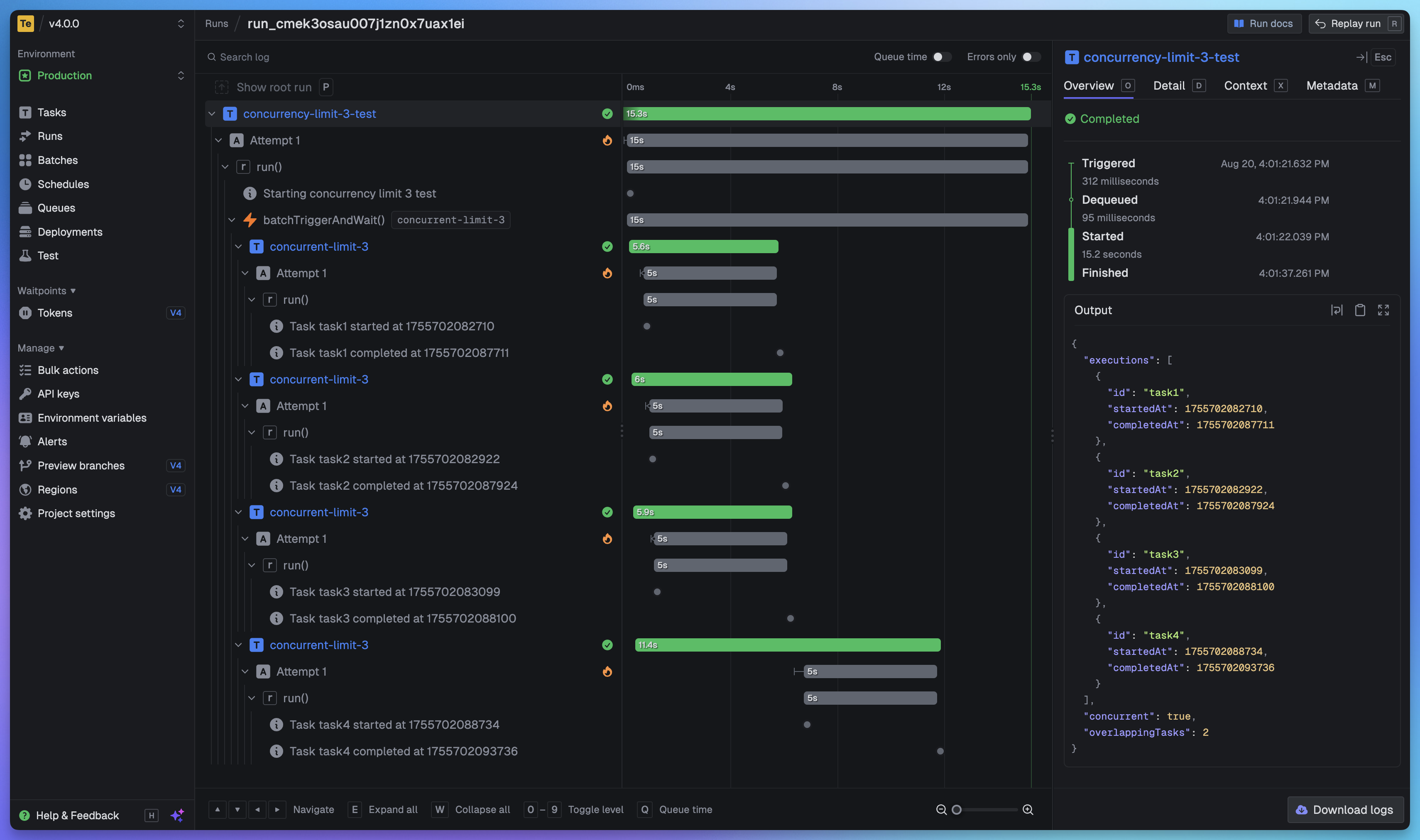
Full visibility of every job run
View every task in every run so you can tell exactly what happened. We provide a full trace view of every task run so you can see what happened at every step.
Getting started
The quickest way to get started is to create an account and project in our web app, and follow the instructions in the onboarding. Build and deploy your first task in minutes.
Useful links:
- Quick start - get up and running in minutes
- How it works - understand how Trigger.dev works under the hood
- Guides and examples - walk-through guides and code examples for popular frameworks and use cases
Self-hosting
If you prefer to self-host Trigger.dev, you can follow our self-hosting guides:
- Docker self-hosting guide - use Docker Compose to spin up a Trigger.dev instance
- Kubernetes self-hosting guide - use our official Helm chart to deploy Trigger.dev to your Kubernetes cluster
Support and community
We have a large active community in our official Discord server for support, including a dedicated channel for self-hosting.
Development
To setup and develop locally or contribute to the open source project, follow our development guide.