 Matt Aitken
4bd1786ae5
Matt Aitken
4bd1786ae5
* Initial commit - started work on new billing components

* Added a slider component

* Added features to the pricing tiers

* Small pricing tier margin tweaks

* WIP on a concurrecy chart

* Reworked the pricing tiers to include a segmented controller and tooltips

* Renamed the charts storybook page

* Made the way data is added more flexible and added some definition tool tips

* Term definitions are used properly in the tiers

* Callouts can now have an optional CTA on the right hand side

* Alignment fix for the callouts

* organize imports

* Definition tooltip now its own component

* renamed the storybook story

* WIP new volume discount table and usage sliders

* Added pricing calculator sliders

* Fixed alignment of the legend

* Breadcrumb now has an upgrade prompt and button

* New Join our Slack button in the side menu

* New progress meter in the side menu

* Use the highest of 2 values to show progress

* An attempt to fix the step count in the calculator slider

* WIP usage progress bar

* Added the 4 progress bars

* More examples of the usage bar

* Better way to include the percentage in the free plan progress meter

* The usage bar now works with the extra runs over the free limit

* Pricing calculator has better slider logic

* Moved the free plan usage bar into it’s own component and added it to storybook

* Usage bar chart now supports a paying customer option and optional billing limit. Also added more usage examples to storybook

* Added more examples of usage to storybook

* tooltip takes classname

* Format numbers nicely

* Added a tooltip to show the precise numbers in the chart

* small improvements to the billing calculator

* New onboarding choose plan page

* pricing tiers better fill the size of their container

* Removed unused code

* Usage bars animate

* Wording tweak

* Callouts fit the button size better

* Added new routes for the 2 new billing pages

* import cleanup

* Added meta info in the header for bill price, plan type and billing period

* made free a noun

* Added pricing calculator to the plans page

* Fixed some illegal markup when using tooltips

* Added container query support

* Added new concurrency chart to the usage page

* billing now has a green theme

* Simplified the plan summary info int the header

* Fixed padding alignment

* Use a custom lable for the concurrent runs chart

* Removed the Job runs table

* Latest lockfile

* Show a message if you haven’t done runs yet

* Added a layoutId to the pageTabs

* Show a message callout if you’ve exceeeded 10k runs on the free plan

* Added a callout on the plans page if you’re over the runs limit

* Fixed button inside button bug

* Removed the background gradients from the app

* The billing package is importing properly

* Getting the curent plan for an org

* Reading the current plan and usage

* Hooked up the free plan bar

* Render basic billing details

* vol discount table has optional values

* Added a new page to show new subscribers

* Created a new hook for confetti on the subscribed page

* Toast styling updated

* The Invoice and Manage card details links are working

* Meta appEnv data optional

* Data for the plans page

* Format the billing period duration in days

* Switch to 20 icons

* URL for the subscribed page now includes the org path

* New pathBuilder path for the subscribed page

* Plans are upgraded/downgraded successfully

* Fixed badly named paths

* Improved some of the display

* Deal with when the user has canceled so they can re-upgrade

* Subscribing from Stripe is working, and canceling

* Tidied up some bits, latest billing package

* The tiers are now rendering using the real data

* The onboarding screen is hooked up, but not linked to yet

* Onboarding price selection working

* Pricing slider working

* Price estimation working

* Pricing calculator working on the select a plan page

* Button copy change

* Improved the layout of the run calculator marker

* Fix for the period end when you’ve canceled

* Improved the formatting in the calculator

* Pricing table tooltip uses the vol discount pricing table

* Remove the vertical lines from the calculator

* Contact us button in Enterprise tier opens the contact us form

* Added composite index to triggerdotdev_events.run_executions for event_time and organization_id

* Concurrent run chart data

* Improves styling, fix for React error with Enterprise contact button

* Show warning box when you’ve hit the concurrency in the past 30 days

* Lots of work o the usage page

* Improvements to the usage page

* Show 31 days of data, fix for not showing the current date…

* Stripe portal links are generated when the user clicks through

* Better alignment of the reference line and x-axis label

* Readme update

* Fixed pricing button loading buttons

* Show warnings about concurrency and runs on the plans page

* Removed some storybook stories

* Join Slack channel shows if you’re subscribed with instructions

* Added a gap between the runs charts

* Improved the definitions

* Added some margin to the page loading spinner

* A wider, cleaner feedback panel

* Modal backgrounds match the Sheet style

* Fixed menu item text being clipped

* Improved icons for execution time and exclusion count

* Concurrency chart now renders the dates nicely

* Fix for plans data on the plans page

* The healthcheck doesn’t need to do a HEAD request to /

* Better disabled states and fixed the disabled hover state issue

* Improved the segmented controller style

* loading spinner now centered inside the button

* Redirect to the project page when selecting the free plan

* Fix for “Runs” and added real date to upgrade warning

* DeCAPITALIZED some things

---------

Co-authored-by: James Ritchie <james@jamesritchie.co.uk>


About Trigger.dev
Create long-running jobs directly in your codebase with features like API integrations, webhooks, scheduling and delays.
Long running Jobs on serverless
Reliably run jobs and don’t worry about function timeouts, we handle those for you.
- Auto-resume after a function timeout
- Auto-resume after a server outage
- Add delays of up to a year
In your codebase
Create Jobs where they belong: in your codebase. Version control, localhost, test, review, and deploy like you're already used to.
Secure by design
We only receive Triggers and the data you choose to send to us. You can even completely self-host the entire platform.
Don't worry about deployment
Just use our SDK to write Jobs in your codebase. There's nothing extra to deploy and no CI to configure, your Jobs just connect to our cloud. Or you can always self-host.
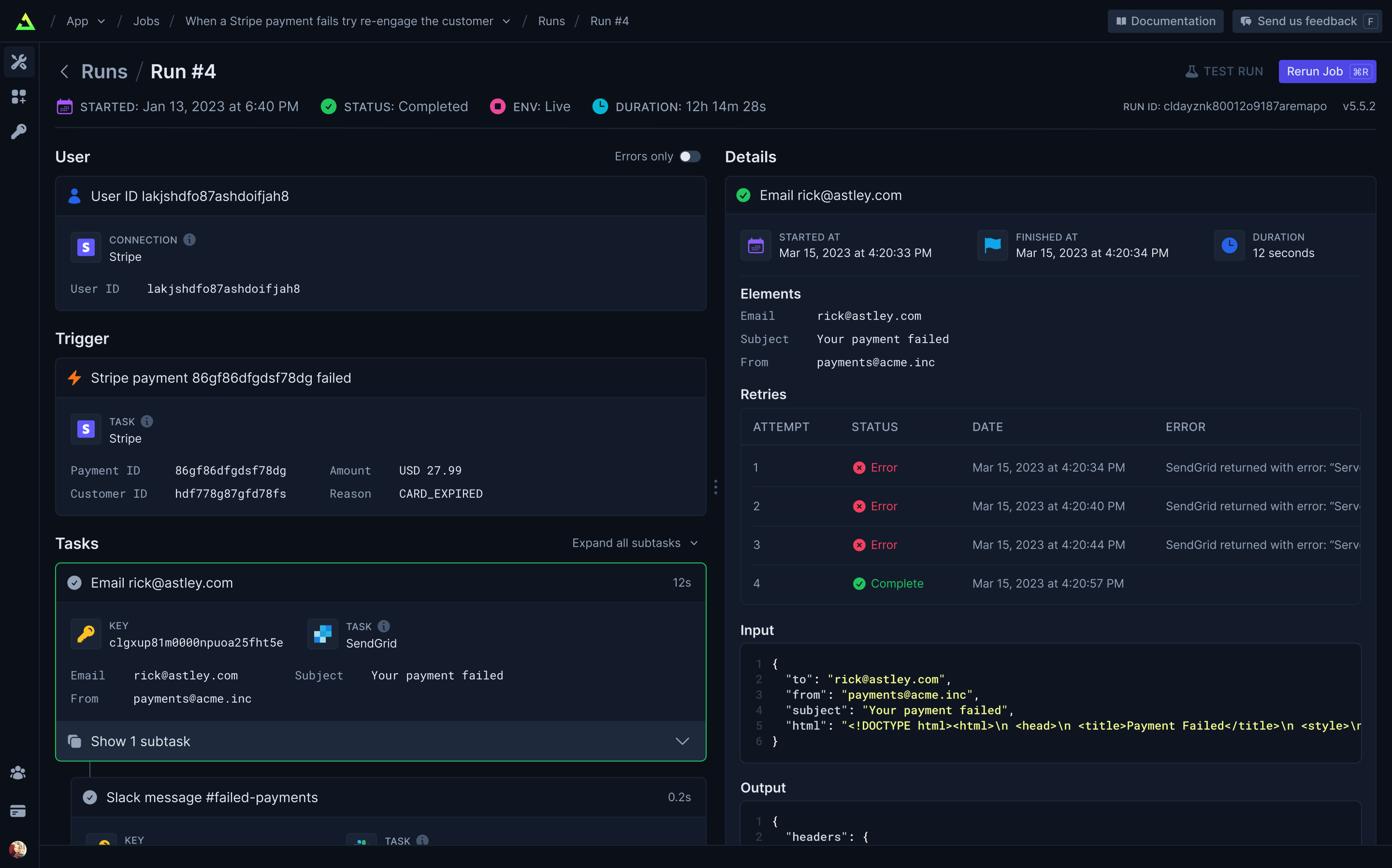
Full visibility of every job run
View every Task in every Run so you can tell exactly what happened.
Built-in integrations
Easily integrate with hundreds of third-party APIs – including your own. Use API keys (which never leave your server) or let us handle OAuth for you. Install our integration packages and easily subscribe to webhooks and perform common tasks, or you can easily use your existing favorite Node.JS SDKs and get resumability and idempotency through our runTask function.
Our progress
We’re building the most comprehensive and easy-to-use background jobs framework for developers.
Click the links to join the discussions about our upcoming features.
| Feature | What it does | Status |
|---|---|---|
| Integration kit | Official Trigger.dev integrations or build your own | ✅ |
| Self-hosting | Host the platform yourself | ✅ |
| Cloud | Just write code, no deployment required | ✅ |
| Dashboard | View every Task in every Run | ✅ |
| Serverless | Long-running Jobs on your serverless backend | ✅ |
| React hooks | Easily update your UI with Job progress | ✅ |
| React frameworks | Support for Remix, Astro, RedwoodJS & more | ✅ |
| Background tasks | Offload long or intense Tasks to our infrastructure | 🛠️ |
| Long-running servers | Run Jobs on your long-running backend | 🛠️ |
| Polling Triggers | Subscribe to changes without webhooks | 🕝 |
| Vercel integration | Easy deploy and preview environment support | 🕝 |
| Streaming | Receive data from your Jobs in realtime | 🕝 |
| 100+ integrations | Comprehensive support for popular APIs | 🕝 |
| Trigger.dev Connect | Use integrations signed in as your users | 🕝 |
| File IO | Create Tasks that have file outputs | 🕝 |
Getting started
Visit our docs here.
Self-host
We provide an official trigger.dev docker image you can use to easily self-host the platform. We're working on more extensive guides but we currently provide a Fly.io example repository with instructions in the README for deploying and using a self-hosted instance of Trigger.dev on Fly.io.
Development
To setup and develop locally or contribute to the open source project, follow our development guide.