 Dan
Dan
94 lines
4.0 KiB
Markdown
94 lines
4.0 KiB
Markdown
<div align="center">
|
|
<picture>
|
|
<source media="(prefers-color-scheme: dark)" srcset="https://imagedelivery.net/3TbraffuDZ4aEf8KWOmI_w/a45d1fa2-0ae8-4a39-4409-f4f934bfae00/public">
|
|
<source media="(prefers-color-scheme: light)" srcset="https://imagedelivery.net/3TbraffuDZ4aEf8KWOmI_w/3f5ad4c1-c4c8-4277-b622-290e7f37bd00/public">
|
|
<img alt="Trigger.dev logo" src="https://imagedelivery.net/3TbraffuDZ4aEf8KWOmI_w/a45d1fa2-0ae8-4a39-4409-f4f934bfae00/public">
|
|
</picture>
|
|
|
|
### Open source background jobs and AI infrastructure
|
|
|
|
[Discord](https://trigger.dev/discord) | [Website](https://trigger.dev) | [Issues](https://github.com/triggerdotdev/trigger.dev/issues) | [Docs](https://trigger.dev/docs)
|
|
|
|
[](https://twitter.com/triggerdotdev)
|
|
|
|
</div>
|
|
|
|
## About Trigger.dev
|
|
|
|
Trigger.dev is an open source platform and SDK which allows you to create long-running background jobs. Write normal async code, deploy, and never hit a timeout.
|
|
|
|
### Key features:
|
|
|
|
- JavaScript and TypeScript SDK
|
|
- No timeouts
|
|
- Retries (with exponential backoff)
|
|
- Queues and concurrency controls
|
|
- Schedules and crons
|
|
- Full Observability; logs, live trace views, advanced filtering
|
|
- React hooks to interact with the Trigger API from your React app
|
|
- Pipe LLM streams straight to your users through the Realtime API
|
|
- Trigger tasks and display the run status and metadata anywhere in your app
|
|
- Custom alerts, get notified by email, Slack or webhooks
|
|
- No infrastructure to manage
|
|
- Elastic (scaling)
|
|
- Works with your existing tech stack
|
|
|
|
## In your codebase
|
|
|
|
Create tasks where they belong: in your codebase. Version control, localhost, test and review like you're already used to.
|
|
|
|
```ts
|
|
import { task } from "@trigger.dev/sdk/v3";
|
|
|
|
//1. You need to export each task
|
|
export const helloWorld = task({
|
|
//2. Use a unique id for each task
|
|
id: "hello-world",
|
|
//3. The run function is the main function of the task
|
|
run: async (payload: { message: string }) => {
|
|
//4. You can write code that runs for a long time here, there are no timeouts
|
|
console.log(payload.message);
|
|
},
|
|
});
|
|
```
|
|
|
|
## Deployment
|
|
|
|
Use our SDK to write tasks in your codebase. There's no infrastructure to manage, your tasks automatically scale and connect to our cloud. Or you can always self-host.
|
|
|
|
## Environments
|
|
|
|
We support `Development`, `Staging`, and `Production` environments, allowing you to test your tasks before deploying them to production.
|
|
|
|
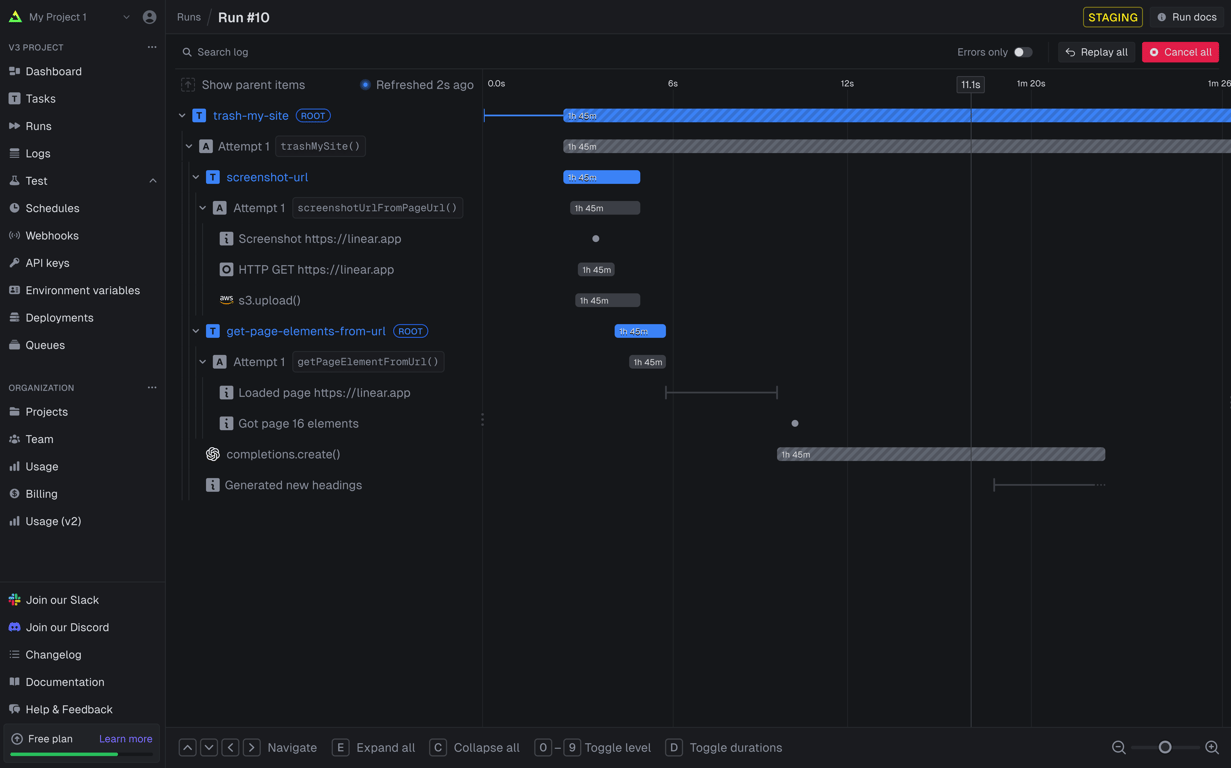
## Full visibility of every job run
|
|
|
|
View every task in every run so you can tell exactly what happened. We provide a full trace view of every task run so you can see what happened at every step.
|
|
|
|
|
|
|
|
# Getting started
|
|
|
|
The quickest way to get started is to create an account and project in our [web app](https://cloud.trigger.dev), and follow the instructions in the onboarding. Build and deploy your first task in minutes.
|
|
|
|
### Useful links:
|
|
|
|
- [Quick start](https://trigger.dev/docs/quick-start) - get up and running in minutes
|
|
- [How it works](https://trigger.dev/docs/v3/how-it-works) - understand how Trigger.dev works under the hood
|
|
- [Guides and examples](https://trigger.dev/docs/guides/introduction) - walk-through guides and code examples for popular frameworks and use cases
|
|
|
|
## Self-hosting
|
|
|
|
If you prefer to self-host Trigger.dev, you can follow our [self-hosting guide](https://trigger.dev/docs/v3/open-source-self-hosting#overview).
|
|
|
|
We also have a dedicated self-hosting channel in our [Discord server](https://trigger.dev/discord) for support.
|
|
|
|
## Development
|
|
|
|
To setup and develop locally or contribute to the open source project, follow our [development guide](./CONTRIBUTING.md).
|
|
|
|
## Meet the Amazing People Behind This Project:
|
|
|
|
<a href="https://github.com/triggerdotdev/trigger.dev/graphs/contributors">
|
|
<img src="https://contrib.rocks/image?repo=triggerdotdev/trigger.dev" />
|
|
</a>
|