 Matt Aitken
cb9aefd49b
Matt Aitken
cb9aefd49b
## Summary

Self-hosted deployments now run ClickHouse from the official
[`clickhouse/clickhouse-server`](https://hub.docker.com/r/clickhouse/clickhouse-server)
image instead of `bitnamilegacy/clickhouse`. Bitnami's free image
catalog is EOL and the frozen legacy archive tops out at ClickHouse
25.7.5, below the 25.8 minimum the platform requires since v4.5.0, which
broke every ClickHouse insert on chart-bundled deployments. Both stacks
now default to 26.2, the same version the platform is developed and
tested against.

Existing deployments keep their ClickHouse data with no manual
migration.

Fixes #4197.

## Details

**Docker Compose**: the `clickhouse` service uses the official image
with its native env vars, plus the recommended `nofile` ulimits. It
reuses the same named volume as before: a `data-paths.xml` config
override points ClickHouse at the `data/` subdirectory of the volume,
which is exactly the layout the Bitnami image used, so old volumes work
in place (including SQL-created users) and fresh installs get the
identical layout. The service follows the required-secrets model:
`CLICKHOUSE_PASSWORD` must be set, matching the other services.

**Helm chart**: the Bitnami ClickHouse subchart is replaced by a
chart-owned single-node StatefulSet and Service running the official
image (non-root, HTTP `/ping` probes, config overrides mounted into
`config.d`, and the same `data-paths.xml` layout compatibility). On
upgrade, the chart automatically adopts the data PVC left behind by the
old subchart (`data-<release>-clickhouse-shard0-0`) via `lookup`, and
`fsGroup` relabeling handles the uid change on first mount. Both the
ClickHouse server and the webapp read the password from the same
chart-managed datastore secret (auto-generated and retained across
upgrades), so the server credential and the app's connection URL always
match. Existing `clickhouse.*` values keep working: `auth` (including
`existingSecret`/`existingSecretKey`), `persistence` (including
`global.storageClass`), `resources`, `secure`, `external.*`,
`configdFiles`, and now `nodeSelector`/`tolerations`/`affinity`.
Bitnami-only keys (`shards`, `replicaCount`, `keeper`,
`resourcesPreset`) are gone; default `resources` requests/limits match
what the old preset applied. The docs state the 25.8 minimum for
bring-your-own ClickHouse.

## Upgrade caveats

An adversarial review of the upgrade path found a few cohorts that need
awareness (all documented):

- **GitOps tools that render with `helm template`** (no cluster access):
PVC auto-detection can't run, so `clickhouse.persistence.existingClaim`
must be set to the old PVC name or ClickHouse starts on a fresh empty
volume. Documented in the values file and the Kubernetes self-hosting
docs. Tools that run real helm installs (e.g. Flux) adopt automatically.
- **A pinned `CLICKHOUSE_IMAGE_TAG`** pointing at a Bitnami tag must be
updated to an official image tag; documented in the Docker self-hosting
docs.
- **Storage without `fsGroup` support** (NFS, hostPath): set
`clickhouse.volumePermissions.enabled: true` for a one-time
ownership-fixing init container.
- **Rollback is not automatic**: once the official image has run, file
ownership changes and the Bitnami image can no longer read the volume
without a manual chown, and ClickHouse does not support downgrades
across the version gap.

## Verification

- Full upgrade simulation for Compose, twice (before and after rebasing
onto the required-secrets release): booted the ClickHouse service from
the old compose file on `main` (Bitnami), wrote thousands of rows, then
brought the same project up with this branch's compose file. The
official 26.2 server came up healthy on the same volume with all rows
intact, SQL-created users working, and writes succeeding.
- Adoption scenarios tested against real containers: old volume + root
entrypoint (Compose), old volume owned by the Bitnami uid + non-root 101
with fsGroup-style group permissions (Kubernetes), and fresh volumes for
both.
- `helm lint`, `helm template` (default values, `existingClaim` set,
external ClickHouse, volumePermissions/scheduling toggles, and the
production example) and kubeconform all pass, mirroring the release CI
steps. The rendered webapp Deployment and ClickHouse StatefulSet resolve
to the same datastore secret key.
- Inserts using
`input_format_json_infer_array_of_dynamic_from_array_of_different_types`
(the setting that fails on 25.7.5) succeed on the upgraded volume.

## Upgrade preflight and docs

A production upgrade report on this branch surfaced two hazards that
predate this PR — both landed in chart 4.5.6 (#4316) — so they are fixed
here rather than left for the next person to hit.

**`secrets.existingSecret` gained two required keys.** The webapp
started reading `PROVIDER_SECRET` and `COORDINATOR_SECRET`, and when
`existingSecret` is set the chart generates nothing, so a missing key
only surfaced as a `CreateContainerConfigError` partway through the
webapp rollout. The pre-install/pre-upgrade validation now looks the
Secret up and fails with the complete list of missing keys, leaving the
running release untouched. It is skipped under `helm template` and
client-side dry-run, where `lookup` cannot read the cluster.

**Bundled datastore credentials moved into the chart-managed Secret**
(`<release>-clickhouse`/`admin-password` →
`trigger-datastore`/`clickhouse-admin-password`). The chart wires both
ends itself, but consumers outside it — maintenance CronJobs, Grafana
datasources, secret syncs — have to be repointed. A new `## Upgrading`
section in the Kubernetes docs carries the old→new mapping, the two new
keys, and a pointer to the ClickHouse image notes.

The existingSecret key list in the docs also named
`OBJECT_STORE_ACCESS_KEY_ID`/`OBJECT_STORE_SECRET_ACCESS_KEY`, which are
env var names rather than keys the chart reads; corrected to the real
key names and the condition under which they apply.

Verified on a throwaway kind cluster with `--dry-run=server`: a
pre-4.5.6 Secret fails with both key names listed, the documented
`kubectl patch` clears it, and default values, `existingClaim`, external
ClickHouse, volumePermissions/scheduling and the production example all
still render. A real `helm install` followed by an upgrade against an
incomplete Secret aborts with the release still at revision 1 and
`deployed`. `helm lint`, the CI render and kubeconform (59 resources, 0
invalid) pass.

---------

Co-authored-by: nicktrn <55853254+nicktrn@users.noreply.github.com>

Build and deploy fully‑managed AI agents and workflows
Website | Docs | Issues | Example projects | Feature requests | Public roadmap | Self-hosting








About Trigger.dev
Trigger.dev is the open-source platform for building AI workflows in TypeScript. Long-running tasks with retries, queues, observability, and elastic scaling.
The platform designed for building AI agents
Build AI agents using all the frameworks, services and LLMs you're used to, deploy them to Trigger.dev and get durable, long-running tasks with retries, queues, observability, and elastic scaling out of the box.
-
Long-running without timeouts: Execute your tasks with absolutely no timeouts, unlike AWS Lambda, Vercel, and other serverless platforms.
-
Durability, retries & queues: Build rock solid agents and AI applications using our durable tasks, retries, queues and idempotency.
-
True runtime freedom: Customize your deployed tasks with system packages – run browsers, Python scripts, FFmpeg and more.
-
Human-in-the-loop: Programmatically pause your tasks until a human can approve, reject or give feedback.
-
Realtime apps & streaming: Move your background jobs to the foreground by subscribing to runs or streaming AI responses to your app.
-
Observability & monitoring: Each run has full tracing and logs. Configure error alerts to catch bugs fast.
Key features:
- JavaScript and TypeScript SDK - Build background tasks using familiar programming models
- Long-running tasks - Handle resource-heavy tasks without timeouts
- Durable cron schedules - Create and attach recurring schedules of up to a year
- Trigger.dev Realtime - Trigger, subscribe to, and get real-time updates for runs, with LLM streaming support
- Build extensions - Hook directly into the build system and customize the build process. Run Python scripts, FFmpeg, browsers, and more.
- React hooks - Interact with the Trigger.dev API on your frontend using our React hooks package
- Batch triggering - Use batchTrigger() to initiate multiple runs of a task with custom payloads and options
- Structured inputs / outputs - Define precise data schemas for your tasks with runtime payload validation
- Waits - Add waits to your tasks to pause execution for a specified duration
- Preview branches - Create isolated environments for testing and development. Integrates with Vercel and git workflows
- Waitpoints - Add human-in-the-loop judgment at critical decision points without disrupting workflow
- Concurrency & queues - Set concurrency rules to manage how multiple tasks execute
- Multiple environments - Support for DEV, PREVIEW, STAGING, and PROD environments
- No infrastructure to manage - Auto-scaling infrastructure that eliminates timeouts and server management
- Automatic retries - If your task encounters an uncaught error, we automatically attempt to run it again
- Checkpointing - Tasks are inherently durable, thanks to our checkpointing feature
- Versioning - Atomic versioning allows you to deploy new versions without affecting running tasks
- Machines - Configure the number of vCPUs and GBs of RAM you want the task to use
- Observability & monitoring - Monitor every aspect of your tasks' performance with comprehensive logging and visualization tools
- Logging & tracing - Comprehensive logging and tracing for all your tasks
- Tags - Attach up to ten tags to each run, allowing you to filter via the dashboard, realtime, and the SDK
- Run metadata - Attach metadata to runs which updates as the run progresses and is available to use in your frontend for live updates
- Bulk actions - Perform actions on multiple runs simultaneously, including replaying and cancelling
- Real-time alerts - Choose your preferred notification method for run failures and deployments
Write tasks in your codebase
Create tasks where they belong: in your codebase. Version control, localhost, test and review like you're already used to.
import { task } from "@trigger.dev/sdk";

//1. You need to export each task
export const helloWorld = task({
  //2. Use a unique id for each task
  id: "hello-world",
  //3. The run function is the main function of the task
  run: async (payload: { message: string }) => {
    //4. You can write code that runs for a long time here, there are no timeouts
    console.log(payload.message);
  },
});
Deployment
Use our SDK to write tasks in your codebase. There's no infrastructure to manage, your tasks automatically scale and connect to our cloud. Or you can always self-host.
Environments
We support Development, Staging, Preview, and Production environments, allowing you to test your tasks before deploying them to production.
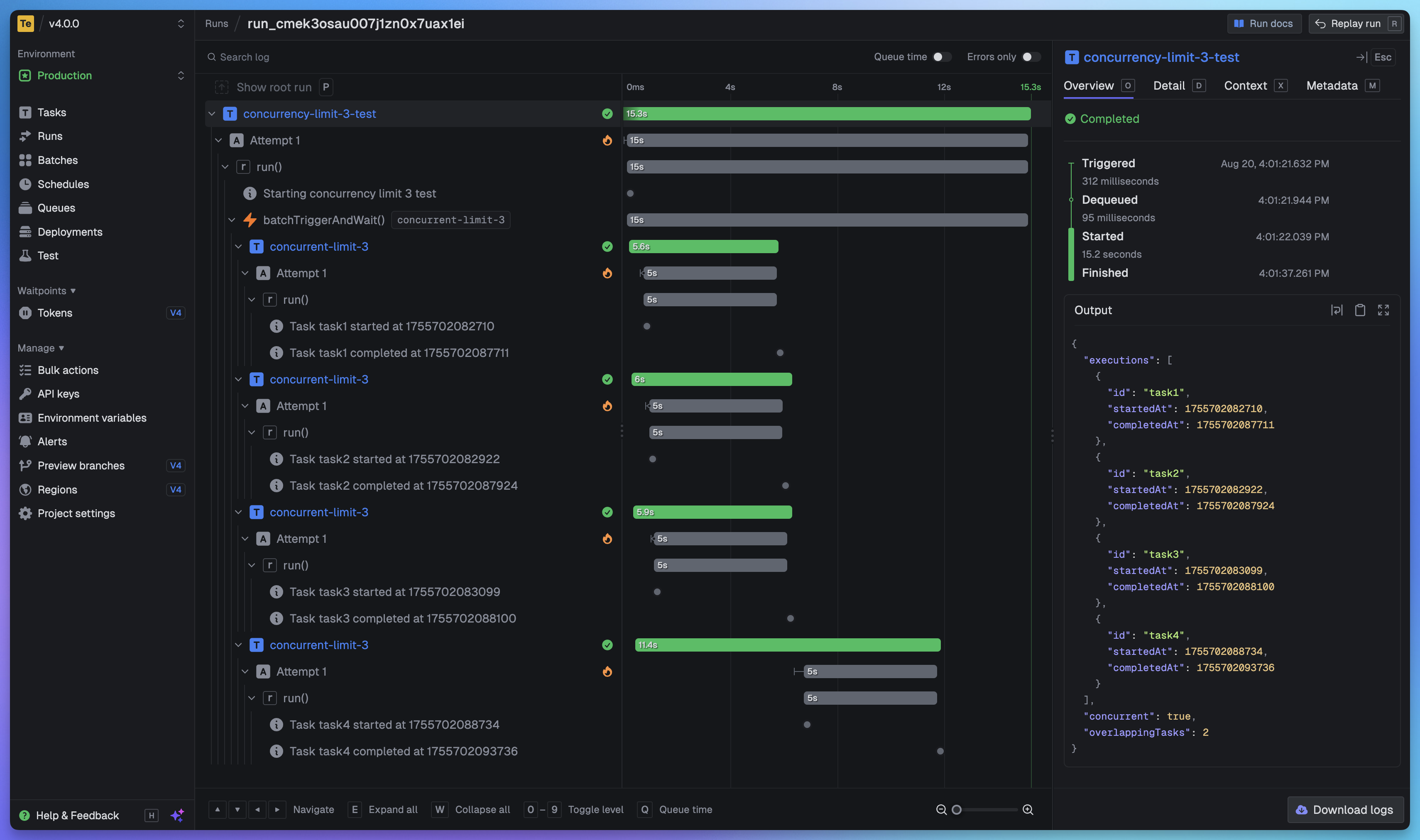
Full visibility of every job run
View every task in every run so you can tell exactly what happened. We provide a full trace view of every task run so you can see what happened at every step.
Getting started
The quickest way to get started is to create an account and project in our web app, and follow the instructions in the onboarding. Build and deploy your first task in minutes.
Useful links:
- Quick start - get up and running in minutes
- How it works - understand how Trigger.dev works under the hood
- Guides and examples - walk-through guides and code examples for popular frameworks and use cases
Self-hosting
If you prefer to self-host Trigger.dev, you can follow our self-hosting guides:
- Docker self-hosting guide - use Docker Compose to spin up a Trigger.dev instance
- Kubernetes self-hosting guide - use our official Helm chart to deploy Trigger.dev to your Kubernetes cluster
Support and community
We have a large active community in our official Discord server for support, including a dedicated channel for self-hosting.
Development
To setup and develop locally or contribute to the open source project, follow our development guide.