 Eric Allam
b1b9321ad2
Eric Allam
b1b9321ad2
* WIP job run performance improvements

- Added a `perf` tool to better measure job run performance under heavy load
- Removed `runFinished` job (not really needed)
- startQueuedRuns now uses a jobKey with replace
- Fixed an issue with ZodWorker when using jobKey

* Publish improvement docker images

* fixed the improvement docker publishing

* Downgrade back to prisma 4.16.0 because 5.1.x broke docker builds

* Changes to how queued runs work

- Split the worker into two different workers, one dedicated to performRunExecution
- Schedule performRunExecution in a single place, with a queue and using a round robin manually controlled concurrency
- Remove startQueuedRuns
- All runs are queued before they are started
- Setting the worker maxPoolSize to the same as the worker concurrency
- Starting to be able to split the docker image

* Remove queue name from startRun graphile job

* Make the prisma connection pool stuff configurable through env vars

* Hardcode (for now) the max concurrent runs limit

* Rewrite performRunExecution to be more performant

PerformRunExecutionV2:

- Does not create and manage jobRunExecution records
- Does not reimplement retrying, uses graphile worker retrying instead

I’ve kept around PerformRunExecutionV1 so this works when deploying. Definitely needs LOTS of testing

* Fix issues with cached tasks

- Limit the size of the cached tasks sent when executing a run, using the knapsack problem dynamic programming approach
- Actually USE the cached tasks in IO by using the idempotencyKey instead of the task ID
- Remove output from all logs
- Added a stress test job catalog

* Forgot to commit the logger updates

* Never log connectionString

* Login to docker hub to get around rate limits

* Add additional logging to the graphile workers

* Fix the *_ENABLED  env vars

* Allow adding and removing jobs to be done from the webapp

* Don’t set the job to failed if it’s being retried

* Deprecated queue options in the job and removed startPosition. Now using the job/env combo as the job queue name

* Dequeung jobs doesn’t check if the runner is initialized

* Fixed issues with retrying a run getting stuck on a cancelled task, and errors from parsing the results of dequeing a job

* Remove queued round robin thing that isn’t used anymore

* Added slack to job catalog

* Better forwards compat

* Added long delay

* Fixed lock file


About Trigger.dev
Create long-running jobs directly in your codebase with features like API integrations, webhooks, scheduling and delays.
Long running Jobs on serverless
Reliably run jobs and don’t worry about function timeouts, we handle those for you.
- Auto-resume after a function timeout
- Auto-resume after a server outage
- Add delays of up to a year
In your codebase
Create Jobs where they belong: in your codebase. Version control, localhost, test, review, and deploy like you're already used to.
Secure by design
We only receive Triggers and the data you choose to send to us. You can even completely self-host the entire platform.
Don't worry about deployment
Just use our SDK to write Jobs in your Next.js codebase. There's nothing extra to deploy and no CI to configure, your Jobs just connect to our cloud. Or you can always self-host.
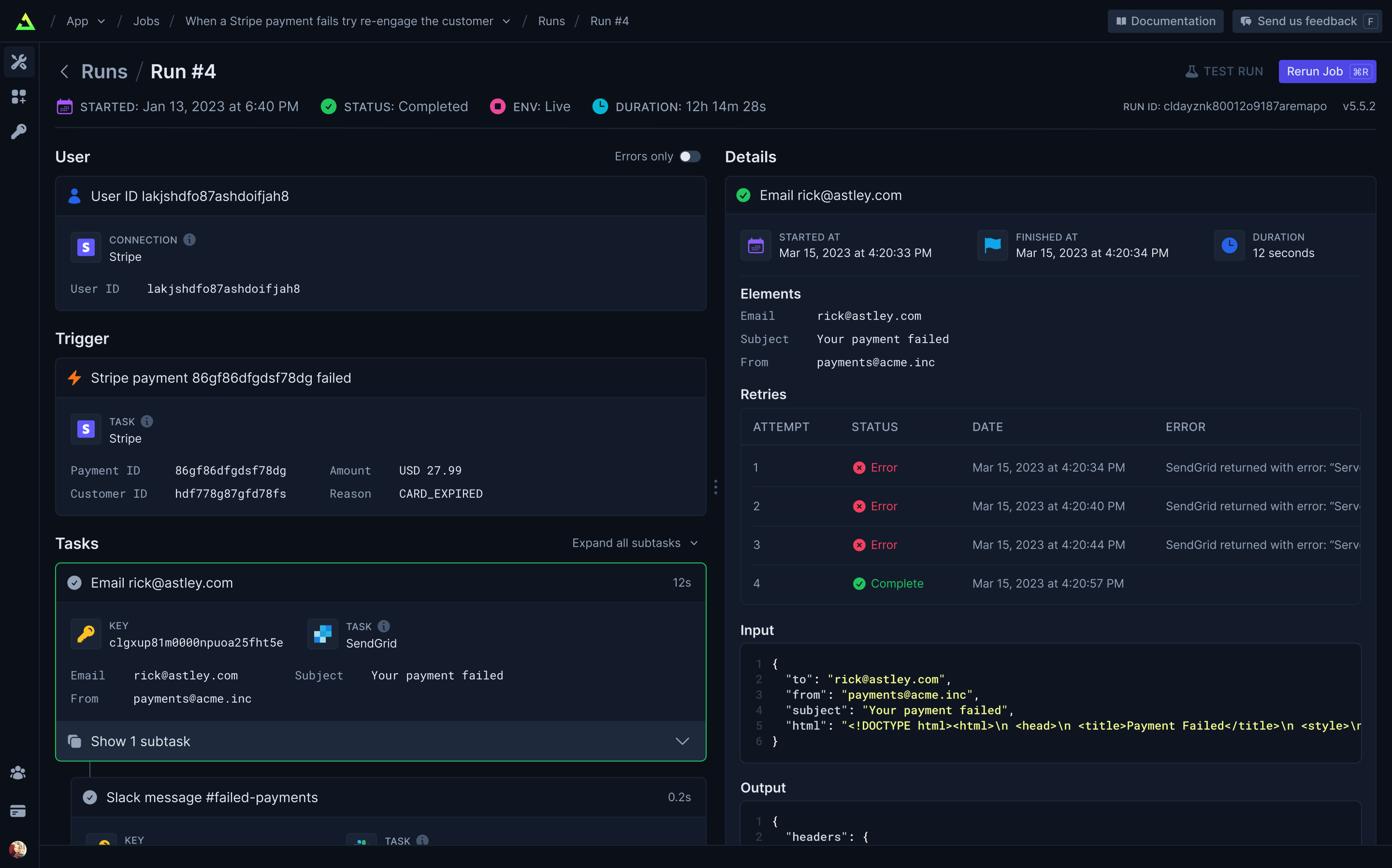
Full visibility of every job run
View every Task in every Run so you can tell exactly what happened.
Built-in integrations
Easily integrate with hundreds of third-party APIs – including your own. Use API keys (which never leave your server) or let us handle OAuth for you. Install our integration packages and easily subscribe to webhooks and perform common tasks, or you can easily use your existing favorite Node.JS SDKs and get resumability and idempotency through our runTask function.
Trigger.dev Connect (coming soon)
Easily add integrations for your users.
Getting started
Visit our docs here.
Self-host
We provide an official trigger.dev docker image you can use to easily self-host the platform. We're working on more extensive guides but we currently provide a Fly.io example repository with instructions in the README for deploying and using a self-hosted instance of Trigger.dev on Fly.io.
Development
To setup and develop locally or contribute to the open source project, follow our developement guide.