 Katia Bulatova
0b750d00dd
Katia Bulatova
0b750d00dd
Watch is the agent noticing something later: you ask it to tell you when
a condition holds, and it answers when it does — or when it can't any
more.

A watch is a **durable one-shot promise**. The condition is checked on a
schedule by deterministic code (no LLM in the checks), the answer lands
in the chat once, and then the watch is over. Ten kinds: three on a run,
five on a queue, error recurrence, health recovery.

## Stack

Stacked on **#4529** (UI), which is stacked on **#4418** (chat, reports,
investigate). Merge those first. **#4516** (storybook gallery) sits on
top of this branch.

## How to review


[**GUIDEBOOK.md**](https://github.com/triggerdotdev/trigger.dev/blob/feat/dashboard-agent-flows-watch/internal-packages/dashboard-agent/GUIDEBOOK.md)
on this branch is the behaviour reference — it states the conditions
rather than the code, so you can predict what happens without running
anything. "The ten watch kinds, and what makes each fire" and "Creating
a watch" describe exactly this PR, and the tables there are the spec the
code is written against.

## What's inside

- **Ten watch kinds**, one deterministic check each
(`dashboardAgentWatch*Checks.ts`), with the spec union in
`dashboard-agent-contracts/src/watch.ts`.
- **Scheduling** — each watch schedules its own next check; due watches
of one `(environment, cadence)` group can be checked together in one
batch pass, with a sweep as the backstop for expiry, redelivery and
retention.
- **Delivery** — the in-chat wake and card, an optional email alert (new
`DASHBOARD_AGENT_WATCH` alert channel, so it shows on the project's
Alerts page with one-click unsubscribe), and an optional investigation
when the outcome needs attention.
- **Submission ledger** — `watch_submissions`, keyed `(chat_id,
client_request_id)`, so a retried card submission replays the recorded
outcome instead of creating a second watch.
- **Watch token** — a delayed-execution credential accepted only by the
watch endpoints, re-checked against the user's live access on every
tick.
- **Unread work** — the panel polls for wakes that landed while it was
closed, so a chat can go unread and light the launcher dot.

## Key decisions

**A check result is a 4-way, and only two of them are verdicts.**
`satisfied` / `terminal_unsatisfied` are answers; `pending` and
`unavailable` are not. Any exception inside any check is caught in one
place and becomes `unavailable` with an unverified observation — a check
that failed is never evidence.

**A completed window is an answer, and whether it is good or bad news is
declared per kind, never inferred.** There is a table for that in the
guidebook: `run_failed` completing its window is *good* news ("hasn't
failed"), `backlog_drain` completing it is not. One rule overrides the
table: a window that completed on an unverified observation is neutral
and says only that the watch ended without a confirmed answer. **An
unreadable source is never a negative answer** — and, because
investigations only open on `attention`, it never starts one either.

**Identity is `(chat, project, environment)` plus the condition,**
enforced by a partial unique index over active rows
(`watches_chat_active_identity_key`), not by the read-then-insert check.
Cadence, window, note and `ticks` are deliberately not part of it. Two
different chats may watch the same thing — a watch is a promise to a
chat.

**The server resolves the target's name, whatever the model calls it.**
The model can't tell a task queue (`task/<id>`) from a custom queue, so
both spellings are tried and the stored one wins — and the rewrite
happens **before** identity and before the row is written, so the
identity, the checks, the link and the wording all see one spelling.

**Freshness fences.** Depth falls back from the live counter to the
newest 60 s ClickHouse bucket, which only counts as current within 60 s
of now. A non-current reading at or below the *quiet line* is refused as
`unavailable` rather than believed, so a stale empty bucket is never
read as "drained". The stall streak is the one piece of carried state:
it lives in the previous check's facts and *freezes* on an unreadable
reading rather than breaking.

**Chain reliability.** There is no shared cron — each watch (or batch
group) schedules its own next tick, so the failure mode to review is the
chain dying. A failed batch check is caught, the next tick is scheduled
anyway and the run resolves rather than failing, so the chain survives a
check that couldn't run; the sweep re-arms groups and finalizes anything
still active past its deadline, even when delivery isn't configured.
Wake redelivery is id-deduped rather than conditional, because the sweep
can't know whether the user was already told. Access is re-authorized on
**every** check against the primary — replica lag would extend access
the user has already lost.

**Wording lives in one place.** `watch-wording.ts` is read by the card,
banner, toast, email and the agent's own narration, and the numbers come
from the frozen observation rather than a fresh read, so a retry
produces the same sentence. Replay reproduces the **recorded** decision
instead of deciding again — the transcript is append-once, so a second
decision would contradict it forever.

**Cancellation is the ending without an answer** — no resolution, no
wake. One exception, decided during testing: a watch the *user*
cancelled leaves a single neutral transcript line ("Stopped watching
…"), keyed off the watch id so a retry can't repeat it. The other four
reasons stay silent.

**Email is opt-in and only a fired watch emails.** An expiry is narrated
in the chat and nowhere else. Both gates (agent access, a configured
email transport) are checked at subscribe time *and* again at delivery,
and the subscription outcome is frozen on the ledger row so a retry
replays it. Neither gate is a plan check.

**One watch offer per turn.** The prompt and the renderer guard this
independently — if the turn already proposed a watch card, the action
button is dropped, because the card is the better affordance. Two eval
cases pin the prompt side: exactly one offer with the line last and the
button after it, and zero offers when the rendered card already carries
one — deterministic assertions, over a real-model run.

## Testing

Unit tests (vitest, testcontainers, no mocks) under
`apps/webapp/test/dashboardAgentWatch*.test.ts` and
`internal-packages/dashboard-agent/src/watch-*.test.ts` cover the
invariants above: the 4-way check results and the freshness fences,
identity/dedup and the submission ledger, queue-name resolution, the
batch chain surviving a failed check, sweep boundaries and alert-once,
tenancy and the watch token's scope, and the wording snapshot. The
load-bearing ones were verified by control-breaking the guard first and
checking the test goes red.

Live-tested end to end against a local stack, following the guidebook:
all ten watch kinds firing and expiring, cancellation, the email pair (a
fired watch mails, an expired one does not), and watch recovery from a
health report.

Build and deploy fully‑managed AI agents and workflows
Website | Docs | Issues | Example projects | Feature requests | Public roadmap | Self-hosting








About Trigger.dev
Trigger.dev is the open-source platform for building AI workflows in TypeScript. Long-running tasks with retries, queues, observability, and elastic scaling.
The platform designed for building AI agents
Build AI agents using all the frameworks, services and LLMs you're used to, deploy them to Trigger.dev and get durable, long-running tasks with retries, queues, observability, and elastic scaling out of the box.
-
Long-running without timeouts: Execute your tasks with absolutely no timeouts, unlike AWS Lambda, Vercel, and other serverless platforms.
-
Durability, retries & queues: Build rock solid agents and AI applications using our durable tasks, retries, queues and idempotency.
-
True runtime freedom: Customize your deployed tasks with system packages – run browsers, Python scripts, FFmpeg and more.
-
Human-in-the-loop: Programmatically pause your tasks until a human can approve, reject or give feedback.
-
Realtime apps & streaming: Move your background jobs to the foreground by subscribing to runs or streaming AI responses to your app.
-
Observability & monitoring: Each run has full tracing and logs. Configure error alerts to catch bugs fast.
Key features:
- JavaScript and TypeScript SDK - Build background tasks using familiar programming models
- Long-running tasks - Handle resource-heavy tasks without timeouts
- Durable cron schedules - Create and attach recurring schedules of up to a year
- Trigger.dev Realtime - Trigger, subscribe to, and get real-time updates for runs, with LLM streaming support
- Build extensions - Hook directly into the build system and customize the build process. Run Python scripts, FFmpeg, browsers, and more.
- React hooks - Interact with the Trigger.dev API on your frontend using our React hooks package
- Batch triggering - Use batchTrigger() to initiate multiple runs of a task with custom payloads and options
- Structured inputs / outputs - Define precise data schemas for your tasks with runtime payload validation
- Waits - Add waits to your tasks to pause execution for a specified duration
- Preview branches - Create isolated environments for testing and development. Integrates with Vercel and git workflows
- Waitpoints - Add human-in-the-loop judgment at critical decision points without disrupting workflow
- Concurrency & queues - Set concurrency rules to manage how multiple tasks execute
- Multiple environments - Support for DEV, PREVIEW, STAGING, and PROD environments
- No infrastructure to manage - Auto-scaling infrastructure that eliminates timeouts and server management
- Automatic retries - If your task encounters an uncaught error, we automatically attempt to run it again
- Checkpointing - Tasks are inherently durable, thanks to our checkpointing feature
- Versioning - Atomic versioning allows you to deploy new versions without affecting running tasks
- Machines - Configure the number of vCPUs and GBs of RAM you want the task to use
- Observability & monitoring - Monitor every aspect of your tasks' performance with comprehensive logging and visualization tools
- Logging & tracing - Comprehensive logging and tracing for all your tasks
- Tags - Attach up to ten tags to each run, allowing you to filter via the dashboard, realtime, and the SDK
- Run metadata - Attach metadata to runs which updates as the run progresses and is available to use in your frontend for live updates
- Bulk actions - Perform actions on multiple runs simultaneously, including replaying and cancelling
- Real-time alerts - Choose your preferred notification method for run failures and deployments
Write tasks in your codebase
Create tasks where they belong: in your codebase. Version control, localhost, test and review like you're already used to.
import { task } from "@trigger.dev/sdk";

//1. You need to export each task
export const helloWorld = task({
  //2. Use a unique id for each task
  id: "hello-world",
  //3. The run function is the main function of the task
  run: async (payload: { message: string }) => {
    //4. You can write code that runs for a long time here, there are no timeouts
    console.log(payload.message);
  },
});
Deployment
Use our SDK to write tasks in your codebase. There's no infrastructure to manage, your tasks automatically scale and connect to our cloud. Or you can always self-host.
Environments
We support Development, Staging, Preview, and Production environments, allowing you to test your tasks before deploying them to production.
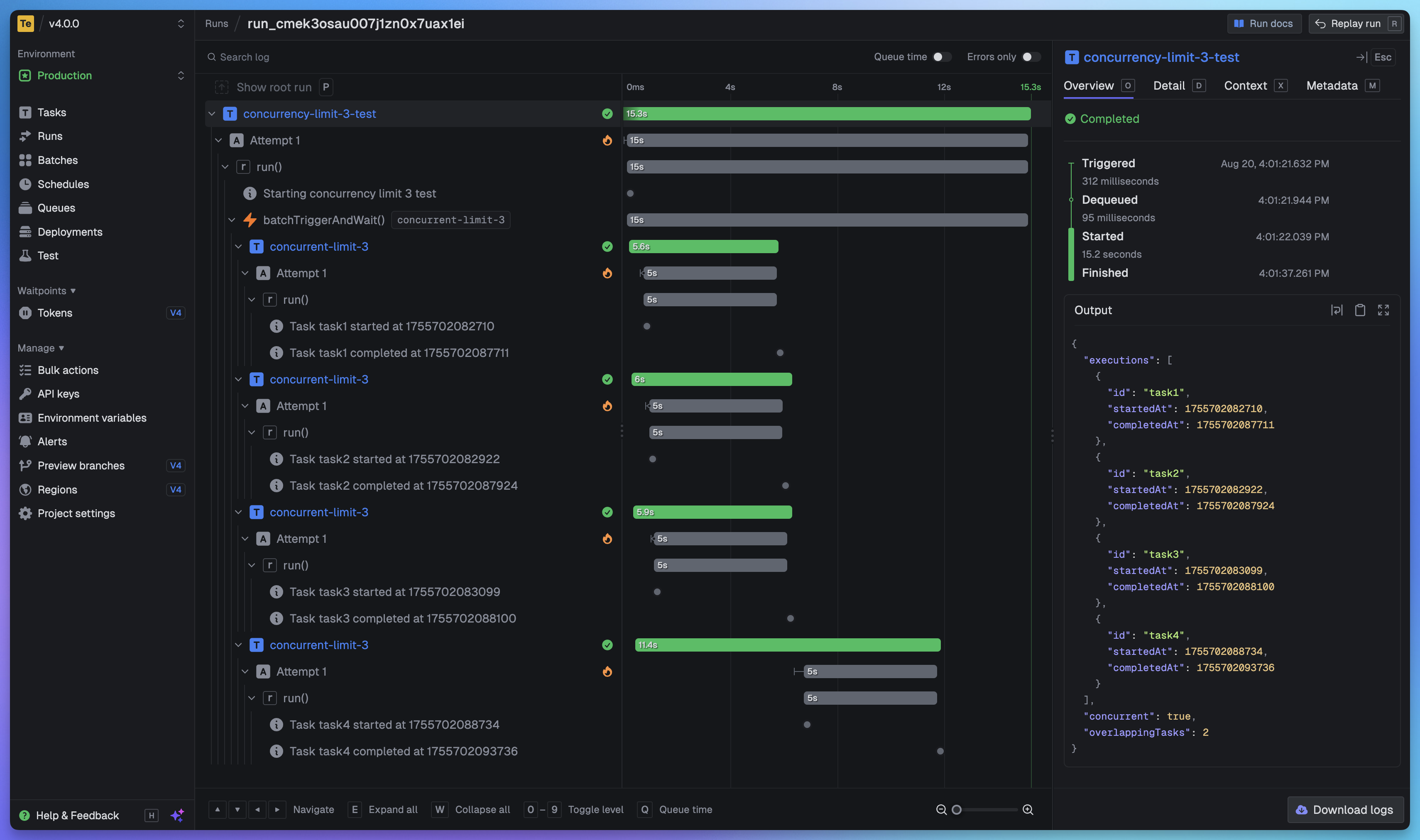
Full visibility of every job run
View every task in every run so you can tell exactly what happened. We provide a full trace view of every task run so you can see what happened at every step.
Getting started
The quickest way to get started is to create an account and project in our web app, and follow the instructions in the onboarding. Build and deploy your first task in minutes.
Useful links:
- Quick start - get up and running in minutes
- How it works - understand how Trigger.dev works under the hood
- Guides and examples - walk-through guides and code examples for popular frameworks and use cases
Self-hosting
If you prefer to self-host Trigger.dev, you can follow our self-hosting guides:
- Docker self-hosting guide - use Docker Compose to spin up a Trigger.dev instance
- Kubernetes self-hosting guide - use our official Helm chart to deploy Trigger.dev to your Kubernetes cluster
Support and community
We have a large active community in our official Discord server for support, including a dedicated channel for self-hosting.
Development
To setup and develop locally or contribute to the open source project, follow our development guide.