 github-actions[bot]
015106d7fa
github-actions[bot]
015106d7fa
## Summary
7 improvements.

## Improvements
- `@trigger.dev/sdk` now bundles the Trigger.dev agent skills and a
curated snapshot of the docs those skills reference. The skills that
`trigger skills` installs into your coding agent read this content from
node_modules, so the guidance your AI assistant follows is pinned to the
SDK version installed in your project and stays current across upgrades
instead of going stale until the next reinstall.
([#3937](https://github.com/triggerdotdev/trigger.dev/pull/3937))
- Running a CLI command like `dev`, `deploy`, `preview`, or `update`
before initializing a project no longer crashes with a raw `Cannot find
matching package.json` stack trace. The CLI now detects the missing
project and points you to `npx trigger.dev@latest init` instead.
([#3929](https://github.com/triggerdotdev/trigger.dev/pull/3929))
- The agent skills installed by `trigger skills` are now namespaced with
a `trigger-` prefix (e.g. `trigger-authoring-tasks`,
`trigger-getting-started`) so they don't collide with unrelated skills
in your coding agent's skills directory. Adds a `trigger-cost-savings`
skill for auditing and reducing compute spend (right-sizing machines,
`maxDuration`, batching, debounce), and `@trigger.dev/sdk` now bundles
the full Trigger.dev documentation so your agent can read the complete,
version-pinned reference directly from node_modules.
([#3970](https://github.com/triggerdotdev/trigger.dev/pull/3970))
- The run span API response now includes `cachedCost` and
`cacheCreationCost` on the `ai` object, alongside the existing
`inputCost` / `outputCost` / `totalCost`. `inputCost` reflects only the
non-cached input, so these fields let you reconstruct the full cost
breakdown for prompt-cached calls.
([#3958](https://github.com/triggerdotdev/trigger.dev/pull/3958))
- `chat.headStart` now works with the `chat.customAgent` and
`chat.createSession` backends, not only `chat.agent`. The warm step-1
response hands over to your loop the same way it does for a managed
agent. ([#3963](https://github.com/triggerdotdev/trigger.dev/pull/3963))

  In a `chat.customAgent` loop, consume the handover on turn 0:

  ```ts
  const conversation = new chat.MessageAccumulator();
const { isFinal, skipped } = await conversation.consumeHandover({
payload });
  if (skipped) return; // warm handler aborted, so exit without a turn
  if (isFinal) {
await chat.writeTurnComplete(); // step 1 is the response, no streamText
  } else {
const result = streamText({ model, messages: conversation.modelMessages,
tools });
// Pass originalMessages so the handed-over tool round merges into the
    // step-1 assistant instead of starting a new message.
    const response = await chat.pipeAndCapture(result, {
      originalMessages: conversation.uiMessages,
    });
    if (response) await conversation.addResponse(response);
  }
  ```

With `chat.createSession`, the iterator surfaces it as `turn.handover`;
call `turn.complete()` with no argument on a final handover. The
lower-level `chat.waitForHandover()` and `accumulator.applyHandover()`
are also exported for hand-rolled loops.
- Cache your chat agent's system prompt with Anthropic prompt caching.
`chat.toStreamTextOptions()` now emits the system prompt as a cacheable
message when you opt in, so a large, stable system block is billed at
cache-read rates on every turn instead of full price.
([#3952](https://github.com/triggerdotdev/trigger.dev/pull/3952))

  ```ts
  // at the streamText call site (Anthropic sugar)
  streamText({
...chat.toStreamTextOptions({ cacheControl: { type: "ephemeral" } }),
    messages,
  });

  // provider-agnostic equivalent
  chat.toStreamTextOptions({
systemProviderOptions: { anthropic: { cacheControl: { type: "ephemeral"
} } },
  });

  // or where the prompt is defined
  chat.prompt.set(SYSTEM_PROMPT, {
providerOptions: { anthropic: { cacheControl: { type: "ephemeral" } } },
  });
  ```

Without an option, `system` stays a plain string. Pairs with a
`prepareMessages` cache breakpoint to cache the conversation prefix
across turns too.
- Three fixes for custom agent loops (`chat.customAgent`,
`chat.createSession`, and hand-rolled `MessageAccumulator` loops):
([#3936](https://github.com/triggerdotdev/trigger.dev/pull/3936))

- Continuation runs no longer replay already-answered user messages into
the first turn. The `.in` resume cursor is now seeded before any
listener attaches (the same boot logic `chat.agent` uses), so a chat
that continues after a cancel, crash, or upgrade only sees genuinely new
messages.
- Steering a hand-rolled loop mid-stream no longer wipes the in-flight
assistant response. `chat.pipeAndCapture` now stamps a server-generated
message id on the stream, so a `prepareStep` injection keeps the partial
text instead of replacing the message.
- Task-backed tools (`ai.toolExecute`) now work from custom agent loops:
the parent's session is threaded to the child run, so child tasks can
stream progress into the chat with `chat.stream.writer({ target: "root"
})` instead of failing with "session handle is not initialized".

<details>
<summary>Raw changeset output</summary>

⚠️⚠️⚠️⚠️⚠️⚠️

`main` is currently in **pre mode** so this branch has prereleases
rather than normal releases. If you want to exit prereleases, run
`changeset pre exit` on `main`.

⚠️⚠️⚠️⚠️⚠️⚠️

# Releases
## @trigger.dev/build@4.5.0-rc.7

### Patch Changes

-   Updated dependencies:
    -   `@trigger.dev/core@4.5.0-rc.7`

## trigger.dev@4.5.0-rc.7

### Patch Changes

- `@trigger.dev/sdk` now bundles the Trigger.dev agent skills and a
curated snapshot of the docs those skills reference. The skills that
`trigger skills` installs into your coding agent read this content from
node_modules, so the guidance your AI assistant follows is pinned to the
SDK version installed in your project and stays current across upgrades
instead of going stale until the next reinstall.
([#3937](https://github.com/triggerdotdev/trigger.dev/pull/3937))
- Running a CLI command like `dev`, `deploy`, `preview`, or `update`
before initializing a project no longer crashes with a raw `Cannot find
matching package.json` stack trace. The CLI now detects the missing
project and points you to `npx trigger.dev@latest init` instead.
([#3929](https://github.com/triggerdotdev/trigger.dev/pull/3929))
- The agent skills installed by `trigger skills` are now namespaced with
a `trigger-` prefix (e.g. `trigger-authoring-tasks`,
`trigger-getting-started`) so they don't collide with unrelated skills
in your coding agent's skills directory. Adds a `trigger-cost-savings`
skill for auditing and reducing compute spend (right-sizing machines,
`maxDuration`, batching, debounce), and `@trigger.dev/sdk` now bundles
the full Trigger.dev documentation so your agent can read the complete,
version-pinned reference directly from node_modules.
([#3970](https://github.com/triggerdotdev/trigger.dev/pull/3970))
-   Updated dependencies:
    -   `@trigger.dev/core@4.5.0-rc.7`
    -   `@trigger.dev/build@4.5.0-rc.7`
    -   `@trigger.dev/schema-to-json@4.5.0-rc.7`

## @trigger.dev/core@4.5.0-rc.7

### Patch Changes

- The run span API response now includes `cachedCost` and
`cacheCreationCost` on the `ai` object, alongside the existing
`inputCost` / `outputCost` / `totalCost`. `inputCost` reflects only the
non-cached input, so these fields let you reconstruct the full cost
breakdown for prompt-cached calls.
([#3958](https://github.com/triggerdotdev/trigger.dev/pull/3958))

## @trigger.dev/python@4.5.0-rc.7

### Patch Changes

-   Updated dependencies:
    -   `@trigger.dev/sdk@4.5.0-rc.7`
    -   `@trigger.dev/core@4.5.0-rc.7`
    -   `@trigger.dev/build@4.5.0-rc.7`

## @trigger.dev/react-hooks@4.5.0-rc.7

### Patch Changes

-   Updated dependencies:
    -   `@trigger.dev/core@4.5.0-rc.7`

## @trigger.dev/redis-worker@4.5.0-rc.7

### Patch Changes

-   Updated dependencies:
    -   `@trigger.dev/core@4.5.0-rc.7`

## @trigger.dev/rsc@4.5.0-rc.7

### Patch Changes

-   Updated dependencies:
    -   `@trigger.dev/core@4.5.0-rc.7`

## @trigger.dev/schema-to-json@4.5.0-rc.7

### Patch Changes

-   Updated dependencies:
    -   `@trigger.dev/core@4.5.0-rc.7`

## @trigger.dev/sdk@4.5.0-rc.7

### Patch Changes

- `@trigger.dev/sdk` now bundles the Trigger.dev agent skills and a
curated snapshot of the docs those skills reference. The skills that
`trigger skills` installs into your coding agent read this content from
node_modules, so the guidance your AI assistant follows is pinned to the
SDK version installed in your project and stays current across upgrades
instead of going stale until the next reinstall.
([#3937](https://github.com/triggerdotdev/trigger.dev/pull/3937))

- `chat.headStart` now works with the `chat.customAgent` and
`chat.createSession` backends, not only `chat.agent`. The warm step-1
response hands over to your loop the same way it does for a managed
agent. ([#3963](https://github.com/triggerdotdev/trigger.dev/pull/3963))

    In a `chat.customAgent` loop, consume the handover on turn 0:

    ```ts
    const conversation = new chat.MessageAccumulator();
const { isFinal, skipped } = await conversation.consumeHandover({
payload });
    if (skipped) return; // warm handler aborted, so exit without a turn
    if (isFinal) {
await chat.writeTurnComplete(); // step 1 is the response, no streamText
    } else {
const result = streamText({ model, messages: conversation.modelMessages,
tools });
// Pass originalMessages so the handed-over tool round merges into the
      // step-1 assistant instead of starting a new message.
      const response = await chat.pipeAndCapture(result, {
        originalMessages: conversation.uiMessages,
      });
      if (response) await conversation.addResponse(response);
    }
    ```

With `chat.createSession`, the iterator surfaces it as `turn.handover`;
call `turn.complete()` with no argument on a final handover. The
lower-level `chat.waitForHandover()` and `accumulator.applyHandover()`
are also exported for hand-rolled loops.

- Add `triggerConfig` support to `chat.headStart()` and
`chat.openSession()`, so the auto-triggered handover-prepare run
inherits tags, queue, machine, and other session trigger options the
same way `chat.createStartSessionAction()` does. The `chat:{chatId}` tag
is prepended automatically.
([#3963](https://github.com/triggerdotdev/trigger.dev/pull/3963))

    ```ts
    export const POST = chat.headStart({
      agentId: "my-agent",
      triggerConfig: { tags: ["org:acme"], queue: "chat" },
run: async ({ chat }) => streamText({ ...chat.toStreamTextOptions(),
model }),
    });
    ```

Because the session is created once on the first head-start turn and is
idempotent on the chat id, this is the only place to set those options
for a head-start chat's lifetime. `chat.createStartSessionAction()` now
also forwards `maxDuration`, `region`, and `lockToVersion` so both
session entry points stay consistent.

- Cache your chat agent's system prompt with Anthropic prompt caching.
`chat.toStreamTextOptions()` now emits the system prompt as a cacheable
message when you opt in, so a large, stable system block is billed at
cache-read rates on every turn instead of full price.
([#3952](https://github.com/triggerdotdev/trigger.dev/pull/3952))

    ```ts
    // at the streamText call site (Anthropic sugar)
    streamText({
...chat.toStreamTextOptions({ cacheControl: { type: "ephemeral" } }),
      messages,
    });

    // provider-agnostic equivalent
    chat.toStreamTextOptions({
systemProviderOptions: { anthropic: { cacheControl: { type: "ephemeral"
} } },
    });

    // or where the prompt is defined
    chat.prompt.set(SYSTEM_PROMPT, {
providerOptions: { anthropic: { cacheControl: { type: "ephemeral" } } },
    });
    ```

Without an option, `system` stays a plain string. Pairs with a
`prepareMessages` cache breakpoint to cache the conversation prefix
across turns too.

- Three fixes for custom agent loops (`chat.customAgent`,
`chat.createSession`, and hand-rolled `MessageAccumulator` loops):
([#3936](https://github.com/triggerdotdev/trigger.dev/pull/3936))

- Continuation runs no longer replay already-answered user messages into
the first turn. The `.in` resume cursor is now seeded before any
listener attaches (the same boot logic `chat.agent` uses), so a chat
that continues after a cancel, crash, or upgrade only sees genuinely new
messages.
- Steering a hand-rolled loop mid-stream no longer wipes the in-flight
assistant response. `chat.pipeAndCapture` now stamps a server-generated
message id on the stream, so a `prepareStep` injection keeps the partial
text instead of replacing the message.
- Task-backed tools (`ai.toolExecute`) now work from custom agent loops:
the parent's session is threaded to the child run, so child tasks can
stream progress into the chat with `chat.stream.writer({ target: "root"
})` instead of failing with "session handle is not initialized".

- The agent skills installed by `trigger skills` are now namespaced with
a `trigger-` prefix (e.g. `trigger-authoring-tasks`,
`trigger-getting-started`) so they don't collide with unrelated skills
in your coding agent's skills directory. Adds a `trigger-cost-savings`
skill for auditing and reducing compute spend (right-sizing machines,
`maxDuration`, batching, debounce), and `@trigger.dev/sdk` now bundles
the full Trigger.dev documentation so your agent can read the complete,
version-pinned reference directly from node_modules.
([#3970](https://github.com/triggerdotdev/trigger.dev/pull/3970))

-   Updated dependencies:
    -   `@trigger.dev/core@4.5.0-rc.7`

## @trigger.dev/plugins@4.5.0-rc.7

### Patch Changes

-   Updated dependencies:
    -   `@trigger.dev/core@4.5.0-rc.7`

</details>

Co-authored-by: github-actions[bot] <41898282+github-actions[bot]@users.noreply.github.com>

Build and deploy fully‑managed AI agents and workflows
Website | Docs | Issues | Example projects | Feature requests | Public roadmap | Self-hosting








About Trigger.dev
Trigger.dev is the open-source platform for building AI workflows in TypeScript. Long-running tasks with retries, queues, observability, and elastic scaling.
The platform designed for building AI agents
Build AI agents using all the frameworks, services and LLMs you're used to, deploy them to Trigger.dev and get durable, long-running tasks with retries, queues, observability, and elastic scaling out of the box.
-
Long-running without timeouts: Execute your tasks with absolutely no timeouts, unlike AWS Lambda, Vercel, and other serverless platforms.
-
Durability, retries & queues: Build rock solid agents and AI applications using our durable tasks, retries, queues and idempotency.
-
True runtime freedom: Customize your deployed tasks with system packages – run browsers, Python scripts, FFmpeg and more.
-
Human-in-the-loop: Programmatically pause your tasks until a human can approve, reject or give feedback.
-
Realtime apps & streaming: Move your background jobs to the foreground by subscribing to runs or streaming AI responses to your app.
-
Observability & monitoring: Each run has full tracing and logs. Configure error alerts to catch bugs fast.
Key features:
- JavaScript and TypeScript SDK - Build background tasks using familiar programming models
- Long-running tasks - Handle resource-heavy tasks without timeouts
- Durable cron schedules - Create and attach recurring schedules of up to a year
- Trigger.dev Realtime - Trigger, subscribe to, and get real-time updates for runs, with LLM streaming support
- Build extensions - Hook directly into the build system and customize the build process. Run Python scripts, FFmpeg, browsers, and more.
- React hooks - Interact with the Trigger.dev API on your frontend using our React hooks package
- Batch triggering - Use batchTrigger() to initiate multiple runs of a task with custom payloads and options
- Structured inputs / outputs - Define precise data schemas for your tasks with runtime payload validation
- Waits - Add waits to your tasks to pause execution for a specified duration
- Preview branches - Create isolated environments for testing and development. Integrates with Vercel and git workflows
- Waitpoints - Add human-in-the-loop judgment at critical decision points without disrupting workflow
- Concurrency & queues - Set concurrency rules to manage how multiple tasks execute
- Multiple environments - Support for DEV, PREVIEW, STAGING, and PROD environments
- No infrastructure to manage - Auto-scaling infrastructure that eliminates timeouts and server management
- Automatic retries - If your task encounters an uncaught error, we automatically attempt to run it again
- Checkpointing - Tasks are inherently durable, thanks to our checkpointing feature
- Versioning - Atomic versioning allows you to deploy new versions without affecting running tasks
- Machines - Configure the number of vCPUs and GBs of RAM you want the task to use
- Observability & monitoring - Monitor every aspect of your tasks' performance with comprehensive logging and visualization tools
- Logging & tracing - Comprehensive logging and tracing for all your tasks
- Tags - Attach up to ten tags to each run, allowing you to filter via the dashboard, realtime, and the SDK
- Run metadata - Attach metadata to runs which updates as the run progresses and is available to use in your frontend for live updates
- Bulk actions - Perform actions on multiple runs simultaneously, including replaying and cancelling
- Real-time alerts - Choose your preferred notification method for run failures and deployments
Write tasks in your codebase
Create tasks where they belong: in your codebase. Version control, localhost, test and review like you're already used to.
import { task } from "@trigger.dev/sdk";

//1. You need to export each task
export const helloWorld = task({
  //2. Use a unique id for each task
  id: "hello-world",
  //3. The run function is the main function of the task
  run: async (payload: { message: string }) => {
    //4. You can write code that runs for a long time here, there are no timeouts
    console.log(payload.message);
  },
});
Deployment
Use our SDK to write tasks in your codebase. There's no infrastructure to manage, your tasks automatically scale and connect to our cloud. Or you can always self-host.
Environments
We support Development, Staging, Preview, and Production environments, allowing you to test your tasks before deploying them to production.
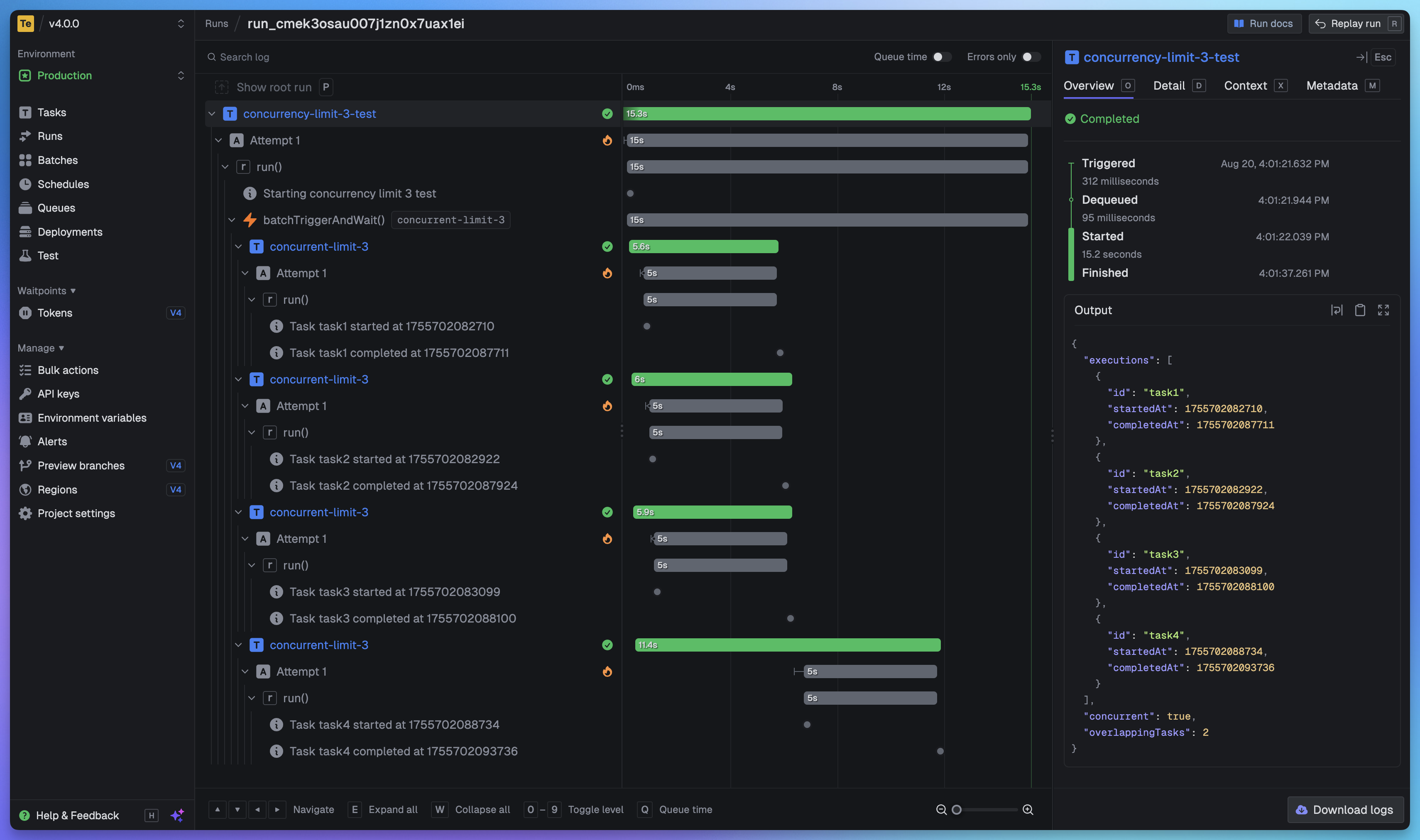
Full visibility of every job run
View every task in every run so you can tell exactly what happened. We provide a full trace view of every task run so you can see what happened at every step.
Getting started
The quickest way to get started is to create an account and project in our web app, and follow the instructions in the onboarding. Build and deploy your first task in minutes.
Useful links:
- Quick start - get up and running in minutes
- How it works - understand how Trigger.dev works under the hood
- Guides and examples - walk-through guides and code examples for popular frameworks and use cases
Self-hosting
If you prefer to self-host Trigger.dev, you can follow our self-hosting guides:
- Docker self-hosting guide - use Docker Compose to spin up a Trigger.dev instance
- Kubernetes self-hosting guide - use our official Helm chart to deploy Trigger.dev to your Kubernetes cluster
Support and community
We have a large active community in our official Discord server for support, including a dedicated channel for self-hosting.
Development
To setup and develop locally or contribute to the open source project, follow our development guide.