Compare commits
488 Commits
| Author | SHA1 | Date | |
|---|---|---|---|
 Eric Allam Eric Allam
|
cab222ac4b | ||
|
Eric Allam
|
667a60a551 | ||
|
Eric Allam
|
710bcc2c47 | ||
|
D-K-P
|
d1d34da9b2 | ||
|
James Ritchie
|
0c476093d7 | ||
|
James Ritchie
|
ba2c895e53 | ||
|
James Ritchie
|
764dd21613 | ||
|
Eric Allam
|
78c3e1060d | ||
|
Eric Allam
|
96a180f26e | ||
|
Eric Allam
|
35718033bd | ||
|
Eric Allam
|
5501a927bf | ||
|
D-K-P
|
17568a0aec | ||
|
D-K-P
|
563a535b56 | ||
|
Matt Aitken
|
2a2652d3aa | ||
|
Matt Aitken
|
aca9081e64 | ||
|
Eric Allam
|
d9ad006550 | ||
|
Eric Allam
|
eacee88f45 | ||
|
Eric Allam
|
51432feb74 | ||
|
Eric Allam
|
2398f85081 | ||
|
Eric Allam
|
b1fb567c28 | ||
|
Eric Allam
|
8c89ed3334 | ||
|
James Ritchie
|
32b9dbcf94 | ||
|
James Ritchie
|
7d84f59c1e | ||
|
James Ritchie
|
d22ef06525 | ||
|
James Ritchie
|
595df9ae62 | ||
|
James Ritchie
|
ceb862f484 | ||
|
James Ritchie
|
49846df811 | ||
|
James Ritchie
|
5fec008f09 | ||
|
James Ritchie
|
90f8b088ff | ||
|
James Ritchie
|
a1d464325d | ||
|
James Ritchie
|
a17442b016 | ||
|
Eric Allam
|
cb3b068fab | ||
|
Eric Allam
|
26a5913734 | ||
|
James Ritchie
|
078beb1689 | ||
|
James Ritchie
|
05a2f6f8e1 | ||
|
James Ritchie
|
7fc6358e40 | ||
|
James Ritchie
|
70ce15b271 | ||
|
James Ritchie
|
97b0019d99 | ||
|
Matt Aitken
|
c419101750 | ||
|
Matt Aitken
|
fdb2944380 | ||
|
Matt Aitken
|
13b6d96f8c | ||
|
Matt Aitken
|
feae0b3c08 | ||
|
Matt Aitken
|
64854b128f | ||
|
Eric Allam
|
46fc33ca15 | ||
|
Matt Aitken
|
f02eeb0af9 | ||
|
Matt Aitken
|
f95938d2ac | ||
|
Eric Allam
|
c3f2f61982 | ||
|
Eric Allam
|
124751e62a | ||
|
Eric Allam
|
81569eb66e | ||
|
Matt Aitken
|
66d959282d | ||
|
Matt Aitken
|
b0a06f8a9d | ||
|
Matt Aitken
|
07f0144354 | ||
|
James Ritchie
|
11beadfb7d | ||
|
Matt Aitken
|
54faa44e84 | ||
|
Matt Aitken
|
f121a48466 | ||
|
Matt Aitken
|
92436308c0 | ||
|
James Ritchie
|
8ba20d8fa3 | ||
|
Matt Aitken
|
92a37ae3a5 | ||
|
Matt Aitken
|
db9d9d93df | ||
|
Matt Aitken
|
506dfe6860 | ||
|
Matt Aitken
|
813c3622e9 | ||
|
James Ritchie
|
d0208e698b | ||
|
Eric Allam
|
2a51c5a1a3 | ||
|
Matt Aitken
|
ee9125ff02 | ||
|
James Ritchie
|
6caadf5da5 | ||
|
James Ritchie
|
c98b7c4e24 | ||
|
James Ritchie
|
489c40c847 | ||
|
Eric Allam
|
0d2d9a043c | ||
|
James Ritchie
|
9bb9c1cdbe | ||
|
James Ritchie
|
81d6fbfdaa | ||
|
James Ritchie
|
b72d63bdd2 | ||
|
James Ritchie
|
1319651079 | ||
|
Matt Aitken
|
f6fbd5e5b7 | ||
|
Matt Aitken
|
9d5e24dac5 | ||
|
D-K-P
|
4ad2702e4d | ||
|
D-K-P
|
2a2da8fa7a | ||
|
James Ritchie
|
64ccb0cf11 | ||
|
D-K-P
|
8b3abd6a06 | ||
|
Matt Aitken
|
63b3d82c2f | ||
|
Matt Aitken
|
358e9af01d | ||
|
James Ritchie
|
f9cab846b9 | ||
|
James Ritchie
|
8a66983f63 | ||
|
James Ritchie
|
b45a176c4f | ||
|
D-K-P
|
86d1a2413a | ||
|
Matt Aitken
|
763ee294ba | ||
|
James Ritchie
|
9a7db7bcff | ||
|
D-K-P
|
2c2de7b236 | ||
|
D-K-P
|
b9b49a8733 | ||
|
James Ritchie
|
32f09d59e6 | ||
|
James Ritchie
|
ddb8b131c0 | ||
|
James Ritchie
|
ab8e1f0d06 | ||
|
D-K-P
|
3f25622abf | ||
|
D-K-P
|
9692ef5ceb | ||
|
D-K-P
|
2c29687712 | ||
|
James Ritchie
|
a392e6a00c | ||
|
James Ritchie
|
59a5c2df51 | ||
|
James Ritchie
|
9872afcf98 | ||
|
D-K-P
|
55fd404449 | ||
|
James Ritchie
|
faa844efa1 | ||
|
James Ritchie
|
1d02ffaf18 | ||
|
D-K-P
|
859a31e08b | ||
|
Eric Allam
|
a5f18cf45a | ||
|
James Ritchie
|
c669c61ba7 | ||
|
James Ritchie
|
ec1df6d476 | ||
|
James Ritchie
|
50ecc88b99 | ||
|
James Ritchie
|
605e34b6ad | ||
|
James Ritchie
|
780cd7fcef | ||
|
James Ritchie
|
f447cb1ca0 | ||
|
James Ritchie
|
ee28eca61c | ||
|
D-K-P
|
d629e3cca1 | ||
|
James Ritchie
|
43a320253d | ||
|
Matt Aitken
|
5ffababfe5 | ||
|
James Ritchie
|
e77bfc77e0 | ||
|
James Ritchie
|
93903bf072 | ||
|
James Ritchie
|
2b4a74f672 | ||
|
Matt Aitken
|
8ffb612496 | ||
|
Matt Aitken
|
34f86dda3b | ||
|
James Ritchie
|
81d3d324e2 | ||
|
D-K-P
|
6d8100d200 | ||
|
D-K-P
|
3e53699b05 | ||
|
D-K-P
|
8cca0f520b | ||
|
D-K-P
|
908fff6fe3 | ||
|
James Ritchie
|
da7742985f | ||
|
James Ritchie
|
4077d014e4 | ||
|
James Ritchie
|
ab0938e91b | ||
|
Matt Aitken
|
547f619112 | ||
|
Eric Allam
|
4008e1d7ed | ||
|
James Ritchie
|
910a8d3651 | ||
|
Eric Allam
|
0e4ec8d8e6 | ||
|
James Ritchie
|
2d08718389 | ||
|
D-K-P
|
96306eb5e0 | ||
|
James Ritchie
|
517d50242f | ||
|
James Ritchie
|
cf8163ef5c | ||
|
Matt Aitken
|
d6c7648bf1 | ||
|
Matt Aitken
|
05b0bd9fb4 | ||
|
Matt Aitken
|
6495b67d1f | ||
|
Matt Aitken
|
c37edf970d | ||
|
Matt Aitken
|
b38961205a | ||
|
Matt Aitken
|
7e1c04ae71 | ||
|
Matt Aitken
|
49a4b0ce11 | ||
|
Matt Aitken
|
42c2a87238 | ||
|
Matt Aitken
|
aefbba1f37 | ||
|
Matt Aitken
|
b8b032a5fb | ||
|
Matt Aitken
|
2eea62c3ce | ||
|
Matt Aitken
|
22327886ac | ||
|
Matt Aitken
|
3126d890dc | ||
|
D-K-P
|
60abac1bc0 | ||
|
D-K-P
|
37d331588d | ||
|
D-K-P
|
6ddaf067a9 | ||
|
Matt Aitken
|
e281297da5 | ||
|
Matt Aitken
|
f46436b903 | ||
|
Matt Aitken
|
6442576a38 | ||
|
Matt Aitken
|
93f1814fd2 | ||
|
James Ritchie
|
d97b82e572 | ||
|
Eric Allam
|
5e15aaadc3 | ||
|
Eric Allam
|
5fce178cc0 | ||
|
D-K-P
|
2938a11685 | ||
|
Eric Allam
|
3dc8751189 | ||
|
D-K-P
|
fe8b8a7131 | ||
|
D-K-P
|
d7f59db79e | ||
|
Eric Allam
|
a98dfecd17 | ||
|
Eric Allam
|
84053d5a20 | ||
|
Eric Allam
|
3365bf26dc | ||
|
Eric Allam
|
3d5c646a1c | ||
|
Eric Allam
|
2d97d20b37 | ||
|
Matt Aitken
|
731b6308e0 | ||
|
Matt Aitken
|
c1742f0d1b | ||
|
Matt Aitken
|
d57339a7c1 | ||
|
Eric Allam
|
0833d402f2 | ||
|
Matt Aitken
|
4054571929 | ||
|
Matt Aitken
|
afc47d328f | ||
|
Eric Allam
|
d6925ff4b6 | ||
|
D-K-P
|
a372a179d1 | ||
|
D-K-P
|
f8c39e3446 | ||
|
Matt Aitken
|
868e5f4ed1 | ||
|
Matt Aitken
|
e6ce7ea859 | ||
|
Eric Allam
|
e6d1ddc5d8 | ||
|
Eric Allam
|
8124930841 | ||
|
Eric Allam
|
421bd9f757 | ||
|
Matt Aitken
|
b3bc70baa3 | ||
|
Matt Aitken
|
dbfff6b5f4 | ||
|
Matt Aitken
|
69004cdcf4 | ||
|
Matt Aitken
|
c1511f233c | ||
|
James Ritchie
|
56d23efcfa | ||
|
James Ritchie
|
31c6da3be4 | ||
|
Matt Aitken
|
6acda311db | ||
|
Matt Aitken
|
9a529492d0 | ||
|
D-K-P
|
f05cfc9895 | ||
|
D-K-P
|
659637c6a5 | ||
|
D-K-P
|
37bf4dcadd | ||
|
Matt Aitken
|
950138bd72 | ||
|
Matt Aitken
|
c578891947 | ||
|
Eric Allam
|
b852731fbb | ||
|
Eric Allam
|
5c350e216a | ||
|
Eric Allam
|
8ac7414bba | ||
|
Matt Aitken
|
6e8d9b4c9a | ||
|
Eric Allam
|
1dc9e1253a | ||
|
Eric Allam
|
24afe630ec | ||
|
Eric Allam
|
5bd1f12c0d | ||
|
Eric Allam
|
7e3dfcdfb1 | ||
|
Matt Aitken
|
24b57e026b | ||
|
Matt Aitken
|
3dd0af6157 | ||
|
Eric Allam
|
cdaa5dfe3b | ||
|
Matt Aitken
|
a4a64affd4 | ||
|
Matt Aitken
|
a20a26e748 | ||
|
Matt Aitken
|
4fb9091870 | ||
|
Matt Aitken
|
7b29422a57 | ||
|
Eric Allam
|
1ef4243aaf | ||
|
D-K-P
|
1b696cabc1 | ||
|
Matt Aitken
|
3496053e11 | ||
|
Eric Allam
|
fd54c86240 | ||
|
Eric Allam
|
064e27f05d | ||
|
Eric Allam
|
89d38c04aa | ||
|
Eric Allam
|
6c027c3c8f | ||
|
Eric Allam
|
fad8f44ad1 | ||
|
Eric Allam
|
5f517a5c70 | ||
|
Eric Allam
|
09142cedd1 | ||
|
Eric Allam
|
2bb7bad947 | ||
|
Eric Allam
|
d71c61fc56 | ||
|
Eric Allam
|
3f9e7f4bda | ||
|
Eric Allam
|
e2261942a0 | ||
|
D-K-P
|
a015e535f0 | ||
|
Eric Allam
|
6c3c99123b | ||
|
Eric Allam
|
c96f9f10b4 | ||
|
James Ritchie
|
23fc242dde | ||
|
James Ritchie
|
c1ca53f513 | ||
|
James Ritchie
|
b8dc408f0f | ||
|
James Ritchie
|
b129381cf2 | ||
|
James Ritchie
|
0141643b66 | ||
|
James Ritchie
|
36cdf50c7c | ||
|
D-K-P
|
f660810fb8 | ||
|
James Ritchie
|
8372cf71d4 | ||
|
James Ritchie
|
4adad0041a | ||
|
Eric Allam
|
887f9d1091 | ||
|
Eric Allam
|
91130472a9 | ||
|
Eric Allam
|
7554b48948 | ||
|
Eric Allam
|
91b1edba7b | ||
|
Eric Allam
|
be86c3d45d | ||
|
Eric Allam
|
7f2fd9b1b3 | ||
|
Eric Allam
|
a069ba14e4 | ||
|
Eric Allam
|
87f755c93e | ||
|
Matt Aitken
|
66b6c2f844 | ||
|
Eric Allam
|
c97a64bb02 | ||
|
Eric Allam
|
f3258ea411 | ||
|
Eric Allam
|
42648e93ee | ||
|
Eric Allam
|
acf8bf038f | ||
|
Eric Allam
|
3769d12bd8 | ||
|
Eric Allam
|
3759dfc434 | ||
|
Eric Allam
|
c8e871393d | ||
|
Eric Allam
|
f9208f45a7 | ||
|
Eric Allam
|
2d0e766b1a | ||
|
Eric Allam
|
71549606ad | ||
|
Eric Allam
|
b63769b4e3 | ||
|
D-K-P
|
f325061444 | ||
|
Eric Allam
|
5ad386e306 | ||
|
Eric Allam
|
a04e0f5e2d | ||
|
James Ritchie
|
5b65dd0070 | ||
|
James Ritchie
|
2f0104e960 | ||
|
James Ritchie
|
c3e7a3e649 | ||
|
James Ritchie
|
1433004292 | ||
|
James Ritchie
|
cc1887b065 | ||
|
James Ritchie
|
614489c67d | ||
|
D-K-P
|
2a4b91da82 | ||
|
James Ritchie
|
0f8014f613 | ||
|
James Ritchie
|
ab7c27be53 | ||
|
Matt Aitken
|
4c23370735 | ||
|
Matt Aitken
|
0d6e843880 | ||
|
Matt Aitken
|
da948c4f4b | ||
|
Matt Aitken
|
898069b5c8 | ||
|
Eric Allam
|
c1b9aee818 | ||
|
Eric Allam
|
63276c266d | ||
|
Eric Allam
|
a4342437a2 | ||
|
Eric Allam
|
5035e10f11 | ||
|
James Ritchie
|
b68ca6e440 | ||
|
James Ritchie
|
a832074264 | ||
|
James Ritchie
|
598d1542b4 | ||
|
Matt Aitken
|
0f187803ae | ||
|
Matt Aitken
|
e235e4e472 | ||
|
Matt Aitken
|
5423d5464f | ||
|
Matt Aitken
|
251b64ccf2 | ||
|
Matt Aitken
|
3e9e743751 | ||
|
Matt Aitken
|
1fc7020b84 | ||
|
Matt Aitken
|
0137dac540 | ||
|
Matt Aitken
|
95d594457c | ||
|
Matt Aitken
|
e21ae74f21 | ||
|
Matt Aitken
|
416c46d4cf | ||
|
Matt Aitken
|
ba617fa7d7 | ||
|
Matt Aitken
|
35aedadfe9 | ||
|
Matt Aitken
|
888c8a7460 | ||
|
Matt Aitken
|
d6512b2ba5 | ||
|
Matt Aitken
|
92391c48cb | ||
|
Matt Aitken
|
7095b45a37 | ||
|
Matt Aitken
|
c954b3743f | ||
|
Matt Aitken
|
49810df735 | ||
|
Matt Aitken
|
b647277333 | ||
|
Matt Aitken
|
26c1c9f4b2 | ||
|
Matt Aitken
|
058824cee4 | ||
|
Matt Aitken
|
ef149bd260 | ||
|
Matt Aitken
|
d8ef6becec | ||
|
Matt Aitken
|
31e7b77fe7 | ||
|
Matt Aitken
|
56e5a5c8a4 | ||
|
Matt Aitken
|
28cc99bf9f | ||
|
Matt Aitken
|
b29041002c | ||
|
Matt Aitken
|
e1b26c863d | ||
|
Matt Aitken
|
f5b88ce272 | ||
|
Matt Aitken
|
dd62655bc7 | ||
|
Matt Aitken
|
2d72c112f3 | ||
|
Matt Aitken
|
96ff7f136c | ||
|
D-K-P
|
719c2a6091 | ||
|
James Ritchie
|
b327d1bb62 | ||
|
James Ritchie
|
65b78f8f20 | ||
|
Matt Aitken
|
128f3baa08 | ||
|
Matt Aitken
|
75eca2895b | ||
|
James Ritchie
|
617cc221cb | ||
|
Matt Aitken
|
ffacc2fb6d | ||
|
Matt Aitken
|
9f935cdd3b | ||
|
Matt Aitken
|
b75ef0266e | ||
|
Matt Aitken
|
74df0b702b | ||
|
D-K-P
|
e8a29dca6b | ||
|
Eric Allam
|
057a13b52c | ||
|
Eric Allam
|
52d21ac84d | ||
|
Matt Aitken
|
897724e883 | ||
|
Matt Aitken
|
7e7c8dafd7 | ||
|
Eric Allam
|
86c543c45f | ||
|
Matt Aitken
|
543589ae32 | ||
|
Matt Aitken
|
e5530299da | ||
|
James Ritchie
|
a4bd86fefe | ||
|
Matt Aitken
|
518472fcb2 | ||
|
Matt Aitken
|
1a20d1b2a3 | ||
|
D-K-P
|
31a8e364de | ||
|
Eric Allam
|
a1b16400d5 | ||
|
Eric Allam
|
24cad37264 | ||
|
Eric Allam
|
6bc46a8b90 | ||
|
Eric Allam
|
6909cc8152 | ||
|
Eric Allam
|
fbda1d9ec4 | ||
|
Eric Allam
|
1d5b592c8f | ||
|
Eric Allam
|
519293ca03 | ||
|
Eric Allam
|
2ae86d0f0e | ||
|
Eric Allam
|
60a5ca785e | ||
|
Eric Allam
|
e8dfa4bea7 | ||
|
Eric Allam
|
f100bfc81f | ||
|
Eric Allam
|
f447b98c50 | ||
|
Eric Allam
|
63cc3ad5c5 | ||
|
Eric Allam
|
fb6d254898 | ||
|
Eric Allam
|
cc4f27a3cd | ||
|
Eric Allam
|
46b59f1bf6 | ||
|
Eric Allam
|
7faf4312b1 | ||
|
Eric Allam
|
58a946547c | ||
|
Eric Allam
|
0ed3784d01 | ||
|
Eric Allam
|
e37a2001e1 | ||
|
Eric Allam
|
1374c10d99 | ||
|
Eric Allam
|
e63d354144 | ||
|
Matt Aitken
|
3710f99270 | ||
|
D-K-P
|
75d65511b3 | ||
|
D-K-P
|
faa35fdbae | ||
|
D-K-P
|
9e77246ebf | ||
|
Matt Aitken
|
8719a4c680 | ||
|
Matt Aitken
|
ea9a839886 | ||
|
Matt Aitken
|
fa7e670a56 | ||
|
Matt Aitken
|
94f2de81ea | ||
|
Matt Aitken
|
9da1f881f0 | ||
|
Matt Aitken
|
3d3a88d9ac | ||
|
Matt Aitken
|
5ea825f5eb | ||
|
Matt Aitken
|
2dc72d68c3 | ||
|
Matt Aitken
|
039321f176 | ||
|
Matt Aitken
|
ed06751a8f | ||
|
Matt Aitken
|
dc83526a77 | ||
|
James Ritchie
|
d10538c3d7 | ||
|
James Ritchie
|
26264ad2ee | ||
|
James Ritchie
|
9435709ad1 | ||
|
James Ritchie
|
00ac720071 | ||
|
James Ritchie
|
af63b52e32 | ||
|
Matt Aitken
|
c3bf58669b | ||
|
Matt Aitken
|
88306d6a63 | ||
|
Matt Aitken
|
80ebc1b1fa | ||
|
James Ritchie
|
42065e3ffc | ||
|
James Ritchie
|
3d7e154589 | ||
|
James Ritchie
|
ff8ea0c80e | ||
|
D-K-P
|
989dcc1375 | ||
|
James Ritchie
|
ada581cc88 | ||
|
Matt Aitken
|
7a8911b89a | ||
|
Eric Allam
|
1c893a538d | ||
|
Eric Allam
|
39853e5ce0 | ||
|
Eric Allam
|
22b2e1635f | ||
|
D-K-P
|
a9cca5ba78 | ||
|
Matt Aitken
|
33128bc124 | ||
|
Eric Allam
|
2bf2d707ea | ||
|
Eric Allam
|
d3da60b871 | ||
|
Eric Allam
|
ddf42558aa | ||
|
Eric Allam
|
40164ee136 | ||
|
Eric Allam
|
2fd9e4fa2f | ||
|
Matt Aitken
|
764f5c1fbb | ||
|
Matt Aitken
|
bce1bd1314 | ||
|
Matt Aitken
|
e607281b1b | ||
|
Matt Aitken
|
109d81d9fa | ||
|
Matt Aitken
|
972444da16 | ||
|
Matt Aitken
|
2ab9b5f97b | ||
|
Matt Aitken
|
001cd811c4 | ||
|
Matt Aitken
|
51c295f102 | ||
|
Matt Aitken
|
1843a2f944 | ||
|
James Ritchie
|
f10dadbd9f | ||
|
Matt Aitken
|
809ffe2168 | ||
|
Matt Aitken
|
12dfc8dbe1 | ||
|
Matt Aitken
|
4085ad983c | ||
|
Matt Aitken
|
3caa793de2 | ||
|
Matt Aitken
|
d6b69ab387 | ||
|
James Ritchie
|
1cc397732f | ||
|
James Ritchie
|
8541ec6198 | ||
|
James Ritchie
|
f6b7b4ad53 | ||
|
Eric Allam
|
7be5433bda | ||
|
Eric Allam
|
c570f069fb | ||
|
Eric Allam
|
a8f8125a94 | ||
|
Eric Allam
|
3b6b8f5964 | ||
|
Matt Aitken
|
042dd928d8 | ||
|
Matt Aitken
|
46521a3aa8 | ||
|
Matt Aitken
|
77f3233224 | ||
|
Matt Aitken
|
03008054ea | ||
|
Matt Aitken
|
36480dd850 | ||
|
D-K-P
|
aceceec317 | ||
|
D-K-P
|
eebe37109e | ||
|
D-K-P
|
d717a909d2 | ||
|
Eric Allam
|
951bf9a92c | ||
|
Eric Allam
|
a2d11a2bf5 | ||
|
Eric Allam
|
dc11daced1 | ||
|
Eric Allam
|
681955c19d | ||
|
James Ritchie
|
780688ea73 | ||
|
James Ritchie
|
1c373321f5 | ||
|
James Ritchie
|
84bb476907 | ||
|
James Ritchie
|
fb11417aac | ||
|
Matt Aitken
|
c41026d34c | ||
|
Matt Aitken
|
08179a086c | ||
|
James Ritchie
|
98fca0ed60 | ||
|
James Ritchie
|
9ecabd41b9 | ||
|
Matt Aitken
|
5dac88601f | ||
|
James Ritchie
|
62a5163c2d | ||
|
Eric Allam
|
45e64b9ef0 | ||
|
Eric Allam
|
748494ca87 | ||
|
D-K-P
|
2020b0afa5 | ||
|
Eric Allam
|
a05436014f | ||
|
Eric Allam
|
39b167ed1f | ||
|
D-K-P
|
ada6e43bb7 | ||
|
James Ritchie
|
8d9587b416 | ||
|
D-K-P
|
5a32765cf8 | ||
|
James Ritchie
|
4d6eabb0fa | ||
|
James Ritchie
|
4c48390b81 | ||
|
James Ritchie
|
e9818d2fad | ||
|
James Ritchie
|
fc6e78772c | ||
|
James Ritchie
|
a97b759628 | ||
|
D-K-P
|
ba547430b2 | ||
|
Eric Allam
|
63776c7702 | ||
|
Eric Allam
|
5bcdae0336 | ||
|
Eric Allam
|
f316c6e3af | ||
|
James Ritchie
|
ac15256fe6 | ||
|
James Ritchie
|
beced33525 | ||
|
James Ritchie
|
25315c6c05 | ||
|
Matt Aitken
|
ce8d146ed4 | ||
|
James Ritchie
|
dc8685bd4f | ||
|
James Ritchie
|
8be6574b69 | ||
|
James Ritchie
|
8c6e97b6a2 | ||
|
Matt Aitken
|
0db83e1b28 | ||
|
Eric Allam
|
f350fcadbc | ||
|
James Ritchie
|
36de036bce | ||
|
Eric Allam
|
caae2609bd | ||
|
Eric Allam
|
c69c3705c5 | ||
|
Matt Aitken
|
14b5cce734 | ||
|
Matt Aitken
|
81109f97a0 | ||
|
Matt Aitken
|
0980927cea | ||
|
Matt Aitken
|
92ae9bd894 | ||
|
James Ritchie
|
377ada775e | ||
|
Matt Aitken
|
b45a5c60f7 | ||
|
Matt Aitken
|
9c313e8aef | ||
|
Matt Aitken
|
6673798e42 | ||
|
Matt Aitken
|
93a4ed8a1e | ||
|
Matt Aitken
|
20c413330c | ||
|
Matt Aitken
|
9a3b5d603b | ||
|
Matt Aitken
|
0b1791203a | ||
|
Matt Aitken
|
b124747ba1 | ||
|
Matt Aitken
|
92dd011919 | ||
|
Matt Aitken
|
16f6df68aa | ||
|
Matt Aitken
|
1c62f16117 | ||
|
Matt Aitken
|
a23be11cdc | ||
|
Matt Aitken
|
67a0d54f74 | ||
|
Matt Aitken
|
87c78683ab | ||
|
Matt Aitken
|
64d23bc273 | ||
|
Matt Aitken
|
ce0d4b9a29 | ||
|
Matt Aitken
|
8a9d0c2957 | ||
|
Matt Aitken
|
111b0c76a7 | ||
|
Eric Allam
|
55c0a8bb11 |
@@ -4,8 +4,8 @@
|
||||
"commit": false,
|
||||
"fixed": [],
|
||||
"linked": [],
|
||||
"access": "restricted",
|
||||
"access": "public",
|
||||
"baseBranch": "main",
|
||||
"updateInternalDependencies": "patch",
|
||||
"ignore": ["wss", "webapp", "docs"]
|
||||
"ignore": ["wss", "webapp"]
|
||||
}
|
||||
|
||||
@@ -44,4 +44,5 @@ yarn-error.log*
|
||||
.env
|
||||
.output
|
||||
apps/**/public/build
|
||||
.tests-container-id.txt
|
||||
.tests-container-id.txt
|
||||
.sentryclirc
|
||||
@@ -33,19 +33,6 @@ windows:
|
||||
commands:
|
||||
- exec: pnpm run dev --filter webapp
|
||||
- cwd: /Users/eric/code/triggerdotdev/trigger.dev/apps/webapp
|
||||
- title: sdk
|
||||
layout:
|
||||
split_direction: horizontal
|
||||
panes:
|
||||
- cwd: /Users/eric/code/triggerdotdev/trigger.dev
|
||||
- split_direction: vertical
|
||||
panes:
|
||||
- cwd: /Users/eric/code/triggerdotdev/trigger.dev
|
||||
commands:
|
||||
- exec: pnpm run dev --filter @trigger.dev/sdk
|
||||
- cwd: /Users/eric/code/triggerdotdev/trigger.dev
|
||||
commands:
|
||||
- exec: pnpm run dev --filter @trigger.dev/integrations
|
||||
- title: ngrok
|
||||
layout:
|
||||
split_direction: horizontal
|
||||
|
||||
@@ -7,8 +7,11 @@ Trigger.dev uses [changesets](https://github.com/changesets/changesets) to manag
|
||||
To add a changeset, use `pnpm run changeset:add` and follow the instructions [here](https://github.com/changesets/changesets/blob/main/docs/adding-a-changeset.md). Please only ever select one of our public packages when adding a changeset, which currently are:
|
||||
|
||||
- `@trigger.dev/sdk`
|
||||
- `@trigger.dev/integrations`
|
||||
- `@trigger.dev/providers`
|
||||
- `@trigger.dev/integration-sdk`
|
||||
- `@trigger.dev/github`
|
||||
- `@trigger.dev/slack`
|
||||
- `@trigger.dev/shopify`
|
||||
- `@trigger.dev/resend`
|
||||
|
||||
## Release instructions
|
||||
|
||||
@@ -16,3 +19,8 @@ Based on the instructions [here](https://github.com/changesets/changesets/blob/m
|
||||
|
||||
1. Run `pnpm run changeset:version`
|
||||
2. Run `pnpm run changeset:release`
|
||||
|
||||
## Pre-release instructions
|
||||
|
||||
- Switch into pre-release mode by running `pnpm run changeset:next`.
|
||||
- Switch back into normal mode by running `pnpm run changeset:normal`.
|
||||
|
||||
@@ -188,16 +188,10 @@ pnpm run dev --filter=webapp
|
||||
pnpm run dev --filter=wss
|
||||
```
|
||||
|
||||
4. Run the @trigger.dev/sdk:dev
|
||||
4. Build all the @trigger.dev/\* packages
|
||||
|
||||
```bash
|
||||
pnpm run dev --filter=@trigger.dev/sdk
|
||||
```
|
||||
|
||||
5. Run the @trigger.dev integrations
|
||||
|
||||
```bash
|
||||
pnpm run dev --filter=@trigger.dev/integrations
|
||||
pnpm run dev --filter="@trigger.dev/*"
|
||||
```
|
||||
|
||||
## Running the smoke test
|
||||
|
||||
@@ -1,201 +1,25 @@
|
||||
Apache License
|
||||
Version 2.0, January 2004
|
||||
http://www.apache.org/licenses/
|
||||
Copyright (c) 2022 API Hero Inc.
|
||||
|
||||
TERMS AND CONDITIONS FOR USE, REPRODUCTION, AND DISTRIBUTION
|
||||
Portions of this software are licensed as follows:
|
||||
|
||||
1. Definitions.
|
||||
- All content that resides under any "ee/" directory of this repository, if such directories exists, are licensed under the license defined in "ee/LICENSE".
|
||||
- All third party components incorporated into the Trigger.dev Software are licensed under the original license provided by the owner of the applicable component.
|
||||
- Content outside of the above mentioned directories or restrictions above is available under the "MIT Expat" license as defined below.
|
||||
|
||||
"License" shall mean the terms and conditions for use, reproduction,
|
||||
and distribution as defined by Sections 1 through 9 of this document.
|
||||
Permission is hereby granted, free of charge, to any person obtaining a copy
|
||||
of this software and associated documentation files (the "Software"), to deal
|
||||
in the Software without restriction, including without limitation the rights
|
||||
to use, copy, modify, merge, publish, distribute, sublicense, and/or sell
|
||||
copies of the Software, and to permit persons to whom the Software is
|
||||
furnished to do so, subject to the following conditions:
|
||||
|
||||
"Licensor" shall mean the copyright owner or entity authorized by
|
||||
the copyright owner that is granting the License.
|
||||
The above copyright notice and this permission notice shall be included in all
|
||||
copies or substantial portions of the Software.
|
||||
|
||||
"Legal Entity" shall mean the union of the acting entity and all
|
||||
other entities that control, are controlled by, or are under common
|
||||
control with that entity. For the purposes of this definition,
|
||||
"control" means (i) the power, direct or indirect, to cause the
|
||||
direction or management of such entity, whether by contract or
|
||||
otherwise, or (ii) ownership of fifty percent (50%) or more of the
|
||||
outstanding shares, or (iii) beneficial ownership of such entity.
|
||||
|
||||
"You" (or "Your") shall mean an individual or Legal Entity
|
||||
exercising permissions granted by this License.
|
||||
|
||||
"Source" form shall mean the preferred form for making modifications,
|
||||
including but not limited to software source code, documentation
|
||||
source, and configuration files.
|
||||
|
||||
"Object" form shall mean any form resulting from mechanical
|
||||
transformation or translation of a Source form, including but
|
||||
not limited to compiled object code, generated documentation,
|
||||
and conversions to other media types.
|
||||
|
||||
"Work" shall mean the work of authorship, whether in Source or
|
||||
Object form, made available under the License, as indicated by a
|
||||
copyright notice that is included in or attached to the work
|
||||
(an example is provided in the Appendix below).
|
||||
|
||||
"Derivative Works" shall mean any work, whether in Source or Object
|
||||
form, that is based on (or derived from) the Work and for which the
|
||||
editorial revisions, annotations, elaborations, or other modifications
|
||||
represent, as a whole, an original work of authorship. For the purposes
|
||||
of this License, Derivative Works shall not include works that remain
|
||||
separable from, or merely link (or bind by name) to the interfaces of,
|
||||
the Work and Derivative Works thereof.
|
||||
|
||||
"Contribution" shall mean any work of authorship, including
|
||||
the original version of the Work and any modifications or additions
|
||||
to that Work or Derivative Works thereof, that is intentionally
|
||||
submitted to Licensor for inclusion in the Work by the copyright owner
|
||||
or by an individual or Legal Entity authorized to submit on behalf of
|
||||
the copyright owner. For the purposes of this definition, "submitted"
|
||||
means any form of electronic, verbal, or written communication sent
|
||||
to the Licensor or its representatives, including but not limited to
|
||||
communication on electronic mailing lists, source code control systems,
|
||||
and issue tracking systems that are managed by, or on behalf of, the
|
||||
Licensor for the purpose of discussing and improving the Work, but
|
||||
excluding communication that is conspicuously marked or otherwise
|
||||
designated in writing by the copyright owner as "Not a Contribution."
|
||||
|
||||
"Contributor" shall mean Licensor and any individual or Legal Entity
|
||||
on behalf of whom a Contribution has been received by Licensor and
|
||||
subsequently incorporated within the Work.
|
||||
|
||||
2. Grant of Copyright License. Subject to the terms and conditions of
|
||||
this License, each Contributor hereby grants to You a perpetual,
|
||||
worldwide, non-exclusive, no-charge, royalty-free, irrevocable
|
||||
copyright license to reproduce, prepare Derivative Works of,
|
||||
publicly display, publicly perform, sublicense, and distribute the
|
||||
Work and such Derivative Works in Source or Object form.
|
||||
|
||||
3. Grant of Patent License. Subject to the terms and conditions of
|
||||
this License, each Contributor hereby grants to You a perpetual,
|
||||
worldwide, non-exclusive, no-charge, royalty-free, irrevocable
|
||||
(except as stated in this section) patent license to make, have made,
|
||||
use, offer to sell, sell, import, and otherwise transfer the Work,
|
||||
where such license applies only to those patent claims licensable
|
||||
by such Contributor that are necessarily infringed by their
|
||||
Contribution(s) alone or by combination of their Contribution(s)
|
||||
with the Work to which such Contribution(s) was submitted. If You
|
||||
institute patent litigation against any entity (including a
|
||||
cross-claim or counterclaim in a lawsuit) alleging that the Work
|
||||
or a Contribution incorporated within the Work constitutes direct
|
||||
or contributory patent infringement, then any patent licenses
|
||||
granted to You under this License for that Work shall terminate
|
||||
as of the date such litigation is filed.
|
||||
|
||||
4. Redistribution. You may reproduce and distribute copies of the
|
||||
Work or Derivative Works thereof in any medium, with or without
|
||||
modifications, and in Source or Object form, provided that You
|
||||
meet the following conditions:
|
||||
|
||||
(a) You must give any other recipients of the Work or
|
||||
Derivative Works a copy of this License; and
|
||||
|
||||
(b) You must cause any modified files to carry prominent notices
|
||||
stating that You changed the files; and
|
||||
|
||||
(c) You must retain, in the Source form of any Derivative Works
|
||||
that You distribute, all copyright, patent, trademark, and
|
||||
attribution notices from the Source form of the Work,
|
||||
excluding those notices that do not pertain to any part of
|
||||
the Derivative Works; and
|
||||
|
||||
(d) If the Work includes a "NOTICE" text file as part of its
|
||||
distribution, then any Derivative Works that You distribute must
|
||||
include a readable copy of the attribution notices contained
|
||||
within such NOTICE file, excluding those notices that do not
|
||||
pertain to any part of the Derivative Works, in at least one
|
||||
of the following places: within a NOTICE text file distributed
|
||||
as part of the Derivative Works; within the Source form or
|
||||
documentation, if provided along with the Derivative Works; or,
|
||||
within a display generated by the Derivative Works, if and
|
||||
wherever such third-party notices normally appear. The contents
|
||||
of the NOTICE file are for informational purposes only and
|
||||
do not modify the License. You may add Your own attribution
|
||||
notices within Derivative Works that You distribute, alongside
|
||||
or as an addendum to the NOTICE text from the Work, provided
|
||||
that such additional attribution notices cannot be construed
|
||||
as modifying the License.
|
||||
|
||||
You may add Your own copyright statement to Your modifications and
|
||||
may provide additional or different license terms and conditions
|
||||
for use, reproduction, or distribution of Your modifications, or
|
||||
for any such Derivative Works as a whole, provided Your use,
|
||||
reproduction, and distribution of the Work otherwise complies with
|
||||
the conditions stated in this License.
|
||||
|
||||
5. Submission of Contributions. Unless You explicitly state otherwise,
|
||||
any Contribution intentionally submitted for inclusion in the Work
|
||||
by You to the Licensor shall be under the terms and conditions of
|
||||
this License, without any additional terms or conditions.
|
||||
Notwithstanding the above, nothing herein shall supersede or modify
|
||||
the terms of any separate license agreement you may have executed
|
||||
with Licensor regarding such Contributions.
|
||||
|
||||
6. Trademarks. This License does not grant permission to use the trade
|
||||
names, trademarks, service marks, or product names of the Licensor,
|
||||
except as required for reasonable and customary use in describing the
|
||||
origin of the Work and reproducing the content of the NOTICE file.
|
||||
|
||||
7. Disclaimer of Warranty. Unless required by applicable law or
|
||||
agreed to in writing, Licensor provides the Work (and each
|
||||
Contributor provides its Contributions) on an "AS IS" BASIS,
|
||||
WITHOUT WARRANTIES OR CONDITIONS OF ANY KIND, either express or
|
||||
implied, including, without limitation, any warranties or conditions
|
||||
of TITLE, NON-INFRINGEMENT, MERCHANTABILITY, or FITNESS FOR A
|
||||
PARTICULAR PURPOSE. You are solely responsible for determining the
|
||||
appropriateness of using or redistributing the Work and assume any
|
||||
risks associated with Your exercise of permissions under this License.
|
||||
|
||||
8. Limitation of Liability. In no event and under no legal theory,
|
||||
whether in tort (including negligence), contract, or otherwise,
|
||||
unless required by applicable law (such as deliberate and grossly
|
||||
negligent acts) or agreed to in writing, shall any Contributor be
|
||||
liable to You for damages, including any direct, indirect, special,
|
||||
incidental, or consequential damages of any character arising as a
|
||||
result of this License or out of the use or inability to use the
|
||||
Work (including but not limited to damages for loss of goodwill,
|
||||
work stoppage, computer failure or malfunction, or any and all
|
||||
other commercial damages or losses), even if such Contributor
|
||||
has been advised of the possibility of such damages.
|
||||
|
||||
9. Accepting Warranty or Additional Liability. While redistributing
|
||||
the Work or Derivative Works thereof, You may choose to offer,
|
||||
and charge a fee for, acceptance of support, warranty, indemnity,
|
||||
or other liability obligations and/or rights consistent with this
|
||||
License. However, in accepting such obligations, You may act only
|
||||
on Your own behalf and on Your sole responsibility, not on behalf
|
||||
of any other Contributor, and only if You agree to indemnify,
|
||||
defend, and hold each Contributor harmless for any liability
|
||||
incurred by, or claims asserted against, such Contributor by reason
|
||||
of your accepting any such warranty or additional liability.
|
||||
|
||||
END OF TERMS AND CONDITIONS
|
||||
|
||||
APPENDIX: How to apply the Apache License to your work.
|
||||
|
||||
To apply the Apache License to your work, attach the following
|
||||
boilerplate notice, with the fields enclosed by brackets "[]"
|
||||
replaced with your own identifying information. (Don't include
|
||||
the brackets!) The text should be enclosed in the appropriate
|
||||
comment syntax for the file format. We also recommend that a
|
||||
file or class name and description of purpose be included on the
|
||||
same "printed page" as the copyright notice for easier
|
||||
identification within third-party archives.
|
||||
|
||||
Copyright [yyyy] [name of copyright owner]
|
||||
|
||||
Licensed under the Apache License, Version 2.0 (the "License");
|
||||
you may not use this file except in compliance with the License.
|
||||
You may obtain a copy of the License at
|
||||
|
||||
http://www.apache.org/licenses/LICENSE-2.0
|
||||
|
||||
Unless required by applicable law or agreed to in writing, software
|
||||
distributed under the License is distributed on an "AS IS" BASIS,
|
||||
WITHOUT WARRANTIES OR CONDITIONS OF ANY KIND, either express or implied.
|
||||
See the License for the specific language governing permissions and
|
||||
limitations under the License.
|
||||
THE SOFTWARE IS PROVIDED "AS IS", WITHOUT WARRANTY OF ANY KIND, EXPRESS OR
|
||||
IMPLIED, INCLUDING BUT NOT LIMITED TO THE WARRANTIES OF MERCHANTABILITY,
|
||||
FITNESS FOR A PARTICULAR PURPOSE AND NONINFRINGEMENT. IN NO EVENT SHALL THE
|
||||
AUTHORS OR COPYRIGHT HOLDERS BE LIABLE FOR ANY CLAIM, DAMAGES OR OTHER
|
||||
LIABILITY, WHETHER IN AN ACTION OF CONTRACT, TORT OR OTHERWISE, ARISING FROM,
|
||||
OUT OF OR IN CONNECTION WITH THE SOFTWARE OR THE USE OR OTHER DEALINGS IN THE
|
||||
SOFTWARE.
|
||||
|
||||
@@ -1,384 +1,205 @@
|
||||

|
||||
<div align="center">
|
||||
|
||||

|
||||
|
||||
[](https://twitter.com/triggerdotdev) [](https://www.youtube.com/@triggerdotdev)
|
||||
[](https://github.com/triggerdotdev/trigger.dev)
|
||||
|
||||
[Website](https://trigger.dev) | [Community](https://discord.gg/JtBAxBr2m3) | [Docs](https://docs.trigger.dev)
|
||||
</div>
|
||||
|
||||
|
||||
### We are now accepting users 😊! Request early access [here](https://bcymafitv0e.typeform.com/tddsignup#source=GitHubReadme).
|
||||
# **⚡️ Trigger.dev**
|
||||
### **The developer-first open source Zapier alternative.**
|
||||
|
||||
|
||||
Trigger.dev is an open source platform that makes it easy for developers to create event-driven background tasks directly in their code. Build, test and run workflows locally using our SDK. Subscribe to webhooks, schedule jobs, run background jobs and add long delays easily and reliably. In our web app you get full visibility of every run your workflow has ever made making it easier to monitor and debug.
|
||||
|
||||
|
||||
|
||||
---
|
||||
# **⭐️ Features:**
|
||||
|
||||
- 👂 Easily subscribe to [webhooks](https://docs.trigger.dev/triggers/webhooks)
|
||||
— they work locally without tunnelling.
|
||||
- 🔥 Fire your own [custom events](https://docs.trigger.dev/triggers/custom-events)—a single event can trigger multiple workflows.
|
||||
- 📆 [Schedule workflows](https://docs.trigger.dev/triggers/scheduled)—easily repeat tasks or use CRON syntax for advanced cases.
|
||||
- 🚦 Add [long delays](https://docs.trigger.dev/functions/delays) inside workflows (up to a year) and they will pick up where they left off.
|
||||
- 🤝 When your server goes down [it’s not a problem](https://docs.trigger.dev/guides/resumability), workflows will reconnect and continue.
|
||||
- 🪧 [View every step of every run](https://docs.trigger.dev/viewing-runs), with data, previews and errors.
|
||||
- 👋 Connect to and authenticate with APIs using our custom integrations.
|
||||
- 🚗 If you have a custom use case, we support [Fetch for calling any HTTP endpoint](https://docs.trigger.dev/functions/fetch) or [webhooks](https://docs.trigger.dev/triggers/webhooks) for subscribing to events from APIs.
|
||||
- 📡 All API calls are automatically retried with exponential back off.
|
||||
- 😀 TypeScript SDK, so whether you’re using JavaScript or TypeScript you will have a great experience.
|
||||
|
||||
|
||||
|
||||
# **🌱 Documentation:**
|
||||
|
||||

|
||||
|
||||
[](https://twitter.com/intent/follow?screen_name=triggerdotdev)
|
||||
|
||||
# ⚙️ Automate complex workflows with code
|
||||
|
||||
Trigger workflows from APIs, on a schedule, or on demand. API calls are easy with authentication handled for you. Add durable delays that survive server restarts.
|
||||
|
||||

|
||||
|
||||
# 💻 Developer-first features
|
||||
|
||||
## In your codebase
|
||||
|
||||
Trigger.dev is code-first so you can create workflows where they belong: in your codebase. Version control, localhost, test, review, and deploy like you're used to.
|
||||
|
||||
## Secure by design
|
||||
|
||||
Your workflows run on your servers, not ours. We only receive the data you choose to send to us.
|
||||
- [Getting Started with Trigger.dev](https://docs.trigger.dev/getting-started)
|
||||
- Example workflows
|
||||
- [Welcome email drip campaign using Resend and Slack](https://docs.trigger.dev/examples/resend)
|
||||
- [Post to Slack when a GitHub issue is created or modified](https://docs.trigger.dev/examples/slack)
|
||||
- [Create a new product on Shopify](https://docs.trigger.dev/examples/shopify)
|
||||
- [When a GitHub repo is starred, post information about the user to Slack](https://docs.trigger.dev/examples/github)
|
||||
- Triggers:
|
||||
- [Webhooks](https://docs.trigger.dev/triggers/webhooks)
|
||||
- [Custom events](https://docs.trigger.dev/triggers/custom-events)
|
||||
- [Scheduled](https://docs.trigger.dev/triggers/scheduled)
|
||||
- Functions:
|
||||
- [Fetch](https://docs.trigger.dev/functions/fetch)
|
||||
- [Logging](https://docs.trigger.dev/functions/logging)
|
||||
- [Delays](https://docs.trigger.dev/functions/delays)
|
||||
- [Send event](https://docs.trigger.dev/functions/send-event)
|
||||
- [Loops, conditionals, etc](https://docs.trigger.dev/functions/loops-conditionals-etc)
|
||||
|
||||
|
||||
|
||||
# Hundreds of Integrations
|
||||
# 🔬 **Anatomy of a workflow**
|
||||
|
||||
Subscribe to API changes and make requests, we’ll handle authentication for you.
|
||||
* You create workflows in code on your server using our SDK
|
||||
* Each API integration is a separate package, e.g. `@trigger.dev/slack`
|
||||
* Each workflow has an event that triggers it, e.g. `github.events.newStarEvent`, `scheduleEvent`, `customEvent`
|
||||
* Each workflow has a `run` function that is called when the event is triggered
|
||||
* If we don't have an integration for the API you want to use, you can use `fetch` to call any HTTP endpoint and `webhookEvent` to subscribe to webhooks
|
||||
|
||||
|
||||
## **Example workflows**
|
||||
|
||||
# 🚀 Workflow examples
|
||||
<details open><summary> Post to Slack when a GitHub issue is created or modified
|
||||
</summary>
|
||||
|
||||
## 🔄 Sync GitHub issues to Linear
|
||||
_Integrations required: Slack, GitHub_
|
||||
|
||||
 
|
||||
|
||||
Triggered when a GitHub issue is created or updated. Query your database to map GitHub user ids to Linear user ids. Then create or update Linear issues.",
|
||||
|
||||
```Typescript
|
||||
|
||||
import { Trigger, github, linear } from "@trigger.dev/sdk";
|
||||
```ts
|
||||
import { Trigger } from "@trigger.dev/sdk";
|
||||
import * as github from "@trigger.dev/github";
|
||||
import * as slack from "@trigger.dev/slack";
|
||||
|
||||
new Trigger({
|
||||
name: "Sync Github issues to Linear",
|
||||
on: github.issueEvent({
|
||||
repo: "acme/website",
|
||||
}),
|
||||
run: async (event, ctx) => {
|
||||
const { issue, action } = event;
|
||||
|
||||
// Find the user in our local database
|
||||
const assignee = await findUserByGithubId(issue.assignee?.id);
|
||||
|
||||
if (action === "opened") {
|
||||
await linear.issueCreate({
|
||||
id: issue.id,
|
||||
title: issue.title,
|
||||
description: issue.body,
|
||||
assigneeId: assignee?.linearId,
|
||||
teamId: ctx.env.LINEAR_TEAM_ID,
|
||||
id: "new-github-star-to-slack",
|
||||
name: "New GitHub Star: triggerdotdev/trigger.dev",
|
||||
apiKey: "<my_api_key>",
|
||||
on: github.events.newStarEvent({
|
||||
repo: "triggerdotdev/trigger.dev",
|
||||
}),
|
||||
run: async (event) => {
|
||||
await slack.postMessage("github-stars", {
|
||||
channelName: "github-stars",
|
||||
text: `New GitHub star from \n<${event.sender.html_url}|${event.sender.login}>`,
|
||||
});
|
||||
} else {
|
||||
await linear.issueUpdate(issue.id, {
|
||||
assigneeId: assignee?.linearId,
|
||||
stateId:
|
||||
action === "closed"
|
||||
? ctx.env.LINEAR_CLOSED_STATE_ID
|
||||
: ctx.env.LINEAR_OPEN_STATE_ID,
|
||||
});
|
||||
}
|
||||
},
|
||||
},
|
||||
}).listen();
|
||||
|
||||
```
|
||||
|
||||
|
||||
</details>
|
||||
|
||||
## ✉️ Send emails to new users
|
||||
<details><summary>Welcome email drip campaign
|
||||
</summary>
|
||||
|
||||
  
|
||||
_Integrations required: Slack, Resend_
|
||||
|
||||
Triggered on demand by your other code when a user is created. We wait for 3 hours then send a follow-up email if the user hasn’t completed onboarding yet.
|
||||
|
||||
```Typescript
|
||||
import { Trigger, customEvent, slack, mailgun } from "@trigger.dev/sdk";
|
||||
```ts
|
||||
import { customEvent, Trigger, sendEvent } from "@trigger.dev/sdk";
|
||||
import * as resend from "@trigger.dev/resend";
|
||||
import * as slack from "@trigger.dev/slack";
|
||||
import React from "react";
|
||||
import { z } from "zod";
|
||||
import { getUser } from "../db";
|
||||
import { InactiveEmail, TipsEmail, WelcomeEmail } from "./email-templates";
|
||||
|
||||
new Trigger({
|
||||
name: "Send Email to New Users",
|
||||
on: customEvent<UserEvent>({ name: "user.created" }),
|
||||
run: async (event, ctx) => {
|
||||
// Wait for 3 hours before continuing
|
||||
await ctx.waitFor({ hours: 3 });
|
||||
id: "welcome-email-campaign",
|
||||
name: "Welcome email drip campaign",
|
||||
apiKey: "<my_api_key>",
|
||||
on: customEvent({
|
||||
name: "user.created",
|
||||
schema: z.object({
|
||||
userId: z.string(),
|
||||
}),
|
||||
}),
|
||||
async run(event, context) {
|
||||
//get the user data from the database
|
||||
const user = await getUser(event.userId);
|
||||
|
||||
// Lookup user in the database
|
||||
const user = await findUserById(event.id);
|
||||
await slack.postMessage("send-to-slack", {
|
||||
channelName: "new-users",
|
||||
text: `New user signed up: ${user.name} (${user.email})`,
|
||||
});
|
||||
|
||||
// only send email if user has not onboarded
|
||||
if (!user.hasOnboarded) {
|
||||
await mailgun.send({
|
||||
to: user.email,
|
||||
subject: "Welcome to our app!",
|
||||
body: `Welcome to our app ${user.name}!}`,
|
||||
});
|
||||
//Send the first email
|
||||
const welcomeResponse = await resend.sendEmail("welcome-email", {
|
||||
from: "Trigger.dev <james@email.trigger.dev>",
|
||||
replyTo: "James <james@trigger.dev>",
|
||||
to: user.email,
|
||||
subject: "Welcome to Trigger.dev",
|
||||
react: <WelcomeEmail name={user.name} />,
|
||||
});
|
||||
await context.logger.debug(
|
||||
`Sent welcome email to ${welcomeResponse.to} with id ${welcomeResponse.id}`
|
||||
);
|
||||
|
||||
await slack.sendMessage({
|
||||
text: `Welcome email sent to ${user.email}`,
|
||||
//wait 1 day, check if the user has created a workflow and send the appropriate email
|
||||
await context.waitFor("wait-a-while", { days: 1 });
|
||||
const updatedUser = await getUser(event.userId);
|
||||
|
||||
if (updatedUser.hasOnboarded) {
|
||||
await resend.sendEmail("onboarding-complete", {
|
||||
from: "Trigger.dev <james@email.trigger.dev>",
|
||||
replyTo: "James <james@trigger.dev>",
|
||||
to: updatedUser.email,
|
||||
subject: "Pro tips for workflows",
|
||||
react: <TipsEmail name={updatedUser.name} />,
|
||||
});
|
||||
} else {
|
||||
await slack.sendMessage({
|
||||
text: `User ${user.email} has already onboarded`,
|
||||
await resend.sendEmail("onboarding-incomplete", {
|
||||
from: "Trigger.dev <james@email.trigger.dev>",
|
||||
replyTo: "James <james@trigger.dev>",
|
||||
to: updatedUser.email,
|
||||
subject: "Help with your first workflow",
|
||||
react: <InactiveEmail name={updatedUser.name} />,
|
||||
});
|
||||
}
|
||||
},
|
||||
}).listen();
|
||||
```
|
||||
|
||||
|
||||
</details>
|
||||
|
||||
## 🚨 Escalate critical incidents
|
||||
|
||||
   
|
||||
|
||||
Triggered when an Intercom incident happens. We create a Linear issue, send a Slack message and, if it’s an urgent incident, we alert whoever is on call.
|
||||
|
||||
```Typescript
|
||||
import { Trigger, intercom, linear, slack, pagerduty } from "@trigger.dev/sdk";
|
||||
|
||||
new Trigger({
|
||||
name: "Intercom Incident",
|
||||
on: intercom.newIncident(),
|
||||
run: async (event, ctx) => {
|
||||
// Find the customer in the database
|
||||
const customer = await db.query("SELECT * FROM users WHERE email = $1", [
|
||||
event.email,
|
||||
]);
|
||||
|
||||
// Create linear ticket
|
||||
const ticket = await linear.issueCreate({
|
||||
title: event.title,
|
||||
description: event.description,
|
||||
assigneeId: ctx.env.LINEAR_ASSIGNEE_ID,
|
||||
teamId: ctx.env.LINEAR_TEAM_ID,
|
||||
});
|
||||
|
||||
// notify account manager
|
||||
await slack.sendMessage({
|
||||
text: `New incident for ${customer.name} in Linear: ${ticket.url}`,
|
||||
});
|
||||
|
||||
if (event.severity === "urgent") {
|
||||
// Create a pagerduty incident
|
||||
await pagerduty.createIncident({
|
||||
title: event.title,
|
||||
description: event.description,
|
||||
severity: "critical",
|
||||
serviceId: ctx.env.PAGERDUTY_SERVICE_ID,
|
||||
});
|
||||
}
|
||||
},
|
||||
}).listen();
|
||||
```
|
||||
[More examples here](https://docs.trigger.dev/examples/examples)
|
||||
|
||||
|
||||
|
||||
# ⚡️ Trigger happy
|
||||
# 👀 **Viewing runs:**
|
||||
|
||||
Install our SDK and get instant access to an arsenal of triggers you can use in your code:
|
||||
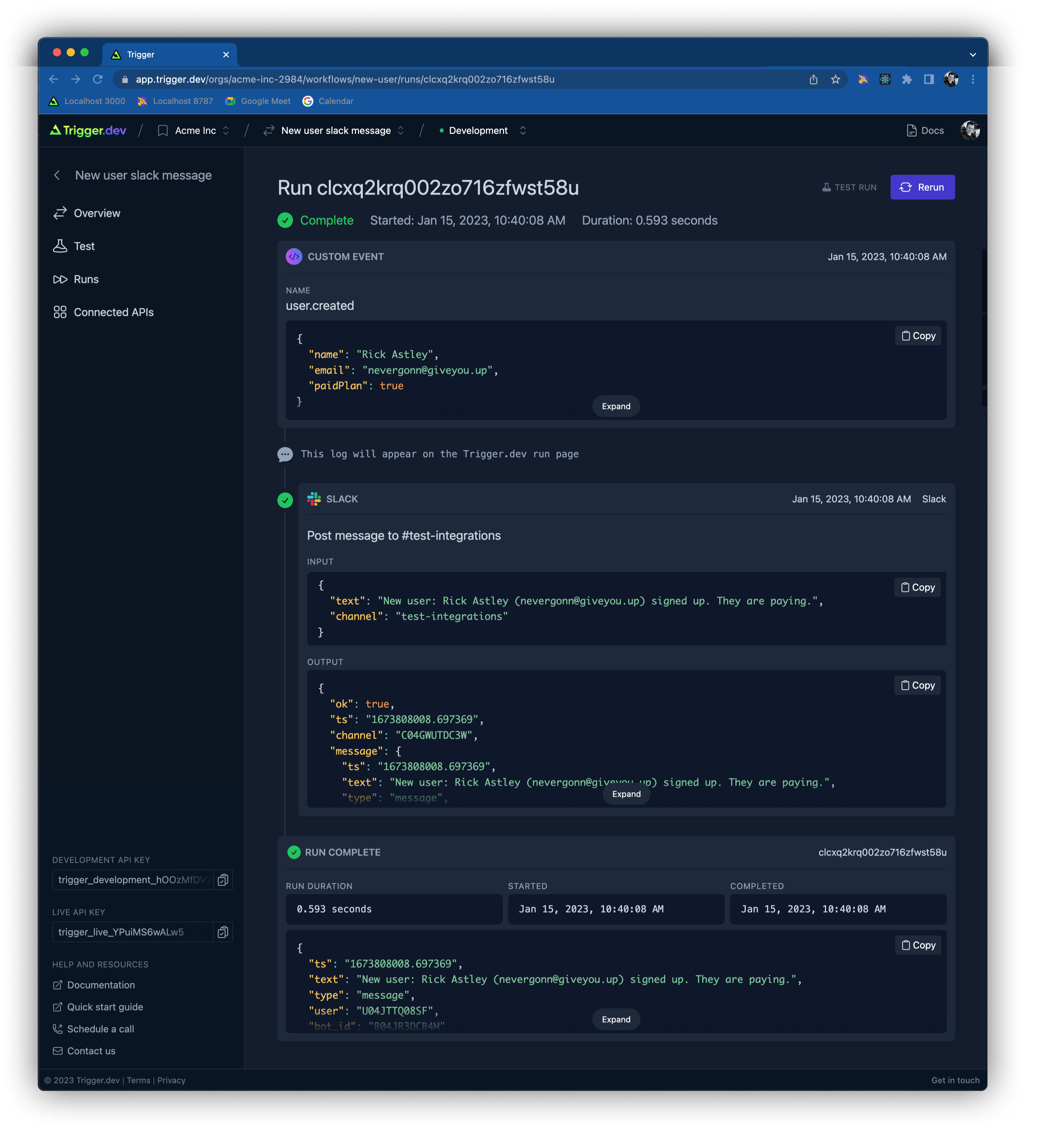
One of the most powerful features of Trigger.dev is the [runs page](https://docs.trigger.dev/viewing-runs). All of the steps in a workflow, including the initial event, can be viewed in detail. See the status / output of each step, the logs, rich previews, errors and much more.
|
||||
|
||||
|
||||
|
||||
### **Webhooks**
|
||||
|
||||
Subscribe to webhooks without creating API endpoints. Plus they work locally without tunneling.
|
||||
|
||||
```Typescript
|
||||
github.issueEvent({ repo: "acme/website" })
|
||||
```
|
||||
|
||||
|
||||
### **Scheduled (CRON)**
|
||||
|
||||
Easily subscribe to a recurring schedule using human readable code or CRON syntax.
|
||||
|
||||
```Typescript
|
||||
scheduleEvent({ every: { minutes: 30 } })
|
||||
```
|
||||
|
||||
|
||||
### **Custom Events**
|
||||
|
||||
Trigger workflows from any event in your app. Send us your events, and we'll do the rest.
|
||||
|
||||
```Typescript
|
||||
customEvent<YourType>({ name: "your.event" })
|
||||
```
|
||||
|
||||
### **HTTP Endpoint**
|
||||
|
||||
Expose a HTTP endpoint to trigger your workflows with the method and path of your choice.
|
||||
|
||||
```Typescript
|
||||
httpEvent<User>({ method: "POST", path: "/users/:id" })
|
||||
```
|
||||
|
||||
### **Receive Emails**
|
||||
|
||||
Receive emails from your custom domain and trigger a workflow with the email metadata and content.
|
||||
|
||||
```Typescript
|
||||
emailEvent({ address: "support@help.customdomain.io" })
|
||||
```
|
||||
|
||||
### **AWS Event Bridge**
|
||||
|
||||
Integrate with AWS Event Bridge to trigger workflows on your own Event Bridge events.
|
||||
|
||||
```Typescript
|
||||
eventBridge<SupportRequest>({ bus: "customer-support" })
|
||||
```
|
||||
|
||||
|
||||
|
||||
# 🔋 Batteries included
|
||||
# **🏠 Running Trigger.dev locally:**
|
||||
|
||||
### **Debugging and visibility**
|
||||
|
||||
We provide a full history of all runs, so you can see exactly what happened.
|
||||
To run Trigger.dev locally, [follow these steps](https://github.com/triggerdotdev/trigger.dev/blob/main/DEVELOPMENT.md).
|
||||
|
||||
|
||||
|
||||
<img src="https://trigger.dev/_next/static/media/runs-diagram.c9ce4213.png" alt="Runs" width="400"/>
|
||||
# **👏 Contributing:**
|
||||
|
||||
We are open source and love contributions!
|
||||
|
||||
- Request a feature in our [Discord community](https://discord.gg/JtBAxBr2m3)
|
||||
- Open a PR
|
||||
|
||||
|
||||
|
||||
---
|
||||
# **🧘♂️ Self-hosting guide:**
|
||||
|
||||
Please subscribe to the [GitHub issue](https://github.com/triggerdotdev/trigger.dev/issues/48) to be notified when it's live.
|
||||
|
||||
|
||||
|
||||
### **Survives downtime**
|
||||
|
||||
Workflows pick up where they left off when your server or external APIs go down.
|
||||
# **📧 Support & contact:**
|
||||
|
||||
|
||||
|
||||
<img src="https://trigger.dev/_next/static/media/retries-diagram.d90a00d9.png
|
||||
" alt="Retries" width="400"/>
|
||||
|
||||
|
||||
|
||||
# Go from idea to production in minutes
|
||||
|
||||
## **1. Code**
|
||||
|
||||
Write workflows by creating triggers directly in your code. These can be 3rd-party integrations, custom events or on a schedule.
|
||||
|
||||
## **2. Connect**
|
||||
|
||||
When your server runs, your workflow will be registered and you can authenticate with any APIs you’re using.
|
||||
|
||||
## **3. Test**
|
||||
|
||||
When your server runs, your workflow will be registered and you can authenticate with any APIs you’re using.
|
||||
|
||||
## **3. Deploy**
|
||||
|
||||
Deploy your new workflow as you would any other code commit and inspect each workflow run in real time.
|
||||
|
||||
|
||||
|
||||
# ✅ We ❤️ Open Source!
|
||||
|
||||
You’ll always be able to host and run Trigger.dev yourself.
|
||||
|
||||
We've also created [JSON Hero](https://github.com/triggerdotdev/jsonhero-web), an open source JSON viewer used by around 55,000 developers per month.
|
||||
|
||||
|
||||
|
||||
# 🙋 FAQs
|
||||
|
||||
<details><summary> Does my data get sent to your servers?</summary><br>
|
||||
|
||||
Only what you choose to send. The main body of your workflow code runs on your infrastructure.
|
||||
For example when you do a database query, that never touches us.
|
||||
|
||||
Data we will receive (and store to display on the Runs page in your dashboard):
|
||||
|
||||
- Any data that triggers the start of a workflow
|
||||
- Any data you pass to one of our API integrations • Any data you choose to log using our logging function
|
||||
|
||||
</details>
|
||||
|
||||
<details><summary> How is this different to Zapier, Pipedream etc?</summary><br>
|
||||
|
||||
Trigger.dev is a code-first workflow tool that lets you create workflows directly in your code, rather than using a UI builder like Zapier. This means you can stay in your own IDE and keep your internal data secure.
|
||||
|
||||
</details>
|
||||
|
||||
<details><summary>How long does this take to set up?</summary><br>
|
||||
|
||||
Setting up Trigger.dev is simple and takes 2 minutes. Install our SDK to get started and check out the Getting Started documentation to start creating your first workflow.
|
||||
|
||||
</details>
|
||||
|
||||
<details><summary>Can I use version control or roll-backs?</summary><br>
|
||||
|
||||
Yes. You create workflows directly in your own code so it’s version controlled with everything else.
|
||||
|
||||
</details>
|
||||
|
||||
<details><summary>How long does it take to code up a workflow?</summary><br>
|
||||
|
||||
A simple workflow triggering two events from different services will take about 5 minutes to create.
|
||||
|
||||
</details>
|
||||
|
||||
<details><summary>Do you have all the integrations I need?</summary><br>
|
||||
|
||||
Probably. Trigger.dev includes over 100 integrations including the most popular services. If you need a specific service that’s not available, you can request it, or create it yourself. We’re open source, so create an issue or Pull Request.
|
||||
|
||||
</details>
|
||||
|
||||
<details><summary>Can I build complex workflows?</summary><br>
|
||||
|
||||
Yes. There’s no limit to the complexity on workflows you can create. Workflows are created in code so you can write conditional, looping, branching or time delayed logic.
|
||||
|
||||
</details>
|
||||
|
||||
<details><summary> Can I run Trigger.dev locally?</summary><br>
|
||||
|
||||
Yes. Workflows are created in your code locally and, unlike webhooks, you don’t need to use tunneling to receive triggers.
|
||||
|
||||
</details>
|
||||
|
||||
<details><summary>How does the pricing model work?</summary><br>
|
||||
|
||||
Our hosted product gives you free runs each month, after that you will need to select a paid tier. You can also self-host, view the open source repository for instructions.
|
||||
|
||||
</details>
|
||||
|
||||
<details><summary>Is Trigger.dev open source?</summary><br>
|
||||
|
||||
Yes, Trigger.dev is open source. We are strong supporters of open source software, and our first product, [jsonhero.io](https://jsonhero.io), has a thriving open source community. Trigger.dev follows in that tradition.
|
||||
|
||||
</details>
|
||||
|
||||
<details><summary>Is Trigger.dev a no/low-code tool?</summary><br>
|
||||
|
||||
No. Trigger.dev is designed for developers who want to create workflows directly in code, without using a UI builder like Zapier. This allows developers to stay in their familiar development environment and customise their workflows with code.
|
||||
|
||||
</details>
|
||||
|
||||
<details><summary>What languages / frameworks do you support?</summary><br>
|
||||
|
||||
Currently there is support for Node.js. More frameworks will be added soon.
|
||||
|
||||
</details>
|
||||
|
||||
<details><summary>Can I use an API which doesn’t have webhooks?</summary><br>
|
||||
|
||||
Yes. You can use a polling trigger to subscribe is no webhook exists.
|
||||
|
||||
</details>
|
||||
|
||||
<details><summary>Can non-coders use this product?</summary><br>
|
||||
|
||||
Developers will need to create workflows. Anyone on the team can monitor running workflows in the Trigger dashboard.
|
||||
|
||||
</details>
|
||||
|
||||
|
||||
---
|
||||
|
||||
|
||||
|
||||
If you have any other questions about Trigger.dev, [drop us an email](mailto:hello@trigger.dev), and one of the founders will get back to you.
|
||||
- Join our [Discord community](https://discord.gg/JtBAxBr2m3)
|
||||
- If you have any other questions, get in touch at [hello@trigger.dev](mailto:hello@trigger.dev)
|
||||
|
||||
@@ -1,34 +0,0 @@
|
||||
# Mintlify Starter Kit
|
||||
|
||||
Click on `Use this template` to quickstarter your documentation setup with Mintlify. The starter kit contains examples including
|
||||
|
||||
- Guide pages
|
||||
- Navigation
|
||||
- Customizations
|
||||
- API Reference pages
|
||||
- Use of popular components
|
||||
|
||||
### 👩💻 Development
|
||||
|
||||
Run these from the root of the repository
|
||||
|
||||
```
|
||||
pnpm install --filter docs
|
||||
```
|
||||
|
||||
```
|
||||
pnpm run dev --filter docs
|
||||
```
|
||||
|
||||
Go to http://localhost:3050
|
||||
|
||||
### 😎 Publishing Changes
|
||||
|
||||
Changes will be deployed to production automatically after pushing to the default branch.
|
||||
|
||||
You can also preview changes using PRs, which generates a preview link of the docs.
|
||||
|
||||
#### Troubleshooting
|
||||
|
||||
- Mintlify dev isn't running - Run `mintlify install` it'll re-install dependencies.
|
||||
- Mintlify dev is updating really slowly - Run `mintlify clear` to clear the cache.
|
||||
@@ -1,35 +0,0 @@
|
||||
---
|
||||
title: "GitHub"
|
||||
sidebarTitle: "GitHub"
|
||||
description: "Here are some example workflows you could create using the GitHub integration."
|
||||
---
|
||||
|
||||
You can explore all the supported GitHub functions [here](/).
|
||||
|
||||
## When a GitHub issue is created or modified, post to Slack
|
||||
|
||||
Integrations required: GitHub, Slack
|
||||
|
||||
```ts
|
||||
import { Trigger, customEvent } from "@trigger.dev/sdk";
|
||||
import { github, slack } from "@trigger.dev/integrations";
|
||||
import { z } from "zod";
|
||||
|
||||
new Trigger({
|
||||
id: "my-workflow-1",
|
||||
name: "Posts to Slack when GitHub Issue created or modified",
|
||||
apiKey: "<my_api_key>",
|
||||
on: github.events.repoIssueEvent({
|
||||
repo: "my-github-org/my-github-repo",
|
||||
}),
|
||||
|
||||
run: async (event, ctx) => {
|
||||
const response = await slack.postMessage("send-to-slack", {
|
||||
channel: "my-slack-channel-name",
|
||||
text: `A new issue has been created or modified. ${event.action}`,
|
||||
});
|
||||
|
||||
return response.message;
|
||||
},
|
||||
}).listen();
|
||||
```
|
||||
@@ -1,211 +0,0 @@
|
||||
---
|
||||
title: "Shopify"
|
||||
sidebarTitle: "Shopify"
|
||||
description: "Here are some example workflows you could create using the Shopify integration."
|
||||
---
|
||||
|
||||
You can explore all the supported Shopify functions [here](/).
|
||||
|
||||
## Create a new product
|
||||
|
||||
Integrations required: Shopify
|
||||
|
||||
```ts
|
||||
import { Trigger, customEvent } from "@trigger.dev/sdk";
|
||||
import { z } from "zod";
|
||||
import { shopify } from "@trigger.dev/integrations";
|
||||
|
||||
new Trigger({
|
||||
id: "shopify-products",
|
||||
name: "Shopify products",
|
||||
apiKey: "<my_api_key>",
|
||||
logLevel: "debug",
|
||||
on: customEvent({
|
||||
name: "shopify.products",
|
||||
schema: z.object({}),
|
||||
}),
|
||||
run: async (event, ctx) => {
|
||||
const newProduct = await shopify.createProduct("create-product", {
|
||||
descriptionHtml: "This is my brilliant <i>product description</i>.",
|
||||
title: `Fantastic product ${Math.floor(Math.random() * 1000)}`,
|
||||
productType: "t-shirt",
|
||||
vendor: "Nike",
|
||||
options: ["Color", "Size"],
|
||||
standardizedProductType: {
|
||||
productTaxonomyNodeId: "gid://shopify/ProductTaxonomyNode/352",
|
||||
},
|
||||
variants: [
|
||||
{
|
||||
price: "99.99",
|
||||
sku: "variant-1",
|
||||
inventoryItem: {
|
||||
tracked: true,
|
||||
},
|
||||
inventoryQuantities: [
|
||||
{
|
||||
availableQuantity: 1,
|
||||
locationId: "gid://shopify/Location/76187369773",
|
||||
},
|
||||
],
|
||||
options: ["Maroon", "Tiny"],
|
||||
},
|
||||
],
|
||||
});
|
||||
|
||||
const newImages = await shopify.appendProductImages("append-images", {
|
||||
id: newProduct.id,
|
||||
images: [
|
||||
{
|
||||
src: "https://via.placeholder.com/600/92c952.png",
|
||||
altText: "Image 1",
|
||||
},
|
||||
{
|
||||
src: "https://via.placeholder.com/600/d32776.png",
|
||||
altText: "Image 2",
|
||||
},
|
||||
],
|
||||
});
|
||||
|
||||
return newProduct;
|
||||
},
|
||||
}).listen();
|
||||
```
|
||||
|
||||
## Update a product
|
||||
|
||||
Integrations required: Shopify
|
||||
|
||||
```ts
|
||||
import { Trigger, customEvent } from "@trigger.dev/sdk";
|
||||
import { z } from "zod";
|
||||
import { shopify } from "@trigger.dev/integrations";
|
||||
|
||||
new Trigger({
|
||||
id: "shopify-update-product",
|
||||
name: "Shopify update product",
|
||||
apiKey: "<my_api_key>",
|
||||
logLevel: "debug",
|
||||
on: customEvent({
|
||||
name: "product.update",
|
||||
schema: z.object({
|
||||
id: z.string(),
|
||||
}),
|
||||
}),
|
||||
run: async (event, ctx) => {
|
||||
const product = await shopify.updateProduct("update-product", {
|
||||
id: event.id,
|
||||
descriptionHtml: `<h1>Awesome product title</h1><p>With incredible description</p>`,
|
||||
});
|
||||
|
||||
return product;
|
||||
},
|
||||
}).listen();
|
||||
```
|
||||
|
||||
## Add a product to a collection
|
||||
|
||||
Integrations required: Shopify
|
||||
|
||||
```ts
|
||||
import { Trigger, customEvent } from "@trigger.dev/sdk";
|
||||
import { z } from "zod";
|
||||
import { shopify } from "@trigger.dev/integrations";
|
||||
|
||||
new Trigger({
|
||||
id: "shopify-add-product-to-collection",
|
||||
name: "Shopify add product to collection",
|
||||
apiKey: "<my_api_key>",
|
||||
logLevel: "debug",
|
||||
on: customEvent({
|
||||
name: "product.new",
|
||||
schema: z.object({
|
||||
id: z.string(),
|
||||
}),
|
||||
}),
|
||||
run: async (event, ctx) => {
|
||||
const collection = await shopify.addProductsToCollection(
|
||||
"add-products-to-collection",
|
||||
{
|
||||
collectionId: "gid://shopify/Collection/431864578349",
|
||||
productIds: [event.id],
|
||||
}
|
||||
);
|
||||
|
||||
return collection;
|
||||
},
|
||||
}).listen();
|
||||
```
|
||||
|
||||
## Create new product variants with images
|
||||
|
||||
Integrations required: Shopify
|
||||
|
||||
```ts
|
||||
import { Trigger, customEvent } from "@trigger.dev/sdk";
|
||||
import { z } from "zod";
|
||||
import { shopify } from "@trigger.dev/integrations";
|
||||
|
||||
const sizes = ["Small", "Medium", "Large"];
|
||||
const colors = [
|
||||
"Red",
|
||||
"Orange",
|
||||
"Yellow",
|
||||
"Green",
|
||||
"Blue",
|
||||
"Purple",
|
||||
"Pink",
|
||||
"Brown",
|
||||
"Black",
|
||||
"White",
|
||||
"Gray",
|
||||
"Silver",
|
||||
"Gold",
|
||||
"Beige",
|
||||
];
|
||||
const materials = ["Cotton", "Polyester", "Lycra", "Wool", "Silk", "Leather"];
|
||||
|
||||
function pickRandom(array: string[]): string {
|
||||
return array[Math.floor(Math.random() * array.length)];
|
||||
}
|
||||
|
||||
new Trigger({
|
||||
id: "shopify-product-variants",
|
||||
name: "Shopify product variants",
|
||||
apiKey: "<my_api_key>",
|
||||
logLevel: "debug",
|
||||
on: customEvent({
|
||||
name: "shopify.product-variants",
|
||||
schema: z.object({}),
|
||||
}),
|
||||
run: async (event, ctx) => {
|
||||
await ctx.logger.info("Get Shopify products variants");
|
||||
|
||||
const results = await shopify.searchProductVariants(
|
||||
"get-shopify-variants",
|
||||
{
|
||||
filter: {
|
||||
productId: ["gid://shopify/Product/8098295546157"],
|
||||
sku: ["variant-1"],
|
||||
},
|
||||
}
|
||||
);
|
||||
|
||||
const newVariant = await shopify.createProductVariant("create-variant", {
|
||||
productId: results.productVariants[0].product.id,
|
||||
inventoryQuantities: [
|
||||
{
|
||||
availableQuantity: 10,
|
||||
locationId: "gid://shopify/Location/76187369773",
|
||||
},
|
||||
],
|
||||
price: "12.34",
|
||||
sku: `variant-${Math.floor(Math.random() * 1000)}`,
|
||||
options: [pickRandom(sizes), pickRandom(materials)],
|
||||
});
|
||||
|
||||
await ctx.logger.debug("Debug message");
|
||||
|
||||
return newVariant;
|
||||
},
|
||||
}).listen();
|
||||
```
|
||||
@@ -1,35 +0,0 @@
|
||||
---
|
||||
title: "Slack"
|
||||
sidebarTitle: "Slack"
|
||||
description: "Here are some example workflows you could create using the Slack integration."
|
||||
---
|
||||
|
||||
You can explore all the supported Slack functions [here](/).
|
||||
|
||||
## Post to Slack when a GitHub issue is created or modified
|
||||
|
||||
Integrations required: Slack, GitHub
|
||||
|
||||
```ts
|
||||
import { Trigger, customEvent } from "@trigger.dev/sdk";
|
||||
import { github, slack } from "@trigger.dev/integrations";
|
||||
import { z } from "zod";
|
||||
|
||||
new Trigger({
|
||||
id: "my-workflow-1",
|
||||
name: "Posts to Slack when GitHub Issue created or modified",
|
||||
apiKey: "<my_api_key>",
|
||||
on: github.events.repoIssueEvent({
|
||||
repo: "my-github-org/my-github-repo",
|
||||
}),
|
||||
|
||||
run: async (event, ctx) => {
|
||||
const response = await slack.postMessage("send-to-slack", {
|
||||
channel: "my-slack-channel-name",
|
||||
text: `A new issue has been created or modified. ${event.action}`,
|
||||
});
|
||||
|
||||
return response.message;
|
||||
},
|
||||
}).listen();
|
||||
```
|
||||
@@ -1,89 +0,0 @@
|
||||
---
|
||||
title: "Delays"
|
||||
sidebarTitle: "Delays"
|
||||
description: "You can trigger workflow steps to fire before and after a delay. There are 2 types of delay, waitFor and waitUntil."
|
||||
---
|
||||
|
||||
## `waitFor` delay
|
||||
|
||||
`waitFor` takes a unique key and an object that sets the desired time as a key value pair.
|
||||
|
||||
```ts
|
||||
await ctx.waitFor("wait-for-1", { seconds: 30 });
|
||||
```
|
||||
|
||||
<Note>Reminder: Ensure all keys are unique across all triggers.</Note>
|
||||
|
||||
### Example
|
||||
|
||||
This example posts a message to Slack after a 30 second delay:
|
||||
|
||||
```ts
|
||||
import { Trigger, customEvent } from "@trigger.dev/sdk";
|
||||
import { github, slack } from "@trigger.dev/integrations";
|
||||
import { z } from "zod";
|
||||
|
||||
new Trigger({
|
||||
id: "wait-for-example",
|
||||
name: "Post to Slack after delay",
|
||||
apiKey: "<my_api_key>",
|
||||
on: customEvent({
|
||||
name: "waitForExample",
|
||||
schema: z.object({
|
||||
id: z.string(),
|
||||
}),
|
||||
}),
|
||||
run: async (event, ctx) => {
|
||||
await ctx.waitFor("initial-wait", { seconds: 30 });
|
||||
|
||||
const response = await slack.postMessage("send-to-slack", {
|
||||
channel: "my-slack-channel",
|
||||
text: `This message posted after a 30 second delay.`,
|
||||
});
|
||||
|
||||
return response.message;
|
||||
},
|
||||
}).listen();
|
||||
```
|
||||
|
||||
## `waitUntil` delay
|
||||
|
||||
`waitUntil` takes a unique key and a date function to set desired time.
|
||||
|
||||
```ts
|
||||
await ctx.waitUntil("wait-until-1", new Date(Date.now() + 1000 * 60 * 1));
|
||||
```
|
||||
|
||||
<Note>Reminder: Ensure all keys are unique across all triggers.</Note>
|
||||
|
||||
### Example
|
||||
|
||||
This example posts a message to Slack 1 hour after the workflow triggers:
|
||||
|
||||
```ts
|
||||
import { Trigger, customEvent } from "@trigger.dev/sdk";
|
||||
import { github, slack } from "@trigger.dev/integrations";
|
||||
import { z } from "zod";
|
||||
|
||||
new Trigger({
|
||||
id: "wait-until-example",
|
||||
name: "Post to Slack after 1hr delay",
|
||||
apiKey: "<my_api_key>",
|
||||
on: customEvent({
|
||||
name: "waitUntilExample",
|
||||
schema: z.object({
|
||||
id: z.string(),
|
||||
}),
|
||||
}),
|
||||
run: async (event, ctx) => {
|
||||
await ctx.waitUntil("wait-until", new Date(Date.now() + 1000 * 60 * 1));
|
||||
|
||||
const response = await slack.postMessage("send-to-slack", {
|
||||
channel: "my-slack-channel",
|
||||
text: `This message posted after a 30 second delay.`,
|
||||
});
|
||||
|
||||
return response.message;
|
||||
},
|
||||
}).listen();
|
||||
```
|
||||
@@ -1,7 +0,0 @@
|
||||
---
|
||||
title: "Logging"
|
||||
sidebarTitle: "Logging"
|
||||
description: "There are 4 different types of logs you can add as workflow steps."
|
||||
---
|
||||
|
||||
## Coming soon
|
||||
@@ -1,7 +0,0 @@
|
||||
---
|
||||
title: "Loops, Conditionals…"
|
||||
sidebarTitle: "Loops, Conditionals…"
|
||||
description: "Write any type of code."
|
||||
---
|
||||
|
||||
## Coming soon
|
||||
@@ -1,30 +0,0 @@
|
||||
---
|
||||
title: "Send event"
|
||||
sidebarTitle: "Send event"
|
||||
description: "Send events to trigger your custom events workflows."
|
||||
---
|
||||
|
||||
## How to send an event
|
||||
|
||||
You can send an event from anywhere in your code, including from inside another workflow.
|
||||
|
||||
```ts
|
||||
import { sendEvent } from "@trigger.dev/sdk";
|
||||
|
||||
//send an event with the name "user.created"
|
||||
//and the payload
|
||||
await sendEvent("start-fire-2", {
|
||||
name: "user.created",
|
||||
payload: { userId: "123456" },
|
||||
});
|
||||
```
|
||||
|
||||
If you are calling this from inside a workflow, ensure that the first parameter is unique inside your workflow.
|
||||
|
||||
## Sending events from other workflows
|
||||
|
||||
It is useful to send events from workflows because you can split your logic into smaller chunks and reuse them.
|
||||
|
||||
## Writing a workflow that is triggered by an event
|
||||
|
||||
You should read [the documentation on custom events](/triggers/custom-events) to learn how to write a workflow that is triggered by an event.
|
||||
@@ -1,223 +0,0 @@
|
||||
---
|
||||
title: "Getting started with Trigger.dev"
|
||||
sidebarTitle: "Quick start"
|
||||
description: "Get your first workflow running in just a few minutes"
|
||||
---
|
||||
|
||||
Trigger.dev workflows are written in your codebase and run in your existing infrastructure. This means:
|
||||
|
||||
- They are version controlled with the rest of your code.
|
||||
- They run locally and don't require you to use tunnels.
|
||||
|
||||
<Note>
|
||||
Currently we require you to have a long-running Node.js server, e.g. Express.
|
||||
Support for serverless is coming soon.
|
||||
</Note>
|
||||
|
||||
## 1. Installing @trigger.dev packages
|
||||
|
||||
In your existing project install the packages:
|
||||
|
||||
<Tabs>
|
||||
<Tab title="npm">
|
||||
|
||||
```bash
|
||||
npm install @trigger.dev/sdk @trigger.dev/integrations zod
|
||||
```
|
||||
|
||||
</Tab>
|
||||
<Tab title="pnpm">
|
||||
|
||||
```bash
|
||||
pnpm install @trigger.dev/sdk @trigger.dev/integrations zod
|
||||
```
|
||||
|
||||
</Tab>
|
||||
<Tab title="yarn">
|
||||
|
||||
```bash
|
||||
yarn add @trigger.dev/sdk @trigger.dev/integrations zod
|
||||
```
|
||||
|
||||
</Tab>
|
||||
</Tabs>
|
||||
|
||||
What do the packages do?
|
||||
|
||||
- `@trigger.dev/sdk` is required to use Trigger.dev, it allows you to run workflows.
|
||||
- `@trigger.dev/integrations` allows you to easily subscribe to webhooks and use API calls from popular services.
|
||||
- `zod` is used to define schemas (the expected shape of an object).
|
||||
|
||||
## 2. Sign in to your Trigger.dev dashboard
|
||||
|
||||
Go to [trigger.dev](https://app.trigger.dev) and sign up or login to your account.
|
||||
|
||||
## 3. Get your API keys
|
||||
|
||||
In the bottom-left corner of an Organization page you can find your API keys.
|
||||

|
||||
|
||||
## 4. Creating your first workflow
|
||||
|
||||
Workflows are triggered by events. In this example, we have defined a custom event called `user.created`. We support many different types of events including webhooks, scheduled, and more coming soon.
|
||||
|
||||
```ts first-workflow.ts
|
||||
import { Trigger, customEvent } from "@trigger.dev/sdk";
|
||||
import { slack } from "@trigger.dev/integrations";
|
||||
import { z } from "zod";
|
||||
|
||||
const postMessage = new Trigger({
|
||||
id: "new-user",
|
||||
name: "New user slack message",
|
||||
apiKey: "<your_api_key>",
|
||||
logLevel: "info",
|
||||
on: customEvent({
|
||||
name: "user.created",
|
||||
schema: z.object({
|
||||
name: z.string(),
|
||||
email: z.string(),
|
||||
paidPlan: z.boolean(),
|
||||
}),
|
||||
}),
|
||||
run: async (event, ctx) => {
|
||||
await ctx.logger.info("This log will appear on the Trigger.dev run page");
|
||||
|
||||
//send a message to the #new-users Slack channel with user details
|
||||
const response = await slack.postMessage("send-to-slack", {
|
||||
channel: "new-users",
|
||||
text: `New user: ${event.name} (${event.email}) signed up. ${
|
||||
event.paidPlan ? "They are paying" : "They are on the free plan"
|
||||
}.`,
|
||||
});
|
||||
|
||||
return response.message;
|
||||
},
|
||||
});
|
||||
|
||||
//this workflow will now connect and start listening for events
|
||||
postMessage.listen();
|
||||
```
|
||||
|
||||
You'll notice that when we subscribe to the custom event we have to say the name of the event and provide a schema. Schemas are created using Zod. In this case events must send an object that has `name`, `email`, and `paidPlan`.
|
||||
|
||||
<Note>
|
||||
If the event is triggered with an object that doesn't match this schema, the
|
||||
workflow won't run.
|
||||
</Note>
|
||||
|
||||
<Note>
|
||||
Above we set the API key inside the Trigger object. We recommend instead that
|
||||
you add an environment variable called `TRIGGER_API_KEY`. That way you can use
|
||||
your development API key locally and the production one when you deploy.
|
||||
</Note>
|
||||
|
||||
## 6. Run your web server
|
||||
|
||||
Run your server how you normally would, e.g. `npm run dev`. This will connect your workflow to Trigger.dev, so we can start sending you events. You should see some log messages in your server console (tip: you can turn these off by removing the `logLevel: "info"` from the code above).
|
||||
|
||||
## 5. Testing your workflow from the dashboard
|
||||
|
||||
Now that the workflow is connected to Trigger.dev we need to trigger it. You can easily test your workflow from [your Trigger.dev dashboard](https://app.trigger.dev).
|
||||
|
||||
On the organization page you should see that the Workflow has now appeared (you may need to refresh the page from last time).
|
||||
|
||||

|
||||
|
||||
Move to the "New user slack message" and you will see the workflow page. There have been no runs yet.
|
||||
|
||||
Move to the "Test" page and input a valid test event, remember the workflow expects a name, email and paidPlan. You can copy this:
|
||||
|
||||
```json
|
||||
{
|
||||
"name": "Rick Astley",
|
||||
"email": "nevergonn@giveyou.up",
|
||||
"paidPlan": true
|
||||
}
|
||||
```
|
||||
|
||||
Hit the "Run test" button and it will take us to our first run 🚀!
|
||||
|
||||

|
||||
|
||||
## 6. The run page
|
||||
|
||||
All of the steps in a workflow, including the initial event, can be viewed in detail. You will need to refresh the page if it's running to see it move between steps.
|
||||
|
||||
But there's a problem, we've used Slack in our code and we haven't authenticated.
|
||||
|
||||

|
||||
|
||||
## 7. Authenticating with Slack
|
||||
|
||||
When a workflow step uses an API integration that you haven't already authenticated with, it will pause until you've authenticated.
|
||||
|
||||
Simply click the "Connect to Slack" button and sign-in with your desired Slack workspace. As soon as you do, the workflow will pick up where it left off.
|
||||
|
||||
Test complete!
|
||||
|
||||

|
||||
|
||||
## 8. Triggering this workflow from code
|
||||
|
||||
As this workflow uses a custom event, we need to manually trigger it from our code. Anywhere in your code you can do this:
|
||||
|
||||
```ts
|
||||
import { sendEvent } from "@trigger.dev/sdk";
|
||||
|
||||
/*
|
||||
...your other code
|
||||
*/
|
||||
|
||||
await sendEvent({
|
||||
apiKey: "<my_api_key>",
|
||||
event: {
|
||||
name: "Eleven",
|
||||
email: "jane@hawksmoorhigh.edu",
|
||||
paidPlan: true,
|
||||
},
|
||||
});
|
||||
```
|
||||
|
||||
When you run your server and this code executes, it will trigger the workflow. You will see this in the run list on your workflow page.
|
||||
|
||||
## Next steps
|
||||
|
||||
There are many things we didn't cover here, including Webhook and Scheduled triggers. Below are a some more features to explore:
|
||||
|
||||
### Triggers
|
||||
|
||||
Triggers are what cause your workflows to run.
|
||||
|
||||
<CardGroup>
|
||||
<Card title="Webhooks" icon="rectangle-terminal" href="/triggers/webhooks">
|
||||
Easily subscribe to the APIs you're using
|
||||
</Card>
|
||||
<Card title="Scheduled" icon="sliders" href="/triggers/scheduled">
|
||||
Trigger your workflows on a repeating schedule
|
||||
</Card>
|
||||
<Card title="Custom events" icon="heading" href="/triggers/custom-events">
|
||||
More details on custom events
|
||||
</Card>
|
||||
<Card title="More coming soon" icon="heading">
|
||||
On received email, HTTP endpoint and AWS Event Bridge
|
||||
</Card>
|
||||
</CardGroup>
|
||||
|
||||
### Functions
|
||||
|
||||
<CardGroup>
|
||||
<Card
|
||||
title="API integrations"
|
||||
icon="rectangle-terminal"
|
||||
href="/integrations/apis"
|
||||
>
|
||||
We are making it easy to use lots of APIs by adding integrations.
|
||||
</Card>
|
||||
<Card title="Delays" icon="sliders" href="/functions/delays">
|
||||
Add delays to your workflows. They're resilient so it doesn't matter if your
|
||||
server goes down.
|
||||
</Card>
|
||||
<Card title="Send event" icon="heading" href="/functions/send-event">
|
||||
Send an event, to trigger a custom event workflow
|
||||
</Card>
|
||||
</CardGroup>
|
||||

|
Before Width: | Height: | Size: 412 KiB |

|
Before Width: | Height: | Size: 2.2 KiB |

|
Before Width: | Height: | Size: 410 KiB |

|
Before Width: | Height: | Size: 470 KiB |

|
Before Width: | Height: | Size: 354 KiB |

|
Before Width: | Height: | Size: 372 KiB |
@@ -1,32 +0,0 @@
|
||||
---
|
||||
title: "APIs"
|
||||
sidebarTitle: "APIs"
|
||||
description: "Integrations"
|
||||
---
|
||||
|
||||
## Coming soon
|
||||
|
||||
We will show each API as a subpage. Each API page will break down all the functions available for each API. It will also link to the relevant sample projects.
|
||||
|
||||
<CardGroup>
|
||||
<Card
|
||||
title="GitHub"
|
||||
icon="rectangle-terminal"
|
||||
href="/integrations/apis/github"
|
||||
></Card>
|
||||
<Card
|
||||
title="Shopify"
|
||||
icon="rectangle-terminal"
|
||||
href="/integrations/apis/shopify"
|
||||
></Card>
|
||||
<Card
|
||||
title="Slack"
|
||||
icon="rectangle-terminal"
|
||||
href="/integrations/apis/slack"
|
||||
></Card>
|
||||
</CardGroup>
|
||||
|
||||
### Do you need a specific integration?
|
||||
|
||||
If so, [let us know](mailto:hello@trigger.dev) and we'll build it for
|
||||
you.
|
||||
@@ -1,11 +0,0 @@
|
||||
---
|
||||
title: "GitHub"
|
||||
sidebarTitle: "GitHub"
|
||||
description: "Support for the GitHub API"
|
||||
---
|
||||
|
||||
## GitHub API integration
|
||||
|
||||
Full reference of all functions is coming soon.
|
||||
|
||||
Check out some example workflows using the GitHub API [here](/examples/github).
|
||||
@@ -1,11 +0,0 @@
|
||||
---
|
||||
title: "Shopify"
|
||||
sidebarTitle: "Shopify"
|
||||
description: "Support for the Shopify API"
|
||||
---
|
||||
|
||||
## Shopify API integration
|
||||
|
||||
Full reference of all functions is coming soon.
|
||||
|
||||
Check out some example workflows using the Shopify API [here](/examples/shopify).
|
||||
@@ -1,11 +0,0 @@
|
||||
---
|
||||
title: "Slack"
|
||||
sidebarTitle: "Slack"
|
||||
description: "Support for the Slack API"
|
||||
---
|
||||
|
||||
## Slack API integration
|
||||
|
||||
Full reference of all functions is coming soon.
|
||||
|
||||
Check out some example workflows using the Slack API [here](/examples/slack).
|
||||
@@ -1,7 +0,0 @@
|
||||
---
|
||||
title: "Authentication"
|
||||
sidebarTitle: "Authentication"
|
||||
description: "Authentication"
|
||||
---
|
||||
|
||||
Coming soon...
|
||||

|
Before Width: | Height: | Size: 3.5 KiB |
@@ -1,69 +0,0 @@
|
||||
{
|
||||
"name": "Trigger.dev",
|
||||
"logo": {
|
||||
"dark": "/logo/light.png",
|
||||
"light": "/logo/light.png",
|
||||
"href": "https://app.trigger.dev"
|
||||
},
|
||||
"favicon": "/images/favicon.png",
|
||||
"colors": {
|
||||
"primary": "#0fd122",
|
||||
"light": "#41FF54",
|
||||
"dark": "#632CCC",
|
||||
"anchors": {
|
||||
"from": "#069613",
|
||||
"to": "#0fd122"
|
||||
}
|
||||
},
|
||||
"modeToggle": {
|
||||
"default": "dark",
|
||||
"isHidden": true
|
||||
},
|
||||
"topbarLinks": [
|
||||
{
|
||||
"name": "GitHub",
|
||||
"url": "https://github.com/triggerdotdev/trigger.dev"
|
||||
}
|
||||
],
|
||||
"topbarCtaButton": {
|
||||
"name": "Trigger.dev",
|
||||
"url": "https://app.trigger.dev"
|
||||
},
|
||||
|
||||
"navigation": [
|
||||
{
|
||||
"group": "Getting Started",
|
||||
"pages": ["getting-started"]
|
||||
},
|
||||
{
|
||||
"group": "Triggers",
|
||||
"pages": [
|
||||
"triggers/webhooks",
|
||||
"triggers/custom-events",
|
||||
"triggers/scheduled"
|
||||
]
|
||||
},
|
||||
{
|
||||
"group": "Integrations",
|
||||
"pages": ["integrations/apis", "integrations/authentication"]
|
||||
},
|
||||
{
|
||||
"group": "Functions",
|
||||
"pages": [
|
||||
"functions/logging",
|
||||
"functions/delays",
|
||||
"functions/send-event",
|
||||
"functions/loops-conditionals-etc"
|
||||
]
|
||||
},
|
||||
{
|
||||
"group": "Example workflows",
|
||||
"pages": ["examples/github", "examples/shopify", "examples/slack"]
|
||||
}
|
||||
],
|
||||
"footerSocials": {
|
||||
"website": "https://app.trigger.dev",
|
||||
"twitter": "https://twitter.com/triggerdotdev",
|
||||
"github": "https://github.com/triggerdotdev/trigger.dev"
|
||||
}
|
||||
}
|
||||
@@ -1,12 +0,0 @@
|
||||
{
|
||||
"name": "docs",
|
||||
"version": "1.0.0",
|
||||
"description": "Trigger.dev documentation",
|
||||
"private": true,
|
||||
"scripts": {
|
||||
"dev": "PORT=3050 mintlify dev"
|
||||
},
|
||||
"devDependencies": {
|
||||
"mintlify": "^1.3.0"
|
||||
}
|
||||
}
|
||||
@@ -1,38 +0,0 @@
|
||||
---
|
||||
title: "Resources"
|
||||
description: "Learn more about how to build amazing documentation"
|
||||
---
|
||||
|
||||
<CardGroup>
|
||||
<Card title="Development" icon="rectangle-terminal" href="https://mintlify.com/docs/development">
|
||||
Run on your computer to see changes locally
|
||||
</Card>
|
||||
<Card title="Global Settings" icon="sliders" href="https://mintlify.com/docs/settings/global">
|
||||
Customizing the theme, branding, and other global configurations
|
||||
</Card>
|
||||
<Card title="Page Titles and Metadata" icon="heading" href="https://mintlify.com/docs/settings/page">
|
||||
Setting the title and metadata for navigation and SEO
|
||||
</Card>
|
||||
<Card title="Writing Content" icon="pen-nib" href="https://mintlify.com/docs/components/overview">
|
||||
Introduction on how to add and edit content
|
||||
</Card>
|
||||
</CardGroup>
|
||||
|
||||
## Advanced Topics
|
||||
|
||||
Learn more about how to take your documentation to the next level
|
||||
|
||||
<CardGroup>
|
||||
<Card title="Custom Domains" icon="browser" href="https://mintlify.com/docs/settings/custom-domain/subdomain">
|
||||
Get the documentation hosted at your custom domain
|
||||
</Card>
|
||||
<Card title="Advanced Components" icon="paintbrush-pencil" href="https://mintlify.com/docs/components/advanced/accordion">
|
||||
Advanced components built for specific communication mediums
|
||||
</Card>
|
||||
<Card title="API Components" icon="square-code" href="https://mintlify.com/docs/api-components/overview">
|
||||
Add an API playground into your documentation
|
||||
</Card>
|
||||
<Card title="Analytics" icon="chart-mixed" href="https://mintlify.com/docs/analytics/supported-integrations">
|
||||
Learn how users are interacting with your documentation
|
||||
</Card>
|
||||
</CardGroup>
|
||||
@@ -1,79 +0,0 @@
|
||||
---
|
||||
title: "Custom event triggers"
|
||||
sidebarTitle: "Custom events"
|
||||
description: "Custom event triggers allow you to run workflows from your own code (or your other workflows)"
|
||||
---
|
||||
|
||||
[Send an event](/functions/send-event) and any workflows that subscribe to that Custom event will get triggered.
|
||||
|
||||
## Name and Schemas
|
||||
|
||||
### Name
|
||||
|
||||
Custom event triggers have a `name`. They will only get triggered when a custom even with that name are sent.
|
||||
|
||||
### Schema
|
||||
|
||||
Custom event triggers have a schema. This is used to validate the data that is sent with the event. If the data does not match the schema, the workflow will not run.
|
||||
|
||||
It also means that inside your run function you will have type safety for the data you receive. We use [Zod](https://github.com/colinhacks/zod#installation) for our schemas – it's a fantastic library that allows you to define schemas in a very simple way.
|
||||
|
||||
You can always start out by using `z.any()` as your schema, and then later on you can add more strict validation.
|
||||
|
||||
## Example
|
||||
|
||||
```ts
|
||||
import { Trigger, customEvent } from "@trigger.dev/sdk";
|
||||
import { slack } from "@trigger.dev/integrations";
|
||||
|
||||
//this workflow will run when a "user.created" event is sent
|
||||
new Trigger({
|
||||
id: "new-user-slack",
|
||||
name: "New user slack message",
|
||||
apiKey: "<your_api_key>",
|
||||
//this is the custom event subscription
|
||||
on: customEvent({
|
||||
name: "user.created",
|
||||
schema: z.object({
|
||||
name: z.string(),
|
||||
email: z.string(),
|
||||
paidPlan: z.boolean(),
|
||||
}),
|
||||
}),
|
||||
//this function is run when the custom event is received
|
||||
run: async (event, ctx) => {
|
||||
//send a message to the #new-users Slack channel with user details
|
||||
const response = await slack.postMessage("send-to-slack", {
|
||||
channel: "new-users",
|
||||
text: `New user: ${event.name} (${event.email}) signed up. ${
|
||||
event.paidPlan ? "They are paying" : "They are on the free plan"
|
||||
}.`,
|
||||
});
|
||||
|
||||
return response.message;
|
||||
},
|
||||
}).listen();
|
||||
```
|
||||
|
||||
That workflow will never run, unless an event is sent from your code somewhere – it can be sent from a completely different server.
|
||||
|
||||
## Sending an event
|
||||
|
||||
There is a [full guide on sending events](/functions/send-event) but here is a quick example:
|
||||
|
||||
```ts
|
||||
import { sendEvent } from "@trigger.dev/sdk";
|
||||
|
||||
//send an event with the name "user.created"
|
||||
await sendEvent("fire-user-created-event", {
|
||||
name: "user.created",
|
||||
payload: { name: "John Doe", email: "john@doe.com", paidPlan: true },
|
||||
});
|
||||
```
|
||||
|
||||
If you are calling this from inside a workflow, ensure that the first parameter is unique inside your workflow.
|
||||
|
||||
<Note>
|
||||
The same event can trigger many different workflows, just subscribe to the
|
||||
same event name to achieve this.
|
||||
</Note>
|
||||
@@ -1,53 +0,0 @@
|
||||
---
|
||||
title: "Scheduled triggers"
|
||||
sidebarTitle: "Scheduled"
|
||||
description: "Run a workflow on a recurring schedule"
|
||||
---
|
||||
|
||||
## Examples
|
||||
|
||||
### Every 5 minutes
|
||||
|
||||
This job will run every 5 minutes, starting 5 minutes after this code is first run on your server (that includes running locally).
|
||||
|
||||
```ts
|
||||
import { Trigger, schedule } from "@trigger.dev/sdk";
|
||||
|
||||
new Trigger({
|
||||
id: "scheduled-workflow",
|
||||
name: "Scheduled Workflow",
|
||||
apiKey: "<your_api_key>",
|
||||
on: scheduleEvent({ rateOf: { minutes: 5 } }),
|
||||
run: async (event, ctx) => {
|
||||
await ctx.logger.info("Received the scheduled event", {
|
||||
event,
|
||||
wallTime: new Date(),
|
||||
});
|
||||
|
||||
return { foo: "bar" };
|
||||
},
|
||||
}).listen();
|
||||
```
|
||||
|
||||
### Using CRON syntax
|
||||
|
||||
This job will run at 2:30pm every Monday. You can get help with [CRON syntax](https://crontab.guru/).
|
||||
|
||||
```ts
|
||||
import { Trigger, schedule } from "@trigger.dev/sdk";
|
||||
|
||||
new Trigger({
|
||||
id: "cron-scheduled-workflow",
|
||||
name: "Cron Scheduled Workflow",
|
||||
apiKey: "<your_api_key>",
|
||||
on: scheduleEvent({ cron: "30 14 * * 1" }),
|
||||
run: async (event, ctx) => {
|
||||
await ctx.logger.info("Received the cron scheduled event", {
|
||||
event,
|
||||
wallTime: new Date(),
|
||||
});
|
||||
|
||||
return { foo: "bar" };
|
||||
},
|
||||
}).listen();
|
||||
```
|
||||
@@ -1,49 +0,0 @@
|
||||
---
|
||||
title: "Webhooks"
|
||||
sidebarTitle: "Webhooks"
|
||||
description: "Webhooks allow you to subscribe to events from APIs you use."
|
||||
---
|
||||
|
||||
If you want your server to be notified when one of your users has subscribed to your product, or someone has made a change to a support ticket, then you should use webhooks.
|
||||
|
||||
## Advantages of using Trigger.dev for webhooks
|
||||
|
||||
Webhooks can be difficult to work with, especially when developing locally. We make them far easier to use with our [integrations](/integrations/apis).
|
||||
|
||||
- You don't need to register/unregister for webhooks, we do it for you
|
||||
- They work locally during development without needing to use tunnels (e.g. Ngrok)
|
||||
- We receive the webhook, then keep trying to send it to you until you receive it. If your server goes down, no problem.
|
||||
|
||||
## Send a Slack message when a GitHub issue is labeled as Critical
|
||||
|
||||
```ts
|
||||
import { Trigger } from "@trigger.dev/sdk";
|
||||
import { github, slack } from "@trigger.dev/integrations";
|
||||
|
||||
new Trigger({
|
||||
id: "escalate-critical-issues",
|
||||
name: "Posts to Slack when GitHub Issue created or modified",
|
||||
apiKey: "<my_api_key>",
|
||||
//this is the webhook subscription
|
||||
on: github.events.repoIssueEvent({
|
||||
repo: "my-github-org/my-github-repo",
|
||||
}),
|
||||
//this function is run when the webhook fires
|
||||
run: async (event, ctx) => {
|
||||
if (event.action === "labeled") {
|
||||
await ctx.logger.info(
|
||||
`The issue ${event.issue.title} was labeled ${event.label.name}`
|
||||
);
|
||||
|
||||
if (event.label.name === "critical") {
|
||||
await slack.postMessage("send-to-slack", {
|
||||
channel: "serious-issues",
|
||||
text: `Critical issue: ${event.issue.title} was labeled ${event.label.name}`,
|
||||
});
|
||||
}
|
||||
}
|
||||
|
||||
return event;
|
||||
},
|
||||
}).listen();
|
||||
```
|
||||
@@ -1,7 +1,7 @@
|
||||
FROM node:16-bullseye AS pruner
|
||||
RUN apt-get update && apt-get install openssl -y
|
||||
WORKDIR /app
|
||||
RUN npm install turbo -g
|
||||
RUN npm install turbo@1.7.0 -g
|
||||
COPY . .
|
||||
RUN turbo prune --scope=webapp --docker
|
||||
RUN find . -name "node_modules" -type d -prune -exec rm -rf '{}' +
|
||||
@@ -21,7 +21,7 @@ COPY --from=pruner /app/out/pnpm-workspace.yaml ./pnpm-workspace.yaml
|
||||
|
||||
FROM base AS production-deps
|
||||
WORKDIR /app
|
||||
RUN npm install turbo -g
|
||||
RUN npm install turbo@1.7.0 -g
|
||||
RUN corepack enable
|
||||
ENV NODE_ENV production
|
||||
RUN npm config set python /usr/bin/python3
|
||||
@@ -31,7 +31,7 @@ RUN pnpx prisma generate --schema /app/apps/webapp/prisma/schema.prisma
|
||||
|
||||
FROM base AS builder
|
||||
WORKDIR /app
|
||||
RUN npm install turbo -g
|
||||
RUN npm install turbo@1.7.0 -g
|
||||
COPY turbo.json turbo.json
|
||||
RUN corepack enable
|
||||
COPY --from=pruner /app/out/full/ .
|
||||
|
||||

|
After Width: | Height: | Size: 4.7 KiB |

|
Before Width: | Height: | Size: 358 KiB After Width: | Height: | Size: 361 KiB |

|
Before Width: | Height: | Size: 41 KiB After Width: | Height: | Size: 41 KiB |

|
Before Width: | Height: | Size: 42 KiB After Width: | Height: | Size: 42 KiB |

|
Before Width: | Height: | Size: 43 KiB After Width: | Height: | Size: 43 KiB |

|
Before Width: | Height: | Size: 32 KiB After Width: | Height: | Size: 32 KiB |

|
After Width: | Height: | Size: 46 KiB |

|
After Width: | Height: | Size: 41 KiB |
@@ -6,7 +6,7 @@ import { CopyText } from "./CopyText";
|
||||
const variantStyle = {
|
||||
slate:
|
||||
"bg-slate-800 text-white rounded px-2 py-1 transition hover:text-slate-700 hover:bg-slate-700 hover:bg-slate-700 hover:text-slate-100 active:bg-slate-800 active:text-slate-300 focus-visible:outline-slate-900",
|
||||
blue: "bg-blue-500 rounded px-2 py-1 transition text-white hover:text-slate-100 hover:bg-blue-600 active:bg-blue-800 active:text-blue-100 focus-visible:outline-blue-600",
|
||||
blue: "text-sm bg-indigo-700 rounded px-3 py-2 transition text-white hover:bg-indigo-600 active:bg-indigo-800 active:text-indigo-100 focus-visible:outline-indigo-600",
|
||||
darkTransparent:
|
||||
"bg-black/10 text-slate-900 rounded px-2 py-1 transition hover:bg-blue-50 active:bg-blue-200 active:text-slate-600 focus-visible:outline-white",
|
||||
lightTransparent:
|
||||
@@ -37,7 +37,7 @@ export function CopyTextButton({
|
||||
{copied ? (
|
||||
<div
|
||||
className={classNames(
|
||||
"flex items-center hover:cursor-pointer",
|
||||
"flex items-center hover:cursor-pointer",
|
||||
variantStyle[variant]
|
||||
)}
|
||||
>
|
||||
@@ -46,7 +46,7 @@ export function CopyTextButton({
|
||||
) : (
|
||||
<div
|
||||
className={classNames(
|
||||
"flex items-center hover:cursor-pointer",
|
||||
"flex items-center hover:cursor-pointer",
|
||||
variantStyle[variant]
|
||||
)}
|
||||
>
|
||||
|
||||
@@ -1,73 +1,73 @@
|
||||
import { Tab } from "@headlessui/react";
|
||||
import { ArrowTopRightOnSquareIcon } from "@heroicons/react/24/outline";
|
||||
import { Panel } from "./layout/Panel";
|
||||
import { PrimaryA, SecondaryA } from "./primitives/Buttons";
|
||||
import { Body } from "./primitives/text/Body";
|
||||
import onboarding from "../assets/images/onboarding-image.png";
|
||||
import { Underlined, UnderlinedList } from "~/components/primitives/Tabs";
|
||||
import { useCurrentOrganization } from "~/hooks/useOrganizations";
|
||||
import CodeBlock from "./code/CodeBlock";
|
||||
import { PrimaryLink, SecondaryA } from "./primitives/Buttons";
|
||||
import { SubTitle } from "./primitives/text/SubTitle";
|
||||
|
||||
export default function CreateNewWorkflow() {
|
||||
export function CreateNewWorkflow() {
|
||||
const currentOrganization = useCurrentOrganization();
|
||||
if (currentOrganization === undefined) {
|
||||
return <></>;
|
||||
}
|
||||
return (
|
||||
<>
|
||||
<SubTitle>Create a new workflow</SubTitle>
|
||||
<div className="flex gap-2">
|
||||
<PrimaryA
|
||||
<PrimaryLink
|
||||
to={`/orgs/${currentOrganization.slug}/workflows/new`}
|
||||
rel="noreferrer"
|
||||
>
|
||||
Create a workflow
|
||||
</PrimaryLink>
|
||||
<SecondaryA
|
||||
href="https://docs.trigger.dev"
|
||||
target="_blank"
|
||||
rel="noreferrer"
|
||||
>
|
||||
<ArrowTopRightOnSquareIcon className="w-4 h-4" />
|
||||
<ArrowTopRightOnSquareIcon className="h-4 w-4" />
|
||||
<span>Documentation</span>
|
||||
</PrimaryA>
|
||||
<SecondaryA
|
||||
href="https://docs.trigger.dev/examples/github"
|
||||
target="_blank"
|
||||
rel="noreferrer"
|
||||
>
|
||||
<ArrowTopRightOnSquareIcon className="w-4 h-4" />
|
||||
<span>Example workflows</span>
|
||||
</SecondaryA>
|
||||
</div>
|
||||
</>
|
||||
);
|
||||
}
|
||||
|
||||
export function CreateNewWorkflowNoWorkflows() {
|
||||
export function InstallPackages({ packages }: { packages: string }) {
|
||||
return (
|
||||
<>
|
||||
<Panel className="flex p-0 overflow-hidden">
|
||||
<div className="flex flex-col p-6 w-2/3">
|
||||
<Body className="mb-4 text-slate-300">
|
||||
Create a workflow in your code then trigger it using a test to see
|
||||
the runs appear here. For a head start, you can view some example
|
||||
workflows in the documentation.
|
||||
</Body>
|
||||
<div className="flex gap-2 flex-wrap">
|
||||
<PrimaryA
|
||||
href="https://docs.trigger.dev"
|
||||
target="_blank"
|
||||
rel="noreferrer"
|
||||
>
|
||||
<ArrowTopRightOnSquareIcon className="w-4 h-4" />
|
||||
<span>Documentation</span>
|
||||
</PrimaryA>
|
||||
<SecondaryA
|
||||
href="https://docs.trigger.dev/examples/github"
|
||||
target="_blank"
|
||||
rel="noreferrer"
|
||||
>
|
||||
<ArrowTopRightOnSquareIcon className="w-4 h-4" />
|
||||
<span>Example workflows</span>
|
||||
</SecondaryA>
|
||||
</div>
|
||||
</div>
|
||||
<div className="flex flex-col bg-indigo-600 w-1/3">
|
||||
<img
|
||||
src={onboarding}
|
||||
alt="Create a new Workflow"
|
||||
className="w-full h-full object-cover"
|
||||
<Tab.Group>
|
||||
<UnderlinedList>
|
||||
<Underlined>npm</Underlined>
|
||||
<Underlined>pnpm</Underlined>
|
||||
<Underlined>yarn</Underlined>
|
||||
</UnderlinedList>
|
||||
<Tab.Panels className="flex-grow">
|
||||
<Tab.Panel className="relative h-full">
|
||||
<CodeBlock
|
||||
code={`npm install ${packages}`}
|
||||
language="bash"
|
||||
align="top"
|
||||
showLineNumbers={false}
|
||||
/>
|
||||
</div>
|
||||
</Panel>
|
||||
</>
|
||||
</Tab.Panel>
|
||||
<Tab.Panel className="relative h-full">
|
||||
<CodeBlock
|
||||
code={`pnpm add ${packages}`}
|
||||
language="bash"
|
||||
align="top"
|
||||
showLineNumbers={false}
|
||||
/>
|
||||
</Tab.Panel>
|
||||
<Tab.Panel className="relative h-full">
|
||||
<CodeBlock
|
||||
code={`yarn add ${packages}`}
|
||||
language="bash"
|
||||
align="top"
|
||||
showLineNumbers={false}
|
||||
/>
|
||||
</Tab.Panel>
|
||||
</Tab.Panels>
|
||||
</Tab.Group>
|
||||
);
|
||||
}
|
||||
|
||||
@@ -7,7 +7,7 @@ type GitHubLoginButtonProps = {
|
||||
};
|
||||
|
||||
export function GitHubLoginButton({
|
||||
label = "Login with GitHub",
|
||||
label = "Continue with GitHub",
|
||||
className,
|
||||
onClick,
|
||||
}: GitHubLoginButtonProps) {
|
||||
|
||||
@@ -0,0 +1,20 @@
|
||||
import { TertiaryA } from "./primitives/Buttons";
|
||||
import { Body } from "./primitives/text/Body";
|
||||
|
||||
export function ImpersonationBanner() {
|
||||
return (
|
||||
<div className="grid grid-cols-3 items-center bg-gradient-to-r from-amber-500 via-amber-400 to-amber-500 text-center px-4">
|
||||
<span></span>
|
||||
<Body size="small" className="text-slate-800">
|
||||
You are impersonating{" "}
|
||||
<span className="font-semibold">James Ritchie</span>
|
||||
</Body>
|
||||
<TertiaryA
|
||||
href="/api/auth/logout"
|
||||
className="justify-self-end text-slate-700 hover:!text-slate-900"
|
||||
>
|
||||
Stop impersonating
|
||||
</TertiaryA>
|
||||
</div>
|
||||
);
|
||||
}
|
||||
@@ -0,0 +1,21 @@
|
||||
import { XMarkIcon, DevicePhoneMobileIcon } from "@heroicons/react/24/outline";
|
||||
import { PrimaryA } from "./primitives/Buttons";
|
||||
import { Body } from "./primitives/text/Body";
|
||||
|
||||
export function NoMobileOverlay() {
|
||||
return (
|
||||
<>
|
||||
<div className="fixed inset-0 z-[9999] flex items-center justify-center sm:hidden">
|
||||
<div className="relative bg-black opacity-90 h-full w-full"></div>
|
||||
<div className="absolute flex flex-col gap-6 mx-8 items-center bg-slate-850 px-8 py-10 text-center rounded-lg">
|
||||
<XMarkIcon className="absolute top-14 h-8 w-8 text-rose-600" />
|
||||
<DevicePhoneMobileIcon className="h-16 w-16 text-slate-500" />
|
||||
<Body className="text-slate-300">
|
||||
Trigger.dev is currently only available on desktop.
|
||||
</Body>
|
||||
<PrimaryA href="https://trigger.dev">Back Home</PrimaryA>
|
||||
</div>
|
||||
</div>
|
||||
</>
|
||||
);
|
||||
}
|
||||
@@ -23,7 +23,7 @@ export function UserProfileMenu({ user }: { user: User }) {
|
||||
leaveFrom="transform opacity-100 scale-100"
|
||||
leaveTo="transform opacity-0 scale-95"
|
||||
>
|
||||
<Menu.Items className="absolute right-0 mt-2 w-48 origin-top-right rounded-md bg-slate-700 pb-1 pt-1 shadow-lg ring-1 ring-black ring-opacity-5 focus:outline-none">
|
||||
<Menu.Items className="absolute right-0 mt-2 w-48 origin-top-right rounded-md overflow-hidden bg-slate-700 pb-1 pt-1 shadow-lg ring-1 ring-black ring-opacity-5 focus:outline-none">
|
||||
{user.name ? (
|
||||
<Body
|
||||
size="small"
|
||||
|
||||
@@ -1,5 +1,3 @@
|
||||
import type { Provider } from "@trigger.dev/providers";
|
||||
|
||||
type Props = Omit<
|
||||
React.DetailedHTMLProps<
|
||||
React.ImgHTMLAttributes<HTMLImageElement>,
|
||||
@@ -7,7 +5,7 @@ type Props = Omit<
|
||||
>,
|
||||
"src" | "alt"
|
||||
> & {
|
||||
integration?: Provider;
|
||||
integration?: { icon: string; name: string };
|
||||
size?: Size;
|
||||
};
|
||||
|
||||
|
||||
@@ -2,6 +2,7 @@ import { useEffect, useRef, useState } from "react";
|
||||
import Prism from "prismjs";
|
||||
import "prismjs/components/prism-typescript";
|
||||
import "prismjs/components/prism-json";
|
||||
import "prismjs/components/prism-bash";
|
||||
import "prismjs/plugins/line-numbers/prism-line-numbers";
|
||||
import "prismjs/plugins/line-numbers/prism-line-numbers.css";
|
||||
import { CopyTextButton } from "../CopyTextButton";
|
||||
@@ -11,7 +12,7 @@ Prism.manual = true;
|
||||
|
||||
type CodeBlockProps = {
|
||||
code: string;
|
||||
language?: "typescript" | "json";
|
||||
language?: "typescript" | "json" | "bash";
|
||||
showCopyButton?: boolean;
|
||||
align?: "top" | "center";
|
||||
maxHeight?: string;
|
||||
@@ -60,7 +61,7 @@ export default function CodeBlock({
|
||||
{showCopyButton === true && (
|
||||
<CopyTextButton
|
||||
className={classNames(
|
||||
"absolute text-sm my-2 mx-2",
|
||||
"absolute my-2 mx-2 text-sm",
|
||||
align === "center" ? " top-1/2 right-0" : "top-0 right-0"
|
||||
)}
|
||||
value={code}
|
||||
@@ -68,9 +69,9 @@ export default function CodeBlock({
|
||||
/>
|
||||
)}
|
||||
{maxHeight && (
|
||||
<div className="absolute left-0 bottom-0 w-full flex items-center justify-center bg-gradient-to-b from-transparent to-[#0F172A]">
|
||||
<div className="absolute left-0 bottom-0 flex w-full items-center justify-center bg-gradient-to-b from-transparent to-[#0F172A]">
|
||||
<button
|
||||
className="bg-slate-800 rounded-full py-2 px-3.5 text-xs mb-1 hover:bg-slate-700 transition"
|
||||
className="mb-1 rounded-full bg-slate-800 py-2 px-3.5 text-xs transition hover:bg-slate-700"
|
||||
onClick={(e) => setIsCollapsed((s) => !s)}
|
||||
>
|
||||
{isCollapsed ? "Expand" : "Collapse"}
|
||||
|
||||
@@ -0,0 +1,8 @@
|
||||
import type { ReactNode } from "react";
|
||||
|
||||
const inlineCode =
|
||||
"px-1 py-0.5 text-sm bg-slate-700 border border-slate-900 rounded text-slate-200";
|
||||
|
||||
export function InlineCode({ children }: { children: ReactNode }) {
|
||||
return <code className={inlineCode}>{children}</code>;
|
||||
}
|
||||
@@ -1,16 +1,19 @@
|
||||
import type { APIKeyAuthentication, Provider } from "@trigger.dev/providers";
|
||||
import { InformationCircleIcon } from "@heroicons/react/24/outline";
|
||||
import type {
|
||||
APIKeyAuthentication,
|
||||
IntegrationMetadata,
|
||||
} from "@trigger.dev/integration-sdk";
|
||||
import { marked } from "marked";
|
||||
import { Fragment, useEffect, useState } from "react";
|
||||
import { useTypedFetcher } from "remix-typedjson";
|
||||
import type { Response as CreateResponse } from "~/routes/resources/connection";
|
||||
import { PrimaryButton, SecondaryButton } from "../primitives/Buttons";
|
||||
import { StyledDialog } from "../primitives/Dialog";
|
||||
import { FormError } from "../primitives/FormError";
|
||||
import { Input } from "../primitives/Input";
|
||||
import { InputGroup } from "../primitives/InputGroup";
|
||||
import { Label } from "../primitives/Label";
|
||||
import type { Response as CreateResponse } from "~/routes/resources/connection";
|
||||
import { useTypedFetcher } from "remix-typedjson";
|
||||
import { Body } from "../primitives/text/Body";
|
||||
import { InformationCircleIcon } from "@heroicons/react/24/outline";
|
||||
|
||||
type Status = "loading" | "idle";
|
||||
|
||||
@@ -23,7 +26,7 @@ export function AddApiKeyButton({
|
||||
className,
|
||||
children,
|
||||
}: {
|
||||
integration: Provider;
|
||||
integration: IntegrationMetadata;
|
||||
authentication: APIKeyAuthentication;
|
||||
organizationId: string;
|
||||
sourceId?: string;
|
||||
|
||||
@@ -1,4 +1,4 @@
|
||||
import type { Provider } from "@trigger.dev/providers";
|
||||
import type { IntegrationMetadata } from "@trigger.dev/integration-sdk";
|
||||
import { AddApiKeyButton } from "./AddApiKeyButton";
|
||||
import { ConnectOAuthButton } from "./ConnectOAuthButton";
|
||||
import { IntegrationIcon } from "./IntegrationIcon";
|
||||
@@ -13,7 +13,7 @@ export function ConnectButton({
|
||||
children,
|
||||
className,
|
||||
}: {
|
||||
integration: Provider;
|
||||
integration: IntegrationMetadata;
|
||||
organizationId: string;
|
||||
sourceId?: string;
|
||||
serviceId?: string;
|
||||
@@ -55,7 +55,7 @@ export function BasicConnectButton({
|
||||
sourceId,
|
||||
serviceId,
|
||||
}: {
|
||||
integration: Provider;
|
||||
integration: IntegrationMetadata;
|
||||
organizationId: string;
|
||||
sourceId?: string;
|
||||
serviceId?: string;
|
||||
@@ -66,7 +66,7 @@ export function BasicConnectButton({
|
||||
organizationId={organizationId}
|
||||
sourceId={sourceId}
|
||||
serviceId={serviceId}
|
||||
className="flex rounded bg-indigo-700 gap-3 text-sm text-white items-center hover:bg-indigo-600 transition shadow-md disabled:opacity-50 pl-3 pr-4 py-2"
|
||||
className="flex items-center gap-3 rounded bg-indigo-700 py-2 pl-3 pr-4 text-sm text-white shadow-md transition hover:bg-indigo-600 disabled:opacity-50"
|
||||
>
|
||||
{(status) => (
|
||||
<>
|
||||
|
||||
@@ -1,6 +1,6 @@
|
||||
import Pizzly from "@nangohq/pizzly-frontend";
|
||||
import { useFetcher } from "@remix-run/react";
|
||||
import type { Provider } from "@trigger.dev/providers";
|
||||
import type { IntegrationMetadata } from "@trigger.dev/integration-sdk";
|
||||
import { useCallback, useEffect } from "react";
|
||||
import invariant from "tiny-invariant";
|
||||
import type { Response as CreateResponse } from "~/routes/resources/connection";
|
||||
@@ -18,7 +18,7 @@ export function ConnectOAuthButton({
|
||||
className,
|
||||
children,
|
||||
}: {
|
||||
integration: Provider;
|
||||
integration: IntegrationMetadata;
|
||||
organizationId: string;
|
||||
sourceId?: string;
|
||||
serviceId?: string;
|
||||
@@ -28,7 +28,11 @@ export function ConnectOAuthButton({
|
||||
const { createFetcher, status } = useCreateConnection(sourceId, serviceId);
|
||||
|
||||
return (
|
||||
<createFetcher.Form method="post" action="/resources/connection?index">
|
||||
<createFetcher.Form
|
||||
method="post"
|
||||
action="/resources/connection?index"
|
||||
className="flex"
|
||||
>
|
||||
<input type="hidden" name="type" value="oauth" />
|
||||
<input type="hidden" name="organizationId" value={organizationId} />
|
||||
<input type="hidden" name="service" value={integration.slug} />
|
||||
|
||||
@@ -1,8 +1,8 @@
|
||||
import { Popover, Transition } from "@headlessui/react";
|
||||
import { CheckIcon, ChevronUpDownIcon } from "@heroicons/react/24/outline";
|
||||
import { useFetcher } from "@remix-run/react";
|
||||
import type { IntegrationMetadata } from "@trigger.dev/integration-sdk";
|
||||
import classNames from "classnames";
|
||||
import type { Provider } from "@trigger.dev/providers";
|
||||
import { Fragment } from "react";
|
||||
import type { APIConnection } from "~/models/apiConnection.server";
|
||||
import { BasicConnectButton } from "./ConnectButton";
|
||||
@@ -11,7 +11,7 @@ type Props = {
|
||||
type: "source" | "service";
|
||||
sourceServiceId: string;
|
||||
organizationId: string;
|
||||
integration: Provider;
|
||||
integration: IntegrationMetadata;
|
||||
connections: Pick<APIConnection, "id" | "title">[];
|
||||
selectedConnectionId?: string;
|
||||
className?: string;
|
||||
|
||||
@@ -1,6 +1,10 @@
|
||||
import type { Provider } from "@trigger.dev/providers";
|
||||
import type { IntegrationMetadata } from "@trigger.dev/integration-sdk";
|
||||
|
||||
export function IntegrationIcon({ integration }: { integration: Provider }) {
|
||||
export function IntegrationIcon({
|
||||
integration,
|
||||
}: {
|
||||
integration: IntegrationMetadata;
|
||||
}) {
|
||||
return (
|
||||
<img
|
||||
src={integration.icon}
|
||||
|
||||
@@ -3,7 +3,6 @@ import { useConnectionSlots } from "~/hooks/useConnectionSlots";
|
||||
import { useCurrentOrganization } from "~/hooks/useOrganizations";
|
||||
import { ApiLogoIcon } from "../code/ApiLogoIcon";
|
||||
import { List } from "../layout/List";
|
||||
import { Panel } from "../layout/Panel";
|
||||
import { Body } from "../primitives/text/Body";
|
||||
import { Header3 } from "../primitives/text/Headers";
|
||||
import { SubTitle } from "../primitives/text/SubTitle";
|
||||
|
||||
@@ -1,10 +1,15 @@
|
||||
import classNames from "classnames";
|
||||
import { ImpersonationBanner } from "../ImpersonationBanner";
|
||||
|
||||
export function AppLayout({ children }: { children: React.ReactNode }) {
|
||||
return (
|
||||
<div className="grid grid-rows-[3rem_auto_2rem] w-full h-full">
|
||||
{children}
|
||||
</div>
|
||||
// <div className="grid grid-rows-[2rem_3rem_auto_2rem] w-full h-full">
|
||||
// <ImpersonationBanner />
|
||||
// {children}
|
||||
// </div>
|
||||
);
|
||||
}
|
||||
|
||||
|
||||
@@ -22,11 +22,11 @@ export function Footer() {
|
||||
</a>
|
||||
</p>
|
||||
|
||||
<div className="flex">
|
||||
{/* <a
|
||||
<div className="flex gap-3">
|
||||
<a
|
||||
target="_blank"
|
||||
rel="noopener noreferrer"
|
||||
href="https://discord.com/channels/946768798457921646/1020286418343448586"
|
||||
href="https://discord.gg/kA47vcd8P6"
|
||||
className={linkStyle}
|
||||
>
|
||||
Discord
|
||||
@@ -38,7 +38,7 @@ export function Footer() {
|
||||
className={linkStyle}
|
||||
>
|
||||
Twitter
|
||||
</a> */}
|
||||
</a>
|
||||
|
||||
<a href="mailto:hello@trigger.dev" className={linkStyle}>
|
||||
Get in touch
|
||||
|
||||
@@ -1,4 +1,5 @@
|
||||
import { InformationCircleIcon } from "@heroicons/react/24/solid";
|
||||
import { Body } from "../primitives/text/Body";
|
||||
|
||||
export type PanelInfoProps = {
|
||||
children: React.ReactNode;
|
||||
@@ -8,15 +9,20 @@ export type PanelInfoProps = {
|
||||
export function PanelInfo({
|
||||
children,
|
||||
className,
|
||||
message,
|
||||
}: {
|
||||
children: React.ReactNode;
|
||||
className?: string;
|
||||
message?: string;
|
||||
}) {
|
||||
return (
|
||||
<div
|
||||
className={`flex gap-2.5 items-center bg-slate-400/10 border border-slate-600 w-full shadow-md rounded-md p-3 ${className}`}
|
||||
className={`flex w-full justify-between gap-4 rounded-md border border-slate-600 bg-slate-400/10 py-3 pl-3 pr-3 shadow-md ${className}`}
|
||||
>
|
||||
<InformationCircleIcon className="h-6 w-6 min-w-[24px] text-blue-500" />
|
||||
<div className="flex items-center justify-start gap-2.5">
|
||||
<InformationCircleIcon className="h-6 w-6 min-w-[24px] text-blue-500" />
|
||||
<Body className="text-slate-300">{message}</Body>
|
||||
</div>
|
||||
{children}
|
||||
</div>
|
||||
);
|
||||
|
||||
@@ -1,4 +1,5 @@
|
||||
import { ExclamationTriangleIcon } from "@heroicons/react/24/solid";
|
||||
import { Body } from "../primitives/text/Body";
|
||||
|
||||
export type PanelWarningProps = {
|
||||
children: React.ReactNode;
|
||||
@@ -8,15 +9,20 @@ export type PanelWarningProps = {
|
||||
export function PanelWarning({
|
||||
children,
|
||||
className,
|
||||
message,
|
||||
}: {
|
||||
children: React.ReactNode;
|
||||
children?: React.ReactNode;
|
||||
className?: string;
|
||||
message: string;
|
||||
}) {
|
||||
return (
|
||||
<div
|
||||
className={`flex gap-2.5 items-center bg-amber-400/10 border border-amber-500 w-full shadow-md rounded-md p-3 ${className}`}
|
||||
className={`flex w-full items-center rounded-md border border-amber-500 bg-amber-400/10 p-3 shadow-md ${className}`}
|
||||
>
|
||||
<ExclamationTriangleIcon className="h-6 w-6 min-w-[24px] text-amber-500" />
|
||||
<div className="flex items-center gap-2.5">
|
||||
<ExclamationTriangleIcon className="h-6 w-6 min-w-[24px] text-amber-500" />
|
||||
<Body className="">{message}</Body>
|
||||
</div>
|
||||
{children}
|
||||
</div>
|
||||
);
|
||||
|
||||
@@ -67,7 +67,7 @@ export function OrganizationMenu() {
|
||||
leaveFrom="opacity-100 translate-y-0"
|
||||
leaveTo="opacity-0 translate-y-1"
|
||||
>
|
||||
<Popover.Panel className="absolute left-1/2 z-30 mt-3 w-screen min-w-max max-w-xs -translate-x-1/2 transform px-4 sm:px-0">
|
||||
<Popover.Panel className="absolute left-0 z-30 mt-3 w-screen min-w-max max-w-xs max-h-[70vh] translate-x-0 transform px-4 sm:px-0">
|
||||
<div className="overflow-hidden rounded-lg ring-1 ring-black ring-opacity-5">
|
||||
<div className="relative grid gap-y-1 py-1 bg-slate-700 grid-cols-1">
|
||||
{organizations.map((organization) => {
|
||||
|
||||
@@ -11,6 +11,7 @@ import {
|
||||
ClipboardDocumentCheckIcon,
|
||||
Squares2X2Icon,
|
||||
Cog6ToothIcon,
|
||||
PlusCircleIcon,
|
||||
} from "@heroicons/react/24/outline";
|
||||
import { Link, NavLink } from "@remix-run/react";
|
||||
import {
|
||||
@@ -24,7 +25,7 @@ import invariant from "tiny-invariant";
|
||||
import { CopyText } from "../CopyText";
|
||||
|
||||
export function SideMenuContainer({ children }: { children: React.ReactNode }) {
|
||||
return <div className="grid grid-cols-[300px_2fr] h-full">{children}</div>;
|
||||
return <div className="grid h-full grid-cols-[300px_2fr]">{children}</div>;
|
||||
}
|
||||
|
||||
type SideMenuItem = {
|
||||
@@ -59,6 +60,11 @@ export function OrganizationsSideMenu() {
|
||||
icon: <UsersIcon className={iconStyle} />,
|
||||
to: `/orgs/${currentOrganization.slug}/members`,
|
||||
},
|
||||
{
|
||||
name: "New Workflow",
|
||||
icon: <PlusCircleIcon className={iconStyle} />,
|
||||
to: `/orgs/${currentOrganization.slug}/workflows/new`,
|
||||
},
|
||||
];
|
||||
|
||||
return (
|
||||
@@ -129,24 +135,24 @@ function SideMenu({
|
||||
invariant(organization, "Organization must be defined");
|
||||
|
||||
return (
|
||||
<div className="flex min-h-0 flex-1 flex-col bg-slate-950 border-r border-slate-800">
|
||||
<div className="flex min-h-0 flex-1 flex-col border-r border-slate-800 bg-slate-950">
|
||||
<div className="flex flex-1 flex-col overflow-y-auto pb-4">
|
||||
<nav
|
||||
className="mt-2 flex flex-col h-full justify-between space-y-1 px-2"
|
||||
className="mt-2 flex h-full flex-col justify-between space-y-1 px-2"
|
||||
aria-label="Sidebar"
|
||||
>
|
||||
<div>
|
||||
<div className="group flex items-center my-2 text-slate-400 rounded hover:bg-slate-950 border border-transparent hover:border-slate-800 transition divide-x divide-transparent hover:divide-slate-900">
|
||||
<div className="group my-2 flex items-center divide-x divide-transparent rounded border border-transparent text-slate-400 transition hover:divide-slate-900 hover:border-slate-800 hover:bg-slate-950">
|
||||
<Link
|
||||
to={backPath}
|
||||
className="px-2 py-3 hover:bg-slate-800 rounded-l transition"
|
||||
className="rounded-l px-2 py-3 transition hover:bg-slate-800"
|
||||
>
|
||||
<ChevronLeftIcon className="h-5 w-5 text-slate-400" />
|
||||
</Link>
|
||||
|
||||
<Header1
|
||||
size="small"
|
||||
className="pl-2 py-2 w-full text-slate-400 rounded-r hover:bg-slate-800 transition whitespace-nowrap text-ellipsis overflow-hidden"
|
||||
className="w-full overflow-hidden text-ellipsis whitespace-nowrap rounded-r py-2 pl-2 text-slate-400 transition hover:bg-slate-800"
|
||||
>
|
||||
<Link to="">{title}</Link>
|
||||
</Header1>
|
||||
@@ -167,17 +173,17 @@ function SideMenu({
|
||||
))}
|
||||
</div>
|
||||
<div className="flex flex-col gap-6">
|
||||
<ul className="flex flex-col gap-6 ml-3 mr-2">
|
||||
<ul className="ml-3 mr-2 flex flex-col gap-6">
|
||||
{organization.environments.map((environment) => {
|
||||
return (
|
||||
<li
|
||||
key={environment.id}
|
||||
className="flex flex-col gap-1.5 justify-between w-full"
|
||||
className="flex w-full flex-col justify-between gap-1.5"
|
||||
>
|
||||
<div className="flex justify-between">
|
||||
<Body
|
||||
size="extra-small"
|
||||
className={`text-slate-300 overflow-hidden ${menuSmallTitleStyle}`}
|
||||
className={`overflow-hidden text-slate-300 ${menuSmallTitleStyle}`}
|
||||
>
|
||||
{environment.slug} api key
|
||||
</Body>
|
||||
@@ -186,11 +192,11 @@ function SideMenu({
|
||||
value={environment.apiKey}
|
||||
/> */}
|
||||
</div>
|
||||
<div className="relative overflow-hidden text-sm select-all text-slate-400 p-1 pl-2 rounded-sm border border-slate-800">
|
||||
<span className="block absolute pointer-events-none right-7 top-0 bg-gradient-to-r from-transparent to-slate-950 w-20 h-6"></span>
|
||||
<div className="relative select-all overflow-hidden rounded-sm border border-slate-800 p-1 pl-2 text-sm text-slate-400">
|
||||
<span className="pointer-events-none absolute right-7 top-0 block h-6 w-20 bg-gradient-to-r from-transparent to-slate-950"></span>
|
||||
<CopyText
|
||||
value={environment.apiKey}
|
||||
className="group absolute flex right-0 top-0 items-center justify-center rounded-sm w-7 h-full bg-slate-950 border-l border-slate-800 hover:bg-slate-900 transition hover:cursor-pointer active:bg-green-900"
|
||||
className="group absolute right-0 top-0 flex h-full w-7 items-center justify-center rounded-sm border-l border-slate-800 bg-slate-950 transition hover:cursor-pointer hover:bg-slate-900 active:bg-green-900"
|
||||
>
|
||||
<ClipboardDocumentCheckIcon className="h-5 w-5 group-active:text-green-500" />
|
||||
</CopyText>
|
||||
@@ -200,7 +206,7 @@ function SideMenu({
|
||||
);
|
||||
})}
|
||||
</ul>
|
||||
<ul className="flex flex-col gap-3 ml-3">
|
||||
<ul className="ml-3 flex flex-col gap-3">
|
||||
<li>
|
||||
<Body size="extra-small" className={menuSmallTitleStyle}>
|
||||
Help and resources
|
||||
@@ -219,7 +225,7 @@ function SideMenu({
|
||||
</li>
|
||||
<li>
|
||||
<a
|
||||
href="https://docs.trigger.dev/introduction#getting-started"
|
||||
href="https://docs.trigger.dev/getting-started"
|
||||
rel="noreferrer"
|
||||
target="_blank"
|
||||
className={menuSmallLinkStyle}
|
||||
|
||||
@@ -68,7 +68,7 @@ export function WorkflowMenu() {
|
||||
leaveFrom="opacity-100 translate-y-0"
|
||||
leaveTo="opacity-0 translate-y-1"
|
||||
>
|
||||
<Popover.Panel className="absolute left-1/2 z-30 mt-3 w-screen min-w-max max-w-xs -translate-x-1/2 transform px-4 sm:px-0">
|
||||
<Popover.Panel className="absolute left-0 z-30 mt-3 rounded-lg w-screen min-w-max max-w-xs max-h-[70vh] overflow-hidden overflow-y-auto translate-x-0 transform px-4 sm:px-0">
|
||||
<div className="overflow-hidden rounded-lg shadow-lg ring-1 ring-black ring-opacity-5">
|
||||
<div className="relative grid gap-y-1 py-1 bg-slate-700 grid-cols-1">
|
||||
{workflows.map((workflow) => {
|
||||
|
||||
@@ -37,7 +37,7 @@ function Button({ children, ...props }: ButtonProps) {
|
||||
|
||||
type OptionsProps = Parameters<typeof Listbox.Options>[0];
|
||||
const optionsClassName =
|
||||
"absolute z-10 mt-1 max-h-60 w-full overflow-auto rounded p-1 bg-slate-700 text-base shadow-lg";
|
||||
"absolute z-10 mt-1 max-h-96 w-full overflow-auto rounded p-1 bg-slate-700 text-base shadow-lg";
|
||||
function Options(props: OptionsProps) {
|
||||
return (
|
||||
<Listbox.Options
|
||||
|
||||
@@ -34,7 +34,7 @@ export function Classic({ children, ...props }: HeadlessTabProps) {
|
||||
export function UnderlinedList({ children, ...props }: HeadlessTabListProps) {
|
||||
return (
|
||||
<HeadlessTab.List
|
||||
className={"-mb-px flex space-x-4 border-b border-slate-200"}
|
||||
className={"-mb-px flex space-x-4 border-b border-slate-700"}
|
||||
{...props}
|
||||
>
|
||||
{children}
|
||||
@@ -48,10 +48,10 @@ export function Underlined({ children, ...props }: HeadlessTabProps) {
|
||||
className={({ selected }: { selected: boolean }) =>
|
||||
classnames(
|
||||
selected
|
||||
? "border-blue-500 text-slate-900 outline-none"
|
||||
: "border-transparent text-slate-800 hover:border-slate-200 hover:text-slate-700",
|
||||
? "border-slate-300 text-slate-300 outline-none"
|
||||
: "border-transparent text-slate-400 hover:border-slate-200 hover:text-slate-200",
|
||||
"disabled:text-slate-300 disabled:hover:border-transparent",
|
||||
"flex whitespace-nowrap border-b-2 py-2 px-4 text-xs font-medium"
|
||||
"flex whitespace-nowrap border-b-2 py-2 px-4 text-base font-medium transition"
|
||||
)
|
||||
}
|
||||
{...props}
|
||||
@@ -69,7 +69,7 @@ export function SegmentedList({
|
||||
return (
|
||||
<HeadlessTab.List
|
||||
className={classNames(
|
||||
"flex ml-8 gap-0.5 max-w-fit bg-slate-200 rounded-md p-0.5 border border-slate-300",
|
||||
"flex max-w-fit gap-0.5 rounded-md bg-slate-800 p-1",
|
||||
className
|
||||
)}
|
||||
{...props}
|
||||
@@ -85,8 +85,8 @@ export function Segmented({ children, ...props }: HeadlessTabProps) {
|
||||
className={({ selected }: { selected: boolean }) =>
|
||||
classnames(
|
||||
selected
|
||||
? "bg-blue-500 text-white rounded shadow outline-none"
|
||||
: "text-slate-800 hover:bg-slate-300 rounded hover:text-slate-700 hover:shadow-none transition",
|
||||
? "rounded bg-indigo-600 text-white shadow outline-none"
|
||||
: "rounded text-slate-300 transition hover:bg-slate-700 hover:text-slate-300 hover:shadow-none",
|
||||
"flex whitespace-nowrap py-2 px-4 text-xs font-medium"
|
||||
)
|
||||
}
|
||||
@@ -96,3 +96,36 @@ export function Segmented({ children, ...props }: HeadlessTabProps) {
|
||||
</HeadlessTab>
|
||||
);
|
||||
}
|
||||
|
||||
export function LargeBoxList({
|
||||
children,
|
||||
className,
|
||||
...props
|
||||
}: HeadlessTabListProps) {
|
||||
return (
|
||||
<HeadlessTab.List
|
||||
className={classNames("grid grid-cols-carousel gap-2", className)}
|
||||
{...props}
|
||||
>
|
||||
{children}
|
||||
</HeadlessTab.List>
|
||||
);
|
||||
}
|
||||
|
||||
export function LargeBox({ children, ...props }: HeadlessTabProps) {
|
||||
return (
|
||||
<HeadlessTab
|
||||
className={({ selected }: { selected: boolean }) =>
|
||||
classnames(
|
||||
selected
|
||||
? "bg-slate-800 text-white shadow outline-none"
|
||||
: "text-slate-300 transition hover:bg-slate-800/50 hover:text-slate-300 hover:shadow-none",
|
||||
"flex flex-col items-center justify-center gap-4 rounded border border-slate-700 py-6 px-4 text-base font-medium"
|
||||
)
|
||||
}
|
||||
{...props}
|
||||
>
|
||||
{children}
|
||||
</HeadlessTab>
|
||||
);
|
||||
}
|
||||
|
||||
@@ -1,8 +1,14 @@
|
||||
import { Header2 } from "./Headers";
|
||||
|
||||
export function SubTitle({ children }: { children: React.ReactNode }) {
|
||||
export function SubTitle({
|
||||
children,
|
||||
className,
|
||||
}: {
|
||||
children: React.ReactNode;
|
||||
className?: string;
|
||||
}) {
|
||||
return (
|
||||
<Header2 size="small" className="mb-2 text-slate-400">
|
||||
<Header2 size="small" className={`mb-2 text-slate-400 ${className}`}>
|
||||
{children}
|
||||
</Header2>
|
||||
);
|
||||
|
||||
@@ -97,10 +97,10 @@ export function RunsTable({
|
||||
})
|
||||
)}
|
||||
{isLoading && (
|
||||
<tr className="absolute top-0 left-0 w-full h-full bg-slate-800/90">
|
||||
<tr className="absolute top-0 left-0 h-full w-full bg-slate-800/90">
|
||||
<td
|
||||
colSpan={6}
|
||||
className="flex items-center justify-center gap-2 text-white h-full"
|
||||
className="flex h-full items-center justify-center gap-2 text-white"
|
||||
>
|
||||
<Spinner /> Loading…
|
||||
</td>
|
||||
@@ -125,7 +125,7 @@ function Cell({
|
||||
alignment?: "left" | "right";
|
||||
}) {
|
||||
return (
|
||||
<td className="group-hover:bg-slate-850/50 transition cursor-pointer">
|
||||
<td className="cursor-pointer transition group-hover:bg-slate-850/50">
|
||||
<Link
|
||||
to={to}
|
||||
className={classNames(
|
||||
@@ -142,7 +142,7 @@ function Cell({
|
||||
function BlankRow({ children }: { children: ReactNode }) {
|
||||
return (
|
||||
<tr>
|
||||
<td colSpan={6} className="py-6 text-sm text-center">
|
||||
<td colSpan={6} className="py-6 text-center text-sm">
|
||||
{children}
|
||||
</td>
|
||||
</tr>
|
||||
@@ -152,7 +152,7 @@ function BlankRow({ children }: { children: ReactNode }) {
|
||||
export function NoRuns({ title }: { title: string }) {
|
||||
return (
|
||||
<div className="flex items-center justify-center">
|
||||
<PanelWarning className="max-w-max">{title}</PanelWarning>
|
||||
<PanelWarning message={title} className="max-w-max" />
|
||||
</div>
|
||||
);
|
||||
}
|
||||
|
||||
@@ -0,0 +1,20 @@
|
||||
export function customEvent(apiKey: string) {
|
||||
return `import { customEvent, Trigger } from "@trigger.dev/sdk";
|
||||
import { z } from "zod";
|
||||
|
||||
new Trigger({
|
||||
id: "user-created-notify-slack",
|
||||
name: "User Created - Notify Slack",
|
||||
// For security, we recommend moving this api key to your .env / secrets file.
|
||||
// Our env variable is called TRIGGER_API_KEY
|
||||
apiKey: "${apiKey}",
|
||||
on: customEvent({
|
||||
name: "user.created",
|
||||
schema: z.object({ id: z.string(), admin: z.boolean() }),
|
||||
filter: {
|
||||
admin: [false],
|
||||
},
|
||||
}),
|
||||
run: async (event, ctx) => {},
|
||||
}).listen();`;
|
||||
}
|
||||
@@ -0,0 +1,25 @@
|
||||
export function githubIssues(apiKey: string) {
|
||||
return `import { Trigger } from "@trigger.dev/sdk";
|
||||
import * as github from "@trigger.dev/github";
|
||||
import * as slack from "@trigger.dev/slack";
|
||||
|
||||
new Trigger({
|
||||
id: "github-issues-to-slack",
|
||||
name: "Posts to Slack when GitHub Issue created or modified",
|
||||
// For security, we recommend moving this api key to your .env / secrets file.
|
||||
// Our env variable is called TRIGGER_API_KEY
|
||||
apiKey: "${apiKey}",
|
||||
on: github.events.issueEvent({
|
||||
repo: "my-github-org/my-github-repo",
|
||||
}),
|
||||
|
||||
run: async (event, ctx) => {
|
||||
const response = await slack.postMessage("send-to-slack", {
|
||||
channelName: "my-slack-channel-name",
|
||||
text: \`A new issue has been created or modified. \${event.action}\`,
|
||||
});
|
||||
|
||||
return response.message;
|
||||
},
|
||||
}).listen();`;
|
||||
}
|
||||
@@ -0,0 +1,22 @@
|
||||
export function githubStars(apiKey: string) {
|
||||
return `import { Trigger } from "@trigger.dev/sdk";
|
||||
import * as github from "@trigger.dev/github";
|
||||
import * as slack from "@trigger.dev/slack";
|
||||
|
||||
new Trigger({
|
||||
id: "new-github-star-to-slack",
|
||||
name: "New GitHub Star: triggerdotdev/trigger.dev",
|
||||
// For security, we recommend moving this api key to your .env / secrets file.
|
||||
// Our env variable is called TRIGGER_API_KEY
|
||||
apiKey: "${apiKey}",
|
||||
on: github.events.newStarEvent({
|
||||
repo: "triggerdotdev/trigger.dev",
|
||||
}),
|
||||
run: async (event) => {
|
||||
await slack.postMessage("github-stars", {
|
||||
channelName: "github-stars",
|
||||
text: \`New GitHub star from \n<\${event.sender.html_url}|\${event.sender.login}>\`,
|
||||
});
|
||||
},
|
||||
}).listen();`;
|
||||
}
|
||||
@@ -0,0 +1,34 @@
|
||||
export function newUserSlackMessage(apiKey: string) {
|
||||
return `import { Trigger, customEvent } from "@trigger.dev/sdk";
|
||||
import { postMessage } from "@trigger.dev/slack";
|
||||
import { z } from "zod";
|
||||
|
||||
new Trigger({
|
||||
id: "new-user",
|
||||
name: "New user slack message",
|
||||
// For security, we recommend moving this api key to your .env / secrets file.
|
||||
// Our env variable is called TRIGGER_API_KEY
|
||||
apiKey: "${apiKey}",
|
||||
on: customEvent({
|
||||
name: "user.created",
|
||||
schema: z.object({
|
||||
name: z.string(),
|
||||
email: z.string(),
|
||||
paidPlan: z.boolean(),
|
||||
}),
|
||||
}),
|
||||
run: async (event, ctx) => {
|
||||
await ctx.logger.info("This log will appear on the Trigger.dev run page");
|
||||
|
||||
//send a message to the #new-users Slack channel with user details
|
||||
const response = await postMessage("send-to-slack", {
|
||||
channel: "new-users",
|
||||
text: \`New user: \${event.name} (\${event.email}) signed up. \${
|
||||
event.paidPlan ? "They are paying" : "They are on the free plan"
|
||||
}.\`,
|
||||
});
|
||||
|
||||
return response.message;
|
||||
},
|
||||
}).listen();`;
|
||||
}
|
||||
@@ -0,0 +1,68 @@
|
||||
export function resendEmailDripCampaign(apiKey: string) {
|
||||
return `import { customEvent, Trigger, sendEvent } from "@trigger.dev/sdk";
|
||||
import * as resend from "@trigger.dev/resend";
|
||||
import * as slack from "@trigger.dev/slack";
|
||||
import React from "react";
|
||||
import { z } from "zod";
|
||||
import { getUser } from "../db";
|
||||
import { InactiveEmail, TipsEmail, WelcomeEmail } from "./email-templates";
|
||||
|
||||
new Trigger({
|
||||
id: "welcome-email-campaign",
|
||||
name: "Welcome email drip campaign",
|
||||
// For security, we recommend moving this api key to your .env / secrets file.
|
||||
// Our env variable is called TRIGGER_API_KEY
|
||||
apiKey: "${apiKey}",
|
||||
on: customEvent({
|
||||
name: "user.created",
|
||||
schema: z.object({
|
||||
userId: z.string(),
|
||||
}),
|
||||
}),
|
||||
async run(event, context) {
|
||||
//get the user data from the database
|
||||
const user = await getUser(event.userId);
|
||||
|
||||
await slack.postMessage("send-to-slack", {
|
||||
channelName: "new-users",
|
||||
text: \`New user signed up: \${user.name} (\${user.email})\`,
|
||||
});
|
||||
|
||||
//Send the first email
|
||||
const welcomeResponse = await resend.sendEmail("welcome-email", {
|
||||
from: "Trigger.dev <james@email.trigger.dev>",
|
||||
replyTo: "James <james@trigger.dev>",
|
||||
to: user.email,
|
||||
subject: "Welcome to Trigger.dev",
|
||||
react: <WelcomeEmail name={user.name} />,
|
||||
});
|
||||
await context.logger.debug(
|
||||
\`Sent welcome email to \${welcomeResponse.to} with id \${welcomeResponse.id}
|
||||
\`
|
||||
);
|
||||
|
||||
//wait 1 day, check if the user has created a workflow and send the appropriate email
|
||||
await context.waitFor("wait-a-while", { days: 1 });
|
||||
const updatedUser = await getUser(event.userId);
|
||||
|
||||
if (updatedUser.hasOnboarded) {
|
||||
await resend.sendEmail("onboarding-complete", {
|
||||
from: "Trigger.dev <james@email.trigger.dev>",
|
||||
replyTo: "James <james@trigger.dev>",
|
||||
to: updatedUser.email,
|
||||
subject: "Pro tips for workflows",
|
||||
react: <TipsEmail name={updatedUser.name} />,
|
||||
});
|
||||
} else {
|
||||
await resend.sendEmail("onboarding-incomplete", {
|
||||
from: "Trigger.dev <james@email.trigger.dev>",
|
||||
replyTo: "James <james@trigger.dev>",
|
||||
to: updatedUser.email,
|
||||
subject: "Help with your first workflow",
|
||||
react: <InactiveEmail name={updatedUser.name} />,
|
||||
});
|
||||
}
|
||||
},
|
||||
}).listen();`;
|
||||
}
|
||||
|
||||
@@ -0,0 +1,132 @@
|
||||
import {
|
||||
StarIcon,
|
||||
EnvelopeIcon,
|
||||
ShoppingCartIcon,
|
||||
ChatBubbleOvalLeftEllipsisIcon,
|
||||
UserIcon,
|
||||
DocumentTextIcon,
|
||||
} from "@heroicons/react/24/outline";
|
||||
import { customEvent } from "./custom-event";
|
||||
import { githubIssues } from "./github-issues";
|
||||
import { githubStars } from "./github-stars";
|
||||
import { newUserSlackMessage } from "./new-user-slack-message";
|
||||
import { resendEmailDripCampaign } from "./resend-email-drip-campaign";
|
||||
import { shopifyCreateNewProducts } from "./shopify-create-new-product";
|
||||
import { webhook } from "./webhook";
|
||||
import { scheduled } from "./scheduled";
|
||||
|
||||
import { whatsappListenForMessageAndReply } from "./whatsapp-listen-for-message-and-reply";
|
||||
import { scheduledCron } from "./scheduled-cron";
|
||||
|
||||
export const exampleProjects = [
|
||||
{
|
||||
icon: <StarIcon className="h-8 w-8 text-yellow-400" />,
|
||||
name: "GitHub star → Slack",
|
||||
title: "When you receive a GitHub star, post that user's details to Slack",
|
||||
description:
|
||||
"This workflow is triggered when a GitHub user adds a star to a repository. The user's details will then be posted in a specific Slack channel.",
|
||||
requiredPackages: "@trigger.dev/github @trigger.dev/slack zod",
|
||||
code: githubStars,
|
||||
},
|
||||
|
||||
{
|
||||
icon: <EnvelopeIcon className="h-8 w-8 text-blue-400" />,
|
||||
name: "New user → email",
|
||||
title:
|
||||
"When a new user signs up, post a message to Slack and send them a series of emails",
|
||||
description:
|
||||
"This workflow is triggered when a new user signs up. A welcome email is sent straight away and an alert is sent to a specific Slack channel. 1 day later it checks if the user has completed the onboarding, if they have, they get a ‘tips’ email, otherwise they get a re-engagement email.",
|
||||
requiredPackages: "@trigger.dev/resend @trigger.dev/slack zod",
|
||||
code: resendEmailDripCampaign,
|
||||
},
|
||||
{
|
||||
icon: <UserIcon className="h-8 w-8 text-rose-400" />,
|
||||
name: "New user → Slack",
|
||||
title: "When a new user signs up, post a message to Slack",
|
||||
description:
|
||||
"This workflow is triggered when a new user signs up. The user's details will then be posted in a specific Slack channel.",
|
||||
requiredPackages: "@trigger.dev/slack zod",
|
||||
code: newUserSlackMessage,
|
||||
},
|
||||
|
||||
{
|
||||
icon: <ShoppingCartIcon className="h-8 w-8 text-purple-400" />,
|
||||
name: "New item → Shopify",
|
||||
title: "When a custom event is triggered, create a new product in Shopify",
|
||||
description:
|
||||
"This workflow is triggered by a custom event. Once it is triggered, a new product is created in Shopify with the specified details.",
|
||||
requiredPackages: "@trigger.dev/shopify zod",
|
||||
code: shopifyCreateNewProducts,
|
||||
packagesCopy: "Shopify",
|
||||
},
|
||||
{
|
||||
icon: <DocumentTextIcon className="h-8 w-8 text-orange-400" />,
|
||||
name: "GitHub issue → Slack",
|
||||
title: "When a GitHub issue is created or modified, post it to Slack",
|
||||
description:
|
||||
"This workflow is triggered when a new issue is created or modified in GitHub. The issue will then be posted in a specific Slack channel.",
|
||||
requiredPackages: "@trigger.dev/github @trigger.dev/slack zod",
|
||||
code: githubIssues,
|
||||
},
|
||||
|
||||
{
|
||||
icon: <ChatBubbleOvalLeftEllipsisIcon className="h-8 w-8 text-green-400" />,
|
||||
name: "WhatsApp → Slack",
|
||||
title: "Listen for WhatsApp messages and automatically reply",
|
||||
description:
|
||||
"This workflow is triggered when a WhatsApp message has been received. When received, a pre-determined reply is sent.",
|
||||
requiredPackages: "@trigger.dev/whatsapp zod",
|
||||
code: whatsappListenForMessageAndReply,
|
||||
packagesCopy: "WhatsApp",
|
||||
},
|
||||
];
|
||||
|
||||
export const fromScratchProjects = [
|
||||
{
|
||||
name: "Webhook",
|
||||
requiredPackages: "@trigger.dev/sdk zod",
|
||||
code: webhook,
|
||||
docsLink: "https://docs.trigger.dev/triggers/webhooks",
|
||||
description:
|
||||
"Webhooks allow you to subscribe to events from APIs but can be difficult to work with, especially when developing locally. Trigger.dev makes using webhooks easy:",
|
||||
bulletPoint1:
|
||||
"You don’t need to register/unregister for webhooks, we do it for you.",
|
||||
bulletPoint2:
|
||||
"They work locally during development without needing to use tunnels (e.g. Ngrok).",
|
||||
bulletPoint3:
|
||||
"We receive the webhook, then keep trying to send it to you until you receive it. If your server goes down, no problem.",
|
||||
},
|
||||
{
|
||||
name: "Custom event",
|
||||
requiredPackages: "@trigger.dev/sdk zod",
|
||||
code: customEvent,
|
||||
docsLink: "https://docs.trigger.dev/triggers/custom-events",
|
||||
description:
|
||||
"Custom event triggers allow you to run workflows from your own code (or your other workflows). Send an event and any workflows that subscribe to that custom event will get triggered. You can easily send an event from anywhere, including from inside another workflow. Events don’t have to come from the same server as your workflow and can be sent as HTTP requests from any language.",
|
||||
bulletPoint1: "",
|
||||
bulletPoint2: "",
|
||||
bulletPoint3: "",
|
||||
},
|
||||
{
|
||||
name: "Scheduled (recurring)",
|
||||
requiredPackages: "@trigger.dev/sdk zod",
|
||||
code: scheduled,
|
||||
docsLink: "https://docs.trigger.dev/triggers/scheduled",
|
||||
description:
|
||||
"Run a workflow on a recurring schedule. The example below will run every 5 minutes, starting 5 minutes after this code is first run on your server (that includes running locally).",
|
||||
bulletPoint1: "",
|
||||
bulletPoint2: "",
|
||||
bulletPoint3: "",
|
||||
},
|
||||
{
|
||||
name: "Scheduled (CRON)",
|
||||
requiredPackages: "@trigger.dev/sdk zod",
|
||||
code: scheduledCron,
|
||||
docsLink: "https://docs.trigger.dev/triggers/scheduled",
|
||||
description:
|
||||
"Run a workflow on a recurring schedule. The example job below will run at 2:30pm every Monday.",
|
||||
bulletPoint1: "",
|
||||
bulletPoint2: "",
|
||||
bulletPoint3: "",
|
||||
},
|
||||
];
|
||||
@@ -0,0 +1,20 @@
|
||||
export function scheduledCron(apiKey: string) {
|
||||
return `import { Trigger, scheduleEvent } from "@trigger.dev/sdk";
|
||||
|
||||
new Trigger({
|
||||
id: "cron-scheduled-workflow",
|
||||
name: "Cron Scheduled Workflow",
|
||||
// For security, we recommend moving this api key to your .env / secrets file.
|
||||
// Our env variable is called TRIGGER_API_KEY
|
||||
apiKey: "${apiKey}",
|
||||
on: scheduleEvent({ cron: "30 14 * * 1" }),
|
||||
run: async (event, ctx) => {
|
||||
await ctx.logger.info("Received the cron scheduled event", {
|
||||
event,
|
||||
wallTime: new Date(),
|
||||
});
|
||||
|
||||
return { foo: "bar" };
|
||||
},
|
||||
}).listen();`;
|
||||
}
|
||||
@@ -0,0 +1,20 @@
|
||||
export function scheduled(apiKey: string) {
|
||||
return `import { Trigger, scheduleEvent } from "@trigger.dev/sdk";
|
||||
|
||||
new Trigger({
|
||||
id: "scheduled-workflow",
|
||||
name: "Scheduled Workflow",
|
||||
// For security, we recommend moving this api key to your .env / secrets file.
|
||||
// Our env variable is called TRIGGER_API_KEY
|
||||
apiKey: "${apiKey}",
|
||||
on: scheduleEvent({ rateOf: { minutes: 5 } }),
|
||||
run: async (event, ctx) => {
|
||||
await ctx.logger.info("Received the scheduled event", {
|
||||
event,
|
||||
wallTime: new Date(),
|
||||
});
|
||||
|
||||
return { foo: "bar" };
|
||||
},
|
||||
}).listen();`;
|
||||
}
|
||||
@@ -0,0 +1,62 @@
|
||||
export function shopifyCreateNewProducts(apiKey: string) {
|
||||
return `import { Trigger, customEvent } from "@trigger.dev/sdk";
|
||||
import { z } from "zod";
|
||||
import * as shopify from "@trigger.dev/shopify";
|
||||
|
||||
new Trigger({
|
||||
id: "shopify-products",
|
||||
name: "Shopify products",
|
||||
// For security, we recommend moving this api key to your .env / secrets file.
|
||||
// Our env variable is called TRIGGER_API_KEY
|
||||
apiKey: "${apiKey}",
|
||||
on: customEvent({
|
||||
name: "shopify.products",
|
||||
schema: z.object({}),
|
||||
}),
|
||||
run: async (event, ctx) => {
|
||||
const newProduct = await shopify.createProduct("create-product", {
|
||||
descriptionHtml: "This is my brilliant <i>product description</i>.",
|
||||
title: \`Fantastic product \${Math.floor(Math.random() * 1000)}\`,
|
||||
productType: "t-shirt",
|
||||
vendor: "Nike",
|
||||
options: ["Color", "Size"],
|
||||
standardizedProductType: {
|
||||
productTaxonomyNodeId: "gid://shopify/ProductTaxonomyNode/352",
|
||||
},
|
||||
variants: [
|
||||
{
|
||||
price: "99.99",
|
||||
sku: "variant-1",
|
||||
inventoryItem: {
|
||||
tracked: true,
|
||||
},
|
||||
inventoryQuantities: [
|
||||
{
|
||||
availableQuantity: 1,
|
||||
locationId: "gid://shopify/Location/76187369773",
|
||||
},
|
||||
],
|
||||
options: ["Maroon", "Tiny"],
|
||||
},
|
||||
],
|
||||
});
|
||||
|
||||
const newImages = await shopify.appendProductImages("append-images", {
|
||||
id: newProduct.id,
|
||||
images: [
|
||||
{
|
||||
src: "https://via.placeholder.com/600/92c952.png",
|
||||
altText: "Image 1",
|
||||
},
|
||||
{
|
||||
src: "https://via.placeholder.com/600/d32776.png",
|
||||
altText: "Image 2",
|
||||
},
|
||||
],
|
||||
});
|
||||
|
||||
return newProduct;
|
||||
},
|
||||
}).listen();
|
||||
`;
|
||||
}
|
||||
@@ -0,0 +1,25 @@
|
||||
export function webhook(apiKey: string) {
|
||||
return `import { webhookEvent, Trigger } from "@trigger.dev/sdk";
|
||||
import { z } from "zod";
|
||||
|
||||
new Trigger({
|
||||
id: "caldotcom-to-slack",
|
||||
name: "Cal.com To Slack",
|
||||
// For security, we recommend moving this api key to your .env / secrets file.
|
||||
// Our env variable is called TRIGGER_API_KEY
|
||||
apiKey: "${apiKey}",
|
||||
on: webhookEvent({
|
||||
service: "cal.com",
|
||||
eventName: "BOOKING_CREATED",
|
||||
filter: {
|
||||
triggerEvent: ["BOOKING_CREATED"],
|
||||
},
|
||||
schema: z.any(),
|
||||
verifyPayload: {
|
||||
enabled: true,
|
||||
header: "X-Cal-Signature-256",
|
||||
},
|
||||
}),
|
||||
run: async (event, ctx) => {},
|
||||
}).listen();`;
|
||||
}
|
||||
@@ -0,0 +1,39 @@
|
||||
export function whatsappListenForMessageAndReply(apiKey: string) {
|
||||
return `import { Trigger } from "@trigger.dev/sdk";
|
||||
import { events, sendReaction, sendText } from "@trigger.dev/whatsapp";
|
||||
|
||||
new Trigger({
|
||||
id: "whatsapp-webhook",
|
||||
name: "Listen for WhatsApp messages and reply",
|
||||
// For security, we recommend moving this api key to your .env / secrets file.
|
||||
// Our env variable is called TRIGGER_API_KEY
|
||||
apiKey: "${apiKey}",
|
||||
//this listens for all WhatsApp messages sent to your WhatsApp Business account
|
||||
on: events.messageEvent({
|
||||
accountId: "<your_account_id>",
|
||||
}),
|
||||
run: async (event, ctx) => {
|
||||
//these logs will appear on the run page
|
||||
await ctx.logger.info(\`Message data\`, event.message);
|
||||
await ctx.logger.info(\`Phone number\`, event.contacts[0]);
|
||||
|
||||
//add a 🥰 reaction to the original message
|
||||
const reactionResponse = await sendReaction("reaction", {
|
||||
fromId: event.metadata.phone_number_id,
|
||||
to: event.message.from,
|
||||
isReplyTo: event.message.id,
|
||||
emoji: "🥰",
|
||||
});
|
||||
|
||||
//send a text message in response
|
||||
const textResponse = await sendText("text-msg", {
|
||||
fromId: event.metadata.phone_number_id,
|
||||
to: event.message.from,
|
||||
text: "Hello! This is a text sent automatically from https://www.trigger.dev",
|
||||
});
|
||||
|
||||
//we support all other types of WhatsApp messages (audio, video, document, location, etc)
|
||||
},
|
||||
}).listen();`;
|
||||
}
|
||||
|
||||
@@ -3,6 +3,7 @@ import type {
|
||||
ScheduledEventTrigger,
|
||||
ScheduleSourceCron,
|
||||
ScheduleSourceRate,
|
||||
SlackInteractionEventTrigger,
|
||||
TriggerMetadata,
|
||||
WebhookEventTrigger,
|
||||
} from "@trigger.dev/common-schemas";
|
||||
@@ -20,6 +21,8 @@ export function TriggerBody({ trigger }: { trigger: TriggerMetadata }) {
|
||||
return <CustomEvent event={trigger} />;
|
||||
case "HTTP_ENDPOINT":
|
||||
break;
|
||||
case "SLACK_INTERACTION":
|
||||
return <SlackInteraction trigger={trigger} />;
|
||||
default:
|
||||
break;
|
||||
}
|
||||
@@ -28,6 +31,57 @@ export function TriggerBody({ trigger }: { trigger: TriggerMetadata }) {
|
||||
|
||||
const workflowNodeUppercaseClasses = "uppercase text-slate-400 tracking-wide";
|
||||
|
||||
function SlackInteraction({
|
||||
trigger,
|
||||
}: {
|
||||
trigger: SlackInteractionEventTrigger;
|
||||
}) {
|
||||
return (
|
||||
<div className="flex flex-col">
|
||||
<div className="flex gap-2 items-baseline">
|
||||
<Body size="extra-small" className={workflowNodeUppercaseClasses}>
|
||||
Name
|
||||
</Body>
|
||||
<Header2 size="small" className="text-slate-300 mb-2">
|
||||
{trigger.name}
|
||||
</Header2>
|
||||
</div>
|
||||
{trigger.source.type === "block_action" && (
|
||||
<div className="flex gap-2 items-baseline">
|
||||
<Body size="extra-small" className={workflowNodeUppercaseClasses}>
|
||||
Block
|
||||
</Body>
|
||||
<Header2 size="small" className="text-slate-300 mb-2">
|
||||
{trigger.source.blockId}
|
||||
</Header2>
|
||||
</div>
|
||||
)}
|
||||
{trigger.source.type === "block_action" && (
|
||||
<div className="flex gap-2 items-baseline">
|
||||
<Body size="extra-small" className={workflowNodeUppercaseClasses}>
|
||||
Action
|
||||
</Body>
|
||||
<Header2 size="small" className="text-slate-300 mb-2">
|
||||
{trigger.source.actionIds.join(", ")}
|
||||
</Header2>
|
||||
</div>
|
||||
)}
|
||||
{trigger.source.type === "view_submission" && (
|
||||
<div className="flex gap-2 items-baseline">
|
||||
<Body size="extra-small" className={workflowNodeUppercaseClasses}>
|
||||
Callback IDs
|
||||
</Body>
|
||||
<Header2 size="small" className="text-slate-300 mb-2">
|
||||
{trigger.source.callbackIds.join(", ")}
|
||||
</Header2>
|
||||
</div>
|
||||
)}
|
||||
</div>
|
||||
);
|
||||
}
|
||||
|
||||
// trigger.source.actionIds;
|
||||
|
||||
function Webhook({ webhook }: { webhook: WebhookEventTrigger }) {
|
||||
return (
|
||||
<>
|
||||
@@ -36,6 +90,7 @@ function Webhook({ webhook }: { webhook: WebhookEventTrigger }) {
|
||||
</Header2>
|
||||
<div className="flex flex-col gap-1">
|
||||
{webhook.source &&
|
||||
!webhook.manualRegistration &&
|
||||
Object.entries(webhook.source).map(([key, value]) => (
|
||||
<div key={key} className="flex gap-2 items-baseline">
|
||||
<Body size="extra-small" className={workflowNodeUppercaseClasses}>
|
||||
@@ -65,13 +120,13 @@ function CustomEvent({ event }: { event: CustomEventTrigger }) {
|
||||
function Scheduled({ event }: { event: ScheduledEventTrigger }) {
|
||||
return (
|
||||
<>
|
||||
<Body size="extra-small" className={workflowNodeUppercaseClasses}>
|
||||
<div className={workflowNodeUppercaseClasses}>
|
||||
{"rateOf" in event.source ? (
|
||||
<RateOfScheduled source={event.source} />
|
||||
) : (
|
||||
<AtScheduled source={event.source} />
|
||||
)}
|
||||
</Body>
|
||||
</div>
|
||||
</>
|
||||
);
|
||||
}
|
||||
|
||||
@@ -1,9 +1,10 @@
|
||||
import type { Provider } from "@trigger.dev/providers";
|
||||
import type { Workflow } from "~/models/workflow.server";
|
||||
import { ApiLogoIcon } from "../code/ApiLogoIcon";
|
||||
import CustomEvent from "../../assets/images/triggers/custom-event.png";
|
||||
import HttpEndpoint from "../../assets/images/triggers/http-endpoint.png";
|
||||
import Schedule from "../../assets/images/triggers/schedule.png";
|
||||
import Webhook from "../../assets/images/triggers/webhook.png";
|
||||
import SlackInteraction from "../../assets/images/triggers/slack-interaction.png";
|
||||
import { triggerLabel } from "./triggerLabel";
|
||||
|
||||
type TriggerType = Workflow["type"];
|
||||
@@ -15,7 +16,7 @@ export function TriggerTypeIcon({
|
||||
provider,
|
||||
}: {
|
||||
type: TriggerType;
|
||||
provider?: Provider;
|
||||
provider?: { icon: string; name: string };
|
||||
}) {
|
||||
if (provider) {
|
||||
return (
|
||||
@@ -47,6 +48,18 @@ export function TriggerTypeIcon({
|
||||
return (
|
||||
<img src={Schedule} alt={triggerLabel(type)} className={iconClasses} />
|
||||
);
|
||||
case "WEBHOOK":
|
||||
return (
|
||||
<img src={Webhook} alt={triggerLabel(type)} className={iconClasses} />
|
||||
);
|
||||
case "SLACK_INTERACTION":
|
||||
return (
|
||||
<img
|
||||
src={SlackInteraction}
|
||||
alt={triggerLabel(type)}
|
||||
className={iconClasses}
|
||||
/>
|
||||
);
|
||||
default:
|
||||
return null;
|
||||
}
|
||||
|
||||
@@ -12,6 +12,8 @@ export function triggerLabel(type: TriggerType) {
|
||||
return "HTTP endpoint";
|
||||
case "SCHEDULE":
|
||||
return "Scheduled";
|
||||
case "SLACK_INTERACTION":
|
||||
return "Slack interaction";
|
||||
default:
|
||||
return type;
|
||||
}
|
||||
|
||||
@@ -1,8 +1,9 @@
|
||||
import type { EntryContext } from "@remix-run/node";
|
||||
import { Response } from "@remix-run/node";
|
||||
import { RemixServer } from "@remix-run/react";
|
||||
import { renderToString } from "react-dom/server";
|
||||
import * as Sentry from "~/services/sentry.server";
|
||||
import * as MessageBroker from "~/services/messageBroker.server";
|
||||
import * as Sentry from "~/services/sentry.server";
|
||||
|
||||
export default function handleRequest(
|
||||
request: Request,
|
||||
|
||||
@@ -17,6 +17,14 @@ const EnvironmentSchema = z.object({
|
||||
// eslint-disable-next-line turbo/no-undeclared-env-vars
|
||||
.default(process.env.FC_URL ?? "https://app.trigger.dev"),
|
||||
SENTRY_DSN: z.string().optional(),
|
||||
APP_ENV: z
|
||||
.union([
|
||||
z.literal("development"),
|
||||
z.literal("production"),
|
||||
z.literal("test"),
|
||||
z.literal("staging"),
|
||||
])
|
||||
.default(process.env.NODE_ENV),
|
||||
POSTHOG_PROJECT_KEY: z.string().optional(),
|
||||
MAGIC_LINK_SECRET: z.string(),
|
||||
GITHUB_CLIENT_ID: z.string(),
|
||||
@@ -40,6 +48,7 @@ const EnvironmentSchema = z.object({
|
||||
PULSAR_ISSUER_URL: z.string().optional(),
|
||||
PULSAR_AUDIENCE: z.string().optional(),
|
||||
PULSAR_DEBUG: z.string().optional(),
|
||||
INTERNAL_TRIGGER_API_KEY: z.string().optional(),
|
||||
});
|
||||
|
||||
export type Environment = z.infer<typeof EnvironmentSchema>;
|
||||
|
||||
@@ -36,9 +36,7 @@ export function useEnvironments(): RuntimeEnvironment[] | undefined {
|
||||
|
||||
export function useCurrentEnvironment(): RuntimeEnvironment | undefined {
|
||||
const environments = useEnvironments();
|
||||
const routeMatch = useMatchesData(
|
||||
"routes/__app/orgs/$organizationSlug/workflows/$workflowSlug"
|
||||
);
|
||||
const routeMatch = useMatchesData("routes/__app/orgs/$organizationSlug");
|
||||
|
||||
const currentEnvironmentSlug = routeMatch?.data.currentEnvironmentSlug;
|
||||
if (!currentEnvironmentSlug || !environments) {
|
||||
|
||||
@@ -1,17 +1,17 @@
|
||||
import type {
|
||||
getOrganizationFromSlug,
|
||||
Organization,
|
||||
} from "~/models/organization.server";
|
||||
import type { PrismaReturnType } from "~/utils";
|
||||
import type { UseDataFunctionReturn } from "remix-typedjson";
|
||||
import type { loader as appLoader } from "~/routes/__app";
|
||||
import type { loader as orgLoader } from "~/routes/__app/orgs/$organizationSlug";
|
||||
import { hydrateObject, useMatchesData } from "~/utils";
|
||||
|
||||
export function useOrganizations(): Organization[] | undefined {
|
||||
export function useOrganizations() {
|
||||
const routeMatch = useMatchesData("routes/__app");
|
||||
|
||||
if (!routeMatch || !routeMatch.data.organizations) {
|
||||
return undefined;
|
||||
}
|
||||
return hydrateObject<Organization[]>(routeMatch.data.organizations);
|
||||
return hydrateObject<
|
||||
UseDataFunctionReturn<typeof appLoader>["organizations"]
|
||||
>(routeMatch.data.organizations);
|
||||
}
|
||||
|
||||
export function useCurrentOrganization() {
|
||||
@@ -26,7 +26,7 @@ export function useCurrentOrganization() {
|
||||
}
|
||||
|
||||
const result = hydrateObject<
|
||||
PrismaReturnType<typeof getOrganizationFromSlug>
|
||||
UseDataFunctionReturn<typeof orgLoader>["organization"]
|
||||
>(routeMatch.data.organization);
|
||||
|
||||
if (result == null) return undefined;
|
||||
|
||||
@@ -1,6 +1,7 @@
|
||||
import type { APIConnection, Organization } from ".prisma/client";
|
||||
import { z } from "zod";
|
||||
import { prisma } from "~/db.server";
|
||||
import { Workflow } from "./workflow.server";
|
||||
|
||||
export { APIConnection };
|
||||
|
||||
@@ -117,3 +118,43 @@ export async function updateApiConnectionTitle({
|
||||
},
|
||||
});
|
||||
}
|
||||
|
||||
export async function getApiConnectionsForWorkflow({
|
||||
workflowId,
|
||||
}: {
|
||||
workflowId: Workflow["id"];
|
||||
}) {
|
||||
const workflow = await prisma.workflow.findUnique({
|
||||
where: {
|
||||
id: workflowId,
|
||||
},
|
||||
select: {
|
||||
externalSource: {
|
||||
select: {
|
||||
service: true,
|
||||
connection: true,
|
||||
},
|
||||
},
|
||||
externalServices: {
|
||||
select: {
|
||||
service: true,
|
||||
connection: true,
|
||||
},
|
||||
},
|
||||
},
|
||||
});
|
||||
|
||||
if (!workflow) return [];
|
||||
|
||||
let connections: APIConnection[] = [];
|
||||
if (workflow.externalSource?.connection) {
|
||||
connections.push(workflow.externalSource.connection);
|
||||
}
|
||||
workflow.externalServices.forEach((s) => {
|
||||
if (s.connection) {
|
||||
connections.push(s.connection);
|
||||
}
|
||||
});
|
||||
|
||||
return connections;
|
||||
}
|
||||
|
||||
@@ -1,5 +1,8 @@
|
||||
import { prisma } from "~/db.server";
|
||||
export type { ExternalSource } from ".prisma/client";
|
||||
import type { ExternalSource } from ".prisma/client";
|
||||
import { env } from "~/env.server";
|
||||
|
||||
export type { ExternalSource };
|
||||
|
||||
export type ExternalSourceWithConnection = Awaited<
|
||||
ReturnType<typeof findExternalSourceById>
|
||||
@@ -31,3 +34,7 @@ export async function connectExternalSource({
|
||||
},
|
||||
});
|
||||
}
|
||||
|
||||
export function buildExternalSourceUrl(id: string, serviceIdentifier: string) {
|
||||
return `${env.APP_ORIGIN}/api/v1/internal/webhooks/${serviceIdentifier}/${id}`;
|
||||
}
|
||||
|
||||
@@ -0,0 +1,16 @@
|
||||
import { prisma } from "~/db.server";
|
||||
import type { FetchRequest } from ".prisma/client";
|
||||
|
||||
export type { FetchRequest };
|
||||
|
||||
export async function findFetchRequestById(id: string) {
|
||||
return prisma.fetchRequest.findUnique({
|
||||
where: {
|
||||
id,
|
||||
},
|
||||
include: {
|
||||
step: true,
|
||||
run: true,
|
||||
},
|
||||
});
|
||||
}
|
||||
@@ -1,5 +1,18 @@
|
||||
import { getProviders } from "@trigger.dev/providers";
|
||||
import type { InternalIntegration } from "@trigger.dev/integration-sdk";
|
||||
import { getIntegrations as getInternalIntegrations } from "integration-catalog";
|
||||
|
||||
export function getIntegrations(showAdminOnly: boolean) {
|
||||
return getProviders(showAdminOnly);
|
||||
return getInternalIntegrations(showAdminOnly);
|
||||
}
|
||||
|
||||
export function getIntegrationMetadatas(showAdminOnly: boolean) {
|
||||
return getInternalIntegrations(showAdminOnly).map((i) => i.metadata);
|
||||
}
|
||||
|
||||
export function getIntegrationMetadata(
|
||||
integrations: Array<InternalIntegration>,
|
||||
name: string
|
||||
) {
|
||||
const integration = integrations.find((i) => i.metadata.slug === name);
|
||||
return integration ? integration.metadata : undefined;
|
||||
}
|
||||
|
||||
@@ -33,6 +33,8 @@ export function getWorkflowFromSlugs({
|
||||
connection: true,
|
||||
key: true,
|
||||
service: true,
|
||||
manualRegistration: true,
|
||||
secret: true,
|
||||
},
|
||||
},
|
||||
externalServices: {
|
||||
|
||||
@@ -1,14 +1,16 @@
|
||||
import type { SchedulerSource } from ".prisma/client";
|
||||
import { ScheduleSourceSchema } from "@trigger.dev/common-schemas";
|
||||
import type { SchedulerSource, InternalSource } from ".prisma/client";
|
||||
import {
|
||||
ScheduleSourceSchema,
|
||||
SlackInteractionSourceSchema,
|
||||
} from "@trigger.dev/common-schemas";
|
||||
import cronstrue from "cronstrue";
|
||||
import type { DisplayProperties } from "internal-integrations";
|
||||
import { github } from "internal-integrations";
|
||||
import type { DisplayProperties } from "@trigger.dev/integration-sdk";
|
||||
import * as github from "@trigger.dev/github/internal";
|
||||
import invariant from "tiny-invariant";
|
||||
import { triggerLabel } from "~/components/triggers/triggerLabel";
|
||||
import type { PrismaClient } from "~/db.server";
|
||||
import { prisma } from "~/db.server";
|
||||
import { getIntegration } from "~/utils/integrations";
|
||||
import { getIntegrations } from "./integrations.server";
|
||||
import { getIntegrationMetadata, getIntegrations } from "./integrations.server";
|
||||
import { getRuntimeEnvironment } from "./runtimeEnvironment.server";
|
||||
import type { ExternalSource, Workflow } from "./workflow.server";
|
||||
|
||||
@@ -60,14 +62,15 @@ export class WorkflowListPresenter {
|
||||
trigger: triggerProperties(
|
||||
workflow,
|
||||
workflow.externalSource ?? undefined,
|
||||
workflow.schedulerSources[0] ?? undefined
|
||||
workflow.schedulerSources[0] ?? undefined,
|
||||
workflow.internalSources[0] ?? undefined
|
||||
),
|
||||
integrations: {
|
||||
source: workflow.service
|
||||
? getIntegration(integrations, workflow.service)
|
||||
? getIntegrationMetadata(integrations, workflow.service)
|
||||
: undefined,
|
||||
services: workflow.externalServices.map((service) =>
|
||||
getIntegration(integrations, service.service)
|
||||
getIntegrationMetadata(integrations, service.service)
|
||||
),
|
||||
},
|
||||
lastRun,
|
||||
@@ -105,6 +108,17 @@ function getWorkflows(
|
||||
orderBy: { createdAt: "desc" },
|
||||
take: 1,
|
||||
},
|
||||
internalSources: {
|
||||
select: {
|
||||
source: true,
|
||||
type: true,
|
||||
},
|
||||
where: {
|
||||
environmentId,
|
||||
},
|
||||
orderBy: { createdAt: "desc" },
|
||||
take: 1,
|
||||
},
|
||||
runs: {
|
||||
select: {
|
||||
finishedAt: true,
|
||||
@@ -124,7 +138,8 @@ function getWorkflows(
|
||||
function triggerProperties(
|
||||
workflow: Pick<Workflow, "type" | "eventNames">,
|
||||
externalSource?: Pick<ExternalSource, "service" | "source">,
|
||||
schedulerSource?: Pick<SchedulerSource, "schedule">
|
||||
schedulerSource?: Pick<SchedulerSource, "schedule">,
|
||||
internalSource?: Pick<InternalSource, "type" | "source">
|
||||
): {
|
||||
type: Workflow["type"];
|
||||
typeTitle: string;
|
||||
@@ -138,12 +153,22 @@ function triggerProperties(
|
||||
let displayProperties: DisplayProperties;
|
||||
switch (externalSource.service) {
|
||||
case "github":
|
||||
displayProperties = github.webhooks.displayProperties(
|
||||
externalSource.source
|
||||
);
|
||||
if (github.internalIntegration.webhooks) {
|
||||
displayProperties =
|
||||
github.internalIntegration.webhooks?.displayProperties(
|
||||
externalSource.source
|
||||
);
|
||||
} else {
|
||||
displayProperties = {
|
||||
title: externalSource.service,
|
||||
};
|
||||
}
|
||||
break;
|
||||
default:
|
||||
throw new Error(`Unsupported service ${externalSource.service}`);
|
||||
displayProperties = {
|
||||
title: externalSource.service,
|
||||
};
|
||||
break;
|
||||
}
|
||||
|
||||
return {
|
||||
@@ -154,7 +179,14 @@ function triggerProperties(
|
||||
};
|
||||
}
|
||||
case "SCHEDULE": {
|
||||
invariant(schedulerSource, "Scheduler source is required for schedule");
|
||||
if (!schedulerSource) {
|
||||
return {
|
||||
type: workflow.type,
|
||||
typeTitle: "Schedule",
|
||||
title: "Not configured",
|
||||
};
|
||||
}
|
||||
|
||||
const source = ScheduleSourceSchema.parse(schedulerSource.schedule);
|
||||
|
||||
if ("rateOf" in source) {
|
||||
@@ -202,6 +234,48 @@ function triggerProperties(
|
||||
typeTitle: "Custom event",
|
||||
title: `on: ${workflow.eventNames.join(", ")}`,
|
||||
};
|
||||
case "SLACK_INTERACTION": {
|
||||
if (!internalSource) {
|
||||
return {
|
||||
type: workflow.type,
|
||||
typeTitle: "Slack interaction",
|
||||
title: "on: Slack interaction",
|
||||
};
|
||||
}
|
||||
|
||||
const slackSource = SlackInteractionSourceSchema.safeParse(
|
||||
internalSource.source
|
||||
);
|
||||
|
||||
if (!slackSource.success) {
|
||||
return {
|
||||
type: workflow.type,
|
||||
typeTitle: "Slack interaction",
|
||||
title: "on: Slack interaction",
|
||||
};
|
||||
}
|
||||
|
||||
const title =
|
||||
slackSource.data.type === "block_action"
|
||||
? `block_id = ${slackSource.data.blockId}`
|
||||
: `callback_id = ${slackSource.data.callbackIds.join(", ")}`;
|
||||
|
||||
return {
|
||||
type: workflow.type,
|
||||
typeTitle: "Slack interaction",
|
||||
title: title,
|
||||
properties:
|
||||
slackSource.data.type === "block_action" &&
|
||||
slackSource.data.actionIds.length > 0
|
||||
? [
|
||||
{
|
||||
key: "Action ID",
|
||||
value: slackSource.data.actionIds.join(", "),
|
||||
},
|
||||
]
|
||||
: undefined,
|
||||
};
|
||||
}
|
||||
default: {
|
||||
return {
|
||||
type: workflow.type,
|
||||
|
||||
@@ -1,14 +1,16 @@
|
||||
import type { WorkflowRun, WorkflowRunStep } from ".prisma/client";
|
||||
import type { WorkflowRunStatus } from ".prisma/client";
|
||||
import type {
|
||||
WorkflowRun,
|
||||
WorkflowRunStatus,
|
||||
WorkflowRunStep,
|
||||
} from ".prisma/client";
|
||||
import type {
|
||||
CustomEventSchema,
|
||||
ErrorSchema,
|
||||
LogMessageSchema,
|
||||
} from "@trigger.dev/common-schemas";
|
||||
import { ulid } from "ulid";
|
||||
import type { z } from "zod";
|
||||
import { prisma } from "~/db.server";
|
||||
import { IngestEvent } from "~/services/events/ingest.server";
|
||||
import { IngestCustomEvent } from "~/services/events/ingestCustomEvent.server";
|
||||
import { createStepOnce } from "./workflowRunStep.server";
|
||||
|
||||
export type { WorkflowRun, WorkflowRunStep, WorkflowRunStatus };
|
||||
@@ -160,20 +162,12 @@ export async function triggerEventInRun(
|
||||
return;
|
||||
}
|
||||
|
||||
const ingestService = new IngestEvent();
|
||||
const ingestService = new IngestCustomEvent();
|
||||
|
||||
await ingestService.call(
|
||||
{
|
||||
id: ulid(),
|
||||
name: event.name,
|
||||
type: "CUSTOM_EVENT",
|
||||
service: "trigger",
|
||||
payload: event.payload,
|
||||
context: event.context,
|
||||
apiKey: workflowRun.environment.apiKey,
|
||||
},
|
||||
workflowRun.environment.organization
|
||||
);
|
||||
await ingestService.call({
|
||||
apiKey: workflowRun.environment.apiKey,
|
||||
event,
|
||||
});
|
||||
|
||||
await prisma.workflowRunStep.update({
|
||||
where: { id: step.step.id },
|
||||
@@ -228,13 +222,18 @@ async function findWorkflowRunScopedToApiKey(id: string, apiKey: string) {
|
||||
|
||||
export async function getMostRecentWorkflowRun({
|
||||
workflowSlug,
|
||||
organizationSlug,
|
||||
}: {
|
||||
workflowSlug: string;
|
||||
organizationSlug: string;
|
||||
}) {
|
||||
return prisma.workflowRun.findFirst({
|
||||
where: {
|
||||
workflow: {
|
||||
slug: workflowSlug,
|
||||
organization: {
|
||||
slug: organizationSlug,
|
||||
},
|
||||
},
|
||||
},
|
||||
include: {
|
||||
|
||||
@@ -54,6 +54,14 @@ export class WorkflowRunListPresenter {
|
||||
where: {
|
||||
workflow: {
|
||||
slug: workflowSlug,
|
||||
organization: {
|
||||
slug: organizationSlug,
|
||||
users: {
|
||||
some: {
|
||||
id: userId,
|
||||
},
|
||||
},
|
||||
},
|
||||
},
|
||||
environment: {
|
||||
slug: environmentSlug,
|
||||
|
||||
@@ -1,20 +1,24 @@
|
||||
import type { SecureString } from "@trigger.dev/common-schemas";
|
||||
import {
|
||||
CustomEventSchema,
|
||||
ErrorSchema,
|
||||
FetchRequestSchema,
|
||||
FetchResponseSchema,
|
||||
LogMessageSchema,
|
||||
TriggerMetadataSchema,
|
||||
WaitSchema,
|
||||
} from "@trigger.dev/common-schemas";
|
||||
import type { DisplayProperties } from "internal-integrations";
|
||||
import { slack, shopify } from "internal-integrations";
|
||||
import type { Provider } from "@trigger.dev/providers";
|
||||
import type {
|
||||
DisplayProperties,
|
||||
InternalIntegration,
|
||||
} from "@trigger.dev/integration-sdk";
|
||||
import { SendEmailBodySchema } from "@trigger.dev/resend/schemas";
|
||||
import invariant from "tiny-invariant";
|
||||
import type { PrismaClient } from "~/db.server";
|
||||
import { prisma } from "~/db.server";
|
||||
import type { PrismaReturnType } from "~/utils";
|
||||
import { dateDifference } from "~/utils";
|
||||
import { getIntegration } from "~/utils/integrations";
|
||||
import { getIntegrations } from "./integrations.server";
|
||||
import { getIntegrationMetadata, getIntegrations } from "./integrations.server";
|
||||
import type { WorkflowRunStatus } from "./workflowRun.server";
|
||||
|
||||
export class WorkflowRunPresenter {
|
||||
@@ -56,13 +60,14 @@ export class WorkflowRunPresenter {
|
||||
dateDifference(workflowRun.startedAt, workflowRun.finishedAt),
|
||||
trigger: {
|
||||
...trigger,
|
||||
integration: getIntegration(integrations, trigger.service),
|
||||
integration: getIntegrationMetadata(integrations, trigger.service),
|
||||
},
|
||||
steps,
|
||||
error: workflowRun.error
|
||||
? await ErrorSchema.parseAsync(workflowRun.error)
|
||||
: undefined,
|
||||
timedOutReason: workflowRun.timedOutReason,
|
||||
integrations: integrations.map((i) => i.metadata),
|
||||
};
|
||||
}
|
||||
}
|
||||
@@ -75,7 +80,7 @@ async function parseStep(
|
||||
original: NonNullable<
|
||||
PrismaReturnType<typeof getWorkflowRun>
|
||||
>["tasks"][number],
|
||||
integrations: Provider[]
|
||||
integrations: InternalIntegration[]
|
||||
) {
|
||||
const base = {
|
||||
id: original.id,
|
||||
@@ -84,6 +89,13 @@ async function parseStep(
|
||||
status: original.status,
|
||||
};
|
||||
switch (original.type) {
|
||||
case "RUN_ONCE":
|
||||
return {
|
||||
...base,
|
||||
type: "RUN_ONCE" as const,
|
||||
output: original.output,
|
||||
idempotencyKey: original.id,
|
||||
};
|
||||
case "LOG_MESSAGE":
|
||||
return {
|
||||
...base,
|
||||
@@ -113,6 +125,33 @@ async function parseStep(
|
||||
...base,
|
||||
type: "DISCONNECTION" as const,
|
||||
};
|
||||
case "FETCH_REQUEST":
|
||||
invariant(
|
||||
original.fetchRequest,
|
||||
`Fetch request is missing from run step ${original.id}}`
|
||||
);
|
||||
|
||||
const fetchRequest = FetchRequestSchema.parse(original.input);
|
||||
const lastFetchResponse = original.fetchRequest.responses[0];
|
||||
const lastResponse = lastFetchResponse
|
||||
? FetchResponseSchema.safeParse(lastFetchResponse.output).success
|
||||
? FetchResponseSchema.parse(lastFetchResponse.output)
|
||||
: undefined
|
||||
: undefined;
|
||||
|
||||
return {
|
||||
...base,
|
||||
type: "FETCH_REQUEST" as const,
|
||||
title: `${fetchRequest.method} ${fetchRequest.url}`,
|
||||
input: {
|
||||
headers: obfuscateHeaders(fetchRequest.headers),
|
||||
body: fetchRequest.body,
|
||||
},
|
||||
output: original.output,
|
||||
requestStatus: original.fetchRequest.status,
|
||||
retryCount: original.fetchRequest.retryCount,
|
||||
lastResponse,
|
||||
};
|
||||
case "INTEGRATION_REQUEST":
|
||||
invariant(
|
||||
original.integrationRequest,
|
||||
@@ -120,31 +159,31 @@ async function parseStep(
|
||||
);
|
||||
const externalService = original.integrationRequest.externalService;
|
||||
const integration = integrations.find(
|
||||
(i) => i.slug === externalService.slug
|
||||
(i) => i.metadata.slug === externalService.slug
|
||||
);
|
||||
invariant(integration, `Integration ${externalService.slug} not found`);
|
||||
|
||||
let displayProperties: DisplayProperties;
|
||||
|
||||
switch (externalService.slug) {
|
||||
case "slack":
|
||||
displayProperties = slack.requests.displayProperties(
|
||||
original.integrationRequest.endpoint,
|
||||
original.integrationRequest.params
|
||||
);
|
||||
break;
|
||||
case "shopify":
|
||||
displayProperties = shopify.requests.displayProperties(
|
||||
original.integrationRequest.endpoint,
|
||||
original.integrationRequest.params
|
||||
);
|
||||
break;
|
||||
default:
|
||||
displayProperties = {
|
||||
title: "Unknown integration",
|
||||
};
|
||||
if (integration.requests) {
|
||||
displayProperties = integration.requests.displayProperties(
|
||||
original.integrationRequest.endpoint,
|
||||
original.integrationRequest.params
|
||||
);
|
||||
} else {
|
||||
displayProperties = {
|
||||
title: "Unknown integration",
|
||||
};
|
||||
}
|
||||
|
||||
const customComponent =
|
||||
integration.metadata.slug === "resend"
|
||||
? {
|
||||
component: "resend" as const,
|
||||
input: SendEmailBodySchema.parse(original.input),
|
||||
}
|
||||
: undefined;
|
||||
|
||||
return {
|
||||
...base,
|
||||
type: "INTEGRATION_REQUEST" as const,
|
||||
@@ -159,9 +198,10 @@ async function parseStep(
|
||||
type: externalService.type,
|
||||
status: externalService.status,
|
||||
connection: externalService.connection,
|
||||
integration,
|
||||
integration: integration.metadata,
|
||||
},
|
||||
retryCount: original.integrationRequest.retryCount,
|
||||
customComponent,
|
||||
};
|
||||
}
|
||||
|
||||
@@ -197,9 +237,46 @@ function getWorkflowRun(prismaClient: PrismaClient, id: string) {
|
||||
},
|
||||
},
|
||||
},
|
||||
fetchRequest: {
|
||||
include: {
|
||||
responses: {
|
||||
orderBy: { createdAt: "desc" },
|
||||
take: 1,
|
||||
},
|
||||
},
|
||||
},
|
||||
},
|
||||
orderBy: { ts: "asc" },
|
||||
},
|
||||
},
|
||||
});
|
||||
}
|
||||
|
||||
function obfuscateHeaders(
|
||||
headers?: Record<string, string | SecureString>
|
||||
): Record<string, string> {
|
||||
if (!headers) {
|
||||
return {};
|
||||
}
|
||||
return Object.fromEntries(
|
||||
Object.entries(headers).map(([key, value]) => [
|
||||
key,
|
||||
typeof value === "string" ? value : obfuscateSecureString(value),
|
||||
])
|
||||
);
|
||||
}
|
||||
|
||||
// SecureString is an object with { strings: string[]; interpolations: string[]; }
|
||||
// So we need to build up a string from strings and replace interpolations with ****
|
||||
function obfuscateSecureString(value: SecureString) {
|
||||
let result = "";
|
||||
|
||||
for (let i = 0; i < value.strings.length; i++) {
|
||||
result += value.strings[i];
|
||||
if (i < value.interpolations.length) {
|
||||
result += "********";
|
||||
}
|
||||
}
|
||||
|
||||
return result;
|
||||
}
|
||||
|
||||
@@ -64,3 +64,23 @@ export async function createStepOnce(
|
||||
throw e;
|
||||
}
|
||||
}
|
||||
|
||||
export async function findWorkflowStepById(stepId: string) {
|
||||
return prisma.workflowRunStep.findUnique({
|
||||
where: {
|
||||
id: stepId,
|
||||
},
|
||||
include: {
|
||||
run: {
|
||||
include: {
|
||||
workflow: true,
|
||||
environment: {
|
||||
include: {
|
||||
organization: true,
|
||||
},
|
||||
},
|
||||
},
|
||||
},
|
||||
},
|
||||
});
|
||||
}
|
||||
|
||||
@@ -0,0 +1,87 @@
|
||||
import type { PrismaClient } from "~/db.server";
|
||||
import { prisma } from "~/db.server";
|
||||
import { JSONSchemaFaker } from "json-schema-faker";
|
||||
import type { Workflow, WorkflowRun } from ".prisma/client";
|
||||
|
||||
export class WorkflowTestPresenter {
|
||||
#prismaClient: PrismaClient;
|
||||
|
||||
constructor(prismaClient: PrismaClient = prisma) {
|
||||
this.#prismaClient = prismaClient;
|
||||
}
|
||||
|
||||
async data({
|
||||
organizationSlug,
|
||||
workflowSlug,
|
||||
environmentSlug,
|
||||
}: {
|
||||
organizationSlug: string;
|
||||
workflowSlug: string;
|
||||
environmentSlug: string;
|
||||
}) {
|
||||
const workflow = await this.#prismaClient.workflow.findFirst({
|
||||
where: {
|
||||
slug: workflowSlug,
|
||||
organization: {
|
||||
slug: organizationSlug,
|
||||
},
|
||||
},
|
||||
include: {
|
||||
runs: {
|
||||
where: {
|
||||
environment: {
|
||||
slug: environmentSlug,
|
||||
},
|
||||
},
|
||||
include: {
|
||||
event: true,
|
||||
},
|
||||
orderBy: {
|
||||
createdAt: "desc",
|
||||
},
|
||||
take: 1,
|
||||
},
|
||||
externalSource: true,
|
||||
},
|
||||
});
|
||||
|
||||
if (!workflow) {
|
||||
throw new Error("Workflow not found");
|
||||
}
|
||||
|
||||
const payload = await this.#getPayload(workflow, workflow.runs[0]);
|
||||
|
||||
const status =
|
||||
workflow.status === "CREATED"
|
||||
? workflow.type === "WEBHOOK" &&
|
||||
workflow.externalSource?.manualRegistration
|
||||
? "TESTABLE"
|
||||
: "CREATED"
|
||||
: workflow.status;
|
||||
|
||||
return { payload, status };
|
||||
}
|
||||
|
||||
async #getPayload(
|
||||
workflow: Workflow,
|
||||
lastRun?: WorkflowRun & { event: { payload: any } }
|
||||
) {
|
||||
if (workflow.type === "SCHEDULE") {
|
||||
return {
|
||||
scheduledTime: new Date(),
|
||||
lastRunAt: lastRun?.startedAt ?? undefined,
|
||||
};
|
||||
}
|
||||
|
||||
if (lastRun) {
|
||||
return lastRun.event.payload;
|
||||
}
|
||||
|
||||
if (workflow.jsonSchema) {
|
||||
// @ts-ignore
|
||||
return JSONSchemaFaker.generate(workflow.jsonSchema);
|
||||
}
|
||||
|
||||
return {};
|
||||
}
|
||||
}
|
||||
@@ -21,8 +21,8 @@ import posthog from "posthog-js";
|
||||
import { withSentry } from "@sentry/remix";
|
||||
import { env } from "./env.server";
|
||||
import { typedjson, useTypedLoaderData } from "remix-typedjson";
|
||||
import { Body } from "./components/primitives/text/Body";
|
||||
import { PrimaryLink } from "./components/primitives/Buttons";
|
||||
import { Body } from "./components/primitives/text/Body";
|
||||
|
||||
export const links: LinksFunction = () => {
|
||||
return [
|
||||
@@ -79,6 +79,31 @@ export function CatchBoundary() {
|
||||
);
|
||||
}
|
||||
|
||||
export function ErrorBoundary({ error }: { error: any }) {
|
||||
console.error(error);
|
||||
return (
|
||||
<html>
|
||||
<head>
|
||||
<title>Oops!</title>
|
||||
<Meta />
|
||||
<Links />
|
||||
</head>
|
||||
<body className="bg-slate-850">
|
||||
<div className="flex items-center justify-center h-screen w-screen">
|
||||
<div className="flex flex-col items-center justify-center space-y-4">
|
||||
<h1>Oh no!</h1>
|
||||
<Body size="small">{JSON.stringify(error)}</Body>
|
||||
<PrimaryLink to="/" className="">
|
||||
Back home
|
||||
</PrimaryLink>
|
||||
</div>
|
||||
<Scripts />
|
||||
</div>
|
||||
</body>
|
||||
</html>
|
||||
);
|
||||
}
|
||||
|
||||
function App() {
|
||||
const { toastMessage, posthogProjectKey, user } =
|
||||
useTypedLoaderData<typeof loader>();
|
||||
@@ -144,11 +169,13 @@ function App() {
|
||||
background: "#D1FAE5",
|
||||
padding: "16px 20px",
|
||||
color: "#1E293B",
|
||||
maxWidth: "500px",
|
||||
},
|
||||
iconTheme: {
|
||||
primary: "#10B981",
|
||||
secondary: "#D1FAE5",
|
||||
},
|
||||
duration: 5000,
|
||||
},
|
||||
error: {
|
||||
style: {
|
||||
@@ -156,11 +183,13 @@ function App() {
|
||||
background: "#FFE4E6",
|
||||
padding: "16px 20px",
|
||||
color: "#1E293B",
|
||||
maxWidth: "500px",
|
||||
},
|
||||
iconTheme: {
|
||||
primary: "#F43F5E",
|
||||
secondary: "#FFE4E6",
|
||||
},
|
||||
duration: 5000,
|
||||
},
|
||||
}}
|
||||
/>
|
||||
|
||||