Compare commits
699 Commits
| Author | SHA1 | Date | |
|---|---|---|---|
 Eric Allam Eric Allam
|
174954511e | ||
|
Eric Allam
|
408bd6ddc8 | ||
|
Eric Allam
|
1789d9d215 | ||
|
Eric Allam
|
f3ac17ad91 | ||
|
Eric Allam
|
71d78805e7 | ||
|
Eric Allam
|
3012771a21 | ||
|
Eric Allam
|
5ec7198046 | ||
|
D-K-P
|
60cb8d54c4 | ||
|
D-K-P
|
9d7186eba5 | ||
|
D-K-P
|
5401fa1acb | ||
|
Matt Aitken
|
79f21fd94e | ||
|
James Ritchie
|
fa7ec12434 | ||
|
Matt Aitken
|
c6a668a5f6 | ||
|
Matt Aitken
|
dd786845b7 | ||
|
Matt Aitken
|
fee24168aa | ||
|
Matt Aitken
|
b344dfaaf8 | ||
|
James Ritchie
|
ce019c7b96 | ||
|
D-K-P
|
9a52afe1e2 | ||
|
Eric Allam
|
628726459a | ||
|
Matt Aitken
|
603c3953c6 | ||
|
Matt Aitken
|
8a7795bd4d | ||
|
Matt Aitken
|
9202d3458a | ||
|
Eric Allam
|
fb98a4708f | ||
|
Matt Aitken
|
b29039735b | ||
|
Matt Aitken
|
4d5303b0ad | ||
|
Matt Aitken
|
c3f292a320 | ||
|
Matt Aitken
|
cb414b448e | ||
|
D-K-P
|
5ad6330868 | ||
|
Matt Aitken
|
e8ee088f85 | ||
|
Matt Aitken
|
167b1d1db9 | ||
|
Matt Aitken
|
a365b81915 | ||
|
Matt Aitken
|
697e8f930a | ||
|
Matt Aitken
|
0e0baa8af8 | ||
|
Matt Aitken
|
a82088c243 | ||
|
Matt Aitken
|
e4fc05924e | ||
|
Matt Aitken
|
b3a46212ee | ||
|
Matt Aitken
|
dec790e4a3 | ||
|
Eric Allam
|
a146469d63 | ||
|
Matt Aitken
|
e5a3bb8903 | ||
|
Matt Aitken
|
b61b5054dc | ||
|
Matt Aitken
|
b613f3bbfc | ||
|
Matt Aitken
|
800ae1d834 | ||
|
Matt Aitken
|
d5d3786a97 | ||
|
Matt Aitken
|
b90eeea1e8 | ||
|
Matt Aitken
|
aa30013e05 | ||
|
Matt Aitken
|
eaf06638c3 | ||
|
Eric Allam
|
4834eabb9d | ||
|
Eric Allam
|
8aceb6418a | ||
|
Eric Allam
|
da6062a20c | ||
|
Eric Allam
|
b57241951b | ||
|
Matt Aitken
|
6a1823b242 | ||
|
Matt Aitken
|
2ad039f867 | ||
|
Matt Aitken
|
634ec6c1e3 | ||
|
Matt Aitken
|
a73ddb2dad | ||
|
Matt Aitken
|
0504667334 | ||
|
Matt Aitken
|
6d85eee0cd | ||
|
Matt Aitken
|
1f43988ad9 | ||
|
Matt Aitken
|
0129cbb162 | ||
|
Matt Aitken
|
0121e1b50d | ||
|
Eric Allam
|
63b1c2237a | ||
|
Eric Allam
|
c72120eab0 | ||
|
Eric Allam
|
313b7163e8 | ||
|
Eric Allam
|
b0e64937a0 | ||
|
Eric Allam
|
3a2cf0ddb7 | ||
|
Matt Aitken
|
0f90ea9455 | ||
|
Matt Aitken
|
6d2217bd18 | ||
|
Eric Allam
|
1579cdbfb2 | ||
|
James Ritchie
|
f1e81137b7 | ||
|
Matt Aitken
|
0f51328979 | ||
|
Matt Aitken
|
aea812f621 | ||
|
Eric Allam
|
45b2bea39f | ||
|
Eric Allam
|
4f47d03114 | ||
|
Eric Allam
|
618cca3304 | ||
|
Matt Aitken
|
4fe573b397 | ||
|
Matt Aitken
|
d338b95e7e | ||
|
Matt Aitken
|
2d9bdb26d4 | ||
|
Matt Aitken
|
b660a4c07f | ||
|
James Ritchie
|
5706c3ab52 | ||
|
James Ritchie
|
e8c81cafb8 | ||
|
Eric Allam
|
a0d062c977 | ||
|
Eric Allam
|
87a3bbee8e | ||
|
Matt Aitken
|
65aa6e4e4c | ||
|
Matt Aitken
|
0432a64357 | ||
|
Eric Allam
|
a5ff50f737 | ||
|
James Ritchie
|
763dd8b55a | ||
|
Matt Aitken
|
c2eea6c2b6 | ||
|
Matt Aitken
|
81bbae977f | ||
|
Matt Aitken
|
37bd8f4952 | ||
|
Matt Aitken
|
20d6c6fdfb | ||
|
Matt Aitken
|
ebc45b7f8d | ||
|
Matt Aitken
|
77f146210a | ||
|
Matt Aitken
|
18cb9c6bec | ||
|
Matt Aitken
|
dfd4966cb0 | ||
|
Matt Aitken
|
d7384bf481 | ||
|
James Ritchie
|
9e5c687174 | ||
|
James Ritchie
|
dcbb0f5287 | ||
|
James Ritchie
|
d64cfe5add | ||
|
James Ritchie
|
1fa52f1c8c | ||
|
Matt Aitken
|
f7dfc712b5 | ||
|
Matt Aitken
|
1cfb93ada9 | ||
|
James Ritchie
|
ea28f3dd47 | ||
|
James Ritchie
|
2c563ce998 | ||
|
Matt Aitken
|
7437d9fbd6 | ||
|
James Ritchie
|
7dd0102579 | ||
|
Matt Aitken
|
16c152ec26 | ||
|
James Ritchie
|
01bc7df3e2 | ||
|
Matt Aitken
|
92d4008cc2 | ||
|
James Ritchie
|
6d4f71d22c | ||
|
Matt Aitken
|
2770df644b | ||
|
James Ritchie
|
cc002ef707 | ||
|
James Ritchie
|
f552af517b | ||
|
James Ritchie
|
8aff958bd3 | ||
|
James Ritchie
|
ad189b1f4b | ||
|
Matt Aitken
|
7bebf919e2 | ||
|
James Ritchie
|
e54ba7cbed | ||
|
Matt Aitken
|
4b6e21d6d4 | ||
|
Matt Aitken
|
21d70821de | ||
|
Matt Aitken
|
a4d3f1b61c | ||
|
Matt Aitken
|
42e297474c | ||
|
Matt Aitken
|
a40afd55d2 | ||
|
Matt Aitken
|
621254d0ab | ||
|
Matt Aitken
|
0ff568843d | ||
|
James Ritchie
|
1d056b5328 | ||
|
Eric Allam
|
cf7c413c87 | ||
|
Eric Allam
|
ac87a634a3 | ||
|
Matt Aitken
|
1bc9bc9244 | ||
|
Matt Aitken
|
2fea9e5a6c | ||
|
Matt Aitken
|
2756bfe073 | ||
|
Matt Aitken
|
165ca9cb0f | ||
|
James Ritchie
|
c9e411be9b | ||
|
James Ritchie
|
ee4e181fc3 | ||
|
James Ritchie
|
f51f8f3ece | ||
|
Matt Aitken
|
840435284b | ||
|
D-K-P
|
12f4f3bc68 | ||
|
Eric Allam
|
894a5dcb5d | ||
|
Matt Aitken
|
d65ef5eb87 | ||
|
Matt Aitken
|
71007b5f60 | ||
|
Eric Allam
|
3af9b63a9c | ||
|
Eric Allam
|
0932ae7d89 | ||
|
Matt Aitken
|
43250c444e | ||
|
Eric Allam
|
12056d888b | ||
|
Eric Allam
|
63e004594c | ||
|
James Ritchie
|
ec3e98ca9f | ||
|
Matt Aitken
|
0ccc6d3729 | ||
|
Eric Allam
|
f3ffffd50b | ||
|
Eric Allam
|
e6550d156e | ||
|
James Ritchie
|
ae550df37d | ||
|
James Ritchie
|
26ac1fa57c | ||
|
James Ritchie
|
14031a8c6e | ||
|
James Ritchie
|
719ef2a3a9 | ||
|
Matt Aitken
|
e779cff42a | ||
|
Matt Aitken
|
0b3c3758a7 | ||
|
Matt Aitken
|
ab351cbc8e | ||
|
Matt Aitken
|
dd4fc8c262 | ||
|
Matt Aitken
|
a55acb6296 | ||
|
Eric Allam
|
aa295134ff | ||
|
Eric Allam
|
b2f14cbea3 | ||
|
Eric Allam
|
26e69cb659 | ||
|
Eric Allam
|
51f9bc9d72 | ||
|
Eric Allam
|
74a6a21c35 | ||
|
Matt Aitken
|
4cae6fed63 | ||
|
James Ritchie
|
b69058bfcb | ||
|
James Ritchie
|
1c5d8a4c0b | ||
|
Matt Aitken
|
28c70ab9d1 | ||
|
James Ritchie
|
15ab35c816 | ||
|
James Ritchie
|
1218320492 | ||
|
Matt Aitken
|
9d65a1a2c3 | ||
|
Matt Aitken
|
fc3e85f93e | ||
|
James Ritchie
|
80373c6874 | ||
|
James Ritchie
|
590dd688a9 | ||
|
James Ritchie
|
f739f49209 | ||
|
James Ritchie
|
dabf26c2c9 | ||
|
Matt Aitken
|
8252f3ef86 | ||
|
Matt Aitken
|
7d78089275 | ||
|
Matt Aitken
|
5ae21f28c3 | ||
|
Eric Allam
|
173f88dcad | ||
|
Matt Aitken
|
c2d8934820 | ||
|
Matt Aitken
|
2edff18a59 | ||
|
Matt Aitken
|
fc94c78109 | ||
|
Eric Allam
|
ee20f9212f | ||
|
Matt Aitken
|
77a99c226d | ||
|
Matt Aitken
|
50921f1307 | ||
|
James Ritchie
|
566fb54615 | ||
|
Eric Allam
|
100edb8abd | ||
|
Matt Aitken
|
160ab22f70 | ||
|
Matt Aitken
|
0cf3ebfae3 | ||
|
Eric Allam
|
8cb08b63d2 | ||
|
Matt Aitken
|
8767403a44 | ||
|
Matt Aitken
|
5f1ac75044 | ||
|
James Ritchie
|
4f21aaef97 | ||
|
James Ritchie
|
8272363069 | ||
|
James Ritchie
|
3e32802fdf | ||
|
James Ritchie
|
3e1c1138e5 | ||
|
Matt Aitken
|
7d1e64cb01 | ||
|
Matt Aitken
|
08abf25fd9 | ||
|
Matt Aitken
|
9c9a4caa20 | ||
|
Matt Aitken
|
352b7f75ce | ||
|
Matt Aitken
|
f0378fa874 | ||
|
Matt Aitken
|
8de37d47bf | ||
|
Matt Aitken
|
23376457e6 | ||
|
James Ritchie
|
75589d3bae | ||
|
James Ritchie
|
96c4f319e4 | ||
|
James Ritchie
|
8587841ee4 | ||
|
James Ritchie
|
058afb40ce | ||
|
Eric Allam
|
dc058c8835 | ||
|
James Ritchie
|
f80253ed1d | ||
|
James Ritchie
|
3e384ff18a | ||
|
James Ritchie
|
db9b03ca05 | ||
|
James Ritchie
|
cc6adecfb4 | ||
|
James Ritchie
|
841421bf76 | ||
|
Matt Aitken
|
f5ebde8ddb | ||
|
Matt Aitken
|
da9e357b6d | ||
|
Matt Aitken
|
cde0b7fcfe | ||
|
Matt Aitken
|
43f913e796 | ||
|
Matt Aitken
|
26ae66ad2a | ||
|
Matt Aitken
|
88fe24ad67 | ||
|
Matt Aitken
|
da0ee481b8 | ||
|
Matt Aitken
|
ff57a70a53 | ||
|
Matt Aitken
|
22ae2131a5 | ||
|
Matt Aitken
|
5880d966ac | ||
|
Eric Allam
|
9eeacee7c2 | ||
|
D-K-P
|
6ced99fb02 | ||
|
James Ritchie
|
28fb5d066f | ||
|
James Ritchie
|
0d72b8e0c4 | ||
|
James Ritchie
|
547aab667d | ||
|
James Ritchie
|
d744efdb26 | ||
|
Matt Aitken
|
727a492e45 | ||
|
Matt Aitken
|
384752d36c | ||
|
Matt Aitken
|
d699d38981 | ||
|
Matt Aitken
|
6b53aeb8c2 | ||
|
Matt Aitken
|
b7ee8fd432 | ||
|
Matt Aitken
|
8836aeae81 | ||
|
Matt Aitken
|
2748d9e9a6 | ||
|
Matt Aitken
|
f2a0f304af | ||
|
Matt Aitken
|
7659835541 | ||
|
James Ritchie
|
8862b563dd | ||
|
James Ritchie
|
ed1c2da660 | ||
|
Matt Aitken
|
9e739a50b2 | ||
|
Matt Aitken
|
e4efed07e5 | ||
|
Matt Aitken
|
55644577ea | ||
|
Matt Aitken
|
5df5e30a7d | ||
|
Matt Aitken
|
43ceb44db9 | ||
|
Matt Aitken
|
154294f86e | ||
|
Matt Aitken
|
e20f7ba16a | ||
|
Matt Aitken
|
be6954abf2 | ||
|
Matt Aitken
|
810996f26f | ||
|
Matt Aitken
|
a7044511bb | ||
|
Matt Aitken
|
0efbbece9e | ||
|
Matt Aitken
|
a38945ebcd | ||
|
James Ritchie
|
a63ebd73fb | ||
|
Matt Aitken
|
b34018eb17 | ||
|
Matt Aitken
|
a6f9e1e35d | ||
|
Matt Aitken
|
c7c5d407ef | ||
|
James Ritchie
|
0c6d98d353 | ||
|
Matt Aitken
|
f6ed5517c2 | ||
|
Matt Aitken
|
4aae45ede2 | ||
|
James Ritchie
|
f969f03197 | ||
|
James Ritchie
|
cd8e85f85f | ||
|
James Ritchie
|
3c27b3c40b | ||
|
Eric Allam
|
0a3b12d135 | ||
|
Eric Allam
|
aca332fffc | ||
|
James Ritchie
|
350a60590d | ||
|
James Ritchie
|
ad8a2f170a | ||
|
D-K-P
|
67f6971601 | ||
|
Eric Allam
|
695e4ca3f0 | ||
|
D-K-P
|
4243b10683 | ||
|
James Ritchie
|
c9bd1812f4 | ||
|
James Ritchie
|
a117a3b534 | ||
|
James Ritchie
|
9e64f9d570 | ||
|
D-K-P
|
823da44fb7 | ||
|
Matt Aitken
|
a5a5dcbccb | ||
|
Matt Aitken
|
e2693eb539 | ||
|
Matt Aitken
|
036ffa7e5f | ||
|
Matt Aitken
|
679ac99fad | ||
|
Matt Aitken
|
9f6886c55b | ||
|
Eric Allam
|
ad9089da57 | ||
|
Eric Allam
|
9313adee12 | ||
|
Matt Aitken
|
9bb8363643 | ||
|
Matt Aitken
|
4e2fe3dcac | ||
|
D-K-P
|
092b139d71 | ||
|
Matt Aitken
|
ab92e9515b | ||
|
Matt Aitken
|
d4939c4e11 | ||
|
James Ritchie
|
ef3f075042 | ||
|
Matt Aitken
|
c76d930f08 | ||
|
Matt Aitken
|
06f2fc3aeb | ||
|
Matt Aitken
|
3cd4f2fb9f | ||
|
D-K-P
|
8f011a5da3 | ||
|
Eric Allam
|
067dbfc0cf | ||
|
Matt Aitken
|
8dfdfdb2fa | ||
|
Matt Aitken
|
3b76574ef8 | ||
|
Matt Aitken
|
3a0a6e491c | ||
|
Matt Aitken
|
24203d1b8d | ||
|
Matt Aitken
|
8da0f9ac01 | ||
|
Matt Aitken
|
011264865b | ||
|
Matt Aitken
|
889d9910e2 | ||
|
Matt Aitken
|
679239d9fc | ||
|
Matt Aitken
|
20d8493c3e | ||
|
Matt Aitken
|
fe598ff713 | ||
|
Matt Aitken
|
ac1354b71a | ||
|
Matt Aitken
|
55f04d5d12 | ||
|
Matt Aitken
|
3796ba5b07 | ||
|
Matt Aitken
|
86e1e7143f | ||
|
Matt Aitken
|
d32aa49020 | ||
|
Matt Aitken
|
08338d15a5 | ||
|
Matt Aitken
|
4b3c9b7230 | ||
|
Matt Aitken
|
e84e43e4e1 | ||
|
Matt Aitken
|
584b12451d | ||
|
Matt Aitken
|
0913a34174 | ||
|
Matt Aitken
|
e6d6bfced4 | ||
|
Matt Aitken
|
c7e926a8a9 | ||
|
Matt Aitken
|
3ad8a0a5de | ||
|
Matt Aitken
|
0d918e7bf6 | ||
|
Matt Aitken
|
444996533f | ||
|
Matt Aitken
|
1b53ccbbac | ||
|
Matt Aitken
|
dbd4e9a68c | ||
|
Matt Aitken
|
0c36c3e16f | ||
|
Matt Aitken
|
05af0ba2b5 | ||
|
Matt Aitken
|
f2e341e753 | ||
|
Matt Aitken
|
6e337eb144 | ||
|
Matt Aitken
|
fd90e3c3d8 | ||
|
Matt Aitken
|
b969653f7c | ||
|
Matt Aitken
|
b5128abee0 | ||
|
Matt Aitken
|
1f5053bcdb | ||
|
Matt Aitken
|
232b58daf1 | ||
|
Matt Aitken
|
d07a54f09b | ||
|
Matt Aitken
|
2adea4cd9b | ||
|
Matt Aitken
|
27e1d134f7 | ||
|
Matt Aitken
|
92ca01f3c7 | ||
|
Matt Aitken
|
c75181f10d | ||
|
James Ritchie
|
a26002c525 | ||
|
James Ritchie
|
5a3fdc470f | ||
|
Matt Aitken
|
781a208c07 | ||
|
Matt Aitken
|
67eb592ecc | ||
|
James Ritchie
|
efc35c6c79 | ||
|
Eric Allam
|
65649c1fc7 | ||
|
Matt Aitken
|
0fa59d9387 | ||
|
Matt Aitken
|
aa8cd86041 | ||
|
Matt Aitken
|
165bd68d2d | ||
|
Eric Allam
|
9b664a1af2 | ||
|
Matt Aitken
|
3d174f5aeb | ||
|
Matt Aitken
|
b341e7bb71 | ||
|
Matt Aitken
|
1dc11a39ea | ||
|
James Ritchie
|
970cfcb094 | ||
|
James Ritchie
|
c33e228b26 | ||
|
Matt Aitken
|
6ba6e20026 | ||
|
Matt Aitken
|
81b2742577 | ||
|
Matt Aitken
|
ccadf08bd2 | ||
|
D-K-P
|
cea1291496 | ||
|
Matt Aitken
|
3e6b0c747b | ||
|
Matt Aitken
|
affcabc36f | ||
|
D-K-P
|
6732015b5c | ||
|
Eric Allam
|
cbb50a05ad | ||
|
Eric Allam
|
142fa85b14 | ||
|
James Ritchie
|
857ecf1de7 | ||
|
James Ritchie
|
df6fe919c2 | ||
|
James Ritchie
|
579e98c7af | ||
|
James Ritchie
|
4724ef00fc | ||
|
James Ritchie
|
77e3769dbd | ||
|
James Ritchie
|
70a547a5c5 | ||
|
Matt Aitken
|
3c8a3c421b | ||
|
Eric Allam
|
842ab0cdcc | ||
|
James Ritchie
|
64e0445acb | ||
|
Eric Allam
|
213d86cb1f | ||
|
Eric Allam
|
66805f67fa | ||
|
Eric Allam
|
3defbcc0ed | ||
|
Eric Allam
|
942e695782 | ||
|
James Ritchie
|
4a8b977a99 | ||
|
Eric Allam
|
2e9875c4c6 | ||
|
Eric Allam
|
ed775706a0 | ||
|
Eric Allam
|
89abb57e44 | ||
|
Eric Allam
|
f264aaa16f | ||
|
Eric Allam
|
2f7caab661 | ||
|
James Ritchie
|
c92fec9787 | ||
|
D-K-P
|
9211cce807 | ||
|
Eric Allam
|
26c4f5d23c | ||
|
Matt Aitken
|
4c9891de90 | ||
|
D-K-P
|
3c706723a2 | ||
|
Matt Aitken
|
6e3778d74e | ||
|
Eric Allam
|
8a10431766 | ||
|
Matt Aitken
|
825983db77 | ||
|
James Ritchie
|
a79ded125e | ||
|
James Ritchie
|
e05b3d633d | ||
|
Matt Aitken
|
f659d9aec6 | ||
|
Matt Aitken
|
1772b0664c | ||
|
Matt Aitken
|
eca961a30f | ||
|
Matt Aitken
|
c500155d60 | ||
|
Matt Aitken
|
f8957423e5 | ||
|
Matt Aitken
|
9da448a21b | ||
|
James Ritchie
|
8468db0a83 | ||
|
James Ritchie
|
f0d3b12d84 | ||
|
James Ritchie
|
ce5a42ccd7 | ||
|
Eric Allam
|
fc962f50c9 | ||
|
Matt Aitken
|
171d16ef41 | ||
|
Matt Aitken
|
bec76a3704 | ||
|
Matt Aitken
|
3c403c4212 | ||
|
Matt Aitken
|
97e432462d | ||
|
James Ritchie
|
4a2e0b28f4 | ||
|
James Ritchie
|
fb496b1efa | ||
|
Matt Aitken
|
6c299072cd | ||
|
Matt Aitken
|
25f70c4574 | ||
|
James Ritchie
|
7f0ad4c18a | ||
|
Matt Aitken
|
6c50ce078a | ||
|
D-K-P
|
e8d018ef9d | ||
|
Matt Aitken
|
9dc2ec4dca | ||
|
Matt Aitken
|
694df6ee38 | ||
|
Matt Aitken
|
c27987c191 | ||
|
James Ritchie
|
19aedf8f73 | ||
|
D-K-P
|
4c219a8bf8 | ||
|
James Ritchie
|
f30037da15 | ||
|
James Ritchie
|
df405aa740 | ||
|
Eric Allam
|
7465d31e28 | ||
|
D-K-P
|
2876946792 | ||
|
James Ritchie
|
ae7c1c2cec | ||
|
James Ritchie
|
10b5558dbc | ||
|
Eric Allam
|
570683446c | ||
|
Eric Allam
|
29f3504a23 | ||
|
James Ritchie
|
4bc156ce04 | ||
|
James Ritchie
|
c055c97209 | ||
|
James Ritchie
|
bc767516b6 | ||
|
James Ritchie
|
7a19bb8381 | ||
|
James Ritchie
|
e742486677 | ||
|
James Ritchie
|
821af448f3 | ||
|
James Ritchie
|
9db2e483ef | ||
|
Eric Allam
|
277108d90c | ||
|
James Ritchie
|
49068d8db1 | ||
|
Eric Allam
|
3558a76e27 | ||
|
Eric Allam
|
fde3fec37f | ||
|
Eric Allam
|
dabb17cf51 | ||
|
James Ritchie
|
7a8ad5f254 | ||
|
James Ritchie
|
ab1d283217 | ||
|
D-K-P
|
7e80c5e7f6 | ||
|
D-K-P
|
c5a5cef9f3 | ||
|
James Ritchie
|
f51aa7b792 | ||
|
D-K-P
|
9175d1e541 | ||
|
James Ritchie
|
38fbf41e79 | ||
|
James Ritchie
|
4bd3cabad4 | ||
|
James Ritchie
|
6c9d31fe1c | ||
|
James Ritchie
|
c13c52aa05 | ||
|
Eric Allam
|
260bd5f007 | ||
|
Matt Aitken
|
25cf0245a4 | ||
|
Matt Aitken
|
98cac166b3 | ||
|
Matt Aitken
|
c2e9accade | ||
|
Eric Allam
|
dc86fc2998 | ||
|
Eric Allam
|
7a6968d0ac | ||
|
Eric Allam
|
2c780c976e | ||
|
James Ritchie
|
fbc1b86ea0 | ||
|
D-K-P
|
f20b29519a | ||
|
D-K-P
|
3c7f6cf9ec | ||
|
Matt Aitken
|
1410688499 | ||
|
D-K-P
|
d583e2a8f2 | ||
|
Matt Aitken
|
a94c8e4576 | ||
|
Matt Aitken
|
5fc1236d2e | ||
|
Matt Aitken
|
3b67a5ce10 | ||
|
D-K-P
|
016cf05aba | ||
|
D-K-P
|
22c8a16758 | ||
|
D-K-P
|
0955a51333 | ||
|
D-K-P
|
8dc5bba8ca | ||
|
James Ritchie
|
3538754a76 | ||
|
James Ritchie
|
8ef434eb13 | ||
|
James Ritchie
|
78ecfb60dc | ||
|
Matt Aitken
|
2acd79fb36 | ||
|
Matt Aitken
|
8d15e9a2b9 | ||
|
Matt Aitken
|
d99446a1b2 | ||
|
Matt Aitken
|
7b24248b80 | ||
|
D-K-P
|
feafa69068 | ||
|
James Ritchie
|
91ed853747 | ||
|
Eric Allam
|
76737caa47 | ||
|
Eric Allam
|
b480fa242a | ||
|
Matt Aitken
|
192a1d2119 | ||
|
Matt Aitken
|
2261a769e4 | ||
|
Matt Aitken
|
7e92e8cc75 | ||
|
Matt Aitken
|
5a312dec55 | ||
|
D-K-P
|
a1535dff70 | ||
|
Eric Allam
|
4a00abed46 | ||
|
Matt Aitken
|
15316a7504 | ||
|
Eric Allam
|
039f652a41 | ||
|
Matt Aitken
|
fa80ca07b7 | ||
|
D-K-P
|
f2cfa17b62 | ||
|
Eric Allam
|
77124bba78 | ||
|
James Ritchie
|
7530400a38 | ||
|
James Ritchie
|
bfd8a4f6b8 | ||
|
Eric Allam
|
4a72aff4ef | ||
|
Eric Allam
|
544b9b94c1 | ||
|
James Ritchie
|
6b05b84342 | ||
|
James Ritchie
|
2ede12c2f3 | ||
|
Matt Aitken
|
b142c55fc5 | ||
|
Matt Aitken
|
454bfcc58e | ||
|
Matt Aitken
|
eb98f50fca | ||
|
Matt Aitken
|
81ddf597ed | ||
|
Matt Aitken
|
75d6471c9e | ||
|
Matt Aitken
|
68544359f1 | ||
|
James Ritchie
|
187c0279b2 | ||
|
James Ritchie
|
98cf9afd8e | ||
|
Matt Aitken
|
3ce5d5bf1a | ||
|
Matt Aitken
|
f8ac05500a | ||
|
Matt Aitken
|
23dbeff1c6 | ||
|
D-K-P
|
ba0a4727d3 | ||
|
Eric Allam
|
54c5c82f22 | ||
|
James Ritchie
|
6a3f26427b | ||
|
Matt Aitken
|
9db77b6478 | ||
|
Matt Aitken
|
08ecd288e1 | ||
|
James Ritchie
|
10ae5601f8 | ||
|
Eric Allam
|
9386e19620 | ||
|
Eric Allam
|
1df18b386a | ||
|
Matt Aitken
|
83201312b2 | ||
|
Matt Aitken
|
bfa096dc4a | ||
|
James Ritchie
|
81debee7aa | ||
|
Eric Allam
|
02499a0e63 | ||
|
Matt Aitken
|
558b705ace | ||
|
Eric Allam
|
803b279133 | ||
|
Matt Aitken
|
4874288db0 | ||
|
Matt Aitken
|
30c0984623 | ||
|
Vladyslav Matsiiako
|
1b675968f6 | ||
|
Eric Allam
|
e58b7ada83 | ||
|
Matt Aitken
|
a96bfd3528 | ||
|
D-K-P
|
a47a9b4fd6 | ||
|
D-K-P
|
727ec22fee | ||
|
Matt Aitken
|
c359962b3a | ||
|
Matt Aitken
|
7bc11fe41f | ||
|
James Ritchie
|
7af88c33da | ||
|
Matt Aitken
|
108bb6281e | ||
|
James Ritchie
|
88ff526b87 | ||
|
James Ritchie
|
b88eaa2c40 | ||
|
James Ritchie
|
a46b93e29d | ||
|
James Ritchie
|
1f672d9612 | ||
|
Eric Allam
|
d489311371 | ||
|
Eric Allam
|
af29669003 | ||
|
James Ritchie
|
8f32446170 | ||
|
James Ritchie
|
7f6e03b776 | ||
|
Matt Aitken
|
140d02f462 | ||
|
Matt Aitken
|
6a3ffa6395 | ||
|
James Ritchie
|
f6363ab5b6 | ||
|
James Ritchie
|
60ac029220 | ||
|
Eric Allam
|
1f3eb459c4 | ||
|
Eric Allam
|
9388b5bbed | ||
|
Eric Allam
|
047b011fdd | ||
|
Eric Allam
|
fa470462c4 | ||
|
Matt Aitken
|
d807421b40 | ||
|
Matt Aitken
|
b2bd170a2c | ||
|
Matt Aitken
|
e013c6faa9 | ||
|
Matt Aitken
|
d60e9ae939 | ||
|
Matt Aitken
|
8039f326a9 | ||
|
Matt Aitken
|
259e28e13a | ||
|
James Ritchie
|
103f77215c | ||
|
James Ritchie
|
967b8b0053 | ||
|
Matt Aitken
|
974033d5d2 | ||
|
Matt Aitken
|
84bd5a63a2 | ||
|
D-K-P
|
f0a05ab4e3 | ||
|
D-K-P
|
805f675264 | ||
|
Matt Aitken
|
dfab30c901 | ||
|
Matt Aitken
|
8f5474072f | ||
|
D-K-P
|
056bab7233 | ||
|
James Ritchie
|
08c7a04b61 | ||
|
James Ritchie
|
f2a96a1535 | ||
|
D-K-P
|
abc113701c | ||
|
Matt Aitken
|
fb6953bc1d | ||
|
Matt Aitken
|
8a6467f4c8 | ||
|
Matt Aitken
|
581068362f | ||
|
Matt Aitken
|
011d7d5611 | ||
|
Matt Aitken
|
caac573a64 | ||
|
Matt Aitken
|
39d02e6d00 | ||
|
Matt Aitken
|
1e1da62b32 | ||
|
Eric Allam
|
d67ab54d55 | ||
|
James Ritchie
|
8e5938cd0c | ||
|
James Ritchie
|
16d89c4b79 | ||
|
James Ritchie
|
bf9e269ff3 | ||
|
Matt Aitken
|
a5190693c8 | ||
|
Matt Aitken
|
de5b2ca3d8 | ||
|
Matt Aitken
|
5c8fc8188a | ||
|
Matt Aitken
|
5949c98748 | ||
|
Matt Aitken
|
4f7a8f6ae0 | ||
|
Matt Aitken
|
c01bc15622 | ||
|
Matt Aitken
|
027f0210dc | ||
|
James Ritchie
|
da155d1378 | ||
|
Matt Aitken
|
38f32f405f | ||
|
James Ritchie
|
0fee3ceae5 | ||
|
James Ritchie
|
710003ebdf | ||
|
Matt Aitken
|
76a2c82d9f | ||
|
James Ritchie
|
1be2af9309 | ||
|
James Ritchie
|
cdbae933b2 | ||
|
James Ritchie
|
7f2c9687b7 | ||
|
James Ritchie
|
721a32a379 | ||
|
James Ritchie
|
2424de07ac | ||
|
Eric Allam
|
179afbbcb3 | ||
|
Matt Aitken
|
4d6963f0e7 | ||
|
Matt Aitken
|
73fb0f3c0d | ||
|
D-K-P
|
4ed486ef93 | ||
|
Matt Aitken
|
9751531cc1 | ||
|
Matt Aitken
|
313a8c59cf | ||
|
Matt Aitken
|
76c660f167 | ||
|
Matt Aitken
|
3d5bbf899e | ||
|
James Ritchie
|
460e8aa4a7 | ||
|
Matt Aitken
|
62ab7e098d | ||
|
D-K-P
|
c4a441129b | ||
|
Matt Aitken
|
63486d21c4 | ||
|
Matt Aitken
|
fbdc3c799d | ||
|
Matt Aitken
|
fc1dd44f39 | ||
|
James Ritchie
|
8a1517bc7f | ||
|
D-K-P
|
fb0ecb8c34 | ||
|
James Ritchie
|
c091bc3326 | ||
|
Eric Allam
|
c27bdf6308 | ||
|
James Ritchie
|
007dc2d713 | ||
|
D-K-P
|
ba868cbd40 | ||
|
Eric Allam
|
030844d905 | ||
|
James Ritchie
|
36e25a85f8 | ||
|
James Ritchie
|
4b0d03f9cc | ||
|
D-K-P
|
d6c6c71268 | ||
|
James Ritchie
|
6117bcf7eb | ||
|
D-K-P
|
e1fb69fe44 | ||
|
James Ritchie
|
bf5621b716 | ||
|
James Ritchie
|
1c9be1ee1d | ||
|
James Ritchie
|
a020dfa036 | ||
|
D-K-P
|
2e28bd09ca | ||
|
D-K-P
|
6595535b40 | ||
|
James Ritchie
|
a7eac27b98 | ||
|
James Ritchie
|
b98bae8588 | ||
|
James Ritchie
|
90a582f6ad | ||
|
James Ritchie
|
c41c2e8725 | ||
|
James Ritchie
|
ed4d6846f7 | ||
|
James Ritchie
|
952e584d68 | ||
|
James Ritchie
|
f178629b9d | ||
|
James Ritchie
|
eb2741708a | ||
|
James Ritchie
|
fce24cc7fa | ||
|
James Ritchie
|
1ca8760868 | ||
|
James Ritchie
|
ffcdc763eb | ||
|
Matt Aitken
|
bacd76c8e5 | ||
|
Matt Aitken
|
cf04c3902f | ||
|
James Ritchie
|
c4ba591df0 | ||
|
James Ritchie
|
ef8431b292 | ||
|
Eric Allam
|
b2290e3bc0 | ||
|
James Ritchie
|
1bb2ebc7bc | ||
|
James Ritchie
|
0193327f5d | ||
|
James Ritchie
|
431079c894 | ||
|
Eric Allam
|
cc6a37bdf6 | ||
|
Eric Allam
|
9539138992 | ||
|
Matt Aitken
|
dee2db231a | ||
|
Matt Aitken
|
5e99b28ea5 | ||
|
James Ritchie
|
038d53c7c5 | ||
|
James Ritchie
|
ad1f9346b8 | ||
|
Eric Allam
|
ddfce4e3c7 | ||
|
Matt Aitken
|
8a73e559e8 | ||
|
Matt Aitken
|
ad26302925 | ||
|
Matt Aitken
|
2a20546e7b | ||
|
Matt Aitken
|
137db98176 | ||
|
James Ritchie
|
94154bd96c | ||
|
James Ritchie
|
c34a28b2d5 | ||
|
Matt Aitken
|
79622b6123 | ||
|
Matt Aitken
|
d329aca7e5 | ||
|
D-K-P
|
a347e5526f | ||
|
Matt Aitken
|
5328ba1556 | ||
|
James Ritchie
|
7d12d3242e | ||
|
James Ritchie
|
706024841a | ||
|
Matt Aitken
|
6e5695f873 | ||
|
Matt Aitken
|
565aba4021 | ||
|
Matt Aitken
|
5a10e53de6 | ||
|
D-K-P
|
c927342da3 | ||
|
Matt Aitken
|
862eeb89d5 | ||
|
Matt Aitken
|
b88ad37b92 | ||
|
Matt Aitken
|
5ff4b68bae | ||
|
Matt Aitken
|
a7107cf1b1 | ||
|
Matt Aitken
|
6132cdf8c0 | ||
|
Matt Aitken
|
d39fb33c70 | ||
|
James Ritchie
|
5e7ff78f23 | ||
|
James Ritchie
|
05289d0cb1 | ||
|
Matt Aitken
|
7dbc634388 | ||
|
Matt Aitken
|
d58add78bf | ||
|
James Ritchie
|
0c8448c65d | ||
|
Matt Aitken
|
eed039319e | ||
|
Matt Aitken
|
3542c0ed87 | ||
|
Matt Aitken
|
162c0f5db5 | ||
|
Matt Aitken
|
5f649d1b2e | ||
|
Matt Aitken
|
e261149065 | ||
|
Eric Allam
|
5f3d985b64 | ||
|
Eric Allam
|
283f6d6be6 | ||
|
James Ritchie
|
7d1b4e71a5 | ||
|
Eric Allam
|
29b4ba4c78 | ||
|
Eric Allam
|
cab222ac4b | ||
|
Eric Allam
|
667a60a551 | ||
|
Eric Allam
|
710bcc2c47 | ||
|
D-K-P
|
d1d34da9b2 | ||
|
James Ritchie
|
0c476093d7 | ||
|
James Ritchie
|
ba2c895e53 | ||
|
James Ritchie
|
764dd21613 | ||
|
Eric Allam
|
78c3e1060d | ||
|
Eric Allam
|
96a180f26e | ||
|
Eric Allam
|
35718033bd | ||
|
Eric Allam
|
5501a927bf | ||
|
D-K-P
|
17568a0aec | ||
|
D-K-P
|
563a535b56 | ||
|
Matt Aitken
|
2a2652d3aa | ||
|
Matt Aitken
|
aca9081e64 | ||
|
Eric Allam
|
ccd89d08d9 | ||
|
Dan
|
bf57430b66 | ||
|
Eric Allam
|
ad70dbc5dd | ||
|
Eric Allam
|
a5d8290663 | ||
|
Eric Allam
|
4fa967b2b1 | ||
|
Eric Allam
|
cd11246d9a | ||
|
Eric Allam
|
f377aba208 | ||
|
Eric Allam
|
55a9031526 |
@@ -10,6 +10,9 @@
|
||||
"ignore": [
|
||||
"wss",
|
||||
"webapp",
|
||||
"docs"
|
||||
"integrations",
|
||||
"emails",
|
||||
"internal-cli",
|
||||
"integration-catalog"
|
||||
]
|
||||
}
|
||||
}
|
||||
|
||||
@@ -44,4 +44,5 @@ yarn-error.log*
|
||||
.env
|
||||
.output
|
||||
apps/**/public/build
|
||||
.tests-container-id.txt
|
||||
.tests-container-id.txt
|
||||
.sentryclirc
|
||||
@@ -0,0 +1 @@
|
||||
{"workspaceId":"63e5e42daf9a537ba8d9503c"}
|
||||
@@ -5,18 +5,36 @@
|
||||
"version": "0.2.0",
|
||||
"configurations": [
|
||||
{
|
||||
"command": "pnpm run dev --filter webapp",
|
||||
"command": "pnpm run idev --filter webapp",
|
||||
"name": "Run webapp",
|
||||
"request": "launch",
|
||||
"type": "node-terminal",
|
||||
"cwd": "${workspaceFolder}"
|
||||
},
|
||||
{
|
||||
"command": "pnpm run dev --filter integrations",
|
||||
"name": "Run integrations",
|
||||
"request": "launch",
|
||||
"type": "node-terminal",
|
||||
"cwd": "${workspaceFolder}"
|
||||
},
|
||||
{
|
||||
"type": "chrome",
|
||||
"request": "launch",
|
||||
"name": "Chrome webapp",
|
||||
"url": "http://localhost:3000",
|
||||
"webRoot": "${workspaceFolder}/apps/webapp/app"
|
||||
},
|
||||
{
|
||||
"type": "node",
|
||||
"request": "launch",
|
||||
"name": "Debug Current Test File",
|
||||
"autoAttachChildProcesses": true,
|
||||
"skipFiles": ["<node_internals>/**", "**/node_modules/**"],
|
||||
"program": "${workspaceRoot}/node_modules/vitest/vitest.mjs",
|
||||
"args": ["run", "${relativeFile}"],
|
||||
"smartStep": true,
|
||||
"console": "integratedTerminal"
|
||||
}
|
||||
]
|
||||
}
|
||||
|
||||
@@ -0,0 +1,19 @@
|
||||
{
|
||||
"folders": [
|
||||
{
|
||||
"name": "trigger.dev",
|
||||
"path": "../"
|
||||
},
|
||||
{
|
||||
"name": "Webapp",
|
||||
"path": "../apps/webapp"
|
||||
},
|
||||
{
|
||||
"name": "Integrations",
|
||||
"path": "../apps/integrations"
|
||||
}
|
||||
],
|
||||
"settings": {
|
||||
"vitest.commandLine": "pnpm exec vitest"
|
||||
}
|
||||
}
|
||||
@@ -31,8 +31,17 @@ windows:
|
||||
panes:
|
||||
- cwd: /Users/eric/code/triggerdotdev/trigger.dev
|
||||
commands:
|
||||
- exec: pnpm run dev --filter webapp
|
||||
- exec: pnpm run build --filter webapp
|
||||
- exec: pnpm run i-dev --filter webapp
|
||||
- cwd: /Users/eric/code/triggerdotdev/trigger.dev/apps/webapp
|
||||
- title: integrations
|
||||
layout:
|
||||
split_direction: vertical
|
||||
panes:
|
||||
- cwd: /Users/eric/code/triggerdotdev/trigger.dev
|
||||
commands:
|
||||
- exec: pnpm run dev --filter integrations
|
||||
- cwd: /Users/eric/code/triggerdotdev/trigger.dev/apps/integrations
|
||||
- title: ngrok
|
||||
layout:
|
||||
split_direction: horizontal
|
||||
|
||||
@@ -9,6 +9,7 @@ To add a changeset, use `pnpm run changeset:add` and follow the instructions [he
|
||||
- `@trigger.dev/sdk`
|
||||
- `@trigger.dev/integration-sdk`
|
||||
- `@trigger.dev/github`
|
||||
- `@trigger.dev/notion`
|
||||
- `@trigger.dev/slack`
|
||||
- `@trigger.dev/shopify`
|
||||
- `@trigger.dev/resend`
|
||||
@@ -22,5 +23,8 @@ Based on the instructions [here](https://github.com/changesets/changesets/blob/m
|
||||
|
||||
## Pre-release instructions
|
||||
|
||||
- Switch into pre-release mode by running `pnpm run changeset:next`.
|
||||
- Switch back into normal mode by running `pnpm run changeset:normal`.
|
||||
1. Add changesets as usual `pnpm run changeset:add`
|
||||
2. Switch to pre-release mode by running `pnpm run changeset:next`
|
||||
3. Create version `pnpm run changeset:version`
|
||||
4. Release `pnpm run changeset:release`
|
||||
5. Switch back to normal mode by running `pnpm run changeset:normal`
|
||||
|
||||
@@ -68,10 +68,11 @@ export PULSAR_CPP_DIR=/opt/homebrew/Cellar/libpulsar/3.1.0
|
||||
|
||||
If you are proxying the webapp according to step 2 then in `webapp/.env`, set the `APP_ORIGIN` to the `NGROK_SUBDOMAIN` provided to the `./scripts/proxy-webapp.sh` command, e.g. `APP_ORIGIN=https://dan-trigger-dev.eu.ngrok.io`
|
||||
|
||||
4. Start postgresql, pulsar, and pizzly server
|
||||
4. Start postgresql, redis, pizzly server, followed by pulsar standalone
|
||||
|
||||
```bash
|
||||
pnpm run docker:db
|
||||
pnpm run docker:services
|
||||
pnpm run docker:pulsar
|
||||
```
|
||||
|
||||
> **Note:** The npm script will complete while Docker sets up the container in the background. Ensure that Docker has finished and your container is running before proceeding.
|
||||
@@ -173,7 +174,8 @@ pnpm install
|
||||
1. Ensure the docker containers are running
|
||||
|
||||
```bash
|
||||
pnpm run docker:db
|
||||
pnpm run docker:services
|
||||
pnpm run docker:pulsar
|
||||
```
|
||||
|
||||
2. Run the webapp
|
||||
|
||||
@@ -9,7 +9,7 @@
|
||||
</div>
|
||||
|
||||
|
||||
# **⚡️ Trigger.dev**
|
||||
# **✨ Trigger.dev**
|
||||
### **The developer-first open source Zapier alternative.**
|
||||
|
||||
|
||||
@@ -172,8 +172,7 @@ new Trigger({
|
||||
|
||||
One of the most powerful features of Trigger.dev is the [runs page](https://docs.trigger.dev/viewing-runs). All of the steps in a workflow, including the initial event, can be viewed in detail. See the status / output of each step, the logs, rich previews, errors and much more.
|
||||
|
||||
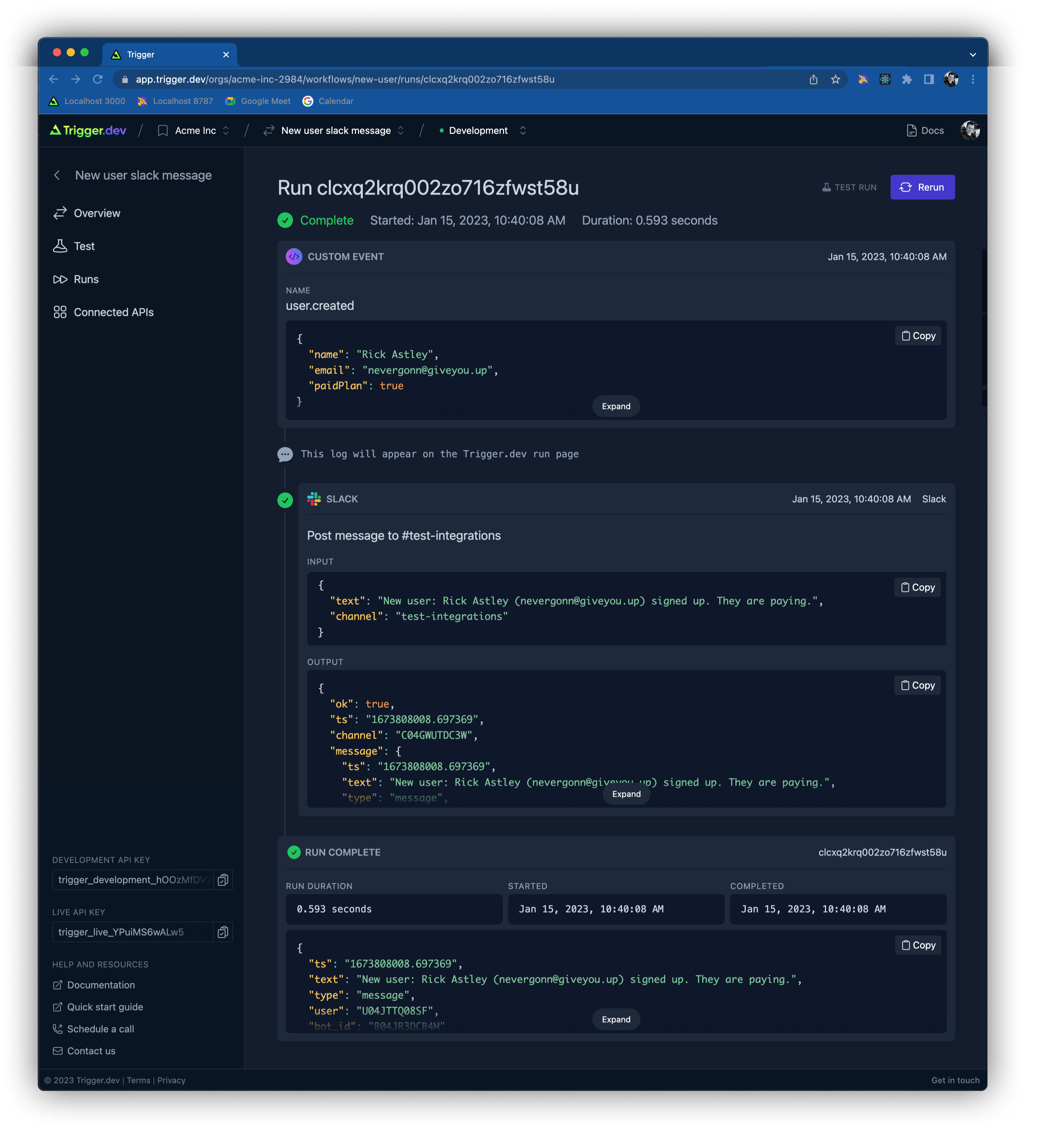
|
||||
|
||||
|
||||
|
||||
|
||||
|
||||
@@ -194,10 +193,11 @@ We are open source and love contributions!
|
||||
|
||||
# **🧘♂️ Self-hosting guide:**
|
||||
|
||||
_coming soon..._
|
||||
Please subscribe to the [GitHub issue](https://github.com/triggerdotdev/trigger.dev/issues/48) to be notified when it's live.
|
||||
|
||||
|
||||
|
||||
|
||||
# **📧 Support & contact:**
|
||||
|
||||
- Join our [Discord community](https://discord.gg/JtBAxBr2m3)
|
||||
|
||||
@@ -1,34 +0,0 @@
|
||||
# Mintlify Starter Kit
|
||||
|
||||
Click on `Use this template` to quickstarter your documentation setup with Mintlify. The starter kit contains examples including
|
||||
|
||||
- Guide pages
|
||||
- Navigation
|
||||
- Customizations
|
||||
- API Reference pages
|
||||
- Use of popular components
|
||||
|
||||
### 👩💻 Development
|
||||
|
||||
Run these from the root of the repository
|
||||
|
||||
```
|
||||
pnpm install --filter docs
|
||||
```
|
||||
|
||||
```
|
||||
pnpm run dev --filter docs
|
||||
```
|
||||
|
||||
Go to http://localhost:3050
|
||||
|
||||
### 😎 Publishing Changes
|
||||
|
||||
Changes will be deployed to production automatically after pushing to the default branch.
|
||||
|
||||
You can also preview changes using PRs, which generates a preview link of the docs.
|
||||
|
||||
#### Troubleshooting
|
||||
|
||||
- Mintlify dev isn't running - Run `mintlify install` it'll re-install dependencies.
|
||||
- Mintlify dev is updating really slowly - Run `mintlify clear` to clear the cache.
|
||||
@@ -1,204 +0,0 @@
|
||||
The following example combines WhatsApp and Slack to create a workflow that allows you to receive WhatsApp messages in Slack, and use a modal to compose a reply.
|
||||
|
||||
<CodeGroup>
|
||||
|
||||
```tsx whatsappToSlack.tsx
|
||||
/** @jsxImportSource jsx-slack */
|
||||
import { Trigger } from "@trigger.dev/sdk";
|
||||
import {
|
||||
events,
|
||||
sendText,
|
||||
getMediaUrl,
|
||||
MessageEventMessage,
|
||||
} from "@trigger.dev/whatsapp";
|
||||
import JSXSlack, {
|
||||
Actions,
|
||||
Blocks,
|
||||
Button,
|
||||
Section,
|
||||
Header,
|
||||
Context,
|
||||
Image,
|
||||
Modal,
|
||||
Input,
|
||||
Textarea,
|
||||
} from "jsx-slack";
|
||||
import * as slack from "@trigger.dev/slack";
|
||||
|
||||
const dateFormatter = new Intl.DateTimeFormat("en-US", {
|
||||
timeStyle: "short",
|
||||
dateStyle: "short",
|
||||
});
|
||||
|
||||
// this trigger listens for WhatsApp messages and sends them to Slack
|
||||
new Trigger({
|
||||
id: "whatsapp-to-slack",
|
||||
name: "WhatsApp: load messages",
|
||||
on: events.messageEvent({
|
||||
accountId: "<account id>",
|
||||
}),
|
||||
run: async (event, ctx) => {
|
||||
//this generates Slack blocks from the WhatsApp message
|
||||
const messageBody = await createMessageBody(event.message);
|
||||
|
||||
await slack.postMessage("jsx-test", {
|
||||
channelName: "whatsapp-support",
|
||||
//text appears in Slack notifications on mobile/desktop
|
||||
text: "How is your progress today?",
|
||||
//import and use JSXSlack to make creating rich messages much easier
|
||||
blocks: JSXSlack(
|
||||
<Blocks>
|
||||
<Header>From: {event.message.from}</Header>
|
||||
<Context>At: {dateFormatter.format(event.message.timestamp)}</Context>
|
||||
{messageBody}
|
||||
<Actions blockId="launch-modal">
|
||||
<Button value="reply" actionId="reply">
|
||||
Reply
|
||||
</Button>
|
||||
</Actions>
|
||||
</Blocks>
|
||||
),
|
||||
//pass the WhatsApp message to the next trigger
|
||||
metadata: {
|
||||
whatsAppMessage: event.message,
|
||||
},
|
||||
});
|
||||
},
|
||||
}).listen();
|
||||
```
|
||||
|
||||
```tsx replyButtonInteraction.tsx
|
||||
//this trigger creates a Slack modal when a user presses the Reply button
|
||||
new Trigger({
|
||||
id: "whatsapp-to-slack-modal",
|
||||
name: "WhatsApp: show message composer",
|
||||
on: slack.events.blockActionInteraction({
|
||||
blockId: "launch-modal",
|
||||
}),
|
||||
run: async (event, ctx) => {
|
||||
if (!event.trigger_id) {
|
||||
return;
|
||||
}
|
||||
|
||||
//get the action (pressing the reply button) and the original WhatsApp message
|
||||
const action = event.actions[0];
|
||||
const whatsAppMessage =
|
||||
event.message?.metadata?.event_payload.whatsAppMessage;
|
||||
|
||||
//generate Slack blocks from the WhatsApp message
|
||||
const messageBody = await createMessageBody(whatsAppMessage);
|
||||
|
||||
if (action.action_id === "reply" && action.type === "button") {
|
||||
//show a reply modal, with the original message and an input field for the reply
|
||||
await slack.openView(
|
||||
"Opening view",
|
||||
event.trigger_id,
|
||||
JSXSlack(
|
||||
<Modal title="Your reply" close="Cancel" callbackId="submit-message">
|
||||
<Header>Original message</Header>
|
||||
{messageBody}
|
||||
<Header>Your reply</Header>
|
||||
<Textarea
|
||||
name="message"
|
||||
label="Message"
|
||||
placeholder="Your message"
|
||||
maxLength={500}
|
||||
id="messageField"
|
||||
/>
|
||||
<Input type="submit" value="submit" />
|
||||
</Modal>
|
||||
),
|
||||
{
|
||||
onSubmit: "close",
|
||||
//pass the original WhatsApp message to the next trigger, and the original Slack message so we can thread replies
|
||||
metadata: {
|
||||
whatsAppMessage,
|
||||
thread_ts: event.message?.ts,
|
||||
},
|
||||
}
|
||||
);
|
||||
}
|
||||
},
|
||||
}).listen();
|
||||
```
|
||||
|
||||
```tsx replyModalSubmission.tsx
|
||||
//this trigger sends the reply from Slack to WhatsApp
|
||||
new Trigger({
|
||||
id: "whatsapp-composed-slack-message",
|
||||
name: "WhatsApp: send message from Slack",
|
||||
on: slack.events.viewSubmissionInteraction({
|
||||
callbackId: "submit-message",
|
||||
}),
|
||||
run: async (event, ctx) => {
|
||||
await ctx.logger.info("Modal submission", { event });
|
||||
|
||||
//the message from the input field in Slack
|
||||
const usersResponse = event.view.state?.values.messageField.message
|
||||
.value as string;
|
||||
|
||||
//get the data from the previous messages/panels
|
||||
const privateMetadata =
|
||||
event.view.private_metadata && JSON.parse(event.view.private_metadata);
|
||||
await ctx.logger.info("Private metadata", privateMetadata);
|
||||
const whatsAppMessage = privateMetadata?.whatsAppMessage;
|
||||
|
||||
if (!whatsAppMessage || !usersResponse) {
|
||||
await ctx.logger.error("No message or original message", { event });
|
||||
return;
|
||||
}
|
||||
|
||||
//send WhatsApp message
|
||||
await sendText("send-whatsapp", {
|
||||
fromId: "102119172798864",
|
||||
to: whatsAppMessage.from,
|
||||
text: usersResponse,
|
||||
});
|
||||
|
||||
//send message in the Slack thread
|
||||
await slack.postMessage("slack-reply", {
|
||||
channelName: "whatsapp-support",
|
||||
text: `Replied with: ${usersResponse}`,
|
||||
blocks: JSXSlack(
|
||||
<Blocks>
|
||||
<Header>Reply from @{event.user.username}</Header>
|
||||
<Context>
|
||||
At: {dateFormatter.format(new Date())} To: {whatsAppMessage.from}
|
||||
</Context>
|
||||
<Section>{usersResponse}</Section>
|
||||
</Blocks>
|
||||
),
|
||||
thread_ts: privateMetadata?.thread_ts,
|
||||
});
|
||||
|
||||
return event;
|
||||
},
|
||||
}).listen();
|
||||
|
||||
//creates different Slack blocks depending on the type of WhatsApp message (e.g. text, image, etc.)
|
||||
async function createMessageBody(message: MessageEventMessage) {
|
||||
switch (message.type) {
|
||||
case "text": {
|
||||
return <Section>{message.text.body}</Section>;
|
||||
}
|
||||
case "image": {
|
||||
const mediaUrl = await getMediaUrl(`getImageUrl`, message.image);
|
||||
return (
|
||||
<Image
|
||||
src={mediaUrl}
|
||||
alt={message.image.caption ?? ""}
|
||||
title={message.image.caption ?? ""}
|
||||
/>
|
||||
);
|
||||
}
|
||||
case "video": {
|
||||
const mediaUrl = await getMediaUrl(`getVideoUrl`, message.video);
|
||||
return <Section>{mediaUrl}</Section>;
|
||||
}
|
||||
default:
|
||||
return <Section>Unsupported message type: {message.type}</Section>;
|
||||
}
|
||||
}
|
||||
```
|
||||
|
||||
</CodeGroup>
|
||||
@@ -1,6 +0,0 @@
|
||||
---
|
||||
title: "Send Event"
|
||||
openapi: "POST /events"
|
||||
sidebarTitle: "Send Event"
|
||||
description: "Send a custom event to Trigger through the API."
|
||||
---
|
||||
@@ -1,28 +0,0 @@
|
||||
---
|
||||
title: "Changelog"
|
||||
description: "We release features and fixes weekly! See some of the changes we have made."
|
||||
---
|
||||
|
||||
## Feb 6 2023 Release
|
||||
|
||||
#### app.trigger.dev
|
||||
|
||||
- Improved the onboarding experience for new users, as well as users creating a new workflow.
|
||||
- Test editor now suggests example JSON for `customEvent` and `webhookEvent` actions.
|
||||
- Added a support widget to the bottom right of the screen.
|
||||
|
||||
#### @trigger.dev/sdk - v0.2.12
|
||||
|
||||
- Added `runOnce` and `runOnceLocalOnly` functions to support running custom idempotent actions. [Docs](/functions/run-once)
|
||||
- We will now serialize and send the Zod schemas for `customEvent` and `webhookEvent` to trigger.dev to support better test JSON generation (using `json-schema-faker`).
|
||||
|
||||
#### @trigger.dev/slack - v0.1.19
|
||||
|
||||
- Added support for opening modal views and handling view submissions. See [openView](/integrations/apis/slack/actions/open-view) and [viewSubmissionInteraction](/integrations/apis/slack/events/view-submission-interaction) docs for more info.
|
||||
- Added support for triggering on BlockKit actions and posting responses. See [blockActionInteraction](/integrations/apis/slack/events/block-action-interaction) and [postMessageResponse](/integrations/apis/slack/actions/post-message-response) docs for more info.
|
||||
- Added ability to add reactions to messages. See [addReaction](/integrations/apis/slack/actions/add-reaction) docs for more info.
|
||||
- You can now post a message in a thread using the `thread_ts` option in [postMessage](/integrations/apis/slack/actions/post-message).
|
||||
|
||||
#### @trigger.dev/whatsapp - v0.1.17
|
||||
|
||||
Initial release of our WhatsApp integration. Includes support for sending and receiving messages. See the [docs](/integrations/apis/whatsapp) for more info.
|
||||
@@ -1,26 +0,0 @@
|
||||
---
|
||||
title: "Example workflows"
|
||||
sidebarTitle: "Overview"
|
||||
description: "Example workflows to use in your projects."
|
||||
---
|
||||
|
||||
Not sure what to build? Take a look through our examples for inspiration.
|
||||
You can use these workflows in your product by following the instructions on each page.
|
||||
|
||||
<CardGroup>
|
||||
<Card title="GitHub" icon="github" href="/examples/github">
|
||||
When a GitHub repo is starred, post information about the user to Slack
|
||||
</Card>
|
||||
<Card title="Shopify" icon="shopify" href="/examples/shopify">
|
||||
Create a new product in my Shopify store.
|
||||
</Card>
|
||||
<Card title="Slack" icon="slack" href="/examples/slack">
|
||||
Post to Slack when a GitHub issue is created or modified.
|
||||
</Card>
|
||||
<Card title="Resend" icon="envelope" href="/examples/resend">
|
||||
Create a welcome email drip campaign.
|
||||
</Card>
|
||||
<Card title="WhatsApp" icon="whatsapp" href="/examples/whatsapp">
|
||||
Listen for WhatsApp messages and reply.
|
||||
</Card>
|
||||
</CardGroup>
|
||||
@@ -1,120 +0,0 @@
|
||||
---
|
||||
title: "GitHub"
|
||||
sidebarTitle: "GitHub"
|
||||
description: "Here are some example workflows you could create using the GitHub integration."
|
||||
---
|
||||
|
||||
You can explore all the supported GitHub functions [here](/integrations/apis/github/events/push).
|
||||
|
||||
### Example workflows:
|
||||
|
||||
## When a GitHub repo is starred, post information about the user to Slack
|
||||
|
||||
Integrations required: GitHub, Slack
|
||||
|
||||
Packages required:
|
||||
|
||||
<Tabs>
|
||||
<Tab title="npm">
|
||||
|
||||
```bash
|
||||
npm install @trigger.dev/github @trigger.dev/slack
|
||||
```
|
||||
|
||||
</Tab>
|
||||
<Tab title="pnpm">
|
||||
|
||||
```bash
|
||||
pnpm add @trigger.dev/github @trigger.dev/slack
|
||||
```
|
||||
|
||||
</Tab>
|
||||
<Tab title="yarn">
|
||||
|
||||
```bash
|
||||
yarn add @trigger.dev/github @trigger.dev/slack
|
||||
```
|
||||
|
||||
</Tab>
|
||||
</Tabs>
|
||||
|
||||
Workflow code:
|
||||
|
||||
```ts
|
||||
import { Trigger } from "@trigger.dev/sdk";
|
||||
import * as github from "@trigger.dev/github";
|
||||
import * as slack from "@trigger.dev/slack";
|
||||
|
||||
new Trigger({
|
||||
id: "new-github-star-to-slack",
|
||||
name: "New GitHub Star: triggerdotdev/trigger.dev",
|
||||
apiKey: "<my_api_key>",
|
||||
on: github.events.newStarEvent({
|
||||
repo: "triggerdotdev/trigger.dev",
|
||||
}),
|
||||
run: async (event) => {
|
||||
await slack.postMessage("github-stars", {
|
||||
channelName: "github-stars",
|
||||
text: `New GitHub star from \n<${event.sender.html_url}|${event.sender.login}>`,
|
||||
});
|
||||
},
|
||||
}).listen();
|
||||
```
|
||||
|
||||
## When a GitHub issue is created or modified, post to Slack
|
||||
|
||||
Integrations required: GitHub, Slack
|
||||
|
||||
Packages required:
|
||||
|
||||
<Tabs>
|
||||
<Tab title="npm">
|
||||
|
||||
```bash
|
||||
npm install @trigger.dev/github @trigger.dev/slack
|
||||
```
|
||||
|
||||
</Tab>
|
||||
<Tab title="pnpm">
|
||||
|
||||
```bash
|
||||
pnpm add @trigger.dev/github @trigger.dev/slack
|
||||
```
|
||||
|
||||
</Tab>
|
||||
<Tab title="yarn">
|
||||
|
||||
```bash
|
||||
yarn add @trigger.dev/github @trigger.dev/slack
|
||||
```
|
||||
|
||||
</Tab>
|
||||
</Tabs>
|
||||
|
||||
Workflow code:
|
||||
|
||||
```ts
|
||||
import { Trigger } from "@trigger.dev/sdk";
|
||||
import * as github from "@trigger.dev/github";
|
||||
import * as slack from "@trigger.dev/slack";
|
||||
|
||||
new Trigger({
|
||||
id: "my-workflow-1",
|
||||
name: "Posts to Slack when GitHub Issue created or modified",
|
||||
apiKey: "<my_api_key>",
|
||||
on: github.events.issueEvent({
|
||||
repo: "my-github-org/my-github-repo",
|
||||
}),
|
||||
|
||||
run: async (event, ctx) => {
|
||||
const response = await slack.postMessage("send-to-slack", {
|
||||
channelName: "my-slack-channel-name",
|
||||
text: `A new issue has been created or modified. ${event.action}`,
|
||||
});
|
||||
|
||||
return response.message;
|
||||
},
|
||||
}).listen();
|
||||
```
|
||||
|
||||
You can explore all the supported GitHub functions [here](/integrations/apis/github/events/push).
|
||||
@@ -1,122 +0,0 @@
|
||||
---
|
||||
title: "Resend"
|
||||
sidebarTitle: "Resend"
|
||||
description: "Here are some example workflows you could create using the Resend integration."
|
||||
---
|
||||
|
||||
<Tip>
|
||||
Resend.com is currently in private beta but you can request early access
|
||||
[here](https://resend.com/).
|
||||
</Tip>
|
||||
|
||||
### Example workflows:
|
||||
|
||||
## Welcome email drip campaign
|
||||
|
||||
This workflow will get triggered and a Slack notification and welcome email will be sent straight away.
|
||||
1 day later we check if the user has completed onboarding, if they have, they get a 'tips' email, otherwise they get a re-engagement email.
|
||||
|
||||
Integrations required: Resend, Slack
|
||||
|
||||
Packages required:
|
||||
|
||||
<Tabs>
|
||||
<Tab title="npm">
|
||||
|
||||
```bash
|
||||
npm install @trigger.dev/resend @trigger.dev/slack
|
||||
```
|
||||
|
||||
</Tab>
|
||||
<Tab title="pnpm">
|
||||
|
||||
```bash
|
||||
pnpm add @trigger.dev/resend @trigger.dev/slack
|
||||
```
|
||||
|
||||
</Tab>
|
||||
<Tab title="yarn">
|
||||
|
||||
```bash
|
||||
yarn add @trigger.dev/resend @trigger.dev/slack
|
||||
```
|
||||
|
||||
</Tab>
|
||||
</Tabs>
|
||||
|
||||
Workflow code:
|
||||
|
||||
```ts
|
||||
import { customEvent, Trigger, sendEvent } from "@trigger.dev/sdk";
|
||||
import * as resend from "@trigger.dev/resend";
|
||||
import * as slack from "@trigger.dev/slack";
|
||||
import React from "react";
|
||||
import { z } from "zod";
|
||||
import { getUser } from "../db";
|
||||
import { InactiveEmail, TipsEmail, WelcomeEmail } from "./email-templates";
|
||||
|
||||
new Trigger({
|
||||
id: "welcome-email-campaign",
|
||||
name: "Welcome email drip campaign",
|
||||
apiKey: "<my_api_key>",
|
||||
on: customEvent({
|
||||
name: "user.created",
|
||||
schema: z.object({
|
||||
userId: z.string(),
|
||||
}),
|
||||
}),
|
||||
async run(event, context) {
|
||||
//get the user data from the database
|
||||
const user = await getUser(event.userId);
|
||||
|
||||
await slack.postMessage("send-to-slack", {
|
||||
channelName: "new-users",
|
||||
text: `New user signed up: ${user.name} (${user.email})`,
|
||||
});
|
||||
|
||||
//Send the first email
|
||||
const welcomeResponse = await resend.sendEmail("welcome-email", {
|
||||
from: "Trigger.dev <james@email.trigger.dev>",
|
||||
replyTo: "James <james@trigger.dev>",
|
||||
to: user.email,
|
||||
subject: "Welcome to Trigger.dev",
|
||||
react: <WelcomeEmail name={user.name} />,
|
||||
});
|
||||
await context.logger.debug(
|
||||
`Sent welcome email to ${welcomeResponse.to} with id ${welcomeResponse.id}`
|
||||
);
|
||||
|
||||
//wait 1 day, check if the user has created a workflow and send the appropriate email
|
||||
await context.waitFor("wait-a-while", { days: 1 });
|
||||
const updatedUser = await getUser(event.userId);
|
||||
|
||||
if (updatedUser.hasOnboarded) {
|
||||
await resend.sendEmail("onboarding-complete", {
|
||||
from: "Trigger.dev <james@email.trigger.dev>",
|
||||
replyTo: "James <james@trigger.dev>",
|
||||
to: updatedUser.email,
|
||||
subject: "Pro tips for workflows",
|
||||
react: <TipsEmail name={updatedUser.name} />,
|
||||
});
|
||||
} else {
|
||||
await resend.sendEmail("onboarding-incomplete", {
|
||||
from: "Trigger.dev <james@email.trigger.dev>",
|
||||
replyTo: "James <james@trigger.dev>",
|
||||
to: updatedUser.email,
|
||||
subject: "Help with your first workflow",
|
||||
react: <InactiveEmail name={updatedUser.name} />,
|
||||
});
|
||||
}
|
||||
},
|
||||
}).listen();
|
||||
```
|
||||
|
||||
<iframe
|
||||
width="100%"
|
||||
height="440"
|
||||
src="https://www.youtube.com/embed/aFlwD0frvnQ?rel=0"
|
||||
title="YouTube video player"
|
||||
frameborder="0"
|
||||
allow="accelerometer; autoplay; clipboard-write; encrypted-media; gyroscope; picture-in-picture; web-share"
|
||||
allowfullscreen
|
||||
></iframe>
|
||||
@@ -1,235 +0,0 @@
|
||||
---
|
||||
title: "Shopify"
|
||||
sidebarTitle: "Shopify"
|
||||
description: "Here are some example workflows you could create using the Shopify integration."
|
||||
---
|
||||
|
||||
### Example workflows:
|
||||
|
||||
## Create a new product
|
||||
|
||||
Integrations required: Shopify
|
||||
|
||||
Packages required:
|
||||
|
||||
<Tabs>
|
||||
<Tab title="npm">
|
||||
|
||||
```bash
|
||||
npm install @trigger.dev/shopify
|
||||
```
|
||||
|
||||
</Tab>
|
||||
<Tab title="pnpm">
|
||||
|
||||
```bash
|
||||
pnpm add @trigger.dev/shopify
|
||||
```
|
||||
|
||||
</Tab>
|
||||
<Tab title="yarn">
|
||||
|
||||
```bash
|
||||
yarn add @trigger.dev/shopify
|
||||
```
|
||||
|
||||
</Tab>
|
||||
</Tabs>
|
||||
|
||||
Workflow code:
|
||||
|
||||
```ts
|
||||
import { Trigger, customEvent } from "@trigger.dev/sdk";
|
||||
import { z } from "zod";
|
||||
import * as shopify from "@trigger.dev/shopify";
|
||||
|
||||
new Trigger({
|
||||
id: "shopify-products",
|
||||
name: "Shopify products",
|
||||
apiKey: "<my_api_key>",
|
||||
on: customEvent({
|
||||
name: "shopify.products",
|
||||
schema: z.object({}),
|
||||
}),
|
||||
run: async (event, ctx) => {
|
||||
const newProduct = await shopify.createProduct("create-product", {
|
||||
descriptionHtml: "This is my brilliant <i>product description</i>.",
|
||||
title: `Fantastic product ${Math.floor(Math.random() * 1000)}`,
|
||||
productType: "t-shirt",
|
||||
vendor: "Nike",
|
||||
options: ["Color", "Size"],
|
||||
standardizedProductType: {
|
||||
productTaxonomyNodeId: "gid://shopify/ProductTaxonomyNode/352",
|
||||
},
|
||||
variants: [
|
||||
{
|
||||
price: "99.99",
|
||||
sku: "variant-1",
|
||||
inventoryItem: {
|
||||
tracked: true,
|
||||
},
|
||||
inventoryQuantities: [
|
||||
{
|
||||
availableQuantity: 1,
|
||||
locationId: "gid://shopify/Location/76187369773",
|
||||
},
|
||||
],
|
||||
options: ["Maroon", "Tiny"],
|
||||
},
|
||||
],
|
||||
});
|
||||
|
||||
const newImages = await shopify.appendProductImages("append-images", {
|
||||
id: newProduct.id,
|
||||
images: [
|
||||
{
|
||||
src: "https://via.placeholder.com/600/92c952.png",
|
||||
altText: "Image 1",
|
||||
},
|
||||
{
|
||||
src: "https://via.placeholder.com/600/d32776.png",
|
||||
altText: "Image 2",
|
||||
},
|
||||
],
|
||||
});
|
||||
|
||||
return newProduct;
|
||||
},
|
||||
}).listen();
|
||||
```
|
||||
|
||||
## Update a product
|
||||
|
||||
Integrations required: Shopify
|
||||
|
||||
```ts
|
||||
import { Trigger, customEvent } from "@trigger.dev/sdk";
|
||||
import { z } from "zod";
|
||||
import * as shopify from "@trigger.dev/shopify";
|
||||
|
||||
new Trigger({
|
||||
id: "shopify-update-product",
|
||||
name: "Shopify update product",
|
||||
apiKey: "<my_api_key>",
|
||||
on: customEvent({
|
||||
name: "product.update",
|
||||
schema: z.object({
|
||||
id: z.string(),
|
||||
}),
|
||||
}),
|
||||
run: async (event, ctx) => {
|
||||
const product = await shopify.updateProduct("update-product", {
|
||||
id: event.id,
|
||||
descriptionHtml: `<h1>Awesome product title</h1><p>With incredible description</p>`,
|
||||
});
|
||||
|
||||
return product;
|
||||
},
|
||||
}).listen();
|
||||
```
|
||||
|
||||
## Add a product to a collection
|
||||
|
||||
Integrations required: Shopify
|
||||
|
||||
```ts
|
||||
import { Trigger, customEvent } from "@trigger.dev/sdk";
|
||||
import { z } from "zod";
|
||||
import * as shopify from "@trigger.dev/shopify";
|
||||
|
||||
new Trigger({
|
||||
id: "shopify-add-product-to-collection",
|
||||
name: "Shopify add product to collection",
|
||||
apiKey: "<my_api_key>",
|
||||
on: customEvent({
|
||||
name: "product.new",
|
||||
schema: z.object({
|
||||
id: z.string(),
|
||||
}),
|
||||
}),
|
||||
run: async (event, ctx) => {
|
||||
const collection = await shopify.addProductsToCollection(
|
||||
"add-products-to-collection",
|
||||
{
|
||||
collectionId: "gid://shopify/Collection/431864578349",
|
||||
productIds: [event.id],
|
||||
}
|
||||
);
|
||||
|
||||
return collection;
|
||||
},
|
||||
}).listen();
|
||||
```
|
||||
|
||||
## Create new product variants with images
|
||||
|
||||
Integrations required: Shopify
|
||||
|
||||
```ts
|
||||
import { Trigger, customEvent } from "@trigger.dev/sdk";
|
||||
import { z } from "zod";
|
||||
import * as shopify from "@trigger.dev/shopify";
|
||||
|
||||
const sizes = ["Small", "Medium", "Large"];
|
||||
const colors = [
|
||||
"Red",
|
||||
"Orange",
|
||||
"Yellow",
|
||||
"Green",
|
||||
"Blue",
|
||||
"Purple",
|
||||
"Pink",
|
||||
"Brown",
|
||||
"Black",
|
||||
"White",
|
||||
"Gray",
|
||||
"Silver",
|
||||
"Gold",
|
||||
"Beige",
|
||||
];
|
||||
const materials = ["Cotton", "Polyester", "Lycra", "Wool", "Silk", "Leather"];
|
||||
|
||||
function pickRandom(array: string[]): string {
|
||||
return array[Math.floor(Math.random() * array.length)];
|
||||
}
|
||||
|
||||
new Trigger({
|
||||
id: "shopify-product-variants",
|
||||
name: "Shopify product variants",
|
||||
apiKey: "<my_api_key>",
|
||||
on: customEvent({
|
||||
name: "shopify.product-variants",
|
||||
schema: z.object({}),
|
||||
}),
|
||||
run: async (event, ctx) => {
|
||||
await ctx.logger.info("Get Shopify products variants");
|
||||
|
||||
const results = await shopify.searchProductVariants(
|
||||
"get-shopify-variants",
|
||||
{
|
||||
filter: {
|
||||
productId: ["gid://shopify/Product/8098295546157"],
|
||||
sku: ["variant-1"],
|
||||
},
|
||||
}
|
||||
);
|
||||
|
||||
const newVariant = await shopify.createProductVariant("create-variant", {
|
||||
productId: results.productVariants[0].product.id,
|
||||
inventoryQuantities: [
|
||||
{
|
||||
availableQuantity: 10,
|
||||
locationId: "gid://shopify/Location/76187369773",
|
||||
},
|
||||
],
|
||||
price: "12.34",
|
||||
sku: `variant-${Math.floor(Math.random() * 1000)}`,
|
||||
options: [pickRandom(sizes), pickRandom(materials)],
|
||||
});
|
||||
|
||||
await ctx.logger.debug("Debug message");
|
||||
|
||||
return newVariant;
|
||||
},
|
||||
}).listen();
|
||||
```
|
||||
@@ -1,63 +0,0 @@
|
||||
---
|
||||
title: "Slack"
|
||||
sidebarTitle: "Slack"
|
||||
description: "Here are some example workflows you could create using the Slack integration."
|
||||
---
|
||||
|
||||
### Example workflows:
|
||||
|
||||
## Post to Slack when a GitHub issue is created or modified
|
||||
|
||||
Integrations required: Slack, GitHub
|
||||
|
||||
Packages required:
|
||||
|
||||
<Tabs>
|
||||
<Tab title="npm">
|
||||
|
||||
```bash
|
||||
npm install @trigger.dev/slack @trigger.dev/github
|
||||
```
|
||||
|
||||
</Tab>
|
||||
<Tab title="pnpm">
|
||||
|
||||
```bash
|
||||
pnpm add @trigger.dev/slack @trigger.dev/github
|
||||
```
|
||||
|
||||
</Tab>
|
||||
<Tab title="yarn">
|
||||
|
||||
```bash
|
||||
yarn add @trigger.dev/slack @trigger.dev/github
|
||||
```
|
||||
|
||||
</Tab>
|
||||
</Tabs>
|
||||
|
||||
Workflow code:
|
||||
|
||||
```ts
|
||||
import { Trigger, customEvent } from "@trigger.dev/sdk";
|
||||
import * as slack from "@trigger.dev/slack";
|
||||
import * as github from "@trigger.dev/github";
|
||||
import { z } from "zod";
|
||||
|
||||
new Trigger({
|
||||
id: "my-workflow-1",
|
||||
name: "Posts to Slack when GitHub Issue created or modified",
|
||||
apiKey: "<my_api_key>",
|
||||
on: github.events.issueEvent({
|
||||
repo: "my-github-org/my-github-repo",
|
||||
}),
|
||||
run: async (event, ctx) => {
|
||||
const response = await slack.postMessage("send-to-slack", {
|
||||
channelName: "my-slack-channel-name",
|
||||
text: `A new issue has been created or modified. ${event.action}`,
|
||||
});
|
||||
|
||||
return response.message;
|
||||
},
|
||||
}).listen();
|
||||
```
|
||||
@@ -1,78 +0,0 @@
|
||||
---
|
||||
title: "WhatsApp"
|
||||
sidebarTitle: "WhatsApp"
|
||||
description: "Here are some example workflows you could create using the WhatsApp integration."
|
||||
---
|
||||
|
||||
For more information about the WhatsApp integration, check out the [integration page](/integrations/apis/whatsapp).
|
||||
|
||||
### Example workflows:
|
||||
|
||||
## Listen for WhatsApp messages and reply
|
||||
|
||||
Integrations required: WhatsApp
|
||||
|
||||
Packages required:
|
||||
|
||||
<Tabs>
|
||||
<Tab title="npm">
|
||||
|
||||
```bash
|
||||
npm install @trigger.dev/whatsapp
|
||||
```
|
||||
|
||||
</Tab>
|
||||
<Tab title="pnpm">
|
||||
|
||||
```bash
|
||||
pnpm add @trigger.dev/whatsapp
|
||||
```
|
||||
|
||||
</Tab>
|
||||
<Tab title="yarn">
|
||||
|
||||
```bash
|
||||
yarn add @trigger.dev/whatsapp
|
||||
```
|
||||
|
||||
</Tab>
|
||||
</Tabs>
|
||||
|
||||
Workflow code:
|
||||
|
||||
```ts
|
||||
import { Trigger } from "@trigger.dev/sdk";
|
||||
import { events, sendReaction, sendText } from "@trigger.dev/whatsapp";
|
||||
|
||||
new Trigger({
|
||||
id: "whatsapp-webhook",
|
||||
name: "Listen for WhatsApp messages and reply",
|
||||
apiKey: "<my_api_key>",
|
||||
//this listens for all WhatsApp messages sent to your WhatsApp Business account
|
||||
on: events.messageEvent({
|
||||
accountId: "<your_account_id>",
|
||||
}),
|
||||
run: async (event, ctx) => {
|
||||
//these logs will appear on the run page
|
||||
await ctx.logger.info(`Message data`, event.message);
|
||||
await ctx.logger.info(`Phone number`, event.contacts[0]);
|
||||
|
||||
//add a 🥰 reaction to the original message
|
||||
const reactionResponse = await sendReaction("reaction", {
|
||||
fromId: event.metadata.phone_number_id,
|
||||
to: event.message.from,
|
||||
isReplyTo: event.message.id,
|
||||
emoji: "🥰",
|
||||
});
|
||||
|
||||
//send a text message in response
|
||||
const textResponse = await sendText("text-msg", {
|
||||
fromId: event.metadata.phone_number_id,
|
||||
to: event.message.from,
|
||||
text: "Hello! This is a text sent automatically from https://www.trigger.dev",
|
||||
});
|
||||
|
||||
//we support all other types of WhatsApp messages (audio, video, document, location, etc)
|
||||
},
|
||||
}).listen();
|
||||
```
|
||||
@@ -1,91 +0,0 @@
|
||||
---
|
||||
title: "Delays"
|
||||
sidebarTitle: "Delays"
|
||||
description: "You can trigger workflow steps to fire before and after a delay. There are 2 types of delay, waitFor and waitUntil."
|
||||
---
|
||||
|
||||
## `waitFor` delay
|
||||
|
||||
`waitFor` takes a unique key and an object that sets the desired time as a key value pair.
|
||||
|
||||
```ts
|
||||
await ctx.waitFor("wait-for-1", { seconds: 30 });
|
||||
```
|
||||
|
||||
<Note>Reminder: Ensure all keys are unique across all triggers.</Note>
|
||||
|
||||
### Example
|
||||
|
||||
This example posts a message to Slack after a 30 second delay:
|
||||
|
||||
```ts
|
||||
import { Trigger, customEvent } from "@trigger.dev/sdk";
|
||||
import * as slack from "@trigger.dev/slack";
|
||||
import * as github from "@trigger.dev/github";
|
||||
import { z } from "zod";
|
||||
|
||||
new Trigger({
|
||||
id: "wait-for-example",
|
||||
name: "Post to Slack after delay",
|
||||
apiKey: "<my_api_key>",
|
||||
on: customEvent({
|
||||
name: "waitForExample",
|
||||
schema: z.object({
|
||||
id: z.string(),
|
||||
}),
|
||||
}),
|
||||
run: async (event, ctx) => {
|
||||
await ctx.waitFor("initial-wait", { seconds: 30 });
|
||||
|
||||
const response = await slack.postMessage("send-to-slack", {
|
||||
channel: "my-slack-channel",
|
||||
text: `This message posted after a 30 second delay.`,
|
||||
});
|
||||
|
||||
return response.message;
|
||||
},
|
||||
}).listen();
|
||||
```
|
||||
|
||||
## `waitUntil` delay
|
||||
|
||||
`waitUntil` takes a unique key and a date function to set desired time.
|
||||
|
||||
```ts
|
||||
await ctx.waitUntil("wait-until-1", new Date(Date.now() + 1000 * 60 * 1));
|
||||
```
|
||||
|
||||
<Note>Reminder: Ensure all keys are unique across all triggers.</Note>
|
||||
|
||||
### Example
|
||||
|
||||
This example posts a message to Slack 1 hour after the workflow triggers:
|
||||
|
||||
```ts
|
||||
import { Trigger, customEvent } from "@trigger.dev/sdk";
|
||||
import * as slack from "@trigger.dev/slack";
|
||||
import * as github from "@trigger.dev/github";
|
||||
import { z } from "zod";
|
||||
|
||||
new Trigger({
|
||||
id: "wait-until-example",
|
||||
name: "Post to Slack after 1hr delay",
|
||||
apiKey: "<my_api_key>",
|
||||
on: customEvent({
|
||||
name: "waitUntilExample",
|
||||
schema: z.object({
|
||||
id: z.string(),
|
||||
}),
|
||||
}),
|
||||
run: async (event, ctx) => {
|
||||
await ctx.waitUntil("wait-until", new Date(Date.now() + 1000 * 60 * 1));
|
||||
|
||||
const response = await slack.postMessage("send-to-slack", {
|
||||
channel: "my-slack-channel",
|
||||
text: `This message posted after a 30 second delay.`,
|
||||
});
|
||||
|
||||
return response.message;
|
||||
},
|
||||
}).listen();
|
||||
```
|
||||
@@ -1,257 +0,0 @@
|
||||
---
|
||||
title: "Generic Fetch"
|
||||
sidebarTitle: "Fetch"
|
||||
description: "A generic fetch function that can be used to call any HTTP endpoint"
|
||||
---
|
||||
|
||||
## Why use our fetch?
|
||||
|
||||
The `fetch` function provided by the trigger.dev SDK is a generic function that can be used to call any HTTP endpoint. It is designed to be used inside a `Trigger.run` function, and gives you the following benefits over using the standard [fetch](https://developer.mozilla.org/en-US/docs/Web/API/Fetch_API) API:
|
||||
|
||||
- We automatically retry with exponential back off (this can be configured with the options param)
|
||||
- The request and response are displayed in your Trigger.dev run dashbaord for easy debugging
|
||||
- We automatically parse the response body as JSON and provide it as `body` on the response (and typed if you give provide a [responseSchema](/#response))
|
||||
- We will retry the request reliably, even if your workflow is stopped, e.g. you deploy in the middle of a run. See [Resumability](/guides/resumability) for more information.
|
||||
|
||||
## Usage
|
||||
|
||||
A `fetch` function is available to use inside a `Trigger.run` function through the `context` argument, and should be familiar for anyone who has used the standard [fetch](https://developer.mozilla.org/en-US/docs/Web/API/Fetch_API) API, with a few modifications.
|
||||
|
||||
```ts
|
||||
import { Trigger } from "@trigger.dev/sdk";
|
||||
|
||||
new Trigger({
|
||||
id: "fetch-example",
|
||||
name: "Fetch Example",
|
||||
on: customEvent({
|
||||
name: "example.fetch",
|
||||
}),
|
||||
run: async (event, ctx) => {
|
||||
await ctx.fetch("Example Key", "http://httpbin.org/get");
|
||||
},
|
||||
}).listen();
|
||||
```
|
||||
|
||||
Notice the first parameter to `fetch` is a `key` that is used to identify this call to fetch to support resumability. Please see the [Resumability](/guides/resumability) guide for more information.
|
||||
|
||||
You can also import `fetch` and use it outside of a `Trigger.run` function:
|
||||
|
||||
```ts httpBin.ts
|
||||
import { fetch } from "@trigger.dev/sdk";
|
||||
|
||||
export function httpBinGet() {
|
||||
return fetch("Example Key", "http://httpbin.org/get");
|
||||
}
|
||||
```
|
||||
|
||||
Now you can use the exported `httpBinGet` function inside your `Trigger.run` function:
|
||||
|
||||
```ts
|
||||
import { Trigger } from "@trigger.dev/sdk";
|
||||
import { httpBinGet } from "./httpBin";
|
||||
|
||||
new Trigger({
|
||||
id: "fetch-example",
|
||||
name: "Fetch Example",
|
||||
on: customEvent({
|
||||
name: "example.fetch",
|
||||
}),
|
||||
run: async (event, ctx) => {
|
||||
await httpBinGet();
|
||||
},
|
||||
}).listen();
|
||||
```
|
||||
|
||||
This is useful if you want to wrap `fetch` to provide an SDK like experience inside your workflows.
|
||||
|
||||
<Warning>
|
||||
Calling `fetch` when not inside of a workflow run will result in a thrown
|
||||
Error.
|
||||
</Warning>
|
||||
|
||||
## Response
|
||||
|
||||
<Tip>
|
||||
Make sure to check `response.ok`, as non-2xx status codes will not throw an
|
||||
error and will instead return a response with `ok` set to `false`.
|
||||
</Tip>
|
||||
|
||||
The return value of `fetch` is a similar to a normal fetch response, but we will automatically parse the response body as JSON and provide it as `body`, like so:
|
||||
|
||||
```ts
|
||||
const response = await ctx.fetch("Example Key", "http://httpbin.org/get");
|
||||
|
||||
if (response.body) {
|
||||
console.log(response.body.url); // http://httpbin.org/get
|
||||
}
|
||||
```
|
||||
|
||||
By default, the `body` is typed as `any`, but you can provide a [Zod](/guides/zod) schema to validate the response body and get a more specific type:
|
||||
|
||||
```ts
|
||||
import { z } from "zod";
|
||||
|
||||
const response = await ctx.fetch("Get HTTPBin", "http://httpbin.org/get", {
|
||||
responseSchema: z.object({
|
||||
url: z.string(),
|
||||
origin: z.string(),
|
||||
headers: z.record(z.string()),
|
||||
}),
|
||||
});
|
||||
```
|
||||
|
||||
Now the `body` will be typed as:
|
||||
|
||||
```ts
|
||||
{
|
||||
url: string;
|
||||
origin: string;
|
||||
headers: Record<string, string>;
|
||||
}
|
||||
```
|
||||
|
||||
It's okay to not be comprehensive with the schema, as long as the response body matches the schema, it will be valid. Do note that any properties not included in the schema will be excluded, unless you use `.passthrough()`:
|
||||
|
||||
```ts
|
||||
const response = await ctx.fetch("Get HTTPBin", "http://httpbin.org/get", {
|
||||
responseSchema: z.object({
|
||||
url: z.string(),
|
||||
origin: z.string(),
|
||||
headers: z.record(z.string()),
|
||||
}),
|
||||
});
|
||||
|
||||
console.log(response.body); // Only includes url, origin, and headers
|
||||
|
||||
// Using passthrough():
|
||||
const response = await ctx.fetch("Get HTTPBin", "http://httpbin.org/get", {
|
||||
responseSchema: z
|
||||
.object({
|
||||
url: z.string(),
|
||||
origin: z.string(),
|
||||
headers: z.record(z.string()),
|
||||
})
|
||||
.passthrough(),
|
||||
});
|
||||
|
||||
console.log(response.body); // Includes url, origin, headers, and everything else
|
||||
```
|
||||
|
||||
<Note>
|
||||
The fetch function currently only supports JSON request and response bodies.
|
||||
</Note>
|
||||
|
||||
## Secret values
|
||||
|
||||
If you are using a header with a secret value, you can use our `secureString` [tagged template](https://developer.mozilla.org/en-US/docs/Web/JavaScript/Reference/Template_literals#tagged_templates) to ensure that the value is not logged in the trigger.dev logs:
|
||||
|
||||
```ts
|
||||
import { Trigger, secureString } from "@trigger.dev/sdk";
|
||||
|
||||
new Trigger({
|
||||
id: "fetch-example",
|
||||
name: "Fetch Example",
|
||||
on: customEvent({
|
||||
name: "example.fetch",
|
||||
}),
|
||||
run: async (event, ctx) => {
|
||||
await ctx.fetch("🔑 Secret API", "http://httpbin.org/post", {
|
||||
method: "POST",
|
||||
headers: {
|
||||
"Content-Type": "application/json",
|
||||
Authorization: secureString`Bearer ${process.env.SECRET_API_KEY}`,
|
||||
},
|
||||
});
|
||||
},
|
||||
}).listen();
|
||||
```
|
||||
|
||||
Which will show in the trigger.dev app as:
|
||||
|
||||

|
||||
|
||||
## Retrying
|
||||
|
||||
By default, we will retry a failed request up to 10 times if it has one of the following status codes: `408`, `429`, `500`, `502`, `503`, `504`. You can override this behavior by providing a `retry` option:
|
||||
|
||||
```ts
|
||||
await ctx.fetch("Example Key", "http://httpbin.org/get", {
|
||||
retry: {
|
||||
maxAttempts: 5,
|
||||
statusCodes: [408, 429, 500, 502, 503, 504, 521, 522, 524],
|
||||
minTimeout: 1000,
|
||||
maxTimeout: 10000,
|
||||
factor: 1.2,
|
||||
},
|
||||
});
|
||||
```
|
||||
|
||||
| Property | Description | Default |
|
||||
| ----------- | ---------------------------------------- | ---------------------------------------- |
|
||||
| enabled | Enables retrying of failed requests | true |
|
||||
| factor | The exponential factor of backoff | 1.8 |
|
||||
| minTimeout | The minimum amount of ms between retries | 1000 |
|
||||
| maxTimeout | The maximum amount of ms between retries | 60000 |
|
||||
| statusCodes | The HTTP Status Codes that are retryable | `408`, `429`, `500`, `502`, `503`, `504` |
|
||||
|
||||
If you'd like to disable retrying, simple pass in the `retry` option with `enabled` set to `false`:
|
||||
|
||||
```ts
|
||||
await ctx.fetch("Example Key", "http://httpbin.org/get", {
|
||||
retry: {
|
||||
enabled: false,
|
||||
},
|
||||
});
|
||||
```
|
||||
|
||||
## Params
|
||||
|
||||
<ParamField path="key" type="string" required={true}>
|
||||
A unique string. Please see the [Keys and Resumability](/guides/resumability)
|
||||
doc for more info.
|
||||
</ParamField>
|
||||
|
||||
<ParamField path="url" type="string | URL" required={true}>
|
||||
The URL to fetch.
|
||||
</ParamField>
|
||||
|
||||
<ParamField path="options" type="object" required={false}>
|
||||
<Expandable title="properties">
|
||||
<ParamField path="method" type="string" required={false}>
|
||||
The HTTP method to use. Defaults to `GET`.
|
||||
</ParamField>
|
||||
|
||||
<ParamField path="headers" type="record" required={false}>
|
||||
An object of headers to send with the request.
|
||||
</ParamField>
|
||||
|
||||
<ParamField path="responseSchema" type="zod Schema" required={false}>
|
||||
A [Zod](/guides/zod) schema to validate the response body.
|
||||
</ParamField>
|
||||
|
||||
<ParamField path="body" type="json" required={false}>
|
||||
The body to send with the request. Only valid for `POST`, `PUT`, and `PATCH`. You don't need to `JSON.stringify` before passing it in.
|
||||
</ParamField>
|
||||
|
||||
</Expandable>
|
||||
</ParamField>
|
||||
|
||||
## Response
|
||||
|
||||
<ParamField path="ok" type="boolean">
|
||||
Whether the response was successful. Non-2xx status codes will have `ok =
|
||||
false`.
|
||||
</ParamField>
|
||||
|
||||
<ParamField path="body" type="object" required={false}>
|
||||
The response body, parsed with the `responseSchema` if provided. Can be
|
||||
undefined if the response body is empty.
|
||||
</ParamField>
|
||||
|
||||
<ParamField path="status" type="number">
|
||||
The HTTP status code.
|
||||
</ParamField>
|
||||
|
||||
<ParamField path="headers" type="Record<string, string>">
|
||||
The response headers.
|
||||
</ParamField>
|
||||
@@ -1,41 +0,0 @@
|
||||
---
|
||||
title: "Logging"
|
||||
sidebarTitle: "Logging"
|
||||
description: "There are 4 different types of logs you can add as workflow steps."
|
||||
---
|
||||
|
||||
If you'd like to add additional logging to your workflow run, you can use our built-in logging utility
|
||||
|
||||
## Usage
|
||||
|
||||
```ts
|
||||
import { Trigger } from "@trigger.dev/sdk";
|
||||
|
||||
new Trigger({
|
||||
id: "my-trigger",
|
||||
on: scheduleEvent({ rateOf: { minutes: 5 } }),
|
||||
run: async (event, ctx) => {
|
||||
await ctx.logger.info("It's been 5 minutes since the last run!");
|
||||
},
|
||||
}).listen();
|
||||
```
|
||||
|
||||
This will log the message to your workflow run page in the Trigger dashboard
|
||||
|
||||
There are 4 different types of logs you can add as workflow steps:
|
||||
|
||||
```ts
|
||||
await ctx.logger.info("It's been 5 minutes since the last run!");
|
||||
await ctx.logger.debug("This is a debug log");
|
||||
await ctx.logger.warn("This is a warning");
|
||||
await ctx.logger.error("This is an error");
|
||||
```
|
||||
|
||||
You can also include a second argument to the logger to add additional metadata to the log:
|
||||
|
||||
```ts
|
||||
await ctx.logger.info("It's been 5 minutes since the last run!", {
|
||||
foo: "bar",
|
||||
baz: 123,
|
||||
});
|
||||
```
|
||||
@@ -1,50 +0,0 @@
|
||||
---
|
||||
title: "Loops, Conditionals…"
|
||||
sidebarTitle: "Loops, Conditionals…"
|
||||
description: "Write any type of code."
|
||||
---
|
||||
|
||||
Currently, we don't have anything special for loops or conditionals. You can just write plain-old TypeScript code and it will Just Work™.
|
||||
|
||||
## Loops
|
||||
|
||||
When you perform an action (sendEvent, delays, etc.) inside of a loop, make sure to create unique keys for each action to make sure that your workflows are [Resumable](/guides/resumability):
|
||||
|
||||
```ts
|
||||
for (let i = 0; i < 10; i++) {
|
||||
await ctx.waitFor(`Wait ${i}`, { seconds: 30 });
|
||||
|
||||
await slack.postMessage(`⭐️ New Star ${i}`, {
|
||||
channelName: "github-stars",
|
||||
text: `@${starredBy} just starred ${repoName}!`,
|
||||
});
|
||||
}
|
||||
```
|
||||
|
||||
## Parallel Execution
|
||||
|
||||
You can run actions in parallel using `Promise.all`, like so:
|
||||
|
||||
```ts
|
||||
await Promise.all(
|
||||
messages.map((message) =>
|
||||
slack.postMessage(message.id, {
|
||||
channelName: "github-stars",
|
||||
text: message.text,
|
||||
})
|
||||
)
|
||||
);
|
||||
```
|
||||
|
||||
## Conditionals
|
||||
|
||||
You can use `if` statements to conditionally execute code, just like normal code:
|
||||
|
||||
```ts
|
||||
if (ctx.event.payload.action === "opened") {
|
||||
await slack.postMessage("New Issue", {
|
||||
channelName: "github-issues",
|
||||
text: `@${ctx.event.payload.sender.login} just opened an issue!`,
|
||||
});
|
||||
}
|
||||
```
|
||||
@@ -1,152 +0,0 @@
|
||||
---
|
||||
title: "Run Once"
|
||||
sidebarTitle: "Run Once"
|
||||
description: "Perform an action only once per run, even if your server is restarted."
|
||||
---
|
||||
|
||||
## Usage
|
||||
|
||||
A `runOnce` function is available to use inside a `Trigger.run` function through the `context` argument, allowing you to run a callback function only once [\*](#caveats) per run, based on the key you provide. This makes it so you can write code that participates in the Trigger.dev resumability system, even if your server is restarted.
|
||||
|
||||
<Note>
|
||||
Please see our detailed [Keys and Resumability guide](/guides/resumability)
|
||||
for more information on how Trigger.dev handles resumability.
|
||||
</Note>
|
||||
|
||||
```ts
|
||||
import { Trigger } from "@trigger.dev/sdk";
|
||||
|
||||
new Trigger({
|
||||
id: "run-once-example",
|
||||
name: "Run Once Example",
|
||||
on: customEvent({
|
||||
name: "example.runOnce",
|
||||
}),
|
||||
run: async (event, ctx) => {
|
||||
await ctx.runOnce("Example Key", async (idempotencyKey) =>
|
||||
performIdempotentAction(idempotencyKey)
|
||||
);
|
||||
},
|
||||
}).listen();
|
||||
```
|
||||
|
||||
The `performIdempotentAction` above is only called once [\*](#caveats) per run, even if the server is restarted. The `idempotencyKey` is a unique key that is generated for each run, and is used to ensure that the action is only performed once per run.
|
||||
|
||||
<Info>
|
||||
The Stripe API is a great example of an API that uses idempotency keys to
|
||||
ensure that an action is only performed once. You can read more about it in
|
||||
their [Idempotent Requests
|
||||
docs](https://stripe.com/docs/api/idempotent_requests)
|
||||
</Info>
|
||||
|
||||
Your callback can also optionally return a value, and that value will be returned from the `runOnce` function.
|
||||
|
||||
```ts
|
||||
import { Trigger } from "@trigger.dev/sdk";
|
||||
|
||||
new Trigger({
|
||||
id: "run-once-example",
|
||||
name: "Run Once Example",
|
||||
on: customEvent({
|
||||
name: "example.runOnce",
|
||||
}),
|
||||
run: async (event, ctx) => {
|
||||
const output = await ctx.runOnce("Example Key", async (idempotencyKey) =>
|
||||
performIdempotentAction(idempotencyKey)
|
||||
);
|
||||
|
||||
// Do something with the output
|
||||
// ...
|
||||
},
|
||||
}).listen();
|
||||
```
|
||||
|
||||
In your app.trigger.dev run dashboard we will also display the output of your `runOnce` function, so you can see what it returned easily:
|
||||
|
||||

|
||||
|
||||
## Caveats
|
||||
|
||||
As you may have noticed above, we've used cleverly placed asterisks above to signal that your callback passed to the `runOnce` function MAY actually be called more than once, in certain situations.
|
||||
|
||||
It's possible that in between us running the `runOnce` callback and attempting to send the result to trigger.dev, an issue occurs and we are unable to save the result. If this happens, and we [resume](/guides/resumability) the same run at a later time, your callback function will be called again (but with the same idempotency key).
|
||||
|
||||
This is why it's important that your callback function is truly idempotent. If you're not sure what that means, we recommend reading the [Stripe docs on idempotent requests](https://stripe.com/docs/api/idempotent_requests).
|
||||
|
||||
## Local Only
|
||||
|
||||
If you don't want to send the result of the `runOnce` callback to trigger.dev, you can alternatively use the `runOnceLocalOnly` function. This is useful if you want to use the `runOnce` functionality, but don't want to store the value in the Trigger.dev database.
|
||||
|
||||
<Warning>
|
||||
`runOnceLocalOnly` will ALWAYS call your callback function, so be extra sure
|
||||
your callback is truly idempotent. See below for more information.
|
||||
</Warning>
|
||||
|
||||
```ts
|
||||
import { Trigger } from "@trigger.dev/sdk";
|
||||
|
||||
new Trigger({
|
||||
id: "run-once-local-only-example",
|
||||
name: "Run Once Local Only Example",
|
||||
on: customEvent({
|
||||
name: "example.runOnce",
|
||||
}),
|
||||
run: async (event, ctx) => {
|
||||
const output = await ctx.runOnceLocalOnly(
|
||||
"Example Key",
|
||||
async (idempotencyKey) => performIdempotentAction(idempotencyKey)
|
||||
);
|
||||
|
||||
// Do something with the output
|
||||
// ...
|
||||
},
|
||||
}).listen();
|
||||
```
|
||||
|
||||
## Real World Example
|
||||
|
||||
Let's say you want to use the Stripe SDK to make an idempotent charge to a customer using trigger.dev. You can use the `runOnce` function to generate an `idempotencyKey` and pass it to the Stripe SDK, ensuring that the charge is only made once per run.
|
||||
|
||||
```ts
|
||||
import { Trigger } from "@trigger.dev/sdk";
|
||||
import Stripe from "stripe";
|
||||
import z from "zod";
|
||||
|
||||
const stripe = new Stripe(process.env.STRIPE_SECRET_KEY, {
|
||||
apiVersion: "2020-08-27",
|
||||
});
|
||||
|
||||
new Trigger({
|
||||
id: "stripe-charge",
|
||||
name: "Stripe Charge",
|
||||
on: customEvent({
|
||||
name: "example.stripeCharge",
|
||||
schema: z.object({
|
||||
orderId: z.string(),
|
||||
customerId: z.string(),
|
||||
amount: z.number(),
|
||||
}),
|
||||
}),
|
||||
run: async (event, ctx) => {
|
||||
const { customerId, amount, orderId } = event.data;
|
||||
|
||||
const stripeResponse = await ctx.runOnce(
|
||||
orderId,
|
||||
async (idempotencyKey) => {
|
||||
return await stripe.charges.create(
|
||||
{
|
||||
amount,
|
||||
currency: "usd",
|
||||
customer: customerId,
|
||||
},
|
||||
{
|
||||
idempotencyKey,
|
||||
}
|
||||
);
|
||||
}
|
||||
);
|
||||
|
||||
return stripeResponse;
|
||||
},
|
||||
}).listen();
|
||||
```
|
||||
@@ -1,201 +0,0 @@
|
||||
---
|
||||
title: "Send event"
|
||||
sidebarTitle: "Send event"
|
||||
description: "Send events to trigger your custom events workflows."
|
||||
---
|
||||
|
||||
## Send an event
|
||||
|
||||
You can easily send an event from anywhere, including from inside another workflow. Events don't have to come from the same server as your workflow and can be sent as HTTP requests from any language (see our cURL example below for the format).
|
||||
|
||||
<Tabs>
|
||||
<Tab title="Our Node.js SDK">
|
||||
|
||||
```ts
|
||||
import { sendEvent } from "@trigger.dev/sdk";
|
||||
|
||||
//send an event with the name "user.created"
|
||||
//and the payload
|
||||
await sendEvent("start-fire-2", {
|
||||
name: "user.created",
|
||||
payload: { userId: "123456" },
|
||||
});
|
||||
```
|
||||
|
||||
</Tab>
|
||||
<Tab title="cURL">
|
||||
|
||||
```bash
|
||||
curl --request POST \
|
||||
--url https://app.trigger.dev/api/v1/events \
|
||||
--header 'Authorization: Bearer <insert_api_key_here>' \
|
||||
--header 'Content-Type: application/json' \
|
||||
--data '{
|
||||
"id": "<optional unique event id>",
|
||||
"event": {
|
||||
"name": "user.created",
|
||||
"payload": {
|
||||
"userId": "123456"
|
||||
}
|
||||
}
|
||||
}'
|
||||
```
|
||||
|
||||
</Tab>
|
||||
</Tabs>
|
||||
|
||||
If you are calling this from inside a workflow, ensure that the first parameter is unique inside your workflow.
|
||||
|
||||
## Sending events from other workflows
|
||||
|
||||
It is useful to send events from workflows because you can split your logic into smaller chunks and reuse them. The below example shows how a scheduled workflow delegates the work via sending a custom event:
|
||||
|
||||
<CodeGroup>
|
||||
|
||||
```ts check-scheduler.ts
|
||||
new Trigger({
|
||||
id: "check-scheduler",
|
||||
name: "Check Scheduler",
|
||||
on: scheduleEvent({ rateOf: { minutes: 10 } }),
|
||||
run: async (event, context) => {
|
||||
await context.sendEvent("health.check trigger.dev", {
|
||||
name: "health.check",
|
||||
payload: {
|
||||
url: "https://trigger.dev",
|
||||
host: "trigger.dev",
|
||||
},
|
||||
});
|
||||
|
||||
await context.sendEvent("health.check docs.trigger.dev", {
|
||||
name: "health.check",
|
||||
payload: {
|
||||
url: "https://docs.trigger.dev",
|
||||
host: "docs.trigger.dev",
|
||||
},
|
||||
});
|
||||
|
||||
await context.sendEvent("health.check app.trigger.dev", {
|
||||
name: "health.check",
|
||||
payload: {
|
||||
url: "https://app.trigger.dev/healthcheck",
|
||||
host: "app.trigger.dev",
|
||||
},
|
||||
});
|
||||
},
|
||||
}).listen();
|
||||
```
|
||||
|
||||
```ts health-check.ts
|
||||
export const healthCheck = new Trigger({
|
||||
id: "health-check",
|
||||
name: "Health Check",
|
||||
on: customEvent({
|
||||
name: "health.check",
|
||||
schema: z.object({
|
||||
url: z.string().url(),
|
||||
host: z.string(),
|
||||
}),
|
||||
}),
|
||||
run: async (event, context) => {
|
||||
const response = await context.fetch("fetch site", event.url, {
|
||||
method: "GET",
|
||||
retry: {
|
||||
enabled: false,
|
||||
},
|
||||
});
|
||||
|
||||
if (response.ok) {
|
||||
await context.logger.info(`${event.host} is up!`);
|
||||
return;
|
||||
}
|
||||
|
||||
await slack.postMessage("Site is down", {
|
||||
channelName: "health-checks",
|
||||
text: `${event.host} is down: ${response.status}`,
|
||||
});
|
||||
},
|
||||
}).listen();
|
||||
```
|
||||
|
||||
</CodeGroup>
|
||||
|
||||
## Delaying event delivery
|
||||
|
||||
Through both our Node.js SDK and our HTTP API, you can delay the delivery of an event. This is useful if you want to send an event to trigger a workflow, but you want to wait for a certain amount of time before the event is delivered.
|
||||
|
||||
Using the health check example above, we can delay the delivery of the `health.check` event in various ways:
|
||||
|
||||
```ts
|
||||
new Trigger({
|
||||
id: "check-scheduler",
|
||||
name: "Check Scheduler",
|
||||
on: scheduleEvent({ rateOf: { minutes: 10 } }),
|
||||
run: async (event, context) => {
|
||||
await context.sendEvent("health.check trigger.dev", {
|
||||
name: "health.check",
|
||||
payload: {
|
||||
url: "https://trigger.dev",
|
||||
host: "trigger.dev",
|
||||
},
|
||||
delay: { until: new Date(Date.now() + 1000 * 60 * 5) }, // Delay until a specific date
|
||||
});
|
||||
|
||||
await context.sendEvent("health.check docs.trigger.dev", {
|
||||
name: "health.check",
|
||||
payload: {
|
||||
url: "https://docs.trigger.dev",
|
||||
host: "docs.trigger.dev",
|
||||
},
|
||||
delay: { minutes: 5 }, // Delay for a specific amount of time
|
||||
});
|
||||
|
||||
await context.sendEvent("health.check app.trigger.dev", {
|
||||
name: "health.check",
|
||||
payload: {
|
||||
url: "https://app.trigger.dev/healthcheck",
|
||||
host: "app.trigger.dev",
|
||||
},
|
||||
delay: { seconds: 30 }, // Delay for a specific amount of time
|
||||
});
|
||||
},
|
||||
}).listen();
|
||||
```
|
||||
|
||||
<Note>
|
||||
When sending events in the context of a workflow run, adding a delay DOES NOT
|
||||
add a delay to the workflow run, as sending a custom event is a
|
||||
fire-and-forget action.
|
||||
</Note>
|
||||
|
||||
You can add delays via the HTTP API by adding a `delay` object to the event:
|
||||
|
||||
```bash
|
||||
curl --request POST \
|
||||
--url https://app.trigger.dev/api/v1/events \
|
||||
--header 'Authorization: Bearer <insert_api_key_here>' \
|
||||
--header 'Content-Type: application/json' \
|
||||
--data '{
|
||||
"id": "<optional unique event id>",
|
||||
"event": {
|
||||
"name": "user.created",
|
||||
"payload": {
|
||||
"userId": "123456"
|
||||
},
|
||||
"delay": {
|
||||
"seconds": 30
|
||||
}
|
||||
}
|
||||
}'
|
||||
```
|
||||
|
||||
## Event deduplication
|
||||
|
||||
When sending events, you can specify an `id` for the event. If you send an event with the same `id` multiple times, only the first event will be delivered. This is useful if you want to ensure that an event is only delivered once, even if you send it multiple times.
|
||||
|
||||
```ts
|
||||
sendEvent({
|
||||
id: "my-event-id",
|
||||
name: "my-event",
|
||||
payload: { foo: "bar" },
|
||||
});
|
||||
```
|
||||
@@ -1,26 +0,0 @@
|
||||
---
|
||||
title: "Get in touch with us!"
|
||||
sidebarTitle: "Get help"
|
||||
description: "Contact us if you have any questions, or would like help with any issues."
|
||||
---
|
||||
|
||||
<Note>We are active in the community and will respond to all messages.</Note>
|
||||
|
||||
Please email us at <a href="mailto:help@trigger.dev">help@trigger.dev</a> or choose one of the options below:
|
||||
|
||||
<CardGroup>
|
||||
<Card
|
||||
title="Join the communty"
|
||||
icon="discord"
|
||||
href="https://discord.gg/nkqV9xBYWy"
|
||||
>
|
||||
The place to meet other users, the team and to get product updates.
|
||||
</Card>
|
||||
<Card
|
||||
title="Schedule a call"
|
||||
icon="video"
|
||||
href="https://cal.com/team/triggerdotdev/support"
|
||||
>
|
||||
A call with someone from our support team. We are happy to help.
|
||||
</Card>
|
||||
</CardGroup>
|
||||
@@ -1,239 +0,0 @@
|
||||
---
|
||||
title: "Getting started with Trigger.dev"
|
||||
sidebarTitle: "Quick start"
|
||||
description: "Get your first workflow running in just a few minutes"
|
||||
---
|
||||
|
||||
Trigger.dev workflows are written in your codebase and run in your existing infrastructure. This means:
|
||||
|
||||
- They are version controlled with the rest of your code.
|
||||
- They run locally and don't require you to use tunnels.
|
||||
|
||||
<Note>
|
||||
Currently we require you to have a long-running Node.js server, e.g. Express.
|
||||
Support for serverless is coming soon.
|
||||
</Note>
|
||||
|
||||
## 1. Installing @trigger.dev packages
|
||||
|
||||
In your existing project install the packages:
|
||||
|
||||
<Tabs>
|
||||
<Tab title="npm">
|
||||
|
||||
```bash
|
||||
npm install @trigger.dev/sdk @trigger.dev/slack zod
|
||||
```
|
||||
|
||||
</Tab>
|
||||
<Tab title="pnpm">
|
||||
|
||||
```bash
|
||||
pnpm add @trigger.dev/sdk @trigger.dev/slack zod
|
||||
```
|
||||
|
||||
</Tab>
|
||||
<Tab title="yarn">
|
||||
|
||||
```bash
|
||||
yarn add @trigger.dev/sdk @trigger.dev/slack zod
|
||||
```
|
||||
|
||||
</Tab>
|
||||
</Tabs>
|
||||
|
||||
What do the packages do?
|
||||
|
||||
- `@trigger.dev/sdk` is required to use Trigger.dev, it allows you to run workflows.
|
||||
- `@trigger.dev/slack` is the official Slack integration, which allows you to interact with the Slack API.
|
||||
- `zod` is used to define schemas (the expected shape of an object).
|
||||
|
||||
## 2. Sign in to your Trigger.dev dashboard
|
||||
|
||||
Go to [trigger.dev](https://app.trigger.dev) and sign up or login to your account.
|
||||
|
||||
## 3. Get your API keys
|
||||
|
||||
In the bottom-left corner of an Organization page you can find your API keys.
|
||||

|
||||
|
||||
## 4. Creating your first workflow
|
||||
|
||||
Workflows are triggered by events. In this example, we have defined a custom event called `user.created`. We support many different types of events including webhooks, scheduled, and more coming soon.
|
||||
|
||||
```ts first-workflow.ts
|
||||
import { Trigger, customEvent } from "@trigger.dev/sdk";
|
||||
import { postMessage } from "@trigger.dev/slack";
|
||||
import { z } from "zod";
|
||||
|
||||
new Trigger({
|
||||
id: "new-user",
|
||||
name: "New user slack message",
|
||||
apiKey: "<your_api_key>",
|
||||
on: customEvent({
|
||||
name: "user.created",
|
||||
schema: z.object({
|
||||
name: z.string(),
|
||||
email: z.string(),
|
||||
paidPlan: z.boolean(),
|
||||
}),
|
||||
}),
|
||||
run: async (event, ctx) => {
|
||||
await ctx.logger.info("This log will appear on the Trigger.dev run page");
|
||||
|
||||
//send a message to the #new-users Slack channel with user details
|
||||
const response = await postMessage("send-to-slack", {
|
||||
channel: "new-users",
|
||||
text: `New user: ${event.name} (${event.email}) signed up. ${
|
||||
event.paidPlan ? "They are paying" : "They are on the free plan"
|
||||
}.`,
|
||||
});
|
||||
|
||||
return response.message;
|
||||
},
|
||||
}).listen();
|
||||
```
|
||||
|
||||
You'll notice that when we subscribe to the custom event we have to say the name of the event and provide a schema. Schemas are created using Zod. In this case events must send an object that has `name`, `email`, and `paidPlan`.
|
||||
|
||||
<Note>
|
||||
If the event is triggered with an object that doesn't match this schema, the
|
||||
workflow won't run.
|
||||
</Note>
|
||||
|
||||
<Note>
|
||||
Above we set the API key inside the Trigger object. We recommend instead that
|
||||
you add an environment variable called `TRIGGER_API_KEY`. That way you can use
|
||||
your development API key locally and the production one when you deploy.
|
||||
</Note>
|
||||
|
||||
## 6. Run your web server
|
||||
|
||||
Run your server how you normally would, e.g. `npm run dev`. This will connect your workflow to Trigger.dev, so we can start sending you events. You should see some log messages in your server console (tip: you can turn these off by removing the `logLevel: "info"` from the code above).
|
||||
|
||||
## 5. Testing your workflow from the dashboard
|
||||
|
||||
Now that the workflow is connected to Trigger.dev we need to trigger it. You can easily test your workflow from [your Trigger.dev dashboard](https://app.trigger.dev).
|
||||
|
||||
On the organization page you should see that the Workflow has now appeared (you may need to refresh the page from last time).
|
||||
|
||||

|
||||
|
||||
Move to the "New user slack message" and you will see the workflow page. There have been no runs yet.
|
||||
|
||||
Move to the "Test" page and input a valid test event, remember the workflow expects a name, email and paidPlan. You can copy this:
|
||||
|
||||
```json
|
||||
{
|
||||
"name": "Rick Astley",
|
||||
"email": "nevergonn@giveyou.up",
|
||||
"paidPlan": true
|
||||
}
|
||||
```
|
||||
|
||||
Hit the "Run test" button and it will take us to our first run 🚀!
|
||||
|
||||

|
||||
|
||||
## 6. The run page
|
||||
|
||||
All of the steps in a workflow, including the initial event, can be viewed in detail. You will need to refresh the page if it's running to see it move between steps.
|
||||
|
||||
But there's a problem, we've used Slack in our code and we haven't authenticated.
|
||||
|
||||

|
||||
|
||||
## 7. Authenticating with Slack
|
||||
|
||||
When a workflow step uses an API integration that you haven't already authenticated with, it will pause until you've authenticated.
|
||||
|
||||
Simply click the "Connect to Slack" button and sign-in with your desired Slack workspace. As soon as you do, the workflow will pick up where it left off.
|
||||
|
||||
Test complete!
|
||||
|
||||

|
||||
|
||||
## 8. Triggering this workflow from code
|
||||
|
||||
As this workflow uses a custom event, we need to manually trigger it from our code. Anywhere in your code you can do this:
|
||||
|
||||
```ts
|
||||
import { sendEvent } from "@trigger.dev/sdk";
|
||||
|
||||
/*
|
||||
...your other code
|
||||
*/
|
||||
|
||||
await sendEvent(uuidv4(), {
|
||||
name: "user.created"
|
||||
payload: {
|
||||
name: "Eleven",
|
||||
email: "jane@hawksmoorhigh.edu",
|
||||
paidPlan: true,
|
||||
},
|
||||
});
|
||||
```
|
||||
|
||||
<Note>
|
||||
If you are using `sendEvent` outside of a Trigger, make sure and set your API
|
||||
key to the `TRIGGER_API_KEY` environment variable. See the
|
||||
[sendEvent](/functions/send-event) docs for more info.
|
||||
</Note>
|
||||
|
||||
When you run your server and this code executes, it will trigger the workflow. You will see this in the run list on your workflow page.
|
||||
|
||||
You can also use our API to send events from other programming languages. See the [sendEvent](/api/events/sendEvent) API reference for more info.
|
||||
|
||||
## Next steps
|
||||
|
||||
<Card
|
||||
title="Join the communty"
|
||||
icon="discord"
|
||||
href="https://discord.gg/nkqV9xBYWy"
|
||||
>
|
||||
Meet other users, get help and product updates. We will respond to all
|
||||
messages and will help with any issues.
|
||||
</Card>
|
||||
|
||||
There are many things we didn't cover here, including Webhook and Scheduled triggers. Below are a some more features to explore:
|
||||
|
||||
### Triggers
|
||||
|
||||
Triggers are what cause your workflows to run.
|
||||
|
||||
<CardGroup>
|
||||
<Card title="Webhooks" icon="rectangle-terminal" href="/triggers/webhooks">
|
||||
Easily subscribe to the APIs you're using
|
||||
</Card>
|
||||
<Card title="Scheduled" icon="clock" href="/triggers/scheduled">
|
||||
Trigger your workflows on a repeating schedule
|
||||
</Card>
|
||||
<Card title="Custom events" icon="code" href="/triggers/custom-events">
|
||||
More details on custom events
|
||||
</Card>
|
||||
<Card title="More coming soon" icon="bookmark">
|
||||
On received email, HTTP endpoint and AWS Event Bridge
|
||||
</Card>
|
||||
</CardGroup>
|
||||
|
||||
### Functions
|
||||
|
||||
<CardGroup>
|
||||
<Card
|
||||
title="API integrations"
|
||||
icon="rectangle-terminal"
|
||||
href="/integrations/apis"
|
||||
>
|
||||
We are making it easy to use lots of APIs by adding integrations.
|
||||
</Card>
|
||||
<Card title="Fetch" icon="server" href="/functions/fetch">
|
||||
Call any API from your workflow
|
||||
</Card>
|
||||
<Card title="Delays" icon="alarm-clock" href="/functions/delays">
|
||||
Add delays to your workflows. They're resilient so it doesn't matter if your
|
||||
server goes down.
|
||||
</Card>
|
||||
<Card title="Send event" icon="code" href="/functions/send-event">
|
||||
Send an event, to trigger a custom event workflow
|
||||
</Card>
|
||||
</CardGroup>
|
||||
@@ -1,64 +0,0 @@
|
||||
---
|
||||
title: "Event Driven Architecture"
|
||||
sidebarTitle: "Event Driven"
|
||||
description: "How to build an event driven architecture using Trigger.dev"
|
||||
---
|
||||
|
||||
## Event-driven Patterns in Trigger.dev
|
||||
|
||||
### Claim check pattern
|
||||
|
||||
Inspired by [this post](https://serverlessland.com/event-driven-architecture/visuals/claim-check-pattern) by [@boyney123](https://twitter.com/boyney123), here is how you could implement the claim check pattern using Trigger.dev:
|
||||
|
||||
```ts
|
||||
import { Trigger } from "@trigger.dev/sdk";
|
||||
import * as github from "@trigger.dev/github";
|
||||
import { db } from "./db.server";
|
||||
|
||||
new Trigger({
|
||||
id: "issue-producer",
|
||||
on: github.events.issueEvent({
|
||||
repo: "triggerdotdev/trigger.dev",
|
||||
}),
|
||||
run: async (event, ctx) => {
|
||||
// 1. Store the event in a database (e.g. MongoDB, DynamoDB, etc.)
|
||||
const id = await db.insert(ctx.id, event);
|
||||
|
||||
// 2. Send a new event with the id of the stored event
|
||||
await ctx.sendEvent("📧 Send Event", {
|
||||
name: "github.issue",
|
||||
payload: {
|
||||
id,
|
||||
action: event.payload.action,
|
||||
},
|
||||
});
|
||||
},
|
||||
}).listen();
|
||||
```
|
||||
|
||||
The above workflow will store any issue events from the trigger.dev repo in a database. Then, it will send a new event with the name `github.issue` and the id and action of the stored event. This event can then trigger another workflow and be used to retrieve the original event from the database:
|
||||
|
||||
```ts
|
||||
import { Trigger, customEvent } from "@trigger.dev/sdk";
|
||||
import { db } from "./db.server";
|
||||
import { z } from "zod";
|
||||
|
||||
new Trigger({
|
||||
id: "opened-issue-consumer",
|
||||
on: customEvent({
|
||||
name: "github.issue",
|
||||
filter: {
|
||||
action: ["opened"],
|
||||
}
|
||||
schema: z.object({ id: z.string() }),
|
||||
}),
|
||||
run: async (event, ctx) => {
|
||||
// 3. Retrieve the event from the database
|
||||
const event = await db.get(ctx.id);
|
||||
|
||||
// 4. Do something with the event
|
||||
},
|
||||
}).listen();
|
||||
```
|
||||
|
||||
As you can see above we filtered the event to only trigger when the action is `opened`. This is because we only want to do something when an issue is opened. We also used a schema to validate the event payload (which in this pattern is pretty simple).
|
||||
@@ -1,53 +0,0 @@
|
||||
---
|
||||
title: "Event Filters"
|
||||
sidebarTitle: "Event Filters"
|
||||
description: "Event filters are used to filter events based on their attributes."
|
||||
---
|
||||
|
||||
Event filters are used to filter events based on their attributes in the [customEvent](/reference/custom-event) and [webhookEvent](/reference/webhook-event) triggers.
|
||||
|
||||
They are declarative pattern-matching rules, modeled after [AWS EventBridge patterns](https://docs.aws.amazon.com/eventbridge/latest/userguide/eb-event-patterns.html).
|
||||
|
||||
Given the following custom event payload:
|
||||
|
||||
```json
|
||||
{
|
||||
{
|
||||
"uid": "jexAgaeJFJsrGfans1pxqm",
|
||||
"type": "15 Min Meeting",
|
||||
"price": 0,
|
||||
"title": "15 Min Meeting between Eric Allam and John Doe",
|
||||
"length": 15,
|
||||
"status": "ACCEPTED",
|
||||
"endTime": "2023-01-25T16:00:00Z",
|
||||
"bookingId": 198052,
|
||||
"organizer": {
|
||||
"id": 32794,
|
||||
"name": "Eric Allam",
|
||||
"email": "eric@trigger.dev",
|
||||
"language": { "locale": "en" },
|
||||
"timeZone": "Europe/London"
|
||||
},
|
||||
}
|
||||
}
|
||||
```
|
||||
|
||||
The following event filter would match the event:
|
||||
|
||||
```json
|
||||
{
|
||||
"type": ["15 Min Meeting"],
|
||||
"status": ["ACCEPTED", "REJECTED"],
|
||||
"organizer": {
|
||||
"name": ["Eric Allam"]
|
||||
}
|
||||
}
|
||||
```
|
||||
|
||||
For an event pattern to match an event, the event must contain all the field names listed in the event pattern. The field names must also appear in the event with the same nesting structure.
|
||||
|
||||
The value of each field name in the event pattern must be an array of strings, numbers, or booleans. The event pattern matches the event if the value of the field name in the event is equal to any of the values in the array.
|
||||
|
||||
Effectively, each array is an OR condition, and the entire event pattern is an AND condition.
|
||||
|
||||
So the above event filter will match because `status == "ACCEPTED"`, and it would also match if `status == "REJECTED"`.
|
||||
@@ -1,72 +0,0 @@
|
||||
---
|
||||
title: "Resumability"
|
||||
sidebarTitle: "Keys and Resumability"
|
||||
description: "Understand how keys work to ensure resumability of long-running workflows in Trigger.dev"
|
||||
---
|
||||
|
||||
## Intro
|
||||
|
||||
In this article, we'll cover how Trigger.dev handles resumability of long-running workflows. We'll also cover how to use keys to ensure that your workflows are resumable.
|
||||
|
||||
## What is resumability?
|
||||
|
||||
Resumability is the ability of a workflow run to continue from where it left off after a failure or interruption. For example, if a workflow run is interrupted due to a network failure, it should be able to resume from where it left off when the network is back up.
|
||||
|
||||
We accomplish this by storing the state of the workflow run in a database, and when a workflow run is resumed we will call the `Trigger.run` function again.
|
||||
|
||||
We use step "keys" to determine which steps have already been executed. If a step has already been executed, we will skip it and move on to the next step.
|
||||
|
||||
## How to use keys
|
||||
|
||||
Like we mentioned above, we use step keys to determine which steps have already been executed. They are defined by you inside your `Trigger.run` function, for example when you call `slack.postMessage`:
|
||||
|
||||
```ts
|
||||
await slack.postMessage("⭐️ New Star", {
|
||||
channelName: "github-stars",
|
||||
text: `@${starredBy} just starred ${repoName}!`,
|
||||
});
|
||||
```
|
||||
|
||||
In this example, the key is the string `"⭐️ New Star"`. This means that if the workflow is interrupted and then resumed, the `slack.postMessage` step will be skipped because it has already been executed.
|
||||
|
||||
If you make multiple calls to `slack.postMessage`, you should use different keys for each call. For example:
|
||||
|
||||
```ts
|
||||
await slack.postMessage("⭐️ New Star", {
|
||||
channelName: "github-stars",
|
||||
text: `@${starredBy} just starred ${repoName}!`,
|
||||
});
|
||||
|
||||
await slack.postMessage("🚨 Critical Issue", {
|
||||
channelName: "critical-issues",
|
||||
text: `@${assignee} just opened a critical issue in ${repoName}!`,
|
||||
});
|
||||
```
|
||||
|
||||
If you are calling a step multiple times with the same key, it will only be executed once. For example, if you call `slack.postMessage` with the key `"⭐️ New Star"` twice, it will only be executed once.
|
||||
|
||||
## How to use keys with loops
|
||||
|
||||
If you are using a loop, you should use the loop index as the key. For example:
|
||||
|
||||
```ts
|
||||
for (let i = 0; i < 10; i++) {
|
||||
await ctx.waitFor(`Wait ${i}`, { seconds: 30 });
|
||||
|
||||
await slack.postMessage(`⭐️ New Star ${i}`, {
|
||||
channelName: "github-stars",
|
||||
text: `@${starredBy} just starred ${repoName}!`,
|
||||
});
|
||||
}
|
||||
```
|
||||
|
||||
## When to use keys
|
||||
|
||||
The following functions in Trigger.dev require a `key` parameter:
|
||||
|
||||
- Integration actions (e.g. `slack.postMessage`)
|
||||
- [delays](/functions/delays)
|
||||
- [sendEvent](/functions/send-event)
|
||||
- [fetch](/functions/fetch)
|
||||
|
||||
[Logging](/functions/logging) does not require a key, as we are currently using the log message as the key.
|
||||
@@ -1,312 +0,0 @@
|
||||
---
|
||||
title: "Zod Guide"
|
||||
sidebarTitle: "Zod"
|
||||
description: "TypeScript-first schema validation with static type inference"
|
||||
---
|
||||
|
||||
## Intro
|
||||
|
||||
Zod is a fantastic utility package by [@colinhacks](https://twitter.com/colinhacks) that allows for defining runtime schema validation and type-safety.
|
||||
|
||||
We use it [extensively](https://github.com/search?q=repo%3Atriggerdotdev%2Ftrigger.dev+%22zod%22%3B&type=code) internally at Trigger.dev to ensure we never trigger your workflows with invalid data (and more).
|
||||
|
||||
But there are a few places where we ask you to provide us with a Zod schema, for example when defining a [Custom Event Trigger](/triggers/custom-events):
|
||||
|
||||
```ts
|
||||
import { Trigger, customEvent } from "@trigger.dev/sdk";
|
||||
import * as slack from "@trigger.dev/slack";
|
||||
import { z } from "zod";
|
||||
|
||||
//this workflow will run when a "user.created" event is sent
|
||||
new Trigger({
|
||||
id: "zod",
|
||||
name: "Zod custom event",
|
||||
//this is the custom event subscription
|
||||
on: customEvent({
|
||||
name: "user.created",
|
||||
schema: z.object({
|
||||
name: z.string(),
|
||||
email: z.string(),
|
||||
paidPlan: z.boolean(),
|
||||
}),
|
||||
}),
|
||||
//this function is run when the custom event is received
|
||||
run: async (event, ctx) => {
|
||||
console.log(event); // Has name, email, paidPlan
|
||||
},
|
||||
}).listen();
|
||||
```
|
||||
|
||||
So it will help to know a little about Zod and how to use it. We definitely recommend the well written [Zod README](https://github.com/colinhacks/zod#readme) but we've included a short primer below.
|
||||
|
||||
<Tip>
|
||||
Wherever we require you to pass in a Zod schema, you can always start with
|
||||
`z.any()` which accepts `any` type and then add more strict validations later.
|
||||
</Tip>
|
||||
|
||||
## Basic Usage
|
||||
|
||||
There are three main steps to using Zod:
|
||||
|
||||
1. Define a schema
|
||||
|
||||
```ts
|
||||
import { z } from "zod";
|
||||
|
||||
const mySchema = z.object({
|
||||
name: z.string(),
|
||||
email: z.string(),
|
||||
paidPlan: z.boolean(),
|
||||
});
|
||||
```
|
||||
|
||||
2. Infer TypeScript types from the schema
|
||||
|
||||
```ts
|
||||
type MySchema = z.infer<typeof mySchema>;
|
||||
```
|
||||
|
||||
3. Validate data against the schema
|
||||
|
||||
```ts
|
||||
const data: unknown = {
|
||||
name: "Eric",
|
||||
email: "eric@trigger.dev",
|
||||
paidPlan: true,
|
||||
};
|
||||
|
||||
const result = mySchema.parse(data);
|
||||
```
|
||||
|
||||
When using Zod with Trigger.dev, you'll only really need to do the first step, and by passing it to us (through the `schema` property of the `customEvent` function), we'll do the second and third steps for you.
|
||||
|
||||
## Defining Schemas
|
||||
|
||||
### Primitives
|
||||
|
||||
Zod schemas are a way to define the shape of an object. They can be as simple as a single type, or as complex as a nested object.
|
||||
|
||||
```ts
|
||||
// Primitives
|
||||
z.string();
|
||||
z.number();
|
||||
z.boolean();
|
||||
z.date();
|
||||
z.undefined();
|
||||
z.null();
|
||||
```
|
||||
|
||||
Any schema can be marked as optional, which means the schema can be `undefined` or `null`:
|
||||
|
||||
```ts
|
||||
z.string().optional();
|
||||
```
|
||||
|
||||
Schemas can also be marked optional by providing a default value:
|
||||
|
||||
```ts
|
||||
const optionalString = z.string().default("default value");
|
||||
|
||||
const value = optionalString.parse(undefined); // value === "default value"
|
||||
```
|
||||
|
||||
If you need to allow a value to be `null`, you can use `nullable()`:
|
||||
|
||||
```ts
|
||||
const nullableString = z.string().nullable();
|
||||
|
||||
const value = nullableString.parse(null);
|
||||
```
|
||||
|
||||
You can also use Zod to coerce primites into other types. For example, you can coerce a string into a number:
|
||||
|
||||
```ts
|
||||
const numberString = z.coerce.number();
|
||||
|
||||
const value = numberString.parse("123"); // value === 123
|
||||
```
|
||||
|
||||
The following primitives are supported:
|
||||
|
||||
```ts
|
||||
z.coerce.string();
|
||||
z.coerce.number();
|
||||
z.coerce.boolean();
|
||||
z.coerce.bigint();
|
||||
z.coerce.date();
|
||||
```
|
||||
|
||||
Coercing dates are especially useful when you are receiving a `string` from an API and want to convert it to a JavaScript `Date` object:
|
||||
|
||||
```ts
|
||||
const date = z.coerce.date();
|
||||
|
||||
const value = date.parse("2021-01-01T00:00:00.000Z"); // value === Date object
|
||||
```
|
||||
|
||||
### Objects
|
||||
|
||||
Object schemas are the most common type of schema. They allow you to define the shape of an object, and the types of each property.
|
||||
|
||||
```ts
|
||||
const mySchema = z.object({
|
||||
name: z.string(),
|
||||
email: z.string(),
|
||||
paidPlan: z.boolean(),
|
||||
});
|
||||
```
|
||||
|
||||
All properties are required by default, although you can make them all optional using `partial()`:
|
||||
|
||||
```ts
|
||||
const mySchema = z
|
||||
.object({
|
||||
name: z.string(),
|
||||
email: z.string(),
|
||||
paidPlan: z.boolean(),
|
||||
})
|
||||
.partial();
|
||||
```
|
||||
|
||||
You can also make individual properties optional:
|
||||
|
||||
```ts
|
||||
const mySchema = z.object({
|
||||
name: z.string(),
|
||||
email: z.string(),
|
||||
paidPlan: z.boolean().optional(),
|
||||
});
|
||||
```
|
||||
|
||||
By default an object schema will strip out any extra properties that are not defined in the schema. You can disable this behavior using `passthrough()`:
|
||||
|
||||
```ts
|
||||
const mySchema = z.object({
|
||||
name: z.string(),
|
||||
});
|
||||
|
||||
mySchema.parse({ name: "Eric", email: "eric@trigger.dev" }); // { name: "Eric" }
|
||||
mySchema.passthrough().parse({ name: "Eric", email: "eric@trigger.dev" }); // { name: "Eric", email: "eric@trigger.dev" }
|
||||
```
|
||||
|
||||
Or you can use `strict()` to make the schema throw an error if there are any extra properties:
|
||||
|
||||
```ts
|
||||
const mySchema = z
|
||||
.object({
|
||||
name: z.string(),
|
||||
})
|
||||
.strict();
|
||||
|
||||
mySchema.parse({ name: "Eric", email: "eric@trigger.dev" }); // throws error
|
||||
```
|
||||
|
||||
Zod includes a few useful object schema utilities to help with reusing schemas, `extends()` and `merge()`:
|
||||
|
||||
```ts
|
||||
const baseSchema = z.object({
|
||||
name: z.string(),
|
||||
});
|
||||
|
||||
const extendedSchema = baseSchema.extend({
|
||||
email: z.string(),
|
||||
});
|
||||
|
||||
const mergedSchema = baseSchema.merge(
|
||||
z.object({
|
||||
email: z.string(),
|
||||
})
|
||||
);
|
||||
```
|
||||
|
||||
You can also use `pick()` and `omit()` to create a new schema that only includes or excludes certain properties:
|
||||
|
||||
```ts
|
||||
const mySchema = z.object({
|
||||
name: z.string(),
|
||||
email: z.string(),
|
||||
paidPlan: z.boolean(),
|
||||
});
|
||||
|
||||
const pickedSchema = mySchema.pick({ name: true, email: true });
|
||||
const omittedSchema = mySchema.omit({ paidPlan: true });
|
||||
```
|
||||
|
||||
### Arrays
|
||||
|
||||
You can specify the schema of an array using `z.array()`:
|
||||
|
||||
```ts
|
||||
z.array(z.string()); // string[]
|
||||
z.array(z.number()); // number[]
|
||||
z.array(z.object({ name: z.string() })); // Array<{ name: string }>
|
||||
```
|
||||
|
||||
You can also specify the type of array that has a fixed number of elements using `z.tuple()`:
|
||||
|
||||
```ts
|
||||
z.tuple([z.string(), z.number(), z.boolean()]); // [string, number, boolean]
|
||||
```
|
||||
|
||||
### Unions
|
||||
|
||||
You can specify a union of schemas using `z.union()`:
|
||||
|
||||
```ts
|
||||
z.union([z.string(), z.number(), z.boolean()]); // string | number | boolean
|
||||
```
|
||||
|
||||
Discriminating unions are also supported, and especially useful when paired with type narrowing:
|
||||
|
||||
```ts
|
||||
const mySchema = z.discriminatingUnion("type", [
|
||||
z.object({
|
||||
type: z.literal("a"),
|
||||
data: z.string(),
|
||||
}),
|
||||
z.object({
|
||||
type: z.literal("b"),
|
||||
data: z.number(),
|
||||
}),
|
||||
]);
|
||||
|
||||
const value = mySchema.parse({ type: "a", data: "hello" });
|
||||
|
||||
if (type.a) {
|
||||
// value is { type: "a", data: string }
|
||||
} else if (type.b) {
|
||||
// value is { type: "b", data: number }
|
||||
}
|
||||
```
|
||||
|
||||
### Records
|
||||
|
||||
You can specify a record of schemas using `z.record()`, useful for when you have a map of values but don't care about the keys:
|
||||
|
||||
```ts
|
||||
z.record(z.string()); // Record<string, string>
|
||||
z.record(z.number()); // Record<string, number>
|
||||
```
|
||||
|
||||
### JSON type
|
||||
|
||||
If you want to accept any valid JSON value, you can use the following schema:
|
||||
|
||||
```ts
|
||||
const literalSchema = z.union([z.string(), z.number(), z.boolean(), z.null()]);
|
||||
type Literal = z.infer<typeof literalSchema>;
|
||||
type Json = Literal | { [key: string]: Json } | Json[];
|
||||
const jsonSchema: z.ZodType<Json> = z.lazy(() =>
|
||||
z.union([literalSchema, z.array(jsonSchema), z.record(jsonSchema)])
|
||||
);
|
||||
|
||||
jsonSchema.parse(data);
|
||||
```
|
||||
|
||||
Hat tip to [ggoodman](https://github.com/ggoodman) for this one.
|
||||
|
||||
## Resources
|
||||
|
||||
Matt Pocock [@mattpocock](https://twitter.com/mattpocockuk) has a great free Zod Tutorial up on [Total Typescript](https://www.totaltypescript.com/tutorials/zod) that covers the basics of Zod.
|
||||
|
||||
Easily generate Zod schemas from [JSON](https://transform.tools/json-to-zod), [JSON Schemas](https://transform.tools/json-schema-to-zod), or [TypeScript](https://transform.tools/typescript-to-zod) types.
|
||||

|
Before Width: | Height: | Size: 405 KiB |

|
Before Width: | Height: | Size: 754 KiB |

|
Before Width: | Height: | Size: 1.9 KiB |

|
Before Width: | Height: | Size: 11 KiB |

|
Before Width: | Height: | Size: 6.4 KiB |

|
Before Width: | Height: | Size: 402 KiB |

|
Before Width: | Height: | Size: 122 KiB |

|
Before Width: | Height: | Size: 463 KiB |

|
Before Width: | Height: | Size: 346 KiB |

|
Before Width: | Height: | Size: 14 KiB |

|
Before Width: | Height: | Size: 85 KiB |

|
Before Width: | Height: | Size: 1.1 MiB |

|
Before Width: | Height: | Size: 360 KiB |
@@ -1,32 +0,0 @@
|
||||
---
|
||||
title: "APIs"
|
||||
sidebarTitle: "APIs"
|
||||
description: "Integrations"
|
||||
---
|
||||
|
||||
## Coming soon
|
||||
|
||||
We will show each API as a subpage. Each API page will break down all the functions available for each API. It will also link to the relevant sample projects.
|
||||
|
||||
<CardGroup>
|
||||
<Card
|
||||
title="GitHub"
|
||||
icon="rectangle-terminal"
|
||||
href="/integrations/apis/github"
|
||||
></Card>
|
||||
<Card
|
||||
title="Shopify"
|
||||
icon="rectangle-terminal"
|
||||
href="/integrations/apis/shopify"
|
||||
></Card>
|
||||
<Card
|
||||
title="Slack"
|
||||
icon="rectangle-terminal"
|
||||
href="/integrations/apis/slack"
|
||||
></Card>
|
||||
</CardGroup>
|
||||
|
||||
### Do you need a specific integration?
|
||||
|
||||
If so, [let us know](mailto:hello@trigger.dev) and we'll build it for
|
||||
you.
|
||||
@@ -1,11 +0,0 @@
|
||||
---
|
||||
title: "GitHub"
|
||||
sidebarTitle: "GitHub"
|
||||
description: "Support for the GitHub API"
|
||||
---
|
||||
|
||||
## GitHub API integration
|
||||
|
||||
Full reference of all functions is coming soon.
|
||||
|
||||
Check out some example workflows using the GitHub API [here](/examples/github).
|
||||
@@ -1,19 +0,0 @@
|
||||
---
|
||||
title: "GitHub Events"
|
||||
sidebarTitle: "Events"
|
||||
description: "GitHub Triggers"
|
||||
---
|
||||
|
||||
## GitHub API integration
|
||||
|
||||
Full reference of all functions is coming soon.
|
||||
|
||||
Check out some example workflows using the GitHub API [here](/examples/github).
|
||||
|
||||
### Events
|
||||
|
||||
These are the events you can use to trigger a workflow
|
||||
|
||||
### Requests
|
||||
|
||||
These are the requests you can make to the GitHub API.
|
||||
@@ -1,376 +0,0 @@
|
||||
---
|
||||
title: "Issue Comment Event"
|
||||
sidebarTitle: "Issue Comments"
|
||||
description: "Trigger a workflow whenever an issue_comment action is performed in a GitHub repository."
|
||||
---
|
||||
|
||||
## Usage
|
||||
|
||||
```ts
|
||||
import * as github from "@trigger.dev/github";
|
||||
|
||||
new Trigger({
|
||||
id: "demo",
|
||||
on: github.events.issueCommentEvent({
|
||||
repo: "triggerdotdev/trigger.dev",
|
||||
}),
|
||||
run: async (event, ctx) => {},
|
||||
}).listen();
|
||||
```
|
||||
|
||||
## Params
|
||||
|
||||
<ParamField path="repo" type="string" required={true}>
|
||||
The full path to the repository, including the organization
|
||||
</ParamField>
|
||||
|
||||
## Event
|
||||
|
||||
<ResponseField name="action" type="string">
|
||||
The issue_comment action, which can be either created, deleted, or edited.
|
||||
</ResponseField>
|
||||
|
||||
<ResponseField name="comment" type="object" required={true}>
|
||||
The comment object.
|
||||
</ResponseField>
|
||||
|
||||
<ResponseField name="issue" type="object" required={true}>
|
||||
The issue object.
|
||||
</ResponseField>
|
||||
|
||||
<ResponseField name="repository" type="object" required={true}>
|
||||
A repository on GitHub.
|
||||
</ResponseField>
|
||||
|
||||
<ResponseField name="sender" type="object" required={true}>
|
||||
The GitHub user object who performed the action.
|
||||
</ResponseField>
|
||||
|
||||
<ResponseField name="organization" type="object">
|
||||
The organization object the repository belongs to.
|
||||
</ResponseField>
|
||||
|
||||
## Example Workflows
|
||||
|
||||
<CodeGroup>
|
||||
|
||||
```typescript Notify Slack on new Issue comment
|
||||
new Trigger({
|
||||
id: "github-to-slack",
|
||||
name: "Notify Slack on new Issue comment",
|
||||
on: github.events.issueCommentEvent({
|
||||
repo: "triggerdotdev/trigger.dev",
|
||||
}),
|
||||
run: async (event, ctx) => {
|
||||
if (event.action === "created") {
|
||||
await slack.postMessage("New Comment", {
|
||||
channelName: "github-issues",
|
||||
text: `New comment on issue ${event.issue.title} by ${event.sender.login}: ${event.comment.html_url}`,
|
||||
});
|
||||
}
|
||||
},
|
||||
}).listen();
|
||||
```
|
||||
|
||||
</CodeGroup>
|
||||
|
||||
## Example Event payload
|
||||
|
||||
```json
|
||||
{
|
||||
"issue": {
|
||||
"id": 1548436712,
|
||||
"url": "https://api.github.com/repos/triggerdotdev/trigger.dev-examples/issues/1",
|
||||
"body": "Changed the body text once",
|
||||
"user": {
|
||||
"id": 10635986,
|
||||
"url": "https://api.github.com/users/matt-aitken",
|
||||
"type": "User",
|
||||
"login": "matt-aitken",
|
||||
"node_id": "MDQ6VXNlcjEwNjM1OTg2",
|
||||
"html_url": "https://github.com/matt-aitken",
|
||||
"gists_url": "https://api.github.com/users/matt-aitken/gists{/gist_id}",
|
||||
"repos_url": "https://api.github.com/users/matt-aitken/repos",
|
||||
"avatar_url": "https://avatars.githubusercontent.com/u/10635986?v=4",
|
||||
"events_url": "https://api.github.com/users/matt-aitken/events{/privacy}",
|
||||
"site_admin": false,
|
||||
"gravatar_id": "",
|
||||
"starred_url": "https://api.github.com/users/matt-aitken/starred{/owner}{/repo}",
|
||||
"followers_url": "https://api.github.com/users/matt-aitken/followers",
|
||||
"following_url": "https://api.github.com/users/matt-aitken/following{/other_user}",
|
||||
"organizations_url": "https://api.github.com/users/matt-aitken/orgs",
|
||||
"subscriptions_url": "https://api.github.com/users/matt-aitken/subscriptions",
|
||||
"received_events_url": "https://api.github.com/users/matt-aitken/received_events"
|
||||
},
|
||||
"state": "open",
|
||||
"title": "Changed test issue title",
|
||||
"labels": [
|
||||
{
|
||||
"id": 5003355458,
|
||||
"url": "https://api.github.com/repos/triggerdotdev/trigger.dev-examples/labels/documentation",
|
||||
"name": "documentation",
|
||||
"color": "0075ca",
|
||||
"default": true,
|
||||
"node_id": "LA_kwDOIxVdCc8AAAABKjklQg",
|
||||
"description": "Improvements or additions to documentation"
|
||||
},
|
||||
{
|
||||
"id": 5003355474,
|
||||
"url": "https://api.github.com/repos/triggerdotdev/trigger.dev-examples/labels/enhancement",
|
||||
"name": "enhancement",
|
||||
"color": "a2eeef",
|
||||
"default": true,
|
||||
"node_id": "LA_kwDOIxVdCc8AAAABKjklUg",
|
||||
"description": "New feature or request"
|
||||
}
|
||||
],
|
||||
"locked": false,
|
||||
"number": 1,
|
||||
"node_id": "I_kwDOIxVdCc5cS0To",
|
||||
"assignee": null,
|
||||
"comments": 6,
|
||||
"html_url": "https://github.com/triggerdotdev/trigger.dev-examples/issues/1",
|
||||
"assignees": [],
|
||||
"closed_at": null,
|
||||
"milestone": {
|
||||
"id": 8941544,
|
||||
"url": "https://api.github.com/repos/triggerdotdev/trigger.dev-examples/milestones/1",
|
||||
"state": "open",
|
||||
"title": "Test milestone",
|
||||
"due_on": "2023-01-20T08:00:00Z",
|
||||
"number": 1,
|
||||
"creator": {
|
||||
"id": 10635986,
|
||||
"url": "https://api.github.com/users/matt-aitken",
|
||||
"type": "User",
|
||||
"login": "matt-aitken",
|
||||
"node_id": "MDQ6VXNlcjEwNjM1OTg2",
|
||||
"html_url": "https://github.com/matt-aitken",
|
||||
"gists_url": "https://api.github.com/users/matt-aitken/gists{/gist_id}",
|
||||
"repos_url": "https://api.github.com/users/matt-aitken/repos",
|
||||
"avatar_url": "https://avatars.githubusercontent.com/u/10635986?v=4",
|
||||
"events_url": "https://api.github.com/users/matt-aitken/events{/privacy}",
|
||||
"site_admin": false,
|
||||
"gravatar_id": "",
|
||||
"starred_url": "https://api.github.com/users/matt-aitken/starred{/owner}{/repo}",
|
||||
"followers_url": "https://api.github.com/users/matt-aitken/followers",
|
||||
"following_url": "https://api.github.com/users/matt-aitken/following{/other_user}",
|
||||
"organizations_url": "https://api.github.com/users/matt-aitken/orgs",
|
||||
"subscriptions_url": "https://api.github.com/users/matt-aitken/subscriptions",
|
||||
"received_events_url": "https://api.github.com/users/matt-aitken/received_events"
|
||||
},
|
||||
"node_id": "MI_kwDOIxVdCc4AiG_o",
|
||||
"html_url": "https://github.com/triggerdotdev/trigger.dev-examples/milestone/1",
|
||||
"closed_at": null,
|
||||
"created_at": "2023-01-19T03:02:37Z",
|
||||
"labels_url": "https://api.github.com/repos/triggerdotdev/trigger.dev-examples/milestones/1/labels",
|
||||
"updated_at": "2023-01-19T17:21:25Z",
|
||||
"description": "",
|
||||
"open_issues": 1,
|
||||
"closed_issues": 0
|
||||
},
|
||||
"reactions": {
|
||||
"+1": 0,
|
||||
"-1": 0,
|
||||
"url": "https://api.github.com/repos/triggerdotdev/trigger.dev-examples/issues/1/reactions",
|
||||
"eyes": 0,
|
||||
"heart": 0,
|
||||
"laugh": 0,
|
||||
"hooray": 0,
|
||||
"rocket": 0,
|
||||
"confused": 0,
|
||||
"total_count": 0
|
||||
},
|
||||
"created_at": "2023-01-19T02:50:49Z",
|
||||
"events_url": "https://api.github.com/repos/triggerdotdev/trigger.dev-examples/issues/1/events",
|
||||
"labels_url": "https://api.github.com/repos/triggerdotdev/trigger.dev-examples/issues/1/labels{/name}",
|
||||
"updated_at": "2023-01-24T04:18:52Z",
|
||||
"comments_url": "https://api.github.com/repos/triggerdotdev/trigger.dev-examples/issues/1/comments",
|
||||
"state_reason": "reopened",
|
||||
"timeline_url": "https://api.github.com/repos/triggerdotdev/trigger.dev-examples/issues/1/timeline",
|
||||
"repository_url": "https://api.github.com/repos/triggerdotdev/trigger.dev-examples",
|
||||
"active_lock_reason": null,
|
||||
"author_association": "MEMBER",
|
||||
"performed_via_github_app": null
|
||||
},
|
||||
"action": "created",
|
||||
"sender": {
|
||||
"id": 534,
|
||||
"url": "https://api.github.com/users/ericallam",
|
||||
"type": "User",
|
||||
"login": "ericallam",
|
||||
"node_id": "MDQ6VXNlcjUzNA==",
|
||||
"html_url": "https://github.com/ericallam",
|
||||
"gists_url": "https://api.github.com/users/ericallam/gists{/gist_id}",
|
||||
"repos_url": "https://api.github.com/users/ericallam/repos",
|
||||
"avatar_url": "https://avatars.githubusercontent.com/u/534?v=4",
|
||||
"events_url": "https://api.github.com/users/ericallam/events{/privacy}",
|
||||
"site_admin": false,
|
||||
"gravatar_id": "",
|
||||
"starred_url": "https://api.github.com/users/ericallam/starred{/owner}{/repo}",
|
||||
"followers_url": "https://api.github.com/users/ericallam/followers",
|
||||
"following_url": "https://api.github.com/users/ericallam/following{/other_user}",
|
||||
"organizations_url": "https://api.github.com/users/ericallam/orgs",
|
||||
"subscriptions_url": "https://api.github.com/users/ericallam/subscriptions",
|
||||
"received_events_url": "https://api.github.com/users/ericallam/received_events"
|
||||
},
|
||||
"comment": {
|
||||
"id": 1401375866,
|
||||
"url": "https://api.github.com/repos/triggerdotdev/trigger.dev-examples/issues/comments/1401375866",
|
||||
"body": "New comment",
|
||||
"user": {
|
||||
"id": 534,
|
||||
"url": "https://api.github.com/users/ericallam",
|
||||
"type": "User",
|
||||
"login": "ericallam",
|
||||
"node_id": "MDQ6VXNlcjUzNA==",
|
||||
"html_url": "https://github.com/ericallam",
|
||||
"gists_url": "https://api.github.com/users/ericallam/gists{/gist_id}",
|
||||
"repos_url": "https://api.github.com/users/ericallam/repos",
|
||||
"avatar_url": "https://avatars.githubusercontent.com/u/534?v=4",
|
||||
"events_url": "https://api.github.com/users/ericallam/events{/privacy}",
|
||||
"site_admin": false,
|
||||
"gravatar_id": "",
|
||||
"starred_url": "https://api.github.com/users/ericallam/starred{/owner}{/repo}",
|
||||
"followers_url": "https://api.github.com/users/ericallam/followers",
|
||||
"following_url": "https://api.github.com/users/ericallam/following{/other_user}",
|
||||
"organizations_url": "https://api.github.com/users/ericallam/orgs",
|
||||
"subscriptions_url": "https://api.github.com/users/ericallam/subscriptions",
|
||||
"received_events_url": "https://api.github.com/users/ericallam/received_events"
|
||||
},
|
||||
"node_id": "IC_kwDOIxVdCc5Th0x6",
|
||||
"html_url": "https://github.com/triggerdotdev/trigger.dev-examples/issues/1#issuecomment-1401375866",
|
||||
"issue_url": "https://api.github.com/repos/triggerdotdev/trigger.dev-examples/issues/1",
|
||||
"reactions": {
|
||||
"+1": 0,
|
||||
"-1": 0,
|
||||
"url": "https://api.github.com/repos/triggerdotdev/trigger.dev-examples/issues/comments/1401375866/reactions",
|
||||
"eyes": 0,
|
||||
"heart": 0,
|
||||
"laugh": 0,
|
||||
"hooray": 0,
|
||||
"rocket": 0,
|
||||
"confused": 0,
|
||||
"total_count": 0
|
||||
},
|
||||
"created_at": "2023-01-24T04:18:52Z",
|
||||
"updated_at": "2023-01-24T04:18:52Z",
|
||||
"author_association": "MEMBER",
|
||||
"performed_via_github_app": null
|
||||
},
|
||||
"repository": {
|
||||
"id": 588602633,
|
||||
"url": "https://api.github.com/repos/triggerdotdev/trigger.dev-examples",
|
||||
"fork": false,
|
||||
"name": "trigger.dev-examples",
|
||||
"size": 161,
|
||||
"forks": 0,
|
||||
"owner": {
|
||||
"id": 95297378,
|
||||
"url": "https://api.github.com/users/triggerdotdev",
|
||||
"type": "Organization",
|
||||
"login": "triggerdotdev",
|
||||
"node_id": "O_kgDOBa4fYg",
|
||||
"html_url": "https://github.com/triggerdotdev",
|
||||
"gists_url": "https://api.github.com/users/triggerdotdev/gists{/gist_id}",
|
||||
"repos_url": "https://api.github.com/users/triggerdotdev/repos",
|
||||
"avatar_url": "https://avatars.githubusercontent.com/u/95297378?v=4",
|
||||
"events_url": "https://api.github.com/users/triggerdotdev/events{/privacy}",
|
||||
"site_admin": false,
|
||||
"gravatar_id": "",
|
||||
"starred_url": "https://api.github.com/users/triggerdotdev/starred{/owner}{/repo}",
|
||||
"followers_url": "https://api.github.com/users/triggerdotdev/followers",
|
||||
"following_url": "https://api.github.com/users/triggerdotdev/following{/other_user}",
|
||||
"organizations_url": "https://api.github.com/users/triggerdotdev/orgs",
|
||||
"subscriptions_url": "https://api.github.com/users/triggerdotdev/subscriptions",
|
||||
"received_events_url": "https://api.github.com/users/triggerdotdev/received_events"
|
||||
},
|
||||
"topics": [],
|
||||
"git_url": "git://github.com/triggerdotdev/trigger.dev-examples.git",
|
||||
"license": null,
|
||||
"node_id": "R_kgDOIxVdCQ",
|
||||
"private": false,
|
||||
"ssh_url": "git@github.com:triggerdotdev/trigger.dev-examples.git",
|
||||
"svn_url": "https://github.com/triggerdotdev/trigger.dev-examples",
|
||||
"archived": false,
|
||||
"disabled": false,
|
||||
"has_wiki": false,
|
||||
"homepage": null,
|
||||
"html_url": "https://github.com/triggerdotdev/trigger.dev-examples",
|
||||
"keys_url": "https://api.github.com/repos/triggerdotdev/trigger.dev-examples/keys{/key_id}",
|
||||
"language": "TypeScript",
|
||||
"tags_url": "https://api.github.com/repos/triggerdotdev/trigger.dev-examples/tags",
|
||||
"watchers": 1,
|
||||
"blobs_url": "https://api.github.com/repos/triggerdotdev/trigger.dev-examples/git/blobs{/sha}",
|
||||
"clone_url": "https://github.com/triggerdotdev/trigger.dev-examples.git",
|
||||
"forks_url": "https://api.github.com/repos/triggerdotdev/trigger.dev-examples/forks",
|
||||
"full_name": "triggerdotdev/trigger.dev-examples",
|
||||
"has_pages": false,
|
||||
"hooks_url": "https://api.github.com/repos/triggerdotdev/trigger.dev-examples/hooks",
|
||||
"pulls_url": "https://api.github.com/repos/triggerdotdev/trigger.dev-examples/pulls{/number}",
|
||||
"pushed_at": "2023-01-23T19:06:36Z",
|
||||
"teams_url": "https://api.github.com/repos/triggerdotdev/trigger.dev-examples/teams",
|
||||
"trees_url": "https://api.github.com/repos/triggerdotdev/trigger.dev-examples/git/trees{/sha}",
|
||||
"created_at": "2023-01-13T14:26:45Z",
|
||||
"events_url": "https://api.github.com/repos/triggerdotdev/trigger.dev-examples/events",
|
||||
"has_issues": true,
|
||||
"issues_url": "https://api.github.com/repos/triggerdotdev/trigger.dev-examples/issues{/number}",
|
||||
"labels_url": "https://api.github.com/repos/triggerdotdev/trigger.dev-examples/labels{/name}",
|
||||
"merges_url": "https://api.github.com/repos/triggerdotdev/trigger.dev-examples/merges",
|
||||
"mirror_url": null,
|
||||
"updated_at": "2023-01-23T14:22:40Z",
|
||||
"visibility": "public",
|
||||
"archive_url": "https://api.github.com/repos/triggerdotdev/trigger.dev-examples/{archive_format}{/ref}",
|
||||
"commits_url": "https://api.github.com/repos/triggerdotdev/trigger.dev-examples/commits{/sha}",
|
||||
"compare_url": "https://api.github.com/repos/triggerdotdev/trigger.dev-examples/compare/{base}...{head}",
|
||||
"description": "Node.js project with multiple example Trigger.dev workflows",
|
||||
"forks_count": 0,
|
||||
"is_template": false,
|
||||
"open_issues": 2,
|
||||
"branches_url": "https://api.github.com/repos/triggerdotdev/trigger.dev-examples/branches{/branch}",
|
||||
"comments_url": "https://api.github.com/repos/triggerdotdev/trigger.dev-examples/comments{/number}",
|
||||
"contents_url": "https://api.github.com/repos/triggerdotdev/trigger.dev-examples/contents/{+path}",
|
||||
"git_refs_url": "https://api.github.com/repos/triggerdotdev/trigger.dev-examples/git/refs{/sha}",
|
||||
"git_tags_url": "https://api.github.com/repos/triggerdotdev/trigger.dev-examples/git/tags{/sha}",
|
||||
"has_projects": true,
|
||||
"releases_url": "https://api.github.com/repos/triggerdotdev/trigger.dev-examples/releases{/id}",
|
||||
"statuses_url": "https://api.github.com/repos/triggerdotdev/trigger.dev-examples/statuses/{sha}",
|
||||
"allow_forking": true,
|
||||
"assignees_url": "https://api.github.com/repos/triggerdotdev/trigger.dev-examples/assignees{/user}",
|
||||
"downloads_url": "https://api.github.com/repos/triggerdotdev/trigger.dev-examples/downloads",
|
||||
"has_downloads": false,
|
||||
"languages_url": "https://api.github.com/repos/triggerdotdev/trigger.dev-examples/languages",
|
||||
"default_branch": "main",
|
||||
"milestones_url": "https://api.github.com/repos/triggerdotdev/trigger.dev-examples/milestones{/number}",
|
||||
"stargazers_url": "https://api.github.com/repos/triggerdotdev/trigger.dev-examples/stargazers",
|
||||
"watchers_count": 1,
|
||||
"deployments_url": "https://api.github.com/repos/triggerdotdev/trigger.dev-examples/deployments",
|
||||
"git_commits_url": "https://api.github.com/repos/triggerdotdev/trigger.dev-examples/git/commits{/sha}",
|
||||
"has_discussions": false,
|
||||
"subscribers_url": "https://api.github.com/repos/triggerdotdev/trigger.dev-examples/subscribers",
|
||||
"contributors_url": "https://api.github.com/repos/triggerdotdev/trigger.dev-examples/contributors",
|
||||
"issue_events_url": "https://api.github.com/repos/triggerdotdev/trigger.dev-examples/issues/events{/number}",
|
||||
"stargazers_count": 1,
|
||||
"subscription_url": "https://api.github.com/repos/triggerdotdev/trigger.dev-examples/subscription",
|
||||
"collaborators_url": "https://api.github.com/repos/triggerdotdev/trigger.dev-examples/collaborators{/collaborator}",
|
||||
"issue_comment_url": "https://api.github.com/repos/triggerdotdev/trigger.dev-examples/issues/comments{/number}",
|
||||
"notifications_url": "https://api.github.com/repos/triggerdotdev/trigger.dev-examples/notifications{?since,all,participating}",
|
||||
"open_issues_count": 2,
|
||||
"web_commit_signoff_required": false
|
||||
},
|
||||
"organization": {
|
||||
"id": 95297378,
|
||||
"url": "https://api.github.com/orgs/triggerdotdev",
|
||||
"login": "triggerdotdev",
|
||||
"node_id": "O_kgDOBa4fYg",
|
||||
"hooks_url": "https://api.github.com/orgs/triggerdotdev/hooks",
|
||||
"repos_url": "https://api.github.com/orgs/triggerdotdev/repos",
|
||||
"avatar_url": "https://avatars.githubusercontent.com/u/95297378?v=4",
|
||||
"events_url": "https://api.github.com/orgs/triggerdotdev/events",
|
||||
"issues_url": "https://api.github.com/orgs/triggerdotdev/issues",
|
||||
"description": "",
|
||||
"members_url": "https://api.github.com/orgs/triggerdotdev/members{/member}",
|
||||
"public_members_url": "https://api.github.com/orgs/triggerdotdev/public_members{/member}"
|
||||
}
|
||||
}
|
||||
```
|
||||
@@ -1,428 +0,0 @@
|
||||
---
|
||||
title: "Issue Event"
|
||||
sidebarTitle: "Issues"
|
||||
description: "Trigger a workflow whenever an issue action is performed in a GitHub repository."
|
||||
---
|
||||
|
||||
## Usage
|
||||
|
||||
```ts
|
||||
import * as github from "@trigger.dev/github";
|
||||
|
||||
new Trigger({
|
||||
id: "demo",
|
||||
on: github.events.issueEvent({
|
||||
repo: "triggerdotdev/trigger.dev",
|
||||
}),
|
||||
run: async (event, ctx) => {},
|
||||
}).listen();
|
||||
```
|
||||
|
||||
## Params
|
||||
|
||||
<ParamField path="repo" type="string" required={true}>
|
||||
The full path to the repository, including the organization
|
||||
</ParamField>
|
||||
|
||||
## Event
|
||||
|
||||
<ResponseField name="action" type="string">
|
||||
The issue action, can be one of assigned, closed, deleted, edited, labeled,
|
||||
unlabeled, locked, opened, pinned, reopened, transferred, unlocked, or
|
||||
unassigned.
|
||||
</ResponseField>
|
||||
|
||||
<ResponseField name="issue" type="object" required={true}>
|
||||
The issue object.
|
||||
</ResponseField>
|
||||
|
||||
<ResponseField name="repository" type="object" required={true}>
|
||||
A repository on GitHub.
|
||||
</ResponseField>
|
||||
|
||||
<ResponseField name="sender" type="object" required={true}>
|
||||
The GitHub user object who performed the action.
|
||||
</ResponseField>
|
||||
|
||||
<ResponseField name="organization" type="object">
|
||||
The organization object the repository belongs to.
|
||||
</ResponseField>
|
||||
|
||||
## Additional event fields
|
||||
|
||||
### transferred issues
|
||||
|
||||
<ResponseField name="changes" type="object">
|
||||
<Expandable title="properties">
|
||||
<ResponseField name="new_issue" type="object">
|
||||
The new issue object.
|
||||
</ResponseField>
|
||||
|
||||
<ResponseField name="new_repository" type="object">
|
||||
The new issue repository.
|
||||
</ResponseField>
|
||||
|
||||
</Expandable>
|
||||
</ResponseField>
|
||||
|
||||
### edited issues
|
||||
|
||||
<ResponseField name="changes" type="object">
|
||||
<Expandable title="properties">
|
||||
<ResponseField name="body" type="object">
|
||||
<Expandable title="properties" defaultOpen={true}>
|
||||
<ResponseField name="from" type="string">
|
||||
The previous body text.
|
||||
</ResponseField>
|
||||
</Expandable>
|
||||
</ResponseField>
|
||||
|
||||
<ResponseField name="title" type="object">
|
||||
<Expandable title="properties" defaultOpen={true}>
|
||||
<ResponseField name="from" type="string">
|
||||
The previous title text.
|
||||
</ResponseField>
|
||||
</Expandable>
|
||||
</ResponseField>
|
||||
|
||||
</Expandable>
|
||||
</ResponseField>
|
||||
|
||||
### labeled/unlabeled issues
|
||||
|
||||
<ResponseField name="label" type="object">
|
||||
The label object.
|
||||
</ResponseField>
|
||||
|
||||
### assigned/unassigned issues
|
||||
|
||||
<ResponseField name="assignee" type="object">
|
||||
The assignee object.
|
||||
</ResponseField>
|
||||
|
||||
### opened issues
|
||||
|
||||
<ResponseField name="changes" type="object">
|
||||
<Expandable title="properties">
|
||||
<ResponseField name="old_issue" type="object">
|
||||
The old issue object.
|
||||
</ResponseField>
|
||||
|
||||
<ResponseField name="old_repository" type="object">
|
||||
The old issue repository.
|
||||
</ResponseField>
|
||||
|
||||
</Expandable>
|
||||
</ResponseField>
|
||||
|
||||
## Example Workflows
|
||||
|
||||
<CodeGroup>
|
||||
|
||||
```typescript Notify Slack on Critical Issue
|
||||
new Trigger({
|
||||
id: "github-to-slack",
|
||||
name: "Notify of critical issues",
|
||||
on: github.events.issueEvent({
|
||||
repo: "triggerdotdev/trigger.dev",
|
||||
}),
|
||||
run: async (event, ctx) => {
|
||||
if (event.action === "labeled") {
|
||||
if (event.label?.name === "critical") {
|
||||
await slack.postMessage("send-to-slack", {
|
||||
channelName: "serious-issues",
|
||||
text: `Critical issue: ${event.issue.title} was labeled ${event.label.name}`,
|
||||
});
|
||||
}
|
||||
}
|
||||
|
||||
return event;
|
||||
},
|
||||
}).listen();
|
||||
```
|
||||
|
||||
</CodeGroup>
|
||||
|
||||
## Example Event payload
|
||||
|
||||
```json
|
||||
{
|
||||
"issue": {
|
||||
"id": 1514714160,
|
||||
"url": "https://api.github.com/repos/triggerdotdev/trigger.dev/issues/2",
|
||||
"body": "This is the body text\r\n`const name = \"Matt\"`",
|
||||
"user": {
|
||||
"id": 10635986,
|
||||
"url": "https://api.github.com/users/matt-aitken",
|
||||
"type": "User",
|
||||
"login": "matt-aitken",
|
||||
"node_id": "MDQ6VXNlcjEwNjM1OTg2",
|
||||
"html_url": "https://github.com/matt-aitken",
|
||||
"gists_url": "https://api.github.com/users/matt-aitken/gists{/gist_id}",
|
||||
"repos_url": "https://api.github.com/users/matt-aitken/repos",
|
||||
"avatar_url": "https://avatars.githubusercontent.com/u/10635986?v=4",
|
||||
"events_url": "https://api.github.com/users/matt-aitken/events{/privacy}",
|
||||
"site_admin": false,
|
||||
"gravatar_id": "",
|
||||
"starred_url": "https://api.github.com/users/matt-aitken/starred{/owner}{/repo}",
|
||||
"followers_url": "https://api.github.com/users/matt-aitken/followers",
|
||||
"following_url": "https://api.github.com/users/matt-aitken/following{/other_user}",
|
||||
"organizations_url": "https://api.github.com/users/matt-aitken/orgs",
|
||||
"subscriptions_url": "https://api.github.com/users/matt-aitken/subscriptions",
|
||||
"received_events_url": "https://api.github.com/users/matt-aitken/received_events"
|
||||
},
|
||||
"state": "open",
|
||||
"title": "Test issue for webhook",
|
||||
"labels": [
|
||||
{
|
||||
"id": 4858587614,
|
||||
"url": "https://api.github.com/repos/triggerdotdev/trigger.dev/labels/documentation",
|
||||
"name": "documentation",
|
||||
"color": "0075ca",
|
||||
"default": true,
|
||||
"node_id": "LA_kwDOIiC6Ac8AAAABIZgp3g",
|
||||
"description": "Improvements or additions to documentation"
|
||||
},
|
||||
{
|
||||
"id": 5009913913,
|
||||
"url": "https://api.github.com/repos/triggerdotdev/trigger.dev/labels/critical",
|
||||
"name": "critical",
|
||||
"color": "e99695",
|
||||
"default": false,
|
||||
"node_id": "LA_kwDOIiC6Ac8AAAABKp04OQ",
|
||||
"description": ""
|
||||
}
|
||||
],
|
||||
"locked": false,
|
||||
"number": 2,
|
||||
"node_id": "I_kwDOIiC6Ac5aSLQw",
|
||||
"assignee": {
|
||||
"id": 10635986,
|
||||
"url": "https://api.github.com/users/matt-aitken",
|
||||
"type": "User",
|
||||
"login": "matt-aitken",
|
||||
"node_id": "MDQ6VXNlcjEwNjM1OTg2",
|
||||
"html_url": "https://github.com/matt-aitken",
|
||||
"gists_url": "https://api.github.com/users/matt-aitken/gists{/gist_id}",
|
||||
"repos_url": "https://api.github.com/users/matt-aitken/repos",
|
||||
"avatar_url": "https://avatars.githubusercontent.com/u/10635986?v=4",
|
||||
"events_url": "https://api.github.com/users/matt-aitken/events{/privacy}",
|
||||
"site_admin": false,
|
||||
"gravatar_id": "",
|
||||
"starred_url": "https://api.github.com/users/matt-aitken/starred{/owner}{/repo}",
|
||||
"followers_url": "https://api.github.com/users/matt-aitken/followers",
|
||||
"following_url": "https://api.github.com/users/matt-aitken/following{/other_user}",
|
||||
"organizations_url": "https://api.github.com/users/matt-aitken/orgs",
|
||||
"subscriptions_url": "https://api.github.com/users/matt-aitken/subscriptions",
|
||||
"received_events_url": "https://api.github.com/users/matt-aitken/received_events"
|
||||
},
|
||||
"comments": 2,
|
||||
"html_url": "https://github.com/triggerdotdev/trigger.dev/issues/2",
|
||||
"assignees": [
|
||||
{
|
||||
"id": 10635986,
|
||||
"url": "https://api.github.com/users/matt-aitken",
|
||||
"type": "User",
|
||||
"login": "matt-aitken",
|
||||
"node_id": "MDQ6VXNlcjEwNjM1OTg2",
|
||||
"html_url": "https://github.com/matt-aitken",
|
||||
"gists_url": "https://api.github.com/users/matt-aitken/gists{/gist_id}",
|
||||
"repos_url": "https://api.github.com/users/matt-aitken/repos",
|
||||
"avatar_url": "https://avatars.githubusercontent.com/u/10635986?v=4",
|
||||
"events_url": "https://api.github.com/users/matt-aitken/events{/privacy}",
|
||||
"site_admin": false,
|
||||
"gravatar_id": "",
|
||||
"starred_url": "https://api.github.com/users/matt-aitken/starred{/owner}{/repo}",
|
||||
"followers_url": "https://api.github.com/users/matt-aitken/followers",
|
||||
"following_url": "https://api.github.com/users/matt-aitken/following{/other_user}",
|
||||
"organizations_url": "https://api.github.com/users/matt-aitken/orgs",
|
||||
"subscriptions_url": "https://api.github.com/users/matt-aitken/subscriptions",
|
||||
"received_events_url": "https://api.github.com/users/matt-aitken/received_events"
|
||||
}
|
||||
],
|
||||
"closed_at": null,
|
||||
"milestone": null,
|
||||
"reactions": {
|
||||
"+1": 0,
|
||||
"-1": 0,
|
||||
"url": "https://api.github.com/repos/triggerdotdev/trigger.dev/issues/2/reactions",
|
||||
"eyes": 0,
|
||||
"heart": 0,
|
||||
"laugh": 0,
|
||||
"hooray": 0,
|
||||
"rocket": 0,
|
||||
"confused": 0,
|
||||
"total_count": 0
|
||||
},
|
||||
"created_at": "2022-12-30T18:34:01Z",
|
||||
"events_url": "https://api.github.com/repos/triggerdotdev/trigger.dev/issues/2/events",
|
||||
"labels_url": "https://api.github.com/repos/triggerdotdev/trigger.dev/issues/2/labels{/name}",
|
||||
"updated_at": "2023-01-15T20:18:14Z",
|
||||
"comments_url": "https://api.github.com/repos/triggerdotdev/trigger.dev/issues/2/comments",
|
||||
"state_reason": null,
|
||||
"timeline_url": "https://api.github.com/repos/triggerdotdev/trigger.dev/issues/2/timeline",
|
||||
"repository_url": "https://api.github.com/repos/triggerdotdev/trigger.dev",
|
||||
"active_lock_reason": null,
|
||||
"author_association": "MEMBER",
|
||||
"performed_via_github_app": null
|
||||
},
|
||||
"label": {
|
||||
"id": 5009913913,
|
||||
"url": "https://api.github.com/repos/triggerdotdev/trigger.dev/labels/critical",
|
||||
"name": "critical",
|
||||
"color": "e99695",
|
||||
"default": false,
|
||||
"node_id": "LA_kwDOIiC6Ac8AAAABKp04OQ",
|
||||
"description": ""
|
||||
},
|
||||
"action": "labeled",
|
||||
"sender": {
|
||||
"id": 7555566,
|
||||
"url": "https://api.github.com/users/samejr",
|
||||
"type": "User",
|
||||
"login": "samejr",
|
||||
"node_id": "MDQ6VXNlcjc1NTU1NjY=",
|
||||
"html_url": "https://github.com/samejr",
|
||||
"gists_url": "https://api.github.com/users/samejr/gists{/gist_id}",
|
||||
"repos_url": "https://api.github.com/users/samejr/repos",
|
||||
"avatar_url": "https://avatars.githubusercontent.com/u/7555566?v=4",
|
||||
"events_url": "https://api.github.com/users/samejr/events{/privacy}",
|
||||
"site_admin": false,
|
||||
"gravatar_id": "",
|
||||
"starred_url": "https://api.github.com/users/samejr/starred{/owner}{/repo}",
|
||||
"followers_url": "https://api.github.com/users/samejr/followers",
|
||||
"following_url": "https://api.github.com/users/samejr/following{/other_user}",
|
||||
"organizations_url": "https://api.github.com/users/samejr/orgs",
|
||||
"subscriptions_url": "https://api.github.com/users/samejr/subscriptions",
|
||||
"received_events_url": "https://api.github.com/users/samejr/received_events"
|
||||
},
|
||||
"repository": {
|
||||
"id": 572570113,
|
||||
"url": "https://api.github.com/repos/triggerdotdev/trigger.dev",
|
||||
"fork": false,
|
||||
"name": "trigger.dev",
|
||||
"size": 14727,
|
||||
"forks": 2,
|
||||
"owner": {
|
||||
"id": 95297378,
|
||||
"url": "https://api.github.com/users/triggerdotdev",
|
||||
"type": "Organization",
|
||||
"login": "triggerdotdev",
|
||||
"node_id": "O_kgDOBa4fYg",
|
||||
"html_url": "https://github.com/triggerdotdev",
|
||||
"gists_url": "https://api.github.com/users/triggerdotdev/gists{/gist_id}",
|
||||
"repos_url": "https://api.github.com/users/triggerdotdev/repos",
|
||||
"avatar_url": "https://avatars.githubusercontent.com/u/95297378?v=4",
|
||||
"events_url": "https://api.github.com/users/triggerdotdev/events{/privacy}",
|
||||
"site_admin": false,
|
||||
"gravatar_id": "",
|
||||
"starred_url": "https://api.github.com/users/triggerdotdev/starred{/owner}{/repo}",
|
||||
"followers_url": "https://api.github.com/users/triggerdotdev/followers",
|
||||
"following_url": "https://api.github.com/users/triggerdotdev/following{/other_user}",
|
||||
"organizations_url": "https://api.github.com/users/triggerdotdev/orgs",
|
||||
"subscriptions_url": "https://api.github.com/users/triggerdotdev/subscriptions",
|
||||
"received_events_url": "https://api.github.com/users/triggerdotdev/received_events"
|
||||
},
|
||||
"topics": [
|
||||
"apis",
|
||||
"automation",
|
||||
"event-driven",
|
||||
"events",
|
||||
"orchestration",
|
||||
"scheduler",
|
||||
"workflows"
|
||||
],
|
||||
"git_url": "git://github.com/triggerdotdev/trigger.dev.git",
|
||||
"license": {
|
||||
"key": "apache-2.0",
|
||||
"url": "https://api.github.com/licenses/apache-2.0",
|
||||
"name": "Apache License 2.0",
|
||||
"node_id": "MDc6TGljZW5zZTI=",
|
||||
"spdx_id": "Apache-2.0"
|
||||
},
|
||||
"node_id": "R_kgDOIiC6AQ",
|
||||
"private": false,
|
||||
"ssh_url": "git@github.com:triggerdotdev/trigger.dev.git",
|
||||
"svn_url": "https://github.com/triggerdotdev/trigger.dev",
|
||||
"archived": false,
|
||||
"disabled": false,
|
||||
"has_wiki": true,
|
||||
"homepage": "https://trigger.dev",
|
||||
"html_url": "https://github.com/triggerdotdev/trigger.dev",
|
||||
"keys_url": "https://api.github.com/repos/triggerdotdev/trigger.dev/keys{/key_id}",
|
||||
"language": "TypeScript",
|
||||
"tags_url": "https://api.github.com/repos/triggerdotdev/trigger.dev/tags",
|
||||
"watchers": 58,
|
||||
"blobs_url": "https://api.github.com/repos/triggerdotdev/trigger.dev/git/blobs{/sha}",
|
||||
"clone_url": "https://github.com/triggerdotdev/trigger.dev.git",
|
||||
"forks_url": "https://api.github.com/repos/triggerdotdev/trigger.dev/forks",
|
||||
"full_name": "triggerdotdev/trigger.dev",
|
||||
"has_pages": false,
|
||||
"hooks_url": "https://api.github.com/repos/triggerdotdev/trigger.dev/hooks",
|
||||
"pulls_url": "https://api.github.com/repos/triggerdotdev/trigger.dev/pulls{/number}",
|
||||
"pushed_at": "2023-01-15T19:41:24Z",
|
||||
"teams_url": "https://api.github.com/repos/triggerdotdev/trigger.dev/teams",
|
||||
"trees_url": "https://api.github.com/repos/triggerdotdev/trigger.dev/git/trees{/sha}",
|
||||
"created_at": "2022-11-30T14:59:07Z",
|
||||
"events_url": "https://api.github.com/repos/triggerdotdev/trigger.dev/events",
|
||||
"has_issues": true,
|
||||
"issues_url": "https://api.github.com/repos/triggerdotdev/trigger.dev/issues{/number}",
|
||||
"labels_url": "https://api.github.com/repos/triggerdotdev/trigger.dev/labels{/name}",
|
||||
"merges_url": "https://api.github.com/repos/triggerdotdev/trigger.dev/merges",
|
||||
"mirror_url": null,
|
||||
"updated_at": "2023-01-15T18:49:01Z",
|
||||
"visibility": "public",
|
||||
"archive_url": "https://api.github.com/repos/triggerdotdev/trigger.dev/{archive_format}{/ref}",
|
||||
"commits_url": "https://api.github.com/repos/triggerdotdev/trigger.dev/commits{/sha}",
|
||||
"compare_url": "https://api.github.com/repos/triggerdotdev/trigger.dev/compare/{base}...{head}",
|
||||
"description": "The developer-first, open source Zapier Alternative. Coming soon. Give us a ⭐️ and we'll let you know",
|
||||
"forks_count": 2,
|
||||
"is_template": false,
|
||||
"open_issues": 2,
|
||||
"branches_url": "https://api.github.com/repos/triggerdotdev/trigger.dev/branches{/branch}",
|
||||
"comments_url": "https://api.github.com/repos/triggerdotdev/trigger.dev/comments{/number}",
|
||||
"contents_url": "https://api.github.com/repos/triggerdotdev/trigger.dev/contents/{+path}",
|
||||
"git_refs_url": "https://api.github.com/repos/triggerdotdev/trigger.dev/git/refs{/sha}",
|
||||
"git_tags_url": "https://api.github.com/repos/triggerdotdev/trigger.dev/git/tags{/sha}",
|
||||
"has_projects": true,
|
||||
"releases_url": "https://api.github.com/repos/triggerdotdev/trigger.dev/releases{/id}",
|
||||
"statuses_url": "https://api.github.com/repos/triggerdotdev/trigger.dev/statuses/{sha}",
|
||||
"allow_forking": true,
|
||||
"assignees_url": "https://api.github.com/repos/triggerdotdev/trigger.dev/assignees{/user}",
|
||||
"downloads_url": "https://api.github.com/repos/triggerdotdev/trigger.dev/downloads",
|
||||
"has_downloads": true,
|
||||
"languages_url": "https://api.github.com/repos/triggerdotdev/trigger.dev/languages",
|
||||
"default_branch": "main",
|
||||
"milestones_url": "https://api.github.com/repos/triggerdotdev/trigger.dev/milestones{/number}",
|
||||
"stargazers_url": "https://api.github.com/repos/triggerdotdev/trigger.dev/stargazers",
|
||||
"watchers_count": 58,
|
||||
"deployments_url": "https://api.github.com/repos/triggerdotdev/trigger.dev/deployments",
|
||||
"git_commits_url": "https://api.github.com/repos/triggerdotdev/trigger.dev/git/commits{/sha}",
|
||||
"has_discussions": false,
|
||||
"subscribers_url": "https://api.github.com/repos/triggerdotdev/trigger.dev/subscribers",
|
||||
"contributors_url": "https://api.github.com/repos/triggerdotdev/trigger.dev/contributors",
|
||||
"issue_events_url": "https://api.github.com/repos/triggerdotdev/trigger.dev/issues/events{/number}",
|
||||
"stargazers_count": 58,
|
||||
"subscription_url": "https://api.github.com/repos/triggerdotdev/trigger.dev/subscription",
|
||||
"collaborators_url": "https://api.github.com/repos/triggerdotdev/trigger.dev/collaborators{/collaborator}",
|
||||
"issue_comment_url": "https://api.github.com/repos/triggerdotdev/trigger.dev/issues/comments{/number}",
|
||||
"notifications_url": "https://api.github.com/repos/triggerdotdev/trigger.dev/notifications{?since,all,participating}",
|
||||
"open_issues_count": 2,
|
||||
"web_commit_signoff_required": false
|
||||
},
|
||||
"organization": {
|
||||
"id": 95297378,
|
||||
"url": "https://api.github.com/orgs/triggerdotdev",
|
||||
"login": "triggerdotdev",
|
||||
"node_id": "O_kgDOBa4fYg",
|
||||
"hooks_url": "https://api.github.com/orgs/triggerdotdev/hooks",
|
||||
"repos_url": "https://api.github.com/orgs/triggerdotdev/repos",
|
||||
"avatar_url": "https://avatars.githubusercontent.com/u/95297378?v=4",
|
||||
"events_url": "https://api.github.com/orgs/triggerdotdev/events",
|
||||
"issues_url": "https://api.github.com/orgs/triggerdotdev/issues",
|
||||
"description": "",
|
||||
"members_url": "https://api.github.com/orgs/triggerdotdev/members{/member}",
|
||||
"public_members_url": "https://api.github.com/orgs/triggerdotdev/public_members{/member}"
|
||||
}
|
||||
}
|
||||
```
|
||||
@@ -1,220 +0,0 @@
|
||||
---
|
||||
title: "New Star Event"
|
||||
sidebarTitle: "New Star"
|
||||
description: "Trigger a workflow whenever a user star's the specified GitHub repository."
|
||||
---
|
||||
|
||||
## Usage
|
||||
|
||||
```ts
|
||||
import * as github from "@trigger.dev/github";
|
||||
|
||||
new Trigger({
|
||||
id: "demo",
|
||||
on: github.events.newStarEvent({
|
||||
repo: "triggerdotdev/trigger.dev",
|
||||
}),
|
||||
run: async (event, ctx) => {},
|
||||
}).listen();
|
||||
```
|
||||
|
||||
## Params
|
||||
|
||||
<ParamField path="repo" type="string" required={true}>
|
||||
The full path to the repository, including the organization
|
||||
</ParamField>
|
||||
|
||||
## Event
|
||||
|
||||
<ResponseField name="action" type="string" default="created">
|
||||
The star action, which in this case is always `"created"`.
|
||||
</ResponseField>
|
||||
|
||||
<ResponseField name="starred_at" type="Date" required={true}>
|
||||
The date and time the starring occurred.
|
||||
</ResponseField>
|
||||
|
||||
<ResponseField name="repository" type="object" required={true}>
|
||||
A repository on GitHub.
|
||||
</ResponseField>
|
||||
|
||||
<ResponseField name="sender" type="object" required={true}>
|
||||
The GitHub user object who starred the repository.
|
||||
</ResponseField>
|
||||
|
||||
<ResponseField name="organization" type="object">
|
||||
The organization object the repository belongs to.
|
||||
</ResponseField>
|
||||
|
||||
## Example Workflows
|
||||
|
||||
<CodeGroup>
|
||||
|
||||
```typescript Notify Slack on New GitHub Star
|
||||
import * as slack from "@trigger.dev/slack";
|
||||
|
||||
new Trigger({
|
||||
id: "new-star",
|
||||
name: "On New Star",
|
||||
on: github.events.newStarEvent({
|
||||
repo: "triggerdotdev/trigger.dev",
|
||||
}),
|
||||
run: async (event, ctx) => {
|
||||
await slack.postMessage("⭐️ New Star", {
|
||||
channelName: "github-stars",
|
||||
text: `Repo ${event.repository.full_name} got a star from ${event.sender.login}, for a total of ${event.repository.stargazers_count} stars!`,
|
||||
});
|
||||
},
|
||||
}).listen();
|
||||
```
|
||||
|
||||
</CodeGroup>
|
||||
|
||||
## Example Event payload
|
||||
|
||||
```json Example
|
||||
{
|
||||
"action": "created",
|
||||
"starred_at": "2023-01-21T23:47:38Z",
|
||||
"repository": {
|
||||
"id": 516315865,
|
||||
"node_id": "R_kgDOHsZa2Q",
|
||||
"name": "apihero-openapi-generator",
|
||||
"full_name": "triggerdotdev/apihero-openapi-generator",
|
||||
"private": false,
|
||||
"owner": {
|
||||
"login": "triggerdotdev",
|
||||
"id": 95297378,
|
||||
"node_id": "O_kgDOBa4fYg",
|
||||
"avatar_url": "https://avatars.githubusercontent.com/u/95297378?v=4",
|
||||
"gravatar_id": "",
|
||||
"url": "https://api.github.com/users/triggerdotdev",
|
||||
"html_url": "https://github.com/triggerdotdev",
|
||||
"followers_url": "https://api.github.com/users/triggerdotdev/followers",
|
||||
"following_url": "https://api.github.com/users/triggerdotdev/following{/other_user}",
|
||||
"gists_url": "https://api.github.com/users/triggerdotdev/gists{/gist_id}",
|
||||
"starred_url": "https://api.github.com/users/triggerdotdev/starred{/owner}{/repo}",
|
||||
"subscriptions_url": "https://api.github.com/users/triggerdotdev/subscriptions",
|
||||
"organizations_url": "https://api.github.com/users/triggerdotdev/orgs",
|
||||
"repos_url": "https://api.github.com/users/triggerdotdev/repos",
|
||||
"events_url": "https://api.github.com/users/triggerdotdev/events{/privacy}",
|
||||
"received_events_url": "https://api.github.com/users/triggerdotdev/received_events",
|
||||
"type": "Organization",
|
||||
"site_admin": false
|
||||
},
|
||||
"html_url": "https://github.com/triggerdotdev/apihero-openapi-generator",
|
||||
"description": null,
|
||||
"fork": false,
|
||||
"url": "https://api.github.com/repos/triggerdotdev/apihero-openapi-generator",
|
||||
"forks_url": "https://api.github.com/repos/triggerdotdev/apihero-openapi-generator/forks",
|
||||
"keys_url": "https://api.github.com/repos/triggerdotdev/apihero-openapi-generator/keys{/key_id}",
|
||||
"collaborators_url": "https://api.github.com/repos/triggerdotdev/apihero-openapi-generator/collaborators{/collaborator}",
|
||||
"teams_url": "https://api.github.com/repos/triggerdotdev/apihero-openapi-generator/teams",
|
||||
"hooks_url": "https://api.github.com/repos/triggerdotdev/apihero-openapi-generator/hooks",
|
||||
"issue_events_url": "https://api.github.com/repos/triggerdotdev/apihero-openapi-generator/issues/events{/number}",
|
||||
"events_url": "https://api.github.com/repos/triggerdotdev/apihero-openapi-generator/events",
|
||||
"assignees_url": "https://api.github.com/repos/triggerdotdev/apihero-openapi-generator/assignees{/user}",
|
||||
"branches_url": "https://api.github.com/repos/triggerdotdev/apihero-openapi-generator/branches{/branch}",
|
||||
"tags_url": "https://api.github.com/repos/triggerdotdev/apihero-openapi-generator/tags",
|
||||
"blobs_url": "https://api.github.com/repos/triggerdotdev/apihero-openapi-generator/git/blobs{/sha}",
|
||||
"git_tags_url": "https://api.github.com/repos/triggerdotdev/apihero-openapi-generator/git/tags{/sha}",
|
||||
"git_refs_url": "https://api.github.com/repos/triggerdotdev/apihero-openapi-generator/git/refs{/sha}",
|
||||
"trees_url": "https://api.github.com/repos/triggerdotdev/apihero-openapi-generator/git/trees{/sha}",
|
||||
"statuses_url": "https://api.github.com/repos/triggerdotdev/apihero-openapi-generator/statuses/{sha}",
|
||||
"languages_url": "https://api.github.com/repos/triggerdotdev/apihero-openapi-generator/languages",
|
||||
"stargazers_url": "https://api.github.com/repos/triggerdotdev/apihero-openapi-generator/stargazers",
|
||||
"contributors_url": "https://api.github.com/repos/triggerdotdev/apihero-openapi-generator/contributors",
|
||||
"subscribers_url": "https://api.github.com/repos/triggerdotdev/apihero-openapi-generator/subscribers",
|
||||
"subscription_url": "https://api.github.com/repos/triggerdotdev/apihero-openapi-generator/subscription",
|
||||
"commits_url": "https://api.github.com/repos/triggerdotdev/apihero-openapi-generator/commits{/sha}",
|
||||
"git_commits_url": "https://api.github.com/repos/triggerdotdev/apihero-openapi-generator/git/commits{/sha}",
|
||||
"comments_url": "https://api.github.com/repos/triggerdotdev/apihero-openapi-generator/comments{/number}",
|
||||
"issue_comment_url": "https://api.github.com/repos/triggerdotdev/apihero-openapi-generator/issues/comments{/number}",
|
||||
"contents_url": "https://api.github.com/repos/triggerdotdev/apihero-openapi-generator/contents/{+path}",
|
||||
"compare_url": "https://api.github.com/repos/triggerdotdev/apihero-openapi-generator/compare/{base}...{head}",
|
||||
"merges_url": "https://api.github.com/repos/triggerdotdev/apihero-openapi-generator/merges",
|
||||
"archive_url": "https://api.github.com/repos/triggerdotdev/apihero-openapi-generator/{archive_format}{/ref}",
|
||||
"downloads_url": "https://api.github.com/repos/triggerdotdev/apihero-openapi-generator/downloads",
|
||||
"issues_url": "https://api.github.com/repos/triggerdotdev/apihero-openapi-generator/issues{/number}",
|
||||
"pulls_url": "https://api.github.com/repos/triggerdotdev/apihero-openapi-generator/pulls{/number}",
|
||||
"milestones_url": "https://api.github.com/repos/triggerdotdev/apihero-openapi-generator/milestones{/number}",
|
||||
"notifications_url": "https://api.github.com/repos/triggerdotdev/apihero-openapi-generator/notifications{?since,all,participating}",
|
||||
"labels_url": "https://api.github.com/repos/triggerdotdev/apihero-openapi-generator/labels{/name}",
|
||||
"releases_url": "https://api.github.com/repos/triggerdotdev/apihero-openapi-generator/releases{/id}",
|
||||
"deployments_url": "https://api.github.com/repos/triggerdotdev/apihero-openapi-generator/deployments",
|
||||
"created_at": "2022-07-21T09:57:53Z",
|
||||
"updated_at": "2023-01-21T23:47:38Z",
|
||||
"pushed_at": "2022-10-20T13:21:09Z",
|
||||
"git_url": "git://github.com/triggerdotdev/apihero-openapi-generator.git",
|
||||
"ssh_url": "git@github.com:triggerdotdev/apihero-openapi-generator.git",
|
||||
"clone_url": "https://github.com/triggerdotdev/apihero-openapi-generator.git",
|
||||
"svn_url": "https://github.com/triggerdotdev/apihero-openapi-generator",
|
||||
"homepage": null,
|
||||
"size": 4962,
|
||||
"stargazers_count": 1,
|
||||
"watchers_count": 1,
|
||||
"language": "TypeScript",
|
||||
"has_issues": true,
|
||||
"has_projects": true,
|
||||
"has_downloads": true,
|
||||
"has_wiki": true,
|
||||
"has_pages": false,
|
||||
"has_discussions": false,
|
||||
"forks_count": 0,
|
||||
"mirror_url": null,
|
||||
"archived": false,
|
||||
"disabled": false,
|
||||
"open_issues_count": 0,
|
||||
"license": {
|
||||
"key": "mit",
|
||||
"name": "MIT License",
|
||||
"spdx_id": "MIT",
|
||||
"url": "https://api.github.com/licenses/mit",
|
||||
"node_id": "MDc6TGljZW5zZTEz"
|
||||
},
|
||||
"allow_forking": true,
|
||||
"is_template": false,
|
||||
"web_commit_signoff_required": false,
|
||||
"topics": [],
|
||||
"visibility": "public",
|
||||
"forks": 0,
|
||||
"open_issues": 0,
|
||||
"watchers": 1,
|
||||
"default_branch": "main"
|
||||
},
|
||||
"organization": {
|
||||
"login": "triggerdotdev",
|
||||
"id": 95297378,
|
||||
"node_id": "O_kgDOBa4fYg",
|
||||
"url": "https://api.github.com/orgs/triggerdotdev",
|
||||
"repos_url": "https://api.github.com/orgs/triggerdotdev/repos",
|
||||
"events_url": "https://api.github.com/orgs/triggerdotdev/events",
|
||||
"hooks_url": "https://api.github.com/orgs/triggerdotdev/hooks",
|
||||
"issues_url": "https://api.github.com/orgs/triggerdotdev/issues",
|
||||
"members_url": "https://api.github.com/orgs/triggerdotdev/members{/member}",
|
||||
"public_members_url": "https://api.github.com/orgs/triggerdotdev/public_members{/member}",
|
||||
"avatar_url": "https://avatars.githubusercontent.com/u/95297378?v=4",
|
||||
"description": ""
|
||||
},
|
||||
"sender": {
|
||||
"login": "ericallam",
|
||||
"id": 534,
|
||||
"node_id": "MDQ6VXNlcjUzNA==",
|
||||
"avatar_url": "https://avatars.githubusercontent.com/u/534?v=4",
|
||||
"gravatar_id": "",
|
||||
"url": "https://api.github.com/users/ericallam",
|
||||
"html_url": "https://github.com/ericallam",
|
||||
"followers_url": "https://api.github.com/users/ericallam/followers",
|
||||
"following_url": "https://api.github.com/users/ericallam/following{/other_user}",
|
||||
"gists_url": "https://api.github.com/users/ericallam/gists{/gist_id}",
|
||||
"starred_url": "https://api.github.com/users/ericallam/starred{/owner}{/repo}",
|
||||
"subscriptions_url": "https://api.github.com/users/ericallam/subscriptions",
|
||||
"organizations_url": "https://api.github.com/users/ericallam/orgs",
|
||||
"repos_url": "https://api.github.com/users/ericallam/repos",
|
||||
"events_url": "https://api.github.com/users/ericallam/events{/privacy}",
|
||||
"received_events_url": "https://api.github.com/users/ericallam/received_events",
|
||||
"type": "User",
|
||||
"site_admin": false
|
||||
}
|
||||
}
|
||||
```
|
||||
@@ -1,97 +0,0 @@
|
||||
---
|
||||
title: "PR Review Comment Event"
|
||||
sidebarTitle: "PR Review Comments"
|
||||
description: "Trigger a workflow whenever an pull_request_review_comment action is performed in a GitHub repository."
|
||||
---
|
||||
|
||||
<Note>
|
||||
If you would like to trigger a workflow when a comment is made on a PR, use
|
||||
the [issueCommentEvent](/integrations/apis/github/events/issue-comments)
|
||||
instead
|
||||
</Note>
|
||||
|
||||
## Usage
|
||||
|
||||
```ts
|
||||
import * as github from "@trigger.dev/github";
|
||||
|
||||
new Trigger({
|
||||
id: "demo",
|
||||
on: github.events.pullRequestCommentEvent({
|
||||
repo: "triggerdotdev/trigger.dev",
|
||||
}),
|
||||
run: async (event, ctx) => {},
|
||||
}).listen();
|
||||
```
|
||||
|
||||
## Params
|
||||
|
||||
<ParamField path="repo" type="string" required={true}>
|
||||
The full path to the repository, including the organization
|
||||
</ParamField>
|
||||
|
||||
## Event
|
||||
|
||||
<ResponseField name="action" type="string">
|
||||
The pull_request action, can be one of: `created`, `edited`, `deleted`.
|
||||
</ResponseField>
|
||||
|
||||
<ResponseField name="comment" type="object" required={true}>
|
||||
The pull request review comment object.
|
||||
</ResponseField>
|
||||
|
||||
<ResponseField name="pull_request" type="object" required={true}>
|
||||
The pull request object.
|
||||
</ResponseField>
|
||||
|
||||
<ResponseField name="repository" type="object" required={true}>
|
||||
A repository on GitHub.
|
||||
</ResponseField>
|
||||
|
||||
<ResponseField name="sender" type="object" required={true}>
|
||||
The GitHub user object who performed the action.
|
||||
</ResponseField>
|
||||
|
||||
<ResponseField name="organization" type="object">
|
||||
The organization object the repository belongs to.
|
||||
</ResponseField>
|
||||
|
||||
## Additional event fields
|
||||
|
||||
### edited PR Review Comment
|
||||
|
||||
<ResponseField name="changes" type="object">
|
||||
<Expandable title="properties">
|
||||
<ResponseField name="body" type="object">
|
||||
<Expandable title="properties" defaultOpen={true}>
|
||||
<ResponseField name="from" type="string">
|
||||
The previous body text.
|
||||
</ResponseField>
|
||||
</Expandable>
|
||||
</ResponseField>
|
||||
</Expandable>
|
||||
</ResponseField>
|
||||
|
||||
## Example Workflows
|
||||
|
||||
<CodeGroup>
|
||||
|
||||
```typescript Notify Slack on new PR
|
||||
new Trigger({
|
||||
id: "new-pr",
|
||||
name: "Notify Slack on new PR Review Comment",
|
||||
on: github.events.pullRequestCommentEvent({
|
||||
repo: "triggerdotdev/trigger.dev",
|
||||
}),
|
||||
run: async (event, ctx) => {
|
||||
if (event.action === "created") {
|
||||
await slack.postMessage("New PR comment", {
|
||||
channelName: "github-prs",
|
||||
text: `New PR comment by ${event.sender.login} on PR ${event.pull_request.title} (${event.pull_request.html_url})`,
|
||||
});
|
||||
}
|
||||
},
|
||||
}).listen();
|
||||
```
|
||||
|
||||
</CodeGroup>
|
||||
@@ -1,625 +0,0 @@
|
||||
---
|
||||
title: "PR Review Event"
|
||||
sidebarTitle: "PR Reviews"
|
||||
description: "Trigger a workflow whenever an pull_request_review action is performed in a GitHub repository."
|
||||
---
|
||||
|
||||
## Usage
|
||||
|
||||
```ts
|
||||
import * as github from "@trigger.dev/github";
|
||||
|
||||
new Trigger({
|
||||
id: "demo",
|
||||
on: github.events.pullRequestReviewEvent({
|
||||
repo: "triggerdotdev/trigger.dev",
|
||||
}),
|
||||
run: async (event, ctx) => {},
|
||||
}).listen();
|
||||
```
|
||||
|
||||
## Params
|
||||
|
||||
<ParamField path="repo" type="string" required={true}>
|
||||
The full path to the repository, including the organization
|
||||
</ParamField>
|
||||
|
||||
## Event
|
||||
|
||||
<ResponseField name="action" type="string">
|
||||
The pull_request_review action, can be one of: `submitted`, `edited`,
|
||||
`dismissed`.
|
||||
</ResponseField>
|
||||
|
||||
<ResponseField name="review" type="object" required={true}>
|
||||
The pull request review object.
|
||||
</ResponseField>
|
||||
|
||||
<ResponseField name="pull_request" type="object" required={true}>
|
||||
The pull request object.
|
||||
</ResponseField>
|
||||
|
||||
<ResponseField name="repository" type="object" required={true}>
|
||||
A repository on GitHub.
|
||||
</ResponseField>
|
||||
|
||||
<ResponseField name="sender" type="object" required={true}>
|
||||
The GitHub user object who performed the action.
|
||||
</ResponseField>
|
||||
|
||||
<ResponseField name="organization" type="object">
|
||||
The organization object the repository belongs to.
|
||||
</ResponseField>
|
||||
|
||||
## Additional event fields
|
||||
|
||||
### edited PR Review
|
||||
|
||||
<ResponseField name="changes" type="object">
|
||||
<Expandable title="properties">
|
||||
<ResponseField name="body" type="object">
|
||||
<Expandable title="properties" defaultOpen={true}>
|
||||
<ResponseField name="from" type="string">
|
||||
The previous body text.
|
||||
</ResponseField>
|
||||
</Expandable>
|
||||
</ResponseField>
|
||||
</Expandable>
|
||||
</ResponseField>
|
||||
|
||||
## Example Workflows
|
||||
|
||||
<CodeGroup>
|
||||
|
||||
```typescript Notify Slack on new PR Review
|
||||
new Trigger({
|
||||
id: "new-pr",
|
||||
name: "Notify Slack on new PR Review",
|
||||
on: github.events.pullRequestReviewEvent({
|
||||
repo: "triggerdotdev/trigger.dev",
|
||||
}),
|
||||
run: async (event, ctx) => {
|
||||
if (event.action === "submitted") {
|
||||
await slack.postMessage("New PR Review", {
|
||||
channelName: "github-prs",
|
||||
text: `New PR Review by ${event.sender.login} on PR ${event.pull_request.title} (${event.pull_request.html_url})`,
|
||||
});
|
||||
}
|
||||
},
|
||||
}).listen();
|
||||
```
|
||||
|
||||
</CodeGroup>
|
||||
|
||||
## Example Event payload
|
||||
|
||||
```json
|
||||
{
|
||||
"action": "submitted",
|
||||
"review": {
|
||||
"id": 1266763458,
|
||||
"body": "This is a PR review comment?",
|
||||
"user": {
|
||||
"id": 534,
|
||||
"url": "https://api.github.com/users/ericallam",
|
||||
"type": "User",
|
||||
"login": "ericallam",
|
||||
"node_id": "MDQ6VXNlcjUzNA==",
|
||||
"html_url": "https://github.com/ericallam",
|
||||
"gists_url": "https://api.github.com/users/ericallam/gists{/gist_id}",
|
||||
"repos_url": "https://api.github.com/users/ericallam/repos",
|
||||
"avatar_url": "https://avatars.githubusercontent.com/u/534?v=4",
|
||||
"events_url": "https://api.github.com/users/ericallam/events{/privacy}",
|
||||
"site_admin": false,
|
||||
"gravatar_id": "",
|
||||
"starred_url": "https://api.github.com/users/ericallam/starred{/owner}{/repo}",
|
||||
"followers_url": "https://api.github.com/users/ericallam/followers",
|
||||
"following_url": "https://api.github.com/users/ericallam/following{/other_user}",
|
||||
"organizations_url": "https://api.github.com/users/ericallam/orgs",
|
||||
"subscriptions_url": "https://api.github.com/users/ericallam/subscriptions",
|
||||
"received_events_url": "https://api.github.com/users/ericallam/received_events"
|
||||
},
|
||||
"state": "commented",
|
||||
"_links": {
|
||||
"html": {
|
||||
"href": "https://github.com/triggerdotdev/trigger.dev-examples/pull/4#pullrequestreview-1266763458"
|
||||
},
|
||||
"pull_request": {
|
||||
"href": "https://api.github.com/repos/triggerdotdev/trigger.dev-examples/pulls/4"
|
||||
}
|
||||
},
|
||||
"node_id": "PRR_kwDOIxVdCc5LgUbC",
|
||||
"html_url": "https://github.com/triggerdotdev/trigger.dev-examples/pull/4#pullrequestreview-1266763458",
|
||||
"commit_id": "efc58e149c06f4a45ebf7a0bf34ac25cdcd34b07",
|
||||
"submitted_at": "2023-01-24T04:24:58Z",
|
||||
"pull_request_url": "https://api.github.com/repos/triggerdotdev/trigger.dev-examples/pulls/4",
|
||||
"author_association": "MEMBER"
|
||||
},
|
||||
"sender": {
|
||||
"id": 534,
|
||||
"url": "https://api.github.com/users/ericallam",
|
||||
"type": "User",
|
||||
"login": "ericallam",
|
||||
"node_id": "MDQ6VXNlcjUzNA==",
|
||||
"html_url": "https://github.com/ericallam",
|
||||
"gists_url": "https://api.github.com/users/ericallam/gists{/gist_id}",
|
||||
"repos_url": "https://api.github.com/users/ericallam/repos",
|
||||
"avatar_url": "https://avatars.githubusercontent.com/u/534?v=4",
|
||||
"events_url": "https://api.github.com/users/ericallam/events{/privacy}",
|
||||
"site_admin": false,
|
||||
"gravatar_id": "",
|
||||
"starred_url": "https://api.github.com/users/ericallam/starred{/owner}{/repo}",
|
||||
"followers_url": "https://api.github.com/users/ericallam/followers",
|
||||
"following_url": "https://api.github.com/users/ericallam/following{/other_user}",
|
||||
"organizations_url": "https://api.github.com/users/ericallam/orgs",
|
||||
"subscriptions_url": "https://api.github.com/users/ericallam/subscriptions",
|
||||
"received_events_url": "https://api.github.com/users/ericallam/received_events"
|
||||
},
|
||||
"repository": {
|
||||
"id": 588602633,
|
||||
"url": "https://api.github.com/repos/triggerdotdev/trigger.dev-examples",
|
||||
"fork": false,
|
||||
"name": "trigger.dev-examples",
|
||||
"size": 161,
|
||||
"forks": 0,
|
||||
"owner": {
|
||||
"id": 95297378,
|
||||
"url": "https://api.github.com/users/triggerdotdev",
|
||||
"type": "Organization",
|
||||
"login": "triggerdotdev",
|
||||
"node_id": "O_kgDOBa4fYg",
|
||||
"html_url": "https://github.com/triggerdotdev",
|
||||
"gists_url": "https://api.github.com/users/triggerdotdev/gists{/gist_id}",
|
||||
"repos_url": "https://api.github.com/users/triggerdotdev/repos",
|
||||
"avatar_url": "https://avatars.githubusercontent.com/u/95297378?v=4",
|
||||
"events_url": "https://api.github.com/users/triggerdotdev/events{/privacy}",
|
||||
"site_admin": false,
|
||||
"gravatar_id": "",
|
||||
"starred_url": "https://api.github.com/users/triggerdotdev/starred{/owner}{/repo}",
|
||||
"followers_url": "https://api.github.com/users/triggerdotdev/followers",
|
||||
"following_url": "https://api.github.com/users/triggerdotdev/following{/other_user}",
|
||||
"organizations_url": "https://api.github.com/users/triggerdotdev/orgs",
|
||||
"subscriptions_url": "https://api.github.com/users/triggerdotdev/subscriptions",
|
||||
"received_events_url": "https://api.github.com/users/triggerdotdev/received_events"
|
||||
},
|
||||
"topics": [],
|
||||
"git_url": "git://github.com/triggerdotdev/trigger.dev-examples.git",
|
||||
"license": null,
|
||||
"node_id": "R_kgDOIxVdCQ",
|
||||
"private": false,
|
||||
"ssh_url": "git@github.com:triggerdotdev/trigger.dev-examples.git",
|
||||
"svn_url": "https://github.com/triggerdotdev/trigger.dev-examples",
|
||||
"archived": false,
|
||||
"disabled": false,
|
||||
"has_wiki": false,
|
||||
"homepage": null,
|
||||
"html_url": "https://github.com/triggerdotdev/trigger.dev-examples",
|
||||
"keys_url": "https://api.github.com/repos/triggerdotdev/trigger.dev-examples/keys{/key_id}",
|
||||
"language": "TypeScript",
|
||||
"tags_url": "https://api.github.com/repos/triggerdotdev/trigger.dev-examples/tags",
|
||||
"watchers": 1,
|
||||
"blobs_url": "https://api.github.com/repos/triggerdotdev/trigger.dev-examples/git/blobs{/sha}",
|
||||
"clone_url": "https://github.com/triggerdotdev/trigger.dev-examples.git",
|
||||
"forks_url": "https://api.github.com/repos/triggerdotdev/trigger.dev-examples/forks",
|
||||
"full_name": "triggerdotdev/trigger.dev-examples",
|
||||
"has_pages": false,
|
||||
"hooks_url": "https://api.github.com/repos/triggerdotdev/trigger.dev-examples/hooks",
|
||||
"pulls_url": "https://api.github.com/repos/triggerdotdev/trigger.dev-examples/pulls{/number}",
|
||||
"pushed_at": "2023-01-24T04:20:52Z",
|
||||
"teams_url": "https://api.github.com/repos/triggerdotdev/trigger.dev-examples/teams",
|
||||
"trees_url": "https://api.github.com/repos/triggerdotdev/trigger.dev-examples/git/trees{/sha}",
|
||||
"created_at": "2023-01-13T14:26:45Z",
|
||||
"events_url": "https://api.github.com/repos/triggerdotdev/trigger.dev-examples/events",
|
||||
"has_issues": true,
|
||||
"issues_url": "https://api.github.com/repos/triggerdotdev/trigger.dev-examples/issues{/number}",
|
||||
"labels_url": "https://api.github.com/repos/triggerdotdev/trigger.dev-examples/labels{/name}",
|
||||
"merges_url": "https://api.github.com/repos/triggerdotdev/trigger.dev-examples/merges",
|
||||
"mirror_url": null,
|
||||
"updated_at": "2023-01-23T14:22:40Z",
|
||||
"visibility": "public",
|
||||
"archive_url": "https://api.github.com/repos/triggerdotdev/trigger.dev-examples/{archive_format}{/ref}",
|
||||
"commits_url": "https://api.github.com/repos/triggerdotdev/trigger.dev-examples/commits{/sha}",
|
||||
"compare_url": "https://api.github.com/repos/triggerdotdev/trigger.dev-examples/compare/{base}...{head}",
|
||||
"description": "Node.js project with multiple example Trigger.dev workflows",
|
||||
"forks_count": 0,
|
||||
"is_template": false,
|
||||
"open_issues": 3,
|
||||
"branches_url": "https://api.github.com/repos/triggerdotdev/trigger.dev-examples/branches{/branch}",
|
||||
"comments_url": "https://api.github.com/repos/triggerdotdev/trigger.dev-examples/comments{/number}",
|
||||
"contents_url": "https://api.github.com/repos/triggerdotdev/trigger.dev-examples/contents/{+path}",
|
||||
"git_refs_url": "https://api.github.com/repos/triggerdotdev/trigger.dev-examples/git/refs{/sha}",
|
||||
"git_tags_url": "https://api.github.com/repos/triggerdotdev/trigger.dev-examples/git/tags{/sha}",
|
||||
"has_projects": true,
|
||||
"releases_url": "https://api.github.com/repos/triggerdotdev/trigger.dev-examples/releases{/id}",
|
||||
"statuses_url": "https://api.github.com/repos/triggerdotdev/trigger.dev-examples/statuses/{sha}",
|
||||
"allow_forking": true,
|
||||
"assignees_url": "https://api.github.com/repos/triggerdotdev/trigger.dev-examples/assignees{/user}",
|
||||
"downloads_url": "https://api.github.com/repos/triggerdotdev/trigger.dev-examples/downloads",
|
||||
"has_downloads": false,
|
||||
"languages_url": "https://api.github.com/repos/triggerdotdev/trigger.dev-examples/languages",
|
||||
"default_branch": "main",
|
||||
"milestones_url": "https://api.github.com/repos/triggerdotdev/trigger.dev-examples/milestones{/number}",
|
||||
"stargazers_url": "https://api.github.com/repos/triggerdotdev/trigger.dev-examples/stargazers",
|
||||
"watchers_count": 1,
|
||||
"deployments_url": "https://api.github.com/repos/triggerdotdev/trigger.dev-examples/deployments",
|
||||
"git_commits_url": "https://api.github.com/repos/triggerdotdev/trigger.dev-examples/git/commits{/sha}",
|
||||
"has_discussions": false,
|
||||
"subscribers_url": "https://api.github.com/repos/triggerdotdev/trigger.dev-examples/subscribers",
|
||||
"contributors_url": "https://api.github.com/repos/triggerdotdev/trigger.dev-examples/contributors",
|
||||
"issue_events_url": "https://api.github.com/repos/triggerdotdev/trigger.dev-examples/issues/events{/number}",
|
||||
"stargazers_count": 1,
|
||||
"subscription_url": "https://api.github.com/repos/triggerdotdev/trigger.dev-examples/subscription",
|
||||
"collaborators_url": "https://api.github.com/repos/triggerdotdev/trigger.dev-examples/collaborators{/collaborator}",
|
||||
"issue_comment_url": "https://api.github.com/repos/triggerdotdev/trigger.dev-examples/issues/comments{/number}",
|
||||
"notifications_url": "https://api.github.com/repos/triggerdotdev/trigger.dev-examples/notifications{?since,all,participating}",
|
||||
"open_issues_count": 3,
|
||||
"web_commit_signoff_required": false
|
||||
},
|
||||
"organization": {
|
||||
"id": 95297378,
|
||||
"url": "https://api.github.com/orgs/triggerdotdev",
|
||||
"login": "triggerdotdev",
|
||||
"node_id": "O_kgDOBa4fYg",
|
||||
"hooks_url": "https://api.github.com/orgs/triggerdotdev/hooks",
|
||||
"repos_url": "https://api.github.com/orgs/triggerdotdev/repos",
|
||||
"avatar_url": "https://avatars.githubusercontent.com/u/95297378?v=4",
|
||||
"events_url": "https://api.github.com/orgs/triggerdotdev/events",
|
||||
"issues_url": "https://api.github.com/orgs/triggerdotdev/issues",
|
||||
"description": "",
|
||||
"members_url": "https://api.github.com/orgs/triggerdotdev/members{/member}",
|
||||
"public_members_url": "https://api.github.com/orgs/triggerdotdev/public_members{/member}"
|
||||
},
|
||||
"pull_request": {
|
||||
"id": 1214500311,
|
||||
"url": "https://api.github.com/repos/triggerdotdev/trigger.dev-examples/pulls/4",
|
||||
"base": {
|
||||
"ref": "main",
|
||||
"sha": "e7c0680e23fcd3e52d35ddfbb4076112c640d9fa",
|
||||
"repo": {
|
||||
"id": 588602633,
|
||||
"url": "https://api.github.com/repos/triggerdotdev/trigger.dev-examples",
|
||||
"fork": false,
|
||||
"name": "trigger.dev-examples",
|
||||
"size": 161,
|
||||
"forks": 0,
|
||||
"owner": {
|
||||
"id": 95297378,
|
||||
"url": "https://api.github.com/users/triggerdotdev",
|
||||
"type": "Organization",
|
||||
"login": "triggerdotdev",
|
||||
"node_id": "O_kgDOBa4fYg",
|
||||
"html_url": "https://github.com/triggerdotdev",
|
||||
"gists_url": "https://api.github.com/users/triggerdotdev/gists{/gist_id}",
|
||||
"repos_url": "https://api.github.com/users/triggerdotdev/repos",
|
||||
"avatar_url": "https://avatars.githubusercontent.com/u/95297378?v=4",
|
||||
"events_url": "https://api.github.com/users/triggerdotdev/events{/privacy}",
|
||||
"site_admin": false,
|
||||
"gravatar_id": "",
|
||||
"starred_url": "https://api.github.com/users/triggerdotdev/starred{/owner}{/repo}",
|
||||
"followers_url": "https://api.github.com/users/triggerdotdev/followers",
|
||||
"following_url": "https://api.github.com/users/triggerdotdev/following{/other_user}",
|
||||
"organizations_url": "https://api.github.com/users/triggerdotdev/orgs",
|
||||
"subscriptions_url": "https://api.github.com/users/triggerdotdev/subscriptions",
|
||||
"received_events_url": "https://api.github.com/users/triggerdotdev/received_events"
|
||||
},
|
||||
"topics": [],
|
||||
"git_url": "git://github.com/triggerdotdev/trigger.dev-examples.git",
|
||||
"license": null,
|
||||
"node_id": "R_kgDOIxVdCQ",
|
||||
"private": false,
|
||||
"ssh_url": "git@github.com:triggerdotdev/trigger.dev-examples.git",
|
||||
"svn_url": "https://github.com/triggerdotdev/trigger.dev-examples",
|
||||
"archived": false,
|
||||
"disabled": false,
|
||||
"has_wiki": false,
|
||||
"homepage": null,
|
||||
"html_url": "https://github.com/triggerdotdev/trigger.dev-examples",
|
||||
"keys_url": "https://api.github.com/repos/triggerdotdev/trigger.dev-examples/keys{/key_id}",
|
||||
"language": "TypeScript",
|
||||
"tags_url": "https://api.github.com/repos/triggerdotdev/trigger.dev-examples/tags",
|
||||
"watchers": 1,
|
||||
"blobs_url": "https://api.github.com/repos/triggerdotdev/trigger.dev-examples/git/blobs{/sha}",
|
||||
"clone_url": "https://github.com/triggerdotdev/trigger.dev-examples.git",
|
||||
"forks_url": "https://api.github.com/repos/triggerdotdev/trigger.dev-examples/forks",
|
||||
"full_name": "triggerdotdev/trigger.dev-examples",
|
||||
"has_pages": false,
|
||||
"hooks_url": "https://api.github.com/repos/triggerdotdev/trigger.dev-examples/hooks",
|
||||
"pulls_url": "https://api.github.com/repos/triggerdotdev/trigger.dev-examples/pulls{/number}",
|
||||
"pushed_at": "2023-01-24T04:20:52Z",
|
||||
"teams_url": "https://api.github.com/repos/triggerdotdev/trigger.dev-examples/teams",
|
||||
"trees_url": "https://api.github.com/repos/triggerdotdev/trigger.dev-examples/git/trees{/sha}",
|
||||
"created_at": "2023-01-13T14:26:45Z",
|
||||
"events_url": "https://api.github.com/repos/triggerdotdev/trigger.dev-examples/events",
|
||||
"has_issues": true,
|
||||
"issues_url": "https://api.github.com/repos/triggerdotdev/trigger.dev-examples/issues{/number}",
|
||||
"labels_url": "https://api.github.com/repos/triggerdotdev/trigger.dev-examples/labels{/name}",
|
||||
"merges_url": "https://api.github.com/repos/triggerdotdev/trigger.dev-examples/merges",
|
||||
"mirror_url": null,
|
||||
"updated_at": "2023-01-23T14:22:40Z",
|
||||
"visibility": "public",
|
||||
"archive_url": "https://api.github.com/repos/triggerdotdev/trigger.dev-examples/{archive_format}{/ref}",
|
||||
"commits_url": "https://api.github.com/repos/triggerdotdev/trigger.dev-examples/commits{/sha}",
|
||||
"compare_url": "https://api.github.com/repos/triggerdotdev/trigger.dev-examples/compare/{base}...{head}",
|
||||
"description": "Node.js project with multiple example Trigger.dev workflows",
|
||||
"forks_count": 0,
|
||||
"is_template": false,
|
||||
"open_issues": 3,
|
||||
"branches_url": "https://api.github.com/repos/triggerdotdev/trigger.dev-examples/branches{/branch}",
|
||||
"comments_url": "https://api.github.com/repos/triggerdotdev/trigger.dev-examples/comments{/number}",
|
||||
"contents_url": "https://api.github.com/repos/triggerdotdev/trigger.dev-examples/contents/{+path}",
|
||||
"git_refs_url": "https://api.github.com/repos/triggerdotdev/trigger.dev-examples/git/refs{/sha}",
|
||||
"git_tags_url": "https://api.github.com/repos/triggerdotdev/trigger.dev-examples/git/tags{/sha}",
|
||||
"has_projects": true,
|
||||
"releases_url": "https://api.github.com/repos/triggerdotdev/trigger.dev-examples/releases{/id}",
|
||||
"statuses_url": "https://api.github.com/repos/triggerdotdev/trigger.dev-examples/statuses/{sha}",
|
||||
"allow_forking": true,
|
||||
"assignees_url": "https://api.github.com/repos/triggerdotdev/trigger.dev-examples/assignees{/user}",
|
||||
"downloads_url": "https://api.github.com/repos/triggerdotdev/trigger.dev-examples/downloads",
|
||||
"has_downloads": false,
|
||||
"languages_url": "https://api.github.com/repos/triggerdotdev/trigger.dev-examples/languages",
|
||||
"default_branch": "main",
|
||||
"milestones_url": "https://api.github.com/repos/triggerdotdev/trigger.dev-examples/milestones{/number}",
|
||||
"stargazers_url": "https://api.github.com/repos/triggerdotdev/trigger.dev-examples/stargazers",
|
||||
"watchers_count": 1,
|
||||
"deployments_url": "https://api.github.com/repos/triggerdotdev/trigger.dev-examples/deployments",
|
||||
"git_commits_url": "https://api.github.com/repos/triggerdotdev/trigger.dev-examples/git/commits{/sha}",
|
||||
"has_discussions": false,
|
||||
"subscribers_url": "https://api.github.com/repos/triggerdotdev/trigger.dev-examples/subscribers",
|
||||
"allow_auto_merge": false,
|
||||
"contributors_url": "https://api.github.com/repos/triggerdotdev/trigger.dev-examples/contributors",
|
||||
"issue_events_url": "https://api.github.com/repos/triggerdotdev/trigger.dev-examples/issues/events{/number}",
|
||||
"stargazers_count": 1,
|
||||
"subscription_url": "https://api.github.com/repos/triggerdotdev/trigger.dev-examples/subscription",
|
||||
"collaborators_url": "https://api.github.com/repos/triggerdotdev/trigger.dev-examples/collaborators{/collaborator}",
|
||||
"issue_comment_url": "https://api.github.com/repos/triggerdotdev/trigger.dev-examples/issues/comments{/number}",
|
||||
"notifications_url": "https://api.github.com/repos/triggerdotdev/trigger.dev-examples/notifications{?since,all,participating}",
|
||||
"open_issues_count": 3,
|
||||
"allow_merge_commit": true,
|
||||
"allow_rebase_merge": true,
|
||||
"allow_squash_merge": true,
|
||||
"merge_commit_title": "MERGE_MESSAGE",
|
||||
"allow_update_branch": false,
|
||||
"merge_commit_message": "PR_TITLE",
|
||||
"delete_branch_on_merge": false,
|
||||
"squash_merge_commit_title": "COMMIT_OR_PR_TITLE",
|
||||
"squash_merge_commit_message": "COMMIT_MESSAGES",
|
||||
"web_commit_signoff_required": false,
|
||||
"use_squash_pr_title_as_default": false
|
||||
},
|
||||
"user": {
|
||||
"id": 95297378,
|
||||
"url": "https://api.github.com/users/triggerdotdev",
|
||||
"type": "Organization",
|
||||
"login": "triggerdotdev",
|
||||
"node_id": "O_kgDOBa4fYg",
|
||||
"html_url": "https://github.com/triggerdotdev",
|
||||
"gists_url": "https://api.github.com/users/triggerdotdev/gists{/gist_id}",
|
||||
"repos_url": "https://api.github.com/users/triggerdotdev/repos",
|
||||
"avatar_url": "https://avatars.githubusercontent.com/u/95297378?v=4",
|
||||
"events_url": "https://api.github.com/users/triggerdotdev/events{/privacy}",
|
||||
"site_admin": false,
|
||||
"gravatar_id": "",
|
||||
"starred_url": "https://api.github.com/users/triggerdotdev/starred{/owner}{/repo}",
|
||||
"followers_url": "https://api.github.com/users/triggerdotdev/followers",
|
||||
"following_url": "https://api.github.com/users/triggerdotdev/following{/other_user}",
|
||||
"organizations_url": "https://api.github.com/users/triggerdotdev/orgs",
|
||||
"subscriptions_url": "https://api.github.com/users/triggerdotdev/subscriptions",
|
||||
"received_events_url": "https://api.github.com/users/triggerdotdev/received_events"
|
||||
},
|
||||
"label": "triggerdotdev:main"
|
||||
},
|
||||
"body": null,
|
||||
"head": {
|
||||
"ref": "resend",
|
||||
"sha": "efc58e149c06f4a45ebf7a0bf34ac25cdcd34b07",
|
||||
"repo": {
|
||||
"id": 588602633,
|
||||
"url": "https://api.github.com/repos/triggerdotdev/trigger.dev-examples",
|
||||
"fork": false,
|
||||
"name": "trigger.dev-examples",
|
||||
"size": 161,
|
||||
"forks": 0,
|
||||
"owner": {
|
||||
"id": 95297378,
|
||||
"url": "https://api.github.com/users/triggerdotdev",
|
||||
"type": "Organization",
|
||||
"login": "triggerdotdev",
|
||||
"node_id": "O_kgDOBa4fYg",
|
||||
"html_url": "https://github.com/triggerdotdev",
|
||||
"gists_url": "https://api.github.com/users/triggerdotdev/gists{/gist_id}",
|
||||
"repos_url": "https://api.github.com/users/triggerdotdev/repos",
|
||||
"avatar_url": "https://avatars.githubusercontent.com/u/95297378?v=4",
|
||||
"events_url": "https://api.github.com/users/triggerdotdev/events{/privacy}",
|
||||
"site_admin": false,
|
||||
"gravatar_id": "",
|
||||
"starred_url": "https://api.github.com/users/triggerdotdev/starred{/owner}{/repo}",
|
||||
"followers_url": "https://api.github.com/users/triggerdotdev/followers",
|
||||
"following_url": "https://api.github.com/users/triggerdotdev/following{/other_user}",
|
||||
"organizations_url": "https://api.github.com/users/triggerdotdev/orgs",
|
||||
"subscriptions_url": "https://api.github.com/users/triggerdotdev/subscriptions",
|
||||
"received_events_url": "https://api.github.com/users/triggerdotdev/received_events"
|
||||
},
|
||||
"topics": [],
|
||||
"git_url": "git://github.com/triggerdotdev/trigger.dev-examples.git",
|
||||
"license": null,
|
||||
"node_id": "R_kgDOIxVdCQ",
|
||||
"private": false,
|
||||
"ssh_url": "git@github.com:triggerdotdev/trigger.dev-examples.git",
|
||||
"svn_url": "https://github.com/triggerdotdev/trigger.dev-examples",
|
||||
"archived": false,
|
||||
"disabled": false,
|
||||
"has_wiki": false,
|
||||
"homepage": null,
|
||||
"html_url": "https://github.com/triggerdotdev/trigger.dev-examples",
|
||||
"keys_url": "https://api.github.com/repos/triggerdotdev/trigger.dev-examples/keys{/key_id}",
|
||||
"language": "TypeScript",
|
||||
"tags_url": "https://api.github.com/repos/triggerdotdev/trigger.dev-examples/tags",
|
||||
"watchers": 1,
|
||||
"blobs_url": "https://api.github.com/repos/triggerdotdev/trigger.dev-examples/git/blobs{/sha}",
|
||||
"clone_url": "https://github.com/triggerdotdev/trigger.dev-examples.git",
|
||||
"forks_url": "https://api.github.com/repos/triggerdotdev/trigger.dev-examples/forks",
|
||||
"full_name": "triggerdotdev/trigger.dev-examples",
|
||||
"has_pages": false,
|
||||
"hooks_url": "https://api.github.com/repos/triggerdotdev/trigger.dev-examples/hooks",
|
||||
"pulls_url": "https://api.github.com/repos/triggerdotdev/trigger.dev-examples/pulls{/number}",
|
||||
"pushed_at": "2023-01-24T04:20:52Z",
|
||||
"teams_url": "https://api.github.com/repos/triggerdotdev/trigger.dev-examples/teams",
|
||||
"trees_url": "https://api.github.com/repos/triggerdotdev/trigger.dev-examples/git/trees{/sha}",
|
||||
"created_at": "2023-01-13T14:26:45Z",
|
||||
"events_url": "https://api.github.com/repos/triggerdotdev/trigger.dev-examples/events",
|
||||
"has_issues": true,
|
||||
"issues_url": "https://api.github.com/repos/triggerdotdev/trigger.dev-examples/issues{/number}",
|
||||
"labels_url": "https://api.github.com/repos/triggerdotdev/trigger.dev-examples/labels{/name}",
|
||||
"merges_url": "https://api.github.com/repos/triggerdotdev/trigger.dev-examples/merges",
|
||||
"mirror_url": null,
|
||||
"updated_at": "2023-01-23T14:22:40Z",
|
||||
"visibility": "public",
|
||||
"archive_url": "https://api.github.com/repos/triggerdotdev/trigger.dev-examples/{archive_format}{/ref}",
|
||||
"commits_url": "https://api.github.com/repos/triggerdotdev/trigger.dev-examples/commits{/sha}",
|
||||
"compare_url": "https://api.github.com/repos/triggerdotdev/trigger.dev-examples/compare/{base}...{head}",
|
||||
"description": "Node.js project with multiple example Trigger.dev workflows",
|
||||
"forks_count": 0,
|
||||
"is_template": false,
|
||||
"open_issues": 3,
|
||||
"branches_url": "https://api.github.com/repos/triggerdotdev/trigger.dev-examples/branches{/branch}",
|
||||
"comments_url": "https://api.github.com/repos/triggerdotdev/trigger.dev-examples/comments{/number}",
|
||||
"contents_url": "https://api.github.com/repos/triggerdotdev/trigger.dev-examples/contents/{+path}",
|
||||
"git_refs_url": "https://api.github.com/repos/triggerdotdev/trigger.dev-examples/git/refs{/sha}",
|
||||
"git_tags_url": "https://api.github.com/repos/triggerdotdev/trigger.dev-examples/git/tags{/sha}",
|
||||
"has_projects": true,
|
||||
"releases_url": "https://api.github.com/repos/triggerdotdev/trigger.dev-examples/releases{/id}",
|
||||
"statuses_url": "https://api.github.com/repos/triggerdotdev/trigger.dev-examples/statuses/{sha}",
|
||||
"allow_forking": true,
|
||||
"assignees_url": "https://api.github.com/repos/triggerdotdev/trigger.dev-examples/assignees{/user}",
|
||||
"downloads_url": "https://api.github.com/repos/triggerdotdev/trigger.dev-examples/downloads",
|
||||
"has_downloads": false,
|
||||
"languages_url": "https://api.github.com/repos/triggerdotdev/trigger.dev-examples/languages",
|
||||
"default_branch": "main",
|
||||
"milestones_url": "https://api.github.com/repos/triggerdotdev/trigger.dev-examples/milestones{/number}",
|
||||
"stargazers_url": "https://api.github.com/repos/triggerdotdev/trigger.dev-examples/stargazers",
|
||||
"watchers_count": 1,
|
||||
"deployments_url": "https://api.github.com/repos/triggerdotdev/trigger.dev-examples/deployments",
|
||||
"git_commits_url": "https://api.github.com/repos/triggerdotdev/trigger.dev-examples/git/commits{/sha}",
|
||||
"has_discussions": false,
|
||||
"subscribers_url": "https://api.github.com/repos/triggerdotdev/trigger.dev-examples/subscribers",
|
||||
"allow_auto_merge": false,
|
||||
"contributors_url": "https://api.github.com/repos/triggerdotdev/trigger.dev-examples/contributors",
|
||||
"issue_events_url": "https://api.github.com/repos/triggerdotdev/trigger.dev-examples/issues/events{/number}",
|
||||
"stargazers_count": 1,
|
||||
"subscription_url": "https://api.github.com/repos/triggerdotdev/trigger.dev-examples/subscription",
|
||||
"collaborators_url": "https://api.github.com/repos/triggerdotdev/trigger.dev-examples/collaborators{/collaborator}",
|
||||
"issue_comment_url": "https://api.github.com/repos/triggerdotdev/trigger.dev-examples/issues/comments{/number}",
|
||||
"notifications_url": "https://api.github.com/repos/triggerdotdev/trigger.dev-examples/notifications{?since,all,participating}",
|
||||
"open_issues_count": 3,
|
||||
"allow_merge_commit": true,
|
||||
"allow_rebase_merge": true,
|
||||
"allow_squash_merge": true,
|
||||
"merge_commit_title": "MERGE_MESSAGE",
|
||||
"allow_update_branch": false,
|
||||
"merge_commit_message": "PR_TITLE",
|
||||
"delete_branch_on_merge": false,
|
||||
"squash_merge_commit_title": "COMMIT_OR_PR_TITLE",
|
||||
"squash_merge_commit_message": "COMMIT_MESSAGES",
|
||||
"web_commit_signoff_required": false,
|
||||
"use_squash_pr_title_as_default": false
|
||||
},
|
||||
"user": {
|
||||
"id": 95297378,
|
||||
"url": "https://api.github.com/users/triggerdotdev",
|
||||
"type": "Organization",
|
||||
"login": "triggerdotdev",
|
||||
"node_id": "O_kgDOBa4fYg",
|
||||
"html_url": "https://github.com/triggerdotdev",
|
||||
"gists_url": "https://api.github.com/users/triggerdotdev/gists{/gist_id}",
|
||||
"repos_url": "https://api.github.com/users/triggerdotdev/repos",
|
||||
"avatar_url": "https://avatars.githubusercontent.com/u/95297378?v=4",
|
||||
"events_url": "https://api.github.com/users/triggerdotdev/events{/privacy}",
|
||||
"site_admin": false,
|
||||
"gravatar_id": "",
|
||||
"starred_url": "https://api.github.com/users/triggerdotdev/starred{/owner}{/repo}",
|
||||
"followers_url": "https://api.github.com/users/triggerdotdev/followers",
|
||||
"following_url": "https://api.github.com/users/triggerdotdev/following{/other_user}",
|
||||
"organizations_url": "https://api.github.com/users/triggerdotdev/orgs",
|
||||
"subscriptions_url": "https://api.github.com/users/triggerdotdev/subscriptions",
|
||||
"received_events_url": "https://api.github.com/users/triggerdotdev/received_events"
|
||||
},
|
||||
"label": "triggerdotdev:resend"
|
||||
},
|
||||
"user": {
|
||||
"id": 534,
|
||||
"url": "https://api.github.com/users/ericallam",
|
||||
"type": "User",
|
||||
"login": "ericallam",
|
||||
"node_id": "MDQ6VXNlcjUzNA==",
|
||||
"html_url": "https://github.com/ericallam",
|
||||
"gists_url": "https://api.github.com/users/ericallam/gists{/gist_id}",
|
||||
"repos_url": "https://api.github.com/users/ericallam/repos",
|
||||
"avatar_url": "https://avatars.githubusercontent.com/u/534?v=4",
|
||||
"events_url": "https://api.github.com/users/ericallam/events{/privacy}",
|
||||
"site_admin": false,
|
||||
"gravatar_id": "",
|
||||
"starred_url": "https://api.github.com/users/ericallam/starred{/owner}{/repo}",
|
||||
"followers_url": "https://api.github.com/users/ericallam/followers",
|
||||
"following_url": "https://api.github.com/users/ericallam/following{/other_user}",
|
||||
"organizations_url": "https://api.github.com/users/ericallam/orgs",
|
||||
"subscriptions_url": "https://api.github.com/users/ericallam/subscriptions",
|
||||
"received_events_url": "https://api.github.com/users/ericallam/received_events"
|
||||
},
|
||||
"draft": false,
|
||||
"state": "open",
|
||||
"title": "Example PR",
|
||||
"_links": {
|
||||
"html": {
|
||||
"href": "https://github.com/triggerdotdev/trigger.dev-examples/pull/4"
|
||||
},
|
||||
"self": {
|
||||
"href": "https://api.github.com/repos/triggerdotdev/trigger.dev-examples/pulls/4"
|
||||
},
|
||||
"issue": {
|
||||
"href": "https://api.github.com/repos/triggerdotdev/trigger.dev-examples/issues/4"
|
||||
},
|
||||
"commits": {
|
||||
"href": "https://api.github.com/repos/triggerdotdev/trigger.dev-examples/pulls/4/commits"
|
||||
},
|
||||
"comments": {
|
||||
"href": "https://api.github.com/repos/triggerdotdev/trigger.dev-examples/issues/4/comments"
|
||||
},
|
||||
"statuses": {
|
||||
"href": "https://api.github.com/repos/triggerdotdev/trigger.dev-examples/statuses/efc58e149c06f4a45ebf7a0bf34ac25cdcd34b07"
|
||||
},
|
||||
"review_comment": {
|
||||
"href": "https://api.github.com/repos/triggerdotdev/trigger.dev-examples/pulls/comments{/number}"
|
||||
},
|
||||
"review_comments": {
|
||||
"href": "https://api.github.com/repos/triggerdotdev/trigger.dev-examples/pulls/4/comments"
|
||||
}
|
||||
},
|
||||
"labels": [],
|
||||
"locked": false,
|
||||
"number": 4,
|
||||
"node_id": "PR_kwDOIxVdCc5IY83X",
|
||||
"assignee": null,
|
||||
"diff_url": "https://github.com/triggerdotdev/trigger.dev-examples/pull/4.diff",
|
||||
"html_url": "https://github.com/triggerdotdev/trigger.dev-examples/pull/4",
|
||||
"assignees": [],
|
||||
"closed_at": null,
|
||||
"issue_url": "https://api.github.com/repos/triggerdotdev/trigger.dev-examples/issues/4",
|
||||
"merged_at": null,
|
||||
"milestone": null,
|
||||
"patch_url": "https://github.com/triggerdotdev/trigger.dev-examples/pull/4.patch",
|
||||
"auto_merge": null,
|
||||
"created_at": "2023-01-24T04:20:51Z",
|
||||
"updated_at": "2023-01-24T04:24:58Z",
|
||||
"commits_url": "https://api.github.com/repos/triggerdotdev/trigger.dev-examples/pulls/4/commits",
|
||||
"comments_url": "https://api.github.com/repos/triggerdotdev/trigger.dev-examples/issues/4/comments",
|
||||
"statuses_url": "https://api.github.com/repos/triggerdotdev/trigger.dev-examples/statuses/efc58e149c06f4a45ebf7a0bf34ac25cdcd34b07",
|
||||
"requested_teams": [],
|
||||
"merge_commit_sha": null,
|
||||
"active_lock_reason": null,
|
||||
"author_association": "MEMBER",
|
||||
"review_comment_url": "https://api.github.com/repos/triggerdotdev/trigger.dev-examples/pulls/comments{/number}",
|
||||
"requested_reviewers": [],
|
||||
"review_comments_url": "https://api.github.com/repos/triggerdotdev/trigger.dev-examples/pulls/4/comments"
|
||||
}
|
||||
}
|
||||
```
|
||||
@@ -1,644 +0,0 @@
|
||||
---
|
||||
title: "Pull Request Event"
|
||||
sidebarTitle: "Pull Requests"
|
||||
description: "Trigger a workflow whenever an pull_request action is performed in a GitHub repository."
|
||||
---
|
||||
|
||||
## Usage
|
||||
|
||||
```ts
|
||||
import * as github from "@trigger.dev/github";
|
||||
|
||||
new Trigger({
|
||||
id: "demo",
|
||||
on: github.events.pullRequestEvent({
|
||||
repo: "triggerdotdev/trigger.dev",
|
||||
}),
|
||||
run: async (event, ctx) => {},
|
||||
}).listen();
|
||||
```
|
||||
|
||||
## Params
|
||||
|
||||
<ParamField path="repo" type="string" required={true}>
|
||||
The full path to the repository, including the organization
|
||||
</ParamField>
|
||||
|
||||
## Event
|
||||
|
||||
<ResponseField name="action" type="string">
|
||||
The pull_request action, which can one of assigned, unassigned,
|
||||
auto_merge_enabled, auto_merge_disabled, review_requested,
|
||||
review_request_removed, ready_for_review, labeled, unlabeled, opened, edited,
|
||||
closed, reopened, synchronize, ready_for_review, locked, unlocked, or
|
||||
converted_to_draft.
|
||||
</ResponseField>
|
||||
|
||||
<ResponseField name="number" type="number" required={true}>
|
||||
The pull request number.
|
||||
</ResponseField>
|
||||
|
||||
<ResponseField name="pull_request" type="object" required={true}>
|
||||
The pull request object.
|
||||
</ResponseField>
|
||||
|
||||
<ResponseField name="repository" type="object" required={true}>
|
||||
A repository on GitHub.
|
||||
</ResponseField>
|
||||
|
||||
<ResponseField name="sender" type="object" required={true}>
|
||||
The GitHub user object who performed the action.
|
||||
</ResponseField>
|
||||
|
||||
<ResponseField name="organization" type="object">
|
||||
The organization object the repository belongs to.
|
||||
</ResponseField>
|
||||
|
||||
## Additional event fields
|
||||
|
||||
### review_requested/review_request_removed PRs
|
||||
|
||||
<ResponseField name="requested_reviewer" type="object">
|
||||
The GitHub user object who was requested to review the PR.
|
||||
</ResponseField>
|
||||
|
||||
<ResponseField name="requested_team" type="object">
|
||||
The GitHub team object who was requested to review the PR.
|
||||
</ResponseField>
|
||||
|
||||
### labeled/unlabeled PRs
|
||||
|
||||
<ResponseField name="label" type="object">
|
||||
The label object.
|
||||
</ResponseField>
|
||||
|
||||
### assigned/unassigned PRs
|
||||
|
||||
<ResponseField name="assignee" type="object">
|
||||
The assignee object.
|
||||
</ResponseField>
|
||||
|
||||
### edited PRs
|
||||
|
||||
<ResponseField name="changes" type="object">
|
||||
<Expandable title="properties">
|
||||
<ResponseField name="body" type="object">
|
||||
<Expandable title="properties" defaultOpen={true}>
|
||||
<ResponseField name="from" type="string">
|
||||
The previous body text.
|
||||
</ResponseField>
|
||||
</Expandable>
|
||||
</ResponseField>
|
||||
|
||||
<ResponseField name="title" type="object">
|
||||
<Expandable title="properties" defaultOpen={true}>
|
||||
<ResponseField name="from" type="string">
|
||||
The previous title text.
|
||||
</ResponseField>
|
||||
</Expandable>
|
||||
</ResponseField>
|
||||
|
||||
<ResponseField name="base" type="object">
|
||||
<Expandable title="properties" defaultOpen={true}>
|
||||
<ResponseField name="ref" type="object">
|
||||
Use `ref.from` to get the previous base branch name.
|
||||
</ResponseField>
|
||||
<ResponseField name="sha" type="object">
|
||||
Use `sha.from` to get the previous base branch SHA.
|
||||
</ResponseField>
|
||||
</Expandable>
|
||||
</ResponseField>
|
||||
|
||||
</Expandable>
|
||||
</ResponseField>
|
||||
|
||||
## Example Workflows
|
||||
|
||||
<CodeGroup>
|
||||
|
||||
```typescript Notify Slack on new PR
|
||||
new Trigger({
|
||||
id: "new-pr",
|
||||
name: "Notify Slack on new PR",
|
||||
on: github.events.pullRequestEvent({
|
||||
repo: "triggerdotdev/trigger.dev",
|
||||
}),
|
||||
run: async (event, ctx) => {
|
||||
if (event.action === "opened") {
|
||||
await slack.postMessage("New PR", {
|
||||
channelName: "github-prs",
|
||||
text: `New PR: ${event.pull_request.html_url}`,
|
||||
});
|
||||
}
|
||||
},
|
||||
}).listen();
|
||||
```
|
||||
|
||||
</CodeGroup>
|
||||
|
||||
## Example Event payload
|
||||
|
||||
```json
|
||||
{
|
||||
"action": "opened",
|
||||
"number": 4,
|
||||
"sender": {
|
||||
"id": 534,
|
||||
"url": "https://api.github.com/users/ericallam",
|
||||
"type": "User",
|
||||
"login": "ericallam",
|
||||
"node_id": "MDQ6VXNlcjUzNA==",
|
||||
"html_url": "https://github.com/ericallam",
|
||||
"gists_url": "https://api.github.com/users/ericallam/gists{/gist_id}",
|
||||
"repos_url": "https://api.github.com/users/ericallam/repos",
|
||||
"avatar_url": "https://avatars.githubusercontent.com/u/534?v=4",
|
||||
"events_url": "https://api.github.com/users/ericallam/events{/privacy}",
|
||||
"site_admin": false,
|
||||
"gravatar_id": "",
|
||||
"starred_url": "https://api.github.com/users/ericallam/starred{/owner}{/repo}",
|
||||
"followers_url": "https://api.github.com/users/ericallam/followers",
|
||||
"following_url": "https://api.github.com/users/ericallam/following{/other_user}",
|
||||
"organizations_url": "https://api.github.com/users/ericallam/orgs",
|
||||
"subscriptions_url": "https://api.github.com/users/ericallam/subscriptions",
|
||||
"received_events_url": "https://api.github.com/users/ericallam/received_events"
|
||||
},
|
||||
"repository": {
|
||||
"id": 588602633,
|
||||
"url": "https://api.github.com/repos/triggerdotdev/trigger.dev-examples",
|
||||
"fork": false,
|
||||
"name": "trigger.dev-examples",
|
||||
"size": 161,
|
||||
"forks": 0,
|
||||
"owner": {
|
||||
"id": 95297378,
|
||||
"url": "https://api.github.com/users/triggerdotdev",
|
||||
"type": "Organization",
|
||||
"login": "triggerdotdev",
|
||||
"node_id": "O_kgDOBa4fYg",
|
||||
"html_url": "https://github.com/triggerdotdev",
|
||||
"gists_url": "https://api.github.com/users/triggerdotdev/gists{/gist_id}",
|
||||
"repos_url": "https://api.github.com/users/triggerdotdev/repos",
|
||||
"avatar_url": "https://avatars.githubusercontent.com/u/95297378?v=4",
|
||||
"events_url": "https://api.github.com/users/triggerdotdev/events{/privacy}",
|
||||
"site_admin": false,
|
||||
"gravatar_id": "",
|
||||
"starred_url": "https://api.github.com/users/triggerdotdev/starred{/owner}{/repo}",
|
||||
"followers_url": "https://api.github.com/users/triggerdotdev/followers",
|
||||
"following_url": "https://api.github.com/users/triggerdotdev/following{/other_user}",
|
||||
"organizations_url": "https://api.github.com/users/triggerdotdev/orgs",
|
||||
"subscriptions_url": "https://api.github.com/users/triggerdotdev/subscriptions",
|
||||
"received_events_url": "https://api.github.com/users/triggerdotdev/received_events"
|
||||
},
|
||||
"topics": [],
|
||||
"git_url": "git://github.com/triggerdotdev/trigger.dev-examples.git",
|
||||
"license": null,
|
||||
"node_id": "R_kgDOIxVdCQ",
|
||||
"private": false,
|
||||
"ssh_url": "git@github.com:triggerdotdev/trigger.dev-examples.git",
|
||||
"svn_url": "https://github.com/triggerdotdev/trigger.dev-examples",
|
||||
"archived": false,
|
||||
"disabled": false,
|
||||
"has_wiki": false,
|
||||
"homepage": null,
|
||||
"html_url": "https://github.com/triggerdotdev/trigger.dev-examples",
|
||||
"keys_url": "https://api.github.com/repos/triggerdotdev/trigger.dev-examples/keys{/key_id}",
|
||||
"language": "TypeScript",
|
||||
"tags_url": "https://api.github.com/repos/triggerdotdev/trigger.dev-examples/tags",
|
||||
"watchers": 1,
|
||||
"blobs_url": "https://api.github.com/repos/triggerdotdev/trigger.dev-examples/git/blobs{/sha}",
|
||||
"clone_url": "https://github.com/triggerdotdev/trigger.dev-examples.git",
|
||||
"forks_url": "https://api.github.com/repos/triggerdotdev/trigger.dev-examples/forks",
|
||||
"full_name": "triggerdotdev/trigger.dev-examples",
|
||||
"has_pages": false,
|
||||
"hooks_url": "https://api.github.com/repos/triggerdotdev/trigger.dev-examples/hooks",
|
||||
"pulls_url": "https://api.github.com/repos/triggerdotdev/trigger.dev-examples/pulls{/number}",
|
||||
"pushed_at": "2023-01-24T04:20:52Z",
|
||||
"teams_url": "https://api.github.com/repos/triggerdotdev/trigger.dev-examples/teams",
|
||||
"trees_url": "https://api.github.com/repos/triggerdotdev/trigger.dev-examples/git/trees{/sha}",
|
||||
"created_at": "2023-01-13T14:26:45Z",
|
||||
"events_url": "https://api.github.com/repos/triggerdotdev/trigger.dev-examples/events",
|
||||
"has_issues": true,
|
||||
"issues_url": "https://api.github.com/repos/triggerdotdev/trigger.dev-examples/issues{/number}",
|
||||
"labels_url": "https://api.github.com/repos/triggerdotdev/trigger.dev-examples/labels{/name}",
|
||||
"merges_url": "https://api.github.com/repos/triggerdotdev/trigger.dev-examples/merges",
|
||||
"mirror_url": null,
|
||||
"updated_at": "2023-01-23T14:22:40Z",
|
||||
"visibility": "public",
|
||||
"archive_url": "https://api.github.com/repos/triggerdotdev/trigger.dev-examples/{archive_format}{/ref}",
|
||||
"commits_url": "https://api.github.com/repos/triggerdotdev/trigger.dev-examples/commits{/sha}",
|
||||
"compare_url": "https://api.github.com/repos/triggerdotdev/trigger.dev-examples/compare/{base}...{head}",
|
||||
"description": "Node.js project with multiple example Trigger.dev workflows",
|
||||
"forks_count": 0,
|
||||
"is_template": false,
|
||||
"open_issues": 3,
|
||||
"branches_url": "https://api.github.com/repos/triggerdotdev/trigger.dev-examples/branches{/branch}",
|
||||
"comments_url": "https://api.github.com/repos/triggerdotdev/trigger.dev-examples/comments{/number}",
|
||||
"contents_url": "https://api.github.com/repos/triggerdotdev/trigger.dev-examples/contents/{+path}",
|
||||
"git_refs_url": "https://api.github.com/repos/triggerdotdev/trigger.dev-examples/git/refs{/sha}",
|
||||
"git_tags_url": "https://api.github.com/repos/triggerdotdev/trigger.dev-examples/git/tags{/sha}",
|
||||
"has_projects": true,
|
||||
"releases_url": "https://api.github.com/repos/triggerdotdev/trigger.dev-examples/releases{/id}",
|
||||
"statuses_url": "https://api.github.com/repos/triggerdotdev/trigger.dev-examples/statuses/{sha}",
|
||||
"allow_forking": true,
|
||||
"assignees_url": "https://api.github.com/repos/triggerdotdev/trigger.dev-examples/assignees{/user}",
|
||||
"downloads_url": "https://api.github.com/repos/triggerdotdev/trigger.dev-examples/downloads",
|
||||
"has_downloads": false,
|
||||
"languages_url": "https://api.github.com/repos/triggerdotdev/trigger.dev-examples/languages",
|
||||
"default_branch": "main",
|
||||
"milestones_url": "https://api.github.com/repos/triggerdotdev/trigger.dev-examples/milestones{/number}",
|
||||
"stargazers_url": "https://api.github.com/repos/triggerdotdev/trigger.dev-examples/stargazers",
|
||||
"watchers_count": 1,
|
||||
"deployments_url": "https://api.github.com/repos/triggerdotdev/trigger.dev-examples/deployments",
|
||||
"git_commits_url": "https://api.github.com/repos/triggerdotdev/trigger.dev-examples/git/commits{/sha}",
|
||||
"has_discussions": false,
|
||||
"subscribers_url": "https://api.github.com/repos/triggerdotdev/trigger.dev-examples/subscribers",
|
||||
"contributors_url": "https://api.github.com/repos/triggerdotdev/trigger.dev-examples/contributors",
|
||||
"issue_events_url": "https://api.github.com/repos/triggerdotdev/trigger.dev-examples/issues/events{/number}",
|
||||
"stargazers_count": 1,
|
||||
"subscription_url": "https://api.github.com/repos/triggerdotdev/trigger.dev-examples/subscription",
|
||||
"collaborators_url": "https://api.github.com/repos/triggerdotdev/trigger.dev-examples/collaborators{/collaborator}",
|
||||
"issue_comment_url": "https://api.github.com/repos/triggerdotdev/trigger.dev-examples/issues/comments{/number}",
|
||||
"notifications_url": "https://api.github.com/repos/triggerdotdev/trigger.dev-examples/notifications{?since,all,participating}",
|
||||
"open_issues_count": 3,
|
||||
"web_commit_signoff_required": false
|
||||
},
|
||||
"organization": {
|
||||
"id": 95297378,
|
||||
"url": "https://api.github.com/orgs/triggerdotdev",
|
||||
"login": "triggerdotdev",
|
||||
"node_id": "O_kgDOBa4fYg",
|
||||
"hooks_url": "https://api.github.com/orgs/triggerdotdev/hooks",
|
||||
"repos_url": "https://api.github.com/orgs/triggerdotdev/repos",
|
||||
"avatar_url": "https://avatars.githubusercontent.com/u/95297378?v=4",
|
||||
"events_url": "https://api.github.com/orgs/triggerdotdev/events",
|
||||
"issues_url": "https://api.github.com/orgs/triggerdotdev/issues",
|
||||
"description": "",
|
||||
"members_url": "https://api.github.com/orgs/triggerdotdev/members{/member}",
|
||||
"public_members_url": "https://api.github.com/orgs/triggerdotdev/public_members{/member}"
|
||||
},
|
||||
"pull_request": {
|
||||
"id": 1214500311,
|
||||
"url": "https://api.github.com/repos/triggerdotdev/trigger.dev-examples/pulls/4",
|
||||
"base": {
|
||||
"ref": "main",
|
||||
"sha": "e7c0680e23fcd3e52d35ddfbb4076112c640d9fa",
|
||||
"repo": {
|
||||
"id": 588602633,
|
||||
"url": "https://api.github.com/repos/triggerdotdev/trigger.dev-examples",
|
||||
"fork": false,
|
||||
"name": "trigger.dev-examples",
|
||||
"size": 161,
|
||||
"forks": 0,
|
||||
"owner": {
|
||||
"id": 95297378,
|
||||
"url": "https://api.github.com/users/triggerdotdev",
|
||||
"type": "Organization",
|
||||
"login": "triggerdotdev",
|
||||
"node_id": "O_kgDOBa4fYg",
|
||||
"html_url": "https://github.com/triggerdotdev",
|
||||
"gists_url": "https://api.github.com/users/triggerdotdev/gists{/gist_id}",
|
||||
"repos_url": "https://api.github.com/users/triggerdotdev/repos",
|
||||
"avatar_url": "https://avatars.githubusercontent.com/u/95297378?v=4",
|
||||
"events_url": "https://api.github.com/users/triggerdotdev/events{/privacy}",
|
||||
"site_admin": false,
|
||||
"gravatar_id": "",
|
||||
"starred_url": "https://api.github.com/users/triggerdotdev/starred{/owner}{/repo}",
|
||||
"followers_url": "https://api.github.com/users/triggerdotdev/followers",
|
||||
"following_url": "https://api.github.com/users/triggerdotdev/following{/other_user}",
|
||||
"organizations_url": "https://api.github.com/users/triggerdotdev/orgs",
|
||||
"subscriptions_url": "https://api.github.com/users/triggerdotdev/subscriptions",
|
||||
"received_events_url": "https://api.github.com/users/triggerdotdev/received_events"
|
||||
},
|
||||
"topics": [],
|
||||
"git_url": "git://github.com/triggerdotdev/trigger.dev-examples.git",
|
||||
"license": null,
|
||||
"node_id": "R_kgDOIxVdCQ",
|
||||
"private": false,
|
||||
"ssh_url": "git@github.com:triggerdotdev/trigger.dev-examples.git",
|
||||
"svn_url": "https://github.com/triggerdotdev/trigger.dev-examples",
|
||||
"archived": false,
|
||||
"disabled": false,
|
||||
"has_wiki": false,
|
||||
"homepage": null,
|
||||
"html_url": "https://github.com/triggerdotdev/trigger.dev-examples",
|
||||
"keys_url": "https://api.github.com/repos/triggerdotdev/trigger.dev-examples/keys{/key_id}",
|
||||
"language": "TypeScript",
|
||||
"tags_url": "https://api.github.com/repos/triggerdotdev/trigger.dev-examples/tags",
|
||||
"watchers": 1,
|
||||
"blobs_url": "https://api.github.com/repos/triggerdotdev/trigger.dev-examples/git/blobs{/sha}",
|
||||
"clone_url": "https://github.com/triggerdotdev/trigger.dev-examples.git",
|
||||
"forks_url": "https://api.github.com/repos/triggerdotdev/trigger.dev-examples/forks",
|
||||
"full_name": "triggerdotdev/trigger.dev-examples",
|
||||
"has_pages": false,
|
||||
"hooks_url": "https://api.github.com/repos/triggerdotdev/trigger.dev-examples/hooks",
|
||||
"pulls_url": "https://api.github.com/repos/triggerdotdev/trigger.dev-examples/pulls{/number}",
|
||||
"pushed_at": "2023-01-24T04:20:52Z",
|
||||
"teams_url": "https://api.github.com/repos/triggerdotdev/trigger.dev-examples/teams",
|
||||
"trees_url": "https://api.github.com/repos/triggerdotdev/trigger.dev-examples/git/trees{/sha}",
|
||||
"created_at": "2023-01-13T14:26:45Z",
|
||||
"events_url": "https://api.github.com/repos/triggerdotdev/trigger.dev-examples/events",
|
||||
"has_issues": true,
|
||||
"issues_url": "https://api.github.com/repos/triggerdotdev/trigger.dev-examples/issues{/number}",
|
||||
"labels_url": "https://api.github.com/repos/triggerdotdev/trigger.dev-examples/labels{/name}",
|
||||
"merges_url": "https://api.github.com/repos/triggerdotdev/trigger.dev-examples/merges",
|
||||
"mirror_url": null,
|
||||
"updated_at": "2023-01-23T14:22:40Z",
|
||||
"visibility": "public",
|
||||
"archive_url": "https://api.github.com/repos/triggerdotdev/trigger.dev-examples/{archive_format}{/ref}",
|
||||
"commits_url": "https://api.github.com/repos/triggerdotdev/trigger.dev-examples/commits{/sha}",
|
||||
"compare_url": "https://api.github.com/repos/triggerdotdev/trigger.dev-examples/compare/{base}...{head}",
|
||||
"description": "Node.js project with multiple example Trigger.dev workflows",
|
||||
"forks_count": 0,
|
||||
"is_template": false,
|
||||
"open_issues": 3,
|
||||
"branches_url": "https://api.github.com/repos/triggerdotdev/trigger.dev-examples/branches{/branch}",
|
||||
"comments_url": "https://api.github.com/repos/triggerdotdev/trigger.dev-examples/comments{/number}",
|
||||
"contents_url": "https://api.github.com/repos/triggerdotdev/trigger.dev-examples/contents/{+path}",
|
||||
"git_refs_url": "https://api.github.com/repos/triggerdotdev/trigger.dev-examples/git/refs{/sha}",
|
||||
"git_tags_url": "https://api.github.com/repos/triggerdotdev/trigger.dev-examples/git/tags{/sha}",
|
||||
"has_projects": true,
|
||||
"releases_url": "https://api.github.com/repos/triggerdotdev/trigger.dev-examples/releases{/id}",
|
||||
"statuses_url": "https://api.github.com/repos/triggerdotdev/trigger.dev-examples/statuses/{sha}",
|
||||
"allow_forking": true,
|
||||
"assignees_url": "https://api.github.com/repos/triggerdotdev/trigger.dev-examples/assignees{/user}",
|
||||
"downloads_url": "https://api.github.com/repos/triggerdotdev/trigger.dev-examples/downloads",
|
||||
"has_downloads": false,
|
||||
"languages_url": "https://api.github.com/repos/triggerdotdev/trigger.dev-examples/languages",
|
||||
"default_branch": "main",
|
||||
"milestones_url": "https://api.github.com/repos/triggerdotdev/trigger.dev-examples/milestones{/number}",
|
||||
"stargazers_url": "https://api.github.com/repos/triggerdotdev/trigger.dev-examples/stargazers",
|
||||
"watchers_count": 1,
|
||||
"deployments_url": "https://api.github.com/repos/triggerdotdev/trigger.dev-examples/deployments",
|
||||
"git_commits_url": "https://api.github.com/repos/triggerdotdev/trigger.dev-examples/git/commits{/sha}",
|
||||
"has_discussions": false,
|
||||
"subscribers_url": "https://api.github.com/repos/triggerdotdev/trigger.dev-examples/subscribers",
|
||||
"allow_auto_merge": false,
|
||||
"contributors_url": "https://api.github.com/repos/triggerdotdev/trigger.dev-examples/contributors",
|
||||
"issue_events_url": "https://api.github.com/repos/triggerdotdev/trigger.dev-examples/issues/events{/number}",
|
||||
"stargazers_count": 1,
|
||||
"subscription_url": "https://api.github.com/repos/triggerdotdev/trigger.dev-examples/subscription",
|
||||
"collaborators_url": "https://api.github.com/repos/triggerdotdev/trigger.dev-examples/collaborators{/collaborator}",
|
||||
"issue_comment_url": "https://api.github.com/repos/triggerdotdev/trigger.dev-examples/issues/comments{/number}",
|
||||
"notifications_url": "https://api.github.com/repos/triggerdotdev/trigger.dev-examples/notifications{?since,all,participating}",
|
||||
"open_issues_count": 3,
|
||||
"allow_merge_commit": true,
|
||||
"allow_rebase_merge": true,
|
||||
"allow_squash_merge": true,
|
||||
"merge_commit_title": "MERGE_MESSAGE",
|
||||
"allow_update_branch": false,
|
||||
"merge_commit_message": "PR_TITLE",
|
||||
"delete_branch_on_merge": false,
|
||||
"squash_merge_commit_title": "COMMIT_OR_PR_TITLE",
|
||||
"squash_merge_commit_message": "COMMIT_MESSAGES",
|
||||
"web_commit_signoff_required": false,
|
||||
"use_squash_pr_title_as_default": false
|
||||
},
|
||||
"user": {
|
||||
"id": 95297378,
|
||||
"url": "https://api.github.com/users/triggerdotdev",
|
||||
"type": "Organization",
|
||||
"login": "triggerdotdev",
|
||||
"node_id": "O_kgDOBa4fYg",
|
||||
"html_url": "https://github.com/triggerdotdev",
|
||||
"gists_url": "https://api.github.com/users/triggerdotdev/gists{/gist_id}",
|
||||
"repos_url": "https://api.github.com/users/triggerdotdev/repos",
|
||||
"avatar_url": "https://avatars.githubusercontent.com/u/95297378?v=4",
|
||||
"events_url": "https://api.github.com/users/triggerdotdev/events{/privacy}",
|
||||
"site_admin": false,
|
||||
"gravatar_id": "",
|
||||
"starred_url": "https://api.github.com/users/triggerdotdev/starred{/owner}{/repo}",
|
||||
"followers_url": "https://api.github.com/users/triggerdotdev/followers",
|
||||
"following_url": "https://api.github.com/users/triggerdotdev/following{/other_user}",
|
||||
"organizations_url": "https://api.github.com/users/triggerdotdev/orgs",
|
||||
"subscriptions_url": "https://api.github.com/users/triggerdotdev/subscriptions",
|
||||
"received_events_url": "https://api.github.com/users/triggerdotdev/received_events"
|
||||
},
|
||||
"label": "triggerdotdev:main"
|
||||
},
|
||||
"body": null,
|
||||
"head": {
|
||||
"ref": "resend",
|
||||
"sha": "efc58e149c06f4a45ebf7a0bf34ac25cdcd34b07",
|
||||
"repo": {
|
||||
"id": 588602633,
|
||||
"url": "https://api.github.com/repos/triggerdotdev/trigger.dev-examples",
|
||||
"fork": false,
|
||||
"name": "trigger.dev-examples",
|
||||
"size": 161,
|
||||
"forks": 0,
|
||||
"owner": {
|
||||
"id": 95297378,
|
||||
"url": "https://api.github.com/users/triggerdotdev",
|
||||
"type": "Organization",
|
||||
"login": "triggerdotdev",
|
||||
"node_id": "O_kgDOBa4fYg",
|
||||
"html_url": "https://github.com/triggerdotdev",
|
||||
"gists_url": "https://api.github.com/users/triggerdotdev/gists{/gist_id}",
|
||||
"repos_url": "https://api.github.com/users/triggerdotdev/repos",
|
||||
"avatar_url": "https://avatars.githubusercontent.com/u/95297378?v=4",
|
||||
"events_url": "https://api.github.com/users/triggerdotdev/events{/privacy}",
|
||||
"site_admin": false,
|
||||
"gravatar_id": "",
|
||||
"starred_url": "https://api.github.com/users/triggerdotdev/starred{/owner}{/repo}",
|
||||
"followers_url": "https://api.github.com/users/triggerdotdev/followers",
|
||||
"following_url": "https://api.github.com/users/triggerdotdev/following{/other_user}",
|
||||
"organizations_url": "https://api.github.com/users/triggerdotdev/orgs",
|
||||
"subscriptions_url": "https://api.github.com/users/triggerdotdev/subscriptions",
|
||||
"received_events_url": "https://api.github.com/users/triggerdotdev/received_events"
|
||||
},
|
||||
"topics": [],
|
||||
"git_url": "git://github.com/triggerdotdev/trigger.dev-examples.git",
|
||||
"license": null,
|
||||
"node_id": "R_kgDOIxVdCQ",
|
||||
"private": false,
|
||||
"ssh_url": "git@github.com:triggerdotdev/trigger.dev-examples.git",
|
||||
"svn_url": "https://github.com/triggerdotdev/trigger.dev-examples",
|
||||
"archived": false,
|
||||
"disabled": false,
|
||||
"has_wiki": false,
|
||||
"homepage": null,
|
||||
"html_url": "https://github.com/triggerdotdev/trigger.dev-examples",
|
||||
"keys_url": "https://api.github.com/repos/triggerdotdev/trigger.dev-examples/keys{/key_id}",
|
||||
"language": "TypeScript",
|
||||
"tags_url": "https://api.github.com/repos/triggerdotdev/trigger.dev-examples/tags",
|
||||
"watchers": 1,
|
||||
"blobs_url": "https://api.github.com/repos/triggerdotdev/trigger.dev-examples/git/blobs{/sha}",
|
||||
"clone_url": "https://github.com/triggerdotdev/trigger.dev-examples.git",
|
||||
"forks_url": "https://api.github.com/repos/triggerdotdev/trigger.dev-examples/forks",
|
||||
"full_name": "triggerdotdev/trigger.dev-examples",
|
||||
"has_pages": false,
|
||||
"hooks_url": "https://api.github.com/repos/triggerdotdev/trigger.dev-examples/hooks",
|
||||
"pulls_url": "https://api.github.com/repos/triggerdotdev/trigger.dev-examples/pulls{/number}",
|
||||
"pushed_at": "2023-01-24T04:20:52Z",
|
||||
"teams_url": "https://api.github.com/repos/triggerdotdev/trigger.dev-examples/teams",
|
||||
"trees_url": "https://api.github.com/repos/triggerdotdev/trigger.dev-examples/git/trees{/sha}",
|
||||
"created_at": "2023-01-13T14:26:45Z",
|
||||
"events_url": "https://api.github.com/repos/triggerdotdev/trigger.dev-examples/events",
|
||||
"has_issues": true,
|
||||
"issues_url": "https://api.github.com/repos/triggerdotdev/trigger.dev-examples/issues{/number}",
|
||||
"labels_url": "https://api.github.com/repos/triggerdotdev/trigger.dev-examples/labels{/name}",
|
||||
"merges_url": "https://api.github.com/repos/triggerdotdev/trigger.dev-examples/merges",
|
||||
"mirror_url": null,
|
||||
"updated_at": "2023-01-23T14:22:40Z",
|
||||
"visibility": "public",
|
||||
"archive_url": "https://api.github.com/repos/triggerdotdev/trigger.dev-examples/{archive_format}{/ref}",
|
||||
"commits_url": "https://api.github.com/repos/triggerdotdev/trigger.dev-examples/commits{/sha}",
|
||||
"compare_url": "https://api.github.com/repos/triggerdotdev/trigger.dev-examples/compare/{base}...{head}",
|
||||
"description": "Node.js project with multiple example Trigger.dev workflows",
|
||||
"forks_count": 0,
|
||||
"is_template": false,
|
||||
"open_issues": 3,
|
||||
"branches_url": "https://api.github.com/repos/triggerdotdev/trigger.dev-examples/branches{/branch}",
|
||||
"comments_url": "https://api.github.com/repos/triggerdotdev/trigger.dev-examples/comments{/number}",
|
||||
"contents_url": "https://api.github.com/repos/triggerdotdev/trigger.dev-examples/contents/{+path}",
|
||||
"git_refs_url": "https://api.github.com/repos/triggerdotdev/trigger.dev-examples/git/refs{/sha}",
|
||||
"git_tags_url": "https://api.github.com/repos/triggerdotdev/trigger.dev-examples/git/tags{/sha}",
|
||||
"has_projects": true,
|
||||
"releases_url": "https://api.github.com/repos/triggerdotdev/trigger.dev-examples/releases{/id}",
|
||||
"statuses_url": "https://api.github.com/repos/triggerdotdev/trigger.dev-examples/statuses/{sha}",
|
||||
"allow_forking": true,
|
||||
"assignees_url": "https://api.github.com/repos/triggerdotdev/trigger.dev-examples/assignees{/user}",
|
||||
"downloads_url": "https://api.github.com/repos/triggerdotdev/trigger.dev-examples/downloads",
|
||||
"has_downloads": false,
|
||||
"languages_url": "https://api.github.com/repos/triggerdotdev/trigger.dev-examples/languages",
|
||||
"default_branch": "main",
|
||||
"milestones_url": "https://api.github.com/repos/triggerdotdev/trigger.dev-examples/milestones{/number}",
|
||||
"stargazers_url": "https://api.github.com/repos/triggerdotdev/trigger.dev-examples/stargazers",
|
||||
"watchers_count": 1,
|
||||
"deployments_url": "https://api.github.com/repos/triggerdotdev/trigger.dev-examples/deployments",
|
||||
"git_commits_url": "https://api.github.com/repos/triggerdotdev/trigger.dev-examples/git/commits{/sha}",
|
||||
"has_discussions": false,
|
||||
"subscribers_url": "https://api.github.com/repos/triggerdotdev/trigger.dev-examples/subscribers",
|
||||
"allow_auto_merge": false,
|
||||
"contributors_url": "https://api.github.com/repos/triggerdotdev/trigger.dev-examples/contributors",
|
||||
"issue_events_url": "https://api.github.com/repos/triggerdotdev/trigger.dev-examples/issues/events{/number}",
|
||||
"stargazers_count": 1,
|
||||
"subscription_url": "https://api.github.com/repos/triggerdotdev/trigger.dev-examples/subscription",
|
||||
"collaborators_url": "https://api.github.com/repos/triggerdotdev/trigger.dev-examples/collaborators{/collaborator}",
|
||||
"issue_comment_url": "https://api.github.com/repos/triggerdotdev/trigger.dev-examples/issues/comments{/number}",
|
||||
"notifications_url": "https://api.github.com/repos/triggerdotdev/trigger.dev-examples/notifications{?since,all,participating}",
|
||||
"open_issues_count": 3,
|
||||
"allow_merge_commit": true,
|
||||
"allow_rebase_merge": true,
|
||||
"allow_squash_merge": true,
|
||||
"merge_commit_title": "MERGE_MESSAGE",
|
||||
"allow_update_branch": false,
|
||||
"merge_commit_message": "PR_TITLE",
|
||||
"delete_branch_on_merge": false,
|
||||
"squash_merge_commit_title": "COMMIT_OR_PR_TITLE",
|
||||
"squash_merge_commit_message": "COMMIT_MESSAGES",
|
||||
"web_commit_signoff_required": false,
|
||||
"use_squash_pr_title_as_default": false
|
||||
},
|
||||
"user": {
|
||||
"id": 95297378,
|
||||
"url": "https://api.github.com/users/triggerdotdev",
|
||||
"type": "Organization",
|
||||
"login": "triggerdotdev",
|
||||
"node_id": "O_kgDOBa4fYg",
|
||||
"html_url": "https://github.com/triggerdotdev",
|
||||
"gists_url": "https://api.github.com/users/triggerdotdev/gists{/gist_id}",
|
||||
"repos_url": "https://api.github.com/users/triggerdotdev/repos",
|
||||
"avatar_url": "https://avatars.githubusercontent.com/u/95297378?v=4",
|
||||
"events_url": "https://api.github.com/users/triggerdotdev/events{/privacy}",
|
||||
"site_admin": false,
|
||||
"gravatar_id": "",
|
||||
"starred_url": "https://api.github.com/users/triggerdotdev/starred{/owner}{/repo}",
|
||||
"followers_url": "https://api.github.com/users/triggerdotdev/followers",
|
||||
"following_url": "https://api.github.com/users/triggerdotdev/following{/other_user}",
|
||||
"organizations_url": "https://api.github.com/users/triggerdotdev/orgs",
|
||||
"subscriptions_url": "https://api.github.com/users/triggerdotdev/subscriptions",
|
||||
"received_events_url": "https://api.github.com/users/triggerdotdev/received_events"
|
||||
},
|
||||
"label": "triggerdotdev:resend"
|
||||
},
|
||||
"user": {
|
||||
"id": 534,
|
||||
"url": "https://api.github.com/users/ericallam",
|
||||
"type": "User",
|
||||
"login": "ericallam",
|
||||
"node_id": "MDQ6VXNlcjUzNA==",
|
||||
"html_url": "https://github.com/ericallam",
|
||||
"gists_url": "https://api.github.com/users/ericallam/gists{/gist_id}",
|
||||
"repos_url": "https://api.github.com/users/ericallam/repos",
|
||||
"avatar_url": "https://avatars.githubusercontent.com/u/534?v=4",
|
||||
"events_url": "https://api.github.com/users/ericallam/events{/privacy}",
|
||||
"site_admin": false,
|
||||
"gravatar_id": "",
|
||||
"starred_url": "https://api.github.com/users/ericallam/starred{/owner}{/repo}",
|
||||
"followers_url": "https://api.github.com/users/ericallam/followers",
|
||||
"following_url": "https://api.github.com/users/ericallam/following{/other_user}",
|
||||
"organizations_url": "https://api.github.com/users/ericallam/orgs",
|
||||
"subscriptions_url": "https://api.github.com/users/ericallam/subscriptions",
|
||||
"received_events_url": "https://api.github.com/users/ericallam/received_events"
|
||||
},
|
||||
"draft": false,
|
||||
"state": "open",
|
||||
"title": "Example PR",
|
||||
"_links": {
|
||||
"html": {
|
||||
"href": "https://github.com/triggerdotdev/trigger.dev-examples/pull/4"
|
||||
},
|
||||
"self": {
|
||||
"href": "https://api.github.com/repos/triggerdotdev/trigger.dev-examples/pulls/4"
|
||||
},
|
||||
"issue": {
|
||||
"href": "https://api.github.com/repos/triggerdotdev/trigger.dev-examples/issues/4"
|
||||
},
|
||||
"commits": {
|
||||
"href": "https://api.github.com/repos/triggerdotdev/trigger.dev-examples/pulls/4/commits"
|
||||
},
|
||||
"comments": {
|
||||
"href": "https://api.github.com/repos/triggerdotdev/trigger.dev-examples/issues/4/comments"
|
||||
},
|
||||
"statuses": {
|
||||
"href": "https://api.github.com/repos/triggerdotdev/trigger.dev-examples/statuses/efc58e149c06f4a45ebf7a0bf34ac25cdcd34b07"
|
||||
},
|
||||
"review_comment": {
|
||||
"href": "https://api.github.com/repos/triggerdotdev/trigger.dev-examples/pulls/comments{/number}"
|
||||
},
|
||||
"review_comments": {
|
||||
"href": "https://api.github.com/repos/triggerdotdev/trigger.dev-examples/pulls/4/comments"
|
||||
}
|
||||
},
|
||||
"labels": [],
|
||||
"locked": false,
|
||||
"merged": false,
|
||||
"number": 4,
|
||||
"commits": 1,
|
||||
"node_id": "PR_kwDOIxVdCc5IY83X",
|
||||
"assignee": null,
|
||||
"comments": 0,
|
||||
"diff_url": "https://github.com/triggerdotdev/trigger.dev-examples/pull/4.diff",
|
||||
"html_url": "https://github.com/triggerdotdev/trigger.dev-examples/pull/4",
|
||||
"additions": 220,
|
||||
"assignees": [],
|
||||
"closed_at": null,
|
||||
"deletions": 0,
|
||||
"issue_url": "https://api.github.com/repos/triggerdotdev/trigger.dev-examples/issues/4",
|
||||
"mergeable": null,
|
||||
"merged_at": null,
|
||||
"merged_by": null,
|
||||
"milestone": null,
|
||||
"patch_url": "https://github.com/triggerdotdev/trigger.dev-examples/pull/4.patch",
|
||||
"auto_merge": null,
|
||||
"created_at": "2023-01-24T04:20:51Z",
|
||||
"rebaseable": null,
|
||||
"updated_at": "2023-01-24T04:20:51Z",
|
||||
"commits_url": "https://api.github.com/repos/triggerdotdev/trigger.dev-examples/pulls/4/commits",
|
||||
"comments_url": "https://api.github.com/repos/triggerdotdev/trigger.dev-examples/issues/4/comments",
|
||||
"statuses_url": "https://api.github.com/repos/triggerdotdev/trigger.dev-examples/statuses/efc58e149c06f4a45ebf7a0bf34ac25cdcd34b07",
|
||||
"changed_files": 3,
|
||||
"mergeable_state": "unknown",
|
||||
"requested_teams": [],
|
||||
"review_comments": 0,
|
||||
"merge_commit_sha": null,
|
||||
"active_lock_reason": null,
|
||||
"author_association": "MEMBER",
|
||||
"review_comment_url": "https://api.github.com/repos/triggerdotdev/trigger.dev-examples/pulls/comments{/number}",
|
||||
"requested_reviewers": [],
|
||||
"review_comments_url": "https://api.github.com/repos/triggerdotdev/trigger.dev-examples/pulls/4/comments",
|
||||
"maintainer_can_modify": false
|
||||
}
|
||||
}
|
||||
```
|
||||
@@ -1,311 +0,0 @@
|
||||
---
|
||||
title: "Push Event"
|
||||
sidebarTitle: "Pushes"
|
||||
description: "Trigger a workflow whenever a push action is performed in a GitHub repository."
|
||||
---
|
||||
|
||||
## Usage
|
||||
|
||||
```ts
|
||||
import * as github from "@trigger.dev/github";
|
||||
|
||||
new Trigger({
|
||||
id: "demo",
|
||||
on: github.events.pushEvent({
|
||||
repo: "triggerdotdev/trigger.dev",
|
||||
}),
|
||||
run: async (event, ctx) => {},
|
||||
}).listen();
|
||||
```
|
||||
|
||||
## Params
|
||||
|
||||
<ParamField path="repo" type="string" required={true}>
|
||||
The full path to the repository, including the organization
|
||||
</ParamField>
|
||||
|
||||
## Event
|
||||
|
||||
<ResponseField name="ref" type="string">
|
||||
The full git ref that was pushed. Example: refs/heads/master.
|
||||
</ResponseField>
|
||||
|
||||
<ResponseField name="before" type="string">
|
||||
The SHA of the commit before the push.
|
||||
</ResponseField>
|
||||
|
||||
<ResponseField name="after" type="string">
|
||||
The SHA of the commit after the push.
|
||||
</ResponseField>
|
||||
|
||||
<ResponseField name="created" type="boolean">
|
||||
Whether this was a created branch or tag.
|
||||
</ResponseField>
|
||||
|
||||
<ResponseField name="deleted" type="boolean">
|
||||
Whether this was a deleted branch or tag.
|
||||
</ResponseField>
|
||||
|
||||
<ResponseField name="forced" type="boolean">
|
||||
Whether this was a forced update or not.
|
||||
</ResponseField>
|
||||
|
||||
<ResponseField name="base_ref" type="string">
|
||||
If the ref is a branch, this is the branch name that the push was made to.
|
||||
</ResponseField>
|
||||
|
||||
<ResponseField name="compare" type="string">
|
||||
The HTTP URL to compare the two commits.
|
||||
</ResponseField>
|
||||
|
||||
<ResponseField name="commits" type="array">
|
||||
An array of commit objects describing the pushed commits.
|
||||
</ResponseField>
|
||||
|
||||
<ResponseField name="head_commit" type="object">
|
||||
The head commit object.
|
||||
</ResponseField>
|
||||
|
||||
<ResponseField name="repository" type="object" required={true}>
|
||||
A repository on GitHub.
|
||||
</ResponseField>
|
||||
|
||||
<ResponseField name="sender" type="object" required={true}>
|
||||
The GitHub user object who performed the action.
|
||||
</ResponseField>
|
||||
|
||||
<ResponseField name="organization" type="object">
|
||||
The organization object the repository belongs to.
|
||||
</ResponseField>
|
||||
|
||||
## Example Workflows
|
||||
|
||||
<CodeGroup>
|
||||
|
||||
```typescript Notify Slack on new push
|
||||
new Trigger({
|
||||
id: "github-to-slack",
|
||||
name: "Notify of new push",
|
||||
on: github.events.pushEvent({
|
||||
repo: "triggerdotdev/trigger.dev",
|
||||
}),
|
||||
run: async (event, ctx) => {
|
||||
await slack.postMessage("New push to trigger.dev", {
|
||||
channel: "github-changes",
|
||||
text: `New push to trigger.dev by ${event.sender.login}: ${event.compare}`,
|
||||
});
|
||||
},
|
||||
}).listen();
|
||||
```
|
||||
|
||||
</CodeGroup>
|
||||
|
||||
## Example Event payload
|
||||
|
||||
```json
|
||||
{
|
||||
"ref": "refs/heads/main",
|
||||
"after": "4a0834a1daa09cdd1a03038dbc131f807d887de8",
|
||||
"before": "e7c0680e23fcd3e52d35ddfbb4076112c640d9fa",
|
||||
"forced": false,
|
||||
"pusher": {
|
||||
"name": "ericallam",
|
||||
"email": "eallam@icloud.com"
|
||||
},
|
||||
"sender": {
|
||||
"id": 534,
|
||||
"url": "https://api.github.com/users/ericallam",
|
||||
"type": "User",
|
||||
"login": "ericallam",
|
||||
"node_id": "MDQ6VXNlcjUzNA==",
|
||||
"html_url": "https://github.com/ericallam",
|
||||
"gists_url": "https://api.github.com/users/ericallam/gists{/gist_id}",
|
||||
"repos_url": "https://api.github.com/users/ericallam/repos",
|
||||
"avatar_url": "https://avatars.githubusercontent.com/u/534?v=4",
|
||||
"events_url": "https://api.github.com/users/ericallam/events{/privacy}",
|
||||
"site_admin": false,
|
||||
"gravatar_id": "",
|
||||
"starred_url": "https://api.github.com/users/ericallam/starred{/owner}{/repo}",
|
||||
"followers_url": "https://api.github.com/users/ericallam/followers",
|
||||
"following_url": "https://api.github.com/users/ericallam/following{/other_user}",
|
||||
"organizations_url": "https://api.github.com/users/ericallam/orgs",
|
||||
"subscriptions_url": "https://api.github.com/users/ericallam/subscriptions",
|
||||
"received_events_url": "https://api.github.com/users/ericallam/received_events"
|
||||
},
|
||||
"commits": [
|
||||
{
|
||||
"id": "4a0834a1daa09cdd1a03038dbc131f807d887de8",
|
||||
"url": "https://github.com/triggerdotdev/trigger.dev-examples/commit/4a0834a1daa09cdd1a03038dbc131f807d887de8",
|
||||
"added": [],
|
||||
"author": {
|
||||
"name": "Eric Allam",
|
||||
"email": "eallam@icloud.com",
|
||||
"username": "ericallam"
|
||||
},
|
||||
"message": "Add some documentation for how to run (needs work)",
|
||||
"removed": [],
|
||||
"tree_id": "5c06942324e80422eea4f4c11ff80d4bd8f9d7a7",
|
||||
"distinct": true,
|
||||
"modified": [
|
||||
"README.md",
|
||||
"pnpm-lock.yaml",
|
||||
"src/examples/github-webhook.ts"
|
||||
],
|
||||
"committer": {
|
||||
"name": "Eric Allam",
|
||||
"email": "eallam@icloud.com",
|
||||
"username": "ericallam"
|
||||
},
|
||||
"timestamp": "2023-01-24T04:43:40Z"
|
||||
}
|
||||
],
|
||||
"compare": "https://github.com/triggerdotdev/trigger.dev-examples/compare/e7c0680e23fc...4a0834a1daa0",
|
||||
"created": false,
|
||||
"deleted": false,
|
||||
"base_ref": null,
|
||||
"repository": {
|
||||
"id": 588602633,
|
||||
"url": "https://github.com/triggerdotdev/trigger.dev-examples",
|
||||
"fork": false,
|
||||
"name": "trigger.dev-examples",
|
||||
"size": 161,
|
||||
"forks": 0,
|
||||
"owner": {
|
||||
"id": 95297378,
|
||||
"url": "https://api.github.com/users/triggerdotdev",
|
||||
"name": "triggerdotdev",
|
||||
"type": "Organization",
|
||||
"email": "hello@trigger.dev",
|
||||
"login": "triggerdotdev",
|
||||
"node_id": "O_kgDOBa4fYg",
|
||||
"html_url": "https://github.com/triggerdotdev",
|
||||
"gists_url": "https://api.github.com/users/triggerdotdev/gists{/gist_id}",
|
||||
"repos_url": "https://api.github.com/users/triggerdotdev/repos",
|
||||
"avatar_url": "https://avatars.githubusercontent.com/u/95297378?v=4",
|
||||
"events_url": "https://api.github.com/users/triggerdotdev/events{/privacy}",
|
||||
"site_admin": false,
|
||||
"gravatar_id": "",
|
||||
"starred_url": "https://api.github.com/users/triggerdotdev/starred{/owner}{/repo}",
|
||||
"followers_url": "https://api.github.com/users/triggerdotdev/followers",
|
||||
"following_url": "https://api.github.com/users/triggerdotdev/following{/other_user}",
|
||||
"organizations_url": "https://api.github.com/users/triggerdotdev/orgs",
|
||||
"subscriptions_url": "https://api.github.com/users/triggerdotdev/subscriptions",
|
||||
"received_events_url": "https://api.github.com/users/triggerdotdev/received_events"
|
||||
},
|
||||
"topics": [],
|
||||
"git_url": "git://github.com/triggerdotdev/trigger.dev-examples.git",
|
||||
"license": null,
|
||||
"node_id": "R_kgDOIxVdCQ",
|
||||
"private": false,
|
||||
"ssh_url": "git@github.com:triggerdotdev/trigger.dev-examples.git",
|
||||
"svn_url": "https://github.com/triggerdotdev/trigger.dev-examples",
|
||||
"archived": false,
|
||||
"disabled": false,
|
||||
"has_wiki": false,
|
||||
"homepage": null,
|
||||
"html_url": "https://github.com/triggerdotdev/trigger.dev-examples",
|
||||
"keys_url": "https://api.github.com/repos/triggerdotdev/trigger.dev-examples/keys{/key_id}",
|
||||
"language": "TypeScript",
|
||||
"tags_url": "https://api.github.com/repos/triggerdotdev/trigger.dev-examples/tags",
|
||||
"watchers": 1,
|
||||
"blobs_url": "https://api.github.com/repos/triggerdotdev/trigger.dev-examples/git/blobs{/sha}",
|
||||
"clone_url": "https://github.com/triggerdotdev/trigger.dev-examples.git",
|
||||
"forks_url": "https://api.github.com/repos/triggerdotdev/trigger.dev-examples/forks",
|
||||
"full_name": "triggerdotdev/trigger.dev-examples",
|
||||
"has_pages": false,
|
||||
"hooks_url": "https://api.github.com/repos/triggerdotdev/trigger.dev-examples/hooks",
|
||||
"pulls_url": "https://api.github.com/repos/triggerdotdev/trigger.dev-examples/pulls{/number}",
|
||||
"pushed_at": 1674535423,
|
||||
"teams_url": "https://api.github.com/repos/triggerdotdev/trigger.dev-examples/teams",
|
||||
"trees_url": "https://api.github.com/repos/triggerdotdev/trigger.dev-examples/git/trees{/sha}",
|
||||
"created_at": 1673620005,
|
||||
"events_url": "https://api.github.com/repos/triggerdotdev/trigger.dev-examples/events",
|
||||
"has_issues": true,
|
||||
"issues_url": "https://api.github.com/repos/triggerdotdev/trigger.dev-examples/issues{/number}",
|
||||
"labels_url": "https://api.github.com/repos/triggerdotdev/trigger.dev-examples/labels{/name}",
|
||||
"merges_url": "https://api.github.com/repos/triggerdotdev/trigger.dev-examples/merges",
|
||||
"mirror_url": null,
|
||||
"stargazers": 1,
|
||||
"updated_at": "2023-01-23T14:22:40Z",
|
||||
"visibility": "public",
|
||||
"archive_url": "https://api.github.com/repos/triggerdotdev/trigger.dev-examples/{archive_format}{/ref}",
|
||||
"commits_url": "https://api.github.com/repos/triggerdotdev/trigger.dev-examples/commits{/sha}",
|
||||
"compare_url": "https://api.github.com/repos/triggerdotdev/trigger.dev-examples/compare/{base}...{head}",
|
||||
"description": "Node.js project with multiple example Trigger.dev workflows",
|
||||
"forks_count": 0,
|
||||
"is_template": false,
|
||||
"open_issues": 2,
|
||||
"branches_url": "https://api.github.com/repos/triggerdotdev/trigger.dev-examples/branches{/branch}",
|
||||
"comments_url": "https://api.github.com/repos/triggerdotdev/trigger.dev-examples/comments{/number}",
|
||||
"contents_url": "https://api.github.com/repos/triggerdotdev/trigger.dev-examples/contents/{+path}",
|
||||
"git_refs_url": "https://api.github.com/repos/triggerdotdev/trigger.dev-examples/git/refs{/sha}",
|
||||
"git_tags_url": "https://api.github.com/repos/triggerdotdev/trigger.dev-examples/git/tags{/sha}",
|
||||
"has_projects": true,
|
||||
"organization": "triggerdotdev",
|
||||
"releases_url": "https://api.github.com/repos/triggerdotdev/trigger.dev-examples/releases{/id}",
|
||||
"statuses_url": "https://api.github.com/repos/triggerdotdev/trigger.dev-examples/statuses/{sha}",
|
||||
"allow_forking": true,
|
||||
"assignees_url": "https://api.github.com/repos/triggerdotdev/trigger.dev-examples/assignees{/user}",
|
||||
"downloads_url": "https://api.github.com/repos/triggerdotdev/trigger.dev-examples/downloads",
|
||||
"has_downloads": false,
|
||||
"languages_url": "https://api.github.com/repos/triggerdotdev/trigger.dev-examples/languages",
|
||||
"master_branch": "main",
|
||||
"default_branch": "main",
|
||||
"milestones_url": "https://api.github.com/repos/triggerdotdev/trigger.dev-examples/milestones{/number}",
|
||||
"stargazers_url": "https://api.github.com/repos/triggerdotdev/trigger.dev-examples/stargazers",
|
||||
"watchers_count": 1,
|
||||
"deployments_url": "https://api.github.com/repos/triggerdotdev/trigger.dev-examples/deployments",
|
||||
"git_commits_url": "https://api.github.com/repos/triggerdotdev/trigger.dev-examples/git/commits{/sha}",
|
||||
"has_discussions": false,
|
||||
"subscribers_url": "https://api.github.com/repos/triggerdotdev/trigger.dev-examples/subscribers",
|
||||
"contributors_url": "https://api.github.com/repos/triggerdotdev/trigger.dev-examples/contributors",
|
||||
"issue_events_url": "https://api.github.com/repos/triggerdotdev/trigger.dev-examples/issues/events{/number}",
|
||||
"stargazers_count": 1,
|
||||
"subscription_url": "https://api.github.com/repos/triggerdotdev/trigger.dev-examples/subscription",
|
||||
"collaborators_url": "https://api.github.com/repos/triggerdotdev/trigger.dev-examples/collaborators{/collaborator}",
|
||||
"issue_comment_url": "https://api.github.com/repos/triggerdotdev/trigger.dev-examples/issues/comments{/number}",
|
||||
"notifications_url": "https://api.github.com/repos/triggerdotdev/trigger.dev-examples/notifications{?since,all,participating}",
|
||||
"open_issues_count": 2,
|
||||
"web_commit_signoff_required": false
|
||||
},
|
||||
"head_commit": {
|
||||
"id": "4a0834a1daa09cdd1a03038dbc131f807d887de8",
|
||||
"url": "https://github.com/triggerdotdev/trigger.dev-examples/commit/4a0834a1daa09cdd1a03038dbc131f807d887de8",
|
||||
"added": [],
|
||||
"author": {
|
||||
"name": "Eric Allam",
|
||||
"email": "eallam@icloud.com",
|
||||
"username": "ericallam"
|
||||
},
|
||||
"message": "Add some documentation for how to run (needs work)",
|
||||
"removed": [],
|
||||
"tree_id": "5c06942324e80422eea4f4c11ff80d4bd8f9d7a7",
|
||||
"distinct": true,
|
||||
"modified": [
|
||||
"README.md",
|
||||
"pnpm-lock.yaml",
|
||||
"src/examples/github-webhook.ts"
|
||||
],
|
||||
"committer": {
|
||||
"name": "Eric Allam",
|
||||
"email": "eallam@icloud.com",
|
||||
"username": "ericallam"
|
||||
},
|
||||
"timestamp": "2023-01-24T04:43:40Z"
|
||||
},
|
||||
"organization": {
|
||||
"id": 95297378,
|
||||
"url": "https://api.github.com/orgs/triggerdotdev",
|
||||
"login": "triggerdotdev",
|
||||
"node_id": "O_kgDOBa4fYg",
|
||||
"hooks_url": "https://api.github.com/orgs/triggerdotdev/hooks",
|
||||
"repos_url": "https://api.github.com/orgs/triggerdotdev/repos",
|
||||
"avatar_url": "https://avatars.githubusercontent.com/u/95297378?v=4",
|
||||
"events_url": "https://api.github.com/orgs/triggerdotdev/events",
|
||||
"issues_url": "https://api.github.com/orgs/triggerdotdev/issues",
|
||||
"description": "",
|
||||
"members_url": "https://api.github.com/orgs/triggerdotdev/members{/member}",
|
||||
"public_members_url": "https://api.github.com/orgs/triggerdotdev/public_members{/member}"
|
||||
}
|
||||
}
|
||||
```
|
||||
@@ -1,132 +0,0 @@
|
||||
---
|
||||
title: "Send Email"
|
||||
sidebarTitle: "Send Email"
|
||||
description: "Send email using Resend.com"
|
||||
---
|
||||
|
||||
<Tip>
|
||||
Resend.com is currently in private beta but you can request early access
|
||||
[here](https://resend.com/).
|
||||
</Tip>
|
||||
|
||||
|
||||
<Note>
|
||||
If you'd like to render emails using React, please see the [React.email
|
||||
docs](https://react.email/)
|
||||
</Note>
|
||||
|
||||
## Params
|
||||
|
||||
<ParamField path="key" type="string" required={true}>
|
||||
A unique string. Please see the [Keys and Resumability](/guides/resumability)
|
||||
doc for more info.
|
||||
</ParamField>
|
||||
|
||||
<ParamField path="message" type="object" required={true}>
|
||||
<Expandable title="properties" defaultOpen={true}>
|
||||
<ParamField path="text" type="string" required={false}>
|
||||
The text of the email. If `html` is provided, this will be used as the
|
||||
plain text version of the email.
|
||||
</ParamField>
|
||||
|
||||
<ParamField path="html" type="string" required={false}>
|
||||
The HTML of the email. If `text` is provided, this will be used as the
|
||||
HTML version of the email.
|
||||
</ParamField>
|
||||
|
||||
<ParamField path="react" type="react component" required={false}>
|
||||
A React component that will be rendered to HTML and used as the email
|
||||
content. Please see the [React.email docs](https://react.email/) for more info
|
||||
</ParamField>
|
||||
|
||||
<ParamField path="subject" type="string" required={true}>
|
||||
The subject of the email.
|
||||
</ParamField>
|
||||
|
||||
<ParamField path="from" type="string" required={true}>
|
||||
The email address of the sender.
|
||||
</ParamField>
|
||||
|
||||
<ParamField path="to" type="string | string[]" required={true}>
|
||||
One or more email addresses of the recipients.
|
||||
</ParamField>
|
||||
|
||||
<ParamField path="cc" type="string | string[]" required={false}>
|
||||
One or more email addresses of the CC recipients.
|
||||
</ParamField>
|
||||
|
||||
<ParamField path="bcc" type="string | string[]" required={false}>
|
||||
One or more email addresses of the BCC recipients.
|
||||
</ParamField>
|
||||
|
||||
<ParamField path="replyTo" type="string | string[]" required={false}>
|
||||
An optional email address to use as the reply-to address.
|
||||
</ParamField>
|
||||
|
||||
</Expandable>
|
||||
</ParamField>
|
||||
|
||||
## Response
|
||||
|
||||
<ResponseField name="id" type="string">
|
||||
The ID of the email.
|
||||
</ResponseField>
|
||||
|
||||
<ResponseField name="from" type="string">
|
||||
The email address of the sender.
|
||||
</ResponseField>
|
||||
|
||||
<ResponseField name="to" type="string">
|
||||
The email address of the recipient.
|
||||
</ResponseField>
|
||||
|
||||
<ResponseField name="created_at" type="string">
|
||||
The date and time the email was created.
|
||||
</ResponseField>
|
||||
|
||||
## Example Workflows
|
||||
|
||||
<CodeGroup>
|
||||
|
||||
```typescript criticalIssue.tsx
|
||||
import * as github from "@trigger.dev/github";
|
||||
import * as resend from "@trigger.dev/resend";
|
||||
import { CriticalIssueEmail } from "./emails";
|
||||
|
||||
new Trigger({
|
||||
id: "email-ops",
|
||||
name: "On Critical Issue",
|
||||
on: github.events.issueEvent({
|
||||
repo: "triggerdotdev/trigger.dev",
|
||||
}),
|
||||
run: async (event, ctx) => {
|
||||
if (event.action === "labeled" && event.label.name === "critical") {
|
||||
await resend.sendEmail("🚨 Alert Ops", {
|
||||
to: "ops@trigger.dev",
|
||||
from: "internal@trigger.dev",
|
||||
subject: `Critical issue: ${event.issue.title}`,
|
||||
react: (
|
||||
<CriticalIssueEmail
|
||||
issue={event.issue}
|
||||
sender={event.sender}
|
||||
repo={event.repository}
|
||||
/>
|
||||
),
|
||||
});
|
||||
}
|
||||
},
|
||||
}).listen();
|
||||
```
|
||||
|
||||
</CodeGroup>
|
||||
|
||||
## Example Response
|
||||
|
||||
```json
|
||||
{
|
||||
"id": "1673618429",
|
||||
"from": "internal@trigger.dev",
|
||||
"to": "ops@trigger.dev",
|
||||
"created_at": "2023-01-24T14:38:26Z"
|
||||
}
|
||||
```
|
||||
@@ -1,11 +0,0 @@
|
||||
---
|
||||
title: "Shopify"
|
||||
sidebarTitle: "Shopify"
|
||||
description: "Support for the Shopify API"
|
||||
---
|
||||
|
||||
## Shopify API integration
|
||||
|
||||
Full reference of all functions is coming soon.
|
||||
|
||||
Check out some example workflows using the Shopify API [here](/examples/shopify).
|
||||
@@ -1,11 +0,0 @@
|
||||
---
|
||||
title: "Slack"
|
||||
sidebarTitle: "Slack"
|
||||
description: "Support for the Slack API"
|
||||
---
|
||||
|
||||
## Slack API integration
|
||||
|
||||
Full reference of all functions is coming soon.
|
||||
|
||||
Check out some example workflows using the Slack API [here](/examples/slack).
|
||||
@@ -1,69 +0,0 @@
|
||||
---
|
||||
title: "Add Reaction"
|
||||
sidebarTitle: "Add Reaction"
|
||||
description: "Add a reaction to a message in Slack."
|
||||
---
|
||||
|
||||
Adds an emoji reaction to a message in Slack. Useful when using the [blockActionInteraction](../events/block-action-interaction) event.
|
||||
|
||||
## Params
|
||||
|
||||
<ParamField path="key" type="string" required={true}>
|
||||
A unique string. Please see the [Keys and Resumability](/guides/resumability)
|
||||
doc for more info.
|
||||
</ParamField>
|
||||
|
||||
<ParamField path="options" type="object" required={true}>
|
||||
<Expandable title="properties" defaultOpen={true}>
|
||||
<ParamField path="name" type="string" required={true}>
|
||||
The name of the emoji to add as a reaction (without colons). (Check out [this emoji cheatsheet](https://www.webfx.com/tools/emoji-cheat-sheet/) to see what's available.)
|
||||
</ParamField>
|
||||
|
||||
<ParamField path="timestamp" type="string" required={true}>
|
||||
The timestamp of the message to add the reaction to. E.g. `1631234567.123456`.
|
||||
</ParamField>
|
||||
|
||||
<ParamField path="channelName" type="string" required={false}>
|
||||
The name of the channel, can optionally include the `#`. E.g. `#team`.
|
||||
Alternatively you can use the `channelId` param.
|
||||
</ParamField>
|
||||
|
||||
<ParamField path="channelId" type="string" required={false}>
|
||||
The slack ID of the channel, e.g. `C04GWUTDC4W`. Can be used instead of `channelName`. Use `channelId` if the slack channel name could change.
|
||||
</ParamField>
|
||||
|
||||
</Expandable>
|
||||
</ParamField>
|
||||
|
||||
## Response
|
||||
|
||||
<ResponseField name="ok" type="boolean" default="true">
|
||||
Always true; non-ok responses will halt the workflow run and throw an error.
|
||||
</ResponseField>
|
||||
|
||||
## Example Workflows
|
||||
|
||||
<CodeGroup>
|
||||
|
||||
```ts triggers.ts
|
||||
import { Trigger } from "@trigger.dev/sdk";
|
||||
import * as slack from "@trigger.dev/slack";
|
||||
|
||||
new Trigger({
|
||||
id: "slack-block-interaction",
|
||||
name: "Slack Block Interaction",
|
||||
on: slack.events.blockActionInteraction({
|
||||
blockId: "issue.action.block",
|
||||
actionId: ["status-blocked", "status-help", "rating"],
|
||||
}),
|
||||
run: async (event, ctx) => {
|
||||
return slack.addReaction("Adding a funny reaction to the message", {
|
||||
name: "laughing",
|
||||
timestamp: event.message.ts,
|
||||
channelId: event.channel.id,
|
||||
});
|
||||
},
|
||||
}).listen();
|
||||
```
|
||||
|
||||
</CodeGroup>
|
||||
@@ -1,634 +0,0 @@
|
||||
---
|
||||
title: "Open View"
|
||||
sidebarTitle: "Open View"
|
||||
description: "Open a view for a user, usually in response to a user action."
|
||||
---
|
||||
|
||||
Open a modal view for a user after a button click or other user action. The view is a modal that blocks other user interactions with your app, and can be used to collect more complex input from users.
|
||||
|
||||
To be able to open a view, you must first acquire a `trigger_id` from a user interaction, such as a button click. See the [blockActionInteraction docs](../events/block-action-interaction) for more info on triggering on user actions.
|
||||
|
||||
<Note>
|
||||
`trigger_id`'s are valid for only 3 seconds, so make sure not to add any
|
||||
delays before calling `openView`
|
||||
</Note>
|
||||
|
||||
## Usage
|
||||
|
||||
There are 3 steps to opening a view:
|
||||
|
||||
1. Post a message to a channel with an interactive component (button, select menu, etc).
|
||||
2. Listen for a user interaction with that component (using [blockActionInteraction](../events/block-action-interaction)).
|
||||
3. Call `openView` with the `trigger_id` from the interaction.
|
||||
|
||||
<CodeGroup>
|
||||
|
||||
```ts step1.ts
|
||||
// This is inside a Trigger.run handler, but extracted for brevity
|
||||
await slack.postMessage("New Issue", {
|
||||
channelName: "github-issues",
|
||||
text: "There is a new GitHub issue in the repo",
|
||||
metadata: { githubIssueId },
|
||||
blocks: [
|
||||
{
|
||||
type: "actions",
|
||||
block_id: "new.issue", // this is the block_id that we'll use to identify the message
|
||||
elements: [
|
||||
{
|
||||
type: "button",
|
||||
action_id: "reply",
|
||||
text: {
|
||||
type: "plain_text",
|
||||
text: "Reply to Issue",
|
||||
},
|
||||
value: "reply",
|
||||
},
|
||||
],
|
||||
},
|
||||
],
|
||||
});
|
||||
```
|
||||
|
||||
```ts step2.ts
|
||||
new Trigger({
|
||||
id: "github-issue-slack-interaction",
|
||||
name: "GitHub Issue Slack Interaction",
|
||||
on: slack.events.blockActionInteraction({
|
||||
blockId: "new.issue",
|
||||
}),
|
||||
run: async (event, ctx) => {
|
||||
// Use the trigger_id from the event to open the view
|
||||
},
|
||||
}).listen();
|
||||
```
|
||||
|
||||
```ts step3.ts
|
||||
new Trigger({
|
||||
id: "github-issue-slack-interaction",
|
||||
name: "GitHub Issue Slack Interaction",
|
||||
on: slack.events.blockActionInteraction({
|
||||
blockId: "new.issue",
|
||||
}),
|
||||
run: async (event, ctx) => {
|
||||
await slack.openView("Get the reply", event.trigger_id, {
|
||||
type: "modal",
|
||||
callback_id: "reply",
|
||||
title: {
|
||||
type: "plain_text",
|
||||
text: "Reply to Issue",
|
||||
},
|
||||
blocks: [
|
||||
{
|
||||
type: "input",
|
||||
block_id: "replyInput",
|
||||
element: {
|
||||
type: "plain_text_input",
|
||||
action_id: "reply",
|
||||
},
|
||||
label: {
|
||||
type: "plain_text",
|
||||
text: "Reply",
|
||||
},
|
||||
},
|
||||
],
|
||||
submit: {
|
||||
type: "plain_text",
|
||||
text: "Submit",
|
||||
},
|
||||
});
|
||||
},
|
||||
}).listen();
|
||||
```
|
||||
|
||||
</CodeGroup>
|
||||
|
||||
## Modal Validation
|
||||
|
||||
You can optional provide a validation schema (using [Zod](/guides/zod)) which we will use to validate the view submission and provide feedback to the user.
|
||||
|
||||
For example, we could make sure the `replyInput` above is more than 3 characters and less than 500 characters:
|
||||
|
||||
```ts
|
||||
await slack.openView(
|
||||
"Get the reply",
|
||||
event.trigger_id,
|
||||
{
|
||||
type: "modal",
|
||||
callback_id: "reply",
|
||||
title: {
|
||||
type: "plain_text",
|
||||
text: "Reply to Issue",
|
||||
},
|
||||
blocks: [
|
||||
{
|
||||
type: "input",
|
||||
block_id: "replyInput",
|
||||
element: {
|
||||
type: "plain_text_input",
|
||||
action_id: "reply",
|
||||
},
|
||||
label: {
|
||||
type: "plain_text",
|
||||
text: "Reply",
|
||||
},
|
||||
},
|
||||
],
|
||||
submit: {
|
||||
type: "plain_text",
|
||||
text: "Submit",
|
||||
},
|
||||
},
|
||||
{
|
||||
validationSchema: z.object({
|
||||
replyInput: z.string().min(3).max(500),
|
||||
}),
|
||||
}
|
||||
);
|
||||
```
|
||||
|
||||
Note that the `block_id` of the input is used as the key in the validation schema (not the `action_id`).
|
||||
|
||||
The above example will show an error message if the user submits a reply that is less than 3 characters or more than 500 characters, but you might want to provide an even better experience by using the built-in validation provided by BlockKit:
|
||||
|
||||
```ts
|
||||
await slack.openView("Get the reply", event.trigger_id, {
|
||||
type: "modal",
|
||||
callback_id: "reply",
|
||||
title: {
|
||||
type: "plain_text",
|
||||
text: "Reply to Issue",
|
||||
},
|
||||
blocks: [
|
||||
{
|
||||
type: "input",
|
||||
block_id: "replyInput",
|
||||
element: {
|
||||
type: "plain_text_input",
|
||||
action_id: "reply",
|
||||
},
|
||||
label: {
|
||||
type: "plain_text",
|
||||
text: "Reply",
|
||||
},
|
||||
min_length: 3,
|
||||
max_length: 500,
|
||||
},
|
||||
],
|
||||
submit: {
|
||||
type: "plain_text",
|
||||
text: "Submit",
|
||||
},
|
||||
});
|
||||
```
|
||||
|
||||
See Slack's [Block Element reference docs](https://api.slack.com/reference/block-kit/block-elements) page for more information the properties you can use to control a user's input.
|
||||
|
||||
## JSX Slack
|
||||
|
||||
You can use the [JSX Slack](https://github.com/yhatt/jsx-slack/) project to build your views in a more declarative way:
|
||||
|
||||
### Step 1: Install and configure JSX Slack
|
||||
|
||||
<Tabs>
|
||||
<Tab title="npm">
|
||||
|
||||
```bash
|
||||
npm install jsx-slack
|
||||
```
|
||||
|
||||
</Tab>
|
||||
<Tab title="pnpm">
|
||||
|
||||
```bash
|
||||
pnpm add jsx-slack
|
||||
```
|
||||
|
||||
</Tab>
|
||||
<Tab title="yarn">
|
||||
|
||||
```bash
|
||||
yarn add jsx-slack
|
||||
```
|
||||
|
||||
</Tab>
|
||||
</Tabs>
|
||||
|
||||
If you aren't already using React in your project, you will need to update your `tsconfig.json` file to add the `compilerOptions.jsx` option, and ensure to include `.tsx` files in your `include` array:
|
||||
|
||||
```json
|
||||
{
|
||||
"compilerOptions": {
|
||||
"jsx": "react-jsx"
|
||||
},
|
||||
"include": ["src/**/*.ts", "src/**/*.tsx"]
|
||||
}
|
||||
```
|
||||
|
||||
### Step 2: Create your Modal
|
||||
|
||||
```tsx modals.tsx
|
||||
/** @jsxImportSource jsx-slack */
|
||||
import JSXSlack, {
|
||||
Actions,
|
||||
Input,
|
||||
Textarea,
|
||||
Section,
|
||||
Header,
|
||||
Modal,
|
||||
} from "jsx-slack";
|
||||
|
||||
export function replyModal(title: string, callbackId: string) {
|
||||
return JSXSlack(
|
||||
<Modal title="Your reply" close="Cancel" callbackId={callbackId}>
|
||||
<Header>Issue title</Header>
|
||||
<Section>{title}</Section>
|
||||
<Header>Your reply</Header>
|
||||
<Textarea
|
||||
name="message"
|
||||
label="Message"
|
||||
placeholder="Your message"
|
||||
maxLength={500}
|
||||
id="messageInput"
|
||||
/>
|
||||
<Input type="submit" value="submit" />
|
||||
</Modal>
|
||||
);
|
||||
}
|
||||
```
|
||||
|
||||
### Step 3: Open the Modal
|
||||
|
||||
```ts
|
||||
import { replyModal } from "./modals";
|
||||
|
||||
await slack.openView(
|
||||
"Get the reply",
|
||||
event.trigger_id,
|
||||
replyModal("Issue title", "reply")
|
||||
);
|
||||
```
|
||||
|
||||
## Handling a View Submission
|
||||
|
||||
To get the results of a view submission, you can use the [viewSubmissionInteraction](../events/view-submission-interaction) event, providing the `callback_id` of the view you want to listen for:
|
||||
|
||||
```ts
|
||||
new Trigger({
|
||||
id: "handle-view-submission",
|
||||
name: "Handle View Submission",
|
||||
on: slack.events.viewSubmissionInteraction({
|
||||
callbackId: "reply",
|
||||
}),
|
||||
run: async (event, ctx) => {
|
||||
// use event.view.state.values to get the values of the inputs
|
||||
},
|
||||
}).listen();
|
||||
```
|
||||
|
||||
For more information please see the [viewSubmissionInteraction docs](../events/view-submission-interaction).
|
||||
|
||||
## Passing custom data
|
||||
|
||||
There are a few ways you can pass custom data to your view submission handler when opening a view:
|
||||
|
||||
### Using the `metadata` option
|
||||
|
||||
When calling `openView`, you can pass a 4th argument which is object with a `metadata` property. This will be passed to your view submission handler as `event.view.private_metadata`:
|
||||
|
||||
<CodeGroup>
|
||||
|
||||
```ts openView.ts
|
||||
import { replyModal } from "./modals";
|
||||
|
||||
await slack.openView(
|
||||
"Get the reply",
|
||||
event.trigger_id,
|
||||
replyModal("Issue title", "reply"),
|
||||
{
|
||||
metadata: {
|
||||
issueId: "123",
|
||||
thread_ts: event.message.ts,
|
||||
},
|
||||
}
|
||||
);
|
||||
```
|
||||
|
||||
```ts viewSubmissionInteraction.ts
|
||||
new Trigger({
|
||||
id: "handle-view-submission",
|
||||
name: "Handle View Submission",
|
||||
on: slack.events.viewSubmissionInteraction({
|
||||
callbackId: "reply",
|
||||
}),
|
||||
run: async (event, ctx) => {
|
||||
// event.view.private_metadata will be:
|
||||
// {
|
||||
// issueId: "123",
|
||||
// thread_ts: "123.456"
|
||||
// }
|
||||
//
|
||||
// use event.view.private_metadata.thread_ts to post a reply to a message in a thread
|
||||
await slack.postMessage("Reply", {
|
||||
channelName: "github-issues",
|
||||
text: event.view.state.values.messageInput.message.value,
|
||||
thread_ts: event.view.private_metadata.thread_ts,
|
||||
});
|
||||
},
|
||||
}).listen();
|
||||
```
|
||||
|
||||
</CodeGroup>
|
||||
|
||||
## Params
|
||||
|
||||
<ParamField path="key" type="string" required={true}>
|
||||
A unique string. Please see the [Keys and Resumability](/guides/resumability)
|
||||
doc for more info.
|
||||
</ParamField>
|
||||
|
||||
<ParamField path="trigger_id" type="string" required={true}>
|
||||
The trigger ID from the original event. Must be called within 3 seconds of the
|
||||
original event.
|
||||
</ParamField>
|
||||
|
||||
<ParamField path="view" type="view object" required={true}>
|
||||
The view to open.
|
||||
|
||||
<Expandable title="properties">
|
||||
<ParamField path="type" type="string" required={true}>
|
||||
Must be `modal`.
|
||||
</ParamField>
|
||||
|
||||
<ParamField path="callback_id" type="string" required={false}>
|
||||
A unique identifier for the view. You can use this when you trigger on the [viewSubmissionInteraction](../events/view-submission-interaction) event. If not specified, a unique identifier will be generated. Maximum length for this field is 255 characters.
|
||||
</ParamField>
|
||||
|
||||
<ParamField path="title" type="plain_text object" required={true}>
|
||||
The title that appears in the top-left of the modal. Must be a plain_text text element with a max length of 24 characters.
|
||||
</ParamField>
|
||||
|
||||
<ParamField path="blocks" type="Array<block>" required={true}>
|
||||
An array of [blocks](https://api.slack.com/reference/block-kit/blocks) that defines the content of the view. Max of 100 blocks.
|
||||
</ParamField>
|
||||
|
||||
<ParamField path="submit_disabled" type="boolean">
|
||||
Whether the submit button is disabled until the user makes changes to the view. Defaults to `false`.
|
||||
</ParamField>
|
||||
|
||||
</Expandable>
|
||||
</ParamField>
|
||||
|
||||
<ParamField path="options" type="object" required={false}>
|
||||
<Expandable title="properties">
|
||||
<ParamField path="validationSchema" type="ZodObject" required={false}>
|
||||
A [Zod](/guides/zod) object schema to validate the view submission. If the schema fails, the view submission will be rejected and the user will be shown an error message.
|
||||
</ParamField>
|
||||
|
||||
<ParamField path="onSubmit" type="string" required={false}>
|
||||
One of `"clear" | "close" | "none"` to specify what happens after the view is submitted. Defaults to `"close"`. `"clear"` will clear all the modals in the stack, `"close"` will close the current modal, and `"none"` will do nothing.
|
||||
</ParamField>
|
||||
|
||||
<ParamField path="metadata" type="object" required={false}>
|
||||
A custom object that will be passed to the [viewSubmissionInteraction](../events/view-submission-interaction) event as `event.view.private_metadata`.
|
||||
</ParamField>
|
||||
|
||||
</Expandable>
|
||||
</ParamField>
|
||||
|
||||
## Response
|
||||
|
||||
<ResponseField name="ok" type="boolean" default="true">
|
||||
Always true; non-ok responses will halt the workflow run and throw an error.
|
||||
</ResponseField>
|
||||
|
||||
<ResponseField name="view" type="object">
|
||||
<Expandable title="properties">
|
||||
<ResponseField name="id" type="string">
|
||||
The unique ID of the view. You can use this to update the view later.
|
||||
</ResponseField>
|
||||
|
||||
<ResponseField name="team_id" type="string">
|
||||
The ID of the workspace where the view was opened.
|
||||
</ResponseField>
|
||||
|
||||
<ResponseField name="type" type="string">
|
||||
The type of view. Always `modal`.
|
||||
</ResponseField>
|
||||
|
||||
<ResponseField name="private_metadata" type="object">
|
||||
The metadata that was passed to the view when it was opened.
|
||||
</ResponseField>
|
||||
|
||||
<ResponseField name="callback_id" type="string">
|
||||
The callback ID that was passed to the view when it was opened.
|
||||
</ResponseField>
|
||||
|
||||
</Expandable>
|
||||
</ResponseField>
|
||||
|
||||
## Example Workflow
|
||||
|
||||
The following example combines WhatsApp and Slack to create a workflow that allows you to receive WhatsApp messages in Slack, and use a modal to compose a reply.
|
||||
|
||||
<CodeGroup>
|
||||
|
||||
```tsx whatsappToSlack.tsx
|
||||
/** @jsxImportSource jsx-slack */
|
||||
import { Trigger } from "@trigger.dev/sdk";
|
||||
import {
|
||||
events,
|
||||
sendText,
|
||||
getMediaUrl,
|
||||
MessageEventMessage,
|
||||
} from "@trigger.dev/whatsapp";
|
||||
import JSXSlack, {
|
||||
Actions,
|
||||
Blocks,
|
||||
Button,
|
||||
Section,
|
||||
Header,
|
||||
Context,
|
||||
Image,
|
||||
Modal,
|
||||
Input,
|
||||
Textarea,
|
||||
} from "jsx-slack";
|
||||
import * as slack from "@trigger.dev/slack";
|
||||
|
||||
const dateFormatter = new Intl.DateTimeFormat("en-US", {
|
||||
timeStyle: "short",
|
||||
dateStyle: "short",
|
||||
});
|
||||
|
||||
// this trigger listens for WhatsApp messages and sends them to Slack
|
||||
new Trigger({
|
||||
id: "whatsapp-to-slack",
|
||||
name: "WhatsApp: load messages",
|
||||
on: events.messageEvent({
|
||||
accountId: "<account id>",
|
||||
}),
|
||||
run: async (event, ctx) => {
|
||||
//this generates Slack blocks from the WhatsApp message
|
||||
const messageBody = await createMessageBody(event.message);
|
||||
|
||||
await slack.postMessage("jsx-test", {
|
||||
channelName: "whatsapp-support",
|
||||
//text appears in Slack notifications on mobile/desktop
|
||||
text: "How is your progress today?",
|
||||
//import and use JSXSlack to make creating rich messages much easier
|
||||
blocks: JSXSlack(
|
||||
<Blocks>
|
||||
<Header>From: {event.message.from}</Header>
|
||||
<Context>At: {dateFormatter.format(event.message.timestamp)}</Context>
|
||||
{messageBody}
|
||||
<Actions blockId="launch-modal">
|
||||
<Button value="reply" actionId="reply">
|
||||
Reply
|
||||
</Button>
|
||||
</Actions>
|
||||
</Blocks>
|
||||
),
|
||||
//pass the WhatsApp message to the next trigger
|
||||
metadata: {
|
||||
whatsAppMessage: event.message,
|
||||
},
|
||||
});
|
||||
},
|
||||
}).listen();
|
||||
```
|
||||
|
||||
```tsx replyButtonInteraction.tsx
|
||||
//this trigger creates a Slack modal when a user presses the Reply button
|
||||
new Trigger({
|
||||
id: "whatsapp-to-slack-modal",
|
||||
name: "WhatsApp: show message composer",
|
||||
on: slack.events.blockActionInteraction({
|
||||
blockId: "launch-modal",
|
||||
}),
|
||||
run: async (event, ctx) => {
|
||||
if (!event.trigger_id) {
|
||||
return;
|
||||
}
|
||||
|
||||
//get the action (pressing the reply button) and the original WhatsApp message
|
||||
const action = event.actions[0];
|
||||
const whatsAppMessage =
|
||||
event.message?.metadata?.event_payload.whatsAppMessage;
|
||||
|
||||
//generate Slack blocks from the WhatsApp message
|
||||
const messageBody = await createMessageBody(whatsAppMessage);
|
||||
|
||||
if (action.action_id === "reply" && action.type === "button") {
|
||||
//show a reply modal, with the original message and an input field for the reply
|
||||
await slack.openView(
|
||||
"Opening view",
|
||||
event.trigger_id,
|
||||
JSXSlack(
|
||||
<Modal title="Your reply" close="Cancel" callbackId="submit-message">
|
||||
<Header>Original message</Header>
|
||||
{messageBody}
|
||||
<Header>Your reply</Header>
|
||||
<Textarea
|
||||
name="message"
|
||||
label="Message"
|
||||
placeholder="Your message"
|
||||
maxLength={500}
|
||||
id="messageField"
|
||||
/>
|
||||
<Input type="submit" value="submit" />
|
||||
</Modal>
|
||||
),
|
||||
{
|
||||
onSubmit: "close",
|
||||
//pass the original WhatsApp message to the next trigger, and the original Slack message so we can thread replies
|
||||
metadata: {
|
||||
whatsAppMessage,
|
||||
thread_ts: event.message?.ts,
|
||||
},
|
||||
}
|
||||
);
|
||||
}
|
||||
},
|
||||
}).listen();
|
||||
```
|
||||
|
||||
```tsx replyModalSubmission.tsx
|
||||
//this trigger sends the reply from Slack to WhatsApp
|
||||
new Trigger({
|
||||
id: "whatsapp-composed-slack-message",
|
||||
name: "WhatsApp: send message from Slack",
|
||||
on: slack.events.viewSubmissionInteraction({
|
||||
callbackId: "submit-message",
|
||||
}),
|
||||
run: async (event, ctx) => {
|
||||
await ctx.logger.info("Modal submission", { event });
|
||||
|
||||
//the message from the input field in Slack
|
||||
const usersResponse = event.view.state?.values.messageField.message
|
||||
.value as string;
|
||||
|
||||
//get the data from the previous messages/panels
|
||||
const privateMetadata =
|
||||
event.view.private_metadata && JSON.parse(event.view.private_metadata);
|
||||
await ctx.logger.info("Private metadata", privateMetadata);
|
||||
const whatsAppMessage = privateMetadata?.whatsAppMessage;
|
||||
|
||||
if (!whatsAppMessage || !usersResponse) {
|
||||
await ctx.logger.error("No message or original message", { event });
|
||||
return;
|
||||
}
|
||||
|
||||
//send WhatsApp message
|
||||
await sendText("send-whatsapp", {
|
||||
fromId: "102119172798864",
|
||||
to: whatsAppMessage.from,
|
||||
text: usersResponse,
|
||||
});
|
||||
|
||||
//send message in the Slack thread
|
||||
await slack.postMessage("slack-reply", {
|
||||
channelName: "whatsapp-support",
|
||||
text: `Replied with: ${usersResponse}`,
|
||||
blocks: JSXSlack(
|
||||
<Blocks>
|
||||
<Header>Reply from @{event.user.username}</Header>
|
||||
<Context>
|
||||
At: {dateFormatter.format(new Date())} To: {whatsAppMessage.from}
|
||||
</Context>
|
||||
<Section>{usersResponse}</Section>
|
||||
</Blocks>
|
||||
),
|
||||
thread_ts: privateMetadata?.thread_ts,
|
||||
});
|
||||
|
||||
return event;
|
||||
},
|
||||
}).listen();
|
||||
|
||||
//creates different Slack blocks depending on the type of WhatsApp message (e.g. text, image, etc.)
|
||||
async function createMessageBody(message: MessageEventMessage) {
|
||||
switch (message.type) {
|
||||
case "text": {
|
||||
return <Section>{message.text.body}</Section>;
|
||||
}
|
||||
case "image": {
|
||||
const mediaUrl = await getMediaUrl(`getImageUrl`, message.image);
|
||||
return (
|
||||
<Image
|
||||
src={mediaUrl}
|
||||
alt={message.image.caption ?? ""}
|
||||
title={message.image.caption ?? ""}
|
||||
/>
|
||||
);
|
||||
}
|
||||
case "video": {
|
||||
const mediaUrl = await getMediaUrl(`getVideoUrl`, message.video);
|
||||
return <Section>{mediaUrl}</Section>;
|
||||
}
|
||||
default:
|
||||
return <Section>Unsupported message type: {message.type}</Section>;
|
||||
}
|
||||
}
|
||||
```
|
||||
|
||||
</CodeGroup>
|
||||
@@ -1,113 +0,0 @@
|
||||
---
|
||||
title: "Post Message Response"
|
||||
sidebarTitle: "Post Message Response"
|
||||
description: "Post a Slack message in response to a user interaction in Slack"
|
||||
---
|
||||
|
||||
Post a message to slack when you receive a [blockActionInteraction](../events/block-action-interaction) event with a `response_url`. For example, if you publish a message with a button and the user clicks the button, you can use this action to post a message in response to the user's click.
|
||||
|
||||
There are three different types of responses you can send:
|
||||
|
||||
- **Ephemeral**: A message that only the user who clicked the button will see and do not persist in the channel or across apps. This is the default.
|
||||
- **In Channel**: A message that will be published to the channel and will persist across apps. Everyone in the channel will see the message.
|
||||
- **Update**: Update the original message with new text or blocks.
|
||||
|
||||
Here's a table with the different `message` params you can use for each type of response (`text` and `blocks` are supported for all three types of responses)
|
||||
|
||||
| Param | Ephemeral | In Channel | Update |
|
||||
| ------------------ | ----------- | -------------- | ----------- |
|
||||
| `replace_original` | `false` | `false` | `true` |
|
||||
| `response_type` | `undefined` | `"in_channel"` | `undefined` |
|
||||
|
||||
## Params
|
||||
|
||||
<ParamField path="key" type="string" required={true}>
|
||||
A unique string. Please see the [Keys and Resumability](/guides/resumability)
|
||||
doc for more info.
|
||||
</ParamField>
|
||||
|
||||
<ParamField path="message" type="object" required={true}>
|
||||
<Expandable title="properties" defaultOpen={true}>
|
||||
<ParamField path="text" type="string" required={true}>
|
||||
The formatted text of the message to be published, formatted as [mrkdwn](https://api.slack.com/reference/surfaces/formatting#basics).
|
||||
</ParamField>
|
||||
|
||||
<ParamField path="blocks" type="object" required={false}>
|
||||
You can use blocks to create a rich message with images, buttons, and more.
|
||||
|
||||
You can either pass in a JavaScript object or use [JSX Slack](https://github.com/yhatt/jsx-slack/) to create blocks. We highly recommend using JSX Slack as it's much easier to read and write. See the [block example](#blocks-with-interactivity) to see it in action.
|
||||
|
||||
For full details on Slack blocks, see the [Slack API docs](https://api.slack.com/reference/block-kit/blocks).
|
||||
</ParamField>
|
||||
|
||||
<ParamField path="response_type" type="'in_channel' | undefined" required={false}>
|
||||
Set the `'in_channel'` response type to publish the message to the channel. If not specified, the message will be ephemeral.
|
||||
</ParamField>
|
||||
|
||||
<ParamField path="replace_original" type="boolean" required={false} default="false">
|
||||
Set to `true` to update the original message with new text or blocks. If not specified, the message will be ephemeral or published to the channel.
|
||||
</ParamField>
|
||||
|
||||
<ParamField path="delete_original" type="boolean" required={false} default="false">
|
||||
Set to `true` to delete the original message.
|
||||
</ParamField>
|
||||
|
||||
<ParamField path="thread_ts" type="string" required={false}>
|
||||
The "timestamp ID" of the message to reply to. If not specified, the
|
||||
message will be published as a new thread.
|
||||
</ParamField>
|
||||
|
||||
</Expandable>
|
||||
</ParamField>
|
||||
|
||||
## Response
|
||||
|
||||
<ResponseField name="ok" type="boolean" default="true">
|
||||
Always true; non-ok responses will halt the workflow run and throw an error.
|
||||
</ResponseField>
|
||||
|
||||
## Example Workflows
|
||||
|
||||
<CodeGroup>
|
||||
|
||||
```ts triggers.ts
|
||||
import { Trigger } from "@trigger.dev/sdk";
|
||||
import * as slack from "@trigger.dev/slack";
|
||||
import { z } from "zod";
|
||||
|
||||
new Trigger({
|
||||
id: "slack-block-interaction",
|
||||
name: "Slack Block Interaction",
|
||||
on: slack.events.blockActionInteraction({
|
||||
blockId: "issue.action.block",
|
||||
actionId: ["status-blocked", "status-help", "rating"],
|
||||
}),
|
||||
run: async (event, ctx) => {
|
||||
if (!event.response_url) {
|
||||
return;
|
||||
}
|
||||
|
||||
// Post an ephemeral message
|
||||
return slack.postMessageResponse(
|
||||
"Added a comment to the issue",
|
||||
event.response_url,
|
||||
{
|
||||
text: `You rated your day ${action.selected_option?.value} stars`,
|
||||
replace_original: false,
|
||||
}
|
||||
);
|
||||
|
||||
// Post an a message to the channel
|
||||
return slack.postMessageResponse(
|
||||
"Added a comment to the issue",
|
||||
event.response_url,
|
||||
{
|
||||
text: `Another rating of ${action.selected_option?.value} stars!`,
|
||||
response_type: "in_channel",
|
||||
}
|
||||
);
|
||||
},
|
||||
}).listen();
|
||||
```
|
||||
|
||||
</CodeGroup>
|
||||
@@ -1,291 +0,0 @@
|
||||
---
|
||||
title: "Post Message"
|
||||
sidebarTitle: "Post Message"
|
||||
description: "Post a message to a Slack channel"
|
||||
---
|
||||
|
||||
Publish Slack messages to a public or private channel in your Slack Workspace as the Trigger.dev Slack bot. If you need to publish messages to your customer's Slack channels, consider using [Incoming Webhooks](https://api.slack.com/messaging/webhooks) and our [fetch](/functions/fetch) function.
|
||||
|
||||
## Params
|
||||
|
||||
<ParamField path="key" type="string" required={true}>
|
||||
A unique string. Please see the [Keys and Resumability](/guides/resumability)
|
||||
doc for more info.
|
||||
</ParamField>
|
||||
|
||||
<ParamField path="message" type="object" required={true}>
|
||||
<Expandable title="properties" defaultOpen={true}>
|
||||
<ParamField path="channelName" type="string" required={false}>
|
||||
The name of the channel, can optionally include the `#`. E.g. `#team`.
|
||||
Alternatively you can use the `channelId` param.
|
||||
</ParamField>
|
||||
|
||||
<ParamField path="channelId" type="string" required={false}>
|
||||
The slack ID of the channel, e.g. `C04GWUTDC4W`. Can be used instead of `channelName`. Use `channelId` if the slack channel name could change.
|
||||
</ParamField>
|
||||
|
||||
<ParamField path="text" type="string" required={true}>
|
||||
The formatted text of the message to be published, formatted as [mrkdwn](https://api.slack.com/reference/surfaces/formatting#basics).
|
||||
</ParamField>
|
||||
|
||||
<ParamField path="blocks" type="object" required={false}>
|
||||
You can use blocks to create a rich message with images, buttons, and more.
|
||||
|
||||
You can either pass in a JavaScript object or use [JSX Slack](https://github.com/yhatt/jsx-slack/) to create blocks. We highly recommend using JSX Slack as it's much easier to read and write. See the [block example](#blocks-with-interactivity) to see it in action.
|
||||
|
||||
For full details on Slack blocks, see the [Slack API docs](https://api.slack.com/reference/block-kit/blocks).
|
||||
</ParamField>
|
||||
|
||||
<ParamField path="thread_ts" type="string" required={false}>
|
||||
The "timestamp ID" of the message to reply to. If not specified, the
|
||||
message will be published as a new thread.
|
||||
</ParamField>
|
||||
|
||||
<ParamField path="metadata" type="object" required={false}>
|
||||
A JSON object that will be attached to the message. This can be used to
|
||||
store custom data about the message, but will not be displayed to users. Useful for passing data to a [blockActionInteraction](../events/block-action-interaction) trigger.
|
||||
</ParamField>
|
||||
|
||||
<ParamField path="username" type="string" required={false}>
|
||||
The name of the bot that will publish the message. If not specified, the
|
||||
message will be published as the Trigger.dev Slack bot.
|
||||
</ParamField>
|
||||
|
||||
<ParamField path="icon_emoji" type="string" required={false}>
|
||||
The emoji to use as the icon for the bot that will publish the message.
|
||||
If not specified, the message will be published as the Trigger.dev Slack
|
||||
bot.
|
||||
</ParamField>
|
||||
|
||||
<ParamField path="icon_url" type="string" required={false}>
|
||||
The URL of an image to use as the icon for the bot that will publish the
|
||||
message. If not specified, the message will be published as the
|
||||
Trigger.dev Slack bot.
|
||||
</ParamField>
|
||||
|
||||
</Expandable>
|
||||
</ParamField>
|
||||
|
||||
## Response
|
||||
|
||||
<ResponseField name="ok" type="boolean" default="true">
|
||||
Always true; non-ok responses will halt the workflow run and throw an error.
|
||||
</ResponseField>
|
||||
|
||||
<ResponseField name="channel" type="string">
|
||||
The channel ID of the channel the message was published to.
|
||||
</ResponseField>
|
||||
|
||||
<ResponseField name="ts" type="string">
|
||||
The "timestamp ID" of the message, which can be used to update or delete the
|
||||
message.
|
||||
</ResponseField>
|
||||
|
||||
<ResponseField name="message" type="object">
|
||||
<Expandable title="properties">
|
||||
<ResponseField name="ts" type="string">
|
||||
The "timestamp ID" of the message, which can be used to update or delete the message.
|
||||
</ResponseField>
|
||||
|
||||
<ResponseField name="text" type="string">
|
||||
The text published to the channel.
|
||||
</ResponseField>
|
||||
|
||||
<ResponseField name="user" type="string">
|
||||
The user ID of the user who published the message.
|
||||
</ResponseField>
|
||||
|
||||
<ResponseField name="bot_id" type="string">
|
||||
The bot ID of the bot that published the message.
|
||||
</ResponseField>
|
||||
|
||||
</Expandable>
|
||||
</ResponseField>
|
||||
|
||||
## Example Workflows
|
||||
|
||||
### Notify Slack on New GitHub Star
|
||||
|
||||
<CodeGroup>
|
||||
|
||||
```typescript Notify Slack on New GitHub Star
|
||||
import * as github from "@trigger.dev/github";
|
||||
import * as slack from "@trigger.dev/slack";
|
||||
|
||||
new Trigger({
|
||||
id: "new-star",
|
||||
name: "On New Star",
|
||||
on: github.events.newStarEvent({
|
||||
repo: "triggerdotdev/trigger.dev",
|
||||
}),
|
||||
run: async (event, ctx) => {
|
||||
await slack.postMessage("⭐️ New Star", {
|
||||
channelName: "github-stars",
|
||||
text: `Repo ${event.repository.full_name} got a star from ${event.sender.login}, for a total of ${event.repository.stargazers_count} stars!`,
|
||||
});
|
||||
},
|
||||
}).listen();
|
||||
```
|
||||
|
||||
```json Example response
|
||||
{
|
||||
"ok": true,
|
||||
"ts": "1673618429.084699",
|
||||
"channel": "C04GWUTDC3W",
|
||||
"message": {
|
||||
"ts": "1673618429.084699",
|
||||
"text": "New domain created: trigger.dev by customer 1st-ever-slack-workflow-yippie",
|
||||
"type": "message",
|
||||
"user": "U04JTTQ08SF",
|
||||
"bot_id": "B04JR3DCB4M"
|
||||
}
|
||||
}
|
||||
```
|
||||
|
||||
</CodeGroup>
|
||||
|
||||
### Blocks with interactivity
|
||||
|
||||
You can add interaction and richer visual elements using Blocks. The easiest way to add them is using `jsx-slack` (which is a separate npm package that you can install).
|
||||
|
||||
This example messages your team every minute (!) and asks them how they're doing. There are two buttons and a dropdown menu.
|
||||
|
||||
In this examples there are two workflows:
|
||||
|
||||
1. Messages your team every minute (!) and asks them how they're doing.
|
||||
2. Receives the interaction from users. It adds reactions when the buttons are pressed and posts a message when a user selects from the dropdown menu.
|
||||
|
||||
Please note, that to use `jsx-slack` you will need to add the `jsxImportSource` pragma to the top of your file. This is because `jsx-slack` is not a React library, but it uses the same syntax as React. Also, you might need to add `"jsx": "react-jsx"` to your `compilerOption` in `tsconfig.json`. The workflow file needs to be a `.jsx` or `.tsx` file (like when you use React).
|
||||
|
||||
<CodeGroup>
|
||||
|
||||
```typescript workflow.tsx
|
||||
/** @jsxImportSource jsx-slack */
|
||||
import * as slack from "@trigger.dev/slack";
|
||||
import JSXSlack, {
|
||||
Actions,
|
||||
Blocks,
|
||||
Button,
|
||||
Section,
|
||||
Select,
|
||||
Option,
|
||||
} from "jsx-slack";
|
||||
import { z } from "zod";
|
||||
|
||||
const BLOCK_ID = "issue.action.block";
|
||||
|
||||
//1. every minute see how your employees are doing, we don't recommend this frequency 😉
|
||||
new Trigger({
|
||||
id: "slack-interactivity",
|
||||
name: "Testing Slack Interactivity",
|
||||
on: scheduleEvent({
|
||||
rateOf: {
|
||||
minutes: 1,
|
||||
},
|
||||
}),
|
||||
run: async (event, ctx) => {
|
||||
await slack.postMessage("jsx-test", {
|
||||
channelName: "test-integrations",
|
||||
//text appears in Slack notifications on mobile/desktop
|
||||
text: "How is your progress today?",
|
||||
//import and use JSXSlack to make creating rich messages much easier
|
||||
blocks: JSXSlack(
|
||||
<Blocks>
|
||||
<Section>How is your progress today?</Section>
|
||||
<Actions blockId={BLOCK_ID}>
|
||||
<Button value="blocked" actionId="status-blocked">
|
||||
I'm blocked
|
||||
</Button>
|
||||
<Button
|
||||
value="help"
|
||||
actionId="status-help"
|
||||
url="https://xkcd.com/1349/"
|
||||
>
|
||||
Get help
|
||||
</Button>
|
||||
<Select actionId="rating" placeholder="Rate it!">
|
||||
<Option value="5">5 {":star:".repeat(5)}</Option>
|
||||
<Option value="4">4 {":star:".repeat(4)}</Option>
|
||||
<Option value="3">3 {":star:".repeat(3)}</Option>
|
||||
<Option value="2">2 {":star:".repeat(2)}</Option>
|
||||
<Option value="1">1 {":star:".repeat(1)}</Option>
|
||||
</Select>
|
||||
</Actions>
|
||||
</Blocks>
|
||||
),
|
||||
});
|
||||
},
|
||||
}).listen();
|
||||
|
||||
//2. this workflow listens for Slack interactions filtered by the block id and actions we used above
|
||||
new Trigger({
|
||||
id: "slack-block-interaction",
|
||||
name: "Slack Block Interaction",
|
||||
on: slack.events.blockActionInteraction({
|
||||
blockId: BLOCK_ID,
|
||||
actionId: ["status-blocked", "status-help", "rating"],
|
||||
}),
|
||||
run: async (event, ctx) => {
|
||||
//create promises from all the actions
|
||||
const promises = event.actions.map((action) => {
|
||||
switch (action.action_id) {
|
||||
case "status-blocked": {
|
||||
//the user is blocked so add a 😢 emoji as a reaction
|
||||
if (event.message) {
|
||||
return slack.addReaction("React to message", {
|
||||
name: "cry",
|
||||
timestamp: event.message.ts,
|
||||
channelId: event.channel.id,
|
||||
});
|
||||
}
|
||||
break;
|
||||
}
|
||||
case "status-help": {
|
||||
//the user needs help so add an 🆘 emoji as a reaction
|
||||
if (event.message) {
|
||||
return slack.addReaction("React to message", {
|
||||
name: "sos",
|
||||
timestamp: event.message.ts,
|
||||
channelId: event.channel.id,
|
||||
});
|
||||
}
|
||||
break;
|
||||
}
|
||||
case "rating": {
|
||||
if (action.type != "static_select") {
|
||||
throw new Error("This action should be a select");
|
||||
}
|
||||
|
||||
//post the rating as a message that appears below the original,
|
||||
//only the user pressing the button will see this message
|
||||
return slack.postMessageResponse(
|
||||
"Added a comment to the issue",
|
||||
event.response_url,
|
||||
{
|
||||
text: `You rated your day ${action.selected_option?.value} stars`,
|
||||
replace_original: false,
|
||||
}
|
||||
);
|
||||
}
|
||||
default:
|
||||
return Promise.resolve();
|
||||
}
|
||||
});
|
||||
|
||||
await Promise.all(promises);
|
||||
},
|
||||
}).listen();
|
||||
```
|
||||
|
||||
```json tsconfig.json
|
||||
{
|
||||
//other options
|
||||
"compilerOptions": {
|
||||
"jsx": "react-jsx"
|
||||
//other options
|
||||
},
|
||||
"include": ["src/**/*.ts", "src/**/*.tsx"] // make sure to include `.tsx` files
|
||||
}
|
||||
```
|
||||
|
||||
</CodeGroup>
|
||||
@@ -1,478 +0,0 @@
|
||||
---
|
||||
title: "Block Actions"
|
||||
sidebarTitle: "Block Actions"
|
||||
description: "Trigger a workflow when a user interacts with a BlockKit interaction component (e.g. buttons, menus, etc.)"
|
||||
---
|
||||
|
||||
## Overview
|
||||
|
||||
If you send a message with BlockKit components, you can trigger a workflow when a user interacts with those components. For example, you can trigger a workflow when a user clicks a button, selects an option from a menu, or submits a modal.
|
||||
|
||||
The event will be the [block_action event payload](https://api.slack.com/reference/interaction-payloads/block-actions#fields) from Slack, which includes the `actions` array. You can use the `actions` array to determine which action was triggered, and the `block_id` and `action_id` to determine which component was interacted with.
|
||||
|
||||
A very simple example would be to first send a message to a channel with a button, and then trigger a workflow when the button is clicked:
|
||||
|
||||
<CodeGroup>
|
||||
|
||||
```typescript Send Message with Button
|
||||
import * as slack from "@trigger.dev/slack";
|
||||
import { z } from "zod";
|
||||
|
||||
const BLOCK_ID = "employee-ping";
|
||||
|
||||
new Trigger({
|
||||
id: "send-message-with-button",
|
||||
name: "Send Message with Button",
|
||||
on: scheduleEvent({
|
||||
rateOf: {
|
||||
minutes: 5,
|
||||
},
|
||||
}),
|
||||
run: async (event, ctx) => {
|
||||
await slack.postMessage("Are you still there?", {
|
||||
channelName: "employee-ping",
|
||||
//text appears in Slack notifications on mobile/desktop
|
||||
text: "Are you still there?",
|
||||
blocks: [
|
||||
{
|
||||
type: "section",
|
||||
text: {
|
||||
type: "mrkdwn",
|
||||
text: "Are you still there?",
|
||||
verbatim: true,
|
||||
},
|
||||
},
|
||||
{
|
||||
type: "actions",
|
||||
block_id: BLOCK_ID, // this is the block_id that we'll use to identify the message
|
||||
elements: [
|
||||
{
|
||||
type: "button",
|
||||
action_id: "nope",
|
||||
text: {
|
||||
type: "plain_text",
|
||||
text: "I'm at lunch",
|
||||
emoji: true,
|
||||
},
|
||||
value: "lunch",
|
||||
},
|
||||
{
|
||||
type: "button",
|
||||
action_id: "youbet",
|
||||
text: {
|
||||
type: "plain_text",
|
||||
text: "Still here!",
|
||||
emoji: true,
|
||||
},
|
||||
value: "in-my-seat",
|
||||
},
|
||||
],
|
||||
},
|
||||
],
|
||||
});
|
||||
},
|
||||
}).listen();
|
||||
```
|
||||
|
||||
```typescript Listen for Button Click
|
||||
import * as slack from "@trigger.dev/slack";
|
||||
import { z } from "zod";
|
||||
|
||||
const BLOCK_ID = "employee-ping";
|
||||
|
||||
new Trigger({
|
||||
id: "employee-ping-event",
|
||||
name: "Listen for Employee Ping",
|
||||
on: slack.events.blockActionInteraction({
|
||||
blockId: BLOCK_ID,
|
||||
}),
|
||||
run: async (event, ctx) => {
|
||||
const action = event.actions[0];
|
||||
|
||||
if (action.action_id === "nope") {
|
||||
await slack.postMessage("respond to employee", {
|
||||
channelName: "employee-ping",
|
||||
text: "Okay, I'll ping you again in 5 minutes.",
|
||||
});
|
||||
} else if (action.action_id === "youbet") {
|
||||
await slack.postMessage("respond to employee", {
|
||||
channelName: "employee-ping",
|
||||
text: "Great! I'll ping you again in 5 minutes.",
|
||||
});
|
||||
}
|
||||
},
|
||||
}).listen();
|
||||
```
|
||||
|
||||
</CodeGroup>
|
||||
|
||||
## Passing custom data
|
||||
|
||||
There are three ways to pass custom data to the workflow that is triggered by the event:
|
||||
|
||||
1. Use the `value` field of the BlockKit component. This is the easiest way to pass data, but it is limited to 2000 characters.
|
||||
2. Use the `metadata` option when sending the message. This is best for handling "context" data that relates to any possible action taken in a BlockKit message.
|
||||
|
||||
An example of using the `value` field:
|
||||
|
||||
<CodeGroup>
|
||||
|
||||
```ts postMessage.ts
|
||||
await slack.postMessage("New Issue", {
|
||||
channelName: "github-issues",
|
||||
//text appears in Slack notifications on mobile/desktop
|
||||
text: "There is a new GitHub issue in the repo",
|
||||
blocks: [
|
||||
{
|
||||
type: "actions",
|
||||
block_id: "new.issue", // this is the block_id that we'll use to identify the message
|
||||
elements: [
|
||||
{
|
||||
type: "button",
|
||||
action_id: "reply",
|
||||
text: {
|
||||
type: "plain_text",
|
||||
text: "Reply to Issue",
|
||||
},
|
||||
value: githubIssueId,
|
||||
},
|
||||
{
|
||||
type: "button",
|
||||
action_id: "close",
|
||||
text: {
|
||||
type: "plain_text",
|
||||
text: "Close Issue",
|
||||
},
|
||||
value: githubIssueId,
|
||||
},
|
||||
],
|
||||
},
|
||||
],
|
||||
});
|
||||
```
|
||||
|
||||
```ts trigger.ts
|
||||
new Trigger({
|
||||
id: "github-issue-slack-interaction",
|
||||
name: "GitHub Issue Slack Interaction",
|
||||
on: slack.events.blockActionInteraction({
|
||||
blockId: "new.issue",
|
||||
}),
|
||||
run: async (event, ctx) => {
|
||||
const action = event.actions[0];
|
||||
|
||||
if (action.action_id === "reply") {
|
||||
// action.value is the githubIssueId
|
||||
} else if (action.action_id === "close") {
|
||||
// action.value is the githubIssueId
|
||||
}
|
||||
},
|
||||
}).listen();
|
||||
```
|
||||
|
||||
</CodeGroup>
|
||||
|
||||
And an example using the `metadata` option (which can be any JSON-serializable data):
|
||||
|
||||
<CodeGroup>
|
||||
|
||||
```ts postMessage.ts
|
||||
await slack.postMessage("New Issue", {
|
||||
channelName: "github-issues",
|
||||
//text appears in Slack notifications on mobile/desktop
|
||||
text: "There is a new GitHub issue in the repo",
|
||||
metadata: { githubIssueId },
|
||||
blocks: [
|
||||
{
|
||||
type: "actions",
|
||||
block_id: "new.issue", // this is the block_id that we'll use to identify the message
|
||||
elements: [
|
||||
{
|
||||
type: "button",
|
||||
action_id: "reply",
|
||||
text: {
|
||||
type: "plain_text",
|
||||
text: "Reply to Issue",
|
||||
},
|
||||
value: "reply",
|
||||
},
|
||||
{
|
||||
type: "button",
|
||||
action_id: "close",
|
||||
text: {
|
||||
type: "plain_text",
|
||||
text: "Close Issue",
|
||||
},
|
||||
value: "close",
|
||||
},
|
||||
],
|
||||
},
|
||||
],
|
||||
});
|
||||
```
|
||||
|
||||
```ts trigger.ts
|
||||
new Trigger({
|
||||
id: "github-issue-slack-interaction",
|
||||
name: "GitHub Issue Slack Interaction",
|
||||
on: slack.events.blockActionInteraction({
|
||||
blockId: "new.issue",
|
||||
}),
|
||||
run: async (event, ctx) => {
|
||||
const action = event.actions[0];
|
||||
|
||||
if (action.action_id === "reply") {
|
||||
// event.message.metadata.event_payload.githubIssueId is the githubIssueId
|
||||
} else if (action.action_id === "close") {
|
||||
// event.message.metadata.event_payload.githubIssueId is the githubIssueId
|
||||
}
|
||||
},
|
||||
}).listen();
|
||||
```
|
||||
|
||||
</CodeGroup>
|
||||
|
||||
## JSX Slack
|
||||
|
||||
You can use the [JSX Slack](https://github.com/yhatt/jsx-slack/) project to build your BlockKit messages and trigger the `blockActionInteraction` event.
|
||||
|
||||
### Step 1: Install and configure JSX Slack
|
||||
|
||||
<Tabs>
|
||||
<Tab title="npm">
|
||||
|
||||
```bash
|
||||
npm install jsx-slack
|
||||
```
|
||||
|
||||
</Tab>
|
||||
<Tab title="pnpm">
|
||||
|
||||
```bash
|
||||
pnpm add jsx-slack
|
||||
```
|
||||
|
||||
</Tab>
|
||||
<Tab title="yarn">
|
||||
|
||||
```bash
|
||||
yarn add jsx-slack
|
||||
```
|
||||
|
||||
</Tab>
|
||||
</Tabs>
|
||||
|
||||
If you aren't already using React in your project, you will need to update your `tsconfig.json` file to add the `compilerOptions.jsx` option, and ensure to include `.tsx` files in your `include` array:
|
||||
|
||||
```json
|
||||
{
|
||||
"compilerOptions": {
|
||||
"jsx": "react-jsx"
|
||||
},
|
||||
"include": ["src/**/*.ts", "src/**/*.tsx"]
|
||||
}
|
||||
```
|
||||
|
||||
### Step 2: Create your BlockKit message
|
||||
|
||||
```tsx
|
||||
/** @jsxImportSource jsx-slack */
|
||||
import JSXSlack, {
|
||||
Actions,
|
||||
Blocks,
|
||||
Button,
|
||||
Section,
|
||||
Select,
|
||||
Option,
|
||||
} from "jsx-slack";
|
||||
|
||||
export function progressBlock(blockId: string) {
|
||||
return JSXSlack(
|
||||
<Blocks>
|
||||
<Section>How is your progress today?</Section>
|
||||
<Actions blockId={blockId}>
|
||||
<Button value="blocked" actionId="status-blocked">
|
||||
I'm blocked
|
||||
</Button>
|
||||
<Button
|
||||
value="help"
|
||||
actionId="status-help"
|
||||
url="https://xkcd.com/1349/"
|
||||
>
|
||||
Get help
|
||||
</Button>
|
||||
<Select actionId="rating" placeholder="Rate it!">
|
||||
<Option value="5">5 {":star:".repeat(5)}</Option>
|
||||
<Option value="4">4 {":star:".repeat(4)}</Option>
|
||||
<Option value="3">3 {":star:".repeat(3)}</Option>
|
||||
<Option value="2">2 {":star:".repeat(2)}</Option>
|
||||
<Option value="1">1 {":star:".repeat(1)}</Option>
|
||||
</Select>
|
||||
</Actions>
|
||||
</Blocks>
|
||||
);
|
||||
}
|
||||
```
|
||||
|
||||
Please note, that to use `jsx-slack` you will need to add the `jsxImportSource` pragma to the top of your file. This is because `jsx-slack` is not a React library, but it uses the same syntax as React. The file also needs to be a `.jsx` or `.tsx` file (like when you use React).
|
||||
|
||||
### Step 3: Use your BlockKit message in a `postMessage` call
|
||||
|
||||
<CodeGroup>
|
||||
|
||||
```typescript postMessage.ts
|
||||
import * as slack from "@trigger.dev/slack";
|
||||
import { z } from "zod";
|
||||
import { progressBlock } from "./messages";
|
||||
|
||||
const BLOCK_ID = "issue.action.block";
|
||||
|
||||
//1. every minute see how your employees are doing, we don't recommend this frequency 😉
|
||||
new Trigger({
|
||||
id: "slack-interactivity",
|
||||
name: "Testing Slack Interactivity",
|
||||
on: scheduleEvent({
|
||||
rateOf: {
|
||||
minutes: 1,
|
||||
},
|
||||
}),
|
||||
run: async (event, ctx) => {
|
||||
await slack.postMessage("jsx-test", {
|
||||
channelName: "employee-progress",
|
||||
text: "How is your progress today?",
|
||||
blocks: progressBlock(BLOCK_ID), // Pass in the block_id which we'll trigger on in the next step
|
||||
});
|
||||
},
|
||||
}).listen();
|
||||
```
|
||||
|
||||
```typescript blockAction.ts
|
||||
new Trigger({
|
||||
id: "slack-block-interaction",
|
||||
name: "Slack Block Interaction",
|
||||
on: slack.events.blockActionInteraction({
|
||||
blockId: BLOCK_ID, // trigger on the block_id we passed in the previous step
|
||||
actionId: ["status-blocked", "status-help", "rating"], // we could have also left this blank to trigger on all actions
|
||||
}),
|
||||
run: async (event, ctx) => {
|
||||
if (!event.message) {
|
||||
return;
|
||||
}
|
||||
|
||||
const action = event.actions[0];
|
||||
|
||||
switch (action.action_id) {
|
||||
case "status-blocked": {
|
||||
return slack.addReaction("React to message", {
|
||||
name: "cry",
|
||||
timestamp: event.message.ts,
|
||||
channelId: event.channel.id,
|
||||
});
|
||||
}
|
||||
case "status-help": {
|
||||
return slack.addReaction("React to message", {
|
||||
name: "sos",
|
||||
timestamp: event.message.ts,
|
||||
channelId: event.channel.id,
|
||||
});
|
||||
}
|
||||
case "rating": {
|
||||
if (action.type != "static_select") {
|
||||
throw new Error("This action should be a select");
|
||||
}
|
||||
|
||||
//post the rating as a message that appears below the original,
|
||||
//only the user pressing the button will see this message
|
||||
return slack.postMessageResponse(
|
||||
"Added a comment to the issue",
|
||||
event.response_url,
|
||||
{
|
||||
text: `You rated your day ${action.selected_option?.value} stars`,
|
||||
replace_original: false,
|
||||
}
|
||||
);
|
||||
}
|
||||
}
|
||||
},
|
||||
}).listen();
|
||||
```
|
||||
|
||||
</CodeGroup>
|
||||
|
||||
## Params
|
||||
|
||||
<ParamField path="blockId" type="string" required={true}>
|
||||
The `block_id` of the BlockKit component that you want to listen for.
|
||||
</ParamField>
|
||||
|
||||
<ParamField path="actionId" type="string | string[]" required={false}>
|
||||
The `action_id` of the BlockKit component that you want to listen for. If you
|
||||
don't specify an `actionId`, the workflow will be triggered for any action on
|
||||
the specified `blockId`. You can also specify an array of `action_id`s to
|
||||
listen for multiple actions.
|
||||
</ParamField>
|
||||
|
||||
## Event Payload
|
||||
|
||||
Please see the [Slack Block Actions event payload](https://api.slack.com/reference/interaction-payloads/block-actions#fields) for more information.
|
||||
|
||||
<ResponseField name="type" type="string">
|
||||
The type of event. This will always be `block_actions`.
|
||||
</ResponseField>
|
||||
|
||||
<ResponseField name="trigger_id" type="string">
|
||||
A short-lived ID that can be used to open a modal. See the [openView
|
||||
docs](../actions/open-view)
|
||||
</ResponseField>
|
||||
|
||||
<ResponseField name="response_url" type="string">
|
||||
A short-lived URL that can be used to send a response to the user. See the
|
||||
[postMessageResponse docs](../actions/post-message-response) for more
|
||||
information.
|
||||
</ResponseField>
|
||||
|
||||
<ResponseField name="user" type="user object">
|
||||
The user that triggered the event.
|
||||
</ResponseField>
|
||||
|
||||
<ResponseField name="message" type="message object">
|
||||
The message that the user interacted with.
|
||||
</ResponseField>
|
||||
|
||||
<ResponseField name="view" type="view object">
|
||||
The view that the user interacted with.
|
||||
</ResponseField>
|
||||
|
||||
<ResponseField name="actions" type="Array<action>">
|
||||
An array of actions that the user interacted with. `actions.action_id` can be
|
||||
used to determine which action was triggered. (e.g. which button was clicked)
|
||||
</ResponseField>
|
||||
|
||||
<ResponseField name="team" type="team object">
|
||||
The team that the user is a part of.
|
||||
</ResponseField>
|
||||
|
||||
<ResponseField name="channel" type="channel object">
|
||||
The channel where the interaction took place.
|
||||
</ResponseField>
|
||||
|
||||
<ResponseField name="container" type="object">
|
||||
<Expandable title="properties">
|
||||
<ResponseField name="type" type="string">
|
||||
The type of container. This will always be `message`.
|
||||
</ResponseField>
|
||||
|
||||
<ResponseField name="message_ts" type="string">
|
||||
The timestamp of the message that the user interacted with.
|
||||
</ResponseField>
|
||||
|
||||
<ResponseField name="channel_id" type="string">
|
||||
The ID of the channel where the interaction took place.
|
||||
</ResponseField>
|
||||
|
||||
<ResponseField name="is_ephemeral" type="boolean">
|
||||
Whether the message is ephemeral.
|
||||
</ResponseField>
|
||||
|
||||
</Expandable>
|
||||
</ResponseField>
|
||||
@@ -1,326 +0,0 @@
|
||||
---
|
||||
title: "View Submission"
|
||||
sidebarTitle: "View Submission"
|
||||
description: "Trigger a workflow when a user submits a modal view."
|
||||
---
|
||||
|
||||
## Overview
|
||||
|
||||
If you open a modal view with a submit button, you can trigger a workflow when the user submits the view using this trigger. See the [openView docs](../actions/open-view) for more information on how to open a modal view.
|
||||
|
||||
The event will be the [view_submission event payload](https://api.slack.com/reference/interaction-payloads/views#view_submission) from Slack, which includes the `view.state.values` object which you can use to access the values of the inputs in the view.
|
||||
|
||||
For example, given the following view:
|
||||
|
||||
```ts
|
||||
await slack.openView("Get the reply", event.trigger_id, {
|
||||
type: "modal",
|
||||
callback_id: "message-reply",
|
||||
title: {
|
||||
type: "plain_text",
|
||||
text: "Reply to Issue",
|
||||
},
|
||||
blocks: [
|
||||
{
|
||||
type: "input",
|
||||
block_id: "replyInput",
|
||||
element: {
|
||||
type: "plain_text_input",
|
||||
action_id: "reply",
|
||||
},
|
||||
label: {
|
||||
type: "plain_text",
|
||||
text: "Reply",
|
||||
},
|
||||
},
|
||||
],
|
||||
submit: {
|
||||
type: "plain_text",
|
||||
text: "Submit",
|
||||
},
|
||||
});
|
||||
```
|
||||
|
||||
The event payload would have the following shape:
|
||||
|
||||
```json
|
||||
{
|
||||
// ...
|
||||
"view": {
|
||||
"id": "V04N2P0G797",
|
||||
"type": "modal",
|
||||
"state": {
|
||||
"values": {
|
||||
"replyInput": {
|
||||
"reply": {
|
||||
"type": "plain_text_input",
|
||||
"value": "This is the reply!"
|
||||
}
|
||||
}
|
||||
}
|
||||
}
|
||||
// ...
|
||||
}
|
||||
}
|
||||
```
|
||||
|
||||
## Callback IDs
|
||||
|
||||
You can optionally provide callback ID for the view in order to only trigger on specific views. The callback ID is specified in the `callback_id` property of the view. In the example above, the callback ID is `"message-reply"`:
|
||||
|
||||
```ts
|
||||
import * as slack from "@trigger.dev/slack";
|
||||
|
||||
new Trigger({
|
||||
on: slack.events.viewSubmissionInteraction({
|
||||
callbackId: "message-reply",
|
||||
}),
|
||||
});
|
||||
```
|
||||
|
||||
You can also provide an array of callback IDs to trigger on multiple views:
|
||||
|
||||
```ts
|
||||
import * as slack from "@trigger.dev/slack";
|
||||
|
||||
new Trigger({
|
||||
on: slack.events.viewSubmissionInteraction({
|
||||
callbackId: ["message-reply", "another-view"],
|
||||
}),
|
||||
});
|
||||
```
|
||||
|
||||
## Limitations
|
||||
|
||||
Because of the way the Slack API works, you cannot update the view or push a new view through the API when handling a view submission. The only way to update or push a view in a view submission interaction is with a [response_action](https://api.slack.com/surfaces/modals/using#updating_response), which we currently do not support. If you'd like this feature, please don't hesitate to [get in touch!](/get-help)
|
||||
|
||||
## Event payload
|
||||
|
||||
Please see the [Slack View Submission event payload](https://api.slack.com/reference/interaction-payloads/views#view_submission) for more information.
|
||||
|
||||
<ResponseField name="type" type="string">
|
||||
The type of event, which will always be `view_submission`.
|
||||
</ResponseField>
|
||||
|
||||
<ResponseField name="view" type="view object">
|
||||
The view that the user interacted with.
|
||||
</ResponseField>
|
||||
|
||||
<ResponseField name="user" type="user object">
|
||||
The user that submitted the view.
|
||||
</ResponseField>
|
||||
|
||||
<ResponseField name="team" type="team object">
|
||||
The team that the user is a part of.
|
||||
</ResponseField>
|
||||
|
||||
<ResponseField name="channel" type="channel object">
|
||||
The channel where the interaction took place.
|
||||
</ResponseField>
|
||||
|
||||
## Example Workflow
|
||||
|
||||
The following example combines WhatsApp and Slack to create a workflow that allows you to receive WhatsApp messages in Slack, and use a modal to compose a reply.
|
||||
|
||||
<CodeGroup>
|
||||
|
||||
```tsx whatsappToSlack.tsx
|
||||
/** @jsxImportSource jsx-slack */
|
||||
import { Trigger } from "@trigger.dev/sdk";
|
||||
import {
|
||||
events,
|
||||
sendText,
|
||||
getMediaUrl,
|
||||
MessageEventMessage,
|
||||
} from "@trigger.dev/whatsapp";
|
||||
import JSXSlack, {
|
||||
Actions,
|
||||
Blocks,
|
||||
Button,
|
||||
Section,
|
||||
Header,
|
||||
Context,
|
||||
Image,
|
||||
Modal,
|
||||
Input,
|
||||
Textarea,
|
||||
} from "jsx-slack";
|
||||
import * as slack from "@trigger.dev/slack";
|
||||
|
||||
const dateFormatter = new Intl.DateTimeFormat("en-US", {
|
||||
timeStyle: "short",
|
||||
dateStyle: "short",
|
||||
});
|
||||
|
||||
// this trigger listens for WhatsApp messages and sends them to Slack
|
||||
new Trigger({
|
||||
id: "whatsapp-to-slack",
|
||||
name: "WhatsApp: load messages",
|
||||
on: events.messageEvent({
|
||||
accountId: "<account id>",
|
||||
}),
|
||||
run: async (event, ctx) => {
|
||||
//this generates Slack blocks from the WhatsApp message
|
||||
const messageBody = await createMessageBody(event.message);
|
||||
|
||||
await slack.postMessage("jsx-test", {
|
||||
channelName: "whatsapp-support",
|
||||
//text appears in Slack notifications on mobile/desktop
|
||||
text: "How is your progress today?",
|
||||
//import and use JSXSlack to make creating rich messages much easier
|
||||
blocks: JSXSlack(
|
||||
<Blocks>
|
||||
<Header>From: {event.message.from}</Header>
|
||||
<Context>At: {dateFormatter.format(event.message.timestamp)}</Context>
|
||||
{messageBody}
|
||||
<Actions blockId="launch-modal">
|
||||
<Button value="reply" actionId="reply">
|
||||
Reply
|
||||
</Button>
|
||||
</Actions>
|
||||
</Blocks>
|
||||
),
|
||||
//pass the WhatsApp message to the next trigger
|
||||
metadata: {
|
||||
whatsAppMessage: event.message,
|
||||
},
|
||||
});
|
||||
},
|
||||
}).listen();
|
||||
```
|
||||
|
||||
```tsx replyButtonInteraction.tsx
|
||||
//this trigger creates a Slack modal when a user presses the Reply button
|
||||
new Trigger({
|
||||
id: "whatsapp-to-slack-modal",
|
||||
name: "WhatsApp: show message composer",
|
||||
on: slack.events.blockActionInteraction({
|
||||
blockId: "launch-modal",
|
||||
}),
|
||||
run: async (event, ctx) => {
|
||||
if (!event.trigger_id) {
|
||||
return;
|
||||
}
|
||||
|
||||
//get the action (pressing the reply button) and the original WhatsApp message
|
||||
const action = event.actions[0];
|
||||
const whatsAppMessage =
|
||||
event.message?.metadata?.event_payload.whatsAppMessage;
|
||||
|
||||
//generate Slack blocks from the WhatsApp message
|
||||
const messageBody = await createMessageBody(whatsAppMessage);
|
||||
|
||||
if (action.action_id === "reply" && action.type === "button") {
|
||||
//show a reply modal, with the original message and an input field for the reply
|
||||
await slack.openView(
|
||||
"Opening view",
|
||||
event.trigger_id,
|
||||
JSXSlack(
|
||||
<Modal title="Your reply" close="Cancel" callbackId="submit-message">
|
||||
<Header>Original message</Header>
|
||||
{messageBody}
|
||||
<Header>Your reply</Header>
|
||||
<Textarea
|
||||
name="message"
|
||||
label="Message"
|
||||
placeholder="Your message"
|
||||
maxLength={500}
|
||||
id="messageField"
|
||||
/>
|
||||
<Input type="submit" value="submit" />
|
||||
</Modal>
|
||||
),
|
||||
{
|
||||
onSubmit: "close",
|
||||
//pass the original WhatsApp message to the next trigger, and the original Slack message so we can thread replies
|
||||
metadata: {
|
||||
whatsAppMessage,
|
||||
thread_ts: event.message?.ts,
|
||||
},
|
||||
}
|
||||
);
|
||||
}
|
||||
},
|
||||
}).listen();
|
||||
```
|
||||
|
||||
```tsx replyModalSubmission.tsx
|
||||
//this trigger sends the reply from Slack to WhatsApp
|
||||
new Trigger({
|
||||
id: "whatsapp-composed-slack-message",
|
||||
name: "WhatsApp: send message from Slack",
|
||||
on: slack.events.viewSubmissionInteraction({
|
||||
callbackId: "submit-message",
|
||||
}),
|
||||
run: async (event, ctx) => {
|
||||
await ctx.logger.info("Modal submission", { event });
|
||||
|
||||
//the message from the input field in Slack
|
||||
const usersResponse = event.view.state?.values.messageField.message
|
||||
.value as string;
|
||||
|
||||
//get the data from the previous messages/panels
|
||||
const privateMetadata =
|
||||
event.view.private_metadata && JSON.parse(event.view.private_metadata);
|
||||
await ctx.logger.info("Private metadata", privateMetadata);
|
||||
const whatsAppMessage = privateMetadata?.whatsAppMessage;
|
||||
|
||||
if (!whatsAppMessage || !usersResponse) {
|
||||
await ctx.logger.error("No message or original message", { event });
|
||||
return;
|
||||
}
|
||||
|
||||
//send WhatsApp message
|
||||
await sendText("send-whatsapp", {
|
||||
fromId: "102119172798864",
|
||||
to: whatsAppMessage.from,
|
||||
text: usersResponse,
|
||||
});
|
||||
|
||||
//send message in the Slack thread
|
||||
await slack.postMessage("slack-reply", {
|
||||
channelName: "whatsapp-support",
|
||||
text: `Replied with: ${usersResponse}`,
|
||||
blocks: JSXSlack(
|
||||
<Blocks>
|
||||
<Header>Reply from @{event.user.username}</Header>
|
||||
<Context>
|
||||
At: {dateFormatter.format(new Date())} To: {whatsAppMessage.from}
|
||||
</Context>
|
||||
<Section>{usersResponse}</Section>
|
||||
</Blocks>
|
||||
),
|
||||
thread_ts: privateMetadata?.thread_ts,
|
||||
});
|
||||
|
||||
return event;
|
||||
},
|
||||
}).listen();
|
||||
|
||||
//creates different Slack blocks depending on the type of WhatsApp message (e.g. text, image, etc.)
|
||||
async function createMessageBody(message: MessageEventMessage) {
|
||||
switch (message.type) {
|
||||
case "text": {
|
||||
return <Section>{message.text.body}</Section>;
|
||||
}
|
||||
case "image": {
|
||||
const mediaUrl = await getMediaUrl(`getImageUrl`, message.image);
|
||||
return (
|
||||
<Image
|
||||
src={mediaUrl}
|
||||
alt={message.image.caption ?? ""}
|
||||
title={message.image.caption ?? ""}
|
||||
/>
|
||||
);
|
||||
}
|
||||
case "video": {
|
||||
const mediaUrl = await getMediaUrl(`getVideoUrl`, message.video);
|
||||
return <Section>{mediaUrl}</Section>;
|
||||
}
|
||||
default:
|
||||
return <Section>Unsupported message type: {message.type}</Section>;
|
||||
}
|
||||
}
|
||||
```
|
||||
|
||||
</CodeGroup>
|
||||
@@ -1,94 +0,0 @@
|
||||
---
|
||||
title: "Send Audio Message"
|
||||
sidebarTitle: "Audio Message"
|
||||
description: "Post a audio message to WhatsApp"
|
||||
---
|
||||
|
||||
Send WhatsApp audio messages from your WhatsApp Business Account.
|
||||
|
||||
## Params
|
||||
|
||||
<ParamField path="key" type="string" required={true}>
|
||||
A unique string. Please see the [Keys and Resumability](/guides/resumability)
|
||||
doc for more info.
|
||||
</ParamField>
|
||||
|
||||
<ParamField path="message" type="object" required={true}>
|
||||
<Expandable title="properties" defaultOpen={true}>
|
||||
<ParamField path="fromId" type="string" required={false}>
|
||||
The id of the phone number you want to send the message from. You can find this in the your WhatsApp Business dashboard. Note, this is not the phone number.
|
||||
</ParamField>
|
||||
|
||||
<ParamField path="to" type="string" required={false}>
|
||||
The phone number you want to send the message to.
|
||||
</ParamField>
|
||||
|
||||
<ParamField path="url" type="string" required={true}>
|
||||
The url of the audio file to be sent.
|
||||
</ParamField>
|
||||
|
||||
<ParamField path="isReplyTo" type="string" required={false}>
|
||||
Optionally, add the id of the message you want to reply to. It will appear as a reply in the WhatsApp chat.
|
||||
</ParamField>
|
||||
|
||||
</Expandable>
|
||||
</ParamField>
|
||||
|
||||
## Response
|
||||
|
||||
<ResponseField name="contacts" type="object">
|
||||
The contact information of who received the message
|
||||
</ResponseField>
|
||||
|
||||
<ResponseField name="messages" type="object">
|
||||
An array of message ids that were sent
|
||||
</ResponseField>
|
||||
|
||||
<ResponseField name="messaging_product" type="string">
|
||||
Always `whatsapp`
|
||||
</ResponseField>
|
||||
|
||||
## Example Workflows
|
||||
|
||||
### Notify Slack on New GitHub Star
|
||||
|
||||
<CodeGroup>
|
||||
|
||||
```typescript Automated reply to WhatsApp messages
|
||||
import { Trigger } from "@trigger.dev/sdk";
|
||||
import { events, sendAudio } from "@trigger.dev/whatsapp";
|
||||
|
||||
new Trigger({
|
||||
id: "demo",
|
||||
on: events.messageEvent({
|
||||
accountId: "<account_id>",
|
||||
}),
|
||||
run: async (event, ctx) => {
|
||||
//send an automatic audio reply to the message
|
||||
const audioResponse = await sendAudio("audio", {
|
||||
fromId: event.metadata.phone_number_id,
|
||||
to: event.message.from,
|
||||
url: "https://ssl.gstatic.com/dictionary/static/pronunciation/2022-03-02/audio/wi/wikipedia_en_gb_1.mp3",
|
||||
});
|
||||
},
|
||||
}).listen();
|
||||
```
|
||||
|
||||
```json Example response
|
||||
{
|
||||
"contacts": [
|
||||
{
|
||||
"input": "12345678901",
|
||||
"wa_id": "12345678901"
|
||||
}
|
||||
],
|
||||
"messages": [
|
||||
{
|
||||
"id": "wamid.ABCDEFGHIJKLMNOPQRSTUVWXYZ0123456789"
|
||||
}
|
||||
],
|
||||
"messaging_product": "whatsapp"
|
||||
}
|
||||
```
|
||||
|
||||
</CodeGroup>
|
||||
@@ -1,103 +0,0 @@
|
||||
---
|
||||
title: "Send a Contacts Message"
|
||||
sidebarTitle: "Contacts Message"
|
||||
description: "Post a contacts message to WhatsApp"
|
||||
---
|
||||
|
||||
Send WhatsApp contacts messages from your WhatsApp Business Account.
|
||||
|
||||
## Params
|
||||
|
||||
<ParamField path="key" type="string" required={true}>
|
||||
A unique string. Please see the [Keys and Resumability](/guides/resumability)
|
||||
doc for more info.
|
||||
</ParamField>
|
||||
|
||||
<ParamField path="message" type="object" required={true}>
|
||||
<Expandable title="properties" defaultOpen={true}>
|
||||
<ParamField path="fromId" type="string" required={false}>
|
||||
The id of the phone number you want to send the message from. You can find this in the your WhatsApp Business dashboard. Note, this is not the phone number.
|
||||
</ParamField>
|
||||
|
||||
<ParamField path="to" type="string" required={false}>
|
||||
The phone number you want to send the message to.
|
||||
</ParamField>
|
||||
|
||||
<ParamField path="contacts" type="object" required={true}>
|
||||
An array of contacts to be sent.
|
||||
</ParamField>
|
||||
|
||||
</Expandable>
|
||||
</ParamField>
|
||||
|
||||
## Response
|
||||
|
||||
<ResponseField name="contacts" type="object">
|
||||
The contact information of who received the message
|
||||
</ResponseField>
|
||||
|
||||
<ResponseField name="messages" type="object">
|
||||
An array of message ids that were sent
|
||||
</ResponseField>
|
||||
|
||||
<ResponseField name="messaging_product" type="string">
|
||||
Always `whatsapp`
|
||||
</ResponseField>
|
||||
|
||||
## Example Workflows
|
||||
|
||||
### Notify Slack on New GitHub Star
|
||||
|
||||
<CodeGroup>
|
||||
|
||||
```typescript Automated reply to WhatsApp messages
|
||||
import { Trigger } from "@trigger.dev/sdk";
|
||||
import { events, sendVideo } from "@trigger.dev/whatsapp";
|
||||
|
||||
new Trigger({
|
||||
id: "demo",
|
||||
on: events.messageEvent({
|
||||
accountId: "<account_id>",
|
||||
}),
|
||||
run: async (event, ctx) => {
|
||||
//send an contacts message
|
||||
const contactsResponse = await sendContacts("contacts", {
|
||||
fromId: event.metadata.phone_number_id,
|
||||
to: event.message.from,
|
||||
contacts: [
|
||||
{
|
||||
name: {
|
||||
first_name: "Matt",
|
||||
last_name: "Aitken",
|
||||
formatted_name: "Matt Aitken",
|
||||
},
|
||||
phones: [
|
||||
{
|
||||
phone: "+12345678901",
|
||||
},
|
||||
],
|
||||
},
|
||||
],
|
||||
});
|
||||
},
|
||||
}).listen();
|
||||
```
|
||||
|
||||
```json Example response
|
||||
{
|
||||
"contacts": [
|
||||
{
|
||||
"input": "12345678901",
|
||||
"wa_id": "12345678901"
|
||||
}
|
||||
],
|
||||
"messages": [
|
||||
{
|
||||
"id": "wamid.ABCDEFGHIJKLMNOPQRSTUVWXYZ0123456789"
|
||||
}
|
||||
],
|
||||
"messaging_product": "whatsapp"
|
||||
}
|
||||
```
|
||||
|
||||
</CodeGroup>
|
||||
@@ -1,99 +0,0 @@
|
||||
---
|
||||
title: "Send Document Message"
|
||||
sidebarTitle: "Document Message"
|
||||
description: "Post a document message to WhatsApp"
|
||||
---
|
||||
|
||||
Send WhatsApp document messages from your WhatsApp Business Account.
|
||||
|
||||
## Params
|
||||
|
||||
<ParamField path="key" type="string" required={true}>
|
||||
A unique string. Please see the [Keys and Resumability](/guides/resumability)
|
||||
doc for more info.
|
||||
</ParamField>
|
||||
|
||||
<ParamField path="message" type="object" required={true}>
|
||||
<Expandable title="properties" defaultOpen={true}>
|
||||
<ParamField path="fromId" type="string" required={false}>
|
||||
The id of the phone number you want to send the message from. You can find this in the your WhatsApp Business dashboard. Note, this is not the phone number.
|
||||
</ParamField>
|
||||
|
||||
<ParamField path="to" type="string" required={false}>
|
||||
The phone number you want to send the message to.
|
||||
</ParamField>
|
||||
|
||||
<ParamField path="url" type="string" required={true}>
|
||||
The url of the document to be sent.
|
||||
</ParamField>
|
||||
|
||||
<ParamField path="caption" type="string" required={false}>
|
||||
Optional caption that sits below the video
|
||||
</ParamField>
|
||||
|
||||
<ParamField path="isReplyTo" type="string" required={false}>
|
||||
Optionally, add the id of the message you want to reply to. It will appear as a reply in the WhatsApp chat.
|
||||
</ParamField>
|
||||
|
||||
</Expandable>
|
||||
</ParamField>
|
||||
|
||||
## Response
|
||||
|
||||
<ResponseField name="contacts" type="object">
|
||||
The contact information of who received the message
|
||||
</ResponseField>
|
||||
|
||||
<ResponseField name="messages" type="object">
|
||||
An array of message ids that were sent
|
||||
</ResponseField>
|
||||
|
||||
<ResponseField name="messaging_product" type="string">
|
||||
Always `whatsapp`
|
||||
</ResponseField>
|
||||
|
||||
## Example Workflows
|
||||
|
||||
### Notify Slack on New GitHub Star
|
||||
|
||||
<CodeGroup>
|
||||
|
||||
```typescript Automated reply to WhatsApp messages
|
||||
import { Trigger } from "@trigger.dev/sdk";
|
||||
import { events, sendDocument } from "@trigger.dev/whatsapp";
|
||||
|
||||
new Trigger({
|
||||
id: "demo",
|
||||
on: events.messageEvent({
|
||||
accountId: "<account_id>",
|
||||
}),
|
||||
run: async (event, ctx) => {
|
||||
//send an automatic document reply to the message
|
||||
const documentResponse = await sendDocument("doc", {
|
||||
fromId: event.metadata.phone_number_id,
|
||||
to: event.message.from,
|
||||
url: "https://upload.wikimedia.org/wikipedia/commons/2/20/Re_example.pdf",
|
||||
caption: "A pdf for you",
|
||||
});
|
||||
},
|
||||
}).listen();
|
||||
```
|
||||
|
||||
```json Example response
|
||||
{
|
||||
"contacts": [
|
||||
{
|
||||
"input": "12345678901",
|
||||
"wa_id": "12345678901"
|
||||
}
|
||||
],
|
||||
"messages": [
|
||||
{
|
||||
"id": "wamid.ABCDEFGHIJKLMNOPQRSTUVWXYZ0123456789"
|
||||
}
|
||||
],
|
||||
"messaging_product": "whatsapp"
|
||||
}
|
||||
```
|
||||
|
||||
</CodeGroup>
|
||||
@@ -1,99 +0,0 @@
|
||||
---
|
||||
title: "Send Image Message"
|
||||
sidebarTitle: "Image Message"
|
||||
description: "Post a image message to WhatsApp"
|
||||
---
|
||||
|
||||
Send WhatsApp image messages from your WhatsApp Business Account.
|
||||
|
||||
## Params
|
||||
|
||||
<ParamField path="key" type="string" required={true}>
|
||||
A unique string. Please see the [Keys and Resumability](/guides/resumability)
|
||||
doc for more info.
|
||||
</ParamField>
|
||||
|
||||
<ParamField path="message" type="object" required={true}>
|
||||
<Expandable title="properties" defaultOpen={true}>
|
||||
<ParamField path="fromId" type="string" required={false}>
|
||||
The id of the phone number you want to send the message from. You can find this in the your WhatsApp Business dashboard. Note, this is not the phone number.
|
||||
</ParamField>
|
||||
|
||||
<ParamField path="to" type="string" required={false}>
|
||||
The phone number you want to send the message to.
|
||||
</ParamField>
|
||||
|
||||
<ParamField path="url" type="string" required={true}>
|
||||
The url of the image to be sent.
|
||||
</ParamField>
|
||||
|
||||
<ParamField path="caption" type="string" required={false}>
|
||||
Optional caption that sits below the video
|
||||
</ParamField>
|
||||
|
||||
<ParamField path="isReplyTo" type="string" required={false}>
|
||||
Optionally, add the id of the message you want to reply to. It will appear as a reply in the WhatsApp chat.
|
||||
</ParamField>
|
||||
|
||||
</Expandable>
|
||||
</ParamField>
|
||||
|
||||
## Response
|
||||
|
||||
<ResponseField name="contacts" type="object">
|
||||
The contact information of who received the message
|
||||
</ResponseField>
|
||||
|
||||
<ResponseField name="messages" type="object">
|
||||
An array of message ids that were sent
|
||||
</ResponseField>
|
||||
|
||||
<ResponseField name="messaging_product" type="string">
|
||||
Always `whatsapp`
|
||||
</ResponseField>
|
||||
|
||||
## Example Workflows
|
||||
|
||||
### Notify Slack on New GitHub Star
|
||||
|
||||
<CodeGroup>
|
||||
|
||||
```typescript Automated reply to WhatsApp messages
|
||||
import { Trigger } from "@trigger.dev/sdk";
|
||||
import { events, sendImage } from "@trigger.dev/whatsapp";
|
||||
|
||||
new Trigger({
|
||||
id: "demo",
|
||||
on: events.messageEvent({
|
||||
accountId: "<account_id>",
|
||||
}),
|
||||
run: async (event, ctx) => {
|
||||
//send an automatic image reply to the message
|
||||
const imageResponse = await sendImage("image", {
|
||||
fromId: event.metadata.phone_number_id,
|
||||
to: event.message.from,
|
||||
url: "https://app.trigger.dev/emails/logo.png",
|
||||
caption: "This is a great caption",
|
||||
});
|
||||
},
|
||||
}).listen();
|
||||
```
|
||||
|
||||
```json Example response
|
||||
{
|
||||
"contacts": [
|
||||
{
|
||||
"input": "12345678901",
|
||||
"wa_id": "12345678901"
|
||||
}
|
||||
],
|
||||
"messages": [
|
||||
{
|
||||
"id": "wamid.ABCDEFGHIJKLMNOPQRSTUVWXYZ0123456789"
|
||||
}
|
||||
],
|
||||
"messaging_product": "whatsapp"
|
||||
}
|
||||
```
|
||||
|
||||
</CodeGroup>
|
||||
@@ -1,109 +0,0 @@
|
||||
---
|
||||
title: "Send a Location Message"
|
||||
sidebarTitle: "Location Message"
|
||||
description: "Post a location message to WhatsApp"
|
||||
---
|
||||
|
||||
Send WhatsApp location messages from your WhatsApp Business Account.
|
||||
|
||||
## Params
|
||||
|
||||
<ParamField path="key" type="string" required={true}>
|
||||
A unique string. Please see the [Keys and Resumability](/guides/resumability)
|
||||
doc for more info.
|
||||
</ParamField>
|
||||
|
||||
<ParamField path="message" type="object" required={true}>
|
||||
<Expandable title="properties" defaultOpen={true}>
|
||||
<ParamField path="fromId" type="string" required={false}>
|
||||
The id of the phone number you want to send the message from. You can find this in the your WhatsApp Business dashboard. Note, this is not the phone number.
|
||||
</ParamField>
|
||||
|
||||
<ParamField path="to" type="string" required={false}>
|
||||
The phone number you want to send the message to.
|
||||
</ParamField>
|
||||
|
||||
<ParamField path="latitude" type="number" required={true}>
|
||||
The latitude of the location to be sent.
|
||||
</ParamField>
|
||||
|
||||
<ParamField path="longitude" type="number" required={true}>
|
||||
The latitude of the location to be sent.
|
||||
</ParamField>
|
||||
|
||||
<ParamField path="name" type="string" required={false}>
|
||||
Name of the location. An address must be specified for this to appear.
|
||||
</ParamField>
|
||||
|
||||
<ParamField path="address" type="string" required={false}>
|
||||
The address of the location, in a single string.
|
||||
</ParamField>
|
||||
|
||||
<ParamField path="isReplyTo" type="string" required={false}>
|
||||
Optionally, add the id of the message you want to reply to. It will appear as a reply in the WhatsApp chat.
|
||||
</ParamField>
|
||||
|
||||
</Expandable>
|
||||
</ParamField>
|
||||
|
||||
## Response
|
||||
|
||||
<ResponseField name="contacts" type="object">
|
||||
The contact information of who received the message
|
||||
</ResponseField>
|
||||
|
||||
<ResponseField name="messages" type="object">
|
||||
An array of message ids that were sent
|
||||
</ResponseField>
|
||||
|
||||
<ResponseField name="messaging_product" type="string">
|
||||
Always `whatsapp`
|
||||
</ResponseField>
|
||||
|
||||
## Example Workflows
|
||||
|
||||
### Notify Slack on New GitHub Star
|
||||
|
||||
<CodeGroup>
|
||||
|
||||
```typescript Automated reply to WhatsApp messages
|
||||
import { Trigger } from "@trigger.dev/sdk";
|
||||
import { events, sendVideo } from "@trigger.dev/whatsapp";
|
||||
|
||||
new Trigger({
|
||||
id: "demo",
|
||||
on: events.messageEvent({
|
||||
accountId: "<account_id>",
|
||||
}),
|
||||
run: async (event, ctx) => {
|
||||
//send an location message
|
||||
const locationResponse = await sendLocation("location", {
|
||||
fromId: event.metadata.phone_number_id,
|
||||
to: event.message.from,
|
||||
latitude: 37.422,
|
||||
longitude: -122.084,
|
||||
name: "Trigger.dev HQ",
|
||||
address: "123 Main St, San Francisco, CA 94105",
|
||||
});
|
||||
},
|
||||
}).listen();
|
||||
```
|
||||
|
||||
```json Example response
|
||||
{
|
||||
"contacts": [
|
||||
{
|
||||
"input": "12345678901",
|
||||
"wa_id": "12345678901"
|
||||
}
|
||||
],
|
||||
"messages": [
|
||||
{
|
||||
"id": "wamid.ABCDEFGHIJKLMNOPQRSTUVWXYZ0123456789"
|
||||
}
|
||||
],
|
||||
"messaging_product": "whatsapp"
|
||||
}
|
||||
```
|
||||
|
||||
</CodeGroup>
|
||||
@@ -1,95 +0,0 @@
|
||||
---
|
||||
title: "Send a Reaction Message"
|
||||
sidebarTitle: "Reaction Message"
|
||||
description: "Post a reaction to a WhatsApp message"
|
||||
---
|
||||
|
||||
Send WhatsApp reaction messages from your WhatsApp Business Account.
|
||||
|
||||
## Params
|
||||
|
||||
<ParamField path="key" type="string" required={true}>
|
||||
A unique string. Please see the [Keys and Resumability](/guides/resumability)
|
||||
doc for more info.
|
||||
</ParamField>
|
||||
|
||||
<ParamField path="message" type="object" required={true}>
|
||||
<Expandable title="properties" defaultOpen={true}>
|
||||
<ParamField path="fromId" type="string" required={false}>
|
||||
The id of the phone number you want to send the message from. You can find this in the your WhatsApp Business dashboard. Note, this is not the phone number.
|
||||
</ParamField>
|
||||
|
||||
<ParamField path="to" type="string" required={false}>
|
||||
The phone number you want to send the message to.
|
||||
</ParamField>
|
||||
|
||||
<ParamField path="emoji" type="string" required={true}>
|
||||
The emoji you want to react to the message with 🔥
|
||||
</ParamField>
|
||||
|
||||
<ParamField path="isReplyTo" type="string" required={true}>
|
||||
This is required: add the id of the message you want to reply to.
|
||||
</ParamField>
|
||||
|
||||
</Expandable>
|
||||
</ParamField>
|
||||
|
||||
## Response
|
||||
|
||||
<ResponseField name="contacts" type="object">
|
||||
The contact information of who received the message
|
||||
</ResponseField>
|
||||
|
||||
<ResponseField name="messages" type="object">
|
||||
An array of message ids that were sent
|
||||
</ResponseField>
|
||||
|
||||
<ResponseField name="messaging_product" type="string">
|
||||
Always `whatsapp`
|
||||
</ResponseField>
|
||||
|
||||
## Example Workflows
|
||||
|
||||
### Notify Slack on New GitHub Star
|
||||
|
||||
<CodeGroup>
|
||||
|
||||
```typescript Automated reply to WhatsApp messages
|
||||
import { Trigger } from "@trigger.dev/sdk";
|
||||
import { events, sendVideo } from "@trigger.dev/whatsapp";
|
||||
|
||||
new Trigger({
|
||||
id: "demo",
|
||||
on: events.messageEvent({
|
||||
accountId: "<account_id>",
|
||||
}),
|
||||
run: async (event, ctx) => {
|
||||
//send an automatic reaction to the message
|
||||
const reactionResponse = await sendReaction("reaction", {
|
||||
fromId: event.metadata.phone_number_id,
|
||||
to: event.message.from,
|
||||
isReplyTo: event.message.id,
|
||||
emoji: "🔥",
|
||||
});
|
||||
},
|
||||
}).listen();
|
||||
```
|
||||
|
||||
```json Example response
|
||||
{
|
||||
"contacts": [
|
||||
{
|
||||
"input": "12345678901",
|
||||
"wa_id": "12345678901"
|
||||
}
|
||||
],
|
||||
"messages": [
|
||||
{
|
||||
"id": "wamid.ABCDEFGHIJKLMNOPQRSTUVWXYZ0123456789"
|
||||
}
|
||||
],
|
||||
"messaging_product": "whatsapp"
|
||||
}
|
||||
```
|
||||
|
||||
</CodeGroup>
|
||||
@@ -1,98 +0,0 @@
|
||||
---
|
||||
title: "Send a Sticker Message"
|
||||
sidebarTitle: "Sticker Message"
|
||||
description: "Post a sticker message to WhatsApp"
|
||||
---
|
||||
|
||||
Send WhatsApp sticker messages from your WhatsApp Business Account.
|
||||
|
||||
## Params
|
||||
|
||||
<ParamField path="key" type="string" required={true}>
|
||||
A unique string. Please see the [Keys and Resumability](/guides/resumability)
|
||||
doc for more info.
|
||||
</ParamField>
|
||||
|
||||
<ParamField path="message" type="object" required={true}>
|
||||
<Expandable title="properties" defaultOpen={true}>
|
||||
<ParamField path="fromId" type="string" required={false}>
|
||||
The id of the phone number you want to send the message from. You can find this in the your WhatsApp Business dashboard. Note, this is not the phone number.
|
||||
</ParamField>
|
||||
|
||||
<ParamField path="to" type="string" required={false}>
|
||||
The phone number you want to send the message to.
|
||||
</ParamField>
|
||||
|
||||
<ParamField path="url" type="string" required={true}>
|
||||
The url of the image to be sent. Please note that only webp files will work for stickers.
|
||||
</ParamField>
|
||||
|
||||
<ParamField path="caption" type="string" required={false}>
|
||||
Optional caption that sits below the video
|
||||
</ParamField>
|
||||
|
||||
<ParamField path="isReplyTo" type="string" required={false}>
|
||||
Optionally, add the id of the message you want to reply to. It will appear as a reply in the WhatsApp chat.
|
||||
</ParamField>
|
||||
|
||||
</Expandable>
|
||||
</ParamField>
|
||||
|
||||
## Response
|
||||
|
||||
<ResponseField name="contacts" type="object">
|
||||
The contact information of who received the message
|
||||
</ResponseField>
|
||||
|
||||
<ResponseField name="messages" type="object">
|
||||
An array of message ids that were sent
|
||||
</ResponseField>
|
||||
|
||||
<ResponseField name="messaging_product" type="string">
|
||||
Always `whatsapp`
|
||||
</ResponseField>
|
||||
|
||||
## Example Workflows
|
||||
|
||||
### Notify Slack on New GitHub Star
|
||||
|
||||
<CodeGroup>
|
||||
|
||||
```typescript Automated reply to WhatsApp messages
|
||||
import { Trigger } from "@trigger.dev/sdk";
|
||||
import { events, sendVideo } from "@trigger.dev/whatsapp";
|
||||
|
||||
new Trigger({
|
||||
id: "demo",
|
||||
on: events.messageEvent({
|
||||
accountId: "<account_id>",
|
||||
}),
|
||||
run: async (event, ctx) => {
|
||||
//send an automatic sticker to the message
|
||||
const stickerResponse = await sendSticker("stick", {
|
||||
fromId: event.metadata.phone_number_id,
|
||||
to: event.message.from,
|
||||
url: "https://www.tyntec.com/sites/default/files/2020-07/tyntec_rocket_sticker_512px_001_.webp",
|
||||
});
|
||||
},
|
||||
}).listen();
|
||||
```
|
||||
|
||||
```json Example response
|
||||
{
|
||||
"contacts": [
|
||||
{
|
||||
"input": "12345678901",
|
||||
"wa_id": "12345678901"
|
||||
}
|
||||
],
|
||||
"messages": [
|
||||
{
|
||||
"id": "wamid.ABCDEFGHIJKLMNOPQRSTUVWXYZ0123456789"
|
||||
}
|
||||
],
|
||||
"messaging_product": "whatsapp"
|
||||
}
|
||||
```
|
||||
|
||||
</CodeGroup>
|
||||
@@ -1,178 +0,0 @@
|
||||
---
|
||||
title: "Send Template Message"
|
||||
sidebarTitle: "Template Message"
|
||||
description: "Post a template message to WhatsApp"
|
||||
---
|
||||
|
||||
Send WhatsApp template messages from your WhatsApp Business Account.
|
||||
|
||||
## Params
|
||||
|
||||
<ParamField path="key" type="string" required={true}>
|
||||
A unique string. Please see the [Keys and Resumability](/guides/resumability)
|
||||
doc for more info.
|
||||
</ParamField>
|
||||
|
||||
<ParamField path="message" type="object" required={true}>
|
||||
<Expandable title="properties" defaultOpen={true}>
|
||||
<ParamField path="fromId" type="string" required={false}>
|
||||
The id of the phone number you want to send the message from. You can find this in the your WhatsApp Business dashboard. Note, this is not the phone number.
|
||||
</ParamField>
|
||||
|
||||
<ParamField path="to" type="string" required={false}>
|
||||
The phone number you want to send the message to.
|
||||
</ParamField>
|
||||
|
||||
<ParamField path="template" type="string" required={true}>
|
||||
The name of the template you want to send. Note that these have to be approved by Meta before they can be used. You can find this in the your WhatsApp Business dashboard.
|
||||
</ParamField>
|
||||
|
||||
<ParamField path="languageCode" type="string" required={true}>
|
||||
The language code of the template you want to send, e.g. "en_US". You can find this in the your WhatsApp Business dashboard.
|
||||
</ParamField>
|
||||
|
||||
<ParamField path="parameters" type="object" required={false}>
|
||||
You can customise the message by providing values for variables in the template. There are three sections header, body and buttons. [Full WhatsApp documentation](https://developers.facebook.com/micro_site/url/?click_from_context_menu=true&country=GB&destination=https%3A%2F%2Fdevelopers.facebook.com%2Fdocs%2Fwhatsapp%2Fapi%2Fmessages%2Fmessage-templates%2F%23local&event_type=click&last_nav_impression_id=1gi9JORcnblgd3gKs&max_percent_page_viewed=52&max_viewport_height_px=1272&max_viewport_width_px=2560&orig_http_referrer=https%3A%2F%2Fdevelopers.facebook.com%2Fdocs%2Fwhatsapp%2Fapi%2Fmessages%2Fmessage-templates%2F&orig_request_uri=https%3A%2F%2Fdevelopers.facebook.com%2Fajax%2Fdocs%2Fnav%2F%3Fpath1%3Dwhatsapp%26path2%3Dapi%26path3%3Dmessages%26path4%3Dmessage-templates®ion=emea&scrolled=true&session_id=1p7ElKefs7QDpKC36&site=developers)
|
||||
</ParamField>
|
||||
|
||||
</Expandable>
|
||||
</ParamField>
|
||||
|
||||
## Response
|
||||
|
||||
<ResponseField name="contacts" type="object">
|
||||
The contact information of who received the message
|
||||
</ResponseField>
|
||||
|
||||
<ResponseField name="messages" type="object">
|
||||
An array of message ids that were sent
|
||||
</ResponseField>
|
||||
|
||||
<ResponseField name="messaging_product" type="string">
|
||||
Always `whatsapp`
|
||||
</ResponseField>
|
||||
|
||||
## Example Workflows
|
||||
|
||||
### Notify Slack on New GitHub Star
|
||||
|
||||
<CodeGroup>
|
||||
|
||||
```typescript Automated reply to WhatsApp messages
|
||||
import { Trigger } from "@trigger.dev/sdk";
|
||||
import { events, sendText } from "@trigger.dev/whatsapp";
|
||||
|
||||
new Trigger({
|
||||
id: "demo",
|
||||
on: events.messageEvent({
|
||||
accountId: "<account_id>",
|
||||
}),
|
||||
run: async (event, ctx) => {
|
||||
//send a templated message, with variables
|
||||
//in this example we have included are the possible variables (mostly commented out)
|
||||
const templateResponse = await sendTemplate("template-msg", {
|
||||
fromId: event.metadata.phone_number_id,
|
||||
to: event.message.from,
|
||||
//this template must be approved in your WhatsApp Business Account
|
||||
template: "hello_world",
|
||||
languageCode: "en_US",
|
||||
//you only need to include these if your template has variables
|
||||
parameters: {
|
||||
//only include this if your header has variables, they can be text, image, video or document
|
||||
header: [
|
||||
{
|
||||
type: "text",
|
||||
text: "Matt",
|
||||
},
|
||||
// {
|
||||
// type: "image",
|
||||
// image: {
|
||||
// link: "https://app.trigger.dev/emails/logo.png",
|
||||
// caption: "This is a logo",
|
||||
// },
|
||||
// },
|
||||
// {
|
||||
// type: "video",
|
||||
// video: {
|
||||
// link: "https://media.giphy.com/media/5i7umUqAOYYEw/giphy.mp4",
|
||||
// caption: "This is a fun video",
|
||||
// },
|
||||
// },
|
||||
// {
|
||||
// type: "document",
|
||||
// video: {
|
||||
// link: "https://upload.wikimedia.org/wikipedia/commons/2/20/Re_example.pdf",
|
||||
// caption: "This is a document",
|
||||
// },
|
||||
// },
|
||||
],
|
||||
//only include this if the body of your message has variables. They can be text, currency, date_time
|
||||
body: [
|
||||
{
|
||||
type: "text",
|
||||
text: "Matt",
|
||||
},
|
||||
// {
|
||||
// type: "currency",
|
||||
// currency: {
|
||||
// amount_1000: 1000,
|
||||
// code: "USD",
|
||||
// fallback_value: "1000 USD",
|
||||
// },
|
||||
// },
|
||||
// {
|
||||
// type: "date_time",
|
||||
// date_time: {
|
||||
// fallback_value: "2021-01-01",
|
||||
// },
|
||||
// }
|
||||
],
|
||||
//only include this if the buttons of your message have variables. They can be quick_reply or call_to_action
|
||||
buttons: [
|
||||
{
|
||||
sub_type: "quick_reply",
|
||||
parameters: [
|
||||
{
|
||||
type: "payload",
|
||||
payload: "buy",
|
||||
},
|
||||
// {
|
||||
// type: "text",
|
||||
// text: "Buy now!",
|
||||
// },
|
||||
],
|
||||
},
|
||||
{
|
||||
sub_type: "call_to_action",
|
||||
parameters: [
|
||||
{
|
||||
type: "text",
|
||||
text: "Buy now!",
|
||||
},
|
||||
],
|
||||
},
|
||||
],
|
||||
},
|
||||
});
|
||||
},
|
||||
}).listen();
|
||||
```
|
||||
|
||||
```json Example response
|
||||
{
|
||||
"contacts": [
|
||||
{
|
||||
"input": "12345678901",
|
||||
"wa_id": "12345678901"
|
||||
}
|
||||
],
|
||||
"messages": [
|
||||
{
|
||||
"id": "wamid.ABCDEFGHIJKLMNOPQRSTUVWXYZ0123456789"
|
||||
}
|
||||
],
|
||||
"messaging_product": "whatsapp"
|
||||
}
|
||||
```
|
||||
|
||||
</CodeGroup>
|
||||
@@ -1,96 +0,0 @@
|
||||
---
|
||||
title: "Send Text Message"
|
||||
sidebarTitle: "Text Message"
|
||||
description: "Post a text message to WhatsApp"
|
||||
---
|
||||
|
||||
Send WhatsApp text messages from your WhatsApp Business Account.
|
||||
|
||||
## Params
|
||||
|
||||
<ParamField path="key" type="string" required={true}>
|
||||
A unique string. Please see the [Keys and Resumability](/guides/resumability)
|
||||
doc for more info.
|
||||
</ParamField>
|
||||
|
||||
<ParamField path="message" type="object" required={true}>
|
||||
<Expandable title="properties" defaultOpen={true}>
|
||||
<ParamField path="fromId" type="string" required={false}>
|
||||
The id of the phone number you want to send the message from. You can find this in the your WhatsApp Business dashboard. Note, this is not the phone number.
|
||||
</ParamField>
|
||||
|
||||
<ParamField path="to" type="string" required={false}>
|
||||
The phone number you want to send the message to.
|
||||
</ParamField>
|
||||
|
||||
<ParamField path="text" type="string" required={true}>
|
||||
The text of the message to be sent.
|
||||
</ParamField>
|
||||
|
||||
<ParamField path="isReplyTo" type="string" required={false}>
|
||||
Optionally, add the id of the message you want to reply to. It will appear as a reply in the WhatsApp chat.
|
||||
</ParamField>
|
||||
|
||||
</Expandable>
|
||||
</ParamField>
|
||||
|
||||
## Response
|
||||
|
||||
<ResponseField name="contacts" type="object">
|
||||
The contact information of who received the message
|
||||
</ResponseField>
|
||||
|
||||
<ResponseField name="messages" type="object">
|
||||
An array of message ids that were sent
|
||||
</ResponseField>
|
||||
|
||||
<ResponseField name="messaging_product" type="string">
|
||||
Always `whatsapp`
|
||||
</ResponseField>
|
||||
|
||||
## Example Workflows
|
||||
|
||||
### Notify Slack on New GitHub Star
|
||||
|
||||
<CodeGroup>
|
||||
|
||||
```typescript Automated reply to WhatsApp messages
|
||||
import { Trigger } from "@trigger.dev/sdk";
|
||||
import { events, sendText } from "@trigger.dev/whatsapp";
|
||||
|
||||
new Trigger({
|
||||
id: "demo",
|
||||
on: events.messageEvent({
|
||||
accountId: "<account_id>",
|
||||
}),
|
||||
run: async (event, ctx) => {
|
||||
//send an automatic reply to the message
|
||||
const textResponse = await sendText("text-msg", {
|
||||
fromId: event.metadata.phone_number_id,
|
||||
to: event.message.from,
|
||||
text: "Hello! This is a text sent automatically from https://www.trigger.dev",
|
||||
//this is optional – if set, the message will appear quoting the original message
|
||||
isReplyTo: event.message.id,
|
||||
});
|
||||
},
|
||||
}).listen();
|
||||
```
|
||||
|
||||
```json Example response
|
||||
{
|
||||
"contacts": [
|
||||
{
|
||||
"input": "12345678901",
|
||||
"wa_id": "12345678901"
|
||||
}
|
||||
],
|
||||
"messages": [
|
||||
{
|
||||
"id": "wamid.ABCDEFGHIJKLMNOPQRSTUVWXYZ0123456789"
|
||||
}
|
||||
],
|
||||
"messaging_product": "whatsapp"
|
||||
}
|
||||
```
|
||||
|
||||
</CodeGroup>
|
||||
@@ -1,99 +0,0 @@
|
||||
---
|
||||
title: "Send Video Message"
|
||||
sidebarTitle: "Video Message"
|
||||
description: "Post a video message to WhatsApp"
|
||||
---
|
||||
|
||||
Send WhatsApp video messages from your WhatsApp Business Account.
|
||||
|
||||
## Params
|
||||
|
||||
<ParamField path="key" type="string" required={true}>
|
||||
A unique string. Please see the [Keys and Resumability](/guides/resumability)
|
||||
doc for more info.
|
||||
</ParamField>
|
||||
|
||||
<ParamField path="message" type="object" required={true}>
|
||||
<Expandable title="properties" defaultOpen={true}>
|
||||
<ParamField path="fromId" type="string" required={false}>
|
||||
The id of the phone number you want to send the message from. You can find this in the your WhatsApp Business dashboard. Note, this is not the phone number.
|
||||
</ParamField>
|
||||
|
||||
<ParamField path="to" type="string" required={false}>
|
||||
The phone number you want to send the message to.
|
||||
</ParamField>
|
||||
|
||||
<ParamField path="url" type="string" required={true}>
|
||||
The url of the video to be sent.
|
||||
</ParamField>
|
||||
|
||||
<ParamField path="caption" type="string" required={false}>
|
||||
Optional caption that sits below the video
|
||||
</ParamField>
|
||||
|
||||
<ParamField path="isReplyTo" type="string" required={false}>
|
||||
Optionally, add the id of the message you want to reply to. It will appear as a reply in the WhatsApp chat.
|
||||
</ParamField>
|
||||
|
||||
</Expandable>
|
||||
</ParamField>
|
||||
|
||||
## Response
|
||||
|
||||
<ResponseField name="contacts" type="object">
|
||||
The contact information of who received the message
|
||||
</ResponseField>
|
||||
|
||||
<ResponseField name="messages" type="object">
|
||||
An array of message ids that were sent
|
||||
</ResponseField>
|
||||
|
||||
<ResponseField name="messaging_product" type="string">
|
||||
Always `whatsapp`
|
||||
</ResponseField>
|
||||
|
||||
## Example Workflows
|
||||
|
||||
### Notify Slack on New GitHub Star
|
||||
|
||||
<CodeGroup>
|
||||
|
||||
```typescript Automated reply to WhatsApp messages
|
||||
import { Trigger } from "@trigger.dev/sdk";
|
||||
import { events, sendVideo } from "@trigger.dev/whatsapp";
|
||||
|
||||
new Trigger({
|
||||
id: "demo",
|
||||
on: events.messageEvent({
|
||||
accountId: "<account_id>",
|
||||
}),
|
||||
run: async (event, ctx) => {
|
||||
//send an automatic video reply to the message
|
||||
const videoResponse = await sendVideo("video", {
|
||||
fromId: event.metadata.phone_number_id,
|
||||
to: event.message.from,
|
||||
url: "https://media.giphy.com/media/5i7umUqAOYYEw/giphy.mp4",
|
||||
caption: "OMGGGG CATTTT",
|
||||
});
|
||||
},
|
||||
}).listen();
|
||||
```
|
||||
|
||||
```json Example response
|
||||
{
|
||||
"contacts": [
|
||||
{
|
||||
"input": "12345678901",
|
||||
"wa_id": "12345678901"
|
||||
}
|
||||
],
|
||||
"messages": [
|
||||
{
|
||||
"id": "wamid.ABCDEFGHIJKLMNOPQRSTUVWXYZ0123456789"
|
||||
}
|
||||
],
|
||||
"messaging_product": "whatsapp"
|
||||
}
|
||||
```
|
||||
|
||||
</CodeGroup>
|
||||
@@ -1,106 +0,0 @@
|
||||
---
|
||||
title: "Message Event"
|
||||
sidebarTitle: "Message"
|
||||
description: "Trigger a workflow whenever a WhatsApp message is received in your WhatsApp Business Account"
|
||||
---
|
||||
|
||||
## Usage
|
||||
|
||||
```ts
|
||||
import { Trigger } from "@trigger.dev/sdk";
|
||||
import { events } from "@trigger.dev/whatsapp";
|
||||
|
||||
new Trigger({
|
||||
id: "demo",
|
||||
on: events.messageEvent({
|
||||
accountId: "<account_id>",
|
||||
}),
|
||||
run: async (event, ctx) => {
|
||||
//your workflow code here
|
||||
},
|
||||
}).listen();
|
||||
```
|
||||
|
||||
## Params
|
||||
|
||||
<ParamField path="accountId" type="string" required={true}>
|
||||
Your WhatsApp Business Account id
|
||||
</ParamField>
|
||||
|
||||
## Event
|
||||
|
||||
<ResponseField name="message" type="object" required={true}>
|
||||
The message object has the type of message (e.g. text, video, audio etc) and
|
||||
the message content.
|
||||
</ResponseField>
|
||||
|
||||
<ResponseField name="contacts" type="object" required={true}>
|
||||
The contact information of the sender.
|
||||
</ResponseField>
|
||||
|
||||
<ResponseField name="metadata" type="object" required={true}>
|
||||
Information about the account and phone number that received the message, i.e.
|
||||
your WhatsApp Business Account details.
|
||||
</ResponseField>
|
||||
|
||||
## Example Workflows
|
||||
|
||||
<CodeGroup>
|
||||
|
||||
```typescript post a message to your support Slack channel
|
||||
import { Trigger } from "@trigger.dev/sdk";
|
||||
import { events } from "@trigger.dev/whatsapp";
|
||||
|
||||
new Trigger({
|
||||
id: "demo",
|
||||
on: events.messageEvent({
|
||||
accountId: "<account_id>",
|
||||
}),
|
||||
run: async (event, ctx) => {
|
||||
//get the user from your database, using the phone number
|
||||
const user = await db.getUser({ phoneNumber: event.message.from });
|
||||
|
||||
if (!user) {
|
||||
await ctx.logger.error(`No user to phone number ${event.message.from}`);
|
||||
return;
|
||||
}
|
||||
|
||||
//post a message to your support Slack channel
|
||||
await slack.postMessage({
|
||||
channel: "support",
|
||||
text: `Support message from ${user.name} (${user.email})\n${event.message.body}`,
|
||||
});
|
||||
},
|
||||
}).listen();
|
||||
```
|
||||
|
||||
</CodeGroup>
|
||||
|
||||
## Example Event payload
|
||||
|
||||
```json
|
||||
{
|
||||
"type": "message",
|
||||
"message": {
|
||||
"id": "wamid.ABCDEFGHIJKLMNOPQRSTUVWXYZ",
|
||||
"from": "12345678901",
|
||||
"text": {
|
||||
"body": "The quick brown fox jumps over the lazy dog"
|
||||
},
|
||||
"type": "text",
|
||||
"timestamp": 1675257050000
|
||||
},
|
||||
"contacts": [
|
||||
{
|
||||
"wa_id": "12345678901",
|
||||
"profile": {
|
||||
"name": "Matt Aitken"
|
||||
}
|
||||
}
|
||||
],
|
||||
"metadata": {
|
||||
"phone_number_id": "987654321012",
|
||||
"display_phone_number": "15550676999"
|
||||
}
|
||||
}
|
||||
```
|
||||
@@ -1,9 +0,0 @@
|
||||
---
|
||||
title: "WhatsApp reference"
|
||||
sidebarTitle: "Reference"
|
||||
description: "Reference for the WhatsApp integration"
|
||||
---
|
||||
|
||||
Navigate through the following pages for the full reference for the WhatsApp integration.
|
||||
|
||||
Or [view the examples](/examples/whatsapp) of how to use the WhatsApp integration.
|
||||
@@ -1,7 +0,0 @@
|
||||
---
|
||||
title: "Authentication"
|
||||
sidebarTitle: "Authentication"
|
||||
description: "Authentication"
|
||||
---
|
||||
|
||||
Coming soon...
|
||||

|
Before Width: | Height: | Size: 3.5 KiB |
@@ -1,224 +0,0 @@
|
||||
{
|
||||
"name": "Trigger.dev",
|
||||
"logo": {
|
||||
"dark": "/logo/light.png",
|
||||
"light": "/logo/light.png",
|
||||
"href": "https://app.trigger.dev"
|
||||
},
|
||||
"favicon": "/images/favicon.png",
|
||||
"colors": {
|
||||
"primary": "#0fd122",
|
||||
"light": "#41FF54",
|
||||
"dark": "#632CCC",
|
||||
"anchors": {
|
||||
"from": "#069613",
|
||||
"to": "#0fd122"
|
||||
}
|
||||
},
|
||||
"backgroundImage": "/images/docs-background.png",
|
||||
"modeToggle": {
|
||||
"default": "dark",
|
||||
"isHidden": true
|
||||
},
|
||||
"topbarLinks": [
|
||||
{
|
||||
"name": "Login",
|
||||
"url": "https://app.trigger.dev"
|
||||
},
|
||||
{
|
||||
"name": "Sign up",
|
||||
"url": "https://app.trigger.dev"
|
||||
}
|
||||
],
|
||||
"topbarCtaButton": {
|
||||
"type": "github",
|
||||
"url": "https://github.com/triggerdotdev/trigger.dev"
|
||||
},
|
||||
"anchors": [
|
||||
{
|
||||
"name": "Community",
|
||||
"icon": "discord",
|
||||
"url": "https://discord.gg/nkqV9xBYWy"
|
||||
},
|
||||
{
|
||||
"name": "GitHub",
|
||||
"icon": "github",
|
||||
"url": "https://github.com/triggerdotdev/trigger.dev"
|
||||
}
|
||||
],
|
||||
"navigation": [
|
||||
{
|
||||
"group": "Getting Started",
|
||||
"pages": [
|
||||
"welcome",
|
||||
"getting-started",
|
||||
"get-help",
|
||||
"viewing-runs",
|
||||
"changelog"
|
||||
]
|
||||
},
|
||||
{
|
||||
"group": "Example workflows",
|
||||
"pages": [
|
||||
"examples/examples",
|
||||
"examples/github",
|
||||
"examples/resend",
|
||||
"examples/shopify",
|
||||
"examples/slack",
|
||||
"examples/whatsapp"
|
||||
]
|
||||
},
|
||||
{
|
||||
"group": "Triggers",
|
||||
"pages": [
|
||||
"triggers/webhooks",
|
||||
"triggers/custom-events",
|
||||
"triggers/scheduled"
|
||||
]
|
||||
},
|
||||
{
|
||||
"group": "Integrations",
|
||||
"pages": [
|
||||
{
|
||||
"group": "APIs",
|
||||
"pages": [
|
||||
{
|
||||
"group": "GitHub",
|
||||
"pages": [
|
||||
{
|
||||
"group": "Events",
|
||||
"pages": [
|
||||
"integrations/apis/github/events/issue-comments",
|
||||
"integrations/apis/github/events/issues",
|
||||
"integrations/apis/github/events/new-star",
|
||||
"integrations/apis/github/events/pull-request-comments",
|
||||
"integrations/apis/github/events/pull-request-reviews",
|
||||
"integrations/apis/github/events/pull-requests",
|
||||
"integrations/apis/github/events/push"
|
||||
]
|
||||
}
|
||||
]
|
||||
},
|
||||
{
|
||||
"group": "Slack",
|
||||
"pages": [
|
||||
"integrations/apis/slack/actions/post-message",
|
||||
"integrations/apis/slack/actions/post-message-response",
|
||||
"integrations/apis/slack/actions/add-reaction",
|
||||
"integrations/apis/slack/actions/open-view"
|
||||
]
|
||||
},
|
||||
{
|
||||
"group": "Resend.com",
|
||||
"pages": [
|
||||
"integrations/apis/resend/actions/send-email"
|
||||
]
|
||||
},
|
||||
{
|
||||
"group": "WhatsApp",
|
||||
"pages": [
|
||||
"integrations/apis/whatsapp/index",
|
||||
{
|
||||
"group": "Events",
|
||||
"pages": [
|
||||
"integrations/apis/whatsapp/events/message"
|
||||
]
|
||||
},
|
||||
{
|
||||
"group": "Actions",
|
||||
"pages": [
|
||||
"integrations/apis/whatsapp/actions/text-message",
|
||||
"integrations/apis/whatsapp/actions/reaction-message",
|
||||
"integrations/apis/whatsapp/actions/audio-message",
|
||||
"integrations/apis/whatsapp/actions/video-message",
|
||||
"integrations/apis/whatsapp/actions/document-message",
|
||||
"integrations/apis/whatsapp/actions/sticker-message",
|
||||
"integrations/apis/whatsapp/actions/template-message",
|
||||
"integrations/apis/whatsapp/actions/location-message",
|
||||
"integrations/apis/whatsapp/actions/contacts-message"
|
||||
]
|
||||
}
|
||||
]
|
||||
}
|
||||
]
|
||||
},
|
||||
"integrations/authentication"
|
||||
]
|
||||
},
|
||||
{
|
||||
"group": "Functions",
|
||||
"pages": [
|
||||
"functions/fetch",
|
||||
"functions/logging",
|
||||
"functions/delays",
|
||||
"functions/send-event",
|
||||
"functions/run-once",
|
||||
"functions/loops-conditionals-etc"
|
||||
]
|
||||
},
|
||||
{
|
||||
"group": "Guides",
|
||||
"pages": [
|
||||
"guides/resumability",
|
||||
"guides/event-filters",
|
||||
"guides/zod",
|
||||
"guides/event-driven"
|
||||
]
|
||||
},
|
||||
{
|
||||
"group": "SDK Reference",
|
||||
"pages": [
|
||||
"reference/trigger",
|
||||
"reference/custom-event",
|
||||
"reference/webhook-event",
|
||||
"reference/schedule-event",
|
||||
"reference/send-event"
|
||||
]
|
||||
},
|
||||
{
|
||||
"group": "API Reference",
|
||||
"pages": [
|
||||
"api-reference/events/sendEvent"
|
||||
]
|
||||
},
|
||||
{
|
||||
"group": "Webhook Catalog",
|
||||
"pages": [
|
||||
{
|
||||
"group": "Slack",
|
||||
"pages": [
|
||||
"integrations/apis/slack/events/block-action-interaction",
|
||||
"integrations/apis/slack/events/view-submission-interaction"
|
||||
]
|
||||
},
|
||||
{
|
||||
"group": "GitHub",
|
||||
"pages": [
|
||||
"integrations/apis/github/events/push",
|
||||
"integrations/apis/github/events/issues",
|
||||
"integrations/apis/github/events/issue-comments",
|
||||
"integrations/apis/github/events/pull-requests",
|
||||
"integrations/apis/github/events/pull-request-reviews",
|
||||
"integrations/apis/github/events/pull-request-comments",
|
||||
"integrations/apis/github/events/new-star"
|
||||
]
|
||||
}
|
||||
]
|
||||
}
|
||||
],
|
||||
"footerSocials": {
|
||||
"twitter": "https://twitter.com/triggerdotdev",
|
||||
"github": "https://github.com/triggerdotdev/trigger.dev",
|
||||
"discord": "https://discord.gg/nkqV9xBYWy"
|
||||
},
|
||||
"api": {
|
||||
"auth": {
|
||||
"method": "bearer"
|
||||
}
|
||||
},
|
||||
"analytics": {
|
||||
"posthog": {
|
||||
"apiKey": "phc_cU8Ow5tDcy9alp09yWYpad98CHafOsfsXK3HzLM6uy0"
|
||||
}
|
||||
}
|
||||
}
|
||||
@@ -1,133 +0,0 @@
|
||||
openapi: 3.0.3
|
||||
info:
|
||||
title: Trigger.dev API
|
||||
version: v0.2.3
|
||||
description: Please see https://docs.trigger.dev for more details.
|
||||
contact:
|
||||
name: Eric
|
||||
email: eric@trigger.dev
|
||||
url: https://trigger.dev
|
||||
termsOfService: https://trigger.dev/terms
|
||||
servers:
|
||||
- url: https://app.trigger.dev/api/v1
|
||||
description: Trigger.dev
|
||||
tags:
|
||||
- name: "events"
|
||||
description: "Send and manage custom events"
|
||||
externalDocs:
|
||||
description: "Trigger.dev Docs"
|
||||
url: "https://docs.trigger.dev"
|
||||
security:
|
||||
- apiKey: []
|
||||
paths:
|
||||
/events:
|
||||
post:
|
||||
summary: Send Custom Event
|
||||
description: Send a custom event to run your customEvent Triggers
|
||||
operationId: "sendEvent"
|
||||
tags:
|
||||
- events
|
||||
externalDocs:
|
||||
description: "API method documentation"
|
||||
url: "https://docs.trigger.dev/api/events/sendEvent"
|
||||
requestBody:
|
||||
required: true
|
||||
content:
|
||||
application/json:
|
||||
schema:
|
||||
$ref: "#/components/schemas/customEvent"
|
||||
responses:
|
||||
"200":
|
||||
description: OK
|
||||
content:
|
||||
application/json:
|
||||
schema:
|
||||
$ref: "#/components/schemas/customEvent"
|
||||
"401":
|
||||
description: Unauthorized
|
||||
content:
|
||||
application/json:
|
||||
schema:
|
||||
$ref: "#/components/schemas/error"
|
||||
"405":
|
||||
description: Method not allowed
|
||||
content:
|
||||
application/json:
|
||||
schema:
|
||||
$ref: "#/components/schemas/error"
|
||||
"422":
|
||||
description: Unprocessable Entity
|
||||
content:
|
||||
application/json:
|
||||
schema:
|
||||
$ref: "#/components/schemas/error"
|
||||
components:
|
||||
schemas:
|
||||
error:
|
||||
type: object
|
||||
properties:
|
||||
error:
|
||||
type: string
|
||||
customEvent:
|
||||
type: object
|
||||
required:
|
||||
- id
|
||||
- event
|
||||
properties:
|
||||
id:
|
||||
type: string
|
||||
description: "A unique event identifier, can be used to deduplicate events. Use a sufficiently unique ID generator, such as UUIDv4"
|
||||
event:
|
||||
type: object
|
||||
additionalProperties: false
|
||||
required:
|
||||
- name
|
||||
- payload
|
||||
properties:
|
||||
name:
|
||||
type: string
|
||||
example: user.created
|
||||
description: "The name of the event. This is the same value you'd use in your customEvent trigger code to listen for events"
|
||||
payload:
|
||||
type: object
|
||||
additionalProperties: true
|
||||
description: "The JSON payload of the event"
|
||||
context:
|
||||
type: object
|
||||
additionalProperties: true
|
||||
description: "An optional context object for the event. This can be used to pass additional information about the event, such as the user who triggered it. Note that this is not currently exposed to the workflow (coming soon)."
|
||||
timestamp:
|
||||
type: string
|
||||
format: "date-time"
|
||||
example: "2022-01-01T12:30:00Z"
|
||||
description: "An optional timestamp for the event. If not provided, one will be generated. Must be in ISO 8601 format (e.g. new Date().toISOString())"
|
||||
delay:
|
||||
type: object
|
||||
description: "An optional delay object for the event. This can be used to delay the event by a certain amount of time. "
|
||||
oneOf:
|
||||
- type: object
|
||||
properties:
|
||||
seconds:
|
||||
type: integer
|
||||
- type: object
|
||||
properties:
|
||||
minutes:
|
||||
type: integer
|
||||
- type: object
|
||||
properties:
|
||||
hours:
|
||||
type: integer
|
||||
- type: object
|
||||
properties:
|
||||
days:
|
||||
type: integer
|
||||
- type: object
|
||||
properties:
|
||||
until:
|
||||
type: string
|
||||
format: date-time
|
||||
securitySchemes:
|
||||
apiKey:
|
||||
type: apiKey
|
||||
in: header
|
||||
name: Authorization
|
||||
@@ -1,12 +0,0 @@
|
||||
{
|
||||
"name": "docs",
|
||||
"version": "1.0.0",
|
||||
"description": "Trigger.dev documentation",
|
||||
"private": true,
|
||||
"scripts": {
|
||||
"dev": "mintlify dev --port 3050"
|
||||
},
|
||||
"devDependencies": {
|
||||
"mintlify": "2.0.16"
|
||||
}
|
||||
}
|
||||
@@ -1,40 +0,0 @@
|
||||
---
|
||||
title: "customEvent Trigger"
|
||||
sidebarTitle: "customEvent"
|
||||
description: "Trigger a workflow when a custom event is received."
|
||||
---
|
||||
|
||||
## Usage
|
||||
|
||||
```ts
|
||||
import { customEvent, Trigger } from "@trigger.dev/sdk";
|
||||
|
||||
new Trigger({
|
||||
id: "user-created-notify-slack",
|
||||
name: "User Created - Notify Slack",
|
||||
on: customEvent({
|
||||
name: "user.created",
|
||||
schema: z.object({ id: z.string(), admin: z.boolean() }),
|
||||
filter: {
|
||||
admin: [false],
|
||||
},
|
||||
}),
|
||||
run: async (event, ctx) => {},
|
||||
}).listen();
|
||||
```
|
||||
|
||||
## Options
|
||||
|
||||
<ParamField path="name" type="string" required={true}>
|
||||
The name of the custom event to listen for.
|
||||
</ParamField>
|
||||
|
||||
<ParamField path="filter" type="object" required={false}>
|
||||
An event filter to apply to the custom event payload. See the [event filter
|
||||
documentation](/guides/event-filters) for more information.
|
||||
</ParamField>
|
||||
|
||||
<ParamField path="schema" type="Zod Schema" required={true}>
|
||||
A Zod schema to validate the webhook event payload against. See our [Zod
|
||||
guide](/guides/zod) for more information.
|
||||
</ParamField>
|
||||
@@ -1,68 +0,0 @@
|
||||
---
|
||||
title: "scheduleEvent Trigger"
|
||||
sidebarTitle: "scheduleEvent"
|
||||
description: "Run a workflow on a recurring schedule."
|
||||
---
|
||||
|
||||
## Usage
|
||||
|
||||
```ts
|
||||
import { scheduleEvent } from "@trigger.dev/sdk";
|
||||
|
||||
new Trigger({
|
||||
id: "usage",
|
||||
name: "usage",
|
||||
on: scheduleEvent({ rateof: { minutes: 10 } }),
|
||||
run: async (event, ctx) => {},
|
||||
}).listen();
|
||||
```
|
||||
|
||||
## Options
|
||||
|
||||
You must use one of the following options, but not both:
|
||||
|
||||
<ParamField path="rateOf" type="object" required={false}>
|
||||
The rate of the schedule. This can be a number of minutes, hours,
|
||||
or days. For example, `{ rateOf: { minutes: 10 } }` will run
|
||||
every 10 minutes.
|
||||
</ParamField>
|
||||
|
||||
<ParamField path="cron" type="string" required={false}>
|
||||
A cron expression to run the workflow on. For example, `0 0 * * *` will run
|
||||
the workflow every hour at the top of the hour. See
|
||||
[crontab.guru](https://crontab.guru/) for more information.
|
||||
</ParamField>
|
||||
|
||||
## Event Payload
|
||||
|
||||
<ResponseField name="scheduledTime" type="Date" required={true}>
|
||||
The time the event was scheduled to run.
|
||||
</ResponseField>
|
||||
|
||||
<ResponseField name="lastRunAt" type="Date" required={false}>
|
||||
The time the event last run. This will be `undefined` if the event has never run. Use this parameter to run window queries:
|
||||
|
||||
```ts
|
||||
import { scheduleEvent, Trigger } from "@trigger.dev/sdk";
|
||||
|
||||
new Trigger({
|
||||
id: "usage",
|
||||
name: "usage",
|
||||
on: scheduleEvent({ rateof: { minutes: 10 } }),
|
||||
run: async (event, ctx) => {
|
||||
const { lastRunAt, scheduledTime } = event;
|
||||
|
||||
const query = `SELECT * FROM users WHERE created_at < ${scheduledTime}`;
|
||||
|
||||
if (lastRunAt) {
|
||||
query += ` AND created_at > ${lastRunAt}`;
|
||||
}
|
||||
|
||||
const latestUsers = await db.query(query);
|
||||
|
||||
// ...
|
||||
},
|
||||
}).listen();
|
||||
```
|
||||
|
||||
</ResponseField>
|
||||
@@ -1,97 +0,0 @@
|
||||
---
|
||||
title: "sendEvent"
|
||||
sidebarTitle: "sendEvent"
|
||||
description: "Send a custom event to Trigger, from inside or outside of a workflow."
|
||||
---
|
||||
|
||||
## Usage
|
||||
|
||||
```ts
|
||||
import { Trigger, customEvent } from "@trigger.dev/sdk";
|
||||
|
||||
new Trigger({
|
||||
id: "usage",
|
||||
name: "usage",
|
||||
on: customEvent({
|
||||
name: "user.created",
|
||||
schema: z.any(),
|
||||
}),
|
||||
run: async (event, ctx) => {
|
||||
await ctx.sendEvent("Sending context user.created event", {
|
||||
name: "user.created",
|
||||
payload: {
|
||||
id: "1234_abc",
|
||||
},
|
||||
});
|
||||
},
|
||||
}).listen();
|
||||
```
|
||||
|
||||
You can also use `sendEvent` by importing it from `@trigger.dev/sdk`:
|
||||
|
||||
```ts
|
||||
import { sendEvent } from "@trigger.dev/sdk";
|
||||
|
||||
await sendEvent("Sending context user.created event", {
|
||||
name: "user.created",
|
||||
payload: {
|
||||
id: "1234_abc",
|
||||
},
|
||||
});
|
||||
```
|
||||
|
||||
<Note>
|
||||
If calling `sendEvent` from outside of a workflow run, it will make an HTTP
|
||||
API request to app.trigger.dev to send the event. Make sure you set the
|
||||
`TRIGGER_API_KEY` environment variable if you will be using it this way.
|
||||
</Note>
|
||||
|
||||
## Parameters
|
||||
|
||||
<ParamField path="key" type="string" required={true}>
|
||||
A unique key for the event in the context of a workflow run. Please see the
|
||||
[Keys and Resumability](/guides/resumability) guide for more info.
|
||||
</ParamField>
|
||||
|
||||
<ParamField path="event" type="object" required={true}>
|
||||
<Expandable title="properties" defaultOpen={true}>
|
||||
<ParamField path="id" type="string" required={false}>
|
||||
An optional unique ID for the event. If not provided, one will be
|
||||
generated automatically (using `clid`). Set this field to perform event
|
||||
deduplication.
|
||||
</ParamField>
|
||||
|
||||
<ParamField path="name" type="string" required={true}>
|
||||
The name of the event. This is the name you set when creating the
|
||||
`customEvent` trigger.
|
||||
</ParamField>
|
||||
|
||||
<ParamField path="payload" type="json object" required={true}>
|
||||
The payload of the event.
|
||||
</ParamField>
|
||||
|
||||
<ParamField path="timestamp" type="ISO8601 string" required={false}>
|
||||
An optional timestamp for the event. If not provided, one will be generated. Must be in ISO 8601 format (e.g. `new Date().toISOString()`)
|
||||
</ParamField>
|
||||
|
||||
<ParamField path="context" type="json object" required={false}>
|
||||
An optional context object for the event. This can be used to pass
|
||||
additional information about the event, such as the user who triggered
|
||||
it. Note that this is not currently exposed to the workflow (coming soon).
|
||||
</ParamField>
|
||||
|
||||
<ParamField path="delay" type="object" required={false}>
|
||||
An optional delay object for the event. This can be used to delay the
|
||||
event by a certain amount of time. Use one of the following options:
|
||||
|
||||
- `{ seconds: number }` - delay the event by a certain number of seconds
|
||||
- `{ minutes: number }` - delay the event by a certain number of minutes
|
||||
- `{ hours: number }` - delay the event by a certain number of hours
|
||||
- `{ days: number }` - delay the event by a certain number of days
|
||||
- `{ until: Date }` - delay the event until a certain date
|
||||
|
||||
See the [Delaying Event Delivery](/functions/send-event#delaying-event-delivery) docs for more info.
|
||||
</ParamField>
|
||||
|
||||
</Expandable>
|
||||
</ParamField>
|
||||
@@ -1,159 +0,0 @@
|
||||
---
|
||||
title: "Trigger"
|
||||
sidebarTitle: "Trigger"
|
||||
description: "The Trigger class let's you define a workflow that is triggered by a specific event."
|
||||
---
|
||||
|
||||
## Constructor
|
||||
|
||||
### Usage
|
||||
|
||||
```ts
|
||||
import { customEvent, Trigger } from "@trigger.dev/sdk";
|
||||
|
||||
const trigger = new Trigger({
|
||||
id: "user-created-notify-slack",
|
||||
name: "User Created - Notify Slack",
|
||||
on: customEvent({
|
||||
name: "user.created",
|
||||
schema: z.object({ id: z.string(), admin: z.boolean() }),
|
||||
filter: {
|
||||
admin: [false],
|
||||
},
|
||||
}),
|
||||
run: async (event, ctx) => {},
|
||||
});
|
||||
```
|
||||
|
||||
### Options
|
||||
|
||||
<ParamField path="id" type="string" required={true}>
|
||||
An identifier for this trigger. Must unique across your Trigger.dev
|
||||
organization.
|
||||
</ParamField>
|
||||
|
||||
<ParamField path="name" type="string" required={true}>
|
||||
A display name for this trigger.
|
||||
</ParamField>
|
||||
|
||||
<ParamField path="apiKey" type="string" required={false}>
|
||||
Your Trigger.dev API key. If not provided, the API key will be read from the
|
||||
`TRIGGER_API_KEY` environment variable.
|
||||
</ParamField>
|
||||
|
||||
<ParamField path="endpoint" type="string" required={false}>
|
||||
The URL of the Trigger.dev WebSocket server. If not provided, the endpoint
|
||||
will point to the production server.
|
||||
</ParamField>
|
||||
|
||||
<ParamField path="logLevel" type="string" required={false}>
|
||||
The log level for the Trigger. Defaults to `info`
|
||||
</ParamField>
|
||||
|
||||
<ParamField path="triggerTTL" type="number" required={false}>
|
||||
The TTL for the trigger in seconds. If the delay between the event timestamp
|
||||
and the current time is greater than the TTL, the trigger will not be
|
||||
executed. Defaults to `3600` seconds, or 1 hour.
|
||||
</ParamField>
|
||||
|
||||
<ParamField path="run" type="function" required={true}>
|
||||
The function that will be executed when the trigger is fired. The function
|
||||
will be passed the event data and a context object.
|
||||
</ParamField>
|
||||
|
||||
### Context Object
|
||||
|
||||
<ParamField path="id" type="string">
|
||||
The identifier of the individual run of this trigger.
|
||||
</ParamField>
|
||||
|
||||
<ParamField path="environment" type="string">
|
||||
Either `development` or `live`, depending on the API Key used.
|
||||
</ParamField>
|
||||
|
||||
<ParamField path="apiKey" type="string">
|
||||
The API Key used to authenticate this trigger.
|
||||
</ParamField>
|
||||
|
||||
<ParamField path="organizationId" type="string">
|
||||
The identifier of the organization that owns this trigger.
|
||||
</ParamField>
|
||||
|
||||
<ParamField path="logger" type="object">
|
||||
The logger object for this trigger. See the [Logging](/functions/logging) page
|
||||
for more info.
|
||||
</ParamField>
|
||||
|
||||
<ParamField path="isTest" type="boolean">
|
||||
Whether or not this trigger is being run as a test.
|
||||
</ParamField>
|
||||
|
||||
<ParamField path="sendEvent" type="function">
|
||||
A function that can be used to send an event to trigger.dev. See the [Sending
|
||||
Events](/functions/send-event) page for more info.
|
||||
</ParamField>
|
||||
|
||||
<ParamField path="waitFor" type="function">
|
||||
A function that can be used to wait for a specific amount of time before
|
||||
continuing. See the [Delays](/functions/delays) page for more info.
|
||||
</ParamField>
|
||||
|
||||
<ParamField path="waitUntil" type="function">
|
||||
A function that can be used to wait for a specific date/time before
|
||||
continuing. See the [Delays](/functions/delays) page for more info.
|
||||
</ParamField>
|
||||
|
||||
<ParamField path="fetch" type="function">
|
||||
A function that can be used to make HTTP requests. See the
|
||||
[fetch](/functions/fetch) page for more info.
|
||||
</ParamField>
|
||||
|
||||
## listen
|
||||
|
||||
The `listen` function will register the Trigger with Trigger.dev and start listening for events.
|
||||
|
||||
### Usage
|
||||
|
||||
```ts
|
||||
const trigger = new Trigger({
|
||||
id: "user-created-notify-slack",
|
||||
name: "User Created - Notify Slack",
|
||||
on: customEvent({
|
||||
name: "user.created",
|
||||
schema: z.object({ id: z.string(), admin: z.boolean() }),
|
||||
filter: {
|
||||
admin: [false],
|
||||
},
|
||||
}),
|
||||
run: async (event, ctx) => {},
|
||||
});
|
||||
|
||||
trigger.listen();
|
||||
```
|
||||
|
||||
You can split the creation of the trigger and the listening for events by calling `trigger.listen()` at a later time.
|
||||
|
||||
<CodeGroup>
|
||||
|
||||
```ts triggers.ts
|
||||
export const userCreatedNotifySlack = new Trigger({
|
||||
id: "user-created-notify-slack",
|
||||
name: "User Created - Notify Slack",
|
||||
on: customEvent({
|
||||
name: "user.created",
|
||||
schema: z.object({ id: z.string(), admin: z.boolean() }),
|
||||
filter: {
|
||||
admin: [false],
|
||||
},
|
||||
}),
|
||||
run: async (event, ctx) => {},
|
||||
});
|
||||
```
|
||||
|
||||
```ts index.ts
|
||||
import { userCreatedNotifySlack } from "./triggers";
|
||||
|
||||
userCreatedNotifySlack.listen();
|
||||
```
|
||||
|
||||
</CodeGroup>
|
||||
@@ -1,65 +0,0 @@
|
||||
---
|
||||
title: "webhookEvent Trigger"
|
||||
sidebarTitle: "webhookEvent"
|
||||
description: "Trigger a workflow when a webhook event is received"
|
||||
---
|
||||
|
||||
## Usage
|
||||
|
||||
```ts
|
||||
import { webhookEvent, Trigger } from "@trigger.dev/sdk";
|
||||
|
||||
new Trigger({
|
||||
id: "caldotcom-to-slack",
|
||||
name: "Cal.com To Slack",
|
||||
on: webhookEvent({
|
||||
service: "cal.com",
|
||||
eventName: "BOOKING_CREATED",
|
||||
filter: {
|
||||
triggerEvent: ["BOOKING_CREATED"],
|
||||
},
|
||||
schema: z.any(),
|
||||
verifyPayload: {
|
||||
enabled: true,
|
||||
header: "X-Cal-Signature-256",
|
||||
},
|
||||
}),
|
||||
run: async (event, ctx) => {},
|
||||
}).listen();
|
||||
```
|
||||
|
||||
## Options
|
||||
|
||||
<ParamField path="service" type="string" required={true}>
|
||||
The name of the service that will be sending the webhook event.
|
||||
</ParamField>
|
||||
|
||||
<ParamField path="name" type="string" required={true}>
|
||||
The name of the event that will be sent by the service.
|
||||
</ParamField>
|
||||
|
||||
<ParamField path="filter" type="object" required={false}>
|
||||
An event filter to apply to the webhook event. See the [event filter
|
||||
documentation](/guides/event-filters) for more information.
|
||||
</ParamField>
|
||||
|
||||
<ParamField path="schema" type="Zod Schema" required={true}>
|
||||
A Zod schema to validate the webhook event payload against. See our [Zod
|
||||
guide](/guides/zod) for more information.
|
||||
</ParamField>
|
||||
|
||||
<ParamField path="verifyPayload" type="object" required={false}>
|
||||
Verify the payload of the webhook event. Currently only supports sha256 HMAC
|
||||
signatures.
|
||||
<Expandable title="properties">
|
||||
<ParamField path="enabled" type="boolean" required={false}>
|
||||
Whether to verify the payload of the webhook event. Defaults to `false`.
|
||||
</ParamField>
|
||||
|
||||
<ParamField path="header" type="string" required={false}>
|
||||
The name of the header that contains the signature to verify the payload
|
||||
against. e.g. `X-Webhook-Signature`.
|
||||
</ParamField>
|
||||
|
||||
</Expandable>
|
||||
</ParamField>
|
||||
@@ -1,38 +0,0 @@
|
||||
---
|
||||
title: "Resources"
|
||||
description: "Learn more about how to build amazing documentation"
|
||||
---
|
||||
|
||||
<CardGroup>
|
||||
<Card title="Development" icon="rectangle-terminal" href="https://mintlify.com/docs/development">
|
||||
Run on your computer to see changes locally
|
||||
</Card>
|
||||
<Card title="Global Settings" icon="sliders" href="https://mintlify.com/docs/settings/global">
|
||||
Customizing the theme, branding, and other global configurations
|
||||
</Card>
|
||||
<Card title="Page Titles and Metadata" icon="heading" href="https://mintlify.com/docs/settings/page">
|
||||
Setting the title and metadata for navigation and SEO
|
||||
</Card>
|
||||
<Card title="Writing Content" icon="pen-nib" href="https://mintlify.com/docs/components/overview">
|
||||
Introduction on how to add and edit content
|
||||
</Card>
|
||||
</CardGroup>
|
||||
|
||||
## Advanced Topics
|
||||
|
||||
Learn more about how to take your documentation to the next level
|
||||
|
||||
<CardGroup>
|
||||
<Card title="Custom Domains" icon="browser" href="https://mintlify.com/docs/settings/custom-domain/subdomain">
|
||||
Get the documentation hosted at your custom domain
|
||||
</Card>
|
||||
<Card title="Advanced Components" icon="paintbrush-pencil" href="https://mintlify.com/docs/components/advanced/accordion">
|
||||
Advanced components built for specific communication mediums
|
||||
</Card>
|
||||
<Card title="API Components" icon="square-code" href="https://mintlify.com/docs/api-components/overview">
|
||||
Add an API playground into your documentation
|
||||
</Card>
|
||||
<Card title="Analytics" icon="chart-mixed" href="https://mintlify.com/docs/analytics/supported-integrations">
|
||||
Learn how users are interacting with your documentation
|
||||
</Card>
|
||||
</CardGroup>
|
||||
@@ -1,27 +0,0 @@
|
||||
---
|
||||
title: "Roadmap"
|
||||
description: "Coming changes to trigger.dev"
|
||||
---
|
||||
|
||||
## Next up
|
||||
|
||||
Features and integrations we'll be working on next.
|
||||
|
||||
#### Integrations
|
||||
|
||||
- Airtable
|
||||
- Slack: add support for commands and triggering on message events. Add actions for channel and team management.
|
||||
- Stripe
|
||||
- Google Sheets
|
||||
- Twitter
|
||||
|
||||
#### Features
|
||||
|
||||
- Unified workflow run list. See all your runs across all your workflows in one place.
|
||||
- Live logs. See your workflow logs in real time.
|
||||
- Workflow presence. See if your workflow is connected and running.
|
||||
- Error alerts. Get notified when your workflow fails or doesn't start.
|
||||
|
||||
#### Platform
|
||||
|
||||
- More robust and resilient webhook handling. We're working on a new webhook ingest system that will ensure webhook requests are never missed.
|
||||
@@ -1,117 +0,0 @@
|
||||
---
|
||||
title: "Custom event triggers"
|
||||
sidebarTitle: "Custom events"
|
||||
description: "Custom event triggers allow you to run workflows from your own code (or your other workflows)"
|
||||
---
|
||||
|
||||
[Send an event](/functions/send-event) and any workflows that subscribe to that custom event will get triggered.
|
||||
|
||||
## Name and Schemas
|
||||
|
||||
### Name
|
||||
|
||||
Custom event triggers have a `name`. They will only get triggered when a custom event with that name are sent.
|
||||
|
||||
### Schema
|
||||
|
||||
Custom event triggers take a [Zod](https://github.com/colinhacks/zod) schema. This is used to validate the data that is sent with the event. If the data does not match the schema, the workflow will not run.
|
||||
|
||||
It also means that inside your run function the event param will be typed correctly. We use [Zod](https://github.com/colinhacks/zod#installation) for our schemas – it's a fantastic library that allows you to define schemas in a very simple way.
|
||||
|
||||
You can always start out by using `z.any()` as your schema, and then later on you can add more strict validation. See our [Zod guide](/guides/zod) for more information.
|
||||
|
||||
## Filters
|
||||
|
||||
You can also add filters to your custom event triggers. This allows you to filter out events that you don't want to run your workflow for.
|
||||
|
||||
```ts
|
||||
new Trigger({
|
||||
id: "new-user-slack",
|
||||
name: "New user slack message",
|
||||
on: customEvent({
|
||||
name: "user.created",
|
||||
schema: z.object({
|
||||
name: z.string(),
|
||||
email: z.string(),
|
||||
paidPlan: z.boolean(),
|
||||
}),
|
||||
filter: {
|
||||
//only run the workflow if the user is paying
|
||||
paidPlan: [true],
|
||||
},
|
||||
}),
|
||||
//this function is run when the custom event is received
|
||||
run: async (event, ctx) => {
|
||||
//send a message to the #new-users Slack channel with user details
|
||||
const response = await slack.postMessage("send-to-slack", {
|
||||
channel: "new-users",
|
||||
text: `New user: ${event.name} (${event.email}) signed up. ${
|
||||
event.paidPlan ? "They are paying" : "They are on the free plan"
|
||||
}.`,
|
||||
});
|
||||
|
||||
return response.message;
|
||||
},
|
||||
}).listen();
|
||||
```
|
||||
|
||||
Please see the [Event filters guide](/guides/event-filters) for more information.
|
||||
|
||||
## Example
|
||||
|
||||
```ts
|
||||
import { Trigger, customEvent } from "@trigger.dev/sdk";
|
||||
import * as slack from "@trigger.dev/slack";
|
||||
import { z } from "zod";
|
||||
|
||||
//this workflow will run when a "user.created" event is sent
|
||||
new Trigger({
|
||||
id: "new-user-slack",
|
||||
name: "New user slack message",
|
||||
apiKey: "<your_api_key>",
|
||||
//this is the custom event subscription
|
||||
on: customEvent({
|
||||
name: "user.created",
|
||||
schema: z.object({
|
||||
name: z.string(),
|
||||
email: z.string(),
|
||||
paidPlan: z.boolean(),
|
||||
}),
|
||||
}),
|
||||
//this function is run when the custom event is received
|
||||
run: async (event, ctx) => {
|
||||
//send a message to the #new-users Slack channel with user details
|
||||
const response = await slack.postMessage("send-to-slack", {
|
||||
channel: "new-users",
|
||||
text: `New user: ${event.name} (${event.email}) signed up. ${
|
||||
event.paidPlan ? "They are paying" : "They are on the free plan"
|
||||
}.`,
|
||||
});
|
||||
|
||||
return response.message;
|
||||
},
|
||||
}).listen();
|
||||
```
|
||||
|
||||
That workflow will never run, unless an event is sent from your code somewhere – it can be sent from a completely different server.
|
||||
|
||||
## Sending an event
|
||||
|
||||
There is a [full guide on sending events](/functions/send-event) but here is a quick example:
|
||||
|
||||
```ts
|
||||
import { sendEvent } from "@trigger.dev/sdk";
|
||||
|
||||
//send an event with the name "user.created"
|
||||
await sendEvent("fire-user-created-event", {
|
||||
name: "user.created",
|
||||
payload: { name: "John Doe", email: "john@doe.com", paidPlan: true },
|
||||
});
|
||||
```
|
||||
|
||||
If you are calling this from inside a workflow, ensure that the first parameter is unique inside your workflow.
|
||||
|
||||
<Note>
|
||||
The same event can trigger many different workflows, just subscribe to the
|
||||
same event name to achieve this.
|
||||
</Note>
|
||||
@@ -1,109 +0,0 @@
|
||||
---
|
||||
title: "Scheduled triggers"
|
||||
sidebarTitle: "Scheduled"
|
||||
description: "Run a workflow on a recurring schedule"
|
||||
---
|
||||
|
||||
See the [reference](/reference/schedule-event) for more details.
|
||||
|
||||
## Examples
|
||||
|
||||
### Every 5 minutes
|
||||
|
||||
This job will run every 5 minutes, starting 5 minutes after this code is first run on your server (that includes running locally).
|
||||
|
||||
```ts
|
||||
import { Trigger, scheduleEvent } from "@trigger.dev/sdk";
|
||||
|
||||
new Trigger({
|
||||
id: "scheduled-workflow",
|
||||
name: "Scheduled Workflow",
|
||||
apiKey: "<your_api_key>",
|
||||
on: scheduleEvent({ rateOf: { minutes: 5 } }),
|
||||
run: async (event, ctx) => {
|
||||
await ctx.logger.info("Received the scheduled event", {
|
||||
event,
|
||||
wallTime: new Date(),
|
||||
});
|
||||
|
||||
return { foo: "bar" };
|
||||
},
|
||||
}).listen();
|
||||
```
|
||||
|
||||
### Using CRON syntax
|
||||
|
||||
This job will run at 2:30pm every Monday. You can get help with [CRON syntax](https://crontab.guru/).
|
||||
|
||||
```ts
|
||||
import { Trigger, scheduleEvent } from "@trigger.dev/sdk";
|
||||
|
||||
new Trigger({
|
||||
id: "cron-scheduled-workflow",
|
||||
name: "Cron Scheduled Workflow",
|
||||
apiKey: "<your_api_key>",
|
||||
on: scheduleEvent({ cron: "30 14 * * 1" }),
|
||||
run: async (event, ctx) => {
|
||||
await ctx.logger.info("Received the cron scheduled event", {
|
||||
event,
|
||||
wallTime: new Date(),
|
||||
});
|
||||
|
||||
return { foo: "bar" };
|
||||
},
|
||||
}).listen();
|
||||
```
|
||||
|
||||
## Preventing late runs
|
||||
|
||||
To prevent a scheduled trigger from running late, you can set a `triggerTTL` option when creating the `Trigger`, like so:
|
||||
|
||||
```ts
|
||||
new Trigger({
|
||||
id: "scheduled-workflow",
|
||||
name: "Scheduled Workflow",
|
||||
apiKey: "<your_api_key>",
|
||||
on: scheduleEvent({ rateOf: { minutes: 5 } }),
|
||||
triggerTTL: 300,
|
||||
run: async (event, ctx) => {
|
||||
await ctx.logger.info("Received the scheduled event", {
|
||||
event,
|
||||
wallTime: new Date(),
|
||||
});
|
||||
|
||||
return { foo: "bar" };
|
||||
},
|
||||
}).listen();
|
||||
```
|
||||
|
||||
This will prevent the trigger from running if it is running more than `300` seconds behind, which can happen if the server running your `Trigger` code goes down or is otherwise unavailable.
|
||||
|
||||
This is especially useful for scheduled triggers that run on a very short interval, like every minute, so you don't get a backlog of runs that all run at once when the server comes back online.
|
||||
|
||||
<Tip>
|
||||
Set your `triggerTTL` to the same time (or double) as the rateOf the trigger.
|
||||
</Tip>
|
||||
|
||||
## Live-only scheduled events
|
||||
|
||||
In many cases, you only want scheduled events to run when your code is running on a server, and not locally during development. To do this, you can check the `context.environment` property together with the `context.isTest` property, like so:
|
||||
|
||||
```ts
|
||||
new Trigger({
|
||||
id: "check-scheduler",
|
||||
name: "Check Scheduler",
|
||||
on: scheduleEvent({ rateOf: { minutes: 10 } }),
|
||||
logLevel: "info",
|
||||
triggerTTL: 600,
|
||||
run: async (event, context) => {
|
||||
// Return if in development and not running a test
|
||||
if (context.environment === "development" && !context.isTest) {
|
||||
return;
|
||||
}
|
||||
|
||||
// do stuff here
|
||||
},
|
||||
}).listen();
|
||||
```
|
||||
|
||||
By checking `context.isTest`, you can manually test scheduled events locally before pushing to live.
|
||||
@@ -1,120 +0,0 @@
|
||||
---
|
||||
title: "Webhooks"
|
||||
sidebarTitle: "Webhooks"
|
||||
description: "Webhooks allow you to subscribe to events from APIs you use."
|
||||
---
|
||||
|
||||
Webhooks are a crucial part of API development, allowing for real-time reactions to various events across different systems, such as when a Stripe Payment is made, or when a GitHub issue is created.
|
||||
|
||||
## Advantages of using Trigger.dev for webhooks
|
||||
|
||||
Webhooks can be difficult to work with, especially when developing locally. We make them far easier to use with our [integrations](/integrations/apis).
|
||||
|
||||
- You don't need to register/unregister for webhooks, we do it for you
|
||||
- They work locally during development without needing to use tunnels (e.g. Ngrok)
|
||||
- We receive the webhook, then keep trying to send it to you until you receive it. If your server goes down, no problem.
|
||||
|
||||
## Usage
|
||||
|
||||
There are two ways to use webhooks with Trigger.dev:
|
||||
|
||||
1. Use one of our built-in integrations, such as [GitHub](/integrations/github). We'll take care of registering the webhook for you.
|
||||
2. Use our [webhookEvent](/reference/webhook-event) function to create a webhook subscription and you'll register the webhook yourself.
|
||||
|
||||
## Webhook integrations
|
||||
|
||||
We currently have built in integrations for the following webhooks:
|
||||
|
||||
- [GitHub](/integrations/apis/github)
|
||||
|
||||
Please [join our discord community](https://discord.gg/kA47vcd8P6) and let us know which integration you'd like us to add.
|
||||
|
||||
We've documented all the support webhooks for each integration in the sidebar, for example the GitHub [newStarEvent](/integrations/apis/github/events/new-star) webhook:
|
||||
|
||||
```ts
|
||||
import * as github from "@trigger.dev/github";
|
||||
|
||||
new Trigger({
|
||||
id: "demo",
|
||||
on: github.events.newStarEvent({
|
||||
repo: "triggerdotdev/trigger.dev",
|
||||
}),
|
||||
run: async (event, ctx) => {},
|
||||
}).listen();
|
||||
```
|
||||
|
||||
Once you've connected to Trigger.dev, and authorized your GitHub account, we'll go ahead and register the webhook in the repository you've specified and start triggering your `Trigger.run` function when new stars roll in.
|
||||
|
||||
## Manual Webhooks
|
||||
|
||||
If we haven't built out the integration you need, you can use our `webhookEvent` function to create a webhook subscription. You'll need to register the webhook yourself, but we'll take care of the rest. Here's an example for triggering events when a new booking happens in [Cal.com](https://cal.com):
|
||||
|
||||
```ts
|
||||
import { Trigger, webhookEvent } from "@trigger.dev/sdk";
|
||||
import { z } from "zod";
|
||||
|
||||
new Trigger({
|
||||
id: "caldotcom-to-slack",
|
||||
name: "Cal.com To Slack",
|
||||
on: webhookEvent({
|
||||
service: "cal.com",
|
||||
eventName: "BOOKING_CREATED",
|
||||
filter: {
|
||||
triggerEvent: ["BOOKING_CREATED"],
|
||||
},
|
||||
schema: z.any(),
|
||||
verifyPayload: {
|
||||
enabled: true,
|
||||
header: "X-Cal-Signature-256",
|
||||
},
|
||||
}),
|
||||
run: async (event, ctx) => {},
|
||||
}).listen();
|
||||
```
|
||||
|
||||
For more information on the various options for `webhookEvent`, see the [webhookEvent reference](/reference/webhook-event).
|
||||
|
||||
Once you connect to Trigger.dev, we will display the URL and (optionally) the secret you need to register with the webhook provider on the workflow overview page:
|
||||
|
||||

|
||||
|
||||
Copy the URL and secret, and register the webhook with the provider (in this case, Cal.com). Once you've done that, we'll start triggering your `Trigger.run` function when the webhook fires.
|
||||
|
||||
## Examples
|
||||
|
||||
<CodeGroup>
|
||||
|
||||
```ts Github
|
||||
import { Trigger } from "@trigger.dev/sdk";
|
||||
import * as github from "@trigger.dev/github";
|
||||
import * as slack from "@trigger.dev/slack";
|
||||
|
||||
new Trigger({
|
||||
id: "escalate-critical-issues",
|
||||
name: "Posts to Slack when GitHub Issue created or modified",
|
||||
apiKey: "<my_api_key>",
|
||||
//this is the webhook subscription
|
||||
on: github.events.issueEvent({
|
||||
repo: "my-github-org/my-github-repo",
|
||||
}),
|
||||
//this function is run when the webhook fires
|
||||
run: async (event, ctx) => {
|
||||
if (event.action === "labeled") {
|
||||
await ctx.logger.info(
|
||||
`The issue ${event.issue.title} was labeled ${event.label.name}`
|
||||
);
|
||||
|
||||
if (event.label.name === "critical") {
|
||||
await slack.postMessage("send-to-slack", {
|
||||
channel: "serious-issues",
|
||||
text: `Critical issue: ${event.issue.title} was labeled ${event.label.name}`,
|
||||
});
|
||||
}
|
||||
}
|
||||
|
||||
return event;
|
||||
},
|
||||
}).listen();
|
||||
```
|
||||
|
||||
</CodeGroup>
|
||||
@@ -1,10 +0,0 @@
|
||||
---
|
||||
title: "Viewing runs"
|
||||
sidebarTitle: "Viewing runs"
|
||||
description: "Full visibility of every run your workflow has made."
|
||||
---
|
||||
|
||||
One of the most powerful features of Trigger.dev is the runs page. All of the steps in a workflow, including the initial event, can be viewed in detail. See the status / output of each step, the logs, rich previews, errors and much more.
|
||||
|
||||

|
||||
|
||||
@@ -1,58 +0,0 @@
|
||||
---
|
||||
title: "Trigger.dev Documentation"
|
||||
sidebarTitle: "Welcome"
|
||||
description: ""
|
||||
---
|
||||
|
||||
Trigger.dev is an open source platform that makes it easy for developers to create event-driven background tasks directly in their code. Build, test and run workflows locally using our SDK. Subscribe to webhooks, schedule jobs, run background jobs and add long delays easily and reliably. In our web app you get full visibility of every run your workflow has ever made.
|
||||
|
||||
|
||||
<CardGroup>
|
||||
<Card title="Getting Started" icon="circle-play" href="/getting-started">
|
||||
Quickly get up and running with Trigger.dev by following our quick start
|
||||
guide.
|
||||
</Card>
|
||||
<Card
|
||||
title="Examples"
|
||||
icon="arrow-right-arrow-left"
|
||||
href="/examples/examples"
|
||||
>
|
||||
One of the quickest ways to learn how Trigger.dev works is to view some
|
||||
example workflows.
|
||||
</Card>
|
||||
<Card
|
||||
title="Join Our Discord"
|
||||
icon="discord"
|
||||
href="https://discord.gg/kA47vcd8P6"
|
||||
>
|
||||
The #help-and-questions channel is a great place to get help with any
|
||||
questions about Trigger.dev.
|
||||
</Card>
|
||||
<Card
|
||||
title="Schedule a call"
|
||||
icon="phone"
|
||||
href="https://cal.com/team/triggerdotdev/support"
|
||||
>
|
||||
Arrange a call with one of the founders. We can help answer questions, build
|
||||
API integrations for you and help you with workflows.
|
||||
</Card>
|
||||
</CardGroup>
|
||||
|
||||
|
||||
|
||||
Workflows live in your codebase so you can use your existing types, functions, version control and IDE. They are triggered by us but run on your server so your private data is never exposed.
|
||||
|
||||
|
||||
_A workflow in action:_
|
||||

|
||||
|
||||
<iframe
|
||||
width="100%"
|
||||
height="440"
|
||||
src="https://www.youtube.com/embed/aFlwD0frvnQ?rel=0"
|
||||
title="YouTube video player"
|
||||
frameborder="0"
|
||||
allow="accelerometer; autoplay; clipboard-write; encrypted-media; gyroscope; picture-in-picture; web-share"
|
||||
allowfullscreen
|
||||
></iframe>
|
||||
|
||||
@@ -0,0 +1,21 @@
|
||||
{
|
||||
"extends": [
|
||||
"eslint:recommended",
|
||||
"plugin:@typescript-eslint/recommended",
|
||||
"prettier"
|
||||
],
|
||||
"env": {
|
||||
"node": true,
|
||||
"commonjs": true
|
||||
},
|
||||
"parser": "@typescript-eslint/parser",
|
||||
"plugins": ["@typescript-eslint"],
|
||||
"root": true,
|
||||
"rules": {
|
||||
"@typescript-eslint/explicit-function-return-type": "off",
|
||||
"@typescript-eslint/no-explicit-any": "off",
|
||||
"@typescript-eslint/no-unused-vars": "off",
|
||||
"no-console": "off"
|
||||
},
|
||||
"ignorePatterns": ["**/dist/*.js"]
|
||||
}
|
||||
@@ -0,0 +1,105 @@
|
||||
# Logs
|
||||
logs
|
||||
*.log
|
||||
npm-debug.log*
|
||||
yarn-debug.log*
|
||||
yarn-error.log*
|
||||
lerna-debug.log*
|
||||
|
||||
# Diagnostic reports (https://nodejs.org/api/report.html)
|
||||
report.[0-9]*.[0-9]*.[0-9]*.[0-9]*.json
|
||||
|
||||
# Runtime data
|
||||
pids
|
||||
*.pid
|
||||
*.seed
|
||||
*.pid.lock
|
||||
|
||||
# Directory for instrumented libs generated by jscoverage/JSCover
|
||||
lib-cov
|
||||
|
||||
# Coverage directory used by tools like istanbul
|
||||
coverage
|
||||
*.lcov
|
||||
|
||||
# nyc test coverage
|
||||
.nyc_output
|
||||
|
||||
# Grunt intermediate storage (https://gruntjs.com/creating-plugins#storing-task-files)
|
||||
.grunt
|
||||
|
||||
# Bower dependency directory (https://bower.io/)
|
||||
bower_components
|
||||
|
||||
# node-waf configuration
|
||||
.lock-wscript
|
||||
|
||||
# Compiled binary addons (https://nodejs.org/api/addons.html)
|
||||
build/Release
|
||||
|
||||
# Dependency directories
|
||||
node_modules/
|
||||
jspm_packages/
|
||||
|
||||
# TypeScript v1 declaration files
|
||||
typings/
|
||||
|
||||
# TypeScript cache
|
||||
*.tsbuildinfo
|
||||
|
||||
# Optional npm cache directory
|
||||
.npm
|
||||
|
||||
# Optional eslint cache
|
||||
.eslintcache
|
||||
|
||||
# Microbundle cache
|
||||
.rpt2_cache/
|
||||
.rts2_cache_cjs/
|
||||
.rts2_cache_es/
|
||||
.rts2_cache_umd/
|
||||
|
||||
# Optional REPL history
|
||||
.node_repl_history
|
||||
|
||||
# Output of 'npm pack'
|
||||
*.tgz
|
||||
|
||||
# Yarn Integrity file
|
||||
.yarn-integrity
|
||||
|
||||
# dotenv environment variables file
|
||||
.env
|
||||
.env.test
|
||||
|
||||
# parcel-bundler cache (https://parceljs.org/)
|
||||
.cache
|
||||
|
||||
# Next.js build output
|
||||
.next
|
||||
|
||||
# Nuxt.js build / generate output
|
||||
.nuxt
|
||||
dist
|
||||
|
||||
# Gatsby files
|
||||
.cache/
|
||||
# Comment in the public line in if your project uses Gatsby and *not* Next.js
|
||||
# https://nextjs.org/blog/next-9-1#public-directory-support
|
||||
# public
|
||||
|
||||
# vuepress build output
|
||||
.vuepress/dist
|
||||
|
||||
# Serverless directories
|
||||
.serverless/
|
||||
|
||||
# FuseBox cache
|
||||
.fusebox/
|
||||
|
||||
# DynamoDB Local files
|
||||
.dynamodb/
|
||||
|
||||
# TernJS port file
|
||||
.tern-port
|
||||
.DS_Store
|
||||
@@ -0,0 +1 @@
|
||||
{ "workspaceId": "63ea6cff29733e58db1e6b80" }
|
||||
@@ -0,0 +1,4 @@
|
||||
node_modules
|
||||
|
||||
/build
|
||||
.env
|
||||
@@ -0,0 +1,55 @@
|
||||
FROM node:16-bullseye AS pruner
|
||||
RUN apt-get update && apt-get install openssl -y
|
||||
WORKDIR /app
|
||||
RUN npm install turbo@1.7.0 -g
|
||||
COPY . .
|
||||
RUN turbo prune --scope=integrations --docker
|
||||
RUN find . -name "node_modules" -type d -prune -exec rm -rf '{}' +
|
||||
|
||||
# Base strategy to have layer caching
|
||||
FROM node:16-bullseye AS base
|
||||
RUN apt-get update && apt-get install openssl -y
|
||||
WORKDIR /app
|
||||
COPY .gitignore .gitignore
|
||||
COPY --from=pruner /app/out/json/ .
|
||||
COPY --from=pruner /app/out/pnpm-lock.yaml ./pnpm-lock.yaml
|
||||
COPY --from=pruner /app/out/pnpm-workspace.yaml ./pnpm-workspace.yaml
|
||||
|
||||
FROM base AS production-deps
|
||||
WORKDIR /app
|
||||
RUN npm install turbo@1.7.0 -g
|
||||
RUN corepack enable
|
||||
ENV NODE_ENV production
|
||||
COPY --from=pruner /app/out/full/apps/integrations/prisma/schema.prisma /app/apps/integrations/prisma/schema.prisma
|
||||
RUN pnpm install --prod --frozen-lockfile
|
||||
RUN pnpx prisma generate --schema /app/apps/integrations/prisma/schema.prisma
|
||||
|
||||
FROM base AS builder
|
||||
WORKDIR /app
|
||||
RUN npm install turbo@1.7.0 -g
|
||||
COPY turbo.json turbo.json
|
||||
RUN corepack enable
|
||||
COPY --from=pruner /app/out/full/ .
|
||||
ENV NODE_ENV development
|
||||
RUN pnpm install --ignore-scripts --frozen-lockfile
|
||||
ENV NODE_ENV production
|
||||
RUN pnpm run generate
|
||||
RUN pnpm run build --filter=integrations...
|
||||
RUN pnpx prisma migrate deploy --schema apps/integrations/prisma/schema.prisma
|
||||
|
||||
# Runner
|
||||
FROM node:16-bullseye AS runner
|
||||
RUN apt-get update && apt-get install openssl -y
|
||||
WORKDIR /app
|
||||
RUN corepack enable
|
||||
ENV NODE_ENV production
|
||||
RUN addgroup --system --gid 1001 nodejs
|
||||
RUN adduser --system --uid 1001 expressjs
|
||||
RUN chown -R expressjs:nodejs /app
|
||||
USER expressjs
|
||||
|
||||
COPY --from=pruner --chown=expressjs:nodejs /app/out/full/ .
|
||||
COPY --from=production-deps --chown=expressjs:nodejs /app .
|
||||
COPY --from=builder --chown=expressjs:nodejs /app/apps/integrations/dist/index.js ./apps/integrations/dist/index.js
|
||||
|
||||
ENTRYPOINT ["pnpm", "--filter", "integrations", "run", "start"]
|
||||
@@ -0,0 +1,2 @@
|
||||
# trigger-integrations
|
||||
You can create API integrations using this data and system
|
||||
@@ -0,0 +1,71 @@
|
||||
{
|
||||
"private": true,
|
||||
"name": "integrations",
|
||||
"version": "1.0.0",
|
||||
"description": "API integrations in a format that can be used to generate clients",
|
||||
"main": "./dist/index.js",
|
||||
"scripts": {
|
||||
"build": "tsup",
|
||||
"start": "node dist/index.js",
|
||||
"dev": "concurrently \"tsup --watch\" \"nodemon -r dotenv/config -q dist/index.js\"",
|
||||
"test": "vitest",
|
||||
"typecheck": "tsc -b",
|
||||
"lint": "eslint --no-error-on-unmatched-pattern src/**",
|
||||
"lint-fix": "eslint --no-error-on-unmatched-pattern --fix src/**",
|
||||
"generate-integrations": "NODE_OPTIONS=--max-old-space-size=16384 tsx src/trigger/sdk/generate.ts generate",
|
||||
"generate": "prisma generate",
|
||||
"convert": "tsx src/tools/schemas/typescript-to-json-schema.ts convert",
|
||||
"db:migrate:deploy": "prisma migrate deploy",
|
||||
"db:migrate:dev": "prisma migrate dev"
|
||||
},
|
||||
"dependencies": {
|
||||
"@cfworker/json-schema": "^1.12.5",
|
||||
"@prisma/client": "^4.3.0",
|
||||
"@sentry/node": "^7.38.0",
|
||||
"ajv": "^8.12.0",
|
||||
"express": "^4.18.1",
|
||||
"express-async-errors": "^3.1.1",
|
||||
"json-pointer": "^0.6.2",
|
||||
"json-schema-deref-sync": "^0.14.0",
|
||||
"json-schema-to-typescript": "^11.0.3",
|
||||
"loglevel": "^1.8.1",
|
||||
"morgan": "^1.10.0",
|
||||
"node-fetch": "^3.3.0",
|
||||
"node-object-hash": "^2.3.10",
|
||||
"zod": "^3.20.2"
|
||||
},
|
||||
"devDependencies": {
|
||||
"@apidevtools/json-schema-ref-parser": "^10.1.0",
|
||||
"@types/eslint": "^8.4.6",
|
||||
"@types/express": "^4.17.13",
|
||||
"@types/json-pointer": "^1.0.31",
|
||||
"@types/morgan": "^1.9.3",
|
||||
"@types/node": "^18.13.0",
|
||||
"@typescript-eslint/eslint-plugin": "^5.51.0",
|
||||
"commander": "^9.4.1",
|
||||
"concurrently": "^7.6.0",
|
||||
"dotenv": "^16.0.3",
|
||||
"eslint": "^8.34.0",
|
||||
"eslint-config-prettier": "^8.5.0",
|
||||
"eslint-config-standard-with-typescript": "^34.0.0",
|
||||
"eslint-plugin-import": "^2.27.5",
|
||||
"eslint-plugin-n": "^15.6.1",
|
||||
"eslint-plugin-promise": "^6.1.1",
|
||||
"nock": "^13.3.0",
|
||||
"nodemon": "^2.0.19",
|
||||
"prisma": "^4.3.0",
|
||||
"rimraf": "^4.1.2",
|
||||
"tiny-invariant": "^1.2.0",
|
||||
"ts-json-schema-generator": "^1.2.0",
|
||||
"ts-morph": "^17.0.1",
|
||||
"tsup": "^6.6.2",
|
||||
"tsx": "^3.12.3",
|
||||
"typescript": "^4.9.5",
|
||||
"vite": "^4.1.1",
|
||||
"vite-tsconfig-paths": "^4.0.5",
|
||||
"vitest": "^0.28.4"
|
||||
},
|
||||
"engines": {
|
||||
"node": ">=16.0.0"
|
||||
}
|
||||
}
|
||||
@@ -0,0 +1,20 @@
|
||||
-- CreateTable
|
||||
CREATE TABLE "Cache" (
|
||||
"id" TEXT NOT NULL,
|
||||
"namespace" TEXT NOT NULL,
|
||||
"key" TEXT NOT NULL,
|
||||
"value" TEXT NOT NULL,
|
||||
"expiresAt" TIMESTAMP(3) NOT NULL,
|
||||
"createdAt" TIMESTAMP(3) NOT NULL DEFAULT CURRENT_TIMESTAMP,
|
||||
|
||||
CONSTRAINT "Cache_pkey" PRIMARY KEY ("id")
|
||||
);
|
||||
|
||||
-- CreateIndex
|
||||
CREATE UNIQUE INDEX "Cache_key_key" ON "Cache"("key");
|
||||
|
||||
-- CreateIndex
|
||||
CREATE INDEX "Cache_namespace_key_idx" ON "Cache"("namespace", "key");
|
||||
|
||||
-- CreateIndex
|
||||
CREATE UNIQUE INDEX "Cache_namespace_key_key" ON "Cache"("namespace", "key");
|
||||