Compare commits
51 Commits
| Author | SHA1 | Date | |
|---|---|---|---|
 Matt Aitken Matt Aitken
|
dc7f335beb | ||
|
github-actions[bot]
|
454cad69b4 | ||
|
Matt Aitken
|
f86117f92b | ||
|
Matt Aitken
|
b4c67984bc | ||
|
Chigala
|
1b4db79885 | ||
|
Matt Aitken
|
e1e60499b2 | ||
|
Matt Aitken
|
4eb2439d64 | ||
|
Matt Aitken
|
2895ad52fd | ||
|
Matt Aitken
|
a73b842c60 | ||
|
github-actions[bot]
|
cfa3e24123 | ||
|
Matt Aitken
|
b2670f5948 | ||
|
Matt Aitken
|
5a93aa6fa1 | ||
|
Matt Aitken
|
6b471489b0 | ||
|
Matt Aitken
|
07d68a3289 | ||
|
Ravan
|
bf24593b7f | ||
|
Matt Aitken
|
f52ecb9a84 | ||
|
Matt Aitken
|
711019032f | ||
|
Matt Aitken
|
68c3c89824 | ||
|
Chigala
|
b00717748b | ||
|
arika
|
7833db45d7 | ||
|
nicktrn
|
6de8bd470b | ||
|
hrutik7
|
1d4e31138e | ||
|
Matt Aitken
|
a93fba932c | ||
|
Matt Aitken
|
6d29914327 | ||
|
Matt Aitken
|
bd0b335c1e | ||
|
Matt Aitken
|
82c5965e8a | ||
|
James Ritchie
|
65fa8300ad | ||
|
D-K-P
|
aae143d96e | ||
|
Bryan Eaton
|
315b94d05b | ||
|
Dan
|
440560976d | ||
|
arika
|
5c1e002233 | ||
|
Matt Aitken
|
36f2ece44c | ||
|
Matt Aitken
|
316bf9f3c2 | ||
|
Matt Aitken
|
a57221bbfe | ||
|
Matt Aitken
|
39b8445e06 | ||
|
Matt Aitken
|
33ecb36be1 | ||
|
Matt Aitken
|
a00fbe421a | ||
|
Matt Aitken
|
c0edeca5cc | ||
|
Matt Aitken
|
7ac7d83c3e | ||
|
Matt Aitken
|
3d1b6c236a | ||
|
Matt Aitken
|
8ddd151051 | ||
|
Matt Aitken
|
9947383f5a | ||
|
github-actions[bot]
|
46e1a1493b | ||
|
Matt Aitken
|
b1cdbf52d6 | ||
|
Matt Aitken
|
1491d4251d | ||
|
Eric Allam
|
62ac5dd137 | ||
|
Matt Aitken
|
23c93a5712 | ||
|
github-actions[bot]
|
208907e10e | ||
|
Matt Aitken
|
3ef588e4e5 | ||
|
Matt Aitken
|
10836735be | ||
|
Matt Aitken
|
090bc2e7d2 |
@@ -1,31 +0,0 @@
|
||||
{
|
||||
"mode": "pre",
|
||||
"tag": "beta",
|
||||
"initialVersions": {
|
||||
"webapp": "1.0.0",
|
||||
"@trigger.dev/airtable": "2.0.14",
|
||||
"@trigger.dev/github": "2.0.14",
|
||||
"@trigger.dev/openai": "2.0.14",
|
||||
"@trigger.dev/plain": "2.0.14",
|
||||
"@trigger.dev/resend": "2.0.14",
|
||||
"@trigger.dev/sendgrid": "2.0.14",
|
||||
"@trigger.dev/slack": "2.0.14",
|
||||
"@trigger.dev/stripe": "2.0.14",
|
||||
"@trigger.dev/supabase": "2.0.14",
|
||||
"@trigger.dev/typeform": "2.0.14",
|
||||
"@trigger.dev/astro": "2.0.14",
|
||||
"@trigger.dev/cli": "2.0.14",
|
||||
"@trigger.dev/core": "2.0.14",
|
||||
"@trigger.dev/database": "0.0.0",
|
||||
"emails": "1.0.0",
|
||||
"@trigger.dev/eslint-plugin": "2.0.14",
|
||||
"@trigger.dev/express": "2.0.14",
|
||||
"@trigger.dev/integration-kit": "2.0.14",
|
||||
"@trigger.dev/nextjs": "2.0.14",
|
||||
"@trigger.dev/react": "2.0.14",
|
||||
"@trigger.dev/sdk": "2.0.14"
|
||||
},
|
||||
"changesets": [
|
||||
"young-trains-give"
|
||||
]
|
||||
}
|
||||
@@ -1,23 +0,0 @@
|
||||
---
|
||||
"@trigger.dev/airtable": minor
|
||||
"@trigger.dev/github": minor
|
||||
"@trigger.dev/openai": minor
|
||||
"@trigger.dev/plain": minor
|
||||
"@trigger.dev/resend": minor
|
||||
"@trigger.dev/sendgrid": minor
|
||||
"@trigger.dev/slack": minor
|
||||
"@trigger.dev/stripe": minor
|
||||
"@trigger.dev/supabase": minor
|
||||
"@trigger.dev/typeform": minor
|
||||
"@trigger.dev/astro": minor
|
||||
"@trigger.dev/cli": minor
|
||||
"@trigger.dev/core": minor
|
||||
"@trigger.dev/eslint-plugin": minor
|
||||
"@trigger.dev/express": minor
|
||||
"@trigger.dev/integration-kit": minor
|
||||
"@trigger.dev/nextjs": minor
|
||||
"@trigger.dev/react": minor
|
||||
"@trigger.dev/sdk": minor
|
||||
---
|
||||
|
||||
Integrations are now simpler and support authentication during webhook registration
|
||||
@@ -23,6 +23,7 @@ on:
|
||||
- "turbo.json"
|
||||
- "docker/Dockerfile"
|
||||
- "docker/scripts/**"
|
||||
- "tests/**"
|
||||
|
||||
permissions:
|
||||
id-token: write
|
||||
|
||||
@@ -5,7 +5,7 @@
|
||||
<img alt="Trigger.dev logo" src="https://imagedelivery.net/3TbraffuDZ4aEf8KWOmI_w/a45d1fa2-0ae8-4a39-4409-f4f934bfae00/public">
|
||||
</picture>
|
||||
|
||||
### The background jobs framework for Next.js
|
||||
### The open source background jobs framework
|
||||
|
||||
[Discord](https://discord.gg/JtBAxBr2m3) | [Website](https://trigger.dev) | [Issues](https://github.com/triggerdotdev/trigger.dev/issues) | [Docs](https://trigger.dev/docs)
|
||||
|
||||
@@ -18,7 +18,7 @@
|
||||
|
||||
Create long-running jobs directly in your codebase with features like API integrations, webhooks, scheduling and delays.
|
||||
|
||||
### Long running Jobs on serverless
|
||||
## Long running Jobs on serverless
|
||||
|
||||
Reliably run jobs and don’t worry about function timeouts, we handle those for you.
|
||||
|
||||
@@ -26,31 +26,51 @@ Reliably run jobs and don’t worry about function timeouts, we handle those for
|
||||
- Auto-resume after a server outage
|
||||
- Add delays of up to a year
|
||||
|
||||
### In your codebase
|
||||
## In your codebase
|
||||
|
||||
Create Jobs where they belong: in your codebase. Version control, localhost, test, review, and deploy like you're already used to.
|
||||
|
||||
### Secure by design
|
||||
## Secure by design
|
||||
|
||||
We only receive Triggers and the data you choose to send to us. You can even completely self-host the entire platform.
|
||||
|
||||
### Don't worry about deployment
|
||||
## Don't worry about deployment
|
||||
|
||||
Just use our SDK to write Jobs in your Next.js codebase. There's nothing extra to deploy and no CI to configure, your Jobs just connect to our cloud. Or you can always self-host.
|
||||
Just use our SDK to write Jobs in your codebase. There's nothing extra to deploy and no CI to configure, your Jobs just connect to our cloud. Or you can always self-host.
|
||||
|
||||
### Full visibility of every job run
|
||||
## Full visibility of every job run
|
||||
|
||||
View every Task in every Run so you can tell exactly what happened.
|
||||
|
||||
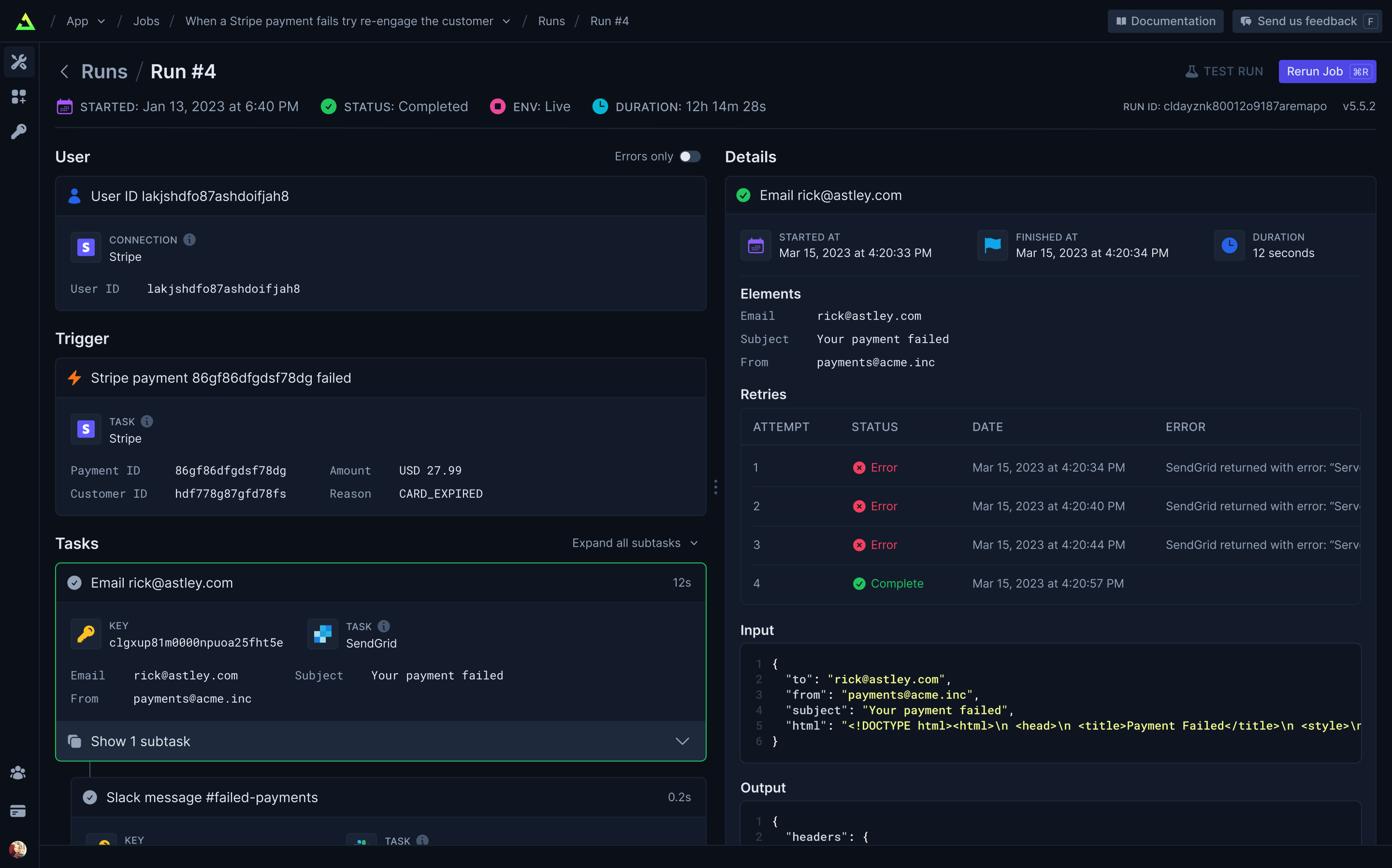
|
||||
|
||||
### Built-in integrations
|
||||
## Built-in integrations
|
||||
|
||||
Easily integrate with hundreds of third-party APIs – including your own. Use API keys (which never leave your server) or let us handle OAuth for you. Install our integration packages and easily subscribe to webhooks and perform common tasks, or you can easily use your existing favorite Node.JS SDKs and get resumability and idempotency through our `runTask` function.
|
||||
|
||||
### Trigger.dev Connect (coming soon)
|
||||
## Our progress
|
||||
|
||||
Easily add integrations for your users.
|
||||
We’re building the most comprehensive and easy-to-use background jobs framework for developers.
|
||||
|
||||
Click the links to join the discussions about our upcoming features.
|
||||
|
||||
| Feature | What it does | Status |
|
||||
| ------------------------------------------------------------------------------------ | --------------------------------------------------- | ------ |
|
||||
| Integration kit | Official Trigger.dev integrations or build your own | ✅ |
|
||||
| Self-hosting | Host the platform yourself | ✅ |
|
||||
| Cloud | Just write code, no deployment required | ✅ |
|
||||
| Dashboard | View every Task in every Run | ✅ |
|
||||
| Serverless | Long-running Jobs on your serverless backend | ✅ |
|
||||
| React hooks | Easily update your UI with Job progress | ✅ |
|
||||
| [Background tasks](https://github.com/triggerdotdev/trigger.dev/discussions/400) | Offload long or intense Tasks to our infrastructure | 🛠️ |
|
||||
| [React frameworks](https://github.com/triggerdotdev/trigger.dev/discussions/411) | Support for Remix, Astro, RedwoodJS & more | 🛠️ |
|
||||
| [Long-running servers](https://github.com/triggerdotdev/trigger.dev/discussions/430) | Run Jobs on your long-running backend | 🛠️ |
|
||||
| Polling Triggers | Subscribe to changes without webhooks | 🕝 |
|
||||
| Vercel integration | Easy deploy and preview environment support | 🕝 |
|
||||
| Streaming | Receive data from your Jobs in realtime | 🕝 |
|
||||
| 100+ integrations | Comprehensive support for popular APIs | 🕝 |
|
||||
| [Trigger.dev Connect](https://github.com/triggerdotdev/trigger.dev/discussions/441) | Use integrations signed in as your users | 🕝 |
|
||||
| File IO | Create Tasks that have file outputs | 🕝 |
|
||||
|
||||
# Getting started
|
||||
|
||||
|
||||

Binary file not shown.
|
Before Width: | Height: | Size: 181 KiB After Width: | Height: | Size: 151 KiB |
@@ -0,0 +1,57 @@
|
||||
export function AstroLogo({ className }: { className?: string }) {
|
||||
return (
|
||||
<svg className={className} viewBox="0 0 184 49" fill="none" xmlns="http://www.w3.org/2000/svg">
|
||||
<g clipPath="url(#clip0_5336_22429)">
|
||||
<mask id="mask0_5336_22429" maskUnits="userSpaceOnUse" x="0" y="0" width="184" height="49">
|
||||
<path d="M184 0H0V48.4533H184V0Z" fill="white" />
|
||||
</mask>
|
||||
<g mask="url(#mask0_5336_22429)">
|
||||
<path
|
||||
d="M12.4424 40.9986C10.2625 39.0108 9.62608 34.8341 10.5343 31.8083C12.1092 33.716 14.2912 34.3203 16.5514 34.6615C20.0406 35.1879 23.4674 34.991 26.7087 33.4002C27.0795 33.218 27.4221 32.9759 27.8273 32.7306C28.1315 33.6107 28.2106 34.4993 28.1044 35.4037C27.8461 37.6063 26.7472 39.3077 24.9995 40.5974C24.3006 41.1133 23.5611 41.5744 22.8393 42.0609C20.6218 43.5559 20.0219 45.3089 20.8551 47.8589C20.8749 47.921 20.8926 47.9831 20.9374 48.1347C19.8053 47.6293 18.9783 46.8934 18.3481 45.9258C17.6825 44.9046 17.3659 43.7749 17.3492 42.5525C17.3409 41.9577 17.3409 41.3576 17.2607 40.7711C17.0649 39.3413 16.3921 38.7013 15.1245 38.6644C13.8236 38.6265 12.7945 39.4287 12.5216 40.6921C12.5008 40.789 12.4706 40.8849 12.4404 40.9975L12.4424 40.9986Z"
|
||||
fill="url(#paint0_linear_5336_22429)"
|
||||
/>
|
||||
<path
|
||||
d="M0 31.3041C0 31.3041 6.45527 28.1673 12.9286 28.1673L17.8093 13.1001C17.992 12.3714 18.5256 11.8762 19.1278 11.8762C19.7302 11.8762 20.2637 12.3714 20.4464 13.1001L25.3271 28.1673C32.9938 28.1673 38.2557 31.3041 38.2557 31.3041C38.2557 31.3041 27.2909 1.50808 27.2694 1.44829C26.9547 0.567361 26.4234 0 25.7072 0H12.5496C11.8333 0 11.3235 0.567361 10.9874 1.44829C10.9637 1.50695 0 31.3041 0 31.3041Z"
|
||||
fill="white"
|
||||
/>
|
||||
<path
|
||||
d="M68.0598 26.9653C68.0598 29.6056 64.7674 31.1825 60.2089 31.1825C57.2422 31.1825 56.1929 30.4491 56.1929 28.9089C56.1929 27.2954 57.4954 26.5253 60.4622 26.5253C63.1396 26.5253 65.4188 26.5619 68.0598 26.892V26.9653ZM68.096 23.7016C66.4682 23.3349 64.0081 23.1149 61.0773 23.1149C52.5388 23.1149 48.5228 25.1318 48.5228 29.8257C48.5228 34.7029 51.2725 36.5731 57.6402 36.5731C63.031 36.5731 66.6853 35.2163 68.0236 31.8792H68.2407C68.2045 32.6859 68.1683 33.4927 68.1683 34.1161C68.1683 35.8396 68.4578 35.9864 69.8691 35.9864H76.5262C76.1644 34.9596 75.9472 32.0626 75.9472 29.5689C75.9472 26.892 76.0558 24.8751 76.0558 22.1615C76.0558 16.6241 72.7272 13.1037 62.3073 13.1037C57.821 13.1037 52.8282 13.8738 49.0293 15.0106C49.3911 16.5141 49.8977 19.5578 50.1509 21.538C53.4433 19.9979 58.1105 19.3378 61.7283 19.3378C66.7215 19.3378 68.096 20.4745 68.096 22.7848V23.7016Z"
|
||||
fill="white"
|
||||
/>
|
||||
<path
|
||||
d="M86.3622 28.5055C85.4576 28.6155 84.2278 28.6155 82.9613 28.6155C81.6224 28.6155 80.3927 28.5788 79.5604 28.4688C79.5604 28.7622 79.5242 29.0922 79.5242 29.3856C79.5242 33.9695 82.5271 36.6464 93.0917 36.6464C103.041 36.6464 106.261 34.0062 106.261 29.3489C106.261 24.9484 104.127 22.7848 94.6833 22.3081C87.3393 21.9781 86.6879 21.1713 86.6879 20.2545C86.6879 19.1911 87.6288 18.641 92.5489 18.641C97.6506 18.641 99.0251 19.3378 99.0251 20.8046V21.1346C99.7489 21.098 101.052 21.0613 102.39 21.0613C103.656 21.0613 105.031 21.098 105.827 21.1713C105.827 20.8413 105.863 20.5479 105.863 20.2912C105.863 14.9006 101.377 13.1404 92.6937 13.1404C82.9251 13.1404 79.6327 15.524 79.6327 20.1812C79.6327 24.3617 82.2738 26.9653 91.6443 27.3687C98.5547 27.5887 99.3146 28.3588 99.3146 29.4223C99.3146 30.559 98.1928 31.0725 93.345 31.0725C87.7735 31.0725 86.3622 30.3024 86.3622 28.7255V28.5055Z"
|
||||
fill="white"
|
||||
/>
|
||||
<path
|
||||
d="M118.203 9.17995C115.562 11.6369 110.822 14.0939 108.181 14.7539C108.217 16.1107 108.217 18.6044 108.217 19.9612L110.641 19.9979C110.605 22.6015 110.569 25.7552 110.569 27.8454C110.569 32.7226 113.137 36.3897 121.133 36.3897C124.498 36.3897 126.741 36.023 129.527 35.4363C129.237 33.6394 128.912 30.8891 128.804 28.7988C127.139 29.3489 125.041 29.6423 122.725 29.6423C119.505 29.6423 118.203 28.7622 118.203 26.2319C118.203 24.0316 118.203 21.9781 118.239 20.0712C122.364 20.1078 126.488 20.1812 128.912 20.2545C128.876 18.3477 128.948 15.5973 129.057 13.7638C125.547 13.8371 121.604 13.8738 118.348 13.8738C118.384 12.2603 118.42 10.7201 118.456 9.17995H118.203Z"
|
||||
fill="white"
|
||||
/>
|
||||
<path
|
||||
d="M139.812 18.861C139.848 16.9541 139.884 15.3406 139.92 13.7638H132.648C132.757 16.9175 132.757 20.1445 132.757 24.8751C132.757 29.6056 132.72 32.8693 132.648 35.9864H140.969C140.824 33.7861 140.788 30.0823 140.788 26.9286C140.788 21.9414 142.815 20.5112 147.409 20.5112C149.544 20.5112 151.063 20.768 152.402 21.2446C152.438 19.3745 152.8 15.744 153.017 14.1305C151.642 13.7271 150.123 13.4705 148.278 13.4705C144.334 13.4338 141.44 15.0473 140.101 18.8977L139.812 18.861Z"
|
||||
fill="white"
|
||||
/>
|
||||
<path
|
||||
d="M176.038 24.7284C176.038 28.7255 173.143 30.5957 168.584 30.5957C164.062 30.5957 161.167 28.8355 161.167 24.7284C161.167 20.6213 164.098 19.0811 168.584 19.0811C173.107 19.0811 176.038 20.7313 176.038 24.7284ZM183.599 24.5451C183.599 16.5875 177.376 13.0304 168.584 13.0304C159.757 13.0304 153.75 16.5875 153.75 24.5451C153.75 32.4659 159.359 36.7198 168.548 36.7198C177.81 36.7198 183.599 32.4659 183.599 24.5451Z"
|
||||
fill="white"
|
||||
/>
|
||||
</g>
|
||||
</g>
|
||||
<defs>
|
||||
<linearGradient
|
||||
id="paint0_linear_5336_22429"
|
||||
x1="10.1338"
|
||||
y1="48.1347"
|
||||
x2="31.1641"
|
||||
y2="38.1736"
|
||||
gradientUnits="userSpaceOnUse"
|
||||
>
|
||||
<stop stopColor="#D83333" />
|
||||
<stop offset="1" stopColor="#F041FF" />
|
||||
</linearGradient>
|
||||
<clipPath id="clip0_5336_22429">
|
||||
<rect width="184" height="48.4533" fill="white" />
|
||||
</clipPath>
|
||||
</defs>
|
||||
</svg>
|
||||
);
|
||||
}
|
||||
File diff suppressed because one or more lines are too long
@@ -0,0 +1,45 @@
|
||||
export function FastifyLogo({ className }: { className?: string }) {
|
||||
return (
|
||||
<svg className={className} viewBox="0 0 184 55" fill="none" xmlns="http://www.w3.org/2000/svg">
|
||||
<g clipPath="url(#clip0_5342_22458)">
|
||||
<path
|
||||
d="M181.319 7.73806L184 0.829078L183.889 0.386903L157.47 7.35116C160.288 3.26104 159.321 0 159.321 0C159.321 0 150.892 5.38901 144.508 5.25083C138.124 5.11265 136.079 3.39922 126.296 6.52208C116.513 9.64494 113.749 19.207 110.903 21.2797C108.084 23.3247 99.213 30.1508 99.213 30.1508L107.227 27.5807C107.227 27.5807 104.961 29.7363 100.291 36.0096V36.0372C101.037 37.0874 104.326 41.4263 107.587 40.4866C107.946 40.3761 108.36 40.1826 108.83 39.9615C110.295 40.7906 112.257 41.5921 114.385 41.8132C114.385 41.8132 112.948 40.155 111.732 38.2205L112.727 37.5849L112.561 37.6954L115.629 38.8008L115.297 35.9267H115.325L118.309 37.0321L117.95 34.4067L119.083 33.854L122.206 22.0258L135.14 13.1823L134.117 15.7801C131.492 22.2193 126.573 23.7393 126.573 23.7393L124.527 24.5407C122.98 26.337 122.344 26.7792 121.819 32.8591C123.063 32.5275 124.223 32.4722 125.301 32.7486C130.828 34.2409 132.735 40.9012 131.243 42.7528C130.884 43.195 129.999 43.9964 128.866 44.9084H126.628L126.6 46.7324L126.379 46.9258H124.085L124.058 48.6945L123.45 49.1367C121.322 49.1919 118.586 47.3127 118.586 47.3127C118.613 49.0261 120.023 51.6515 120.023 51.6515L120.272 51.5134L120.05 51.6792C120.05 51.6792 125.799 55.4929 129.419 54.0835C132.625 52.8123 140.943 46.2625 148.129 43.1673L169.85 37.419L172.725 30.0126L156.171 34.3791V27.6912L175.599 22.5786L178.473 15.1445L156.171 21.0309V14.3707L181.319 7.73806ZM141.883 21.86L147.051 20.5059L147.106 20.7546L145.503 24.9276L140.169 26.337L141.883 21.86ZM143.652 30.7864L138.318 32.1959L140.059 27.7188L145.199 26.3647L145.282 26.6134L143.652 30.7864ZM150.616 29.2941L145.282 30.7035L147.023 26.2265L152.163 24.8723L152.246 25.1211L150.616 29.2941Z"
|
||||
fill="white"
|
||||
/>
|
||||
<path
|
||||
d="M4.00721 16.7197L4.17302 15.863C4.64284 13.3758 5.58246 11.2478 7.32352 9.64495C8.59477 8.4566 10.474 7.73807 12.602 7.73807C13.9561 7.73807 14.9787 7.93152 15.6143 8.15261L14.426 12.2427C13.9285 12.0769 13.4587 11.994 12.7678 11.994C10.8609 11.994 9.75548 13.9838 9.39621 15.8078L9.2304 16.7197H13.2652L12.5467 20.4506H8.59477L5.3061 37.5296H0L3.26104 20.4506"
|
||||
fill="white"
|
||||
/>
|
||||
<path
|
||||
d="M21.4178 37.5296L21.5837 34.0475H21.4455C19.7873 36.8111 17.7975 37.8612 16.1394 37.8612C13.0994 37.8612 11.6071 35.2634 11.6071 31.6155C11.6071 25.3145 14.7576 16.3605 23.7116 16.3605C25.7843 16.3605 27.8846 16.7197 29.1559 17.2172L26.8621 28.7966C26.3647 31.2286 25.9778 35.2634 26.0054 37.5296H21.4178ZM23.3247 20.4506C22.9102 20.3677 22.5233 20.34 22.2193 20.34C18.7372 20.34 16.8579 27.2767 16.8026 30.3443C16.8026 32.1682 17.079 33.4947 18.3779 33.4947C19.8426 33.4947 21.1968 31.0904 21.9706 27.3043L23.3247 20.4506Z"
|
||||
fill="white"
|
||||
/>
|
||||
<path
|
||||
d="M29.7915 32.9697C30.6482 33.4395 31.6708 33.854 33.1631 33.8264C34.7107 33.7711 35.5398 32.8038 35.5398 31.4773C35.5398 30.3166 34.9871 29.5152 33.55 28.3821C31.7537 26.9174 30.897 25.0934 30.897 23.2971C30.897 19.4833 33.8816 16.3605 38.6074 16.3605C40.459 16.3605 41.7579 16.6921 42.5317 17.1343L41.371 21.0033C40.7906 20.6717 39.7957 20.3677 38.9114 20.3677C37.198 20.3677 36.1478 21.252 36.1478 22.6615C36.1478 23.7393 36.7558 24.3749 37.723 25.1763C40.0721 26.9727 40.8459 29.0177 40.8459 30.6206C40.8459 35.2358 37.6401 37.7783 32.8591 37.7783C30.9522 37.7783 29.2388 37.2256 28.5203 36.7282L29.7915 32.9697Z"
|
||||
fill="white"
|
||||
/>
|
||||
<path
|
||||
d="M53.3097 11.082L52.2319 16.7197H60.4121L59.7212 20.4506H51.5134L49.6894 30.1232C49.5512 30.8417 49.5236 31.4773 49.5236 31.8642C49.5236 33.1355 50.1592 33.6053 51.1265 33.6053C51.5134 33.6053 52.0661 33.6053 52.5635 33.5224L51.9279 37.5296C50.9606 37.7783 49.7723 37.8612 48.7498 37.8612C45.544 37.8612 43.9688 36.0925 43.9688 33.2736C43.9688 32.334 44.1346 31.1733 44.3557 30.1508L46.1796 20.4506H43.7753L44.4938 16.6921H46.9258L47.7549 12.4085L53.3097 11.082Z"
|
||||
fill="white"
|
||||
/>
|
||||
<path
|
||||
d="M54.581 37.5296L58.5882 16.7197H63.8943L59.9147 37.5296H54.581ZM59.5554 11.386C59.5554 9.83838 60.6609 8.09732 62.5401 8.09732C64.2812 8.09732 65.1103 9.42384 65.055 10.8609C64.9997 12.9889 63.5626 14.2049 61.9874 14.2049C60.274 14.2049 59.5278 12.9612 59.5554 11.386Z"
|
||||
fill="white"
|
||||
/>
|
||||
<path
|
||||
d="M67.2106 16.7197L67.3764 15.863C67.8462 13.3758 68.7858 11.2478 70.5269 9.64495C71.7981 8.4566 73.6774 7.73807 75.8054 7.73807C77.1595 7.73807 78.182 7.93152 78.8177 8.15261L77.6293 12.2427C77.1319 12.0769 76.6621 11.994 75.9712 11.994C74.0643 11.994 72.9589 13.9838 72.6272 15.8078L72.4338 16.7197H78.6242L77.9057 20.4506H71.7981L68.5371 37.5296H63.2034L66.492 20.4506"
|
||||
fill="white"
|
||||
/>
|
||||
<path
|
||||
d="M81.9405 16.7197L82.0787 26.7239C82.1063 28.6861 82.1616 30.1232 82.1063 31.6431H82.1892C82.6314 29.9574 83.046 28.5479 83.7645 26.337L86.915 16.6921H92.2764L85.4779 33.1078C83.4329 37.8612 81.0838 41.8684 78.5413 44.2175C77.2977 45.3506 75.8606 46.2625 74.9763 46.6218L72.8483 42.283C73.7603 41.8132 74.7552 41.2604 75.6119 40.5972C76.8002 39.6023 77.9333 38.4139 78.4584 37.2532C78.5413 36.9769 78.6242 36.7558 78.5689 36.3413L76.3581 16.6921H81.9405V16.7197Z"
|
||||
fill="white"
|
||||
/>
|
||||
</g>
|
||||
<defs>
|
||||
<clipPath id="clip0_5342_22458">
|
||||
<rect width="184" height="54.4151" fill="white" />
|
||||
</clipPath>
|
||||
</defs>
|
||||
</svg>
|
||||
);
|
||||
}
|
||||
File diff suppressed because one or more lines are too long
@@ -0,0 +1,47 @@
|
||||
export function NextjsLogo({ className }: { className?: string }) {
|
||||
return (
|
||||
<svg className={className} viewBox="0 0 184 38" fill="none" xmlns="http://www.w3.org/2000/svg">
|
||||
<g clipPath="url(#clip0_5291_19580)">
|
||||
<path
|
||||
d="M122.318 0.0154419H154.367V5.93096H141.653V37.0517H135.296V5.93096H122.318V0.0154419Z"
|
||||
fill="white"
|
||||
/>
|
||||
<path
|
||||
d="M69.608 0.0154419V5.93096H43.9181V15.4472H64.5779V21.3627H43.9181V31.1362H69.608V37.0517H37.5612L37.5586 0.0154419H69.608Z"
|
||||
fill="white"
|
||||
/>
|
||||
<path
|
||||
d="M85.6114 0.0308914H77.2921L107.09 37.0672H115.433L100.533 18.5618L115.41 0.0591477L107.09 0.0720044L96.3674 13.3889L85.6114 0.0308914Z"
|
||||
fill="white"
|
||||
/>
|
||||
<path
|
||||
d="M94.1482 26.4861L89.9821 21.3061L77.2683 37.0954H85.6114L94.1482 26.4861Z"
|
||||
fill="white"
|
||||
/>
|
||||
<path
|
||||
fillRule="evenodd"
|
||||
clipRule="evenodd"
|
||||
d="M37.784 37.0517L7.94614 0H0V37.0363H6.35692V7.91648L29.7981 37.0517H37.784Z"
|
||||
fill="white"
|
||||
/>
|
||||
<path
|
||||
d="M155.796 36.8255C155.331 36.8255 154.935 36.6642 154.603 36.3417C154.271 36.0191 154.107 35.6286 154.112 35.166C154.107 34.7161 154.271 34.3298 154.603 34.0073C154.935 33.6847 155.331 33.5234 155.796 33.5234C156.244 33.5234 156.636 33.6847 156.967 34.0073C157.304 34.3298 157.471 34.7161 157.476 35.166C157.471 35.4716 157.394 35.7517 157.239 36.0021C157.079 36.2568 156.877 36.4563 156.623 36.6006C156.373 36.7491 156.097 36.8255 155.796 36.8255Z"
|
||||
fill="white"
|
||||
/>
|
||||
<path
|
||||
d="M166.646 21.2232H169.463V32.0761C169.459 33.0735 169.243 33.9266 168.821 34.6439C168.395 35.3612 167.805 35.9087 167.047 36.2949C166.293 36.6769 165.41 36.8722 164.406 36.8722C163.489 36.8722 162.666 36.7066 161.934 36.3841C161.202 36.0615 160.62 35.5777 160.194 34.941C159.763 34.3043 159.552 33.5107 159.552 32.5599H162.373C162.378 32.9759 162.472 33.3366 162.653 33.638C162.834 33.9393 163.084 34.1685 163.403 34.3298C163.725 34.4911 164.096 34.5717 164.514 34.5717C164.966 34.5717 165.354 34.4783 165.668 34.2873C165.982 34.1006 166.224 33.8205 166.392 33.447C166.555 33.0777 166.642 32.6193 166.646 32.0761V21.2232Z"
|
||||
fill="white"
|
||||
/>
|
||||
<path
|
||||
d="M181.054 25.4676C180.985 24.8097 180.683 24.2961 180.158 23.9311C179.628 23.5619 178.943 23.3793 178.103 23.3793C177.513 23.3793 177.005 23.4685 176.583 23.6425C176.161 23.8208 175.833 24.0584 175.609 24.3598C175.386 24.6611 175.274 25.0049 175.265 25.3912C175.265 25.7138 175.342 25.9939 175.493 26.2273C175.644 26.465 175.846 26.6645 176.109 26.8258C176.367 26.9913 176.656 27.1271 176.971 27.2375C177.289 27.3478 177.608 27.4412 177.927 27.5176L179.395 27.8784C179.986 28.0142 180.559 28.1967 181.105 28.4301C181.652 28.6594 182.148 28.9522 182.583 29.3045C183.018 29.6568 183.363 30.0812 183.617 30.5778C183.871 31.0744 184 31.6558 184 32.3265C184 33.2305 183.767 34.0242 183.298 34.7118C182.828 35.3951 182.152 35.9299 181.265 36.3162C180.382 36.6982 179.314 36.8934 178.056 36.8934C176.841 36.8934 175.782 36.7067 174.89 36.3332C173.994 35.9639 173.296 35.4206 172.792 34.7075C172.288 33.9945 172.017 33.1244 171.978 32.1015H174.77C174.808 32.6363 174.981 33.082 175.274 33.4427C175.571 33.7993 175.958 34.0624 176.432 34.2407C176.91 34.4147 177.444 34.5038 178.034 34.5038C178.65 34.5038 179.193 34.4104 179.662 34.2279C180.128 34.0454 180.494 33.7908 180.757 33.4597C181.024 33.1329 181.157 32.7467 181.162 32.3053C181.157 31.902 181.036 31.5667 180.804 31.3035C180.567 31.0404 180.24 30.8197 179.822 30.6415C179.4 30.4632 178.909 30.3019 178.349 30.1618L176.566 29.7119C175.278 29.3851 174.257 28.8886 173.512 28.2222C172.762 27.5558 172.392 26.673 172.392 25.5652C172.392 24.6569 172.641 23.859 173.146 23.1756C173.645 22.4923 174.33 21.9618 175.196 21.584C176.066 21.202 177.048 21.0152 178.142 21.0152C179.253 21.0152 180.227 21.202 181.067 21.584C181.906 21.9618 182.566 22.4881 183.044 23.1586C183.522 23.8293 183.772 24.5975 183.785 25.4676H181.054Z"
|
||||
fill="white"
|
||||
/>
|
||||
</g>
|
||||
<defs>
|
||||
<clipPath id="clip0_5291_19580">
|
||||
<rect width="184" height="37.3604" fill="white" />
|
||||
</clipPath>
|
||||
</defs>
|
||||
</svg>
|
||||
);
|
||||
}
|
||||
@@ -0,0 +1,21 @@
|
||||
export function NuxtLogo({ className }: { className?: string }) {
|
||||
return (
|
||||
<svg className={className} viewBox="0 0 184 46" fill="none" xmlns="http://www.w3.org/2000/svg">
|
||||
<g clipPath="url(#clip0_5336_22448)">
|
||||
<path
|
||||
d="M38.7097 46H64.3598C65.1746 46 65.9748 45.7875 66.6805 45.3838C67.3846 44.9814 67.9704 44.4006 68.379 43.7C68.7859 43.0017 69.0002 42.208 69 41.3998C68.9994 40.5916 68.7844 39.7981 68.3769 39.1002L51.1511 9.52867C50.7425 8.82816 50.1568 8.24752 49.4528 7.84507C48.7462 7.44109 47.9464 7.22869 47.1325 7.2289C46.3181 7.2289 45.5179 7.44165 44.8125 7.8453C44.1084 8.24768 43.5227 8.82834 43.1142 9.5289L38.7097 17.095L30.0978 2.29954C29.6891 1.59892 29.1031 1.01826 28.3988 0.61594C27.6921 0.212089 26.8922 -0.000228035 26.0783 1.8379e-07C25.2637 1.8379e-07 24.4633 0.21252 23.7576 0.61617C23.0534 1.01847 22.4674 1.59904 22.0586 2.29954L0.623071 39.1C0.215509 39.7979 0.000499188 40.5915 7.38785e-07 41.3998C-0.000459261 42.2073 0.213901 43.0006 0.621001 43.7C1.0296 44.4006 1.61541 44.9813 2.31955 45.3838C3.02626 45.7878 3.82623 46.0002 4.64025 46H20.7412C27.1207 46 31.8253 43.2228 35.0624 37.8044L42.9217 24.3144L47.1314 17.095L59.7653 38.7805H42.9217L38.7097 46ZM20.4787 38.7732L9.24232 38.7706L26.0857 9.85826L34.4901 24.3144L28.8629 33.9768C26.7131 37.4923 24.271 38.7732 20.4787 38.7732Z"
|
||||
fill="#00DC82"
|
||||
/>
|
||||
<path
|
||||
d="M86.71 46C86.954 46 87.188 45.9031 87.3605 45.7305C87.5331 45.558 87.63 45.324 87.63 45.08V23.69C87.63 23.69 88.8361 25.5958 91.08 29.44L99.9826 44.841C100.394 45.5584 101.152 46 101.972 46H108.1V11.5H101.89C101.646 11.5 101.412 11.5969 101.239 11.7695C101.067 11.942 100.97 12.176 100.97 12.42V34.04L97.06 27.14L88.6448 12.6546C88.2326 11.9398 87.4761 11.5 86.6578 11.5H80.5V46H86.71ZM155.527 33.0871L163.427 21.16H157.509C157.128 21.1607 156.754 21.2561 156.419 21.4377C156.084 21.6193 155.8 21.8813 155.592 22.2001L151.974 27.715L148.356 22.2001C148.148 21.8813 147.864 21.6193 147.529 21.4377C147.195 21.2561 146.82 21.1607 146.439 21.16H140.568L148.468 33.0379L139.961 46H145.703C146.08 45.9993 146.452 45.9054 146.785 45.7265C147.117 45.5477 147.401 45.2894 147.609 44.9747L152.021 38.3608L156.386 44.9664C156.595 45.2834 156.878 45.5438 157.212 45.7242C157.546 45.9046 157.919 45.9993 158.298 46H163.988L155.527 33.0871ZM166.658 21.16H171.192V13.8163H177.689V21.16H184V26.8771H177.689V36.685C177.689 39.1 178.905 40.2337 181.008 40.2337H184V46H180.12C174.698 46 171.192 42.7471 171.192 36.9808V26.8771H166.658V21.16ZM135.7 21.16H132.25C131.448 21.16 130.82 21.1934 130.295 21.7403C129.77 22.2569 129.72 22.5752 129.72 23.3655V35.4372C129.72 37.2906 129.634 38.4185 128.8 39.33C127.966 40.2111 126.818 40.48 125.12 40.48C123.453 40.48 122.274 40.2111 121.44 39.33C120.606 38.4185 120.52 37.2906 120.52 35.4372V23.3655C120.52 22.5754 120.47 22.2569 119.945 21.7403C119.42 21.1934 118.792 21.16 117.99 21.16H114.54V35.5171C114.54 38.738 115.435 41.2903 117.225 43.1742C119.047 45.0582 121.694 46 125.12 46C128.546 46 131.147 45.0582 132.968 43.1742C134.789 41.2903 135.7 38.738 135.7 35.5171V21.16Z"
|
||||
fill="white"
|
||||
/>
|
||||
</g>
|
||||
<defs>
|
||||
<clipPath id="clip0_5336_22448">
|
||||
<rect width="184" height="46" fill="white" />
|
||||
</clipPath>
|
||||
</defs>
|
||||
</svg>
|
||||
);
|
||||
}
|
||||
File diff suppressed because one or more lines are too long
@@ -0,0 +1,199 @@
|
||||
export function RemixLogo({ className }: { className?: string }) {
|
||||
return (
|
||||
<svg className={className} viewBox="0 0 204 66" fill="none" xmlns="http://www.w3.org/2000/svg">
|
||||
<g filter="url(#filter0_d_5334_22407)">
|
||||
<path
|
||||
fillRule="evenodd"
|
||||
clipRule="evenodd"
|
||||
d="M47.4777 45.058C47.8835 50.3106 47.8835 52.7727 47.8835 55.4603H35.8237C35.8237 54.8748 35.8341 54.3393 35.8445 53.7962C35.8771 52.1081 35.9111 50.3479 35.6397 46.7928C35.2811 41.5885 33.0571 40.4319 28.9676 40.4319H25.3444H10V30.9627H29.5415C34.7071 30.9627 37.2898 29.379 37.2898 25.1865C37.2898 21.5001 34.7071 19.2659 29.5415 19.2659H10V10H31.6937C43.3882 10 49.1997 15.5659 49.1997 24.457C49.1997 31.1071 45.1102 35.4441 39.5857 36.167C44.2492 37.1068 46.9754 39.7813 47.4777 45.058Z"
|
||||
fill="#E5F3FF"
|
||||
/>
|
||||
</g>
|
||||
<path
|
||||
d="M10 55.4604V48.4012H22.7516C24.8815 48.4012 25.3439 49.9932 25.3439 50.9423V55.4604H10Z"
|
||||
fill="#E5F3FF"
|
||||
/>
|
||||
<g filter="url(#filter1_d_5334_22407)">
|
||||
<path
|
||||
d="M192.998 23.7133H181.045L175.606 31.3573L170.309 23.7133H157.498L169.021 39.5059L156.496 55.8753H168.448L174.819 47.1497L181.188 55.8753H194L181.403 39.0011L192.998 23.7133Z"
|
||||
fill="#FFF1F1"
|
||||
/>
|
||||
</g>
|
||||
<g filter="url(#filter2_d_5334_22407)">
|
||||
<path
|
||||
d="M117.711 29.0434C116.351 25.2935 113.416 22.6975 107.762 22.6975C102.966 22.6975 99.5309 24.861 97.8132 28.3943V23.5629H86.2185V55.7246H97.8132V39.9322C97.8132 35.1008 99.1731 31.9279 102.966 31.9279C106.474 31.9279 107.333 34.2354 107.333 38.6343V55.7246H118.927V39.9322C118.927 35.1008 120.215 31.9279 124.08 31.9279C127.588 31.9279 128.375 34.2354 128.375 38.6343V55.7246H139.97V35.5335C139.97 28.827 137.393 22.6975 128.59 22.6975C123.222 22.6975 119.428 25.4377 117.711 29.0434Z"
|
||||
fill="#FFFAEA"
|
||||
/>
|
||||
</g>
|
||||
<g filter="url(#filter3_d_5334_22407)">
|
||||
<path
|
||||
d="M74.1446 43.2432C73.071 45.7671 71.067 46.8487 67.9178 46.8487C64.4107 46.8487 61.5477 44.9738 61.2614 41.0076H83.6637V37.7628C83.6637 29.0372 78.0096 21.6817 67.345 21.6817C57.3964 21.6817 49.9529 28.9651 49.9529 39.1328C49.9529 49.3725 57.2534 55.5742 67.4883 55.5742C75.934 55.5742 81.803 51.464 83.4491 44.1084L74.1446 43.2432ZM61.4047 35.3829C61.8339 32.3542 63.4803 30.0466 67.202 30.0466C70.6375 30.0466 72.4983 32.4984 72.6415 35.3829H61.4047Z"
|
||||
fill="#F1FFF0"
|
||||
/>
|
||||
</g>
|
||||
<g filter="url(#filter4_d_5334_22407)">
|
||||
<path
|
||||
d="M143.762 23.7765V55.9383H155.357V23.7765H143.762ZM143.691 20.7478H155.429V10.5078H143.691V20.7478Z"
|
||||
fill="white"
|
||||
/>
|
||||
</g>
|
||||
<defs>
|
||||
<filter
|
||||
id="filter0_d_5334_22407"
|
||||
x="0"
|
||||
y="0"
|
||||
width="59.1997"
|
||||
height="65.4604"
|
||||
filterUnits="userSpaceOnUse"
|
||||
colorInterpolationFilters="sRGB"
|
||||
>
|
||||
<feFlood floodOpacity="0" result="BackgroundImageFix" />
|
||||
<feColorMatrix
|
||||
in="SourceAlpha"
|
||||
type="matrix"
|
||||
values="0 0 0 0 0 0 0 0 0 0 0 0 0 0 0 0 0 0 127 0"
|
||||
result="hardAlpha"
|
||||
/>
|
||||
<feOffset />
|
||||
<feGaussianBlur stdDeviation="5" />
|
||||
<feComposite in2="hardAlpha" operator="out" />
|
||||
<feColorMatrix
|
||||
type="matrix"
|
||||
values="0 0 0 0 0.203922 0 0 0 0 0.45098 0 0 0 0 0.74902 0 0 0 1 0"
|
||||
/>
|
||||
<feBlend mode="normal" in2="BackgroundImageFix" result="effect1_dropShadow_5334_22407" />
|
||||
<feBlend
|
||||
mode="normal"
|
||||
in="SourceGraphic"
|
||||
in2="effect1_dropShadow_5334_22407"
|
||||
result="shape"
|
||||
/>
|
||||
</filter>
|
||||
<filter
|
||||
id="filter1_d_5334_22407"
|
||||
x="146.496"
|
||||
y="13.7133"
|
||||
width="57.5044"
|
||||
height="52.162"
|
||||
filterUnits="userSpaceOnUse"
|
||||
colorInterpolationFilters="sRGB"
|
||||
>
|
||||
<feFlood floodOpacity="0" result="BackgroundImageFix" />
|
||||
<feColorMatrix
|
||||
in="SourceAlpha"
|
||||
type="matrix"
|
||||
values="0 0 0 0 0 0 0 0 0 0 0 0 0 0 0 0 0 0 127 0"
|
||||
result="hardAlpha"
|
||||
/>
|
||||
<feOffset />
|
||||
<feGaussianBlur stdDeviation="5" />
|
||||
<feComposite in2="hardAlpha" operator="out" />
|
||||
<feColorMatrix
|
||||
type="matrix"
|
||||
values="0 0 0 0 0.882353 0 0 0 0 0.180392 0 0 0 0 0.227451 0 0 0 1 0"
|
||||
/>
|
||||
<feBlend mode="normal" in2="BackgroundImageFix" result="effect1_dropShadow_5334_22407" />
|
||||
<feBlend
|
||||
mode="normal"
|
||||
in="SourceGraphic"
|
||||
in2="effect1_dropShadow_5334_22407"
|
||||
result="shape"
|
||||
/>
|
||||
</filter>
|
||||
<filter
|
||||
id="filter2_d_5334_22407"
|
||||
x="78.2185"
|
||||
y="14.6975"
|
||||
width="69.7512"
|
||||
height="49.0271"
|
||||
filterUnits="userSpaceOnUse"
|
||||
colorInterpolationFilters="sRGB"
|
||||
>
|
||||
<feFlood floodOpacity="0" result="BackgroundImageFix" />
|
||||
<feColorMatrix
|
||||
in="SourceAlpha"
|
||||
type="matrix"
|
||||
values="0 0 0 0 0 0 0 0 0 0 0 0 0 0 0 0 0 0 127 0"
|
||||
result="hardAlpha"
|
||||
/>
|
||||
<feOffset />
|
||||
<feGaussianBlur stdDeviation="4" />
|
||||
<feComposite in2="hardAlpha" operator="out" />
|
||||
<feColorMatrix
|
||||
type="matrix"
|
||||
values="0 0 0 0 0.937255 0 0 0 0 0.72549 0 0 0 0 0.117647 0 0 0 1 0"
|
||||
/>
|
||||
<feBlend mode="normal" in2="BackgroundImageFix" result="effect1_dropShadow_5334_22407" />
|
||||
<feBlend
|
||||
mode="normal"
|
||||
in="SourceGraphic"
|
||||
in2="effect1_dropShadow_5334_22407"
|
||||
result="shape"
|
||||
/>
|
||||
</filter>
|
||||
<filter
|
||||
id="filter3_d_5334_22407"
|
||||
x="41.9529"
|
||||
y="13.6817"
|
||||
width="49.7108"
|
||||
height="49.8926"
|
||||
filterUnits="userSpaceOnUse"
|
||||
colorInterpolationFilters="sRGB"
|
||||
>
|
||||
<feFlood floodOpacity="0" result="BackgroundImageFix" />
|
||||
<feColorMatrix
|
||||
in="SourceAlpha"
|
||||
type="matrix"
|
||||
values="0 0 0 0 0 0 0 0 0 0 0 0 0 0 0 0 0 0 127 0"
|
||||
result="hardAlpha"
|
||||
/>
|
||||
<feOffset />
|
||||
<feGaussianBlur stdDeviation="4" />
|
||||
<feComposite in2="hardAlpha" operator="out" />
|
||||
<feColorMatrix
|
||||
type="matrix"
|
||||
values="0 0 0 0 0.384314 0 0 0 0 0.788235 0 0 0 0 0.372549 0 0 0 1 0"
|
||||
/>
|
||||
<feBlend mode="normal" in2="BackgroundImageFix" result="effect1_dropShadow_5334_22407" />
|
||||
<feBlend
|
||||
mode="normal"
|
||||
in="SourceGraphic"
|
||||
in2="effect1_dropShadow_5334_22407"
|
||||
result="shape"
|
||||
/>
|
||||
</filter>
|
||||
<filter
|
||||
id="filter4_d_5334_22407"
|
||||
x="133.691"
|
||||
y="0.507791"
|
||||
width="31.738"
|
||||
height="65.4305"
|
||||
filterUnits="userSpaceOnUse"
|
||||
colorInterpolationFilters="sRGB"
|
||||
>
|
||||
<feFlood floodOpacity="0" result="BackgroundImageFix" />
|
||||
<feColorMatrix
|
||||
in="SourceAlpha"
|
||||
type="matrix"
|
||||
values="0 0 0 0 0 0 0 0 0 0 0 0 0 0 0 0 0 0 127 0"
|
||||
result="hardAlpha"
|
||||
/>
|
||||
<feOffset />
|
||||
<feGaussianBlur stdDeviation="5" />
|
||||
<feComposite in2="hardAlpha" operator="out" />
|
||||
<feColorMatrix
|
||||
type="matrix"
|
||||
values="0 0 0 0 0.596078 0 0 0 0 0.192157 0 0 0 0 0.556863 0 0 0 1 0"
|
||||
/>
|
||||
<feBlend mode="normal" in2="BackgroundImageFix" result="effect1_dropShadow_5334_22407" />
|
||||
<feBlend
|
||||
mode="normal"
|
||||
in="SourceGraphic"
|
||||
in2="effect1_dropShadow_5334_22407"
|
||||
result="shape"
|
||||
/>
|
||||
</filter>
|
||||
</defs>
|
||||
</svg>
|
||||
);
|
||||
}
|
||||
@@ -0,0 +1,29 @@
|
||||
export function SvelteKitLogo({ className }: { className?: string }) {
|
||||
return (
|
||||
<svg className={className} viewBox="0 0 184 34" fill="none" xmlns="http://www.w3.org/2000/svg">
|
||||
<g clipPath="url(#clip0_5341_22451)">
|
||||
<path
|
||||
d="M153.928 25.3304L149.002 16.1776L145.901 19.929V25.3304H143.3V7.82486H145.901V16.3027L152.653 7.82486H155.654L150.753 13.977L156.98 25.3304H153.928ZM162.606 25.3304V7.82486H165.206V25.3304H162.606ZM178.761 10.3257V25.3304H176.16V10.3257H171.208V7.82486H183.712V10.3257H178.761Z"
|
||||
fill="#8D8D93"
|
||||
/>
|
||||
<path
|
||||
d="M43.8554 25.6303C42.4293 25.6662 41.0258 25.2695 39.8294 24.4926C38.7117 23.7554 37.8816 22.6561 37.4785 21.3792L39.9292 20.4789C40.2691 21.2628 40.8241 21.9343 41.53 22.4157C42.2466 22.8959 43.0933 23.1447 43.9558 23.1285C44.7848 23.1719 45.603 22.9242 46.2688 22.4283C46.5585 22.1851 46.7873 21.8776 46.9371 21.5302C47.0869 21.1829 47.1535 20.8054 47.1316 20.4278C47.1349 20.076 47.0534 19.7285 46.8939 19.4148C46.7552 19.1342 46.5738 18.8768 46.3563 18.6518C46.0811 18.4012 45.7691 18.1946 45.431 18.0391C45.0139 17.8311 44.6679 17.6727 44.393 17.5639C44.1181 17.4552 43.7138 17.3093 43.1801 17.1264C42.5134 16.893 42.0133 16.7097 41.68 16.5764C41.2284 16.3842 40.7898 16.1628 40.367 15.9135C39.912 15.6721 39.4983 15.3598 39.1415 14.9882C38.8329 14.6257 38.5839 14.2162 38.4041 13.7754C38.0584 12.9348 37.9858 12.0069 38.1964 11.1229C38.4071 10.2388 38.8904 9.44335 39.5779 8.84903C40.5782 7.96552 41.9368 7.52366 43.6538 7.52347C45.0876 7.52347 46.2672 7.84021 47.1926 8.47369C48.0908 9.07097 48.7503 9.96521 49.0555 10.9998L46.655 11.7998C46.4138 11.258 46.0065 10.807 45.492 10.5121C44.8698 10.1667 44.1651 9.99797 43.4539 10.024C42.7565 9.98411 42.0657 10.1777 41.4907 10.5743C41.2559 10.7563 41.0685 10.9924 40.9445 11.2623C40.8204 11.5323 40.7634 11.8282 40.7782 12.1249C40.7802 12.3524 40.8303 12.5769 40.9251 12.7837C41.0198 12.9906 41.1572 13.1751 41.3281 13.3252C41.6604 13.6524 42.0504 13.9153 42.4785 14.1005C42.8791 14.2672 43.4878 14.4922 44.3044 14.7755C44.8041 14.9592 45.1749 15.0967 45.4169 15.1881C45.6589 15.2794 46.0132 15.4336 46.4798 15.6506C46.8539 15.816 47.2136 16.0123 47.555 16.2375C47.8608 16.4574 48.1532 16.6954 48.4304 16.9503C48.732 17.2117 48.9896 17.5199 49.1934 17.863C49.3877 18.2188 49.5387 18.5965 49.6433 18.9881C49.771 19.4482 49.8342 19.9239 49.8311 20.4014C49.8311 22.0354 49.2726 23.3149 48.1555 24.2399C47.0384 25.1649 45.605 25.6283 43.8554 25.6303ZM59.8851 25.3304L53.8832 7.82485H56.6843L60.6604 20.0287C60.8801 20.6851 61.0638 21.3531 61.2107 22.0295C61.357 21.3529 61.5407 20.685 61.7609 20.0287L65.6868 7.82485H68.4627L62.4858 25.3304H59.8851ZM73.764 25.3304V7.82485H84.6174V10.2758H76.365V15.0772H81.6916V17.5281H76.365V22.8794H85.1688V25.3304H73.764ZM91.7943 25.3304V7.82485H94.3955V22.8295H102.948V25.3304H91.7943ZM112.75 10.3257V25.3304H110.149V10.3257H105.198V7.82485H117.702V10.3257H112.75ZM123.078 25.3304V7.82485H133.931V10.2758H125.679V15.0772H131.006V17.5281H125.679V22.8794H134.483V25.3304H123.078Z"
|
||||
fill="#4A4A55"
|
||||
/>
|
||||
<path
|
||||
d="M25.615 4.49554C22.563 0.127376 16.5351 -1.16825 12.1769 1.60935L4.52282 6.48785C3.48875 7.13833 2.6018 7.99743 1.91867 9.01023C1.23553 10.023 0.771258 11.1672 0.555527 12.3697C0.190411 14.395 0.51127 16.4843 1.46731 18.3067C0.812002 19.3005 0.365144 20.417 0.153779 21.5885C-0.0643107 22.8151 -0.0352588 24.073 0.239231 25.2882C0.51372 26.5035 1.02812 27.6517 1.75226 28.6656C4.80425 33.0343 10.8325 34.3294 15.1901 31.5518L22.8445 26.6733C23.8786 26.0228 24.7655 25.1637 25.4487 24.1509C26.1318 23.1381 26.5961 21.9939 26.8118 20.7914C27.1767 18.766 26.856 16.6768 25.9003 14.8541C26.5553 13.8603 27.0019 12.744 27.2132 11.5726C27.4315 10.346 27.4025 9.08811 27.128 7.87282C26.8535 6.65752 26.3393 5.5093 25.615 4.49554Z"
|
||||
fill="#FF3E00"
|
||||
/>
|
||||
<path
|
||||
d="M11.4291 29.0767C10.2246 29.3898 8.95296 29.3257 7.78598 28.8932C6.619 28.4606 5.61287 27.6803 4.90345 26.6577C4.46805 26.0481 4.15874 25.3578 3.99365 24.6271C3.82857 23.8964 3.81103 23.1401 3.94207 22.4025C3.98642 22.1604 4.04751 21.9216 4.1249 21.6879L4.26898 21.2478L4.66134 21.5356C5.56664 22.2013 6.57896 22.7074 7.65464 23.0323L7.93901 23.1186L7.91289 23.4026C7.87805 23.8066 7.98742 24.2097 8.22161 24.5407C8.43522 24.849 8.73834 25.0842 9.08998 25.2146C9.44162 25.345 9.82483 25.3644 10.1878 25.2699C10.3539 25.2258 10.5122 25.1565 10.6573 25.0645L18.312 20.1845C18.4992 20.0666 18.6599 19.9109 18.7837 19.7275C18.9075 19.544 18.9917 19.3368 19.0309 19.119C19.0702 18.8966 19.0648 18.6687 19.015 18.4485C18.9652 18.2282 18.8721 18.0201 18.741 17.8363C18.5274 17.528 18.2243 17.2928 17.8727 17.1622C17.521 17.0317 17.1379 17.0122 16.7748 17.1064C16.6087 17.1505 16.4504 17.2198 16.3053 17.3119L13.3842 19.1739C12.9035 19.4793 12.379 19.7095 11.8288 19.8565C10.6243 20.1696 9.35266 20.1055 8.18568 19.6729C7.01869 19.2403 6.01256 18.4601 5.30314 17.4375C4.86762 16.8279 4.55821 16.1376 4.39307 15.4069C4.22793 14.6762 4.21039 13.9198 4.34147 13.1823C4.47158 12.4591 4.75119 11.7711 5.16242 11.1622C5.57365 10.5533 6.10744 10.0369 6.72965 9.64607L14.3834 4.76787C14.8639 4.46198 15.3885 4.23149 15.9388 4.0844C17.1433 3.77125 18.4149 3.8353 19.5819 4.26789C20.7489 4.70048 21.755 5.48077 22.4644 6.5034C22.8999 7.11296 23.2093 7.80332 23.3744 8.53401C23.5395 9.2647 23.5571 10.021 23.4261 10.7586C23.3812 11.0011 23.3197 11.2402 23.2421 11.4743L23.098 11.9145L22.706 11.6272C21.8007 10.9615 20.7884 10.4553 19.7127 10.1306L19.428 10.0443L19.4544 9.76023C19.4889 9.35635 19.3795 8.95328 19.1457 8.62219C18.9322 8.31419 18.6293 8.07913 18.278 7.94872C17.9266 7.81831 17.5437 7.79884 17.181 7.89294C17.0149 7.93707 16.8566 8.00635 16.7114 8.09836L9.05592 12.9766C8.86868 13.0944 8.70806 13.25 8.58432 13.4335C8.46058 13.6169 8.37643 13.8241 8.33723 14.0418C8.29778 14.2642 8.30305 14.4922 8.35274 14.7125C8.40242 14.9328 8.49551 15.1409 8.62659 15.3248C8.84026 15.6331 9.14336 15.8683 9.49496 15.9988C9.84656 16.1293 10.2297 16.1488 10.5928 16.0547C10.7588 16.0104 10.9171 15.9411 11.0623 15.8493L13.9828 13.9881C14.4633 13.6822 14.9878 13.4518 15.5382 13.3049C16.7424 12.9919 18.0136 13.0559 19.1803 13.4882C20.347 13.9205 21.3529 14.7004 22.0624 15.7225C22.4979 16.332 22.8073 17.0224 22.9725 17.7531C23.1376 18.4838 23.1552 19.2401 23.0241 19.9777C22.8943 20.7008 22.615 21.3889 22.2042 21.998C21.7934 22.607 21.26 23.1237 20.6382 23.515L12.9845 28.3932C12.504 28.6992 11.9795 28.9297 11.4291 29.0767Z"
|
||||
fill="white"
|
||||
/>
|
||||
</g>
|
||||
<defs>
|
||||
<clipPath id="clip0_5341_22451">
|
||||
<rect width="184" height="33.1611" fill="white" />
|
||||
</clipPath>
|
||||
</defs>
|
||||
</svg>
|
||||
);
|
||||
}
|
||||
@@ -0,0 +1,12 @@
|
||||
import gradientBackground from "~/assets/images/gradient-background.png";
|
||||
|
||||
export function PageGradient({ children }: { children: React.ReactNode }) {
|
||||
return (
|
||||
<div
|
||||
className="-mt-4 h-full w-full bg-cover bg-no-repeat pt-20"
|
||||
style={{ backgroundImage: `url("${gradientBackground}")` }}
|
||||
>
|
||||
{children}
|
||||
</div>
|
||||
);
|
||||
}
|
||||
@@ -0,0 +1,118 @@
|
||||
import { InlineCode } from "./code/InlineCode";
|
||||
import {
|
||||
ClientTabs,
|
||||
ClientTabsContent,
|
||||
ClientTabsList,
|
||||
ClientTabsTrigger,
|
||||
} from "./primitives/ClientTabs";
|
||||
import { ClipboardField } from "./primitives/ClipboardField";
|
||||
import { Paragraph } from "./primitives/Paragraph";
|
||||
|
||||
export function InitCommand({ appOrigin, apiKey }: { appOrigin: string; apiKey: string }) {
|
||||
return (
|
||||
<ClientTabs defaultValue="npm">
|
||||
<ClientTabsList>
|
||||
<ClientTabsTrigger value={"npm"}>npm</ClientTabsTrigger>
|
||||
<ClientTabsTrigger value={"pnpm"}>pnpm</ClientTabsTrigger>
|
||||
<ClientTabsTrigger value={"yarn"}>yarn</ClientTabsTrigger>
|
||||
</ClientTabsList>
|
||||
<ClientTabsContent value={"npm"}>
|
||||
<ClipboardField
|
||||
variant="primary/medium"
|
||||
className="mb-4"
|
||||
secure={`npx @trigger.dev/cli@latest init -k ••••••••• -t ${appOrigin}`}
|
||||
value={`npx @trigger.dev/cli@latest init -k ${apiKey} -t ${appOrigin}`}
|
||||
/>
|
||||
</ClientTabsContent>
|
||||
<ClientTabsContent value={"pnpm"}>
|
||||
<ClipboardField
|
||||
variant="primary/medium"
|
||||
className="mb-4"
|
||||
secure={`pnpm dlx @trigger.dev/cli@latest init -k ••••••••• -t ${appOrigin}`}
|
||||
value={`pnpm dlx @trigger.dev/cli@latest init -k ${apiKey} -t ${appOrigin}`}
|
||||
/>
|
||||
</ClientTabsContent>
|
||||
<ClientTabsContent value={"yarn"}>
|
||||
<ClipboardField
|
||||
variant="primary/medium"
|
||||
className="mb-4"
|
||||
secure={`yarn dlx @trigger.dev/cli@latest init -k ••••••••• -t ${appOrigin}`}
|
||||
value={`yarn dlx @trigger.dev/cli@latest init -k ${apiKey} -t ${appOrigin}`}
|
||||
/>
|
||||
</ClientTabsContent>
|
||||
</ClientTabs>
|
||||
);
|
||||
}
|
||||
|
||||
export function RunDevCommand() {
|
||||
return (
|
||||
<ClientTabs defaultValue="npm">
|
||||
<ClientTabsList>
|
||||
<ClientTabsTrigger value={"npm"}>npm</ClientTabsTrigger>
|
||||
<ClientTabsTrigger value={"pnpm"}>pnpm</ClientTabsTrigger>
|
||||
<ClientTabsTrigger value={"yarn"}>yarn</ClientTabsTrigger>
|
||||
</ClientTabsList>
|
||||
<ClientTabsContent value={"npm"}>
|
||||
<ClipboardField variant="primary/medium" className="mb-4" value={`npm run dev`} />
|
||||
</ClientTabsContent>
|
||||
<ClientTabsContent value={"pnpm"}>
|
||||
<ClipboardField variant="primary/medium" className="mb-4" value={`pnpm run dev`} />
|
||||
</ClientTabsContent>
|
||||
<ClientTabsContent value={"yarn"}>
|
||||
<ClipboardField variant="primary/medium" className="mb-4" value={`yarn run dev`} />
|
||||
</ClientTabsContent>
|
||||
</ClientTabs>
|
||||
);
|
||||
}
|
||||
|
||||
export function TriggerDevCommand() {
|
||||
return (
|
||||
<ClientTabs defaultValue="npm">
|
||||
<ClientTabsList>
|
||||
<ClientTabsTrigger value={"npm"}>npm</ClientTabsTrigger>
|
||||
<ClientTabsTrigger value={"pnpm"}>pnpm</ClientTabsTrigger>
|
||||
<ClientTabsTrigger value={"yarn"}>yarn</ClientTabsTrigger>
|
||||
</ClientTabsList>
|
||||
<ClientTabsContent value={"npm"}>
|
||||
<ClipboardField
|
||||
variant="primary/medium"
|
||||
className="mb-4"
|
||||
value={`npx @trigger.dev/cli@latest dev`}
|
||||
/>
|
||||
</ClientTabsContent>
|
||||
<ClientTabsContent value={"pnpm"}>
|
||||
<ClipboardField
|
||||
variant="primary/medium"
|
||||
className="mb-4"
|
||||
value={`pnpm dlx @trigger.dev/cli@latest dev`}
|
||||
/>
|
||||
</ClientTabsContent>
|
||||
<ClientTabsContent value={"yarn"}>
|
||||
<ClipboardField
|
||||
variant="primary/medium"
|
||||
className="mb-4"
|
||||
value={`yarn dlx @trigger.dev/cli@latest dev`}
|
||||
/>
|
||||
</ClientTabsContent>
|
||||
</ClientTabs>
|
||||
);
|
||||
}
|
||||
|
||||
export function TriggerDevStep() {
|
||||
return (
|
||||
<>
|
||||
<Paragraph spacing>
|
||||
In a <span className="text-amber-400">separate terminal window or tab</span> run:
|
||||
</Paragraph>
|
||||
<TriggerDevCommand />
|
||||
<Paragraph spacing variant="small">
|
||||
If you’re not running on port 3000 you can specify the port by adding{" "}
|
||||
<InlineCode variant="extra-small">--port 3001</InlineCode> to the end.
|
||||
</Paragraph>
|
||||
<Paragraph spacing variant="small">
|
||||
You should leave the <InlineCode variant="extra-small">dev</InlineCode> command running when
|
||||
you're developing.
|
||||
</Paragraph>
|
||||
</>
|
||||
);
|
||||
}
|
||||
@@ -0,0 +1,11 @@
|
||||
import { cn } from "~/utils/cn";
|
||||
|
||||
export function StepContentContainer({
|
||||
children,
|
||||
className,
|
||||
}: {
|
||||
children: React.ReactNode;
|
||||
className?: string;
|
||||
}) {
|
||||
return <div className={cn("mb-6 ml-9 mt-1", className)}>{children}</div>;
|
||||
}
|
||||
@@ -0,0 +1,67 @@
|
||||
import { Squares2X2Icon } from "@heroicons/react/20/solid";
|
||||
import { GitHubDarkIcon } from "@trigger.dev/companyicons";
|
||||
import { useOrganization } from "~/hooks/useOrganizations";
|
||||
import { useProject } from "~/hooks/useProject";
|
||||
import { projectSetupPath } from "~/utils/pathBuilder";
|
||||
import { PageGradient } from "../PageGradient";
|
||||
import { LinkButton } from "../primitives/Buttons";
|
||||
import { Header1 } from "../primitives/Headers";
|
||||
import { Paragraph } from "../primitives/Paragraph";
|
||||
import { NamedIcon } from "../primitives/NamedIcon";
|
||||
export type FrameworkComingSoonProps = {
|
||||
frameworkName: string;
|
||||
githubIssueUrl: string;
|
||||
githubIssueNumber: number;
|
||||
children: React.ReactNode;
|
||||
};
|
||||
|
||||
export function FrameworkComingSoon({
|
||||
frameworkName,
|
||||
githubIssueUrl,
|
||||
githubIssueNumber,
|
||||
children,
|
||||
}: FrameworkComingSoonProps) {
|
||||
const organization = useOrganization();
|
||||
const project = useProject();
|
||||
|
||||
return (
|
||||
<PageGradient>
|
||||
<div className="mx-auto max-w-3xl">
|
||||
<div className="mb-6 grid place-items-center pb-6">{children}</div>
|
||||
<div className="flex items-center justify-between">
|
||||
<Header1 spacing>{frameworkName} is coming soon!</Header1>
|
||||
<LinkButton
|
||||
to={projectSetupPath(organization, project)}
|
||||
variant="tertiary/small"
|
||||
LeadingIcon={Squares2X2Icon}
|
||||
>
|
||||
Choose a different framework
|
||||
</LinkButton>
|
||||
</div>
|
||||
<Paragraph spacing className="border-b border-slate-800 pb-4">
|
||||
We're working hard to bring support for {frameworkName} in Trigger.dev. Follow along with
|
||||
the GitHub issue or contribute and help us bring it to Trigger.dev faster.
|
||||
</Paragraph>
|
||||
<a
|
||||
href={githubIssueUrl}
|
||||
target="_blank"
|
||||
className="group mt-4 block max-w-sm rounded-md bg-bright px-10 py-8 transition hover:bg-slate-100"
|
||||
>
|
||||
<Paragraph spacing>triggerdotdev/trigger.dev</Paragraph>
|
||||
<h2 className="text-2xl font-semibold text-black">
|
||||
<span className="mr-1 font-normal text-dimmed">#{githubIssueNumber}</span>Framework:
|
||||
support for {frameworkName}
|
||||
</h2>
|
||||
<div className="mt-4 flex items-center gap-1.5">
|
||||
<GitHubDarkIcon className="h-4 w-4" />
|
||||
<Paragraph variant="small">View on GitHub</Paragraph>
|
||||
<NamedIcon
|
||||
name="arrow-right"
|
||||
className="h-4 w-4 text-dimmed transition group-hover:translate-x-1"
|
||||
/>
|
||||
</div>
|
||||
</a>
|
||||
</div>
|
||||
</PageGradient>
|
||||
);
|
||||
}
|
||||
@@ -0,0 +1,103 @@
|
||||
import { ChatBubbleLeftRightIcon } from "@heroicons/react/20/solid";
|
||||
import { Link } from "@remix-run/react";
|
||||
import { AstroLogo } from "~/assets/logos/AstroLogo";
|
||||
import { ExpressLogo } from "~/assets/logos/ExpressLogo";
|
||||
import { FastifyLogo } from "~/assets/logos/FastifyLogo";
|
||||
import { NestjsLogo } from "~/assets/logos/NestjsLogo";
|
||||
import { NextjsLogo } from "~/assets/logos/NextjsLogo";
|
||||
import { NuxtLogo } from "~/assets/logos/NuxtLogo";
|
||||
import { RedwoodLogo } from "~/assets/logos/RedwoodLogo";
|
||||
import { RemixLogo } from "~/assets/logos/RemixLogo";
|
||||
import { SvelteKitLogo } from "~/assets/logos/SveltekitLogo";
|
||||
import { useOrganization } from "~/hooks/useOrganizations";
|
||||
import { useProject } from "~/hooks/useProject";
|
||||
import { cn } from "~/utils/cn";
|
||||
import {
|
||||
projectSetupAstroPath,
|
||||
projectSetupExpressPath,
|
||||
projectSetupFastifyPath,
|
||||
projectSetupNestjsPath,
|
||||
projectSetupNextjsPath,
|
||||
projectSetupNuxtPath,
|
||||
projectSetupRedwoodPath,
|
||||
projectSetupRemixPath,
|
||||
projectSetupSvelteKitPath,
|
||||
} from "~/utils/pathBuilder";
|
||||
import { Feedback } from "../Feedback";
|
||||
import { PageGradient } from "../PageGradient";
|
||||
import { Button } from "../primitives/Buttons";
|
||||
import { Header1 } from "../primitives/Headers";
|
||||
|
||||
export function FrameworkSelector() {
|
||||
const organization = useOrganization();
|
||||
const project = useProject();
|
||||
|
||||
return (
|
||||
<PageGradient>
|
||||
<div className="mx-auto max-w-3xl">
|
||||
<div className="flex items-center justify-between">
|
||||
<Header1 spacing>Choose a framework to get started…</Header1>
|
||||
<Feedback
|
||||
button={
|
||||
<Button variant="tertiary/small" LeadingIcon={ChatBubbleLeftRightIcon}>
|
||||
Request a framework
|
||||
</Button>
|
||||
}
|
||||
defaultValue="feature"
|
||||
/>
|
||||
</div>
|
||||
|
||||
<div className="grid grid-cols-3 place-items-center gap-2">
|
||||
<FrameworkLink to={projectSetupNextjsPath(organization, project)} supported>
|
||||
<NextjsLogo className="w-32" />
|
||||
</FrameworkLink>
|
||||
<FrameworkLink to={projectSetupExpressPath(organization, project)}>
|
||||
<ExpressLogo className="w-36" />
|
||||
</FrameworkLink>
|
||||
<FrameworkLink to={projectSetupRemixPath(organization, project)} supported>
|
||||
<RemixLogo className="w-32" />
|
||||
</FrameworkLink>
|
||||
<FrameworkLink to={projectSetupRedwoodPath(organization, project)}>
|
||||
<RedwoodLogo className="w-44" />
|
||||
</FrameworkLink>
|
||||
<FrameworkLink to={projectSetupAstroPath(organization, project)} supported>
|
||||
<AstroLogo className="w-32" />
|
||||
</FrameworkLink>
|
||||
<FrameworkLink to={projectSetupNuxtPath(organization, project)}>
|
||||
<NuxtLogo className="w-32" />
|
||||
</FrameworkLink>
|
||||
<FrameworkLink to={projectSetupSvelteKitPath(organization, project)}>
|
||||
<SvelteKitLogo className="w-44" />
|
||||
</FrameworkLink>
|
||||
<FrameworkLink to={projectSetupFastifyPath(organization, project)}>
|
||||
<FastifyLogo className="w-36" />
|
||||
</FrameworkLink>
|
||||
<FrameworkLink to={projectSetupNestjsPath(organization, project)}>
|
||||
<NestjsLogo className="w-36" />
|
||||
</FrameworkLink>
|
||||
</div>
|
||||
</div>
|
||||
</PageGradient>
|
||||
);
|
||||
}
|
||||
|
||||
type FrameworkLinkProps = {
|
||||
children: React.ReactNode;
|
||||
to: string;
|
||||
supported?: boolean;
|
||||
};
|
||||
|
||||
function FrameworkLink({ children, to, supported = false }: FrameworkLinkProps) {
|
||||
return (
|
||||
<Link
|
||||
to={to}
|
||||
className={cn(
|
||||
"flex h-28 w-full items-center justify-center rounded-md border border-slate-750 px-8 py-4 transition hover:bg-slate-850",
|
||||
!supported &&
|
||||
"border-dashed opacity-50 grayscale transition hover:opacity-100 hover:grayscale-0"
|
||||
)}
|
||||
>
|
||||
{children}
|
||||
</Link>
|
||||
);
|
||||
}
|
||||
@@ -1,268 +1,26 @@
|
||||
import { ChatBubbleLeftRightIcon } from "@heroicons/react/20/solid";
|
||||
import { Link, useRevalidator } from "@remix-run/react";
|
||||
import { useEffect, useState } from "react";
|
||||
import { useEventSource } from "remix-utils";
|
||||
import invariant from "tiny-invariant";
|
||||
import gradientBackground from "~/assets/images/gradient-background.png";
|
||||
import { Link } from "@remix-run/react";
|
||||
import { Paragraph } from "~/components/primitives/Paragraph";
|
||||
import { StepNumber } from "~/components/primitives/StepNumber";
|
||||
import { useAppOrigin } from "~/hooks/useAppOrigin";
|
||||
import { useDevEnvironment } from "~/hooks/useEnvironments";
|
||||
import { useJob } from "~/hooks/useJob";
|
||||
import { useOrganization } from "~/hooks/useOrganizations";
|
||||
import { useProject } from "~/hooks/useProject";
|
||||
import { IntegrationIcon } from "~/routes/_app.orgs.$organizationSlug.projects.$projectParam.integrations/route";
|
||||
import { jobTestPath, projectStreamingPath } from "~/utils/pathBuilder";
|
||||
import { Feedback } from "../Feedback";
|
||||
import { jobTestPath } from "~/utils/pathBuilder";
|
||||
import { CodeBlock } from "../code/CodeBlock";
|
||||
import { InlineCode } from "../code/InlineCode";
|
||||
import { EnvironmentLabel } from "../environments/EnvironmentLabel";
|
||||
import { HelpPanelProps } from "../integrations/ApiKeyHelp";
|
||||
import { HelpInstall } from "../integrations/HelpInstall";
|
||||
import { HelpSamples } from "../integrations/HelpSamples";
|
||||
import { Button, LinkButton } from "../primitives/Buttons";
|
||||
import { LinkButton } from "../primitives/Buttons";
|
||||
import { Callout, variantClasses } from "../primitives/Callout";
|
||||
import {
|
||||
ClientTabs,
|
||||
ClientTabsContent,
|
||||
ClientTabsList,
|
||||
ClientTabsTrigger,
|
||||
} from "../primitives/ClientTabs";
|
||||
import { ClipboardField } from "../primitives/ClipboardField";
|
||||
import { Header1, Header2 } from "../primitives/Headers";
|
||||
import { NamedIcon } from "../primitives/NamedIcon";
|
||||
import { RadioGroup, RadioGroupItem } from "../primitives/RadioButton";
|
||||
import { Header2 } from "../primitives/Headers";
|
||||
import { TextLink } from "../primitives/TextLink";
|
||||
import integrationButton from "./integration-button.png";
|
||||
import selectEnvironment from "./select-environment.png";
|
||||
import selectExample from "./select-example.png";
|
||||
|
||||
type SelectionChoices = "use-existing-project" | "create-new-next-app";
|
||||
|
||||
export function HowToSetupYourProject() {
|
||||
const project = useProject();
|
||||
const devEnvironment = useDevEnvironment();
|
||||
const appOrigin = useAppOrigin();
|
||||
|
||||
const [selectedValue, setSelectedValue] = useState<SelectionChoices | null>(null);
|
||||
|
||||
invariant(devEnvironment, "devEnvironment is required");
|
||||
|
||||
const revalidator = useRevalidator();
|
||||
const events = useEventSource(projectStreamingPath(project.id), {
|
||||
event: "message",
|
||||
});
|
||||
|
||||
useEffect(() => {
|
||||
if (events !== null) {
|
||||
// This uses https://www.npmjs.com/package/canvas-confetti
|
||||
if ("confetti" in window && typeof window.confetti !== "undefined") {
|
||||
const duration = 3.5 * 1000;
|
||||
const animationEnd = Date.now() + duration;
|
||||
const defaults = {
|
||||
startVelocity: 30,
|
||||
spread: 360,
|
||||
ticks: 60,
|
||||
zIndex: 0,
|
||||
colors: [
|
||||
"#E7FF52",
|
||||
"#41FF54",
|
||||
"rgb(245 158 11)",
|
||||
"rgb(22 163 74)",
|
||||
"rgb(37 99 235)",
|
||||
"rgb(67 56 202)",
|
||||
"rgb(219 39 119)",
|
||||
"rgb(225 29 72)",
|
||||
"rgb(217 70 239)",
|
||||
],
|
||||
};
|
||||
function randomInRange(min: number, max: number): number {
|
||||
return Math.random() * (max - min) + min;
|
||||
}
|
||||
// @ts-ignore
|
||||
const interval = setInterval(function () {
|
||||
const timeLeft = animationEnd - Date.now();
|
||||
|
||||
if (timeLeft <= 0) {
|
||||
return clearInterval(interval);
|
||||
}
|
||||
|
||||
const particleCount = 50 * (timeLeft / duration);
|
||||
// since particles fall down, start a bit higher than random
|
||||
// @ts-ignore
|
||||
window.confetti(
|
||||
Object.assign({}, defaults, {
|
||||
particleCount,
|
||||
origin: { x: randomInRange(0.1, 0.4), y: Math.random() - 0.2 },
|
||||
})
|
||||
);
|
||||
// @ts-ignore
|
||||
window.confetti(
|
||||
Object.assign({}, defaults, {
|
||||
particleCount,
|
||||
origin: { x: randomInRange(0.6, 0.9), y: Math.random() - 0.2 },
|
||||
})
|
||||
);
|
||||
}, 250);
|
||||
}
|
||||
|
||||
revalidator.revalidate();
|
||||
}
|
||||
// WARNING Don't put the revalidator in the useEffect deps array or bad things will happen
|
||||
}, [events]); // eslint-disable-line react-hooks/exhaustive-deps
|
||||
|
||||
return (
|
||||
<div
|
||||
className="-ml-4 -mt-4 h-full w-[calc(100%+32px)] bg-cover bg-no-repeat pt-20"
|
||||
style={{ backgroundImage: `url("${gradientBackground}")` }}
|
||||
>
|
||||
<div className="mx-auto max-w-3xl">
|
||||
<div className="flex items-center justify-between">
|
||||
<Header1 spacing className="text-bright">
|
||||
Get setup in {selectedValue === "create-new-next-app" ? "5" : "2"} minutes
|
||||
</Header1>
|
||||
<Feedback
|
||||
button={
|
||||
<Button variant="secondary/small" LeadingIcon={ChatBubbleLeftRightIcon}>
|
||||
I'm stuck!
|
||||
</Button>
|
||||
}
|
||||
defaultValue="help"
|
||||
/>
|
||||
</div>
|
||||
<RadioGroup
|
||||
className="mb-4 flex gap-x-2"
|
||||
onValueChange={(value) => setSelectedValue(value as SelectionChoices)}
|
||||
>
|
||||
<RadioGroupItem
|
||||
label="Use an existing Next.js project"
|
||||
description="Use Trigger.dev in an existing Next.js project in less than 2 mins."
|
||||
value="use-existing-project"
|
||||
checked={selectedValue === "use-existing-project"}
|
||||
variant="icon"
|
||||
data-action="use-existing-project"
|
||||
icon={<NamedIcon className="h-12 w-12 text-green-600" name={"tree"} />}
|
||||
/>
|
||||
<RadioGroupItem
|
||||
label="Create a new Next.js project"
|
||||
description="This is the quickest way to try out Trigger.dev in a new Next.js project and takes 5 mins."
|
||||
value="create-new-next-app"
|
||||
checked={selectedValue === "create-new-next-app"}
|
||||
variant="icon"
|
||||
data-action="create-new-next-app"
|
||||
icon={<NamedIcon className="h-8 w-8 text-green-600" name={"sapling"} />}
|
||||
/>
|
||||
</RadioGroup>
|
||||
{selectedValue && (
|
||||
<>
|
||||
{selectedValue === "create-new-next-app" ? (
|
||||
<>
|
||||
<StepNumber stepNumber="1" title="Create a new Next.js project" />
|
||||
<StepContentContainer>
|
||||
<ClientTabs defaultValue="npm">
|
||||
<ClientTabsList>
|
||||
<ClientTabsTrigger value={"npm"}>npm</ClientTabsTrigger>
|
||||
<ClientTabsTrigger value={"pnpm"}>pnpm</ClientTabsTrigger>
|
||||
<ClientTabsTrigger value={"yarn"}>yarn</ClientTabsTrigger>
|
||||
</ClientTabsList>
|
||||
<ClientTabsContent value={"npm"}>
|
||||
<ClipboardField
|
||||
variant="primary/medium"
|
||||
className="mb-4"
|
||||
value={`npx create-next-app@latest`}
|
||||
/>
|
||||
</ClientTabsContent>
|
||||
<ClientTabsContent value={"pnpm"}>
|
||||
<ClipboardField
|
||||
variant="primary/medium"
|
||||
className="mb-4"
|
||||
value={`pnpm create next-app`}
|
||||
/>
|
||||
</ClientTabsContent>
|
||||
<ClientTabsContent value={"yarn"}>
|
||||
<ClipboardField
|
||||
variant="primary/medium"
|
||||
className="mb-4"
|
||||
value={`yarn create next-app`}
|
||||
/>
|
||||
</ClientTabsContent>
|
||||
</ClientTabs>
|
||||
|
||||
<Paragraph spacing variant="small">
|
||||
Trigger.dev works with either the Pages or App Router configuration.
|
||||
</Paragraph>
|
||||
</StepContentContainer>
|
||||
<StepNumber stepNumber="2" title="Navigate to your new Next.js project" />
|
||||
<StepContentContainer>
|
||||
<Paragraph spacing>
|
||||
You have now created a new Next.js project. Let’s <InlineCode>cd</InlineCode>{" "}
|
||||
into it using the project name you just provided:
|
||||
</Paragraph>
|
||||
<ClipboardField
|
||||
value={"cd [replace with your project name]"}
|
||||
variant={"primary/medium"}
|
||||
></ClipboardField>
|
||||
</StepContentContainer>
|
||||
<StepNumber
|
||||
stepNumber="3"
|
||||
title="Run the CLI 'init' command in your new Next.js project"
|
||||
/>
|
||||
<StepContentContainer>
|
||||
<InitCommand appOrigin={appOrigin} apiKey={devEnvironment.apiKey} />
|
||||
<Paragraph spacing variant="small">
|
||||
You’ll notice a new folder in your project called 'jobs'. We’ve added a very
|
||||
simple example Job in <InlineCode variant="extra-small">examples.ts</InlineCode>{" "}
|
||||
to help you get started.
|
||||
</Paragraph>
|
||||
</StepContentContainer>
|
||||
<StepNumber stepNumber="4" title="Run your Next.js app" />
|
||||
<StepContentContainer>
|
||||
<NextDevCommand />
|
||||
</StepContentContainer>
|
||||
<StepNumber stepNumber="5" title="Run the CLI 'dev' command" />
|
||||
<StepContentContainer>
|
||||
<TriggerDevStep />
|
||||
</StepContentContainer>
|
||||
<StepNumber stepNumber="6" title="Wait for Jobs" displaySpinner />
|
||||
<StepContentContainer>
|
||||
<Paragraph>This page will automatically refresh.</Paragraph>
|
||||
</StepContentContainer>
|
||||
</>
|
||||
) : (
|
||||
<>
|
||||
<StepNumber
|
||||
stepNumber="1"
|
||||
title="Run the CLI 'init' command in an existing Next.js project"
|
||||
/>
|
||||
<StepContentContainer>
|
||||
<InitCommand appOrigin={appOrigin} apiKey={devEnvironment.apiKey} />
|
||||
|
||||
<Paragraph spacing variant="small">
|
||||
You’ll notice a new folder in your project called 'jobs'. We’ve added a very
|
||||
simple example Job in <InlineCode variant="extra-small">examples.ts</InlineCode>{" "}
|
||||
to help you get started.
|
||||
</Paragraph>
|
||||
</StepContentContainer>
|
||||
<StepNumber stepNumber="2" title="Run your Next.js app" />
|
||||
<StepContentContainer>
|
||||
<NextDevCommand />
|
||||
</StepContentContainer>
|
||||
<StepNumber stepNumber="3" title="Run the CLI 'dev' command" />
|
||||
<StepContentContainer>
|
||||
<TriggerDevStep />
|
||||
</StepContentContainer>
|
||||
<StepNumber stepNumber="4" title="Wait for Jobs" displaySpinner />
|
||||
<StepContentContainer>
|
||||
<Paragraph>This page will automatically refresh.</Paragraph>
|
||||
</StepContentContainer>
|
||||
</>
|
||||
)}
|
||||
</>
|
||||
)}
|
||||
</div>
|
||||
</div>
|
||||
);
|
||||
}
|
||||
import { StepContentContainer } from "../StepContentContainer";
|
||||
import { TriggerDevCommand } from "../SetupCommands";
|
||||
|
||||
export function HowToRunYourJob() {
|
||||
const organization = useOrganization();
|
||||
@@ -271,20 +29,6 @@ export function HowToRunYourJob() {
|
||||
|
||||
return (
|
||||
<>
|
||||
<Callout variant="info" className="mb-6">
|
||||
<Paragraph variant={"small"} className={variantClasses.info.textColor}>
|
||||
Scheduled Triggers <strong>do not</strong> trigger Jobs in the DEV Environment. When
|
||||
developing locally you should use the{" "}
|
||||
<Link
|
||||
to={jobTestPath(organization, project, job)}
|
||||
className="underline underline-offset-2 transition hover:text-blue-100"
|
||||
>
|
||||
Test feature
|
||||
</Link>{" "}
|
||||
to trigger any scheduled Jobs.
|
||||
</Paragraph>
|
||||
</Callout>
|
||||
|
||||
<Paragraph spacing>There are two ways to run your Job:</Paragraph>
|
||||
|
||||
<StepNumber stepNumber="1" title="Trigger a test Run" />
|
||||
@@ -318,6 +62,19 @@ export function HowToRunYourJob() {
|
||||
How to run a Job
|
||||
</LinkButton>
|
||||
</StepContentContainer>
|
||||
<Callout variant="info">
|
||||
<Paragraph variant={"small"} className={variantClasses.info.textColor}>
|
||||
Scheduled Triggers <strong>do not</strong> trigger Jobs in the DEV Environment. When
|
||||
developing locally you should use the{" "}
|
||||
<Link
|
||||
to={jobTestPath(organization, project, job)}
|
||||
className="underline underline-offset-2 transition hover:text-blue-100"
|
||||
>
|
||||
Test feature
|
||||
</Link>{" "}
|
||||
to trigger any scheduled Jobs.
|
||||
</Paragraph>
|
||||
</Callout>
|
||||
</>
|
||||
);
|
||||
}
|
||||
@@ -553,116 +310,3 @@ export function HowToUseApiKeysAndEndpoints() {
|
||||
</>
|
||||
);
|
||||
}
|
||||
|
||||
function StepContentContainer({ children }: { children: React.ReactNode }) {
|
||||
return <div className="mb-6 ml-9 mt-1">{children}</div>;
|
||||
}
|
||||
|
||||
function InitCommand({ appOrigin, apiKey }: { appOrigin: string; apiKey: string }) {
|
||||
return (
|
||||
<ClientTabs defaultValue="npm">
|
||||
<ClientTabsList>
|
||||
<ClientTabsTrigger value={"npm"}>npm</ClientTabsTrigger>
|
||||
<ClientTabsTrigger value={"pnpm"}>pnpm</ClientTabsTrigger>
|
||||
<ClientTabsTrigger value={"yarn"}>yarn</ClientTabsTrigger>
|
||||
</ClientTabsList>
|
||||
<ClientTabsContent value={"npm"}>
|
||||
<ClipboardField
|
||||
variant="primary/medium"
|
||||
className="mb-4"
|
||||
secure={`npx @trigger.dev/cli@latest init -k ••••••••• -t ${appOrigin}`}
|
||||
value={`npx @trigger.dev/cli@latest init -k ${apiKey} -t ${appOrigin}`}
|
||||
/>
|
||||
</ClientTabsContent>
|
||||
<ClientTabsContent value={"pnpm"}>
|
||||
<ClipboardField
|
||||
variant="primary/medium"
|
||||
className="mb-4"
|
||||
secure={`pnpm dlx @trigger.dev/cli@latest init -k ••••••••• -t ${appOrigin}`}
|
||||
value={`pnpm dlx @trigger.dev/cli@latest init -k ${apiKey} -t ${appOrigin}`}
|
||||
/>
|
||||
</ClientTabsContent>
|
||||
<ClientTabsContent value={"yarn"}>
|
||||
<ClipboardField
|
||||
variant="primary/medium"
|
||||
className="mb-4"
|
||||
secure={`yarn dlx @trigger.dev/cli@latest init -k ••••••••• -t ${appOrigin}`}
|
||||
value={`yarn dlx @trigger.dev/cli@latest init -k ${apiKey} -t ${appOrigin}`}
|
||||
/>
|
||||
</ClientTabsContent>
|
||||
</ClientTabs>
|
||||
);
|
||||
}
|
||||
|
||||
function NextDevCommand() {
|
||||
return (
|
||||
<ClientTabs defaultValue="npm">
|
||||
<ClientTabsList>
|
||||
<ClientTabsTrigger value={"npm"}>npm</ClientTabsTrigger>
|
||||
<ClientTabsTrigger value={"pnpm"}>pnpm</ClientTabsTrigger>
|
||||
<ClientTabsTrigger value={"yarn"}>yarn</ClientTabsTrigger>
|
||||
</ClientTabsList>
|
||||
<ClientTabsContent value={"npm"}>
|
||||
<ClipboardField variant="primary/medium" className="mb-4" value={`npm run dev`} />
|
||||
</ClientTabsContent>
|
||||
<ClientTabsContent value={"pnpm"}>
|
||||
<ClipboardField variant="primary/medium" className="mb-4" value={`pnpm run dev`} />
|
||||
</ClientTabsContent>
|
||||
<ClientTabsContent value={"yarn"}>
|
||||
<ClipboardField variant="primary/medium" className="mb-4" value={`yarn run dev`} />
|
||||
</ClientTabsContent>
|
||||
</ClientTabs>
|
||||
);
|
||||
}
|
||||
|
||||
function TriggerDevCommand() {
|
||||
return (
|
||||
<ClientTabs defaultValue="npm">
|
||||
<ClientTabsList>
|
||||
<ClientTabsTrigger value={"npm"}>npm</ClientTabsTrigger>
|
||||
<ClientTabsTrigger value={"pnpm"}>pnpm</ClientTabsTrigger>
|
||||
<ClientTabsTrigger value={"yarn"}>yarn</ClientTabsTrigger>
|
||||
</ClientTabsList>
|
||||
<ClientTabsContent value={"npm"}>
|
||||
<ClipboardField
|
||||
variant="primary/medium"
|
||||
className="mb-4"
|
||||
value={`npx @trigger.dev/cli@latest dev`}
|
||||
/>
|
||||
</ClientTabsContent>
|
||||
<ClientTabsContent value={"pnpm"}>
|
||||
<ClipboardField
|
||||
variant="primary/medium"
|
||||
className="mb-4"
|
||||
value={`pnpm dlx @trigger.dev/cli@latest dev`}
|
||||
/>
|
||||
</ClientTabsContent>
|
||||
<ClientTabsContent value={"yarn"}>
|
||||
<ClipboardField
|
||||
variant="primary/medium"
|
||||
className="mb-4"
|
||||
value={`yarn dlx @trigger.dev/cli@latest dev`}
|
||||
/>
|
||||
</ClientTabsContent>
|
||||
</ClientTabs>
|
||||
);
|
||||
}
|
||||
|
||||
function TriggerDevStep() {
|
||||
return (
|
||||
<>
|
||||
<Paragraph spacing>
|
||||
In a <span className="text-amber-400">separate terminal window or tab</span> run:
|
||||
</Paragraph>
|
||||
<TriggerDevCommand />
|
||||
<Paragraph spacing variant="small">
|
||||
If you’re not running on port 3000 you can specify the port by adding{" "}
|
||||
<InlineCode variant="extra-small">--port 3001</InlineCode> to the end.
|
||||
</Paragraph>
|
||||
<Paragraph spacing variant="small">
|
||||
You should leave the <InlineCode variant="extra-small">dev</InlineCode> command running when
|
||||
you're developing.
|
||||
</Paragraph>
|
||||
</>
|
||||
);
|
||||
}
|
||||
|
||||
@@ -25,8 +25,6 @@ client.defineJob({
|
||||
//wrap an SDK call in io.runTask so it's resumable and displays in logs
|
||||
const repo = await io.runTask(
|
||||
"Get repo",
|
||||
//you can add metadata to the task to improve the display in the logs
|
||||
{ name: "Get repo", icon: "github" },
|
||||
async () => {
|
||||
//this is the regular GitHub SDK
|
||||
const response = await octokit.rest.repos.get({
|
||||
@@ -34,7 +32,9 @@ client.defineJob({
|
||||
repo: "trigger.dev",
|
||||
});
|
||||
return response.data;
|
||||
}
|
||||
},
|
||||
//you can add metadata to the task to improve the display in the logs
|
||||
{ name: "Get repo", icon: "github" }
|
||||
);
|
||||
},
|
||||
});
|
||||
@@ -60,13 +60,13 @@ client.defineJob({
|
||||
//wrap anything in io.runTask so it's resumable and displays in logs
|
||||
const repo = await io.runTask(
|
||||
"Get org",
|
||||
//you can add metadata to the task to improve the display in the logs
|
||||
{ name: "Get org", icon: "github" },
|
||||
async () => {
|
||||
//you can use fetch, axios, or any other library to make requests
|
||||
const response = await fetch('https://api.github.com/orgs/nodejs');
|
||||
return response.json();
|
||||
}
|
||||
},
|
||||
//you can add metadata to the task to improve the display in the logs
|
||||
{ name: "Get org", icon: "github" }
|
||||
);
|
||||
},
|
||||
});
|
||||
|
||||
@@ -40,8 +40,14 @@ export function BackgroundGradient({
|
||||
}
|
||||
|
||||
/** This container should be placed around the content on a page */
|
||||
export function PageContainer({ children }: { children: React.ReactNode }) {
|
||||
return <div className={cn("grid h-full grid-rows-[auto_1fr]")}>{children}</div>;
|
||||
export function PageContainer({
|
||||
children,
|
||||
className,
|
||||
}: {
|
||||
children: React.ReactNode;
|
||||
className?: string;
|
||||
}) {
|
||||
return <div className={cn("grid h-full grid-rows-[auto_1fr]", className)}>{children}</div>;
|
||||
}
|
||||
|
||||
export function PageBody({
|
||||
|
||||
@@ -11,6 +11,7 @@ import {
|
||||
organizationTeamPath,
|
||||
projectEnvironmentsPath,
|
||||
projectIntegrationsPath,
|
||||
projectSetupPath,
|
||||
projectPath,
|
||||
projectTriggersPath,
|
||||
} from "~/utils/pathBuilder";
|
||||
@@ -57,8 +58,9 @@ export function ProjectSideMenu() {
|
||||
animate={isCollapsed ? "collapsed" : "expanded"}
|
||||
variants={menuVariants}
|
||||
initial={isCollapsed ? "collapsed" : "expanded"}
|
||||
transition={{ type: "spring", duration: 0.5 }}
|
||||
className={cn(
|
||||
"flex h-full flex-col justify-between overflow-hidden border-r border-uiBorder p-1 transition duration-300 ease-in-out"
|
||||
"flex h-full flex-col justify-between overflow-hidden border-r border-uiBorder p-1 transition"
|
||||
)}
|
||||
>
|
||||
<div className="flex flex-col gap-1">
|
||||
@@ -109,6 +111,13 @@ export function ProjectSideMenu() {
|
||||
isCollapsed={isCollapsed}
|
||||
data-action="usage & billing"
|
||||
/>
|
||||
<SideMenuItem
|
||||
name="Onboarding"
|
||||
icon="clipboard-checked"
|
||||
to={projectSetupPath(organization, project)}
|
||||
isCollapsed={isCollapsed}
|
||||
data-action="onboarding"
|
||||
/>
|
||||
<SideMenuItem
|
||||
name="Account"
|
||||
icon={UserProfilePhoto}
|
||||
|
||||
@@ -16,10 +16,10 @@ import { Paragraph } from "./Paragraph";
|
||||
|
||||
export const variantClasses = {
|
||||
info: {
|
||||
className: "border-blue-400/20 bg-blue-400/30",
|
||||
icon: <InformationCircleIcon className="h-5 w-5 shrink-0 text-blue-400" />,
|
||||
textColor: "text-blue-200",
|
||||
linkClassName: "transition hover:bg-blue-400/40",
|
||||
className: "border-slate-700 bg-slate-800",
|
||||
icon: <InformationCircleIcon className="h-5 w-5 shrink-0 text-dimmed" />,
|
||||
textColor: "text-bright",
|
||||
linkClassName: "transition hover:bg-slate-750",
|
||||
},
|
||||
warning: {
|
||||
className: "border-yellow-400/20 bg-yellow-400/30",
|
||||
|
||||
@@ -21,6 +21,7 @@ import {
|
||||
ChevronLeftIcon,
|
||||
ChevronRightIcon,
|
||||
ChevronUpIcon,
|
||||
ClipboardDocumentCheckIcon,
|
||||
ClockIcon,
|
||||
CloudIcon,
|
||||
CodeBracketSquareIcon,
|
||||
@@ -36,10 +37,12 @@ import {
|
||||
HeartIcon,
|
||||
KeyIcon,
|
||||
LightBulbIcon,
|
||||
ListBulletIcon,
|
||||
MagnifyingGlassIcon,
|
||||
PlusIcon,
|
||||
PlusSmallIcon,
|
||||
QrCodeIcon,
|
||||
Square2StackIcon,
|
||||
SquaresPlusIcon,
|
||||
StarIcon,
|
||||
TrashIcon,
|
||||
@@ -120,6 +123,9 @@ const icons = {
|
||||
job: (className: string) => <WrenchScrewdriverIcon className={cn("text-teal-500", className)} />,
|
||||
key: (className: string) => <KeyIcon className={cn("text-amber-400", className)} />,
|
||||
lightbulb: (className: string) => <LightBulbIcon className={cn("text-amber-400", className)} />,
|
||||
"clipboard-checked": (className: string) => (
|
||||
<ClipboardDocumentCheckIcon className={cn("text-dimmed", className)} />
|
||||
),
|
||||
log: (className: string) => (
|
||||
<ChatBubbleLeftEllipsisIcon className={cn("text-slate-400", className)} />
|
||||
),
|
||||
@@ -140,6 +146,7 @@ const icons = {
|
||||
settings: (className: string) => <Cog8ToothIcon className={cn("text-slate-600", className)} />,
|
||||
spinner: (className: string) => <Spinner className={className} color="blue" />,
|
||||
"spinner-white": (className: string) => <Spinner className={className} color="white" />,
|
||||
squares: (className: string) => <Square2StackIcon className={cn("text-dimmed", className)} />,
|
||||
star: (className: string) => <StarIcon className={cn("text-yellow-500", className)} />,
|
||||
stop: (className: string) => <StopIcon className={cn("text-rose-500", className)} />,
|
||||
team: (className: string) => <UserGroupIcon className={cn("text-blue-500", className)} />,
|
||||
|
||||
@@ -0,0 +1,73 @@
|
||||
import { useEffect } from "react";
|
||||
import { useEventSource } from "remix-utils";
|
||||
import { projectPath, projectStreamingPath } from "~/utils/pathBuilder";
|
||||
import { useProject } from "./useProject";
|
||||
import { useOrganization } from "./useOrganizations";
|
||||
import { useNavigate } from "@remix-run/react";
|
||||
|
||||
export function useProjectSetupComplete() {
|
||||
const project = useProject();
|
||||
const organization = useOrganization();
|
||||
const navigate = useNavigate();
|
||||
const events = useEventSource(projectStreamingPath(project.id), {
|
||||
event: "message",
|
||||
});
|
||||
|
||||
useEffect(() => {
|
||||
if (events !== null) {
|
||||
// This uses https://www.npmjs.com/package/canvas-confetti
|
||||
if ("confetti" in window && typeof window.confetti !== "undefined") {
|
||||
const duration = 3.5 * 1000;
|
||||
const animationEnd = Date.now() + duration;
|
||||
const defaults = {
|
||||
startVelocity: 30,
|
||||
spread: 360,
|
||||
ticks: 60,
|
||||
zIndex: 0,
|
||||
colors: [
|
||||
"#E7FF52",
|
||||
"#41FF54",
|
||||
"rgb(245 158 11)",
|
||||
"rgb(22 163 74)",
|
||||
"rgb(37 99 235)",
|
||||
"rgb(67 56 202)",
|
||||
"rgb(219 39 119)",
|
||||
"rgb(225 29 72)",
|
||||
"rgb(217 70 239)",
|
||||
],
|
||||
};
|
||||
function randomInRange(min: number, max: number): number {
|
||||
return Math.random() * (max - min) + min;
|
||||
}
|
||||
// @ts-ignore
|
||||
const interval = setInterval(function () {
|
||||
const timeLeft = animationEnd - Date.now();
|
||||
|
||||
if (timeLeft <= 0) {
|
||||
return clearInterval(interval);
|
||||
}
|
||||
|
||||
const particleCount = 60 * (timeLeft / duration);
|
||||
// since particles fall down, start a bit higher than random
|
||||
// @ts-ignore
|
||||
window.confetti(
|
||||
Object.assign({}, defaults, {
|
||||
particleCount,
|
||||
origin: { x: randomInRange(0.1, 0.4), y: Math.random() - 0.2 },
|
||||
})
|
||||
);
|
||||
// @ts-ignore
|
||||
window.confetti(
|
||||
Object.assign({}, defaults, {
|
||||
particleCount,
|
||||
origin: { x: randomInRange(0.6, 0.9), y: Math.random() - 0.2 },
|
||||
})
|
||||
);
|
||||
}, 250);
|
||||
}
|
||||
|
||||
navigate(projectPath(organization, project));
|
||||
}
|
||||
// WARNING Don't put the revalidator in the useEffect deps array or bad things will happen
|
||||
}, [events]); // eslint-disable-line react-hooks/exhaustive-deps
|
||||
}
|
||||
+18
-24
@@ -1,9 +1,7 @@
|
||||
import { ArrowUpIcon } from "@heroicons/react/24/solid";
|
||||
import { LoaderArgs, SerializeFrom } from "@remix-run/server-runtime";
|
||||
import useWindowSize from "react-use/lib/useWindowSize";
|
||||
import { LoaderArgs } from "@remix-run/server-runtime";
|
||||
import { typedjson, useTypedLoaderData } from "remix-typedjson";
|
||||
import { ExternalScriptsFunction } from "remix-utils";
|
||||
import { HowToSetupYourProject } from "~/components/helpContent/HelpContentText";
|
||||
import { FrameworkSelector } from "~/components/frameworks/FrameworkSelector";
|
||||
import { JobsTable } from "~/components/jobs/JobsTable";
|
||||
import { PageBody, PageContainer } from "~/components/layout/AppLayout";
|
||||
import { BreadcrumbLink } from "~/components/navigation/NavBar";
|
||||
@@ -58,39 +56,35 @@ export const loader = async ({ request, params }: LoaderArgs) => {
|
||||
export const handle: Handle = {
|
||||
breadcrumb: (match) => <BreadcrumbLink to={trimTrailingSlash(match.pathname)} title="Jobs" />,
|
||||
expandSidebar: true,
|
||||
scripts: (match) => [
|
||||
{
|
||||
src: "https://cdn.jsdelivr.net/npm/canvas-confetti@1.5.1/dist/confetti.browser.min.js",
|
||||
crossOrigin: "anonymous",
|
||||
},
|
||||
],
|
||||
};
|
||||
|
||||
export default function Page() {
|
||||
const organization = useOrganization();
|
||||
const project = useProject();
|
||||
const { jobs } = useTypedLoaderData<typeof loader>();
|
||||
|
||||
const { filterText, setFilterText, filteredItems } = useFilterJobs(jobs);
|
||||
const hasJobs = jobs.length > 0;
|
||||
|
||||
return (
|
||||
<PageContainer>
|
||||
<PageHeader>
|
||||
<PageTitleRow>
|
||||
<PageTitle title="Jobs" />
|
||||
</PageTitleRow>
|
||||
<PageInfoRow>
|
||||
<PageInfoGroup>
|
||||
<PageInfoProperty icon={"job"} label={"Active Jobs"} value={jobs.length} />
|
||||
</PageInfoGroup>
|
||||
</PageInfoRow>
|
||||
</PageHeader>
|
||||
<PageContainer className={hasJobs ? "" : "grid-rows-1"}>
|
||||
{hasJobs && (
|
||||
<PageHeader>
|
||||
<PageTitleRow>
|
||||
<PageTitle title="Jobs" />
|
||||
</PageTitleRow>
|
||||
<PageInfoRow>
|
||||
<PageInfoGroup>
|
||||
<PageInfoProperty icon={"job"} label={"Active Jobs"} value={jobs.length} />
|
||||
</PageInfoGroup>
|
||||
</PageInfoRow>
|
||||
</PageHeader>
|
||||
)}
|
||||
<PageBody>
|
||||
<Help>
|
||||
{(open) => (
|
||||
<div className={cn("grid gap-4", open ? "h-full grid-cols-2" : " h-full grid-cols-1")}>
|
||||
<div className="h-full">
|
||||
{jobs.length > 0 ? (
|
||||
{hasJobs ? (
|
||||
<>
|
||||
{jobs.some((j) => j.hasIntegrationsRequiringAction) && (
|
||||
<Callout
|
||||
@@ -126,7 +120,7 @@ export default function Page() {
|
||||
)}
|
||||
</>
|
||||
) : (
|
||||
<HowToSetupYourProject />
|
||||
<FrameworkSelector />
|
||||
)}
|
||||
</div>
|
||||
<HelpContent title="Example Jobs and inspiration">
|
||||
|
||||
+14
@@ -0,0 +1,14 @@
|
||||
import { FrameworkSelector } from "~/components/frameworks/FrameworkSelector";
|
||||
import { Handle } from "~/utils/handle";
|
||||
|
||||
export const handle: Handle = {
|
||||
expandSidebar: true,
|
||||
};
|
||||
|
||||
export default function Page() {
|
||||
return (
|
||||
<>
|
||||
<FrameworkSelector />
|
||||
</>
|
||||
);
|
||||
}
|
||||
+119
@@ -0,0 +1,119 @@
|
||||
import { AstroLogo } from "~/assets/logos/AstroLogo";
|
||||
import { ChatBubbleLeftRightIcon, Squares2X2Icon } from "@heroicons/react/20/solid";
|
||||
import invariant from "tiny-invariant";
|
||||
import { Feedback } from "~/components/Feedback";
|
||||
import { PageGradient } from "~/components/PageGradient";
|
||||
import { InitCommand, RunDevCommand, TriggerDevStep } from "~/components/SetupCommands";
|
||||
import { StepContentContainer } from "~/components/StepContentContainer";
|
||||
import { InlineCode } from "~/components/code/InlineCode";
|
||||
import { BreadcrumbLink } from "~/components/navigation/NavBar";
|
||||
import { Button, LinkButton } from "~/components/primitives/Buttons";
|
||||
import {
|
||||
ClientTabs,
|
||||
ClientTabsContent,
|
||||
ClientTabsList,
|
||||
ClientTabsTrigger,
|
||||
} from "~/components/primitives/ClientTabs";
|
||||
import { ClipboardField } from "~/components/primitives/ClipboardField";
|
||||
import { Header1 } from "~/components/primitives/Headers";
|
||||
import { NamedIcon } from "~/components/primitives/NamedIcon";
|
||||
import { Paragraph } from "~/components/primitives/Paragraph";
|
||||
import { StepNumber } from "~/components/primitives/StepNumber";
|
||||
import { useAppOrigin } from "~/hooks/useAppOrigin";
|
||||
import { useProjectSetupComplete } from "~/hooks/useProjectSetupComplete";
|
||||
import { useDevEnvironment } from "~/hooks/useEnvironments";
|
||||
import { useOrganization } from "~/hooks/useOrganizations";
|
||||
import { useProject } from "~/hooks/useProject";
|
||||
import { Handle } from "~/utils/handle";
|
||||
import { projectSetupPath, trimTrailingSlash } from "~/utils/pathBuilder";
|
||||
import { Callout } from "~/components/primitives/Callout";
|
||||
import { Badge } from "~/components/primitives/Badge";
|
||||
|
||||
export const handle: Handle = {
|
||||
breadcrumb: (match) => <BreadcrumbLink to={trimTrailingSlash(match.pathname)} title="Astro" />,
|
||||
};
|
||||
|
||||
export default function SetUpAstro() {
|
||||
const organization = useOrganization();
|
||||
const project = useProject();
|
||||
useProjectSetupComplete();
|
||||
const devEnvironment = useDevEnvironment();
|
||||
invariant(devEnvironment, "Dev environment must be defined");
|
||||
return (
|
||||
<PageGradient>
|
||||
<div className="mx-auto max-w-3xl">
|
||||
<div className="flex items-center justify-between">
|
||||
<Header1 spacing className="text-bright">
|
||||
Get setup in 5 minutes
|
||||
</Header1>
|
||||
<div className="flex items-center gap-2">
|
||||
<LinkButton
|
||||
to={projectSetupPath(organization, project)}
|
||||
variant="tertiary/small"
|
||||
LeadingIcon={Squares2X2Icon}
|
||||
>
|
||||
Choose a different framework
|
||||
</LinkButton>
|
||||
<Feedback
|
||||
button={
|
||||
<Button variant="tertiary/small" LeadingIcon={ChatBubbleLeftRightIcon}>
|
||||
I'm stuck!
|
||||
</Button>
|
||||
}
|
||||
defaultValue="help"
|
||||
/>
|
||||
</div>
|
||||
</div>
|
||||
<div>
|
||||
<Callout
|
||||
variant={"info"}
|
||||
to="https://github.com/triggerdotdev/trigger.dev/discussions/430"
|
||||
className="mb-8"
|
||||
>
|
||||
Trigger.dev has full support for serverless. We will be adding support for long-running
|
||||
servers soon.
|
||||
</Callout>
|
||||
<div>
|
||||
<StepNumber
|
||||
stepNumber="1"
|
||||
title="Follow the steps from the Astro manual installation guide"
|
||||
/>
|
||||
<StepContentContainer className="flex flex-col gap-2">
|
||||
<Paragraph className="mt-2">Copy your server API Key to your clipboard:</Paragraph>
|
||||
<div className="mb-2 flex w-full items-center justify-between">
|
||||
<ClipboardField
|
||||
secure
|
||||
className="w-fit"
|
||||
value={devEnvironment.apiKey}
|
||||
variant={"secondary/medium"}
|
||||
icon={<Badge variant="outline">Server</Badge>}
|
||||
/>
|
||||
</div>
|
||||
<Paragraph>Now follow this guide:</Paragraph>
|
||||
<LinkButton
|
||||
to="https://trigger.dev/docs/documentation/guides/manual/astro"
|
||||
variant="primary/medium"
|
||||
TrailingIcon="external-link"
|
||||
>
|
||||
Manual installation guide
|
||||
</LinkButton>
|
||||
<div className="flex items-start justify-start gap-2"></div>
|
||||
</StepContentContainer>
|
||||
<StepNumber stepNumber="2" title="Run your Astro app" />
|
||||
<StepContentContainer>
|
||||
<RunDevCommand />
|
||||
</StepContentContainer>
|
||||
<StepNumber stepNumber="3" title="Run the CLI 'dev' command" />
|
||||
<StepContentContainer>
|
||||
<TriggerDevStep />
|
||||
</StepContentContainer>
|
||||
<StepNumber stepNumber="6" title="Wait for Jobs" displaySpinner />
|
||||
<StepContentContainer>
|
||||
<Paragraph>This page will automatically refresh.</Paragraph>
|
||||
</StepContentContainer>
|
||||
</div>
|
||||
</div>
|
||||
</div>
|
||||
</PageGradient>
|
||||
);
|
||||
}
|
||||
+21
@@ -0,0 +1,21 @@
|
||||
import { ExpressLogo } from "~/assets/logos/ExpressLogo";
|
||||
import { FrameworkComingSoon } from "~/components/frameworks/FrameworkComingSoon";
|
||||
import { BreadcrumbLink } from "~/components/navigation/NavBar";
|
||||
import { Handle } from "~/utils/handle";
|
||||
import { trimTrailingSlash } from "~/utils/pathBuilder";
|
||||
|
||||
export const handle: Handle = {
|
||||
breadcrumb: (match) => <BreadcrumbLink to={trimTrailingSlash(match.pathname)} title="Express" />,
|
||||
};
|
||||
|
||||
export default function Page() {
|
||||
return (
|
||||
<FrameworkComingSoon
|
||||
frameworkName="Express"
|
||||
githubIssueUrl="https://github.com/triggerdotdev/trigger.dev/issues/451"
|
||||
githubIssueNumber={451}
|
||||
>
|
||||
<ExpressLogo className="w-56" />
|
||||
</FrameworkComingSoon>
|
||||
);
|
||||
}
|
||||
+21
@@ -0,0 +1,21 @@
|
||||
import { FastifyLogo } from "~/assets/logos/FastifyLogo";
|
||||
import { FrameworkComingSoon } from "~/components/frameworks/FrameworkComingSoon";
|
||||
import { BreadcrumbLink } from "~/components/navigation/NavBar";
|
||||
import { Handle } from "~/utils/handle";
|
||||
import { trimTrailingSlash } from "~/utils/pathBuilder";
|
||||
|
||||
export const handle: Handle = {
|
||||
breadcrumb: (match) => <BreadcrumbLink to={trimTrailingSlash(match.pathname)} title="Fastify" />,
|
||||
};
|
||||
|
||||
export default function Page() {
|
||||
return (
|
||||
<FrameworkComingSoon
|
||||
frameworkName="Fastify"
|
||||
githubIssueUrl="https://github.com/triggerdotdev/trigger.dev/issues/450"
|
||||
githubIssueNumber={450}
|
||||
>
|
||||
<FastifyLogo className="w-56" />
|
||||
</FrameworkComingSoon>
|
||||
);
|
||||
}
|
||||
+21
@@ -0,0 +1,21 @@
|
||||
import { NestjsLogo } from "~/assets/logos/NestjsLogo";
|
||||
import { FrameworkComingSoon } from "~/components/frameworks/FrameworkComingSoon";
|
||||
import { BreadcrumbLink } from "~/components/navigation/NavBar";
|
||||
import { Handle } from "~/utils/handle";
|
||||
import { trimTrailingSlash } from "~/utils/pathBuilder";
|
||||
|
||||
export const handle: Handle = {
|
||||
breadcrumb: (match) => <BreadcrumbLink to={trimTrailingSlash(match.pathname)} title="Nest.js" />,
|
||||
};
|
||||
|
||||
export default function Page() {
|
||||
return (
|
||||
<FrameworkComingSoon
|
||||
frameworkName="Nest.js"
|
||||
githubIssueUrl="https://github.com/triggerdotdev/trigger.dev/issues/449"
|
||||
githubIssueNumber={449}
|
||||
>
|
||||
<NestjsLogo className="w-56" />
|
||||
</FrameworkComingSoon>
|
||||
);
|
||||
}
|
||||
+213
@@ -0,0 +1,213 @@
|
||||
import { ChatBubbleLeftRightIcon, Squares2X2Icon } from "@heroicons/react/20/solid";
|
||||
import { useState } from "react";
|
||||
import invariant from "tiny-invariant";
|
||||
import { Feedback } from "~/components/Feedback";
|
||||
import { PageGradient } from "~/components/PageGradient";
|
||||
import { InitCommand, RunDevCommand, TriggerDevStep } from "~/components/SetupCommands";
|
||||
import { StepContentContainer } from "~/components/StepContentContainer";
|
||||
import { InlineCode } from "~/components/code/InlineCode";
|
||||
import { BreadcrumbLink } from "~/components/navigation/NavBar";
|
||||
import { Button, LinkButton } from "~/components/primitives/Buttons";
|
||||
import {
|
||||
ClientTabs,
|
||||
ClientTabsContent,
|
||||
ClientTabsList,
|
||||
ClientTabsTrigger,
|
||||
} from "~/components/primitives/ClientTabs";
|
||||
import { ClipboardField } from "~/components/primitives/ClipboardField";
|
||||
import { Header1 } from "~/components/primitives/Headers";
|
||||
import { NamedIcon } from "~/components/primitives/NamedIcon";
|
||||
import { Paragraph } from "~/components/primitives/Paragraph";
|
||||
import { RadioGroup, RadioGroupItem } from "~/components/primitives/RadioButton";
|
||||
import { StepNumber } from "~/components/primitives/StepNumber";
|
||||
import { useAppOrigin } from "~/hooks/useAppOrigin";
|
||||
import { useProjectSetupComplete } from "~/hooks/useProjectSetupComplete";
|
||||
import { useDevEnvironment } from "~/hooks/useEnvironments";
|
||||
import { useOrganization } from "~/hooks/useOrganizations";
|
||||
import { useProject } from "~/hooks/useProject";
|
||||
import { Handle } from "~/utils/handle";
|
||||
import { projectSetupPath, trimTrailingSlash } from "~/utils/pathBuilder";
|
||||
import { Callout } from "~/components/primitives/Callout";
|
||||
|
||||
type SelectionChoices = "use-existing-project" | "create-new-next-app";
|
||||
|
||||
export const handle: Handle = {
|
||||
breadcrumb: (match) => <BreadcrumbLink to={trimTrailingSlash(match.pathname)} title="Next.js" />,
|
||||
};
|
||||
|
||||
export default function SetupNextjs() {
|
||||
const organization = useOrganization();
|
||||
const project = useProject();
|
||||
useProjectSetupComplete();
|
||||
const devEnvironment = useDevEnvironment();
|
||||
const appOrigin = useAppOrigin();
|
||||
const [selectedValue, setSelectedValue] = useState<SelectionChoices | null>(null);
|
||||
|
||||
invariant(devEnvironment, "devEnvironment is required");
|
||||
|
||||
return (
|
||||
<PageGradient>
|
||||
<div className="mx-auto max-w-3xl">
|
||||
<div className="flex items-center justify-between">
|
||||
<Header1 spacing className="text-bright">
|
||||
Get setup in {selectedValue === "create-new-next-app" ? "5" : "2"} minutes
|
||||
</Header1>
|
||||
<div className="flex items-center gap-2">
|
||||
<LinkButton
|
||||
to={projectSetupPath(organization, project)}
|
||||
variant="tertiary/small"
|
||||
LeadingIcon={Squares2X2Icon}
|
||||
>
|
||||
Choose a different framework
|
||||
</LinkButton>
|
||||
<Feedback
|
||||
button={
|
||||
<Button variant="tertiary/small" LeadingIcon={ChatBubbleLeftRightIcon}>
|
||||
I'm stuck!
|
||||
</Button>
|
||||
}
|
||||
defaultValue="help"
|
||||
/>
|
||||
</div>
|
||||
</div>
|
||||
<RadioGroup
|
||||
className="mb-4 flex gap-x-2"
|
||||
onValueChange={(value) => setSelectedValue(value as SelectionChoices)}
|
||||
>
|
||||
<RadioGroupItem
|
||||
label="Use an existing Next.js project"
|
||||
description="Use Trigger.dev in an existing Next.js project in less than 2 mins."
|
||||
value="use-existing-project"
|
||||
checked={selectedValue === "use-existing-project"}
|
||||
variant="icon"
|
||||
data-action="use-existing-project"
|
||||
icon={<NamedIcon className="h-12 w-12 text-green-600" name={"tree"} />}
|
||||
/>
|
||||
<RadioGroupItem
|
||||
label="Create a new Next.js project"
|
||||
description="This is the quickest way to try out Trigger.dev in a new Next.js project and takes 5 mins."
|
||||
value="create-new-next-app"
|
||||
checked={selectedValue === "create-new-next-app"}
|
||||
variant="icon"
|
||||
data-action="create-new-next-app"
|
||||
icon={<NamedIcon className="h-8 w-8 text-green-600" name={"sapling"} />}
|
||||
/>
|
||||
</RadioGroup>
|
||||
{selectedValue && (
|
||||
<>
|
||||
<Callout
|
||||
variant={"info"}
|
||||
to="https://github.com/triggerdotdev/trigger.dev/discussions/430"
|
||||
className="mb-8"
|
||||
>
|
||||
Trigger.dev has full support for serverless. We will be adding support for
|
||||
long-running servers soon.
|
||||
</Callout>
|
||||
{selectedValue === "create-new-next-app" ? (
|
||||
<>
|
||||
<StepNumber stepNumber="1" title="Create a new Next.js project" />
|
||||
<StepContentContainer>
|
||||
<ClientTabs defaultValue="npm">
|
||||
<ClientTabsList>
|
||||
<ClientTabsTrigger value={"npm"}>npm</ClientTabsTrigger>
|
||||
<ClientTabsTrigger value={"pnpm"}>pnpm</ClientTabsTrigger>
|
||||
<ClientTabsTrigger value={"yarn"}>yarn</ClientTabsTrigger>
|
||||
</ClientTabsList>
|
||||
<ClientTabsContent value={"npm"}>
|
||||
<ClipboardField
|
||||
variant="primary/medium"
|
||||
className="mb-4"
|
||||
value={`npx create-next-app@latest`}
|
||||
/>
|
||||
</ClientTabsContent>
|
||||
<ClientTabsContent value={"pnpm"}>
|
||||
<ClipboardField
|
||||
variant="primary/medium"
|
||||
className="mb-4"
|
||||
value={`pnpm create next-app`}
|
||||
/>
|
||||
</ClientTabsContent>
|
||||
<ClientTabsContent value={"yarn"}>
|
||||
<ClipboardField
|
||||
variant="primary/medium"
|
||||
className="mb-4"
|
||||
value={`yarn create next-app`}
|
||||
/>
|
||||
</ClientTabsContent>
|
||||
</ClientTabs>
|
||||
|
||||
<Paragraph spacing variant="small">
|
||||
Trigger.dev works with either the Pages or App Router configuration.
|
||||
</Paragraph>
|
||||
</StepContentContainer>
|
||||
<StepNumber stepNumber="2" title="Navigate to your new Next.js project" />
|
||||
<StepContentContainer>
|
||||
<Paragraph spacing>
|
||||
You have now created a new Next.js project. Let’s <InlineCode>cd</InlineCode>{" "}
|
||||
into it using the project name you just provided:
|
||||
</Paragraph>
|
||||
<ClipboardField
|
||||
value={"cd [replace with your project name]"}
|
||||
variant={"primary/medium"}
|
||||
></ClipboardField>
|
||||
</StepContentContainer>
|
||||
<StepNumber
|
||||
stepNumber="3"
|
||||
title="Run the CLI 'init' command in your new Next.js project"
|
||||
/>
|
||||
<StepContentContainer>
|
||||
<InitCommand appOrigin={appOrigin} apiKey={devEnvironment.apiKey} />
|
||||
<Paragraph spacing variant="small">
|
||||
You’ll notice a new folder in your project called 'jobs'. We’ve added a very
|
||||
simple example Job in <InlineCode variant="extra-small">examples.ts</InlineCode>{" "}
|
||||
to help you get started.
|
||||
</Paragraph>
|
||||
</StepContentContainer>
|
||||
<StepNumber stepNumber="4" title="Run your Next.js app" />
|
||||
<StepContentContainer>
|
||||
<RunDevCommand />
|
||||
</StepContentContainer>
|
||||
<StepNumber stepNumber="5" title="Run the CLI 'dev' command" />
|
||||
<StepContentContainer>
|
||||
<TriggerDevStep />
|
||||
</StepContentContainer>
|
||||
<StepNumber stepNumber="6" title="Wait for Jobs" displaySpinner />
|
||||
<StepContentContainer>
|
||||
<Paragraph>This page will automatically refresh.</Paragraph>
|
||||
</StepContentContainer>
|
||||
</>
|
||||
) : (
|
||||
<>
|
||||
<StepNumber
|
||||
stepNumber="1"
|
||||
title="Run the CLI 'init' command in an existing Next.js project"
|
||||
/>
|
||||
<StepContentContainer>
|
||||
<InitCommand appOrigin={appOrigin} apiKey={devEnvironment.apiKey} />
|
||||
|
||||
<Paragraph spacing variant="small">
|
||||
You’ll notice a new folder in your project called 'jobs'. We’ve added a very
|
||||
simple example Job in <InlineCode variant="extra-small">examples.ts</InlineCode>{" "}
|
||||
to help you get started.
|
||||
</Paragraph>
|
||||
</StepContentContainer>
|
||||
<StepNumber stepNumber="2" title="Run your Next.js app" />
|
||||
<StepContentContainer>
|
||||
<RunDevCommand />
|
||||
</StepContentContainer>
|
||||
<StepNumber stepNumber="3" title="Run the CLI 'dev' command" />
|
||||
<StepContentContainer>
|
||||
<TriggerDevStep />
|
||||
</StepContentContainer>
|
||||
<StepNumber stepNumber="4" title="Wait for Jobs" displaySpinner />
|
||||
<StepContentContainer>
|
||||
<Paragraph>This page will automatically refresh.</Paragraph>
|
||||
</StepContentContainer>
|
||||
</>
|
||||
)}
|
||||
</>
|
||||
)}
|
||||
</div>
|
||||
</PageGradient>
|
||||
);
|
||||
}
|
||||
+21
@@ -0,0 +1,21 @@
|
||||
import { NuxtLogo } from "~/assets/logos/NuxtLogo";
|
||||
import { FrameworkComingSoon } from "~/components/frameworks/FrameworkComingSoon";
|
||||
import { BreadcrumbLink } from "~/components/navigation/NavBar";
|
||||
import { Handle } from "~/utils/handle";
|
||||
import { trimTrailingSlash } from "~/utils/pathBuilder";
|
||||
|
||||
export const handle: Handle = {
|
||||
breadcrumb: (match) => <BreadcrumbLink to={trimTrailingSlash(match.pathname)} title="Nuxt" />,
|
||||
};
|
||||
|
||||
export default function Page() {
|
||||
return (
|
||||
<FrameworkComingSoon
|
||||
frameworkName="Nuxt"
|
||||
githubIssueUrl="https://github.com/triggerdotdev/trigger.dev/issues/447"
|
||||
githubIssueNumber={447}
|
||||
>
|
||||
<NuxtLogo className="w-56" />
|
||||
</FrameworkComingSoon>
|
||||
);
|
||||
}
|
||||
+21
@@ -0,0 +1,21 @@
|
||||
import { RedwoodLogo } from "~/assets/logos/RedwoodLogo";
|
||||
import { FrameworkComingSoon } from "~/components/frameworks/FrameworkComingSoon";
|
||||
import { BreadcrumbLink } from "~/components/navigation/NavBar";
|
||||
import { Handle } from "~/utils/handle";
|
||||
import { trimTrailingSlash } from "~/utils/pathBuilder";
|
||||
|
||||
export const handle: Handle = {
|
||||
breadcrumb: (match) => <BreadcrumbLink to={trimTrailingSlash(match.pathname)} title="Redwood" />,
|
||||
};
|
||||
|
||||
export default function Page() {
|
||||
return (
|
||||
<FrameworkComingSoon
|
||||
frameworkName="Redwood"
|
||||
githubIssueUrl="https://github.com/triggerdotdev/trigger.dev/issues/448"
|
||||
githubIssueNumber={448}
|
||||
>
|
||||
<RedwoodLogo className="w-56" />
|
||||
</FrameworkComingSoon>
|
||||
);
|
||||
}
|
||||
+118
@@ -0,0 +1,118 @@
|
||||
import { ChatBubbleLeftRightIcon, Squares2X2Icon } from "@heroicons/react/20/solid";
|
||||
import invariant from "tiny-invariant";
|
||||
import { Feedback } from "~/components/Feedback";
|
||||
import { PageGradient } from "~/components/PageGradient";
|
||||
import { StepContentContainer } from "~/components/StepContentContainer";
|
||||
import { InlineCode } from "~/components/code/InlineCode";
|
||||
import { BreadcrumbLink } from "~/components/navigation/NavBar";
|
||||
import { Button, LinkButton } from "~/components/primitives/Buttons";
|
||||
import {
|
||||
ClientTabs,
|
||||
ClientTabsContent,
|
||||
ClientTabsList,
|
||||
ClientTabsTrigger,
|
||||
} from "~/components/primitives/ClientTabs";
|
||||
import { ClipboardField } from "~/components/primitives/ClipboardField";
|
||||
import { Header1 } from "~/components/primitives/Headers";
|
||||
import { NamedIcon } from "~/components/primitives/NamedIcon";
|
||||
import { Paragraph } from "~/components/primitives/Paragraph";
|
||||
import { StepNumber } from "~/components/primitives/StepNumber";
|
||||
import { useAppOrigin } from "~/hooks/useAppOrigin";
|
||||
import { useProjectSetupComplete } from "~/hooks/useProjectSetupComplete";
|
||||
import { useDevEnvironment } from "~/hooks/useEnvironments";
|
||||
import { useOrganization } from "~/hooks/useOrganizations";
|
||||
import { useProject } from "~/hooks/useProject";
|
||||
import { Handle } from "~/utils/handle";
|
||||
import { projectSetupPath, trimTrailingSlash } from "~/utils/pathBuilder";
|
||||
import { Callout } from "~/components/primitives/Callout";
|
||||
import { RunDevCommand, TriggerDevStep } from "~/components/SetupCommands";
|
||||
import { Badge } from "~/components/primitives/Badge";
|
||||
|
||||
export const handle: Handle = {
|
||||
breadcrumb: (match) => <BreadcrumbLink to={trimTrailingSlash(match.pathname)} title="Remix" />,
|
||||
};
|
||||
|
||||
export default function SetUpRemix() {
|
||||
const organization = useOrganization();
|
||||
const project = useProject();
|
||||
useProjectSetupComplete();
|
||||
const devEnvironment = useDevEnvironment();
|
||||
invariant(devEnvironment, "Dev environment must be defined");
|
||||
return (
|
||||
<PageGradient>
|
||||
<div className="mx-auto max-w-3xl">
|
||||
<div className="flex items-center justify-between">
|
||||
<Header1 spacing className="text-bright">
|
||||
Get setup in 5 minutes
|
||||
</Header1>
|
||||
<div className="flex items-center gap-2">
|
||||
<LinkButton
|
||||
to={projectSetupPath(organization, project)}
|
||||
variant="tertiary/small"
|
||||
LeadingIcon={Squares2X2Icon}
|
||||
>
|
||||
Choose a different framework
|
||||
</LinkButton>
|
||||
<Feedback
|
||||
button={
|
||||
<Button variant="tertiary/small" LeadingIcon={ChatBubbleLeftRightIcon}>
|
||||
I'm stuck!
|
||||
</Button>
|
||||
}
|
||||
defaultValue="help"
|
||||
/>
|
||||
</div>
|
||||
</div>
|
||||
<div>
|
||||
<Callout
|
||||
variant={"info"}
|
||||
to="https://github.com/triggerdotdev/trigger.dev/discussions/430"
|
||||
className="mb-8"
|
||||
>
|
||||
Trigger.dev has full support for serverless. We will be adding support for long-running
|
||||
servers soon.
|
||||
</Callout>
|
||||
<div>
|
||||
<StepNumber
|
||||
stepNumber="1"
|
||||
title="Follow the steps from the Remix manual installation guide"
|
||||
/>
|
||||
<StepContentContainer className="flex flex-col gap-2">
|
||||
<Paragraph className="mt-2">Copy your server API Key to your clipboard:</Paragraph>
|
||||
<div className="mb-2 flex w-full items-center justify-between">
|
||||
<ClipboardField
|
||||
secure
|
||||
className="w-fit"
|
||||
value={devEnvironment.apiKey}
|
||||
variant={"secondary/medium"}
|
||||
icon={<Badge variant="outline">Server</Badge>}
|
||||
/>
|
||||
</div>
|
||||
<Paragraph>Now follow this guide:</Paragraph>
|
||||
<LinkButton
|
||||
to="https://trigger.dev/docs/documentation/guides/manual/remix"
|
||||
variant="primary/medium"
|
||||
TrailingIcon="external-link"
|
||||
>
|
||||
Manual installation guide
|
||||
</LinkButton>
|
||||
<div className="flex items-start justify-start gap-2"></div>
|
||||
</StepContentContainer>
|
||||
<StepNumber stepNumber="2" title="Run your Remix app" />
|
||||
<StepContentContainer>
|
||||
<RunDevCommand />
|
||||
</StepContentContainer>
|
||||
<StepNumber stepNumber="3" title="Run the CLI 'dev' command" />
|
||||
<StepContentContainer>
|
||||
<TriggerDevStep />
|
||||
</StepContentContainer>
|
||||
<StepNumber stepNumber="6" title="Wait for Jobs" displaySpinner />
|
||||
<StepContentContainer>
|
||||
<Paragraph>This page will automatically refresh.</Paragraph>
|
||||
</StepContentContainer>
|
||||
</div>
|
||||
</div>
|
||||
</div>
|
||||
</PageGradient>
|
||||
);
|
||||
}
|
||||
+23
@@ -0,0 +1,23 @@
|
||||
import { SvelteKitLogo } from "~/assets/logos/SveltekitLogo";
|
||||
import { FrameworkComingSoon } from "~/components/frameworks/FrameworkComingSoon";
|
||||
import { BreadcrumbLink } from "~/components/navigation/NavBar";
|
||||
import { Handle } from "~/utils/handle";
|
||||
import { trimTrailingSlash } from "~/utils/pathBuilder";
|
||||
|
||||
export const handle: Handle = {
|
||||
breadcrumb: (match) => (
|
||||
<BreadcrumbLink to={trimTrailingSlash(match.pathname)} title="SvelteKit" />
|
||||
),
|
||||
};
|
||||
|
||||
export default function Page() {
|
||||
return (
|
||||
<FrameworkComingSoon
|
||||
frameworkName="SvelteKit"
|
||||
githubIssueUrl="https://github.com/triggerdotdev/trigger.dev/issues/453"
|
||||
githubIssueNumber={453}
|
||||
>
|
||||
<SvelteKitLogo className="w-56" />
|
||||
</FrameworkComingSoon>
|
||||
);
|
||||
}
|
||||
+18
@@ -0,0 +1,18 @@
|
||||
import { Outlet } from "@remix-run/react";
|
||||
import { BreadcrumbLink } from "~/components/navigation/NavBar";
|
||||
import { Handle } from "~/utils/handle";
|
||||
import { trimTrailingSlash } from "~/utils/pathBuilder";
|
||||
|
||||
export const handle: Handle = {
|
||||
breadcrumb: (match) => (
|
||||
<BreadcrumbLink to={trimTrailingSlash(match.pathname)} title="Onboarding" />
|
||||
),
|
||||
};
|
||||
|
||||
export default function Page() {
|
||||
return (
|
||||
<div className="h-full overflow-y-auto overflow-x-hidden p-4 scrollbar-thin scrollbar-track-transparent scrollbar-thumb-slate-700">
|
||||
<Outlet />
|
||||
</div>
|
||||
);
|
||||
}
|
||||
@@ -53,6 +53,12 @@ export const loader = async ({ request, params }: LoaderArgs) => {
|
||||
|
||||
export const handle: Handle = {
|
||||
breadcrumb: (_match, matches) => <ProjectsMenu matches={matches} />,
|
||||
scripts: (match) => [
|
||||
{
|
||||
src: "https://cdn.jsdelivr.net/npm/canvas-confetti@1.5.1/dist/confetti.browser.min.js",
|
||||
crossOrigin: "anonymous",
|
||||
},
|
||||
],
|
||||
};
|
||||
|
||||
export default function Project() {
|
||||
|
||||
@@ -7,11 +7,15 @@ export const loader: LoaderFunction = async ({ request }) => {
|
||||
|
||||
try {
|
||||
const url = new URL("/", `http://${host}`);
|
||||
|
||||
if (request.headers.get("x-forwarded-proto") === "https") {
|
||||
url.protocol = "https:";
|
||||
}
|
||||
// if we can connect to the database and make a simple query
|
||||
// and make a HEAD request to ourselves, then we're good.
|
||||
await Promise.all([
|
||||
prisma.user.count(),
|
||||
fetch(url.toString(), { method: "HEAD" }).then((r) => {
|
||||
fetch(url.href, { method: "HEAD" }).then((r) => {
|
||||
if (!r.ok) return Promise.reject(r);
|
||||
}),
|
||||
]);
|
||||
|
||||
@@ -4,40 +4,46 @@ function usageSample(hasApiKey: boolean): HelpSample {
|
||||
return {
|
||||
title: "Using the client",
|
||||
code: `
|
||||
import { Airtable } from "@trigger.dev/airtable";
|
||||
import { Airtable } from "@trigger.dev/airtable";
|
||||
|
||||
const airtable = new Airtable({
|
||||
id: "__SLUG__"${hasApiKey ? ",\n token: process.env.AIRTABLE_API_KEY!" : ""}
|
||||
});
|
||||
const airtable = new Airtable({
|
||||
id: "__SLUG__"${hasApiKey ? ",\n token: process.env.AIRTABLE_TOKEN!" : ""}
|
||||
});
|
||||
|
||||
client.defineJob({
|
||||
id: "alert-on-new-github-issues",
|
||||
name: "Alert on new GitHub issues",
|
||||
version: "0.1.1",
|
||||
trigger: github.triggers.repo({
|
||||
event: events.onIssueOpened,
|
||||
owner: "triggerdotdev",
|
||||
repo: "trigger.dev",
|
||||
//you can define your Airtable table types
|
||||
type LaunchGoalsAndOkRs = {
|
||||
"Launch goals"?: string;
|
||||
DRI?: Collaborator;
|
||||
Team?: string;
|
||||
Status?: "On track" | "In progress" | "At risk";
|
||||
"Key results"?: Array<string>;
|
||||
"Features (from 💻 Features table)"?: Array<string>;
|
||||
"Status (from 💻 Features)": Array<"Live" | "Complete" | "In progress" | "Planning" | "In reviews">;
|
||||
};
|
||||
|
||||
client.defineJob({
|
||||
id: "airtable-example-1",
|
||||
name: "Airtable Example 1: getRecords",
|
||||
version: "0.1.0",
|
||||
trigger: eventTrigger({
|
||||
name: "airtable.example",
|
||||
schema: z.object({
|
||||
baseId: z.string(),
|
||||
tableName: z.string(),
|
||||
}),
|
||||
run: async (payload, io, ctx) => {
|
||||
//wrap the SDK call in runTask
|
||||
const { data } = await io.runTask(
|
||||
"create-card",
|
||||
{ name: "Create card" },
|
||||
async () => {
|
||||
//create a project card using the underlying client
|
||||
return io.github.client.rest.projects.createCard({
|
||||
column_id: 123,
|
||||
note: "test",
|
||||
});
|
||||
}
|
||||
);
|
||||
|
||||
//log the url of the created card
|
||||
await io.logger.info(data.url);
|
||||
},
|
||||
});
|
||||
|
||||
}),
|
||||
integrations: {
|
||||
airtable,
|
||||
},
|
||||
run: async (payload, io, ctx) => {
|
||||
//then you can set the types for your table, so you get type safety
|
||||
const table = io.airtable.base(payload.baseId).table<LaunchGoalsAndOkRs>(payload.tableName);
|
||||
|
||||
const records = await table.getRecords("muliple records", { fields: ["Status"] });
|
||||
//this will be type checked
|
||||
await io.logger.log(records[0].fields.Status ?? "no status");
|
||||
},
|
||||
});
|
||||
`,
|
||||
};
|
||||
}
|
||||
|
||||
@@ -23,40 +23,41 @@ const userAnnotation: ScopeAnnotation = {
|
||||
const usageSample: HelpSample = {
|
||||
title: "Using the client",
|
||||
code: `
|
||||
import { Github, events } from "@trigger.dev/github";
|
||||
import { Github, events } from "@trigger.dev/github";
|
||||
|
||||
const github = new Github({
|
||||
id: "__SLUG__",
|
||||
token: process.env.GITHUB_TOKEN,
|
||||
});
|
||||
|
||||
client.defineJob({
|
||||
id: "alert-on-new-github-issues",
|
||||
name: "Alert on new GitHub issues",
|
||||
version: "0.1.1",
|
||||
trigger: github.triggers.repo({
|
||||
event: events.onIssueOpened,
|
||||
owner: "triggerdotdev",
|
||||
repo: "trigger.dev",
|
||||
}),
|
||||
run: async (payload, io, ctx) => {
|
||||
//wrap the SDK call in runTask
|
||||
const { data } = await io.runTask(
|
||||
"create-card",
|
||||
{ name: "Create card" },
|
||||
async () => {
|
||||
//create a project card using the underlying client
|
||||
return io.github.client.rest.projects.createCard({
|
||||
column_id: 123,
|
||||
note: "test",
|
||||
});
|
||||
}
|
||||
);
|
||||
|
||||
//log the url of the created card
|
||||
await io.logger.info(data.url);
|
||||
},
|
||||
});
|
||||
const github = new Github({
|
||||
id: "__SLUG__",
|
||||
token: process.env.GITHUB_TOKEN!,
|
||||
});
|
||||
|
||||
client.defineJob({
|
||||
id: "github-integration-on-issue-opened",
|
||||
name: "GitHub Integration - On Issue Opened",
|
||||
version: "0.1.0",
|
||||
integrations: { github },
|
||||
trigger: github.triggers.repo({
|
||||
event: events.onIssueOpened,
|
||||
owner: "triggerdotdev",
|
||||
repo: "empty",
|
||||
}),
|
||||
run: async (payload, io, ctx) => {
|
||||
await io.github.addIssueAssignees("add assignee", {
|
||||
owner: payload.repository.owner.login,
|
||||
repo: payload.repository.name,
|
||||
issueNumber: payload.issue.number,
|
||||
assignees: ["matt-aitken"],
|
||||
});
|
||||
|
||||
await io.github.addIssueLabels("add label", {
|
||||
owner: payload.repository.owner.login,
|
||||
repo: payload.repository.name,
|
||||
issueNumber: payload.issue.number,
|
||||
labels: ["bug"],
|
||||
});
|
||||
|
||||
return { payload, ctx };
|
||||
},
|
||||
});
|
||||
|
||||
`,
|
||||
};
|
||||
@@ -322,7 +323,7 @@ import { Github } from "@trigger.dev/github";
|
||||
|
||||
const github = new Github({
|
||||
id: "__SLUG__",
|
||||
token: process.env.GITHUB_TOKEN
|
||||
token: process.env.GITHUB_TOKEN!
|
||||
});
|
||||
`,
|
||||
},
|
||||
|
||||
@@ -115,6 +115,46 @@ export function projectPath(organization: OrgForPath, project: ProjectForPath) {
|
||||
return `/orgs/${organizationParam(organization)}/projects/${projectParam(project)}`;
|
||||
}
|
||||
|
||||
export function projectSetupPath(organization: OrgForPath, project: ProjectForPath) {
|
||||
return `${projectPath(organization, project)}/setup`;
|
||||
}
|
||||
|
||||
export function projectSetupNextjsPath(organization: OrgForPath, project: ProjectForPath) {
|
||||
return `${projectPath(organization, project)}/setup/nextjs`;
|
||||
}
|
||||
|
||||
export function projectSetupRemixPath(organization: OrgForPath, project: ProjectForPath) {
|
||||
return `${projectPath(organization, project)}/setup/remix`;
|
||||
}
|
||||
|
||||
export function projectSetupExpressPath(organization: OrgForPath, project: ProjectForPath) {
|
||||
return `${projectPath(organization, project)}/setup/express`;
|
||||
}
|
||||
|
||||
export function projectSetupRedwoodPath(organization: OrgForPath, project: ProjectForPath) {
|
||||
return `${projectPath(organization, project)}/setup/redwood`;
|
||||
}
|
||||
|
||||
export function projectSetupNuxtPath(organization: OrgForPath, project: ProjectForPath) {
|
||||
return `${projectPath(organization, project)}/setup/nuxt`;
|
||||
}
|
||||
|
||||
export function projectSetupSvelteKitPath(organization: OrgForPath, project: ProjectForPath) {
|
||||
return `${projectPath(organization, project)}/setup/sveltekit`;
|
||||
}
|
||||
|
||||
export function projectSetupFastifyPath(organization: OrgForPath, project: ProjectForPath) {
|
||||
return `${projectPath(organization, project)}/setup/fastify`;
|
||||
}
|
||||
|
||||
export function projectSetupAstroPath(organization: OrgForPath, project: ProjectForPath) {
|
||||
return `${projectPath(organization, project)}/setup/astro`;
|
||||
}
|
||||
|
||||
export function projectSetupNestjsPath(organization: OrgForPath, project: ProjectForPath) {
|
||||
return `${projectPath(organization, project)}/setup/nestjs`;
|
||||
}
|
||||
|
||||
export function projectJobsPath(organization: OrgForPath, project: ProjectForPath) {
|
||||
return projectPath(organization, project);
|
||||
}
|
||||
|
||||
@@ -12,6 +12,7 @@
|
||||
"format": "prettier --write .",
|
||||
"lint": "eslint --cache --cache-location ./node_modules/.cache/eslint .",
|
||||
"start": "cross-env NODE_ENV=production node --max-old-space-size=8192 ./build/server.js",
|
||||
"start:local": "cross-env node --max-old-space-size=8192 ./build/server.js",
|
||||
"typecheck": "tsc --noEmit",
|
||||
"db:seed": "node prisma/seed.js",
|
||||
"db:seed:local": "ts-node prisma/seed.ts",
|
||||
|
||||
@@ -19,6 +19,8 @@
|
||||
"paths": {
|
||||
"~/*": ["./app/*"],
|
||||
"@/*": ["./*"],
|
||||
"@trigger.dev/sdk": ["../../packages/trigger-sdk/src/index"],
|
||||
"@trigger.dev/sdk/*": ["../../packages/trigger-sdk/src/*"],
|
||||
"@trigger.dev/core": ["../../packages/core/src/index"],
|
||||
"@trigger.dev/core/*": ["../../packages/core/src/*"],
|
||||
"@trigger.dev/database": ["../../packages/database/src/index"],
|
||||
|
||||
@@ -14,4 +14,4 @@ cp node_modules/@prisma/engines/*.node apps/webapp/prisma/
|
||||
pnpm --filter webapp db:seed
|
||||
|
||||
cd /triggerdotdev/apps/webapp
|
||||
exec dumb-init pnpm run start
|
||||
exec dumb-init pnpm run start:local
|
||||
|
||||
@@ -1,3 +1,3 @@
|
||||
## Getting started
|
||||
|
||||
If you have not yet set up Trigger.dev in your Next.js project, go to the [quick start guide](/documentation/quickstart).
|
||||
If you have not yet set up Trigger.dev in your project, go to the [quick start guide](/documentation/quickstart).
|
||||
|
||||
@@ -0,0 +1,4 @@
|
||||
<Info>
|
||||
Trigger.dev lets you create long-running jobs in serverless environments. Support for long-running
|
||||
servers is [coming soon](https://github.com/triggerdotdev/trigger.dev/discussions/430).
|
||||
</Info>
|
||||
@@ -0,0 +1,248 @@
|
||||
## Install Required Packages
|
||||
|
||||
To begin, install the necessary packages in your Astro project directory. You can choose one of the following package managers:
|
||||
|
||||
<CodeGroup>
|
||||
|
||||
```bash npm
|
||||
npm i @trigger.dev/sdk @trigger.dev/astro
|
||||
```
|
||||
|
||||
```bash pnpm
|
||||
pnpm install @trigger.dev/sdk @trigger.dev/astro
|
||||
```
|
||||
|
||||
```bash yarn
|
||||
yarn add @trigger.dev/sdk @trigger.dev/astro
|
||||
```
|
||||
|
||||
</CodeGroup>
|
||||
|
||||
## Obtaining the Development API Key
|
||||
|
||||
To locate your development API key, login to the [Trigger.dev
|
||||
dashboard](https://cloud.trigger.dev) and select the Project you want to
|
||||
connect to. Then click on the Environments & API Keys tab in the left menu.
|
||||
You can copy your development API Key from the field at the top of this page.
|
||||
(Your development key will start with `tr_dev_`).
|
||||
|
||||
## Adding Environment Variables
|
||||
|
||||
Create a `.env` file at the root of your project and include your Trigger API key and URL like this:
|
||||
|
||||
```bash
|
||||
TRIGGER_API_KEY=ENTER_YOUR_DEVELOPMENT_API_KEY_HERE
|
||||
TRIGGER_API_URL=https://cloud.trigger.dev
|
||||
```
|
||||
|
||||
Replace `ENTER_YOUR_DEVELOPMENT_API_KEY_HERE` with the actual API key obtained from the previous step.
|
||||
|
||||
## Configuring the Trigger Client
|
||||
|
||||
To set up the Trigger Client for your project, follow these steps:
|
||||
|
||||
1. **Create Configuration File:**
|
||||
|
||||
In your project directory, create a configuration file named `trigger.ts` or `trigger.js`, depending on whether your project uses TypeScript (`.ts`) or JavaScript (`.js`).
|
||||
|
||||
2. **Choose Directory:**
|
||||
|
||||
Depending on your project structure, choose the appropriate directory for the configuration file. If your project uses a `src` directory, create the file within it or Otherwise, create it directly in the project root.
|
||||
|
||||
3. **Add Configuration Code:**
|
||||
|
||||
Open the configuration file you created and add the following code:
|
||||
|
||||
```typescript src/trigger.(ts/js)
|
||||
// trigger.ts (for TypeScript) or trigger.js (for JavaScript)
|
||||
|
||||
import { TriggerClient } from "@trigger.dev/sdk";
|
||||
|
||||
export const client = new TriggerClient({
|
||||
id: "my-app",
|
||||
apiKey: process.env.TRIGGER_API_KEY,
|
||||
apiUrl: process.env.TRIGGER_API_URL,
|
||||
});
|
||||
```
|
||||
|
||||
Replace **"my-app"** with an appropriate identifier for your project. The **apiKey** and **apiUrl** are obtained from the environment variables you set earlier.
|
||||
|
||||
4. **File Location:**
|
||||
|
||||
- You can save the file within the **src** directory or in the project rooot.
|
||||
|
||||
**Example Directory Structure with src:**
|
||||
|
||||
```
|
||||
project-root/
|
||||
├── src/
|
||||
├── trigger.ts
|
||||
├── other files...
|
||||
```
|
||||
|
||||
**Example Directory Structure without src:**
|
||||
|
||||
```
|
||||
project-root/
|
||||
├── trigger.ts
|
||||
├── other files...
|
||||
```
|
||||
|
||||
By following these steps, you'll configure the Trigger Client to work with your project, regardless of whether you have a separate **src** directory and whether you're using TypeScript or JavaScript files.
|
||||
|
||||
## update the astro.config file to enable ssr
|
||||
|
||||
- You need to enable ssr to use API endpoints that would be in the `pages/api` folder
|
||||
|
||||
```typescript astro.config.mjs
|
||||
import { defineConfig } from "astro/config";
|
||||
|
||||
export default defineConfig({
|
||||
output: "server",
|
||||
});
|
||||
```
|
||||
|
||||
## Creating the API Route
|
||||
|
||||
To establish an API route for interacting with Trigger.dev, follow these steps based on your project's file type and structure
|
||||
|
||||
1. Create a new file named `trigger.(ts/js)` within the `pages/api/` directory.
|
||||
2. Add the following code to `trigger.(ts/js)`:
|
||||
|
||||
```typescript api/trigger.ts/js
|
||||
import { createAstroRoute } from "@trigger.dev/astro";
|
||||
import { client } from "@/trigger";
|
||||
|
||||
//import your jobs
|
||||
import "@/jobs";
|
||||
|
||||
export const { POST } = createAstroRoute(client);
|
||||
```
|
||||
|
||||
## Creating the Example Job
|
||||
|
||||
1. Create a folder named `Jobs` alongside your `pages` directory
|
||||
2. Inside the `Jobs` folder, add two files named `example.(ts/js)` and `index.(ts/js)`.
|
||||
|
||||
<CodeGroup>
|
||||
|
||||
```typescript example.(ts/js)
|
||||
import { eventTrigger } from "@trigger.dev/sdk";
|
||||
import { client } from "@/trigger";
|
||||
|
||||
// your first job
|
||||
client.defineJob({
|
||||
id: "example-job",
|
||||
name: "Example Job",
|
||||
version: "0.0.1",
|
||||
trigger: eventTrigger({
|
||||
name: "example.event",
|
||||
}),
|
||||
run: async (payload, io, ctx) => {
|
||||
await io.logger.info("Hello world!", { payload });
|
||||
|
||||
return {
|
||||
message: "Hello world!",
|
||||
};
|
||||
},
|
||||
});
|
||||
```
|
||||
|
||||
```typescript index.ts/index.(ts/js)
|
||||
// import all your job files here
|
||||
|
||||
export * from "./examples";
|
||||
```
|
||||
|
||||
</CodeGroup>
|
||||
|
||||
## Additonal Job Definitions
|
||||
|
||||
You can define more job definitions by creating additional files in the `Jobs` folder and exporting them in `index` file.
|
||||
|
||||
For example, in `index.(ts/js)`, you can export other job files like this:
|
||||
|
||||
```typescript
|
||||
// import all your job files here
|
||||
|
||||
export * from "./examples";
|
||||
export * from "./other-job-file";
|
||||
```
|
||||
|
||||
## Adding Configuration to `package.json`
|
||||
|
||||
Inside the `package.json` file, add the following configuration under the root object:
|
||||
|
||||
```json
|
||||
"trigger.dev": {
|
||||
"endpointId": "my-app"
|
||||
}
|
||||
```
|
||||
|
||||
Your `package.json` file might look something like this:
|
||||
|
||||
```json
|
||||
{
|
||||
"name": "my-app",
|
||||
"version": "1.0.0",
|
||||
"dependencies": {
|
||||
// ... other dependencies
|
||||
},
|
||||
"trigger.dev": {
|
||||
"endpointId": "my-app"
|
||||
}
|
||||
}
|
||||
```
|
||||
|
||||
Replace **"my-app"** with the appropriate identifier you used during the step for creating the Trigger Client.
|
||||
|
||||
## Running
|
||||
|
||||
### Run your Astro app
|
||||
|
||||
Run your Astro app locally, like you normally would. For example:
|
||||
|
||||
<CodeGroup>
|
||||
|
||||
```bash npm
|
||||
npm run dev
|
||||
```
|
||||
|
||||
```bash pnpm
|
||||
pnpm run dev
|
||||
```
|
||||
|
||||
```bash yarn
|
||||
yarn run dev
|
||||
```
|
||||
|
||||
</CodeGroup>
|
||||
|
||||
### Run the CLI 'dev' command
|
||||
|
||||
In a **_separate terminal window or tab_** run:
|
||||
|
||||
<CodeGroup>
|
||||
|
||||
```bash npm
|
||||
npx @trigger.dev/cli@latest dev
|
||||
```
|
||||
|
||||
```bash pnpm
|
||||
pnpm dlx @trigger.dev/cli@latest dev
|
||||
```
|
||||
|
||||
```bash yarn
|
||||
yarn dlx @trigger.dev/cli@latest dev
|
||||
```
|
||||
|
||||
</CodeGroup>
|
||||
<br />
|
||||
<Note>
|
||||
You can optionally pass the port if you're not running on 3000 by adding
|
||||
`--port 4321` to the end
|
||||
</Note>
|
||||
<Note>
|
||||
You can optionally pass the hostname if you're not running on localhost by adding
|
||||
`--hostname <host>`. Example, in case your Astro app is running on 0.0.0.0: `--hostname 0.0.0.0`.
|
||||
</Note>
|
||||
@@ -0,0 +1 @@
|
||||
We're in the process of building support for the Express framework. You can follow along with progress or contribute via [this GitHub issue](https://github.com/triggerdotdev/trigger.dev/issues).
|
||||
@@ -0,0 +1 @@
|
||||
We're in the process of building support for the Fastify framework. You can follow along with progress or contribute via [this GitHub issue](https://github.com/triggerdotdev/trigger.dev/issues).
|
||||
@@ -0,0 +1 @@
|
||||
We're in the process of building support for the Nuxt framework. You can follow along with progress or contribute via [this GitHub issue](https://github.com/triggerdotdev/trigger.dev/issues).
|
||||
@@ -0,0 +1 @@
|
||||
We're in the process of building support for the Redwood framework. You can follow along with progress or contribute via [this GitHub issue](https://github.com/triggerdotdev/trigger.dev/issues).
|
||||
@@ -0,0 +1,212 @@
|
||||
## Installing Required Packages
|
||||
|
||||
To begin, install the necessary packages in your Remix project directory. You can choose one of the following package managers:
|
||||
|
||||
<CodeGroup>
|
||||
|
||||
```bash npm
|
||||
npm i @trigger.dev/sdk @trigger.dev/remix
|
||||
```
|
||||
|
||||
```bash pnpm
|
||||
pnpm install @trigger.dev/sdk @trigger.dev/remix
|
||||
```
|
||||
|
||||
```bash yarn
|
||||
yarn add @trigger.dev/sdk @trigger.dev/remix
|
||||
```
|
||||
|
||||
</CodeGroup>
|
||||
|
||||
## Obtaining the Development Server API Key
|
||||
|
||||
To locate your development Server API key, login to the [Trigger.dev
|
||||
dashboard](https://cloud.trigger.dev) and select the Project you want to
|
||||
connect to. Then click on the Environments & API Keys tab in the left menu.
|
||||
You can copy your development Server API Key from the field at the top of this page.
|
||||
(Your development key will start with `tr_dev_`).
|
||||
|
||||
## Adding Environment Variables
|
||||
|
||||
Create a `.env` file at the root of your project and include your Trigger API key and URL like this:
|
||||
|
||||
```bash
|
||||
TRIGGER_API_KEY=ENTER_YOUR_DEVELOPMENT_API_KEY_HERE
|
||||
TRIGGER_API_URL=https://cloud.trigger.dev
|
||||
```
|
||||
|
||||
Replace `ENTER_YOUR_DEVELOPMENT_API_KEY_HERE` with the actual API key obtained from the previous step.
|
||||
|
||||
## Configuring the Trigger Client
|
||||
|
||||
To set up the Trigger Client for your project, follow these steps:
|
||||
|
||||
1. **Create Configuration File:**
|
||||
|
||||
In your project directory, create a configuration file named `trigger.ts` or `trigger.js`, depending on whether your project uses TypeScript (`.ts`) or JavaScript (`.js`).
|
||||
|
||||
2. **Choose Directory:**
|
||||
|
||||
Create the configuration file inside the **app** directory of your project.
|
||||
|
||||
3. **Add Configuration Code:**
|
||||
|
||||
Open the configuration file you created and add the following code:
|
||||
|
||||
```typescript app/trigger.(ts/js)
|
||||
// trigger.ts (for TypeScript) or trigger.js (for JavaScript)
|
||||
|
||||
import { TriggerClient } from "@trigger.dev/sdk";
|
||||
|
||||
export const client = new TriggerClient({
|
||||
id: "my-app",
|
||||
apiKey: process.env.TRIGGER_API_KEY,
|
||||
apiUrl: process.env.TRIGGER_API_URL,
|
||||
});
|
||||
```
|
||||
|
||||
Replace **"my-app"** with an appropriate identifier for your project. The **apiKey** and **apiUrl** are obtained from the environment variables you set earlier.
|
||||
|
||||
4. **Example Directory Structure :**
|
||||
|
||||
```
|
||||
project-root/
|
||||
├── app/
|
||||
├── routes/
|
||||
├── trigger.ts
|
||||
├── other files...
|
||||
```
|
||||
|
||||
## Creating the API Route
|
||||
|
||||
To establish an API route for interacting with Trigger.dev, follow these steps based on your project's file type and structure
|
||||
|
||||
1. Create a new file named `api.trigger.(ts/js)` within the `app/routes/` directory.
|
||||
2. Add the following code to `app/routes/api.trigger.(ts/js)`:
|
||||
|
||||
```typescript app/routes/api.trigger.(ts/js)
|
||||
import { createRemixRoute } from "@trigger.dev/remix";
|
||||
import { client } from "~/trigger";
|
||||
|
||||
// Remix will automatically strip files with side effects
|
||||
// So you need to *export* your Job definitions like this:
|
||||
export * from "~/jobs/example.server";
|
||||
|
||||
export const { action } = createRemixRoute(client);
|
||||
```
|
||||
|
||||
## Creating the Example Job
|
||||
|
||||
1. Create a folder named `jobs` inside your `app` directory
|
||||
2. Inside the `jobs` folder, add a file named `example.server.(ts/js)`.
|
||||
|
||||
`.server` files are guaranteed to be excluded from the client-side build, so you can safely import server-only dependencies here.
|
||||
|
||||
<CodeGroup>
|
||||
|
||||
```typescript app/jobs/example.server.(ts/js)
|
||||
import { eventTrigger } from "@trigger.dev/sdk";
|
||||
import { client } from "~/trigger";
|
||||
|
||||
// your first job
|
||||
export const job = client.defineJob({
|
||||
id: "example-job",
|
||||
name: "Example Job",
|
||||
version: "0.0.1",
|
||||
trigger: eventTrigger({
|
||||
name: "example.event",
|
||||
}),
|
||||
run: async (payload, io, ctx) => {
|
||||
await io.logger.info("Hello world!", { payload });
|
||||
|
||||
return {
|
||||
message: "Hello world!",
|
||||
};
|
||||
},
|
||||
});
|
||||
```
|
||||
|
||||
</CodeGroup>
|
||||
|
||||
## Additional Job Definitions
|
||||
|
||||
You can define more job definitions by creating additional files in the `Jobs` folder, exporting from the file and from the api.trigger route.
|
||||
|
||||
## Adding Configuration to `package.json`
|
||||
|
||||
Inside the `package.json` file, add the following configuration under the root object:
|
||||
|
||||
```json
|
||||
"trigger.dev": {
|
||||
"endpointId": "my-app"
|
||||
}
|
||||
```
|
||||
|
||||
Your `package.json` file might look something like this:
|
||||
|
||||
```json
|
||||
{
|
||||
"name": "my-app",
|
||||
"version": "1.0.0",
|
||||
"dependencies": {
|
||||
// ... other dependencies
|
||||
},
|
||||
"trigger.dev": {
|
||||
"endpointId": "my-app"
|
||||
}
|
||||
}
|
||||
```
|
||||
|
||||
Replace **"my-app"** with the appropriate project identifier you used during the step for creating the Trigger Client.
|
||||
|
||||
## Running
|
||||
|
||||
### Run your Remix app
|
||||
|
||||
Run your Remix app locally, like you normally would. For example:
|
||||
|
||||
<CodeGroup>
|
||||
|
||||
```bash npm
|
||||
npm run dev
|
||||
```
|
||||
|
||||
```bash pnpm
|
||||
pnpm run dev
|
||||
```
|
||||
|
||||
```bash yarn
|
||||
yarn run dev
|
||||
```
|
||||
|
||||
</CodeGroup>
|
||||
|
||||
### Run the CLI 'dev' command
|
||||
|
||||
In a **_separate terminal window or tab_** run:
|
||||
|
||||
<CodeGroup>
|
||||
|
||||
```bash npm
|
||||
npx @trigger.dev/cli@latest dev
|
||||
```
|
||||
|
||||
```bash pnpm
|
||||
pnpm dlx @trigger.dev/cli@latest dev
|
||||
```
|
||||
|
||||
```bash yarn
|
||||
yarn dlx @trigger.dev/cli@latest dev
|
||||
```
|
||||
|
||||
</CodeGroup>
|
||||
<br />
|
||||
<Note>
|
||||
You can optionally pass the port if you're not running on 3000 by adding
|
||||
`--port 3001` to the end
|
||||
</Note>
|
||||
|
||||
<Note>
|
||||
You can optionally pass the hostname if you're not running on localhost by adding
|
||||
`--hostname <host>`. Example, in case your Remix is running on 0.0.0.0: `--hostname 0.0.0.0`.
|
||||
</Note>
|
||||
@@ -0,0 +1 @@
|
||||
We're in the process of building support for the SvelteKit framework. You can follow along with progress or contribute via [this GitHub issue](https://github.com/triggerdotdev/trigger.dev/issues).
|
||||
@@ -1,15 +1,4 @@
|
||||
---
|
||||
title: "Changelog"
|
||||
description: "We release features and fixes weekly! See some of the changes we have made."
|
||||
url: "https://github.com/triggerdotdev/trigger.dev/releases"
|
||||
---
|
||||
|
||||
## June 28 2023 Release
|
||||
|
||||
The first release of Trigger.dev v2, a major overhaul.
|
||||
|
||||
- Works well on serverless and long-running servers
|
||||
- Adaptors for Next.js
|
||||
- Simpler architecture utilizing Postgres
|
||||
- Integrations are now just Node.js packages
|
||||
- New UI
|
||||
- Easy self-hosting
|
||||
|
||||
@@ -28,4 +28,6 @@ Each platform has one or more adaptors, see the guides below:
|
||||
| ------------------------------------------------- | -------------------- |
|
||||
| [Next.js](/documentation/guides/platforms/nextjs) | `createPagesRoute()` |
|
||||
| [Next.js](/documentation/guides/platforms/nextjs) | `createAppRoute()` |
|
||||
| [Astro](/documentation/guides/platforms/astro) | `createAstroRoute()` |
|
||||
| [Remix](/documentation/guides/platforms/remix) | `createRemixRoute()` |
|
||||
| Express | Coming soon |
|
||||
|
||||
@@ -44,9 +44,13 @@ client.defineJob({
|
||||
await io.wait("wait", 60 * 60 * 3); // wait for 3 hours
|
||||
|
||||
// You can wrap your own code in a Task, for retrying, resumability and logging
|
||||
const response = await io.runTask("my-task", { name: "My Task" }, async () => {
|
||||
return await longRunningCode(payload.userId);
|
||||
});
|
||||
const response = await io.runTask(
|
||||
"my-task",
|
||||
async () => {
|
||||
return await longRunningCode(payload.userId);
|
||||
},
|
||||
{ name: "My Task" }
|
||||
);
|
||||
|
||||
return response;
|
||||
},
|
||||
|
||||
@@ -71,7 +71,7 @@ client.defineJob({
|
||||
});
|
||||
```
|
||||
|
||||
This code lives in a file inside your Next.js repo.
|
||||
This code lives in a file inside your project repo.
|
||||
|
||||
It is listening for the [issueEvent](/integrations/apis/github/triggers) GitHub webhook, and when it receives one, we will take care of calling the `run` function supplied to the `Job` constructor with the webhook payload. This gives you the following advantages over traditional webhooks:
|
||||
|
||||
|
||||
+27
-40
@@ -8,23 +8,15 @@ description: "This section is aimed at collecting common questions from users to
|
||||
</Accordion>
|
||||
|
||||
<Accordion title="Does my data get sent to your servers?">
|
||||
Only what you choose to send. The main body of your Job code runs on your
|
||||
infrastructure. For example when you do a database query, that never touches
|
||||
us. We receive data that triggers the start of a Job, any data you pass to one
|
||||
of our API Integrations, and any data you choose to log using our logging
|
||||
function. We store this to display on the Runs page of your dashboard.
|
||||
Only what you choose to send. The main body of your Job code runs on your infrastructure. For
|
||||
example when you do a database query, that never touches us. We receive data that triggers the
|
||||
start of a Job, any data you pass to one of our API Integrations, and any data you choose to log
|
||||
using our logging function. We store this to display on the Runs page of your dashboard.
|
||||
</Accordion>
|
||||
|
||||
<Accordion title="Does Trigger.dev only support Next.js?">
|
||||
No, you'll be able to use Trigger.dev with a variety of other frameworks,
|
||||
serverless or otherwise, such as Node.js, Remix, and Express, in addition to
|
||||
Next.js.
|
||||
</Accordion>
|
||||
|
||||
<Accordion title="How is this different to Zapier, Pipedream etc?">
|
||||
Trigger.dev is a code-first tool that lets you create Jobs directly in your
|
||||
code, rather than using a UI builder like Zapier. This means you can stay in
|
||||
your own IDE and keep your internal data secure.
|
||||
<Accordion title="What frameworks does Trigger.dev support?">
|
||||
You can use Trigger.dev with a variety of frameworks. You can check out [the full list
|
||||
here](/documentation/quickstarts/introduction).
|
||||
</Accordion>
|
||||
|
||||
<Accordion title="Can I run Trigger.dev locally?">
|
||||
@@ -32,52 +24,47 @@ description: "This section is aimed at collecting common questions from users to
|
||||
</Accordion>
|
||||
|
||||
<Accordion title="Can I build complex Jobs?">
|
||||
Yes. There’s no limit to the complexity of Jobs you can create. Jobs are
|
||||
created in code so you can write conditional, looping, branching or time
|
||||
delayed logic.
|
||||
Yes. There’s no limit to the complexity of Jobs you can create. Jobs are created in code so you
|
||||
can write conditional, looping, branching or time delayed logic.
|
||||
</Accordion>
|
||||
|
||||
<Accordion title="What is a 'Run'?">
|
||||
A run is a single execution of a Job. This can be in either development,
|
||||
staging or production. [View full details](/documentation/concepts/runs).
|
||||
A run is a single execution of a Job. This can be in either development, staging or production.
|
||||
[View full details](/documentation/concepts/runs).
|
||||
</Accordion>
|
||||
|
||||
<Accordion title="Can I use version control or roll-backs?">
|
||||
Yes. You create Jobs directly in your own code so it’s version controlled with
|
||||
everything else.
|
||||
Yes. You create Jobs directly in your own code so it’s version controlled with everything else.
|
||||
</Accordion>
|
||||
|
||||
<Accordion title="How long does it take to code up a Job?">
|
||||
A simple Job doing a couple of API calls from different services will take
|
||||
about 5 minutes to create.
|
||||
A simple Job doing a couple of API calls from different services will take about 5 minutes to
|
||||
create.
|
||||
</Accordion>
|
||||
|
||||
<Accordion title="Do you have all the Integrations I need?">
|
||||
View [our Integrations page](/integrations) to see the Integrations we
|
||||
currently support. If we don't have an Integration you need, you can request
|
||||
it or create it yourself.
|
||||
View [our Integrations page](/integrations) to see the Integrations we currently support. If we
|
||||
don't have an Integration you need, you can request it or create it yourself.
|
||||
</Accordion>
|
||||
|
||||
<Accordion title="Is Trigger.dev open source?">
|
||||
Yes, Trigger.dev is open source. We are strong supporters of open source
|
||||
software, and our first product, [jsonhero.io](https://jsonhero.io), has a
|
||||
thriving open source community. Trigger.dev follows in that tradition.
|
||||
Yes, Trigger.dev is open source. We are strong supporters of open source software, and our first
|
||||
product, [jsonhero.io](https://jsonhero.io), has a thriving open source community. Trigger.dev
|
||||
follows in that tradition.
|
||||
</Accordion>
|
||||
|
||||
<Accordion title="Is Trigger.dev a no/low-code tool?">
|
||||
No. Trigger.dev is designed for developers who want to create Jobs directly in
|
||||
code, without using a UI builder like Zapier. This allows developers to stay
|
||||
in their familiar development environment and customise their Jobs with code.
|
||||
<Accordion title="Is Trigger.dev a no/low-code tool like Zapier?">
|
||||
No. Trigger.dev is designed for developers who want to create Jobs directly in code, without using
|
||||
a UI builder like Zapier. This allows developers to stay in their familiar development environment
|
||||
and customise their Jobs with code.
|
||||
</Accordion>
|
||||
|
||||
<Accordion title="Can non-coders use this product?">
|
||||
Developers will need to create Jobs. However, anyone on the team can monitor
|
||||
running Jobs in the Trigger.dev dashboard.
|
||||
Developers will need to create Jobs. However, anyone on the team can monitor running Jobs in the
|
||||
Trigger.dev dashboard.
|
||||
</Accordion>
|
||||
|
||||
<Accordion title="My question is not listed here">
|
||||
Hop in our [Discord](https://discord.gg/nkqV9xBYWy) and ask any question you have in there!
|
||||
|
||||
You could also open a [GitHub issue](https://github.com/triggerdotdev/trigger.dev/issues/new).
|
||||
|
||||
Hop in our [Discord](https://discord.gg/nkqV9xBYWy) and ask any question you have in there! You
|
||||
could also open a [GitHub issue](https://github.com/triggerdotdev/trigger.dev/issues/new).
|
||||
</Accordion>
|
||||
|
||||
@@ -9,7 +9,7 @@ If you're setting up your project for the first time, we recommend using the CLI
|
||||
|
||||
## init Command
|
||||
|
||||
The `init` command incorporates Trigger.dev into your Next.js project. It performs the following functions:
|
||||
The `init` command incorporates Trigger.dev into your project. It performs the following functions:
|
||||
|
||||
- Adds Trigger.dev to the project.
|
||||
- Creates a new route.
|
||||
@@ -74,13 +74,13 @@ yarn dlx @trigger.dev/cli@latest init
|
||||
|
||||
## dev Command
|
||||
|
||||
Once you're running your Next.js project locally, you can then execute the `dev` CLI command to run Trigger.dev locally. You should run this command every time you want to use Trigger.dev locally.
|
||||
Once you're running your project locally, you can then execute the `dev` CLI command to run Trigger.dev locally. You should run this command every time you want to use Trigger.dev locally.
|
||||
|
||||

|
||||
|
||||
<Warning>
|
||||
Make sure your Next.js site is running locally before continuing. You must also leave this `dev`
|
||||
terminal command running while you develop.
|
||||
Make sure your site is running locally before continuing. You must also leave this `dev` terminal
|
||||
command running while you develop.
|
||||
</Warning>
|
||||
|
||||
In a **new terminal window or tab** run:
|
||||
@@ -107,7 +107,7 @@ yarn dlx @trigger.dev/cli@latest dev
|
||||
</Note>
|
||||
<Note>
|
||||
You can optionally pass the hostname if you're not running on localhost by adding
|
||||
`--hostname <host>`. Example, in case your Next.js is running on 0.0.0.0: `--hostname 0.0.0.0`.
|
||||
`--hostname <host>`. For example, in case your app is running on 0.0.0.0: `--hostname 0.0.0.0`.
|
||||
</Note>
|
||||
|
||||
## update Command
|
||||
|
||||
@@ -32,10 +32,9 @@ client.defineJob({
|
||||
The `id` and `name` are important because they are used to create and identify your Job in the app.
|
||||
|
||||
<Note>
|
||||
This Job must be imported in the `trigger` file in order to be registered when
|
||||
the CLI dev command is run. This can be found in either the
|
||||
`app/api/trigger/route.ts` file if you're using the Next.js App Router, or
|
||||
`pages/api/trigger.ts` if you're using the Next.js Pages Router.
|
||||
This Job must be imported in the `trigger` file in order to be registered when the CLI dev command
|
||||
is run. If you're using Next.js, this can be found in either the `app/api/trigger/route.ts` file
|
||||
for projects using the App Router, or `pages/api/trigger.ts` if you're using the Pages Router.
|
||||
</Note>
|
||||
|
||||
### 2. Choose a Trigger
|
||||
@@ -112,8 +111,8 @@ This is what kicks-off a Job. There are a few different types of Triggers you ca
|
||||
> A Task is a resumable unit of a Run that can be retried, resumed and is logged.
|
||||
|
||||
<Info>
|
||||
You can use just regular code in your Jobs. But you don't get the benefits of
|
||||
retrying, logging and resumability. More info on [Tasks vs regular
|
||||
You can use just regular code in your Jobs. But you don't get the benefits of retrying, logging
|
||||
and resumability. More info on [Tasks vs regular
|
||||
code](/documentation/concepts/tasks#tasks-vs-regular-code).
|
||||
</Info>
|
||||
|
||||
@@ -121,21 +120,21 @@ You can string together multiple Tasks and regular code in any order you want.
|
||||
|
||||
**Useful built-in Tasks:**
|
||||
|
||||
| Task | Description | Task code |
|
||||
| ------------------------------------------- | ----------------------------------------------------------------------- | ------------------------------------------------------------------------------------------ |
|
||||
| [Delay](/documentation/concepts/delays) | Wait for a period of time | `await io.wait("wait", 60);` |
|
||||
| [Log](/sdk/io/logger) | Log a message | `await io.logger.log("Hello");` |
|
||||
| [Send Event](/sdk/io/sendevent) | Send an event (for eventTrigger) | `await io.sendEvent("my-event", { name: "my.event", payload: { hello: "world" } });` |
|
||||
| [Run task](/sdk/io/runtask) | Wrap your own code in this to create a Task | `await io.runTask("My Task", { name: "My Task" }, async () => { console.log("Hello"); });` |
|
||||
| [Background fetch](/sdk/io/backgroundfetch) | Fetch data from a URL that can take longer that the serverless timeout. | `await io.backgroundFetch("fetch-some-data", { url: "https://example.com" });` |
|
||||
| Task | Description | Task code |
|
||||
| ------------------------------------------- | ----------------------------------------------------------------------- | ------------------------------------------------------------------------------------ |
|
||||
| [Delay](/documentation/concepts/delays) | Wait for a period of time | `await io.wait("wait", 60);` |
|
||||
| [Log](/sdk/io/logger) | Log a message | `await io.logger.log("Hello");` |
|
||||
| [Send Event](/sdk/io/sendevent) | Send an event (for eventTrigger) | `await io.sendEvent("my-event", { name: "my.event", payload: { hello: "world" } });` |
|
||||
| [Run task](/sdk/io/runtask) | Wrap your own code in this to create a Task | `await io.runTask("My Task", async () => { console.log("Hello"); });` |
|
||||
| [Background fetch](/sdk/io/backgroundfetch) | Fetch data from a URL that can take longer that the serverless timeout. | `await io.backgroundFetch("fetch-some-data", { url: "https://example.com" });` |
|
||||
|
||||
For a full list of built-in Tasks, see the [io SDK reference](/sdk/io).
|
||||
|
||||
**Integration Task examples:**
|
||||
|
||||
<Info>
|
||||
To use our integrations you will need to set them up in the app first. Our
|
||||
guide is [here](/documentation/guides/using-integrations).
|
||||
To use our integrations you will need to set them up in the app first. Our guide is
|
||||
[here](/documentation/guides/using-integrations).
|
||||
</Info>
|
||||
|
||||
<AccordionGroup>
|
||||
@@ -229,10 +228,9 @@ yarn dlx @trigger.dev/cli@latest dev
|
||||
This will register all of your Jobs, they should appear in your dashboard.
|
||||
|
||||
<Note>
|
||||
Not seeing your Job in the web app? It might be because you forgot to import
|
||||
it. This will need to be either in `app/api/trigger/route.ts` file if you're
|
||||
using the Next,js App Router, or `pages/api/trigger.ts` if you're using the
|
||||
Next,js Pages Router.
|
||||
Not seeing your Job in the web app? It might be because you forgot to import it. This will need to
|
||||
be either in `app/api/trigger/route.ts` file if you're using the Next,js App Router, or
|
||||
`pages/api/trigger.ts` if you're using the Next,js Pages Router.
|
||||
</Note>
|
||||
|
||||
If you are having trouble getting your job running, please reach out to us and we will help you fix any issues:
|
||||
|
||||
@@ -0,0 +1,7 @@
|
||||
---
|
||||
title: "Astro"
|
||||
sidebarTitle: "Astro"
|
||||
description: "How to manually setup Trigger.dev in your Astro project"
|
||||
---
|
||||
|
||||
<Snippet file="manual-setup-astro.mdx" />
|
||||
@@ -0,0 +1,7 @@
|
||||
---
|
||||
title: "Express"
|
||||
sidebarTitle: "Express"
|
||||
description: "How to manually setup Trigger.dev in your Express project"
|
||||
---
|
||||
|
||||
<Snippet file="manual-setup-express.mdx" />
|
||||
@@ -0,0 +1,7 @@
|
||||
---
|
||||
title: "Fastify"
|
||||
sidebarTitle: "Fastify"
|
||||
description: "How to manually setup Trigger.dev in your Fastify project"
|
||||
---
|
||||
|
||||
<Snippet file="manual-setup-fastify.mdx" />
|
||||
+49
-30
@@ -1,6 +1,7 @@
|
||||
---
|
||||
title: Using Manual Setup
|
||||
description: How to Manually Initialize Trigger.dev in your Next.js project
|
||||
title: "Next.js"
|
||||
sidebarTitle: "Next.js"
|
||||
description: "How to manually setup Trigger.dev in your Next.js project"
|
||||
---
|
||||
|
||||
<Accordion defaultOpen title="Don't have a Next.js project yet to add Trigger.dev to? No problem, you can complete the Manual Setup using a blank Next.js project:">
|
||||
@@ -15,6 +16,7 @@ Trigger.dev works with either the Pages or App Router configuration.
|
||||
</Accordion>
|
||||
|
||||
## Installing Required Packages
|
||||
|
||||
To begin, install the necessary packages in your Next.js project directory. You can choose one of the following package managers:
|
||||
|
||||
<CodeGroup>
|
||||
@@ -42,6 +44,7 @@ yarn add @trigger.dev/sdk @trigger-dev/nextjs
|
||||
<Note>Ensure that you execute this command within a Next.js project.</Note>
|
||||
|
||||
## Obtaining the Development API Key
|
||||
|
||||
To locate your development API key, login to the [Trigger.dev
|
||||
dashboard](https://cloud.trigger.dev) and select the Project you want to
|
||||
connect to. Then click on the Environments & API Keys tab in the left menu.
|
||||
@@ -49,6 +52,7 @@ You can copy your development API Key from the field at the top of this page.
|
||||
(Your development key will start with `tr_dev_`).
|
||||
|
||||
## Adding Environment Variables
|
||||
|
||||
Create a `.env.local` file at the root of your project and include your Trigger API key and URL like this:
|
||||
|
||||
```bash
|
||||
@@ -65,7 +69,7 @@ Replace `ENTER_YOUR_DEVELOPMENT_API_KEY_HERE` with the actual API key obtained f
|
||||
To set up the Trigger Client for your project, follow these steps:
|
||||
|
||||
1. **Create Configuration File:**
|
||||
|
||||
|
||||
In your project directory, create a configuration file named `trigger.ts` or `trigger.js`, depending on whether your project uses TypeScript (`.ts`) or JavaScript (`.js`).
|
||||
|
||||
2. **Choose Directory:**
|
||||
@@ -78,41 +82,41 @@ To set up the Trigger Client for your project, follow these steps:
|
||||
|
||||
```typescript
|
||||
// trigger.ts (for TypeScript) or trigger.js (for JavaScript)
|
||||
|
||||
|
||||
import { TriggerClient } from "@trigger.dev/sdk";
|
||||
|
||||
|
||||
export const client = new TriggerClient({
|
||||
id: "my-app",
|
||||
apiKey: process.env.TRIGGER_API_KEY,
|
||||
apiUrl: process.env.TRIGGER_API_URL,
|
||||
});
|
||||
|
||||
```
|
||||
|
||||
Replace **"my-app"** with an appropriate identifier for your project. The **apiKey** and **apiUrl** are obtained from the environment variables you set earlier.
|
||||
Replace **"my-app"** with an appropriate identifier for your project. The **apiKey** and **apiUrl** are obtained from the environment variables you set earlier.
|
||||
|
||||
4. **File Location:**
|
||||
|
||||
Depending on your project structure, save the configuration file in the appropriate location:
|
||||
- If your project uses a **src** directory, save the file within the **src** directory.
|
||||
- If your project does not use a **src** directory, save the file in the project root.
|
||||
Depending on your project structure, save the configuration file in the appropriate location:
|
||||
|
||||
**Example Directory Structure with src:**
|
||||
- If your project uses a **src** directory, save the file within the **src** directory.
|
||||
- If your project does not use a **src** directory, save the file in the project root.
|
||||
|
||||
```
|
||||
project-root/
|
||||
├── src/
|
||||
├── trigger.ts
|
||||
├── other files...
|
||||
```
|
||||
**Example Directory Structure with src:**
|
||||
|
||||
**Example Directory Structure without src:**
|
||||
```
|
||||
project-root/
|
||||
├── src/
|
||||
├── trigger.ts
|
||||
├── other files...
|
||||
```
|
||||
|
||||
```
|
||||
project-root/
|
||||
├── trigger.ts
|
||||
├── other files...
|
||||
```
|
||||
**Example Directory Structure without src:**
|
||||
|
||||
```
|
||||
project-root/
|
||||
├── trigger.ts
|
||||
├── other files...
|
||||
```
|
||||
|
||||
By following these steps, you'll configure the Trigger Client to work with your project, regardless of whether you have a separate **src** directory and whether you're using TypeScript or JavaScript files.
|
||||
|
||||
@@ -147,14 +151,21 @@ To establish an API route for interacting with Trigger.dev, follow these steps b
|
||||
export { config };
|
||||
export default handler;
|
||||
```
|
||||
|
||||
</Tab>
|
||||
</Tabs>
|
||||
|
||||
<Warning>In the code blocks, replace "@/trigger" with the appropriate path to your Trigger Client configuration file, and adjust the path to the Jobs folder accordingly. Make sure to provide the correct paths if your project isn't utilizing the Next.js alias feature.</Warning>
|
||||
<Warning>
|
||||
In the code blocks, replace "@/trigger" with the appropriate path to your Trigger Client
|
||||
configuration file, and adjust the path to the Jobs folder accordingly. Make sure to provide the
|
||||
correct paths if your project isn't utilizing the Next.js alias feature.
|
||||
</Warning>
|
||||
|
||||
## Creating the Example Job
|
||||
|
||||
1. Create a folder named `Jobs` alongside your `app` or `pages` directory
|
||||
2. Inside the `Jobs` folder, add two files named `example.(ts/js)` and `index.(ts/js)`.
|
||||
|
||||
<CodeGroup>
|
||||
|
||||
```typescript example.(ts/js)
|
||||
@@ -182,12 +193,13 @@ client.defineJob({
|
||||
```typescript index.ts/index.(ts/js)
|
||||
// import all your job files here
|
||||
|
||||
export * from "./examples"
|
||||
export * from "./examples";
|
||||
```
|
||||
|
||||
</CodeGroup>
|
||||
|
||||
## Additonal Job Definitions
|
||||
|
||||
You can define more job definitions by creating additional files in the `Jobs` folder and exporting them in `index` file.
|
||||
|
||||
For example, in `index.(ts/js)`, you can export other job files like this:
|
||||
@@ -195,7 +207,7 @@ For example, in `index.(ts/js)`, you can export other job files like this:
|
||||
```typescript
|
||||
// import all your job files here
|
||||
|
||||
export * from "./examples"
|
||||
export * from "./examples";
|
||||
export * from "./other-job-file";
|
||||
```
|
||||
|
||||
@@ -210,6 +222,7 @@ Inside the `package.json` file, add the following configuration under the root o
|
||||
```
|
||||
|
||||
Your `package.json` file might look something like this:
|
||||
|
||||
```json
|
||||
{
|
||||
"name": "my-app",
|
||||
@@ -227,13 +240,13 @@ Replace **"my-app"** with the appropriate identifier you used during the step fo
|
||||
|
||||
## Next Steps
|
||||
|
||||
Start your Next.js project locally locally, and then execute the `dev` CLI command to run Trigger.dev locally. You should run this command every time you want to use Trigger.dev locally.
|
||||
Start your Next.js project locally, and then execute the `dev` CLI command to run Trigger.dev locally. You should run this command every time you want to use Trigger.dev locally.
|
||||
|
||||

|
||||
|
||||
<Warning>
|
||||
Make sure your Next.js site is running locally before continuing. You must
|
||||
also leave this `dev` terminal command running while you develop.
|
||||
Make sure your Next.js site is running locally before continuing. You must also leave this `dev`
|
||||
terminal command running while you develop.
|
||||
</Warning>
|
||||
|
||||
In a **new terminal window or tab** run:
|
||||
@@ -263,4 +276,10 @@ yarn dlx @trigger.dev/cli@latest dev
|
||||
`--hostname <host>`. Example, in case your Next.js is running on 0.0.0.0: `--hostname 0.0.0.0`.
|
||||
</Note>
|
||||
|
||||
<Tip>If your existing Next.js project utilizes middleware and you encounter any issues, such as potential conflicts with Trigger.dev, it's recommended to refer to the troubleshooting guide at [Middleware](/documentation/guides/platforms/nextjs#middleware) for assistance. This guide can help you address any concerns related to middleware conflicts and ensure the smooth functioning of your project with Trigger.dev.</Tip>
|
||||
<Tip>
|
||||
If your existing Next.js project utilizes middleware and you encounter any issues, such as
|
||||
potential conflicts with Trigger.dev, it's recommended to refer to the troubleshooting guide at
|
||||
[Middleware](/documentation/guides/platforms/nextjs#middleware) for assistance. This guide can
|
||||
help you address any concerns related to middleware conflicts and ensure the smooth functioning of
|
||||
your project with Trigger.dev.
|
||||
</Tip>
|
||||
@@ -0,0 +1,7 @@
|
||||
---
|
||||
title: "Nuxt"
|
||||
sidebarTitle: "Nuxt"
|
||||
description: "How to manually setup Trigger.dev in your Nuxt project"
|
||||
---
|
||||
|
||||
<Snippet file="manual-setup-nuxt.mdx" />
|
||||
@@ -0,0 +1,7 @@
|
||||
---
|
||||
title: "Redwood"
|
||||
sidebarTitle: "Redwood"
|
||||
description: "How to manually setup Trigger.dev in your Redwood project"
|
||||
---
|
||||
|
||||
<Snippet file="manual-setup-redwood.mdx" />
|
||||
@@ -0,0 +1,7 @@
|
||||
---
|
||||
title: "Remix"
|
||||
sidebarTitle: "Remix"
|
||||
description: "How to manually setup Trigger.dev in your Remix project"
|
||||
---
|
||||
|
||||
<Snippet file="manual-setup-remix.mdx" />
|
||||
@@ -0,0 +1,7 @@
|
||||
---
|
||||
title: "SvelteKit"
|
||||
sidebarTitle: "SvelteKit"
|
||||
description: "How to manually setup Trigger.dev in your SvelteKit project"
|
||||
---
|
||||
|
||||
<Snippet file="manual-setup-sveltekit.mdx" />
|
||||
@@ -0,0 +1,19 @@
|
||||
---
|
||||
title: "Astro"
|
||||
sidebarTitle: "Astro"
|
||||
description: "How to get setup and deploy Jobs for your Astro project"
|
||||
---
|
||||
|
||||
<Snippet file="long-running-coming-soon.mdx" />
|
||||
|
||||
## Initial setup
|
||||
|
||||
View our [Quick start guide](/documentation/quickstarts/astro) to get setup.
|
||||
|
||||
## Writing Jobs
|
||||
|
||||
View our [guide for writing Jobs](/documentation/guides/create-a-job).
|
||||
|
||||
## Deployment
|
||||
|
||||
View our [deployment guide](/documentation/guides/deployment) to learn how to deploy your Jobs.
|
||||
@@ -1,6 +1,6 @@
|
||||
---
|
||||
title: "Express"
|
||||
description: "How to get setup and deploy your Express project"
|
||||
description: "How to get setup and deploy Jobs for your Express project"
|
||||
---
|
||||
|
||||
<Note>Support for Express is coming very soon</Note>
|
||||
<Snippet file="manual-setup-express.mdx" />
|
||||
|
||||
@@ -0,0 +1,6 @@
|
||||
---
|
||||
title: "Fastify"
|
||||
description: "How to get setup and deploy Jobs for your Fastify project"
|
||||
---
|
||||
|
||||
<Snippet file="manual-setup-fastify.mdx" />
|
||||
@@ -3,15 +3,11 @@ title: "Next.js"
|
||||
description: "How to get setup and deploy Jobs for your Next.js project"
|
||||
---
|
||||
|
||||
You can write Jobs in your Next.js codebase and deploy to both serverless platforms and long-running servers.
|
||||
|
||||
## Supported platforms
|
||||
|
||||
We support all platforms because under-the-hood an API endpoint is used to run your Jobs.
|
||||
<Snippet file="long-running-coming-soon.mdx" />
|
||||
|
||||
## Initial setup
|
||||
|
||||
View our [Quick start guide](/documentation/quickstart) to get setup.
|
||||
View our [Quick start guide](/documentation/quickstarts/nextjs) to get setup. Or [manual setup](/documentation/guides/manual/nextjs) if you'd prefer.
|
||||
|
||||
## Writing Jobs
|
||||
|
||||
@@ -92,3 +88,7 @@ export const config = {
|
||||
matcher: ["/((?!.*\\..*|_next).*)", "/", "/(api|trpc)(.*)"],
|
||||
};
|
||||
```
|
||||
|
||||
### Known issues
|
||||
|
||||
- `Module parse failed: Identifier 'NextResponse' has already been declared .` This error is caused by version 13.4.4. For further information, please [visit](https://github.com/nextauthjs/next-auth/issues/7660)
|
||||
|
||||
@@ -0,0 +1,6 @@
|
||||
---
|
||||
title: "Nuxt"
|
||||
description: "How to get setup and deploy Jobs for your Nuxt project"
|
||||
---
|
||||
|
||||
<Snippet file="manual-setup-nuxt.mdx" />
|
||||
@@ -0,0 +1,6 @@
|
||||
---
|
||||
title: "Redwood"
|
||||
description: "How to get setup and deploy Jobs for your Redwood project"
|
||||
---
|
||||
|
||||
<Snippet file="manual-setup-redwood.mdx" />
|
||||
@@ -0,0 +1,18 @@
|
||||
---
|
||||
title: "Remix"
|
||||
description: "How to get setup and deploy Jobs for your Remix project"
|
||||
---
|
||||
|
||||
<Snippet file="long-running-coming-soon.mdx" />
|
||||
|
||||
## Initial setup
|
||||
|
||||
View our [Quick start guide](/documentation/quickstarts/remix) to get setup.
|
||||
|
||||
## Writing Jobs
|
||||
|
||||
View our [guide for writing Jobs](/documentation/guides/create-a-job).
|
||||
|
||||
## Deployment
|
||||
|
||||
View our [deployment guide](/documentation/guides/deployment) to learn how to deploy your Jobs.
|
||||
@@ -0,0 +1,6 @@
|
||||
---
|
||||
title: "SvelteKit"
|
||||
description: "How to get setup and deploy Jobs for your SvelteKit project"
|
||||
---
|
||||
|
||||
<Snippet file="manual-setup-sveltekit.mdx" />
|
||||
@@ -3,7 +3,7 @@ title: Introduction
|
||||
description: "Welcome to the Trigger.dev documentation."
|
||||
---
|
||||
|
||||
Trigger.dev is an open source framework for creating long-running Jobs directly in your Next.js app with API Integrations, webhooks, scheduling and delays. You can reliably run Jobs that wouldn't normally work in serverless environments (like Vercel) because of timeouts.
|
||||
Trigger.dev is an open source framework for creating long-running Jobs directly in your app with API Integrations, webhooks, scheduling and delays. You can reliably run Jobs that wouldn't normally work in serverless environments (like Vercel) because of timeouts.
|
||||
|
||||
You can use [Trigger.dev Cloud](https://cloud.trigger.dev) or [Self-host Trigger.dev](/documentation/guides/self-hosting) on your own infrastructure.
|
||||
|
||||
@@ -13,11 +13,11 @@ You can use [Trigger.dev Cloud](https://cloud.trigger.dev) or [Self-host Trigger
|
||||
</Note>
|
||||
|
||||
<CardGroup>
|
||||
<Card title="Next.js Quick start" icon="person-running-fast" href="quickstart">
|
||||
<Card title="Quick start guides" icon="person-running-fast" href="quickstarts/introduction">
|
||||
Get started in 5 minutes.
|
||||
</Card>
|
||||
<Card title="Video walkthrough" icon="video" href="/documentation/guides/video-walkthrough">
|
||||
Go from zero to a working Job in your Next.js app in 10 minutes.
|
||||
Go from zero to a working Job in your app in 10 minutes.
|
||||
</Card>
|
||||
<Card
|
||||
title="What is Trigger.dev"
|
||||
|
||||
@@ -0,0 +1,7 @@
|
||||
---
|
||||
title: "Astro Quick Start"
|
||||
sidebarTitle: "Astro"
|
||||
description: "Start creating Jobs in 5 minutes in your Astro project."
|
||||
---
|
||||
|
||||
<Snippet file="manual-setup-astro.mdx" />
|
||||
@@ -0,0 +1,7 @@
|
||||
---
|
||||
title: "Express Quick Start"
|
||||
sidebarTitle: "Express"
|
||||
description: "Start creating Jobs in 5 minutes in your Express project."
|
||||
---
|
||||
|
||||
<Snippet file="manual-setup-express.mdx" />
|
||||
@@ -0,0 +1,7 @@
|
||||
---
|
||||
title: "Fastify Quick Start"
|
||||
sidebarTitle: "Fastify"
|
||||
description: "Start creating Jobs in 5 minutes in your Fastify project."
|
||||
---
|
||||
|
||||
<Snippet file="manual-setup-fastify.mdx" />
|
||||
File diff suppressed because one or more lines are too long
@@ -0,0 +1,7 @@
|
||||
---
|
||||
title: "Nuxt Quick Start"
|
||||
sidebarTitle: "Nuxt"
|
||||
description: "Start creating Jobs in 5 minutes in your Nuxt project."
|
||||
---
|
||||
|
||||
<Snippet file="manual-setup-nuxt.mdx" />
|
||||
@@ -0,0 +1,7 @@
|
||||
---
|
||||
title: "Redwood Quick Start"
|
||||
sidebarTitle: "Redwood"
|
||||
description: "Start creating Jobs in 5 minutes in your Redwood project."
|
||||
---
|
||||
|
||||
<Snippet file="manual-setup-redwood.mdx" />
|
||||
@@ -0,0 +1,7 @@
|
||||
---
|
||||
title: "Remix Quick Start"
|
||||
sidebarTitle: "Remix"
|
||||
description: "Start creating Jobs in 5 minutes in your Remix project."
|
||||
---
|
||||
|
||||
<Snippet file="manual-setup-remix.mdx" />
|
||||
@@ -1,6 +1,6 @@
|
||||
---
|
||||
title: "Supabase Quick Start"
|
||||
sidebarTitle: "Supabase.com"
|
||||
sidebarTitle: "Supabase"
|
||||
description: "Integrate Supabase with Trigger.dev in minutes."
|
||||
---
|
||||
|
||||
|
||||
@@ -0,0 +1,7 @@
|
||||
---
|
||||
title: "SvelteKit Quick Start"
|
||||
sidebarTitle: "SvelteKit"
|
||||
description: "Start creating Jobs in 5 minutes in your SvelteKit project."
|
||||
---
|
||||
|
||||
<Snippet file="manual-setup-sveltekit.mdx" />
|
||||
@@ -1,15 +1,4 @@
|
||||
---
|
||||
title: "Roadmap"
|
||||
description: "Coming changes to Trigger.dev"
|
||||
url: "https://trigger.dev#roadmap"
|
||||
---
|
||||
|
||||
## Next up
|
||||
|
||||
Features and Integrations we'll be working on next.
|
||||
|
||||
#### Features
|
||||
|
||||
- Trigger.dev Connect: authenticate your users so you can quickly add Integrations to your app.
|
||||
- Vercel Integration
|
||||
- Error alerts: get notified when your Jobs fail or don't start.
|
||||
- Filtering Runs (e.g. by status)
|
||||
|
||||
@@ -1,17 +0,0 @@
|
||||
---
|
||||
title: Examples Repository
|
||||
description: "Pre-built Next.js projects with Jobs."
|
||||
---
|
||||
|
||||
We have an [examples GitHub repo](https://github.com/triggerdotdev/examples) that we add to all the time. It's a great place to start if you're looking for inspiration.
|
||||
|
||||
Instructions on how to run each of the below projects are included in their respective READMEs (linked below).
|
||||
|
||||
| Name | Description | Integrations |
|
||||
| -------------------------------------------------------------------------- | ------------------------------------------------------------- | ----------------------------------- |
|
||||
| [Delays](https://github.com/triggerdotdev/examples/tree/main/delays) | A Next.js project containing Jobs using delays | N/A |
|
||||
| [Scheduled](https://github.com/triggerdotdev/examples/tree/main/scheduled) | A Next.js project containing interval and cron scheduled Jobs | N/A |
|
||||
| [GitHub](https://github.com/triggerdotdev/examples/tree/main/github) | A Next.js project containing GitHub Jobs | [GitHub](/integrations/apis/github) |
|
||||
| [OpenAI](https://github.com/triggerdotdev/examples/tree/main/openai) | A Next.js project containing OpenAI Jobs | [OpenAI](/integrations/apis/openai) |
|
||||
| [Resend](https://github.com/triggerdotdev/examples/tree/main/resend) | A Next.js project containing Resend Jobs | [Resend](/integrations/apis/resend) |
|
||||
| [Slack](https://github.com/triggerdotdev/examples/tree/main/slack) | A Next.js project containing Slack Jobs | [Slack](integrations/apis/slack) |
|
||||
@@ -1,27 +1,29 @@
|
||||
---
|
||||
title: Example Jobs
|
||||
description: "An ever-growing list of example Jobs which you can use to get started with Trigger.dev."
|
||||
description: "Jobs and projects you can use to get started."
|
||||
---
|
||||
|
||||
<Info>
|
||||
If you are using integrations, you'll need set up authentication either using OAuth or API keys /
|
||||
access tokens. You can find out how to do that in the [integrations section](/integrations).
|
||||
</Info>
|
||||
<Card
|
||||
title="Browse our Jobs Showcase"
|
||||
icon="rocket-launch"
|
||||
href="https://trigger.dev/showcase"
|
||||
color="#EC4899"
|
||||
>
|
||||
The showcase is our ever-growing library of Jobs. Use them as they are, right out of the box, or
|
||||
customize them to suit your needs.
|
||||
</Card>
|
||||
|
||||
Click the links below to view the Job code. You can also easily test these Jobs by following the instructions in the README of each example.
|
||||
### Full projects
|
||||
|
||||
| Job (code in link) | Description | Integrations used |
|
||||
| ----------------------------------------------------------------------------------------------------------------------------------------------- | ------------------------------------------------------------------------------------------------------------------------------------------------------------- | --------------------------------------------------------------------------- |
|
||||
| [Basic delay](https://github.com/triggerdotdev/examples/blob/main/delays/src/jobs/delayJob.ts) | Logs a message to the console, waits for 5 minutes, and then logs another message. | N/A |
|
||||
| [Basic interval](https://github.com/triggerdotdev/examples/blob/main/scheduled/src/jobs/interval.ts) | This Job will run every 60 seconds, starting 60 seconds after this Job is first indexed. | N/A |
|
||||
| [Cron scheduled interval](https://github.com/triggerdotdev/examples/blob/main/scheduled/src/jobs/cronScheduled.ts) | A scheduled Job which runs at 2:30pm every Monday. | N/A |
|
||||
| [Supabase user management starter](https://github.com/triggerdotdev/examples/blob/main/supabase-onboarding-emails/jobs/supabase.ts) | When a user signs up and confirms their email address, they will receive 3 "onboarding" emails over 2 days | [Supabase](/integrations/apis/supabase) [Resend](/integrations/apis/resend) |
|
||||
| [OpenAI text summarizer](https://github.com/triggerdotdev/examples/blob/main/openai-text-summarizer/src/jobs/textSummarizer.ts) | Summarizes a block of text, pulling out the most unique and helpful points using OpenAI GPT-3.5 turbo. | [OpenAI](/integrations/apis/openai) |
|
||||
| [Tell me a joke using OpenAI](https://github.com/triggerdotdev/examples/blob/main/openai/src/jobs/tellMeAJoke.ts) | Generates a random joke using OpenAI GPT 3.5. | [OpenAI](/integrations/apis/openai) |
|
||||
| [Generate an image using OpenAI](https://github.com/triggerdotdev/examples/blob/main/openai/src/jobs/generateHedgehogImages.ts) | Generates a random image of a hedgehog using OpenAI DALL-E. | [OpenAI](/integrations/apis/openai) |
|
||||
| [GitHub issue reminder](https://github.com/triggerdotdev/examples/blob/main/github-issue-reminder/jobs/githubIssue.ts) | Sends a Slack message to a channel if a GitHub issue is left open for 24 hours | [GitHub](/integrations/apis/github), [Slack](/integrations/apis/slack) |
|
||||
| [Github new star alert in Slack](https://github.com/triggerdotdev/examples/blob/main/github/src/jobs/newStarToSlack.ts) | When a repo is starred, a message is sent to a Slack channel with the name and URL of the GitHub user who starred the repo, and the updated Stargazers count. | [GitHub](/integrations/apis/github), [Slack](/integrations/apis/slack) |
|
||||
| [Add a custom label to a GitHub issue when it is created](https://github.com/triggerdotdev/examples/blob/main/github/src/jobs/onIssueOpened.ts) | When a new GitHub issue is opened it adds a "Bug" label to it. | [GitHub](/integrations/apis/github) |
|
||||
| [GitHub new star alert](https://github.com/triggerdotdev/examples/blob/main/github/src/jobs/newStarAlert.ts) | When a repo is starred a message is logged with the new Stargazers count. | [GitHub](/integrations/apis/github) |
|
||||
| [Send a Slack message when an event is received](https://github.com/triggerdotdev/examples/blob/main/slack/src/jobs/sendSlackMessage.ts) | Sends a Slack message to a specific channel when an event is received. | [Slack](/integrations/apis/slack) |
|
||||
| [Send an email using Resend](https://github.com/triggerdotdev/examples/blob/main/resend/src/jobs/resendBasicEmail.ts) | Send a basic email using Resend | [Resend](/integrations/apis/resend) |
|
||||
As well as our Showcase we have an open source [examples repository](https://github.com/triggerdotdev/examples/tree/main) of full projects you can fork for your own use.
|
||||
|
||||
To run them, simply follow the instructions in the README files linked below.
|
||||
|
||||
| Project Name | Description | Integrations | Author | Status |
|
||||
| ---------------------------------------------------------------------------------------------------------------- | ------------------------------------------------------------------------------------------------------------------------------------------- | --------------------------------------------------------------------------------------------------------------------------- | --------------------------------------- | ------ |
|
||||
| [OpenAI text summarizer](https://github.com/triggerdotdev/examples/tree/main/openai-text-summarizer) | An app which uses OpenAI to summarize an article and then post the result to Slack. | [OpenAI](https://trigger.dev/docs/integrations/apis/openai) [Slack](https://trigger.dev/docs/integrations/apis/slack) | Trigger.dev | ✅ |
|
||||
| [Supabase onboarding emails](https://github.com/triggerdotdev/examples/tree/main/supabase-onboarding-emails) | When a user signs up and confirms their email address, they will receive 3 "onboarding" emails over 2 days using Resend.com and Trigger.dev | [Supabase](https://trigger.dev/docs/integrations/apis/supabase) [Resend](https://trigger.dev/docs/integrations/apis/resend) | Trigger.dev | ✅ |
|
||||
| [Generate presentation titles using OpenAI](https://github.com/triggerdotdev/examples/tree/main/express-vanilla) | Generate presentation titles using OpenAI background jobs with Node.js, Express and Trigger.dev | [OpenAI](https://trigger.dev/docs/integrations/apis/openai) | [lirantal](https://github.com/lirantal) | ✅ |
|
||||
| [Send a basic email with Resend](https://github.com/triggerdotdev/examples/tree/main/resend) | Send a basic email from a form with Resend | [Resend](https://trigger.dev/docs/integrations/apis/resend) | Trigger.dev | ✅ |
|
||||
| AI landing page copy generator | Copies your site and generates new copy using OpenAI | [OpenAI](https://trigger.dev/docs/integrations/apis/openai) | Trigger.dev | 🛠️ |
|
||||
| AI changelog generator | Generates a changelog from your GitHub commits using OpenAI | [OpenAI](https://trigger.dev/docs/integrations/apis/openai) [GitHub](https://trigger.dev/docs/integrations/apis/github) | Trigger.dev | 🛠️ |
|
||||
|
||||
@@ -0,0 +1,141 @@
|
||||
---
|
||||
title: Airtable
|
||||
---
|
||||
|
||||
Use the Airtable integration to create, read, update, and delete records in your Airtable bases.
|
||||
|
||||
Coming soon: subscribing to changes in your Airtable bases using triggers.
|
||||
|
||||
<Snippet file="integration-getting-started.mdx" />
|
||||
|
||||
## Installation
|
||||
|
||||
To get started with the Airtable integration on Trigger.dev, you need to install the `@trigger.dev/airtable` package.
|
||||
You can do this using npm, pnpm, or yarn:
|
||||
|
||||
<CodeGroup>
|
||||
|
||||
```bash npm
|
||||
npm install @trigger.dev/airtable@latest
|
||||
```
|
||||
|
||||
```bash pnpm
|
||||
pnpm add @trigger.dev/airtable@latest
|
||||
```
|
||||
|
||||
```bash yarn
|
||||
yarn add @trigger.dev/airtable@latest
|
||||
```
|
||||
|
||||
</CodeGroup>
|
||||
|
||||
## Authentication
|
||||
|
||||
To use the Airtable API with Trigger.dev, you can either use OAuth or a Personal Access Token.
|
||||
|
||||
### OAuth
|
||||
|
||||
```ts
|
||||
import { Airtable } from "@trigger.dev/airtable";
|
||||
|
||||
//this will use OAuth
|
||||
const airtable = new Airtable({
|
||||
id: "airtable",
|
||||
});
|
||||
```
|
||||
|
||||
### Personal Access Token
|
||||
|
||||
You can create an Airtable Personal Access Token [here on their developer site](https://airtable.com/create/tokens).
|
||||
|
||||
```ts
|
||||
import { Airtable } from "@trigger.dev/airtable";
|
||||
|
||||
//this will use the passed in token (defined in your environment variables)
|
||||
const airtable = new Airtable({
|
||||
id: "airtable",
|
||||
token: process.env["AIRTABLE_TOKEN"],
|
||||
});
|
||||
```
|
||||
|
||||
## Usage
|
||||
|
||||
Include the Airtable integration in your Trigger.dev job.
|
||||
|
||||
You can optionally add the types for your Table – this gives you nice type inference and errors when writing your code.
|
||||
|
||||
```ts
|
||||
//this is the type definition for my Table
|
||||
type LaunchGoalsAndOkRs = {
|
||||
"Launch goals"?: string;
|
||||
DRI?: Collaborator;
|
||||
Team?: string;
|
||||
Status?: "On track" | "In progress" | "At risk";
|
||||
"Key results"?: Array<string>;
|
||||
"Features (from 💻 Features table)"?: Array<string>;
|
||||
"Status (from 💻 Features)": Array<
|
||||
"Live" | "Complete" | "In progress" | "Planning" | "In reviews"
|
||||
>;
|
||||
};
|
||||
|
||||
client.defineJob({
|
||||
id: "airtable-example-1",
|
||||
name: "Airtable Example 1: getRecords",
|
||||
version: "0.1.0",
|
||||
trigger: eventTrigger({
|
||||
name: "airtable.example",
|
||||
}),
|
||||
integrations: {
|
||||
//make sure to add the integration here
|
||||
airtable,
|
||||
},
|
||||
run: async (payload, io, ctx) => {
|
||||
//adding the type to table<YourTableType>("<your table name>") gives you nice type inference and errors
|
||||
//you can leave it out as well table("<your table name>")
|
||||
const table = io.airtable.base("<your base id>").table<LaunchGoalsAndOkRs>("<your table name>");
|
||||
|
||||
//gets multiple records from the table. Here we only get the Status fields (columns)
|
||||
const records = await table.getRecords("muliple records", { fields: ["Status"] });
|
||||
await io.logger.log(records[0].fields.Status ?? "no status");
|
||||
|
||||
//Get a single record
|
||||
const aRecord = await table.getRecord("single", records[0].id);
|
||||
|
||||
//create a new record
|
||||
const newRecords = await table.createRecords("create records", [
|
||||
{
|
||||
fields: { "Launch goals": "Created from Trigger.dev", Status: "In progress" },
|
||||
},
|
||||
]);
|
||||
|
||||
//update the record we just created
|
||||
const updatedRecords = await table.updateRecords(
|
||||
"update records",
|
||||
newRecords.map((record) => ({
|
||||
id: record.id,
|
||||
fields: { Status: "At risk" },
|
||||
}))
|
||||
);
|
||||
|
||||
//wait 5 seconds
|
||||
await io.wait("5 secs", 5);
|
||||
|
||||
//delete the record we just created + updated
|
||||
const deletedRecords = await table.deleteRecords(
|
||||
"delete records",
|
||||
updatedRecords.map((record) => record.id)
|
||||
);
|
||||
},
|
||||
});
|
||||
```
|
||||
|
||||
## Tasks
|
||||
|
||||
| Function Name | Description |
|
||||
| -------------------------- | --------------------------------------------------------------- |
|
||||
| `base.table.getRecords` | Gets multiple records for a table. You can filter |
|
||||
| `base.table.getRecord` | Gets a single record (using the id) for a table. |
|
||||
| `base.table.createRecords` | Create one or more records in a table. |
|
||||
| `base.table.updateRecords` | Update one or more records in a table. |
|
||||
| `base.table.deleteRecords` | Delete one or more records in a table (using ids). |
|
||||
| `runTask` | Do anything that's possible with the official Airtable Node SDK |
|
||||
@@ -82,14 +82,17 @@ client.defineJob({
|
||||
github,
|
||||
},
|
||||
run: async (payload, io, ctx) => {
|
||||
//wrap the SDK call in runTask
|
||||
const { data } = await io.runTask("create-card", { name: "Create card" }, async () => {
|
||||
//create a project card using the underlying client
|
||||
return io.github.client.rest.projects.createCard({
|
||||
column_id: 123,
|
||||
note: "test",
|
||||
});
|
||||
});
|
||||
//io.github.runTask allows you to use the underlying SDK client
|
||||
const { data } = await io.github.runTask(
|
||||
"create-card",
|
||||
async (client) => {
|
||||
return client.rest.projects.createCard({
|
||||
column_id: 123,
|
||||
note: "test",
|
||||
});
|
||||
},
|
||||
{ name: "Create card" }
|
||||
);
|
||||
|
||||
//log the url of the created card
|
||||
await io.logger.info(data.url);
|
||||
|
||||
@@ -1,8 +1,8 @@
|
||||
---
|
||||
title: Introduction
|
||||
title: OpenAI
|
||||
---
|
||||
|
||||
Trigger.dev provides seamless integration with OpenAI, enabling developers to harness the power of AI
|
||||
Trigger.dev has a seamless integration with OpenAI, enabling developers to harness the power of AI
|
||||
language models in their serverless applications. With Trigger.dev's background tasks, long-running
|
||||
OpenAI completions become possible, even within the constraints of serverless timeouts.
|
||||
|
||||
|
||||
@@ -131,7 +131,7 @@ client.defineJob({
|
||||
|
||||
## Using the underlying client
|
||||
|
||||
You can use the underlying client to do anything [@team-plain/typescript-sdk](https://github.com/team-plain/typescript-sdk) supports, but make sure to wrap it in a task:
|
||||
You can use the underlying client to do anything [@team-plain/typescript-sdk](https://github.com/team-plain/typescript-sdk) supports by using runTask:
|
||||
|
||||
```ts
|
||||
import { Plain } from "@trigger.dev/plain";
|
||||
@@ -151,21 +151,14 @@ client.defineJob({
|
||||
name: "plain.client",
|
||||
}),
|
||||
run: async (payload, io, ctx) => {
|
||||
const issue = await io.runTask(
|
||||
const result = await io.plain.runTask(
|
||||
"create-issue",
|
||||
{ name: "Create issue", icon: "plain" },
|
||||
async () => {
|
||||
const result = await io.plain.client.createIssue({
|
||||
async (client) =>
|
||||
client.createIssue({
|
||||
customerId: "abcdefghij",
|
||||
issueTypeId: "123456",
|
||||
});
|
||||
|
||||
if (result.error) {
|
||||
throw result.error;
|
||||
}
|
||||
|
||||
return result.data;
|
||||
}
|
||||
}),
|
||||
{ name: "Create issue" }
|
||||
);
|
||||
},
|
||||
});
|
||||
|
||||
@@ -1,5 +1,5 @@
|
||||
---
|
||||
title: Introduction
|
||||
title: Resend
|
||||
---
|
||||
|
||||
<Snippet file="integration-getting-started.mdx" />
|
||||
|
||||
@@ -1,5 +1,5 @@
|
||||
---
|
||||
title: Introduction
|
||||
title: SendGrid
|
||||
---
|
||||
|
||||
<Snippet file="integration-getting-started.mdx" />
|
||||
@@ -24,7 +24,7 @@ yarn add @trigger.dev/sendgrid@latest
|
||||
|
||||
## Authentication
|
||||
|
||||
SendGrid integration supports API Keys. To authenticate, you'll need to create an instance of the SendGrid class and provide your API key.
|
||||
SendGrid integration supports API Keys. To authenticate, you'll need to create an instance of the SendGrid class and provide your API key.
|
||||
|
||||
```ts
|
||||
import { SendGrid } from "@trigger.dev/sendgrid";
|
||||
@@ -33,7 +33,6 @@ const sendgrid = new SendGrid({
|
||||
id: "sendgrid",
|
||||
apiKey: process.env.SENDGRID_API_KEY!,
|
||||
});
|
||||
|
||||
```
|
||||
|
||||
## Example
|
||||
@@ -59,7 +58,7 @@ client.defineJob({
|
||||
trigger: eventTrigger({
|
||||
name: "send.email",
|
||||
schema: z.object({
|
||||
to:z.string(),
|
||||
to: z.string(),
|
||||
subject: z.string(),
|
||||
text: z.string(),
|
||||
}),
|
||||
@@ -76,7 +75,6 @@ client.defineJob({
|
||||
});
|
||||
},
|
||||
});
|
||||
|
||||
```
|
||||
|
||||
## Tasks
|
||||
|
||||
@@ -1,5 +1,5 @@
|
||||
---
|
||||
title: Introduction
|
||||
title: Slack
|
||||
---
|
||||
|
||||
<Snippet file="integration-getting-started.mdx" />
|
||||
|
||||
@@ -215,7 +215,7 @@ If there are any tasks missing that you'd like to see added, please [open a new
|
||||
|
||||
## Using the underlying Stripe client
|
||||
|
||||
You can use the underlying client to do anything the [stripe-node](https://github.com/stripe/stripe-node) client supports by using the `client` property on the integration:
|
||||
You can use the underlying client to do anything the [stripe-node](https://github.com/stripe/stripe-node) client supports by using `runTask` on the integration:
|
||||
|
||||
```ts
|
||||
const stripe = new Stripe({
|
||||
@@ -234,20 +234,25 @@ client.defineJob({
|
||||
stripe,
|
||||
},
|
||||
run: async (payload, io, ctx) => {
|
||||
await io.runTask("create-price", { name: "Create Price" }, async (task) => {
|
||||
return stripe.client.prices.create(
|
||||
{
|
||||
unit_amount: 2000,
|
||||
currency: "usd",
|
||||
product_data: {
|
||||
name: "T-shirt",
|
||||
const price = await io.stripe.runTask(
|
||||
"create-price",
|
||||
async (client, task) => {
|
||||
return client.prices.create(
|
||||
{
|
||||
unit_amount: 2000,
|
||||
currency: "usd",
|
||||
product_data: {
|
||||
name: "T-shirt",
|
||||
},
|
||||
},
|
||||
},
|
||||
{
|
||||
idempotencyKey: task.idempotencyKey,
|
||||
}
|
||||
);
|
||||
});
|
||||
{
|
||||
idempotencyKey: task.idempotencyKey,
|
||||
}
|
||||
);
|
||||
},
|
||||
//this is optional, it will appear on the Run page
|
||||
{ name: "Create Price" }
|
||||
);
|
||||
},
|
||||
});
|
||||
```
|
||||
|
||||
@@ -119,7 +119,7 @@ client.defineJob({
|
||||
|
||||
## Using the underlying client
|
||||
|
||||
You can use the underlying client to do anything [@typeform/api-client](https://www.npmjs.com/package/@typeform/api-client) supports, but make sure to wrap it in a task:
|
||||
You can use the underlying client to do anything [@typeform/api-client](https://www.npmjs.com/package/@typeform/api-client) supports:
|
||||
|
||||
```ts
|
||||
import { Typeform } from "@trigger.dev/typeform";
|
||||
@@ -139,14 +139,28 @@ client.defineJob({
|
||||
name: "typeform.client",
|
||||
}),
|
||||
run: async (payload, io, ctx) => {
|
||||
const form = await io.runTask(
|
||||
const form = await io.typeform.runTask(
|
||||
"create-form",
|
||||
{ name: "Create Form", icon: "typeform" },
|
||||
async () => {
|
||||
return io.typeform.client.forms.create({
|
||||
data: { ... }
|
||||
})
|
||||
}
|
||||
async (client) => {
|
||||
return client.forms.create({
|
||||
data: {
|
||||
title: "My Form",
|
||||
fields: [
|
||||
{
|
||||
title: "What is your name?",
|
||||
type: "short_text",
|
||||
ref: "name",
|
||||
},
|
||||
{
|
||||
title: "What is your email?",
|
||||
type: "email",
|
||||
ref: "email",
|
||||
},
|
||||
],
|
||||
},
|
||||
});
|
||||
},
|
||||
{ name: "Create Form" }
|
||||
);
|
||||
},
|
||||
});
|
||||
|
||||
Some files were not shown because too many files have changed in this diff Show More
Reference in New Issue
Block a user