 Rehan Ul Haq
816b7702bc
Rehan Ul Haq
816b7702bc
Closes #762

**Description**

This PR updates the docstring for the `parallel_tool_calls` attribute in
the `ModelSettings` dataclass to accurately reflect its default
behavior.. The previous docstring incorrectly stated that the default of
`False`, while the actual behavior is dependent on the underlying model
provider's default.

As noted in OpenAI's (here refers as model provider) [Function
Calling](https://platform.openai.com/docs/guides/function-calling?api-mode=responses#parallel-function-calling)
documentation, "The model may choose to call multiple functions in a
single turn. You can prevent this by setting parallel_tool_calls to
false, which ensures exactly zero or one tool is called."

Therefore, when the `parallel_tool_calls` attribute in the
`ModelSettings` dataclass is set to `None` (i.e., `parallel_tool_calls:
bool | None = None`), and this value is passed directly to the API
without modification, it defers to the model provider's default behavior
for parallel tool calls. This is typically `True` for most current
providers, but it's important to acknowledge that this isn't a fixed
default within our codebase.

The new docstring is formatted for automatic documentation generation
and provides clear, accurate information for users and developers.

**Key changes:**

* **Clarified the default behavior of `parallel_tool_calls`:** Instead
of stating a fixed default, the docstring now accurately reflects that
the behavior defaults to whatever the model provider does when the
attribute is `None`.
* Improved the docstring format for compatibility with documentation
tools.
* Clarified the purpose and usage of the `parallel_tool_calls`
attribute.

**Testing:**

* Explicitly set `parallel_tool_calls=False` in both the `run_config` of
the `Runner.run` method and in the agent’s `model_settings` attribute.
* Example for `Runner.run`:
```python
Runner.run(agent, input, run_config=RunConfig(model_settings=ModelSettings(parallel_tool_calls=False)))
```
* Example for agent initialization:
```python
agent = Agent(..., model_settings=ModelSettings(parallel_tool_calls=False))
```
* Verified that when `parallel_tool_calls=False`, tools are called
sequentially.
* Confirmed that by default (without setting the attribute), tools are
called in parallel (Tested with openai models).
* Checked that the updated docstring renders correctly in the generated
documentation.
* Ensured the default value in code matches the documentation.

**Why this is important:**

* Prevents confusion for users and developers regarding the default
behavior of `parallel_tool_calls`.
* Ensures that generated documentation is accurate and up-to-date.
* Improves overall code quality and maintainability.
OpenAI Agents SDK
The OpenAI Agents SDK is a lightweight yet powerful framework for building multi-agent workflows. It is provider-agnostic, supporting the OpenAI Responses and Chat Completions APIs, as well as 100+ other LLMs.
Note
Looking for the JavaScript/TypeScript version? Check out Agents SDK JS/TS.
Core concepts:
- Agents: LLMs configured with instructions, tools, guardrails, and handoffs
- Handoffs: A specialized tool call used by the Agents SDK for transferring control between agents
- Guardrails: Configurable safety checks for input and output validation
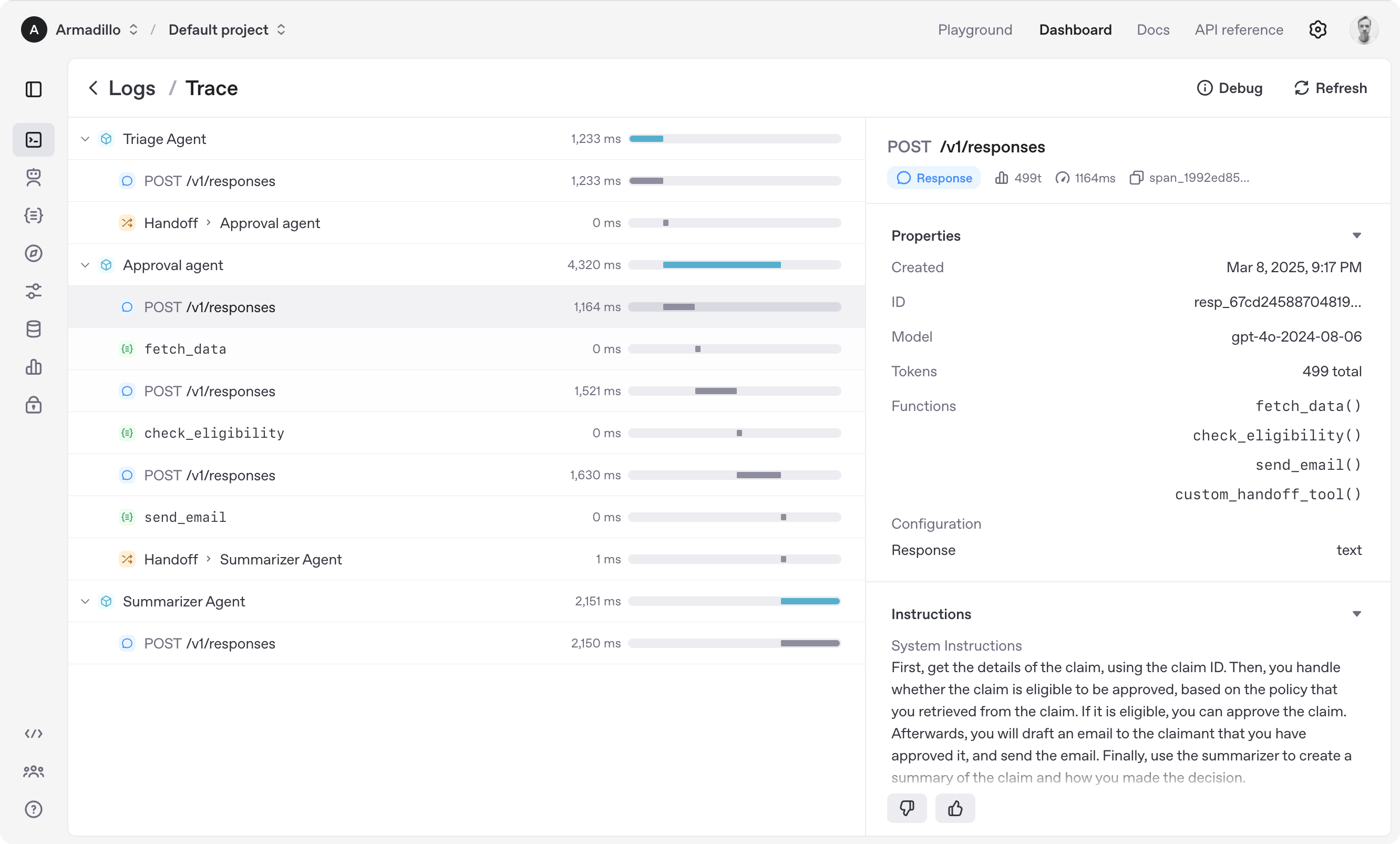
- Tracing: Built-in tracking of agent runs, allowing you to view, debug and optimize your workflows
Explore the examples directory to see the SDK in action, and read our documentation for more details.
Get started
- Set up your Python environment
- Option A: Using venv (traditional method)
python -m venv env
source env/bin/activate  # On Windows: env\Scripts\activate
- Option B: Using uv (recommended)
uv venv
source .venv/bin/activate  # On Windows: .venv\Scripts\activate
- Install Agents SDK
pip install openai-agents
For voice support, install with the optional voice group: pip install 'openai-agents[voice]'.
Hello world example
from agents import Agent, Runner

agent = Agent(name="Assistant", instructions="You are a helpful assistant")

result = Runner.run_sync(agent, "Write a haiku about recursion in programming.")
print(result.final_output)

# Code within the code,
# Functions calling themselves,
# Infinite loop's dance.
(If running this, ensure you set the OPENAI_API_KEY environment variable)
(For Jupyter notebook users, see hello_world_jupyter.py)
Handoffs example
from agents import Agent, Runner
import asyncio

spanish_agent = Agent(
    name="Spanish agent",
    instructions="You only speak Spanish.",
)

english_agent = Agent(
    name="English agent",
    instructions="You only speak English",
)

triage_agent = Agent(
    name="Triage agent",
    instructions="Handoff to the appropriate agent based on the language of the request.",
    handoffs=[spanish_agent, english_agent],
)


async def main():
    result = await Runner.run(triage_agent, input="Hola, ¿cómo estás?")
    print(result.final_output)
    # ¡Hola! Estoy bien, gracias por preguntar. ¿Y tú, cómo estás?


if __name__ == "__main__":
    asyncio.run(main())
Functions example
import asyncio

from agents import Agent, Runner, function_tool


@function_tool
def get_weather(city: str) -> str:
    return f"The weather in {city} is sunny."


agent = Agent(
    name="Hello world",
    instructions="You are a helpful agent.",
    tools=[get_weather],
)


async def main():
    result = await Runner.run(agent, input="What's the weather in Tokyo?")
    print(result.final_output)
    # The weather in Tokyo is sunny.


if __name__ == "__main__":
    asyncio.run(main())
The agent loop
When you call Runner.run(), we run a loop until we get a final output.
- We call the LLM, using the model and settings on the agent, and the message history.
- The LLM returns a response, which may include tool calls.
- If the response has a final output (see below for more on this), we return it and end the loop.
- If the response has a handoff, we set the agent to the new agent and go back to step 1.
- We process the tool calls (if any) and append the tool responses messages. Then we go to step 1.
There is a max_turns parameter that you can use to limit the number of times the loop executes.
Final output
Final output is the last thing the agent produces in the loop.
- If you set an
output_typeon the agent, the final output is when the LLM returns something of that type. We use structured outputs for this. - If there's no
output_type(i.e. plain text responses), then the first LLM response without any tool calls or handoffs is considered as the final output.
As a result, the mental model for the agent loop is:
- If the current agent has an
output_type, the loop runs until the agent produces structured output matching that type. - If the current agent does not have an
output_type, the loop runs until the current agent produces a message without any tool calls/handoffs.
Common agent patterns
The Agents SDK is designed to be highly flexible, allowing you to model a wide range of LLM workflows including deterministic flows, iterative loops, and more. See examples in examples/agent_patterns.
Tracing
The Agents SDK automatically traces your agent runs, making it easy to track and debug the behavior of your agents. Tracing is extensible by design, supporting custom spans and a wide variety of external destinations, including Logfire, AgentOps, Braintrust, Scorecard, and Keywords AI. For more details about how to customize or disable tracing, see Tracing, which also includes a larger list of external tracing processors.
Development (only needed if you need to edit the SDK/examples)
- Ensure you have
uvinstalled.
uv --version
- Install dependencies
make sync
- (After making changes) lint/test
make tests  # run tests
make mypy   # run typechecker
make lint   # run linter
Acknowledgements
We'd like to acknowledge the excellent work of the open-source community, especially:
We're committed to continuing to build the Agents SDK as an open source framework so others in the community can expand on our approach.