Compare commits
171 Commits
| Author | SHA1 | Date | |
|---|---|---|---|
 jackwener jackwener
|
90971d4c1a | ||
|
jackwener
|
4945f10ac8 | ||
|
jackwener
|
454964010d | ||
|
jakevin
|
94c3ef9af1 | ||
|
jakevin
|
86b59d91a6 | ||
|
jakevin
|
e916c164b6 | ||
|
jakevin
|
1af0f48023 | ||
|
jakevin
|
2fb7ed131b | ||
|
jakevin
|
14672ddf9b | ||
|
jakevin
|
77814553cf | ||
|
jakevin
|
9018713749 | ||
|
VK
|
3d39574501 | ||
|
dependabot[bot]
|
b1067b64ee | ||
|
工具人研究所
|
376c63c7db | ||
|
sline
|
ccfc0ed0de | ||
|
AstroHan
|
3a7a5e135b | ||
|
jakevin
|
618dae9148 | ||
|
AstroHan
|
11df7181b3 | ||
|
MatrixA
|
2b24f517fe | ||
|
AstroHan
|
d44a0ab256 | ||
|
zhanghui67
|
9f2aa3b711 | ||
|
jakevin
|
505c86bae9 | ||
|
dependabot[bot]
|
b8b4fa011b | ||
|
Piotr Yordanov
|
8869d3b457 | ||
|
jakevin
|
7c9caa81f8 | ||
|
Xeron
|
7c808fd339 | ||
|
jakevin
|
fb562fa1e9 | ||
|
haijun huang
|
f6466db39a | ||
|
dependabot[bot]
|
37c7ea41b8 | ||
|
jakevin
|
d58e1a74cd | ||
|
jakevin
|
1b3f74cd6a | ||
|
jakevin
|
bdcffd147f | ||
|
jakevin
|
53699eb807 | ||
|
jakevin
|
56d4326646 | ||
|
QSam2023
|
4c9a2b1fde | ||
|
dependabot[bot]
|
57fcc50c1b | ||
|
dependabot[bot]
|
689cd1ebb3 | ||
|
jakevin
|
167c7c784a | ||
|
jakevin
|
f852da3af4 | ||
|
jakevin
|
15d9ef814f | ||
|
jakevin
|
89a20e11bc | ||
|
jakevin
|
760b91e7b3 | ||
|
calm
|
b6a02f82ed | ||
|
jakevin
|
a170873ad6 | ||
|
jakevin
|
75f42371ca | ||
|
sline
|
41aedf68cd | ||
|
jakevin
|
8bf750c4ea | ||
|
jakevin
|
c9b3568594 | ||
|
jakevin
|
b4d64cad6e | ||
|
jakevin
|
966f6e5019 | ||
|
AniChikage
|
ea8324257d | ||
|
Yee
|
dff0fe510c | ||
|
jakevin
|
4343ec07e0 | ||
|
jakevin
|
f00a5d1929 | ||
|
caokaizz
|
c7895eaf8e | ||
|
AstroHan
|
a83027d19c | ||
|
yin1991
|
f8bf66390d | ||
|
jicaiji1-max
|
22f5c7ade0 | ||
|
jakevin
|
8ab0cd2a50 | ||
|
donquijote2557-web
|
d4b06be049 | ||
|
AstroHan
|
7073645e30 | ||
|
jakevin
|
3a21be624e | ||
|
AstroHan
|
127a974ecd | ||
|
jakevin
|
fcb5a9d409 | ||
|
jakevin
|
66c4b841f2 | ||
|
jakevin
|
2a52906ed2 | ||
|
helloimcx
|
9cdc1274b2 | ||
|
stometaverse
|
a6d993f37f | ||
|
jakevin
|
b7c6c02370 | ||
|
jakevin
|
722c180a0a | ||
|
jakevin
|
788126198b | ||
|
jakevin
|
98ecfab8ad | ||
|
jakevin
|
4b976da04f | ||
|
Zhang ShengYan
|
3bedaccc25 | ||
|
jakevin
|
40bd11dfbe | ||
|
AlexYue
|
9a77dba139 | ||
|
jakevin
|
49c2dc7426 | ||
|
jakevin
|
e4a13cb6f0 | ||
|
jakevin
|
637161f0ab | ||
|
jakevin
|
a778f617ca | ||
|
jakevin
|
b4a8089224 | ||
|
jakevin
|
428b831f85 | ||
|
jakevin
|
7ebe8134cc | ||
|
jakevin
|
c44bc62b60 | ||
|
jakevin
|
7f57e76485 | ||
|
jakevin
|
e9818c1b41 | ||
|
jakevin
|
3e91876d13 | ||
|
jakevin
|
7c02588105 | ||
|
jakevin
|
112fdefa8d | ||
|
jakevin
|
e077ad2336 | ||
|
jakevin
|
81384ede00 | ||
|
jakevin
|
71b2c3961b | ||
|
jakevin
|
b3b9892836 | ||
|
jakevin
|
520622ac75 | ||
|
jakevin
|
2d1b8c1e76 | ||
|
ykfnxx
|
70651d3ba8 | ||
|
plat1ko
|
9696db9ed4 | ||
|
jakevin
|
c76f86c9cb | ||
|
jakevin
|
4cd0409ded | ||
|
VK
|
ea113a6471 | ||
|
AstroHan
|
a439286398 | ||
|
AstroHan
|
1d56dd77a8 | ||
|
AstroHan
|
e98cf756e9 | ||
|
Zhang ShengYan
|
387aa0d6e5 | ||
|
jakevin
|
1ecac25df5 | ||
|
jakevin
|
9921e5d696 | ||
|
jakevin
|
4c8a447ead | ||
|
plat1ko
|
fb2a145e36 | ||
|
jakevin
|
bd274ce2d7 | ||
|
jakevin
|
28c393ec86 | ||
|
jakevin
|
8a4ea411e1 | ||
|
jakevin
|
45cee57ca0 | ||
|
AstroHan
|
4e3259976b | ||
|
Leo Yuan Tsao
|
bdf5967abd | ||
|
jakevin
|
7776db83d7 | ||
|
plat1ko
|
fae1dce027 | ||
|
jakevin
|
d831b04d48 | ||
|
jakevin
|
a22875814b | ||
|
云比云
|
ae30763e9b | ||
|
jakevin
|
3669a89323 | ||
|
sline
|
eb0ccaf549 | ||
|
AstroHan
|
fbf051d539 | ||
|
Kasumi
|
fcff2e40be | ||
|
sline
|
4391ccfcb8 | ||
|
sline
|
ce484c2a63 | ||
|
VK
|
06c902aeed | ||
|
AlexYue
|
1d39295f4b | ||
|
jakevin
|
50ec7c6868 | ||
|
jackwener
|
644b8bcbd4 | ||
|
jackwener
|
4e274a92b7 | ||
|
jakevin
|
d1ade61e8c | ||
|
jakevin
|
5d84c6f63e | ||
|
Noah
|
cbd50ccb91 | ||
|
Alex Yang
|
3f16d42e27 | ||
|
Sheng-Yan, Zhang
|
c8e8c773c0 | ||
|
jakevin
|
5de920a994 | ||
|
Yunxiao_Li
|
476fe115de | ||
|
jakevin
|
8d45019119 | ||
|
jackwener
|
36cf3067f7 | ||
|
jakevin
|
516f1be3e6 | ||
|
jakevin
|
d556eeb512 | ||
|
jakevin
|
d7c895592f | ||
|
jakevin
|
eeace115cb | ||
|
jakevin
|
35676a101f | ||
|
AstroHan
|
cd0c6f874e | ||
|
ajia1206
|
0b71c6c4da | ||
|
Kasumi
|
7700704923 | ||
|
jackwener
|
4d3b972d67 | ||
|
AlexYue
|
15d3583c60 | ||
|
AlexYue
|
53a95ed0ce | ||
|
jackwener
|
0a2591842c | ||
|
jakevin
|
d9a71da596 | ||
|
jackwener
|
9a79501bfd | ||
|
jackwener
|
46d0f00aa6 | ||
|
jackwener
|
b3e32d8a05 | ||
|
jackwener
|
36bc57a962 | ||
|
jackwener
|
0e8c96b6d9 | ||
|
jackwener
|
c63af6d418 | ||
|
jackwener
|
35a0fed8a0 | ||
|
jackwener
|
593436e4cb | ||
|
jackwener
|
02793e990e | ||
|
jackwener
|
03f067d907 | ||
|
云比云
|
7e973ca592 | ||
|
jackwener
|
4600b9d46d | ||
|
BruceLoveDecimal
|
3cda14a2ab | ||
|
jackwener
|
4f74b45963 | ||
|
ajia1206
|
8f1725982e | ||
|
AlexYue
|
2876750891 | ||
|
jakevin
|
4ab4f88bcd | ||
|
AlexYue
|
9eb7a1eaa1 | ||
|
Chencheng Li
|
4cabca12df |
@@ -166,10 +166,10 @@ cli({
|
||||
|
||||
### 3.4 公共模式复用
|
||||
|
||||
迁移过程中如果发现多个适配器共享逻辑,考虑提取到 `src/<site>.ts` 工具文件:
|
||||
迁移过程中如果发现多个适配器共享逻辑,考虑提取到 `src/clis/<site>/utils.ts` 工具文件:
|
||||
|
||||
```typescript
|
||||
// src/<site>.ts
|
||||
// src/clis/<site>/utils.ts
|
||||
export async function fetchWithAuth(page, url) { ... }
|
||||
export function parseItem(raw) { ... }
|
||||
```
|
||||
|
||||
@@ -19,6 +19,13 @@ Related issue:
|
||||
- [ ] I updated tests or docs if needed
|
||||
- [ ] I included output or screenshots when useful
|
||||
|
||||
### Documentation (if adding/modifying an adapter)
|
||||
|
||||
- [ ] Added doc page under `docs/adapters/` (if new adapter)
|
||||
- [ ] Updated `docs/adapters/index.md` table (if new adapter)
|
||||
- [ ] Updated sidebar in `docs/.vitepress/config.mts` (if new adapter)
|
||||
|
||||
## Screenshots / Output
|
||||
|
||||
<!-- If applicable, paste CLI output or screenshots here. -->
|
||||
|
||||
|
||||
@@ -15,10 +15,10 @@ jobs:
|
||||
runs-on: ubuntu-latest
|
||||
steps:
|
||||
- name: Checkout Code
|
||||
uses: actions/checkout@v4
|
||||
uses: actions/checkout@v6
|
||||
|
||||
- name: Setup Node.js
|
||||
uses: actions/setup-node@v4
|
||||
uses: actions/setup-node@v6
|
||||
with:
|
||||
node-version: 20
|
||||
cache: 'npm'
|
||||
@@ -45,35 +45,20 @@ jobs:
|
||||
cd extension-package
|
||||
zip -r ../opencli-extension.zip .
|
||||
|
||||
- name: Create Extension CRX
|
||||
run: |
|
||||
npm install -g crx3
|
||||
if [ -n "${{ secrets.CRX_PRIVATE_KEY }}" ]; then
|
||||
echo "Found CRX_PRIVATE_KEY, signing extension..."
|
||||
echo "${{ secrets.CRX_PRIVATE_KEY }}" > crx-key.pem
|
||||
crx3 pack extension-package -o opencli-extension.crx -p crx-key.pem
|
||||
rm crx-key.pem
|
||||
else
|
||||
echo "No CRX_PRIVATE_KEY configured. Generating CRX with a temporary random key..."
|
||||
crx3 pack extension-package -o opencli-extension.crx
|
||||
fi
|
||||
|
||||
- name: Upload Artifacts (Action Run)
|
||||
uses: actions/upload-artifact@v4
|
||||
uses: actions/upload-artifact@v7
|
||||
with:
|
||||
name: opencli-extension-build
|
||||
path: |
|
||||
opencli-extension.zip
|
||||
opencli-extension.crx
|
||||
retention-days: 7
|
||||
|
||||
- name: Attach to GitHub Release
|
||||
if: startsWith(github.ref, 'refs/tags/')
|
||||
uses: softprops/action-gh-release@v2
|
||||
uses: softprops/action-gh-release@v2.6.1
|
||||
with:
|
||||
files: |
|
||||
opencli-extension.zip
|
||||
opencli-extension.crx
|
||||
draft: false
|
||||
prerelease: false
|
||||
env:
|
||||
|
||||
@@ -18,9 +18,9 @@ jobs:
|
||||
build:
|
||||
runs-on: ubuntu-latest
|
||||
steps:
|
||||
- uses: actions/checkout@v4
|
||||
- uses: actions/checkout@v6
|
||||
|
||||
- uses: actions/setup-node@v4
|
||||
- uses: actions/setup-node@v6
|
||||
with:
|
||||
node-version: '22'
|
||||
cache: 'npm'
|
||||
@@ -43,9 +43,9 @@ jobs:
|
||||
node-version: ['20', '22']
|
||||
shard: [1, 2]
|
||||
steps:
|
||||
- uses: actions/checkout@v4
|
||||
- uses: actions/checkout@v6
|
||||
|
||||
- uses: actions/setup-node@v4
|
||||
- uses: actions/setup-node@v6
|
||||
with:
|
||||
node-version: ${{ matrix.node-version }}
|
||||
cache: 'npm'
|
||||
@@ -54,7 +54,24 @@ jobs:
|
||||
run: npm ci
|
||||
|
||||
- name: Run unit tests (Node ${{ matrix.node-version }}, shard ${{ matrix.shard }}/2)
|
||||
run: npx vitest run src/ --reporter=verbose --shard=${{ matrix.shard }}/2
|
||||
run: npm test -- --reporter=verbose --shard=${{ matrix.shard }}/2
|
||||
|
||||
adapter-test:
|
||||
runs-on: ubuntu-latest
|
||||
needs: build
|
||||
steps:
|
||||
- uses: actions/checkout@v6
|
||||
|
||||
- uses: actions/setup-node@v6
|
||||
with:
|
||||
node-version: '22'
|
||||
cache: 'npm'
|
||||
|
||||
- name: Install dependencies
|
||||
run: npm ci
|
||||
|
||||
- name: Run focused adapter tests
|
||||
run: npm run test:adapter -- --reporter=verbose
|
||||
|
||||
# ── Smoke tests (scheduled / manual only) ──
|
||||
smoke-test:
|
||||
@@ -62,9 +79,9 @@ jobs:
|
||||
needs: build
|
||||
runs-on: ubuntu-latest
|
||||
steps:
|
||||
- uses: actions/checkout@v4
|
||||
- uses: actions/checkout@v6
|
||||
|
||||
- uses: actions/setup-node@v4
|
||||
- uses: actions/setup-node@v6
|
||||
with:
|
||||
node-version: '22'
|
||||
cache: 'npm'
|
||||
|
||||
@@ -0,0 +1,36 @@
|
||||
name: Doc Check
|
||||
|
||||
on:
|
||||
pull_request:
|
||||
branches: [main, dev]
|
||||
|
||||
concurrency:
|
||||
group: doc-check-${{ github.ref }}
|
||||
cancel-in-progress: true
|
||||
|
||||
jobs:
|
||||
# ── Adapter doc coverage ──
|
||||
doc-coverage:
|
||||
runs-on: ubuntu-latest
|
||||
steps:
|
||||
- uses: actions/checkout@v6
|
||||
|
||||
- name: Check adapter doc coverage
|
||||
run: bash scripts/check-doc-coverage.sh --strict
|
||||
|
||||
# ── VitePress build validation ──
|
||||
docs-build:
|
||||
runs-on: ubuntu-latest
|
||||
steps:
|
||||
- uses: actions/checkout@v6
|
||||
|
||||
- uses: actions/setup-node@v6
|
||||
with:
|
||||
node-version: '22'
|
||||
cache: 'npm'
|
||||
|
||||
- name: Install dependencies
|
||||
run: npm ci
|
||||
|
||||
- name: Build docs (catches broken links & sidebar refs)
|
||||
run: npm run docs:build
|
||||
@@ -1,52 +1,17 @@
|
||||
name: Deploy Docs
|
||||
name: Trigger Website Rebuild (Docs Updated)
|
||||
|
||||
on:
|
||||
push:
|
||||
branches: [main]
|
||||
paths: ['docs/**']
|
||||
workflow_dispatch:
|
||||
|
||||
permissions:
|
||||
contents: read
|
||||
pages: write
|
||||
id-token: write
|
||||
|
||||
concurrency:
|
||||
group: pages
|
||||
cancel-in-progress: false
|
||||
|
||||
jobs:
|
||||
build:
|
||||
dispatch:
|
||||
runs-on: ubuntu-latest
|
||||
steps:
|
||||
- uses: actions/checkout@v4
|
||||
- name: Trigger opencli-website rebuild
|
||||
uses: peter-evans/repository-dispatch@v4
|
||||
with:
|
||||
fetch-depth: 0
|
||||
|
||||
- uses: actions/setup-node@v4
|
||||
with:
|
||||
node-version: 20
|
||||
cache: npm
|
||||
|
||||
- name: Install dependencies
|
||||
run: npm ci
|
||||
|
||||
- name: Build docs
|
||||
run: npm run docs:build
|
||||
|
||||
- uses: actions/configure-pages@v4
|
||||
|
||||
- uses: actions/upload-pages-artifact@v3
|
||||
with:
|
||||
path: docs/.vitepress/dist
|
||||
|
||||
deploy:
|
||||
environment:
|
||||
name: github-pages
|
||||
url: ${{ steps.deployment.outputs.page_url }}
|
||||
needs: build
|
||||
runs-on: ubuntu-latest
|
||||
steps:
|
||||
- name: Deploy to GitHub Pages
|
||||
id: deployment
|
||||
uses: actions/deploy-pages@v4
|
||||
token: ${{ secrets.WEBSITE_DEPLOY_TOKEN }}
|
||||
repository: jackwener/opencli-website
|
||||
event-type: docs-updated
|
||||
|
||||
@@ -16,9 +16,9 @@ jobs:
|
||||
runs-on: ubuntu-latest
|
||||
timeout-minutes: 20
|
||||
steps:
|
||||
- uses: actions/checkout@v4
|
||||
- uses: actions/checkout@v6
|
||||
|
||||
- uses: actions/setup-node@v4
|
||||
- uses: actions/setup-node@v6
|
||||
with:
|
||||
node-version: '22'
|
||||
cache: 'npm'
|
||||
|
||||
@@ -13,9 +13,9 @@ jobs:
|
||||
if: ${{ vars.PKG_PR_NEW_ENABLED == 'true' }}
|
||||
runs-on: ubuntu-latest
|
||||
steps:
|
||||
- uses: actions/checkout@v4
|
||||
- uses: actions/checkout@v6
|
||||
|
||||
- uses: actions/setup-node@v4
|
||||
- uses: actions/setup-node@v6
|
||||
with:
|
||||
node-version: '22'
|
||||
cache: 'npm'
|
||||
|
||||
@@ -1,25 +0,0 @@
|
||||
name: Release Please
|
||||
|
||||
on:
|
||||
push:
|
||||
branches: [main]
|
||||
|
||||
permissions:
|
||||
contents: write
|
||||
pull-requests: write
|
||||
|
||||
jobs:
|
||||
release-please:
|
||||
runs-on: ubuntu-latest
|
||||
steps:
|
||||
- name: Ensure release-please token is configured
|
||||
run: |
|
||||
if [ -z "${{ secrets.RELEASE_PLEASE_TOKEN }}" ]; then
|
||||
echo "RELEASE_PLEASE_TOKEN secret is required so release PRs can trigger downstream CI workflows." >&2
|
||||
exit 1
|
||||
fi
|
||||
|
||||
- uses: googleapis/release-please-action@v4
|
||||
with:
|
||||
release-type: node
|
||||
token: ${{ secrets.RELEASE_PLEASE_TOKEN }}
|
||||
@@ -13,9 +13,9 @@ jobs:
|
||||
release:
|
||||
runs-on: ubuntu-latest
|
||||
steps:
|
||||
- uses: actions/checkout@v4
|
||||
- uses: actions/checkout@v6
|
||||
|
||||
- uses: actions/setup-node@v4
|
||||
- uses: actions/setup-node@v6
|
||||
with:
|
||||
node-version: '22'
|
||||
registry-url: 'https://registry.npmjs.org'
|
||||
@@ -27,7 +27,7 @@ jobs:
|
||||
run: npx tsc --noEmit
|
||||
|
||||
- name: Create GitHub Release
|
||||
uses: softprops/action-gh-release@v2
|
||||
uses: softprops/action-gh-release@v2.6.1
|
||||
with:
|
||||
generate_release_notes: true
|
||||
|
||||
@@ -35,3 +35,10 @@ jobs:
|
||||
run: npm publish --provenance --access public
|
||||
env:
|
||||
NODE_AUTH_TOKEN: ${{ secrets.NPM_TOKEN }}
|
||||
|
||||
- name: Trigger website rebuild
|
||||
uses: peter-evans/repository-dispatch@v4
|
||||
with:
|
||||
token: ${{ secrets.WEBSITE_DEPLOY_TOKEN }}
|
||||
repository: jackwener/opencli-website
|
||||
event-type: version-released
|
||||
|
||||
@@ -19,9 +19,9 @@ jobs:
|
||||
audit:
|
||||
runs-on: ubuntu-latest
|
||||
steps:
|
||||
- uses: actions/checkout@v4
|
||||
- uses: actions/checkout@v6
|
||||
|
||||
- uses: actions/setup-node@v4
|
||||
- uses: actions/setup-node@v6
|
||||
with:
|
||||
node-version: '22'
|
||||
cache: 'npm'
|
||||
|
||||
@@ -5,6 +5,7 @@ dist/
|
||||
.opencli/
|
||||
.mcp.json
|
||||
*.log
|
||||
.DS_Store
|
||||
|
||||
# VitePress
|
||||
docs/.vitepress/dist
|
||||
@@ -14,3 +15,10 @@ docs/.vitepress/cache
|
||||
*.pem
|
||||
*.crx
|
||||
*.zip
|
||||
.envrc
|
||||
.windsurf
|
||||
.claude
|
||||
.cortex
|
||||
|
||||
# Database files
|
||||
*.db
|
||||
|
||||
@@ -1,103 +0,0 @@
|
||||
# Connecting OpenCLI via CDP (Remote/Headless Servers)
|
||||
|
||||
If you cannot use the opencli Browser Bridge extension (e.g., in a remote headless server environment without a UI), OpenCLI provides an alternative: connecting directly to Chrome via **CDP (Chrome DevTools Protocol)**.
|
||||
|
||||
Because CDP binds to `localhost` by default for security reasons, accessing it from a remote server requires an additional networking tunnel.
|
||||
|
||||
This guide is broken down into three phases:
|
||||
1. **Preparation**: Start Chrome with CDP enabled locally.
|
||||
2. **Network Tunnels**: Expose that CDP port to your remote server using either **SSH Tunnels** or **Reverse Proxies**.
|
||||
3. **Execution**: Run OpenCLI on your server.
|
||||
|
||||
---
|
||||
|
||||
## Phase 1: Preparation (Local Machine)
|
||||
|
||||
First, you need to start a Chrome browser on your local machine with remote debugging enabled.
|
||||
|
||||
**macOS:**
|
||||
```bash
|
||||
/Applications/Google\ Chrome.app/Contents/MacOS/Google\ Chrome \
|
||||
--remote-debugging-port=9222 \
|
||||
--user-data-dir="$HOME/chrome-debug-profile" \
|
||||
--remote-allow-origins="*"
|
||||
```
|
||||
|
||||
**Linux:**
|
||||
```bash
|
||||
google-chrome \
|
||||
--remote-debugging-port=9222 \
|
||||
--user-data-dir="$HOME/chrome-debug-profile" \
|
||||
--remote-allow-origins="*"
|
||||
```
|
||||
|
||||
**Windows:**
|
||||
```cmd
|
||||
"C:\Program Files\Google\Chrome\Application\chrome.exe" ^
|
||||
--remote-debugging-port=9222 ^
|
||||
--user-data-dir="%USERPROFILE%\chrome-debug-profile" ^
|
||||
--remote-allow-origins="*"
|
||||
```
|
||||
|
||||
> **Note**: The `--remote-allow-origins="*"` flag is often required for modern Chrome versions to accept cross-origin CDP WebSocket connections (e.g. from reverse proxies like ngrok).
|
||||
|
||||
Once this browser instance opens, **log into the target websites you want to use** (e.g., bilibili.com, zhihu.com) so that the session contains the correct cookies.
|
||||
|
||||
---
|
||||
|
||||
## Phase 2: Remote Access Methods
|
||||
|
||||
Once CDP is running locally on port `9222`, you must securely expose this port to your remote server. Choose one of the two methods below depending on your network conditions.
|
||||
|
||||
### Method A: SSH Tunnel (Recommended)
|
||||
|
||||
If your local machine has SSH access to the remote server, this is the most secure and straightforward method.
|
||||
|
||||
Run this command on your **Local Machine** to forward the remote server's port `9222` back to your local port `9222`:
|
||||
|
||||
```bash
|
||||
ssh -R 9222:localhost:9222 your-server-user@your-server-ip
|
||||
```
|
||||
|
||||
Leave this SSH session running in the background.
|
||||
|
||||
### Method B: Reverse Proxy (ngrok / frp / socat)
|
||||
|
||||
If you cannot establish a direct SSH connection (e.g., due to NAT or firewalls), you can use an intranet penetration tool like `ngrok`.
|
||||
|
||||
Run this command on your **Local Machine** to expose your local port `9222` to the public internet securely via ngrok:
|
||||
|
||||
```bash
|
||||
ngrok http 9222
|
||||
```
|
||||
|
||||
This will print a forwarding URL, such as `https://abcdef.ngrok.app`. **Copy this URL**.
|
||||
|
||||
---
|
||||
|
||||
## Phase 3: Execution (Remote Server)
|
||||
|
||||
Now switch to your **Remote Server** where OpenCLI is installed.
|
||||
|
||||
Depending on the network tunnel method you chose in Phase 2, set the `OPENCLI_CDP_ENDPOINT` environment variable and run your commands.
|
||||
|
||||
### If you used Method A (SSH Tunnel):
|
||||
|
||||
```bash
|
||||
export OPENCLI_CDP_ENDPOINT="http://localhost:9222"
|
||||
opencli doctor # Verify connection
|
||||
opencli bilibili hot --limit 5 # Test a command
|
||||
```
|
||||
|
||||
### If you used Method B (Reverse Proxy like ngrok):
|
||||
|
||||
```bash
|
||||
# Use the URL you copied from ngrok earlier
|
||||
export OPENCLI_CDP_ENDPOINT="https://abcdef.ngrok.app"
|
||||
opencli doctor # Verify connection
|
||||
opencli bilibili hot --limit 5 # Test a command
|
||||
```
|
||||
|
||||
> *Tip: If you provide a standard HTTP/HTTPS CDP endpoint, OpenCLI requests the `/json` target list and picks the most likely inspectable app/page target automatically. If multiple app targets exist, you can further narrow selection with `OPENCLI_CDP_TARGET` (for example `antigravity` or `codex`).*
|
||||
|
||||
If you plan to use this setup frequently, you can persist the environment variable by adding the `export` line to your `~/.bashrc` or `~/.zshrc` on the server.
|
||||
-103
@@ -1,103 +0,0 @@
|
||||
# 通过 CDP 远程连接 OpenCLI (服务器/无头环境)
|
||||
|
||||
如果你无法使用 opencli Browser Bridge 浏览器扩展(例如:在无界面的远程服务器上运行 OpenCLI 时),OpenCLI 提供了备选方案:通过连接 **CDP (Chrome DevTools Protocol,即 Chrome 开发者工具协议)** 来直接控制本地 Chrome。
|
||||
|
||||
出于安全考虑,CDP 默认仅绑定在 `localhost` 的本地端口。所以,若是想让**远程服务器**调用本地的 CDP 服务,我们需要依靠一层额外的网络隧道。
|
||||
|
||||
本指南将整个过程拆分为三个阶段:
|
||||
1. **阶段一:准备工作**(在本地启动允许 CDP 调试的 Chrome)。
|
||||
2. **阶段二:建立网络隧道**(通过 **SSH反向隧道** 或 **反向代理工具**,将本地的 CDP 端口暴露给服务器)。
|
||||
3. **阶段三:执行命令**(在服务器端运行 OpenCLI)。
|
||||
|
||||
---
|
||||
|
||||
## 阶段一:准备工作 (本地电脑)
|
||||
|
||||
首先,你需要在你的本地电脑上,通过命令行参数启动一个开启了远程调试端口的 Chrome 实例。
|
||||
|
||||
**macOS:**
|
||||
```bash
|
||||
/Applications/Google\ Chrome.app/Contents/MacOS/Google\ Chrome \
|
||||
--remote-debugging-port=9222 \
|
||||
--user-data-dir="$HOME/chrome-debug-profile" \
|
||||
--remote-allow-origins="*"
|
||||
```
|
||||
|
||||
**Linux:**
|
||||
```bash
|
||||
google-chrome \
|
||||
--remote-debugging-port=9222 \
|
||||
--user-data-dir="$HOME/chrome-debug-profile" \
|
||||
--remote-allow-origins="*"
|
||||
```
|
||||
|
||||
**Windows:**
|
||||
```cmd
|
||||
"C:\Program Files\Google\Chrome\Application\chrome.exe" ^
|
||||
--remote-debugging-port=9222 ^
|
||||
--user-data-dir="%USERPROFILE%\chrome-debug-profile" ^
|
||||
--remote-allow-origins="*"
|
||||
```
|
||||
|
||||
> **注意**:此处增加的 `--remote-allow-origins="*"` 参数对于较新版本的 Chrome 来说通常是[必需的],以允许来自反向代理(如 ngrok)的跨域 WebSocket 连接请求。
|
||||
|
||||
待这个新的浏览器实例打开后,**手工登录那些你打算使用的网站**(如 bilibili.com、zhihu.com 等),这可以让该浏览器的运行资料(Profile)保留上这些网站登录用的 Cookie。
|
||||
|
||||
---
|
||||
|
||||
## 阶段二:建立网络隧道
|
||||
|
||||
现在你的本地已经有了一个监听在 `9222` 端口的 CDP 服务,接下来,选择以下任意一种方式将其实际暴露给你的远端服务器。
|
||||
|
||||
### 方法 A:SSH 反向端口转发 (推荐)
|
||||
|
||||
如果你的本地电脑可以直连远程服务器的 SSH,那么这是最简单且最安全的做法。
|
||||
|
||||
在你的 **本地电脑** 终端上直接运行这条 ssh 命令,将远程服务器的 `9222` 端口反向映射回本地的 `9222` 端口:
|
||||
|
||||
```bash
|
||||
ssh -R 9222:localhost:9222 your-server-user@your-server-ip
|
||||
```
|
||||
|
||||
保持此 SSH 会话在后台运行即可。
|
||||
|
||||
### 方法 B:反向代理 / 内网穿透 (ngrok / frp / socat)
|
||||
|
||||
如果因为 NAT 或防火墙等因素导致无法直连 SSH 服务器,你可以使用 `ngrok` 等内网穿透工具。
|
||||
|
||||
在 **本地电脑** 运行 ngrok 将本地的 `9222` 端口暴露到公网:
|
||||
|
||||
```bash
|
||||
ngrok http 9222
|
||||
```
|
||||
|
||||
此时终端里会打印出一段专属的转发 URL 地址(如:`https://abcdef.ngrok.app`)。**复制这一段 URL 地址备用**。
|
||||
|
||||
---
|
||||
|
||||
## 阶段三:执行命令 (远程服务器)
|
||||
|
||||
现在,所有的准备工作已结束。请切换到你已安装好 OpenCLI 的 **远程服务器** 终端上。
|
||||
|
||||
根据你在上方阶段二所选择的隧道方案,在终端中配置对应的 `OPENCLI_CDP_ENDPOINT` 环境变量:
|
||||
|
||||
### 若使用 方法 A (SSH 反向隧道):
|
||||
|
||||
```bash
|
||||
export OPENCLI_CDP_ENDPOINT="http://localhost:9222"
|
||||
opencli doctor # 查看并验证连接是否通畅
|
||||
opencli bilibili hot --limit 5 # 执行目标命令
|
||||
```
|
||||
|
||||
### 若使用 方法 B (Ngrok 等反向代理):
|
||||
|
||||
```bash
|
||||
# 将刚刚使用 ngrok 得到的地址填入这里
|
||||
export OPENCLI_CDP_ENDPOINT="https://abcdef.ngrok.app"
|
||||
opencli doctor # 查看并验证连接是否通畅
|
||||
opencli bilibili hot --limit 5 # 执行目标命令
|
||||
```
|
||||
|
||||
> *Tip: 如果你填写的是一个普通 HTTP/HTTPS 的 CDP 地址,OpenCLI 会自动请求 `/json` target 列表,并挑选最可能的 app/page target;如果同一个端口下暴露了多个应用 target,还可以通过 `OPENCLI_CDP_TARGET`(例如 `antigravity`、`codex`)进一步缩小匹配范围。*
|
||||
|
||||
如果你想在此服务器上永久启用该配置,可以将对应的 `export` 语句追加进入你的 `~/.bashrc` 或 `~/.zshrc` 配置文件中。
|
||||
+159
@@ -0,0 +1,159 @@
|
||||
# Changelog
|
||||
|
||||
## [1.3.2](https://github.com/jackwener/opencli/compare/v1.3.1...v1.3.2) (2026-03-24)
|
||||
|
||||
|
||||
### Features
|
||||
|
||||
* **error-handling:** refine error handling with semantic error types and emoji-coded output ([#312](https://github.com/jackwener/opencli/issues/312)) ([b4d64ca](https://github.com/jackwener/opencli/commit/b4d64ca))
|
||||
|
||||
|
||||
### Bug Fixes
|
||||
|
||||
* **security:** replace execSync with execFileSync to prevent command injection ([#309](https://github.com/jackwener/opencli/issues/309)) ([41aedf6](https://github.com/jackwener/opencli/commit/41aedf6))
|
||||
* remove duplicate getErrorMessage import in discovery.ts ([#315](https://github.com/jackwener/opencli/issues/315)) ([75f4237](https://github.com/jackwener/opencli/commit/75f4237))
|
||||
* **e2e:** broaden xiaoyuzhou skip logic for overseas CI runners ([#316](https://github.com/jackwener/opencli/issues/316)) ([a170873](https://github.com/jackwener/opencli/commit/a170873))
|
||||
|
||||
|
||||
### Documentation
|
||||
|
||||
* **SKILL.md:** sync command reference — add missing sites and desktop adapters ([#314](https://github.com/jackwener/opencli/issues/314)) ([8bf750c](https://github.com/jackwener/opencli/commit/8bf750c))
|
||||
|
||||
|
||||
### Chores
|
||||
|
||||
* pre-release cleanup — fix dependencies, sync docs, reduce code duplication ([#311](https://github.com/jackwener/opencli/issues/311)) ([c9b3568](https://github.com/jackwener/opencli/commit/c9b3568))
|
||||
|
||||
|
||||
## [1.3.1](https://github.com/jackwener/opencli/compare/v1.3.0...v1.3.1) (2026-03-22)
|
||||
|
||||
|
||||
### Features
|
||||
|
||||
* **plugin:** add update command, hot reload after install, README section ([#307](https://github.com/jackwener/opencli/issues/307)) ([966f6e5](https://github.com/jackwener/opencli/commit/966f6e5))
|
||||
* **yollomi:** add new commands and update documentation ([#235](https://github.com/jackwener/opencli/issues/235)) ([ea83242](https://github.com/jackwener/opencli/commit/ea83242))
|
||||
* **record:** add live recording command for API capture ([#300](https://github.com/jackwener/opencli/issues/300)) ([dff0fe5](https://github.com/jackwener/opencli/commit/dff0fe5))
|
||||
* **weibo:** add weibo search command ([#299](https://github.com/jackwener/opencli/issues/299)) ([c7895ea](https://github.com/jackwener/opencli/commit/c7895ea))
|
||||
* **v2ex:** add node, user, member, replies, nodes commands ([#282](https://github.com/jackwener/opencli/issues/282)) ([a83027d](https://github.com/jackwener/opencli/commit/a83027d))
|
||||
* **hackernews:** add new, best, ask, show, jobs, search, user commands ([#290](https://github.com/jackwener/opencli/issues/290)) ([127a974](https://github.com/jackwener/opencli/commit/127a974))
|
||||
* **doubao-app:** add Doubao AI desktop app CLI adapter ([#289](https://github.com/jackwener/opencli/issues/289)) ([66c4b84](https://github.com/jackwener/opencli/commit/66c4b84))
|
||||
* **doubao:** add doubao browser adapter ([#277](https://github.com/jackwener/opencli/issues/277)) ([9cdc127](https://github.com/jackwener/opencli/commit/9cdc127))
|
||||
* **xiaohongshu:** add publish command for 图文 note automation ([#276](https://github.com/jackwener/opencli/issues/276)) ([a6d993f](https://github.com/jackwener/opencli/commit/a6d993f))
|
||||
* **weixin:** add weixin article download adapter & abstract download helpers ([#280](https://github.com/jackwener/opencli/issues/280)) ([b7c6c02](https://github.com/jackwener/opencli/commit/b7c6c02))
|
||||
|
||||
|
||||
### Bug Fixes
|
||||
|
||||
* **tests:** use positional arg syntax in browser search tests ([#302](https://github.com/jackwener/opencli/issues/302)) ([4343ec0](https://github.com/jackwener/opencli/commit/4343ec0))
|
||||
* **xiaohongshu:** improve search login-wall handling and detail output ([#298](https://github.com/jackwener/opencli/issues/298)) ([f8bf663](https://github.com/jackwener/opencli/commit/f8bf663))
|
||||
* ensure standard PATH is available for external CLIs ([#285](https://github.com/jackwener/opencli/issues/285)) ([22f5c7a](https://github.com/jackwener/opencli/commit/22f5c7a))
|
||||
* **xiaohongshu:** scope image selector to avoid downloading avatars ([#293](https://github.com/jackwener/opencli/issues/293)) ([3a21be6](https://github.com/jackwener/opencli/commit/3a21be6))
|
||||
* add turndown dependency to package.json ([#288](https://github.com/jackwener/opencli/issues/288)) ([2a52906](https://github.com/jackwener/opencli/commit/2a52906))
|
||||
|
||||
|
||||
## [1.3.0](https://github.com/jackwener/opencli/compare/v1.2.3...v1.3.0) (2026-03-21)
|
||||
|
||||
|
||||
### Features
|
||||
|
||||
* **daemon:** harden security against browser CSRF attacks ([#268](https://github.com/jackwener/opencli/issues/268)) ([40bd11d](https://github.com/jackwener/opencli/commit/40bd11d))
|
||||
|
||||
|
||||
### Performance
|
||||
|
||||
* smart page settle via DOM stability detection ([#271](https://github.com/jackwener/opencli/issues/271)) ([4b976da](https://github.com/jackwener/opencli/commit/4b976da))
|
||||
|
||||
|
||||
### Refactoring
|
||||
|
||||
* doctor defaults to live mode, remove setup command entirely ([#263](https://github.com/jackwener/opencli/issues/263)) ([b4a8089](https://github.com/jackwener/opencli/commit/b4a8089))
|
||||
|
||||
|
||||
## [1.2.3](https://github.com/jackwener/opencli/compare/v1.2.2...v1.2.3) (2026-03-21)
|
||||
|
||||
|
||||
### Bug Fixes
|
||||
|
||||
* replace all about:blank with data: URI to prevent New Tab Override interception ([#257](https://github.com/jackwener/opencli/issues/257)) ([3e91876](https://github.com/jackwener/opencli/commit/3e91876))
|
||||
* harden resolveTabId against New Tab Override extension interception ([#255](https://github.com/jackwener/opencli/issues/255)) ([112fdef](https://github.com/jackwener/opencli/commit/112fdef))
|
||||
|
||||
|
||||
## [1.2.2](https://github.com/jackwener/opencli/compare/v1.2.1...v1.2.2) (2026-03-21)
|
||||
|
||||
|
||||
### Bug Fixes
|
||||
|
||||
* harden browser automation pipeline (resolves [#249](https://github.com/jackwener/opencli/issues/249)) ([#251](https://github.com/jackwener/opencli/issues/251)) ([71b2c39](https://github.com/jackwener/opencli/commit/71b2c39))
|
||||
|
||||
|
||||
## [1.2.1](https://github.com/jackwener/opencli/compare/v1.2.0...v1.2.1) (2026-03-21)
|
||||
|
||||
|
||||
### Bug Fixes
|
||||
|
||||
* **twitter:** harden timeline review findings ([#236](https://github.com/jackwener/opencli/issues/236)) ([4cd0409](https://github.com/jackwener/opencli/commit/4cd0409))
|
||||
* **wikipedia:** fix search arg name + add random and trending commands ([#231](https://github.com/jackwener/opencli/issues/231)) ([1d56dd7](https://github.com/jackwener/opencli/commit/1d56dd7))
|
||||
* resolve inconsistent doctor --live report (fix [#121](https://github.com/jackwener/opencli/issues/121)) ([#224](https://github.com/jackwener/opencli/issues/224)) ([387aa0d](https://github.com/jackwener/opencli/commit/387aa0d))
|
||||
|
||||
|
||||
## [1.2.0](https://github.com/jackwener/opencli/compare/v1.1.0...v1.2.0) (2026-03-21)
|
||||
|
||||
|
||||
### Features
|
||||
|
||||
* **douban:** add movie adapter with search, top250, subject, marks, reviews commands ([#239](https://github.com/jackwener/opencli/issues/239)) ([70651d3](https://github.com/jackwener/opencli/commit/70651d3))
|
||||
* **devto:** add devto adapter ([#234](https://github.com/jackwener/opencli/issues/234)) ([ea113a6](https://github.com/jackwener/opencli/commit/ea113a6))
|
||||
* **twitter:** add --type flag to timeline command ([#83](https://github.com/jackwener/opencli/issues/83)) ([e98cf75](https://github.com/jackwener/opencli/commit/e98cf75))
|
||||
* **google:** add search, suggest, news, and trends adapters ([#184](https://github.com/jackwener/opencli/issues/184)) ([4e32599](https://github.com/jackwener/opencli/commit/4e32599))
|
||||
* add douban, sinablog, substack adapters; upgrade medium to TS ([#185](https://github.com/jackwener/opencli/issues/185)) ([bdf5967](https://github.com/jackwener/opencli/commit/bdf5967))
|
||||
* **xueqiu:** add earnings-date command ([#211](https://github.com/jackwener/opencli/issues/211)) ([fae1dce](https://github.com/jackwener/opencli/commit/fae1dce))
|
||||
* **browser:** advanced DOM snapshot engine with 13-layer pruning pipeline ([#210](https://github.com/jackwener/opencli/issues/210)) ([d831b04](https://github.com/jackwener/opencli/commit/d831b04))
|
||||
* **instagram,facebook:** add write actions and extended commands ([#201](https://github.com/jackwener/opencli/issues/201)) ([eb0ccaf](https://github.com/jackwener/opencli/commit/eb0ccaf))
|
||||
* **grok:** add opt-in --web flow for grok ask ([#193](https://github.com/jackwener/opencli/issues/193)) ([fcff2e4](https://github.com/jackwener/opencli/commit/fcff2e4))
|
||||
* **tiktok:** add TikTok adapter with 15 commands ([#202](https://github.com/jackwener/opencli/issues/202)) ([4391ccf](https://github.com/jackwener/opencli/commit/4391ccf))
|
||||
* add Lobste.rs, Instagram, and Facebook adapters ([#199](https://github.com/jackwener/opencli/issues/199)) ([ce484c2](https://github.com/jackwener/opencli/commit/ce484c2))
|
||||
* **medium:** add medium adapter ([#190](https://github.com/jackwener/opencli/issues/190)) ([06c902a](https://github.com/jackwener/opencli/commit/06c902a))
|
||||
* plugin system (Stage 0-2) ([1d39295](https://github.com/jackwener/opencli/commit/1d39295))
|
||||
* make primary args positional across all CLIs ([#242](https://github.com/jackwener/opencli/issues/242)) ([9696db9](https://github.com/jackwener/opencli/commit/9696db9))
|
||||
* **xueqiu:** make primary args positional ([#213](https://github.com/jackwener/opencli/issues/213)) ([fb2a145](https://github.com/jackwener/opencli/commit/fb2a145))
|
||||
|
||||
|
||||
### Refactoring
|
||||
|
||||
* replace hardcoded skipPreNav with declarative navigateBefore field ([#208](https://github.com/jackwener/opencli/issues/208)) ([a228758](https://github.com/jackwener/opencli/commit/a228758))
|
||||
* **boss:** extract common.ts utilities, fix missing login detection ([#200](https://github.com/jackwener/opencli/issues/200)) ([ae30763](https://github.com/jackwener/opencli/commit/ae30763))
|
||||
* type discovery core ([#219](https://github.com/jackwener/opencli/issues/219)) ([bd274ce](https://github.com/jackwener/opencli/commit/bd274ce))
|
||||
* type browser core ([#218](https://github.com/jackwener/opencli/issues/218)) ([28c393e](https://github.com/jackwener/opencli/commit/28c393e))
|
||||
* type pipeline core ([#217](https://github.com/jackwener/opencli/issues/217)) ([8a4ea41](https://github.com/jackwener/opencli/commit/8a4ea41))
|
||||
* reduce core any usage ([#216](https://github.com/jackwener/opencli/issues/216)) ([45cee57](https://github.com/jackwener/opencli/commit/45cee57))
|
||||
* fail fast on invalid pipeline steps ([#237](https://github.com/jackwener/opencli/issues/237)) ([c76f86c](https://github.com/jackwener/opencli/commit/c76f86c))
|
||||
|
||||
## [1.1.0](https://github.com/jackwener/opencli/compare/v1.0.6...v1.1.0) (2026-03-20)
|
||||
|
||||
|
||||
### Features
|
||||
|
||||
* add antigravity serve command — Anthropic API proxy ([35a0fed](https://github.com/jackwener/opencli/commit/35a0fed8a0c1cb714298f672c19f017bbc9a9630))
|
||||
* add arxiv and wikipedia adapters ([#132](https://github.com/jackwener/opencli/issues/132)) ([3cda14a](https://github.com/jackwener/opencli/commit/3cda14a2ab502e3bebfba6cdd9842c35b2b66b41))
|
||||
* add external CLI hub for discovery, auto-installation, and execution of external tools. ([b3e32d8](https://github.com/jackwener/opencli/commit/b3e32d8a05744c9bcdfef96f5ff3085ac72bd353))
|
||||
* add sinafinance 7x24 news adapter ([#131](https://github.com/jackwener/opencli/issues/131)) ([02793e9](https://github.com/jackwener/opencli/commit/02793e990ef4bdfdde9d7a748960b8a9ed6ea988))
|
||||
* **boss:** add 8 new recruitment management commands ([#133](https://github.com/jackwener/opencli/issues/133)) ([7e973ca](https://github.com/jackwener/opencli/commit/7e973ca59270029f33021a483ca4974dc3975d36))
|
||||
* **serve:** implement auto new conv, model mapping, and precise completion detection ([0e8c96b](https://github.com/jackwener/opencli/commit/0e8c96b6d9baebad5deb90b9e0620af5570b259d))
|
||||
* **serve:** use CDP mouse click + Input.insertText for reliable message injection ([c63af6d](https://github.com/jackwener/opencli/commit/c63af6d41808dddf6f0f76789aa6c042f391f0b0))
|
||||
* xiaohongshu creator flows migration ([#124](https://github.com/jackwener/opencli/issues/124)) ([8f17259](https://github.com/jackwener/opencli/commit/8f1725982ec06d121d7c15b5cf3cda2f5941c32a))
|
||||
|
||||
|
||||
### Bug Fixes
|
||||
|
||||
* **docs:** use base '/' for custom domain and add CNAME file ([#129](https://github.com/jackwener/opencli/issues/129)) ([2876750](https://github.com/jackwener/opencli/commit/2876750891bc8a66be577b06ead4db61852c8e81))
|
||||
* **serve:** update model mappings to match actual Antigravity UI ([36bc57a](https://github.com/jackwener/opencli/commit/36bc57a9624cdfaa50ffb2c1ad7f9c518c5e6c55))
|
||||
* type safety for wikiFetch and arxiv abstract truncation ([4600b9d](https://github.com/jackwener/opencli/commit/4600b9d46dc7b56ff564c5f100c3a94c6a792c06))
|
||||
* use UTC+8 for XHS timestamp formatting (CI timezone fix) ([03f067d](https://github.com/jackwener/opencli/commit/03f067d90764487f0439705df36e1a5c969a7f98))
|
||||
* **xiaohongshu:** use fixed UTC+8 offset in trend timestamp formatting (CI timezone fix) ([593436e](https://github.com/jackwener/opencli/commit/593436e4cb5852f396fbaaa9f87ef1a0b518e76d))
|
||||
|
||||
## [1.0.6](https://github.com/jackwener/opencli/compare/v1.0.5...v1.0.6) (2026-03-20)
|
||||
|
||||
|
||||
### Bug Fixes
|
||||
|
||||
* use %20 instead of + for spaces in Bilibili WBI signed requests ([#126](https://github.com/jackwener/opencli/issues/126)) ([4cabca1](https://github.com/jackwener/opencli/commit/4cabca12dfa6ca027b938b80ee6b940b5e89ea5c)), closes [#125](https://github.com/jackwener/opencli/issues/125)
|
||||
-125
@@ -1,125 +0,0 @@
|
||||
---
|
||||
description: How to CLI-ify and automate any Electron Desktop Application via CDP
|
||||
---
|
||||
|
||||
# CLI-ifying Electron Applications (Skill Guide)
|
||||
|
||||
Based on the successful automation of **Cursor**, **Codex**, **Antigravity**, **ChatWise**, **Notion**, and **Discord** desktop apps, this guide serves as the standard operating procedure (SOP) for adapting ANY Electron-based application into an OpenCLI adapter.
|
||||
|
||||
## Core Concept
|
||||
|
||||
Electron apps are essentially local Chromium browser instances. By exposing a debugging port (CDP — Chrome DevTools Protocol) at launch time, we can use the Browser Bridge to pierce through the UI layer, accessing and controlling all underlying state including React/Vue components and Shadow DOM.
|
||||
|
||||
> **Note:** Not all desktop apps are Electron. WeChat (native Cocoa) and Feishu/Lark (custom Lark Framework) embed Chromium but do NOT expose CDP. For those apps, use the AppleScript + clipboard approach instead (see [Non-Electron Pattern](#non-electron-pattern-applescript)).
|
||||
|
||||
### Launching the Target App
|
||||
```bash
|
||||
/Applications/AppName.app/Contents/MacOS/AppName --remote-debugging-port=9222
|
||||
```
|
||||
|
||||
### Verifying Electron
|
||||
```bash
|
||||
# Check for Electron Framework in the app bundle
|
||||
ls /Applications/AppName.app/Contents/Frameworks/Electron\ Framework.framework
|
||||
# If this directory exists → Electron → CDP works
|
||||
# If not → check for libEGL.dylib (embedded Chromium/CEF, CDP may not work)
|
||||
```
|
||||
|
||||
## The 5-Command Pattern (CDP / Electron)
|
||||
|
||||
Every new Electron adapter should implement these 5 commands in `src/clis/<app_name>/`:
|
||||
|
||||
### 1. `status.ts` — Connection Test
|
||||
```typescript
|
||||
export const statusCommand = cli({
|
||||
site: 'myapp',
|
||||
name: 'status',
|
||||
domain: 'localhost',
|
||||
strategy: Strategy.UI,
|
||||
browser: true, // Requires CDP connection
|
||||
args: [],
|
||||
columns: ['Status', 'Url', 'Title'],
|
||||
func: async (page: IPage) => {
|
||||
const url = await page.evaluate('window.location.href');
|
||||
const title = await page.evaluate('document.title');
|
||||
return [{ Status: 'Connected', Url: url, Title: title }];
|
||||
},
|
||||
});
|
||||
```
|
||||
|
||||
### 2. `dump.ts` — Reverse Engineering Core
|
||||
Modern app DOMs are huge and obfuscated. **Never guess selectors.** Dump first, then extract precise class names with AI or `grep`:
|
||||
```typescript
|
||||
const dom = await page.evaluate('document.body.innerHTML');
|
||||
fs.writeFileSync('/tmp/app-dom.html', dom);
|
||||
const snap = await page.snapshot({ interactive: false });
|
||||
fs.writeFileSync('/tmp/app-snapshot.json', JSON.stringify(snap, null, 2));
|
||||
```
|
||||
|
||||
### 3. `send.ts` — Advanced Text Injection
|
||||
Electron apps often use complex rich-text editors (Monaco, Lexical, ProseMirror). Setting `.value` directly is ignored by React state.
|
||||
|
||||
**Best practice:** Use `document.execCommand('insertText')` to perfectly simulate real user input, fully piercing React state:
|
||||
```javascript
|
||||
const composer = document.querySelector('[contenteditable="true"]');
|
||||
composer.focus();
|
||||
document.execCommand('insertText', false, 'Hello');
|
||||
```
|
||||
Then submit with `await page.pressKey('Enter')`.
|
||||
|
||||
### 4. `read.ts` — Context Extraction
|
||||
Don't extract the entire page text. Use `dump.ts` output to find the real "conversation container":
|
||||
- Look for semantic selectors: `[role="log"]`, `[data-testid="conversation"]`, `[data-content-search-turn-key]`
|
||||
- Format output as Markdown — readable by both humans and LLMs
|
||||
|
||||
### 5. `new.ts` — Keyboard Shortcuts
|
||||
Many GUI actions respond to native shortcuts rather than button clicks:
|
||||
```typescript
|
||||
const isMac = process.platform === 'darwin';
|
||||
await page.pressKey(isMac ? 'Meta+N' : 'Control+N');
|
||||
await page.wait(1); // Wait for re-render
|
||||
```
|
||||
|
||||
## Environment Variable
|
||||
```bash
|
||||
export OPENCLI_CDP_ENDPOINT="http://127.0.0.1:9222"
|
||||
```
|
||||
|
||||
## Non-Electron Pattern (AppleScript)
|
||||
|
||||
For native macOS apps (WeChat, Feishu) that don't expose CDP:
|
||||
```typescript
|
||||
export const statusCommand = cli({
|
||||
site: 'myapp',
|
||||
strategy: Strategy.PUBLIC,
|
||||
browser: false, // No browser needed
|
||||
func: async (page: IPage | null) => {
|
||||
const output = execSync("osascript -e 'application \"MyApp\" is running'", { encoding: 'utf-8' }).trim();
|
||||
return [{ Status: output === 'true' ? 'Running' : 'Stopped' }];
|
||||
},
|
||||
});
|
||||
```
|
||||
|
||||
Core techniques:
|
||||
- **status**: `osascript -e 'application "AppName" is running'`
|
||||
- **send**: `pbcopy` → activate window → `Cmd+V` → `Enter`
|
||||
- **read**: `Cmd+A` → `Cmd+C` → `pbpaste`
|
||||
- **search**: Activate → `Cmd+F`/`Cmd+K` → `keystroke "query"`
|
||||
|
||||
## Pitfalls & Gotchas
|
||||
|
||||
1. **Port conflicts (EADDRINUSE)**: Only one app per port. Use unique ports: Codex=9222, ChatGPT=9224, Cursor=9226, ChatWise=9228, Notion=9230, Discord=9232
|
||||
2. **IPage abstraction**: OpenCLI wraps the browser page as `IPage` (`src/types.ts`). Use `page.pressKey()` and `page.evaluate()`, NOT direct DOM APIs
|
||||
3. **Timing**: Always add `await page.wait(0.5)` to `1.0` after DOM mutations. Returning too early disconnects prematurely
|
||||
4. **AppleScript requires Accessibility**: Terminal app must be granted permission in System Settings → Privacy & Security → Accessibility
|
||||
|
||||
## Port Assignment Table
|
||||
|
||||
| App | Port | Mode |
|
||||
|-----|------|------|
|
||||
| Codex | 9222 | CDP |
|
||||
| ChatGPT | 9224 | CDP / AppleScript |
|
||||
| Cursor | 9226 | CDP |
|
||||
| ChatWise | 9228 | CDP |
|
||||
| Notion | 9230 | CDP |
|
||||
| Discord App | 9232 | CDP |
|
||||
+9
-8
@@ -196,7 +196,7 @@ cat src/clis/<site>/feed.ts # 读最相似的那个
|
||||
|
||||
写 TS 适配器之前,先看看你的目标站点有没有**现成的 helper 函数**可以复用:
|
||||
|
||||
#### Bilibili (`src/bilibili.ts`)
|
||||
#### Bilibili (`src/clis/bilibili/utils.ts`)
|
||||
|
||||
| 函数 | 用途 | 何时使用 |
|
||||
|------|------|----------|
|
||||
@@ -342,10 +342,11 @@ name: search
|
||||
description: 知乎搜索
|
||||
|
||||
args:
|
||||
keyword:
|
||||
query:
|
||||
type: str
|
||||
required: true
|
||||
description: Search keyword
|
||||
positional: true
|
||||
description: Search query
|
||||
limit:
|
||||
type: int
|
||||
default: 10
|
||||
@@ -355,7 +356,7 @@ pipeline:
|
||||
|
||||
- evaluate: |
|
||||
(async () => {
|
||||
const q = encodeURIComponent('${{ args.keyword }}');
|
||||
const q = encodeURIComponent('${{ args.query }}');
|
||||
const res = await fetch('/api/v4/search_v3?q=' + q + '&t=general&limit=${{ args.limit }}', {
|
||||
credentials: 'include'
|
||||
});
|
||||
@@ -455,7 +456,7 @@ cli({
|
||||
name: 'search',
|
||||
description: 'Search tweets',
|
||||
strategy: Strategy.HEADER,
|
||||
args: [{ name: 'keyword', required: true }],
|
||||
args: [{ name: 'query', required: true, positional: true }],
|
||||
columns: ['rank', 'author', 'text', 'likes'],
|
||||
func: async (page, kwargs) => {
|
||||
await page.goto('https://x.com');
|
||||
@@ -474,7 +475,7 @@ cli({
|
||||
'X-Twitter-Auth-Type': 'OAuth2Session',
|
||||
};
|
||||
|
||||
const variables = JSON.stringify({ rawQuery: '${kwargs.keyword}', count: 20 });
|
||||
const variables = JSON.stringify({ rawQuery: '${kwargs.query}', count: 20 });
|
||||
const url = '/i/api/graphql/xxx/SearchTimeline?variables=' + encodeURIComponent(variables);
|
||||
const res = await fetch(url, { headers, credentials: 'include' });
|
||||
return await res.json();
|
||||
@@ -631,7 +632,7 @@ git add src/clis/mysite/ && git commit -m "feat(mysite): add hot" && git push
|
||||
```typescript
|
||||
import { cli, Strategy } from '../../registry.js';
|
||||
import type { IPage } from '../../types.js';
|
||||
import { apiGet } from '../../bilibili.js'; // 复用平台 SDK
|
||||
import { apiGet } from './utils.js'; // 复用平台 SDK
|
||||
|
||||
cli({
|
||||
site: 'bilibili',
|
||||
@@ -694,7 +695,7 @@ cli({
|
||||
| 嵌套字段访问 | `${{ item.node?.title }}` 不工作 | 在 evaluate 中 flatten 数据,不在模板中用 optional chaining |
|
||||
| 缺少 `strategy: public` | 公开 API 也启动浏览器,7s → 1s | 公开 API 加上 `strategy: public` + `browser: false` |
|
||||
| evaluate 返回字符串 | map 步骤收到 `""` 而非数组 | pipeline 有 auto-parse,但建议在 evaluate 内 `.map()` 整形 |
|
||||
| 搜索参数被 URL 编码 | `${{ args.keyword }}` 被浏览器二次编码 | 在 evaluate 内用 `encodeURIComponent()` 手动编码 |
|
||||
| 搜索参数被 URL 编码 | `${{ args.query }}` 被浏览器二次编码 | 在 evaluate 内用 `encodeURIComponent()` 手动编码 |
|
||||
| Cookie 过期 | 返回 401 / 空数据 | 在浏览器里重新登录目标站点 |
|
||||
| Extension tab 残留 | Chrome 多出 `chrome-extension://` tab | 已自动清理;若残留,手动关闭即可 |
|
||||
| TS evaluate 格式 | `() => {}` 报 `result is not a function` | TS 中 `page.evaluate()` 必须用 IIFE:`(async () => { ... })()` |
|
||||
|
||||
+45
-4
@@ -17,7 +17,8 @@ npm run build
|
||||
|
||||
# 4. Run a few checks
|
||||
npx tsc --noEmit
|
||||
npx vitest run src/
|
||||
npm test
|
||||
npm run test:adapter
|
||||
|
||||
# 5. Link globally (optional, for testing `opencli` command)
|
||||
npm link
|
||||
@@ -40,6 +41,11 @@ strategy: public # public | cookie | header
|
||||
browser: false # true if browser session is needed
|
||||
|
||||
args:
|
||||
query:
|
||||
positional: true
|
||||
type: str
|
||||
required: true
|
||||
description: Search keyword
|
||||
limit:
|
||||
type: int
|
||||
default: 20
|
||||
@@ -76,7 +82,7 @@ cli({
|
||||
domain: 'www.mysite.com',
|
||||
strategy: Strategy.COOKIE,
|
||||
args: [
|
||||
{ name: 'query', required: true, help: 'Search query' },
|
||||
{ name: 'query', positional: true, required: true, help: 'Search query' },
|
||||
{ name: 'limit', type: 'int', default: 10, help: 'Max results' },
|
||||
],
|
||||
columns: ['title', 'url', 'date'],
|
||||
@@ -118,12 +124,46 @@ opencli <site> <command> --limit 3 -f json
|
||||
opencli <site> <command> -v
|
||||
```
|
||||
|
||||
## Arg Design Convention
|
||||
|
||||
Use **positional** for the primary, required argument of a command (the "what" — query, symbol, id, url, username). Use **named options** (`--flag`) for secondary/optional configuration (limit, format, sort, page, filters, language, date).
|
||||
|
||||
**Rule of thumb**: Think about how the user will type the command. `opencli xueqiu stock SH600519` is more natural than `opencli xueqiu stock --symbol SH600519`.
|
||||
|
||||
| Arg type | Positional? | Examples |
|
||||
|----------|-------------|----------|
|
||||
| Main target (query, symbol, id, url, username) | ✅ `positional: true` | `search '茅台'`, `stock SH600519`, `download BV1xxx` |
|
||||
| Configuration (limit, format, sort, page, type, filters) | ❌ Named `--flag` | `--limit 10`, `--format json`, `--sort hot`, `--location seattle` |
|
||||
|
||||
Do **not** convert an argument to positional just because it appears first in the file. If the argument is optional, acts like a filter, or selects a mode/configuration, it should usually stay a named option.
|
||||
|
||||
YAML example:
|
||||
```yaml
|
||||
args:
|
||||
query:
|
||||
positional: true # ← primary arg, user types it directly
|
||||
type: str
|
||||
required: true
|
||||
limit:
|
||||
type: int # ← config arg, user types --limit 10
|
||||
default: 20
|
||||
```
|
||||
|
||||
TS example:
|
||||
```typescript
|
||||
args: [
|
||||
{ name: 'query', positional: true, required: true, help: 'Search query' },
|
||||
{ name: 'limit', type: 'int', default: 10, help: 'Max results' },
|
||||
]
|
||||
```
|
||||
|
||||
## Testing
|
||||
|
||||
See [TESTING.md](./TESTING.md) for the full guide and exact test locations.
|
||||
|
||||
```bash
|
||||
npx vitest run src/ # Unit tests
|
||||
npm test # Core unit tests (non-adapter)
|
||||
npm run test:adapter # Focused adapter tests: zhihu/twitter/reddit/bilibili
|
||||
npx vitest run tests/e2e/ # E2E tests
|
||||
npx vitest run # All tests
|
||||
```
|
||||
@@ -156,7 +196,8 @@ Common scopes: site name (`twitter`, `reddit`) or module name (`browser`, `pipel
|
||||
3. Run the checks that apply:
|
||||
```bash
|
||||
npx tsc --noEmit # Type check
|
||||
npx vitest run src/ # Unit tests
|
||||
npm test # Core unit tests
|
||||
npm run test:adapter # Focused adapter tests (if you touched adapter logic)
|
||||
opencli validate # YAML validation (if applicable)
|
||||
```
|
||||
4. Commit using conventional commit format
|
||||
|
||||
@@ -1,7 +1,7 @@
|
||||
# OpenCLI
|
||||
|
||||
> **Make any website or Electron App your CLI.**
|
||||
> Zero risk · Reuse Chrome login · AI-powered discovery · Browser + Desktop automation
|
||||
> **Make any website, Electron App, or Local Tool your CLI.**
|
||||
> Zero risk · Reuse Chrome login · AI-powered discovery · Universal CLI Hub
|
||||
|
||||
[中文文档](./README.zh-CN.md)
|
||||
|
||||
@@ -9,40 +9,45 @@
|
||||
[](https://nodejs.org)
|
||||
[](./LICENSE)
|
||||
|
||||
A CLI tool that turns **any website** or **Electron app** into a command-line interface — Bilibili, Zhihu, 小红书, Twitter/X, Reddit, YouTube, Antigravity, and [many more](#built-in-commands) — powered by browser session reuse and AI-native discovery.
|
||||
A CLI tool that turns **any website**, **Electron app**, or **local CLI tool** into a command-line interface — Bilibili, Zhihu, 小红书, Twitter/X, Reddit, YouTube, Antigravity, `gh`, `docker`, and [many more](#built-in-commands) — powered by browser session reuse and AI-native discovery.
|
||||
|
||||
🔥 **CLI All Electron Apps! The Most Powerful Update Has Arrived!** 🔥
|
||||
**Built for AI Agents**: Simply configure an instruction in your global `AGENT.md` or `.cursorrules` guiding the AI to execute `opencli list` via Bash to discover available tools. Register your favorite local CLIs (`opencli register mycli`), and the AI will automatically learn how to invoke all your tools perfectly!
|
||||
|
||||
**CLI All Electron Apps! The Most Powerful Update Has Arrived!**
|
||||
Turn ANY Electron application into a CLI tool! Recombine, script, and extend applications like Antigravity Ultra seamlessly. Now AI can control itself natively. Unlimited possibilities await!
|
||||
|
||||
---
|
||||
|
||||
## Table of Contents
|
||||
|
||||
- [Highlights](#highlights)
|
||||
- [Prerequisites](#prerequisites)
|
||||
- [Quick Start](#quick-start)
|
||||
- [Built-in Commands](#built-in-commands)
|
||||
- [Desktop App Adapters](#desktop-app-adapters)
|
||||
- [Download Support](#download-support)
|
||||
- [Output Formats](#output-formats)
|
||||
- [For AI Agents (Developer Guide)](#for-ai-agents-developer-guide)
|
||||
- [Remote Chrome (Server/Headless)](#remote-chrome-serverheadless)
|
||||
- [Testing](#testing)
|
||||
- [Troubleshooting](#troubleshooting)
|
||||
- [Releasing New Versions](#releasing-new-versions)
|
||||
- [License](#license)
|
||||
|
||||
---
|
||||
|
||||
## Highlights
|
||||
|
||||
- **CLI All Electron** — CLI-ify apps like Antigravity Ultra! Now AI can control itself natively using cc/openclaw!
|
||||
- **Account-safe** — Reuses Chrome's logged-in state; your credentials never leave the browser.
|
||||
- **AI Agent ready** — `explore` discovers APIs, `synthesize` generates adapters, `cascade` finds auth strategies.
|
||||
- **Self-healing setup** — `opencli setup` verifies Browser Bridge connectivity; `opencli doctor` diagnoses daemon, extension, and live browser connectivity.
|
||||
- **External CLI Hub** — Discover, auto-install, and passthrough commands to any external CLI (gh, obsidian, docker, etc). Zero setup.
|
||||
- **Self-healing setup** — `opencli doctor` diagnoses and auto-starts the daemon, extension, and live browser connectivity.
|
||||
- **Dynamic Loader** — Simply drop `.ts` or `.yaml` adapters into the `clis/` folder for auto-registration.
|
||||
- **Dual-Engine Architecture** — Supports both YAML declarative data pipelines and robust browser runtime TypeScript injections.
|
||||
|
||||
## Why opencli?
|
||||
|
||||
There are many great browser automation tools. Here's when opencli is the right choice:
|
||||
|
||||
| Your need | Best tool | Why |
|
||||
|-----------|-----------|-----|
|
||||
| Scheduled data extraction from specific sites | **opencli** | Pre-built adapters, deterministic JSON, zero LLM cost |
|
||||
| AI agent needs reliable site operations | **opencli** | Hundreds of commands, structured output, fast deterministic response |
|
||||
| Explore an unknown website ad-hoc | Browser-Use, Stagehand | LLM-driven general browsing for one-off tasks |
|
||||
| Large-scale web crawling | Crawl4AI, Scrapy | Purpose-built for throughput and scale |
|
||||
| Control desktop Electron apps from terminal | **opencli** | CDP + AppleScript — the only CLI tool that does this |
|
||||
|
||||
**What makes opencli different:**
|
||||
|
||||
- **Zero LLM cost** — No tokens consumed at runtime. Run 10,000 times and pay nothing.
|
||||
- **Deterministic** — Same command, same output schema, every time. Pipeable, scriptable, CI-friendly.
|
||||
- **Broad coverage** — 50+ sites across global and Chinese platforms (Bilibili, Zhihu, Xiaohongshu, Reddit, HackerNews, and more), plus desktop Electron apps via CDP.
|
||||
|
||||
> For a detailed comparison with Browser-Use, Crawl4AI, Firecrawl, and others, see the [Comparison Guide](./docs/comparison.md).
|
||||
|
||||
## Prerequisites
|
||||
|
||||
- **Node.js**: >= 20.0.0
|
||||
@@ -57,11 +62,11 @@ OpenCLI connects to your browser through a lightweight **Browser Bridge** Chrome
|
||||
You can install the extension via either method:
|
||||
|
||||
**Method 1: Download Pre-built Release (Recommended)**
|
||||
1. Go to the GitHub [Releases page](https://github.com/jackwener/opencli/releases) and download the latest `opencli-extension.zip` or `opencli-extension.crx`.
|
||||
2. Open `chrome://extensions` and enable **Developer mode** (top-right toggle).
|
||||
3. Drag and drop the `.crx` file or the unzipped folder into the extensions page.
|
||||
1. Go to the GitHub [Releases page](https://github.com/jackwener/opencli/releases) and download the latest `opencli-extension.zip`.
|
||||
2. Unzip the file and open `chrome://extensions`, enable **Developer mode** (top-right toggle).
|
||||
3. Click **Load unpacked** and select the unzipped folder.
|
||||
|
||||
**Method 2: Load Unpacked Source (For Developers)**
|
||||
**Method 2: Load Source (For Developers)**
|
||||
1. Open `chrome://extensions` and enable **Developer mode**.
|
||||
2. Click **Load unpacked** and select the `extension/` directory from this repository.
|
||||
|
||||
@@ -70,7 +75,6 @@ That's it! The daemon auto-starts when you run any browser command. No tokens, n
|
||||
> **Tip**: Use `opencli doctor` for ongoing diagnosis:
|
||||
> ```bash
|
||||
> opencli doctor # Check extension + daemon connectivity
|
||||
> opencli doctor --live # Also test live browser commands
|
||||
> ```
|
||||
|
||||
## Quick Start
|
||||
@@ -115,34 +119,85 @@ Run `opencli list` for the live registry.
|
||||
|
||||
| Site | Commands | Mode |
|
||||
|------|----------|------|
|
||||
| **twitter** | `trending` `bookmarks` `profile` `search` `timeline` `thread` `following` `followers` `notifications` `post` `reply` `delete` `like` `article` `follow` `unfollow` `bookmark` `unbookmark` `download` `accept` `reply-dm` | Browser |
|
||||
| **twitter** | `trending` `bookmarks` `profile` `search` `timeline` `thread` `following` `followers` `notifications` `post` `reply` `delete` `like` `article` `follow` `unfollow` `bookmark` `unbookmark` `download` `accept` `reply-dm` `block` `unblock` `hide-reply` | Browser |
|
||||
| **reddit** | `hot` `frontpage` `popular` `search` `subreddit` `read` `user` `user-posts` `user-comments` `upvote` `save` `comment` `subscribe` `saved` `upvoted` | Browser |
|
||||
| **cursor** | `status` `send` `read` `new` `dump` `composer` `model` `extract-code` `ask` `screenshot` `history` `export` | Desktop |
|
||||
| **bilibili** | `hot` `search` `me` `favorite` `history` `feed` `subtitle` `dynamic` `ranking` `following` `user-videos` `download` | Browser |
|
||||
| **codex** | `status` `send` `read` `new` `extract-diff` `model` `ask` `screenshot` `history` `export` | Desktop |
|
||||
| **codex** | `status` `send` `read` `new` `dump` `extract-diff` `model` `ask` `screenshot` `history` `export` | Desktop |
|
||||
| **chatwise** | `status` `new` `send` `read` `ask` `model` `history` `export` `screenshot` | Desktop |
|
||||
| **doubao** | `status` `new` `send` `read` `ask` | Browser |
|
||||
| **doubao-app** | `status` `new` `send` `read` `ask` `screenshot` `dump` | Desktop |
|
||||
| **notion** | `status` `search` `read` `new` `write` `sidebar` `favorites` `export` | Desktop |
|
||||
| **discord-app** | `status` `send` `read` `channels` `servers` `search` `members` | Desktop |
|
||||
| **v2ex** | `hot` `latest` `topic` `daily` `me` `notifications` | Public / Browser |
|
||||
| **xueqiu** | `feed` `hot-stock` `hot` `search` `stock` `watchlist` | Browser |
|
||||
| **v2ex** | `hot` `latest` `topic` `node` `user` `member` `replies` `nodes` `daily` `me` `notifications` | Public / Browser |
|
||||
| **xueqiu** | `feed` `hot-stock` `hot` `search` `stock` `watchlist` `earnings-date` | Browser |
|
||||
| **antigravity** | `status` `send` `read` `new` `dump` `extract-code` `model` `watch` | Desktop |
|
||||
| **chatgpt** | `status` `new` `send` `read` `ask` | Desktop |
|
||||
| **xiaohongshu** | `search` `notifications` `feed` `me` `user` `download` | Browser |
|
||||
| **xiaohongshu** | `search` `notifications` `feed` `user` `download` `publish` `creator-notes` `creator-note-detail` `creator-notes-summary` `creator-profile` `creator-stats` | Browser |
|
||||
| **apple-podcasts** | `search` `episodes` `top` | Public |
|
||||
| **xiaoyuzhou** | `podcast` `podcast-episodes` `episode` | Public |
|
||||
| **zhihu** | `hot` `search` `question` `download` | Browser |
|
||||
| **weixin** | `download` | Browser |
|
||||
| **youtube** | `search` `video` `transcript` | Browser |
|
||||
| **boss** | `search` `detail` | Browser |
|
||||
| **boss** | `search` `detail` `recommend` `joblist` `greet` `batchgreet` `send` `chatlist` `chatmsg` `invite` `mark` `exchange` `resume` `stats` | Browser |
|
||||
| **coupang** | `search` `add-to-cart` | Browser |
|
||||
| **bbc** | `news` | Public |
|
||||
| **bloomberg** | `main` `markets` `economics` `industries` `tech` `politics` `businessweek` `opinions` `feeds` `news` | Public / Browser |
|
||||
| **ctrip** | `search` | Browser |
|
||||
| **github** | `search` | Public |
|
||||
| **hackernews** | `top` | Public |
|
||||
| **devto** | `top` `tag` `user` | Public |
|
||||
| **dictionary** | `search` `synonyms` `examples` | Public |
|
||||
| **arxiv** | `search` `paper` | Public |
|
||||
| **wikipedia** | `search` `summary` `random` `trending` | Public |
|
||||
| **hackernews** | `top` `new` `best` `ask` `show` `jobs` `search` `user` | Public |
|
||||
| **linkedin** | `search` | Browser |
|
||||
| **reuters** | `search` | Browser |
|
||||
| **smzdm** | `search` | Browser |
|
||||
| **weibo** | `hot` | Browser |
|
||||
| **weibo** | `hot` `search` | Browser |
|
||||
| **yahoo-finance** | `quote` | Browser |
|
||||
| **sinafinance** | `news` | 🌐 Public |
|
||||
| **barchart** | `quote` `options` `greeks` `flow` | Browser |
|
||||
| **chaoxing** | `assignments` `exams` | Browser |
|
||||
| **grok** | `ask` | Browser |
|
||||
| **hf** | `top` | Public |
|
||||
| **jike** | `feed` `search` `create` `like` `comment` `repost` `notifications` `post` `topic` `user` | Browser |
|
||||
| **jimeng** | `generate` `history` | Browser |
|
||||
| **yollomi** | `generate` `video` `edit` `upload` `models` `remove-bg` `upscale` `face-swap` `restore` `try-on` `background` `object-remover` | Browser |
|
||||
| **linux-do** | `hot` `latest` `search` `categories` `category` `topic` | Public |
|
||||
| **stackoverflow** | `hot` `search` `bounties` `unanswered` | Public |
|
||||
| **steam** | `top-sellers` | Public |
|
||||
| **weread** | `shelf` `search` `book` `highlights` `notes` `notebooks` `ranking` | Browser |
|
||||
| **douban** | `search` `top250` `subject` `marks` `reviews` `movie-hot` `book-hot` | Browser |
|
||||
| **facebook** | `feed` `profile` `search` `friends` `groups` `events` `notifications` `memories` `add-friend` `join-group` | Browser |
|
||||
| **google** | `news` `search` `suggest` `trends` | Public |
|
||||
| **instagram** | `explore` `profile` `search` `user` `followers` `following` `follow` `unfollow` `like` `unlike` `comment` `save` `unsave` `saved` | Browser |
|
||||
| **lobsters** | `hot` `newest` `active` `tag` | Public |
|
||||
| **medium** | `feed` `search` `user` | Browser |
|
||||
| **sinablog** | `hot` `search` `article` `user` | Browser |
|
||||
| **substack** | `feed` `search` `publication` | Browser |
|
||||
| **tiktok** | `explore` `search` `profile` `user` `following` `follow` `unfollow` `like` `unlike` `comment` `save` `unsave` `live` `notifications` `friends` | Browser |
|
||||
|
||||
|
||||
### External CLI Hub
|
||||
|
||||
OpenCLI acts as a universal hub for your existing command-line tools. It provides unified discovery, automatic installation, and pure passthrough execution.
|
||||
|
||||
| External CLI | Description | Commands Example |
|
||||
|--------------|-------------|------------------|
|
||||
| **gh** | GitHub CLI | `opencli gh pr list --limit 5` |
|
||||
| **obsidian** | Obsidian vault management | `opencli obsidian search query="AI"` |
|
||||
| **docker** | Docker command-line interface | `opencli docker ps` |
|
||||
| **readwise** | Readwise & Reader CLI | `opencli readwise login` |
|
||||
| **gws** | Google Workspace CLI — Docs, Sheets, Drive, Gmail, Calendar | `opencli gws docs list` |
|
||||
|
||||
**Zero Configuration**: OpenCLI purely passes your inputs to the underlying binary via standard I/O streams. The external CLI works exactly as it naturally would, maintaining its standard output formats.
|
||||
|
||||
**Auto-Installation**: If you run `opencli gh ...` and `gh` is not installed on your system, OpenCLI will automatically try to install it using your system's package manager (e.g., `brew install gh`) before seamlessly re-running the command.
|
||||
|
||||
**Register Your Own**:
|
||||
Add any local CLI to your OpenCLI registry so AI agents can automatically discover it via the `opencli list` command.
|
||||
```bash
|
||||
opencli register mycli
|
||||
```
|
||||
|
||||
### Desktop App Adapters
|
||||
|
||||
@@ -150,16 +205,14 @@ Each desktop adapter has its own detailed documentation with commands reference,
|
||||
|
||||
| App | Description | Doc |
|
||||
|-----|-------------|-----|
|
||||
| **Cursor** | Control Cursor IDE — Composer, chat, code extraction | [README](./src/clis/cursor/README.md) |
|
||||
| **Codex** | Drive OpenAI Codex CLI agent headlessly | [README](./src/clis/codex/README.md) |
|
||||
| **Antigravity** | Control Antigravity Ultra from terminal | [README](./src/clis/antigravity/README.md) |
|
||||
| **ChatGPT** | Automate ChatGPT macOS desktop app | [README](./src/clis/chatgpt/README.md) |
|
||||
| **ChatWise** | Multi-LLM client (GPT-4, Claude, Gemini) | [README](./src/clis/chatwise/README.md) |
|
||||
| **Notion** | Search, read, write Notion pages | [README](./src/clis/notion/README.md) |
|
||||
| **Discord** | Discord Desktop — messages, channels, servers | [README](./src/clis/discord-app/README.md) |
|
||||
| **Feishu** | 飞书/Lark Desktop via AppleScript | [README](./src/clis/feishu/README.md) |
|
||||
| **WeChat** | 微信 Desktop via AppleScript + Accessibility | [README](./src/clis/wechat/README.md) |
|
||||
| **NeteaseMusic** | 网易云音乐 Desktop via CEF/CDP | [README](./src/clis/neteasemusic/README.md) |
|
||||
| **Cursor** | Control Cursor IDE — Composer, chat, code extraction | [Doc](./docs/adapters/desktop/cursor.md) |
|
||||
| **Codex** | Drive OpenAI Codex CLI agent headlessly | [Doc](./docs/adapters/desktop/codex.md) |
|
||||
| **Antigravity** | Control Antigravity Ultra from terminal | [Doc](./docs/adapters/desktop/antigravity.md) |
|
||||
| **ChatGPT** | Automate ChatGPT macOS desktop app | [Doc](./docs/adapters/desktop/chatgpt.md) |
|
||||
| **ChatWise** | Multi-LLM client (GPT-4, Claude, Gemini) | [Doc](./docs/adapters/desktop/chatwise.md) |
|
||||
| **Notion** | Search, read, write Notion pages | [Doc](./docs/adapters/desktop/notion.md) |
|
||||
| **Discord** | Discord Desktop — messages, channels, servers | [Doc](./docs/adapters/desktop/discord.md) |
|
||||
| **Doubao** | Control Doubao AI desktop app via CDP | [Doc](./docs/adapters/desktop/doubao-app.md) |
|
||||
|
||||
## Download Support
|
||||
|
||||
@@ -173,6 +226,7 @@ OpenCLI supports downloading images, videos, and articles from supported platfor
|
||||
| **bilibili** | Videos | Requires `yt-dlp` installed |
|
||||
| **twitter** | Images, Videos | Downloads from user media tab or single tweet |
|
||||
| **zhihu** | Articles (Markdown) | Exports articles with optional image download |
|
||||
| **weixin** | Articles (Markdown) | Exports WeChat Official Account articles |
|
||||
|
||||
### Prerequisites
|
||||
|
||||
@@ -189,39 +243,29 @@ brew install yt-dlp
|
||||
|
||||
```bash
|
||||
# Download images/videos from Xiaohongshu note
|
||||
opencli xiaohongshu download --note_id abc123 --output ./xhs
|
||||
opencli xiaohongshu download abc123 --output ./xhs
|
||||
|
||||
# Download Bilibili video (requires yt-dlp)
|
||||
opencli bilibili download --bvid BV1xxx --output ./bilibili
|
||||
opencli bilibili download --bvid BV1xxx --quality 1080p # Specify quality
|
||||
opencli bilibili download BV1xxx --output ./bilibili
|
||||
opencli bilibili download BV1xxx --quality 1080p # Specify quality
|
||||
|
||||
# Download Twitter media from user
|
||||
opencli twitter download --username elonmusk --limit 20 --output ./twitter
|
||||
opencli twitter download elonmusk --limit 20 --output ./twitter
|
||||
|
||||
# Download single tweet media
|
||||
opencli twitter download --tweet-url "https://x.com/user/status/123" --output ./twitter
|
||||
|
||||
# Export Zhihu article to Markdown
|
||||
opencli zhihu download --url "https://zhuanlan.zhihu.com/p/xxx" --output ./zhihu
|
||||
opencli zhihu download "https://zhuanlan.zhihu.com/p/xxx" --output ./zhihu
|
||||
|
||||
# Export with local images
|
||||
opencli zhihu download --url "https://zhuanlan.zhihu.com/p/xxx" --download-images
|
||||
opencli zhihu download "https://zhuanlan.zhihu.com/p/xxx" --download-images
|
||||
|
||||
# Export WeChat article to Markdown
|
||||
opencli weixin download --url "https://mp.weixin.qq.com/s/xxx" --output ./weixin
|
||||
```
|
||||
|
||||
### Pipeline Step (for YAML adapters)
|
||||
|
||||
The `download` step can be used in YAML pipelines:
|
||||
|
||||
```yaml
|
||||
pipeline:
|
||||
- fetch: https://api.example.com/media
|
||||
- download:
|
||||
url: ${{ item.imageUrl }}
|
||||
dir: ./downloads
|
||||
filename: ${{ item.title | sanitize }}.jpg
|
||||
concurrency: 5
|
||||
skip_existing: true
|
||||
```
|
||||
|
||||
## Output Formats
|
||||
|
||||
@@ -238,6 +282,25 @@ opencli bilibili hot -f csv # CSV
|
||||
opencli bilibili hot -v # Verbose: show pipeline debug steps
|
||||
```
|
||||
|
||||
## Plugins
|
||||
|
||||
Extend OpenCLI with community-contributed adapters. Plugins use the same YAML/TS format as built-in commands and are automatically discovered at startup.
|
||||
|
||||
```bash
|
||||
opencli plugin install github:user/opencli-plugin-my-tool # Install
|
||||
opencli plugin list # List installed
|
||||
opencli plugin update my-tool # Update to latest
|
||||
opencli plugin uninstall my-tool # Remove
|
||||
```
|
||||
|
||||
| Plugin | Type | Description |
|
||||
|--------|------|-------------|
|
||||
| [opencli-plugin-github-trending](https://github.com/ByteYue/opencli-plugin-github-trending) | YAML | GitHub Trending repositories |
|
||||
| [opencli-plugin-hot-digest](https://github.com/ByteYue/opencli-plugin-hot-digest) | TS | Multi-platform trending aggregator |
|
||||
| [opencli-plugin-juejin](https://github.com/Astro-Han/opencli-plugin-juejin) | YAML | 稀土掘金 (Juejin) hot articles |
|
||||
|
||||
See [Plugins Guide](./docs/guide/plugins.md) for creating your own plugin.
|
||||
|
||||
## For AI Agents (Developer Guide)
|
||||
|
||||
If you are an AI assistant tasked with creating a new command adapter for `opencli`, please follow the AI Agent workflow below:
|
||||
@@ -264,26 +327,14 @@ Explore outputs to `.opencli/explore/<site>/` (manifest.json, endpoints.json, ca
|
||||
|
||||
## Testing
|
||||
|
||||
See **[TESTING.md](./TESTING.md)** for the full testing guide, including:
|
||||
|
||||
- Current test coverage (unit + E2E tests across browser and desktop adapters)
|
||||
- How to run tests locally
|
||||
- How to add tests when creating new adapters
|
||||
- CI/CD pipeline with sharding
|
||||
- Headless browser mode (`OPENCLI_HEADLESS=1`)
|
||||
|
||||
```bash
|
||||
# Quick start
|
||||
npm run build
|
||||
npx vitest run # All tests
|
||||
npx vitest run src/ # Unit tests only
|
||||
npx vitest run tests/e2e/ # E2E tests
|
||||
```
|
||||
See **[TESTING.md](./TESTING.md)** for how to run and write tests.
|
||||
|
||||
## Troubleshooting
|
||||
|
||||
- **"Extension not connected"**
|
||||
- Ensure the opencli Browser Bridge extension is installed and **enabled** in `chrome://extensions`.
|
||||
- **"attach failed: Cannot access a chrome-extension:// URL"**
|
||||
- Another Chrome extension (e.g. youmind, New Tab Override, or AI assistant extensions) may be interfering. Try **disabling other extensions** temporarily, then retry.
|
||||
- **Empty data returns or 'Unauthorized' error**
|
||||
- Your login session in Chrome might have expired. Open a normal Chrome tab, navigate to the target site, and log in or refresh the page.
|
||||
- **Node API errors**
|
||||
@@ -292,15 +343,12 @@ npx vitest run tests/e2e/ # E2E tests
|
||||
- Check daemon status: `curl localhost:19825/status`
|
||||
- View extension logs: `curl localhost:19825/logs`
|
||||
|
||||
## Releasing New Versions
|
||||
|
||||
```bash
|
||||
npm version patch # 0.1.0 → 0.1.1
|
||||
npm version minor # 0.1.0 → 0.2.0
|
||||
git push --follow-tags
|
||||
```
|
||||
## Star History
|
||||
|
||||
[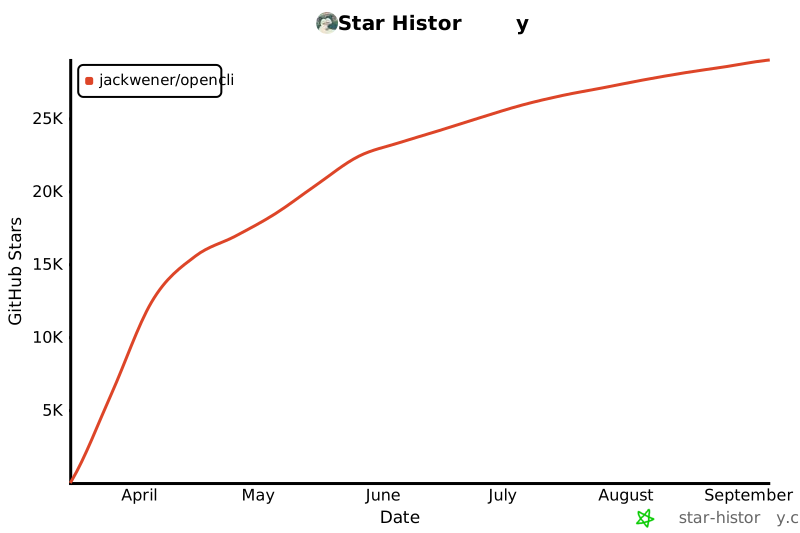](https://star-history.com/#jackwener/opencli&Date)
|
||||
|
||||
|
||||
The CI will automatically build, create a GitHub release, and publish to npm.
|
||||
|
||||
## License
|
||||
|
||||
|
||||
+135
-72
@@ -1,7 +1,7 @@
|
||||
# OpenCLI
|
||||
|
||||
> **把任何网站或 Electron 应用变成你的命令行工具。**
|
||||
> 零风控 · 复用 Chrome 登录 · AI 自动发现接口 · 浏览器与桌面端自动化
|
||||
> **把任何网站、本地工具、Electron 应用变成能够让 AI 调用的命令行!**
|
||||
> 零风控 · 复用 Chrome 登录 · AI 自动发现接口 · 全能 CLI 枢纽
|
||||
|
||||
[English](./README.md)
|
||||
|
||||
@@ -9,41 +9,47 @@
|
||||
[](https://nodejs.org)
|
||||
[](./LICENSE)
|
||||
|
||||
OpenCLI 将任何网站或 Electron 应用(如 Antigravity)变成命令行工具 — B站、知乎、小红书、Twitter/X、Reddit、YouTube 等[多种站点与应用](#内置命令) — 复用浏览器登录态,AI 驱动探索。
|
||||
OpenCLI 将任何网站、本地 CLI 或 Electron 应用(如 Antigravity)变成命令行工具 — B站、知乎、小红书、Twitter/X、Reddit、YouTube,以及 `gh`、`docker` 等[多种站点与工具](#内置命令) — 复用浏览器登录态,AI 驱动探索。
|
||||
|
||||
🔥 **opencli 支持 CLI 化所有 electron 应用!最强大更新来袭!** 🔥
|
||||
**专为 AI Agent 打造**:只需在全局 `.cursorrules` 或 `AGENT.md` 中配置简单指令,引导 AI 通过 Bash 执行 `opencli list` 来检索可用的 CLI 工具及其用法。随后,将你常用的 CLI 列表整合注册进去(`opencli register mycli`),AI 便能瞬间学会自动调用相应的本地工具!
|
||||
|
||||
**opencli 支持 CLI 化所有 electron 应用!最强大更新来袭!**
|
||||
CLI all electron!现在支持把所有 electron 应用 CLI 化,从而组合出各种神奇的能力。
|
||||
如果你在使用诸如 Antigravity Ultra 等工具时觉得不够灵活或难以扩展,现在通过 OpenCLI 把他 CLI 化,轻松打破界限。
|
||||
现在,**AI 可以自己控制自己**!结合 cc/openclaw 就可以远程控制任何 electron 应用!无限玩法!!
|
||||
|
||||
---
|
||||
|
||||
## 目录
|
||||
|
||||
- [亮点](#亮点)
|
||||
- [前置要求](#前置要求)
|
||||
- [快速开始](#快速开始)
|
||||
- [内置命令](#内置命令)
|
||||
- [桌面应用适配器](#桌面应用适配器)
|
||||
- [下载支持](#下载支持)
|
||||
- [输出格式](#输出格式)
|
||||
- [致 AI Agent(开发者指南)](#致-ai-agent开发者指南)
|
||||
- [远程 Chrome(服务器/无头环境)](#远程-chrome服务器无头环境)
|
||||
- [常见问题排查](#常见问题排查)
|
||||
- [版本发布](#版本发布)
|
||||
- [License](#license)
|
||||
|
||||
---
|
||||
|
||||
## 亮点
|
||||
|
||||
- **CLI All Electron** — 支持把所有 electron 应用(如 Antigravity Ultra)CLI 化,让 AI 控制自己!
|
||||
- **多站点覆盖** — 覆盖 B站、知乎、小红书、Twitter、Reddit,以及多种桌面应用
|
||||
- **零风控** — 复用 Chrome 登录态,无需存储任何凭证
|
||||
- **自修复配置** — `opencli setup` 检查 Browser Bridge 连通性;`opencli doctor` 诊断 daemon、扩展和浏览器连接状态
|
||||
- **外部 CLI 枢纽** — 统一发现、自动安装、透传执行 `gh`、`docker` 等本地 CLI
|
||||
- **自修复配置** — `opencli doctor` 自动启动 daemon,诊断扩展和浏览器连接状态
|
||||
- **AI 原生** — `explore` 自动发现 API,`synthesize` 生成适配器,`cascade` 探测认证策略
|
||||
- **动态加载引擎** — 声明式的 `.yaml` 或者底层定制的 `.ts` 适配器,放入 `clis/` 文件夹即可自动注册生效
|
||||
|
||||
## 为什么选 opencli?
|
||||
|
||||
浏览器自动化工具很多,opencli 适合什么场景?
|
||||
|
||||
| 你的需求 | 最佳工具 | 原因 |
|
||||
|----------|----------|------|
|
||||
| 定时从特定站点提取结构化数据 | **opencli** | 预定义适配器,确定性 JSON 输出,零 LLM 成本 |
|
||||
| AI Agent 需要可靠的站点操作 | **opencli** | 数百条命令,结构化输出,快速确定性响应 |
|
||||
| 临时探索未知网站 | Browser-Use、Stagehand | LLM 驱动的通用浏览,适合一次性任务 |
|
||||
| 大规模网页爬取 | Crawl4AI、Scrapy | 专为吞吐量和规模设计 |
|
||||
| 从终端控制桌面 Electron 应用 | **opencli** | CDP + AppleScript,目前唯一能做到这一点的 CLI 工具 |
|
||||
|
||||
**opencli 的核心差异:**
|
||||
|
||||
- **零 LLM 成本** — 运行时不消耗任何 token,跑一万次不花一分钱
|
||||
- **确定性** — 同一命令永远返回同一结构,可管道化、可脚本化、CI 友好
|
||||
- **覆盖广泛** — 50+ 站点,横跨全球与中国平台(B站、知乎、小红书、Reddit、HackerNews 等),并支持通过 CDP 控制桌面 Electron 应用
|
||||
|
||||
> 与 Browser-Use、Crawl4AI、Firecrawl 等工具的详细对比,请查看 [Comparison Guide](./docs/comparison.md)。
|
||||
|
||||
## 前置要求
|
||||
|
||||
- **Node.js**: >= 20.0.0
|
||||
@@ -58,9 +64,9 @@ OpenCLI 通过轻量化的 **Browser Bridge** Chrome 扩展 + 微型 daemon 与
|
||||
你可以选择以下任一方式安装扩展:
|
||||
|
||||
**方式一:下载构建好的安装包(推荐)**
|
||||
1. 到 GitHub [Releases 页面](https://github.com/jackwener/opencli/releases) 下载最新的 `opencli-extension.zip` 或 `opencli-extension.crx`。
|
||||
2. 打开 Chrome 的 `chrome://extensions`,启用右上角的 **开发者模式**。
|
||||
3. 将 `.crx` 拖入浏览器窗口,或将解压后的文件夹拖入即可完成安装。
|
||||
1. 到 GitHub [Releases 页面](https://github.com/jackwener/opencli/releases) 下载最新的 `opencli-extension.zip`。
|
||||
2. 解压后打开 Chrome 的 `chrome://extensions`,启用右上角的 **开发者模式**。
|
||||
3. 点击 **加载已解压的扩展程序**,选择解压后的文件夹。
|
||||
|
||||
**方式二:加载源码(针对开发者)**
|
||||
1. 同样在 `chrome://extensions` 开启 **开发者模式**。
|
||||
@@ -71,7 +77,6 @@ OpenCLI 通过轻量化的 **Browser Bridge** Chrome 扩展 + 微型 daemon 与
|
||||
> **Tip**:后续诊断用 `opencli doctor`:
|
||||
> ```bash
|
||||
> opencli doctor # 检查扩展和 daemon 连通性
|
||||
> opencli doctor --live # 额外测试浏览器命令
|
||||
> ```
|
||||
|
||||
## 快速开始
|
||||
@@ -116,34 +121,85 @@ npm install -g @jackwener/opencli@latest
|
||||
|
||||
| 站点 | 命令 | 模式 |
|
||||
|------|------|------|
|
||||
| **twitter** | `trending` `bookmarks` `profile` `search` `timeline` `thread` `following` `followers` `notifications` `post` `reply` `delete` `like` `article` `follow` `unfollow` `bookmark` `unbookmark` `download` `accept` `reply-dm` | 浏览器 |
|
||||
| **twitter** | `trending` `bookmarks` `profile` `search` `timeline` `thread` `following` `followers` `notifications` `post` `reply` `delete` `like` `article` `follow` `unfollow` `bookmark` `unbookmark` `download` `accept` `reply-dm` `block` `unblock` `hide-reply` | 浏览器 |
|
||||
| **reddit** | `hot` `frontpage` `popular` `search` `subreddit` `read` `user` `user-posts` `user-comments` `upvote` `save` `comment` `subscribe` `saved` `upvoted` | 浏览器 |
|
||||
| **cursor** | `status` `send` `read` `new` `dump` `composer` `model` `extract-code` `ask` `screenshot` `history` `export` | 桌面端 |
|
||||
| **bilibili** | `hot` `search` `me` `favorite` `history` `feed` `subtitle` `dynamic` `ranking` `following` `user-videos` `download` | 浏览器 |
|
||||
| **codex** | `status` `send` `read` `new` `extract-diff` `model` `ask` `screenshot` `history` `export` | 桌面端 |
|
||||
| **codex** | `status` `send` `read` `new` `dump` `extract-diff` `model` `ask` `screenshot` `history` `export` | 桌面端 |
|
||||
| **chatwise** | `status` `new` `send` `read` `ask` `model` `history` `export` `screenshot` | 桌面端 |
|
||||
| **doubao** | `status` `new` `send` `read` `ask` | 浏览器 |
|
||||
| **doubao-app** | `status` `new` `send` `read` `ask` `screenshot` `dump` | 桌面端 |
|
||||
| **notion** | `status` `search` `read` `new` `write` `sidebar` `favorites` `export` | 桌面端 |
|
||||
| **discord-app** | `status` `send` `read` `channels` `servers` `search` `members` | 桌面端 |
|
||||
| **v2ex** | `hot` `latest` `topic` `daily` `me` `notifications` | 公开 / 浏览器 |
|
||||
| **xueqiu** | `feed` `hot-stock` `hot` `search` `stock` `watchlist` | 浏览器 |
|
||||
| **v2ex** | `hot` `latest` `topic` `node` `user` `member` `replies` `nodes` `daily` `me` `notifications` | 公开 / 浏览器 |
|
||||
| **xueqiu** | `feed` `hot-stock` `hot` `search` `stock` `watchlist` `earnings-date` | 浏览器 |
|
||||
| **antigravity** | `status` `send` `read` `new` `dump` `extract-code` `model` `watch` | 桌面端 |
|
||||
| **chatgpt** | `status` `new` `send` `read` `ask` | 桌面端 |
|
||||
| **xiaohongshu** | `search` `notifications` `feed` `me` `user` `download` | 浏览器 |
|
||||
| **xiaohongshu** | `search` `notifications` `feed` `user` `download` `publish` `creator-notes` `creator-note-detail` `creator-notes-summary` `creator-profile` `creator-stats` | 浏览器 |
|
||||
| **apple-podcasts** | `search` `episodes` `top` | 公开 |
|
||||
| **xiaoyuzhou** | `podcast` `podcast-episodes` `episode` | 公开 |
|
||||
| **zhihu** | `hot` `search` `question` `download` | 浏览器 |
|
||||
| **weixin** | `download` | 浏览器 |
|
||||
| **youtube** | `search` `video` `transcript` | 浏览器 |
|
||||
| **boss** | `search` `detail` | 浏览器 |
|
||||
| **boss** | `search` `detail` `recommend` `joblist` `greet` `batchgreet` `send` `chatlist` `chatmsg` `invite` `mark` `exchange` `resume` `stats` | 浏览器 |
|
||||
| **coupang** | `search` `add-to-cart` | 浏览器 |
|
||||
| **bbc** | `news` | 公共 API |
|
||||
| **bloomberg** | `main` `markets` `economics` `industries` `tech` `politics` `businessweek` `opinions` `feeds` `news` | 公共 API / 浏览器 |
|
||||
| **ctrip** | `search` | 浏览器 |
|
||||
| **github** | `search` | 公共 API |
|
||||
| **hackernews** | `top` | 公共 API |
|
||||
| **devto** | `top` `tag` `user` | 公开 |
|
||||
| **dictionary** | `search` `synonyms` `examples` | 公开 |
|
||||
| **arxiv** | `search` `paper` | 公开 |
|
||||
| **wikipedia** | `search` `summary` `random` `trending` | 公开 |
|
||||
| **hackernews** | `top` `new` `best` `ask` `show` `jobs` `search` `user` | 公共 API |
|
||||
| **linkedin** | `search` | 浏览器 |
|
||||
| **reuters** | `search` | 浏览器 |
|
||||
| **smzdm** | `search` | 浏览器 |
|
||||
| **weibo** | `hot` | 浏览器 |
|
||||
| **weibo** | `hot` `search` | 浏览器 |
|
||||
| **yahoo-finance** | `quote` | 浏览器 |
|
||||
| **sinafinance** | `news` | 🌐 公开 |
|
||||
| **barchart** | `quote` `options` `greeks` `flow` | 浏览器 |
|
||||
| **chaoxing** | `assignments` `exams` | 浏览器 |
|
||||
| **grok** | `ask` | 浏览器 |
|
||||
| **hf** | `top` | 公开 |
|
||||
| **jike** | `feed` `search` `create` `like` `comment` `repost` `notifications` `post` `topic` `user` | 浏览器 |
|
||||
| **jimeng** | `generate` `history` | 浏览器 |
|
||||
| **yollomi** | `generate` `video` `edit` `upload` `models` `remove-bg` `upscale` `face-swap` `restore` `try-on` `background` `object-remover` | 浏览器 |
|
||||
| **linux-do** | `hot` `latest` `search` `categories` `category` `topic` | 公开 |
|
||||
| **stackoverflow** | `hot` `search` `bounties` `unanswered` | 公开 |
|
||||
| **steam** | `top-sellers` | 公开 |
|
||||
| **weread** | `shelf` `search` `book` `highlights` `notes` `notebooks` `ranking` | 浏览器 |
|
||||
| **douban** | `search` `top250` `subject` `marks` `reviews` `movie-hot` `book-hot` | 浏览器 |
|
||||
| **facebook** | `feed` `profile` `search` `friends` `groups` `events` `notifications` `memories` `add-friend` `join-group` | 浏览器 |
|
||||
| **google** | `news` `search` `suggest` `trends` | 公开 |
|
||||
| **instagram** | `explore` `profile` `search` `user` `followers` `following` `follow` `unfollow` `like` `unlike` `comment` `save` `unsave` `saved` | 浏览器 |
|
||||
| **lobsters** | `hot` `newest` `active` `tag` | 公开 |
|
||||
| **medium** | `feed` `search` `user` | 浏览器 |
|
||||
| **sinablog** | `hot` `search` `article` `user` | 浏览器 |
|
||||
| **substack** | `feed` `search` `publication` | 浏览器 |
|
||||
| **tiktok** | `explore` `search` `profile` `user` `following` `follow` `unfollow` `like` `unlike` `comment` `save` `unsave` `live` `notifications` `friends` | 浏览器 |
|
||||
|
||||
|
||||
### 外部 CLI 枢纽
|
||||
|
||||
OpenCLI 也可以作为你现有命令行工具的统一入口,负责发现、自动安装和纯透传执行。
|
||||
|
||||
| 外部 CLI | 描述 | 示例 |
|
||||
|----------|------|------|
|
||||
| **gh** | GitHub CLI | `opencli gh pr list --limit 5` |
|
||||
| **obsidian** | Obsidian 仓库管理 | `opencli obsidian search query="AI"` |
|
||||
| **docker** | Docker 命令行工具 | `opencli docker ps` |
|
||||
| **readwise** | Readwise / Reader CLI | `opencli readwise login` |
|
||||
| **gws** | Google Workspace CLI — Docs, Sheets, Drive, Gmail, Calendar | `opencli gws docs list` |
|
||||
|
||||
**零配置透传**:OpenCLI 会把你的输入原样转发给底层二进制,保留原生 stdout / stderr 行为。
|
||||
|
||||
**自动安装**:如果你运行 `opencli gh ...` 时系统中还没有 `gh`,OpenCLI 会优先尝试通过系统包管理器安装,然后自动重试命令。
|
||||
|
||||
**注册自定义本地 CLI**:
|
||||
|
||||
```bash
|
||||
opencli register mycli
|
||||
```
|
||||
|
||||
### 桌面应用适配器
|
||||
|
||||
@@ -151,16 +207,14 @@ npm install -g @jackwener/opencli@latest
|
||||
|
||||
| 应用 | 描述 | 文档 |
|
||||
|-----|-------------|-----|
|
||||
| **Cursor** | 控制 Cursor IDE — Composer、对话、代码提取等 | [README](./src/clis/cursor/README.md) |
|
||||
| **Codex** | 在后台(无头)驱动 OpenAI Codex CLI Agent | [README](./src/clis/codex/README.md) |
|
||||
| **Antigravity** | 在终端直接控制 Antigravity Ultra | [README](./src/clis/antigravity/README.md) |
|
||||
| **ChatGPT** | 自动化操作 ChatGPT macOS 桌面客户端 | [README](./src/clis/chatgpt/README.md) |
|
||||
| **ChatWise** | 多 LLM 客户端(GPT-4、Claude、Gemini) | [README](./src/clis/chatwise/README.md) |
|
||||
| **Notion** | 搜索、读取、写入 Notion 页面 | [README](./src/clis/notion/README.md) |
|
||||
| **Discord** | Discord 桌面版 — 消息、频道、服务器 | [README](./src/clis/discord-app/README.md) |
|
||||
| **Feishu** | 飞书/Lark 桌面版 (AppleScript 驱动) | [README](./src/clis/feishu/README.md) |
|
||||
| **WeChat** | 微信 Mac 桌面端 (AppleScript + 无障碍接口) | [README](./src/clis/wechat/README.md) |
|
||||
| **NeteaseMusic** | 网易云音乐 (CEF/CDP 驱动) | [README](./src/clis/neteasemusic/README.md) |
|
||||
| **Cursor** | 控制 Cursor IDE — Composer、对话、代码提取等 | [Doc](./docs/adapters/desktop/cursor.md) |
|
||||
| **Codex** | 在后台(无头)驱动 OpenAI Codex CLI Agent | [Doc](./docs/adapters/desktop/codex.md) |
|
||||
| **Antigravity** | 在终端直接控制 Antigravity Ultra | [Doc](./docs/adapters/desktop/antigravity.md) |
|
||||
| **ChatGPT** | 自动化操作 ChatGPT macOS 桌面客户端 | [Doc](./docs/adapters/desktop/chatgpt.md) |
|
||||
| **ChatWise** | 多 LLM 客户端(GPT-4、Claude、Gemini) | [Doc](./docs/adapters/desktop/chatwise.md) |
|
||||
| **Notion** | 搜索、读取、写入 Notion 页面 | [Doc](./docs/adapters/desktop/notion.md) |
|
||||
| **Discord** | Discord 桌面版 — 消息、频道、服务器 | [Doc](./docs/adapters/desktop/discord.md) |
|
||||
| **Doubao** | 通过 CDP 控制豆包桌面应用 | [Doc](./docs/adapters/desktop/doubao-app.md) |
|
||||
|
||||
## 下载支持
|
||||
|
||||
@@ -174,6 +228,7 @@ OpenCLI 支持从各平台下载图片、视频和文章。
|
||||
| **B站** | 视频 | 需要安装 `yt-dlp` |
|
||||
| **Twitter/X** | 图片、视频 | 从用户媒体页或单条推文下载 |
|
||||
| **知乎** | 文章(Markdown) | 导出文章,可选下载图片到本地 |
|
||||
| **微信公众号** | 文章(Markdown) | 导出微信公众号文章为 Markdown |
|
||||
|
||||
### 前置依赖
|
||||
|
||||
@@ -190,39 +245,29 @@ brew install yt-dlp
|
||||
|
||||
```bash
|
||||
# 下载小红书笔记中的图片/视频
|
||||
opencli xiaohongshu download --note_id abc123 --output ./xhs
|
||||
opencli xiaohongshu download abc123 --output ./xhs
|
||||
|
||||
# 下载B站视频(需要 yt-dlp)
|
||||
opencli bilibili download --bvid BV1xxx --output ./bilibili
|
||||
opencli bilibili download --bvid BV1xxx --quality 1080p # 指定画质
|
||||
opencli bilibili download BV1xxx --output ./bilibili
|
||||
opencli bilibili download BV1xxx --quality 1080p # 指定画质
|
||||
|
||||
# 下载 Twitter 用户的媒体
|
||||
opencli twitter download --username elonmusk --limit 20 --output ./twitter
|
||||
opencli twitter download elonmusk --limit 20 --output ./twitter
|
||||
|
||||
# 下载单条推文的媒体
|
||||
opencli twitter download --tweet-url "https://x.com/user/status/123" --output ./twitter
|
||||
|
||||
# 导出知乎文章为 Markdown
|
||||
opencli zhihu download --url "https://zhuanlan.zhihu.com/p/xxx" --output ./zhihu
|
||||
opencli zhihu download "https://zhuanlan.zhihu.com/p/xxx" --output ./zhihu
|
||||
|
||||
# 导出文章并下载图片到本地
|
||||
opencli zhihu download --url "https://zhuanlan.zhihu.com/p/xxx" --download-images
|
||||
# 导出并下载图片
|
||||
opencli zhihu download "https://zhuanlan.zhihu.com/p/xxx" --download-images
|
||||
|
||||
# 导出微信公众号文章为 Markdown
|
||||
opencli weixin download --url "https://mp.weixin.qq.com/s/xxx" --output ./weixin
|
||||
```
|
||||
|
||||
### Pipeline Step(用于 YAML 适配器)
|
||||
|
||||
`download` step 可以在 YAML 管线中使用:
|
||||
|
||||
```yaml
|
||||
pipeline:
|
||||
- fetch: https://api.example.com/media
|
||||
- download:
|
||||
url: ${{ item.imageUrl }}
|
||||
dir: ./downloads
|
||||
filename: ${{ item.title | sanitize }}.jpg
|
||||
concurrency: 5
|
||||
skip_existing: true
|
||||
```
|
||||
|
||||
## 输出格式
|
||||
|
||||
@@ -239,6 +284,25 @@ opencli bilibili hot -f csv # CSV
|
||||
opencli bilibili hot -v # 详细模式:展示管线执行步骤调试信息
|
||||
```
|
||||
|
||||
## 插件
|
||||
|
||||
通过社区贡献的插件扩展 OpenCLI。插件使用与内置命令相同的 YAML/TS 格式,启动时自动发现。
|
||||
|
||||
```bash
|
||||
opencli plugin install github:user/opencli-plugin-my-tool # 安装
|
||||
opencli plugin list # 查看已安装
|
||||
opencli plugin update my-tool # 更新到最新
|
||||
opencli plugin uninstall my-tool # 卸载
|
||||
```
|
||||
|
||||
| 插件 | 类型 | 描述 |
|
||||
|------|------|------|
|
||||
| [opencli-plugin-github-trending](https://github.com/ByteYue/opencli-plugin-github-trending) | YAML | GitHub Trending 仓库 |
|
||||
| [opencli-plugin-hot-digest](https://github.com/ByteYue/opencli-plugin-hot-digest) | TS | 多平台热榜聚合 |
|
||||
| [opencli-plugin-juejin](https://github.com/Astro-Han/opencli-plugin-juejin) | YAML | 稀土掘金热门文章 |
|
||||
|
||||
详见 [插件指南](./docs/zh/guide/plugins.md) 了解如何创建自己的插件。
|
||||
|
||||
## 致 AI Agent(开发者指南)
|
||||
|
||||
如果你是一个被要求查阅代码并编写新 `opencli` 适配器的 AI,请遵守以下工作流。
|
||||
@@ -267,6 +331,8 @@ opencli cascade https://api.example.com/data
|
||||
|
||||
- **"Extension not connected" 报错**
|
||||
- 确保你当前的 Chrome 已安装且**开启了** opencli Browser Bridge 扩展(在 `chrome://extensions` 中检查)。
|
||||
- **"attach failed: Cannot access a chrome-extension:// URL" 报错**
|
||||
- 其他 Chrome 扩展(如 youmind、New Tab Override 或 AI 助手类扩展)可能产生冲突。请尝试**暂时禁用其他扩展**后重试。
|
||||
- **返回空数据,或者报错 "Unauthorized"**
|
||||
- Chrome 里的登录态可能已经过期。请打开当前 Chrome 页面,在新标签页重新手工登录或刷新该页面。
|
||||
- **Node API 错误 (如 parseArgs, fs 等)**
|
||||
@@ -275,15 +341,12 @@ opencli cascade https://api.example.com/data
|
||||
- 检查 daemon 状态:`curl localhost:19825/status`
|
||||
- 查看扩展日志:`curl localhost:19825/logs`
|
||||
|
||||
## 版本发布
|
||||
|
||||
```bash
|
||||
npm version patch # 0.1.0 → 0.1.1
|
||||
npm version minor # 0.1.0 → 0.2.0
|
||||
## Star History
|
||||
|
||||
[](https://star-history.com/#jackwener/opencli&Date)
|
||||
|
||||
|
||||
# 推送 tag,GitHub Actions 将自动执行发版和 npm 发布
|
||||
git push --follow-tags
|
||||
```
|
||||
|
||||
## License
|
||||
|
||||
|
||||
@@ -1,9 +1,9 @@
|
||||
---
|
||||
name: opencli
|
||||
description: "OpenCLI — Make any website or Electron App your CLI. Zero risk, AI-powered, reuse Chrome login. 80+ commands across 19 sites."
|
||||
version: 0.7.4
|
||||
description: "OpenCLI — Make any website or Electron App your CLI. Zero risk, AI-powered, reuse Chrome login."
|
||||
version: 1.3.1
|
||||
author: jackwener
|
||||
tags: [cli, browser, web, chrome-extension, cdp, bilibili, zhihu, twitter, github, v2ex, hackernews, reddit, xiaohongshu, xueqiu, youtube, boss, coupang, AI, agent]
|
||||
tags: [cli, browser, web, chrome-extension, cdp, bilibili, zhihu, twitter, github, v2ex, hackernews, reddit, xiaohongshu, xueqiu, youtube, boss, coupang, yollomi, AI, agent]
|
||||
---
|
||||
|
||||
# OpenCLI
|
||||
@@ -39,7 +39,7 @@ Browser commands require:
|
||||
|
||||
> **Note**: You must be logged into the target website in Chrome before running commands. Tabs opened during command execution are auto-closed afterwards.
|
||||
|
||||
Public API commands (`hackernews`, `github search`, `v2ex`) need no browser.
|
||||
Public API commands (`hackernews`, `v2ex`) need no browser.
|
||||
|
||||
## Commands Reference
|
||||
|
||||
@@ -48,7 +48,7 @@ Public API commands (`hackernews`, `github search`, `v2ex`) need no browser.
|
||||
```bash
|
||||
# Bilibili (browser)
|
||||
opencli bilibili hot --limit 10 # B站热门视频
|
||||
opencli bilibili search --keyword "rust" # 搜索视频
|
||||
opencli bilibili search "rust" # 搜索视频 (query positional)
|
||||
opencli bilibili me # 我的信息
|
||||
opencli bilibili favorite # 我的收藏
|
||||
opencli bilibili history --limit 20 # 观看历史
|
||||
@@ -61,15 +61,19 @@ opencli bilibili following --limit 20 # 我的关注列表 (支持 --uid 查
|
||||
|
||||
# 知乎 (browser)
|
||||
opencli zhihu hot --limit 10 # 知乎热榜
|
||||
opencli zhihu search --keyword "AI" # 搜索
|
||||
opencli zhihu question --id 34816524 # 问题详情和回答
|
||||
opencli zhihu search "AI" # 搜索 (query positional)
|
||||
opencli zhihu question 34816524 # 问题详情和回答 (id positional)
|
||||
|
||||
# 小红书 (browser)
|
||||
opencli xiaohongshu search --keyword "美食" # 搜索笔记
|
||||
opencli xiaohongshu search "美食" # 搜索笔记 (query positional)
|
||||
opencli xiaohongshu notifications # 通知(mentions/likes/connections)
|
||||
opencli xiaohongshu feed --limit 10 # 推荐 Feed
|
||||
opencli xiaohongshu me # 我的信息
|
||||
opencli xiaohongshu user --uid xxx # 用户主页
|
||||
opencli xiaohongshu user xxx # 用户主页 (id positional)
|
||||
opencli xiaohongshu creator-notes --limit 10 # 创作者笔记列表
|
||||
opencli xiaohongshu creator-note-detail --note-id xxx # 笔记详情
|
||||
opencli xiaohongshu creator-notes-summary # 笔记数据概览
|
||||
opencli xiaohongshu creator-profile # 创作者资料
|
||||
opencli xiaohongshu creator-stats # 创作者数据统计
|
||||
|
||||
# 雪球 Xueqiu (browser)
|
||||
opencli xueqiu hot-stock --limit 10 # 雪球热门股票榜
|
||||
@@ -77,15 +81,17 @@ opencli xueqiu stock --symbol SH600519 # 查看股票实时行情
|
||||
opencli xueqiu watchlist # 获取自选股/持仓列表
|
||||
opencli xueqiu feed # 我的关注 timeline
|
||||
opencli xueqiu hot --limit 10 # 雪球热榜
|
||||
opencli xueqiu search --keyword "特斯拉" # 搜索
|
||||
opencli xueqiu search "特斯拉" # 搜索 (query positional)
|
||||
|
||||
# GitHub (public)
|
||||
opencli github search --keyword "cli" # 搜索仓库
|
||||
# GitHub (via gh External CLI)
|
||||
opencli gh repo list # 列出仓库 (passthrough to gh)
|
||||
opencli gh pr list --limit 5 # PR 列表
|
||||
opencli gh issue list # Issue 列表
|
||||
|
||||
# Twitter/X (browser)
|
||||
opencli twitter trending --limit 10 # 热门话题
|
||||
opencli twitter bookmarks --limit 20 # 获取收藏的书签推文
|
||||
opencli twitter search --keyword "AI" # 搜索推文
|
||||
opencli twitter search "AI" # 搜索推文 (query positional)
|
||||
opencli twitter profile elonmusk # 用户资料
|
||||
opencli twitter timeline --limit 20 # 时间线
|
||||
opencli twitter thread 1234567890 # 推文 thread(原文 + 回复)
|
||||
@@ -100,15 +106,15 @@ opencli reddit hot --limit 10 # 热门帖子
|
||||
opencli reddit hot --subreddit programming # 指定子版块
|
||||
opencli reddit frontpage --limit 10 # 首页 /r/all
|
||||
opencli reddit popular --limit 10 # /r/popular 热门
|
||||
opencli reddit search --query "AI" --sort top --time week # 搜索(支持排序+时间过滤)
|
||||
opencli reddit subreddit --name rust --sort top --time month # 子版块浏览(支持时间过滤)
|
||||
opencli reddit read --post_id 1abc123 # 阅读帖子 + 评论
|
||||
opencli reddit user --username spez # 用户资料(karma、注册时间)
|
||||
opencli reddit user-posts --username spez # 用户发帖历史
|
||||
opencli reddit user-comments --username spez # 用户评论历史
|
||||
opencli reddit upvote --post_id xxx --direction up # 投票(up/down/none)
|
||||
opencli reddit save --post_id xxx # 收藏帖子
|
||||
opencli reddit comment --post_id xxx --text "Great!" # 发表评论
|
||||
opencli reddit search "AI" --sort top --time week # 搜索(支持排序+时间过滤)
|
||||
opencli reddit subreddit rust --sort top --time month # 子版块浏览(支持时间过滤)
|
||||
opencli reddit read --post-id 1abc123 # 阅读帖子 + 评论
|
||||
opencli reddit user spez # 用户资料(karma、注册时间)
|
||||
opencli reddit user-posts spez # 用户发帖历史
|
||||
opencli reddit user-comments spez # 用户评论历史
|
||||
opencli reddit upvote --post-id xxx --direction up # 投票(up/down/none)
|
||||
opencli reddit save --post-id xxx # 收藏帖子
|
||||
opencli reddit comment --post-id xxx "Great!" # 发表评论 (text positional)
|
||||
opencli reddit subscribe --subreddit python # 订阅子版块
|
||||
opencli reddit saved --limit 10 # 我的收藏
|
||||
opencli reddit upvoted --limit 10 # 我的赞
|
||||
@@ -116,7 +122,7 @@ opencli reddit upvoted --limit 10 # 我的赞
|
||||
# V2EX (public + browser)
|
||||
opencli v2ex hot --limit 10 # 热门话题
|
||||
opencli v2ex latest --limit 10 # 最新话题
|
||||
opencli v2ex topic --id 1024 # 主题详情
|
||||
opencli v2ex topic 1024 # 主题详情 (id positional)
|
||||
opencli v2ex daily # 每日签到 (browser)
|
||||
opencli v2ex me # 我的信息 (browser)
|
||||
opencli v2ex notifications --limit 10 # 通知 (browser)
|
||||
@@ -131,48 +137,290 @@ opencli bbc news --limit 10 # BBC News RSS headlines
|
||||
opencli weibo hot --limit 10 # 微博热搜
|
||||
|
||||
# BOSS直聘 (browser)
|
||||
opencli boss search --query "AI agent" # 搜索职位
|
||||
opencli boss detail --securityId xxx # 职位详情
|
||||
opencli boss search "AI agent" # 搜索职位 (query positional)
|
||||
opencli boss detail --security-id xxx # 职位详情
|
||||
opencli boss recommend --limit 10 # 推荐职位
|
||||
opencli boss joblist --limit 10 # 职位列表
|
||||
opencli boss greet --security-id xxx # 打招呼
|
||||
opencli boss batchgreet --job-id xxx # 批量打招呼
|
||||
opencli boss send --uid xxx "消息内容" # 发消息 (text positional)
|
||||
opencli boss chatlist --limit 10 # 聊天列表
|
||||
opencli boss chatmsg --security-id xxx # 聊天记录
|
||||
opencli boss invite --security-id xxx # 邀请沟通
|
||||
opencli boss mark --security-id xxx # 标记管理
|
||||
opencli boss exchange --security-id xxx # 交换联系方式
|
||||
opencli boss resume # 简历管理
|
||||
opencli boss stats # 数据统计
|
||||
|
||||
# YouTube (browser)
|
||||
opencli youtube search --query "rust" # 搜索视频
|
||||
opencli youtube video --url "https://www.youtube.com/watch?v=xxx" # 视频元数据(标题、播放量、描述等)
|
||||
opencli youtube transcript --url "https://www.youtube.com/watch?v=xxx" # 获取视频字幕/转录
|
||||
opencli youtube transcript --url "xxx" --lang zh-Hans --mode raw # 指定语言 + 原始时间戳模式
|
||||
opencli youtube search "rust" # 搜索视频 (query positional)
|
||||
opencli youtube video "https://www.youtube.com/watch?v=xxx" # 视频元数据
|
||||
opencli youtube transcript "https://www.youtube.com/watch?v=xxx" # 获取视频字幕/转录
|
||||
opencli youtube transcript "xxx" --lang zh-Hans --mode raw # 指定语言 + 原始时间戳模式
|
||||
|
||||
# Yahoo Finance (browser)
|
||||
opencli yahoo-finance quote --symbol AAPL # 股票行情
|
||||
|
||||
# Sina Finance
|
||||
opencli sinafinance news --limit 10 --type 1 # 7x24实时快讯 (0=全部 1=A股 2=宏观 3=公司 4=数据 5=市场 6=国际 7=观点 8=央行 9=其它)
|
||||
|
||||
# Reuters (browser)
|
||||
opencli reuters search --query "AI" # 路透社搜索
|
||||
opencli reuters search "AI" # 路透社搜索 (query positional)
|
||||
|
||||
# 什么值得买 (browser)
|
||||
opencli smzdm search --keyword "耳机" # 搜索好价
|
||||
opencli smzdm search "耳机" # 搜索好价 (query positional)
|
||||
|
||||
# 携程 (browser)
|
||||
opencli ctrip search --query "三亚" # 搜索目的地
|
||||
opencli ctrip search "三亚" # 搜索目的地 (query positional)
|
||||
|
||||
# Antigravity (Electron/CDP)
|
||||
opencli antigravity status # 检查 CDP 连接
|
||||
opencli antigravity send "hello" # 发送文本到当前 agent 聊天框
|
||||
opencli antigravity read # 读取整个聊天记录面板
|
||||
opencli antigravity new # 清空聊天、开启新对话
|
||||
opencli antigravity dump # 导出 DOM 和快照调试信息
|
||||
opencli antigravity extract-code # 自动抽取 AI 回复中的代码块
|
||||
opencli antigravity model claude # 切换底层模型
|
||||
opencli antigravity watch # 流式监听增量消息
|
||||
|
||||
# Barchart (browser)
|
||||
opencli barchart quote --symbol AAPL # 股票行情
|
||||
opencli barchart options --symbol AAPL # 期权链
|
||||
opencli barchart greeks --symbol AAPL # 期权 Greeks
|
||||
opencli barchart flow --limit 20 # 异常期权活动
|
||||
|
||||
# Jike 即刻 (browser)
|
||||
opencli jike feed --limit 10 # 动态流
|
||||
opencli jike search "AI" # 搜索 (query positional)
|
||||
opencli jike create "内容" # 发布动态 (text positional)
|
||||
opencli jike like xxx # 点赞 (id positional)
|
||||
opencli jike comment xxx "评论" # 评论 (id + text positional)
|
||||
opencli jike repost xxx # 转发 (id positional)
|
||||
opencli jike notifications # 通知
|
||||
|
||||
# Linux.do (public)
|
||||
opencli linux-do hot --limit 10 # 热门话题
|
||||
opencli linux-do latest --limit 10 # 最新话题
|
||||
opencli linux-do search "rust" # 搜索 (query positional)
|
||||
opencli linux-do topic 1024 # 主题详情 (id positional)
|
||||
|
||||
# StackOverflow (public)
|
||||
opencli stackoverflow hot --limit 10 # 热门问题
|
||||
opencli stackoverflow search "typescript" # 搜索 (query positional)
|
||||
opencli stackoverflow bounties --limit 10 # 悬赏问题
|
||||
|
||||
# WeRead 微信读书 (browser)
|
||||
opencli weread shelf --limit 10 # 书架
|
||||
opencli weread search "AI" # 搜索图书 (query positional)
|
||||
opencli weread book xxx # 图书详情 (book-id positional)
|
||||
opencli weread highlights xxx # 划线笔记 (book-id positional)
|
||||
opencli weread notes xxx # 想法笔记 (book-id positional)
|
||||
opencli weread ranking --limit 10 # 排行榜
|
||||
|
||||
# Jimeng 即梦 AI (browser)
|
||||
opencli jimeng generate --prompt "描述" # AI 生图
|
||||
opencli jimeng history --limit 10 # 生成历史
|
||||
|
||||
# Yollomi yollomi.com (browser — 需在 Chrome 登录 yollomi.com,复用站点 session)
|
||||
opencli yollomi models --type image # 列出图像模型与积分
|
||||
opencli yollomi generate "提示词" --model z-image-turbo # 文生图
|
||||
opencli yollomi video "提示词" --model kling-2-1 # 视频
|
||||
opencli yollomi upload ./photo.jpg # 上传得 URL,供 img2img / 工具链使用
|
||||
opencli yollomi remove-bg <image-url> # 去背景(免费)
|
||||
opencli yollomi edit <image-url> "改成油画风格" # Qwen 图像编辑
|
||||
|
||||
# Grok (default + explicit web)
|
||||
opencli grok ask --prompt "问题" # 提问 Grok(兼容默认路径)
|
||||
opencli grok ask --prompt "问题" --web # 显式 grok.com consumer web UI 路径
|
||||
|
||||
# HuggingFace (public)
|
||||
opencli hf top --limit 10 # 热门模型
|
||||
|
||||
# 超星学习通 (browser)
|
||||
opencli chaoxing assignments # 作业列表
|
||||
opencli chaoxing exams # 考试列表
|
||||
|
||||
# Douban 豆瓣 (browser)
|
||||
opencli douban search "三体" # 搜索 (query positional)
|
||||
opencli douban top250 # 豆瓣 Top 250
|
||||
opencli douban subject 1234567 # 条目详情 (id positional)
|
||||
opencli douban marks --limit 10 # 我的标记
|
||||
opencli douban reviews --limit 10 # 短评
|
||||
|
||||
# Facebook (browser)
|
||||
opencli facebook feed --limit 10 # 动态流
|
||||
opencli facebook profile username # 用户资料 (id positional)
|
||||
opencli facebook search "AI" # 搜索 (query positional)
|
||||
opencli facebook friends # 好友列表
|
||||
opencli facebook groups # 群组
|
||||
opencli facebook events # 活动
|
||||
opencli facebook notifications # 通知
|
||||
opencli facebook memories # 回忆
|
||||
opencli facebook add-friend username # 添加好友 (id positional)
|
||||
opencli facebook join-group groupid # 加入群组 (id positional)
|
||||
|
||||
# Instagram (browser)
|
||||
opencli instagram explore # 探索
|
||||
opencli instagram profile username # 用户资料 (id positional)
|
||||
opencli instagram search "AI" # 搜索 (query positional)
|
||||
opencli instagram user username # 用户详情 (id positional)
|
||||
opencli instagram followers username # 粉丝 (id positional)
|
||||
opencli instagram following username # 关注 (id positional)
|
||||
opencli instagram follow username # 关注用户 (id positional)
|
||||
opencli instagram unfollow username # 取消关注 (id positional)
|
||||
opencli instagram like postid # 点赞 (id positional)
|
||||
opencli instagram unlike postid # 取消点赞 (id positional)
|
||||
opencli instagram comment postid "评论" # 评论 (id + text positional)
|
||||
opencli instagram save postid # 收藏 (id positional)
|
||||
opencli instagram unsave postid # 取消收藏 (id positional)
|
||||
opencli instagram saved # 已收藏列表
|
||||
|
||||
# TikTok (browser)
|
||||
opencli tiktok explore # 探索
|
||||
opencli tiktok search "AI" # 搜索 (query positional)
|
||||
opencli tiktok profile username # 用户资料 (id positional)
|
||||
opencli tiktok user username # 用户详情 (id positional)
|
||||
opencli tiktok following username # 关注列表 (id positional)
|
||||
opencli tiktok follow username # 关注 (id positional)
|
||||
opencli tiktok unfollow username # 取消关注 (id positional)
|
||||
opencli tiktok like videoid # 点赞 (id positional)
|
||||
opencli tiktok unlike videoid # 取消点赞 (id positional)
|
||||
opencli tiktok comment videoid "评论" # 评论 (id + text positional)
|
||||
opencli tiktok save videoid # 收藏 (id positional)
|
||||
opencli tiktok unsave videoid # 取消收藏 (id positional)
|
||||
opencli tiktok live # 直播
|
||||
opencli tiktok notifications # 通知
|
||||
opencli tiktok friends # 朋友
|
||||
|
||||
# Medium (browser)
|
||||
opencli medium feed --limit 10 # 动态流
|
||||
opencli medium search "AI" # 搜索 (query positional)
|
||||
opencli medium user username # 用户主页 (id positional)
|
||||
|
||||
# Substack (browser)
|
||||
opencli substack feed --limit 10 # 订阅动态
|
||||
opencli substack search "AI" # 搜索 (query positional)
|
||||
opencli substack publication name # 出版物详情 (id positional)
|
||||
|
||||
# Sinablog 新浪博客 (browser)
|
||||
opencli sinablog hot --limit 10 # 热门
|
||||
opencli sinablog search "AI" # 搜索 (query positional)
|
||||
opencli sinablog article url # 文章详情
|
||||
opencli sinablog user username # 用户主页 (id positional)
|
||||
|
||||
# Lobsters (public)
|
||||
opencli lobsters hot --limit 10 # 热门
|
||||
opencli lobsters newest --limit 10 # 最新
|
||||
opencli lobsters active --limit 10 # 活跃
|
||||
opencli lobsters tag rust # 按标签筛选 (tag positional)
|
||||
|
||||
# Google (public)
|
||||
opencli google news --limit 10 # 新闻
|
||||
opencli google search "AI" # 搜索 (query positional)
|
||||
opencli google suggest "AI" # 搜索建议 (query positional)
|
||||
opencli google trends # 趋势
|
||||
|
||||
# DEV.to (public)
|
||||
opencli devto top --limit 10 # 热门文章
|
||||
opencli devto tag javascript --limit 10 # 按标签 (tag positional)
|
||||
opencli devto user username # 用户文章 (username positional)
|
||||
|
||||
# Steam (public)
|
||||
opencli steam top-sellers --limit 10 # 热销游戏
|
||||
|
||||
# Wikipedia (public)
|
||||
opencli wikipedia search "AI" # 搜索 (query positional)
|
||||
opencli wikipedia summary "Python" # 摘要 (title positional)
|
||||
```
|
||||
|
||||
### Desktop Adapter Commands
|
||||
|
||||
```bash
|
||||
# Cursor (desktop — CDP via Electron)
|
||||
opencli cursor status # 检查连接
|
||||
opencli cursor send "message" # 发送消息
|
||||
opencli cursor read # 读取回复
|
||||
opencli cursor new # 新建对话
|
||||
opencli cursor dump # 导出 DOM 调试信息
|
||||
opencli cursor composer # Composer 模式
|
||||
opencli cursor model claude # 切换模型
|
||||
opencli cursor extract-code # 提取代码块
|
||||
opencli cursor ask "question" # 一键提问并等回复
|
||||
opencli cursor screenshot # 截图
|
||||
opencli cursor history # 对话历史
|
||||
opencli cursor export # 导出对话
|
||||
|
||||
# Codex (desktop — headless CLI agent)
|
||||
opencli codex status # 检查连接
|
||||
opencli codex send "message" # 发送消息
|
||||
opencli codex read # 读取回复
|
||||
opencli codex new # 新建对话
|
||||
opencli codex dump # 导出调试信息
|
||||
opencli codex extract-diff # 提取 diff
|
||||
opencli codex model gpt-4 # 切换模型
|
||||
opencli codex ask "question" # 一键提问并等回复
|
||||
opencli codex screenshot # 截图
|
||||
opencli codex history # 对话历史
|
||||
opencli codex export # 导出对话
|
||||
|
||||
# ChatGPT (desktop — macOS AppleScript/CDP)
|
||||
opencli chatgpt status # 检查应用状态
|
||||
opencli chatgpt new # 新建对话
|
||||
opencli chatgpt send "message" # 发送消息
|
||||
opencli chatgpt read # 读取回复
|
||||
opencli chatgpt ask "question" # 一键提问并等回复
|
||||
|
||||
# ChatWise (desktop — multi-LLM client)
|
||||
opencli chatwise status # 检查连接
|
||||
opencli chatwise new # 新建对话
|
||||
opencli chatwise send "message" # 发送消息
|
||||
opencli chatwise read # 读取回复
|
||||
opencli chatwise ask "question" # 一键提问并等回复
|
||||
opencli chatwise model claude # 切换模型
|
||||
opencli chatwise history # 对话历史
|
||||
opencli chatwise export # 导出对话
|
||||
opencli chatwise screenshot # 截图
|
||||
|
||||
# Notion (desktop — CDP via Electron)
|
||||
opencli notion status # 检查连接
|
||||
opencli notion search "keyword" # 搜索页面
|
||||
opencli notion read # 读取当前页面
|
||||
opencli notion new # 新建页面
|
||||
opencli notion write "content" # 写入内容
|
||||
opencli notion sidebar # 侧边栏导航
|
||||
opencli notion favorites # 收藏列表
|
||||
opencli notion export # 导出
|
||||
|
||||
# Discord App (desktop — CDP via Electron)
|
||||
opencli discord-app status # 检查连接
|
||||
opencli discord-app send "message" # 发送消息
|
||||
opencli discord-app read # 读取消息
|
||||
opencli discord-app channels # 频道列表
|
||||
opencli discord-app servers # 服务器列表
|
||||
opencli discord-app search "keyword" # 搜索
|
||||
opencli discord-app members # 成员列表
|
||||
|
||||
# Doubao App 豆包桌面版 (desktop — CDP via Electron)
|
||||
opencli doubao-app status # 检查连接
|
||||
opencli doubao-app new # 新建对话
|
||||
opencli doubao-app send "message" # 发送消息
|
||||
opencli doubao-app read # 读取回复
|
||||
opencli doubao-app ask "question" # 一键提问并等回复
|
||||
opencli doubao-app screenshot # 截图
|
||||
opencli doubao-app dump # 导出 DOM 调试信息
|
||||
```
|
||||
|
||||
### Management Commands
|
||||
|
||||
```bash
|
||||
opencli list # List all commands
|
||||
opencli list # List all commands (including External CLIs)
|
||||
opencli list --json # JSON output
|
||||
opencli list -f yaml # YAML output
|
||||
opencli install <name> # Auto-install an external CLI (e.g., gh, obsidian)
|
||||
opencli register <name> # Register a local custom CLI for unified discovery
|
||||
opencli validate # Validate all CLI definitions
|
||||
opencli validate bilibili # Validate specific site
|
||||
opencli setup # Interactive Browser Bridge setup and connectivity check
|
||||
opencli doctor # Diagnose daemon, extension, and browser connectivity
|
||||
opencli doctor --live # Also test live browser connectivity
|
||||
opencli doctor # Diagnose browser bridge (auto-starts daemon, includes live test)
|
||||
```
|
||||
|
||||
### AI Agent Workflow
|
||||
@@ -187,14 +435,26 @@ opencli synthesize <site>
|
||||
# Generate: one-shot explore → synthesize → register
|
||||
opencli generate <url> --goal "hot"
|
||||
|
||||
# Record: YOU operate the page, opencli captures every API call → YAML candidates
|
||||
# Opens the URL in automation window, injects fetch/XHR interceptor into ALL tabs,
|
||||
# polls every 2s, auto-stops after 60s (or press Enter to stop early).
|
||||
opencli record <url> # 录制,site name 从域名推断
|
||||
opencli record <url> --site mysite # 指定 site name
|
||||
opencli record <url> --timeout 120000 # 自定义超时(毫秒,默认 60000)
|
||||
opencli record <url> --poll 1000 # 缩短轮询间隔(毫秒,默认 2000)
|
||||
opencli record <url> --out .opencli/record/x # 自定义输出目录
|
||||
# Output:
|
||||
# .opencli/record/<site>/captured.json ← 原始捕获数据(带 url/method/body)
|
||||
# .opencli/record/<site>/candidates/*.yaml ← 高置信度候选适配器(score ≥ 8,有 array 结果)
|
||||
|
||||
# Strategy Cascade: auto-probe PUBLIC → COOKIE → HEADER
|
||||
opencli cascade <api-url>
|
||||
|
||||
# Explore with interactive fuzzing (click buttons to trigger lazy APIs)
|
||||
opencli explore <url> --auto --click "字幕,CC,评论"
|
||||
|
||||
# Verify: validate adapter definitions
|
||||
opencli verify
|
||||
# Validate: validate adapter definitions
|
||||
opencli validate
|
||||
```
|
||||
|
||||
## Output Formats
|
||||
@@ -217,6 +477,129 @@ opencli bilibili hot -f csv # CSV
|
||||
opencli bilibili hot -v # Show each pipeline step and data flow
|
||||
```
|
||||
|
||||
## Record Workflow
|
||||
|
||||
`record` 是为「无法用 `explore` 自动发现」的页面(需要登录操作、复杂交互、SPA 内路由)准备的手动录制方案。
|
||||
|
||||
### 工作原理
|
||||
|
||||
```
|
||||
opencli record <url>
|
||||
→ 打开 automation window 并导航到目标 URL
|
||||
→ 向所有 tab 注入 fetch/XHR 拦截器(幂等,可重复注入)
|
||||
→ 每 2s 轮询一次:发现新 tab 自动注入,drain 所有 tab 的捕获缓冲区
|
||||
→ 超时(默认 60s)或按 Enter 停止
|
||||
→ 分析捕获到的 JSON 请求:去重 → 评分 → 生成候选 YAML
|
||||
```
|
||||
|
||||
**拦截器特性**:
|
||||
- 同时 patch `window.fetch` 和 `XMLHttpRequest`
|
||||
- 只捕获 `Content-Type: application/json` 的响应
|
||||
- 过滤纯对象少于 2 个 key 的响应(避免 tracking/ping)
|
||||
- 跨 tab 隔离:每个 tab 独立缓冲区,轮询时分别 drain
|
||||
- 幂等注入:同一 tab 二次注入时先 restore 原始函数再重新 patch,不丢失已捕获数据
|
||||
|
||||
### 使用步骤
|
||||
|
||||
```bash
|
||||
# 1. 启动录制(建议 --timeout 给足操作时间)
|
||||
opencli record "https://example.com/page" --timeout 120000
|
||||
|
||||
# 2. 在弹出的 automation window 里正常操作页面:
|
||||
# - 打开列表、搜索、点击条目、切换 Tab
|
||||
# - 凡是触发网络请求的操作都会被捕获
|
||||
|
||||
# 3. 完成操作后按 Enter 停止(或等超时自动停止)
|
||||
|
||||
# 4. 查看结果
|
||||
cat .opencli/record/<site>/captured.json # 原始捕获
|
||||
ls .opencli/record/<site>/candidates/ # 候选 YAML
|
||||
```
|
||||
|
||||
### 页面类型与捕获预期
|
||||
|
||||
| 页面类型 | 预期捕获量 | 说明 |
|
||||
|---------|-----------|------|
|
||||
| 列表/搜索页 | 多(5~20+) | 每次搜索/翻页都会触发新请求 |
|
||||
| 详情页(只读) | 少(1~5) | 首屏数据一次性返回,后续操作走 form/redirect |
|
||||
| SPA 内路由跳转 | 中等 | 路由切换会触发新接口,但首屏请求在注入前已发出 |
|
||||
| 需要登录的页面 | 视操作而定 | 确保 Chrome 已登录目标网站 |
|
||||
|
||||
> **注意**:如果页面在导航完成前就发出了大部分请求(服务端渲染 / SSR 注水),拦截器会错过这些请求。
|
||||
> 解决方案:在页面加载完成后,手动触发能产生新请求的操作(搜索、翻页、切 Tab、展开折叠项等)。
|
||||
|
||||
### 候选 YAML → TS CLI 转换
|
||||
|
||||
生成的候选 YAML 是起点,通常需要转换为 TypeScript(尤其是 tae 等内部系统):
|
||||
|
||||
**候选 YAML 结构**(自动生成):
|
||||
```yaml
|
||||
site: tae
|
||||
name: getList # 从 URL path 推断的名称
|
||||
strategy: cookie
|
||||
browser: true
|
||||
pipeline:
|
||||
- navigate: https://...
|
||||
- evaluate: |
|
||||
(async () => {
|
||||
const res = await fetch('/approval/getList.json?procInsId=...', { credentials: 'include' });
|
||||
const data = await res.json();
|
||||
return (data?.content?.operatorRecords || []).map(item => ({ ... }));
|
||||
})()
|
||||
```
|
||||
|
||||
**转换为 TS CLI**(参考 `src/clis/tae/add-expense.ts` 风格):
|
||||
```typescript
|
||||
import { cli, Strategy } from '../../registry.js';
|
||||
|
||||
cli({
|
||||
site: 'tae',
|
||||
name: 'get-approval',
|
||||
description: '查看报销单审批流程和操作记录',
|
||||
domain: 'tae.alibaba-inc.com',
|
||||
strategy: Strategy.COOKIE,
|
||||
browser: true,
|
||||
args: [
|
||||
{ name: 'proc_ins_id', type: 'string', required: true, positional: true, help: '流程实例 ID(procInsId)' },
|
||||
],
|
||||
columns: ['step', 'operator', 'action', 'time'],
|
||||
func: async (page, kwargs) => {
|
||||
await page.goto('https://tae.alibaba-inc.com/expense/pc.html?_authType=SAML');
|
||||
await page.wait(2);
|
||||
const result = await page.evaluate(`(async () => {
|
||||
const res = await fetch('/approval/getList.json?taskId=&procInsId=${kwargs.proc_ins_id}', {
|
||||
credentials: 'include'
|
||||
});
|
||||
const data = await res.json();
|
||||
return data?.content?.operatorRecords || [];
|
||||
})()`);
|
||||
return (result as any[]).map((r, i) => ({
|
||||
step: i + 1,
|
||||
operator: r.operatorName || r.userId,
|
||||
action: r.operationType,
|
||||
time: r.operateTime,
|
||||
}));
|
||||
},
|
||||
});
|
||||
```
|
||||
|
||||
**转换要点**:
|
||||
1. URL 中的动态 ID(`procInsId`、`taskId` 等)提取为 `args`
|
||||
2. `captured.json` 里的真实 body 结构用于确定正确的数据路径(如 `content.operatorRecords`)
|
||||
3. tae 系统统一用 `{ success, content, errorCode, errorMsg }` 外层包裹,取数据要走 `content.*`
|
||||
4. 认证方式:cookie(`credentials: 'include'`),不需要额外 header
|
||||
5. 文件放入 `src/clis/<site>/`,无需手动注册,`npm run build` 后自动发现
|
||||
|
||||
### 故障排查
|
||||
|
||||
| 现象 | 原因 | 解法 |
|
||||
|------|------|------|
|
||||
| 捕获 0 条请求 | 拦截器注入失败,或页面无 JSON API | 检查 daemon 是否运行:`curl localhost:19825/status` |
|
||||
| 捕获量少(1~3 条) | 页面是只读详情页,首屏数据已在注入前发出 | 手动操作触发更多请求(搜索/翻页),或换用列表页 |
|
||||
| 候选 YAML 为 0 | 捕获到的 JSON 都没有 array 结构 | 直接看 `captured.json` 手写 TS CLI |
|
||||
| 新开的 tab 没有被拦截 | 轮询间隔内 tab 已关闭 | 缩短 `--poll 500` |
|
||||
| 二次运行 record 时数据不连续 | 正常,每次 `record` 启动都是新的 automation window | 无需处理 |
|
||||
|
||||
## Creating Adapters
|
||||
|
||||
> [!TIP]
|
||||
@@ -295,7 +678,7 @@ cli({
|
||||
site: 'mysite',
|
||||
name: 'search',
|
||||
strategy: Strategy.INTERCEPT, // Or COOKIE
|
||||
args: [{ name: 'keyword', required: true }],
|
||||
args: [{ name: 'query', required: true, positional: true }],
|
||||
columns: ['rank', 'title', 'url'],
|
||||
func: async (page, kwargs) => {
|
||||
await page.goto('https://www.mysite.com/search');
|
||||
@@ -346,7 +729,7 @@ cli({
|
||||
|
||||
```yaml
|
||||
# Arguments with defaults
|
||||
${{ args.keyword }}
|
||||
${{ args.query }}
|
||||
${{ args.limit | default(20) }}
|
||||
|
||||
# Current item (in map/filter)
|
||||
|
||||
+85
-67
@@ -18,57 +18,72 @@
|
||||
|
||||
测试分为三层,全部使用 **vitest** 运行:
|
||||
|
||||
```
|
||||
```text
|
||||
tests/
|
||||
├── e2e/ # E2E 集成测试(子进程运行真实 CLI)
|
||||
│ ├── helpers.ts # runCli() 共享工具
|
||||
│ ├── public-commands.test.ts # 公开 API 命令(无需浏览器)
|
||||
│ ├── helpers.ts # runCli() / parseJsonOutput() 共享工具
|
||||
│ ├── public-commands.test.ts # 公开 API 命令
|
||||
│ ├── browser-public.test.ts # 浏览器命令(公开数据)
|
||||
│ ├── browser-auth.test.ts # 需登录命令(graceful failure 测试)
|
||||
│ ├── management.test.ts # 管理命令(list, validate, verify, help)
|
||||
│ └── output-formats.test.ts # 输出格式(json/yaml/csv/md)
|
||||
├── smoke/ # 烟雾测试(仅定时 / 手动触发)
|
||||
│ └── api-health.test.ts # 外部 API 可用性检测
|
||||
│ ├── browser-auth.test.ts # 需登录命令(graceful failure)
|
||||
│ ├── management.test.ts # 管理命令(list / validate / verify / help)
|
||||
│ └── output-formats.test.ts # 输出格式校验
|
||||
├── smoke/
|
||||
│ └── api-health.test.ts # 外部 API、adapter 定义、命令注册健康检查
|
||||
src/
|
||||
├── *.test.ts # 单元测试(已有 8 个)
|
||||
└── **/*.test.ts # 单元测试(当前 32 个文件)
|
||||
```
|
||||
|
||||
| 层 | 位置 | 运行方式 | 用途 |
|
||||
|---|---|---|---|
|
||||
| 单元测试 | `src/**/*.test.ts` | `npx vitest run src/` | 内部模块逻辑 |
|
||||
| E2E 测试 | `tests/e2e/*.test.ts` | `npx vitest run tests/e2e/` | 真实 CLI 命令执行 |
|
||||
| 烟雾测试 | `tests/smoke/*.test.ts` | `npx vitest run tests/smoke/` | 外部 API 健康 |
|
||||
| 层 | 位置 | 当前文件数 | 运行方式 | 用途 |
|
||||
|---|---|---:|---|---|
|
||||
| 单元测试 | `src/**/*.test.ts` | 32 | `npx vitest run src/` | 内部模块、pipeline、adapter 工具函数 |
|
||||
| E2E 测试 | `tests/e2e/*.test.ts` | 5 | `npx vitest run tests/e2e/` | 真实 CLI 命令执行 |
|
||||
| 烟雾测试 | `tests/smoke/*.test.ts` | 1 | `npx vitest run tests/smoke/` | 外部 API 与注册完整性 |
|
||||
|
||||
---
|
||||
|
||||
## 当前覆盖范围
|
||||
|
||||
### 单元测试(8 个文件)
|
||||
### 单元测试(32 个文件)
|
||||
|
||||
| 文件 | 覆盖内容 |
|
||||
| 领域 | 文件 |
|
||||
|---|---|
|
||||
| `browser.test.ts` | JSON-RPC、tab 管理、extension/standalone 模式切换 |
|
||||
| `engine.test.ts` | 命令发现与执行 |
|
||||
| `registry.test.ts` | 命令注册与策略分配 |
|
||||
| `output.test.ts` | 输出格式渲染 |
|
||||
| `doctor.test.ts` | Token 诊断 |
|
||||
| `coupang.test.ts` | 数据归一化 |
|
||||
| `pipeline/template.test.ts` | 模板表达式求值 |
|
||||
| `pipeline/transform.test.ts` | 数据变换步骤 |
|
||||
| 核心运行时与输出 | `src/browser.test.ts`, `src/browser/dom-snapshot.test.ts`, `src/build-manifest.test.ts`, `src/capabilityRouting.test.ts`, `src/doctor.test.ts`, `src/engine.test.ts`, `src/interceptor.test.ts`, `src/output.test.ts`, `src/plugin.test.ts`, `src/registry.test.ts`, `src/snapshotFormatter.test.ts` |
|
||||
| pipeline 与下载 | `src/download/index.test.ts`, `src/pipeline/executor.test.ts`, `src/pipeline/template.test.ts`, `src/pipeline/transform.test.ts` |
|
||||
| 站点 / adapter 逻辑 | `src/clis/apple-podcasts/commands.test.ts`, `src/clis/apple-podcasts/utils.test.ts`, `src/clis/bloomberg/utils.test.ts`, `src/clis/chaoxing/utils.test.ts`, `src/clis/coupang/utils.test.ts`, `src/clis/google/utils.test.ts`, `src/clis/grok/ask.test.ts`, `src/clis/twitter/timeline.test.ts`, `src/clis/weread/utils.test.ts`, `src/clis/xiaohongshu/creator-note-detail.test.ts`, `src/clis/xiaohongshu/creator-notes-summary.test.ts`, `src/clis/xiaohongshu/creator-notes.test.ts`, `src/clis/xiaohongshu/search.test.ts`, `src/clis/xiaohongshu/user-helpers.test.ts`, `src/clis/xiaoyuzhou/utils.test.ts`, `src/clis/youtube/transcript-group.test.ts`, `src/clis/zhihu/download.test.ts` |
|
||||
|
||||
### E2E 测试(~52 个用例)
|
||||
这些测试覆盖的重点包括:
|
||||
|
||||
| 文件 | 覆盖站点/功能 | 测试数 |
|
||||
|---|---|---|
|
||||
| `public-commands.test.ts` | hackernews/top, v2ex/hot, v2ex/latest, v2ex/topic | 5 |
|
||||
| `browser-public.test.ts` | bbc, bilibili×3, weibo, zhihu×2, reddit×2, twitter, xueqiu×2, reuters, youtube, smzdm, boss, ctrip, coupang, xiaohongshu, yahoo-finance, v2ex/daily | 21 |
|
||||
| `browser-auth.test.ts` | bilibili/me,dynamic,favorite,history,following + twitter/bookmarks,timeline,notifications + v2ex/me,notifications + xueqiu/feed,watchlist + xiaohongshu/feed,notifications | 14 |
|
||||
| `management.test.ts` | list×5 格式, validate×3 级别, verify, --version, --help, unknown cmd | 12 |
|
||||
| `output-formats.test.ts` | json, yaml, csv, md 格式验证 | 5 |
|
||||
- Browser Bridge、DOM snapshot、interceptor、capability routing
|
||||
- manifest 生成、命令发现、插件安装与注册表
|
||||
- 输出格式渲染与 snapshot formatting
|
||||
- pipeline 模板求值、执行器与变换步骤
|
||||
- 各站点 adapter 的数据归一化、参数处理与容错逻辑
|
||||
|
||||
### 烟雾测试
|
||||
### E2E 测试(5 个文件)
|
||||
|
||||
公开 API 可用性(hackernews, v2ex×2, v2ex/topic)+ 全站点注册完整性检查。
|
||||
| 文件 | 当前覆盖范围 |
|
||||
|---|---|
|
||||
| `tests/e2e/public-commands.test.ts` | `bloomberg`、`apple-podcasts`、`hackernews`、`v2ex`、`xiaoyuzhou`、`google suggest` 等公开命令 |
|
||||
| `tests/e2e/browser-public.test.ts` | `bbc`、`bloomberg`、`bilibili`、`weibo`、`zhihu`、`reddit`、`twitter`、`xueqiu`、`reuters`、`youtube`、`smzdm`、`boss`、`ctrip`、`coupang`、`xiaohongshu`、`google`、`yahoo-finance`、`v2ex daily` |
|
||||
| `tests/e2e/browser-auth.test.ts` | `bilibili`、`twitter`、`v2ex`、`xueqiu`、`linux-do`、`xiaohongshu` 的需登录命令 graceful failure |
|
||||
| `tests/e2e/management.test.ts` | `list`、`validate`、`verify`、`--version`、`--help`、unknown command |
|
||||
| `tests/e2e/output-formats.test.ts` | `json` / `yaml` / `csv` / `md` 输出格式校验 |
|
||||
|
||||
### 烟雾测试(1 个文件)
|
||||
|
||||
| 文件 | 当前覆盖范围 |
|
||||
|---|---|
|
||||
| `tests/smoke/api-health.test.ts` | `hackernews`、`v2ex` 公开 API 可用性,`validate` 全量 adapter 校验,以及命令注册表基础完整性 |
|
||||
|
||||
### 快速核对命令
|
||||
|
||||
需要刷新测试清单时,直接以仓库文件为准:
|
||||
|
||||
```bash
|
||||
find src -name '*.test.ts' | sort
|
||||
find tests/e2e -name '*.test.ts' | sort
|
||||
find tests/smoke -name '*.test.ts' | sort
|
||||
```
|
||||
|
||||
---
|
||||
|
||||
@@ -78,7 +93,7 @@ src/
|
||||
|
||||
```bash
|
||||
npm ci # 安装依赖
|
||||
npm run build # 编译(E2E 测试需要 dist/main.js)
|
||||
npm run build # 编译(E2E / smoke 测试需要 dist/main.js)
|
||||
```
|
||||
|
||||
### 运行命令
|
||||
@@ -87,18 +102,19 @@ npm run build # 编译(E2E 测试需要 dist/main.js)
|
||||
# 全部单元测试
|
||||
npx vitest run src/
|
||||
|
||||
# 全部 E2E 测试(会真实调用外部 API)
|
||||
# 全部 E2E 测试(会真实调用外部 API / 浏览器)
|
||||
npx vitest run tests/e2e/
|
||||
|
||||
# 全部 smoke 测试
|
||||
npx vitest run tests/smoke/
|
||||
|
||||
# 单个测试文件
|
||||
npx vitest run src/clis/apple-podcasts/commands.test.ts
|
||||
npx vitest run tests/e2e/management.test.ts
|
||||
|
||||
# 全部测试(单元 + E2E)
|
||||
# 全部测试
|
||||
npx vitest run
|
||||
|
||||
# 烟雾测试
|
||||
npx vitest run tests/smoke/
|
||||
|
||||
# watch 模式(开发时推荐)
|
||||
npx vitest src/
|
||||
```
|
||||
@@ -106,9 +122,10 @@ npx vitest src/
|
||||
### 浏览器命令本地测试须知
|
||||
|
||||
- opencli 通过 Browser Bridge 扩展连接已运行的 Chrome 浏览器
|
||||
- `browser-public.test.ts` 使用 `tryBrowserCommand()`,站点反爬导致空数据时 warn + pass
|
||||
- `browser-auth.test.ts` 验证 **graceful failure**(不 crash 不 hang 即通过)
|
||||
- 如需测试完整登录态,保持 Chrome 登录态并安装 Browser Bridge 扩展,手动跑对应测试
|
||||
- E2E 测试通过 `tests/e2e/helpers.ts` 里的 `runCli()` 调用已构建的 `dist/main.js`
|
||||
- `browser-public.test.ts` 使用 `tryBrowserCommand()`,站点反爬或地域限制导致空数据时会 warn + pass
|
||||
- `browser-auth.test.ts` 验证 **graceful failure**,重点是不 crash、不 hang、错误信息可控
|
||||
- 如需测试完整登录态,保持 Chrome 登录态并安装 Browser Bridge 扩展,再手动运行对应测试
|
||||
|
||||
---
|
||||
|
||||
@@ -116,8 +133,8 @@ npx vitest src/
|
||||
|
||||
### 新增 YAML Adapter(如 `src/clis/producthunt/trending.yaml`)
|
||||
|
||||
1. **无需额外操作**:`validate` 测试会自动覆盖 YAML 结构验证
|
||||
2. 根据 adapter 类型,在对应文件加一个 `it()` block:
|
||||
1. `opencli validate` 的 E2E / smoke 测试会覆盖 adapter 结构校验
|
||||
2. 根据 adapter 类型,在对应测试文件补一个 `it()` block
|
||||
|
||||
```typescript
|
||||
// 如果 browser: false(公开 API)→ tests/e2e/public-commands.test.ts
|
||||
@@ -148,15 +165,15 @@ it('producthunt me fails gracefully without login', async () => {
|
||||
|
||||
### 新增管理命令(如 `opencli export`)
|
||||
|
||||
在 `tests/e2e/management.test.ts` 添加测试。
|
||||
在 `tests/e2e/management.test.ts` 添加测试;如果新命令会影响输出格式,也同步补 `tests/e2e/output-formats.test.ts`。
|
||||
|
||||
### 新增内部模块
|
||||
|
||||
在 `src/` 下对应位置创建 `*.test.ts`。
|
||||
在对应源码旁创建 `*.test.ts`,优先和被测模块放在同一目录下,便于发现与维护。
|
||||
|
||||
### 决策流程图
|
||||
|
||||
```
|
||||
```text
|
||||
新增功能 → 是内部模块? → 是 → src/ 下加 *.test.ts
|
||||
↓ 否
|
||||
是 CLI 命令? → browser: false? → tests/e2e/public-commands.test.ts
|
||||
@@ -170,32 +187,33 @@ it('producthunt me fails gracefully without login', async () => {
|
||||
|
||||
## CI/CD 流水线
|
||||
|
||||
### ci.yml(主流水线)
|
||||
### `ci.yml`
|
||||
|
||||
| Job | 触发条件 | 内容 |
|
||||
|---|---|---|
|
||||
| **build** | push/PR to main,dev | typecheck + build |
|
||||
| **unit-test** | push/PR to main,dev | 单元测试,2 shard 并行 |
|
||||
| **smoke-test** | 每周一 08:00 UTC / 手动 | xvfb + real Chrome,外部 API 健康检查 |
|
||||
| `build` | push/PR 到 `main`,`dev` | `tsc --noEmit` + `npm run build` |
|
||||
| `unit-test` | push/PR 到 `main`,`dev` | Node `20` 与 `22` 双版本运行 `src/` 单元测试,按 `2` shard 并行 |
|
||||
| `smoke-test` | `schedule` 或 `workflow_dispatch` | 安装真实 Chrome,`xvfb-run` 执行 `tests/smoke/` |
|
||||
|
||||
### e2e-headed.yml(E2E 测试)
|
||||
### `e2e-headed.yml`
|
||||
|
||||
| Job | 触发条件 | 内容 |
|
||||
|---|---|---|
|
||||
| **e2e-headed** | push/PR to main,dev | xvfb + real Chrome,全部 E2E 测试 |
|
||||
| `e2e-headed` | push/PR 到 `main`,`dev`,或手动触发 | 安装真实 Chrome,`xvfb-run` 执行 `tests/e2e/` |
|
||||
|
||||
E2E 使用 `browser-actions/setup-chrome` 安装真实 Chrome,配合 `xvfb-run` 提供虚拟显示器,以 headed 模式运行浏览器。
|
||||
E2E 与 smoke 都使用 `./.github/actions/setup-chrome` 准备真实 Chrome,并通过 `OPENCLI_BROWSER_EXECUTABLE_PATH` 注入浏览器路径。
|
||||
|
||||
### Sharding
|
||||
|
||||
单元测试使用 vitest 内置 shard:
|
||||
单元测试使用 vitest 内置 shard,并在 Node `20` / `22` 两个版本上运行:
|
||||
|
||||
```yaml
|
||||
strategy:
|
||||
matrix:
|
||||
node-version: ['20', '22']
|
||||
shard: [1, 2]
|
||||
steps:
|
||||
- run: npx vitest run src/ --shard=${{ matrix.shard }}/2
|
||||
- run: npx vitest run src/ --reporter=verbose --shard=${{ matrix.shard }}/2
|
||||
```
|
||||
|
||||
---
|
||||
@@ -206,8 +224,8 @@ opencli 通过 Browser Bridge 扩展连接浏览器:
|
||||
|
||||
| 条件 | 模式 | 使用场景 |
|
||||
|---|---|---|
|
||||
| 扩展已安装 | Extension 模式 | 本地用户,连接已登录的 Chrome |
|
||||
| 扩展未安装 | CLI 报错提示安装 | 需要安装 Browser Bridge 扩展 |
|
||||
| 扩展已安装 / 已连接 | Extension 模式 | 本地用户,连接已登录的 Chrome |
|
||||
| 无扩展 token | CLI 自行拉起浏览器 | CI、无登录态或纯自动化场景 |
|
||||
|
||||
CI 中使用 `OPENCLI_BROWSER_EXECUTABLE_PATH` 指定真实 Chrome 路径:
|
||||
|
||||
@@ -220,14 +238,14 @@ env:
|
||||
|
||||
## 站点兼容性
|
||||
|
||||
在 GitHub Actions 美国 runner 上,部分站点因地域限制或登录要求返回空数据。E2E 测试对这些站点使用 warn + pass 策略,不影响 CI 绿灯。
|
||||
GitHub Actions 的美国 runner 上,部分站点会因为地域限制、登录要求或反爬而返回空数据。当前 E2E 对这些场景采用 warn + pass 策略,避免偶发站点限制把整条 CI 打红。
|
||||
|
||||
| 站点 | CI 状态 | 限制原因 |
|
||||
| 站点 | CI 表现 | 常见原因 |
|
||||
|---|---|---|
|
||||
| hackernews, bbc, v2ex | ✅ 返回数据 | 无限制 |
|
||||
| yahoo-finance | ✅ 返回数据 | 无限制 |
|
||||
| bilibili, zhihu, weibo, xiaohongshu | ⚠️ 空数据 | 地域限制(中国站点) |
|
||||
| reddit, twitter, youtube | ⚠️ 空数据 | 需登录或 cookie |
|
||||
| smzdm, boss, ctrip, coupang, xueqiu | ⚠️ 空数据 | 地域限制 / 需登录 |
|
||||
| `hackernews`、`bbc`、`v2ex`、`bloomberg` | 通常返回数据 | 公开接口或公开页面 |
|
||||
| `yahoo-finance`、`google` | 通常返回数据 | 页面公开,但仍可能受限流影响 |
|
||||
| `bilibili`、`zhihu`、`weibo`、`xiaohongshu`、`xueqiu` | 容易空数据 | 地域限制、反爬、登录要求 |
|
||||
| `reddit`、`twitter`、`youtube` | 容易空数据 | 登录态、cookie、机器人检测 |
|
||||
| `smzdm`、`boss`、`ctrip`、`coupang`、`linux-do` | 结果波动较大 | 地域限制、风控或页面结构变动 |
|
||||
|
||||
> 使用 self-hosted runner(国内服务器)可解决地域限制问题。
|
||||
> 如果需要更稳定的浏览器 E2E 结果,优先使用具备目标站点网络可达性的 self-hosted runner。
|
||||
|
||||
@@ -1,6 +1,7 @@
|
||||
import { defineConfig } from 'vitepress'
|
||||
|
||||
export default defineConfig({
|
||||
base: '/docs/',
|
||||
title: 'OpenCLI',
|
||||
description: 'Make any website or Electron App your CLI — AI-powered, account-safe, self-healing.',
|
||||
|
||||
@@ -28,8 +29,10 @@ export default defineConfig({
|
||||
items: [
|
||||
{ text: 'Getting Started', link: '/guide/getting-started' },
|
||||
{ text: 'Installation', link: '/guide/installation' },
|
||||
{ text: 'Comparison', link: '/comparison' },
|
||||
{ text: 'Browser Bridge', link: '/guide/browser-bridge' },
|
||||
{ text: 'Troubleshooting', link: '/guide/troubleshooting' },
|
||||
{ text: 'Plugins', link: '/guide/plugins' },
|
||||
],
|
||||
},
|
||||
],
|
||||
@@ -53,12 +56,23 @@ export default defineConfig({
|
||||
{ text: 'YouTube', link: '/adapters/browser/youtube' },
|
||||
{ text: 'Xueqiu', link: '/adapters/browser/xueqiu' },
|
||||
{ text: 'V2EX', link: '/adapters/browser/v2ex' },
|
||||
{ text: 'Bloomberg', link: '/adapters/browser/bloomberg' },
|
||||
{ text: 'LinkedIn', link: '/adapters/browser/linkedin' },
|
||||
{ text: 'Coupang', link: '/adapters/browser/coupang' },
|
||||
{ text: 'BOSS Zhipin', link: '/adapters/browser/boss' },
|
||||
{ text: 'Ctrip', link: '/adapters/browser/ctrip' },
|
||||
{ text: 'Reuters', link: '/adapters/browser/reuters' },
|
||||
{ text: 'SMZDM', link: '/adapters/browser/smzdm' },
|
||||
{ text: 'Jike', link: '/adapters/browser/jike' },
|
||||
{ text: 'Jimeng', link: '/adapters/browser/jimeng' },
|
||||
{ text: 'Yollomi', link: '/adapters/browser/yollomi' },
|
||||
{ text: 'LINUX DO', link: '/adapters/browser/linux-do' },
|
||||
{ text: 'Chaoxing', link: '/adapters/browser/chaoxing' },
|
||||
{ text: 'Grok', link: '/adapters/browser/grok' },
|
||||
{ text: 'WeRead', link: '/adapters/browser/weread' },
|
||||
{ text: 'Douban', link: '/adapters/browser/douban' },
|
||||
{ text: 'Sina Blog', link: '/adapters/browser/sinablog' },
|
||||
{ text: 'Substack', link: '/adapters/browser/substack' },
|
||||
],
|
||||
},
|
||||
{
|
||||
@@ -66,11 +80,18 @@ export default defineConfig({
|
||||
collapsed: false,
|
||||
items: [
|
||||
{ text: 'HackerNews', link: '/adapters/browser/hackernews' },
|
||||
{ text: 'GitHub', link: '/adapters/browser/github' },
|
||||
{ text: 'Dev.to', link: '/adapters/browser/devto' },
|
||||
{ text: 'Dictionary', link: '/adapters/browser/dictionary' },
|
||||
{ text: 'BBC', link: '/adapters/browser/bbc' },
|
||||
{ text: 'Apple Podcasts', link: '/adapters/browser/apple-podcasts' },
|
||||
{ text: 'Xiaoyuzhou', link: '/adapters/browser/xiaoyuzhou' },
|
||||
{ text: 'Yahoo Finance', link: '/adapters/browser/yahoo-finance' },
|
||||
{ text: 'arXiv', link: '/adapters/browser/arxiv' },
|
||||
{ text: 'Barchart', link: '/adapters/browser/barchart' },
|
||||
{ text: 'Hugging Face', link: '/adapters/browser/hf' },
|
||||
{ text: 'Sina Finance', link: '/adapters/browser/sinafinance' },
|
||||
{ text: 'Stack Overflow', link: '/adapters/browser/stackoverflow' },
|
||||
{ text: 'Wikipedia', link: '/adapters/browser/wikipedia' },
|
||||
],
|
||||
},
|
||||
{
|
||||
@@ -84,9 +105,6 @@ export default defineConfig({
|
||||
{ text: 'ChatWise', link: '/adapters/desktop/chatwise' },
|
||||
{ text: 'Notion', link: '/adapters/desktop/notion' },
|
||||
{ text: 'Discord', link: '/adapters/desktop/discord' },
|
||||
{ text: 'Feishu', link: '/adapters/desktop/feishu' },
|
||||
{ text: 'WeChat', link: '/adapters/desktop/wechat' },
|
||||
{ text: 'NeteaseMusic', link: '/adapters/desktop/neteasemusic' },
|
||||
],
|
||||
},
|
||||
],
|
||||
@@ -136,7 +154,7 @@ export default defineConfig({
|
||||
{ text: '快速开始', link: '/zh/guide/getting-started' },
|
||||
{ text: '安装', link: '/zh/guide/installation' },
|
||||
{ text: 'Browser Bridge', link: '/zh/guide/browser-bridge' },
|
||||
{ text: '问题排查', link: '/zh/guide/troubleshooting' },
|
||||
{ text: '插件', link: '/zh/guide/plugins' },
|
||||
],
|
||||
},
|
||||
],
|
||||
@@ -153,7 +171,6 @@ export default defineConfig({
|
||||
text: '开发者指南',
|
||||
items: [
|
||||
{ text: '贡献指南', link: '/zh/developer/contributing' },
|
||||
{ text: '测试', link: '/zh/developer/testing' },
|
||||
],
|
||||
},
|
||||
],
|
||||
|
||||
@@ -0,0 +1,27 @@
|
||||
# arXiv
|
||||
|
||||
**Mode**: 🌐 Public · **Domain**: `arxiv.org`
|
||||
|
||||
## Commands
|
||||
|
||||
| Command | Description |
|
||||
|---------|-------------|
|
||||
| `opencli arxiv search` | Search arXiv papers |
|
||||
| `opencli arxiv paper` | Get arXiv paper details by ID |
|
||||
|
||||
## Usage Examples
|
||||
|
||||
```bash
|
||||
# Search for papers
|
||||
opencli arxiv search "transformer attention" --limit 10
|
||||
|
||||
# Get paper details by arXiv ID
|
||||
opencli arxiv paper 2301.00001
|
||||
|
||||
# JSON output
|
||||
opencli arxiv search "LLM" -f json
|
||||
```
|
||||
|
||||
## Prerequisites
|
||||
|
||||
- No browser required — uses public arXiv API
|
||||
@@ -0,0 +1,33 @@
|
||||
# Barchart
|
||||
|
||||
**Mode**: 🔐 Browser · **Domain**: `barchart.com`
|
||||
|
||||
## Commands
|
||||
|
||||
| Command | Description |
|
||||
|---------|-------------|
|
||||
| `opencli barchart quote` | Stock quote with price, volume, and key metrics |
|
||||
| `opencli barchart options` | Options chain with greeks, IV, volume, and open interest |
|
||||
| `opencli barchart greeks` | Options greeks overview (IV, delta, gamma, theta, vega) |
|
||||
| `opencli barchart flow` | Unusual options activity / options flow |
|
||||
|
||||
## Usage Examples
|
||||
|
||||
```bash
|
||||
# Get stock quote
|
||||
opencli barchart quote AAPL
|
||||
|
||||
# View options chain
|
||||
opencli barchart options TSLA
|
||||
|
||||
# Options greeks overview
|
||||
opencli barchart greeks NVDA
|
||||
|
||||
# Unusual options flow
|
||||
opencli barchart flow --limit 20 -f json
|
||||
```
|
||||
|
||||
## Prerequisites
|
||||
|
||||
- Chrome running and able to open `barchart.com`
|
||||
- [Browser Bridge extension](/guide/browser-bridge) installed
|
||||
@@ -25,6 +25,15 @@
|
||||
# Quick start
|
||||
opencli bilibili hot --limit 5
|
||||
|
||||
# Search videos
|
||||
opencli bilibili search 黑神话 --limit 10
|
||||
|
||||
# Read one creator's videos
|
||||
opencli bilibili user-videos 2 --limit 10
|
||||
|
||||
# Fetch subtitles
|
||||
opencli bilibili subtitle BV1xx411c7mD --lang zh-CN
|
||||
|
||||
# JSON output
|
||||
opencli bilibili hot -f json
|
||||
|
||||
|
||||
@@ -0,0 +1,70 @@
|
||||
# Bloomberg
|
||||
|
||||
**Mode**: 🌐 / 🔐 Mixed · **Domains**: `feeds.bloomberg.com`, `www.bloomberg.com`
|
||||
|
||||
## Commands
|
||||
|
||||
| Command | Description |
|
||||
|---------|-------------|
|
||||
| `opencli bloomberg main` | Bloomberg homepage top stories from RSS |
|
||||
| `opencli bloomberg markets` | Bloomberg Markets top stories from RSS |
|
||||
| `opencli bloomberg economics` | Bloomberg Economics top stories from RSS |
|
||||
| `opencli bloomberg industries` | Bloomberg Industries top stories from RSS |
|
||||
| `opencli bloomberg tech` | Bloomberg Tech top stories from RSS |
|
||||
| `opencli bloomberg politics` | Bloomberg Politics top stories from RSS |
|
||||
| `opencli bloomberg businessweek` | Bloomberg Businessweek top stories from RSS |
|
||||
| `opencli bloomberg opinions` | Bloomberg Opinion top stories from RSS |
|
||||
| `opencli bloomberg feeds` | List the RSS feed aliases used by the adapter |
|
||||
| `opencli bloomberg news <link>` | Read a standard Bloomberg story/article page and return title, summary, media links, and article text |
|
||||
|
||||
## What works today
|
||||
|
||||
- RSS-backed listing commands work without a browser:
|
||||
- `main`
|
||||
- `markets`
|
||||
- `economics`
|
||||
- `industries`
|
||||
- `tech`
|
||||
- `politics`
|
||||
- `businessweek`
|
||||
- `opinions`
|
||||
- `feeds`
|
||||
- `bloomberg news` works on standard Bloomberg story/article pages that expose `#__NEXT_DATA__` and are accessible to your current Chrome session.
|
||||
|
||||
## Current limitations
|
||||
|
||||
- Audio pages and some other non-standard Bloomberg URLs may fail.
|
||||
- Some Bloomberg pages can return bot-protection or access-gated responses instead of article data.
|
||||
- This adapter is for data retrieval/extraction only. It does **not** bypass Bloomberg paywall, login, entitlement, or other access checks.
|
||||
|
||||
## Usage Examples
|
||||
|
||||
```bash
|
||||
# List supported RSS feed aliases
|
||||
opencli bloomberg feeds
|
||||
|
||||
# Fetch Bloomberg homepage headlines
|
||||
opencli bloomberg main --limit 5
|
||||
|
||||
# Fetch a section feed as JSON
|
||||
opencli bloomberg tech --limit 3 -f json
|
||||
|
||||
# Read a standard article page
|
||||
opencli bloomberg news https://www.bloomberg.com/news/articles/2026-03-19/example -f json
|
||||
|
||||
# Relative article paths also work
|
||||
opencli bloomberg news /news/articles/2026-03-19/example
|
||||
```
|
||||
|
||||
## Prerequisites
|
||||
|
||||
- RSS commands do not require Chrome.
|
||||
- `bloomberg news` requires:
|
||||
- Chrome running
|
||||
- a Chrome session that can already access the target Bloomberg article page
|
||||
- the [Browser Bridge extension](/guide/browser-bridge)
|
||||
|
||||
## Notes
|
||||
|
||||
- RSS commands support `--limit` with a maximum of 20 items.
|
||||
- If `bloomberg news` fails on a page from RSS, try a different standard story/article link first; not every Bloomberg URL in feeds is a normal article page.
|
||||
@@ -0,0 +1,39 @@
|
||||
# 超星学习通 (Chaoxing)
|
||||
|
||||
**Mode**: 🔐 Browser · **Domain**: `mooc2-ans.chaoxing.com`
|
||||
|
||||
## Commands
|
||||
|
||||
| Command | Description |
|
||||
|---------|-------------|
|
||||
| `opencli chaoxing assignments` | 学习通作业列表 |
|
||||
| `opencli chaoxing exams` | 学习通考试列表 |
|
||||
|
||||
## Usage Examples
|
||||
|
||||
```bash
|
||||
# List all assignments
|
||||
opencli chaoxing assignments --limit 20
|
||||
|
||||
# Filter exams by course name
|
||||
opencli chaoxing exams --course "高等数学"
|
||||
|
||||
# Filter exams by status
|
||||
opencli chaoxing exams --status ongoing
|
||||
|
||||
# JSON output
|
||||
opencli chaoxing assignments -f json
|
||||
```
|
||||
|
||||
### Options
|
||||
|
||||
| Option | Description |
|
||||
|--------|-------------|
|
||||
| `--course` | Filter by course name (fuzzy match) |
|
||||
| `--status` | Filter by status: `all`, `upcoming`, `ongoing`, `finished` |
|
||||
| `--limit` | Max number of results (default: 20) |
|
||||
|
||||
## Prerequisites
|
||||
|
||||
- Chrome running and **logged into** mooc2-ans.chaoxing.com
|
||||
- [Browser Bridge extension](/guide/browser-bridge) installed
|
||||
@@ -0,0 +1,35 @@
|
||||
# Dev.to
|
||||
|
||||
**Mode**: 🌐 Public · **Domain**: `dev.to`
|
||||
|
||||
Fetch the latest and greatest developer articles from the DEV community without needing an API key.
|
||||
|
||||
## Commands
|
||||
|
||||
| Command | Description |
|
||||
|---------|-------------|
|
||||
| `opencli devto top` | Top DEV.to articles of the day |
|
||||
| `opencli devto tag` | Latest articles for a specific tag |
|
||||
| `opencli devto user` | Recent articles from a specific user |
|
||||
|
||||
## Usage Examples
|
||||
|
||||
```bash
|
||||
# Top articles today
|
||||
opencli devto top --limit 5
|
||||
|
||||
# Articles by tag (positional argument)
|
||||
opencli devto tag javascript
|
||||
opencli devto tag python --limit 20
|
||||
|
||||
# Articles by a specific author
|
||||
opencli devto user ben
|
||||
opencli devto user thepracticaldev --limit 5
|
||||
|
||||
# JSON output
|
||||
opencli devto top -f json
|
||||
```
|
||||
|
||||
## Prerequisites
|
||||
|
||||
- No browser required — uses the public DEV.to API
|
||||
@@ -0,0 +1,27 @@
|
||||
# Dictionary
|
||||
|
||||
**Mode**: 🌐 Public · **Domain**: `api.dictionaryapi.dev`
|
||||
|
||||
Search the open dictionary to quickly fetch native definitions, part of speech contexts, and phonetic pronunciations directly in your IDE terminal.
|
||||
|
||||
## Commands
|
||||
|
||||
| Command | Description |
|
||||
|---------|-------------|
|
||||
| `opencli dictionary search` | Fetch the exact definition of a word |
|
||||
| `opencli dictionary synonyms` | Find related synonyms for a word |
|
||||
| `opencli dictionary examples` | Read real-world sentence usage examples |
|
||||
|
||||
## Usage Examples
|
||||
|
||||
```bash
|
||||
# Look up a complex term
|
||||
opencli dictionary search serendipity
|
||||
|
||||
# Discover phonetics
|
||||
opencli dictionary search ephemeral
|
||||
```
|
||||
|
||||
## Prerequisites
|
||||
|
||||
- No browser required — utilizes the fast, open JSON definitions API.
|
||||
@@ -0,0 +1,48 @@
|
||||
# 豆瓣 (Douban)
|
||||
|
||||
**Mode**: 🔐 Browser (Cookie) · **Domain**: `douban.com`
|
||||
|
||||
## Commands
|
||||
|
||||
| Command | Description |
|
||||
|---------|-------------|
|
||||
| `opencli douban search` | 搜索豆瓣电影、图书或音乐 |
|
||||
| `opencli douban top250` | 豆瓣电影 Top 250 |
|
||||
| `opencli douban subject` | 条目详情 |
|
||||
| `opencli douban marks` | 我的标记 |
|
||||
| `opencli douban reviews` | 我的短评 |
|
||||
| `opencli douban movie-hot` | 豆瓣电影热门榜单 |
|
||||
| `opencli douban book-hot` | 豆瓣图书热门榜单 |
|
||||
|
||||
## Usage Examples
|
||||
|
||||
```bash
|
||||
# 搜索电影
|
||||
opencli douban search "流浪地球"
|
||||
|
||||
# 搜索图书
|
||||
opencli douban search --type book "三体"
|
||||
|
||||
# 搜索音乐
|
||||
opencli douban search --type music "周杰伦"
|
||||
|
||||
# 电影 Top 250
|
||||
opencli douban top250 --limit 10
|
||||
|
||||
# 条目详情
|
||||
opencli douban subject 1292052
|
||||
|
||||
# 电影热门
|
||||
opencli douban movie-hot --limit 10
|
||||
|
||||
# 图书热门
|
||||
opencli douban book-hot --limit 10
|
||||
|
||||
# JSON output
|
||||
opencli douban top250 -f json
|
||||
```
|
||||
|
||||
## Prerequisites
|
||||
|
||||
- Chrome logged into `douban.com`
|
||||
- Browser Bridge extension installed
|
||||
@@ -0,0 +1,35 @@
|
||||
# doubao
|
||||
|
||||
Browser adapter for [Doubao Chat](https://www.doubao.com/chat).
|
||||
|
||||
## Commands
|
||||
|
||||
| Command | Description |
|
||||
|---------|-------------|
|
||||
| `opencli doubao status` | Check whether the page is reachable and whether Doubao appears logged in |
|
||||
| `opencli doubao new` | Start a new Doubao conversation |
|
||||
| `opencli doubao send "..."` | Send a message to the current Doubao chat |
|
||||
| `opencli doubao read` | Read the visible Doubao conversation |
|
||||
| `opencli doubao ask "..."` | Send a prompt and wait for a reply |
|
||||
|
||||
## Prerequisites
|
||||
|
||||
- Chrome is running
|
||||
- You are already logged into [doubao.com](https://www.doubao.com/)
|
||||
- Playwright MCP Bridge / browser bridge is configured for OpenCLI
|
||||
|
||||
## Examples
|
||||
|
||||
```bash
|
||||
opencli doubao status
|
||||
opencli doubao new
|
||||
opencli doubao send "帮我总结这段文档"
|
||||
opencli doubao read
|
||||
opencli doubao ask "请写一个 Python 快速排序示例" --timeout 90
|
||||
```
|
||||
|
||||
## Notes
|
||||
|
||||
- The adapter targets the web chat page at `https://www.doubao.com/chat`
|
||||
- `new` first tries the visible "New Chat / 新对话" button, then falls back to the new-thread route
|
||||
- `ask` uses DOM polling, so very long generations may need a larger `--timeout`
|
||||
@@ -0,0 +1,36 @@
|
||||
# Facebook
|
||||
|
||||
**Mode**: 🔐 Browser · **Domain**: `facebook.com`
|
||||
|
||||
## Commands
|
||||
|
||||
| Command | Description |
|
||||
|---------|-------------|
|
||||
| `opencli facebook profile` | Get user/page profile info |
|
||||
| `opencli facebook notifications` | Get recent notifications |
|
||||
| `opencli facebook feed` | Get news feed posts |
|
||||
| `opencli facebook search` | Search people, pages, posts |
|
||||
|
||||
## Usage Examples
|
||||
|
||||
```bash
|
||||
# View a profile
|
||||
opencli facebook profile zuck
|
||||
|
||||
# Get notifications
|
||||
opencli facebook notifications --limit 10
|
||||
|
||||
# News feed
|
||||
opencli facebook feed --limit 5
|
||||
|
||||
# Search
|
||||
opencli facebook search "OpenAI" --limit 5
|
||||
|
||||
# JSON output
|
||||
opencli facebook profile zuck -f json
|
||||
```
|
||||
|
||||
## Prerequisites
|
||||
|
||||
- Chrome running and **logged into** facebook.com
|
||||
- [Browser Bridge extension](/guide/browser-bridge) installed
|
||||
@@ -1,26 +0,0 @@
|
||||
# GitHub
|
||||
|
||||
**Mode**: 🌐 Public · **Domain**: `github.com`
|
||||
|
||||
## Commands
|
||||
|
||||
| Command | Description |
|
||||
|---------|-------------|
|
||||
| `opencli github search` | |
|
||||
|
||||
## Usage Examples
|
||||
|
||||
```bash
|
||||
# Quick start
|
||||
opencli github search --limit 5
|
||||
|
||||
# JSON output
|
||||
opencli github search -f json
|
||||
|
||||
# Verbose mode
|
||||
opencli github search -v
|
||||
```
|
||||
|
||||
## Prerequisites
|
||||
|
||||
- No browser required — uses public API
|
||||
@@ -0,0 +1,62 @@
|
||||
# Google
|
||||
|
||||
**Mode**: 🌐 / 🔐 Mixed · **Domains**: `google.com`, `suggestqueries.google.com`, `news.google.com`, `trends.google.com`
|
||||
|
||||
## Commands
|
||||
|
||||
| Command | Description |
|
||||
|---------|-------------|
|
||||
| `opencli google search <keyword>` | Search Google and extract results from the page |
|
||||
| `opencli google suggest <keyword>` | Get Google search suggestions |
|
||||
| `opencli google news [keyword]` | Get Google News headlines (top stories or search) |
|
||||
| `opencli google trends` | Get Google Trends daily trending searches |
|
||||
|
||||
## What works today
|
||||
|
||||
- Public API commands work without a browser:
|
||||
- `suggest` — JSON API, no auth needed
|
||||
- `news` — RSS feed, supports top stories and keyword search
|
||||
- `trends` — RSS feed, supports different regions
|
||||
- `google search` uses browser mode to extract results from google.com.
|
||||
|
||||
## Current limitations
|
||||
|
||||
- `google search` may trigger CAPTCHA in Standalone browser mode. Extension mode (with an established Chrome session) is more reliable.
|
||||
- Google frequently changes its DOM structure. If `search` stops returning results, selectors may need updating.
|
||||
- Snippet extraction may return empty for some results depending on Google's layout.
|
||||
|
||||
## Usage Examples
|
||||
|
||||
```bash
|
||||
# Search Google
|
||||
opencli google search "typescript tutorial" --limit 10
|
||||
|
||||
# Get search suggestions
|
||||
opencli google suggest python
|
||||
|
||||
# Get top news headlines
|
||||
opencli google news --limit 5
|
||||
|
||||
# Search news for a topic
|
||||
opencli google news "artificial intelligence" --limit 10 --lang en --region US
|
||||
|
||||
# Get trending searches in Japan
|
||||
opencli google trends --region JP --limit 10
|
||||
|
||||
# Output as JSON
|
||||
opencli google search "machine learning" -f json
|
||||
```
|
||||
|
||||
## Prerequisites
|
||||
|
||||
- `suggest`, `news`, `trends` do not require Chrome.
|
||||
- `search` requires:
|
||||
- Chrome running (or Standalone mode will auto-launch)
|
||||
- For best results, use the [Browser Bridge extension](/guide/browser-bridge) with an established Google session
|
||||
|
||||
## Notes
|
||||
|
||||
- `suggest` defaults to `--lang zh-CN`; other commands default to `--lang en`.
|
||||
- `news` supports `--lang` and `--region` parameters for localized results.
|
||||
- `trends` traffic values are raw strings (e.g. "500K+", "1,000,000+"), not numeric.
|
||||
- `search` output includes three result types: `result` (standard), `snippet` (featured answer box), and `paa` (People Also Ask).
|
||||
@@ -0,0 +1,53 @@
|
||||
# Grok
|
||||
|
||||
**Mode**: Default Grok adapter + optional explicit consumer web path · **Domain**: `grok.com`
|
||||
|
||||
## Commands
|
||||
|
||||
| Command | Description |
|
||||
|---------|-------------|
|
||||
| `opencli grok ask` | Keep the default Grok ask behavior |
|
||||
| `opencli grok ask --web` | Use the explicit grok.com consumer web UI flow |
|
||||
|
||||
## Usage Examples
|
||||
|
||||
```bash
|
||||
# Default / compatibility path
|
||||
opencli grok ask --prompt "Explain quantum computing in simple terms"
|
||||
|
||||
# Explicit consumer web path
|
||||
opencli grok ask --prompt "Explain quantum computing in simple terms" --web
|
||||
|
||||
# Best-effort fresh chat on the consumer web path
|
||||
opencli grok ask --prompt "Hello" --web --new
|
||||
|
||||
# Set custom timeout (default: 120s)
|
||||
opencli grok ask --prompt "Write a long essay" --web --timeout 180
|
||||
```
|
||||
|
||||
### Options
|
||||
|
||||
| Option | Description |
|
||||
|--------|-------------|
|
||||
| `--prompt` | The message to send (required) |
|
||||
| `--timeout` | Wait timeout in seconds (default: 120) |
|
||||
| `--new` | Start a new chat before sending (default: false) |
|
||||
| `--web` | Opt into the explicit grok.com consumer web flow (default: false) |
|
||||
|
||||
## Behavior
|
||||
|
||||
- `opencli grok ask` keeps the upstream/default behavior intact.
|
||||
- `opencli grok ask --web` switches to the newer hardened consumer-web implementation.
|
||||
- The `--web` path adds stricter composer detection, clearer blocked/session-gated hints, and waits for a stabilized assistant bubble before returning.
|
||||
|
||||
## Prerequisites
|
||||
|
||||
- The Grok adapter still depends on browser-backed access to `grok.com`
|
||||
- For `--web`, Chrome should already be running with an authenticated Grok consumer session
|
||||
- [Browser Bridge extension](/guide/browser-bridge) installed
|
||||
|
||||
## Caveats
|
||||
|
||||
- `--web` drives the Grok consumer web UI in the browser, not an API.
|
||||
- It depends on an already-authenticated session and can fail if Grok shows login, challenge, rate-limit, or other session-gating UI.
|
||||
- It may break when the Grok composer DOM, submit button behavior, or message bubble structure changes.
|
||||
@@ -6,19 +6,35 @@
|
||||
|
||||
| Command | Description |
|
||||
|---------|-------------|
|
||||
| `opencli hackernews top` | |
|
||||
| `opencli hackernews top` | Hacker News top stories |
|
||||
| `opencli hackernews new` | Hacker News newest stories |
|
||||
| `opencli hackernews best` | Hacker News best stories |
|
||||
| `opencli hackernews ask` | Hacker News Ask HN posts |
|
||||
| `opencli hackernews show` | Hacker News Show HN posts |
|
||||
| `opencli hackernews jobs` | Hacker News job postings |
|
||||
| `opencli hackernews search <query>` | Search Hacker News stories |
|
||||
| `opencli hackernews user <username>` | Hacker News user profile |
|
||||
|
||||
## Usage Examples
|
||||
|
||||
```bash
|
||||
# Quick start
|
||||
# Top stories
|
||||
opencli hackernews top --limit 5
|
||||
|
||||
# Newest stories
|
||||
opencli hackernews new --limit 10
|
||||
|
||||
# Search stories
|
||||
opencli hackernews search "machine learning" --limit 5
|
||||
|
||||
# User profile
|
||||
opencli hackernews user pg
|
||||
|
||||
# JSON output
|
||||
opencli hackernews top -f json
|
||||
|
||||
# Verbose mode
|
||||
opencli hackernews top -v
|
||||
# Sort search by date
|
||||
opencli hackernews search "rust" --sort date
|
||||
```
|
||||
|
||||
## Prerequisites
|
||||
|
||||
@@ -0,0 +1,42 @@
|
||||
# Hugging Face
|
||||
|
||||
**Mode**: 🌐 Public · **Domain**: `huggingface.co`
|
||||
|
||||
## Commands
|
||||
|
||||
| Command | Description |
|
||||
|---------|-------------|
|
||||
| `opencli hf top` | Top upvoted Hugging Face papers |
|
||||
|
||||
## Usage Examples
|
||||
|
||||
```bash
|
||||
# Today's top papers
|
||||
opencli hf top --limit 10
|
||||
|
||||
# All papers (no limit)
|
||||
opencli hf top --all
|
||||
|
||||
# Specific date
|
||||
opencli hf top --date 2025-03-01
|
||||
|
||||
# Weekly/monthly top papers
|
||||
opencli hf top --period weekly
|
||||
opencli hf top --period monthly
|
||||
|
||||
# JSON output
|
||||
opencli hf top -f json
|
||||
```
|
||||
|
||||
### Options
|
||||
|
||||
| Option | Description |
|
||||
|--------|-------------|
|
||||
| `--limit` | Number of papers (default: 20) |
|
||||
| `--all` | Return all papers, ignoring limit |
|
||||
| `--date` | Date in `YYYY-MM-DD` format (defaults to most recent) |
|
||||
| `--period` | Time period: `daily`, `weekly`, or `monthly` (default: daily) |
|
||||
|
||||
## Prerequisites
|
||||
|
||||
- No browser required — uses public Hugging Face API
|
||||
@@ -0,0 +1,46 @@
|
||||
# Instagram
|
||||
|
||||
**Mode**: 🔐 Browser · **Domain**: `instagram.com`
|
||||
|
||||
## Commands
|
||||
|
||||
| Command | Description |
|
||||
|---------|-------------|
|
||||
| `opencli instagram profile` | Get user profile info |
|
||||
| `opencli instagram search` | Search users |
|
||||
| `opencli instagram user` | Get recent posts from a user |
|
||||
| `opencli instagram explore` | Discover trending posts |
|
||||
| `opencli instagram followers` | List user's followers |
|
||||
| `opencli instagram following` | List user's following |
|
||||
| `opencli instagram saved` | Get your saved posts |
|
||||
|
||||
## Usage Examples
|
||||
|
||||
```bash
|
||||
# View a user's profile
|
||||
opencli instagram profile nasa
|
||||
|
||||
# Search users
|
||||
opencli instagram search nasa --limit 5
|
||||
|
||||
# View a user's recent posts
|
||||
opencli instagram user nasa --limit 10
|
||||
|
||||
# Discover trending posts
|
||||
opencli instagram explore --limit 20
|
||||
|
||||
# List followers/following
|
||||
opencli instagram followers nasa --limit 20
|
||||
opencli instagram following nasa --limit 20
|
||||
|
||||
# Get your saved posts
|
||||
opencli instagram saved --limit 10
|
||||
|
||||
# JSON output
|
||||
opencli instagram profile nasa -f json
|
||||
```
|
||||
|
||||
## Prerequisites
|
||||
|
||||
- Chrome running and **logged into** instagram.com
|
||||
- [Browser Bridge extension](/guide/browser-bridge) installed
|
||||
@@ -0,0 +1,27 @@
|
||||
# JD.com
|
||||
|
||||
**Mode**: 🔐 Browser · **Domain**: `item.jd.com`
|
||||
|
||||
## Commands
|
||||
|
||||
| Command | Description |
|
||||
|---------|-------------|
|
||||
| `opencli jd item <sku>` | Fetch product details (price, images, specs) |
|
||||
|
||||
## Usage Examples
|
||||
|
||||
```bash
|
||||
# Get product details by SKU
|
||||
opencli jd item 100291143898
|
||||
|
||||
# Limit detail images
|
||||
opencli jd item 100291143898 --images 5
|
||||
|
||||
# JSON output
|
||||
opencli jd item 100291143898 -f json
|
||||
```
|
||||
|
||||
## Prerequisites
|
||||
|
||||
- Chrome running and **logged into** jd.com
|
||||
- [Browser Bridge extension](/guide/browser-bridge) installed
|
||||
@@ -0,0 +1,45 @@
|
||||
# 即刻 (Jike)
|
||||
|
||||
**Mode**: 🔐 Browser · **Domain**: `web.okjike.com`
|
||||
|
||||
## Commands
|
||||
|
||||
| Command | Description |
|
||||
|---------|-------------|
|
||||
| `opencli jike feed` | 即刻首页动态流 |
|
||||
| `opencli jike search` | 搜索即刻帖子 |
|
||||
| `opencli jike post` | 帖子详情及评论 |
|
||||
| `opencli jike topic` | 话题详情 |
|
||||
| `opencli jike user` | 用户资料 |
|
||||
| `opencli jike create` | 发布即刻动态 |
|
||||
| `opencli jike comment` | 评论即刻帖子 |
|
||||
| `opencli jike like` | 点赞即刻帖子 |
|
||||
| `opencli jike repost` | 转发即刻帖子 |
|
||||
| `opencli jike notifications` | 即刻通知 |
|
||||
|
||||
## Usage Examples
|
||||
|
||||
```bash
|
||||
# View feed
|
||||
opencli jike feed --limit 10
|
||||
|
||||
# Search posts
|
||||
opencli jike search "AI" --limit 20
|
||||
|
||||
# View post details and comments
|
||||
opencli jike post <post-id>
|
||||
|
||||
# Create a new post
|
||||
opencli jike create --content "Hello Jike!"
|
||||
|
||||
# Like a post
|
||||
opencli jike like <post-id>
|
||||
|
||||
# JSON output
|
||||
opencli jike feed -f json
|
||||
```
|
||||
|
||||
## Prerequisites
|
||||
|
||||
- Chrome running and **logged into** web.okjike.com
|
||||
- [Browser Bridge extension](/guide/browser-bridge) installed
|
||||
@@ -0,0 +1,39 @@
|
||||
# 即梦AI (Jimeng)
|
||||
|
||||
**Mode**: 🔐 Browser · **Domain**: `jimeng.jianying.com`
|
||||
|
||||
## Commands
|
||||
|
||||
| Command | Description |
|
||||
|---------|-------------|
|
||||
| `opencli jimeng generate` | 即梦AI 文生图 — 输入 prompt 生成图片 |
|
||||
| `opencli jimeng history` | 查看生成历史 |
|
||||
|
||||
## Usage Examples
|
||||
|
||||
```bash
|
||||
# Generate an image
|
||||
opencli jimeng generate --prompt "一只在星空下的猫"
|
||||
|
||||
# Use a specific model
|
||||
opencli jimeng generate --prompt "cyberpunk city" --model high_aes_general_v50
|
||||
|
||||
# Set custom wait timeout
|
||||
opencli jimeng generate --prompt "sunset landscape" --wait 60
|
||||
|
||||
# View generation history
|
||||
opencli jimeng history --limit 10
|
||||
```
|
||||
|
||||
### Options (generate)
|
||||
|
||||
| Option | Description |
|
||||
|--------|-------------|
|
||||
| `--prompt` | Image description prompt (required) |
|
||||
| `--model` | Model: `high_aes_general_v50` (5.0 Lite), `high_aes_general_v42` (4.6), `high_aes_general_v40` (4.0) |
|
||||
| `--wait` | Wait seconds for generation (default: 40) |
|
||||
|
||||
## Prerequisites
|
||||
|
||||
- Chrome running and **logged into** jimeng.jianying.com
|
||||
- [Browser Bridge extension](/guide/browser-bridge) installed
|
||||
@@ -7,6 +7,7 @@
|
||||
| Command | Description |
|
||||
|---------|-------------|
|
||||
| `opencli linkedin search` | |
|
||||
| `opencli linkedin timeline` | Read posts from your LinkedIn home feed |
|
||||
|
||||
## Usage Examples
|
||||
|
||||
@@ -14,9 +15,14 @@
|
||||
# Quick start
|
||||
opencli linkedin search --limit 5
|
||||
|
||||
# Read your home timeline
|
||||
opencli linkedin timeline --limit 5
|
||||
|
||||
# JSON output
|
||||
opencli linkedin search -f json
|
||||
|
||||
opencli linkedin timeline -f json
|
||||
|
||||
# Verbose mode
|
||||
opencli linkedin search -v
|
||||
```
|
||||
|
||||
@@ -0,0 +1,45 @@
|
||||
# LINUX DO
|
||||
|
||||
**Mode**: 🔐 Browser · **Domain**: `linux.do`
|
||||
|
||||
## Commands
|
||||
|
||||
| Command | Description |
|
||||
|---------|-------------|
|
||||
| `opencli linux-do hot` | 热门话题 |
|
||||
| `opencli linux-do latest` | 最新话题 |
|
||||
| `opencli linux-do categories` | 板块列表 |
|
||||
| `opencli linux-do category` | 板块话题 |
|
||||
| `opencli linux-do search` | 搜索话题 |
|
||||
| `opencli linux-do topic` | 话题详情 |
|
||||
|
||||
## Usage Examples
|
||||
|
||||
```bash
|
||||
# Hot topics this week
|
||||
opencli linux-do hot --limit 20
|
||||
|
||||
# Hot topics by period
|
||||
opencli linux-do hot --period daily
|
||||
opencli linux-do hot --period monthly
|
||||
|
||||
# Latest topics
|
||||
opencli linux-do latest --limit 10
|
||||
|
||||
# List all categories
|
||||
opencli linux-do categories
|
||||
|
||||
# Search topics
|
||||
opencli linux-do search "NixOS"
|
||||
|
||||
# View topic details
|
||||
opencli linux-do topic 12345
|
||||
|
||||
# JSON output
|
||||
opencli linux-do hot -f json
|
||||
```
|
||||
|
||||
## Prerequisites
|
||||
|
||||
- Chrome running and **logged into** linux.do
|
||||
- [Browser Bridge extension](/guide/browser-bridge) installed
|
||||
@@ -0,0 +1,32 @@
|
||||
# Lobsters
|
||||
|
||||
**Mode**: 🌐 Public · **Domain**: `lobste.rs`
|
||||
|
||||
## Commands
|
||||
|
||||
| Command | Description |
|
||||
|---------|-------------|
|
||||
| `opencli lobsters hot` | Hottest stories |
|
||||
| `opencli lobsters newest` | Latest stories |
|
||||
| `opencli lobsters active` | Most active discussions |
|
||||
| `opencli lobsters tag` | Stories by tag |
|
||||
|
||||
## Usage Examples
|
||||
|
||||
```bash
|
||||
# Quick start
|
||||
opencli lobsters hot --limit 10
|
||||
|
||||
# Filter by tag
|
||||
opencli lobsters tag --tag rust --limit 5
|
||||
|
||||
# JSON output
|
||||
opencli lobsters hot -f json
|
||||
|
||||
# Verbose mode
|
||||
opencli lobsters hot -v
|
||||
```
|
||||
|
||||
## Prerequisites
|
||||
|
||||
None — all commands use the public JSON API, no browser or login required.
|
||||
@@ -0,0 +1,32 @@
|
||||
# Medium
|
||||
|
||||
**Mode**: 🌗 Mixed · **Domain**: `medium.com`
|
||||
|
||||
## Commands
|
||||
|
||||
| Command | Description |
|
||||
|---------|-------------|
|
||||
| `opencli medium feed` | Get hot Medium posts, optionally scoped to a topic |
|
||||
| `opencli medium search` | Search Medium posts by keyword |
|
||||
| `opencli medium user` | Get recent articles by a user |
|
||||
|
||||
## Usage Examples
|
||||
|
||||
```bash
|
||||
# Get the general Medium feed
|
||||
opencli medium feed --limit 10
|
||||
|
||||
# Search posts by keyword
|
||||
opencli medium search ai
|
||||
|
||||
# Get articles by a user
|
||||
opencli medium user @username
|
||||
|
||||
# Topic feed as JSON
|
||||
opencli medium feed --topic programming -f json
|
||||
```
|
||||
|
||||
## Prerequisites
|
||||
|
||||
- `opencli medium search` can run without a browser
|
||||
- `opencli medium feed` and `opencli medium user` require Browser Bridge access to `medium.com`
|
||||
@@ -28,6 +28,15 @@
|
||||
# Quick start
|
||||
opencli reddit hot --limit 5
|
||||
|
||||
# Read one subreddit
|
||||
opencli reddit subreddit python --limit 10
|
||||
|
||||
# Read a post thread
|
||||
opencli reddit read 1abc123 --depth 2
|
||||
|
||||
# Comment on a post
|
||||
opencli reddit comment 1abc123 "Great post"
|
||||
|
||||
# JSON output
|
||||
opencli reddit hot -f json
|
||||
|
||||
|
||||
@@ -0,0 +1,36 @@
|
||||
# 新浪博客 (Sina Blog)
|
||||
|
||||
**Mode**: 🌐 Public (search) / 🔐 Browser (hot, article, user) · **Domain**: `blog.sina.com.cn`
|
||||
|
||||
## Commands
|
||||
|
||||
| Command | Description |
|
||||
|---------|-------------|
|
||||
| `opencli sinablog hot` | 获取新浪博客热门文章/推荐 |
|
||||
| `opencli sinablog search` | 搜索新浪博客文章(通过新浪搜索,无需浏览器) |
|
||||
| `opencli sinablog article` | 获取新浪博客单篇文章详情 |
|
||||
| `opencli sinablog user` | 获取新浪博客用户的文章列表 |
|
||||
|
||||
## Usage Examples
|
||||
|
||||
```bash
|
||||
# 热门文章
|
||||
opencli sinablog hot --limit 10
|
||||
|
||||
# 搜索文章(公开 API,无需浏览器)
|
||||
opencli sinablog search "人工智能"
|
||||
|
||||
# 文章详情
|
||||
opencli sinablog article "https://blog.sina.com.cn/s/blog_xxx.html"
|
||||
|
||||
# 用户文章列表
|
||||
opencli sinablog user 1234567890 --limit 10
|
||||
|
||||
# JSON output
|
||||
opencli sinablog hot -f json
|
||||
```
|
||||
|
||||
## Prerequisites
|
||||
|
||||
- `search` command: No login required (public API)
|
||||
- `hot`, `article`, `user` commands: Chrome with `blog.sina.com.cn` accessible, Browser Bridge extension installed
|
||||
@@ -0,0 +1,35 @@
|
||||
# 新浪财经 (Sina Finance)
|
||||
|
||||
**Mode**: 🌐 Public · **Domain**: `finance.sina.com.cn`
|
||||
|
||||
## Commands
|
||||
|
||||
| Command | Description |
|
||||
|---------|-------------|
|
||||
| `opencli sinafinance news` | 新浪财经 7×24 小时实时快讯 |
|
||||
|
||||
## Usage Examples
|
||||
|
||||
```bash
|
||||
# Latest financial news
|
||||
opencli sinafinance news --limit 20
|
||||
|
||||
# Filter by type
|
||||
opencli sinafinance news --type 1 # A股
|
||||
opencli sinafinance news --type 2 # 宏观
|
||||
opencli sinafinance news --type 6 # 国际
|
||||
|
||||
# JSON output
|
||||
opencli sinafinance news -f json
|
||||
```
|
||||
|
||||
### Options
|
||||
|
||||
| Option | Description |
|
||||
|--------|-------------|
|
||||
| `--limit` | Max results, up to 50 (default: 20) |
|
||||
| `--type` | News type: `0`=全部, `1`=A股, `2`=宏观, `3`=公司, `4`=数据, `5`=市场, `6`=国际, `7`=观点, `8`=央行, `9`=其它 |
|
||||
|
||||
## Prerequisites
|
||||
|
||||
- No browser required — uses public API
|
||||
@@ -0,0 +1,35 @@
|
||||
# Stack Overflow
|
||||
|
||||
**Mode**: 🌐 Public · **Domain**: `stackoverflow.com`
|
||||
|
||||
## Commands
|
||||
|
||||
| Command | Description |
|
||||
|---------|-------------|
|
||||
| `opencli stackoverflow hot` | Hot questions |
|
||||
| `opencli stackoverflow search` | Search questions |
|
||||
| `opencli stackoverflow bounties` | Questions with active bounties |
|
||||
| `opencli stackoverflow unanswered` | Unanswered questions |
|
||||
|
||||
## Usage Examples
|
||||
|
||||
```bash
|
||||
# Hot questions
|
||||
opencli stackoverflow hot --limit 10
|
||||
|
||||
# Search questions
|
||||
opencli stackoverflow search "async await" --limit 20
|
||||
|
||||
# Active bounties
|
||||
opencli stackoverflow bounties --limit 10
|
||||
|
||||
# Unanswered questions
|
||||
opencli stackoverflow unanswered --limit 10
|
||||
|
||||
# JSON output
|
||||
opencli stackoverflow hot -f json
|
||||
```
|
||||
|
||||
## Prerequisites
|
||||
|
||||
- No browser required — uses public Stack Exchange API
|
||||
@@ -0,0 +1,26 @@
|
||||
# Steam
|
||||
|
||||
**Mode**: 🌐 Public · **Domain**: `store.steampowered.com`
|
||||
|
||||
## Commands
|
||||
|
||||
| Command | Description |
|
||||
|---------|-------------|
|
||||
| `opencli steam top-sellers` | Top selling games on Steam |
|
||||
|
||||
## Usage Examples
|
||||
|
||||
```bash
|
||||
# Quick start
|
||||
opencli steam top-sellers
|
||||
|
||||
# Limit results
|
||||
opencli steam top-sellers --limit 5
|
||||
|
||||
# JSON output
|
||||
opencli steam top-sellers -f json
|
||||
```
|
||||
|
||||
## Prerequisites
|
||||
|
||||
- No login required (public API)
|
||||
@@ -0,0 +1,38 @@
|
||||
# Substack
|
||||
|
||||
**Mode**: 🌐 Public (search) / 🔐 Browser (feed, publication) · **Domain**: `substack.com`
|
||||
|
||||
## Commands
|
||||
|
||||
| Command | Description |
|
||||
|---------|-------------|
|
||||
| `opencli substack feed` | Substack 热门文章 Feed |
|
||||
| `opencli substack search` | 搜索 Substack 文章和 Newsletter(无需浏览器) |
|
||||
| `opencli substack publication` | 获取特定 Substack Newsletter 的最新文章 |
|
||||
|
||||
## Usage Examples
|
||||
|
||||
```bash
|
||||
# 热门 Feed
|
||||
opencli substack feed --limit 10
|
||||
|
||||
# 按分类浏览
|
||||
opencli substack feed --category tech --limit 10
|
||||
|
||||
# 搜索文章(公开 API,无需浏览器)
|
||||
opencli substack search "AI"
|
||||
|
||||
# 搜索 Newsletter
|
||||
opencli substack search "technology" --type publications
|
||||
|
||||
# 查看特定 Newsletter 的最新文章
|
||||
opencli substack publication "https://example.substack.com" --limit 10
|
||||
|
||||
# JSON output
|
||||
opencli substack search "AI" -f json
|
||||
```
|
||||
|
||||
## Prerequisites
|
||||
|
||||
- `search` command: No login required (public API)
|
||||
- `feed`, `publication` commands: Chrome with `substack.com` accessible, Browser Bridge extension installed
|
||||
@@ -0,0 +1,68 @@
|
||||
# TikTok
|
||||
|
||||
**Mode**: 🔐 Browser · **Domain**: `tiktok.com`
|
||||
|
||||
## Commands
|
||||
|
||||
| Command | Description |
|
||||
|---------|-------------|
|
||||
| `opencli tiktok profile` | Get user profile info |
|
||||
| `opencli tiktok search` | Search videos |
|
||||
| `opencli tiktok explore` | Trending videos from explore page |
|
||||
| `opencli tiktok user` | Get recent videos from a user |
|
||||
| `opencli tiktok following` | List accounts you follow |
|
||||
| `opencli tiktok friends` | Friend suggestions |
|
||||
| `opencli tiktok live` | Browse live streams |
|
||||
| `opencli tiktok notifications` | Get notifications |
|
||||
| `opencli tiktok like` | Like a video |
|
||||
| `opencli tiktok unlike` | Unlike a video |
|
||||
| `opencli tiktok save` | Add to Favorites |
|
||||
| `opencli tiktok unsave` | Remove from Favorites |
|
||||
| `opencli tiktok follow` | Follow a user |
|
||||
| `opencli tiktok unfollow` | Unfollow a user |
|
||||
| `opencli tiktok comment` | Comment on a video |
|
||||
|
||||
## Usage Examples
|
||||
|
||||
```bash
|
||||
# View a user's profile
|
||||
opencli tiktok profile --username tiktok
|
||||
|
||||
# Search videos
|
||||
opencli tiktok search "cooking" --limit 10
|
||||
|
||||
# Trending explore videos
|
||||
opencli tiktok explore --limit 20
|
||||
|
||||
# Browse live streams
|
||||
opencli tiktok live --limit 10
|
||||
|
||||
# List who you follow
|
||||
opencli tiktok following
|
||||
|
||||
# Friend suggestions
|
||||
opencli tiktok friends --limit 10
|
||||
|
||||
# Like/unlike a video
|
||||
opencli tiktok like --url "https://www.tiktok.com/@user/video/123"
|
||||
opencli tiktok unlike --url "https://www.tiktok.com/@user/video/123"
|
||||
|
||||
# Save/unsave (Favorites)
|
||||
opencli tiktok save --url "https://www.tiktok.com/@user/video/123"
|
||||
opencli tiktok unsave --url "https://www.tiktok.com/@user/video/123"
|
||||
|
||||
# Follow/unfollow
|
||||
opencli tiktok follow --username nasa
|
||||
opencli tiktok unfollow --username nasa
|
||||
|
||||
# Comment on a video
|
||||
opencli tiktok comment --url "https://www.tiktok.com/@user/video/123" --text "Great!"
|
||||
|
||||
# JSON output
|
||||
opencli tiktok profile --username tiktok -f json
|
||||
```
|
||||
|
||||
## Prerequisites
|
||||
|
||||
- Chrome running and **logged into** tiktok.com
|
||||
- [Browser Bridge extension](/guide/browser-bridge) installed
|
||||
@@ -24,6 +24,9 @@
|
||||
| `opencli twitter unfollow` | |
|
||||
| `opencli twitter bookmark` | |
|
||||
| `opencli twitter unbookmark` | |
|
||||
| `opencli twitter block` | |
|
||||
| `opencli twitter unblock` | |
|
||||
| `opencli twitter hide-reply` | |
|
||||
| `opencli twitter download` | |
|
||||
| `opencli twitter accept` | |
|
||||
| `opencli twitter reply-dm` | |
|
||||
|
||||
@@ -6,27 +6,48 @@
|
||||
|
||||
| Command | Description |
|
||||
|---------|-------------|
|
||||
| `opencli v2ex hot` | |
|
||||
| `opencli v2ex latest` | |
|
||||
| `opencli v2ex topic` | |
|
||||
| `opencli v2ex daily` | |
|
||||
| `opencli v2ex me` | |
|
||||
| `opencli v2ex notifications` | |
|
||||
| `opencli v2ex hot` | Hot topics |
|
||||
| `opencli v2ex latest` | Latest topics |
|
||||
| `opencli v2ex topic <id>` | Topic detail |
|
||||
| `opencli v2ex node <name>` | Topics by node |
|
||||
| `opencli v2ex user <username>` | Topics by user |
|
||||
| `opencli v2ex member <username>` | User profile |
|
||||
| `opencli v2ex replies <id>` | Topic replies |
|
||||
| `opencli v2ex nodes` | All nodes (sorted by topic count) |
|
||||
| `opencli v2ex daily` | Daily hot |
|
||||
| `opencli v2ex me` | My profile (auth required) |
|
||||
| `opencli v2ex notifications` | My notifications (auth required) |
|
||||
|
||||
## Usage Examples
|
||||
|
||||
```bash
|
||||
# Quick start
|
||||
# Hot topics
|
||||
opencli v2ex hot --limit 5
|
||||
|
||||
# Browse topics in a node
|
||||
opencli v2ex node python
|
||||
|
||||
# View topic replies
|
||||
opencli v2ex replies 1000
|
||||
|
||||
# User's topics
|
||||
opencli v2ex user Livid
|
||||
|
||||
# User profile
|
||||
opencli v2ex member Livid
|
||||
|
||||
# List all nodes
|
||||
opencli v2ex nodes --limit 10
|
||||
|
||||
# JSON output
|
||||
opencli v2ex hot -f json
|
||||
|
||||
# Verbose mode
|
||||
opencli v2ex hot -v
|
||||
```
|
||||
|
||||
## Prerequisites
|
||||
|
||||
Most commands (`hot`, `latest`, `topic`, `node`, `user`, `member`, `replies`, `nodes`) use the public V2EX API and **require no browser or login**.
|
||||
|
||||
For `daily`, `me`, and `notifications`:
|
||||
|
||||
- Chrome running and **logged into** v2ex.com
|
||||
- [Browser Bridge extension](/guide/browser-bridge) installed
|
||||
|
||||
@@ -0,0 +1,30 @@
|
||||
# Web
|
||||
|
||||
**Mode**: 🔐 Browser · **Domain**: any URL
|
||||
|
||||
## Commands
|
||||
|
||||
| Command | Description |
|
||||
|---------|-------------|
|
||||
| `opencli web read <url>` | Fetch any web page and export as Markdown |
|
||||
|
||||
## Usage Examples
|
||||
|
||||
```bash
|
||||
# Read a web page and save as Markdown
|
||||
opencli web read https://example.com/article
|
||||
|
||||
# Custom output directory
|
||||
opencli web read https://example.com/article --output ./my-articles
|
||||
|
||||
# Skip image download
|
||||
opencli web read https://example.com/article --download-images false
|
||||
|
||||
# JSON output
|
||||
opencli web read https://example.com/article -f json
|
||||
```
|
||||
|
||||
## Prerequisites
|
||||
|
||||
- Chrome running
|
||||
- [Browser Bridge extension](/guide/browser-bridge) installed
|
||||
@@ -7,6 +7,7 @@
|
||||
| Command | Description |
|
||||
|---------|-------------|
|
||||
| `opencli weibo hot` | |
|
||||
| `opencli weibo search` | Search Weibo posts by keyword |
|
||||
|
||||
## Usage Examples
|
||||
|
||||
@@ -17,6 +18,9 @@ opencli weibo hot --limit 5
|
||||
# JSON output
|
||||
opencli weibo hot -f json
|
||||
|
||||
# Search
|
||||
opencli weibo search "OpenAI" --limit 5
|
||||
|
||||
# Verbose mode
|
||||
opencli weibo hot -v
|
||||
```
|
||||
|
||||
@@ -0,0 +1,33 @@
|
||||
# WeChat (微信公众号)
|
||||
|
||||
**Mode**: 🔐 Browser · **Domain**: `mp.weixin.qq.com`
|
||||
|
||||
## Commands
|
||||
|
||||
| Command | Description |
|
||||
|---------|-------------|
|
||||
| `opencli weixin download` | 下载微信公众号文章为 Markdown 格式 |
|
||||
|
||||
## Usage Examples
|
||||
|
||||
```bash
|
||||
# Export article to Markdown
|
||||
opencli weixin download --url "https://mp.weixin.qq.com/s/xxx" --output ./weixin
|
||||
|
||||
# Export with locally downloaded images
|
||||
opencli weixin download --url "https://mp.weixin.qq.com/s/xxx" --download-images
|
||||
|
||||
# Export without images
|
||||
opencli weixin download --url "https://mp.weixin.qq.com/s/xxx" --no-download-images
|
||||
```
|
||||
|
||||
## Output
|
||||
|
||||
Downloads to `<output>/<article-title>/`:
|
||||
- `<article-title>.md` — Markdown with frontmatter (title, author, publish time, source URL)
|
||||
- `images/` — Downloaded images (if `--download-images` is enabled, default: true)
|
||||
|
||||
## Prerequisites
|
||||
|
||||
- Chrome running and **logged into** mp.weixin.qq.com (for articles behind login wall)
|
||||
- [Browser Bridge extension](/guide/browser-bridge) installed
|
||||
@@ -0,0 +1,48 @@
|
||||
# 微信读书 (WeRead)
|
||||
|
||||
**Mode**: 🔐 Browser · **Domain**: `weread.qq.com`
|
||||
|
||||
## Commands
|
||||
|
||||
| Command | Description |
|
||||
|---------|-------------|
|
||||
| `opencli weread shelf` | List books on your bookshelf |
|
||||
| `opencli weread search` | Search books on WeRead |
|
||||
| `opencli weread book` | View book details |
|
||||
| `opencli weread ranking` | Book rankings by category |
|
||||
| `opencli weread notebooks` | List books that have highlights or notes |
|
||||
| `opencli weread highlights` | List your highlights (underlines) in a book |
|
||||
| `opencli weread notes` | List your notes (thoughts) on a book |
|
||||
|
||||
## Usage Examples
|
||||
|
||||
```bash
|
||||
# View your bookshelf
|
||||
opencli weread shelf --limit 20
|
||||
|
||||
# Search books
|
||||
opencli weread search "三体"
|
||||
|
||||
# View book details
|
||||
opencli weread book <book-id>
|
||||
|
||||
# Book rankings
|
||||
opencli weread ranking --limit 10
|
||||
|
||||
# List books with notes/highlights
|
||||
opencli weread notebooks
|
||||
|
||||
# View highlights for a book
|
||||
opencli weread highlights <book-id>
|
||||
|
||||
# View your notes
|
||||
opencli weread notes <book-id>
|
||||
|
||||
# JSON output
|
||||
opencli weread shelf -f json
|
||||
```
|
||||
|
||||
## Prerequisites
|
||||
|
||||
- Chrome running and **logged into** weread.qq.com
|
||||
- [Browser Bridge extension](/guide/browser-bridge) installed
|
||||
@@ -0,0 +1,30 @@
|
||||
# Wikipedia
|
||||
|
||||
**Mode**: 🌐 Public · **Domain**: `wikipedia.org`
|
||||
|
||||
## Commands
|
||||
|
||||
| Command | Description |
|
||||
|---------|-------------|
|
||||
| `opencli wikipedia search` | Search Wikipedia articles |
|
||||
| `opencli wikipedia summary` | Get Wikipedia article summary |
|
||||
|
||||
## Usage Examples
|
||||
|
||||
```bash
|
||||
# Search articles
|
||||
opencli wikipedia search "quantum computing" --limit 10
|
||||
|
||||
# Get article summary
|
||||
opencli wikipedia summary "Artificial intelligence"
|
||||
|
||||
# Use with other languages
|
||||
opencli wikipedia search "人工智能" --lang zh
|
||||
|
||||
# JSON output
|
||||
opencli wikipedia search "Rust" -f json
|
||||
```
|
||||
|
||||
## Prerequisites
|
||||
|
||||
- No browser required — uses public Wikipedia API
|
||||
@@ -6,24 +6,30 @@
|
||||
|
||||
| Command | Description |
|
||||
|---------|-------------|
|
||||
| `opencli xiaohongshu search` | |
|
||||
| `opencli xiaohongshu search` | Search notes by keyword (returns title, author, likes, URL) |
|
||||
| `opencli xiaohongshu notifications` | |
|
||||
| `opencli xiaohongshu feed` | |
|
||||
| `opencli xiaohongshu me` | |
|
||||
| `opencli xiaohongshu user` | |
|
||||
| `opencli xiaohongshu download` | |
|
||||
| `opencli xiaohongshu creator-notes` | |
|
||||
| `opencli xiaohongshu creator-note-detail` | |
|
||||
| `opencli xiaohongshu creator-notes-summary` | |
|
||||
| `opencli xiaohongshu creator-profile` | |
|
||||
| `opencli xiaohongshu creator-stats` | |
|
||||
|
||||
## Usage Examples
|
||||
|
||||
```bash
|
||||
# Quick start
|
||||
opencli xiaohongshu search --limit 5
|
||||
# Search for notes
|
||||
opencli xiaohongshu search 美食 --limit 10
|
||||
|
||||
# JSON output
|
||||
opencli xiaohongshu search -f json
|
||||
opencli xiaohongshu search 旅行 -f json
|
||||
|
||||
# Verbose mode
|
||||
opencli xiaohongshu search -v
|
||||
# Other commands
|
||||
opencli xiaohongshu feed
|
||||
opencli xiaohongshu notifications
|
||||
opencli xiaohongshu download <url>
|
||||
```
|
||||
|
||||
## Prerequisites
|
||||
|
||||
@@ -7,6 +7,7 @@
|
||||
| Command | Description |
|
||||
|---------|-------------|
|
||||
| `opencli xueqiu feed` | |
|
||||
| `opencli xueqiu earnings-date` | |
|
||||
| `opencli xueqiu hot-stock` | |
|
||||
| `opencli xueqiu hot` | |
|
||||
| `opencli xueqiu search` | |
|
||||
@@ -19,6 +20,15 @@
|
||||
# Quick start
|
||||
opencli xueqiu feed --limit 5
|
||||
|
||||
# Search stocks
|
||||
opencli xueqiu search 茅台
|
||||
|
||||
# View one stock
|
||||
opencli xueqiu stock SH600519
|
||||
|
||||
# Upcoming earnings dates
|
||||
opencli xueqiu earnings-date SH600519 --next
|
||||
|
||||
# JSON output
|
||||
opencli xueqiu feed -f json
|
||||
|
||||
|
||||
@@ -1,6 +1,6 @@
|
||||
# Yahoo Finance
|
||||
|
||||
**Mode**: 🌐 Public · **Domain**: `finance.yahoo.com`
|
||||
**Mode**: 🔐 Browser · **Domain**: `finance.yahoo.com`
|
||||
|
||||
## Commands
|
||||
|
||||
@@ -12,15 +12,16 @@
|
||||
|
||||
```bash
|
||||
# Quick start
|
||||
opencli yahoo-finance quote --limit 5
|
||||
opencli yahoo-finance quote AAPL
|
||||
|
||||
# JSON output
|
||||
opencli yahoo-finance quote -f json
|
||||
opencli yahoo-finance quote TSLA -f json
|
||||
|
||||
# Verbose mode
|
||||
opencli yahoo-finance quote -v
|
||||
opencli yahoo-finance quote NVDA -v
|
||||
```
|
||||
|
||||
## Prerequisites
|
||||
|
||||
- No browser required — uses public API
|
||||
- Chrome running and able to open `finance.yahoo.com`
|
||||
- [Browser Bridge extension](/guide/browser-bridge) installed
|
||||
|
||||
@@ -0,0 +1,69 @@
|
||||
# Yollomi
|
||||
|
||||
**Mode**: 🔐 Browser · **Domain**: `yollomi.com`
|
||||
|
||||
AI image/video generation and editing on [yollomi.com](https://yollomi.com). Uses the same `/api/ai/*` routes as the web app; authentication is your **logged-in Chrome session** (NextAuth cookies).
|
||||
|
||||
## Commands
|
||||
|
||||
| Command | Description |
|
||||
|---------|-------------|
|
||||
| `opencli yollomi generate` | Text-to-image / image-to-image |
|
||||
| `opencli yollomi video` | Text-to-video / image-to-video |
|
||||
| `opencli yollomi edit` | Qwen image edit (prompt + image) |
|
||||
| `opencli yollomi upload` | Upload a local file → public URL for other commands |
|
||||
| `opencli yollomi models` | List image / video / tool models and credit costs |
|
||||
| `opencli yollomi remove-bg` | Remove background (free) |
|
||||
| `opencli yollomi upscale` | Image upscaling |
|
||||
| `opencli yollomi face-swap` | Face swap between two images |
|
||||
| `opencli yollomi restore` | Photo restoration |
|
||||
| `opencli yollomi try-on` | Virtual try-on |
|
||||
| `opencli yollomi background` | AI background for product/object images |
|
||||
| `opencli yollomi object-remover` | Remove objects (image + mask URLs) |
|
||||
|
||||
## Usage Examples
|
||||
|
||||
```bash
|
||||
# List models
|
||||
opencli yollomi models --type image
|
||||
|
||||
# Text-to-image (default model: z-image-turbo)
|
||||
opencli yollomi generate "a red apple on a wooden table"
|
||||
|
||||
# Choose model and aspect ratio
|
||||
opencli yollomi generate "sunset" --model flux-schnell --ratio 16:9
|
||||
|
||||
# Image-to-image: upload first, then pass URL
|
||||
opencli yollomi upload ./photo.png
|
||||
opencli yollomi generate "oil painting style" --model flux-2-pro --image "https://..."
|
||||
|
||||
# Video
|
||||
opencli yollomi video "waves on a beach" --model kling-2-1
|
||||
|
||||
# Tools
|
||||
opencli yollomi remove-bg https://example.com/image.png
|
||||
opencli yollomi upscale https://example.com/image.png --scale 4
|
||||
opencli yollomi edit https://example.com/in.png "make it vintage"
|
||||
```
|
||||
|
||||
### Common options
|
||||
|
||||
| Option | Applies to | Description |
|
||||
|--------|------------|-------------|
|
||||
| `--model` | `generate`, `video` | Model id (see `yollomi models`) |
|
||||
| `--ratio` | `generate`, `video` | Aspect ratio, e.g. `1:1`, `16:9` |
|
||||
| `--image` | `generate`, `video` | Image URL for img2img / i2v |
|
||||
| `--output` | Most | Output directory (default `./yollomi-output`) |
|
||||
| `--no-download` | Several | Print URLs only, skip saving files |
|
||||
|
||||
## Prerequisites
|
||||
|
||||
- Chrome running and **logged into** [yollomi.com](https://yollomi.com) (Google OAuth)
|
||||
- [Browser Bridge extension](/guide/browser-bridge) installed; daemon connects on first command
|
||||
|
||||
The CLI ensures the automation tab is on `yollomi.com` before calling APIs (same-origin `fetch` with session cookies).
|
||||
|
||||
## Notes
|
||||
|
||||
- **Credits**: Each model consumes account credits; insufficient credits returns HTTP 402.
|
||||
- **Upload**: Local paths for tools are not accepted directly — use `yollomi upload` to get a URL, or pass an existing HTTPS image URL.
|
||||
@@ -36,6 +36,9 @@ Scrape the entire current conversation history block as pure text.
|
||||
### `opencli antigravity new`
|
||||
Click the "New Conversation" button to instantly clear the UI state and start fresh.
|
||||
|
||||
### `opencli antigravity dump`
|
||||
Dump the current DOM and snapshot artifacts to `/tmp` for reverse-engineering and selector debugging.
|
||||
|
||||
### `opencli antigravity extract-code`
|
||||
Extract any multi-line code blocks from the current conversation view. Ideal for automated script extraction (e.g. `opencli antigravity extract-code > script.sh`).
|
||||
|
||||
|
||||
@@ -14,7 +14,8 @@ The current built-in commands use native AppleScript automation — no extra lau
|
||||
- `opencli chatgpt status`: Check if the ChatGPT app is currently running.
|
||||
- `opencli chatgpt new`: Activate ChatGPT and press `Cmd+N` to start a new conversation.
|
||||
- `opencli chatgpt send "message"`: Copy your message to clipboard, activate ChatGPT, paste, and submit.
|
||||
- `opencli chatgpt read`: Copy the last AI response via `Cmd+Shift+C` and return it as text.
|
||||
- `opencli chatgpt read`: Read the last visible message from the focused ChatGPT window via the Accessibility tree.
|
||||
- `opencli chatgpt ask "message"`: Send a prompt and wait for the visible reply in one shot.
|
||||
|
||||
## Approach 2: CDP (Advanced, Electron Debug Mode)
|
||||
|
||||
@@ -29,15 +30,15 @@ ChatGPT Desktop is also an Electron app and can be launched with a remote debugg
|
||||
export OPENCLI_CDP_ENDPOINT="http://127.0.0.1:9224"
|
||||
```
|
||||
|
||||
> The CDP approach enables future advanced commands like DOM inspection, model switching, and code extraction.
|
||||
> The CDP approach is primarily for advanced automation and future desktop-only commands. The built-in command set above still works in the default AppleScript path unless you explicitly route through `OPENCLI_CDP_ENDPOINT`.
|
||||
|
||||
## How It Works
|
||||
|
||||
- **AppleScript mode**: Uses `osascript` and `pbcopy`/`pbpaste` for clipboard-based text transfer.
|
||||
- **AppleScript mode**: Uses `osascript` to control ChatGPT, `pbcopy`/`pbpaste` to paste prompts, and the macOS Accessibility tree to read visible chat messages.
|
||||
- **CDP mode**: Connects via Chrome DevTools Protocol to the Electron renderer process.
|
||||
|
||||
## Limitations
|
||||
|
||||
- macOS only (AppleScript dependency)
|
||||
- AppleScript mode requires Accessibility permissions
|
||||
- `read` command copies the last response — earlier messages need manual scroll
|
||||
- `read` returns the last visible message in the focused ChatGPT window — scroll first if the message you want is not visible
|
||||
|
||||
@@ -14,7 +14,7 @@ Control the **OpenAI Codex Desktop App** headless or headfully via Chrome DevToo
|
||||
## Setup
|
||||
|
||||
```bash
|
||||
export OPENCLI_CODEX_CDP_ENDPOINT="http://127.0.0.1:9222"
|
||||
export OPENCLI_CDP_ENDPOINT="http://127.0.0.1:9222"
|
||||
```
|
||||
|
||||
## Commands
|
||||
@@ -22,11 +22,15 @@ export OPENCLI_CODEX_CDP_ENDPOINT="http://127.0.0.1:9222"
|
||||
### Diagnostics
|
||||
- `opencli codex status`: Checks connection and reads the current active window URL/title.
|
||||
- `opencli codex dump`: Dumps the full UI DOM and Accessibility tree into `/tmp`.
|
||||
- `opencli codex screenshot`: Captures DOM + snapshot artifacts of the current window.
|
||||
|
||||
### Agent Manipulation
|
||||
- `opencli codex new`: Simulates `Cmd+N` to start a completely fresh and isolated Git Worktree thread context.
|
||||
- `opencli codex send "message"`: Robustly finds the active Thread Composer and injects your text.
|
||||
- *Pro-tip*: You can trigger internal shortcuts, e.g., `opencli codex send "/review"`.
|
||||
- `opencli codex ask "message"`: Send + wait + read in one shot.
|
||||
- `opencli codex read`: Extracts the entire current thread history and AI reasoning logs.
|
||||
- `opencli codex extract-diff`: Automatically scrapes any visual Patch chunks and Code Diffs.
|
||||
- `opencli codex model`: Get the currently active AI model.
|
||||
- `opencli codex history`: List recent conversation threads from the sidebar.
|
||||
- `opencli codex export`: Export the current conversation as Markdown.
|
||||
|
||||
@@ -21,13 +21,17 @@ export OPENCLI_CDP_ENDPOINT="http://127.0.0.1:9226"
|
||||
### Diagnostics
|
||||
- `opencli cursor status`: Check CDP connection status.
|
||||
- `opencli cursor dump`: Dump the full DOM and Accessibility snapshot to `/tmp/cursor-dom.html` and `/tmp/cursor-snapshot.json`.
|
||||
- `opencli cursor screenshot`: Capture DOM + snapshot artifacts of the current window.
|
||||
|
||||
### Chat Manipulation
|
||||
- `opencli cursor new`: Press `Cmd+N` to start a new file/tab.
|
||||
- `opencli cursor send "message"`: Inject text into the active Composer/Chat input and submit.
|
||||
- `opencli cursor ask "message"`: Send + wait + read in one shot.
|
||||
- `opencli cursor read`: Extract the full conversation history from the active chat panel.
|
||||
|
||||
### AI Features
|
||||
- `opencli cursor composer "prompt"`: Open the Composer panel (`Cmd+I`) and send a prompt for inline AI editing.
|
||||
- `opencli cursor model`: Get the currently active AI model (e.g., `claude-4.5-sonnet`).
|
||||
- `opencli cursor extract-code`: Extract all code blocks from the current conversation.
|
||||
- `opencli cursor history`: List recent chat/composer sessions from the sidebar.
|
||||
- `opencli cursor export`: Export the current conversation as Markdown.
|
||||
|
||||
@@ -19,10 +19,10 @@ export OPENCLI_CDP_ENDPOINT="http://127.0.0.1:9232"
|
||||
|
||||
| Command | Description |
|
||||
|---------|-------------|
|
||||
| `opencli discord status` | Check CDP connection |
|
||||
| `opencli discord send "message"` | Send a message in the active channel |
|
||||
| `opencli discord read` | Read recent messages |
|
||||
| `opencli discord channels` | List channels in the current server |
|
||||
| `opencli discord servers` | List all joined servers |
|
||||
| `opencli discord search "query"` | Search messages (Cmd+F) |
|
||||
| `opencli discord members` | List online members |
|
||||
| `opencli discord-app status` | Check CDP connection |
|
||||
| `opencli discord-app send "message"` | Send a message in the active channel |
|
||||
| `opencli discord-app read` | Read recent messages |
|
||||
| `opencli discord-app channels` | List channels in the current server |
|
||||
| `opencli discord-app servers` | List all joined servers |
|
||||
| `opencli discord-app search "query"` | Search messages (Cmd+F) |
|
||||
| `opencli discord-app members` | List online members |
|
||||
|
||||
@@ -0,0 +1,35 @@
|
||||
# Doubao App (豆包桌面版)
|
||||
|
||||
Control the **Doubao AI Desktop App** via Chrome DevTools Protocol (CDP).
|
||||
|
||||
## Prerequisites
|
||||
|
||||
1. Launch Doubao Desktop with remote debugging enabled:
|
||||
```bash
|
||||
/Applications/Doubao.app/Contents/MacOS/Doubao --remote-debugging-port=9225
|
||||
```
|
||||
2. Set the CDP endpoint:
|
||||
```bash
|
||||
export OPENCLI_CDP_ENDPOINT="http://127.0.0.1:9225"
|
||||
```
|
||||
|
||||
## Commands
|
||||
|
||||
| Command | Description |
|
||||
|---------|-------------|
|
||||
| `opencli doubao-app status` | Check CDP connection status |
|
||||
| `opencli doubao-app new` | Start a new conversation |
|
||||
| `opencli doubao-app send "message"` | Send a message to the current chat |
|
||||
| `opencli doubao-app read` | Read the latest assistant reply |
|
||||
| `opencli doubao-app ask "message"` | Send a prompt and wait for the reply |
|
||||
| `opencli doubao-app screenshot` | Capture a screenshot of the app window |
|
||||
| `opencli doubao-app dump` | Export DOM and snapshot debug info |
|
||||
|
||||
## How It Works
|
||||
|
||||
Connects to the Doubao Electron app via CDP, injecting JavaScript into the renderer process to control the chat UI — sending messages, reading replies, and capturing screenshots.
|
||||
|
||||
## Limitations
|
||||
|
||||
- Requires Doubao Desktop to be launched with `--remote-debugging-port`
|
||||
- macOS / Linux / Windows (Electron-based, platform independent)
|
||||
@@ -1,20 +0,0 @@
|
||||
# Feishu (飞书/Lark)
|
||||
|
||||
Control **Feishu/Lark Desktop** from the terminal via AppleScript.
|
||||
|
||||
> **Note:** Feishu uses a custom `Lark Framework` (Chromium-based but NOT Electron). CDP is not available, so this adapter uses AppleScript + clipboard.
|
||||
|
||||
## Prerequisites
|
||||
|
||||
1. Feishu/Lark must be running and logged in
|
||||
2. Terminal must have **Accessibility permission**
|
||||
|
||||
## Commands
|
||||
|
||||
| Command | Description |
|
||||
|---------|-------------|
|
||||
| `opencli feishu status` | Check if Feishu/Lark is running |
|
||||
| `opencli feishu send "msg"` | Send message in active chat (paste + Enter) |
|
||||
| `opencli feishu read` | Read current chat (Cmd+A → Cmd+C) |
|
||||
| `opencli feishu search "query"` | Global search (Cmd+K) |
|
||||
| `opencli feishu new` | New message/document (Cmd+N) |
|
||||
@@ -1,31 +0,0 @@
|
||||
# NeteaseMusic (网易云音乐)
|
||||
|
||||
Control **NeteaseMusic** (网易云音乐) from the terminal via Chrome DevTools Protocol (CDP). The app uses Chromium Embedded Framework (CEF).
|
||||
|
||||
## Prerequisites
|
||||
|
||||
Launch with remote debugging port:
|
||||
```bash
|
||||
/Applications/NeteaseMusic.app/Contents/MacOS/NeteaseMusic --remote-debugging-port=9234
|
||||
```
|
||||
|
||||
## Setup
|
||||
|
||||
```bash
|
||||
export OPENCLI_CDP_ENDPOINT="http://127.0.0.1:9234"
|
||||
```
|
||||
|
||||
## Commands
|
||||
|
||||
| Command | Description |
|
||||
|---------|-------------|
|
||||
| `opencli neteasemusic status` | Check CDP connection |
|
||||
| `opencli neteasemusic playing` | Current song info (title, artist, album) |
|
||||
| `opencli neteasemusic play` | Play / Pause toggle |
|
||||
| `opencli neteasemusic next` | Skip to next song |
|
||||
| `opencli neteasemusic prev` | Go to previous song |
|
||||
| `opencli neteasemusic search "query"` | Search songs, artists |
|
||||
| `opencli neteasemusic playlist` | Show current playback queue |
|
||||
| `opencli neteasemusic like` | Like / unlike current song |
|
||||
| `opencli neteasemusic lyrics` | Get lyrics of current song |
|
||||
| `opencli neteasemusic volume [0-100]` | Get or set volume |
|
||||
@@ -1,28 +0,0 @@
|
||||
# WeChat (微信)
|
||||
|
||||
Control **WeChat Mac Desktop** from the terminal via AppleScript + Accessibility API.
|
||||
|
||||
> **Note:** WeChat is a native macOS app (not Electron), so CDP is not available. This adapter uses AppleScript keyboard simulation and clipboard operations.
|
||||
|
||||
## Prerequisites
|
||||
|
||||
1. WeChat must be running and logged in
|
||||
2. Terminal must have **Accessibility permission** (System Settings → Privacy & Security → Accessibility)
|
||||
|
||||
## Commands
|
||||
|
||||
| Command | Description |
|
||||
|---------|-------------|
|
||||
| `opencli wechat status` | Check if WeChat is running |
|
||||
| `opencli wechat send "msg"` | Send message in the active chat (clipboard paste + Enter) |
|
||||
| `opencli wechat read` | Read current chat content (Cmd+A → Cmd+C) |
|
||||
| `opencli wechat search "keyword"` | Open search and type a query (Cmd+F) |
|
||||
| `opencli wechat chats` | Switch to Chats tab (Cmd+1) |
|
||||
| `opencli wechat contacts` | Switch to Contacts tab (Cmd+2) |
|
||||
|
||||
## Limitations
|
||||
|
||||
- **No CDP support** — WeChat is native Cocoa, not Electron
|
||||
- `send` requires the correct conversation to be already open
|
||||
- `read` captures whatever is visible via select-all + copy
|
||||
- `search` types the query but cannot programmatically click results
|
||||
+34
-12
@@ -6,32 +6,56 @@ Run `opencli list` for the live registry.
|
||||
|
||||
| Site | Commands | Mode |
|
||||
|------|----------|------|
|
||||
| **[twitter](/adapters/browser/twitter)** | `trending` `bookmarks` `profile` `search` `timeline` `thread` `following` `followers` `notifications` `post` `reply` `delete` `like` `article` `follow` `unfollow` `bookmark` `unbookmark` `download` `accept` `reply-dm` | 🔐 Browser |
|
||||
| **[twitter](/adapters/browser/twitter)** | `trending` `bookmarks` `profile` `search` `timeline` `thread` `following` `followers` `notifications` `post` `reply` `delete` `like` `article` `follow` `unfollow` `bookmark` `unbookmark` `download` `accept` `reply-dm` `block` `unblock` `hide-reply` | 🔐 Browser |
|
||||
| **[reddit](/adapters/browser/reddit)** | `hot` `frontpage` `popular` `search` `subreddit` `read` `user` `user-posts` `user-comments` `upvote` `save` `comment` `subscribe` `saved` `upvoted` | 🔐 Browser |
|
||||
| **[bilibili](/adapters/browser/bilibili)** | `hot` `search` `me` `favorite` `history` `feed` `subtitle` `dynamic` `ranking` `following` `user-videos` `download` | 🔐 Browser |
|
||||
| **[zhihu](/adapters/browser/zhihu)** | `hot` `search` `question` `download` | 🔐 Browser |
|
||||
| **[xiaohongshu](/adapters/browser/xiaohongshu)** | `search` `notifications` `feed` `me` `user` `download` | 🔐 Browser |
|
||||
| **[xueqiu](/adapters/browser/xueqiu)** | `feed` `hot-stock` `hot` `search` `stock` `watchlist` | 🔐 Browser |
|
||||
| **[xiaohongshu](/adapters/browser/xiaohongshu)** | `search` `notifications` `feed` `user` `download` `publish` `creator-notes` `creator-note-detail` `creator-notes-summary` `creator-profile` `creator-stats` | 🔐 Browser |
|
||||
| **[xueqiu](/adapters/browser/xueqiu)** | `feed` `hot-stock` `hot` `search` `stock` `watchlist` `earnings-date` | 🔐 Browser |
|
||||
| **[youtube](/adapters/browser/youtube)** | `search` `video` `transcript` | 🔐 Browser |
|
||||
| **[v2ex](/adapters/browser/v2ex)** | `hot` `latest` `topic` `daily` `me` `notifications` | 🌐 / 🔐 |
|
||||
| **[weibo](/adapters/browser/weibo)** | `hot` | 🔐 Browser |
|
||||
| **[linkedin](/adapters/browser/linkedin)** | `search` | 🔐 Browser |
|
||||
| **[v2ex](/adapters/browser/v2ex)** | `hot` `latest` `topic` `node` `user` `member` `replies` `nodes` `daily` `me` `notifications` | 🌐 / 🔐 |
|
||||
| **[bloomberg](/adapters/browser/bloomberg)** | `main` `markets` `economics` `industries` `tech` `politics` `businessweek` `opinions` `feeds` `news` | 🌐 / 🔐 |
|
||||
| **[weibo](/adapters/browser/weibo)** | `hot` `search` | 🔐 Browser |
|
||||
| **[linkedin](/adapters/browser/linkedin)** | `search` `timeline` | 🔐 Browser |
|
||||
| **[coupang](/adapters/browser/coupang)** | `search` `add-to-cart` | 🔐 Browser |
|
||||
| **[boss](/adapters/browser/boss)** | `search` `detail` | 🔐 Browser |
|
||||
| **[boss](/adapters/browser/boss)** | `search` `detail` `recommend` `joblist` `greet` `batchgreet` `send` `chatlist` `chatmsg` `invite` `mark` `exchange` `resume` `stats` | 🔐 Browser |
|
||||
| **[ctrip](/adapters/browser/ctrip)** | `search` | 🔐 Browser |
|
||||
| **[reuters](/adapters/browser/reuters)** | `search` | 🔐 Browser |
|
||||
| **[smzdm](/adapters/browser/smzdm)** | `search` | 🔐 Browser |
|
||||
| **[jike](/adapters/browser/jike)** | `feed` `search` `post` `topic` `user` `create` `comment` `like` `repost` `notifications` | 🔐 Browser |
|
||||
| **[jimeng](/adapters/browser/jimeng)** | `generate` `history` | 🔐 Browser |
|
||||
| **[yollomi](/adapters/browser/yollomi)** | `generate` `video` `edit` `upload` `models` `remove-bg` `upscale` `face-swap` `restore` `try-on` `background` `object-remover` | 🔐 Browser |
|
||||
| **[linux-do](/adapters/browser/linux-do)** | `hot` `latest` `categories` `category` `search` `topic` | 🔐 Browser |
|
||||
| **[chaoxing](/adapters/browser/chaoxing)** | `assignments` `exams` | 🔐 Browser |
|
||||
| **[grok](/adapters/browser/grok)** | `ask` | 🔐 Browser |
|
||||
| **[doubao](/adapters/browser/doubao)** | `status` `new` `send` `read` `ask` | 🔐 Browser |
|
||||
| **[weread](/adapters/browser/weread)** | `shelf` `search` `book` `ranking` `notebooks` `highlights` `notes` | 🔐 Browser |
|
||||
| **[douban](/adapters/browser/douban)** | `search` `top250` `subject` `marks` `reviews` `movie-hot` `book-hot` | 🔐 Browser |
|
||||
| **[facebook](/adapters/browser/facebook)** | `feed` `profile` `search` `friends` `groups` `events` `notifications` `memories` `add-friend` `join-group` | 🔐 Browser |
|
||||
| **[instagram](/adapters/browser/instagram)** | `explore` `profile` `search` `user` `followers` `following` `follow` `unfollow` `like` `unlike` `comment` `save` `unsave` `saved` | 🔐 Browser |
|
||||
| **[medium](/adapters/browser/medium)** | `feed` `search` `user` | 🔐 Browser |
|
||||
| **[sinablog](/adapters/browser/sinablog)** | `hot` `search` `article` `user` | 🔐 Browser |
|
||||
| **[substack](/adapters/browser/substack)** | `feed` `search` `publication` | 🔐 Browser |
|
||||
| **[tiktok](/adapters/browser/tiktok)** | `explore` `search` `profile` `user` `following` `follow` `unfollow` `like` `unlike` `comment` `save` `unsave` `live` `notifications` `friends` | 🔐 Browser |
|
||||
|
||||
## Public API Adapters
|
||||
|
||||
| Site | Commands | Mode |
|
||||
|------|----------|------|
|
||||
| **[hackernews](/adapters/browser/hackernews)** | `top` | 🌐 Public |
|
||||
| **[github](/adapters/browser/github)** | `search` | 🌐 Public |
|
||||
| **[hackernews](/adapters/browser/hackernews)** | `top` `new` `best` `ask` `show` `jobs` `search` `user` | 🌐 Public |
|
||||
| **[bbc](/adapters/browser/bbc)** | `news` | 🌐 Public |
|
||||
| **[devto](/adapters/browser/devto)** | `top` `tag` `user` | 🌐 Public |
|
||||
| **[dictionary](/adapters/browser/dictionary)** | `search` `synonyms` `examples` | 🌐 Public |
|
||||
| **[apple-podcasts](/adapters/browser/apple-podcasts)** | `search` `episodes` `top` | 🌐 Public |
|
||||
| **[xiaoyuzhou](/adapters/browser/xiaoyuzhou)** | `podcast` `podcast-episodes` `episode` | 🌐 Public |
|
||||
| **[yahoo-finance](/adapters/browser/yahoo-finance)** | `quote` | 🌐 Public |
|
||||
| **[arxiv](/adapters/browser/arxiv)** | `search` `paper` | 🌐 Public |
|
||||
| **[barchart](/adapters/browser/barchart)** | `quote` `options` `greeks` `flow` | 🌐 Public |
|
||||
| **[hf](/adapters/browser/hf)** | `top` | 🌐 Public |
|
||||
| **[sinafinance](/adapters/browser/sinafinance)** | `news` | 🌐 Public |
|
||||
| **[stackoverflow](/adapters/browser/stackoverflow)** | `hot` `search` `bounties` `unanswered` | 🌐 Public |
|
||||
| **[wikipedia](/adapters/browser/wikipedia)** | `search` `summary` `random` `trending` | 🌐 Public |
|
||||
| **[lobsters](/adapters/browser/lobsters)** | `hot` `newest` `active` `tag` | 🌐 Public |
|
||||
|
||||
## Desktop Adapters
|
||||
|
||||
@@ -44,6 +68,4 @@ Run `opencli list` for the live registry.
|
||||
| **[ChatWise](/adapters/desktop/chatwise)** | Multi-LLM client | `status` `new` `send` `read` `ask` `model` `history` `export` `screenshot` |
|
||||
| **[Notion](/adapters/desktop/notion)** | Search, read, write pages | `status` `search` `read` `new` `write` `sidebar` `favorites` `export` |
|
||||
| **[Discord](/adapters/desktop/discord)** | Desktop messages & channels | `status` `send` `read` `channels` `servers` `search` `members` |
|
||||
| **[Feishu](/adapters/desktop/feishu)** | 飞书/Lark via AppleScript | `status` `send` `read` `search` `new` |
|
||||
| **[WeChat](/adapters/desktop/wechat)** | 微信 via AppleScript | `status` `send` `read` `search` `chats` `contacts` |
|
||||
| **[NeteaseMusic](/adapters/desktop/neteasemusic)** | 网易云音乐 via CDP | `status` `playing` `play` `next` `prev` `search` `playlist` `like` `lyrics` `volume` |
|
||||
| **[Doubao App](/adapters/desktop/doubao-app)** | Doubao AI desktop app via CDP | `status` `new` `send` `read` `ask` `screenshot` `dump` |
|
||||
|
||||
@@ -10,6 +10,7 @@ OpenCLI supports downloading images, videos, and articles from supported platfor
|
||||
| **bilibili** | Videos | Requires `yt-dlp` installed |
|
||||
| **twitter** | Images, Videos | Downloads from user media tab or single tweet |
|
||||
| **zhihu** | Articles (Markdown) | Exports articles with optional image download |
|
||||
| **weixin** | Articles (Markdown) | Exports WeChat Official Account articles |
|
||||
|
||||
## Prerequisites
|
||||
|
||||
@@ -26,23 +27,26 @@ brew install yt-dlp
|
||||
|
||||
```bash
|
||||
# Download images/videos from Xiaohongshu note
|
||||
opencli xiaohongshu download --note_id abc123 --output ./xhs
|
||||
opencli xiaohongshu download --note-id abc123 --output ./xhs
|
||||
|
||||
# Download Bilibili video (requires yt-dlp)
|
||||
opencli bilibili download --bvid BV1xxx --output ./bilibili
|
||||
opencli bilibili download --bvid BV1xxx --quality 1080p
|
||||
|
||||
# Download Twitter media from user
|
||||
opencli twitter download --username elonmusk --limit 20 --output ./twitter
|
||||
opencli twitter download elonmusk --limit 20 --output ./twitter
|
||||
|
||||
# Download single tweet media
|
||||
opencli twitter download --tweet-url "https://x.com/user/status/123" --output ./twitter
|
||||
|
||||
# Export Zhihu article to Markdown
|
||||
opencli zhihu download --url "https://zhuanlan.zhihu.com/p/xxx" --output ./zhihu
|
||||
opencli zhihu download "https://zhuanlan.zhihu.com/p/xxx" --output ./zhihu
|
||||
|
||||
# Export with local images
|
||||
opencli zhihu download --url "https://zhuanlan.zhihu.com/p/xxx" --download-images
|
||||
opencli zhihu download "https://zhuanlan.zhihu.com/p/xxx" --download-images
|
||||
|
||||
# Export WeChat article to Markdown
|
||||
opencli weixin download --url "https://mp.weixin.qq.com/s/xxx" --output ./weixin
|
||||
```
|
||||
|
||||
## Pipeline Step (YAML Adapters)
|
||||
|
||||
@@ -0,0 +1,125 @@
|
||||
# Comparison Guide
|
||||
|
||||
OpenCLI occupies a specific niche in the browser automation ecosystem. This guide honestly evaluates where opencli excels, where it's a viable option, and where other tools are a better fit.
|
||||
|
||||
## At a Glance
|
||||
|
||||
| Tool | Approach | Best for |
|
||||
|------|----------|----------|
|
||||
| **opencli** | Pre-built adapters (YAML/TS) | Deterministic site commands, broad platform coverage, desktop apps |
|
||||
| **Browser-Use** | LLM-driven browser control | General-purpose AI browser automation |
|
||||
| **Crawl4AI** | Async web crawler | Large-scale data crawling |
|
||||
| **Firecrawl** | Scraping API / self-hosted | Clean markdown extraction, managed or self-hosted infrastructure |
|
||||
| **agent-browser** | Browser primitive CLI | Token-efficient AI agent browsing |
|
||||
| **Stagehand** | AI browser framework | Developer-friendly browser automation |
|
||||
| **Skyvern** | Visual AI automation | Cross-site generalized workflows |
|
||||
|
||||
## Scenario Comparison
|
||||
|
||||
### 1. Scheduled Batch Data Extraction
|
||||
|
||||
> "I want to pull trending posts from Bilibili/Reddit/HackerNews every hour into my pipeline."
|
||||
|
||||
| Tool | Fit | Notes |
|
||||
|------|-----|-------|
|
||||
| **opencli** | Best | One command, structured JSON output, zero runtime cost. Runs in cron/CI without tokens or API keys. |
|
||||
| Crawl4AI | Good | Strong for large-scale crawling, but requires writing extraction logic per site. |
|
||||
| Firecrawl | Viable | Managed service with clean output, but costs scale with volume. |
|
||||
| Browser-Use / Stagehand | Poor | LLM inference on every run is slow, expensive, and non-deterministic for repeated tasks. |
|
||||
|
||||
**Why opencli wins here:** A command like `opencli bilibili hot -f json` returns the same structured schema every time, costs nothing to run, and finishes in seconds. For recurring data extraction from known sites, pre-built adapters beat LLM-driven approaches on cost, speed, and reliability.
|
||||
|
||||
### 2. AI Agent Site Operations
|
||||
|
||||
> "My AI agent needs to search Twitter, read Reddit threads, or post to Xiaohongshu."
|
||||
|
||||
| Tool | Fit | Notes |
|
||||
|------|-----|-------|
|
||||
| **opencli** | Best | Structured JSON output, fast deterministic execution, hundreds of commands ready to use. |
|
||||
| agent-browser | Good | Token-efficient browser primitives, but requires LLM reasoning for every step. |
|
||||
| Browser-Use | Viable | General-purpose, but each operation costs tokens and takes 10-60s. |
|
||||
| Stagehand | Viable | Good DX, but same LLM-per-action cost model. |
|
||||
|
||||
**Why opencli wins here:** When your agent needs `twitter search "AI news" -f json`, a deterministic command that returns in seconds is strictly better than an LLM clicking through a webpage. The agent saves tokens for reasoning, not navigation.
|
||||
|
||||
### 3. Authenticated Operations (Login-Required Sites)
|
||||
|
||||
> "I need to access my bookmarks, post content, or interact with sites that require login."
|
||||
|
||||
| Tool | Fit | Notes |
|
||||
|------|-----|-------|
|
||||
| **opencli** | Best | Reuses your Chrome login session via Browser Bridge. No credentials stored or transmitted. |
|
||||
| Browser-Use | Viable | Can use browser profiles, but credential management is manual. |
|
||||
| Firecrawl | Poor | Cloud service cannot access your authenticated sessions. |
|
||||
| Crawl4AI | Poor | Requires manual cookie/session injection. |
|
||||
|
||||
**Why opencli wins here:** The Browser Bridge extension reuses your existing Chrome login state in real-time. You log in once in Chrome, and opencli commands work immediately. No OAuth setup, no API keys, no credential files.
|
||||
|
||||
### 4. General Web Browsing & Exploration
|
||||
|
||||
> "I need to explore an unknown website, fill forms, or navigate complex multi-step flows."
|
||||
|
||||
| Tool | Fit | Notes |
|
||||
|------|-----|-------|
|
||||
| Browser-Use | Best | LLM-driven, handles arbitrary websites and flows. |
|
||||
| Stagehand | Best | Clean API for `act()`, `extract()`, `observe()` on any page. |
|
||||
| agent-browser | Good | Token-efficient primitives for AI agents. |
|
||||
| Skyvern | Good | Visual AI that generalizes across sites. |
|
||||
| **opencli** | Poor | Only works with sites that have pre-built adapters. Cannot handle arbitrary websites. |
|
||||
|
||||
**opencli is not the right tool here.** If you need to explore unknown websites or handle one-off tasks on sites without adapters, use an LLM-driven browser tool. opencli trades generality for determinism and cost.
|
||||
|
||||
### 5. Desktop App Control
|
||||
|
||||
> "I want to script Cursor, ChatGPT, Notion, or other Electron apps from the terminal."
|
||||
|
||||
| Tool | Fit | Notes |
|
||||
|------|-----|-------|
|
||||
| **opencli** | Best | 8 desktop adapters via CDP + AppleScript. The only CLI tool with this capability. |
|
||||
| All others | N/A | Browser automation tools cannot control desktop applications. |
|
||||
|
||||
**This is unique to opencli.** No other tool in this comparison can send a prompt to ChatGPT desktop, extract code from Cursor, or write to Notion pages via CLI.
|
||||
|
||||
## Key Trade-offs
|
||||
|
||||
### opencli's Strengths
|
||||
|
||||
- **Zero LLM cost** — No tokens consumed at runtime. Run 10,000 times for free.
|
||||
- **Deterministic output** — Same command always returns the same schema. Pipeable, scriptable, CI-friendly.
|
||||
- **Speed** — Adapter commands return in seconds, not minutes.
|
||||
- **Broad platform coverage** — 50+ sites spanning global platforms (Reddit, HackerNews, Twitter, YouTube) and Chinese platforms (Bilibili, Zhihu, Xiaohongshu, Douban, Weibo) with adapters that understand local anti-bot patterns.
|
||||
- **Desktop app control** — CDP adapters for Cursor, Codex, Notion, ChatGPT, Discord, and more.
|
||||
- **Easy to extend** — Drop a `.yaml` or `.ts` adapter into the `clis/` folder for auto-registration. Contributing a new site adapter is straightforward.
|
||||
|
||||
### opencli's Limitations
|
||||
|
||||
- **Coverage requires adapters** — opencli only works with sites that have pre-built adapters. Adding a new site means writing a YAML or TypeScript adapter.
|
||||
- **Adapter maintenance** — When a website updates its DOM or API, the corresponding adapter may need updating. The community maintains these, but breakage is possible.
|
||||
- **Not general-purpose** — Cannot handle arbitrary websites. For unknown sites, pair opencli with a general browser tool as a fallback.
|
||||
|
||||
## Complementary Usage
|
||||
|
||||
opencli works best alongside general-purpose browser tools, not as a replacement:
|
||||
|
||||
```
|
||||
Has adapter? ──yes──▶ opencli (fast, free, deterministic)
|
||||
│
|
||||
no
|
||||
│
|
||||
▼
|
||||
One-off task? ──yes──▶ Browser-Use / Stagehand (LLM-driven)
|
||||
│
|
||||
no
|
||||
│
|
||||
▼
|
||||
Recurring? ──yes──▶ Write an opencli adapter, then use opencli
|
||||
```
|
||||
|
||||
## Further Reading
|
||||
|
||||
- [Architecture Overview](./developer/architecture.md)
|
||||
- [Writing a YAML Adapter](./developer/yaml-adapter.md)
|
||||
- [Writing a TypeScript Adapter](./developer/ts-adapter.md)
|
||||
- [Testing Guide](./developer/testing.md)
|
||||
- [AI Workflow](./developer/ai-workflow.md)
|
||||
- [Contributing Guide](./developer/contributing.md)
|
||||
@@ -34,8 +34,14 @@ OpenCLI is built on a **Dual-Engine Architecture** that supports both declarativ
|
||||
### Registry (`src/registry.ts`)
|
||||
Central command registry. All adapters register their commands via the `cli()` function with metadata: site, name, description, domain, strategy, args, columns.
|
||||
|
||||
### Engine (`src/engine.ts`)
|
||||
Command discovery and execution engine. Discovers commands from the registry, parses arguments, executes the appropriate adapter, and routes output through the formatter.
|
||||
### Discovery (`src/discovery.ts`)
|
||||
CLI discovery and manifest loading. Discovers commands from YAML and TypeScript adapter files, parses YAML pipelines, and registers them into the central registry.
|
||||
|
||||
### Execution (`src/execution.ts`)
|
||||
Command execution: argument validation, lazy loading of adapter modules, and executing the appropriate handler function.
|
||||
|
||||
### Commander Adapter (`src/commanderAdapter.ts`)
|
||||
Bridges the Registry commands to Commander.js subcommands. Handles positional args, named options, browser session wiring, and output formatting. Isolates all Commander-specific logic so the core is framework-agnostic.
|
||||
|
||||
### Browser (`src/browser.ts`)
|
||||
Manages connections to Chrome via the Browser Bridge WebSocket daemon. Handles JSON-RPC messaging, tab management, and extension/standalone mode switching.
|
||||
@@ -60,15 +66,22 @@ OpenCLI uses a 3-tier authentication strategy:
|
||||
| `public` | Direct HTTP fetch, no auth | Public APIs (HackerNews, BBC) |
|
||||
| `cookie` | Reuse Chrome cookies via Browser Bridge | Logged-in sites (Bilibili, Zhihu) |
|
||||
| `header` | Custom auth headers | API-key based services |
|
||||
| `intercept` | Network request interception | GraphQL/XHR capture (Twitter) |
|
||||
| `ui` | DOM interaction via accessibility snapshot | Desktop apps, write operations |
|
||||
|
||||
## Directory Structure
|
||||
|
||||
```
|
||||
src/
|
||||
├── main.ts # Entry point
|
||||
├── engine.ts # Command execution engine
|
||||
├── cli.ts # Commander.js CLI setup + built-in commands
|
||||
├── commanderAdapter.ts # Registry → Commander bridge
|
||||
├── discovery.ts # CLI discovery, manifest loading, YAML parsing
|
||||
├── execution.ts # Arg validation, command execution
|
||||
├── registry.ts # Command registry
|
||||
├── browser.ts # Browser Bridge connection
|
||||
├── serialization.ts # Command serialization helpers
|
||||
├── runtime.ts # Browser session & timeout management
|
||||
├── browser/ # Browser Bridge connection
|
||||
├── output.ts # Output formatting
|
||||
├── doctor.ts # Diagnostic tool
|
||||
├── pipeline/ # YAML pipeline engine
|
||||
|
||||
@@ -17,7 +17,8 @@ npm run build
|
||||
|
||||
# 4. Run a few checks
|
||||
npx tsc --noEmit
|
||||
npx vitest run src/
|
||||
npm test
|
||||
npm run test:adapter
|
||||
|
||||
# 5. Link globally (optional, for testing `opencli` command)
|
||||
npm link
|
||||
@@ -129,7 +130,8 @@ chore: bump vitest to v4
|
||||
3. Run the checks:
|
||||
```bash
|
||||
npx tsc --noEmit # Type check
|
||||
npx vitest run src/ # Unit tests
|
||||
npm test # Core unit tests
|
||||
npm run test:adapter # Focused adapter tests (if adapter logic changed)
|
||||
opencli validate # YAML validation (if applicable)
|
||||
```
|
||||
4. Commit using conventional commit format
|
||||
|
||||
+93
-69
@@ -18,57 +18,74 @@
|
||||
|
||||
测试分为三层,全部使用 **vitest** 运行:
|
||||
|
||||
```
|
||||
```text
|
||||
tests/
|
||||
├── e2e/ # E2E 集成测试(子进程运行真实 CLI)
|
||||
│ ├── helpers.ts # runCli() 共享工具
|
||||
│ ├── public-commands.test.ts # 公开 API 命令(无需浏览器)
|
||||
│ ├── helpers.ts # runCli() / parseJsonOutput() 共享工具
|
||||
│ ├── public-commands.test.ts # 公开 API 命令
|
||||
│ ├── browser-public.test.ts # 浏览器命令(公开数据)
|
||||
│ ├── browser-auth.test.ts # 需登录命令(graceful failure 测试)
|
||||
│ ├── management.test.ts # 管理命令(list, validate, verify, help)
|
||||
│ └── output-formats.test.ts # 输出格式(json/yaml/csv/md)
|
||||
├── smoke/ # 烟雾测试(仅定时 / 手动触发)
|
||||
│ └── api-health.test.ts # 外部 API 可用性检测
|
||||
│ ├── browser-auth.test.ts # 需登录命令(graceful failure)
|
||||
│ ├── management.test.ts # 管理命令(list / validate / verify / help)
|
||||
│ └── output-formats.test.ts # 输出格式校验
|
||||
├── smoke/
|
||||
│ └── api-health.test.ts # 外部 API、adapter 定义、命令注册健康检查
|
||||
src/
|
||||
├── *.test.ts # 单元测试(已有 8 个)
|
||||
├── **/*.test.ts # 核心单元测试(默认 `unit` project)
|
||||
└── clis/{zhihu,twitter,reddit,bilibili}/**/*.test.ts # 聚焦 adapter tests
|
||||
```
|
||||
|
||||
| 层 | 位置 | 运行方式 | 用途 |
|
||||
|---|---|---|---|
|
||||
| 单元测试 | `src/**/*.test.ts` | `npx vitest run src/` | 内部模块逻辑 |
|
||||
| E2E 测试 | `tests/e2e/*.test.ts` | `npx vitest run tests/e2e/` | 真实 CLI 命令执行 |
|
||||
| 烟雾测试 | `tests/smoke/*.test.ts` | `npx vitest run tests/smoke/` | 外部 API 健康 |
|
||||
| 层 | 位置 | 当前文件数 | 运行方式 | 用途 |
|
||||
|---|---|---:|---|---|
|
||||
| 单元测试 | `src/**/*.test.ts`(排除 `src/clis/**`) | - | `npm test` | 内部模块、pipeline、runtime |
|
||||
| Adapter 测试 | `src/clis/{zhihu,twitter,reddit,bilibili}/**/*.test.ts` | - | `npm run test:adapter` | 保留 4 个重点站点的 adapter 覆盖 |
|
||||
| E2E 测试 | `tests/e2e/*.test.ts` | 5 | `npx vitest run tests/e2e/` | 真实 CLI 命令执行 |
|
||||
| 烟雾测试 | `tests/smoke/*.test.ts` | 1 | `npx vitest run tests/smoke/` | 外部 API 与注册完整性 |
|
||||
|
||||
---
|
||||
|
||||
## 当前覆盖范围
|
||||
|
||||
### 单元测试(8 个文件)
|
||||
### 单元测试与 Adapter 测试
|
||||
|
||||
| 文件 | 覆盖内容 |
|
||||
| 领域 | 文件 |
|
||||
|---|---|
|
||||
| `browser.test.ts` | JSON-RPC、tab 管理、extension/standalone 模式切换 |
|
||||
| `engine.test.ts` | 命令发现与执行 |
|
||||
| `registry.test.ts` | 命令注册与策略分配 |
|
||||
| `output.test.ts` | 输出格式渲染 |
|
||||
| `doctor.test.ts` | Token 诊断 |
|
||||
| `coupang.test.ts` | 数据归一化 |
|
||||
| `pipeline/template.test.ts` | 模板表达式求值 |
|
||||
| `pipeline/transform.test.ts` | 数据变换步骤 |
|
||||
| 核心运行时与输出 | `src/browser.test.ts`, `src/browser/dom-snapshot.test.ts`, `src/build-manifest.test.ts`, `src/capabilityRouting.test.ts`, `src/doctor.test.ts`, `src/engine.test.ts`, `src/interceptor.test.ts`, `src/output.test.ts`, `src/plugin.test.ts`, `src/registry.test.ts`, `src/snapshotFormatter.test.ts` |
|
||||
| pipeline 与下载 | `src/download/index.test.ts`, `src/pipeline/executor.test.ts`, `src/pipeline/template.test.ts`, `src/pipeline/transform.test.ts` |
|
||||
| 聚焦 adapter 逻辑 | `src/clis/zhihu/download.test.ts`, `src/clis/twitter/timeline.test.ts`, `src/clis/reddit/read.test.ts`, `src/clis/bilibili/dynamic.test.ts` |
|
||||
|
||||
### E2E 测试(~52 个用例)
|
||||
这些测试覆盖的重点包括:
|
||||
|
||||
| 文件 | 覆盖站点/功能 | 测试数 |
|
||||
|---|---|---|
|
||||
| `public-commands.test.ts` | hackernews/top, v2ex/hot, v2ex/latest, v2ex/topic | 5 |
|
||||
| `browser-public.test.ts` | bbc, bilibili×3, weibo, zhihu×2, reddit×2, twitter, xueqiu×2, reuters, youtube, smzdm, boss, ctrip, coupang, xiaohongshu, yahoo-finance, v2ex/daily | 21 |
|
||||
| `browser-auth.test.ts` | bilibili/me,dynamic,favorite,history,following + twitter/bookmarks,timeline,notifications + v2ex/me,notifications + xueqiu/feed,watchlist + xiaohongshu/feed,notifications | 14 |
|
||||
| `management.test.ts` | list×5 格式, validate×3 级别, verify, --version, --help, unknown cmd | 12 |
|
||||
| `output-formats.test.ts` | json, yaml, csv, md 格式验证 | 5 |
|
||||
- Browser Bridge、DOM snapshot、interceptor、capability routing
|
||||
- manifest 生成、命令发现、插件安装与注册表
|
||||
- 输出格式渲染与 snapshot formatting
|
||||
- pipeline 模板求值、执行器与变换步骤
|
||||
- 各站点 adapter 的数据归一化、参数处理与容错逻辑
|
||||
|
||||
### 烟雾测试
|
||||
### E2E 测试(5 个文件)
|
||||
|
||||
公开 API 可用性(hackernews, v2ex×2, v2ex/topic)+ 全站点注册完整性检查。
|
||||
| 文件 | 当前覆盖范围 |
|
||||
|---|---|
|
||||
| `tests/e2e/public-commands.test.ts` | `bloomberg`、`apple-podcasts`、`hackernews`、`v2ex`、`xiaoyuzhou`、`google suggest` 等公开命令 |
|
||||
| `tests/e2e/browser-public.test.ts` | `bbc`、`bloomberg`、`bilibili`、`weibo`、`zhihu`、`reddit`、`twitter`、`xueqiu`、`reuters`、`youtube`、`smzdm`、`boss`、`ctrip`、`coupang`、`xiaohongshu`、`google`、`yahoo-finance`、`v2ex daily` |
|
||||
| `tests/e2e/browser-auth.test.ts` | `bilibili`、`twitter`、`v2ex`、`xueqiu`、`linux-do`、`xiaohongshu` 的需登录命令 graceful failure |
|
||||
| `tests/e2e/management.test.ts` | `list`、`validate`、`verify`、`--version`、`--help`、unknown command |
|
||||
| `tests/e2e/output-formats.test.ts` | `json` / `yaml` / `csv` / `md` 输出格式校验 |
|
||||
|
||||
### 烟雾测试(1 个文件)
|
||||
|
||||
| 文件 | 当前覆盖范围 |
|
||||
|---|---|
|
||||
| `tests/smoke/api-health.test.ts` | `hackernews`、`v2ex` 公开 API 可用性,`validate` 全量 adapter 校验,以及命令注册表基础完整性 |
|
||||
|
||||
### 快速核对命令
|
||||
|
||||
需要刷新测试清单时,直接以仓库文件为准:
|
||||
|
||||
```bash
|
||||
find src -name '*.test.ts' | sort
|
||||
find tests/e2e -name '*.test.ts' | sort
|
||||
find tests/smoke -name '*.test.ts' | sort
|
||||
```
|
||||
|
||||
---
|
||||
|
||||
@@ -78,27 +95,31 @@ src/
|
||||
|
||||
```bash
|
||||
npm ci # 安装依赖
|
||||
npm run build # 编译(E2E 测试需要 dist/main.js)
|
||||
npm run build # 编译(E2E / smoke 测试需要 dist/main.js)
|
||||
```
|
||||
|
||||
### 运行命令
|
||||
|
||||
```bash
|
||||
# 全部单元测试
|
||||
npx vitest run src/
|
||||
# 默认核心单元测试(不含大多数 adapter tests)
|
||||
npm test
|
||||
|
||||
# 全部 E2E 测试(会真实调用外部 API)
|
||||
# 聚焦 adapter tests(只保留 4 个重点站点)
|
||||
npm run test:adapter
|
||||
|
||||
# 全部 E2E 测试(会真实调用外部 API / 浏览器)
|
||||
npx vitest run tests/e2e/
|
||||
|
||||
# 全部 smoke 测试
|
||||
npx vitest run tests/smoke/
|
||||
|
||||
# 单个测试文件
|
||||
npx vitest run src/clis/apple-podcasts/commands.test.ts
|
||||
npx vitest run tests/e2e/management.test.ts
|
||||
|
||||
# 全部测试(单元 + E2E)
|
||||
# 全部测试
|
||||
npx vitest run
|
||||
|
||||
# 烟雾测试
|
||||
npx vitest run tests/smoke/
|
||||
|
||||
# watch 模式(开发时推荐)
|
||||
npx vitest src/
|
||||
```
|
||||
@@ -106,9 +127,10 @@ npx vitest src/
|
||||
### 浏览器命令本地测试须知
|
||||
|
||||
- opencli 通过 Browser Bridge 扩展连接已运行的 Chrome 浏览器
|
||||
- `browser-public.test.ts` 使用 `tryBrowserCommand()`,站点反爬导致空数据时 warn + pass
|
||||
- `browser-auth.test.ts` 验证 **graceful failure**(不 crash 不 hang 即通过)
|
||||
- 如需测试完整登录态,保持 Chrome 登录态并安装 Browser Bridge 扩展,手动跑对应测试
|
||||
- E2E 测试通过 `tests/e2e/helpers.ts` 里的 `runCli()` 调用已构建的 `dist/main.js`
|
||||
- `browser-public.test.ts` 使用 `tryBrowserCommand()`,站点反爬或地域限制导致空数据时会 warn + pass
|
||||
- `browser-auth.test.ts` 验证 **graceful failure**,重点是不 crash、不 hang、错误信息可控
|
||||
- 如需测试完整登录态,保持 Chrome 登录态并安装 Browser Bridge 扩展,再手动运行对应测试
|
||||
|
||||
---
|
||||
|
||||
@@ -116,8 +138,8 @@ npx vitest src/
|
||||
|
||||
### 新增 YAML Adapter(如 `src/clis/producthunt/trending.yaml`)
|
||||
|
||||
1. **无需额外操作**:`validate` 测试会自动覆盖 YAML 结构验证
|
||||
2. 根据 adapter 类型,在对应文件加一个 `it()` block:
|
||||
1. `opencli validate` 的 E2E / smoke 测试会覆盖 adapter 结构校验
|
||||
2. 根据 adapter 类型,在对应测试文件补一个 `it()` block
|
||||
|
||||
```typescript
|
||||
// 如果 browser: false(公开 API)→ tests/e2e/public-commands.test.ts
|
||||
@@ -148,15 +170,15 @@ it('producthunt me fails gracefully without login', async () => {
|
||||
|
||||
### 新增管理命令(如 `opencli export`)
|
||||
|
||||
在 `tests/e2e/management.test.ts` 添加测试。
|
||||
在 `tests/e2e/management.test.ts` 添加测试;如果新命令会影响输出格式,也同步补 `tests/e2e/output-formats.test.ts`。
|
||||
|
||||
### 新增内部模块
|
||||
|
||||
在 `src/` 下对应位置创建 `*.test.ts`。
|
||||
在对应源码旁创建 `*.test.ts`,优先和被测模块放在同一目录下,便于发现与维护。
|
||||
|
||||
### 决策流程图
|
||||
|
||||
```
|
||||
```text
|
||||
新增功能 → 是内部模块? → 是 → src/ 下加 *.test.ts
|
||||
↓ 否
|
||||
是 CLI 命令? → browser: false? → tests/e2e/public-commands.test.ts
|
||||
@@ -170,33 +192,35 @@ it('producthunt me fails gracefully without login', async () => {
|
||||
|
||||
## CI/CD 流水线
|
||||
|
||||
### ci.yml(主流水线)
|
||||
### `ci.yml`
|
||||
|
||||
| Job | 触发条件 | 内容 |
|
||||
|---|---|---|
|
||||
| **build** | push/PR to main,dev | typecheck + build |
|
||||
| **unit-test** | push/PR to main,dev | 单元测试,2 shard 并行 |
|
||||
| **smoke-test** | 每周一 08:00 UTC / 手动 | xvfb + real Chrome,外部 API 健康检查 |
|
||||
| `build` | push/PR 到 `main`,`dev` | `tsc --noEmit` + `npm run build` |
|
||||
| `unit-test` | push/PR 到 `main`,`dev` | Node `20` 与 `22` 双版本运行核心 `unit` tests,按 `2` shard 并行 |
|
||||
| `adapter-test` | push/PR 到 `main`,`dev` | Node `22` 运行聚焦的 `zhihu/twitter/reddit/bilibili` adapter tests |
|
||||
| `smoke-test` | `schedule` 或 `workflow_dispatch` | 安装真实 Chrome,`xvfb-run` 执行 `tests/smoke/` |
|
||||
|
||||
### e2e-headed.yml(E2E 测试)
|
||||
### `e2e-headed.yml`
|
||||
|
||||
| Job | 触发条件 | 内容 |
|
||||
|---|---|---|
|
||||
| **e2e-headed** | push/PR to main,dev | xvfb + real Chrome,全部 E2E 测试 |
|
||||
| `e2e-headed` | push/PR 到 `main`,`dev`,或手动触发 | 安装真实 Chrome,`xvfb-run` 执行 `tests/e2e/` |
|
||||
|
||||
E2E 使用 `browser-actions/setup-chrome` 安装真实 Chrome,配合 `xvfb-run` 提供虚拟显示器,以 headed 模式运行浏览器。
|
||||
E2E 与 smoke 都使用 `./.github/actions/setup-chrome` 准备真实 Chrome,并通过 `OPENCLI_BROWSER_EXECUTABLE_PATH` 注入浏览器路径。
|
||||
|
||||
### Sharding
|
||||
|
||||
单元测试使用 vitest 内置 shard:
|
||||
单元测试使用 vitest 内置 shard,并在 Node `20` / `22` 两个版本上运行:
|
||||
|
||||
::: v-pre
|
||||
```yaml
|
||||
strategy:
|
||||
matrix:
|
||||
node-version: ['20', '22']
|
||||
shard: [1, 2]
|
||||
steps:
|
||||
- run: npx vitest run src/ --shard=${{ matrix.shard }}/2
|
||||
- run: npm test -- --reporter=verbose --shard=${{ matrix.shard }}/2
|
||||
```
|
||||
:::
|
||||
|
||||
@@ -208,8 +232,8 @@ opencli 通过 Browser Bridge 扩展连接浏览器:
|
||||
|
||||
| 条件 | 模式 | 使用场景 |
|
||||
|---|---|---|
|
||||
| 扩展已安装 | Extension 模式 | 本地用户,连接已登录的 Chrome |
|
||||
| 扩展未安装 | CLI 报错提示安装 | 需要安装 Browser Bridge 扩展 |
|
||||
| 扩展已安装 / 已连接 | Extension 模式 | 本地用户,连接已登录的 Chrome |
|
||||
| 无扩展 token | CLI 自行拉起浏览器 | CI、无登录态或纯自动化场景 |
|
||||
|
||||
CI 中使用 `OPENCLI_BROWSER_EXECUTABLE_PATH` 指定真实 Chrome 路径:
|
||||
|
||||
@@ -224,14 +248,14 @@ env:
|
||||
|
||||
## 站点兼容性
|
||||
|
||||
在 GitHub Actions 美国 runner 上,部分站点因地域限制或登录要求返回空数据。E2E 测试对这些站点使用 warn + pass 策略,不影响 CI 绿灯。
|
||||
GitHub Actions 的美国 runner 上,部分站点会因为地域限制、登录要求或反爬而返回空数据。当前 E2E 对这些场景采用 warn + pass 策略,避免偶发站点限制把整条 CI 打红。
|
||||
|
||||
| 站点 | CI 状态 | 限制原因 |
|
||||
| 站点 | CI 表现 | 常见原因 |
|
||||
|---|---|---|
|
||||
| hackernews, bbc, v2ex | ✅ 返回数据 | 无限制 |
|
||||
| yahoo-finance | ✅ 返回数据 | 无限制 |
|
||||
| bilibili, zhihu, weibo, xiaohongshu | ⚠️ 空数据 | 地域限制(中国站点) |
|
||||
| reddit, twitter, youtube | ⚠️ 空数据 | 需登录或 cookie |
|
||||
| smzdm, boss, ctrip, coupang, xueqiu | ⚠️ 空数据 | 地域限制 / 需登录 |
|
||||
| `hackernews`、`bbc`、`v2ex`、`bloomberg` | 通常返回数据 | 公开接口或公开页面 |
|
||||
| `yahoo-finance`、`google` | 通常返回数据 | 页面公开,但仍可能受限流影响 |
|
||||
| `bilibili`、`zhihu`、`weibo`、`xiaohongshu`、`xueqiu` | 容易空数据 | 地域限制、反爬、登录要求 |
|
||||
| `reddit`、`twitter`、`youtube` | 容易空数据 | 登录态、cookie、机器人检测 |
|
||||
| `smzdm`、`boss`、`ctrip`、`coupang`、`linux-do` | 结果波动较大 | 地域限制、风控或页面结构变动 |
|
||||
|
||||
> 使用 self-hosted runner(国内服务器)可解决地域限制问题。
|
||||
> 如果需要更稳定的浏览器 E2E 结果,优先使用具备目标站点网络可达性的 self-hosted runner。
|
||||
|
||||
@@ -8,9 +8,9 @@ OpenCLI connects to your browser through a lightweight **Browser Bridge** Chrome
|
||||
|
||||
### Method 1: Download Pre-built Release (Recommended)
|
||||
|
||||
1. Go to the GitHub [Releases page](https://github.com/jackwener/opencli/releases) and download the latest `opencli-extension.zip` or `opencli-extension.crx`.
|
||||
2. Open `chrome://extensions` and enable **Developer mode** (top-right toggle).
|
||||
3. Drag and drop the `.crx` file or the unzipped folder into the extensions page.
|
||||
1. Go to the GitHub [Releases page](https://github.com/jackwener/opencli/releases) and download the latest `opencli-extension.zip`.
|
||||
2. Unzip the file and open `chrome://extensions`, enable **Developer mode** (top-right toggle).
|
||||
3. Click **Load unpacked** and select the unzipped folder.
|
||||
|
||||
### Method 2: Load Unpacked Source (For Developers)
|
||||
|
||||
@@ -23,7 +23,6 @@ That's it! The daemon auto-starts when you run any browser command. No tokens, n
|
||||
|
||||
```bash
|
||||
opencli doctor # Check extension + daemon connectivity
|
||||
opencli doctor --live # Also test live browser commands
|
||||
```
|
||||
|
||||
## How It Works
|
||||
|
||||
@@ -14,7 +14,7 @@ OpenCLI turns **any website** or **Electron app** into a command-line interface
|
||||
- **CLI All Electron** — CLI-ify apps like Antigravity Ultra! Now AI can control itself natively.
|
||||
- **Account-safe** — Reuses Chrome's logged-in state; your credentials never leave the browser.
|
||||
- **AI Agent ready** — `explore` discovers APIs, `synthesize` generates adapters, `cascade` finds auth strategies.
|
||||
- **Self-healing setup** — `opencli setup` verifies Browser Bridge connectivity; `opencli doctor` diagnoses daemon, extension, and live browser connectivity.
|
||||
- **Self-healing setup** — `opencli doctor` auto-starts the daemon and diagnoses extension + live browser connectivity.
|
||||
- **Dynamic Loader** — Simply drop `.ts` or `.yaml` adapters into the `clis/` folder for auto-registration.
|
||||
- **Dual-Engine Architecture** — Supports both YAML declarative data pipelines and robust browser runtime TypeScript injections.
|
||||
|
||||
@@ -52,5 +52,6 @@ opencli bilibili hot -v # Verbose: show pipeline debug
|
||||
|
||||
- [Installation details](/guide/installation)
|
||||
- [Browser Bridge setup](/guide/browser-bridge)
|
||||
- [Plugins — extend with community adapters](/guide/plugins)
|
||||
- [All available adapters](/adapters/)
|
||||
- [For developers / AI agents](/developer/contributing)
|
||||
|
||||
@@ -0,0 +1,153 @@
|
||||
# Plugins
|
||||
|
||||
OpenCLI supports community-contributed plugins. Install third-party adapters from GitHub, and they're automatically discovered alongside built-in commands.
|
||||
|
||||
## Quick Start
|
||||
|
||||
```bash
|
||||
# Install a plugin
|
||||
opencli plugin install github:ByteYue/opencli-plugin-github-trending
|
||||
|
||||
# List installed plugins
|
||||
opencli plugin list
|
||||
|
||||
# Use the plugin (it's just a regular command)
|
||||
opencli github-trending repos --limit 10
|
||||
|
||||
# Remove a plugin
|
||||
opencli plugin uninstall github-trending
|
||||
```
|
||||
|
||||
## How Plugins Work
|
||||
|
||||
Plugins live in `~/.opencli/plugins/<name>/`. Each subdirectory is scanned at startup for `.yaml`, `.ts`, or `.js` command files — the same formats used by built-in adapters.
|
||||
|
||||
### Supported Source Formats
|
||||
|
||||
```bash
|
||||
opencli plugin install github:user/repo
|
||||
opencli plugin install https://github.com/user/repo
|
||||
```
|
||||
|
||||
The repo name prefix `opencli-plugin-` is automatically stripped for the local directory name. For example, `opencli-plugin-hot-digest` becomes `hot-digest`.
|
||||
|
||||
## Creating a Plugin
|
||||
|
||||
### Option 1: YAML Plugin (Simplest)
|
||||
|
||||
Zero dependencies, no build step. Just create a `.yaml` file:
|
||||
|
||||
```
|
||||
my-plugin/
|
||||
├── my-command.yaml
|
||||
└── README.md
|
||||
```
|
||||
|
||||
Example `my-command.yaml`:
|
||||
|
||||
```yaml
|
||||
site: my-plugin
|
||||
name: my-command
|
||||
description: My custom command
|
||||
strategy: public
|
||||
browser: false
|
||||
|
||||
args:
|
||||
limit:
|
||||
type: int
|
||||
default: 10
|
||||
|
||||
pipeline:
|
||||
- fetch:
|
||||
url: https://api.example.com/data
|
||||
- map:
|
||||
title: ${{ item.title }}
|
||||
score: ${{ item.score }}
|
||||
- limit: ${{ args.limit }}
|
||||
|
||||
columns: [title, score]
|
||||
```
|
||||
|
||||
### Option 2: TypeScript Plugin
|
||||
|
||||
For richer logic (multi-source aggregation, custom transformations, etc.):
|
||||
|
||||
```
|
||||
my-plugin/
|
||||
├── package.json
|
||||
├── my-command.ts
|
||||
└── README.md
|
||||
```
|
||||
|
||||
`package.json`:
|
||||
|
||||
```json
|
||||
{
|
||||
"name": "opencli-plugin-my-plugin",
|
||||
"version": "0.1.0",
|
||||
"type": "module",
|
||||
"peerDependencies": {
|
||||
"@jackwener/opencli": ">=1.0.0"
|
||||
}
|
||||
}
|
||||
```
|
||||
|
||||
`my-command.ts`:
|
||||
|
||||
```typescript
|
||||
import { cli, Strategy } from '@jackwener/opencli/registry';
|
||||
|
||||
cli({
|
||||
site: 'my-plugin',
|
||||
name: 'my-command',
|
||||
description: 'My custom command',
|
||||
strategy: Strategy.PUBLIC,
|
||||
browser: false,
|
||||
args: [
|
||||
{ name: 'limit', type: 'int', default: 10, help: 'Number of items' },
|
||||
],
|
||||
columns: ['title', 'score'],
|
||||
func: async (_page, kwargs) => {
|
||||
const res = await fetch('https://api.example.com/data');
|
||||
const data = await res.json();
|
||||
return data.items.slice(0, kwargs.limit).map((item: any, i: number) => ({
|
||||
title: item.title,
|
||||
score: item.score,
|
||||
}));
|
||||
},
|
||||
});
|
||||
```
|
||||
|
||||
### TS Plugin Install Lifecycle
|
||||
|
||||
When you run `opencli plugin install`, TS plugins are automatically set up:
|
||||
|
||||
1. **Clone** — `git clone --depth 1` from GitHub
|
||||
2. **npm install** — Resolves regular dependencies
|
||||
3. **Host symlink** — Links the running `@jackwener/opencli` into the plugin's `node_modules/` so `import from '@jackwener/opencli/registry'` always resolves against the host
|
||||
4. **Transpile** — Compiles `.ts` → `.js` via `esbuild` (production `node` cannot load `.ts` directly)
|
||||
|
||||
On startup, if both `my-command.ts` and `my-command.js` exist, the `.js` version is loaded to avoid duplicate registration.
|
||||
|
||||
## Example Plugins
|
||||
|
||||
| Repo | Type | Description |
|
||||
|------|------|-------------|
|
||||
| [opencli-plugin-github-trending](https://github.com/ByteYue/opencli-plugin-github-trending) | YAML | GitHub Trending repositories |
|
||||
| [opencli-plugin-hot-digest](https://github.com/ByteYue/opencli-plugin-hot-digest) | TS | Multi-platform trending aggregator (zhihu, weibo, bilibili, v2ex, stackoverflow, reddit, linux-do) |
|
||||
| [opencli-plugin-juejin](https://github.com/Astro-Han/opencli-plugin-juejin) | YAML | 稀土掘金 (Juejin) hot articles, categories, and article feed |
|
||||
|
||||
## Troubleshooting
|
||||
|
||||
### Command not found after install
|
||||
|
||||
Restart opencli (or open a new terminal) — plugins are discovered at startup.
|
||||
|
||||
### TS plugin import errors
|
||||
|
||||
If you see `Cannot find module '@jackwener/opencli/registry'`, the host symlink may be broken. Reinstall the plugin:
|
||||
|
||||
```bash
|
||||
opencli plugin uninstall my-plugin
|
||||
opencli plugin install github:user/opencli-plugin-my-plugin
|
||||
```
|
||||
@@ -53,4 +53,4 @@ npx tsc --noEmit
|
||||
## Getting Help
|
||||
|
||||
- [GitHub Issues](https://github.com/jackwener/opencli/issues) — Bug reports and feature requests
|
||||
- Run `opencli doctor --live` for comprehensive diagnostics
|
||||
- Run `opencli doctor` for comprehensive diagnostics
|
||||
|
||||
+1
-1
@@ -28,7 +28,7 @@ features:
|
||||
details: Supports both YAML declarative data pipelines and robust browser runtime TypeScript injections for maximum flexibility.
|
||||
- icon: 🔧
|
||||
title: Self-Healing Setup
|
||||
details: "opencli setup verifies Browser Bridge connectivity. opencli doctor diagnoses daemon, extension, and live browser."
|
||||
details: "opencli doctor auto-starts the daemon and diagnoses extension + live browser connectivity."
|
||||
- icon: 📦
|
||||
title: Dynamic Loader
|
||||
details: Simply drop .ts or .yaml adapters into the clis/ folder for auto-registration. Zero boilerplate.
|
||||
|
||||
@@ -8,9 +8,9 @@ OpenCLI 通过轻量级 **Browser Bridge** Chrome 扩展 + 微守护进程连接
|
||||
|
||||
### 方法 1:下载预构建版本(推荐)
|
||||
|
||||
1. 前往 GitHub [Releases 页面](https://github.com/jackwener/opencli/releases) 下载最新的 `opencli-extension.zip` 或 `opencli-extension.crx`。
|
||||
2. 打开 `chrome://extensions`,启用**开发者模式**。
|
||||
3. 拖放 `.crx` 文件或解压后的文件夹到扩展页面。
|
||||
1. 前往 GitHub [Releases 页面](https://github.com/jackwener/opencli/releases) 下载最新的 `opencli-extension.zip`。
|
||||
2. 解压后打开 `chrome://extensions`,启用**开发者模式**。
|
||||
3. 点击**加载已解压的扩展程序**,选择解压后的文件夹。
|
||||
|
||||
### 方法 2:加载源码(开发者)
|
||||
|
||||
@@ -21,5 +21,4 @@ OpenCLI 通过轻量级 **Browser Bridge** Chrome 扩展 + 微守护进程连接
|
||||
|
||||
```bash
|
||||
opencli doctor # 检查扩展 + 守护进程连接
|
||||
opencli doctor --live # 同时测试实时浏览器命令
|
||||
```
|
||||
|
||||
@@ -0,0 +1,107 @@
|
||||
# 插件
|
||||
|
||||
OpenCLI 支持社区贡献的 plugins。你可以从 GitHub 安装第三方 adapters,它们会和内置 commands 一起在启动时自动发现。
|
||||
|
||||
## 安装插件
|
||||
|
||||
```bash
|
||||
# 安装插件
|
||||
opencli plugin install github:ByteYue/opencli-plugin-github-trending
|
||||
|
||||
# 列出已安装插件
|
||||
opencli plugin list
|
||||
|
||||
# 使用插件(本质上就是普通 command)
|
||||
opencli github-trending today
|
||||
|
||||
# 卸载插件
|
||||
opencli plugin uninstall github-trending
|
||||
```
|
||||
|
||||
## 插件目录结构
|
||||
|
||||
Plugins 存放在 `~/.opencli/plugins/<name>/`。每个子目录都会在启动时扫描 `.yaml`、`.ts`、`.js` 命令文件,格式与内置 adapters 相同。
|
||||
|
||||
## 安装来源
|
||||
|
||||
```bash
|
||||
opencli plugin install github:user/repo
|
||||
opencli plugin install https://github.com/user/repo
|
||||
```
|
||||
|
||||
如果仓库名带 `opencli-plugin-` 前缀,本地目录会自动去掉这个前缀。例如 `opencli-plugin-hot-digest` 会变成 `hot-digest`。
|
||||
|
||||
## YAML plugin 示例
|
||||
|
||||
```text
|
||||
my-plugin/
|
||||
hot.yaml
|
||||
```
|
||||
|
||||
```yaml
|
||||
site: my-plugin
|
||||
name: hot
|
||||
description: Example plugin command
|
||||
strategy: public
|
||||
browser: false
|
||||
|
||||
pipeline:
|
||||
- evaluate: |
|
||||
() => [{ title: 'hello', url: 'https://example.com' }]
|
||||
|
||||
columns: [title, url]
|
||||
```
|
||||
|
||||
## TypeScript plugin 示例
|
||||
|
||||
```text
|
||||
my-plugin/
|
||||
index.ts
|
||||
package.json
|
||||
```
|
||||
|
||||
```json
|
||||
{
|
||||
"name": "opencli-plugin-my-plugin",
|
||||
"type": "module"
|
||||
}
|
||||
```
|
||||
|
||||
```ts
|
||||
import { cli, Strategy } from '@jackwener/opencli/registry';
|
||||
|
||||
cli({
|
||||
site: 'my-plugin',
|
||||
name: 'hot',
|
||||
description: 'Example TS plugin command',
|
||||
strategy: Strategy.PUBLIC,
|
||||
browser: false,
|
||||
columns: ['title', 'url'],
|
||||
func: async () => [{ title: 'hello', url: 'https://example.com' }],
|
||||
});
|
||||
```
|
||||
|
||||
运行 `opencli plugin install` 时,TS plugins 会自动完成基础设置:
|
||||
|
||||
1. 安装 plugin 自身依赖
|
||||
2. 补齐 TypeScript 运行环境
|
||||
3. 将宿主 `@jackwener/opencli` 链接到 plugin 的 `node_modules/`,保证 `@jackwener/opencli/registry` 指向当前宿主版本
|
||||
|
||||
## 示例 plugins
|
||||
|
||||
- `opencli-plugin-github-trending`:GitHub Trending 仓库
|
||||
- `opencli-plugin-hot-digest`:多平台热点聚合(zhihu、weibo、bilibili、v2ex、stackoverflow、reddit、linux-do)
|
||||
- `opencli-plugin-juejin`:稀土掘金热榜、分类和文章流
|
||||
|
||||
## 排查问题
|
||||
|
||||
### TS plugin import 报错
|
||||
|
||||
如果看到 `Cannot find module '@jackwener/opencli/registry'`,通常是宿主 symlink 失效。重新安装 plugin 即可:
|
||||
|
||||
```bash
|
||||
opencli plugin uninstall my-plugin
|
||||
opencli plugin install github:user/opencli-plugin-my-plugin
|
||||
```
|
||||
|
||||
安装或卸载 plugin 后,建议重新打开一个终端,确保启动时重新发现命令。
|
||||
Vendored
+522
-372
@@ -1,432 +1,582 @@
|
||||
const DAEMON_PORT = 19825;
|
||||
const DAEMON_HOST = "localhost";
|
||||
const DAEMON_WS_URL = `ws://${DAEMON_HOST}:${DAEMON_PORT}/ext`;
|
||||
const WS_RECONNECT_BASE_DELAY = 2e3;
|
||||
const WS_RECONNECT_MAX_DELAY = 6e4;
|
||||
|
||||
const attached = /* @__PURE__ */ new Set();
|
||||
//#region src/protocol.ts
|
||||
/** Default daemon port */
|
||||
var DAEMON_PORT = 19825;
|
||||
var DAEMON_HOST = "localhost";
|
||||
var DAEMON_WS_URL = `ws://${DAEMON_HOST}:${DAEMON_PORT}/ext`;
|
||||
`${DAEMON_HOST}${DAEMON_PORT}`;
|
||||
/** Base reconnect delay for extension WebSocket (ms) */
|
||||
var WS_RECONNECT_BASE_DELAY = 2e3;
|
||||
/** Max reconnect delay (ms) */
|
||||
var WS_RECONNECT_MAX_DELAY = 6e4;
|
||||
//#endregion
|
||||
//#region src/cdp.ts
|
||||
/**
|
||||
* CDP execution via chrome.debugger API.
|
||||
*
|
||||
* chrome.debugger only needs the "debugger" permission — no host_permissions.
|
||||
* It can attach to any http/https tab. Avoid chrome:// and chrome-extension://
|
||||
* tabs (resolveTabId in background.ts filters them).
|
||||
*/
|
||||
var attached = /* @__PURE__ */ new Set();
|
||||
/** Check if a URL can be attached via CDP */
|
||||
function isDebuggableUrl$1(url) {
|
||||
if (!url) return true;
|
||||
return !url.startsWith("chrome://") && !url.startsWith("chrome-extension://");
|
||||
}
|
||||
async function ensureAttached(tabId) {
|
||||
if (attached.has(tabId)) return;
|
||||
try {
|
||||
await chrome.debugger.attach({ tabId }, "1.3");
|
||||
} catch (e) {
|
||||
const msg = e instanceof Error ? e.message : String(e);
|
||||
if (msg.includes("Another debugger is already attached")) {
|
||||
try {
|
||||
await chrome.debugger.detach({ tabId });
|
||||
} catch {
|
||||
}
|
||||
try {
|
||||
await chrome.debugger.attach({ tabId }, "1.3");
|
||||
} catch {
|
||||
throw new Error(`attach failed: ${msg}`);
|
||||
}
|
||||
} else {
|
||||
throw new Error(`attach failed: ${msg}`);
|
||||
}
|
||||
}
|
||||
attached.add(tabId);
|
||||
try {
|
||||
await chrome.debugger.sendCommand({ tabId }, "Runtime.enable");
|
||||
} catch {
|
||||
}
|
||||
try {
|
||||
const tab = await chrome.tabs.get(tabId);
|
||||
if (!isDebuggableUrl$1(tab.url)) {
|
||||
attached.delete(tabId);
|
||||
throw new Error(`Cannot debug tab ${tabId}: URL is ${tab.url ?? "unknown"}`);
|
||||
}
|
||||
} catch (e) {
|
||||
if (e instanceof Error && e.message.startsWith("Cannot debug tab")) throw e;
|
||||
attached.delete(tabId);
|
||||
throw new Error(`Tab ${tabId} no longer exists`);
|
||||
}
|
||||
if (attached.has(tabId)) try {
|
||||
await chrome.debugger.sendCommand({ tabId }, "Runtime.evaluate", {
|
||||
expression: "1",
|
||||
returnByValue: true
|
||||
});
|
||||
return;
|
||||
} catch {
|
||||
attached.delete(tabId);
|
||||
}
|
||||
try {
|
||||
await chrome.debugger.attach({ tabId }, "1.3");
|
||||
} catch (e) {
|
||||
const msg = e instanceof Error ? e.message : String(e);
|
||||
const hint = msg.includes("chrome-extension://") ? ". Tip: another Chrome extension may be interfering — try disabling other extensions" : "";
|
||||
if (msg.includes("Another debugger is already attached")) {
|
||||
try {
|
||||
await chrome.debugger.detach({ tabId });
|
||||
} catch {}
|
||||
try {
|
||||
await chrome.debugger.attach({ tabId }, "1.3");
|
||||
} catch {
|
||||
throw new Error(`attach failed: ${msg}${hint}`);
|
||||
}
|
||||
} else throw new Error(`attach failed: ${msg}${hint}`);
|
||||
}
|
||||
attached.add(tabId);
|
||||
try {
|
||||
await chrome.debugger.sendCommand({ tabId }, "Runtime.enable");
|
||||
} catch {}
|
||||
}
|
||||
async function evaluate(tabId, expression) {
|
||||
await ensureAttached(tabId);
|
||||
const result = await chrome.debugger.sendCommand({ tabId }, "Runtime.evaluate", {
|
||||
expression,
|
||||
returnByValue: true,
|
||||
awaitPromise: true
|
||||
});
|
||||
if (result.exceptionDetails) {
|
||||
const errMsg = result.exceptionDetails.exception?.description || result.exceptionDetails.text || "Eval error";
|
||||
throw new Error(errMsg);
|
||||
}
|
||||
return result.result?.value;
|
||||
await ensureAttached(tabId);
|
||||
const result = await chrome.debugger.sendCommand({ tabId }, "Runtime.evaluate", {
|
||||
expression,
|
||||
returnByValue: true,
|
||||
awaitPromise: true
|
||||
});
|
||||
if (result.exceptionDetails) {
|
||||
const errMsg = result.exceptionDetails.exception?.description || result.exceptionDetails.text || "Eval error";
|
||||
throw new Error(errMsg);
|
||||
}
|
||||
return result.result?.value;
|
||||
}
|
||||
const evaluateAsync = evaluate;
|
||||
var evaluateAsync = evaluate;
|
||||
/**
|
||||
* Capture a screenshot via CDP Page.captureScreenshot.
|
||||
* Returns base64-encoded image data.
|
||||
*/
|
||||
async function screenshot(tabId, options = {}) {
|
||||
await ensureAttached(tabId);
|
||||
const format = options.format ?? "png";
|
||||
if (options.fullPage) {
|
||||
const metrics = await chrome.debugger.sendCommand({ tabId }, "Page.getLayoutMetrics");
|
||||
const size = metrics.cssContentSize || metrics.contentSize;
|
||||
if (size) {
|
||||
await chrome.debugger.sendCommand({ tabId }, "Emulation.setDeviceMetricsOverride", {
|
||||
mobile: false,
|
||||
width: Math.ceil(size.width),
|
||||
height: Math.ceil(size.height),
|
||||
deviceScaleFactor: 1
|
||||
});
|
||||
}
|
||||
}
|
||||
try {
|
||||
const params = { format };
|
||||
if (format === "jpeg" && options.quality !== void 0) {
|
||||
params.quality = Math.max(0, Math.min(100, options.quality));
|
||||
}
|
||||
const result = await chrome.debugger.sendCommand({ tabId }, "Page.captureScreenshot", params);
|
||||
return result.data;
|
||||
} finally {
|
||||
if (options.fullPage) {
|
||||
await chrome.debugger.sendCommand({ tabId }, "Emulation.clearDeviceMetricsOverride").catch(() => {
|
||||
});
|
||||
}
|
||||
}
|
||||
await ensureAttached(tabId);
|
||||
const format = options.format ?? "png";
|
||||
if (options.fullPage) {
|
||||
const metrics = await chrome.debugger.sendCommand({ tabId }, "Page.getLayoutMetrics");
|
||||
const size = metrics.cssContentSize || metrics.contentSize;
|
||||
if (size) await chrome.debugger.sendCommand({ tabId }, "Emulation.setDeviceMetricsOverride", {
|
||||
mobile: false,
|
||||
width: Math.ceil(size.width),
|
||||
height: Math.ceil(size.height),
|
||||
deviceScaleFactor: 1
|
||||
});
|
||||
}
|
||||
try {
|
||||
const params = { format };
|
||||
if (format === "jpeg" && options.quality !== void 0) params.quality = Math.max(0, Math.min(100, options.quality));
|
||||
return (await chrome.debugger.sendCommand({ tabId }, "Page.captureScreenshot", params)).data;
|
||||
} finally {
|
||||
if (options.fullPage) await chrome.debugger.sendCommand({ tabId }, "Emulation.clearDeviceMetricsOverride").catch(() => {});
|
||||
}
|
||||
}
|
||||
function detach(tabId) {
|
||||
if (!attached.has(tabId)) return;
|
||||
attached.delete(tabId);
|
||||
try {
|
||||
chrome.debugger.detach({ tabId });
|
||||
} catch {
|
||||
}
|
||||
async function detach(tabId) {
|
||||
if (!attached.has(tabId)) return;
|
||||
attached.delete(tabId);
|
||||
try {
|
||||
await chrome.debugger.detach({ tabId });
|
||||
} catch {}
|
||||
}
|
||||
function registerListeners() {
|
||||
chrome.tabs.onRemoved.addListener((tabId) => {
|
||||
attached.delete(tabId);
|
||||
});
|
||||
chrome.debugger.onDetach.addListener((source) => {
|
||||
if (source.tabId) attached.delete(source.tabId);
|
||||
});
|
||||
chrome.tabs.onRemoved.addListener((tabId) => {
|
||||
attached.delete(tabId);
|
||||
});
|
||||
chrome.debugger.onDetach.addListener((source) => {
|
||||
if (source.tabId) attached.delete(source.tabId);
|
||||
});
|
||||
chrome.tabs.onUpdated.addListener(async (tabId, info) => {
|
||||
if (info.url && !isDebuggableUrl$1(info.url)) await detach(tabId);
|
||||
});
|
||||
}
|
||||
|
||||
let ws = null;
|
||||
let reconnectTimer = null;
|
||||
let reconnectAttempts = 0;
|
||||
const _origLog = console.log.bind(console);
|
||||
const _origWarn = console.warn.bind(console);
|
||||
const _origError = console.error.bind(console);
|
||||
//#endregion
|
||||
//#region src/background.ts
|
||||
var ws = null;
|
||||
var reconnectTimer = null;
|
||||
var reconnectAttempts = 0;
|
||||
var _origLog = console.log.bind(console);
|
||||
var _origWarn = console.warn.bind(console);
|
||||
var _origError = console.error.bind(console);
|
||||
function forwardLog(level, args) {
|
||||
if (!ws || ws.readyState !== WebSocket.OPEN) return;
|
||||
try {
|
||||
const msg = args.map((a) => typeof a === "string" ? a : JSON.stringify(a)).join(" ");
|
||||
ws.send(JSON.stringify({ type: "log", level, msg, ts: Date.now() }));
|
||||
} catch {
|
||||
}
|
||||
if (!ws || ws.readyState !== WebSocket.OPEN) return;
|
||||
try {
|
||||
const msg = args.map((a) => typeof a === "string" ? a : JSON.stringify(a)).join(" ");
|
||||
ws.send(JSON.stringify({
|
||||
type: "log",
|
||||
level,
|
||||
msg,
|
||||
ts: Date.now()
|
||||
}));
|
||||
} catch {}
|
||||
}
|
||||
console.log = (...args) => {
|
||||
_origLog(...args);
|
||||
forwardLog("info", args);
|
||||
_origLog(...args);
|
||||
forwardLog("info", args);
|
||||
};
|
||||
console.warn = (...args) => {
|
||||
_origWarn(...args);
|
||||
forwardLog("warn", args);
|
||||
_origWarn(...args);
|
||||
forwardLog("warn", args);
|
||||
};
|
||||
console.error = (...args) => {
|
||||
_origError(...args);
|
||||
forwardLog("error", args);
|
||||
_origError(...args);
|
||||
forwardLog("error", args);
|
||||
};
|
||||
function connect() {
|
||||
if (ws?.readyState === WebSocket.OPEN || ws?.readyState === WebSocket.CONNECTING) return;
|
||||
try {
|
||||
ws = new WebSocket(DAEMON_WS_URL);
|
||||
} catch {
|
||||
scheduleReconnect();
|
||||
return;
|
||||
}
|
||||
ws.onopen = () => {
|
||||
console.log("[opencli] Connected to daemon");
|
||||
reconnectAttempts = 0;
|
||||
if (reconnectTimer) {
|
||||
clearTimeout(reconnectTimer);
|
||||
reconnectTimer = null;
|
||||
}
|
||||
};
|
||||
ws.onmessage = async (event) => {
|
||||
try {
|
||||
const command = JSON.parse(event.data);
|
||||
const result = await handleCommand(command);
|
||||
ws?.send(JSON.stringify(result));
|
||||
} catch (err) {
|
||||
console.error("[opencli] Message handling error:", err);
|
||||
}
|
||||
};
|
||||
ws.onclose = () => {
|
||||
console.log("[opencli] Disconnected from daemon");
|
||||
ws = null;
|
||||
scheduleReconnect();
|
||||
};
|
||||
ws.onerror = () => {
|
||||
ws?.close();
|
||||
};
|
||||
if (ws?.readyState === WebSocket.OPEN || ws?.readyState === WebSocket.CONNECTING) return;
|
||||
try {
|
||||
ws = new WebSocket(DAEMON_WS_URL);
|
||||
} catch {
|
||||
scheduleReconnect();
|
||||
return;
|
||||
}
|
||||
ws.onopen = () => {
|
||||
console.log("[opencli] Connected to daemon");
|
||||
reconnectAttempts = 0;
|
||||
if (reconnectTimer) {
|
||||
clearTimeout(reconnectTimer);
|
||||
reconnectTimer = null;
|
||||
}
|
||||
};
|
||||
ws.onmessage = async (event) => {
|
||||
try {
|
||||
const result = await handleCommand(JSON.parse(event.data));
|
||||
ws?.send(JSON.stringify(result));
|
||||
} catch (err) {
|
||||
console.error("[opencli] Message handling error:", err);
|
||||
}
|
||||
};
|
||||
ws.onclose = () => {
|
||||
console.log("[opencli] Disconnected from daemon");
|
||||
ws = null;
|
||||
scheduleReconnect();
|
||||
};
|
||||
ws.onerror = () => {
|
||||
ws?.close();
|
||||
};
|
||||
}
|
||||
function scheduleReconnect() {
|
||||
if (reconnectTimer) return;
|
||||
reconnectAttempts++;
|
||||
const delay = Math.min(WS_RECONNECT_BASE_DELAY * Math.pow(2, reconnectAttempts - 1), WS_RECONNECT_MAX_DELAY);
|
||||
reconnectTimer = setTimeout(() => {
|
||||
reconnectTimer = null;
|
||||
connect();
|
||||
}, delay);
|
||||
if (reconnectTimer) return;
|
||||
reconnectAttempts++;
|
||||
const delay = Math.min(WS_RECONNECT_BASE_DELAY * Math.pow(2, reconnectAttempts - 1), WS_RECONNECT_MAX_DELAY);
|
||||
reconnectTimer = setTimeout(() => {
|
||||
reconnectTimer = null;
|
||||
connect();
|
||||
}, delay);
|
||||
}
|
||||
const automationSessions = /* @__PURE__ */ new Map();
|
||||
const WINDOW_IDLE_TIMEOUT = 3e4;
|
||||
var automationSessions = /* @__PURE__ */ new Map();
|
||||
var WINDOW_IDLE_TIMEOUT = 12e4;
|
||||
function getWorkspaceKey(workspace) {
|
||||
return workspace?.trim() || "default";
|
||||
return workspace?.trim() || "default";
|
||||
}
|
||||
function resetWindowIdleTimer(workspace) {
|
||||
const session = automationSessions.get(workspace);
|
||||
if (!session) return;
|
||||
if (session.idleTimer) clearTimeout(session.idleTimer);
|
||||
session.idleDeadlineAt = Date.now() + WINDOW_IDLE_TIMEOUT;
|
||||
session.idleTimer = setTimeout(async () => {
|
||||
const current = automationSessions.get(workspace);
|
||||
if (!current) return;
|
||||
try {
|
||||
await chrome.windows.remove(current.windowId);
|
||||
console.log(`[opencli] Automation window ${current.windowId} (${workspace}) closed (idle timeout)`);
|
||||
} catch {
|
||||
}
|
||||
automationSessions.delete(workspace);
|
||||
}, WINDOW_IDLE_TIMEOUT);
|
||||
const session = automationSessions.get(workspace);
|
||||
if (!session) return;
|
||||
if (session.idleTimer) clearTimeout(session.idleTimer);
|
||||
session.idleDeadlineAt = Date.now() + WINDOW_IDLE_TIMEOUT;
|
||||
session.idleTimer = setTimeout(async () => {
|
||||
const current = automationSessions.get(workspace);
|
||||
if (!current) return;
|
||||
try {
|
||||
await chrome.windows.remove(current.windowId);
|
||||
console.log(`[opencli] Automation window ${current.windowId} (${workspace}) closed (idle timeout)`);
|
||||
} catch {}
|
||||
automationSessions.delete(workspace);
|
||||
}, WINDOW_IDLE_TIMEOUT);
|
||||
}
|
||||
/** Get or create the dedicated automation window. */
|
||||
async function getAutomationWindow(workspace) {
|
||||
const existing = automationSessions.get(workspace);
|
||||
if (existing) {
|
||||
try {
|
||||
await chrome.windows.get(existing.windowId);
|
||||
return existing.windowId;
|
||||
} catch {
|
||||
automationSessions.delete(workspace);
|
||||
}
|
||||
}
|
||||
const win = await chrome.windows.create({
|
||||
url: "about:blank",
|
||||
focused: false,
|
||||
width: 1280,
|
||||
height: 900,
|
||||
type: "normal"
|
||||
});
|
||||
const session = {
|
||||
windowId: win.id,
|
||||
idleTimer: null,
|
||||
idleDeadlineAt: Date.now() + WINDOW_IDLE_TIMEOUT
|
||||
};
|
||||
automationSessions.set(workspace, session);
|
||||
console.log(`[opencli] Created automation window ${session.windowId} (${workspace})`);
|
||||
resetWindowIdleTimer(workspace);
|
||||
return session.windowId;
|
||||
const existing = automationSessions.get(workspace);
|
||||
if (existing) try {
|
||||
await chrome.windows.get(existing.windowId);
|
||||
return existing.windowId;
|
||||
} catch {
|
||||
automationSessions.delete(workspace);
|
||||
}
|
||||
const session = {
|
||||
windowId: (await chrome.windows.create({
|
||||
url: "data:text/html,<html></html>",
|
||||
focused: false,
|
||||
width: 1280,
|
||||
height: 900,
|
||||
type: "normal"
|
||||
})).id,
|
||||
idleTimer: null,
|
||||
idleDeadlineAt: Date.now() + WINDOW_IDLE_TIMEOUT
|
||||
};
|
||||
automationSessions.set(workspace, session);
|
||||
console.log(`[opencli] Created automation window ${session.windowId} (${workspace})`);
|
||||
resetWindowIdleTimer(workspace);
|
||||
await new Promise((resolve) => setTimeout(resolve, 200));
|
||||
return session.windowId;
|
||||
}
|
||||
chrome.windows.onRemoved.addListener((windowId) => {
|
||||
for (const [workspace, session] of automationSessions.entries()) {
|
||||
if (session.windowId === windowId) {
|
||||
console.log(`[opencli] Automation window closed (${workspace})`);
|
||||
if (session.idleTimer) clearTimeout(session.idleTimer);
|
||||
automationSessions.delete(workspace);
|
||||
}
|
||||
}
|
||||
for (const [workspace, session] of automationSessions.entries()) if (session.windowId === windowId) {
|
||||
console.log(`[opencli] Automation window closed (${workspace})`);
|
||||
if (session.idleTimer) clearTimeout(session.idleTimer);
|
||||
automationSessions.delete(workspace);
|
||||
}
|
||||
});
|
||||
let initialized = false;
|
||||
var initialized = false;
|
||||
function initialize() {
|
||||
if (initialized) return;
|
||||
initialized = true;
|
||||
chrome.alarms.create("keepalive", { periodInMinutes: 0.4 });
|
||||
registerListeners();
|
||||
connect();
|
||||
console.log("[opencli] OpenCLI extension initialized");
|
||||
if (initialized) return;
|
||||
initialized = true;
|
||||
chrome.alarms.create("keepalive", { periodInMinutes: .4 });
|
||||
registerListeners();
|
||||
connect();
|
||||
console.log("[opencli] OpenCLI extension initialized");
|
||||
}
|
||||
chrome.runtime.onInstalled.addListener(() => {
|
||||
initialize();
|
||||
initialize();
|
||||
});
|
||||
chrome.runtime.onStartup.addListener(() => {
|
||||
initialize();
|
||||
initialize();
|
||||
});
|
||||
chrome.alarms.onAlarm.addListener((alarm) => {
|
||||
if (alarm.name === "keepalive") connect();
|
||||
if (alarm.name === "keepalive") connect();
|
||||
});
|
||||
async function handleCommand(cmd) {
|
||||
const workspace = getWorkspaceKey(cmd.workspace);
|
||||
resetWindowIdleTimer(workspace);
|
||||
try {
|
||||
switch (cmd.action) {
|
||||
case "exec":
|
||||
return await handleExec(cmd, workspace);
|
||||
case "navigate":
|
||||
return await handleNavigate(cmd, workspace);
|
||||
case "tabs":
|
||||
return await handleTabs(cmd, workspace);
|
||||
case "cookies":
|
||||
return await handleCookies(cmd);
|
||||
case "screenshot":
|
||||
return await handleScreenshot(cmd, workspace);
|
||||
case "close-window":
|
||||
return await handleCloseWindow(cmd, workspace);
|
||||
case "sessions":
|
||||
return await handleSessions(cmd);
|
||||
default:
|
||||
return { id: cmd.id, ok: false, error: `Unknown action: ${cmd.action}` };
|
||||
}
|
||||
} catch (err) {
|
||||
return {
|
||||
id: cmd.id,
|
||||
ok: false,
|
||||
error: err instanceof Error ? err.message : String(err)
|
||||
};
|
||||
}
|
||||
const workspace = getWorkspaceKey(cmd.workspace);
|
||||
resetWindowIdleTimer(workspace);
|
||||
try {
|
||||
switch (cmd.action) {
|
||||
case "exec": return await handleExec(cmd, workspace);
|
||||
case "navigate": return await handleNavigate(cmd, workspace);
|
||||
case "tabs": return await handleTabs(cmd, workspace);
|
||||
case "cookies": return await handleCookies(cmd);
|
||||
case "screenshot": return await handleScreenshot(cmd, workspace);
|
||||
case "close-window": return await handleCloseWindow(cmd, workspace);
|
||||
case "sessions": return await handleSessions(cmd);
|
||||
default: return {
|
||||
id: cmd.id,
|
||||
ok: false,
|
||||
error: `Unknown action: ${cmd.action}`
|
||||
};
|
||||
}
|
||||
} catch (err) {
|
||||
return {
|
||||
id: cmd.id,
|
||||
ok: false,
|
||||
error: err instanceof Error ? err.message : String(err)
|
||||
};
|
||||
}
|
||||
}
|
||||
function isWebUrl(url) {
|
||||
if (!url) return false;
|
||||
return !url.startsWith("chrome://") && !url.startsWith("chrome-extension://");
|
||||
/** Check if a URL can be attached via CDP (not chrome:// or chrome-extension://) */
|
||||
function isDebuggableUrl(url) {
|
||||
if (!url) return true;
|
||||
return !url.startsWith("chrome://") && !url.startsWith("chrome-extension://");
|
||||
}
|
||||
/**
|
||||
* Resolve target tab in the automation window.
|
||||
* If explicit tabId is given, use that directly.
|
||||
* Otherwise, find or create a tab in the dedicated automation window.
|
||||
*/
|
||||
async function resolveTabId(tabId, workspace) {
|
||||
if (tabId !== void 0) return tabId;
|
||||
const windowId = await getAutomationWindow(workspace);
|
||||
const tabs = await chrome.tabs.query({ windowId });
|
||||
const webTab = tabs.find((t) => t.id && isWebUrl(t.url));
|
||||
if (webTab?.id) return webTab.id;
|
||||
if (tabs.length > 0 && tabs[0]?.id) return tabs[0].id;
|
||||
const newTab = await chrome.tabs.create({ windowId, url: "about:blank", active: true });
|
||||
if (!newTab.id) throw new Error("Failed to create tab in automation window");
|
||||
return newTab.id;
|
||||
if (tabId !== void 0) try {
|
||||
const tab = await chrome.tabs.get(tabId);
|
||||
if (isDebuggableUrl(tab.url)) return tabId;
|
||||
console.warn(`[opencli] Tab ${tabId} URL is not debuggable (${tab.url}), re-resolving`);
|
||||
} catch {
|
||||
console.warn(`[opencli] Tab ${tabId} no longer exists, re-resolving`);
|
||||
}
|
||||
const windowId = await getAutomationWindow(workspace);
|
||||
const tabs = await chrome.tabs.query({ windowId });
|
||||
const debuggableTab = tabs.find((t) => t.id && isDebuggableUrl(t.url));
|
||||
if (debuggableTab?.id) return debuggableTab.id;
|
||||
const reuseTab = tabs.find((t) => t.id);
|
||||
if (reuseTab?.id) {
|
||||
await chrome.tabs.update(reuseTab.id, { url: "data:text/html,<html></html>" });
|
||||
await new Promise((resolve) => setTimeout(resolve, 300));
|
||||
try {
|
||||
const updated = await chrome.tabs.get(reuseTab.id);
|
||||
if (isDebuggableUrl(updated.url)) return reuseTab.id;
|
||||
console.warn(`[opencli] data: URI was intercepted (${updated.url}), creating fresh tab`);
|
||||
} catch {}
|
||||
}
|
||||
const newTab = await chrome.tabs.create({
|
||||
windowId,
|
||||
url: "data:text/html,<html></html>",
|
||||
active: true
|
||||
});
|
||||
if (!newTab.id) throw new Error("Failed to create tab in automation window");
|
||||
return newTab.id;
|
||||
}
|
||||
async function listAutomationTabs(workspace) {
|
||||
const session = automationSessions.get(workspace);
|
||||
if (!session) return [];
|
||||
try {
|
||||
return await chrome.tabs.query({ windowId: session.windowId });
|
||||
} catch {
|
||||
automationSessions.delete(workspace);
|
||||
return [];
|
||||
}
|
||||
const session = automationSessions.get(workspace);
|
||||
if (!session) return [];
|
||||
try {
|
||||
return await chrome.tabs.query({ windowId: session.windowId });
|
||||
} catch {
|
||||
automationSessions.delete(workspace);
|
||||
return [];
|
||||
}
|
||||
}
|
||||
async function listAutomationWebTabs(workspace) {
|
||||
const tabs = await listAutomationTabs(workspace);
|
||||
return tabs.filter((tab) => isWebUrl(tab.url));
|
||||
return (await listAutomationTabs(workspace)).filter((tab) => isDebuggableUrl(tab.url));
|
||||
}
|
||||
async function handleExec(cmd, workspace) {
|
||||
if (!cmd.code) return { id: cmd.id, ok: false, error: "Missing code" };
|
||||
const tabId = await resolveTabId(cmd.tabId, workspace);
|
||||
try {
|
||||
const data = await evaluateAsync(tabId, cmd.code);
|
||||
return { id: cmd.id, ok: true, data };
|
||||
} catch (err) {
|
||||
return { id: cmd.id, ok: false, error: err instanceof Error ? err.message : String(err) };
|
||||
}
|
||||
if (!cmd.code) return {
|
||||
id: cmd.id,
|
||||
ok: false,
|
||||
error: "Missing code"
|
||||
};
|
||||
const tabId = await resolveTabId(cmd.tabId, workspace);
|
||||
try {
|
||||
const data = await evaluateAsync(tabId, cmd.code);
|
||||
return {
|
||||
id: cmd.id,
|
||||
ok: true,
|
||||
data
|
||||
};
|
||||
} catch (err) {
|
||||
return {
|
||||
id: cmd.id,
|
||||
ok: false,
|
||||
error: err instanceof Error ? err.message : String(err)
|
||||
};
|
||||
}
|
||||
}
|
||||
async function handleNavigate(cmd, workspace) {
|
||||
if (!cmd.url) return { id: cmd.id, ok: false, error: "Missing url" };
|
||||
const tabId = await resolveTabId(cmd.tabId, workspace);
|
||||
await chrome.tabs.update(tabId, { url: cmd.url });
|
||||
await new Promise((resolve) => {
|
||||
chrome.tabs.get(tabId).then((tab2) => {
|
||||
if (tab2.status === "complete") {
|
||||
resolve();
|
||||
return;
|
||||
}
|
||||
const listener = (id, info) => {
|
||||
if (id === tabId && info.status === "complete") {
|
||||
chrome.tabs.onUpdated.removeListener(listener);
|
||||
resolve();
|
||||
}
|
||||
};
|
||||
chrome.tabs.onUpdated.addListener(listener);
|
||||
setTimeout(() => {
|
||||
chrome.tabs.onUpdated.removeListener(listener);
|
||||
resolve();
|
||||
}, 15e3);
|
||||
});
|
||||
});
|
||||
const tab = await chrome.tabs.get(tabId);
|
||||
return { id: cmd.id, ok: true, data: { title: tab.title, url: tab.url, tabId } };
|
||||
if (!cmd.url) return {
|
||||
id: cmd.id,
|
||||
ok: false,
|
||||
error: "Missing url"
|
||||
};
|
||||
const tabId = await resolveTabId(cmd.tabId, workspace);
|
||||
const beforeUrl = (await chrome.tabs.get(tabId)).url ?? "";
|
||||
const targetUrl = cmd.url;
|
||||
await detach(tabId);
|
||||
await chrome.tabs.update(tabId, { url: targetUrl });
|
||||
let timedOut = false;
|
||||
await new Promise((resolve) => {
|
||||
let urlChanged = false;
|
||||
const listener = (id, info, tab) => {
|
||||
if (id !== tabId) return;
|
||||
if (info.url && info.url !== beforeUrl) urlChanged = true;
|
||||
if (urlChanged && info.status === "complete") {
|
||||
chrome.tabs.onUpdated.removeListener(listener);
|
||||
resolve();
|
||||
}
|
||||
};
|
||||
chrome.tabs.onUpdated.addListener(listener);
|
||||
setTimeout(async () => {
|
||||
try {
|
||||
const currentTab = await chrome.tabs.get(tabId);
|
||||
if (currentTab.url !== beforeUrl && currentTab.status === "complete") {
|
||||
chrome.tabs.onUpdated.removeListener(listener);
|
||||
resolve();
|
||||
}
|
||||
} catch {}
|
||||
}, 100);
|
||||
setTimeout(() => {
|
||||
chrome.tabs.onUpdated.removeListener(listener);
|
||||
timedOut = true;
|
||||
console.warn(`[opencli] Navigate to ${targetUrl} timed out after 15s`);
|
||||
resolve();
|
||||
}, 15e3);
|
||||
});
|
||||
const tab = await chrome.tabs.get(tabId);
|
||||
return {
|
||||
id: cmd.id,
|
||||
ok: true,
|
||||
data: {
|
||||
title: tab.title,
|
||||
url: tab.url,
|
||||
tabId,
|
||||
timedOut
|
||||
}
|
||||
};
|
||||
}
|
||||
async function handleTabs(cmd, workspace) {
|
||||
switch (cmd.op) {
|
||||
case "list": {
|
||||
const tabs = await listAutomationWebTabs(workspace);
|
||||
const data = tabs.map((t, i) => ({
|
||||
index: i,
|
||||
tabId: t.id,
|
||||
url: t.url,
|
||||
title: t.title,
|
||||
active: t.active
|
||||
}));
|
||||
return { id: cmd.id, ok: true, data };
|
||||
}
|
||||
case "new": {
|
||||
const windowId = await getAutomationWindow(workspace);
|
||||
const tab = await chrome.tabs.create({ windowId, url: cmd.url ?? "about:blank", active: true });
|
||||
return { id: cmd.id, ok: true, data: { tabId: tab.id, url: tab.url } };
|
||||
}
|
||||
case "close": {
|
||||
if (cmd.index !== void 0) {
|
||||
const tabs = await listAutomationWebTabs(workspace);
|
||||
const target = tabs[cmd.index];
|
||||
if (!target?.id) return { id: cmd.id, ok: false, error: `Tab index ${cmd.index} not found` };
|
||||
await chrome.tabs.remove(target.id);
|
||||
detach(target.id);
|
||||
return { id: cmd.id, ok: true, data: { closed: target.id } };
|
||||
}
|
||||
const tabId = await resolveTabId(cmd.tabId, workspace);
|
||||
await chrome.tabs.remove(tabId);
|
||||
detach(tabId);
|
||||
return { id: cmd.id, ok: true, data: { closed: tabId } };
|
||||
}
|
||||
case "select": {
|
||||
if (cmd.index === void 0 && cmd.tabId === void 0)
|
||||
return { id: cmd.id, ok: false, error: "Missing index or tabId" };
|
||||
if (cmd.tabId !== void 0) {
|
||||
await chrome.tabs.update(cmd.tabId, { active: true });
|
||||
return { id: cmd.id, ok: true, data: { selected: cmd.tabId } };
|
||||
}
|
||||
const tabs = await listAutomationWebTabs(workspace);
|
||||
const target = tabs[cmd.index];
|
||||
if (!target?.id) return { id: cmd.id, ok: false, error: `Tab index ${cmd.index} not found` };
|
||||
await chrome.tabs.update(target.id, { active: true });
|
||||
return { id: cmd.id, ok: true, data: { selected: target.id } };
|
||||
}
|
||||
default:
|
||||
return { id: cmd.id, ok: false, error: `Unknown tabs op: ${cmd.op}` };
|
||||
}
|
||||
switch (cmd.op) {
|
||||
case "list": {
|
||||
const data = (await listAutomationWebTabs(workspace)).map((t, i) => ({
|
||||
index: i,
|
||||
tabId: t.id,
|
||||
url: t.url,
|
||||
title: t.title,
|
||||
active: t.active
|
||||
}));
|
||||
return {
|
||||
id: cmd.id,
|
||||
ok: true,
|
||||
data
|
||||
};
|
||||
}
|
||||
case "new": {
|
||||
const windowId = await getAutomationWindow(workspace);
|
||||
const tab = await chrome.tabs.create({
|
||||
windowId,
|
||||
url: cmd.url ?? "data:text/html,<html></html>",
|
||||
active: true
|
||||
});
|
||||
return {
|
||||
id: cmd.id,
|
||||
ok: true,
|
||||
data: {
|
||||
tabId: tab.id,
|
||||
url: tab.url
|
||||
}
|
||||
};
|
||||
}
|
||||
case "close": {
|
||||
if (cmd.index !== void 0) {
|
||||
const target = (await listAutomationWebTabs(workspace))[cmd.index];
|
||||
if (!target?.id) return {
|
||||
id: cmd.id,
|
||||
ok: false,
|
||||
error: `Tab index ${cmd.index} not found`
|
||||
};
|
||||
await chrome.tabs.remove(target.id);
|
||||
await detach(target.id);
|
||||
return {
|
||||
id: cmd.id,
|
||||
ok: true,
|
||||
data: { closed: target.id }
|
||||
};
|
||||
}
|
||||
const tabId = await resolveTabId(cmd.tabId, workspace);
|
||||
await chrome.tabs.remove(tabId);
|
||||
await detach(tabId);
|
||||
return {
|
||||
id: cmd.id,
|
||||
ok: true,
|
||||
data: { closed: tabId }
|
||||
};
|
||||
}
|
||||
case "select": {
|
||||
if (cmd.index === void 0 && cmd.tabId === void 0) return {
|
||||
id: cmd.id,
|
||||
ok: false,
|
||||
error: "Missing index or tabId"
|
||||
};
|
||||
if (cmd.tabId !== void 0) {
|
||||
await chrome.tabs.update(cmd.tabId, { active: true });
|
||||
return {
|
||||
id: cmd.id,
|
||||
ok: true,
|
||||
data: { selected: cmd.tabId }
|
||||
};
|
||||
}
|
||||
const target = (await listAutomationWebTabs(workspace))[cmd.index];
|
||||
if (!target?.id) return {
|
||||
id: cmd.id,
|
||||
ok: false,
|
||||
error: `Tab index ${cmd.index} not found`
|
||||
};
|
||||
await chrome.tabs.update(target.id, { active: true });
|
||||
return {
|
||||
id: cmd.id,
|
||||
ok: true,
|
||||
data: { selected: target.id }
|
||||
};
|
||||
}
|
||||
default: return {
|
||||
id: cmd.id,
|
||||
ok: false,
|
||||
error: `Unknown tabs op: ${cmd.op}`
|
||||
};
|
||||
}
|
||||
}
|
||||
async function handleCookies(cmd) {
|
||||
const details = {};
|
||||
if (cmd.domain) details.domain = cmd.domain;
|
||||
if (cmd.url) details.url = cmd.url;
|
||||
const cookies = await chrome.cookies.getAll(details);
|
||||
const data = cookies.map((c) => ({
|
||||
name: c.name,
|
||||
value: c.value,
|
||||
domain: c.domain,
|
||||
path: c.path,
|
||||
secure: c.secure,
|
||||
httpOnly: c.httpOnly,
|
||||
expirationDate: c.expirationDate
|
||||
}));
|
||||
return { id: cmd.id, ok: true, data };
|
||||
const details = {};
|
||||
if (cmd.domain) details.domain = cmd.domain;
|
||||
if (cmd.url) details.url = cmd.url;
|
||||
const data = (await chrome.cookies.getAll(details)).map((c) => ({
|
||||
name: c.name,
|
||||
value: c.value,
|
||||
domain: c.domain,
|
||||
path: c.path,
|
||||
secure: c.secure,
|
||||
httpOnly: c.httpOnly,
|
||||
expirationDate: c.expirationDate
|
||||
}));
|
||||
return {
|
||||
id: cmd.id,
|
||||
ok: true,
|
||||
data
|
||||
};
|
||||
}
|
||||
async function handleScreenshot(cmd, workspace) {
|
||||
const tabId = await resolveTabId(cmd.tabId, workspace);
|
||||
try {
|
||||
const data = await screenshot(tabId, {
|
||||
format: cmd.format,
|
||||
quality: cmd.quality,
|
||||
fullPage: cmd.fullPage
|
||||
});
|
||||
return { id: cmd.id, ok: true, data };
|
||||
} catch (err) {
|
||||
return { id: cmd.id, ok: false, error: err instanceof Error ? err.message : String(err) };
|
||||
}
|
||||
const tabId = await resolveTabId(cmd.tabId, workspace);
|
||||
try {
|
||||
const data = await screenshot(tabId, {
|
||||
format: cmd.format,
|
||||
quality: cmd.quality,
|
||||
fullPage: cmd.fullPage
|
||||
});
|
||||
return {
|
||||
id: cmd.id,
|
||||
ok: true,
|
||||
data
|
||||
};
|
||||
} catch (err) {
|
||||
return {
|
||||
id: cmd.id,
|
||||
ok: false,
|
||||
error: err instanceof Error ? err.message : String(err)
|
||||
};
|
||||
}
|
||||
}
|
||||
async function handleCloseWindow(cmd, workspace) {
|
||||
const session = automationSessions.get(workspace);
|
||||
if (session) {
|
||||
try {
|
||||
await chrome.windows.remove(session.windowId);
|
||||
} catch {
|
||||
}
|
||||
if (session.idleTimer) clearTimeout(session.idleTimer);
|
||||
automationSessions.delete(workspace);
|
||||
}
|
||||
return { id: cmd.id, ok: true, data: { closed: true } };
|
||||
const session = automationSessions.get(workspace);
|
||||
if (session) {
|
||||
try {
|
||||
await chrome.windows.remove(session.windowId);
|
||||
} catch {}
|
||||
if (session.idleTimer) clearTimeout(session.idleTimer);
|
||||
automationSessions.delete(workspace);
|
||||
}
|
||||
return {
|
||||
id: cmd.id,
|
||||
ok: true,
|
||||
data: { closed: true }
|
||||
};
|
||||
}
|
||||
async function handleSessions(cmd) {
|
||||
const now = Date.now();
|
||||
const data = await Promise.all([...automationSessions.entries()].map(async ([workspace, session]) => ({
|
||||
workspace,
|
||||
windowId: session.windowId,
|
||||
tabCount: (await chrome.tabs.query({ windowId: session.windowId })).filter((tab) => isWebUrl(tab.url)).length,
|
||||
idleMsRemaining: Math.max(0, session.idleDeadlineAt - now)
|
||||
})));
|
||||
return { id: cmd.id, ok: true, data };
|
||||
const now = Date.now();
|
||||
const data = await Promise.all([...automationSessions.entries()].map(async ([workspace, session]) => ({
|
||||
workspace,
|
||||
windowId: session.windowId,
|
||||
tabCount: (await chrome.tabs.query({ windowId: session.windowId })).filter((tab) => isDebuggableUrl(tab.url)).length,
|
||||
idleMsRemaining: Math.max(0, session.idleDeadlineAt - now)
|
||||
})));
|
||||
return {
|
||||
id: cmd.id,
|
||||
ok: true,
|
||||
data
|
||||
};
|
||||
}
|
||||
//#endregion
|
||||
|
||||
@@ -1,7 +1,7 @@
|
||||
{
|
||||
"manifest_version": 3,
|
||||
"name": "OpenCLI",
|
||||
"version": "0.2.0",
|
||||
"version": "1.2.6",
|
||||
"description": "Bridge between opencli CLI and your browser — execute commands, read cookies, manage tabs.",
|
||||
"permissions": [
|
||||
"debugger",
|
||||
|
||||
@@ -1,6 +1,6 @@
|
||||
{
|
||||
"name": "opencli-extension",
|
||||
"version": "0.2.0",
|
||||
"version": "1.2.6",
|
||||
"private": true,
|
||||
"type": "module",
|
||||
"scripts": {
|
||||
|
||||
+103
-36
@@ -88,7 +88,7 @@ function scheduleReconnect(): void {
|
||||
// ─── Automation window isolation ─────────────────────────────────────
|
||||
// All opencli operations happen in a dedicated Chrome window so the
|
||||
// user's active browsing session is never touched.
|
||||
// The window auto-closes after 30s of idle (no commands).
|
||||
// The window auto-closes after 120s of idle (no commands).
|
||||
|
||||
type AutomationSession = {
|
||||
windowId: number;
|
||||
@@ -97,7 +97,7 @@ type AutomationSession = {
|
||||
};
|
||||
|
||||
const automationSessions = new Map<string, AutomationSession>();
|
||||
const WINDOW_IDLE_TIMEOUT = 30000; // 30s
|
||||
const WINDOW_IDLE_TIMEOUT = 120000; // 120s — longer to survive slow pipelines
|
||||
|
||||
function getWorkspaceKey(workspace?: string): string {
|
||||
return workspace?.trim() || 'default';
|
||||
@@ -135,9 +135,10 @@ async function getAutomationWindow(workspace: string): Promise<number> {
|
||||
}
|
||||
}
|
||||
|
||||
// Create a new window with about:blank (not chrome://newtab which blocks scripting)
|
||||
// Create a new window with a data: URI that New Tab Override extensions cannot intercept.
|
||||
// Using about:blank would be hijacked by extensions like "New Tab Override".
|
||||
const win = await chrome.windows.create({
|
||||
url: 'about:blank',
|
||||
url: 'data:text/html,<html></html>',
|
||||
focused: false,
|
||||
width: 1280,
|
||||
height: 900,
|
||||
@@ -151,6 +152,8 @@ async function getAutomationWindow(workspace: string): Promise<number> {
|
||||
automationSessions.set(workspace, session);
|
||||
console.log(`[opencli] Created automation window ${session.windowId} (${workspace})`);
|
||||
resetWindowIdleTimer(workspace);
|
||||
// Brief delay to let Chrome load the initial data: URI tab
|
||||
await new Promise(resolve => setTimeout(resolve, 200));
|
||||
return session.windowId;
|
||||
}
|
||||
|
||||
@@ -226,9 +229,9 @@ async function handleCommand(cmd: Command): Promise<Result> {
|
||||
|
||||
// ─── Action handlers ─────────────────────────────────────────────────
|
||||
|
||||
/** Check if a URL is a debuggable web page (not chrome:// or extension page) */
|
||||
function isWebUrl(url?: string): boolean {
|
||||
if (!url) return false;
|
||||
/** Check if a URL can be attached via CDP (not chrome:// or chrome-extension://) */
|
||||
function isDebuggableUrl(url?: string): boolean {
|
||||
if (!url) return true; // empty/undefined = tab still loading, allow it
|
||||
return !url.startsWith('chrome://') && !url.startsWith('chrome-extension://');
|
||||
}
|
||||
|
||||
@@ -238,21 +241,46 @@ function isWebUrl(url?: string): boolean {
|
||||
* Otherwise, find or create a tab in the dedicated automation window.
|
||||
*/
|
||||
async function resolveTabId(tabId: number | undefined, workspace: string): Promise<number> {
|
||||
if (tabId !== undefined) return tabId;
|
||||
// Even when an explicit tabId is provided, validate it is still debuggable.
|
||||
// This prevents issues when extensions hijack the tab URL to chrome-extension://
|
||||
// or when the tab has been closed by the user.
|
||||
if (tabId !== undefined) {
|
||||
try {
|
||||
const tab = await chrome.tabs.get(tabId);
|
||||
if (isDebuggableUrl(tab.url)) return tabId;
|
||||
// Tab exists but URL is not debuggable — fall through to auto-resolve
|
||||
console.warn(`[opencli] Tab ${tabId} URL is not debuggable (${tab.url}), re-resolving`);
|
||||
} catch {
|
||||
// Tab was closed — fall through to auto-resolve
|
||||
console.warn(`[opencli] Tab ${tabId} no longer exists, re-resolving`);
|
||||
}
|
||||
}
|
||||
|
||||
// Get (or create) the automation window
|
||||
const windowId = await getAutomationWindow(workspace);
|
||||
|
||||
// Find the active tab in our automation window
|
||||
// Prefer an existing debuggable tab
|
||||
const tabs = await chrome.tabs.query({ windowId });
|
||||
const webTab = tabs.find(t => t.id && isWebUrl(t.url));
|
||||
if (webTab?.id) return webTab.id;
|
||||
const debuggableTab = tabs.find(t => t.id && isDebuggableUrl(t.url));
|
||||
if (debuggableTab?.id) return debuggableTab.id;
|
||||
|
||||
// Use the first tab if it's a blank/new tab page
|
||||
if (tabs.length > 0 && tabs[0]?.id) return tabs[0].id;
|
||||
// No debuggable tab — another extension may have hijacked the tab URL.
|
||||
// Try to reuse by navigating to a data: URI (not interceptable by New Tab Override).
|
||||
const reuseTab = tabs.find(t => t.id);
|
||||
if (reuseTab?.id) {
|
||||
await chrome.tabs.update(reuseTab.id, { url: 'data:text/html,<html></html>' });
|
||||
await new Promise(resolve => setTimeout(resolve, 300));
|
||||
try {
|
||||
const updated = await chrome.tabs.get(reuseTab.id);
|
||||
if (isDebuggableUrl(updated.url)) return reuseTab.id;
|
||||
console.warn(`[opencli] data: URI was intercepted (${updated.url}), creating fresh tab`);
|
||||
} catch {
|
||||
// Tab was closed during navigation
|
||||
}
|
||||
}
|
||||
|
||||
// No suitable tab — create one
|
||||
const newTab = await chrome.tabs.create({ windowId, url: 'about:blank', active: true });
|
||||
// Fallback: create a new tab
|
||||
const newTab = await chrome.tabs.create({ windowId, url: 'data:text/html,<html></html>', active: true });
|
||||
if (!newTab.id) throw new Error('Failed to create tab in automation window');
|
||||
return newTab.id;
|
||||
}
|
||||
@@ -270,7 +298,7 @@ async function listAutomationTabs(workspace: string): Promise<chrome.tabs.Tab[]>
|
||||
|
||||
async function listAutomationWebTabs(workspace: string): Promise<chrome.tabs.Tab[]> {
|
||||
const tabs = await listAutomationTabs(workspace);
|
||||
return tabs.filter((tab) => isWebUrl(tab.url));
|
||||
return tabs.filter((tab) => isDebuggableUrl(tab.url));
|
||||
}
|
||||
|
||||
async function handleExec(cmd: Command, workspace: string): Promise<Result> {
|
||||
@@ -287,31 +315,70 @@ async function handleExec(cmd: Command, workspace: string): Promise<Result> {
|
||||
async function handleNavigate(cmd: Command, workspace: string): Promise<Result> {
|
||||
if (!cmd.url) return { id: cmd.id, ok: false, error: 'Missing url' };
|
||||
const tabId = await resolveTabId(cmd.tabId, workspace);
|
||||
await chrome.tabs.update(tabId, { url: cmd.url });
|
||||
|
||||
// Wait for page to finish loading, checking current status first to avoid race
|
||||
// Capture the current URL before navigation to detect actual URL change
|
||||
const beforeTab = await chrome.tabs.get(tabId);
|
||||
const beforeUrl = beforeTab.url ?? '';
|
||||
const targetUrl = cmd.url;
|
||||
|
||||
// Detach any existing debugger before top-level navigation.
|
||||
// Some sites (observed on creator.xiaohongshu.com flows) can invalidate the
|
||||
// current inspected target during navigation, which leaves a stale CDP attach
|
||||
// state and causes the next Runtime.evaluate to fail with
|
||||
// "Inspected target navigated or closed". Resetting here forces a clean
|
||||
// re-attach after navigation.
|
||||
await executor.detach(tabId);
|
||||
|
||||
await chrome.tabs.update(tabId, { url: targetUrl });
|
||||
|
||||
// Wait for: 1) URL to change from the old URL, 2) tab.status === 'complete'
|
||||
// This avoids the race where 'complete' fires for the OLD URL (e.g. about:blank)
|
||||
let timedOut = false;
|
||||
await new Promise<void>((resolve) => {
|
||||
// Check if already complete (e.g. cached pages)
|
||||
chrome.tabs.get(tabId).then(tab => {
|
||||
if (tab.status === 'complete') { resolve(); return; }
|
||||
let urlChanged = false;
|
||||
|
||||
const listener = (id: number, info: chrome.tabs.TabChangeInfo) => {
|
||||
if (id === tabId && info.status === 'complete') {
|
||||
const listener = (id: number, info: chrome.tabs.TabChangeInfo, tab: chrome.tabs.Tab) => {
|
||||
if (id !== tabId) return;
|
||||
|
||||
// Track URL change (new URL differs from the one before navigation)
|
||||
if (info.url && info.url !== beforeUrl) {
|
||||
urlChanged = true;
|
||||
}
|
||||
|
||||
// Only resolve when both URL has changed AND status is complete
|
||||
if (urlChanged && info.status === 'complete') {
|
||||
chrome.tabs.onUpdated.removeListener(listener);
|
||||
resolve();
|
||||
}
|
||||
};
|
||||
chrome.tabs.onUpdated.addListener(listener);
|
||||
|
||||
// Also check if the tab already navigated (e.g. instant cache hit)
|
||||
setTimeout(async () => {
|
||||
try {
|
||||
const currentTab = await chrome.tabs.get(tabId);
|
||||
if (currentTab.url !== beforeUrl && currentTab.status === 'complete') {
|
||||
chrome.tabs.onUpdated.removeListener(listener);
|
||||
resolve();
|
||||
}
|
||||
};
|
||||
chrome.tabs.onUpdated.addListener(listener);
|
||||
// Timeout fallback
|
||||
setTimeout(() => {
|
||||
chrome.tabs.onUpdated.removeListener(listener);
|
||||
resolve();
|
||||
}, 15000);
|
||||
});
|
||||
} catch { /* tab gone */ }
|
||||
}, 100);
|
||||
|
||||
// Timeout fallback with warning
|
||||
setTimeout(() => {
|
||||
chrome.tabs.onUpdated.removeListener(listener);
|
||||
timedOut = true;
|
||||
console.warn(`[opencli] Navigate to ${targetUrl} timed out after 15s`);
|
||||
resolve();
|
||||
}, 15000);
|
||||
});
|
||||
|
||||
const tab = await chrome.tabs.get(tabId);
|
||||
return { id: cmd.id, ok: true, data: { title: tab.title, url: tab.url, tabId } };
|
||||
return {
|
||||
id: cmd.id,
|
||||
ok: true,
|
||||
data: { title: tab.title, url: tab.url, tabId, timedOut },
|
||||
};
|
||||
}
|
||||
|
||||
async function handleTabs(cmd: Command, workspace: string): Promise<Result> {
|
||||
@@ -330,7 +397,7 @@ async function handleTabs(cmd: Command, workspace: string): Promise<Result> {
|
||||
}
|
||||
case 'new': {
|
||||
const windowId = await getAutomationWindow(workspace);
|
||||
const tab = await chrome.tabs.create({ windowId, url: cmd.url ?? 'about:blank', active: true });
|
||||
const tab = await chrome.tabs.create({ windowId, url: cmd.url ?? 'data:text/html,<html></html>', active: true });
|
||||
return { id: cmd.id, ok: true, data: { tabId: tab.id, url: tab.url } };
|
||||
}
|
||||
case 'close': {
|
||||
@@ -339,12 +406,12 @@ async function handleTabs(cmd: Command, workspace: string): Promise<Result> {
|
||||
const target = tabs[cmd.index];
|
||||
if (!target?.id) return { id: cmd.id, ok: false, error: `Tab index ${cmd.index} not found` };
|
||||
await chrome.tabs.remove(target.id);
|
||||
executor.detach(target.id);
|
||||
await executor.detach(target.id);
|
||||
return { id: cmd.id, ok: true, data: { closed: target.id } };
|
||||
}
|
||||
const tabId = await resolveTabId(cmd.tabId, workspace);
|
||||
await chrome.tabs.remove(tabId);
|
||||
executor.detach(tabId);
|
||||
await executor.detach(tabId);
|
||||
return { id: cmd.id, ok: true, data: { closed: tabId } };
|
||||
}
|
||||
case 'select': {
|
||||
@@ -415,7 +482,7 @@ async function handleSessions(cmd: Command): Promise<Result> {
|
||||
const data = await Promise.all([...automationSessions.entries()].map(async ([workspace, session]) => ({
|
||||
workspace,
|
||||
windowId: session.windowId,
|
||||
tabCount: (await chrome.tabs.query({ windowId: session.windowId })).filter((tab) => isWebUrl(tab.url)).length,
|
||||
tabCount: (await chrome.tabs.query({ windowId: session.windowId })).filter((tab) => isDebuggableUrl(tab.url)).length,
|
||||
idleMsRemaining: Math.max(0, session.idleDeadlineAt - now),
|
||||
})));
|
||||
return { id: cmd.id, ok: true, data };
|
||||
|
||||
+46
-5
@@ -8,22 +8,57 @@
|
||||
|
||||
const attached = new Set<number>();
|
||||
|
||||
/** Check if a URL can be attached via CDP */
|
||||
function isDebuggableUrl(url?: string): boolean {
|
||||
if (!url) return true; // empty/undefined = tab still loading, allow it
|
||||
return !url.startsWith('chrome://') && !url.startsWith('chrome-extension://');
|
||||
}
|
||||
|
||||
async function ensureAttached(tabId: number): Promise<void> {
|
||||
if (attached.has(tabId)) return;
|
||||
// Verify the tab URL is debuggable before attempting attach
|
||||
try {
|
||||
const tab = await chrome.tabs.get(tabId);
|
||||
if (!isDebuggableUrl(tab.url)) {
|
||||
// Invalidate cache if previously attached
|
||||
attached.delete(tabId);
|
||||
throw new Error(`Cannot debug tab ${tabId}: URL is ${tab.url ?? 'unknown'}`);
|
||||
}
|
||||
} catch (e) {
|
||||
// Re-throw our own error, catch only chrome.tabs.get failures
|
||||
if (e instanceof Error && e.message.startsWith('Cannot debug tab')) throw e;
|
||||
attached.delete(tabId);
|
||||
throw new Error(`Tab ${tabId} no longer exists`);
|
||||
}
|
||||
|
||||
if (attached.has(tabId)) {
|
||||
// Verify the debugger is still actually attached by sending a harmless command
|
||||
try {
|
||||
await chrome.debugger.sendCommand({ tabId }, 'Runtime.evaluate', {
|
||||
expression: '1', returnByValue: true,
|
||||
});
|
||||
return; // Still attached and working
|
||||
} catch {
|
||||
// Stale cache entry — need to re-attach
|
||||
attached.delete(tabId);
|
||||
}
|
||||
}
|
||||
|
||||
try {
|
||||
await chrome.debugger.attach({ tabId }, '1.3');
|
||||
} catch (e: unknown) {
|
||||
const msg = e instanceof Error ? e.message : String(e);
|
||||
const hint = msg.includes('chrome-extension://')
|
||||
? '. Tip: another Chrome extension may be interfering — try disabling other extensions'
|
||||
: '';
|
||||
if (msg.includes('Another debugger is already attached')) {
|
||||
try { await chrome.debugger.detach({ tabId }); } catch { /* ignore */ }
|
||||
try {
|
||||
await chrome.debugger.attach({ tabId }, '1.3');
|
||||
} catch {
|
||||
throw new Error(`attach failed: ${msg}`);
|
||||
throw new Error(`attach failed: ${msg}${hint}`);
|
||||
}
|
||||
} else {
|
||||
throw new Error(`attach failed: ${msg}`);
|
||||
throw new Error(`attach failed: ${msg}${hint}`);
|
||||
}
|
||||
}
|
||||
attached.add(tabId);
|
||||
@@ -109,10 +144,10 @@ export async function screenshot(
|
||||
}
|
||||
}
|
||||
|
||||
export function detach(tabId: number): void {
|
||||
export async function detach(tabId: number): Promise<void> {
|
||||
if (!attached.has(tabId)) return;
|
||||
attached.delete(tabId);
|
||||
try { chrome.debugger.detach({ tabId }); } catch { /* ignore */ }
|
||||
try { await chrome.debugger.detach({ tabId }); } catch { /* ignore */ }
|
||||
}
|
||||
|
||||
export function registerListeners(): void {
|
||||
@@ -122,4 +157,10 @@ export function registerListeners(): void {
|
||||
chrome.debugger.onDetach.addListener((source) => {
|
||||
if (source.tabId) attached.delete(source.tabId);
|
||||
});
|
||||
// Invalidate attached cache when tab URL changes to non-debuggable
|
||||
chrome.tabs.onUpdated.addListener(async (tabId, info) => {
|
||||
if (info.url && !isDebuggableUrl(info.url)) {
|
||||
await detach(tabId);
|
||||
}
|
||||
});
|
||||
}
|
||||
|
||||
Generated
+160
-147
@@ -1,12 +1,12 @@
|
||||
{
|
||||
"name": "@jackwener/opencli",
|
||||
"version": "1.0.5",
|
||||
"version": "1.3.3",
|
||||
"lockfileVersion": 3,
|
||||
"requires": true,
|
||||
"packages": {
|
||||
"": {
|
||||
"name": "@jackwener/opencli",
|
||||
"version": "1.0.5",
|
||||
"version": "1.3.3",
|
||||
"hasInstallScript": true,
|
||||
"license": "Apache-2.0",
|
||||
"dependencies": {
|
||||
@@ -14,6 +14,7 @@
|
||||
"cli-table3": "^0.6.5",
|
||||
"commander": "^14.0.3",
|
||||
"js-yaml": "^4.1.0",
|
||||
"turndown": "^7.2.2",
|
||||
"ws": "^8.18.0"
|
||||
},
|
||||
"bin": {
|
||||
@@ -22,9 +23,10 @@
|
||||
"devDependencies": {
|
||||
"@types/js-yaml": "^4.0.9",
|
||||
"@types/node": "^22.13.10",
|
||||
"@types/turndown": "^5.0.6",
|
||||
"@types/ws": "^8.5.13",
|
||||
"tsx": "^4.19.3",
|
||||
"typescript": "^5.8.2",
|
||||
"typescript": "^6.0.2",
|
||||
"vitepress": "^1.6.4",
|
||||
"vitest": "^4.1.0"
|
||||
},
|
||||
@@ -402,9 +404,9 @@
|
||||
}
|
||||
},
|
||||
"node_modules/@emnapi/core": {
|
||||
"version": "1.9.0",
|
||||
"resolved": "https://registry.npmjs.org/@emnapi/core/-/core-1.9.0.tgz",
|
||||
"integrity": "sha512-0DQ98G9ZQZOxfUcQn1waV2yS8aWdZ6kJMbYCJB3oUBecjWYO1fqJ+a1DRfPF3O5JEkwqwP1A9QEN/9mYm2Yd0w==",
|
||||
"version": "1.9.1",
|
||||
"resolved": "https://registry.npmjs.org/@emnapi/core/-/core-1.9.1.tgz",
|
||||
"integrity": "sha512-mukuNALVsoix/w1BJwFzwXBN/dHeejQtuVzcDsfOEsdpCumXb/E9j8w11h5S54tT1xhifGfbbSm/ICrObRb3KA==",
|
||||
"dev": true,
|
||||
"license": "MIT",
|
||||
"optional": true,
|
||||
@@ -414,9 +416,9 @@
|
||||
}
|
||||
},
|
||||
"node_modules/@emnapi/runtime": {
|
||||
"version": "1.9.0",
|
||||
"resolved": "https://registry.npmjs.org/@emnapi/runtime/-/runtime-1.9.0.tgz",
|
||||
"integrity": "sha512-QN75eB0IH2ywSpRpNddCRfQIhmJYBCJ1x5Lb3IscKAL8bMnVAKnRg8dCoXbHzVLLH7P38N2Z3mtulB7W0J0FKw==",
|
||||
"version": "1.9.1",
|
||||
"resolved": "https://registry.npmjs.org/@emnapi/runtime/-/runtime-1.9.1.tgz",
|
||||
"integrity": "sha512-VYi5+ZVLhpgK4hQ0TAjiQiZ6ol0oe4mBx7mVv7IflsiEp0OWoVsp/+f9Vc1hOhE0TtkORVrI1GvzyreqpgWtkA==",
|
||||
"dev": true,
|
||||
"license": "MIT",
|
||||
"optional": true,
|
||||
@@ -901,6 +903,12 @@
|
||||
"dev": true,
|
||||
"license": "MIT"
|
||||
},
|
||||
"node_modules/@mixmark-io/domino": {
|
||||
"version": "2.2.0",
|
||||
"resolved": "https://registry.npmjs.org/@mixmark-io/domino/-/domino-2.2.0.tgz",
|
||||
"integrity": "sha512-Y28PR25bHXUg88kCV7nivXrP2Nj2RueZ3/l/jdx6J9f8J4nsEGcgX0Qe6lt7Pa+J79+kPiJU3LguR6O/6zrLOw==",
|
||||
"license": "BSD-2-Clause"
|
||||
},
|
||||
"node_modules/@napi-rs/wasm-runtime": {
|
||||
"version": "1.1.1",
|
||||
"resolved": "https://registry.npmjs.org/@napi-rs/wasm-runtime/-/wasm-runtime-1.1.1.tgz",
|
||||
@@ -918,20 +926,10 @@
|
||||
"url": "https://github.com/sponsors/Brooooooklyn"
|
||||
}
|
||||
},
|
||||
"node_modules/@oxc-project/runtime": {
|
||||
"version": "0.115.0",
|
||||
"resolved": "https://registry.npmjs.org/@oxc-project/runtime/-/runtime-0.115.0.tgz",
|
||||
"integrity": "sha512-Rg8Wlt5dCbXhQnsXPrkOjL1DTSvXLgb2R/KYfnf1/K+R0k6UMLEmbQXPM+kwrWqSmWA2t0B1EtHy2/3zikQpvQ==",
|
||||
"dev": true,
|
||||
"license": "MIT",
|
||||
"engines": {
|
||||
"node": "^20.19.0 || >=22.12.0"
|
||||
}
|
||||
},
|
||||
"node_modules/@oxc-project/types": {
|
||||
"version": "0.115.0",
|
||||
"resolved": "https://registry.npmjs.org/@oxc-project/types/-/types-0.115.0.tgz",
|
||||
"integrity": "sha512-4n91DKnebUS4yjUHl2g3/b2T+IUdCfmoZGhmwsovZCDaJSs+QkVAM+0AqqTxHSsHfeiMuueT75cZaZcT/m0pSw==",
|
||||
"version": "0.122.0",
|
||||
"resolved": "https://registry.npmjs.org/@oxc-project/types/-/types-0.122.0.tgz",
|
||||
"integrity": "sha512-oLAl5kBpV4w69UtFZ9xqcmTi+GENWOcPF7FCrczTiBbmC0ibXxCwyvZGbO39rCVEuLGAZM84DH0pUIyyv/YJzA==",
|
||||
"dev": true,
|
||||
"license": "MIT",
|
||||
"funding": {
|
||||
@@ -939,9 +937,9 @@
|
||||
}
|
||||
},
|
||||
"node_modules/@rolldown/binding-android-arm64": {
|
||||
"version": "1.0.0-rc.9",
|
||||
"resolved": "https://registry.npmjs.org/@rolldown/binding-android-arm64/-/binding-android-arm64-1.0.0-rc.9.tgz",
|
||||
"integrity": "sha512-lcJL0bN5hpgJfSIz/8PIf02irmyL43P+j1pTCfbD1DbLkmGRuFIA4DD3B3ZOvGqG0XiVvRznbKtN0COQVaKUTg==",
|
||||
"version": "1.0.0-rc.11",
|
||||
"resolved": "https://registry.npmjs.org/@rolldown/binding-android-arm64/-/binding-android-arm64-1.0.0-rc.11.tgz",
|
||||
"integrity": "sha512-SJ+/g+xNnOh6NqYxD0V3uVN4W3VfnrGsC9/hoglicgTNfABFG9JjISvkkU0dNY84MNHLWyOgxP9v9Y9pX4S7+A==",
|
||||
"cpu": [
|
||||
"arm64"
|
||||
],
|
||||
@@ -956,9 +954,9 @@
|
||||
}
|
||||
},
|
||||
"node_modules/@rolldown/binding-darwin-arm64": {
|
||||
"version": "1.0.0-rc.9",
|
||||
"resolved": "https://registry.npmjs.org/@rolldown/binding-darwin-arm64/-/binding-darwin-arm64-1.0.0-rc.9.tgz",
|
||||
"integrity": "sha512-J7Zk3kLYFsLtuH6U+F4pS2sYVzac0qkjcO5QxHS7OS7yZu2LRs+IXo+uvJ/mvpyUljDJ3LROZPoQfgBIpCMhdQ==",
|
||||
"version": "1.0.0-rc.11",
|
||||
"resolved": "https://registry.npmjs.org/@rolldown/binding-darwin-arm64/-/binding-darwin-arm64-1.0.0-rc.11.tgz",
|
||||
"integrity": "sha512-7WQgR8SfOPwmDZGFkThUvsmd/nwAWv91oCO4I5LS7RKrssPZmOt7jONN0cW17ydGC1n/+puol1IpoieKqQidmg==",
|
||||
"cpu": [
|
||||
"arm64"
|
||||
],
|
||||
@@ -973,9 +971,9 @@
|
||||
}
|
||||
},
|
||||
"node_modules/@rolldown/binding-darwin-x64": {
|
||||
"version": "1.0.0-rc.9",
|
||||
"resolved": "https://registry.npmjs.org/@rolldown/binding-darwin-x64/-/binding-darwin-x64-1.0.0-rc.9.tgz",
|
||||
"integrity": "sha512-iwtmmghy8nhfRGeNAIltcNXzD0QMNaaA5U/NyZc1Ia4bxrzFByNMDoppoC+hl7cDiUq5/1CnFthpT9n+UtfFyg==",
|
||||
"version": "1.0.0-rc.11",
|
||||
"resolved": "https://registry.npmjs.org/@rolldown/binding-darwin-x64/-/binding-darwin-x64-1.0.0-rc.11.tgz",
|
||||
"integrity": "sha512-39Ks6UvIHq4rEogIfQBoBRusj0Q0nPVWIvqmwBLaT6aqQGIakHdESBVOPRRLacy4WwUPIx4ZKzfZ9PMW+IeyUQ==",
|
||||
"cpu": [
|
||||
"x64"
|
||||
],
|
||||
@@ -990,9 +988,9 @@
|
||||
}
|
||||
},
|
||||
"node_modules/@rolldown/binding-freebsd-x64": {
|
||||
"version": "1.0.0-rc.9",
|
||||
"resolved": "https://registry.npmjs.org/@rolldown/binding-freebsd-x64/-/binding-freebsd-x64-1.0.0-rc.9.tgz",
|
||||
"integrity": "sha512-DLFYI78SCiZr5VvdEplsVC2Vx53lnA4/Ga5C65iyldMVaErr86aiqCoNBLl92PXPfDtUYjUh+xFFor40ueNs4Q==",
|
||||
"version": "1.0.0-rc.11",
|
||||
"resolved": "https://registry.npmjs.org/@rolldown/binding-freebsd-x64/-/binding-freebsd-x64-1.0.0-rc.11.tgz",
|
||||
"integrity": "sha512-jfsm0ZHfhiqrvWjJAmzsqiIFPz5e7mAoCOPBNTcNgkiid/LaFKiq92+0ojH+nmJmKYkre4t71BWXUZDNp7vsag==",
|
||||
"cpu": [
|
||||
"x64"
|
||||
],
|
||||
@@ -1007,9 +1005,9 @@
|
||||
}
|
||||
},
|
||||
"node_modules/@rolldown/binding-linux-arm-gnueabihf": {
|
||||
"version": "1.0.0-rc.9",
|
||||
"resolved": "https://registry.npmjs.org/@rolldown/binding-linux-arm-gnueabihf/-/binding-linux-arm-gnueabihf-1.0.0-rc.9.tgz",
|
||||
"integrity": "sha512-CsjTmTwd0Hri6iTw/DRMK7kOZ7FwAkrO4h8YWKoX/kcj833e4coqo2wzIFywtch/8Eb5enQ/lwLM7w6JX1W5RQ==",
|
||||
"version": "1.0.0-rc.11",
|
||||
"resolved": "https://registry.npmjs.org/@rolldown/binding-linux-arm-gnueabihf/-/binding-linux-arm-gnueabihf-1.0.0-rc.11.tgz",
|
||||
"integrity": "sha512-zjQaUtSyq1nVe3nxmlSCuR96T1LPlpvmJ0SZy0WJFEsV4kFbXcq2u68L4E6O0XeFj4aex9bEauqjW8UQBeAvfQ==",
|
||||
"cpu": [
|
||||
"arm"
|
||||
],
|
||||
@@ -1024,9 +1022,9 @@
|
||||
}
|
||||
},
|
||||
"node_modules/@rolldown/binding-linux-arm64-gnu": {
|
||||
"version": "1.0.0-rc.9",
|
||||
"resolved": "https://registry.npmjs.org/@rolldown/binding-linux-arm64-gnu/-/binding-linux-arm64-gnu-1.0.0-rc.9.tgz",
|
||||
"integrity": "sha512-2x9O2JbSPxpxMDhP9Z74mahAStibTlrBMW0520+epJH5sac7/LwZW5Bmg/E6CXuEF53JJFW509uP+lSedaUNxg==",
|
||||
"version": "1.0.0-rc.11",
|
||||
"resolved": "https://registry.npmjs.org/@rolldown/binding-linux-arm64-gnu/-/binding-linux-arm64-gnu-1.0.0-rc.11.tgz",
|
||||
"integrity": "sha512-WMW1yE6IOnehTcFE9eipFkm3XN63zypWlrJQ2iF7NrQ9b2LDRjumFoOGJE8RJJTJCTBAdmLMnJ8uVitACUUo1Q==",
|
||||
"cpu": [
|
||||
"arm64"
|
||||
],
|
||||
@@ -1041,9 +1039,9 @@
|
||||
}
|
||||
},
|
||||
"node_modules/@rolldown/binding-linux-arm64-musl": {
|
||||
"version": "1.0.0-rc.9",
|
||||
"resolved": "https://registry.npmjs.org/@rolldown/binding-linux-arm64-musl/-/binding-linux-arm64-musl-1.0.0-rc.9.tgz",
|
||||
"integrity": "sha512-JA1QRW31ogheAIRhIg9tjMfsYbglXXYGNPLdPEYrwFxdbkQCAzvpSCSHCDWNl4hTtrol8WeboCSEpjdZK8qrCg==",
|
||||
"version": "1.0.0-rc.11",
|
||||
"resolved": "https://registry.npmjs.org/@rolldown/binding-linux-arm64-musl/-/binding-linux-arm64-musl-1.0.0-rc.11.tgz",
|
||||
"integrity": "sha512-jfndI9tsfm4APzjNt6QdBkYwre5lRPUgHeDHoI7ydKUuJvz3lZeCfMsI56BZj+7BYqiKsJm7cfd/6KYV7ubrBg==",
|
||||
"cpu": [
|
||||
"arm64"
|
||||
],
|
||||
@@ -1058,9 +1056,9 @@
|
||||
}
|
||||
},
|
||||
"node_modules/@rolldown/binding-linux-ppc64-gnu": {
|
||||
"version": "1.0.0-rc.9",
|
||||
"resolved": "https://registry.npmjs.org/@rolldown/binding-linux-ppc64-gnu/-/binding-linux-ppc64-gnu-1.0.0-rc.9.tgz",
|
||||
"integrity": "sha512-aOKU9dJheda8Kj8Y3w9gnt9QFOO+qKPAl8SWd7JPHP+Cu0EuDAE5wokQubLzIDQWg2myXq2XhTpOVS07qqvT+w==",
|
||||
"version": "1.0.0-rc.11",
|
||||
"resolved": "https://registry.npmjs.org/@rolldown/binding-linux-ppc64-gnu/-/binding-linux-ppc64-gnu-1.0.0-rc.11.tgz",
|
||||
"integrity": "sha512-ZlFgw46NOAGMgcdvdYwAGu2Q+SLFA9LzbJLW+iyMOJyhj5wk6P3KEE9Gct4xWwSzFoPI7JCdYmYMzVtlgQ+zfw==",
|
||||
"cpu": [
|
||||
"ppc64"
|
||||
],
|
||||
@@ -1075,9 +1073,9 @@
|
||||
}
|
||||
},
|
||||
"node_modules/@rolldown/binding-linux-s390x-gnu": {
|
||||
"version": "1.0.0-rc.9",
|
||||
"resolved": "https://registry.npmjs.org/@rolldown/binding-linux-s390x-gnu/-/binding-linux-s390x-gnu-1.0.0-rc.9.tgz",
|
||||
"integrity": "sha512-OalO94fqj7IWRn3VdXWty75jC5dk4C197AWEuMhIpvVv2lw9fiPhud0+bW2ctCxb3YoBZor71QHbY+9/WToadA==",
|
||||
"version": "1.0.0-rc.11",
|
||||
"resolved": "https://registry.npmjs.org/@rolldown/binding-linux-s390x-gnu/-/binding-linux-s390x-gnu-1.0.0-rc.11.tgz",
|
||||
"integrity": "sha512-hIOYmuT6ofM4K04XAZd3OzMySEO4K0/nc9+jmNcxNAxRi6c5UWpqfw3KMFV4MVFWL+jQsSh+bGw2VqmaPMTLyw==",
|
||||
"cpu": [
|
||||
"s390x"
|
||||
],
|
||||
@@ -1092,9 +1090,9 @@
|
||||
}
|
||||
},
|
||||
"node_modules/@rolldown/binding-linux-x64-gnu": {
|
||||
"version": "1.0.0-rc.9",
|
||||
"resolved": "https://registry.npmjs.org/@rolldown/binding-linux-x64-gnu/-/binding-linux-x64-gnu-1.0.0-rc.9.tgz",
|
||||
"integrity": "sha512-cVEl1vZtBsBZna3YMjGXNvnYYrOJ7RzuWvZU0ffvJUexWkukMaDuGhUXn0rjnV0ptzGVkvc+vW9Yqy6h8YX4pg==",
|
||||
"version": "1.0.0-rc.11",
|
||||
"resolved": "https://registry.npmjs.org/@rolldown/binding-linux-x64-gnu/-/binding-linux-x64-gnu-1.0.0-rc.11.tgz",
|
||||
"integrity": "sha512-qXBQQO9OvkjjQPLdUVr7Nr2t3QTZI7s4KZtfw7HzBgjbmAPSFwSv4rmET9lLSgq3rH/ndA3ngv3Qb8l2njoPNA==",
|
||||
"cpu": [
|
||||
"x64"
|
||||
],
|
||||
@@ -1109,9 +1107,9 @@
|
||||
}
|
||||
},
|
||||
"node_modules/@rolldown/binding-linux-x64-musl": {
|
||||
"version": "1.0.0-rc.9",
|
||||
"resolved": "https://registry.npmjs.org/@rolldown/binding-linux-x64-musl/-/binding-linux-x64-musl-1.0.0-rc.9.tgz",
|
||||
"integrity": "sha512-UzYnKCIIc4heAKgI4PZ3dfBGUZefGCJ1TPDuLHoCzgrMYPb5Rv6TLFuYtyM4rWyHM7hymNdsg5ik2C+UD9VDbA==",
|
||||
"version": "1.0.0-rc.11",
|
||||
"resolved": "https://registry.npmjs.org/@rolldown/binding-linux-x64-musl/-/binding-linux-x64-musl-1.0.0-rc.11.tgz",
|
||||
"integrity": "sha512-/tpFfoSTzUkH9LPY+cYbqZBDyyX62w5fICq9qzsHLL8uTI6BHip3Q9Uzft0wylk/i8OOwKik8OxW+QAhDmzwmg==",
|
||||
"cpu": [
|
||||
"x64"
|
||||
],
|
||||
@@ -1126,9 +1124,9 @@
|
||||
}
|
||||
},
|
||||
"node_modules/@rolldown/binding-openharmony-arm64": {
|
||||
"version": "1.0.0-rc.9",
|
||||
"resolved": "https://registry.npmjs.org/@rolldown/binding-openharmony-arm64/-/binding-openharmony-arm64-1.0.0-rc.9.tgz",
|
||||
"integrity": "sha512-+6zoiF+RRyf5cdlFQP7nm58mq7+/2PFaY2DNQeD4B87N36JzfF/l9mdBkkmTvSYcYPE8tMh/o3cRlsx1ldLfog==",
|
||||
"version": "1.0.0-rc.11",
|
||||
"resolved": "https://registry.npmjs.org/@rolldown/binding-openharmony-arm64/-/binding-openharmony-arm64-1.0.0-rc.11.tgz",
|
||||
"integrity": "sha512-mcp3Rio2w72IvdZG0oQ4bM2c2oumtwHfUfKncUM6zGgz0KgPz4YmDPQfnXEiY5t3+KD/i8HG2rOB/LxdmieK2g==",
|
||||
"cpu": [
|
||||
"arm64"
|
||||
],
|
||||
@@ -1143,9 +1141,9 @@
|
||||
}
|
||||
},
|
||||
"node_modules/@rolldown/binding-wasm32-wasi": {
|
||||
"version": "1.0.0-rc.9",
|
||||
"resolved": "https://registry.npmjs.org/@rolldown/binding-wasm32-wasi/-/binding-wasm32-wasi-1.0.0-rc.9.tgz",
|
||||
"integrity": "sha512-rgFN6sA/dyebil3YTlL2evvi/M+ivhfnyxec7AccTpRPccno/rPoNlqybEZQBkcbZu8Hy+eqNJCqfBR8P7Pg8g==",
|
||||
"version": "1.0.0-rc.11",
|
||||
"resolved": "https://registry.npmjs.org/@rolldown/binding-wasm32-wasi/-/binding-wasm32-wasi-1.0.0-rc.11.tgz",
|
||||
"integrity": "sha512-LXk5Hii1Ph9asuGRjBuz8TUxdc1lWzB7nyfdoRgI0WGPZKmCxvlKk8KfYysqtr4MfGElu/f/pEQRh8fcEgkrWw==",
|
||||
"cpu": [
|
||||
"wasm32"
|
||||
],
|
||||
@@ -1160,9 +1158,9 @@
|
||||
}
|
||||
},
|
||||
"node_modules/@rolldown/binding-win32-arm64-msvc": {
|
||||
"version": "1.0.0-rc.9",
|
||||
"resolved": "https://registry.npmjs.org/@rolldown/binding-win32-arm64-msvc/-/binding-win32-arm64-msvc-1.0.0-rc.9.tgz",
|
||||
"integrity": "sha512-lHVNUG/8nlF1IQk1C0Ci574qKYyty2goMiPlRqkC5R+3LkXDkL5Dhx8ytbxq35m+pkHVIvIxviD+TWLdfeuadA==",
|
||||
"version": "1.0.0-rc.11",
|
||||
"resolved": "https://registry.npmjs.org/@rolldown/binding-win32-arm64-msvc/-/binding-win32-arm64-msvc-1.0.0-rc.11.tgz",
|
||||
"integrity": "sha512-dDwf5otnx0XgRY1yqxOC4ITizcdzS/8cQ3goOWv3jFAo4F+xQYni+hnMuO6+LssHHdJW7+OCVL3CoU4ycnh35Q==",
|
||||
"cpu": [
|
||||
"arm64"
|
||||
],
|
||||
@@ -1177,9 +1175,9 @@
|
||||
}
|
||||
},
|
||||
"node_modules/@rolldown/binding-win32-x64-msvc": {
|
||||
"version": "1.0.0-rc.9",
|
||||
"resolved": "https://registry.npmjs.org/@rolldown/binding-win32-x64-msvc/-/binding-win32-x64-msvc-1.0.0-rc.9.tgz",
|
||||
"integrity": "sha512-G0oA4+w1iY5AGi5HcDTxWsoxF509hrFIPB2rduV5aDqS9FtDg1CAfa7V34qImbjfhIcA8C+RekocJZA96EarwQ==",
|
||||
"version": "1.0.0-rc.11",
|
||||
"resolved": "https://registry.npmjs.org/@rolldown/binding-win32-x64-msvc/-/binding-win32-x64-msvc-1.0.0-rc.11.tgz",
|
||||
"integrity": "sha512-LN4/skhSggybX71ews7dAj6r2geaMJfm3kMbK2KhFMg9B10AZXnKoLCVVgzhMHL0S+aKtr4p8QbAW8k+w95bAA==",
|
||||
"cpu": [
|
||||
"x64"
|
||||
],
|
||||
@@ -1194,9 +1192,9 @@
|
||||
}
|
||||
},
|
||||
"node_modules/@rolldown/pluginutils": {
|
||||
"version": "1.0.0-rc.9",
|
||||
"resolved": "https://registry.npmjs.org/@rolldown/pluginutils/-/pluginutils-1.0.0-rc.9.tgz",
|
||||
"integrity": "sha512-w6oiRWgEBl04QkFZgmW+jnU1EC9b57Oihi2ot3HNWIQRqgHp5PnYDia5iZ5FF7rpa4EQdiqMDXjlqKGXBhsoXw==",
|
||||
"version": "1.0.0-rc.11",
|
||||
"resolved": "https://registry.npmjs.org/@rolldown/pluginutils/-/pluginutils-1.0.0-rc.11.tgz",
|
||||
"integrity": "sha512-xQO9vbwBecJRv9EUcQ/y0dzSTJgA7Q6UVN7xp6B81+tBGSLVAK03yJ9NkJaUA7JFD91kbjxRSC/mDnmvXzbHoQ==",
|
||||
"dev": true,
|
||||
"license": "MIT"
|
||||
},
|
||||
@@ -1742,6 +1740,13 @@
|
||||
"undici-types": "~6.21.0"
|
||||
}
|
||||
},
|
||||
"node_modules/@types/turndown": {
|
||||
"version": "5.0.6",
|
||||
"resolved": "https://registry.npmjs.org/@types/turndown/-/turndown-5.0.6.tgz",
|
||||
"integrity": "sha512-ru00MoyeeouE5BX4gRL+6m/BsDfbRayOskWqUvh7CLGW+UXxHQItqALa38kKnOiZPqJrtzJUgAC2+F0rL1S4Pg==",
|
||||
"dev": true,
|
||||
"license": "MIT"
|
||||
},
|
||||
"node_modules/@types/unist": {
|
||||
"version": "3.0.3",
|
||||
"resolved": "https://registry.npmjs.org/@types/unist/-/unist-3.0.3.tgz",
|
||||
@@ -1774,16 +1779,16 @@
|
||||
"license": "ISC"
|
||||
},
|
||||
"node_modules/@vitest/expect": {
|
||||
"version": "4.1.0",
|
||||
"resolved": "https://registry.npmjs.org/@vitest/expect/-/expect-4.1.0.tgz",
|
||||
"integrity": "sha512-EIxG7k4wlWweuCLG9Y5InKFwpMEOyrMb6ZJ1ihYu02LVj/bzUwn2VMU+13PinsjRW75XnITeFrQBMH5+dLvCDA==",
|
||||
"version": "4.1.1",
|
||||
"resolved": "https://registry.npmjs.org/@vitest/expect/-/expect-4.1.1.tgz",
|
||||
"integrity": "sha512-xAV0fqBTk44Rn6SjJReEQkHP3RrqbJo6JQ4zZ7/uVOiJZRarBtblzrOfFIZeYUrukp2YD6snZG6IBqhOoHTm+A==",
|
||||
"dev": true,
|
||||
"license": "MIT",
|
||||
"dependencies": {
|
||||
"@standard-schema/spec": "^1.1.0",
|
||||
"@types/chai": "^5.2.2",
|
||||
"@vitest/spy": "4.1.0",
|
||||
"@vitest/utils": "4.1.0",
|
||||
"@vitest/spy": "4.1.1",
|
||||
"@vitest/utils": "4.1.1",
|
||||
"chai": "^6.2.2",
|
||||
"tinyrainbow": "^3.0.3"
|
||||
},
|
||||
@@ -1792,13 +1797,13 @@
|
||||
}
|
||||
},
|
||||
"node_modules/@vitest/mocker": {
|
||||
"version": "4.1.0",
|
||||
"resolved": "https://registry.npmjs.org/@vitest/mocker/-/mocker-4.1.0.tgz",
|
||||
"integrity": "sha512-evxREh+Hork43+Y4IOhTo+h5lGmVRyjqI739Rz4RlUPqwrkFFDF6EMvOOYjTx4E8Tl6gyCLRL8Mu7Ry12a13Tw==",
|
||||
"version": "4.1.1",
|
||||
"resolved": "https://registry.npmjs.org/@vitest/mocker/-/mocker-4.1.1.tgz",
|
||||
"integrity": "sha512-h3BOylsfsCLPeceuCPAAJ+BvNwSENgJa4hXoXu4im0bs9Lyp4URc4JYK4pWLZ4pG/UQn7AT92K6IByi6rE6g3A==",
|
||||
"dev": true,
|
||||
"license": "MIT",
|
||||
"dependencies": {
|
||||
"@vitest/spy": "4.1.0",
|
||||
"@vitest/spy": "4.1.1",
|
||||
"estree-walker": "^3.0.3",
|
||||
"magic-string": "^0.30.21"
|
||||
},
|
||||
@@ -1807,7 +1812,7 @@
|
||||
},
|
||||
"peerDependencies": {
|
||||
"msw": "^2.4.9",
|
||||
"vite": "^6.0.0 || ^7.0.0 || ^8.0.0-0"
|
||||
"vite": "^6.0.0 || ^7.0.0 || ^8.0.0"
|
||||
},
|
||||
"peerDependenciesMeta": {
|
||||
"msw": {
|
||||
@@ -1819,9 +1824,9 @@
|
||||
}
|
||||
},
|
||||
"node_modules/@vitest/pretty-format": {
|
||||
"version": "4.1.0",
|
||||
"resolved": "https://registry.npmjs.org/@vitest/pretty-format/-/pretty-format-4.1.0.tgz",
|
||||
"integrity": "sha512-3RZLZlh88Ib0J7NQTRATfc/3ZPOnSUn2uDBUoGNn5T36+bALixmzphN26OUD3LRXWkJu4H0s5vvUeqBiw+kS0A==",
|
||||
"version": "4.1.1",
|
||||
"resolved": "https://registry.npmjs.org/@vitest/pretty-format/-/pretty-format-4.1.1.tgz",
|
||||
"integrity": "sha512-GM+TEQN5WhOygr1lp7skeVjdLPqqWMHsfzXrcHAqZJi/lIVh63H0kaRCY8MDhNWikx19zBUK8ceaLB7X5AH9NQ==",
|
||||
"dev": true,
|
||||
"license": "MIT",
|
||||
"dependencies": {
|
||||
@@ -1832,13 +1837,13 @@
|
||||
}
|
||||
},
|
||||
"node_modules/@vitest/runner": {
|
||||
"version": "4.1.0",
|
||||
"resolved": "https://registry.npmjs.org/@vitest/runner/-/runner-4.1.0.tgz",
|
||||
"integrity": "sha512-Duvx2OzQ7d6OjchL+trw+aSrb9idh7pnNfxrklo14p3zmNL4qPCDeIJAK+eBKYjkIwG96Bc6vYuxhqDXQOWpoQ==",
|
||||
"version": "4.1.1",
|
||||
"resolved": "https://registry.npmjs.org/@vitest/runner/-/runner-4.1.1.tgz",
|
||||
"integrity": "sha512-f7+FPy75vN91QGWsITueq0gedwUZy1fLtHOCMeQpjs8jTekAHeKP80zfDEnhrleviLHzVSDXIWuCIOFn3D3f8A==",
|
||||
"dev": true,
|
||||
"license": "MIT",
|
||||
"dependencies": {
|
||||
"@vitest/utils": "4.1.0",
|
||||
"@vitest/utils": "4.1.1",
|
||||
"pathe": "^2.0.3"
|
||||
},
|
||||
"funding": {
|
||||
@@ -1846,14 +1851,14 @@
|
||||
}
|
||||
},
|
||||
"node_modules/@vitest/snapshot": {
|
||||
"version": "4.1.0",
|
||||
"resolved": "https://registry.npmjs.org/@vitest/snapshot/-/snapshot-4.1.0.tgz",
|
||||
"integrity": "sha512-0Vy9euT1kgsnj1CHttwi9i9o+4rRLEaPRSOJ5gyv579GJkNpgJK+B4HSv/rAWixx2wdAFci1X4CEPjiu2bXIMg==",
|
||||
"version": "4.1.1",
|
||||
"resolved": "https://registry.npmjs.org/@vitest/snapshot/-/snapshot-4.1.1.tgz",
|
||||
"integrity": "sha512-kMVSgcegWV2FibXEx9p9WIKgje58lcTbXgnJixfcg15iK8nzCXhmalL0ZLtTWLW9PH1+1NEDShiFFedB3tEgWg==",
|
||||
"dev": true,
|
||||
"license": "MIT",
|
||||
"dependencies": {
|
||||
"@vitest/pretty-format": "4.1.0",
|
||||
"@vitest/utils": "4.1.0",
|
||||
"@vitest/pretty-format": "4.1.1",
|
||||
"@vitest/utils": "4.1.1",
|
||||
"magic-string": "^0.30.21",
|
||||
"pathe": "^2.0.3"
|
||||
},
|
||||
@@ -1862,9 +1867,9 @@
|
||||
}
|
||||
},
|
||||
"node_modules/@vitest/spy": {
|
||||
"version": "4.1.0",
|
||||
"resolved": "https://registry.npmjs.org/@vitest/spy/-/spy-4.1.0.tgz",
|
||||
"integrity": "sha512-pz77k+PgNpyMDv2FV6qmk5ZVau6c3R8HC8v342T2xlFxQKTrSeYw9waIJG8KgV9fFwAtTu4ceRzMivPTH6wSxw==",
|
||||
"version": "4.1.1",
|
||||
"resolved": "https://registry.npmjs.org/@vitest/spy/-/spy-4.1.1.tgz",
|
||||
"integrity": "sha512-6Ti/KT5OVaiupdIZEuZN7l3CZcR0cxnxt70Z0//3CtwgObwA6jZhmVBA3yrXSVN3gmwjgd7oDNLlsXz526gpRA==",
|
||||
"dev": true,
|
||||
"license": "MIT",
|
||||
"funding": {
|
||||
@@ -1872,13 +1877,13 @@
|
||||
}
|
||||
},
|
||||
"node_modules/@vitest/utils": {
|
||||
"version": "4.1.0",
|
||||
"resolved": "https://registry.npmjs.org/@vitest/utils/-/utils-4.1.0.tgz",
|
||||
"integrity": "sha512-XfPXT6a8TZY3dcGY8EdwsBulFCIw+BeeX0RZn2x/BtiY/75YGh8FeWGG8QISN/WhaqSrE2OrlDgtF8q5uhOTmw==",
|
||||
"version": "4.1.1",
|
||||
"resolved": "https://registry.npmjs.org/@vitest/utils/-/utils-4.1.1.tgz",
|
||||
"integrity": "sha512-cNxAlaB3sHoCdL6pj6yyUXv9Gry1NHNg0kFTXdvSIZXLHsqKH7chiWOkwJ5s5+d/oMwcoG9T0bKU38JZWKusrQ==",
|
||||
"dev": true,
|
||||
"license": "MIT",
|
||||
"dependencies": {
|
||||
"@vitest/pretty-format": "4.1.0",
|
||||
"@vitest/pretty-format": "4.1.1",
|
||||
"convert-source-map": "^2.0.0",
|
||||
"tinyrainbow": "^3.0.3"
|
||||
},
|
||||
@@ -3187,14 +3192,14 @@
|
||||
"license": "MIT"
|
||||
},
|
||||
"node_modules/rolldown": {
|
||||
"version": "1.0.0-rc.9",
|
||||
"resolved": "https://registry.npmjs.org/rolldown/-/rolldown-1.0.0-rc.9.tgz",
|
||||
"integrity": "sha512-9EbgWge7ZH+yqb4d2EnELAntgPTWbfL8ajiTW+SyhJEC4qhBbkCKbqFV4Ge4zmu5ziQuVbWxb/XwLZ+RIO7E8Q==",
|
||||
"version": "1.0.0-rc.11",
|
||||
"resolved": "https://registry.npmjs.org/rolldown/-/rolldown-1.0.0-rc.11.tgz",
|
||||
"integrity": "sha512-NRjoKMusSjfRbSYiH3VSumlkgFe7kYAa3pzVOsVYVFY3zb5d7nS+a3KGQ7hJKXuYWbzJKPVQ9Wxq2UvyK+ENpw==",
|
||||
"dev": true,
|
||||
"license": "MIT",
|
||||
"dependencies": {
|
||||
"@oxc-project/types": "=0.115.0",
|
||||
"@rolldown/pluginutils": "1.0.0-rc.9"
|
||||
"@oxc-project/types": "=0.122.0",
|
||||
"@rolldown/pluginutils": "1.0.0-rc.11"
|
||||
},
|
||||
"bin": {
|
||||
"rolldown": "bin/cli.mjs"
|
||||
@@ -3203,21 +3208,21 @@
|
||||
"node": "^20.19.0 || >=22.12.0"
|
||||
},
|
||||
"optionalDependencies": {
|
||||
"@rolldown/binding-android-arm64": "1.0.0-rc.9",
|
||||
"@rolldown/binding-darwin-arm64": "1.0.0-rc.9",
|
||||
"@rolldown/binding-darwin-x64": "1.0.0-rc.9",
|
||||
"@rolldown/binding-freebsd-x64": "1.0.0-rc.9",
|
||||
"@rolldown/binding-linux-arm-gnueabihf": "1.0.0-rc.9",
|
||||
"@rolldown/binding-linux-arm64-gnu": "1.0.0-rc.9",
|
||||
"@rolldown/binding-linux-arm64-musl": "1.0.0-rc.9",
|
||||
"@rolldown/binding-linux-ppc64-gnu": "1.0.0-rc.9",
|
||||
"@rolldown/binding-linux-s390x-gnu": "1.0.0-rc.9",
|
||||
"@rolldown/binding-linux-x64-gnu": "1.0.0-rc.9",
|
||||
"@rolldown/binding-linux-x64-musl": "1.0.0-rc.9",
|
||||
"@rolldown/binding-openharmony-arm64": "1.0.0-rc.9",
|
||||
"@rolldown/binding-wasm32-wasi": "1.0.0-rc.9",
|
||||
"@rolldown/binding-win32-arm64-msvc": "1.0.0-rc.9",
|
||||
"@rolldown/binding-win32-x64-msvc": "1.0.0-rc.9"
|
||||
"@rolldown/binding-android-arm64": "1.0.0-rc.11",
|
||||
"@rolldown/binding-darwin-arm64": "1.0.0-rc.11",
|
||||
"@rolldown/binding-darwin-x64": "1.0.0-rc.11",
|
||||
"@rolldown/binding-freebsd-x64": "1.0.0-rc.11",
|
||||
"@rolldown/binding-linux-arm-gnueabihf": "1.0.0-rc.11",
|
||||
"@rolldown/binding-linux-arm64-gnu": "1.0.0-rc.11",
|
||||
"@rolldown/binding-linux-arm64-musl": "1.0.0-rc.11",
|
||||
"@rolldown/binding-linux-ppc64-gnu": "1.0.0-rc.11",
|
||||
"@rolldown/binding-linux-s390x-gnu": "1.0.0-rc.11",
|
||||
"@rolldown/binding-linux-x64-gnu": "1.0.0-rc.11",
|
||||
"@rolldown/binding-linux-x64-musl": "1.0.0-rc.11",
|
||||
"@rolldown/binding-openharmony-arm64": "1.0.0-rc.11",
|
||||
"@rolldown/binding-wasm32-wasi": "1.0.0-rc.11",
|
||||
"@rolldown/binding-win32-arm64-msvc": "1.0.0-rc.11",
|
||||
"@rolldown/binding-win32-x64-msvc": "1.0.0-rc.11"
|
||||
}
|
||||
},
|
||||
"node_modules/rollup": {
|
||||
@@ -3486,10 +3491,19 @@
|
||||
"fsevents": "~2.3.3"
|
||||
}
|
||||
},
|
||||
"node_modules/turndown": {
|
||||
"version": "7.2.2",
|
||||
"resolved": "https://registry.npmjs.org/turndown/-/turndown-7.2.2.tgz",
|
||||
"integrity": "sha512-1F7db8BiExOKxjSMU2b7if62D/XOyQyZbPKq/nUwopfgnHlqXHqQ0lvfUTeUIr1lZJzOPFn43dODyMSIfvWRKQ==",
|
||||
"license": "MIT",
|
||||
"dependencies": {
|
||||
"@mixmark-io/domino": "^2.2.0"
|
||||
}
|
||||
},
|
||||
"node_modules/typescript": {
|
||||
"version": "5.9.3",
|
||||
"resolved": "https://registry.npmjs.org/typescript/-/typescript-5.9.3.tgz",
|
||||
"integrity": "sha512-jl1vZzPDinLr9eUt3J/t7V6FgNEw9QjvBPdysz9KfQDD41fQrC2Y4vKQdiaUpFT4bXlb1RHhLpp8wtm6M5TgSw==",
|
||||
"version": "6.0.2",
|
||||
"resolved": "https://registry.npmjs.org/typescript/-/typescript-6.0.2.tgz",
|
||||
"integrity": "sha512-bGdAIrZ0wiGDo5l8c++HWtbaNCWTS4UTv7RaTH/ThVIgjkveJt83m74bBHMJkuCbslY8ixgLBVZJIOiQlQTjfQ==",
|
||||
"dev": true,
|
||||
"license": "Apache-2.0",
|
||||
"bin": {
|
||||
@@ -3611,17 +3625,16 @@
|
||||
}
|
||||
},
|
||||
"node_modules/vite": {
|
||||
"version": "8.0.0",
|
||||
"resolved": "https://registry.npmjs.org/vite/-/vite-8.0.0.tgz",
|
||||
"integrity": "sha512-fPGaRNj9Zytaf8LEiBhY7Z6ijnFKdzU/+mL8EFBaKr7Vw1/FWcTBAMW0wLPJAGMPX38ZPVCVgLceWiEqeoqL2Q==",
|
||||
"version": "8.0.2",
|
||||
"resolved": "https://registry.npmjs.org/vite/-/vite-8.0.2.tgz",
|
||||
"integrity": "sha512-1gFhNi+bHhRE/qKZOJXACm6tX4bA3Isy9KuKF15AgSRuRazNBOJfdDemPBU16/mpMxApDPrWvZ08DcLPEoRnuA==",
|
||||
"dev": true,
|
||||
"license": "MIT",
|
||||
"dependencies": {
|
||||
"@oxc-project/runtime": "0.115.0",
|
||||
"lightningcss": "^1.32.0",
|
||||
"picomatch": "^4.0.3",
|
||||
"postcss": "^8.5.8",
|
||||
"rolldown": "1.0.0-rc.9",
|
||||
"rolldown": "1.0.0-rc.11",
|
||||
"tinyglobby": "^0.2.15"
|
||||
},
|
||||
"bin": {
|
||||
@@ -3638,7 +3651,7 @@
|
||||
},
|
||||
"peerDependencies": {
|
||||
"@types/node": "^20.19.0 || >=22.12.0",
|
||||
"@vitejs/devtools": "^0.0.0-alpha.31",
|
||||
"@vitejs/devtools": "^0.1.0",
|
||||
"esbuild": "^0.27.0",
|
||||
"jiti": ">=1.21.0",
|
||||
"less": "^4.0.0",
|
||||
@@ -4236,19 +4249,19 @@
|
||||
}
|
||||
},
|
||||
"node_modules/vitest": {
|
||||
"version": "4.1.0",
|
||||
"resolved": "https://registry.npmjs.org/vitest/-/vitest-4.1.0.tgz",
|
||||
"integrity": "sha512-YbDrMF9jM2Lqc++2530UourxZHmkKLxrs4+mYhEwqWS97WJ7wOYEkcr+QfRgJ3PW9wz3odRijLZjHEaRLTNbqw==",
|
||||
"version": "4.1.1",
|
||||
"resolved": "https://registry.npmjs.org/vitest/-/vitest-4.1.1.tgz",
|
||||
"integrity": "sha512-yF+o4POL41rpAzj5KVILUxm1GCjKnELvaqmU9TLLUbMfDzuN0UpUR9uaDs+mCtjPe+uYPksXDRLQGGPvj1cTmA==",
|
||||
"dev": true,
|
||||
"license": "MIT",
|
||||
"dependencies": {
|
||||
"@vitest/expect": "4.1.0",
|
||||
"@vitest/mocker": "4.1.0",
|
||||
"@vitest/pretty-format": "4.1.0",
|
||||
"@vitest/runner": "4.1.0",
|
||||
"@vitest/snapshot": "4.1.0",
|
||||
"@vitest/spy": "4.1.0",
|
||||
"@vitest/utils": "4.1.0",
|
||||
"@vitest/expect": "4.1.1",
|
||||
"@vitest/mocker": "4.1.1",
|
||||
"@vitest/pretty-format": "4.1.1",
|
||||
"@vitest/runner": "4.1.1",
|
||||
"@vitest/snapshot": "4.1.1",
|
||||
"@vitest/spy": "4.1.1",
|
||||
"@vitest/utils": "4.1.1",
|
||||
"es-module-lexer": "^2.0.0",
|
||||
"expect-type": "^1.3.0",
|
||||
"magic-string": "^0.30.21",
|
||||
@@ -4260,7 +4273,7 @@
|
||||
"tinyexec": "^1.0.2",
|
||||
"tinyglobby": "^0.2.15",
|
||||
"tinyrainbow": "^3.0.3",
|
||||
"vite": "^6.0.0 || ^7.0.0 || ^8.0.0-0",
|
||||
"vite": "^6.0.0 || ^7.0.0 || ^8.0.0",
|
||||
"why-is-node-running": "^2.3.0"
|
||||
},
|
||||
"bin": {
|
||||
@@ -4276,13 +4289,13 @@
|
||||
"@edge-runtime/vm": "*",
|
||||
"@opentelemetry/api": "^1.9.0",
|
||||
"@types/node": "^20.0.0 || ^22.0.0 || >=24.0.0",
|
||||
"@vitest/browser-playwright": "4.1.0",
|
||||
"@vitest/browser-preview": "4.1.0",
|
||||
"@vitest/browser-webdriverio": "4.1.0",
|
||||
"@vitest/ui": "4.1.0",
|
||||
"@vitest/browser-playwright": "4.1.1",
|
||||
"@vitest/browser-preview": "4.1.1",
|
||||
"@vitest/browser-webdriverio": "4.1.1",
|
||||
"@vitest/ui": "4.1.1",
|
||||
"happy-dom": "*",
|
||||
"jsdom": "*",
|
||||
"vite": "^6.0.0 || ^7.0.0 || ^8.0.0-0"
|
||||
"vite": "^6.0.0 || ^7.0.0 || ^8.0.0"
|
||||
},
|
||||
"peerDependenciesMeta": {
|
||||
"@edge-runtime/vm": {
|
||||
@@ -4357,9 +4370,9 @@
|
||||
}
|
||||
},
|
||||
"node_modules/ws": {
|
||||
"version": "8.19.0",
|
||||
"resolved": "https://registry.npmjs.org/ws/-/ws-8.19.0.tgz",
|
||||
"integrity": "sha512-blAT2mjOEIi0ZzruJfIhb3nps74PRWTCz1IjglWEEpQl5XS/UNama6u2/rjFkDDouqr4L67ry+1aGIALViWjDg==",
|
||||
"version": "8.20.0",
|
||||
"resolved": "https://registry.npmjs.org/ws/-/ws-8.20.0.tgz",
|
||||
"integrity": "sha512-sAt8BhgNbzCtgGbt2OxmpuryO63ZoDk/sqaB/znQm94T4fCEsy/yV+7CdC1kJhOU9lboAEU7R3kquuycDoibVA==",
|
||||
"license": "MIT",
|
||||
"engines": {
|
||||
"node": ">=10.0.0"
|
||||
|
||||
+14
-6
@@ -1,6 +1,6 @@
|
||||
{
|
||||
"name": "@jackwener/opencli",
|
||||
"version": "1.0.5",
|
||||
"version": "1.3.3",
|
||||
"publishConfig": {
|
||||
"access": "public"
|
||||
},
|
||||
@@ -13,10 +13,15 @@
|
||||
"bin": {
|
||||
"opencli": "dist/main.js"
|
||||
},
|
||||
"exports": {
|
||||
".": "./dist/main.js",
|
||||
"./registry": "./dist/registry-api.js"
|
||||
},
|
||||
"scripts": {
|
||||
"dev": "tsx src/main.ts",
|
||||
"build": "tsc && npm run clean-yaml && npm run copy-yaml && npm run build-manifest",
|
||||
"build": "npm run clean-dist && tsc && npm run clean-yaml && npm run copy-yaml && npm run build-manifest",
|
||||
"build-manifest": "node dist/build-manifest.js",
|
||||
"clean-dist": "node scripts/clean-dist.cjs",
|
||||
"clean-yaml": "node scripts/clean-yaml.cjs",
|
||||
"copy-yaml": "node scripts/copy-yaml.cjs",
|
||||
"start": "node dist/main.js",
|
||||
@@ -24,9 +29,10 @@
|
||||
"typecheck": "tsc --noEmit",
|
||||
"lint": "tsc --noEmit",
|
||||
"prepublishOnly": "npm run build",
|
||||
"test": "vitest run",
|
||||
"test:site": "node scripts/test-site.mjs",
|
||||
"test:watch": "vitest",
|
||||
"test": "vitest run --project unit",
|
||||
"test:adapter": "vitest run --project adapter",
|
||||
"test:all": "vitest run",
|
||||
"test:e2e": "vitest run --project e2e",
|
||||
"docs:dev": "vitepress dev docs",
|
||||
"docs:build": "vitepress build docs",
|
||||
"docs:preview": "vitepress preview docs"
|
||||
@@ -48,14 +54,16 @@
|
||||
"cli-table3": "^0.6.5",
|
||||
"commander": "^14.0.3",
|
||||
"js-yaml": "^4.1.0",
|
||||
"turndown": "^7.2.2",
|
||||
"ws": "^8.18.0"
|
||||
},
|
||||
"devDependencies": {
|
||||
"@types/js-yaml": "^4.0.9",
|
||||
"@types/node": "^22.13.10",
|
||||
"@types/turndown": "^5.0.6",
|
||||
"@types/ws": "^8.5.13",
|
||||
"tsx": "^4.19.3",
|
||||
"typescript": "^5.8.2",
|
||||
"typescript": "^6.0.2",
|
||||
"vitepress": "^1.6.4",
|
||||
"vitest": "^4.1.0"
|
||||
}
|
||||
|
||||
Executable
+71
@@ -0,0 +1,71 @@
|
||||
#!/usr/bin/env bash
|
||||
# check-doc-coverage.sh — Verify every adapter in src/clis/ has a doc page.
|
||||
#
|
||||
# Exit codes:
|
||||
# 0 — all adapters have docs
|
||||
# 1 — at least one adapter is missing documentation
|
||||
#
|
||||
# Usage:
|
||||
# bash scripts/check-doc-coverage.sh # report only
|
||||
# bash scripts/check-doc-coverage.sh --strict # exit 1 on missing docs
|
||||
|
||||
set -euo pipefail
|
||||
|
||||
STRICT=false
|
||||
if [[ "${1:-}" == "--strict" ]]; then
|
||||
STRICT=true
|
||||
fi
|
||||
|
||||
SCRIPT_DIR="$(cd "$(dirname "${BASH_SOURCE[0]}")" && pwd)"
|
||||
ROOT_DIR="$(cd "$SCRIPT_DIR/.." && pwd)"
|
||||
|
||||
SRC_DIR="$ROOT_DIR/src/clis"
|
||||
DOCS_DIR="$ROOT_DIR/docs/adapters"
|
||||
|
||||
missing=()
|
||||
covered=0
|
||||
total=0
|
||||
|
||||
for adapter_dir in "$SRC_DIR"/*/; do
|
||||
adapter_name="$(basename "$adapter_dir")"
|
||||
# Skip internal directories (e.g., _shared)
|
||||
[[ "$adapter_name" == _* ]] && continue
|
||||
total=$((total + 1))
|
||||
|
||||
# Check if doc exists in browser/ or desktop/ subdirectories
|
||||
if [[ -f "$DOCS_DIR/browser/$adapter_name.md" ]] || \
|
||||
[[ -f "$DOCS_DIR/desktop/$adapter_name.md" ]]; then
|
||||
covered=$((covered + 1))
|
||||
else
|
||||
# Handle directory name mismatches (e.g., discord-app -> discord)
|
||||
alt_name="${adapter_name%-app}"
|
||||
if [[ "$alt_name" != "$adapter_name" ]] && \
|
||||
{ [[ -f "$DOCS_DIR/browser/$alt_name.md" ]] || \
|
||||
[[ -f "$DOCS_DIR/desktop/$alt_name.md" ]]; }; then
|
||||
covered=$((covered + 1))
|
||||
else
|
||||
missing+=("$adapter_name")
|
||||
fi
|
||||
fi
|
||||
done
|
||||
|
||||
echo "📊 Doc Coverage: $covered/$total adapters documented"
|
||||
echo ""
|
||||
|
||||
if [[ ${#missing[@]} -gt 0 ]]; then
|
||||
echo "⚠️ Missing docs for ${#missing[@]} adapter(s):"
|
||||
for name in "${missing[@]}"; do
|
||||
echo " - $name → create docs/adapters/browser/$name.md or docs/adapters/desktop/$name.md"
|
||||
done
|
||||
echo ""
|
||||
if $STRICT; then
|
||||
echo "❌ Doc check failed (--strict mode)."
|
||||
exit 1
|
||||
else
|
||||
echo "💡 Run with --strict to fail CI on missing docs."
|
||||
exit 0
|
||||
fi
|
||||
else
|
||||
echo "✅ All adapters have documentation."
|
||||
exit 0
|
||||
fi
|
||||
@@ -0,0 +1,13 @@
|
||||
/**
|
||||
* Remove dist/ before a fresh build so deleted adapters do not leave stale
|
||||
* compiled files behind in dist/clis/.
|
||||
*/
|
||||
const { existsSync, rmSync } = require('fs');
|
||||
|
||||
if (existsSync('dist')) {
|
||||
rmSync('dist', { recursive: true, force: true });
|
||||
}
|
||||
|
||||
if (existsSync('tsconfig.tsbuildinfo')) {
|
||||
rmSync('tsconfig.tsbuildinfo', { force: true });
|
||||
}
|
||||
@@ -19,3 +19,10 @@ function walk(src, dst) {
|
||||
}
|
||||
|
||||
walk('src/clis', 'dist/clis');
|
||||
|
||||
// Copy external CLI registry to dist/
|
||||
const extSrc = 'src/external-clis.yaml';
|
||||
if (existsSync(extSrc)) {
|
||||
mkdirSync('dist', { recursive: true });
|
||||
copyFileSync(extSrc, 'dist/external-clis.yaml');
|
||||
}
|
||||
|
||||
+169
@@ -0,0 +1,169 @@
|
||||
/**
|
||||
* Shared API analysis helpers used by both explore.ts and record.ts.
|
||||
*
|
||||
* Extracts common logic for:
|
||||
* - URL pattern normalization
|
||||
* - Array path discovery in JSON responses
|
||||
* - Field role detection
|
||||
* - Auth indicator inference
|
||||
* - Capability name inference
|
||||
* - Strategy inference
|
||||
*/
|
||||
|
||||
import {
|
||||
VOLATILE_PARAMS,
|
||||
SEARCH_PARAMS,
|
||||
PAGINATION_PARAMS,
|
||||
FIELD_ROLES,
|
||||
} from './constants.js';
|
||||
|
||||
// ── URL pattern normalization ───────────────────────────────────────────────
|
||||
|
||||
/** Normalize a full URL into a pattern (replace IDs, strip volatile params). */
|
||||
export function urlToPattern(url: string): string {
|
||||
try {
|
||||
const p = new URL(url);
|
||||
const pathNorm = p.pathname
|
||||
.replace(/\/\d+/g, '/{id}')
|
||||
.replace(/\/[0-9a-fA-F]{8,}/g, '/{hex}')
|
||||
.replace(/\/BV[a-zA-Z0-9]{10}/g, '/{bvid}');
|
||||
const params: string[] = [];
|
||||
p.searchParams.forEach((_v, k) => { if (!VOLATILE_PARAMS.has(k)) params.push(k); });
|
||||
return `${p.host}${pathNorm}${params.length ? '?' + params.sort().map(k => `${k}={}`).join('&') : ''}`;
|
||||
} catch { return url; }
|
||||
}
|
||||
|
||||
// ── Array discovery in JSON responses ───────────────────────────────────────
|
||||
|
||||
export interface ArrayDiscovery {
|
||||
path: string;
|
||||
items: unknown[];
|
||||
}
|
||||
|
||||
/** Find the best (largest) array of objects in a JSON response body. */
|
||||
export function findArrayPath(obj: unknown, depth = 0): ArrayDiscovery | null {
|
||||
if (depth > 5 || !obj || typeof obj !== 'object') return null;
|
||||
if (Array.isArray(obj)) {
|
||||
if (obj.length >= 2 && obj.some(i => i && typeof i === 'object' && !Array.isArray(i))) {
|
||||
return { path: '', items: obj };
|
||||
}
|
||||
return null;
|
||||
}
|
||||
let best: ArrayDiscovery | null = null;
|
||||
for (const [key, val] of Object.entries(obj as Record<string, unknown>)) {
|
||||
const found = findArrayPath(val, depth + 1);
|
||||
if (found) {
|
||||
const fullPath = found.path ? `${key}.${found.path}` : key;
|
||||
const candidate = { path: fullPath, items: found.items };
|
||||
if (!best || candidate.items.length > best.items.length) best = candidate;
|
||||
}
|
||||
}
|
||||
return best;
|
||||
}
|
||||
|
||||
// ── Field flattening & role detection ───────────────────────────────────────
|
||||
|
||||
/** Flatten nested object keys up to maxDepth. */
|
||||
export function flattenFields(obj: unknown, prefix: string, maxDepth: number): string[] {
|
||||
if (maxDepth <= 0 || !obj || typeof obj !== 'object') return [];
|
||||
const names: string[] = [];
|
||||
const record = obj as Record<string, unknown>;
|
||||
for (const key of Object.keys(record)) {
|
||||
const full = prefix ? `${prefix}.${key}` : key;
|
||||
names.push(full);
|
||||
const val = record[key];
|
||||
if (val && typeof val === 'object' && !Array.isArray(val)) names.push(...flattenFields(val, full, maxDepth - 1));
|
||||
}
|
||||
return names;
|
||||
}
|
||||
|
||||
/** Detect semantic field roles (title, url, author, etc.) from sample fields. */
|
||||
export function detectFieldRoles(sampleFields: string[]): Record<string, string> {
|
||||
const detectedFields: Record<string, string> = {};
|
||||
for (const [role, aliases] of Object.entries(FIELD_ROLES)) {
|
||||
for (const f of sampleFields) {
|
||||
if (aliases.includes(f.split('.').pop()?.toLowerCase() ?? '')) {
|
||||
detectedFields[role] = f;
|
||||
break;
|
||||
}
|
||||
}
|
||||
}
|
||||
return detectedFields;
|
||||
}
|
||||
|
||||
// ── Capability name inference ───────────────────────────────────────────────
|
||||
|
||||
/** Infer a CLI capability name from a URL. */
|
||||
export function inferCapabilityName(url: string, goal?: string): string {
|
||||
if (goal) return goal;
|
||||
const u = url.toLowerCase();
|
||||
if (u.includes('hot') || u.includes('popular') || u.includes('ranking') || u.includes('trending')) return 'hot';
|
||||
if (u.includes('search')) return 'search';
|
||||
if (u.includes('feed') || u.includes('timeline') || u.includes('dynamic')) return 'feed';
|
||||
if (u.includes('comment') || u.includes('reply')) return 'comments';
|
||||
if (u.includes('history')) return 'history';
|
||||
if (u.includes('profile') || u.includes('userinfo') || u.includes('/me')) return 'me';
|
||||
if (u.includes('favorite') || u.includes('collect') || u.includes('bookmark')) return 'favorite';
|
||||
try {
|
||||
const segs = new URL(url).pathname
|
||||
.split('/')
|
||||
.filter(s => s && !s.match(/^\d+$/) && !s.match(/^[0-9a-f]{8,}$/i) && !s.match(/^v\d+$/));
|
||||
if (segs.length) return segs[segs.length - 1].replace(/[^a-z0-9]/gi, '_').toLowerCase();
|
||||
} catch {}
|
||||
return 'data';
|
||||
}
|
||||
|
||||
// ── Strategy inference ──────────────────────────────────────────────────────
|
||||
|
||||
/** Infer auth strategy from detected indicators. */
|
||||
export function inferStrategy(authIndicators: string[]): string {
|
||||
if (authIndicators.includes('signature')) return 'intercept';
|
||||
if (authIndicators.includes('bearer') || authIndicators.includes('csrf')) return 'header';
|
||||
return 'cookie';
|
||||
}
|
||||
|
||||
// ── Auth indicator detection ────────────────────────────────────────────────
|
||||
|
||||
/** Detect auth indicators from HTTP headers. */
|
||||
export function detectAuthFromHeaders(headers?: Record<string, string>): string[] {
|
||||
if (!headers) return [];
|
||||
const indicators: string[] = [];
|
||||
const keys = Object.keys(headers).map(k => k.toLowerCase());
|
||||
if (keys.some(k => k === 'authorization')) indicators.push('bearer');
|
||||
if (keys.some(k => k.startsWith('x-csrf') || k.startsWith('x-xsrf'))) indicators.push('csrf');
|
||||
if (keys.some(k => k.startsWith('x-s') || k === 'x-t' || k === 'x-s-common')) indicators.push('signature');
|
||||
return indicators;
|
||||
}
|
||||
|
||||
/** Detect auth indicators from URL and response body (heuristic). */
|
||||
export function detectAuthFromContent(url: string, body: unknown): string[] {
|
||||
const indicators: string[] = [];
|
||||
if (body && typeof body === 'object') {
|
||||
const keys = Object.keys(body as object).map(k => k.toLowerCase());
|
||||
if (keys.some(k => k.includes('sign') || k === 'w_rid' || k.includes('token'))) {
|
||||
indicators.push('signature');
|
||||
}
|
||||
}
|
||||
if (url.includes('/wbi/') || url.includes('w_rid=')) indicators.push('signature');
|
||||
if (url.includes('bearer') || url.includes('access_token')) indicators.push('bearer');
|
||||
return indicators;
|
||||
}
|
||||
|
||||
// ── Query param classification ──────────────────────────────────────────────
|
||||
|
||||
/** Extract non-volatile query params and classify them. */
|
||||
export function classifyQueryParams(url: string): {
|
||||
params: string[];
|
||||
hasSearch: boolean;
|
||||
hasPagination: boolean;
|
||||
hasLimit: boolean;
|
||||
} {
|
||||
const params: string[] = [];
|
||||
try { new URL(url).searchParams.forEach((_v, k) => { if (!VOLATILE_PARAMS.has(k)) params.push(k); }); } catch {}
|
||||
return {
|
||||
params,
|
||||
hasSearch: params.some(p => SEARCH_PARAMS.has(p)),
|
||||
hasPagination: params.some(p => PAGINATION_PARAMS.has(p)),
|
||||
hasLimit: params.some(p => SEARCH_PARAMS.has(p)),
|
||||
};
|
||||
}
|
||||
+51
-1
@@ -1,5 +1,5 @@
|
||||
import { afterEach, describe, it, expect, vi } from 'vitest';
|
||||
import { BrowserBridge, __test__ } from './browser/index.js';
|
||||
import { BrowserBridge, __test__, generateStealthJs } from './browser/index.js';
|
||||
import * as daemonClient from './browser/daemon-client.js';
|
||||
|
||||
describe('browser helpers', () => {
|
||||
@@ -133,3 +133,53 @@ describe('BrowserBridge state', () => {
|
||||
await expect(mcp.connect()).rejects.toThrow('Browser Extension is not connected');
|
||||
});
|
||||
});
|
||||
|
||||
describe('stealth anti-detection', () => {
|
||||
it('generates non-empty JS string', () => {
|
||||
const js = generateStealthJs();
|
||||
expect(typeof js).toBe('string');
|
||||
expect(js.length).toBeGreaterThan(100);
|
||||
});
|
||||
|
||||
it('contains all 7 anti-detection patches', () => {
|
||||
const js = generateStealthJs();
|
||||
// 1. webdriver
|
||||
expect(js).toContain('navigator');
|
||||
expect(js).toContain('webdriver');
|
||||
// 2. chrome stub
|
||||
expect(js).toContain('window.chrome');
|
||||
// 3. plugins
|
||||
expect(js).toContain('plugins');
|
||||
expect(js).toContain('PDF Viewer');
|
||||
// 4. languages
|
||||
expect(js).toContain('languages');
|
||||
// 5. permissions
|
||||
expect(js).toContain('Permissions');
|
||||
expect(js).toContain('notifications');
|
||||
// 6. automation artifacts (dynamic cdc_ scan)
|
||||
expect(js).toContain('__playwright');
|
||||
expect(js).toContain('__puppeteer');
|
||||
expect(js).toContain('getOwnPropertyNames');
|
||||
expect(js).toContain('cdc_');
|
||||
// 7. CDP stack trace cleanup
|
||||
expect(js).toContain('Error.prototype');
|
||||
expect(js).toContain('puppeteer_evaluation_script');
|
||||
expect(js).toContain('getOwnPropertyDescriptor');
|
||||
});
|
||||
|
||||
it('includes guard flag to prevent double-injection', () => {
|
||||
const js = generateStealthJs();
|
||||
// Guard uses a non-enumerable property on a built-in prototype
|
||||
expect(js).toContain("EventTarget.prototype");
|
||||
// Guard should check early and return 'skipped'
|
||||
expect(js).toContain("return 'skipped'");
|
||||
// Normal path returns 'applied'
|
||||
expect(js).toContain("return 'applied'");
|
||||
});
|
||||
|
||||
it('generates syntactically valid JS', () => {
|
||||
const js = generateStealthJs();
|
||||
// Should not throw when parsed
|
||||
expect(() => new Function(js)).not.toThrow();
|
||||
});
|
||||
});
|
||||
|
||||
+98
-43
@@ -8,9 +8,11 @@
|
||||
* - Shared DOM helper methods extracted to reduce duplication with Page (P1 #5)
|
||||
*/
|
||||
|
||||
import { WebSocket } from 'ws';
|
||||
import type { IPage } from '../types.js';
|
||||
import { WebSocket, type RawData } from 'ws';
|
||||
import type { BrowserCookie, IPage, ScreenshotOptions, SnapshotOptions, WaitOptions } from '../types.js';
|
||||
import { wrapForEval } from './utils.js';
|
||||
import { generateSnapshotJs, scrollToRefJs, getFormStateJs } from './dom-snapshot.js';
|
||||
import { generateStealthJs } from './stealth.js';
|
||||
import {
|
||||
clickJs,
|
||||
typeTextJs,
|
||||
@@ -19,6 +21,7 @@ import {
|
||||
scrollJs,
|
||||
autoScrollJs,
|
||||
networkRequestsJs,
|
||||
waitForDomStableJs,
|
||||
} from './dom-helpers.js';
|
||||
|
||||
export interface CDPTarget {
|
||||
@@ -28,15 +31,28 @@ export interface CDPTarget {
|
||||
webSocketDebuggerUrl?: string;
|
||||
}
|
||||
|
||||
interface RuntimeEvaluateResult {
|
||||
result?: {
|
||||
value?: unknown;
|
||||
};
|
||||
exceptionDetails?: {
|
||||
exception?: {
|
||||
description?: string;
|
||||
};
|
||||
};
|
||||
}
|
||||
|
||||
const CDP_SEND_TIMEOUT = 30_000; // 30s per command
|
||||
|
||||
export class CDPBridge {
|
||||
private _ws: WebSocket | null = null;
|
||||
private _idCounter = 0;
|
||||
private _pending = new Map<number, { resolve: (val: any) => void; reject: (err: Error) => void; timer: ReturnType<typeof setTimeout> }>();
|
||||
private _eventListeners = new Map<string, Set<(params: any) => void>>();
|
||||
private _pending = new Map<number, { resolve: (val: unknown) => void; reject: (err: Error) => void; timer: ReturnType<typeof setTimeout> }>();
|
||||
private _eventListeners = new Map<string, Set<(params: unknown) => void>>();
|
||||
|
||||
async connect(opts?: { timeout?: number; workspace?: string }): Promise<IPage> {
|
||||
if (this._ws) throw new Error('CDPBridge is already connected. Call close() before reconnecting.');
|
||||
|
||||
const endpoint = process.env.OPENCLI_CDP_ENDPOINT;
|
||||
if (!endpoint) throw new Error('OPENCLI_CDP_ENDPOINT is not set');
|
||||
|
||||
@@ -55,20 +71,28 @@ export class CDPBridge {
|
||||
|
||||
return new Promise((resolve, reject) => {
|
||||
const ws = new WebSocket(wsUrl);
|
||||
const timeout = setTimeout(() => reject(new Error('CDP connect timeout')), opts?.timeout ?? 10000);
|
||||
const timeoutMs = (opts?.timeout ?? 10) * 1000; // opts.timeout is in seconds
|
||||
const timeout = setTimeout(() => reject(new Error('CDP connect timeout')), timeoutMs);
|
||||
|
||||
ws.on('open', () => {
|
||||
ws.on('open', async () => {
|
||||
clearTimeout(timeout);
|
||||
this._ws = ws;
|
||||
// Register stealth script to run before any page JS on every navigation.
|
||||
try {
|
||||
await this.send('Page.enable');
|
||||
await this.send('Page.addScriptToEvaluateOnNewDocument', { source: generateStealthJs() });
|
||||
} catch {
|
||||
// Non-fatal: stealth is best-effort
|
||||
}
|
||||
resolve(new CDPPage(this));
|
||||
});
|
||||
|
||||
ws.on('error', (err) => {
|
||||
ws.on('error', (err: Error) => {
|
||||
clearTimeout(timeout);
|
||||
reject(err);
|
||||
});
|
||||
|
||||
ws.on('message', (data) => {
|
||||
ws.on('message', (data: RawData) => {
|
||||
try {
|
||||
const msg = JSON.parse(data.toString());
|
||||
// Handle command responses
|
||||
@@ -110,7 +134,7 @@ export class CDPBridge {
|
||||
}
|
||||
|
||||
/** Send a CDP command with timeout guard (P0 fix #4) */
|
||||
async send(method: string, params: any = {}, timeoutMs: number = CDP_SEND_TIMEOUT): Promise<any> {
|
||||
async send(method: string, params: Record<string, unknown> = {}, timeoutMs: number = CDP_SEND_TIMEOUT): Promise<unknown> {
|
||||
if (!this._ws || this._ws.readyState !== WebSocket.OPEN) {
|
||||
throw new Error('CDP connection is not open');
|
||||
}
|
||||
@@ -126,25 +150,25 @@ export class CDPBridge {
|
||||
}
|
||||
|
||||
/** Listen for a CDP event */
|
||||
on(event: string, handler: (params: any) => void): void {
|
||||
on(event: string, handler: (params: unknown) => void): void {
|
||||
let set = this._eventListeners.get(event);
|
||||
if (!set) { set = new Set(); this._eventListeners.set(event, set); }
|
||||
set.add(handler);
|
||||
}
|
||||
|
||||
/** Remove a CDP event listener */
|
||||
off(event: string, handler: (params: any) => void): void {
|
||||
off(event: string, handler: (params: unknown) => void): void {
|
||||
this._eventListeners.get(event)?.delete(handler);
|
||||
}
|
||||
|
||||
/** Wait for a CDP event to fire (one-shot) */
|
||||
waitForEvent(event: string, timeoutMs: number = 15_000): Promise<any> {
|
||||
waitForEvent(event: string, timeoutMs: number = 15_000): Promise<unknown> {
|
||||
return new Promise((resolve, reject) => {
|
||||
const timer = setTimeout(() => {
|
||||
this.off(event, handler);
|
||||
reject(new Error(`Timed out waiting for CDP event '${event}'`));
|
||||
}, timeoutMs);
|
||||
const handler = (params: any) => {
|
||||
const handler = (params: unknown) => {
|
||||
clearTimeout(timer);
|
||||
this.off(event, handler);
|
||||
resolve(params);
|
||||
@@ -155,41 +179,59 @@ export class CDPBridge {
|
||||
}
|
||||
|
||||
class CDPPage implements IPage {
|
||||
private _pageEnabled = false;
|
||||
constructor(private bridge: CDPBridge) {}
|
||||
|
||||
/** Navigate with proper load event waiting (P1 fix #3) */
|
||||
async goto(url: string): Promise<void> {
|
||||
await this.bridge.send('Page.enable');
|
||||
async goto(url: string, options?: { waitUntil?: 'load' | 'none'; settleMs?: number }): Promise<void> {
|
||||
if (!this._pageEnabled) {
|
||||
await this.bridge.send('Page.enable');
|
||||
this._pageEnabled = true;
|
||||
}
|
||||
const loadPromise = this.bridge.waitForEvent('Page.loadEventFired', 30_000)
|
||||
.catch(() => {}); // Don't fail if event times out
|
||||
.catch(() => {}); // Don't fail if load event times out — page may be an SPA
|
||||
await this.bridge.send('Page.navigate', { url });
|
||||
await loadPromise;
|
||||
// Smart settle: use DOM stability detection instead of fixed sleep.
|
||||
// settleMs is now a timeout cap (default 1000ms), not a fixed wait.
|
||||
if (options?.waitUntil !== 'none') {
|
||||
const maxMs = options?.settleMs ?? 1000;
|
||||
await this.evaluate(waitForDomStableJs(maxMs, Math.min(500, maxMs)));
|
||||
}
|
||||
}
|
||||
|
||||
async evaluate(js: string): Promise<any> {
|
||||
async evaluate(js: string): Promise<unknown> {
|
||||
const expression = wrapForEval(js);
|
||||
const result = await this.bridge.send('Runtime.evaluate', {
|
||||
expression,
|
||||
returnByValue: true,
|
||||
awaitPromise: true
|
||||
});
|
||||
}) as RuntimeEvaluateResult;
|
||||
if (result.exceptionDetails) {
|
||||
throw new Error('Evaluate error: ' + (result.exceptionDetails.exception?.description || 'Unknown exception'));
|
||||
}
|
||||
return result.result?.value;
|
||||
}
|
||||
|
||||
async getCookies(opts: { domain?: string; url?: string } = {}): Promise<any[]> {
|
||||
async getCookies(opts: { domain?: string; url?: string } = {}): Promise<BrowserCookie[]> {
|
||||
const result = await this.bridge.send('Network.getCookies', opts.url ? { urls: [opts.url] } : {});
|
||||
const cookies = Array.isArray(result?.cookies) ? result.cookies : [];
|
||||
return opts.domain
|
||||
? cookies.filter((cookie: any) => typeof cookie.domain === 'string' && cookie.domain.includes(opts.domain!))
|
||||
const cookies = isRecord(result) && Array.isArray(result.cookies) ? result.cookies : [];
|
||||
const domain = opts.domain;
|
||||
return domain
|
||||
? cookies.filter((cookie): cookie is BrowserCookie => isCookie(cookie) && cookie.domain.includes(domain))
|
||||
: cookies;
|
||||
}
|
||||
|
||||
async snapshot(_opts?: any): Promise<any> {
|
||||
// CDP doesn't have a built-in accessibility tree equivalent without additional setup
|
||||
return '(snapshot not available in CDP mode)';
|
||||
async snapshot(opts: SnapshotOptions = {}): Promise<unknown> {
|
||||
const snapshotJs = generateSnapshotJs({
|
||||
viewportExpand: opts.viewportExpand ?? 800,
|
||||
maxDepth: Math.max(1, Math.min(Number(opts.maxDepth) || 50, 200)),
|
||||
interactiveOnly: opts.interactive ?? false,
|
||||
maxTextLength: opts.maxTextLength ?? 120,
|
||||
includeScrollInfo: true,
|
||||
bboxDedup: true,
|
||||
});
|
||||
return this.evaluate(snapshotJs);
|
||||
}
|
||||
|
||||
// ── Shared DOM operations (P1 fix #5 — using dom-helpers.ts) ──
|
||||
@@ -206,13 +248,22 @@ class CDPPage implements IPage {
|
||||
await this.evaluate(pressKeyJs(key));
|
||||
}
|
||||
|
||||
async wait(options: any): Promise<void> {
|
||||
async scrollTo(ref: string): Promise<unknown> {
|
||||
return this.evaluate(scrollToRefJs(ref));
|
||||
}
|
||||
|
||||
async getFormState(): Promise<Record<string, unknown>> {
|
||||
return (await this.evaluate(getFormStateJs())) as Record<string, unknown>;
|
||||
}
|
||||
|
||||
async wait(options: number | WaitOptions): Promise<void> {
|
||||
if (typeof options === 'number') {
|
||||
await new Promise(resolve => setTimeout(resolve, options * 1000));
|
||||
return;
|
||||
}
|
||||
if (options.time) {
|
||||
await new Promise(resolve => setTimeout(resolve, options.time * 1000));
|
||||
if (typeof options.time === 'number') {
|
||||
const waitTime = options.time;
|
||||
await new Promise(resolve => setTimeout(resolve, waitTime * 1000));
|
||||
return;
|
||||
}
|
||||
if (options.text) {
|
||||
@@ -233,28 +284,25 @@ class CDPPage implements IPage {
|
||||
await this.evaluate(autoScrollJs(times, delayMs));
|
||||
}
|
||||
|
||||
async screenshot(options: any = {}): Promise<string> {
|
||||
async screenshot(options: ScreenshotOptions = {}): Promise<string> {
|
||||
const result = await this.bridge.send('Page.captureScreenshot', {
|
||||
format: options.format ?? 'png',
|
||||
quality: options.format === 'jpeg' ? (options.quality ?? 80) : undefined,
|
||||
captureBeyondViewport: options.fullPage ?? false,
|
||||
});
|
||||
const base64 = result.data;
|
||||
const base64 = isRecord(result) && typeof result.data === 'string' ? result.data : '';
|
||||
if (options.path) {
|
||||
const fs = await import('node:fs');
|
||||
const path = await import('node:path');
|
||||
const dir = path.dirname(options.path);
|
||||
await fs.promises.mkdir(dir, { recursive: true });
|
||||
await fs.promises.writeFile(options.path, Buffer.from(base64, 'base64'));
|
||||
await saveBase64ToFile(base64, options.path);
|
||||
}
|
||||
return base64;
|
||||
}
|
||||
|
||||
async networkRequests(includeStatic: boolean = false): Promise<any> {
|
||||
return this.evaluate(networkRequestsJs(includeStatic));
|
||||
async networkRequests(includeStatic: boolean = false): Promise<unknown[]> {
|
||||
const result = await this.evaluate(networkRequestsJs(includeStatic));
|
||||
return Array.isArray(result) ? result : [];
|
||||
}
|
||||
|
||||
async tabs(): Promise<any> {
|
||||
async tabs(): Promise<unknown[]> {
|
||||
return [];
|
||||
}
|
||||
|
||||
@@ -270,7 +318,7 @@ class CDPPage implements IPage {
|
||||
// Not supported in direct CDP mode
|
||||
}
|
||||
|
||||
async consoleMessages(_level?: string): Promise<any> {
|
||||
async consoleMessages(_level?: string): Promise<unknown[]> {
|
||||
return [];
|
||||
}
|
||||
|
||||
@@ -282,13 +330,22 @@ class CDPPage implements IPage {
|
||||
}));
|
||||
}
|
||||
|
||||
async getInterceptedRequests(): Promise<any[]> {
|
||||
async getInterceptedRequests(): Promise<unknown[]> {
|
||||
const { generateReadInterceptedJs } = await import('../interceptor.js');
|
||||
const result = await this.evaluate(generateReadInterceptedJs('__opencli_xhr'));
|
||||
return (result as any[]) || [];
|
||||
return Array.isArray(result) ? result : [];
|
||||
}
|
||||
}
|
||||
|
||||
import { isRecord, saveBase64ToFile } from '../utils.js';
|
||||
|
||||
function isCookie(value: unknown): value is BrowserCookie {
|
||||
return isRecord(value)
|
||||
&& typeof value.name === 'string'
|
||||
&& typeof value.value === 'string'
|
||||
&& typeof value.domain === 'string';
|
||||
}
|
||||
|
||||
// ── CDP target selection (unchanged) ──
|
||||
|
||||
function selectCDPTarget(targets: CDPTarget[]): CDPTarget | undefined {
|
||||
@@ -338,7 +395,6 @@ function scoreCDPTarget(target: CDPTarget, preferredPattern?: RegExp): number {
|
||||
if (title.includes('chatwise')) score += 120;
|
||||
if (title.includes('notion')) score += 120;
|
||||
if (title.includes('discord')) score += 120;
|
||||
if (title.includes('netease')) score += 120;
|
||||
|
||||
if (url.includes('antigravity')) score += 100;
|
||||
if (url.includes('codex')) score += 100;
|
||||
@@ -346,7 +402,6 @@ function scoreCDPTarget(target: CDPTarget, preferredPattern?: RegExp): number {
|
||||
if (url.includes('chatwise')) score += 100;
|
||||
if (url.includes('notion')) score += 100;
|
||||
if (url.includes('discord')) score += 100;
|
||||
if (url.includes('netease')) score += 100;
|
||||
|
||||
return score;
|
||||
}
|
||||
|
||||
@@ -4,7 +4,10 @@
|
||||
* Provides a typed send() function that posts a Command and returns a Result.
|
||||
*/
|
||||
|
||||
const DAEMON_PORT = parseInt(process.env.OPENCLI_DAEMON_PORT ?? '19825', 10);
|
||||
import { DEFAULT_DAEMON_PORT } from '../constants.js';
|
||||
import type { BrowserSessionInfo } from '../types.js';
|
||||
|
||||
const DAEMON_PORT = parseInt(process.env.OPENCLI_DAEMON_PORT ?? String(DEFAULT_DAEMON_PORT), 10);
|
||||
const DAEMON_URL = `http://127.0.0.1:${DAEMON_PORT}`;
|
||||
|
||||
let _idCounter = 0;
|
||||
@@ -42,7 +45,10 @@ export async function isDaemonRunning(): Promise<boolean> {
|
||||
try {
|
||||
const controller = new AbortController();
|
||||
const timer = setTimeout(() => controller.abort(), 2000);
|
||||
const res = await fetch(`${DAEMON_URL}/status`, { signal: controller.signal });
|
||||
const res = await fetch(`${DAEMON_URL}/status`, {
|
||||
headers: { 'X-OpenCLI': '1' },
|
||||
signal: controller.signal,
|
||||
});
|
||||
clearTimeout(timer);
|
||||
return res.ok;
|
||||
} catch {
|
||||
@@ -57,7 +63,10 @@ export async function isExtensionConnected(): Promise<boolean> {
|
||||
try {
|
||||
const controller = new AbortController();
|
||||
const timer = setTimeout(() => controller.abort(), 2000);
|
||||
const res = await fetch(`${DAEMON_URL}/status`, { signal: controller.signal });
|
||||
const res = await fetch(`${DAEMON_URL}/status`, {
|
||||
headers: { 'X-OpenCLI': '1' },
|
||||
signal: controller.signal,
|
||||
});
|
||||
clearTimeout(timer);
|
||||
if (!res.ok) return false;
|
||||
const data = await res.json() as { extensionConnected?: boolean };
|
||||
@@ -69,24 +78,26 @@ export async function isExtensionConnected(): Promise<boolean> {
|
||||
|
||||
/**
|
||||
* Send a command to the daemon and wait for a result.
|
||||
* Retries up to 3 times with 500ms delay for transient failures.
|
||||
* Retries up to 4 times: network errors retry at 500ms,
|
||||
* transient extension errors retry at 1500ms.
|
||||
*/
|
||||
export async function sendCommand(
|
||||
action: DaemonCommand['action'],
|
||||
params: Omit<DaemonCommand, 'id' | 'action'> = {},
|
||||
): Promise<unknown> {
|
||||
const id = generateId();
|
||||
const command: DaemonCommand = { id, action, ...params };
|
||||
const maxRetries = 3;
|
||||
const maxRetries = 4;
|
||||
|
||||
for (let attempt = 1; attempt <= maxRetries; attempt++) {
|
||||
// Generate a fresh ID per attempt to avoid daemon-side duplicate detection
|
||||
const id = generateId();
|
||||
const command: DaemonCommand = { id, action, ...params };
|
||||
try {
|
||||
const controller = new AbortController();
|
||||
const timer = setTimeout(() => controller.abort(), 30000);
|
||||
|
||||
const res = await fetch(`${DAEMON_URL}/command`, {
|
||||
method: 'POST',
|
||||
headers: { 'Content-Type': 'application/json' },
|
||||
headers: { 'Content-Type': 'application/json', 'X-OpenCLI': '1' },
|
||||
body: JSON.stringify(command),
|
||||
signal: controller.signal,
|
||||
});
|
||||
@@ -95,6 +106,17 @@ export async function sendCommand(
|
||||
const result = (await res.json()) as DaemonResult;
|
||||
|
||||
if (!result.ok) {
|
||||
// Check if error is a transient extension issue worth retrying
|
||||
const errMsg = result.error ?? '';
|
||||
const isTransient = errMsg.includes('Extension disconnected')
|
||||
|| errMsg.includes('Extension not connected')
|
||||
|| errMsg.includes('attach failed')
|
||||
|| errMsg.includes('no longer exists');
|
||||
if (isTransient && attempt < maxRetries) {
|
||||
// Longer delay for extension recovery (service worker restart)
|
||||
await new Promise(r => setTimeout(r, 1500));
|
||||
continue;
|
||||
}
|
||||
throw new Error(result.error ?? 'Daemon command failed');
|
||||
}
|
||||
|
||||
@@ -113,7 +135,8 @@ export async function sendCommand(
|
||||
throw new Error('sendCommand: max retries exhausted');
|
||||
}
|
||||
|
||||
export async function listSessions(): Promise<any[]> {
|
||||
export async function listSessions(): Promise<BrowserSessionInfo[]> {
|
||||
const result = await sendCommand('sessions');
|
||||
return Array.isArray(result) ? result : [];
|
||||
}
|
||||
|
||||
|
||||
Some files were not shown because too many files have changed in this diff Show More
Reference in New Issue
Block a user