Compare commits
169 Commits
| Author | SHA1 | Date | |
|---|---|---|---|
 jakevin jakevin
|
218ba918d9 | ||
|
jakevin
|
40b923778f | ||
|
jakevin
|
15c6d0d508 | ||
|
jakevin
|
7617dff262 | ||
|
AlexYue
|
31d3988398 | ||
|
Lr_2002
|
310e136a6c | ||
|
d 🔹
|
776674c8dc | ||
|
AstroHan
|
0773616c1e | ||
|
Mikey Zhou
|
5731881d59 | ||
|
槑囿脑袋
|
c75fea90ad | ||
|
AlexYue
|
6d1fb6d219 | ||
|
zzf
|
fe87fc7b87 | ||
|
jakevin
|
b4cdc922c9 | ||
|
Conn Ho
|
15b9bc8e0c | ||
|
Conn Ho
|
22399cee1a | ||
|
Xeron
|
ed89157804 | ||
|
jakevin
|
53122cd028 | ||
|
jakevin
|
6c6b3c0a39 | ||
|
Xiao Han
|
7348231b08 | ||
|
HzTTT
|
0705d38b40 | ||
|
glwlg
|
784bbc45f4 | ||
|
pi-dal
|
232ad55d0f | ||
|
jakevin
|
4e5b00beeb | ||
|
tiaot33
|
e64046219d | ||
|
jakevin
|
ed706f606b | ||
|
Conn Ho
|
824dc38aab | ||
|
jakevin
|
0872bbec83 | ||
|
MatrixA
|
a5f90884d8 | ||
|
AstroHan
|
79dbd80b88 | ||
|
jakevin
|
53b4f2fc8e | ||
|
jakevin
|
16589a9c7d | ||
|
jakevin
|
8469c894c5 | ||
|
jakevin
|
2bfd3eeeb3 | ||
|
jakevin
|
bf5f327775 | ||
|
jakevin
|
dba93c2739 | ||
|
jakevin
|
03d94ba2e1 | ||
|
jakevin
|
46177e8d1e | ||
|
jakevin
|
41a630d4f0 | ||
|
jakevin
|
3e0c18fc7b | ||
|
nianyi(likai)
|
39ca8330c5 | ||
|
AllenS0104
|
9245bf4529 | ||
|
pshu
|
554329fceb | ||
|
jakevin
|
4812486482 | ||
|
jakevin
|
15369fa23c | ||
|
AlexYue
|
a9571b196f | ||
|
jakevin
|
594ad50949 | ||
|
Saeed Al Mansouri
|
0ff28aa0d8 | ||
|
AstroHan
|
e573f3fc32 | ||
|
AstroHan
|
78813fcb38 | ||
|
iridite
|
9c99cbf8ab | ||
|
AllenS0104
|
297fd15f02 | ||
|
aresbit
|
806b358c0e | ||
|
AstroHan
|
541fd2129c | ||
|
Ryan Tan
|
d36a43e805 | ||
|
AlexYue
|
4eeed2d4d7 | ||
|
Saeed Al Mansouri
|
d51f361bd3 | ||
|
AlexYue
|
78d52d984b | ||
|
AlexYue
|
1512016967 | ||
|
jakevin
|
8d2ee03d2d | ||
|
AstroHan
|
106ab3a424 | ||
|
AlexYue
|
316b495c72 | ||
|
jakevin
|
cffc043fa7 | ||
|
jakevin
|
3b2a51fcd3 | ||
|
AlexYue
|
e7e4367827 | ||
|
ayotme
|
b7ada0e38c | ||
|
AlexYue
|
93b9db5337 | ||
|
jakevin
|
ba5f133cd6 | ||
|
AlexYue
|
3cf323f68b | ||
|
jakevin
|
180e7eae13 | ||
|
jakevin
|
94c3ef9af1 | ||
|
jakevin
|
86b59d91a6 | ||
|
jakevin
|
e916c164b6 | ||
|
jakevin
|
1af0f48023 | ||
|
jakevin
|
2fb7ed131b | ||
|
jakevin
|
14672ddf9b | ||
|
jakevin
|
77814553cf | ||
|
jakevin
|
9018713749 | ||
|
VK
|
3d39574501 | ||
|
dependabot[bot]
|
b1067b64ee | ||
|
工具人研究所
|
376c63c7db | ||
|
sline
|
ccfc0ed0de | ||
|
AstroHan
|
3a7a5e135b | ||
|
jakevin
|
618dae9148 | ||
|
AstroHan
|
11df7181b3 | ||
|
MatrixA
|
2b24f517fe | ||
|
AstroHan
|
d44a0ab256 | ||
|
zhanghui67
|
9f2aa3b711 | ||
|
jakevin
|
505c86bae9 | ||
|
dependabot[bot]
|
b8b4fa011b | ||
|
Piotr Yordanov
|
8869d3b457 | ||
|
jakevin
|
7c9caa81f8 | ||
|
Xeron
|
7c808fd339 | ||
|
jakevin
|
fb562fa1e9 | ||
|
haijun huang
|
f6466db39a | ||
|
dependabot[bot]
|
37c7ea41b8 | ||
|
jakevin
|
d58e1a74cd | ||
|
jakevin
|
1b3f74cd6a | ||
|
jakevin
|
bdcffd147f | ||
|
jakevin
|
53699eb807 | ||
|
jakevin
|
56d4326646 | ||
|
QSam2023
|
4c9a2b1fde | ||
|
dependabot[bot]
|
57fcc50c1b | ||
|
dependabot[bot]
|
689cd1ebb3 | ||
|
jakevin
|
167c7c784a | ||
|
jakevin
|
f852da3af4 | ||
|
jakevin
|
15d9ef814f | ||
|
jakevin
|
89a20e11bc | ||
|
jakevin
|
760b91e7b3 | ||
|
calm
|
b6a02f82ed | ||
|
jakevin
|
a170873ad6 | ||
|
jakevin
|
75f42371ca | ||
|
sline
|
41aedf68cd | ||
|
jakevin
|
8bf750c4ea | ||
|
jakevin
|
c9b3568594 | ||
|
jakevin
|
b4d64cad6e | ||
|
jakevin
|
966f6e5019 | ||
|
AniChikage
|
ea8324257d | ||
|
Yee
|
dff0fe510c | ||
|
jakevin
|
4343ec07e0 | ||
|
jakevin
|
f00a5d1929 | ||
|
caokaizz
|
c7895eaf8e | ||
|
AstroHan
|
a83027d19c | ||
|
yin1991
|
f8bf66390d | ||
|
jicaiji1-max
|
22f5c7ade0 | ||
|
jakevin
|
8ab0cd2a50 | ||
|
donquijote2557-web
|
d4b06be049 | ||
|
AstroHan
|
7073645e30 | ||
|
jakevin
|
3a21be624e | ||
|
AstroHan
|
127a974ecd | ||
|
jakevin
|
fcb5a9d409 | ||
|
jakevin
|
66c4b841f2 | ||
|
jakevin
|
2a52906ed2 | ||
|
helloimcx
|
9cdc1274b2 | ||
|
stometaverse
|
a6d993f37f | ||
|
jakevin
|
b7c6c02370 | ||
|
jakevin
|
722c180a0a | ||
|
jakevin
|
788126198b | ||
|
jakevin
|
98ecfab8ad | ||
|
jakevin
|
4b976da04f | ||
|
Zhang ShengYan
|
3bedaccc25 | ||
|
jakevin
|
40bd11dfbe | ||
|
AlexYue
|
9a77dba139 | ||
|
jakevin
|
49c2dc7426 | ||
|
jakevin
|
e4a13cb6f0 | ||
|
jakevin
|
637161f0ab | ||
|
jakevin
|
a778f617ca | ||
|
jakevin
|
b4a8089224 | ||
|
jakevin
|
428b831f85 | ||
|
jakevin
|
7ebe8134cc | ||
|
jakevin
|
c44bc62b60 | ||
|
jakevin
|
7f57e76485 | ||
|
jakevin
|
e9818c1b41 | ||
|
jakevin
|
3e91876d13 | ||
|
jakevin
|
7c02588105 | ||
|
jakevin
|
112fdefa8d | ||
|
jakevin
|
e077ad2336 | ||
|
jakevin
|
81384ede00 | ||
|
jakevin
|
71b2c3961b | ||
|
jakevin
|
b3b9892836 | ||
|
jakevin
|
520622ac75 | ||
|
jakevin
|
2d1b8c1e76 | ||
|
ykfnxx
|
70651d3ba8 | ||
|
plat1ko
|
9696db9ed4 | ||
|
jakevin
|
c76f86c9cb | ||
|
jakevin
|
4cd0409ded | ||
|
VK
|
ea113a6471 | ||
|
AstroHan
|
a439286398 | ||
|
AstroHan
|
1d56dd77a8 | ||
|
AstroHan
|
e98cf756e9 |
@@ -1,5 +1,5 @@
|
||||
name: Setup Chrome + xvfb
|
||||
description: Install real Chrome and xvfb virtual display for headed browser testing
|
||||
name: Setup Chrome
|
||||
description: Install real Chrome for browser testing (with xvfb on Linux)
|
||||
|
||||
outputs:
|
||||
chrome-path:
|
||||
@@ -19,8 +19,9 @@ runs:
|
||||
shell: bash
|
||||
run: |
|
||||
echo "Chrome path: ${{ steps.setup-chrome.outputs.chrome-path }}"
|
||||
${{ steps.setup-chrome.outputs.chrome-path }} --version
|
||||
"${{ steps.setup-chrome.outputs.chrome-path }}" --version
|
||||
|
||||
- name: Install xvfb for headed mode
|
||||
- name: Install xvfb (Linux only)
|
||||
if: runner.os == 'Linux'
|
||||
shell: bash
|
||||
run: sudo apt-get install -y xvfb
|
||||
|
||||
@@ -24,8 +24,10 @@ Related issue:
|
||||
- [ ] Added doc page under `docs/adapters/` (if new adapter)
|
||||
- [ ] Updated `docs/adapters/index.md` table (if new adapter)
|
||||
- [ ] Updated sidebar in `docs/.vitepress/config.mts` (if new adapter)
|
||||
- [ ] Updated `README.md` / `README.zh-CN.md` when command discoverability changed
|
||||
- [ ] Used positional args for the command's primary subject unless a named flag is clearly better
|
||||
- [ ] Normalized expected adapter failures to `CliError` subclasses instead of raw `Error`
|
||||
|
||||
## Screenshots / Output
|
||||
|
||||
<!-- If applicable, paste CLI output or screenshots here. -->
|
||||
|
||||
|
||||
@@ -4,8 +4,14 @@ on:
|
||||
push:
|
||||
branches: [ "main" ]
|
||||
tags: [ "v*.*.*" ]
|
||||
paths:
|
||||
- 'extension/**'
|
||||
- '.github/workflows/build-extension.yml'
|
||||
pull_request:
|
||||
branches: [ "main" ]
|
||||
paths:
|
||||
- 'extension/**'
|
||||
- '.github/workflows/build-extension.yml'
|
||||
|
||||
permissions:
|
||||
contents: write
|
||||
@@ -15,10 +21,10 @@ jobs:
|
||||
runs-on: ubuntu-latest
|
||||
steps:
|
||||
- name: Checkout Code
|
||||
uses: actions/checkout@v4
|
||||
uses: actions/checkout@v6
|
||||
|
||||
- name: Setup Node.js
|
||||
uses: actions/setup-node@v4
|
||||
uses: actions/setup-node@v6
|
||||
with:
|
||||
node-version: 20
|
||||
cache: 'npm'
|
||||
@@ -33,47 +39,28 @@ jobs:
|
||||
working-directory: extension
|
||||
|
||||
- name: Prepare extension package
|
||||
run: |
|
||||
rm -rf extension-package
|
||||
mkdir -p extension-package
|
||||
cp extension/manifest.json extension-package/
|
||||
cp -R extension/dist extension-package/
|
||||
cp -R extension/icons extension-package/
|
||||
run: npm run package:release -- --out ../extension-package
|
||||
working-directory: extension
|
||||
|
||||
- name: Create Extension ZIP
|
||||
run: |
|
||||
cd extension-package
|
||||
zip -r ../opencli-extension.zip .
|
||||
|
||||
- name: Create Extension CRX
|
||||
run: |
|
||||
npm install -g crx3
|
||||
if [ -n "${{ secrets.CRX_PRIVATE_KEY }}" ]; then
|
||||
echo "Found CRX_PRIVATE_KEY, signing extension..."
|
||||
echo "${{ secrets.CRX_PRIVATE_KEY }}" > crx-key.pem
|
||||
crx3 pack extension-package -o opencli-extension.crx -p crx-key.pem
|
||||
rm crx-key.pem
|
||||
else
|
||||
echo "No CRX_PRIVATE_KEY configured. Generating CRX with a temporary random key..."
|
||||
crx3 pack extension-package -o opencli-extension.crx
|
||||
fi
|
||||
|
||||
- name: Upload Artifacts (Action Run)
|
||||
uses: actions/upload-artifact@v4
|
||||
uses: actions/upload-artifact@v7
|
||||
with:
|
||||
name: opencli-extension-build
|
||||
path: |
|
||||
opencli-extension.zip
|
||||
opencli-extension.crx
|
||||
retention-days: 7
|
||||
|
||||
- name: Attach to GitHub Release
|
||||
if: startsWith(github.ref, 'refs/tags/')
|
||||
uses: softprops/action-gh-release@v2
|
||||
uses: softprops/action-gh-release@v2.6.1
|
||||
with:
|
||||
files: |
|
||||
opencli-extension.zip
|
||||
opencli-extension.crx
|
||||
draft: false
|
||||
prerelease: false
|
||||
env:
|
||||
|
||||
+75
-15
@@ -16,11 +16,15 @@ concurrency:
|
||||
jobs:
|
||||
# ── Fast gate: typecheck + build ──
|
||||
build:
|
||||
runs-on: ubuntu-latest
|
||||
runs-on: ${{ matrix.os }}
|
||||
strategy:
|
||||
fail-fast: false
|
||||
matrix:
|
||||
os: [ubuntu-latest, macos-latest, windows-latest]
|
||||
steps:
|
||||
- uses: actions/checkout@v4
|
||||
- uses: actions/checkout@v6
|
||||
|
||||
- uses: actions/setup-node@v4
|
||||
- uses: actions/setup-node@v6
|
||||
with:
|
||||
node-version: '22'
|
||||
cache: 'npm'
|
||||
@@ -36,16 +40,17 @@ jobs:
|
||||
|
||||
# ── Unit tests (vitest shard) ──
|
||||
unit-test:
|
||||
runs-on: ubuntu-latest
|
||||
runs-on: ${{ matrix.os }}
|
||||
strategy:
|
||||
fail-fast: false
|
||||
matrix:
|
||||
os: [ubuntu-latest, macos-latest, windows-latest]
|
||||
node-version: ['20', '22']
|
||||
shard: [1, 2]
|
||||
steps:
|
||||
- uses: actions/checkout@v4
|
||||
- uses: actions/checkout@v6
|
||||
|
||||
- uses: actions/setup-node@v4
|
||||
- uses: actions/setup-node@v6
|
||||
with:
|
||||
node-version: ${{ matrix.node-version }}
|
||||
cache: 'npm'
|
||||
@@ -54,17 +59,19 @@ jobs:
|
||||
run: npm ci
|
||||
|
||||
- name: Run unit tests (Node ${{ matrix.node-version }}, shard ${{ matrix.shard }}/2)
|
||||
run: npx vitest run src/ --reporter=verbose --shard=${{ matrix.shard }}/2
|
||||
run: npm test -- --reporter=verbose --shard=${{ matrix.shard }}/2
|
||||
|
||||
# ── Smoke tests (scheduled / manual only) ──
|
||||
smoke-test:
|
||||
if: github.event_name == 'schedule' || github.event_name == 'workflow_dispatch'
|
||||
needs: build
|
||||
# ── Bun compatibility check ──
|
||||
bun-test:
|
||||
runs-on: ubuntu-latest
|
||||
steps:
|
||||
- uses: actions/checkout@v4
|
||||
- uses: actions/checkout@v6
|
||||
|
||||
- uses: actions/setup-node@v4
|
||||
- uses: oven-sh/setup-bun@v2
|
||||
with:
|
||||
bun-version: 1.3.5
|
||||
|
||||
- uses: actions/setup-node@v6
|
||||
with:
|
||||
node-version: '22'
|
||||
cache: 'npm'
|
||||
@@ -72,17 +79,70 @@ jobs:
|
||||
- name: Install dependencies
|
||||
run: npm ci
|
||||
|
||||
- name: Setup Chrome + xvfb
|
||||
- name: Run unit tests under Bun
|
||||
run: bun vitest run --project unit --reporter=verbose
|
||||
|
||||
adapter-test:
|
||||
runs-on: ${{ matrix.os }}
|
||||
strategy:
|
||||
fail-fast: false
|
||||
matrix:
|
||||
os: [ubuntu-latest, macos-latest, windows-latest]
|
||||
needs: build
|
||||
steps:
|
||||
- uses: actions/checkout@v6
|
||||
|
||||
- uses: actions/setup-node@v6
|
||||
with:
|
||||
node-version: '22'
|
||||
cache: 'npm'
|
||||
|
||||
- name: Install dependencies
|
||||
run: npm ci
|
||||
|
||||
- name: Run focused adapter tests
|
||||
run: npm run test:adapter -- --reporter=verbose
|
||||
|
||||
# ── Smoke tests (scheduled / manual only) ──
|
||||
smoke-test:
|
||||
if: github.event_name == 'schedule' || github.event_name == 'workflow_dispatch'
|
||||
needs: build
|
||||
runs-on: ${{ matrix.os }}
|
||||
strategy:
|
||||
fail-fast: false
|
||||
matrix:
|
||||
# NOTE: Windows excluded — browser-actions/setup-chrome hangs during
|
||||
# Chrome MSI installation on Windows runners (known issue).
|
||||
os: [ubuntu-latest, macos-latest]
|
||||
steps:
|
||||
- uses: actions/checkout@v6
|
||||
|
||||
- uses: actions/setup-node@v6
|
||||
with:
|
||||
node-version: '22'
|
||||
cache: 'npm'
|
||||
|
||||
- name: Install dependencies
|
||||
run: npm ci
|
||||
|
||||
- name: Setup Chrome
|
||||
uses: ./.github/actions/setup-chrome
|
||||
id: setup-chrome
|
||||
|
||||
- name: Build
|
||||
run: npm run build
|
||||
|
||||
- name: Run smoke tests
|
||||
- name: Run smoke tests (Linux, via xvfb)
|
||||
if: runner.os == 'Linux'
|
||||
run: |
|
||||
xvfb-run --auto-servernum --server-args="-screen 0 1280x720x24" \
|
||||
npx vitest run tests/smoke/ --reporter=verbose
|
||||
env:
|
||||
OPENCLI_BROWSER_EXECUTABLE_PATH: ${{ steps.setup-chrome.outputs.chrome-path }}
|
||||
|
||||
- name: Run smoke tests (macOS / Windows)
|
||||
if: runner.os != 'Linux'
|
||||
run: npx vitest run tests/smoke/ --reporter=verbose
|
||||
env:
|
||||
OPENCLI_BROWSER_EXECUTABLE_PATH: ${{ steps.setup-chrome.outputs.chrome-path }}
|
||||
timeout-minutes: 15
|
||||
|
||||
@@ -13,7 +13,7 @@ jobs:
|
||||
doc-coverage:
|
||||
runs-on: ubuntu-latest
|
||||
steps:
|
||||
- uses: actions/checkout@v4
|
||||
- uses: actions/checkout@v6
|
||||
|
||||
- name: Check adapter doc coverage
|
||||
run: bash scripts/check-doc-coverage.sh --strict
|
||||
@@ -22,9 +22,9 @@ jobs:
|
||||
docs-build:
|
||||
runs-on: ubuntu-latest
|
||||
steps:
|
||||
- uses: actions/checkout@v4
|
||||
- uses: actions/checkout@v6
|
||||
|
||||
- uses: actions/setup-node@v4
|
||||
- uses: actions/setup-node@v6
|
||||
with:
|
||||
node-version: '22'
|
||||
cache: 'npm'
|
||||
|
||||
@@ -10,7 +10,7 @@ jobs:
|
||||
runs-on: ubuntu-latest
|
||||
steps:
|
||||
- name: Trigger opencli-website rebuild
|
||||
uses: peter-evans/repository-dispatch@v3
|
||||
uses: peter-evans/repository-dispatch@v4
|
||||
with:
|
||||
token: ${{ secrets.WEBSITE_DEPLOY_TOKEN }}
|
||||
repository: jackwener/opencli-website
|
||||
|
||||
@@ -3,8 +3,28 @@ name: E2E Headed Chrome
|
||||
on:
|
||||
push:
|
||||
branches: [main, dev]
|
||||
paths:
|
||||
- 'extension/**'
|
||||
- 'src/browser/**'
|
||||
- 'src/daemon.ts'
|
||||
- 'src/execution.ts'
|
||||
- 'src/interceptor.ts'
|
||||
- 'tests/e2e/**'
|
||||
- 'tests/smoke/**'
|
||||
- '.github/actions/setup-chrome/**'
|
||||
- '.github/workflows/e2e-headed.yml'
|
||||
pull_request:
|
||||
branches: [main, dev]
|
||||
paths:
|
||||
- 'extension/**'
|
||||
- 'src/browser/**'
|
||||
- 'src/daemon.ts'
|
||||
- 'src/execution.ts'
|
||||
- 'src/interceptor.ts'
|
||||
- 'tests/e2e/**'
|
||||
- 'tests/smoke/**'
|
||||
- '.github/actions/setup-chrome/**'
|
||||
- '.github/workflows/e2e-headed.yml'
|
||||
workflow_dispatch:
|
||||
|
||||
concurrency:
|
||||
@@ -13,12 +33,18 @@ concurrency:
|
||||
|
||||
jobs:
|
||||
e2e-headed:
|
||||
runs-on: ubuntu-latest
|
||||
runs-on: ${{ matrix.os }}
|
||||
strategy:
|
||||
fail-fast: false
|
||||
matrix:
|
||||
# NOTE: Windows excluded — browser-actions/setup-chrome hangs during
|
||||
# Chrome MSI installation on Windows runners (known issue).
|
||||
os: [ubuntu-latest, macos-latest]
|
||||
timeout-minutes: 20
|
||||
steps:
|
||||
- uses: actions/checkout@v4
|
||||
- uses: actions/checkout@v6
|
||||
|
||||
- uses: actions/setup-node@v4
|
||||
- uses: actions/setup-node@v6
|
||||
with:
|
||||
node-version: '22'
|
||||
cache: 'npm'
|
||||
@@ -26,16 +52,23 @@ jobs:
|
||||
- name: Install dependencies
|
||||
run: npm ci
|
||||
|
||||
- name: Setup Chrome + xvfb
|
||||
- name: Setup Chrome
|
||||
uses: ./.github/actions/setup-chrome
|
||||
id: setup-chrome
|
||||
|
||||
- name: Build
|
||||
run: npm run build
|
||||
|
||||
- name: Run E2E tests (headed Chrome + xvfb)
|
||||
- name: Run E2E tests (Linux, via xvfb)
|
||||
if: runner.os == 'Linux'
|
||||
run: |
|
||||
xvfb-run --auto-servernum --server-args="-screen 0 1280x720x24" \
|
||||
npx vitest run tests/e2e/ --reporter=verbose
|
||||
env:
|
||||
OPENCLI_BROWSER_EXECUTABLE_PATH: ${{ steps.setup-chrome.outputs.chrome-path }}
|
||||
|
||||
- name: Run E2E tests (macOS / Windows)
|
||||
if: runner.os != 'Linux'
|
||||
run: npx vitest run tests/e2e/ --reporter=verbose
|
||||
env:
|
||||
OPENCLI_BROWSER_EXECUTABLE_PATH: ${{ steps.setup-chrome.outputs.chrome-path }}
|
||||
|
||||
@@ -1,30 +0,0 @@
|
||||
name: Publish Any Commit
|
||||
|
||||
on:
|
||||
push:
|
||||
branches: [main, dev]
|
||||
pull_request:
|
||||
branches: [main, dev]
|
||||
|
||||
permissions: {}
|
||||
|
||||
jobs:
|
||||
publish:
|
||||
if: ${{ vars.PKG_PR_NEW_ENABLED == 'true' }}
|
||||
runs-on: ubuntu-latest
|
||||
steps:
|
||||
- uses: actions/checkout@v4
|
||||
|
||||
- uses: actions/setup-node@v4
|
||||
with:
|
||||
node-version: '22'
|
||||
cache: 'npm'
|
||||
|
||||
- name: Install dependencies
|
||||
run: npm ci
|
||||
|
||||
- name: Build
|
||||
run: npm run build
|
||||
|
||||
- name: Publish to pkg.pr.new
|
||||
run: npx pkg-pr-new publish
|
||||
@@ -1,25 +0,0 @@
|
||||
name: Release Please
|
||||
|
||||
on:
|
||||
push:
|
||||
branches: [main]
|
||||
|
||||
permissions:
|
||||
contents: write
|
||||
pull-requests: write
|
||||
|
||||
jobs:
|
||||
release-please:
|
||||
runs-on: ubuntu-latest
|
||||
steps:
|
||||
- name: Ensure release-please token is configured
|
||||
run: |
|
||||
if [ -z "${{ secrets.RELEASE_PLEASE_TOKEN }}" ]; then
|
||||
echo "RELEASE_PLEASE_TOKEN secret is required so release PRs can trigger downstream CI workflows." >&2
|
||||
exit 1
|
||||
fi
|
||||
|
||||
- uses: googleapis/release-please-action@v4
|
||||
with:
|
||||
release-type: node
|
||||
token: ${{ secrets.RELEASE_PLEASE_TOKEN }}
|
||||
@@ -13,9 +13,9 @@ jobs:
|
||||
release:
|
||||
runs-on: ubuntu-latest
|
||||
steps:
|
||||
- uses: actions/checkout@v4
|
||||
- uses: actions/checkout@v6
|
||||
|
||||
- uses: actions/setup-node@v4
|
||||
- uses: actions/setup-node@v6
|
||||
with:
|
||||
node-version: '22'
|
||||
registry-url: 'https://registry.npmjs.org'
|
||||
@@ -27,7 +27,7 @@ jobs:
|
||||
run: npx tsc --noEmit
|
||||
|
||||
- name: Create GitHub Release
|
||||
uses: softprops/action-gh-release@v2
|
||||
uses: softprops/action-gh-release@v2.6.1
|
||||
with:
|
||||
generate_release_notes: true
|
||||
|
||||
@@ -35,3 +35,10 @@ jobs:
|
||||
run: npm publish --provenance --access public
|
||||
env:
|
||||
NODE_AUTH_TOKEN: ${{ secrets.NPM_TOKEN }}
|
||||
|
||||
- name: Trigger website rebuild
|
||||
uses: peter-evans/repository-dispatch@v4
|
||||
with:
|
||||
token: ${{ secrets.WEBSITE_DEPLOY_TOKEN }}
|
||||
repository: jackwener/opencli-website
|
||||
event-type: version-released
|
||||
|
||||
@@ -19,9 +19,9 @@ jobs:
|
||||
audit:
|
||||
runs-on: ubuntu-latest
|
||||
steps:
|
||||
- uses: actions/checkout@v4
|
||||
- uses: actions/checkout@v6
|
||||
|
||||
- uses: actions/setup-node@v4
|
||||
- uses: actions/setup-node@v6
|
||||
with:
|
||||
node-version: '22'
|
||||
cache: 'npm'
|
||||
@@ -31,6 +31,3 @@ jobs:
|
||||
|
||||
- name: npm audit (production)
|
||||
run: npm audit --omit=dev --audit-level=high
|
||||
|
||||
- name: Check for known vulnerabilities
|
||||
run: npx --yes audit-ci@^7 --high --skip-dev
|
||||
|
||||
@@ -19,3 +19,6 @@ docs/.vitepress/cache
|
||||
.windsurf
|
||||
.claude
|
||||
.cortex
|
||||
|
||||
# Database files
|
||||
*.db
|
||||
|
||||
+206
@@ -1,5 +1,211 @@
|
||||
# Changelog
|
||||
|
||||
## [1.4.1](https://github.com/jackwener/opencli/compare/v1.4.0...v1.4.1) (2026-03-25)
|
||||
|
||||
|
||||
### Features
|
||||
|
||||
* **douyin:** add Douyin creator center adapter — 14 commands, 8-phase publish pipeline ([#416](https://github.com/jackwener/opencli/issues/416))
|
||||
* **weibo,youtube:** add Weibo commands and YouTube channel/comments ([#418](https://github.com/jackwener/opencli/issues/418))
|
||||
* **twitter:** add filter option for search ([#410](https://github.com/jackwener/opencli/issues/410))
|
||||
* **extension:** add popup UI, privacy policy, and CSP for Chrome Web Store ([#415](https://github.com/jackwener/opencli/issues/415))
|
||||
* add url field to 9 search adapters (67% -> 97% coverage) ([#414](https://github.com/jackwener/opencli/issues/414))
|
||||
|
||||
|
||||
### Bug Fixes
|
||||
|
||||
* **extension:** improve UX when daemon is not running — show hint in popup, reduce reconnect noise ([#424](https://github.com/jackwener/opencli/issues/424))
|
||||
* remove incorrect gws and readwise external CLI entries ([#419](https://github.com/jackwener/opencli/issues/419), [#420](https://github.com/jackwener/opencli/issues/420))
|
||||
|
||||
|
||||
### CI
|
||||
|
||||
* limit default e2e to bilibili/zhihu/v2ex, gate extended browser tests ([#421](https://github.com/jackwener/opencli/issues/421), [#423](https://github.com/jackwener/opencli/issues/423))
|
||||
|
||||
|
||||
## [1.4.0](https://github.com/jackwener/opencli/compare/v1.3.3...v1.4.0) (2026-03-25)
|
||||
|
||||
|
||||
### Features
|
||||
|
||||
* **pixiv:** add Pixiv adapter — ranking, search, user illusts, detail, download ([#403](https://github.com/jackwener/opencli/issues/403))
|
||||
* **plugin:** add lifecycle hooks API — onStartup, onBeforeExecute, onAfterExecute ([#376](https://github.com/jackwener/opencli/issues/376))
|
||||
* **plugin:** validate plugin structure on install and update ([#364](https://github.com/jackwener/opencli/issues/364))
|
||||
* **xueqiu:** add Danjuan fund account commands — fund-holdings, fund-snapshot ([#391](https://github.com/jackwener/opencli/issues/391))
|
||||
* **tiktok:** add video URL to search results ([#404](https://github.com/jackwener/opencli/issues/404))
|
||||
* **linkedin:** add timeline feed command ([#342](https://github.com/jackwener/opencli/issues/342))
|
||||
* **jd:** add JD.com product details adapter ([#344](https://github.com/jackwener/opencli/issues/344))
|
||||
* **web:** add generic `web read` command for any URL → Markdown ([#343](https://github.com/jackwener/opencli/issues/343))
|
||||
* **dictionary:** add dictionary search, synonyms, and examples adapters ([#241](https://github.com/jackwener/opencli/issues/241))
|
||||
|
||||
|
||||
### Bug Fixes
|
||||
|
||||
* **analysis:** fix hasLimit using wrong Set (SEARCH_PARAMS → LIMIT_PARAMS) ([#412](https://github.com/jackwener/opencli/issues/412))
|
||||
* **pipeline:** remove phantom scroll step — declared but never registered ([#412](https://github.com/jackwener/opencli/issues/412))
|
||||
* **validate:** add missing download step to KNOWN_STEP_NAMES ([#412](https://github.com/jackwener/opencli/issues/412))
|
||||
* **extension:** security hardening — tab isolation, URL validation, cookie scope ([#409](https://github.com/jackwener/opencli/issues/409))
|
||||
* **sort:** use localeCompare with natural numeric sort by default ([#306](https://github.com/jackwener/opencli/issues/306))
|
||||
* **pipeline:** evaluate chained || in template engine ([#305](https://github.com/jackwener/opencli/issues/305))
|
||||
* **pipeline:** check HTTP status in fetch step ([#384](https://github.com/jackwener/opencli/issues/384))
|
||||
* **plugin:** resolve Windows path and symlink issues ([#400](https://github.com/jackwener/opencli/issues/400))
|
||||
* **download:** scope cookies to target domain ([#385](https://github.com/jackwener/opencli/issues/385))
|
||||
* **extension:** fix same-url navigation timeout ([#380](https://github.com/jackwener/opencli/issues/380))
|
||||
* fix ChatWise Windows connect ([#405](https://github.com/jackwener/opencli/issues/405))
|
||||
* resolve 6 critical + 11 important bugs from deep code review ([#337](https://github.com/jackwener/opencli/issues/337), [#340](https://github.com/jackwener/opencli/issues/340))
|
||||
* harden security-sensitive execution paths ([#335](https://github.com/jackwener/opencli/issues/335))
|
||||
* **stealth:** harden anti-detection against advanced fingerprinting ([#357](https://github.com/jackwener/opencli/issues/357))
|
||||
|
||||
|
||||
### Code Quality
|
||||
|
||||
* replace all `catch (err: any)` with typed `getErrorMessage()` across 13 files ([#412](https://github.com/jackwener/opencli/issues/412))
|
||||
* adopt CliError subclasses in social and desktop adapters ([#367](https://github.com/jackwener/opencli/issues/367), [#372](https://github.com/jackwener/opencli/issues/372), [#375](https://github.com/jackwener/opencli/issues/375))
|
||||
* simplify codebase with type dedup, shared analysis module, and consistent naming ([#373](https://github.com/jackwener/opencli/issues/373))
|
||||
* **ci:** add cross-platform CI matrix (Linux/macOS/Windows) ([#402](https://github.com/jackwener/opencli/issues/402))
|
||||
|
||||
|
||||
## [1.3.3](https://github.com/jackwener/opencli/compare/v1.3.2...v1.3.3) (2026-03-25)
|
||||
|
||||
|
||||
### Features
|
||||
|
||||
* **browser:** add stealth anti-detection for CDP and daemon modes ([#319](https://github.com/jackwener/opencli/issues/319))
|
||||
|
||||
|
||||
### Bug Fixes
|
||||
|
||||
* **stealth:** review fixes — guard plugins, rewrite stack trace cleanup ([#320](https://github.com/jackwener/opencli/issues/320))
|
||||
|
||||
|
||||
## [1.3.2](https://github.com/jackwener/opencli/compare/v1.3.1...v1.3.2) (2026-03-24)
|
||||
|
||||
|
||||
### Features
|
||||
|
||||
* **error-handling:** refine error handling with semantic error types and emoji-coded output ([#312](https://github.com/jackwener/opencli/issues/312)) ([b4d64ca](https://github.com/jackwener/opencli/commit/b4d64ca))
|
||||
|
||||
|
||||
### Bug Fixes
|
||||
|
||||
* **security:** replace execSync with execFileSync to prevent command injection ([#309](https://github.com/jackwener/opencli/issues/309)) ([41aedf6](https://github.com/jackwener/opencli/commit/41aedf6))
|
||||
* remove duplicate getErrorMessage import in discovery.ts ([#315](https://github.com/jackwener/opencli/issues/315)) ([75f4237](https://github.com/jackwener/opencli/commit/75f4237))
|
||||
* **e2e:** broaden xiaoyuzhou skip logic for overseas CI runners ([#316](https://github.com/jackwener/opencli/issues/316)) ([a170873](https://github.com/jackwener/opencli/commit/a170873))
|
||||
|
||||
|
||||
### Documentation
|
||||
|
||||
* **SKILL.md:** sync command reference — add missing sites and desktop adapters ([#314](https://github.com/jackwener/opencli/issues/314)) ([8bf750c](https://github.com/jackwener/opencli/commit/8bf750c))
|
||||
|
||||
|
||||
### Chores
|
||||
|
||||
* pre-release cleanup — fix dependencies, sync docs, reduce code duplication ([#311](https://github.com/jackwener/opencli/issues/311)) ([c9b3568](https://github.com/jackwener/opencli/commit/c9b3568))
|
||||
|
||||
|
||||
## [1.3.1](https://github.com/jackwener/opencli/compare/v1.3.0...v1.3.1) (2026-03-22)
|
||||
|
||||
|
||||
### Features
|
||||
|
||||
* **plugin:** add update command, hot reload after install, README section ([#307](https://github.com/jackwener/opencli/issues/307)) ([966f6e5](https://github.com/jackwener/opencli/commit/966f6e5))
|
||||
* **yollomi:** add new commands and update documentation ([#235](https://github.com/jackwener/opencli/issues/235)) ([ea83242](https://github.com/jackwener/opencli/commit/ea83242))
|
||||
* **record:** add live recording command for API capture ([#300](https://github.com/jackwener/opencli/issues/300)) ([dff0fe5](https://github.com/jackwener/opencli/commit/dff0fe5))
|
||||
* **weibo:** add weibo search command ([#299](https://github.com/jackwener/opencli/issues/299)) ([c7895ea](https://github.com/jackwener/opencli/commit/c7895ea))
|
||||
* **v2ex:** add node, user, member, replies, nodes commands ([#282](https://github.com/jackwener/opencli/issues/282)) ([a83027d](https://github.com/jackwener/opencli/commit/a83027d))
|
||||
* **hackernews:** add new, best, ask, show, jobs, search, user commands ([#290](https://github.com/jackwener/opencli/issues/290)) ([127a974](https://github.com/jackwener/opencli/commit/127a974))
|
||||
* **doubao-app:** add Doubao AI desktop app CLI adapter ([#289](https://github.com/jackwener/opencli/issues/289)) ([66c4b84](https://github.com/jackwener/opencli/commit/66c4b84))
|
||||
* **doubao:** add doubao browser adapter ([#277](https://github.com/jackwener/opencli/issues/277)) ([9cdc127](https://github.com/jackwener/opencli/commit/9cdc127))
|
||||
* **xiaohongshu:** add publish command for 图文 note automation ([#276](https://github.com/jackwener/opencli/issues/276)) ([a6d993f](https://github.com/jackwener/opencli/commit/a6d993f))
|
||||
* **weixin:** add weixin article download adapter & abstract download helpers ([#280](https://github.com/jackwener/opencli/issues/280)) ([b7c6c02](https://github.com/jackwener/opencli/commit/b7c6c02))
|
||||
|
||||
|
||||
### Bug Fixes
|
||||
|
||||
* **tests:** use positional arg syntax in browser search tests ([#302](https://github.com/jackwener/opencli/issues/302)) ([4343ec0](https://github.com/jackwener/opencli/commit/4343ec0))
|
||||
* **xiaohongshu:** improve search login-wall handling and detail output ([#298](https://github.com/jackwener/opencli/issues/298)) ([f8bf663](https://github.com/jackwener/opencli/commit/f8bf663))
|
||||
* ensure standard PATH is available for external CLIs ([#285](https://github.com/jackwener/opencli/issues/285)) ([22f5c7a](https://github.com/jackwener/opencli/commit/22f5c7a))
|
||||
* **xiaohongshu:** scope image selector to avoid downloading avatars ([#293](https://github.com/jackwener/opencli/issues/293)) ([3a21be6](https://github.com/jackwener/opencli/commit/3a21be6))
|
||||
* add turndown dependency to package.json ([#288](https://github.com/jackwener/opencli/issues/288)) ([2a52906](https://github.com/jackwener/opencli/commit/2a52906))
|
||||
|
||||
|
||||
## [1.3.0](https://github.com/jackwener/opencli/compare/v1.2.3...v1.3.0) (2026-03-21)
|
||||
|
||||
|
||||
### Features
|
||||
|
||||
* **daemon:** harden security against browser CSRF attacks ([#268](https://github.com/jackwener/opencli/issues/268)) ([40bd11d](https://github.com/jackwener/opencli/commit/40bd11d))
|
||||
|
||||
|
||||
### Performance
|
||||
|
||||
* smart page settle via DOM stability detection ([#271](https://github.com/jackwener/opencli/issues/271)) ([4b976da](https://github.com/jackwener/opencli/commit/4b976da))
|
||||
|
||||
|
||||
### Refactoring
|
||||
|
||||
* doctor defaults to live mode, remove setup command entirely ([#263](https://github.com/jackwener/opencli/issues/263)) ([b4a8089](https://github.com/jackwener/opencli/commit/b4a8089))
|
||||
|
||||
|
||||
## [1.2.3](https://github.com/jackwener/opencli/compare/v1.2.2...v1.2.3) (2026-03-21)
|
||||
|
||||
|
||||
### Bug Fixes
|
||||
|
||||
* replace all about:blank with data: URI to prevent New Tab Override interception ([#257](https://github.com/jackwener/opencli/issues/257)) ([3e91876](https://github.com/jackwener/opencli/commit/3e91876))
|
||||
* harden resolveTabId against New Tab Override extension interception ([#255](https://github.com/jackwener/opencli/issues/255)) ([112fdef](https://github.com/jackwener/opencli/commit/112fdef))
|
||||
|
||||
|
||||
## [1.2.2](https://github.com/jackwener/opencli/compare/v1.2.1...v1.2.2) (2026-03-21)
|
||||
|
||||
|
||||
### Bug Fixes
|
||||
|
||||
* harden browser automation pipeline (resolves [#249](https://github.com/jackwener/opencli/issues/249)) ([#251](https://github.com/jackwener/opencli/issues/251)) ([71b2c39](https://github.com/jackwener/opencli/commit/71b2c39))
|
||||
|
||||
|
||||
## [1.2.1](https://github.com/jackwener/opencli/compare/v1.2.0...v1.2.1) (2026-03-21)
|
||||
|
||||
|
||||
### Bug Fixes
|
||||
|
||||
* **twitter:** harden timeline review findings ([#236](https://github.com/jackwener/opencli/issues/236)) ([4cd0409](https://github.com/jackwener/opencli/commit/4cd0409))
|
||||
* **wikipedia:** fix search arg name + add random and trending commands ([#231](https://github.com/jackwener/opencli/issues/231)) ([1d56dd7](https://github.com/jackwener/opencli/commit/1d56dd7))
|
||||
* resolve inconsistent doctor --live report (fix [#121](https://github.com/jackwener/opencli/issues/121)) ([#224](https://github.com/jackwener/opencli/issues/224)) ([387aa0d](https://github.com/jackwener/opencli/commit/387aa0d))
|
||||
|
||||
|
||||
## [1.2.0](https://github.com/jackwener/opencli/compare/v1.1.0...v1.2.0) (2026-03-21)
|
||||
|
||||
|
||||
### Features
|
||||
|
||||
* **douban:** add movie adapter with search, top250, subject, marks, reviews commands ([#239](https://github.com/jackwener/opencli/issues/239)) ([70651d3](https://github.com/jackwener/opencli/commit/70651d3))
|
||||
* **devto:** add devto adapter ([#234](https://github.com/jackwener/opencli/issues/234)) ([ea113a6](https://github.com/jackwener/opencli/commit/ea113a6))
|
||||
* **twitter:** add --type flag to timeline command ([#83](https://github.com/jackwener/opencli/issues/83)) ([e98cf75](https://github.com/jackwener/opencli/commit/e98cf75))
|
||||
* **google:** add search, suggest, news, and trends adapters ([#184](https://github.com/jackwener/opencli/issues/184)) ([4e32599](https://github.com/jackwener/opencli/commit/4e32599))
|
||||
* add douban, sinablog, substack adapters; upgrade medium to TS ([#185](https://github.com/jackwener/opencli/issues/185)) ([bdf5967](https://github.com/jackwener/opencli/commit/bdf5967))
|
||||
* **xueqiu:** add earnings-date command ([#211](https://github.com/jackwener/opencli/issues/211)) ([fae1dce](https://github.com/jackwener/opencli/commit/fae1dce))
|
||||
* **browser:** advanced DOM snapshot engine with 13-layer pruning pipeline ([#210](https://github.com/jackwener/opencli/issues/210)) ([d831b04](https://github.com/jackwener/opencli/commit/d831b04))
|
||||
* **instagram,facebook:** add write actions and extended commands ([#201](https://github.com/jackwener/opencli/issues/201)) ([eb0ccaf](https://github.com/jackwener/opencli/commit/eb0ccaf))
|
||||
* **grok:** add opt-in --web flow for grok ask ([#193](https://github.com/jackwener/opencli/issues/193)) ([fcff2e4](https://github.com/jackwener/opencli/commit/fcff2e4))
|
||||
* **tiktok:** add TikTok adapter with 15 commands ([#202](https://github.com/jackwener/opencli/issues/202)) ([4391ccf](https://github.com/jackwener/opencli/commit/4391ccf))
|
||||
* add Lobste.rs, Instagram, and Facebook adapters ([#199](https://github.com/jackwener/opencli/issues/199)) ([ce484c2](https://github.com/jackwener/opencli/commit/ce484c2))
|
||||
* **medium:** add medium adapter ([#190](https://github.com/jackwener/opencli/issues/190)) ([06c902a](https://github.com/jackwener/opencli/commit/06c902a))
|
||||
* plugin system (Stage 0-2) ([1d39295](https://github.com/jackwener/opencli/commit/1d39295))
|
||||
* make primary args positional across all CLIs ([#242](https://github.com/jackwener/opencli/issues/242)) ([9696db9](https://github.com/jackwener/opencli/commit/9696db9))
|
||||
* **xueqiu:** make primary args positional ([#213](https://github.com/jackwener/opencli/issues/213)) ([fb2a145](https://github.com/jackwener/opencli/commit/fb2a145))
|
||||
|
||||
|
||||
### Refactoring
|
||||
|
||||
* replace hardcoded skipPreNav with declarative navigateBefore field ([#208](https://github.com/jackwener/opencli/issues/208)) ([a228758](https://github.com/jackwener/opencli/commit/a228758))
|
||||
* **boss:** extract common.ts utilities, fix missing login detection ([#200](https://github.com/jackwener/opencli/issues/200)) ([ae30763](https://github.com/jackwener/opencli/commit/ae30763))
|
||||
* type discovery core ([#219](https://github.com/jackwener/opencli/issues/219)) ([bd274ce](https://github.com/jackwener/opencli/commit/bd274ce))
|
||||
* type browser core ([#218](https://github.com/jackwener/opencli/issues/218)) ([28c393e](https://github.com/jackwener/opencli/commit/28c393e))
|
||||
* type pipeline core ([#217](https://github.com/jackwener/opencli/issues/217)) ([8a4ea41](https://github.com/jackwener/opencli/commit/8a4ea41))
|
||||
* reduce core any usage ([#216](https://github.com/jackwener/opencli/issues/216)) ([45cee57](https://github.com/jackwener/opencli/commit/45cee57))
|
||||
* fail fast on invalid pipeline steps ([#237](https://github.com/jackwener/opencli/issues/237)) ([c76f86c](https://github.com/jackwener/opencli/commit/c76f86c))
|
||||
|
||||
## [1.1.0](https://github.com/jackwener/opencli/compare/v1.0.6...v1.1.0) (2026-03-20)
|
||||
|
||||
|
||||
|
||||
+45
-4
@@ -17,7 +17,8 @@ npm run build
|
||||
|
||||
# 4. Run a few checks
|
||||
npx tsc --noEmit
|
||||
npx vitest run src/
|
||||
npm test
|
||||
npm run test:adapter
|
||||
|
||||
# 5. Link globally (optional, for testing `opencli` command)
|
||||
npm link
|
||||
@@ -40,6 +41,11 @@ strategy: public # public | cookie | header
|
||||
browser: false # true if browser session is needed
|
||||
|
||||
args:
|
||||
query:
|
||||
positional: true
|
||||
type: str
|
||||
required: true
|
||||
description: Search keyword
|
||||
limit:
|
||||
type: int
|
||||
default: 20
|
||||
@@ -76,7 +82,7 @@ cli({
|
||||
domain: 'www.mysite.com',
|
||||
strategy: Strategy.COOKIE,
|
||||
args: [
|
||||
{ name: 'query', required: true, help: 'Search query' },
|
||||
{ name: 'query', positional: true, required: true, help: 'Search query' },
|
||||
{ name: 'limit', type: 'int', default: 10, help: 'Max results' },
|
||||
],
|
||||
columns: ['title', 'url', 'date'],
|
||||
@@ -118,12 +124,46 @@ opencli <site> <command> --limit 3 -f json
|
||||
opencli <site> <command> -v
|
||||
```
|
||||
|
||||
## Arg Design Convention
|
||||
|
||||
Use **positional** for the primary, required argument of a command (the "what" — query, symbol, id, url, username). Use **named options** (`--flag`) for secondary/optional configuration (limit, format, sort, page, filters, language, date).
|
||||
|
||||
**Rule of thumb**: Think about how the user will type the command. `opencli xueqiu stock SH600519` is more natural than `opencli xueqiu stock --symbol SH600519`.
|
||||
|
||||
| Arg type | Positional? | Examples |
|
||||
|----------|-------------|----------|
|
||||
| Main target (query, symbol, id, url, username) | ✅ `positional: true` | `search '茅台'`, `stock SH600519`, `download BV1xxx` |
|
||||
| Configuration (limit, format, sort, page, type, filters) | ❌ Named `--flag` | `--limit 10`, `--format json`, `--sort hot`, `--location seattle` |
|
||||
|
||||
Do **not** convert an argument to positional just because it appears first in the file. If the argument is optional, acts like a filter, or selects a mode/configuration, it should usually stay a named option.
|
||||
|
||||
YAML example:
|
||||
```yaml
|
||||
args:
|
||||
query:
|
||||
positional: true # ← primary arg, user types it directly
|
||||
type: str
|
||||
required: true
|
||||
limit:
|
||||
type: int # ← config arg, user types --limit 10
|
||||
default: 20
|
||||
```
|
||||
|
||||
TS example:
|
||||
```typescript
|
||||
args: [
|
||||
{ name: 'query', positional: true, required: true, help: 'Search query' },
|
||||
{ name: 'limit', type: 'int', default: 10, help: 'Max results' },
|
||||
]
|
||||
```
|
||||
|
||||
## Testing
|
||||
|
||||
See [TESTING.md](./TESTING.md) for the full guide and exact test locations.
|
||||
|
||||
```bash
|
||||
npx vitest run src/ # Unit tests
|
||||
npm test # Core unit tests (non-adapter)
|
||||
npm run test:adapter # Focused adapter tests: zhihu/twitter/reddit/bilibili
|
||||
npx vitest run tests/e2e/ # E2E tests
|
||||
npx vitest run # All tests
|
||||
```
|
||||
@@ -156,7 +196,8 @@ Common scopes: site name (`twitter`, `reddit`) or module name (`browser`, `pipel
|
||||
3. Run the checks that apply:
|
||||
```bash
|
||||
npx tsc --noEmit # Type check
|
||||
npx vitest run src/ # Unit tests
|
||||
npm test # Core unit tests
|
||||
npm run test:adapter # Focused adapter tests (if you touched adapter logic)
|
||||
opencli validate # YAML validation (if applicable)
|
||||
```
|
||||
4. Commit using conventional commit format
|
||||
|
||||
+57
@@ -0,0 +1,57 @@
|
||||
# Privacy Policy — OpenCLI Browser Extension
|
||||
|
||||
**Last updated**: 2026-03-25
|
||||
|
||||
## What the extension does
|
||||
|
||||
The OpenCLI Browser Extension is a bridge between the [OpenCLI](https://github.com/jackwener/opencli) command-line tool and your Chrome browser. It receives commands from a **locally running daemon** process via WebSocket (`localhost` only) and executes them in **isolated Chrome windows** that are separate from your normal browsing session.
|
||||
|
||||
## Data collection
|
||||
|
||||
The extension does **NOT** collect, store, transmit, or sell any personal data. Specifically:
|
||||
|
||||
- **No analytics or telemetry** — no data is sent to any remote server.
|
||||
- **No user tracking** — no cookies, identifiers, or fingerprints are created.
|
||||
- **No external network requests** — all communication is strictly `localhost` (WebSocket to `ws://localhost:19825`).
|
||||
|
||||
## Permissions explained
|
||||
|
||||
| Permission | Why it's needed |
|
||||
|------------|----------------|
|
||||
| `debugger` | Required to use Chrome DevTools Protocol (CDP) for browser automation — executing JavaScript, capturing page content, and taking screenshots in isolated windows. |
|
||||
| `tabs` | Required to create and manage isolated automation windows and tabs, separate from the user's browsing session. |
|
||||
| `cookies` | Required to read site-specific cookies (scoped by domain) so CLI commands can authenticate with websites the user is already logged into. Cookies are **never written, modified, or transmitted externally**. |
|
||||
| `activeTab` | Required to identify the currently active tab for context-aware commands. |
|
||||
| `alarms` | Required to maintain the WebSocket connection to the local daemon via periodic keepalive checks. |
|
||||
|
||||
## Data flow
|
||||
|
||||
```
|
||||
User's terminal (opencli CLI)
|
||||
↓ (spawns)
|
||||
Local daemon process (localhost:19825)
|
||||
↓ (WebSocket, localhost only)
|
||||
Chrome Extension (this extension)
|
||||
↓ (Chrome APIs)
|
||||
Isolated Chrome automation window
|
||||
```
|
||||
|
||||
All data stays on the user's machine. No data leaves `localhost`.
|
||||
|
||||
## Cookie access
|
||||
|
||||
The extension reads cookies **only** when explicitly requested by a CLI command, and **only** for the specific domain the command targets. It cannot and does not dump all cookies. Cookie data is returned to the local daemon process and is never sent to any external server.
|
||||
|
||||
## Third-party services
|
||||
|
||||
This extension does not integrate with, send data to, or receive data from any third-party service.
|
||||
|
||||
## Open source
|
||||
|
||||
This extension is fully open source. You can audit the complete source code at:
|
||||
https://github.com/jackwener/opencli/tree/main/extension
|
||||
|
||||
## Contact
|
||||
|
||||
For privacy questions or concerns, please open an issue at:
|
||||
https://github.com/jackwener/opencli/issues
|
||||
@@ -3,8 +3,7 @@
|
||||
> **Make any website, Electron App, or Local Tool your CLI.**
|
||||
> Zero risk · Reuse Chrome login · AI-powered discovery · Universal CLI Hub
|
||||
|
||||
[中文文档](./README.zh-CN.md)
|
||||
|
||||
[](./README.zh-CN.md)
|
||||
[](https://www.npmjs.com/package/@jackwener/opencli)
|
||||
[](https://nodejs.org)
|
||||
[](./LICENSE)
|
||||
@@ -18,42 +17,63 @@ Turn ANY Electron application into a CLI tool! Recombine, script, and extend app
|
||||
|
||||
---
|
||||
|
||||
## Table of Contents
|
||||
|
||||
- [Highlights](#highlights)
|
||||
- [Prerequisites](#prerequisites)
|
||||
- [Quick Start](#quick-start)
|
||||
- [Built-in Commands](#built-in-commands)
|
||||
- [Desktop App Adapters](#desktop-app-adapters)
|
||||
- [External CLI Hub](#external-cli-hub)
|
||||
- [Download Support](#download-support)
|
||||
- [Output Formats](#output-formats)
|
||||
- [For AI Agents (Developer Guide)](#for-ai-agents-developer-guide)
|
||||
- [Remote Chrome (Server/Headless)](#remote-chrome-serverheadless)
|
||||
- [Testing](#testing)
|
||||
- [Troubleshooting](#troubleshooting)
|
||||
- [Releasing New Versions](#releasing-new-versions)
|
||||
- [License](#license)
|
||||
|
||||
---
|
||||
|
||||
## Highlights
|
||||
|
||||
- **CLI All Electron** — CLI-ify apps like Antigravity Ultra! Now AI can control itself natively using cc/openclaw!
|
||||
- **Account-safe** — Reuses Chrome's logged-in state; your credentials never leave the browser.
|
||||
- **AI Agent ready** — `explore` discovers APIs, `synthesize` generates adapters, `cascade` finds auth strategies.
|
||||
- **External CLI Hub** — Discover, auto-install, and passthrough commands to any external CLI (gh, obsidian, docker, kubectl, etc). Zero setup.
|
||||
- **Self-healing setup** — `opencli setup` verifies Browser Bridge connectivity; `opencli doctor` diagnoses daemon, extension, and live browser connectivity.
|
||||
- **External CLI Hub** — Discover, auto-install, and passthrough commands to any external CLI (gh, obsidian, docker, etc). Zero setup.
|
||||
- **Self-healing setup** — `opencli doctor` diagnoses and auto-starts the daemon, extension, and live browser connectivity.
|
||||
- **Dynamic Loader** — Simply drop `.ts` or `.yaml` adapters into the `clis/` folder for auto-registration.
|
||||
- **Dual-Engine Architecture** — Supports both YAML declarative data pipelines and robust browser runtime TypeScript injections.
|
||||
|
||||
## Why opencli?
|
||||
|
||||
There are many great browser automation tools. Here's when opencli is the right choice:
|
||||
|
||||
| Your need | Best tool | Why |
|
||||
|-----------|-----------|-----|
|
||||
| Scheduled data extraction from specific sites | **opencli** | Pre-built adapters, deterministic JSON, zero LLM cost |
|
||||
| AI agent needs reliable site operations | **opencli** | Hundreds of commands, structured output, fast deterministic response |
|
||||
| Explore an unknown website ad-hoc | Browser-Use, Stagehand | LLM-driven general browsing for one-off tasks |
|
||||
| Large-scale web crawling | Crawl4AI, Scrapy | Purpose-built for throughput and scale |
|
||||
| Control desktop Electron apps from terminal | **opencli** | CDP + AppleScript — the only CLI tool that does this |
|
||||
|
||||
**What makes opencli different:**
|
||||
|
||||
- **Zero LLM cost** — No tokens consumed at runtime. Run 10,000 times and pay nothing.
|
||||
- **Deterministic** — Same command, same output schema, every time. Pipeable, scriptable, CI-friendly.
|
||||
- **Broad coverage** — 50+ sites across global and Chinese platforms (Bilibili, Zhihu, Xiaohongshu, Reddit, HackerNews, and more), plus desktop Electron apps via CDP.
|
||||
|
||||
> For a detailed comparison with Browser-Use, Crawl4AI, Firecrawl, and others, see the [Comparison Guide](./docs/comparison.md).
|
||||
|
||||
## Prerequisites
|
||||
|
||||
- **Node.js**: >= 20.0.0
|
||||
- **Node.js**: >= 20.0.0 (or **Bun** >= 1.0 — see [Runtime Support](#runtime-support) below)
|
||||
- **Chrome** running **and logged into the target site** (e.g. bilibili.com, zhihu.com, xiaohongshu.com).
|
||||
|
||||
> **⚠️ Important**: Browser commands reuse your Chrome login session. You must be logged into the target website in Chrome before running commands. If you get empty data or errors, check your login status first.
|
||||
|
||||
### Runtime Support
|
||||
|
||||
OpenCLI works with both **Node.js** (≥ 20) and **Bun** (≥ 1.0). All commands and adapters are runtime-agnostic.
|
||||
|
||||
```bash
|
||||
# Development with Bun (faster startup)
|
||||
npm run dev:bun
|
||||
|
||||
# Run the built CLI with Bun
|
||||
npm run start:bun
|
||||
|
||||
# Run unit tests under Bun
|
||||
npm run test:bun
|
||||
|
||||
# Run E2E tests with Bun as the runtime
|
||||
OPENCLI_TEST_RUNTIME=bun npm run test:e2e
|
||||
```
|
||||
|
||||
Use `opencli doctor` to check your current runtime — it displays the active engine (e.g. `node v22.13.0` or `bun 1.1.42`).
|
||||
|
||||
OpenCLI connects to your browser through a lightweight **Browser Bridge** Chrome Extension + micro-daemon (zero config, auto-start).
|
||||
|
||||
### Browser Bridge Extension Setup
|
||||
@@ -61,11 +81,11 @@ OpenCLI connects to your browser through a lightweight **Browser Bridge** Chrome
|
||||
You can install the extension via either method:
|
||||
|
||||
**Method 1: Download Pre-built Release (Recommended)**
|
||||
1. Go to the GitHub [Releases page](https://github.com/jackwener/opencli/releases) and download the latest `opencli-extension.zip` or `opencli-extension.crx`.
|
||||
2. Open `chrome://extensions` and enable **Developer mode** (top-right toggle).
|
||||
3. Drag and drop the `.crx` file or the unzipped folder into the extensions page.
|
||||
1. Go to the GitHub [Releases page](https://github.com/jackwener/opencli/releases) and download the latest `opencli-extension.zip`.
|
||||
2. Unzip the file and open `chrome://extensions`, enable **Developer mode** (top-right toggle).
|
||||
3. Click **Load unpacked** and select the unzipped folder.
|
||||
|
||||
**Method 2: Load Unpacked Source (For Developers)**
|
||||
**Method 2: Load Source (For Developers)**
|
||||
1. Open `chrome://extensions` and enable **Developer mode**.
|
||||
2. Click **Load unpacked** and select the `extension/` directory from this repository.
|
||||
|
||||
@@ -74,7 +94,6 @@ That's it! The daemon auto-starts when you run any browser command. No tokens, n
|
||||
> **Tip**: Use `opencli doctor` for ongoing diagnosis:
|
||||
> ```bash
|
||||
> opencli doctor # Check extension + daemon connectivity
|
||||
> opencli doctor --live # Also test live browser commands
|
||||
> ```
|
||||
|
||||
## Quick Start
|
||||
@@ -119,49 +138,70 @@ Run `opencli list` for the live registry.
|
||||
|
||||
| Site | Commands | Mode |
|
||||
|------|----------|------|
|
||||
| **twitter** | `trending` `bookmarks` `profile` `search` `timeline` `thread` `following` `followers` `notifications` `post` `reply` `delete` `like` `article` `follow` `unfollow` `bookmark` `unbookmark` `download` `accept` `reply-dm` | Browser |
|
||||
| **twitter** | `trending` `bookmarks` `profile` `search` `timeline` `thread` `following` `followers` `notifications` `post` `reply` `delete` `like` `article` `follow` `unfollow` `bookmark` `unbookmark` `download` `accept` `reply-dm` `block` `unblock` `hide-reply` | Browser |
|
||||
| **reddit** | `hot` `frontpage` `popular` `search` `subreddit` `read` `user` `user-posts` `user-comments` `upvote` `save` `comment` `subscribe` `saved` `upvoted` | Browser |
|
||||
| **cursor** | `status` `send` `read` `new` `dump` `composer` `model` `extract-code` `ask` `screenshot` `history` `export` | Desktop |
|
||||
| **bilibili** | `hot` `search` `me` `favorite` `history` `feed` `subtitle` `dynamic` `ranking` `following` `user-videos` `download` | Browser |
|
||||
| **codex** | `status` `send` `read` `new` `dump` `extract-diff` `model` `ask` `screenshot` `history` `export` | Desktop |
|
||||
| **chatwise** | `status` `new` `send` `read` `ask` `model` `history` `export` `screenshot` | Desktop |
|
||||
| **doubao** | `status` `new` `send` `read` `ask` | Browser |
|
||||
| **doubao-app** | `status` `new` `send` `read` `ask` `screenshot` `dump` | Desktop |
|
||||
| **notion** | `status` `search` `read` `new` `write` `sidebar` `favorites` `export` | Desktop |
|
||||
| **discord-app** | `status` `send` `read` `channels` `servers` `search` `members` | Desktop |
|
||||
| **v2ex** | `hot` `latest` `topic` `daily` `me` `notifications` | Public / Browser |
|
||||
| **xueqiu** | `feed` `hot-stock` `hot` `search` `stock` `watchlist` | Browser |
|
||||
| **antigravity** | `status` `send` `read` `new` `dump` `extract-code` `model` `watch` `serve` | Desktop |
|
||||
| **chatgpt** | `status` `new` `send` `read` `ask` | Desktop |
|
||||
| **xiaohongshu** | `search` `notifications` `feed` `user` `download` `creator-notes` `creator-note-detail` `creator-notes-summary` `creator-profile` `creator-stats` | Browser |
|
||||
| **v2ex** | `hot` `latest` `topic` `node` `user` `member` `replies` `nodes` `daily` `me` `notifications` | Public / Browser |
|
||||
| **xueqiu** | `feed` `hot-stock` `hot` `search` `stock` `watchlist` `earnings-date` `fund-holdings` `fund-snapshot` | Browser |
|
||||
| **antigravity** | `status` `send` `read` `new` `dump` `extract-code` `model` `watch` | Desktop |
|
||||
| **chatgpt** | `status` `new` `send` `read` `ask` `model` | Desktop |
|
||||
| **xiaohongshu** | `search` `notifications` `feed` `user` `download` `publish` `creator-notes` `creator-note-detail` `creator-notes-summary` `creator-profile` `creator-stats` | Browser |
|
||||
| **apple-podcasts** | `search` `episodes` `top` | Public |
|
||||
| **xiaoyuzhou** | `podcast` `podcast-episodes` `episode` | Public |
|
||||
| **zhihu** | `hot` `search` `question` `download` | Browser |
|
||||
| **weixin** | `download` | Browser |
|
||||
| **youtube** | `search` `video` `transcript` | Browser |
|
||||
| **boss** | `search` `detail` `recommend` `joblist` `greet` `batchgreet` `send` `chatlist` `chatmsg` `invite` `mark` `exchange` `resume` `stats` | Browser |
|
||||
| **coupang** | `search` `add-to-cart` | Browser |
|
||||
| **bbc** | `news` | Public |
|
||||
| **bloomberg** | `main` `markets` `economics` `industries` `tech` `politics` `businessweek` `opinions` `feeds` `news` | Public / Browser |
|
||||
| **ctrip** | `search` | Browser |
|
||||
| **devto** | `top` `tag` `user` | Public |
|
||||
| **dictionary** | `search` `synonyms` `examples` | Public |
|
||||
| **arxiv** | `search` `paper` | Public |
|
||||
| **wikipedia** | `search` `summary` | Public |
|
||||
| **hackernews** | `top` | Public |
|
||||
| **linkedin** | `search` | Browser |
|
||||
| **paperreview** | `submit` `review` `feedback` | Public |
|
||||
| **wikipedia** | `search` `summary` `random` `trending` | Public |
|
||||
| **hackernews** | `top` `new` `best` `ask` `show` `jobs` `search` `user` | Public |
|
||||
| **jd** | `item` | Browser |
|
||||
| **linkedin** | `search` `timeline` | Browser |
|
||||
| **reuters** | `search` | Browser |
|
||||
| **smzdm** | `search` | Browser |
|
||||
| **weibo** | `hot` | Browser |
|
||||
| **web** | `read` | Browser |
|
||||
| **weibo** | `hot` `search` | Browser |
|
||||
| **yahoo-finance** | `quote` | Browser |
|
||||
| **sinafinance** | `news` | 🌐 Public |
|
||||
| **barchart** | `quote` `options` `greeks` `flow` | Browser |
|
||||
| **chaoxing** | `assignments` `exams` | Browser |
|
||||
| **grok** | `ask` | Desktop |
|
||||
| **grok** | `ask` | Browser |
|
||||
| **hf** | `top` | Public |
|
||||
| **jike** | `feed` `search` `create` `like` `comment` `repost` `notifications` `post` `topic` `user` | Browser |
|
||||
| **jimeng** | `generate` `history` | Browser |
|
||||
| **linux-do** | `hot` `latest` `search` `categories` `category` `topic` | Public |
|
||||
| **yollomi** | `generate` `video` `edit` `upload` `models` `remove-bg` `upscale` `face-swap` `restore` `try-on` `background` `object-remover` | Browser |
|
||||
| **linux-do** | `feed` `categories` `tags` `search` `topic` `user-topics` `user-posts` | Browser |
|
||||
| **stackoverflow** | `hot` `search` `bounties` `unanswered` | Public |
|
||||
| **steam** | `top-sellers` | Public |
|
||||
| **weread** | `shelf` `search` `book` `highlights` `notes` `notebooks` `ranking` | Browser |
|
||||
| **douban** | `search` `top250` `subject` `photos` `download` `marks` `reviews` `movie-hot` `book-hot` | Browser |
|
||||
| **facebook** | `feed` `profile` `search` `friends` `groups` `events` `notifications` `memories` `add-friend` `join-group` | Browser |
|
||||
| **google** | `news` `search` `suggest` `trends` | Public |
|
||||
| **36kr** | `news` `hot` `search` `article` | Public / Browser |
|
||||
| **imdb** | `search` `title` `top` `trending` `person` `reviews` | Public |
|
||||
| **producthunt** | `posts` `today` `hot` `browse` | Public / Browser |
|
||||
| **instagram** | `explore` `profile` `search` `user` `followers` `following` `follow` `unfollow` `like` `unlike` `comment` `save` `unsave` `saved` | Browser |
|
||||
| **lobsters** | `hot` `newest` `active` `tag` | Public |
|
||||
| **medium** | `feed` `search` `user` | Browser |
|
||||
| **sinablog** | `hot` `search` `article` `user` | Browser |
|
||||
| **substack** | `feed` `search` `publication` | Browser |
|
||||
| **pixiv** | `ranking` `search` `user` `illusts` `detail` `download` | Browser |
|
||||
| **tiktok** | `explore` `search` `profile` `user` `following` `follow` `unfollow` `like` `unlike` `comment` `save` `unsave` `live` `notifications` `friends` | Browser |
|
||||
|
||||
> **Bloomberg note**: The RSS-backed Bloomberg listing commands (`main`, section feeds, `feeds`) work without a browser. `bloomberg news` is for standard Bloomberg story/article pages that your current Chrome session can already access. Audio and some other non-standard pages may fail, and OpenCLI does not bypass Bloomberg paywall or entitlement checks.
|
||||
|
||||
### External CLI Hub
|
||||
|
||||
@@ -172,8 +212,8 @@ OpenCLI acts as a universal hub for your existing command-line tools. It provide
|
||||
| **gh** | GitHub CLI | `opencli gh pr list --limit 5` |
|
||||
| **obsidian** | Obsidian vault management | `opencli obsidian search query="AI"` |
|
||||
| **docker** | Docker command-line interface | `opencli docker ps` |
|
||||
| **kubectl** | Kubernetes command-line tool | `opencli kubectl get pods` |
|
||||
| **readwise** | Readwise & Reader CLI | `opencli readwise login` |
|
||||
| **gws** | Google Workspace CLI — Docs, Sheets, Drive, Gmail, Calendar | `opencli gws docs list` |
|
||||
|
||||
**Zero Configuration**: OpenCLI purely passes your inputs to the underlying binary via standard I/O streams. The external CLI works exactly as it naturally would, maintaining its standard output formats.
|
||||
|
||||
@@ -189,6 +229,8 @@ opencli register mycli
|
||||
|
||||
Each desktop adapter has its own detailed documentation with commands reference, setup guide, and examples:
|
||||
|
||||
If you want to add support for a new Electron desktop app, start with [docs/guide/electron-app-cli.md](./docs/guide/electron-app-cli.md) and the deeper [Electron guide](./docs/advanced/electron.md).
|
||||
|
||||
| App | Description | Doc |
|
||||
|-----|-------------|-----|
|
||||
| **Cursor** | Control Cursor IDE — Composer, chat, code extraction | [Doc](./docs/adapters/desktop/cursor.md) |
|
||||
@@ -198,6 +240,7 @@ Each desktop adapter has its own detailed documentation with commands reference,
|
||||
| **ChatWise** | Multi-LLM client (GPT-4, Claude, Gemini) | [Doc](./docs/adapters/desktop/chatwise.md) |
|
||||
| **Notion** | Search, read, write Notion pages | [Doc](./docs/adapters/desktop/notion.md) |
|
||||
| **Discord** | Discord Desktop — messages, channels, servers | [Doc](./docs/adapters/desktop/discord.md) |
|
||||
| **Doubao** | Control Doubao AI desktop app via CDP | [Doc](./docs/adapters/desktop/doubao-app.md) |
|
||||
|
||||
## Download Support
|
||||
|
||||
@@ -210,7 +253,10 @@ OpenCLI supports downloading images, videos, and articles from supported platfor
|
||||
| **xiaohongshu** | Images, Videos | Downloads all media from a note |
|
||||
| **bilibili** | Videos | Requires `yt-dlp` installed |
|
||||
| **twitter** | Images, Videos | Downloads from user media tab or single tweet |
|
||||
| **douban** | Images | Downloads poster / still image lists from movie subjects |
|
||||
| **pixiv** | Images | Downloads original-quality illustrations, supports multi-page works |
|
||||
| **zhihu** | Articles (Markdown) | Exports articles with optional image download |
|
||||
| **weixin** | Articles (Markdown) | Exports WeChat Official Account articles |
|
||||
|
||||
### Prerequisites
|
||||
|
||||
@@ -227,11 +273,11 @@ brew install yt-dlp
|
||||
|
||||
```bash
|
||||
# Download images/videos from Xiaohongshu note
|
||||
opencli xiaohongshu download --note-id abc123 --output ./xhs
|
||||
opencli xiaohongshu download abc123 --output ./xhs
|
||||
|
||||
# Download Bilibili video (requires yt-dlp)
|
||||
opencli bilibili download --bvid BV1xxx --output ./bilibili
|
||||
opencli bilibili download --bvid BV1xxx --quality 1080p # Specify quality
|
||||
opencli bilibili download BV1xxx --output ./bilibili
|
||||
opencli bilibili download BV1xxx --quality 1080p # Specify quality
|
||||
|
||||
# Download Twitter media from user
|
||||
opencli twitter download elonmusk --limit 20 --output ./twitter
|
||||
@@ -239,27 +285,20 @@ opencli twitter download elonmusk --limit 20 --output ./twitter
|
||||
# Download single tweet media
|
||||
opencli twitter download --tweet-url "https://x.com/user/status/123" --output ./twitter
|
||||
|
||||
# Download Douban posters / stills
|
||||
opencli douban download 30382501 --output ./douban
|
||||
|
||||
# Export Zhihu article to Markdown
|
||||
opencli zhihu download "https://zhuanlan.zhihu.com/p/xxx" --output ./zhihu
|
||||
|
||||
# Export with local images
|
||||
opencli zhihu download "https://zhuanlan.zhihu.com/p/xxx" --download-images
|
||||
|
||||
# Export WeChat article to Markdown
|
||||
opencli weixin download --url "https://mp.weixin.qq.com/s/xxx" --output ./weixin
|
||||
```
|
||||
|
||||
### Pipeline Step (for YAML adapters)
|
||||
|
||||
The `download` step can be used in YAML pipelines:
|
||||
|
||||
```yaml
|
||||
pipeline:
|
||||
- fetch: https://api.example.com/media
|
||||
- download:
|
||||
url: ${{ item.imageUrl }}
|
||||
dir: ./downloads
|
||||
filename: ${{ item.title | sanitize }}.jpg
|
||||
concurrency: 5
|
||||
skip_existing: true
|
||||
```
|
||||
|
||||
## Output Formats
|
||||
|
||||
@@ -276,6 +315,28 @@ opencli bilibili hot -f csv # CSV
|
||||
opencli bilibili hot -v # Verbose: show pipeline debug steps
|
||||
```
|
||||
|
||||
## Plugins
|
||||
|
||||
Extend OpenCLI with community-contributed adapters. Plugins use the same YAML/TS format as built-in commands and are automatically discovered at startup.
|
||||
|
||||
```bash
|
||||
opencli plugin install github:user/opencli-plugin-my-tool # Install
|
||||
opencli plugin list # List installed
|
||||
opencli plugin update my-tool # Update to latest
|
||||
opencli plugin update --all # Update all installed plugins
|
||||
opencli plugin uninstall my-tool # Remove
|
||||
```
|
||||
|
||||
`opencli plugin list` also shows the tracked short commit hash when a plugin version is recorded in `~/.opencli/plugins.lock.json`.
|
||||
|
||||
| Plugin | Type | Description |
|
||||
|--------|------|-------------|
|
||||
| [opencli-plugin-github-trending](https://github.com/ByteYue/opencli-plugin-github-trending) | YAML | GitHub Trending repositories |
|
||||
| [opencli-plugin-hot-digest](https://github.com/ByteYue/opencli-plugin-hot-digest) | TS | Multi-platform trending aggregator |
|
||||
| [opencli-plugin-juejin](https://github.com/Astro-Han/opencli-plugin-juejin) | YAML | 稀土掘金 (Juejin) hot articles |
|
||||
|
||||
See [Plugins Guide](./docs/guide/plugins.md) for creating your own plugin.
|
||||
|
||||
## For AI Agents (Developer Guide)
|
||||
|
||||
If you are an AI assistant tasked with creating a new command adapter for `opencli`, please follow the AI Agent workflow below:
|
||||
@@ -302,26 +363,14 @@ Explore outputs to `.opencli/explore/<site>/` (manifest.json, endpoints.json, ca
|
||||
|
||||
## Testing
|
||||
|
||||
See **[TESTING.md](./TESTING.md)** for the full testing guide, including:
|
||||
|
||||
- Current test coverage (unit + E2E tests across browser and desktop adapters)
|
||||
- How to run tests locally
|
||||
- How to add tests when creating new adapters
|
||||
- CI/CD pipeline with sharding
|
||||
- Headless browser mode (`OPENCLI_HEADLESS=1`)
|
||||
|
||||
```bash
|
||||
# Quick start
|
||||
npm run build
|
||||
npx vitest run # All tests
|
||||
npx vitest run src/ # Unit tests only
|
||||
npx vitest run tests/e2e/ # E2E tests
|
||||
```
|
||||
See **[TESTING.md](./TESTING.md)** for how to run and write tests.
|
||||
|
||||
## Troubleshooting
|
||||
|
||||
- **"Extension not connected"**
|
||||
- Ensure the opencli Browser Bridge extension is installed and **enabled** in `chrome://extensions`.
|
||||
- **"attach failed: Cannot access a chrome-extension:// URL"**
|
||||
- Another Chrome extension (e.g. youmind, New Tab Override, or AI assistant extensions) may be interfering. Try **disabling other extensions** temporarily, then retry.
|
||||
- **Empty data returns or 'Unauthorized' error**
|
||||
- Your login session in Chrome might have expired. Open a normal Chrome tab, navigate to the target site, and log in or refresh the page.
|
||||
- **Node API errors**
|
||||
@@ -330,15 +379,12 @@ npx vitest run tests/e2e/ # E2E tests
|
||||
- Check daemon status: `curl localhost:19825/status`
|
||||
- View extension logs: `curl localhost:19825/logs`
|
||||
|
||||
## Releasing New Versions
|
||||
|
||||
```bash
|
||||
npm version patch # 0.1.0 → 0.1.1
|
||||
npm version minor # 0.1.0 → 0.2.0
|
||||
git push --follow-tags
|
||||
```
|
||||
## Star History
|
||||
|
||||
[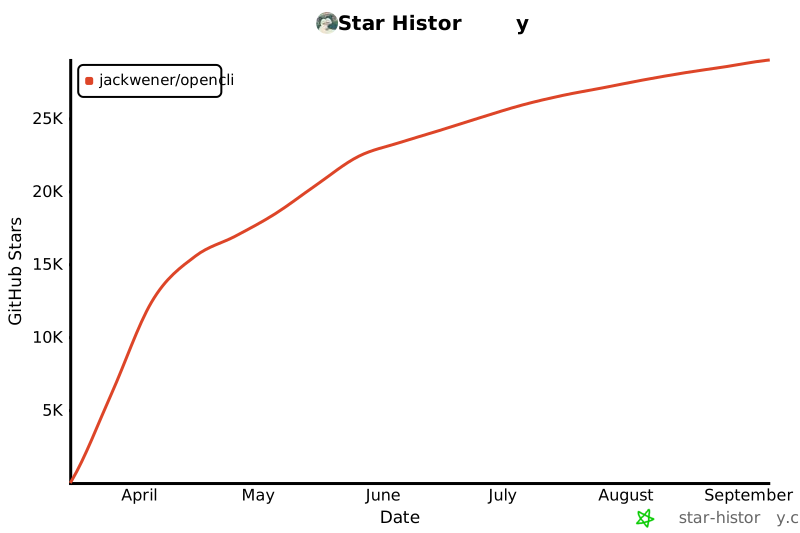](https://star-history.com/#jackwener/opencli&Date)
|
||||
|
||||
|
||||
The CI will automatically build, create a GitHub release, and publish to npm.
|
||||
|
||||
## License
|
||||
|
||||
|
||||
+102
-63
@@ -3,8 +3,7 @@
|
||||
> **把任何网站、本地工具、Electron 应用变成能够让 AI 调用的命令行!**
|
||||
> 零风控 · 复用 Chrome 登录 · AI 自动发现接口 · 全能 CLI 枢纽
|
||||
|
||||
[English](./README.md)
|
||||
|
||||
[](./README.md)
|
||||
[](https://www.npmjs.com/package/@jackwener/opencli)
|
||||
[](https://nodejs.org)
|
||||
[](./LICENSE)
|
||||
@@ -20,34 +19,36 @@ CLI all electron!现在支持把所有 electron 应用 CLI 化,从而组合
|
||||
|
||||
---
|
||||
|
||||
## 目录
|
||||
|
||||
- [亮点](#亮点)
|
||||
- [前置要求](#前置要求)
|
||||
- [快速开始](#快速开始)
|
||||
- [内置命令](#内置命令)
|
||||
- [桌面应用适配器](#桌面应用适配器)
|
||||
- [外部 CLI 枢纽](#外部-cli-枢纽)
|
||||
- [下载支持](#下载支持)
|
||||
- [输出格式](#输出格式)
|
||||
- [致 AI Agent(开发者指南)](#致-ai-agent开发者指南)
|
||||
- [远程 Chrome(服务器/无头环境)](#远程-chrome服务器无头环境)
|
||||
- [常见问题排查](#常见问题排查)
|
||||
- [版本发布](#版本发布)
|
||||
- [License](#license)
|
||||
|
||||
---
|
||||
|
||||
## 亮点
|
||||
|
||||
- **CLI All Electron** — 支持把所有 electron 应用(如 Antigravity Ultra)CLI 化,让 AI 控制自己!
|
||||
- **多站点覆盖** — 覆盖 B站、知乎、小红书、Twitter、Reddit,以及多种桌面应用
|
||||
- **零风控** — 复用 Chrome 登录态,无需存储任何凭证
|
||||
- **外部 CLI 枢纽** — 统一发现、自动安装、透传执行 `gh`、`docker`、`kubectl` 等本地 CLI
|
||||
- **自修复配置** — `opencli setup` 检查 Browser Bridge 连通性;`opencli doctor` 诊断 daemon、扩展和浏览器连接状态
|
||||
- **外部 CLI 枢纽** — 统一发现、自动安装、透传执行 `gh`、`docker` 等本地 CLI
|
||||
- **自修复配置** — `opencli doctor` 自动启动 daemon,诊断扩展和浏览器连接状态
|
||||
- **AI 原生** — `explore` 自动发现 API,`synthesize` 生成适配器,`cascade` 探测认证策略
|
||||
- **动态加载引擎** — 声明式的 `.yaml` 或者底层定制的 `.ts` 适配器,放入 `clis/` 文件夹即可自动注册生效
|
||||
|
||||
## 为什么选 opencli?
|
||||
|
||||
浏览器自动化工具很多,opencli 适合什么场景?
|
||||
|
||||
| 你的需求 | 最佳工具 | 原因 |
|
||||
|----------|----------|------|
|
||||
| 定时从特定站点提取结构化数据 | **opencli** | 预定义适配器,确定性 JSON 输出,零 LLM 成本 |
|
||||
| AI Agent 需要可靠的站点操作 | **opencli** | 数百条命令,结构化输出,快速确定性响应 |
|
||||
| 临时探索未知网站 | Browser-Use、Stagehand | LLM 驱动的通用浏览,适合一次性任务 |
|
||||
| 大规模网页爬取 | Crawl4AI、Scrapy | 专为吞吐量和规模设计 |
|
||||
| 从终端控制桌面 Electron 应用 | **opencli** | CDP + AppleScript,目前唯一能做到这一点的 CLI 工具 |
|
||||
|
||||
**opencli 的核心差异:**
|
||||
|
||||
- **零 LLM 成本** — 运行时不消耗任何 token,跑一万次不花一分钱
|
||||
- **确定性** — 同一命令永远返回同一结构,可管道化、可脚本化、CI 友好
|
||||
- **覆盖广泛** — 50+ 站点,横跨全球与中国平台(B站、知乎、小红书、Reddit、HackerNews 等),并支持通过 CDP 控制桌面 Electron 应用
|
||||
|
||||
> 与 Browser-Use、Crawl4AI、Firecrawl 等工具的详细对比,请查看 [Comparison Guide](./docs/comparison.md)。
|
||||
|
||||
## 前置要求
|
||||
|
||||
- **Node.js**: >= 20.0.0
|
||||
@@ -62,9 +63,9 @@ OpenCLI 通过轻量化的 **Browser Bridge** Chrome 扩展 + 微型 daemon 与
|
||||
你可以选择以下任一方式安装扩展:
|
||||
|
||||
**方式一:下载构建好的安装包(推荐)**
|
||||
1. 到 GitHub [Releases 页面](https://github.com/jackwener/opencli/releases) 下载最新的 `opencli-extension.zip` 或 `opencli-extension.crx`。
|
||||
2. 打开 Chrome 的 `chrome://extensions`,启用右上角的 **开发者模式**。
|
||||
3. 将 `.crx` 拖入浏览器窗口,或将解压后的文件夹拖入即可完成安装。
|
||||
1. 到 GitHub [Releases 页面](https://github.com/jackwener/opencli/releases) 下载最新的 `opencli-extension.zip`。
|
||||
2. 解压后打开 Chrome 的 `chrome://extensions`,启用右上角的 **开发者模式**。
|
||||
3. 点击 **加载已解压的扩展程序**,选择解压后的文件夹。
|
||||
|
||||
**方式二:加载源码(针对开发者)**
|
||||
1. 同样在 `chrome://extensions` 开启 **开发者模式**。
|
||||
@@ -75,7 +76,6 @@ OpenCLI 通过轻量化的 **Browser Bridge** Chrome 扩展 + 微型 daemon 与
|
||||
> **Tip**:后续诊断用 `opencli doctor`:
|
||||
> ```bash
|
||||
> opencli doctor # 检查扩展和 daemon 连通性
|
||||
> opencli doctor --live # 额外测试浏览器命令
|
||||
> ```
|
||||
|
||||
## 快速开始
|
||||
@@ -120,49 +120,70 @@ npm install -g @jackwener/opencli@latest
|
||||
|
||||
| 站点 | 命令 | 模式 |
|
||||
|------|------|------|
|
||||
| **twitter** | `trending` `bookmarks` `profile` `search` `timeline` `thread` `following` `followers` `notifications` `post` `reply` `delete` `like` `article` `follow` `unfollow` `bookmark` `unbookmark` `download` `accept` `reply-dm` | 浏览器 |
|
||||
| **twitter** | `trending` `bookmarks` `profile` `search` `timeline` `thread` `following` `followers` `notifications` `post` `reply` `delete` `like` `article` `follow` `unfollow` `bookmark` `unbookmark` `download` `accept` `reply-dm` `block` `unblock` `hide-reply` | 浏览器 |
|
||||
| **reddit** | `hot` `frontpage` `popular` `search` `subreddit` `read` `user` `user-posts` `user-comments` `upvote` `save` `comment` `subscribe` `saved` `upvoted` | 浏览器 |
|
||||
| **cursor** | `status` `send` `read` `new` `dump` `composer` `model` `extract-code` `ask` `screenshot` `history` `export` | 桌面端 |
|
||||
| **bilibili** | `hot` `search` `me` `favorite` `history` `feed` `subtitle` `dynamic` `ranking` `following` `user-videos` `download` | 浏览器 |
|
||||
| **codex** | `status` `send` `read` `new` `dump` `extract-diff` `model` `ask` `screenshot` `history` `export` | 桌面端 |
|
||||
| **chatwise** | `status` `new` `send` `read` `ask` `model` `history` `export` `screenshot` | 桌面端 |
|
||||
| **doubao** | `status` `new` `send` `read` `ask` | 浏览器 |
|
||||
| **doubao-app** | `status` `new` `send` `read` `ask` `screenshot` `dump` | 桌面端 |
|
||||
| **notion** | `status` `search` `read` `new` `write` `sidebar` `favorites` `export` | 桌面端 |
|
||||
| **discord-app** | `status` `send` `read` `channels` `servers` `search` `members` | 桌面端 |
|
||||
| **v2ex** | `hot` `latest` `topic` `daily` `me` `notifications` | 公开 / 浏览器 |
|
||||
| **xueqiu** | `feed` `hot-stock` `hot` `search` `stock` `watchlist` | 浏览器 |
|
||||
| **antigravity** | `status` `send` `read` `new` `dump` `extract-code` `model` `watch` `serve` | 桌面端 |
|
||||
| **chatgpt** | `status` `new` `send` `read` `ask` | 桌面端 |
|
||||
| **xiaohongshu** | `search` `notifications` `feed` `user` `download` `creator-notes` `creator-note-detail` `creator-notes-summary` `creator-profile` `creator-stats` | 浏览器 |
|
||||
| **v2ex** | `hot` `latest` `topic` `node` `user` `member` `replies` `nodes` `daily` `me` `notifications` | 公开 / 浏览器 |
|
||||
| **xueqiu** | `feed` `hot-stock` `hot` `search` `stock` `watchlist` `earnings-date` `fund-holdings` `fund-snapshot` | 浏览器 |
|
||||
| **antigravity** | `status` `send` `read` `new` `dump` `extract-code` `model` `watch` | 桌面端 |
|
||||
| **chatgpt** | `status` `new` `send` `read` `ask` `model` | 桌面端 |
|
||||
| **xiaohongshu** | `search` `notifications` `feed` `user` `download` `publish` `creator-notes` `creator-note-detail` `creator-notes-summary` `creator-profile` `creator-stats` | 浏览器 |
|
||||
| **apple-podcasts** | `search` `episodes` `top` | 公开 |
|
||||
| **xiaoyuzhou** | `podcast` `podcast-episodes` `episode` | 公开 |
|
||||
| **zhihu** | `hot` `search` `question` `download` | 浏览器 |
|
||||
| **weixin** | `download` | 浏览器 |
|
||||
| **youtube** | `search` `video` `transcript` | 浏览器 |
|
||||
| **boss** | `search` `detail` `recommend` `joblist` `greet` `batchgreet` `send` `chatlist` `chatmsg` `invite` `mark` `exchange` `resume` `stats` | 浏览器 |
|
||||
| **coupang** | `search` `add-to-cart` | 浏览器 |
|
||||
| **bbc** | `news` | 公共 API |
|
||||
| **bloomberg** | `main` `markets` `economics` `industries` `tech` `politics` `businessweek` `opinions` `feeds` `news` | 公共 API / 浏览器 |
|
||||
| **ctrip** | `search` | 浏览器 |
|
||||
| **devto** | `top` `tag` `user` | 公开 |
|
||||
| **dictionary** | `search` `synonyms` `examples` | 公开 |
|
||||
| **arxiv** | `search` `paper` | 公开 |
|
||||
| **wikipedia** | `search` `summary` | 公开 |
|
||||
| **hackernews** | `top` | 公共 API |
|
||||
| **linkedin** | `search` | 浏览器 |
|
||||
| **paperreview** | `submit` `review` `feedback` | 公开 |
|
||||
| **wikipedia** | `search` `summary` `random` `trending` | 公开 |
|
||||
| **hackernews** | `top` `new` `best` `ask` `show` `jobs` `search` `user` | 公共 API |
|
||||
| **jd** | `item` | 浏览器 |
|
||||
| **linkedin** | `search` `timeline` | 浏览器 |
|
||||
| **reuters** | `search` | 浏览器 |
|
||||
| **smzdm** | `search` | 浏览器 |
|
||||
| **weibo** | `hot` | 浏览器 |
|
||||
| **web** | `read` | 浏览器 |
|
||||
| **weibo** | `hot` `search` | 浏览器 |
|
||||
| **yahoo-finance** | `quote` | 浏览器 |
|
||||
| **sinafinance** | `news` | 🌐 公开 |
|
||||
| **barchart** | `quote` `options` `greeks` `flow` | 浏览器 |
|
||||
| **chaoxing** | `assignments` `exams` | 浏览器 |
|
||||
| **grok** | `ask` | 桌面端 |
|
||||
| **grok** | `ask` | 浏览器 |
|
||||
| **hf** | `top` | 公开 |
|
||||
| **jike** | `feed` `search` `create` `like` `comment` `repost` `notifications` `post` `topic` `user` | 浏览器 |
|
||||
| **jimeng** | `generate` `history` | 浏览器 |
|
||||
| **linux-do** | `hot` `latest` `search` `categories` `category` `topic` | 公开 |
|
||||
| **yollomi** | `generate` `video` `edit` `upload` `models` `remove-bg` `upscale` `face-swap` `restore` `try-on` `background` `object-remover` | 浏览器 |
|
||||
| **linux-do** | `feed` `categories` `tags` `search` `topic` `user-topics` `user-posts` | 浏览器 |
|
||||
| **stackoverflow** | `hot` `search` `bounties` `unanswered` | 公开 |
|
||||
| **steam** | `top-sellers` | 公开 |
|
||||
| **weread** | `shelf` `search` `book` `highlights` `notes` `notebooks` `ranking` | 浏览器 |
|
||||
| **douban** | `search` `top250` `subject` `photos` `download` `marks` `reviews` `movie-hot` `book-hot` | 浏览器 |
|
||||
| **facebook** | `feed` `profile` `search` `friends` `groups` `events` `notifications` `memories` `add-friend` `join-group` | 浏览器 |
|
||||
| **google** | `news` `search` `suggest` `trends` | 公开 |
|
||||
| **36kr** | `news` `hot` `search` `article` | 公开 / 浏览器 |
|
||||
| **imdb** | `search` `title` `top` `trending` `person` `reviews` | 公开 |
|
||||
| **producthunt** | `posts` `today` `hot` `browse` | 公开 / 浏览器 |
|
||||
| **instagram** | `explore` `profile` `search` `user` `followers` `following` `follow` `unfollow` `like` `unlike` `comment` `save` `unsave` `saved` | 浏览器 |
|
||||
| **lobsters** | `hot` `newest` `active` `tag` | 公开 |
|
||||
| **medium** | `feed` `search` `user` | 浏览器 |
|
||||
| **sinablog** | `hot` `search` `article` `user` | 浏览器 |
|
||||
| **substack** | `feed` `search` `publication` | 浏览器 |
|
||||
| **pixiv** | `ranking` `search` `user` `illusts` `detail` `download` | 浏览器 |
|
||||
| **tiktok** | `explore` `search` `profile` `user` `following` `follow` `unfollow` `like` `unlike` `comment` `save` `unsave` `live` `notifications` `friends` | 浏览器 |
|
||||
|
||||
> **Bloomberg 说明**:Bloomberg 的 RSS 列表命令(`main`、各栏目 feed、`feeds`)无需浏览器即可使用。`bloomberg news` 适用于当前 Chrome 会话本身就能访问的标准 Bloomberg 文章页。音频页和部分非标准页面可能失败,OpenCLI 也不会绕过 Bloomberg 的付费墙、登录或权限校验。
|
||||
|
||||
### 外部 CLI 枢纽
|
||||
|
||||
@@ -173,8 +194,8 @@ OpenCLI 也可以作为你现有命令行工具的统一入口,负责发现、
|
||||
| **gh** | GitHub CLI | `opencli gh pr list --limit 5` |
|
||||
| **obsidian** | Obsidian 仓库管理 | `opencli obsidian search query="AI"` |
|
||||
| **docker** | Docker 命令行工具 | `opencli docker ps` |
|
||||
| **kubectl** | Kubernetes CLI | `opencli kubectl get pods` |
|
||||
| **readwise** | Readwise / Reader CLI | `opencli readwise login` |
|
||||
| **gws** | Google Workspace CLI — Docs, Sheets, Drive, Gmail, Calendar | `opencli gws docs list` |
|
||||
|
||||
**零配置透传**:OpenCLI 会把你的输入原样转发给底层二进制,保留原生 stdout / stderr 行为。
|
||||
|
||||
@@ -199,6 +220,7 @@ opencli register mycli
|
||||
| **ChatWise** | 多 LLM 客户端(GPT-4、Claude、Gemini) | [Doc](./docs/adapters/desktop/chatwise.md) |
|
||||
| **Notion** | 搜索、读取、写入 Notion 页面 | [Doc](./docs/adapters/desktop/notion.md) |
|
||||
| **Discord** | Discord 桌面版 — 消息、频道、服务器 | [Doc](./docs/adapters/desktop/discord.md) |
|
||||
| **Doubao** | 通过 CDP 控制豆包桌面应用 | [Doc](./docs/adapters/desktop/doubao-app.md) |
|
||||
|
||||
## 下载支持
|
||||
|
||||
@@ -211,7 +233,10 @@ OpenCLI 支持从各平台下载图片、视频和文章。
|
||||
| **小红书** | 图片、视频 | 下载笔记中的所有媒体文件 |
|
||||
| **B站** | 视频 | 需要安装 `yt-dlp` |
|
||||
| **Twitter/X** | 图片、视频 | 从用户媒体页或单条推文下载 |
|
||||
| **Pixiv** | 图片 | 下载原始画质插画,支持多页作品 |
|
||||
| **知乎** | 文章(Markdown) | 导出文章,可选下载图片到本地 |
|
||||
| **微信公众号** | 文章(Markdown) | 导出微信公众号文章为 Markdown |
|
||||
| **豆瓣** | 图片 | 下载电影条目的海报 / 剧照图片 |
|
||||
|
||||
### 前置依赖
|
||||
|
||||
@@ -228,11 +253,11 @@ brew install yt-dlp
|
||||
|
||||
```bash
|
||||
# 下载小红书笔记中的图片/视频
|
||||
opencli xiaohongshu download --note-id abc123 --output ./xhs
|
||||
opencli xiaohongshu download abc123 --output ./xhs
|
||||
|
||||
# 下载B站视频(需要 yt-dlp)
|
||||
opencli bilibili download --bvid BV1xxx --output ./bilibili
|
||||
opencli bilibili download --bvid BV1xxx --quality 1080p # 指定画质
|
||||
opencli bilibili download BV1xxx --output ./bilibili
|
||||
opencli bilibili download BV1xxx --quality 1080p # 指定画质
|
||||
|
||||
# 下载 Twitter 用户的媒体
|
||||
opencli twitter download elonmusk --limit 20 --output ./twitter
|
||||
@@ -240,27 +265,20 @@ opencli twitter download elonmusk --limit 20 --output ./twitter
|
||||
# 下载单条推文的媒体
|
||||
opencli twitter download --tweet-url "https://x.com/user/status/123" --output ./twitter
|
||||
|
||||
# 下载豆瓣电影海报 / 剧照
|
||||
opencli douban download 30382501 --output ./douban
|
||||
|
||||
# 导出知乎文章为 Markdown
|
||||
opencli zhihu download "https://zhuanlan.zhihu.com/p/xxx" --output ./zhihu
|
||||
|
||||
# 导出并下载图片
|
||||
opencli zhihu download "https://zhuanlan.zhihu.com/p/xxx" --download-images
|
||||
|
||||
# 导出微信公众号文章为 Markdown
|
||||
opencli weixin download --url "https://mp.weixin.qq.com/s/xxx" --output ./weixin
|
||||
```
|
||||
|
||||
### Pipeline Step(用于 YAML 适配器)
|
||||
|
||||
`download` step 可以在 YAML 管线中使用:
|
||||
|
||||
```yaml
|
||||
pipeline:
|
||||
- fetch: https://api.example.com/media
|
||||
- download:
|
||||
url: ${{ item.imageUrl }}
|
||||
dir: ./downloads
|
||||
filename: ${{ item.title | sanitize }}.jpg
|
||||
concurrency: 5
|
||||
skip_existing: true
|
||||
```
|
||||
|
||||
## 输出格式
|
||||
|
||||
@@ -277,6 +295,28 @@ opencli bilibili hot -f csv # CSV
|
||||
opencli bilibili hot -v # 详细模式:展示管线执行步骤调试信息
|
||||
```
|
||||
|
||||
## 插件
|
||||
|
||||
通过社区贡献的插件扩展 OpenCLI。插件使用与内置命令相同的 YAML/TS 格式,启动时自动发现。
|
||||
|
||||
```bash
|
||||
opencli plugin install github:user/opencli-plugin-my-tool # 安装
|
||||
opencli plugin list # 查看已安装
|
||||
opencli plugin update my-tool # 更新到最新
|
||||
opencli plugin update --all # 更新全部已安装插件
|
||||
opencli plugin uninstall my-tool # 卸载
|
||||
```
|
||||
|
||||
当 plugin 的版本被记录到 `~/.opencli/plugins.lock.json` 后,`opencli plugin list` 也会显示对应的短 commit hash。
|
||||
|
||||
| 插件 | 类型 | 描述 |
|
||||
|------|------|------|
|
||||
| [opencli-plugin-github-trending](https://github.com/ByteYue/opencli-plugin-github-trending) | YAML | GitHub Trending 仓库 |
|
||||
| [opencli-plugin-hot-digest](https://github.com/ByteYue/opencli-plugin-hot-digest) | TS | 多平台热榜聚合 |
|
||||
| [opencli-plugin-juejin](https://github.com/Astro-Han/opencli-plugin-juejin) | YAML | 稀土掘金热门文章 |
|
||||
|
||||
详见 [插件指南](./docs/zh/guide/plugins.md) 了解如何创建自己的插件。
|
||||
|
||||
## 致 AI Agent(开发者指南)
|
||||
|
||||
如果你是一个被要求查阅代码并编写新 `opencli` 适配器的 AI,请遵守以下工作流。
|
||||
@@ -305,6 +345,8 @@ opencli cascade https://api.example.com/data
|
||||
|
||||
- **"Extension not connected" 报错**
|
||||
- 确保你当前的 Chrome 已安装且**开启了** opencli Browser Bridge 扩展(在 `chrome://extensions` 中检查)。
|
||||
- **"attach failed: Cannot access a chrome-extension:// URL" 报错**
|
||||
- 其他 Chrome 扩展(如 youmind、New Tab Override 或 AI 助手类扩展)可能产生冲突。请尝试**暂时禁用其他扩展**后重试。
|
||||
- **返回空数据,或者报错 "Unauthorized"**
|
||||
- Chrome 里的登录态可能已经过期。请打开当前 Chrome 页面,在新标签页重新手工登录或刷新该页面。
|
||||
- **Node API 错误 (如 parseArgs, fs 等)**
|
||||
@@ -313,15 +355,12 @@ opencli cascade https://api.example.com/data
|
||||
- 检查 daemon 状态:`curl localhost:19825/status`
|
||||
- 查看扩展日志:`curl localhost:19825/logs`
|
||||
|
||||
## 版本发布
|
||||
|
||||
```bash
|
||||
npm version patch # 0.1.0 → 0.1.1
|
||||
npm version minor # 0.1.0 → 0.2.0
|
||||
## Star History
|
||||
|
||||
[](https://star-history.com/#jackwener/opencli&Date)
|
||||
|
||||
|
||||
# 推送 tag,GitHub Actions 将自动执行发版和 npm 发布
|
||||
git push --follow-tags
|
||||
```
|
||||
|
||||
## License
|
||||
|
||||
|
||||
@@ -1,9 +1,9 @@
|
||||
---
|
||||
name: opencli
|
||||
description: "OpenCLI — Make any website or Electron App your CLI. Zero risk, AI-powered, reuse Chrome login. 150+ commands across 30+ sites."
|
||||
version: 1.1.0
|
||||
description: "OpenCLI — Make any website or Electron App your CLI. Zero risk, AI-powered, reuse Chrome login."
|
||||
version: 1.4.1
|
||||
author: jackwener
|
||||
tags: [cli, browser, web, chrome-extension, cdp, bilibili, zhihu, twitter, github, v2ex, hackernews, reddit, xiaohongshu, xueqiu, youtube, boss, coupang, AI, agent]
|
||||
tags: [cli, browser, web, chrome-extension, cdp, bilibili, zhihu, twitter, github, v2ex, hackernews, reddit, xiaohongshu, xueqiu, youtube, boss, coupang, yollomi, AI, agent]
|
||||
---
|
||||
|
||||
# OpenCLI
|
||||
@@ -15,6 +15,12 @@ tags: [cli, browser, web, chrome-extension, cdp, bilibili, zhihu, twitter, githu
|
||||
> 该文档包含完整的 API 发现工作流(必须使用浏览器探索)、5 级认证策略决策树、平台 SDK 速查表、`tap` 步骤调试流程、分页 API 模板、级联请求模式、以及常见陷阱。
|
||||
> **本文件(SKILL.md)仅提供命令参考和简化模板,不足以正确开发适配器。**
|
||||
|
||||
> [!IMPORTANT]
|
||||
> 创建或修改 adapter 时,再额外遵守 3 条收口规则:
|
||||
> 1. 主参数优先用 positional arg,不要把 `query` / `id` / `url` 默认做成 `--query` / `--id` / `--url`
|
||||
> 2. 预期中的 adapter 失败优先抛 `CliError` 子类,不要直接 throw 原始 `Error`
|
||||
> 3. 新增 adapter 或新增用户可发现命令时,同步更新 adapter docs、`docs/adapters/index.md`、sidebar,以及 README/README.zh-CN 中受影响的入口
|
||||
|
||||
## Install & Run
|
||||
|
||||
```bash
|
||||
@@ -82,6 +88,9 @@ opencli xueqiu watchlist # 获取自选股/持仓列表
|
||||
opencli xueqiu feed # 我的关注 timeline
|
||||
opencli xueqiu hot --limit 10 # 雪球热榜
|
||||
opencli xueqiu search "特斯拉" # 搜索 (query positional)
|
||||
opencli xueqiu earnings-date SH600519 # 股票财报发布日期 (symbol positional)
|
||||
opencli xueqiu fund-holdings # 蛋卷基金持仓明细 (支持 --account 过滤)
|
||||
opencli xueqiu fund-snapshot # 蛋卷基金快照(总资产、子账户、持仓)
|
||||
|
||||
# GitHub (via gh External CLI)
|
||||
opencli gh repo list # 列出仓库 (passthrough to gh)
|
||||
@@ -100,6 +109,19 @@ opencli twitter follow elonmusk # 关注用户
|
||||
opencli twitter unfollow elonmusk # 取消关注
|
||||
opencli twitter bookmark https://x.com/... # 收藏推文
|
||||
opencli twitter unbookmark https://x.com/... # 取消收藏
|
||||
opencli twitter post "Hello world" # 发布推文 (text positional)
|
||||
opencli twitter like https://x.com/... # 点赞推文 (url positional)
|
||||
opencli twitter reply https://x.com/... "Nice!" # 回复推文 (url + text positional)
|
||||
opencli twitter delete https://x.com/... # 删除推文 (url positional)
|
||||
opencli twitter block elonmusk # 屏蔽用户 (username positional)
|
||||
opencli twitter unblock elonmusk # 取消屏蔽 (username positional)
|
||||
opencli twitter followers elonmusk # 用户的粉丝列表 (user positional)
|
||||
opencli twitter following elonmusk # 用户的关注列表 (user positional)
|
||||
opencli twitter notifications --limit 20 # 通知列表
|
||||
opencli twitter hide-reply https://x.com/... # 隐藏回复 (url positional)
|
||||
opencli twitter download elonmusk # 下载用户媒体 (username positional, 支持 --tweet-url)
|
||||
opencli twitter accept "群,微信" # 自动接受含关键词的 DM 请求 (query positional)
|
||||
opencli twitter reply-dm "消息内容" # 批量回复 DM (text positional)
|
||||
|
||||
# Reddit (browser)
|
||||
opencli reddit hot --limit 10 # 热门帖子
|
||||
@@ -126,9 +148,21 @@ opencli v2ex topic 1024 # 主题详情 (id positional)
|
||||
opencli v2ex daily # 每日签到 (browser)
|
||||
opencli v2ex me # 我的信息 (browser)
|
||||
opencli v2ex notifications --limit 10 # 通知 (browser)
|
||||
opencli v2ex node python # 节点话题列表 (name positional)
|
||||
opencli v2ex nodes --limit 30 # 所有节点列表
|
||||
opencli v2ex member username # 用户资料 (username positional)
|
||||
opencli v2ex user username # 用户发帖列表 (username positional)
|
||||
opencli v2ex replies 1024 # 主题回复列表 (id positional)
|
||||
|
||||
# Hacker News (public)
|
||||
opencli hackernews top --limit 10 # Top stories
|
||||
opencli hackernews new --limit 10 # Newest stories
|
||||
opencli hackernews best --limit 10 # Best stories
|
||||
opencli hackernews ask --limit 10 # Ask HN posts
|
||||
opencli hackernews show --limit 10 # Show HN posts
|
||||
opencli hackernews jobs --limit 10 # Job postings
|
||||
opencli hackernews search "rust" # 搜索 (query positional)
|
||||
opencli hackernews user dang # 用户资料 (username positional)
|
||||
|
||||
# BBC (public)
|
||||
opencli bbc news --limit 10 # BBC News RSS headlines
|
||||
@@ -182,7 +216,6 @@ opencli antigravity dump # 导出 DOM 和快照调试信息
|
||||
opencli antigravity extract-code # 自动抽取 AI 回复中的代码块
|
||||
opencli antigravity model claude # 切换底层模型
|
||||
opencli antigravity watch # 流式监听增量消息
|
||||
opencli antigravity serve --port 8082 # 启动 Anthropic 兼容代理
|
||||
|
||||
# Barchart (browser)
|
||||
opencli barchart quote --symbol AAPL # 股票行情
|
||||
@@ -199,11 +232,13 @@ opencli jike comment xxx "评论" # 评论 (id + text positional)
|
||||
opencli jike repost xxx # 转发 (id positional)
|
||||
opencli jike notifications # 通知
|
||||
|
||||
# Linux.do (public)
|
||||
# Linux.do (public + browser)
|
||||
opencli linux-do hot --limit 10 # 热门话题
|
||||
opencli linux-do latest --limit 10 # 最新话题
|
||||
opencli linux-do search "rust" # 搜索 (query positional)
|
||||
opencli linux-do topic 1024 # 主题详情 (id positional)
|
||||
opencli linux-do categories --limit 20 # 分类列表 (browser)
|
||||
opencli linux-do category dev 7 # 分类内话题 (slug + id positional, browser)
|
||||
|
||||
# StackOverflow (public)
|
||||
opencli stackoverflow hot --limit 10 # 热门问题
|
||||
@@ -222,6 +257,20 @@ opencli weread ranking --limit 10 # 排行榜
|
||||
opencli jimeng generate --prompt "描述" # AI 生图
|
||||
opencli jimeng history --limit 10 # 生成历史
|
||||
|
||||
# Yollomi yollomi.com (browser — 需在 Chrome 登录 yollomi.com,复用站点 session)
|
||||
opencli yollomi models --type image # 列出图像模型与积分
|
||||
opencli yollomi generate "提示词" --model z-image-turbo # 文生图
|
||||
opencli yollomi video "提示词" --model kling-2-1 # 视频
|
||||
opencli yollomi upload ./photo.jpg # 上传得 URL,供 img2img / 工具链使用
|
||||
opencli yollomi remove-bg <image-url> # 去背景(免费)
|
||||
opencli yollomi edit <image-url> "改成油画风格" # Qwen 图像编辑
|
||||
opencli yollomi background <image-url> # AI 背景生成 (5 credits)
|
||||
opencli yollomi face-swap --source <url> --target <url> # 换脸 (3 credits)
|
||||
opencli yollomi object-remover <image-url> <mask-url> # AI 去除物体 (3 credits)
|
||||
opencli yollomi restore <image-url> # AI 修复老照片 (4 credits)
|
||||
opencli yollomi try-on --person <url> --cloth <url> # 虚拟试衣 (3 credits)
|
||||
opencli yollomi upscale <image-url> # AI 超分辨率 (1 credit, 支持 --scale 2/4)
|
||||
|
||||
# Grok (default + explicit web)
|
||||
opencli grok ask --prompt "问题" # 提问 Grok(兼容默认路径)
|
||||
opencli grok ask --prompt "问题" --web # 显式 grok.com consumer web UI 路径
|
||||
@@ -232,6 +281,240 @@ opencli hf top --limit 10 # 热门模型
|
||||
# 超星学习通 (browser)
|
||||
opencli chaoxing assignments # 作业列表
|
||||
opencli chaoxing exams # 考试列表
|
||||
|
||||
# Douban 豆瓣 (browser)
|
||||
opencli douban search "三体" # 搜索 (query positional)
|
||||
opencli douban top250 # 豆瓣 Top 250
|
||||
opencli douban subject 1234567 # 条目详情 (id positional)
|
||||
opencli douban photos 30382501 # 图片列表 / 直链(默认海报)
|
||||
opencli douban download 30382501 # 下载海报 / 剧照
|
||||
opencli douban marks --limit 10 # 我的标记
|
||||
opencli douban reviews --limit 10 # 短评
|
||||
|
||||
# Facebook (browser)
|
||||
opencli facebook feed --limit 10 # 动态流
|
||||
opencli facebook profile username # 用户资料 (id positional)
|
||||
opencli facebook search "AI" # 搜索 (query positional)
|
||||
opencli facebook friends # 好友列表
|
||||
opencli facebook groups # 群组
|
||||
opencli facebook events # 活动
|
||||
opencli facebook notifications # 通知
|
||||
opencli facebook memories # 回忆
|
||||
opencli facebook add-friend username # 添加好友 (id positional)
|
||||
opencli facebook join-group groupid # 加入群组 (id positional)
|
||||
|
||||
# Instagram (browser)
|
||||
opencli instagram explore # 探索
|
||||
opencli instagram profile username # 用户资料 (id positional)
|
||||
opencli instagram search "AI" # 搜索 (query positional)
|
||||
opencli instagram user username # 用户详情 (id positional)
|
||||
opencli instagram followers username # 粉丝 (id positional)
|
||||
opencli instagram following username # 关注 (id positional)
|
||||
opencli instagram follow username # 关注用户 (id positional)
|
||||
opencli instagram unfollow username # 取消关注 (id positional)
|
||||
opencli instagram like postid # 点赞 (id positional)
|
||||
opencli instagram unlike postid # 取消点赞 (id positional)
|
||||
opencli instagram comment postid "评论" # 评论 (id + text positional)
|
||||
opencli instagram save postid # 收藏 (id positional)
|
||||
opencli instagram unsave postid # 取消收藏 (id positional)
|
||||
opencli instagram saved # 已收藏列表
|
||||
|
||||
# TikTok (browser)
|
||||
opencli tiktok explore # 探索
|
||||
opencli tiktok search "AI" # 搜索 (query positional)
|
||||
opencli tiktok profile username # 用户资料 (id positional)
|
||||
opencli tiktok user username # 用户详情 (id positional)
|
||||
opencli tiktok following username # 关注列表 (id positional)
|
||||
opencli tiktok follow username # 关注 (id positional)
|
||||
opencli tiktok unfollow username # 取消关注 (id positional)
|
||||
opencli tiktok like videoid # 点赞 (id positional)
|
||||
opencli tiktok unlike videoid # 取消点赞 (id positional)
|
||||
opencli tiktok comment videoid "评论" # 评论 (id + text positional)
|
||||
opencli tiktok save videoid # 收藏 (id positional)
|
||||
opencli tiktok unsave videoid # 取消收藏 (id positional)
|
||||
opencli tiktok live # 直播
|
||||
opencli tiktok notifications # 通知
|
||||
opencli tiktok friends # 朋友
|
||||
|
||||
# Medium (browser)
|
||||
opencli medium feed --limit 10 # 动态流
|
||||
opencli medium search "AI" # 搜索 (query positional)
|
||||
opencli medium user username # 用户主页 (id positional)
|
||||
|
||||
# Substack (browser)
|
||||
opencli substack feed --limit 10 # 订阅动态
|
||||
opencli substack search "AI" # 搜索 (query positional)
|
||||
opencli substack publication name # 出版物详情 (id positional)
|
||||
|
||||
# Sinablog 新浪博客 (browser)
|
||||
opencli sinablog hot --limit 10 # 热门
|
||||
opencli sinablog search "AI" # 搜索 (query positional)
|
||||
opencli sinablog article url # 文章详情
|
||||
opencli sinablog user username # 用户主页 (id positional)
|
||||
|
||||
# Lobsters (public)
|
||||
opencli lobsters hot --limit 10 # 热门
|
||||
opencli lobsters newest --limit 10 # 最新
|
||||
opencli lobsters active --limit 10 # 活跃
|
||||
opencli lobsters tag rust # 按标签筛选 (tag positional)
|
||||
|
||||
# Google (public)
|
||||
opencli google news --limit 10 # 新闻
|
||||
opencli google search "AI" # 搜索 (query positional)
|
||||
opencli google suggest "AI" # 搜索建议 (query positional)
|
||||
opencli google trends # 趋势
|
||||
|
||||
# DEV.to (public)
|
||||
opencli devto top --limit 10 # 热门文章
|
||||
opencli devto tag javascript --limit 10 # 按标签 (tag positional)
|
||||
opencli devto user username # 用户文章 (username positional)
|
||||
|
||||
# Steam (public)
|
||||
opencli steam top-sellers --limit 10 # 热销游戏
|
||||
|
||||
# Apple Podcasts (public)
|
||||
opencli apple-podcasts top --limit 10 # 热门播客排行榜 (支持 --country us/cn/gb/jp)
|
||||
opencli apple-podcasts search "科技" # 搜索播客 (query positional)
|
||||
opencli apple-podcasts episodes 12345 # 播客剧集列表 (id positional, 用 search 获取 ID)
|
||||
|
||||
# arXiv (public)
|
||||
opencli arxiv search "attention" # 搜索论文 (query positional)
|
||||
opencli arxiv paper 1706.03762 # 论文详情 (id positional)
|
||||
|
||||
# Bloomberg (public RSS + browser)
|
||||
opencli bloomberg main --limit 10 # Bloomberg 首页头条 (RSS)
|
||||
opencli bloomberg markets --limit 10 # 市场新闻 (RSS)
|
||||
opencli bloomberg tech --limit 10 # 科技新闻 (RSS)
|
||||
opencli bloomberg politics --limit 10 # 政治新闻 (RSS)
|
||||
opencli bloomberg economics --limit 10 # 经济新闻 (RSS)
|
||||
opencli bloomberg opinions --limit 10 # 观点 (RSS)
|
||||
opencli bloomberg industries --limit 10 # 行业新闻 (RSS)
|
||||
opencli bloomberg businessweek --limit 10 # Businessweek (RSS)
|
||||
opencli bloomberg feeds # 列出所有 RSS feed 别名
|
||||
opencli bloomberg news "https://..." # 阅读 Bloomberg 文章全文 (link positional, browser)
|
||||
|
||||
# Coupang 쿠팡 (browser)
|
||||
opencli coupang search "耳机" # 搜索商品 (query positional, 支持 --filter rocket)
|
||||
opencli coupang add-to-cart 12345 # 加入购物车 (product-id positional, 或 --url)
|
||||
|
||||
# Dictionary (public)
|
||||
opencli dictionary search "serendipity" # 单词释义 (word positional)
|
||||
opencli dictionary synonyms "happy" # 近义词 (word positional)
|
||||
opencli dictionary examples "ubiquitous" # 例句 (word positional)
|
||||
|
||||
# 豆包 Doubao Web (browser)
|
||||
opencli doubao status # 检查豆包页面状态
|
||||
opencli doubao new # 新建对话
|
||||
opencli doubao send "你好" # 发送消息 (text positional)
|
||||
opencli doubao read # 读取对话记录
|
||||
opencli doubao ask "问题" # 一键提问并等回复 (text positional)
|
||||
|
||||
# 京东 JD (browser)
|
||||
opencli jd item 100291143898 # 商品详情 (sku positional, 含价格/主图/规格)
|
||||
|
||||
# LinkedIn (browser)
|
||||
opencli linkedin search "AI engineer" # 搜索职位 (query positional, 支持 --location/--company/--remote)
|
||||
opencli linkedin timeline --limit 20 # 首页动态流
|
||||
|
||||
# Pixiv (browser)
|
||||
opencli pixiv ranking --limit 20 # 插画排行榜 (支持 --mode daily/weekly/monthly)
|
||||
opencli pixiv search "風景" # 搜索插画 (query positional)
|
||||
opencli pixiv user 12345 # 画师资料 (uid positional)
|
||||
opencli pixiv illusts 12345 # 画师作品列表 (user-id positional)
|
||||
opencli pixiv detail 12345 # 插画详情 (id positional)
|
||||
opencli pixiv download 12345 # 下载插画 (illust-id positional)
|
||||
|
||||
# Web (browser)
|
||||
opencli web read --url "https://..." # 抓取任意网页并导出为 Markdown
|
||||
|
||||
# 微信公众号 Weixin (browser)
|
||||
opencli weixin download --url "https://mp.weixin.qq.com/s/xxx" # 下载公众号文章为 Markdown
|
||||
|
||||
# 小宇宙 Xiaoyuzhou (public)
|
||||
opencli xiaoyuzhou podcast 12345 # 播客资料 (id positional)
|
||||
opencli xiaoyuzhou podcast-episodes 12345 # 播客剧集列表 (id positional)
|
||||
opencli xiaoyuzhou episode 12345 # 单集详情 (id positional)
|
||||
|
||||
# Wikipedia (public)
|
||||
opencli wikipedia search "AI" # 搜索 (query positional)
|
||||
opencli wikipedia summary "Python" # 摘要 (title positional)
|
||||
```
|
||||
|
||||
### Desktop Adapter Commands
|
||||
|
||||
```bash
|
||||
# Cursor (desktop — CDP via Electron)
|
||||
opencli cursor status # 检查连接
|
||||
opencli cursor send "message" # 发送消息
|
||||
opencli cursor read # 读取回复
|
||||
opencli cursor new # 新建对话
|
||||
opencli cursor dump # 导出 DOM 调试信息
|
||||
opencli cursor composer # Composer 模式
|
||||
opencli cursor model claude # 切换模型
|
||||
opencli cursor extract-code # 提取代码块
|
||||
opencli cursor ask "question" # 一键提问并等回复
|
||||
opencli cursor screenshot # 截图
|
||||
opencli cursor history # 对话历史
|
||||
opencli cursor export # 导出对话
|
||||
|
||||
# Codex (desktop — headless CLI agent)
|
||||
opencli codex status # 检查连接
|
||||
opencli codex send "message" # 发送消息
|
||||
opencli codex read # 读取回复
|
||||
opencli codex new # 新建对话
|
||||
opencli codex dump # 导出调试信息
|
||||
opencli codex extract-diff # 提取 diff
|
||||
opencli codex model gpt-4 # 切换模型
|
||||
opencli codex ask "question" # 一键提问并等回复
|
||||
opencli codex screenshot # 截图
|
||||
opencli codex history # 对话历史
|
||||
opencli codex export # 导出对话
|
||||
|
||||
# ChatGPT (desktop — macOS AppleScript/CDP)
|
||||
opencli chatgpt status # 检查应用状态
|
||||
opencli chatgpt new # 新建对话
|
||||
opencli chatgpt send "message" # 发送消息
|
||||
opencli chatgpt read # 读取回复
|
||||
opencli chatgpt ask "question" # 一键提问并等回复
|
||||
|
||||
# ChatWise (desktop — multi-LLM client)
|
||||
opencli chatwise status # 检查连接
|
||||
opencli chatwise new # 新建对话
|
||||
opencli chatwise send "message" # 发送消息
|
||||
opencli chatwise read # 读取回复
|
||||
opencli chatwise ask "question" # 一键提问并等回复
|
||||
opencli chatwise model claude # 切换模型
|
||||
opencli chatwise history # 对话历史
|
||||
opencli chatwise export # 导出对话
|
||||
opencli chatwise screenshot # 截图
|
||||
|
||||
# Notion (desktop — CDP via Electron)
|
||||
opencli notion status # 检查连接
|
||||
opencli notion search "keyword" # 搜索页面
|
||||
opencli notion read # 读取当前页面
|
||||
opencli notion new # 新建页面
|
||||
opencli notion write "content" # 写入内容
|
||||
opencli notion sidebar # 侧边栏导航
|
||||
opencli notion favorites # 收藏列表
|
||||
opencli notion export # 导出
|
||||
|
||||
# Discord App (desktop — CDP via Electron)
|
||||
opencli discord-app status # 检查连接
|
||||
opencli discord-app send "message" # 发送消息
|
||||
opencli discord-app read # 读取消息
|
||||
opencli discord-app channels # 频道列表
|
||||
opencli discord-app servers # 服务器列表
|
||||
opencli discord-app search "keyword" # 搜索
|
||||
opencli discord-app members # 成员列表
|
||||
|
||||
# Doubao App 豆包桌面版 (desktop — CDP via Electron)
|
||||
opencli doubao-app status # 检查连接
|
||||
opencli doubao-app new # 新建对话
|
||||
opencli doubao-app send "message" # 发送消息
|
||||
opencli doubao-app read # 读取回复
|
||||
opencli doubao-app ask "question" # 一键提问并等回复
|
||||
opencli doubao-app screenshot # 截图
|
||||
opencli doubao-app dump # 导出 DOM 调试信息
|
||||
```
|
||||
|
||||
### Management Commands
|
||||
@@ -244,9 +527,7 @@ opencli install <name> # Auto-install an external CLI (e.g., gh, obsidian)
|
||||
opencli register <name> # Register a local custom CLI for unified discovery
|
||||
opencli validate # Validate all CLI definitions
|
||||
opencli validate bilibili # Validate specific site
|
||||
opencli setup # Interactive Browser Bridge setup and connectivity check
|
||||
opencli doctor # Diagnose daemon, extension, and browser connectivity
|
||||
opencli doctor --live # Also test live browser connectivity
|
||||
opencli doctor # Diagnose browser bridge (auto-starts daemon, includes live test)
|
||||
```
|
||||
|
||||
### AI Agent Workflow
|
||||
@@ -261,14 +542,26 @@ opencli synthesize <site>
|
||||
# Generate: one-shot explore → synthesize → register
|
||||
opencli generate <url> --goal "hot"
|
||||
|
||||
# Record: YOU operate the page, opencli captures every API call → YAML candidates
|
||||
# Opens the URL in automation window, injects fetch/XHR interceptor into ALL tabs,
|
||||
# polls every 2s, auto-stops after 60s (or press Enter to stop early).
|
||||
opencli record <url> # 录制,site name 从域名推断
|
||||
opencli record <url> --site mysite # 指定 site name
|
||||
opencli record <url> --timeout 120000 # 自定义超时(毫秒,默认 60000)
|
||||
opencli record <url> --poll 1000 # 缩短轮询间隔(毫秒,默认 2000)
|
||||
opencli record <url> --out .opencli/record/x # 自定义输出目录
|
||||
# Output:
|
||||
# .opencli/record/<site>/captured.json ← 原始捕获数据(带 url/method/body)
|
||||
# .opencli/record/<site>/candidates/*.yaml ← 高置信度候选适配器(score ≥ 8,有 array 结果)
|
||||
|
||||
# Strategy Cascade: auto-probe PUBLIC → COOKIE → HEADER
|
||||
opencli cascade <api-url>
|
||||
|
||||
# Explore with interactive fuzzing (click buttons to trigger lazy APIs)
|
||||
opencli explore <url> --auto --click "字幕,CC,评论"
|
||||
|
||||
# Verify: validate adapter definitions
|
||||
opencli verify
|
||||
# Validate: validate adapter definitions
|
||||
opencli validate
|
||||
```
|
||||
|
||||
## Output Formats
|
||||
@@ -291,6 +584,129 @@ opencli bilibili hot -f csv # CSV
|
||||
opencli bilibili hot -v # Show each pipeline step and data flow
|
||||
```
|
||||
|
||||
## Record Workflow
|
||||
|
||||
`record` 是为「无法用 `explore` 自动发现」的页面(需要登录操作、复杂交互、SPA 内路由)准备的手动录制方案。
|
||||
|
||||
### 工作原理
|
||||
|
||||
```
|
||||
opencli record <url>
|
||||
→ 打开 automation window 并导航到目标 URL
|
||||
→ 向所有 tab 注入 fetch/XHR 拦截器(幂等,可重复注入)
|
||||
→ 每 2s 轮询一次:发现新 tab 自动注入,drain 所有 tab 的捕获缓冲区
|
||||
→ 超时(默认 60s)或按 Enter 停止
|
||||
→ 分析捕获到的 JSON 请求:去重 → 评分 → 生成候选 YAML
|
||||
```
|
||||
|
||||
**拦截器特性**:
|
||||
- 同时 patch `window.fetch` 和 `XMLHttpRequest`
|
||||
- 只捕获 `Content-Type: application/json` 的响应
|
||||
- 过滤纯对象少于 2 个 key 的响应(避免 tracking/ping)
|
||||
- 跨 tab 隔离:每个 tab 独立缓冲区,轮询时分别 drain
|
||||
- 幂等注入:同一 tab 二次注入时先 restore 原始函数再重新 patch,不丢失已捕获数据
|
||||
|
||||
### 使用步骤
|
||||
|
||||
```bash
|
||||
# 1. 启动录制(建议 --timeout 给足操作时间)
|
||||
opencli record "https://example.com/page" --timeout 120000
|
||||
|
||||
# 2. 在弹出的 automation window 里正常操作页面:
|
||||
# - 打开列表、搜索、点击条目、切换 Tab
|
||||
# - 凡是触发网络请求的操作都会被捕获
|
||||
|
||||
# 3. 完成操作后按 Enter 停止(或等超时自动停止)
|
||||
|
||||
# 4. 查看结果
|
||||
cat .opencli/record/<site>/captured.json # 原始捕获
|
||||
ls .opencli/record/<site>/candidates/ # 候选 YAML
|
||||
```
|
||||
|
||||
### 页面类型与捕获预期
|
||||
|
||||
| 页面类型 | 预期捕获量 | 说明 |
|
||||
|---------|-----------|------|
|
||||
| 列表/搜索页 | 多(5~20+) | 每次搜索/翻页都会触发新请求 |
|
||||
| 详情页(只读) | 少(1~5) | 首屏数据一次性返回,后续操作走 form/redirect |
|
||||
| SPA 内路由跳转 | 中等 | 路由切换会触发新接口,但首屏请求在注入前已发出 |
|
||||
| 需要登录的页面 | 视操作而定 | 确保 Chrome 已登录目标网站 |
|
||||
|
||||
> **注意**:如果页面在导航完成前就发出了大部分请求(服务端渲染 / SSR 注水),拦截器会错过这些请求。
|
||||
> 解决方案:在页面加载完成后,手动触发能产生新请求的操作(搜索、翻页、切 Tab、展开折叠项等)。
|
||||
|
||||
### 候选 YAML → TS CLI 转换
|
||||
|
||||
生成的候选 YAML 是起点,通常需要转换为 TypeScript(尤其是 tae 等内部系统):
|
||||
|
||||
**候选 YAML 结构**(自动生成):
|
||||
```yaml
|
||||
site: tae
|
||||
name: getList # 从 URL path 推断的名称
|
||||
strategy: cookie
|
||||
browser: true
|
||||
pipeline:
|
||||
- navigate: https://...
|
||||
- evaluate: |
|
||||
(async () => {
|
||||
const res = await fetch('/approval/getList.json?procInsId=...', { credentials: 'include' });
|
||||
const data = await res.json();
|
||||
return (data?.content?.operatorRecords || []).map(item => ({ ... }));
|
||||
})()
|
||||
```
|
||||
|
||||
**转换为 TS CLI**(参考 `src/clis/tae/add-expense.ts` 风格):
|
||||
```typescript
|
||||
import { cli, Strategy } from '../../registry.js';
|
||||
|
||||
cli({
|
||||
site: 'tae',
|
||||
name: 'get-approval',
|
||||
description: '查看报销单审批流程和操作记录',
|
||||
domain: 'tae.alibaba-inc.com',
|
||||
strategy: Strategy.COOKIE,
|
||||
browser: true,
|
||||
args: [
|
||||
{ name: 'proc_ins_id', type: 'string', required: true, positional: true, help: '流程实例 ID(procInsId)' },
|
||||
],
|
||||
columns: ['step', 'operator', 'action', 'time'],
|
||||
func: async (page, kwargs) => {
|
||||
await page.goto('https://tae.alibaba-inc.com/expense/pc.html?_authType=SAML');
|
||||
await page.wait(2);
|
||||
const result = await page.evaluate(`(async () => {
|
||||
const res = await fetch('/approval/getList.json?taskId=&procInsId=${kwargs.proc_ins_id}', {
|
||||
credentials: 'include'
|
||||
});
|
||||
const data = await res.json();
|
||||
return data?.content?.operatorRecords || [];
|
||||
})()`);
|
||||
return (result as any[]).map((r, i) => ({
|
||||
step: i + 1,
|
||||
operator: r.operatorName || r.userId,
|
||||
action: r.operationType,
|
||||
time: r.operateTime,
|
||||
}));
|
||||
},
|
||||
});
|
||||
```
|
||||
|
||||
**转换要点**:
|
||||
1. URL 中的动态 ID(`procInsId`、`taskId` 等)提取为 `args`
|
||||
2. `captured.json` 里的真实 body 结构用于确定正确的数据路径(如 `content.operatorRecords`)
|
||||
3. tae 系统统一用 `{ success, content, errorCode, errorMsg }` 外层包裹,取数据要走 `content.*`
|
||||
4. 认证方式:cookie(`credentials: 'include'`),不需要额外 header
|
||||
5. 文件放入 `src/clis/<site>/`,无需手动注册,`npm run build` 后自动发现
|
||||
|
||||
### 故障排查
|
||||
|
||||
| 现象 | 原因 | 解法 |
|
||||
|------|------|------|
|
||||
| 捕获 0 条请求 | 拦截器注入失败,或页面无 JSON API | 检查 daemon 是否运行:`curl localhost:19825/status` |
|
||||
| 捕获量少(1~3 条) | 页面是只读详情页,首屏数据已在注入前发出 | 手动操作触发更多请求(搜索/翻页),或换用列表页 |
|
||||
| 候选 YAML 为 0 | 捕获到的 JSON 都没有 array 结构 | 直接看 `captured.json` 手写 TS CLI |
|
||||
| 新开的 tab 没有被拦截 | 轮询间隔内 tab 已关闭 | 缩短 `--poll 500` |
|
||||
| 二次运行 record 时数据不连续 | 正常,每次 `record` 启动都是新的 automation window | 无需处理 |
|
||||
|
||||
## Creating Adapters
|
||||
|
||||
> [!TIP]
|
||||
|
||||
+86
-67
@@ -18,57 +18,73 @@
|
||||
|
||||
测试分为三层,全部使用 **vitest** 运行:
|
||||
|
||||
```
|
||||
```text
|
||||
tests/
|
||||
├── e2e/ # E2E 集成测试(子进程运行真实 CLI)
|
||||
│ ├── helpers.ts # runCli() 共享工具
|
||||
│ ├── public-commands.test.ts # 公开 API 命令(无需浏览器)
|
||||
│ ├── helpers.ts # runCli() / parseJsonOutput() 共享工具
|
||||
│ ├── public-commands.test.ts # 公开 API 命令
|
||||
│ ├── browser-public.test.ts # 浏览器命令(公开数据)
|
||||
│ ├── browser-auth.test.ts # 需登录命令(graceful failure 测试)
|
||||
│ ├── management.test.ts # 管理命令(list, validate, verify, help)
|
||||
│ └── output-formats.test.ts # 输出格式(json/yaml/csv/md)
|
||||
├── smoke/ # 烟雾测试(仅定时 / 手动触发)
|
||||
│ └── api-health.test.ts # 外部 API 可用性检测
|
||||
│ ├── browser-auth.test.ts # 需登录命令(graceful failure)
|
||||
│ ├── management.test.ts # 管理命令(list / validate / verify / help)
|
||||
│ └── output-formats.test.ts # 输出格式校验
|
||||
├── smoke/
|
||||
│ └── api-health.test.ts # 外部 API、adapter 定义、命令注册健康检查
|
||||
src/
|
||||
├── *.test.ts # 单元测试(已有 8 个)
|
||||
└── **/*.test.ts # 单元测试(当前 32 个文件)
|
||||
```
|
||||
|
||||
| 层 | 位置 | 运行方式 | 用途 |
|
||||
|---|---|---|---|
|
||||
| 单元测试 | `src/**/*.test.ts` | `npx vitest run src/` | 内部模块逻辑 |
|
||||
| E2E 测试 | `tests/e2e/*.test.ts` | `npx vitest run tests/e2e/` | 真实 CLI 命令执行 |
|
||||
| 烟雾测试 | `tests/smoke/*.test.ts` | `npx vitest run tests/smoke/` | 外部 API 健康 |
|
||||
| 层 | 位置 | 当前文件数 | 运行方式 | 用途 |
|
||||
|---|---|---:|---|---|
|
||||
| 单元测试 | `src/**/*.test.ts` | 32 | `npx vitest run src/` | 内部模块、pipeline、adapter 工具函数 |
|
||||
| E2E 测试 | `tests/e2e/*.test.ts` | 5 | `npx vitest run tests/e2e/` | 真实 CLI 命令执行 |
|
||||
| 烟雾测试 | `tests/smoke/*.test.ts` | 1 | `npx vitest run tests/smoke/` | 外部 API 与注册完整性 |
|
||||
|
||||
---
|
||||
|
||||
## 当前覆盖范围
|
||||
|
||||
### 单元测试(8 个文件)
|
||||
### 单元测试(32 个文件)
|
||||
|
||||
| 文件 | 覆盖内容 |
|
||||
| 领域 | 文件 |
|
||||
|---|---|
|
||||
| `browser.test.ts` | JSON-RPC、tab 管理、extension/standalone 模式切换 |
|
||||
| `engine.test.ts` | 命令发现与执行 |
|
||||
| `registry.test.ts` | 命令注册与策略分配 |
|
||||
| `output.test.ts` | 输出格式渲染 |
|
||||
| `doctor.test.ts` | Token 诊断 |
|
||||
| `coupang.test.ts` | 数据归一化 |
|
||||
| `pipeline/template.test.ts` | 模板表达式求值 |
|
||||
| `pipeline/transform.test.ts` | 数据变换步骤 |
|
||||
| 核心运行时与输出 | `src/browser.test.ts`, `src/browser/dom-snapshot.test.ts`, `src/build-manifest.test.ts`, `src/capabilityRouting.test.ts`, `src/doctor.test.ts`, `src/engine.test.ts`, `src/interceptor.test.ts`, `src/output.test.ts`, `src/plugin.test.ts`, `src/registry.test.ts`, `src/snapshotFormatter.test.ts` |
|
||||
| pipeline 与下载 | `src/download/index.test.ts`, `src/pipeline/executor.test.ts`, `src/pipeline/template.test.ts`, `src/pipeline/transform.test.ts` |
|
||||
| 站点 / adapter 逻辑 | `src/clis/apple-podcasts/commands.test.ts`, `src/clis/apple-podcasts/utils.test.ts`, `src/clis/bloomberg/utils.test.ts`, `src/clis/chaoxing/utils.test.ts`, `src/clis/coupang/utils.test.ts`, `src/clis/google/utils.test.ts`, `src/clis/grok/ask.test.ts`, `src/clis/twitter/timeline.test.ts`, `src/clis/weread/utils.test.ts`, `src/clis/xiaohongshu/creator-note-detail.test.ts`, `src/clis/xiaohongshu/creator-notes-summary.test.ts`, `src/clis/xiaohongshu/creator-notes.test.ts`, `src/clis/xiaohongshu/search.test.ts`, `src/clis/xiaohongshu/user-helpers.test.ts`, `src/clis/xiaoyuzhou/utils.test.ts`, `src/clis/youtube/transcript-group.test.ts`, `src/clis/zhihu/download.test.ts` |
|
||||
|
||||
### E2E 测试(~52 个用例)
|
||||
这些测试覆盖的重点包括:
|
||||
|
||||
| 文件 | 覆盖站点/功能 | 测试数 |
|
||||
|---|---|---|
|
||||
| `public-commands.test.ts` | hackernews/top, v2ex/hot, v2ex/latest, v2ex/topic | 5 |
|
||||
| `browser-public.test.ts` | bbc, bilibili×3, weibo, zhihu×2, reddit×2, twitter, xueqiu×2, reuters, youtube, smzdm, boss, ctrip, coupang, xiaohongshu, yahoo-finance, v2ex/daily | 21 |
|
||||
| `browser-auth.test.ts` | bilibili/me,dynamic,favorite,history,following + twitter/bookmarks,timeline,notifications + v2ex/me,notifications + xueqiu/feed,watchlist + xiaohongshu/feed,notifications | 14 |
|
||||
| `management.test.ts` | list×5 格式, validate×3 级别, verify, --version, --help, unknown cmd | 12 |
|
||||
| `output-formats.test.ts` | json, yaml, csv, md 格式验证 | 5 |
|
||||
- Browser Bridge、DOM snapshot、interceptor、capability routing
|
||||
- manifest 生成、命令发现、插件安装与注册表
|
||||
- 输出格式渲染与 snapshot formatting
|
||||
- pipeline 模板求值、执行器与变换步骤
|
||||
- 各站点 adapter 的数据归一化、参数处理与容错逻辑
|
||||
|
||||
### 烟雾测试
|
||||
### E2E 测试(5 个文件)
|
||||
|
||||
公开 API 可用性(hackernews, v2ex×2, v2ex/topic)+ 全站点注册完整性检查。
|
||||
| 文件 | 当前覆盖范围 |
|
||||
|---|---|
|
||||
| `tests/e2e/public-commands.test.ts` | `bloomberg`、`apple-podcasts`、`hackernews`、`v2ex`、`xiaoyuzhou`、`google suggest` 等公开命令 |
|
||||
| `tests/e2e/browser-public.test.ts` | `bbc`、`bloomberg`、`bilibili`、`weibo`、`zhihu`、`reddit`、`twitter`、`xueqiu`、`reuters`、`youtube`、`smzdm`、`boss`、`ctrip`、`coupang`、`xiaohongshu`、`google`、`yahoo-finance`、`v2ex daily` |
|
||||
| `tests/e2e/browser-auth.test.ts` | `bilibili`、`twitter`、`v2ex`、`xueqiu`、`linux-do`、`xiaohongshu` 的需登录命令 graceful failure |
|
||||
| `tests/e2e/management.test.ts` | `list`、`validate`、`verify`、`--version`、`--help`、unknown command |
|
||||
| `tests/e2e/output-formats.test.ts` | `json` / `yaml` / `csv` / `md` 输出格式校验 |
|
||||
| `tests/e2e/plugin-management.test.ts` | `plugin install` / `list` / `update` / `uninstall` 全生命周期 |
|
||||
|
||||
### 烟雾测试(1 个文件)
|
||||
|
||||
| 文件 | 当前覆盖范围 |
|
||||
|---|---|
|
||||
| `tests/smoke/api-health.test.ts` | `hackernews`、`v2ex` 公开 API 可用性,`validate` 全量 adapter 校验,以及命令注册表基础完整性 |
|
||||
|
||||
### 快速核对命令
|
||||
|
||||
需要刷新测试清单时,直接以仓库文件为准:
|
||||
|
||||
```bash
|
||||
find src -name '*.test.ts' | sort
|
||||
find tests/e2e -name '*.test.ts' | sort
|
||||
find tests/smoke -name '*.test.ts' | sort
|
||||
```
|
||||
|
||||
---
|
||||
|
||||
@@ -78,7 +94,7 @@ src/
|
||||
|
||||
```bash
|
||||
npm ci # 安装依赖
|
||||
npm run build # 编译(E2E 测试需要 dist/main.js)
|
||||
npm run build # 编译(E2E / smoke 测试需要 dist/main.js)
|
||||
```
|
||||
|
||||
### 运行命令
|
||||
@@ -87,18 +103,19 @@ npm run build # 编译(E2E 测试需要 dist/main.js)
|
||||
# 全部单元测试
|
||||
npx vitest run src/
|
||||
|
||||
# 全部 E2E 测试(会真实调用外部 API)
|
||||
# 全部 E2E 测试(会真实调用外部 API / 浏览器)
|
||||
npx vitest run tests/e2e/
|
||||
|
||||
# 全部 smoke 测试
|
||||
npx vitest run tests/smoke/
|
||||
|
||||
# 单个测试文件
|
||||
npx vitest run src/clis/apple-podcasts/commands.test.ts
|
||||
npx vitest run tests/e2e/management.test.ts
|
||||
|
||||
# 全部测试(单元 + E2E)
|
||||
# 全部测试
|
||||
npx vitest run
|
||||
|
||||
# 烟雾测试
|
||||
npx vitest run tests/smoke/
|
||||
|
||||
# watch 模式(开发时推荐)
|
||||
npx vitest src/
|
||||
```
|
||||
@@ -106,9 +123,10 @@ npx vitest src/
|
||||
### 浏览器命令本地测试须知
|
||||
|
||||
- opencli 通过 Browser Bridge 扩展连接已运行的 Chrome 浏览器
|
||||
- `browser-public.test.ts` 使用 `tryBrowserCommand()`,站点反爬导致空数据时 warn + pass
|
||||
- `browser-auth.test.ts` 验证 **graceful failure**(不 crash 不 hang 即通过)
|
||||
- 如需测试完整登录态,保持 Chrome 登录态并安装 Browser Bridge 扩展,手动跑对应测试
|
||||
- E2E 测试通过 `tests/e2e/helpers.ts` 里的 `runCli()` 调用已构建的 `dist/main.js`
|
||||
- `browser-public.test.ts` 使用 `tryBrowserCommand()`,站点反爬或地域限制导致空数据时会 warn + pass
|
||||
- `browser-auth.test.ts` 验证 **graceful failure**,重点是不 crash、不 hang、错误信息可控
|
||||
- 如需测试完整登录态,保持 Chrome 登录态并安装 Browser Bridge 扩展,再手动运行对应测试
|
||||
|
||||
---
|
||||
|
||||
@@ -116,8 +134,8 @@ npx vitest src/
|
||||
|
||||
### 新增 YAML Adapter(如 `src/clis/producthunt/trending.yaml`)
|
||||
|
||||
1. **无需额外操作**:`validate` 测试会自动覆盖 YAML 结构验证
|
||||
2. 根据 adapter 类型,在对应文件加一个 `it()` block:
|
||||
1. `opencli validate` 的 E2E / smoke 测试会覆盖 adapter 结构校验
|
||||
2. 根据 adapter 类型,在对应测试文件补一个 `it()` block
|
||||
|
||||
```typescript
|
||||
// 如果 browser: false(公开 API)→ tests/e2e/public-commands.test.ts
|
||||
@@ -148,15 +166,15 @@ it('producthunt me fails gracefully without login', async () => {
|
||||
|
||||
### 新增管理命令(如 `opencli export`)
|
||||
|
||||
在 `tests/e2e/management.test.ts` 添加测试。
|
||||
在 `tests/e2e/management.test.ts` 添加测试;如果新命令会影响输出格式,也同步补 `tests/e2e/output-formats.test.ts`。
|
||||
|
||||
### 新增内部模块
|
||||
|
||||
在 `src/` 下对应位置创建 `*.test.ts`。
|
||||
在对应源码旁创建 `*.test.ts`,优先和被测模块放在同一目录下,便于发现与维护。
|
||||
|
||||
### 决策流程图
|
||||
|
||||
```
|
||||
```text
|
||||
新增功能 → 是内部模块? → 是 → src/ 下加 *.test.ts
|
||||
↓ 否
|
||||
是 CLI 命令? → browser: false? → tests/e2e/public-commands.test.ts
|
||||
@@ -170,32 +188,33 @@ it('producthunt me fails gracefully without login', async () => {
|
||||
|
||||
## CI/CD 流水线
|
||||
|
||||
### ci.yml(主流水线)
|
||||
### `ci.yml`
|
||||
|
||||
| Job | 触发条件 | 内容 |
|
||||
|---|---|---|
|
||||
| **build** | push/PR to main,dev | typecheck + build |
|
||||
| **unit-test** | push/PR to main,dev | 单元测试,2 shard 并行 |
|
||||
| **smoke-test** | 每周一 08:00 UTC / 手动 | xvfb + real Chrome,外部 API 健康检查 |
|
||||
| `build` | push/PR 到 `main`,`dev` | `tsc --noEmit` + `npm run build` |
|
||||
| `unit-test` | push/PR 到 `main`,`dev` | Node `20` 与 `22` 双版本运行 `src/` 单元测试,按 `2` shard 并行 |
|
||||
| `smoke-test` | `schedule` 或 `workflow_dispatch` | 安装真实 Chrome,`xvfb-run` 执行 `tests/smoke/` |
|
||||
|
||||
### e2e-headed.yml(E2E 测试)
|
||||
### `e2e-headed.yml`
|
||||
|
||||
| Job | 触发条件 | 内容 |
|
||||
|---|---|---|
|
||||
| **e2e-headed** | push/PR to main,dev | xvfb + real Chrome,全部 E2E 测试 |
|
||||
| `e2e-headed` | push/PR 到 `main`,`dev`,或手动触发 | 安装真实 Chrome,`xvfb-run` 执行 `tests/e2e/` |
|
||||
|
||||
E2E 使用 `browser-actions/setup-chrome` 安装真实 Chrome,配合 `xvfb-run` 提供虚拟显示器,以 headed 模式运行浏览器。
|
||||
E2E 与 smoke 都使用 `./.github/actions/setup-chrome` 准备真实 Chrome,并通过 `OPENCLI_BROWSER_EXECUTABLE_PATH` 注入浏览器路径。
|
||||
|
||||
### Sharding
|
||||
|
||||
单元测试使用 vitest 内置 shard:
|
||||
单元测试使用 vitest 内置 shard,并在 Node `20` / `22` 两个版本上运行:
|
||||
|
||||
```yaml
|
||||
strategy:
|
||||
matrix:
|
||||
node-version: ['20', '22']
|
||||
shard: [1, 2]
|
||||
steps:
|
||||
- run: npx vitest run src/ --shard=${{ matrix.shard }}/2
|
||||
- run: npx vitest run src/ --reporter=verbose --shard=${{ matrix.shard }}/2
|
||||
```
|
||||
|
||||
---
|
||||
@@ -206,8 +225,8 @@ opencli 通过 Browser Bridge 扩展连接浏览器:
|
||||
|
||||
| 条件 | 模式 | 使用场景 |
|
||||
|---|---|---|
|
||||
| 扩展已安装 | Extension 模式 | 本地用户,连接已登录的 Chrome |
|
||||
| 扩展未安装 | CLI 报错提示安装 | 需要安装 Browser Bridge 扩展 |
|
||||
| 扩展已安装 / 已连接 | Extension 模式 | 本地用户,连接已登录的 Chrome |
|
||||
| 无扩展 token | CLI 自行拉起浏览器 | CI、无登录态或纯自动化场景 |
|
||||
|
||||
CI 中使用 `OPENCLI_BROWSER_EXECUTABLE_PATH` 指定真实 Chrome 路径:
|
||||
|
||||
@@ -220,14 +239,14 @@ env:
|
||||
|
||||
## 站点兼容性
|
||||
|
||||
在 GitHub Actions 美国 runner 上,部分站点因地域限制或登录要求返回空数据。E2E 测试对这些站点使用 warn + pass 策略,不影响 CI 绿灯。
|
||||
GitHub Actions 的美国 runner 上,部分站点会因为地域限制、登录要求或反爬而返回空数据。当前 E2E 对这些场景采用 warn + pass 策略,避免偶发站点限制把整条 CI 打红。
|
||||
|
||||
| 站点 | CI 状态 | 限制原因 |
|
||||
| 站点 | CI 表现 | 常见原因 |
|
||||
|---|---|---|
|
||||
| hackernews, bbc, v2ex | ✅ 返回数据 | 无限制 |
|
||||
| yahoo-finance | ✅ 返回数据 | 无限制 |
|
||||
| bilibili, zhihu, weibo, xiaohongshu | ⚠️ 空数据 | 地域限制(中国站点) |
|
||||
| reddit, twitter, youtube | ⚠️ 空数据 | 需登录或 cookie |
|
||||
| smzdm, boss, ctrip, coupang, xueqiu | ⚠️ 空数据 | 地域限制 / 需登录 |
|
||||
| `hackernews`、`bbc`、`v2ex`、`bloomberg` | 通常返回数据 | 公开接口或公开页面 |
|
||||
| `yahoo-finance`、`google` | 通常返回数据 | 页面公开,但仍可能受限流影响 |
|
||||
| `bilibili`、`zhihu`、`weibo`、`xiaohongshu`、`xueqiu` | 容易空数据 | 地域限制、反爬、登录要求 |
|
||||
| `reddit`、`twitter`、`youtube` | 容易空数据 | 登录态、cookie、机器人检测 |
|
||||
| `smzdm`、`boss`、`ctrip`、`coupang`、`linux-do` | 结果波动较大 | 地域限制、风控或页面结构变动 |
|
||||
|
||||
> 使用 self-hosted runner(国内服务器)可解决地域限制问题。
|
||||
> 如果需要更稳定的浏览器 E2E 结果,优先使用具备目标站点网络可达性的 self-hosted runner。
|
||||
|
||||
@@ -0,0 +1,82 @@
|
||||
[CmdletBinding()]
|
||||
param(
|
||||
[Parameter(ValueFromRemainingArguments = $true)]
|
||||
[string[]]$OpenCliArgs
|
||||
)
|
||||
|
||||
$ErrorActionPreference = 'Stop'
|
||||
|
||||
$chatwiseExe = 'C:\Program Files\ChatWise\ChatWise.exe'
|
||||
if (-not (Test-Path $chatwiseExe)) {
|
||||
throw "ChatWise executable not found at $chatwiseExe"
|
||||
}
|
||||
|
||||
$opencli = Get-Command opencli -ErrorAction SilentlyContinue
|
||||
if (-not $opencli) {
|
||||
throw 'opencli was not found in PATH'
|
||||
}
|
||||
|
||||
function Clear-LocalProxyEnv {
|
||||
$vars = 'http_proxy','https_proxy','HTTP_PROXY','HTTPS_PROXY'
|
||||
foreach ($name in $vars) {
|
||||
Set-Item -Path "Env:$name" -Value ''
|
||||
}
|
||||
$noProxy = '127.0.0.1,localhost'
|
||||
Set-Item -Path 'Env:NO_PROXY' -Value $noProxy
|
||||
Set-Item -Path 'Env:no_proxy' -Value $noProxy
|
||||
}
|
||||
|
||||
function Stop-ChatWiseTree {
|
||||
$candidates = Get-CimInstance Win32_Process |
|
||||
Where-Object { $_.Name -match '^ChatWise\.exe$|^chatwise\.exe$' }
|
||||
|
||||
foreach ($proc in $candidates) {
|
||||
try {
|
||||
Stop-Process -Id $proc.ProcessId -Force -ErrorAction Stop
|
||||
} catch {}
|
||||
}
|
||||
|
||||
Start-Sleep -Seconds 2
|
||||
}
|
||||
|
||||
function Wait-ChatWiseDebugPort {
|
||||
param(
|
||||
[int]$Port = 9228,
|
||||
[int]$TimeoutSeconds = 20
|
||||
)
|
||||
|
||||
$deadline = (Get-Date).AddSeconds($TimeoutSeconds)
|
||||
while ((Get-Date) -lt $deadline) {
|
||||
try {
|
||||
$resp = Invoke-WebRequest -UseBasicParsing -TimeoutSec 2 -Uri "http://127.0.0.1:$Port/json/version"
|
||||
if ($resp.StatusCode -ge 200 -and $resp.StatusCode -lt 300) {
|
||||
return
|
||||
}
|
||||
} catch {}
|
||||
Start-Sleep -Milliseconds 500
|
||||
}
|
||||
|
||||
throw "ChatWise debugging endpoint did not come up on 127.0.0.1:$Port"
|
||||
}
|
||||
|
||||
Clear-LocalProxyEnv
|
||||
Stop-ChatWiseTree
|
||||
|
||||
$proc = Start-Process -FilePath $chatwiseExe -ArgumentList '--remote-debugging-port=9228' -PassThru
|
||||
Start-Sleep -Seconds 4
|
||||
|
||||
if ($proc.HasExited) {
|
||||
throw "ChatWise exited early with code $($proc.ExitCode)"
|
||||
}
|
||||
|
||||
Wait-ChatWiseDebugPort
|
||||
|
||||
$env:OPENCLI_CDP_ENDPOINT = 'http://127.0.0.1:9228'
|
||||
|
||||
if (-not $OpenCliArgs -or $OpenCliArgs.Count -eq 0) {
|
||||
& $opencli.Source 'chatwise' 'status'
|
||||
exit $LASTEXITCODE
|
||||
}
|
||||
|
||||
& $opencli.Source @OpenCliArgs
|
||||
exit $LASTEXITCODE
|
||||
@@ -29,8 +29,10 @@ export default defineConfig({
|
||||
items: [
|
||||
{ text: 'Getting Started', link: '/guide/getting-started' },
|
||||
{ text: 'Installation', link: '/guide/installation' },
|
||||
{ text: 'Comparison', link: '/comparison' },
|
||||
{ text: 'Browser Bridge', link: '/guide/browser-bridge' },
|
||||
{ text: 'Troubleshooting', link: '/guide/troubleshooting' },
|
||||
{ text: 'Add an Electron App CLI', link: '/guide/electron-app-cli' },
|
||||
{ text: 'Plugins', link: '/guide/plugins' },
|
||||
],
|
||||
},
|
||||
@@ -64,6 +66,7 @@ export default defineConfig({
|
||||
{ text: 'SMZDM', link: '/adapters/browser/smzdm' },
|
||||
{ text: 'Jike', link: '/adapters/browser/jike' },
|
||||
{ text: 'Jimeng', link: '/adapters/browser/jimeng' },
|
||||
{ text: 'Yollomi', link: '/adapters/browser/yollomi' },
|
||||
{ text: 'LINUX DO', link: '/adapters/browser/linux-do' },
|
||||
{ text: 'Chaoxing', link: '/adapters/browser/chaoxing' },
|
||||
{ text: 'Grok', link: '/adapters/browser/grok' },
|
||||
@@ -71,6 +74,18 @@ export default defineConfig({
|
||||
{ text: 'Douban', link: '/adapters/browser/douban' },
|
||||
{ text: 'Sina Blog', link: '/adapters/browser/sinablog' },
|
||||
{ text: 'Substack', link: '/adapters/browser/substack' },
|
||||
{ text: 'Pixiv', link: '/adapters/browser/pixiv' },
|
||||
{ text: 'Douban', link: '/adapters/browser/douban' },
|
||||
{ text: 'Doubao', link: '/adapters/browser/doubao' },
|
||||
{ text: 'Facebook', link: '/adapters/browser/facebook' },
|
||||
{ text: 'Google', link: '/adapters/browser/google' },
|
||||
{ text: 'IMDb', link: '/adapters/browser/imdb' },
|
||||
{ text: 'Instagram', link: '/adapters/browser/instagram' },
|
||||
{ text: 'JD.com', link: '/adapters/browser/jd' },
|
||||
{ text: 'Medium', link: '/adapters/browser/medium' },
|
||||
{ text: 'TikTok', link: '/adapters/browser/tiktok' },
|
||||
{ text: 'Web (Generic)', link: '/adapters/browser/web' },
|
||||
{ text: 'Weixin', link: '/adapters/browser/weixin' },
|
||||
],
|
||||
},
|
||||
{
|
||||
@@ -78,16 +93,21 @@ export default defineConfig({
|
||||
collapsed: false,
|
||||
items: [
|
||||
{ text: 'HackerNews', link: '/adapters/browser/hackernews' },
|
||||
{ text: 'Dev.to', link: '/adapters/browser/devto' },
|
||||
{ text: 'Dictionary', link: '/adapters/browser/dictionary' },
|
||||
{ text: 'BBC', link: '/adapters/browser/bbc' },
|
||||
{ text: 'Apple Podcasts', link: '/adapters/browser/apple-podcasts' },
|
||||
{ text: 'Xiaoyuzhou', link: '/adapters/browser/xiaoyuzhou' },
|
||||
{ text: 'Yahoo Finance', link: '/adapters/browser/yahoo-finance' },
|
||||
{ text: 'arXiv', link: '/adapters/browser/arxiv' },
|
||||
{ text: 'paperreview.ai', link: '/adapters/browser/paperreview' },
|
||||
{ text: 'Barchart', link: '/adapters/browser/barchart' },
|
||||
{ text: 'Hugging Face', link: '/adapters/browser/hf' },
|
||||
{ text: 'Sina Finance', link: '/adapters/browser/sinafinance' },
|
||||
{ text: 'Stack Overflow', link: '/adapters/browser/stackoverflow' },
|
||||
{ text: 'Wikipedia', link: '/adapters/browser/wikipedia' },
|
||||
{ text: 'Lobsters', link: '/adapters/browser/lobsters' },
|
||||
{ text: 'Steam', link: '/adapters/browser/steam' },
|
||||
],
|
||||
},
|
||||
{
|
||||
@@ -101,9 +121,7 @@ export default defineConfig({
|
||||
{ text: 'ChatWise', link: '/adapters/desktop/chatwise' },
|
||||
{ text: 'Notion', link: '/adapters/desktop/notion' },
|
||||
{ text: 'Discord', link: '/adapters/desktop/discord' },
|
||||
{ text: 'Feishu', link: '/adapters/desktop/feishu' },
|
||||
{ text: 'WeChat', link: '/adapters/desktop/wechat' },
|
||||
{ text: 'NeteaseMusic', link: '/adapters/desktop/neteasemusic' },
|
||||
{ text: 'Doubao App', link: '/adapters/desktop/doubao-app' },
|
||||
],
|
||||
},
|
||||
],
|
||||
@@ -153,6 +171,7 @@ export default defineConfig({
|
||||
{ text: '快速开始', link: '/zh/guide/getting-started' },
|
||||
{ text: '安装', link: '/zh/guide/installation' },
|
||||
{ text: 'Browser Bridge', link: '/zh/guide/browser-bridge' },
|
||||
{ text: '给新 Electron 应用生成 CLI', link: '/zh/guide/electron-app-cli' },
|
||||
{ text: '插件', link: '/zh/guide/plugins' },
|
||||
],
|
||||
},
|
||||
|
||||
@@ -0,0 +1,47 @@
|
||||
# 36kr (36氪)
|
||||
|
||||
**Mode**: 🌐 Public / 🔐 Browser · **Domain**: `36kr.com`
|
||||
|
||||
## Commands
|
||||
|
||||
| Command | Description |
|
||||
|---------|-------------|
|
||||
| `opencli 36kr hot` | 36氪热榜 — trending articles |
|
||||
| `opencli 36kr news` | Latest tech/startup news from 36kr |
|
||||
| `opencli 36kr search <query>` | Search 36kr articles |
|
||||
| `opencli 36kr article <id-or-url>` | Read full article content |
|
||||
|
||||
## Usage Examples
|
||||
|
||||
```bash
|
||||
# Trending articles
|
||||
opencli 36kr hot --limit 10
|
||||
|
||||
# Hot by type
|
||||
opencli 36kr hot --type renqi --limit 10
|
||||
opencli 36kr hot --type zonghe --limit 10
|
||||
|
||||
# Latest news
|
||||
opencli 36kr news --limit 20
|
||||
|
||||
# Search articles
|
||||
opencli 36kr search "AI" --limit 10
|
||||
opencli 36kr search "OpenAI" --limit 5
|
||||
|
||||
# Read full article (by ID or URL)
|
||||
opencli 36kr article 3000000123456
|
||||
opencli 36kr article https://36kr.com/p/3000000123456
|
||||
|
||||
# JSON output
|
||||
opencli 36kr hot -f json
|
||||
```
|
||||
|
||||
## Notes
|
||||
|
||||
- `news` uses the public RSS feed and works without Browser Bridge.
|
||||
- `hot`, `search`, and `article` use Browser Bridge and are best run with Chrome open.
|
||||
- `hot --type` accepts `catalog`, `renqi`, `zonghe`, and `shoucang`.
|
||||
|
||||
## Prerequisites
|
||||
|
||||
- No browser required — uses public API
|
||||
@@ -0,0 +1,35 @@
|
||||
# Dev.to
|
||||
|
||||
**Mode**: 🌐 Public · **Domain**: `dev.to`
|
||||
|
||||
Fetch the latest and greatest developer articles from the DEV community without needing an API key.
|
||||
|
||||
## Commands
|
||||
|
||||
| Command | Description |
|
||||
|---------|-------------|
|
||||
| `opencli devto top` | Top DEV.to articles of the day |
|
||||
| `opencli devto tag` | Latest articles for a specific tag |
|
||||
| `opencli devto user` | Recent articles from a specific user |
|
||||
|
||||
## Usage Examples
|
||||
|
||||
```bash
|
||||
# Top articles today
|
||||
opencli devto top --limit 5
|
||||
|
||||
# Articles by tag (positional argument)
|
||||
opencli devto tag javascript
|
||||
opencli devto tag python --limit 20
|
||||
|
||||
# Articles by a specific author
|
||||
opencli devto user ben
|
||||
opencli devto user thepracticaldev --limit 5
|
||||
|
||||
# JSON output
|
||||
opencli devto top -f json
|
||||
```
|
||||
|
||||
## Prerequisites
|
||||
|
||||
- No browser required — uses the public DEV.to API
|
||||
@@ -0,0 +1,27 @@
|
||||
# Dictionary
|
||||
|
||||
**Mode**: 🌐 Public · **Domain**: `api.dictionaryapi.dev`
|
||||
|
||||
Search the open dictionary to quickly fetch native definitions, part of speech contexts, and phonetic pronunciations directly in your IDE terminal.
|
||||
|
||||
## Commands
|
||||
|
||||
| Command | Description |
|
||||
|---------|-------------|
|
||||
| `opencli dictionary search` | Fetch the exact definition of a word |
|
||||
| `opencli dictionary synonyms` | Find related synonyms for a word |
|
||||
| `opencli dictionary examples` | Read real-world sentence usage examples |
|
||||
|
||||
## Usage Examples
|
||||
|
||||
```bash
|
||||
# Look up a complex term
|
||||
opencli dictionary search serendipity
|
||||
|
||||
# Discover phonetics
|
||||
opencli dictionary search ephemeral
|
||||
```
|
||||
|
||||
## Prerequisites
|
||||
|
||||
- No browser required — utilizes the fast, open JSON definitions API.
|
||||
@@ -6,19 +6,19 @@
|
||||
|
||||
| Command | Description |
|
||||
|---------|-------------|
|
||||
| `opencli douban search` | 搜索豆瓣电影、图书或音乐 |
|
||||
| `opencli douban top250` | 豆瓣电影 Top 250 |
|
||||
| `opencli douban subject` | 条目详情 |
|
||||
| `opencli douban photos` | 获取电影海报/剧照图片列表 |
|
||||
| `opencli douban download` | 下载电影海报/剧照图片 |
|
||||
| `opencli douban marks` | 我的标记 |
|
||||
| `opencli douban reviews` | 我的短评 |
|
||||
| `opencli douban movie-hot` | 豆瓣电影热门榜单 |
|
||||
| `opencli douban book-hot` | 豆瓣图书热门榜单 |
|
||||
| `opencli douban search` | 搜索豆瓣电影、图书或音乐 |
|
||||
|
||||
## Usage Examples
|
||||
|
||||
```bash
|
||||
# 电影热门
|
||||
opencli douban movie-hot --limit 10
|
||||
|
||||
# 图书热门
|
||||
opencli douban book-hot --limit 10
|
||||
|
||||
# 搜索电影
|
||||
opencli douban search "流浪地球"
|
||||
|
||||
@@ -28,8 +28,32 @@ opencli douban search --type book "三体"
|
||||
# 搜索音乐
|
||||
opencli douban search --type music "周杰伦"
|
||||
|
||||
# 电影 Top 250
|
||||
opencli douban top250 --limit 10
|
||||
|
||||
# 条目详情
|
||||
opencli douban subject 1292052
|
||||
|
||||
# 获取海报直链(默认 type=Rb)
|
||||
opencli douban photos 30382501 --limit 20
|
||||
|
||||
# 下载海报到本地目录
|
||||
opencli douban download 30382501 --output ./douban
|
||||
|
||||
# 只下载指定 photo_id 的一张图
|
||||
opencli douban download 30382501 --photo-id 2913621075 --output ./douban
|
||||
|
||||
# 返回 JSON,便于上层界面直接渲染图片并右键取图
|
||||
opencli douban photos 30382501 -f json
|
||||
|
||||
# 电影热门
|
||||
opencli douban movie-hot --limit 10
|
||||
|
||||
# 图书热门
|
||||
opencli douban book-hot --limit 10
|
||||
|
||||
# JSON output
|
||||
opencli douban movie-hot -f json
|
||||
opencli douban top250 -f json
|
||||
```
|
||||
|
||||
## Prerequisites
|
||||
|
||||
@@ -0,0 +1,35 @@
|
||||
# doubao
|
||||
|
||||
Browser adapter for [Doubao Chat](https://www.doubao.com/chat).
|
||||
|
||||
## Commands
|
||||
|
||||
| Command | Description |
|
||||
|---------|-------------|
|
||||
| `opencli doubao status` | Check whether the page is reachable and whether Doubao appears logged in |
|
||||
| `opencli doubao new` | Start a new Doubao conversation |
|
||||
| `opencli doubao send "..."` | Send a message to the current Doubao chat |
|
||||
| `opencli doubao read` | Read the visible Doubao conversation |
|
||||
| `opencli doubao ask "..."` | Send a prompt and wait for a reply |
|
||||
|
||||
## Prerequisites
|
||||
|
||||
- Chrome is running
|
||||
- You are already logged into [doubao.com](https://www.doubao.com/)
|
||||
- Playwright MCP Bridge / browser bridge is configured for OpenCLI
|
||||
|
||||
## Examples
|
||||
|
||||
```bash
|
||||
opencli doubao status
|
||||
opencli doubao new
|
||||
opencli doubao send "帮我总结这段文档"
|
||||
opencli doubao read
|
||||
opencli doubao ask "请写一个 Python 快速排序示例" --timeout 90
|
||||
```
|
||||
|
||||
## Notes
|
||||
|
||||
- The adapter targets the web chat page at `https://www.doubao.com/chat`
|
||||
- `new` first tries the visible "New Chat / 新对话" button, then falls back to the new-thread route
|
||||
- `ask` uses DOM polling, so very long generations may need a larger `--timeout`
|
||||
@@ -0,0 +1,75 @@
|
||||
# Douyin (抖音创作者中心)
|
||||
|
||||
**Mode**: 🔐 Browser · **Domain**: `creator.douyin.com`
|
||||
|
||||
## Commands
|
||||
|
||||
| Command | Description |
|
||||
|---------|-------------|
|
||||
| `opencli douyin profile` | 获取账号信息 |
|
||||
| `opencli douyin videos` | 获取作品列表 |
|
||||
| `opencli douyin drafts` | 获取草稿列表 |
|
||||
| `opencli douyin draft` | 上传视频并保存为草稿 |
|
||||
| `opencli douyin publish` | 定时发布视频到抖音 |
|
||||
| `opencli douyin update` | 更新视频信息 |
|
||||
| `opencli douyin delete` | 删除作品 |
|
||||
| `opencli douyin stats` | 查询作品数据分析 |
|
||||
| `opencli douyin collections` | 获取合集列表 |
|
||||
| `opencli douyin activities` | 获取官方活动列表 |
|
||||
| `opencli douyin location` | 搜索发布可用的地理位置 |
|
||||
| `opencli douyin hashtag search` | 按关键词搜索话题 |
|
||||
| `opencli douyin hashtag suggest` | 基于封面 URI 推荐话题 |
|
||||
| `opencli douyin hashtag hot` | 获取热点词 |
|
||||
|
||||
## Usage Examples
|
||||
|
||||
```bash
|
||||
# 账号与作品
|
||||
opencli douyin profile
|
||||
opencli douyin videos --limit 10
|
||||
opencli douyin videos --status scheduled
|
||||
opencli douyin drafts
|
||||
|
||||
# 发布前辅助信息
|
||||
opencli douyin collections
|
||||
opencli douyin activities
|
||||
opencli douyin location "东京塔"
|
||||
opencli douyin hashtag search "春游"
|
||||
opencli douyin hashtag hot --limit 10
|
||||
|
||||
# 保存草稿
|
||||
opencli douyin draft ./video.mp4 \
|
||||
--title "春游 vlog" \
|
||||
--caption "#春游 先存草稿"
|
||||
|
||||
# 定时发布
|
||||
opencli douyin publish ./video.mp4 \
|
||||
--title "春游 vlog" \
|
||||
--caption "#春游 今天去看樱花" \
|
||||
--schedule "2026-04-08T12:00:00+09:00"
|
||||
|
||||
# 也支持 Unix 秒字符串
|
||||
opencli douyin publish ./video.mp4 \
|
||||
--title "春游 vlog" \
|
||||
--schedule 1775617200
|
||||
|
||||
# 更新与删除
|
||||
opencli douyin update 1234567890 --caption "更新后的文案"
|
||||
opencli douyin update 1234567890 --reschedule "2026-04-09T20:00:00+09:00"
|
||||
opencli douyin delete 1234567890
|
||||
|
||||
# JSON 输出
|
||||
opencli douyin profile -f json
|
||||
```
|
||||
|
||||
## Prerequisites
|
||||
|
||||
- Chrome running and **logged into** `creator.douyin.com`
|
||||
- The logged-in account must have access to Douyin Creator Center publishing features
|
||||
- [Browser Bridge extension](/guide/browser-bridge) installed
|
||||
|
||||
## Notes
|
||||
|
||||
- `publish` requires `--schedule` to be at least 2 hours later and no more than 14 days later
|
||||
- `draft` and `publish` upload the video through Douyin/ByteDance browser-authenticated APIs, so cookies in the active browser session must be valid
|
||||
- `hashtag suggest` expects a valid `cover`/`cover_uri` value produced during the publish pipeline; for normal manual use, `hashtag search` and `hashtag hot` are usually more convenient
|
||||
@@ -6,19 +6,35 @@
|
||||
|
||||
| Command | Description |
|
||||
|---------|-------------|
|
||||
| `opencli hackernews top` | |
|
||||
| `opencli hackernews top` | Hacker News top stories |
|
||||
| `opencli hackernews new` | Hacker News newest stories |
|
||||
| `opencli hackernews best` | Hacker News best stories |
|
||||
| `opencli hackernews ask` | Hacker News Ask HN posts |
|
||||
| `opencli hackernews show` | Hacker News Show HN posts |
|
||||
| `opencli hackernews jobs` | Hacker News job postings |
|
||||
| `opencli hackernews search <query>` | Search Hacker News stories |
|
||||
| `opencli hackernews user <username>` | Hacker News user profile |
|
||||
|
||||
## Usage Examples
|
||||
|
||||
```bash
|
||||
# Quick start
|
||||
# Top stories
|
||||
opencli hackernews top --limit 5
|
||||
|
||||
# Newest stories
|
||||
opencli hackernews new --limit 10
|
||||
|
||||
# Search stories
|
||||
opencli hackernews search "machine learning" --limit 5
|
||||
|
||||
# User profile
|
||||
opencli hackernews user pg
|
||||
|
||||
# JSON output
|
||||
opencli hackernews top -f json
|
||||
|
||||
# Verbose mode
|
||||
opencli hackernews top -v
|
||||
# Sort search by date
|
||||
opencli hackernews search "rust" --sort date
|
||||
```
|
||||
|
||||
## Prerequisites
|
||||
|
||||
@@ -0,0 +1,47 @@
|
||||
# IMDb
|
||||
|
||||
**Mode**: 🌐 Public (Browser) · **Domain**: `www.imdb.com`
|
||||
|
||||
## Commands
|
||||
|
||||
| Command | Description |
|
||||
|---------|-------------|
|
||||
| `opencli imdb search` | Search movies, TV shows, and people |
|
||||
| `opencli imdb title` | Get movie or TV show details |
|
||||
| `opencli imdb top` | IMDb Top 250 Movies |
|
||||
| `opencli imdb trending` | IMDb Most Popular Movies |
|
||||
| `opencli imdb person` | Get actor or director info |
|
||||
| `opencli imdb reviews` | Get user reviews for a title |
|
||||
|
||||
## Usage Examples
|
||||
|
||||
```bash
|
||||
# Search for a movie
|
||||
opencli imdb search "inception" --limit 10
|
||||
|
||||
# Get movie details
|
||||
opencli imdb title tt1375666
|
||||
|
||||
# Get TV series details (also accepts full URL)
|
||||
opencli imdb title "https://www.imdb.com/title/tt0903747/"
|
||||
|
||||
# Top 250 movies
|
||||
opencli imdb top --limit 20
|
||||
|
||||
# Currently trending movies
|
||||
opencli imdb trending --limit 10
|
||||
|
||||
# Actor/director info with filmography
|
||||
opencli imdb person nm0634240 --limit 5
|
||||
|
||||
# User reviews
|
||||
opencli imdb reviews tt1375666 --limit 5
|
||||
|
||||
# JSON output
|
||||
opencli imdb top --limit 5 -f json
|
||||
```
|
||||
|
||||
## Prerequisites
|
||||
|
||||
- Chrome with Browser Bridge extension installed
|
||||
- No login required (all data is public)
|
||||
@@ -0,0 +1,27 @@
|
||||
# JD.com
|
||||
|
||||
**Mode**: 🔐 Browser · **Domain**: `item.jd.com`
|
||||
|
||||
## Commands
|
||||
|
||||
| Command | Description |
|
||||
|---------|-------------|
|
||||
| `opencli jd item <sku>` | Fetch product details (price, shop, specs, AVIF images) |
|
||||
|
||||
## Usage Examples
|
||||
|
||||
```bash
|
||||
# Get product details by SKU
|
||||
opencli jd item 100291143898
|
||||
|
||||
# Limit returned AVIF images
|
||||
opencli jd item 100291143898 --images 5
|
||||
|
||||
# JSON output
|
||||
opencli jd item 100291143898 -f json
|
||||
```
|
||||
|
||||
## Prerequisites
|
||||
|
||||
- Chrome running and **logged into** jd.com
|
||||
- [Browser Bridge extension](/guide/browser-bridge) installed
|
||||
@@ -7,6 +7,7 @@
|
||||
| Command | Description |
|
||||
|---------|-------------|
|
||||
| `opencli linkedin search` | |
|
||||
| `opencli linkedin timeline` | Read posts from your LinkedIn home feed |
|
||||
|
||||
## Usage Examples
|
||||
|
||||
@@ -14,9 +15,14 @@
|
||||
# Quick start
|
||||
opencli linkedin search --limit 5
|
||||
|
||||
# Read your home timeline
|
||||
opencli linkedin timeline --limit 5
|
||||
|
||||
# JSON output
|
||||
opencli linkedin search -f json
|
||||
|
||||
opencli linkedin timeline -f json
|
||||
|
||||
# Verbose mode
|
||||
opencli linkedin search -v
|
||||
```
|
||||
|
||||
@@ -6,37 +6,198 @@
|
||||
|
||||
| Command | Description |
|
||||
|---------|-------------|
|
||||
| `opencli linux-do hot` | 热门话题 |
|
||||
| `opencli linux-do latest` | 最新话题 |
|
||||
| `opencli linux-do categories` | 板块列表 |
|
||||
| `opencli linux-do category` | 板块话题 |
|
||||
| `opencli linux-do search` | 搜索话题 |
|
||||
| `opencli linux-do topic` | 话题详情 |
|
||||
| `opencli linux-do feed` | Browse topics (site-wide, by tag, or by category) |
|
||||
| `opencli linux-do categories` | List all categories |
|
||||
| `opencli linux-do tags` | List popular tags |
|
||||
| `opencli linux-do search <query>` | Search topics |
|
||||
| `opencli linux-do topic <id>` | View topic posts |
|
||||
| `opencli linux-do user-topics <username>` | Topics created by a user |
|
||||
| `opencli linux-do user-posts <username>` | Replies posted by a user |
|
||||
|
||||
## Usage Examples
|
||||
## feed
|
||||
|
||||
Browse topic listings. Defaults to latest topics when called with no arguments.
|
||||
|
||||
- Supports filtering by `--tag`, `--category`, or both
|
||||
- `--tag` accepts tag name, slug, or ID
|
||||
- `--category` accepts category name, slug, ID, or `Parent / Child` path for sub-categories
|
||||
- Use `--view` to switch between latest / hot / top
|
||||
|
||||
### Basic
|
||||
|
||||
```bash
|
||||
# Hot topics this week
|
||||
opencli linux-do hot --limit 20
|
||||
# Latest topics (default)
|
||||
opencli linux-do feed
|
||||
|
||||
# Hot topics by period
|
||||
opencli linux-do hot --period daily
|
||||
opencli linux-do hot --period monthly
|
||||
# Hot topics
|
||||
opencli linux-do feed --view hot
|
||||
|
||||
# Latest topics
|
||||
opencli linux-do latest --limit 10
|
||||
# Top topics — default period is weekly
|
||||
opencli linux-do feed --view top
|
||||
opencli linux-do feed --view top --period daily
|
||||
opencli linux-do feed --view top --period monthly
|
||||
|
||||
# List all categories
|
||||
opencli linux-do categories
|
||||
# Sort by views descending
|
||||
opencli linux-do feed --order views
|
||||
|
||||
# Search topics
|
||||
opencli linux-do search "NixOS"
|
||||
# Sort by created time ascending
|
||||
opencli linux-do feed --order created --ascending
|
||||
|
||||
# View topic details
|
||||
opencli linux-do topic 12345
|
||||
# Limit results
|
||||
opencli linux-do feed --limit 10
|
||||
|
||||
# JSON output
|
||||
opencli linux-do hot -f json
|
||||
opencli linux-do feed -f json
|
||||
```
|
||||
|
||||
### Filter by tag
|
||||
|
||||
```bash
|
||||
# By tag name, slug, or ID — all equivalent
|
||||
opencli linux-do feed --tag "ChatGPT"
|
||||
opencli linux-do feed --tag chatgpt
|
||||
opencli linux-do feed --tag 3
|
||||
|
||||
# Tag + hot view
|
||||
opencli linux-do feed --tag "ChatGPT" --view hot
|
||||
|
||||
# Tag + top view with period
|
||||
opencli linux-do feed --tag "OpenAI" --view top --period monthly
|
||||
```
|
||||
|
||||
### Filter by category
|
||||
|
||||
Supports both top-level and sub-categories. Sub-categories auto-resolve their parent path.
|
||||
|
||||
```bash
|
||||
# Top-level category — name, slug, or ID
|
||||
opencli linux-do feed --category "开发调优"
|
||||
opencli linux-do feed --category develop
|
||||
opencli linux-do feed --category 4
|
||||
|
||||
# Sub-category
|
||||
opencli linux-do feed --category "开发调优 / Lv1"
|
||||
opencli linux-do feed --category "网盘资源"
|
||||
|
||||
# Category + hot / top view
|
||||
opencli linux-do feed --category "开发调优" --view hot
|
||||
opencli linux-do feed --category "开发调优" --view top --period weekly
|
||||
```
|
||||
|
||||
### Category + tag
|
||||
|
||||
Combine `--category` and `--tag` to narrow results within a category.
|
||||
|
||||
```bash
|
||||
opencli linux-do feed --category "开发调优" --tag "ChatGPT"
|
||||
opencli linux-do feed --category "网盘资源" --tag "OpenAI"
|
||||
opencli linux-do feed --category 94 --tag 4 --view top --period monthly
|
||||
```
|
||||
|
||||
### Parameters
|
||||
|
||||
| Parameter | Description | Default |
|
||||
|-----------|-------------|---------|
|
||||
| `--view V` | `latest`, `hot`, `top` | `latest` |
|
||||
| `--tag VALUE` | Tag name, slug, or ID | — |
|
||||
| `--category VALUE` | Category name, slug, or ID | — |
|
||||
| `--limit N` | Number of results | `20` |
|
||||
| `--order O` | `default`, `created`, `activity`, `views`, `posts`, `category`, `likes`, `op_likes`, `posters` | `default` |
|
||||
| `--ascending` | Sort ascending instead of descending | off |
|
||||
| `--period P` | `all`, `daily`, `weekly`, `monthly`, `quarterly`, `yearly` (only with `--view top`) | `weekly` |
|
||||
|
||||
Output columns: `title`, `replies`, `created`, `likes`, `views`, `url`
|
||||
|
||||
## categories
|
||||
|
||||
List forum categories with optional sub-category expansion.
|
||||
|
||||
```bash
|
||||
opencli linux-do categories
|
||||
opencli linux-do categories --subcategories
|
||||
opencli linux-do categories --limit 50
|
||||
```
|
||||
|
||||
When `--subcategories` is enabled, sub-categories are rendered as `Parent / Child` so the `name` value can be copied directly into `opencli linux-do feed --category ...`.
|
||||
|
||||
Output columns: `name`, `slug`, `id`, `topics`, `description`
|
||||
|
||||
## tags
|
||||
|
||||
List tags sorted by usage count.
|
||||
|
||||
```bash
|
||||
opencli linux-do tags
|
||||
opencli linux-do tags --limit 50
|
||||
```
|
||||
|
||||
Output columns: `rank`, `name`, `count`, `url`
|
||||
|
||||
## search
|
||||
|
||||
Search topics by keyword.
|
||||
|
||||
```bash
|
||||
opencli linux-do search "NixOS"
|
||||
opencli linux-do search "Docker" --limit 10
|
||||
opencli linux-do search "Claude" -f json
|
||||
```
|
||||
|
||||
Output columns: `rank`, `title`, `views`, `likes`, `replies`, `url`
|
||||
|
||||
## topic
|
||||
|
||||
View posts within a topic (first page).
|
||||
|
||||
```bash
|
||||
opencli linux-do topic 1234
|
||||
opencli linux-do topic 1234 --limit 50
|
||||
opencli linux-do topic 1234 --main_only -f json | jq -r '.[0].content'
|
||||
```
|
||||
|
||||
Notes:
|
||||
- `--main_only` returns only the main post row and keeps the body untruncated
|
||||
|
||||
Output columns: `author`, `content`, `likes`, `created_at`
|
||||
|
||||
## user-topics
|
||||
|
||||
List topics created by a user.
|
||||
|
||||
```bash
|
||||
opencli linux-do user-topics neo
|
||||
opencli linux-do user-topics neo --limit 10
|
||||
```
|
||||
|
||||
Output columns: `rank`, `title`, `replies`, `created_at`, `likes`, `views`, `url`
|
||||
|
||||
## user-posts
|
||||
|
||||
List replies posted by a user.
|
||||
|
||||
```bash
|
||||
opencli linux-do user-posts neo
|
||||
opencli linux-do user-posts neo --limit 10
|
||||
```
|
||||
|
||||
Output columns: `index`, `topic_user`, `topic`, `reply`, `time`, `url`
|
||||
|
||||
## Compatibility
|
||||
|
||||
The legacy commands below are still available as compatibility wrappers while `feed` becomes the canonical entrypoint:
|
||||
|
||||
```bash
|
||||
opencli linux-do latest
|
||||
opencli linux-do hot --period weekly
|
||||
opencli linux-do category develop 4
|
||||
```
|
||||
|
||||
Preferred modern forms:
|
||||
|
||||
```bash
|
||||
opencli linux-do feed --view latest
|
||||
opencli linux-do feed --view top --period weekly
|
||||
opencli linux-do feed --category 4
|
||||
```
|
||||
|
||||
## Prerequisites
|
||||
|
||||
@@ -0,0 +1,43 @@
|
||||
# paperreview.ai
|
||||
|
||||
**Mode**: 🌐 Public · **Domain**: `paperreview.ai`
|
||||
|
||||
## Commands
|
||||
|
||||
| Command | Description |
|
||||
|---------|-------------|
|
||||
| `opencli paperreview submit` | Submit a PDF to paperreview.ai for review |
|
||||
| `opencli paperreview review` | Fetch a review by token |
|
||||
| `opencli paperreview feedback` | Send feedback on a completed review |
|
||||
|
||||
## Usage Examples
|
||||
|
||||
```bash
|
||||
# Validate a local PDF without uploading it
|
||||
opencli paperreview submit ./paper.pdf --email you@example.com --venue RAL --dry-run true
|
||||
|
||||
# Request an upload slot but stop before the actual upload
|
||||
opencli paperreview submit ./paper.pdf --email you@example.com --venue RAL --prepare-only true
|
||||
|
||||
# Submit a paper for review
|
||||
opencli paperreview submit ./paper.pdf --email you@example.com --venue RAL -f json
|
||||
|
||||
# Check the review status or fetch the final review
|
||||
opencli paperreview review tok_123 -f json
|
||||
|
||||
# Submit feedback on the review quality
|
||||
opencli paperreview feedback tok_123 --helpfulness 4 --critical-error no --actionable-suggestions yes
|
||||
```
|
||||
|
||||
## Prerequisites
|
||||
|
||||
- No browser required — uses public paperreview.ai endpoints
|
||||
- The input file must be a local `.pdf`
|
||||
- paperreview.ai currently rejects files larger than `10MB`
|
||||
- `submit` requires `--email`; `--venue` is optional
|
||||
|
||||
## Notes
|
||||
|
||||
- `submit` returns both the review token and the review URL when submission succeeds
|
||||
- `review` returns `processing` until the paperreview.ai result is ready
|
||||
- `feedback` expects `yes` / `no` values for `--critical-error` and `--actionable-suggestions`
|
||||
@@ -0,0 +1,92 @@
|
||||
# Pixiv
|
||||
|
||||
**Mode**: 🔐 Browser · **Domain**: `www.pixiv.net`
|
||||
|
||||
## Commands
|
||||
|
||||
| Command | Description |
|
||||
|---------|-------------|
|
||||
| `opencli pixiv ranking` | Daily/weekly/monthly illustration rankings |
|
||||
| `opencli pixiv search <query>` | Search illustrations by keyword or tag |
|
||||
| `opencli pixiv user <uid>` | View artist profile info |
|
||||
| `opencli pixiv illusts <user-id>` | List illustrations by artist |
|
||||
| `opencli pixiv detail <id>` | View illustration details |
|
||||
| `opencli pixiv download <illust-id>` | Download original-quality images |
|
||||
|
||||
## Usage Examples
|
||||
|
||||
### Ranking
|
||||
|
||||
```bash
|
||||
# Daily rankings (default)
|
||||
opencli pixiv ranking --limit 10
|
||||
|
||||
# Weekly / monthly rankings
|
||||
opencli pixiv ranking --mode weekly
|
||||
opencli pixiv ranking --mode monthly
|
||||
|
||||
# R18 rankings
|
||||
opencli pixiv ranking --mode daily_r18
|
||||
opencli pixiv ranking --mode weekly_r18
|
||||
|
||||
# Other modes: rookie, original, male, female
|
||||
opencli pixiv ranking --mode rookie
|
||||
```
|
||||
|
||||
### Search
|
||||
|
||||
```bash
|
||||
# Search by keyword or tag
|
||||
opencli pixiv search "初音ミク" --limit 20
|
||||
|
||||
# Filter by content rating
|
||||
opencli pixiv search "風景" --mode safe # Safe-for-work only
|
||||
opencli pixiv search "風景" --mode r18 # R18 only
|
||||
opencli pixiv search "風景" --mode all # All (default)
|
||||
|
||||
# Sort by popularity
|
||||
opencli pixiv search "VOCALOID" --order popular_d
|
||||
|
||||
# All sort options: date_d (newest), date (oldest), popular_d, popular_male_d, popular_female_d
|
||||
|
||||
# Pagination
|
||||
opencli pixiv search "オリジナル" --page 2 --limit 30
|
||||
```
|
||||
|
||||
### User & Illustrations
|
||||
|
||||
```bash
|
||||
# View artist profile
|
||||
opencli pixiv user 11
|
||||
|
||||
# List artist's illustrations (newest first)
|
||||
opencli pixiv illusts 11 --limit 10
|
||||
|
||||
# View illustration details (tags, stats, type)
|
||||
opencli pixiv detail 12345678
|
||||
```
|
||||
|
||||
### Download
|
||||
|
||||
```bash
|
||||
# Download all images from an illustration
|
||||
opencli pixiv download 12345678
|
||||
|
||||
# Download to a custom directory
|
||||
opencli pixiv download 12345678 --output ./my-images
|
||||
```
|
||||
|
||||
### Output Formats
|
||||
|
||||
```bash
|
||||
# JSON output
|
||||
opencli pixiv ranking -f json
|
||||
|
||||
# Verbose mode
|
||||
opencli pixiv search "test" -v
|
||||
```
|
||||
|
||||
## Prerequisites
|
||||
|
||||
- Chrome running and **logged into** pixiv.net
|
||||
- [Browser Bridge extension](/guide/browser-bridge) installed
|
||||
@@ -0,0 +1,49 @@
|
||||
# Product Hunt
|
||||
|
||||
**Mode**: 🌐 Public / 🔐 Browser · **Domain**: `www.producthunt.com`
|
||||
|
||||
## Commands
|
||||
|
||||
| Command | Description |
|
||||
|---------|-------------|
|
||||
| `opencli producthunt posts` | Latest Product Hunt launches (optional category filter) |
|
||||
| `opencli producthunt today` | Today's Product Hunt launches (most recent day in feed) |
|
||||
| `opencli producthunt hot` | Today's top Product Hunt launches with vote counts |
|
||||
| `opencli producthunt browse <category>` | Best products in a Product Hunt category |
|
||||
|
||||
## Usage Examples
|
||||
|
||||
```bash
|
||||
# Today's top launches with vote counts
|
||||
opencli producthunt hot --limit 10
|
||||
|
||||
# Latest posts (RSS feed)
|
||||
opencli producthunt posts --limit 20
|
||||
|
||||
# Filter by category
|
||||
opencli producthunt posts --category developer-tools --limit 10
|
||||
|
||||
# Today's launches only
|
||||
opencli producthunt today --limit 10
|
||||
|
||||
# Browse best products in a category
|
||||
opencli producthunt browse vibe-coding --limit 10
|
||||
opencli producthunt browse ai-agents --limit 10
|
||||
opencli producthunt browse developer-tools --limit 10
|
||||
|
||||
# JSON output
|
||||
opencli producthunt hot -f json
|
||||
```
|
||||
|
||||
## Category Slugs
|
||||
|
||||
Common categories for `browse` and `posts --category`:
|
||||
|
||||
`ai-agents`, `ai-coding-agents`, `ai-code-editors`, `ai-chatbots`, `ai-workflow-automation`,
|
||||
`vibe-coding`, `developer-tools`, `productivity`, `design-creative`, `marketing-sales`,
|
||||
`no-code-platforms`, `llms`, `finance`, `social-community`, `engineering-development`
|
||||
|
||||
## Prerequisites
|
||||
|
||||
- `posts` and `today` — no browser required (public RSS feed)
|
||||
- `hot` and `browse` — Chrome running with [Browser Bridge extension](/guide/browser-bridge) installed
|
||||
@@ -29,7 +29,7 @@
|
||||
opencli tiktok profile --username tiktok
|
||||
|
||||
# Search videos
|
||||
opencli tiktok search --query "cooking" --limit 10
|
||||
opencli tiktok search "cooking" --limit 10
|
||||
|
||||
# Trending explore videos
|
||||
opencli tiktok explore --limit 20
|
||||
|
||||
@@ -37,6 +37,12 @@
|
||||
# Quick start
|
||||
opencli twitter trending --limit 5
|
||||
|
||||
# Search top tweets (default)
|
||||
opencli twitter search "react 19"
|
||||
|
||||
# Search latest/live tweets
|
||||
opencli twitter search "react 19" --filter live
|
||||
|
||||
# JSON output
|
||||
opencli twitter trending -f json
|
||||
|
||||
|
||||
@@ -6,27 +6,48 @@
|
||||
|
||||
| Command | Description |
|
||||
|---------|-------------|
|
||||
| `opencli v2ex hot` | |
|
||||
| `opencli v2ex latest` | |
|
||||
| `opencli v2ex topic` | |
|
||||
| `opencli v2ex daily` | |
|
||||
| `opencli v2ex me` | |
|
||||
| `opencli v2ex notifications` | |
|
||||
| `opencli v2ex hot` | Hot topics |
|
||||
| `opencli v2ex latest` | Latest topics |
|
||||
| `opencli v2ex topic <id>` | Topic detail |
|
||||
| `opencli v2ex node <name>` | Topics by node |
|
||||
| `opencli v2ex user <username>` | Topics by user |
|
||||
| `opencli v2ex member <username>` | User profile |
|
||||
| `opencli v2ex replies <id>` | Topic replies |
|
||||
| `opencli v2ex nodes` | All nodes (sorted by topic count) |
|
||||
| `opencli v2ex daily` | Daily hot |
|
||||
| `opencli v2ex me` | My profile (auth required) |
|
||||
| `opencli v2ex notifications` | My notifications (auth required) |
|
||||
|
||||
## Usage Examples
|
||||
|
||||
```bash
|
||||
# Quick start
|
||||
# Hot topics
|
||||
opencli v2ex hot --limit 5
|
||||
|
||||
# Browse topics in a node
|
||||
opencli v2ex node python
|
||||
|
||||
# View topic replies
|
||||
opencli v2ex replies 1000
|
||||
|
||||
# User's topics
|
||||
opencli v2ex user Livid
|
||||
|
||||
# User profile
|
||||
opencli v2ex member Livid
|
||||
|
||||
# List all nodes
|
||||
opencli v2ex nodes --limit 10
|
||||
|
||||
# JSON output
|
||||
opencli v2ex hot -f json
|
||||
|
||||
# Verbose mode
|
||||
opencli v2ex hot -v
|
||||
```
|
||||
|
||||
## Prerequisites
|
||||
|
||||
Most commands (`hot`, `latest`, `topic`, `node`, `user`, `member`, `replies`, `nodes`) use the public V2EX API and **require no browser or login**.
|
||||
|
||||
For `daily`, `me`, and `notifications`:
|
||||
|
||||
- Chrome running and **logged into** v2ex.com
|
||||
- [Browser Bridge extension](/guide/browser-bridge) installed
|
||||
|
||||
@@ -0,0 +1,30 @@
|
||||
# Web
|
||||
|
||||
**Mode**: 🔐 Browser · **Domain**: any URL
|
||||
|
||||
## Commands
|
||||
|
||||
| Command | Description |
|
||||
|---------|-------------|
|
||||
| `opencli web read <url>` | Fetch any web page and export as Markdown |
|
||||
|
||||
## Usage Examples
|
||||
|
||||
```bash
|
||||
# Read a web page and save as Markdown
|
||||
opencli web read https://example.com/article
|
||||
|
||||
# Custom output directory
|
||||
opencli web read https://example.com/article --output ./my-articles
|
||||
|
||||
# Skip image download
|
||||
opencli web read https://example.com/article --download-images false
|
||||
|
||||
# JSON output
|
||||
opencli web read https://example.com/article -f json
|
||||
```
|
||||
|
||||
## Prerequisites
|
||||
|
||||
- Chrome running
|
||||
- [Browser Bridge extension](/guide/browser-bridge) installed
|
||||
@@ -7,6 +7,7 @@
|
||||
| Command | Description |
|
||||
|---------|-------------|
|
||||
| `opencli weibo hot` | |
|
||||
| `opencli weibo search` | Search Weibo posts by keyword |
|
||||
|
||||
## Usage Examples
|
||||
|
||||
@@ -17,6 +18,9 @@ opencli weibo hot --limit 5
|
||||
# JSON output
|
||||
opencli weibo hot -f json
|
||||
|
||||
# Search
|
||||
opencli weibo search "OpenAI" --limit 5
|
||||
|
||||
# Verbose mode
|
||||
opencli weibo hot -v
|
||||
```
|
||||
|
||||
@@ -0,0 +1,33 @@
|
||||
# WeChat (微信公众号)
|
||||
|
||||
**Mode**: 🔐 Browser · **Domain**: `mp.weixin.qq.com`
|
||||
|
||||
## Commands
|
||||
|
||||
| Command | Description |
|
||||
|---------|-------------|
|
||||
| `opencli weixin download` | 下载微信公众号文章为 Markdown 格式 |
|
||||
|
||||
## Usage Examples
|
||||
|
||||
```bash
|
||||
# Export article to Markdown
|
||||
opencli weixin download --url "https://mp.weixin.qq.com/s/xxx" --output ./weixin
|
||||
|
||||
# Export with locally downloaded images
|
||||
opencli weixin download --url "https://mp.weixin.qq.com/s/xxx" --download-images
|
||||
|
||||
# Export without images
|
||||
opencli weixin download --url "https://mp.weixin.qq.com/s/xxx" --no-download-images
|
||||
```
|
||||
|
||||
## Output
|
||||
|
||||
Downloads to `<output>/<article-title>/`:
|
||||
- `<article-title>.md` — Markdown with frontmatter (title, author, publish time, source URL)
|
||||
- `images/` — Downloaded images (if `--download-images` is enabled, default: true)
|
||||
|
||||
## Prerequisites
|
||||
|
||||
- Chrome running and **logged into** mp.weixin.qq.com (for articles behind login wall)
|
||||
- [Browser Bridge extension](/guide/browser-bridge) installed
|
||||
@@ -16,9 +16,9 @@
|
||||
opencli wikipedia search "quantum computing" --limit 10
|
||||
|
||||
# Get article summary
|
||||
opencli wikipedia summary --title "Artificial intelligence"
|
||||
opencli wikipedia summary "Artificial intelligence"
|
||||
|
||||
# Search in other languages
|
||||
# Use with other languages
|
||||
opencli wikipedia search "人工智能" --lang zh
|
||||
|
||||
# JSON output
|
||||
|
||||
@@ -6,7 +6,7 @@
|
||||
|
||||
| Command | Description |
|
||||
|---------|-------------|
|
||||
| `opencli xiaohongshu search` | |
|
||||
| `opencli xiaohongshu search` | Search notes by keyword (returns title, author, likes, URL) |
|
||||
| `opencli xiaohongshu notifications` | |
|
||||
| `opencli xiaohongshu feed` | |
|
||||
| `opencli xiaohongshu user` | |
|
||||
@@ -20,14 +20,16 @@
|
||||
## Usage Examples
|
||||
|
||||
```bash
|
||||
# Quick start
|
||||
opencli xiaohongshu search --limit 5
|
||||
# Search for notes
|
||||
opencli xiaohongshu search 美食 --limit 10
|
||||
|
||||
# JSON output
|
||||
opencli xiaohongshu search -f json
|
||||
opencli xiaohongshu search 旅行 -f json
|
||||
|
||||
# Verbose mode
|
||||
opencli xiaohongshu search -v
|
||||
# Other commands
|
||||
opencli xiaohongshu feed
|
||||
opencli xiaohongshu notifications
|
||||
opencli xiaohongshu download <url>
|
||||
```
|
||||
|
||||
## Prerequisites
|
||||
|
||||
@@ -1,18 +1,20 @@
|
||||
# Xueqiu (雪球)
|
||||
|
||||
**Mode**: 🔐 Browser · **Domain**: `xueqiu.com`
|
||||
**Mode**: 🔐 Browser · **Domain**: `xueqiu.com` / `danjuanfunds.com`
|
||||
|
||||
## Commands
|
||||
|
||||
| Command | Description |
|
||||
|---------|-------------|
|
||||
| `opencli xueqiu feed` | |
|
||||
| `opencli xueqiu earnings-date` | |
|
||||
| `opencli xueqiu hot-stock` | |
|
||||
| `opencli xueqiu hot` | |
|
||||
| `opencli xueqiu search` | |
|
||||
| `opencli xueqiu stock` | |
|
||||
| `opencli xueqiu watchlist` | |
|
||||
| `opencli xueqiu feed` | 获取雪球首页时间线 |
|
||||
| `opencli xueqiu earnings-date` | 获取股票预计财报发布日期 |
|
||||
| `opencli xueqiu hot-stock` | 获取雪球热门股票榜 |
|
||||
| `opencli xueqiu hot` | 获取雪球热门动态 |
|
||||
| `opencli xueqiu search` | 搜索雪球股票(代码或名称) |
|
||||
| `opencli xueqiu stock` | 获取雪球股票实时行情 |
|
||||
| `opencli xueqiu watchlist` | 获取雪球自选股列表 |
|
||||
| `opencli xueqiu fund-holdings` | 获取蛋卷基金持仓明细(可用 `--account` 按子账户过滤) |
|
||||
| `opencli xueqiu fund-snapshot` | 获取蛋卷基金快照(总资产、子账户、持仓,推荐 `-f json`) |
|
||||
|
||||
## Usage Examples
|
||||
|
||||
@@ -29,6 +31,15 @@ opencli xueqiu stock SH600519
|
||||
# Upcoming earnings dates
|
||||
opencli xueqiu earnings-date SH600519 --next
|
||||
|
||||
# Danjuan all holdings
|
||||
opencli xueqiu fund-holdings
|
||||
|
||||
# Filter one Danjuan sub-account
|
||||
opencli xueqiu fund-holdings --account 默认账户
|
||||
|
||||
# Full Danjuan snapshot as JSON
|
||||
opencli xueqiu fund-snapshot -f json
|
||||
|
||||
# JSON output
|
||||
opencli xueqiu feed -f json
|
||||
|
||||
@@ -38,5 +49,12 @@ opencli xueqiu feed -v
|
||||
|
||||
## Prerequisites
|
||||
|
||||
- Chrome running and **logged into** xueqiu.com
|
||||
- Chrome running and **logged into** `xueqiu.com`
|
||||
- For fund commands, Chrome must also be logged into `danjuanfunds.com` and able to open `https://danjuanfunds.com/my-money`
|
||||
- [Browser Bridge extension](/guide/browser-bridge) installed
|
||||
|
||||
## Notes
|
||||
|
||||
- `fund-holdings` exposes both market value and share fields (`volume`, `usableRemainShare`)
|
||||
- `fund-snapshot -f json` is the easiest way to persist a full account snapshot for later analysis or diffing
|
||||
- If the commands return empty data, first confirm the logged-in browser can directly see the Danjuan asset page
|
||||
|
||||
@@ -0,0 +1,69 @@
|
||||
# Yollomi
|
||||
|
||||
**Mode**: 🔐 Browser · **Domain**: `yollomi.com`
|
||||
|
||||
AI image/video generation and editing on [yollomi.com](https://yollomi.com). Uses the same `/api/ai/*` routes as the web app; authentication is your **logged-in Chrome session** (NextAuth cookies).
|
||||
|
||||
## Commands
|
||||
|
||||
| Command | Description |
|
||||
|---------|-------------|
|
||||
| `opencli yollomi generate` | Text-to-image / image-to-image |
|
||||
| `opencli yollomi video` | Text-to-video / image-to-video |
|
||||
| `opencli yollomi edit` | Qwen image edit (prompt + image) |
|
||||
| `opencli yollomi upload` | Upload a local file → public URL for other commands |
|
||||
| `opencli yollomi models` | List image / video / tool models and credit costs |
|
||||
| `opencli yollomi remove-bg` | Remove background (free) |
|
||||
| `opencli yollomi upscale` | Image upscaling |
|
||||
| `opencli yollomi face-swap` | Face swap between two images |
|
||||
| `opencli yollomi restore` | Photo restoration |
|
||||
| `opencli yollomi try-on` | Virtual try-on |
|
||||
| `opencli yollomi background` | AI background for product/object images |
|
||||
| `opencli yollomi object-remover` | Remove objects (image + mask URLs) |
|
||||
|
||||
## Usage Examples
|
||||
|
||||
```bash
|
||||
# List models
|
||||
opencli yollomi models --type image
|
||||
|
||||
# Text-to-image (default model: z-image-turbo)
|
||||
opencli yollomi generate "a red apple on a wooden table"
|
||||
|
||||
# Choose model and aspect ratio
|
||||
opencli yollomi generate "sunset" --model flux-schnell --ratio 16:9
|
||||
|
||||
# Image-to-image: upload first, then pass URL
|
||||
opencli yollomi upload ./photo.png
|
||||
opencli yollomi generate "oil painting style" --model flux-2-pro --image "https://..."
|
||||
|
||||
# Video
|
||||
opencli yollomi video "waves on a beach" --model kling-2-1
|
||||
|
||||
# Tools
|
||||
opencli yollomi remove-bg https://example.com/image.png
|
||||
opencli yollomi upscale https://example.com/image.png --scale 4
|
||||
opencli yollomi edit https://example.com/in.png "make it vintage"
|
||||
```
|
||||
|
||||
### Common options
|
||||
|
||||
| Option | Applies to | Description |
|
||||
|--------|------------|-------------|
|
||||
| `--model` | `generate`, `video` | Model id (see `yollomi models`) |
|
||||
| `--ratio` | `generate`, `video` | Aspect ratio, e.g. `1:1`, `16:9` |
|
||||
| `--image` | `generate`, `video` | Image URL for img2img / i2v |
|
||||
| `--output` | Most | Output directory (default `./yollomi-output`) |
|
||||
| `--no-download` | Several | Print URLs only, skip saving files |
|
||||
|
||||
## Prerequisites
|
||||
|
||||
- Chrome running and **logged into** [yollomi.com](https://yollomi.com) (Google OAuth)
|
||||
- [Browser Bridge extension](/guide/browser-bridge) installed; daemon connects on first command
|
||||
|
||||
The CLI ensures the automation tab is on `yollomi.com` before calling APIs (same-origin `fetch` with session cookies).
|
||||
|
||||
## Notes
|
||||
|
||||
- **Credits**: Each model consumes account credits; insufficient credits returns HTTP 402.
|
||||
- **Upload**: Local paths for tools are not accepted directly — use `yollomi upload` to get a URL, or pass an existing HTTPS image URL.
|
||||
@@ -47,6 +47,3 @@ Quickly target and switch the active LLM engine. Example: `opencli antigravity m
|
||||
|
||||
### `opencli antigravity watch`
|
||||
A long-running, streaming process that continuously polls the Antigravity UI for chat updates and outputs them in real-time to standard output.
|
||||
|
||||
### `opencli antigravity serve --port 8082`
|
||||
Start an Anthropic-compatible `/v1/messages` proxy backed by the local Antigravity app. Useful when you want external tools to talk to Antigravity through an API-shaped interface.
|
||||
|
||||
@@ -14,8 +14,13 @@ The current built-in commands use native AppleScript automation — no extra lau
|
||||
- `opencli chatgpt status`: Check if the ChatGPT app is currently running.
|
||||
- `opencli chatgpt new`: Activate ChatGPT and press `Cmd+N` to start a new conversation.
|
||||
- `opencli chatgpt send "message"`: Copy your message to clipboard, activate ChatGPT, paste, and submit.
|
||||
- `opencli chatgpt send "message" --model thinking`: Switch model/mode first, then send the message.
|
||||
- `opencli chatgpt read`: Read the last visible message from the focused ChatGPT window via the Accessibility tree.
|
||||
- `opencli chatgpt ask "message"`: Send a prompt and wait for the visible reply in one shot.
|
||||
- `opencli chatgpt ask "message" --model instant`: Run a one-shot prompt using a specific model/mode.
|
||||
- `opencli chatgpt model thinking`: Switch the active ChatGPT model/mode without sending a message.
|
||||
|
||||
Supported model choices: `auto`, `instant`, `thinking`, `5.2-instant`, `5.2-thinking`.
|
||||
|
||||
## Approach 2: CDP (Advanced, Electron Debug Mode)
|
||||
|
||||
|
||||
@@ -0,0 +1,35 @@
|
||||
# Doubao App (豆包桌面版)
|
||||
|
||||
Control the **Doubao AI Desktop App** via Chrome DevTools Protocol (CDP).
|
||||
|
||||
## Prerequisites
|
||||
|
||||
1. Launch Doubao Desktop with remote debugging enabled:
|
||||
```bash
|
||||
/Applications/Doubao.app/Contents/MacOS/Doubao --remote-debugging-port=9225
|
||||
```
|
||||
2. Set the CDP endpoint:
|
||||
```bash
|
||||
export OPENCLI_CDP_ENDPOINT="http://127.0.0.1:9225"
|
||||
```
|
||||
|
||||
## Commands
|
||||
|
||||
| Command | Description |
|
||||
|---------|-------------|
|
||||
| `opencli doubao-app status` | Check CDP connection status |
|
||||
| `opencli doubao-app new` | Start a new conversation |
|
||||
| `opencli doubao-app send "message"` | Send a message to the current chat |
|
||||
| `opencli doubao-app read` | Read the latest assistant reply |
|
||||
| `opencli doubao-app ask "message"` | Send a prompt and wait for the reply |
|
||||
| `opencli doubao-app screenshot` | Capture a screenshot of the app window |
|
||||
| `opencli doubao-app dump` | Export DOM and snapshot debug info |
|
||||
|
||||
## How It Works
|
||||
|
||||
Connects to the Doubao Electron app via CDP, injecting JavaScript into the renderer process to control the chat UI — sending messages, reading replies, and capturing screenshots.
|
||||
|
||||
## Limitations
|
||||
|
||||
- Requires Doubao Desktop to be launched with `--remote-debugging-port`
|
||||
- macOS / Linux / Windows (Electron-based, platform independent)
|
||||
+33
-10
@@ -6,44 +6,66 @@ Run `opencli list` for the live registry.
|
||||
|
||||
| Site | Commands | Mode |
|
||||
|------|----------|------|
|
||||
| **[twitter](/adapters/browser/twitter)** | `trending` `bookmarks` `profile` `search` `timeline` `thread` `following` `followers` `notifications` `post` `reply` `delete` `like` `article` `follow` `unfollow` `bookmark` `unbookmark` `download` `accept` `reply-dm` | 🔐 Browser |
|
||||
| **[twitter](/adapters/browser/twitter)** | `trending` `bookmarks` `profile` `search` `timeline` `thread` `following` `followers` `notifications` `post` `reply` `delete` `like` `article` `follow` `unfollow` `bookmark` `unbookmark` `download` `accept` `reply-dm` `block` `unblock` `hide-reply` | 🔐 Browser |
|
||||
| **[reddit](/adapters/browser/reddit)** | `hot` `frontpage` `popular` `search` `subreddit` `read` `user` `user-posts` `user-comments` `upvote` `save` `comment` `subscribe` `saved` `upvoted` | 🔐 Browser |
|
||||
| **[bilibili](/adapters/browser/bilibili)** | `hot` `search` `me` `favorite` `history` `feed` `subtitle` `dynamic` `ranking` `following` `user-videos` `download` | 🔐 Browser |
|
||||
| **[zhihu](/adapters/browser/zhihu)** | `hot` `search` `question` `download` | 🔐 Browser |
|
||||
| **[xiaohongshu](/adapters/browser/xiaohongshu)** | `search` `notifications` `feed` `me` `user` `download` | 🔐 Browser |
|
||||
| **[xueqiu](/adapters/browser/xueqiu)** | `feed` `hot-stock` `hot` `search` `stock` `watchlist` | 🔐 Browser |
|
||||
| **[xiaohongshu](/adapters/browser/xiaohongshu)** | `search` `notifications` `feed` `user` `download` `publish` `creator-notes` `creator-note-detail` `creator-notes-summary` `creator-profile` `creator-stats` | 🔐 Browser |
|
||||
| **[xueqiu](/adapters/browser/xueqiu)** | `feed` `hot-stock` `hot` `search` `stock` `watchlist` `earnings-date` `fund-holdings` `fund-snapshot` | 🔐 Browser |
|
||||
| **[youtube](/adapters/browser/youtube)** | `search` `video` `transcript` | 🔐 Browser |
|
||||
| **[v2ex](/adapters/browser/v2ex)** | `hot` `latest` `topic` `daily` `me` `notifications` | 🌐 / 🔐 |
|
||||
| **[v2ex](/adapters/browser/v2ex)** | `hot` `latest` `topic` `node` `user` `member` `replies` `nodes` `daily` `me` `notifications` | 🌐 / 🔐 |
|
||||
| **[bloomberg](/adapters/browser/bloomberg)** | `main` `markets` `economics` `industries` `tech` `politics` `businessweek` `opinions` `feeds` `news` | 🌐 / 🔐 |
|
||||
| **[weibo](/adapters/browser/weibo)** | `hot` | 🔐 Browser |
|
||||
| **[linkedin](/adapters/browser/linkedin)** | `search` | 🔐 Browser |
|
||||
| **[weibo](/adapters/browser/weibo)** | `hot` `search` | 🔐 Browser |
|
||||
| **[linkedin](/adapters/browser/linkedin)** | `search` `timeline` | 🔐 Browser |
|
||||
| **[coupang](/adapters/browser/coupang)** | `search` `add-to-cart` | 🔐 Browser |
|
||||
| **[boss](/adapters/browser/boss)** | `search` `detail` | 🔐 Browser |
|
||||
| **[boss](/adapters/browser/boss)** | `search` `detail` `recommend` `joblist` `greet` `batchgreet` `send` `chatlist` `chatmsg` `invite` `mark` `exchange` `resume` `stats` | 🔐 Browser |
|
||||
| **[ctrip](/adapters/browser/ctrip)** | `search` | 🔐 Browser |
|
||||
| **[reuters](/adapters/browser/reuters)** | `search` | 🔐 Browser |
|
||||
| **[smzdm](/adapters/browser/smzdm)** | `search` | 🔐 Browser |
|
||||
| **[jike](/adapters/browser/jike)** | `feed` `search` `post` `topic` `user` `create` `comment` `like` `repost` `notifications` | 🔐 Browser |
|
||||
| **[jimeng](/adapters/browser/jimeng)** | `generate` `history` | 🔐 Browser |
|
||||
| **[linux-do](/adapters/browser/linux-do)** | `hot` `latest` `categories` `category` `search` `topic` | 🔐 Browser |
|
||||
| **[yollomi](/adapters/browser/yollomi)** | `generate` `video` `edit` `upload` `models` `remove-bg` `upscale` `face-swap` `restore` `try-on` `background` `object-remover` | 🔐 Browser |
|
||||
| **[linux-do](/adapters/browser/linux-do)** | `feed` `categories` `tags` `search` `topic` `user-topics` `user-posts` | 🔐 Browser |
|
||||
| **[chaoxing](/adapters/browser/chaoxing)** | `assignments` `exams` | 🔐 Browser |
|
||||
| **[grok](/adapters/browser/grok)** | `ask` | 🔐 Browser |
|
||||
| **[doubao](/adapters/browser/doubao)** | `status` `new` `send` `read` `ask` | 🔐 Browser |
|
||||
| **[weread](/adapters/browser/weread)** | `shelf` `search` `book` `ranking` `notebooks` `highlights` `notes` | 🔐 Browser |
|
||||
| **[douban](/adapters/browser/douban)** | `search` `top250` `subject` `photos` `download` `marks` `reviews` `movie-hot` `book-hot` | 🔐 Browser |
|
||||
| **[facebook](/adapters/browser/facebook)** | `feed` `profile` `search` `friends` `groups` `events` `notifications` `memories` `add-friend` `join-group` | 🔐 Browser |
|
||||
| **[imdb](/adapters/browser/imdb)** | `search` `title` `top` `trending` `person` `reviews` | 🌐 / 🔐 |
|
||||
| **[instagram](/adapters/browser/instagram)** | `explore` `profile` `search` `user` `followers` `following` `follow` `unfollow` `like` `unlike` `comment` `save` `unsave` `saved` | 🔐 Browser |
|
||||
| **[medium](/adapters/browser/medium)** | `feed` `search` `user` | 🔐 Browser |
|
||||
| **[sinablog](/adapters/browser/sinablog)** | `hot` `search` `article` `user` | 🔐 Browser |
|
||||
| **[substack](/adapters/browser/substack)** | `feed` `search` `publication` | 🔐 Browser |
|
||||
| **[pixiv](/adapters/browser/pixiv)** | `ranking` `search` `user` `illusts` `detail` `download` | 🔐 Browser |
|
||||
| **[tiktok](/adapters/browser/tiktok)** | `explore` `search` `profile` `user` `following` `follow` `unfollow` `like` `unlike` `comment` `save` `unsave` `live` `notifications` `friends` | 🔐 Browser |
|
||||
| **[google](/adapters/browser/google)** | `news` `search` `suggest` `trends` | 🌐 / 🔐 |
|
||||
| **[jd](/adapters/browser/jd)** | `item` | 🔐 Browser |
|
||||
| **[web](/adapters/browser/web)** | `read` | 🔐 Browser |
|
||||
| **[weixin](/adapters/browser/weixin)** | `download` | 🔐 Browser |
|
||||
| **[36kr](/adapters/browser/36kr)** | `news` `hot` `search` `article` | 🌐 / 🔐 |
|
||||
| **[producthunt](/adapters/browser/producthunt)** | `posts` `today` `hot` `browse` | 🌐 / 🔐 |
|
||||
|
||||
## Public API Adapters
|
||||
|
||||
| Site | Commands | Mode |
|
||||
|------|----------|------|
|
||||
| **[hackernews](/adapters/browser/hackernews)** | `top` | 🌐 Public |
|
||||
| **[hackernews](/adapters/browser/hackernews)** | `top` `new` `best` `ask` `show` `jobs` `search` `user` | 🌐 Public |
|
||||
| **[bbc](/adapters/browser/bbc)** | `news` | 🌐 Public |
|
||||
| **[devto](/adapters/browser/devto)** | `top` `tag` `user` | 🌐 Public |
|
||||
| **[dictionary](/adapters/browser/dictionary)** | `search` `synonyms` `examples` | 🌐 Public |
|
||||
| **[apple-podcasts](/adapters/browser/apple-podcasts)** | `search` `episodes` `top` | 🌐 Public |
|
||||
| **[xiaoyuzhou](/adapters/browser/xiaoyuzhou)** | `podcast` `podcast-episodes` `episode` | 🌐 Public |
|
||||
| **[yahoo-finance](/adapters/browser/yahoo-finance)** | `quote` | 🌐 Public |
|
||||
| **[arxiv](/adapters/browser/arxiv)** | `search` `paper` | 🌐 Public |
|
||||
| **[paperreview](/adapters/browser/paperreview)** | `submit` `review` `feedback` | 🌐 Public |
|
||||
| **[barchart](/adapters/browser/barchart)** | `quote` `options` `greeks` `flow` | 🌐 Public |
|
||||
| **[hf](/adapters/browser/hf)** | `top` | 🌐 Public |
|
||||
| **[sinafinance](/adapters/browser/sinafinance)** | `news` | 🌐 Public |
|
||||
| **[stackoverflow](/adapters/browser/stackoverflow)** | `hot` `search` `bounties` `unanswered` | 🌐 Public |
|
||||
| **[wikipedia](/adapters/browser/wikipedia)** | `search` `summary` | 🌐 Public |
|
||||
| **[wikipedia](/adapters/browser/wikipedia)** | `search` `summary` `random` `trending` | 🌐 Public |
|
||||
| **[lobsters](/adapters/browser/lobsters)** | `hot` `newest` `active` `tag` | 🌐 Public |
|
||||
| **[steam](/adapters/browser/steam)** | `top-sellers` | 🌐 Public |
|
||||
|
||||
## Desktop Adapters
|
||||
|
||||
@@ -56,3 +78,4 @@ Run `opencli list` for the live registry.
|
||||
| **[ChatWise](/adapters/desktop/chatwise)** | Multi-LLM client | `status` `new` `send` `read` `ask` `model` `history` `export` `screenshot` |
|
||||
| **[Notion](/adapters/desktop/notion)** | Search, read, write pages | `status` `search` `read` `new` `write` `sidebar` `favorites` `export` |
|
||||
| **[Discord](/adapters/desktop/discord)** | Desktop messages & channels | `status` `send` `read` `channels` `servers` `search` `members` |
|
||||
| **[Doubao App](/adapters/desktop/doubao-app)** | Doubao AI desktop app via CDP | `status` `new` `send` `read` `ask` `screenshot` `dump` |
|
||||
|
||||
@@ -9,7 +9,9 @@ OpenCLI supports downloading images, videos, and articles from supported platfor
|
||||
| **xiaohongshu** | Images, Videos | Downloads all media from a note |
|
||||
| **bilibili** | Videos | Requires `yt-dlp` installed |
|
||||
| **twitter** | Images, Videos | Downloads from user media tab or single tweet |
|
||||
| **douban** | Images | Downloads poster / still image lists from movie subjects |
|
||||
| **zhihu** | Articles (Markdown) | Exports articles with optional image download |
|
||||
| **weixin** | Articles (Markdown) | Exports WeChat Official Account articles |
|
||||
|
||||
## Prerequisites
|
||||
|
||||
@@ -38,11 +40,17 @@ opencli twitter download elonmusk --limit 20 --output ./twitter
|
||||
# Download single tweet media
|
||||
opencli twitter download --tweet-url "https://x.com/user/status/123" --output ./twitter
|
||||
|
||||
# Download Douban posters / stills
|
||||
opencli douban download 30382501 --output ./douban
|
||||
|
||||
# Export Zhihu article to Markdown
|
||||
opencli zhihu download "https://zhuanlan.zhihu.com/p/xxx" --output ./zhihu
|
||||
|
||||
# Export with local images
|
||||
opencli zhihu download "https://zhuanlan.zhihu.com/p/xxx" --download-images
|
||||
|
||||
# Export WeChat article to Markdown
|
||||
opencli weixin download --url "https://mp.weixin.qq.com/s/xxx" --output ./weixin
|
||||
```
|
||||
|
||||
## Pipeline Step (YAML Adapters)
|
||||
|
||||
@@ -0,0 +1,99 @@
|
||||
# Rate Limiter Plugin
|
||||
|
||||
An optional plugin that adds a random sleep between browser-based commands to reduce the risk of platform rate-limiting or bot detection.
|
||||
|
||||
## Install
|
||||
|
||||
```bash
|
||||
opencli plugin install github:jackwener/opencli-plugin-rate-limiter
|
||||
```
|
||||
|
||||
Or copy the example below into `~/.opencli/plugins/rate-limiter/` to use it locally without installing from GitHub.
|
||||
|
||||
## What it does
|
||||
|
||||
After every command targeting a browser platform (xiaohongshu, weibo, bilibili, douyin, tiktok, …), the plugin sleeps for a random duration — 5–30 seconds by default — before returning control to the caller.
|
||||
|
||||
## Configuration
|
||||
|
||||
| Variable | Default | Description |
|
||||
|---|---|---|
|
||||
| `OPENCLI_RATE_MIN` | `5` | Minimum sleep in seconds |
|
||||
| `OPENCLI_RATE_MAX` | `30` | Maximum sleep in seconds |
|
||||
| `OPENCLI_NO_RATE` | — | Set to `1` to disable entirely (local dev) |
|
||||
|
||||
```bash
|
||||
# Shorter delays for light scraping
|
||||
OPENCLI_RATE_MIN=3 OPENCLI_RATE_MAX=10 opencli xiaohongshu search "AI眼镜"
|
||||
|
||||
# Skip delays when iterating locally
|
||||
OPENCLI_NO_RATE=1 opencli bilibili comments BV1WtAGzYEBm
|
||||
```
|
||||
|
||||
## Local installation (without GitHub)
|
||||
|
||||
1. Create the plugin directory:
|
||||
|
||||
```bash
|
||||
mkdir -p ~/.opencli/plugins/rate-limiter
|
||||
```
|
||||
|
||||
2. Create `~/.opencli/plugins/rate-limiter/package.json`:
|
||||
|
||||
```json
|
||||
{ "type": "module" }
|
||||
```
|
||||
|
||||
3. Create `~/.opencli/plugins/rate-limiter/index.js`:
|
||||
|
||||
```js
|
||||
import { onAfterExecute } from '@jackwener/opencli/hooks'
|
||||
|
||||
const BROWSER_DOMAINS = [
|
||||
'xiaohongshu', 'weibo', 'bilibili', 'douyin', 'tiktok',
|
||||
'instagram', 'twitter', 'youtube', 'zhihu', 'douban',
|
||||
'jike', 'weixin', 'xiaoyuzhou',
|
||||
]
|
||||
|
||||
onAfterExecute(async (ctx) => {
|
||||
if (process.env.OPENCLI_NO_RATE === '1') return
|
||||
|
||||
const site = ctx.command?.split('/')?.[0] ?? ''
|
||||
if (!BROWSER_DOMAINS.includes(site)) return
|
||||
|
||||
const min = Number(process.env.OPENCLI_RATE_MIN ?? 5)
|
||||
const max = Number(process.env.OPENCLI_RATE_MAX ?? 30)
|
||||
const ms = Math.floor(Math.random() * (max - min + 1) + min) * 1000
|
||||
|
||||
process.stderr.write(`[rate-limiter] ${site}: sleeping ${(ms / 1000).toFixed(0)}s\n`)
|
||||
await new Promise(r => setTimeout(r, ms))
|
||||
})
|
||||
```
|
||||
|
||||
4. Verify it loaded:
|
||||
|
||||
```bash
|
||||
OPENCLI_NO_RATE=1 opencli xiaohongshu search "test" 2>&1 | grep rate-limiter
|
||||
# → (no output — plugin loaded but rate limit skipped)
|
||||
|
||||
opencli xiaohongshu search "test" 2>&1 | grep rate-limiter
|
||||
# → [rate-limiter] xiaohongshu: sleeping 12s
|
||||
```
|
||||
|
||||
## Writing your own plugin
|
||||
|
||||
Plugins are plain JS/TS files in `~/.opencli/plugins/<name>/`. A plugin file must export a hook registration call that matches the pattern `onStartup(`, `onBeforeExecute(`, or `onAfterExecute(` — opencli's discovery engine uses this pattern to identify hook files vs. command files.
|
||||
|
||||
```js
|
||||
// ~/.opencli/plugins/my-plugin/index.js
|
||||
import { onAfterExecute } from '@jackwener/opencli/hooks'
|
||||
|
||||
onAfterExecute(async (ctx) => {
|
||||
// ctx.command — e.g. "bilibili/comments"
|
||||
// ctx.args — coerced command arguments
|
||||
// ctx.error — set if the command threw
|
||||
console.error(`[my-plugin] finished: ${ctx.command}`)
|
||||
})
|
||||
```
|
||||
|
||||
See [hooks.ts](../../src/hooks.ts) for the full `HookContext` type.
|
||||
@@ -0,0 +1,125 @@
|
||||
# Comparison Guide
|
||||
|
||||
OpenCLI occupies a specific niche in the browser automation ecosystem. This guide honestly evaluates where opencli excels, where it's a viable option, and where other tools are a better fit.
|
||||
|
||||
## At a Glance
|
||||
|
||||
| Tool | Approach | Best for |
|
||||
|------|----------|----------|
|
||||
| **opencli** | Pre-built adapters (YAML/TS) | Deterministic site commands, broad platform coverage, desktop apps |
|
||||
| **Browser-Use** | LLM-driven browser control | General-purpose AI browser automation |
|
||||
| **Crawl4AI** | Async web crawler | Large-scale data crawling |
|
||||
| **Firecrawl** | Scraping API / self-hosted | Clean markdown extraction, managed or self-hosted infrastructure |
|
||||
| **agent-browser** | Browser primitive CLI | Token-efficient AI agent browsing |
|
||||
| **Stagehand** | AI browser framework | Developer-friendly browser automation |
|
||||
| **Skyvern** | Visual AI automation | Cross-site generalized workflows |
|
||||
|
||||
## Scenario Comparison
|
||||
|
||||
### 1. Scheduled Batch Data Extraction
|
||||
|
||||
> "I want to pull trending posts from Bilibili/Reddit/HackerNews every hour into my pipeline."
|
||||
|
||||
| Tool | Fit | Notes |
|
||||
|------|-----|-------|
|
||||
| **opencli** | Best | One command, structured JSON output, zero runtime cost. Runs in cron/CI without tokens or API keys. |
|
||||
| Crawl4AI | Good | Strong for large-scale crawling, but requires writing extraction logic per site. |
|
||||
| Firecrawl | Viable | Managed service with clean output, but costs scale with volume. |
|
||||
| Browser-Use / Stagehand | Poor | LLM inference on every run is slow, expensive, and non-deterministic for repeated tasks. |
|
||||
|
||||
**Why opencli wins here:** A command like `opencli bilibili hot -f json` returns the same structured schema every time, costs nothing to run, and finishes in seconds. For recurring data extraction from known sites, pre-built adapters beat LLM-driven approaches on cost, speed, and reliability.
|
||||
|
||||
### 2. AI Agent Site Operations
|
||||
|
||||
> "My AI agent needs to search Twitter, read Reddit threads, or post to Xiaohongshu."
|
||||
|
||||
| Tool | Fit | Notes |
|
||||
|------|-----|-------|
|
||||
| **opencli** | Best | Structured JSON output, fast deterministic execution, hundreds of commands ready to use. |
|
||||
| agent-browser | Good | Token-efficient browser primitives, but requires LLM reasoning for every step. |
|
||||
| Browser-Use | Viable | General-purpose, but each operation costs tokens and takes 10-60s. |
|
||||
| Stagehand | Viable | Good DX, but same LLM-per-action cost model. |
|
||||
|
||||
**Why opencli wins here:** When your agent needs `twitter search "AI news" -f json`, a deterministic command that returns in seconds is strictly better than an LLM clicking through a webpage. The agent saves tokens for reasoning, not navigation.
|
||||
|
||||
### 3. Authenticated Operations (Login-Required Sites)
|
||||
|
||||
> "I need to access my bookmarks, post content, or interact with sites that require login."
|
||||
|
||||
| Tool | Fit | Notes |
|
||||
|------|-----|-------|
|
||||
| **opencli** | Best | Reuses your Chrome login session via Browser Bridge. No credentials stored or transmitted. |
|
||||
| Browser-Use | Viable | Can use browser profiles, but credential management is manual. |
|
||||
| Firecrawl | Poor | Cloud service cannot access your authenticated sessions. |
|
||||
| Crawl4AI | Poor | Requires manual cookie/session injection. |
|
||||
|
||||
**Why opencli wins here:** The Browser Bridge extension reuses your existing Chrome login state in real-time. You log in once in Chrome, and opencli commands work immediately. No OAuth setup, no API keys, no credential files.
|
||||
|
||||
### 4. General Web Browsing & Exploration
|
||||
|
||||
> "I need to explore an unknown website, fill forms, or navigate complex multi-step flows."
|
||||
|
||||
| Tool | Fit | Notes |
|
||||
|------|-----|-------|
|
||||
| Browser-Use | Best | LLM-driven, handles arbitrary websites and flows. |
|
||||
| Stagehand | Best | Clean API for `act()`, `extract()`, `observe()` on any page. |
|
||||
| agent-browser | Good | Token-efficient primitives for AI agents. |
|
||||
| Skyvern | Good | Visual AI that generalizes across sites. |
|
||||
| **opencli** | Poor | Only works with sites that have pre-built adapters. Cannot handle arbitrary websites. |
|
||||
|
||||
**opencli is not the right tool here.** If you need to explore unknown websites or handle one-off tasks on sites without adapters, use an LLM-driven browser tool. opencli trades generality for determinism and cost.
|
||||
|
||||
### 5. Desktop App Control
|
||||
|
||||
> "I want to script Cursor, ChatGPT, Notion, or other Electron apps from the terminal."
|
||||
|
||||
| Tool | Fit | Notes |
|
||||
|------|-----|-------|
|
||||
| **opencli** | Best | 8 desktop adapters via CDP + AppleScript. The only CLI tool with this capability. |
|
||||
| All others | N/A | Browser automation tools cannot control desktop applications. |
|
||||
|
||||
**This is unique to opencli.** No other tool in this comparison can send a prompt to ChatGPT desktop, extract code from Cursor, or write to Notion pages via CLI.
|
||||
|
||||
## Key Trade-offs
|
||||
|
||||
### opencli's Strengths
|
||||
|
||||
- **Zero LLM cost** — No tokens consumed at runtime. Run 10,000 times for free.
|
||||
- **Deterministic output** — Same command always returns the same schema. Pipeable, scriptable, CI-friendly.
|
||||
- **Speed** — Adapter commands return in seconds, not minutes.
|
||||
- **Broad platform coverage** — 50+ sites spanning global platforms (Reddit, HackerNews, Twitter, YouTube) and Chinese platforms (Bilibili, Zhihu, Xiaohongshu, Douban, Weibo) with adapters that understand local anti-bot patterns.
|
||||
- **Desktop app control** — CDP adapters for Cursor, Codex, Notion, ChatGPT, Discord, and more.
|
||||
- **Easy to extend** — Drop a `.yaml` or `.ts` adapter into the `clis/` folder for auto-registration. Contributing a new site adapter is straightforward.
|
||||
|
||||
### opencli's Limitations
|
||||
|
||||
- **Coverage requires adapters** — opencli only works with sites that have pre-built adapters. Adding a new site means writing a YAML or TypeScript adapter.
|
||||
- **Adapter maintenance** — When a website updates its DOM or API, the corresponding adapter may need updating. The community maintains these, but breakage is possible.
|
||||
- **Not general-purpose** — Cannot handle arbitrary websites. For unknown sites, pair opencli with a general browser tool as a fallback.
|
||||
|
||||
## Complementary Usage
|
||||
|
||||
opencli works best alongside general-purpose browser tools, not as a replacement:
|
||||
|
||||
```
|
||||
Has adapter? ──yes──▶ opencli (fast, free, deterministic)
|
||||
│
|
||||
no
|
||||
│
|
||||
▼
|
||||
One-off task? ──yes──▶ Browser-Use / Stagehand (LLM-driven)
|
||||
│
|
||||
no
|
||||
│
|
||||
▼
|
||||
Recurring? ──yes──▶ Write an opencli adapter, then use opencli
|
||||
```
|
||||
|
||||
## Further Reading
|
||||
|
||||
- [Architecture Overview](./developer/architecture.md)
|
||||
- [Writing a YAML Adapter](./developer/yaml-adapter.md)
|
||||
- [Writing a TypeScript Adapter](./developer/ts-adapter.md)
|
||||
- [Testing Guide](./developer/testing.md)
|
||||
- [AI Workflow](./developer/ai-workflow.md)
|
||||
- [Contributing Guide](./developer/contributing.md)
|
||||
@@ -17,7 +17,8 @@ npm run build
|
||||
|
||||
# 4. Run a few checks
|
||||
npx tsc --noEmit
|
||||
npx vitest run src/
|
||||
npm test
|
||||
npm run test:adapter
|
||||
|
||||
# 5. Link globally (optional, for testing `opencli` command)
|
||||
npm link
|
||||
@@ -27,6 +28,12 @@ npm link
|
||||
|
||||
This is the most common type of contribution. Start with YAML when possible, and use TypeScript only when you need browser-side logic or multi-step flows.
|
||||
|
||||
Before you start:
|
||||
|
||||
- Prefer positional args for the command's primary subject (`search <query>`, `topic <id>`, `download <url>`). Reserve named flags for optional modifiers such as `--limit`, `--sort`, `--lang`, and `--output`.
|
||||
- Normalize expected adapter failures to `CliError` subclasses instead of raw `Error` whenever possible. Prefer `AuthRequiredError`, `EmptyResultError`, `CommandExecutionError`, `TimeoutError`, and `ArgumentError` so the top-level CLI can render better messages and hints.
|
||||
- If you add a new adapter or make a command newly discoverable, update the matching doc page and the user-facing indexes that expose it.
|
||||
|
||||
### YAML Adapter (Recommended for data-fetching commands)
|
||||
|
||||
Create a file like `src/clis/<site>/<command>.yaml`:
|
||||
@@ -70,6 +77,7 @@ Create a file like `src/clis/<site>/<command>.ts`:
|
||||
|
||||
```typescript
|
||||
import { cli, Strategy } from '../../registry.js';
|
||||
import { CommandExecutionError, EmptyResultError } from '../../errors.js';
|
||||
|
||||
cli({
|
||||
site: 'mysite',
|
||||
@@ -86,6 +94,8 @@ cli({
|
||||
func: async (page, kwargs) => {
|
||||
const { query, limit = 10 } = kwargs;
|
||||
// ... browser automation logic
|
||||
if (!Array.isArray(data)) throw new CommandExecutionError('MySite returned an unexpected response');
|
||||
if (!data.length) throw new EmptyResultError('mysite search', 'Try a different keyword');
|
||||
return data.slice(0, Number(limit)).map((item: any) => ({
|
||||
title: item.title,
|
||||
url: item.url,
|
||||
@@ -109,6 +119,7 @@ opencli <site> <command> -v # Verbose mode for debugging
|
||||
- **ES Modules** — use `.js` extensions in imports (TypeScript output).
|
||||
- **Naming**: `kebab-case` for files, `camelCase` for variables/functions, `PascalCase` for types/classes.
|
||||
- **No default exports** — use named exports.
|
||||
- **Errors** — throw `CliError` subclasses for expected adapter failures; avoid raw `Error` for normal adapter control flow.
|
||||
|
||||
## Commit Convention
|
||||
|
||||
@@ -129,8 +140,16 @@ chore: bump vitest to v4
|
||||
3. Run the checks:
|
||||
```bash
|
||||
npx tsc --noEmit # Type check
|
||||
npx vitest run src/ # Unit tests
|
||||
npm test # Core unit tests
|
||||
npm run test:adapter # Focused adapter tests (if adapter logic changed)
|
||||
opencli validate # YAML validation (if applicable)
|
||||
```
|
||||
4. Commit using conventional commit format
|
||||
5. Push and open a PR
|
||||
|
||||
If your PR adds a new adapter or changes user-facing commands, also verify:
|
||||
|
||||
- Adapter docs exist under `docs/adapters/`
|
||||
- `docs/adapters/index.md` is updated for new adapters
|
||||
- VitePress sidebar includes the new doc page
|
||||
- `README.md` / `README.zh-CN.md` stay aligned when command discoverability changes
|
||||
|
||||
+93
-69
@@ -18,57 +18,74 @@
|
||||
|
||||
测试分为三层,全部使用 **vitest** 运行:
|
||||
|
||||
```
|
||||
```text
|
||||
tests/
|
||||
├── e2e/ # E2E 集成测试(子进程运行真实 CLI)
|
||||
│ ├── helpers.ts # runCli() 共享工具
|
||||
│ ├── public-commands.test.ts # 公开 API 命令(无需浏览器)
|
||||
│ ├── helpers.ts # runCli() / parseJsonOutput() 共享工具
|
||||
│ ├── public-commands.test.ts # 公开 API 命令
|
||||
│ ├── browser-public.test.ts # 浏览器命令(公开数据)
|
||||
│ ├── browser-auth.test.ts # 需登录命令(graceful failure 测试)
|
||||
│ ├── management.test.ts # 管理命令(list, validate, verify, help)
|
||||
│ └── output-formats.test.ts # 输出格式(json/yaml/csv/md)
|
||||
├── smoke/ # 烟雾测试(仅定时 / 手动触发)
|
||||
│ └── api-health.test.ts # 外部 API 可用性检测
|
||||
│ ├── browser-auth.test.ts # 需登录命令(graceful failure)
|
||||
│ ├── management.test.ts # 管理命令(list / validate / verify / help)
|
||||
│ └── output-formats.test.ts # 输出格式校验
|
||||
├── smoke/
|
||||
│ └── api-health.test.ts # 外部 API、adapter 定义、命令注册健康检查
|
||||
src/
|
||||
├── *.test.ts # 单元测试(已有 8 个)
|
||||
├── **/*.test.ts # 核心单元测试(默认 `unit` project)
|
||||
└── clis/{zhihu,twitter,reddit,bilibili}/**/*.test.ts # 聚焦 adapter tests
|
||||
```
|
||||
|
||||
| 层 | 位置 | 运行方式 | 用途 |
|
||||
|---|---|---|---|
|
||||
| 单元测试 | `src/**/*.test.ts` | `npx vitest run src/` | 内部模块逻辑 |
|
||||
| E2E 测试 | `tests/e2e/*.test.ts` | `npx vitest run tests/e2e/` | 真实 CLI 命令执行 |
|
||||
| 烟雾测试 | `tests/smoke/*.test.ts` | `npx vitest run tests/smoke/` | 外部 API 健康 |
|
||||
| 层 | 位置 | 当前文件数 | 运行方式 | 用途 |
|
||||
|---|---|---:|---|---|
|
||||
| 单元测试 | `src/**/*.test.ts`(排除 `src/clis/**`) | - | `npm test` | 内部模块、pipeline、runtime |
|
||||
| Adapter 测试 | `src/clis/{zhihu,twitter,reddit,bilibili}/**/*.test.ts` | - | `npm run test:adapter` | 保留 4 个重点站点的 adapter 覆盖 |
|
||||
| E2E 测试 | `tests/e2e/*.test.ts` | 5 | `npx vitest run tests/e2e/` | 真实 CLI 命令执行 |
|
||||
| 烟雾测试 | `tests/smoke/*.test.ts` | 1 | `npx vitest run tests/smoke/` | 外部 API 与注册完整性 |
|
||||
|
||||
---
|
||||
|
||||
## 当前覆盖范围
|
||||
|
||||
### 单元测试(8 个文件)
|
||||
### 单元测试与 Adapter 测试
|
||||
|
||||
| 文件 | 覆盖内容 |
|
||||
| 领域 | 文件 |
|
||||
|---|---|
|
||||
| `browser.test.ts` | JSON-RPC、tab 管理、extension/standalone 模式切换 |
|
||||
| `engine.test.ts` | 命令发现与执行 |
|
||||
| `registry.test.ts` | 命令注册与策略分配 |
|
||||
| `output.test.ts` | 输出格式渲染 |
|
||||
| `doctor.test.ts` | Token 诊断 |
|
||||
| `coupang.test.ts` | 数据归一化 |
|
||||
| `pipeline/template.test.ts` | 模板表达式求值 |
|
||||
| `pipeline/transform.test.ts` | 数据变换步骤 |
|
||||
| 核心运行时与输出 | `src/browser.test.ts`, `src/browser/dom-snapshot.test.ts`, `src/build-manifest.test.ts`, `src/capabilityRouting.test.ts`, `src/doctor.test.ts`, `src/engine.test.ts`, `src/interceptor.test.ts`, `src/output.test.ts`, `src/plugin.test.ts`, `src/registry.test.ts`, `src/snapshotFormatter.test.ts` |
|
||||
| pipeline 与下载 | `src/download/index.test.ts`, `src/pipeline/executor.test.ts`, `src/pipeline/template.test.ts`, `src/pipeline/transform.test.ts` |
|
||||
| 聚焦 adapter 逻辑 | `src/clis/zhihu/download.test.ts`, `src/clis/twitter/timeline.test.ts`, `src/clis/reddit/read.test.ts`, `src/clis/bilibili/dynamic.test.ts` |
|
||||
|
||||
### E2E 测试(~52 个用例)
|
||||
这些测试覆盖的重点包括:
|
||||
|
||||
| 文件 | 覆盖站点/功能 | 测试数 |
|
||||
|---|---|---|
|
||||
| `public-commands.test.ts` | hackernews/top, v2ex/hot, v2ex/latest, v2ex/topic | 5 |
|
||||
| `browser-public.test.ts` | bbc, bilibili×3, weibo, zhihu×2, reddit×2, twitter, xueqiu×2, reuters, youtube, smzdm, boss, ctrip, coupang, xiaohongshu, yahoo-finance, v2ex/daily | 21 |
|
||||
| `browser-auth.test.ts` | bilibili/me,dynamic,favorite,history,following + twitter/bookmarks,timeline,notifications + v2ex/me,notifications + xueqiu/feed,watchlist + xiaohongshu/feed,notifications | 14 |
|
||||
| `management.test.ts` | list×5 格式, validate×3 级别, verify, --version, --help, unknown cmd | 12 |
|
||||
| `output-formats.test.ts` | json, yaml, csv, md 格式验证 | 5 |
|
||||
- Browser Bridge、DOM snapshot、interceptor、capability routing
|
||||
- manifest 生成、命令发现、插件安装与注册表
|
||||
- 输出格式渲染与 snapshot formatting
|
||||
- pipeline 模板求值、执行器与变换步骤
|
||||
- 各站点 adapter 的数据归一化、参数处理与容错逻辑
|
||||
|
||||
### 烟雾测试
|
||||
### E2E 测试(5 个文件)
|
||||
|
||||
公开 API 可用性(hackernews, v2ex×2, v2ex/topic)+ 全站点注册完整性检查。
|
||||
| 文件 | 当前覆盖范围 |
|
||||
|---|---|
|
||||
| `tests/e2e/public-commands.test.ts` | `bloomberg`、`apple-podcasts`、`hackernews`、`v2ex`、`xiaoyuzhou`、`google suggest` 等公开命令 |
|
||||
| `tests/e2e/browser-public.test.ts` | `bbc`、`bloomberg`、`bilibili`、`weibo`、`zhihu`、`reddit`、`twitter`、`xueqiu`、`reuters`、`youtube`、`smzdm`、`boss`、`ctrip`、`coupang`、`xiaohongshu`、`google`、`yahoo-finance`、`v2ex daily` |
|
||||
| `tests/e2e/browser-auth.test.ts` | `bilibili`、`twitter`、`v2ex`、`xueqiu`、`linux-do`、`xiaohongshu` 的需登录命令 graceful failure |
|
||||
| `tests/e2e/management.test.ts` | `list`、`validate`、`verify`、`--version`、`--help`、unknown command |
|
||||
| `tests/e2e/output-formats.test.ts` | `json` / `yaml` / `csv` / `md` 输出格式校验 |
|
||||
|
||||
### 烟雾测试(1 个文件)
|
||||
|
||||
| 文件 | 当前覆盖范围 |
|
||||
|---|---|
|
||||
| `tests/smoke/api-health.test.ts` | `hackernews`、`v2ex` 公开 API 可用性,`validate` 全量 adapter 校验,以及命令注册表基础完整性 |
|
||||
|
||||
### 快速核对命令
|
||||
|
||||
需要刷新测试清单时,直接以仓库文件为准:
|
||||
|
||||
```bash
|
||||
find src -name '*.test.ts' | sort
|
||||
find tests/e2e -name '*.test.ts' | sort
|
||||
find tests/smoke -name '*.test.ts' | sort
|
||||
```
|
||||
|
||||
---
|
||||
|
||||
@@ -78,27 +95,31 @@ src/
|
||||
|
||||
```bash
|
||||
npm ci # 安装依赖
|
||||
npm run build # 编译(E2E 测试需要 dist/main.js)
|
||||
npm run build # 编译(E2E / smoke 测试需要 dist/main.js)
|
||||
```
|
||||
|
||||
### 运行命令
|
||||
|
||||
```bash
|
||||
# 全部单元测试
|
||||
npx vitest run src/
|
||||
# 默认核心单元测试(不含大多数 adapter tests)
|
||||
npm test
|
||||
|
||||
# 全部 E2E 测试(会真实调用外部 API)
|
||||
# 聚焦 adapter tests(只保留 4 个重点站点)
|
||||
npm run test:adapter
|
||||
|
||||
# 全部 E2E 测试(会真实调用外部 API / 浏览器)
|
||||
npx vitest run tests/e2e/
|
||||
|
||||
# 全部 smoke 测试
|
||||
npx vitest run tests/smoke/
|
||||
|
||||
# 单个测试文件
|
||||
npx vitest run src/clis/apple-podcasts/commands.test.ts
|
||||
npx vitest run tests/e2e/management.test.ts
|
||||
|
||||
# 全部测试(单元 + E2E)
|
||||
# 全部测试
|
||||
npx vitest run
|
||||
|
||||
# 烟雾测试
|
||||
npx vitest run tests/smoke/
|
||||
|
||||
# watch 模式(开发时推荐)
|
||||
npx vitest src/
|
||||
```
|
||||
@@ -106,9 +127,10 @@ npx vitest src/
|
||||
### 浏览器命令本地测试须知
|
||||
|
||||
- opencli 通过 Browser Bridge 扩展连接已运行的 Chrome 浏览器
|
||||
- `browser-public.test.ts` 使用 `tryBrowserCommand()`,站点反爬导致空数据时 warn + pass
|
||||
- `browser-auth.test.ts` 验证 **graceful failure**(不 crash 不 hang 即通过)
|
||||
- 如需测试完整登录态,保持 Chrome 登录态并安装 Browser Bridge 扩展,手动跑对应测试
|
||||
- E2E 测试通过 `tests/e2e/helpers.ts` 里的 `runCli()` 调用已构建的 `dist/main.js`
|
||||
- `browser-public.test.ts` 使用 `tryBrowserCommand()`,站点反爬或地域限制导致空数据时会 warn + pass
|
||||
- `browser-auth.test.ts` 验证 **graceful failure**,重点是不 crash、不 hang、错误信息可控
|
||||
- 如需测试完整登录态,保持 Chrome 登录态并安装 Browser Bridge 扩展,再手动运行对应测试
|
||||
|
||||
---
|
||||
|
||||
@@ -116,8 +138,8 @@ npx vitest src/
|
||||
|
||||
### 新增 YAML Adapter(如 `src/clis/producthunt/trending.yaml`)
|
||||
|
||||
1. **无需额外操作**:`validate` 测试会自动覆盖 YAML 结构验证
|
||||
2. 根据 adapter 类型,在对应文件加一个 `it()` block:
|
||||
1. `opencli validate` 的 E2E / smoke 测试会覆盖 adapter 结构校验
|
||||
2. 根据 adapter 类型,在对应测试文件补一个 `it()` block
|
||||
|
||||
```typescript
|
||||
// 如果 browser: false(公开 API)→ tests/e2e/public-commands.test.ts
|
||||
@@ -148,15 +170,15 @@ it('producthunt me fails gracefully without login', async () => {
|
||||
|
||||
### 新增管理命令(如 `opencli export`)
|
||||
|
||||
在 `tests/e2e/management.test.ts` 添加测试。
|
||||
在 `tests/e2e/management.test.ts` 添加测试;如果新命令会影响输出格式,也同步补 `tests/e2e/output-formats.test.ts`。
|
||||
|
||||
### 新增内部模块
|
||||
|
||||
在 `src/` 下对应位置创建 `*.test.ts`。
|
||||
在对应源码旁创建 `*.test.ts`,优先和被测模块放在同一目录下,便于发现与维护。
|
||||
|
||||
### 决策流程图
|
||||
|
||||
```
|
||||
```text
|
||||
新增功能 → 是内部模块? → 是 → src/ 下加 *.test.ts
|
||||
↓ 否
|
||||
是 CLI 命令? → browser: false? → tests/e2e/public-commands.test.ts
|
||||
@@ -170,33 +192,35 @@ it('producthunt me fails gracefully without login', async () => {
|
||||
|
||||
## CI/CD 流水线
|
||||
|
||||
### ci.yml(主流水线)
|
||||
### `ci.yml`
|
||||
|
||||
| Job | 触发条件 | 内容 |
|
||||
|---|---|---|
|
||||
| **build** | push/PR to main,dev | typecheck + build |
|
||||
| **unit-test** | push/PR to main,dev | 单元测试,2 shard 并行 |
|
||||
| **smoke-test** | 每周一 08:00 UTC / 手动 | xvfb + real Chrome,外部 API 健康检查 |
|
||||
| `build` | push/PR 到 `main`,`dev` | `tsc --noEmit` + `npm run build` |
|
||||
| `unit-test` | push/PR 到 `main`,`dev` | Node `20` 与 `22` 双版本运行核心 `unit` tests,按 `2` shard 并行 |
|
||||
| `adapter-test` | push/PR 到 `main`,`dev` | Node `22` 运行聚焦的 `zhihu/twitter/reddit/bilibili` adapter tests |
|
||||
| `smoke-test` | `schedule` 或 `workflow_dispatch` | 安装真实 Chrome,`xvfb-run` 执行 `tests/smoke/` |
|
||||
|
||||
### e2e-headed.yml(E2E 测试)
|
||||
### `e2e-headed.yml`
|
||||
|
||||
| Job | 触发条件 | 内容 |
|
||||
|---|---|---|
|
||||
| **e2e-headed** | push/PR to main,dev | xvfb + real Chrome,全部 E2E 测试 |
|
||||
| `e2e-headed` | push/PR 到 `main`,`dev`,或手动触发 | 安装真实 Chrome,`xvfb-run` 执行 `tests/e2e/` |
|
||||
|
||||
E2E 使用 `browser-actions/setup-chrome` 安装真实 Chrome,配合 `xvfb-run` 提供虚拟显示器,以 headed 模式运行浏览器。
|
||||
E2E 与 smoke 都使用 `./.github/actions/setup-chrome` 准备真实 Chrome,并通过 `OPENCLI_BROWSER_EXECUTABLE_PATH` 注入浏览器路径。
|
||||
|
||||
### Sharding
|
||||
|
||||
单元测试使用 vitest 内置 shard:
|
||||
单元测试使用 vitest 内置 shard,并在 Node `20` / `22` 两个版本上运行:
|
||||
|
||||
::: v-pre
|
||||
```yaml
|
||||
strategy:
|
||||
matrix:
|
||||
node-version: ['20', '22']
|
||||
shard: [1, 2]
|
||||
steps:
|
||||
- run: npx vitest run src/ --shard=${{ matrix.shard }}/2
|
||||
- run: npm test -- --reporter=verbose --shard=${{ matrix.shard }}/2
|
||||
```
|
||||
:::
|
||||
|
||||
@@ -208,8 +232,8 @@ opencli 通过 Browser Bridge 扩展连接浏览器:
|
||||
|
||||
| 条件 | 模式 | 使用场景 |
|
||||
|---|---|---|
|
||||
| 扩展已安装 | Extension 模式 | 本地用户,连接已登录的 Chrome |
|
||||
| 扩展未安装 | CLI 报错提示安装 | 需要安装 Browser Bridge 扩展 |
|
||||
| 扩展已安装 / 已连接 | Extension 模式 | 本地用户,连接已登录的 Chrome |
|
||||
| 无扩展 token | CLI 自行拉起浏览器 | CI、无登录态或纯自动化场景 |
|
||||
|
||||
CI 中使用 `OPENCLI_BROWSER_EXECUTABLE_PATH` 指定真实 Chrome 路径:
|
||||
|
||||
@@ -224,14 +248,14 @@ env:
|
||||
|
||||
## 站点兼容性
|
||||
|
||||
在 GitHub Actions 美国 runner 上,部分站点因地域限制或登录要求返回空数据。E2E 测试对这些站点使用 warn + pass 策略,不影响 CI 绿灯。
|
||||
GitHub Actions 的美国 runner 上,部分站点会因为地域限制、登录要求或反爬而返回空数据。当前 E2E 对这些场景采用 warn + pass 策略,避免偶发站点限制把整条 CI 打红。
|
||||
|
||||
| 站点 | CI 状态 | 限制原因 |
|
||||
| 站点 | CI 表现 | 常见原因 |
|
||||
|---|---|---|
|
||||
| hackernews, bbc, v2ex | ✅ 返回数据 | 无限制 |
|
||||
| yahoo-finance | ✅ 返回数据 | 无限制 |
|
||||
| bilibili, zhihu, weibo, xiaohongshu | ⚠️ 空数据 | 地域限制(中国站点) |
|
||||
| reddit, twitter, youtube | ⚠️ 空数据 | 需登录或 cookie |
|
||||
| smzdm, boss, ctrip, coupang, xueqiu | ⚠️ 空数据 | 地域限制 / 需登录 |
|
||||
| `hackernews`、`bbc`、`v2ex`、`bloomberg` | 通常返回数据 | 公开接口或公开页面 |
|
||||
| `yahoo-finance`、`google` | 通常返回数据 | 页面公开,但仍可能受限流影响 |
|
||||
| `bilibili`、`zhihu`、`weibo`、`xiaohongshu`、`xueqiu` | 容易空数据 | 地域限制、反爬、登录要求 |
|
||||
| `reddit`、`twitter`、`youtube` | 容易空数据 | 登录态、cookie、机器人检测 |
|
||||
| `smzdm`、`boss`、`ctrip`、`coupang`、`linux-do` | 结果波动较大 | 地域限制、风控或页面结构变动 |
|
||||
|
||||
> 使用 self-hosted runner(国内服务器)可解决地域限制问题。
|
||||
> 如果需要更稳定的浏览器 E2E 结果,优先使用具备目标站点网络可达性的 self-hosted runner。
|
||||
|
||||
@@ -6,6 +6,7 @@ Use TypeScript adapters when you need browser-side logic, multi-step flows, DOM
|
||||
|
||||
```typescript
|
||||
import { cli, Strategy } from '../../registry.js';
|
||||
import { CommandExecutionError, EmptyResultError } from '../../errors.js';
|
||||
|
||||
cli({
|
||||
site: 'mysite',
|
||||
@@ -34,6 +35,9 @@ cli({
|
||||
})()
|
||||
`);
|
||||
|
||||
if (!Array.isArray(data)) throw new CommandExecutionError('MySite returned an unexpected response');
|
||||
if (!data.length) throw new EmptyResultError('mysite search', 'Try a different keyword');
|
||||
|
||||
return data.slice(0, Number(limit)).map((item: any) => ({
|
||||
title: item.title,
|
||||
url: item.url,
|
||||
@@ -69,6 +73,20 @@ Contains parsed CLI arguments as key-value pairs. Always destructure with defaul
|
||||
const { query, limit = 10, format = 'json' } = kwargs;
|
||||
```
|
||||
|
||||
For most search/read/detail commands, the main subject should be positional (`opencli mysite search "rust"`, `opencli mysite article 123`) instead of a named flag such as `--query` or `--id`. Keep named flags for optional modifiers.
|
||||
|
||||
## Error Handling
|
||||
|
||||
Prefer throwing `CliError` subclasses from `src/errors.ts` for expected adapter failures:
|
||||
|
||||
- `AuthRequiredError` for missing login / cookies
|
||||
- `EmptyResultError` for empty but valid responses
|
||||
- `CommandExecutionError` for unexpected API or browser failures
|
||||
- `TimeoutError` for site timeouts
|
||||
- `ArgumentError` for invalid user input
|
||||
|
||||
Avoid raw `Error` for normal adapter control flow. This keeps top-level CLI output consistent and preserves hints for users.
|
||||
|
||||
## AI-Assisted Development
|
||||
|
||||
Use the AI workflow tools to accelerate adapter creation:
|
||||
|
||||
@@ -2,6 +2,8 @@
|
||||
|
||||
YAML adapters are the recommended way to add new commands when the site offers a straightforward API. They use a declarative pipeline approach — no TypeScript required.
|
||||
|
||||
Use YAML only when the command stays mostly declarative. If you find yourself embedding long JavaScript expressions, many fallbacks, or multi-step browser logic, move the command to a TypeScript adapter instead of growing an opaque template blob.
|
||||
|
||||
## Basic Structure
|
||||
|
||||
::: v-pre
|
||||
@@ -33,6 +35,14 @@ columns: [rank, title, score, url]
|
||||
```
|
||||
:::
|
||||
|
||||
For most commands, keep the primary subject positional. Good examples:
|
||||
|
||||
- `opencli mysite search "rust"`
|
||||
- `opencli mysite topic 123`
|
||||
- `opencli mysite download "https://example.com/post/1"`
|
||||
|
||||
Prefer named flags only for optional modifiers such as `--limit`, `--sort`, `--lang`, or `--output`.
|
||||
|
||||
## Pipeline Steps
|
||||
|
||||
### `fetch`
|
||||
@@ -106,3 +116,9 @@ Use `${{ ... }}` for dynamic values:
|
||||
## Real Example
|
||||
|
||||
See [`src/clis/hackernews/top.yaml`](https://github.com/jackwener/opencli/blob/main/src/clis/hackernews/top.yaml).
|
||||
|
||||
## Guardrails
|
||||
|
||||
- Add fallbacks for optional fields in `map` expressions when upstream payloads may be sparse.
|
||||
- Keep template expressions short and readable. If the expression starts looking like a mini program, switch to TypeScript.
|
||||
- If you add a new adapter, also add the matching doc page plus index/sidebar entries so `doc-coverage` stays green.
|
||||
|
||||
@@ -8,9 +8,9 @@ OpenCLI connects to your browser through a lightweight **Browser Bridge** Chrome
|
||||
|
||||
### Method 1: Download Pre-built Release (Recommended)
|
||||
|
||||
1. Go to the GitHub [Releases page](https://github.com/jackwener/opencli/releases) and download the latest `opencli-extension.zip` or `opencli-extension.crx`.
|
||||
2. Open `chrome://extensions` and enable **Developer mode** (top-right toggle).
|
||||
3. Drag and drop the `.crx` file or the unzipped folder into the extensions page.
|
||||
1. Go to the GitHub [Releases page](https://github.com/jackwener/opencli/releases) and download the latest `opencli-extension.zip`.
|
||||
2. Unzip the file and open `chrome://extensions`, enable **Developer mode** (top-right toggle).
|
||||
3. Click **Load unpacked** and select the unzipped folder.
|
||||
|
||||
### Method 2: Load Unpacked Source (For Developers)
|
||||
|
||||
@@ -23,7 +23,6 @@ That's it! The daemon auto-starts when you run any browser command. No tokens, n
|
||||
|
||||
```bash
|
||||
opencli doctor # Check extension + daemon connectivity
|
||||
opencli doctor --live # Also test live browser commands
|
||||
```
|
||||
|
||||
## How It Works
|
||||
|
||||
@@ -0,0 +1,200 @@
|
||||
---
|
||||
description: How to turn a new Electron desktop app into an OpenCLI adapter
|
||||
---
|
||||
|
||||
# Add a New Electron App CLI
|
||||
|
||||
This guide is the **fast entry point** for turning a new Electron desktop application into an OpenCLI adapter.
|
||||
|
||||
If you want the full background and deeper SOP, read:
|
||||
- [CLI-ifying Electron Applications](/advanced/electron)
|
||||
- [Chrome DevTools Protocol](/advanced/cdp)
|
||||
- [TypeScript Adapter Guide](/developer/ts-adapter)
|
||||
|
||||
## When to use this guide
|
||||
|
||||
Use this workflow when the target app:
|
||||
- is built with **Electron**, or at least exposes a working **Chrome DevTools Protocol (CDP)** endpoint
|
||||
- can be launched with `--remote-debugging-port=<port>`
|
||||
- should be automated through its real UI instead of a public HTTP API
|
||||
|
||||
If the app is **not** Electron and does **not** expose CDP, use the native desktop automation pattern instead. See [CLI-ifying Electron Applications](/advanced/electron#non-electron-pattern-applescript).
|
||||
|
||||
## The shortest path
|
||||
|
||||
### 1. Confirm the app is Electron
|
||||
|
||||
Typical macOS check:
|
||||
|
||||
```bash
|
||||
ls /Applications/AppName.app/Contents/Frameworks/Electron\ Framework.framework
|
||||
```
|
||||
|
||||
If Electron is present, the next step is usually to launch the app with a debugging port.
|
||||
|
||||
### 2. Launch it with CDP enabled
|
||||
|
||||
```bash
|
||||
/Applications/AppName.app/Contents/MacOS/AppName --remote-debugging-port=9222
|
||||
```
|
||||
|
||||
Then point OpenCLI at that CDP endpoint:
|
||||
|
||||
```bash
|
||||
export OPENCLI_CDP_ENDPOINT="http://127.0.0.1:9222"
|
||||
```
|
||||
|
||||
### 3. Start with the 5-command pattern
|
||||
|
||||
For a new Electron adapter, implement these commands first in `src/clis/<app>/`:
|
||||
|
||||
- `status.ts` — verify the app is reachable through CDP
|
||||
- `dump.ts` — inspect DOM and snapshot structure before guessing selectors
|
||||
- `read.ts` — extract the visible context you actually need
|
||||
- `send.ts` — inject text and submit through the real editor
|
||||
- `new.ts` — create a new session, tab, thread, or document
|
||||
|
||||
This is the standard baseline because it gives you:
|
||||
- a connection check
|
||||
- a reverse-engineering tool
|
||||
- one read path
|
||||
- one write path
|
||||
- one session reset path
|
||||
|
||||
The full rationale and examples are in [CLI-ifying Electron Applications](/advanced/electron).
|
||||
|
||||
## Recommended implementation workflow
|
||||
|
||||
### Step 1: Build `status`
|
||||
|
||||
Goal: prove CDP connectivity before touching app-specific logic.
|
||||
|
||||
Typical checks:
|
||||
- current URL
|
||||
- document title
|
||||
- app shell presence
|
||||
|
||||
If `status` is unstable, stop there and fix connectivity first.
|
||||
|
||||
### Step 2: Build `dump`
|
||||
|
||||
Do **not** guess selectors from the rendered UI.
|
||||
|
||||
Dump:
|
||||
- `document.body.innerHTML`
|
||||
- accessibility snapshot
|
||||
- any stable attributes such as `data-testid`, `role`, `aria-*`, framework-specific markers
|
||||
|
||||
Use the dump to identify real containers, buttons, composers, and conversation regions.
|
||||
|
||||
### Step 3: Build `read`
|
||||
|
||||
Target only the app region that matters.
|
||||
|
||||
Good targets:
|
||||
- message list
|
||||
- editor history
|
||||
- visible thread content
|
||||
- selected document panel
|
||||
|
||||
Avoid dumping the entire page text into the final command output.
|
||||
|
||||
### Step 4: Build `send`
|
||||
|
||||
Most Electron apps use React-style controlled editors, so direct `.value = ...` assignments are often ignored.
|
||||
|
||||
Prefer editor-aware input patterns such as:
|
||||
- focus the editable region
|
||||
- use `document.execCommand('insertText', false, text)` when applicable
|
||||
- use real key presses like `Enter`, `Meta+Enter`, or app-specific shortcuts
|
||||
|
||||
### Step 5: Build `new`
|
||||
|
||||
Many desktop apps rely on keyboard shortcuts for “new chat”, “new tab”, or “new note”.
|
||||
|
||||
Typical pattern:
|
||||
|
||||
```ts
|
||||
const isMac = process.platform === 'darwin';
|
||||
await page.pressKey(isMac ? 'Meta+N' : 'Control+N');
|
||||
await page.wait(1);
|
||||
```
|
||||
|
||||
## Where to put files
|
||||
|
||||
For a TypeScript desktop adapter, the usual layout is:
|
||||
|
||||
```text
|
||||
src/clis/<app>/status.ts
|
||||
src/clis/<app>/dump.ts
|
||||
src/clis/<app>/read.ts
|
||||
src/clis/<app>/send.ts
|
||||
src/clis/<app>/new.ts
|
||||
src/clis/<app>/utils.ts
|
||||
```
|
||||
|
||||
If the app grows beyond the baseline, add higher-level commands such as:
|
||||
- `ask`
|
||||
- `history`
|
||||
- `model`
|
||||
- `screenshot`
|
||||
- `export`
|
||||
|
||||
## What to document when you add a new app
|
||||
|
||||
When the adapter is ready, also add:
|
||||
|
||||
- an adapter doc under `docs/adapters/desktop/`
|
||||
- command list and examples
|
||||
- launch instructions with `--remote-debugging-port`
|
||||
- any required environment variables
|
||||
- platform-specific caveats
|
||||
|
||||
Examples to study:
|
||||
- `docs/adapters/desktop/codex.md`
|
||||
- `docs/adapters/desktop/chatwise.md`
|
||||
- `docs/adapters/desktop/notion.md`
|
||||
- `docs/adapters/desktop/discord.md`
|
||||
|
||||
## Common failure modes
|
||||
|
||||
### CDP endpoint exists, but commands are flaky
|
||||
|
||||
Usually one of these:
|
||||
- the wrong window/tab is selected
|
||||
- the app has not finished rendering
|
||||
- selectors were guessed instead of discovered from `dump`
|
||||
- the editor is controlled and ignores direct value assignment
|
||||
|
||||
### The app is Chromium-based but not truly controllable
|
||||
|
||||
Some desktop apps embed Chromium but do not expose a usable CDP surface.
|
||||
In that case, switch to the non-Electron desktop automation approach instead of forcing the Electron pattern.
|
||||
|
||||
### You already have a browser workflow and wonder whether to reuse it
|
||||
|
||||
If the app exposes a normal web URL and the browser flow is enough, a browser adapter is usually simpler.
|
||||
Use an Electron adapter only when the desktop app is the real integration surface.
|
||||
|
||||
## Recommended reading order
|
||||
|
||||
If you are starting from zero:
|
||||
|
||||
1. This page
|
||||
2. [CLI-ifying Electron Applications](/advanced/electron)
|
||||
3. [Chrome DevTools Protocol](/advanced/cdp)
|
||||
4. [TypeScript Adapter Guide](/developer/ts-adapter)
|
||||
5. One concrete desktop adapter doc under `docs/adapters/desktop/`
|
||||
|
||||
## Practical rule
|
||||
|
||||
Do not start with a large feature surface.
|
||||
|
||||
Start with:
|
||||
- `status`
|
||||
- `dump`
|
||||
- `read`
|
||||
- `send`
|
||||
- `new`
|
||||
|
||||
Once those are stable, extend outward.
|
||||
@@ -14,7 +14,7 @@ OpenCLI turns **any website** or **Electron app** into a command-line interface
|
||||
- **CLI All Electron** — CLI-ify apps like Antigravity Ultra! Now AI can control itself natively.
|
||||
- **Account-safe** — Reuses Chrome's logged-in state; your credentials never leave the browser.
|
||||
- **AI Agent ready** — `explore` discovers APIs, `synthesize` generates adapters, `cascade` finds auth strategies.
|
||||
- **Self-healing setup** — `opencli setup` verifies Browser Bridge connectivity; `opencli doctor` diagnoses daemon, extension, and live browser connectivity.
|
||||
- **Self-healing setup** — `opencli doctor` auto-starts the daemon and diagnoses extension + live browser connectivity.
|
||||
- **Dynamic Loader** — Simply drop `.ts` or `.yaml` adapters into the `clis/` folder for auto-registration.
|
||||
- **Dual-Engine Architecture** — Supports both YAML declarative data pipelines and robust browser runtime TypeScript injections.
|
||||
|
||||
@@ -55,3 +55,4 @@ opencli bilibili hot -v # Verbose: show pipeline debug
|
||||
- [Plugins — extend with community adapters](/guide/plugins)
|
||||
- [All available adapters](/adapters/)
|
||||
- [For developers / AI agents](/developer/contributing)
|
||||
- [Add a new Electron app CLI](/guide/electron-app-cli)
|
||||
|
||||
@@ -11,6 +11,12 @@ opencli plugin install github:ByteYue/opencli-plugin-github-trending
|
||||
# List installed plugins
|
||||
opencli plugin list
|
||||
|
||||
# Update one plugin
|
||||
opencli plugin update github-trending
|
||||
|
||||
# Update all installed plugins
|
||||
opencli plugin update --all
|
||||
|
||||
# Use the plugin (it's just a regular command)
|
||||
opencli github-trending repos --limit 10
|
||||
|
||||
@@ -26,11 +32,102 @@ Plugins live in `~/.opencli/plugins/<name>/`. Each subdirectory is scanned at st
|
||||
|
||||
```bash
|
||||
opencli plugin install github:user/repo
|
||||
opencli plugin install github:user/repo/subplugin # install specific sub-plugin from monorepo
|
||||
opencli plugin install https://github.com/user/repo
|
||||
```
|
||||
|
||||
The repo name prefix `opencli-plugin-` is automatically stripped for the local directory name. For example, `opencli-plugin-hot-digest` becomes `hot-digest`.
|
||||
|
||||
## Plugin Manifest (`opencli-plugin.json`)
|
||||
|
||||
Plugins can include an `opencli-plugin.json` manifest file at the repo root to declare metadata:
|
||||
|
||||
```json
|
||||
{
|
||||
"name": "my-plugin",
|
||||
"version": "1.0.0",
|
||||
"opencli": ">=1.0.0",
|
||||
"description": "My awesome plugin"
|
||||
}
|
||||
```
|
||||
|
||||
| Field | Description |
|
||||
|-------|-------------|
|
||||
| `name` | Plugin name (overrides repo-derived name) |
|
||||
| `version` | Semantic version |
|
||||
| `opencli` | Required opencli version range (e.g. `>=1.0.0`, `^1.2.0`) |
|
||||
| `description` | Human-readable description |
|
||||
| `plugins` | Monorepo sub-plugin declarations (see below) |
|
||||
|
||||
The manifest is optional — plugins without one continue to work exactly as before.
|
||||
|
||||
## Monorepo Plugins
|
||||
|
||||
A single repository can contain multiple plugins by declaring a `plugins` field in `opencli-plugin.json`:
|
||||
|
||||
```json
|
||||
{
|
||||
"version": "1.0.0",
|
||||
"opencli": ">=1.0.0",
|
||||
"description": "My plugin collection",
|
||||
"plugins": {
|
||||
"polymarket": {
|
||||
"path": "packages/polymarket",
|
||||
"description": "Prediction market analysis",
|
||||
"version": "1.2.0"
|
||||
},
|
||||
"defi": {
|
||||
"path": "packages/defi",
|
||||
"description": "DeFi protocol data",
|
||||
"version": "0.8.0",
|
||||
"opencli": ">=1.2.0"
|
||||
},
|
||||
"experimental": {
|
||||
"path": "packages/experimental",
|
||||
"disabled": true
|
||||
}
|
||||
}
|
||||
}
|
||||
```
|
||||
|
||||
### Installing
|
||||
|
||||
```bash
|
||||
# Install ALL enabled sub-plugins from a monorepo
|
||||
opencli plugin install github:user/opencli-plugins
|
||||
|
||||
# Install a SPECIFIC sub-plugin
|
||||
opencli plugin install github:user/opencli-plugins/polymarket
|
||||
```
|
||||
|
||||
### How It Works
|
||||
|
||||
- The monorepo is cloned once to `~/.opencli/monorepos/<repo>/`
|
||||
- Each sub-plugin gets a symlink in `~/.opencli/plugins/<name>/` pointing to its subdirectory
|
||||
- Command discovery works transparently — symlinks are scanned just like regular directories
|
||||
- Disabled sub-plugins (with `"disabled": true`) are skipped during install
|
||||
- Sub-plugins can specify their own `opencli` compatibility range
|
||||
|
||||
### Updating
|
||||
|
||||
Updating any sub-plugin from a monorepo pulls the entire repo and refreshes all sub-plugins:
|
||||
|
||||
```bash
|
||||
opencli plugin update polymarket # updates the monorepo, refreshes all
|
||||
```
|
||||
|
||||
### Uninstalling
|
||||
|
||||
```bash
|
||||
opencli plugin uninstall polymarket # removes just this sub-plugin's symlink
|
||||
```
|
||||
|
||||
When the last sub-plugin from a monorepo is uninstalled, the monorepo clone is automatically cleaned up.
|
||||
|
||||
## Version Tracking
|
||||
|
||||
OpenCLI records installed plugin versions in `~/.opencli/plugins.lock.json`. Each entry stores the plugin source, current git commit hash, install time, and last update time. `opencli plugin list` shows the short commit hash when version metadata is available.
|
||||
|
||||
## Creating a Plugin
|
||||
|
||||
### Option 1: YAML Plugin (Simplest)
|
||||
@@ -135,6 +232,7 @@ On startup, if both `my-command.ts` and `my-command.js` exist, the `.js` version
|
||||
|------|------|-------------|
|
||||
| [opencli-plugin-github-trending](https://github.com/ByteYue/opencli-plugin-github-trending) | YAML | GitHub Trending repositories |
|
||||
| [opencli-plugin-hot-digest](https://github.com/ByteYue/opencli-plugin-hot-digest) | TS | Multi-platform trending aggregator (zhihu, weibo, bilibili, v2ex, stackoverflow, reddit, linux-do) |
|
||||
| [opencli-plugin-juejin](https://github.com/Astro-Han/opencli-plugin-juejin) | YAML | 稀土掘金 (Juejin) hot articles, categories, and article feed |
|
||||
|
||||
## Troubleshooting
|
||||
|
||||
|
||||
@@ -53,4 +53,4 @@ npx tsc --noEmit
|
||||
## Getting Help
|
||||
|
||||
- [GitHub Issues](https://github.com/jackwener/opencli/issues) — Bug reports and feature requests
|
||||
- Run `opencli doctor --live` for comprehensive diagnostics
|
||||
- Run `opencli doctor` for comprehensive diagnostics
|
||||
|
||||
+1
-1
@@ -28,7 +28,7 @@ features:
|
||||
details: Supports both YAML declarative data pipelines and robust browser runtime TypeScript injections for maximum flexibility.
|
||||
- icon: 🔧
|
||||
title: Self-Healing Setup
|
||||
details: "opencli setup verifies Browser Bridge connectivity. opencli doctor diagnoses daemon, extension, and live browser."
|
||||
details: "opencli doctor auto-starts the daemon and diagnoses extension + live browser connectivity."
|
||||
- icon: 📦
|
||||
title: Dynamic Loader
|
||||
details: Simply drop .ts or .yaml adapters into the clis/ folder for auto-registration. Zero boilerplate.
|
||||
|
||||
@@ -8,9 +8,9 @@ OpenCLI 通过轻量级 **Browser Bridge** Chrome 扩展 + 微守护进程连接
|
||||
|
||||
### 方法 1:下载预构建版本(推荐)
|
||||
|
||||
1. 前往 GitHub [Releases 页面](https://github.com/jackwener/opencli/releases) 下载最新的 `opencli-extension.zip` 或 `opencli-extension.crx`。
|
||||
2. 打开 `chrome://extensions`,启用**开发者模式**。
|
||||
3. 拖放 `.crx` 文件或解压后的文件夹到扩展页面。
|
||||
1. 前往 GitHub [Releases 页面](https://github.com/jackwener/opencli/releases) 下载最新的 `opencli-extension.zip`。
|
||||
2. 解压后打开 `chrome://extensions`,启用**开发者模式**。
|
||||
3. 点击**加载已解压的扩展程序**,选择解压后的文件夹。
|
||||
|
||||
### 方法 2:加载源码(开发者)
|
||||
|
||||
@@ -21,5 +21,4 @@ OpenCLI 通过轻量级 **Browser Bridge** Chrome 扩展 + 微守护进程连接
|
||||
|
||||
```bash
|
||||
opencli doctor # 检查扩展 + 守护进程连接
|
||||
opencli doctor --live # 同时测试实时浏览器命令
|
||||
```
|
||||
|
||||
@@ -0,0 +1,188 @@
|
||||
# 给新 Electron 应用生成 CLI
|
||||
|
||||
这篇文档是把一个新的 Electron 桌面应用接入 OpenCLI 的**中文入口指南**。
|
||||
|
||||
如果你需要更完整的背景和标准流程,继续看:
|
||||
- [Chrome DevTools Protocol(中文)](/zh/advanced/cdp)
|
||||
- [CLI-ifying Electron Applications(英文深度版)](/advanced/electron)
|
||||
- [TypeScript 适配器开发指南(英文)](/developer/ts-adapter)
|
||||
|
||||
## 这篇文档适合什么场景
|
||||
|
||||
当目标应用满足下面条件时,用这套流程:
|
||||
- 应用是 **Electron**,或者至少能暴露可用的 **CDP(Chrome DevTools Protocol)** 端口
|
||||
- 可以通过 `--remote-debugging-port=<port>` 启动
|
||||
- 你希望控制的是桌面应用本身,而不是它背后的公开 HTTP API
|
||||
|
||||
如果应用**不是** Electron,或者不暴露 CDP,就不要硬套这套方案。那种情况应改用原生桌面自动化方案。可参考 [英文版说明](/advanced/electron#non-electron-pattern-applescript)。
|
||||
|
||||
## 最短落地路径
|
||||
|
||||
### 1. 先确认它是不是 Electron
|
||||
|
||||
macOS 下常见检查方式:
|
||||
|
||||
```bash
|
||||
ls /Applications/AppName.app/Contents/Frameworks/Electron\ Framework.framework
|
||||
```
|
||||
|
||||
如果存在,通常就可以继续尝试 CDP。
|
||||
|
||||
### 2. 带 CDP 端口启动应用
|
||||
|
||||
```bash
|
||||
/Applications/AppName.app/Contents/MacOS/AppName --remote-debugging-port=9222
|
||||
```
|
||||
|
||||
然后把 OpenCLI 指到这个端口:
|
||||
|
||||
```bash
|
||||
export OPENCLI_CDP_ENDPOINT="http://127.0.0.1:9222"
|
||||
```
|
||||
|
||||
### 3. 先做 5 个基础命令
|
||||
|
||||
建议一个新 Electron 适配器先实现这 5 个命令:
|
||||
|
||||
- `status.ts` —— 确认 CDP 连通
|
||||
- `dump.ts` —— 导出 DOM / snapshot,先做逆向再写逻辑
|
||||
- `read.ts` —— 读取当前上下文
|
||||
- `send.ts` —— 往真实编辑器里输入并发送
|
||||
- `new.ts` —— 新建会话 / 标签页 / 文档
|
||||
|
||||
这是最稳妥的基线,因为它先把“能连上、能看见、能读、能写、能重置状态”这 5 件核心事情打通了。
|
||||
|
||||
## 推荐开发顺序
|
||||
|
||||
### 第一步:先做 `status`
|
||||
|
||||
目标不是功能,而是先证明:
|
||||
- CDP 真的连上了
|
||||
- 你连到的是对的窗口/标签页
|
||||
- 应用当前页面确实可读
|
||||
|
||||
如果 `status` 都不稳定,先不要继续往下做。
|
||||
|
||||
### 第二步:做 `dump`
|
||||
|
||||
**不要猜 selector。**
|
||||
|
||||
先把这些导出来:
|
||||
- `document.body.innerHTML`
|
||||
- accessibility snapshot
|
||||
- 稳定属性:`data-testid`、`role`、`aria-*` 等
|
||||
|
||||
然后再决定:
|
||||
- 消息列表在哪
|
||||
- 输入框在哪
|
||||
- 按钮在哪
|
||||
- 当前会话容器在哪
|
||||
|
||||
### 第三步:做 `read`
|
||||
|
||||
只读真正需要的区域,不要把整个页面文本都塞出来。
|
||||
|
||||
常见目标:
|
||||
- 对话消息区
|
||||
- 当前线程内容
|
||||
- 当前编辑器历史
|
||||
- 当前文档主区域
|
||||
|
||||
### 第四步:做 `send`
|
||||
|
||||
很多 Electron 应用的输入框是 React 控制组件,直接改 `.value` 往往没用。
|
||||
|
||||
更稳妥的方式通常是:
|
||||
- 先 focus 到可编辑区域
|
||||
- 能用时优先 `document.execCommand('insertText', false, text)`
|
||||
- 最后用真实按键提交,比如 `Enter`、`Meta+Enter`
|
||||
|
||||
### 第五步:做 `new`
|
||||
|
||||
很多桌面应用的新建动作其实更适合走快捷键,而不是点按钮。
|
||||
|
||||
典型模式:
|
||||
|
||||
```ts
|
||||
const isMac = process.platform === 'darwin';
|
||||
await page.pressKey(isMac ? 'Meta+N' : 'Control+N');
|
||||
await page.wait(1);
|
||||
```
|
||||
|
||||
## 文件一般怎么放
|
||||
|
||||
一个 TypeScript 桌面适配器,通常结构是:
|
||||
|
||||
```text
|
||||
src/clis/<app>/status.ts
|
||||
src/clis/<app>/dump.ts
|
||||
src/clis/<app>/read.ts
|
||||
src/clis/<app>/send.ts
|
||||
src/clis/<app>/new.ts
|
||||
src/clis/<app>/utils.ts
|
||||
```
|
||||
|
||||
当基础能力稳定后,再继续加:
|
||||
- `ask`
|
||||
- `history`
|
||||
- `model`
|
||||
- `screenshot`
|
||||
- `export`
|
||||
|
||||
## 加完适配器后,还应该补什么文档
|
||||
|
||||
至少补这几项:
|
||||
- `docs/adapters/desktop/` 下的适配器说明页
|
||||
- 命令列表和示例
|
||||
- 如何带 `--remote-debugging-port` 启动
|
||||
- 需要哪些环境变量
|
||||
- 平台限制和注意事项
|
||||
|
||||
可以参考这些现成文档:
|
||||
- `docs/adapters/desktop/codex.md`
|
||||
- `docs/adapters/desktop/chatwise.md`
|
||||
- `docs/adapters/desktop/notion.md`
|
||||
- `docs/adapters/desktop/discord.md`
|
||||
|
||||
## 常见问题
|
||||
|
||||
### CDP 能连,但命令不稳定
|
||||
|
||||
常见原因:
|
||||
- 连错窗口或标签页
|
||||
- 页面还没渲染完
|
||||
- selector 是猜的,不是从 `dump` 里找出来的
|
||||
- 输入框是受控组件,直接赋值不生效
|
||||
|
||||
### 应用看起来像 Chromium,但就是不好控
|
||||
|
||||
有些桌面应用虽然嵌了 Chromium,但并不真正暴露可用的 CDP 接口。
|
||||
这种情况不要强行走 Electron 方案,应该换到非 Electron 的桌面自动化方案。
|
||||
|
||||
### 这个应用其实也有网页版本,还要不要做 Electron 适配器
|
||||
|
||||
如果网页版本已经足够稳定,浏览器适配器通常更简单。
|
||||
只有当**桌面应用才是真正的集成面**时,再优先做 Electron 适配器。
|
||||
|
||||
## 推荐阅读顺序
|
||||
|
||||
如果你从零开始:
|
||||
|
||||
1. 先看这篇
|
||||
2. 再看 [CLI-ifying Electron Applications(英文深度版)](/advanced/electron)
|
||||
3. 再看 [Chrome DevTools Protocol(中文)](/zh/advanced/cdp)
|
||||
4. 再看 [TypeScript Adapter Guide(英文)](/developer/ts-adapter)
|
||||
5. 最后找一个现成桌面适配器文档照着做
|
||||
|
||||
## 最后一个实践建议
|
||||
|
||||
不要一上来就做很大的命令面。
|
||||
|
||||
先把下面 5 个做稳:
|
||||
- `status`
|
||||
- `dump`
|
||||
- `read`
|
||||
- `send`
|
||||
- `new`
|
||||
|
||||
这 5 个稳定了,再往外扩,成本最低,返工也最少。
|
||||
@@ -38,3 +38,4 @@ opencli bilibili hot -f csv # CSV
|
||||
- [Browser Bridge 设置](/zh/guide/browser-bridge)
|
||||
- [所有适配器](/zh/adapters/)
|
||||
- [开发者指南](/zh/developer/contributing)
|
||||
- [给新 Electron 应用生成 CLI](/zh/guide/electron-app-cli)
|
||||
|
||||
@@ -0,0 +1,182 @@
|
||||
# 插件
|
||||
|
||||
OpenCLI 支持社区贡献的 plugins。你可以从 GitHub 安装第三方 adapters,它们会和内置 commands 一起在启动时自动发现。
|
||||
|
||||
## 安装插件
|
||||
|
||||
```bash
|
||||
# 安装插件
|
||||
opencli plugin install github:ByteYue/opencli-plugin-github-trending
|
||||
|
||||
# 列出已安装插件
|
||||
opencli plugin list
|
||||
|
||||
# 更新单个插件
|
||||
opencli plugin update github-trending
|
||||
|
||||
# 更新全部已安装插件
|
||||
opencli plugin update --all
|
||||
|
||||
# 使用插件(本质上就是普通 command)
|
||||
opencli github-trending today
|
||||
|
||||
# 卸载插件
|
||||
opencli plugin uninstall github-trending
|
||||
```
|
||||
|
||||
## 插件目录结构
|
||||
|
||||
Plugins 存放在 `~/.opencli/plugins/<name>/`。每个子目录都会在启动时扫描 `.yaml`、`.ts`、`.js` 命令文件,格式与内置 adapters 相同。
|
||||
|
||||
## 安装来源
|
||||
|
||||
```bash
|
||||
opencli plugin install github:user/repo
|
||||
opencli plugin install github:user/repo/subplugin # 安装 monorepo 中的指定子插件
|
||||
opencli plugin install https://github.com/user/repo
|
||||
```
|
||||
|
||||
如果仓库名带 `opencli-plugin-` 前缀,本地目录会自动去掉这个前缀。例如 `opencli-plugin-hot-digest` 会变成 `hot-digest`。
|
||||
|
||||
## 插件清单 (`opencli-plugin.json`)
|
||||
|
||||
插件可以在仓库根目录放置 `opencli-plugin.json` 来声明元数据:
|
||||
|
||||
```json
|
||||
{
|
||||
"name": "my-plugin",
|
||||
"version": "1.0.0",
|
||||
"opencli": ">=1.0.0",
|
||||
"description": "我的插件"
|
||||
}
|
||||
```
|
||||
|
||||
| 字段 | 说明 |
|
||||
|------|------|
|
||||
| `name` | 插件名称(覆盖从仓库名推导的名称) |
|
||||
| `version` | 语义化版本 |
|
||||
| `opencli` | 所需的 opencli 版本范围(如 `>=1.0.0`、`^1.2.0`) |
|
||||
| `description` | 描述 |
|
||||
| `plugins` | Monorepo 子插件声明(见下文) |
|
||||
|
||||
清单文件是可选的——没有它的插件依然可以正常工作。
|
||||
|
||||
## Monorepo 插件
|
||||
|
||||
一个仓库可以通过在 `opencli-plugin.json` 中声明 `plugins` 字段来包含多个插件:
|
||||
|
||||
```json
|
||||
{
|
||||
"version": "1.0.0",
|
||||
"opencli": ">=1.0.0",
|
||||
"description": "我的插件合集",
|
||||
"plugins": {
|
||||
"polymarket": {
|
||||
"path": "packages/polymarket",
|
||||
"description": "预测市场分析",
|
||||
"version": "1.2.0"
|
||||
},
|
||||
"defi": {
|
||||
"path": "packages/defi",
|
||||
"description": "DeFi 协议数据",
|
||||
"version": "0.8.0"
|
||||
},
|
||||
"experimental": {
|
||||
"path": "packages/experimental",
|
||||
"disabled": true
|
||||
}
|
||||
}
|
||||
}
|
||||
```
|
||||
|
||||
```bash
|
||||
# 安装 monorepo 中的全部子插件
|
||||
opencli plugin install github:user/opencli-plugins
|
||||
|
||||
# 安装指定子插件
|
||||
opencli plugin install github:user/opencli-plugins/polymarket
|
||||
```
|
||||
|
||||
- Monorepo 只 clone 一次到 `~/.opencli/monorepos/<repo>/`
|
||||
- 每个子插件通过 symlink 出现在 `~/.opencli/plugins/<name>/`
|
||||
- 更新任何子插件会拉取整个 monorepo 并刷新所有子插件
|
||||
- 卸载最后一个子插件时,monorepo 目录会被自动清理
|
||||
|
||||
## 版本追踪
|
||||
|
||||
OpenCLI 会把已安装 plugin 的版本记录到 `~/.opencli/plugins.lock.json`。每条记录会保存 plugin source、当前 git commit hash、安装时间,以及最近一次更新时间。只要有这份元数据,`opencli plugin list` 就会显示对应的短 commit hash。
|
||||
|
||||
## YAML plugin 示例
|
||||
|
||||
```text
|
||||
my-plugin/
|
||||
hot.yaml
|
||||
```
|
||||
|
||||
```yaml
|
||||
site: my-plugin
|
||||
name: hot
|
||||
description: Example plugin command
|
||||
strategy: public
|
||||
browser: false
|
||||
|
||||
pipeline:
|
||||
- evaluate: |
|
||||
() => [{ title: 'hello', url: 'https://example.com' }]
|
||||
|
||||
columns: [title, url]
|
||||
```
|
||||
|
||||
## TypeScript plugin 示例
|
||||
|
||||
```text
|
||||
my-plugin/
|
||||
index.ts
|
||||
package.json
|
||||
```
|
||||
|
||||
```json
|
||||
{
|
||||
"name": "opencli-plugin-my-plugin",
|
||||
"type": "module"
|
||||
}
|
||||
```
|
||||
|
||||
```ts
|
||||
import { cli, Strategy } from '@jackwener/opencli/registry';
|
||||
|
||||
cli({
|
||||
site: 'my-plugin',
|
||||
name: 'hot',
|
||||
description: 'Example TS plugin command',
|
||||
strategy: Strategy.PUBLIC,
|
||||
browser: false,
|
||||
columns: ['title', 'url'],
|
||||
func: async () => [{ title: 'hello', url: 'https://example.com' }],
|
||||
});
|
||||
```
|
||||
|
||||
运行 `opencli plugin install` 时,TS plugins 会自动完成基础设置:
|
||||
|
||||
1. 安装 plugin 自身依赖
|
||||
2. 补齐 TypeScript 运行环境
|
||||
3. 将宿主 `@jackwener/opencli` 链接到 plugin 的 `node_modules/`,保证 `@jackwener/opencli/registry` 指向当前宿主版本
|
||||
|
||||
## 示例 plugins
|
||||
|
||||
- `opencli-plugin-github-trending`:GitHub Trending 仓库
|
||||
- `opencli-plugin-hot-digest`:多平台热点聚合(zhihu、weibo、bilibili、v2ex、stackoverflow、reddit、linux-do)
|
||||
- `opencli-plugin-juejin`:稀土掘金热榜、分类和文章流
|
||||
|
||||
## 排查问题
|
||||
|
||||
### TS plugin import 报错
|
||||
|
||||
如果看到 `Cannot find module '@jackwener/opencli/registry'`,通常是宿主 symlink 失效。重新安装 plugin 即可:
|
||||
|
||||
```bash
|
||||
opencli plugin uninstall my-plugin
|
||||
opencli plugin install github:user/opencli-plugin-my-plugin
|
||||
```
|
||||
|
||||
安装或卸载 plugin 后,建议重新打开一个终端,确保启动时重新发现命令。
|
||||
Vendored
+177
-37
@@ -5,12 +5,39 @@ const WS_RECONNECT_BASE_DELAY = 2e3;
|
||||
const WS_RECONNECT_MAX_DELAY = 6e4;
|
||||
|
||||
const attached = /* @__PURE__ */ new Set();
|
||||
const BLANK_PAGE$1 = "data:text/html,<html></html>";
|
||||
function isDebuggableUrl$1(url) {
|
||||
if (!url) return true;
|
||||
return url.startsWith("http://") || url.startsWith("https://") || url === BLANK_PAGE$1;
|
||||
}
|
||||
async function ensureAttached(tabId) {
|
||||
if (attached.has(tabId)) return;
|
||||
try {
|
||||
const tab = await chrome.tabs.get(tabId);
|
||||
if (!isDebuggableUrl$1(tab.url)) {
|
||||
attached.delete(tabId);
|
||||
throw new Error(`Cannot debug tab ${tabId}: URL is ${tab.url ?? "unknown"}`);
|
||||
}
|
||||
} catch (e) {
|
||||
if (e instanceof Error && e.message.startsWith("Cannot debug tab")) throw e;
|
||||
attached.delete(tabId);
|
||||
throw new Error(`Tab ${tabId} no longer exists`);
|
||||
}
|
||||
if (attached.has(tabId)) {
|
||||
try {
|
||||
await chrome.debugger.sendCommand({ tabId }, "Runtime.evaluate", {
|
||||
expression: "1",
|
||||
returnByValue: true
|
||||
});
|
||||
return;
|
||||
} catch {
|
||||
attached.delete(tabId);
|
||||
}
|
||||
}
|
||||
try {
|
||||
await chrome.debugger.attach({ tabId }, "1.3");
|
||||
} catch (e) {
|
||||
const msg = e instanceof Error ? e.message : String(e);
|
||||
const hint = msg.includes("chrome-extension://") ? ". Tip: another Chrome extension may be interfering — try disabling other extensions" : "";
|
||||
if (msg.includes("Another debugger is already attached")) {
|
||||
try {
|
||||
await chrome.debugger.detach({ tabId });
|
||||
@@ -19,10 +46,10 @@ async function ensureAttached(tabId) {
|
||||
try {
|
||||
await chrome.debugger.attach({ tabId }, "1.3");
|
||||
} catch {
|
||||
throw new Error(`attach failed: ${msg}`);
|
||||
throw new Error(`attach failed: ${msg}${hint}`);
|
||||
}
|
||||
} else {
|
||||
throw new Error(`attach failed: ${msg}`);
|
||||
throw new Error(`attach failed: ${msg}${hint}`);
|
||||
}
|
||||
}
|
||||
attached.add(tabId);
|
||||
@@ -74,11 +101,11 @@ async function screenshot(tabId, options = {}) {
|
||||
}
|
||||
}
|
||||
}
|
||||
function detach(tabId) {
|
||||
async function detach(tabId) {
|
||||
if (!attached.has(tabId)) return;
|
||||
attached.delete(tabId);
|
||||
try {
|
||||
chrome.debugger.detach({ tabId });
|
||||
await chrome.debugger.detach({ tabId });
|
||||
} catch {
|
||||
}
|
||||
}
|
||||
@@ -89,6 +116,11 @@ function registerListeners() {
|
||||
chrome.debugger.onDetach.addListener((source) => {
|
||||
if (source.tabId) attached.delete(source.tabId);
|
||||
});
|
||||
chrome.tabs.onUpdated.addListener(async (tabId, info) => {
|
||||
if (info.url && !isDebuggableUrl$1(info.url)) {
|
||||
await detach(tabId);
|
||||
}
|
||||
});
|
||||
}
|
||||
|
||||
let ws = null;
|
||||
@@ -151,9 +183,11 @@ function connect() {
|
||||
ws?.close();
|
||||
};
|
||||
}
|
||||
const MAX_EAGER_ATTEMPTS = 6;
|
||||
function scheduleReconnect() {
|
||||
if (reconnectTimer) return;
|
||||
reconnectAttempts++;
|
||||
if (reconnectAttempts > MAX_EAGER_ATTEMPTS) return;
|
||||
const delay = Math.min(WS_RECONNECT_BASE_DELAY * Math.pow(2, reconnectAttempts - 1), WS_RECONNECT_MAX_DELAY);
|
||||
reconnectTimer = setTimeout(() => {
|
||||
reconnectTimer = null;
|
||||
@@ -161,7 +195,7 @@ function scheduleReconnect() {
|
||||
}, delay);
|
||||
}
|
||||
const automationSessions = /* @__PURE__ */ new Map();
|
||||
const WINDOW_IDLE_TIMEOUT = 3e4;
|
||||
const WINDOW_IDLE_TIMEOUT = 12e4;
|
||||
function getWorkspaceKey(workspace) {
|
||||
return workspace?.trim() || "default";
|
||||
}
|
||||
@@ -192,7 +226,7 @@ async function getAutomationWindow(workspace) {
|
||||
}
|
||||
}
|
||||
const win = await chrome.windows.create({
|
||||
url: "about:blank",
|
||||
url: BLANK_PAGE,
|
||||
focused: false,
|
||||
width: 1280,
|
||||
height: 900,
|
||||
@@ -206,6 +240,7 @@ async function getAutomationWindow(workspace) {
|
||||
automationSessions.set(workspace, session);
|
||||
console.log(`[opencli] Created automation window ${session.windowId} (${workspace})`);
|
||||
resetWindowIdleTimer(workspace);
|
||||
await new Promise((resolve) => setTimeout(resolve, 200));
|
||||
return session.windowId;
|
||||
}
|
||||
chrome.windows.onRemoved.addListener((windowId) => {
|
||||
@@ -235,6 +270,15 @@ chrome.runtime.onStartup.addListener(() => {
|
||||
chrome.alarms.onAlarm.addListener((alarm) => {
|
||||
if (alarm.name === "keepalive") connect();
|
||||
});
|
||||
chrome.runtime.onMessage.addListener((msg, _sender, sendResponse) => {
|
||||
if (msg?.type === "getStatus") {
|
||||
sendResponse({
|
||||
connected: ws?.readyState === WebSocket.OPEN,
|
||||
reconnecting: reconnectTimer !== null
|
||||
});
|
||||
}
|
||||
return false;
|
||||
});
|
||||
async function handleCommand(cmd) {
|
||||
const workspace = getWorkspaceKey(cmd.workspace);
|
||||
resetWindowIdleTimer(workspace);
|
||||
@@ -265,18 +309,61 @@ async function handleCommand(cmd) {
|
||||
};
|
||||
}
|
||||
}
|
||||
function isWebUrl(url) {
|
||||
if (!url) return false;
|
||||
return !url.startsWith("chrome://") && !url.startsWith("chrome-extension://");
|
||||
const BLANK_PAGE = "data:text/html,<html></html>";
|
||||
function isDebuggableUrl(url) {
|
||||
if (!url) return true;
|
||||
return url.startsWith("http://") || url.startsWith("https://") || url === BLANK_PAGE;
|
||||
}
|
||||
function isSafeNavigationUrl(url) {
|
||||
return url.startsWith("http://") || url.startsWith("https://");
|
||||
}
|
||||
function normalizeUrlForComparison(url) {
|
||||
if (!url) return "";
|
||||
try {
|
||||
const parsed = new URL(url);
|
||||
if (parsed.protocol === "https:" && parsed.port === "443" || parsed.protocol === "http:" && parsed.port === "80") {
|
||||
parsed.port = "";
|
||||
}
|
||||
const pathname = parsed.pathname === "/" ? "" : parsed.pathname;
|
||||
return `${parsed.protocol}//${parsed.host}${pathname}${parsed.search}${parsed.hash}`;
|
||||
} catch {
|
||||
return url;
|
||||
}
|
||||
}
|
||||
function isTargetUrl(currentUrl, targetUrl) {
|
||||
return normalizeUrlForComparison(currentUrl) === normalizeUrlForComparison(targetUrl);
|
||||
}
|
||||
async function resolveTabId(tabId, workspace) {
|
||||
if (tabId !== void 0) return tabId;
|
||||
if (tabId !== void 0) {
|
||||
try {
|
||||
const tab = await chrome.tabs.get(tabId);
|
||||
const session = automationSessions.get(workspace);
|
||||
if (isDebuggableUrl(tab.url) && session && tab.windowId === session.windowId) return tabId;
|
||||
if (session && tab.windowId !== session.windowId) {
|
||||
console.warn(`[opencli] Tab ${tabId} belongs to window ${tab.windowId}, not automation window ${session.windowId}, re-resolving`);
|
||||
} else if (!isDebuggableUrl(tab.url)) {
|
||||
console.warn(`[opencli] Tab ${tabId} URL is not debuggable (${tab.url}), re-resolving`);
|
||||
}
|
||||
} catch {
|
||||
console.warn(`[opencli] Tab ${tabId} no longer exists, re-resolving`);
|
||||
}
|
||||
}
|
||||
const windowId = await getAutomationWindow(workspace);
|
||||
const tabs = await chrome.tabs.query({ windowId });
|
||||
const webTab = tabs.find((t) => t.id && isWebUrl(t.url));
|
||||
if (webTab?.id) return webTab.id;
|
||||
if (tabs.length > 0 && tabs[0]?.id) return tabs[0].id;
|
||||
const newTab = await chrome.tabs.create({ windowId, url: "about:blank", active: true });
|
||||
const debuggableTab = tabs.find((t) => t.id && isDebuggableUrl(t.url));
|
||||
if (debuggableTab?.id) return debuggableTab.id;
|
||||
const reuseTab = tabs.find((t) => t.id);
|
||||
if (reuseTab?.id) {
|
||||
await chrome.tabs.update(reuseTab.id, { url: BLANK_PAGE });
|
||||
await new Promise((resolve) => setTimeout(resolve, 300));
|
||||
try {
|
||||
const updated = await chrome.tabs.get(reuseTab.id);
|
||||
if (isDebuggableUrl(updated.url)) return reuseTab.id;
|
||||
console.warn(`[opencli] data: URI was intercepted (${updated.url}), creating fresh tab`);
|
||||
} catch {
|
||||
}
|
||||
}
|
||||
const newTab = await chrome.tabs.create({ windowId, url: BLANK_PAGE, active: true });
|
||||
if (!newTab.id) throw new Error("Failed to create tab in automation window");
|
||||
return newTab.id;
|
||||
}
|
||||
@@ -292,7 +379,7 @@ async function listAutomationTabs(workspace) {
|
||||
}
|
||||
async function listAutomationWebTabs(workspace) {
|
||||
const tabs = await listAutomationTabs(workspace);
|
||||
return tabs.filter((tab) => isWebUrl(tab.url));
|
||||
return tabs.filter((tab) => isDebuggableUrl(tab.url));
|
||||
}
|
||||
async function handleExec(cmd, workspace) {
|
||||
if (!cmd.code) return { id: cmd.id, ok: false, error: "Missing code" };
|
||||
@@ -306,29 +393,66 @@ async function handleExec(cmd, workspace) {
|
||||
}
|
||||
async function handleNavigate(cmd, workspace) {
|
||||
if (!cmd.url) return { id: cmd.id, ok: false, error: "Missing url" };
|
||||
if (!isSafeNavigationUrl(cmd.url)) {
|
||||
return { id: cmd.id, ok: false, error: "Blocked URL scheme -- only http:// and https:// are allowed" };
|
||||
}
|
||||
const tabId = await resolveTabId(cmd.tabId, workspace);
|
||||
await chrome.tabs.update(tabId, { url: cmd.url });
|
||||
const beforeTab = await chrome.tabs.get(tabId);
|
||||
const beforeNormalized = normalizeUrlForComparison(beforeTab.url);
|
||||
const targetUrl = cmd.url;
|
||||
if (beforeTab.status === "complete" && isTargetUrl(beforeTab.url, targetUrl)) {
|
||||
return {
|
||||
id: cmd.id,
|
||||
ok: true,
|
||||
data: { title: beforeTab.title, url: beforeTab.url, tabId, timedOut: false }
|
||||
};
|
||||
}
|
||||
await detach(tabId);
|
||||
await chrome.tabs.update(tabId, { url: targetUrl });
|
||||
let timedOut = false;
|
||||
await new Promise((resolve) => {
|
||||
chrome.tabs.get(tabId).then((tab2) => {
|
||||
if (tab2.status === "complete") {
|
||||
resolve();
|
||||
return;
|
||||
let settled = false;
|
||||
let checkTimer = null;
|
||||
let timeoutTimer = null;
|
||||
const finish = () => {
|
||||
if (settled) return;
|
||||
settled = true;
|
||||
chrome.tabs.onUpdated.removeListener(listener);
|
||||
if (checkTimer) clearTimeout(checkTimer);
|
||||
if (timeoutTimer) clearTimeout(timeoutTimer);
|
||||
resolve();
|
||||
};
|
||||
const isNavigationDone = (url) => {
|
||||
return isTargetUrl(url, targetUrl) || normalizeUrlForComparison(url) !== beforeNormalized;
|
||||
};
|
||||
const listener = (id, info, tab2) => {
|
||||
if (id !== tabId) return;
|
||||
if (info.status === "complete" && isNavigationDone(tab2.url ?? info.url)) {
|
||||
finish();
|
||||
}
|
||||
const listener = (id, info) => {
|
||||
if (id === tabId && info.status === "complete") {
|
||||
chrome.tabs.onUpdated.removeListener(listener);
|
||||
resolve();
|
||||
};
|
||||
chrome.tabs.onUpdated.addListener(listener);
|
||||
checkTimer = setTimeout(async () => {
|
||||
try {
|
||||
const currentTab = await chrome.tabs.get(tabId);
|
||||
if (currentTab.status === "complete" && isNavigationDone(currentTab.url)) {
|
||||
finish();
|
||||
}
|
||||
};
|
||||
chrome.tabs.onUpdated.addListener(listener);
|
||||
setTimeout(() => {
|
||||
chrome.tabs.onUpdated.removeListener(listener);
|
||||
resolve();
|
||||
}, 15e3);
|
||||
});
|
||||
} catch {
|
||||
}
|
||||
}, 100);
|
||||
timeoutTimer = setTimeout(() => {
|
||||
timedOut = true;
|
||||
console.warn(`[opencli] Navigate to ${targetUrl} timed out after 15s`);
|
||||
finish();
|
||||
}, 15e3);
|
||||
});
|
||||
const tab = await chrome.tabs.get(tabId);
|
||||
return { id: cmd.id, ok: true, data: { title: tab.title, url: tab.url, tabId } };
|
||||
return {
|
||||
id: cmd.id,
|
||||
ok: true,
|
||||
data: { title: tab.title, url: tab.url, tabId, timedOut }
|
||||
};
|
||||
}
|
||||
async function handleTabs(cmd, workspace) {
|
||||
switch (cmd.op) {
|
||||
@@ -344,8 +468,11 @@ async function handleTabs(cmd, workspace) {
|
||||
return { id: cmd.id, ok: true, data };
|
||||
}
|
||||
case "new": {
|
||||
if (cmd.url && !isSafeNavigationUrl(cmd.url)) {
|
||||
return { id: cmd.id, ok: false, error: "Blocked URL scheme -- only http:// and https:// are allowed" };
|
||||
}
|
||||
const windowId = await getAutomationWindow(workspace);
|
||||
const tab = await chrome.tabs.create({ windowId, url: cmd.url ?? "about:blank", active: true });
|
||||
const tab = await chrome.tabs.create({ windowId, url: cmd.url ?? BLANK_PAGE, active: true });
|
||||
return { id: cmd.id, ok: true, data: { tabId: tab.id, url: tab.url } };
|
||||
}
|
||||
case "close": {
|
||||
@@ -354,18 +481,28 @@ async function handleTabs(cmd, workspace) {
|
||||
const target = tabs[cmd.index];
|
||||
if (!target?.id) return { id: cmd.id, ok: false, error: `Tab index ${cmd.index} not found` };
|
||||
await chrome.tabs.remove(target.id);
|
||||
detach(target.id);
|
||||
await detach(target.id);
|
||||
return { id: cmd.id, ok: true, data: { closed: target.id } };
|
||||
}
|
||||
const tabId = await resolveTabId(cmd.tabId, workspace);
|
||||
await chrome.tabs.remove(tabId);
|
||||
detach(tabId);
|
||||
await detach(tabId);
|
||||
return { id: cmd.id, ok: true, data: { closed: tabId } };
|
||||
}
|
||||
case "select": {
|
||||
if (cmd.index === void 0 && cmd.tabId === void 0)
|
||||
return { id: cmd.id, ok: false, error: "Missing index or tabId" };
|
||||
if (cmd.tabId !== void 0) {
|
||||
const session = automationSessions.get(workspace);
|
||||
let tab;
|
||||
try {
|
||||
tab = await chrome.tabs.get(cmd.tabId);
|
||||
} catch {
|
||||
return { id: cmd.id, ok: false, error: `Tab ${cmd.tabId} no longer exists` };
|
||||
}
|
||||
if (!session || tab.windowId !== session.windowId) {
|
||||
return { id: cmd.id, ok: false, error: `Tab ${cmd.tabId} is not in the automation window` };
|
||||
}
|
||||
await chrome.tabs.update(cmd.tabId, { active: true });
|
||||
return { id: cmd.id, ok: true, data: { selected: cmd.tabId } };
|
||||
}
|
||||
@@ -380,6 +517,9 @@ async function handleTabs(cmd, workspace) {
|
||||
}
|
||||
}
|
||||
async function handleCookies(cmd) {
|
||||
if (!cmd.domain && !cmd.url) {
|
||||
return { id: cmd.id, ok: false, error: "Cookie scope required: provide domain or url to avoid dumping all cookies" };
|
||||
}
|
||||
const details = {};
|
||||
if (cmd.domain) details.domain = cmd.domain;
|
||||
if (cmd.url) details.url = cmd.url;
|
||||
@@ -425,7 +565,7 @@ async function handleSessions(cmd) {
|
||||
const data = await Promise.all([...automationSessions.entries()].map(async ([workspace, session]) => ({
|
||||
workspace,
|
||||
windowId: session.windowId,
|
||||
tabCount: (await chrome.tabs.query({ windowId: session.windowId })).filter((tab) => isWebUrl(tab.url)).length,
|
||||
tabCount: (await chrome.tabs.query({ windowId: session.windowId })).filter((tab) => isDebuggableUrl(tab.url)).length,
|
||||
idleMsRemaining: Math.max(0, session.idleDeadlineAt - now)
|
||||
})));
|
||||
return { id: cmd.id, ok: true, data };
|
||||
|
||||
@@ -1,8 +1,8 @@
|
||||
{
|
||||
"manifest_version": 3,
|
||||
"name": "OpenCLI",
|
||||
"version": "0.2.0",
|
||||
"description": "Bridge between opencli CLI and your browser — execute commands, read cookies, manage tabs.",
|
||||
"version": "1.4.1",
|
||||
"description": "Browser automation bridge for the OpenCLI CLI tool. Executes commands in isolated Chrome windows via a local daemon.",
|
||||
"permissions": [
|
||||
"debugger",
|
||||
"tabs",
|
||||
@@ -22,10 +22,14 @@
|
||||
},
|
||||
"action": {
|
||||
"default_title": "OpenCLI",
|
||||
"default_popup": "popup.html",
|
||||
"default_icon": {
|
||||
"16": "icons/icon-16.png",
|
||||
"32": "icons/icon-32.png"
|
||||
}
|
||||
},
|
||||
"content_security_policy": {
|
||||
"extension_pages": "script-src 'self'; object-src 'self'"
|
||||
},
|
||||
"homepage_url": "https://github.com/jackwener/opencli"
|
||||
}
|
||||
|
||||
@@ -1,11 +1,12 @@
|
||||
{
|
||||
"name": "opencli-extension",
|
||||
"version": "0.2.0",
|
||||
"version": "1.4.1",
|
||||
"private": true,
|
||||
"type": "module",
|
||||
"scripts": {
|
||||
"dev": "vite build --watch",
|
||||
"build": "vite build",
|
||||
"package:release": "node scripts/package-release.mjs",
|
||||
"typecheck": "tsc --noEmit"
|
||||
},
|
||||
"devDependencies": {
|
||||
|
||||
@@ -0,0 +1,84 @@
|
||||
<!DOCTYPE html>
|
||||
<html lang="en">
|
||||
<head>
|
||||
<meta charset="UTF-8">
|
||||
<style>
|
||||
* { margin: 0; padding: 0; box-sizing: border-box; }
|
||||
body {
|
||||
width: 280px;
|
||||
font-family: -apple-system, BlinkMacSystemFont, 'Segoe UI', Roboto, sans-serif;
|
||||
font-size: 13px;
|
||||
color: #333;
|
||||
background: #fff;
|
||||
padding: 16px;
|
||||
}
|
||||
.header {
|
||||
display: flex;
|
||||
align-items: center;
|
||||
gap: 8px;
|
||||
margin-bottom: 14px;
|
||||
}
|
||||
.header img { width: 24px; height: 24px; }
|
||||
.header h1 { font-size: 15px; font-weight: 600; }
|
||||
.status-row {
|
||||
display: flex;
|
||||
align-items: center;
|
||||
gap: 8px;
|
||||
padding: 10px 12px;
|
||||
border-radius: 8px;
|
||||
background: #f5f5f5;
|
||||
}
|
||||
.dot {
|
||||
width: 8px; height: 8px;
|
||||
border-radius: 50%;
|
||||
flex-shrink: 0;
|
||||
}
|
||||
.dot.connected { background: #34c759; }
|
||||
.dot.disconnected { background: #ff3b30; }
|
||||
.dot.connecting { background: #ff9500; }
|
||||
.status-text { font-size: 13px; color: #555; }
|
||||
.status-text strong { color: #333; }
|
||||
.hint {
|
||||
margin-top: 10px;
|
||||
padding: 8px 10px;
|
||||
border-radius: 6px;
|
||||
background: #f0f4ff;
|
||||
font-size: 11px;
|
||||
color: #666;
|
||||
line-height: 1.5;
|
||||
display: none;
|
||||
}
|
||||
.hint code {
|
||||
background: #e8ecf1;
|
||||
padding: 1px 4px;
|
||||
border-radius: 3px;
|
||||
font-size: 11px;
|
||||
}
|
||||
.footer {
|
||||
margin-top: 14px;
|
||||
text-align: center;
|
||||
font-size: 11px;
|
||||
color: #999;
|
||||
}
|
||||
.footer a { color: #007aff; text-decoration: none; }
|
||||
.footer a:hover { text-decoration: underline; }
|
||||
</style>
|
||||
</head>
|
||||
<body>
|
||||
<div class="header">
|
||||
<img src="icons/icon-48.png" alt="OpenCLI">
|
||||
<h1>OpenCLI</h1>
|
||||
</div>
|
||||
<div class="status-row">
|
||||
<span class="dot disconnected" id="dot"></span>
|
||||
<span class="status-text" id="status">Checking...</span>
|
||||
</div>
|
||||
<div class="hint" id="hint">
|
||||
This is normal. The extension connects automatically when you run any <code>opencli</code> command.
|
||||
</div>
|
||||
<div class="footer">
|
||||
<a href="https://github.com/jackwener/opencli" target="_blank">Documentation</a>
|
||||
</div>
|
||||
<script src="popup.js"></script>
|
||||
</body>
|
||||
</html>
|
||||
@@ -0,0 +1,25 @@
|
||||
// Query connection status from background service worker
|
||||
chrome.runtime.sendMessage({ type: 'getStatus' }, (resp) => {
|
||||
const dot = document.getElementById('dot');
|
||||
const status = document.getElementById('status');
|
||||
const hint = document.getElementById('hint');
|
||||
if (chrome.runtime.lastError || !resp) {
|
||||
dot.className = 'dot disconnected';
|
||||
status.innerHTML = '<strong>No daemon connected</strong>';
|
||||
hint.style.display = 'block';
|
||||
return;
|
||||
}
|
||||
if (resp.connected) {
|
||||
dot.className = 'dot connected';
|
||||
status.innerHTML = '<strong>Connected to daemon</strong>';
|
||||
hint.style.display = 'none';
|
||||
} else if (resp.reconnecting) {
|
||||
dot.className = 'dot connecting';
|
||||
status.innerHTML = '<strong>Reconnecting...</strong>';
|
||||
hint.style.display = 'none';
|
||||
} else {
|
||||
dot.className = 'dot disconnected';
|
||||
status.innerHTML = '<strong>No daemon connected</strong>';
|
||||
hint.style.display = 'block';
|
||||
}
|
||||
});
|
||||
@@ -0,0 +1,179 @@
|
||||
import * as fs from 'node:fs/promises';
|
||||
import * as path from 'node:path';
|
||||
import { fileURLToPath } from 'node:url';
|
||||
|
||||
const __dirname = path.dirname(fileURLToPath(import.meta.url));
|
||||
const extensionDir = path.resolve(__dirname, '..');
|
||||
const repoRoot = path.resolve(extensionDir, '..');
|
||||
|
||||
function parseArgs(argv) {
|
||||
const args = { outDir: path.join(repoRoot, 'extension-package') };
|
||||
for (let i = 0; i < argv.length; i++) {
|
||||
const arg = argv[i];
|
||||
if (arg === '--out' && argv[i + 1]) {
|
||||
const outDir = argv[++i];
|
||||
args.outDir = path.isAbsolute(outDir)
|
||||
? outDir
|
||||
: path.resolve(process.cwd(), outDir);
|
||||
}
|
||||
}
|
||||
return args;
|
||||
}
|
||||
|
||||
async function exists(targetPath) {
|
||||
try {
|
||||
await fs.access(targetPath);
|
||||
return true;
|
||||
} catch {
|
||||
return false;
|
||||
}
|
||||
}
|
||||
|
||||
function isLocalAsset(ref) {
|
||||
return typeof ref === 'string'
|
||||
&& ref.length > 0
|
||||
&& !ref.startsWith('http://')
|
||||
&& !ref.startsWith('https://')
|
||||
&& !ref.startsWith('//')
|
||||
&& !ref.startsWith('chrome://')
|
||||
&& !ref.startsWith('chrome-extension://')
|
||||
&& !ref.startsWith('data:')
|
||||
&& !ref.startsWith('#');
|
||||
}
|
||||
|
||||
function addLocalAsset(files, ref) {
|
||||
if (isLocalAsset(ref)) files.add(ref);
|
||||
}
|
||||
|
||||
function collectManifestEntrypoints(manifest) {
|
||||
const files = new Set(['manifest.json']);
|
||||
|
||||
addLocalAsset(files, manifest.background?.service_worker);
|
||||
addLocalAsset(files, manifest.action?.default_popup);
|
||||
addLocalAsset(files, manifest.options_page);
|
||||
addLocalAsset(files, manifest.devtools_page);
|
||||
addLocalAsset(files, manifest.side_panel?.default_path);
|
||||
|
||||
for (const ref of Object.values(manifest.icons ?? {})) addLocalAsset(files, ref);
|
||||
for (const ref of Object.values(manifest.action?.default_icon ?? {})) addLocalAsset(files, ref);
|
||||
for (const contentScript of manifest.content_scripts ?? []) {
|
||||
for (const jsFile of contentScript.js ?? []) addLocalAsset(files, jsFile);
|
||||
for (const cssFile of contentScript.css ?? []) addLocalAsset(files, cssFile);
|
||||
}
|
||||
for (const page of manifest.sandbox?.pages ?? []) addLocalAsset(files, page);
|
||||
for (const overridePage of Object.values(manifest.chrome_url_overrides ?? {})) addLocalAsset(files, overridePage);
|
||||
for (const entry of manifest.web_accessible_resources ?? []) {
|
||||
for (const resource of entry.resources ?? []) addLocalAsset(files, resource);
|
||||
}
|
||||
if (manifest.default_locale) files.add('_locales');
|
||||
|
||||
return [...files];
|
||||
}
|
||||
|
||||
async function collectHtmlDependencies(relativeHtmlPath, files, visited) {
|
||||
if (visited.has(relativeHtmlPath)) return;
|
||||
visited.add(relativeHtmlPath);
|
||||
|
||||
const htmlPath = path.join(extensionDir, relativeHtmlPath);
|
||||
const html = await fs.readFile(htmlPath, 'utf8');
|
||||
const attrRe = /\b(?:src|href)=["']([^"'#?]+(?:\?[^"']*)?)["']/gi;
|
||||
|
||||
for (const match of html.matchAll(attrRe)) {
|
||||
const rawRef = match[1];
|
||||
const cleanRef = rawRef.split('?')[0];
|
||||
if (!isLocalAsset(cleanRef)) continue;
|
||||
|
||||
const resolvedRelativePath = cleanRef.startsWith('/')
|
||||
? cleanRef.slice(1)
|
||||
: path.posix.normalize(path.posix.join(path.posix.dirname(relativeHtmlPath), cleanRef));
|
||||
|
||||
addLocalAsset(files, resolvedRelativePath);
|
||||
if (resolvedRelativePath.endsWith('.html')) {
|
||||
await collectHtmlDependencies(resolvedRelativePath, files, visited);
|
||||
}
|
||||
}
|
||||
}
|
||||
|
||||
async function collectManifestAssets(manifest) {
|
||||
const files = new Set(collectManifestEntrypoints(manifest));
|
||||
const htmlPages = [];
|
||||
|
||||
if (manifest.action?.default_popup) {
|
||||
htmlPages.push(manifest.action.default_popup);
|
||||
}
|
||||
if (manifest.options_page) htmlPages.push(manifest.options_page);
|
||||
if (manifest.devtools_page) htmlPages.push(manifest.devtools_page);
|
||||
if (manifest.side_panel?.default_path) htmlPages.push(manifest.side_panel.default_path);
|
||||
for (const page of manifest.sandbox?.pages ?? []) htmlPages.push(page);
|
||||
for (const overridePage of Object.values(manifest.chrome_url_overrides ?? {})) htmlPages.push(overridePage);
|
||||
|
||||
const visited = new Set();
|
||||
for (const htmlPage of htmlPages) {
|
||||
if (isLocalAsset(htmlPage)) {
|
||||
await collectHtmlDependencies(htmlPage, files, visited);
|
||||
}
|
||||
}
|
||||
|
||||
return [...files];
|
||||
}
|
||||
|
||||
async function copyEntry(relativePath, outDir) {
|
||||
const fromPath = path.join(extensionDir, relativePath);
|
||||
const toPath = path.join(outDir, relativePath);
|
||||
const stats = await fs.stat(fromPath);
|
||||
|
||||
if (stats.isDirectory()) {
|
||||
await fs.cp(fromPath, toPath, { recursive: true });
|
||||
return;
|
||||
}
|
||||
|
||||
await fs.mkdir(path.dirname(toPath), { recursive: true });
|
||||
await fs.copyFile(fromPath, toPath);
|
||||
}
|
||||
|
||||
async function findMissingEntries(baseDir, entries) {
|
||||
const missingEntries = [];
|
||||
for (const relativePath of entries) {
|
||||
const absolutePath = path.join(baseDir, relativePath);
|
||||
if (!(await exists(absolutePath))) {
|
||||
missingEntries.push(relativePath);
|
||||
}
|
||||
}
|
||||
return missingEntries;
|
||||
}
|
||||
|
||||
async function main() {
|
||||
const { outDir } = parseArgs(process.argv.slice(2));
|
||||
const manifestPath = path.join(extensionDir, 'manifest.json');
|
||||
const manifest = JSON.parse(await fs.readFile(manifestPath, 'utf8'));
|
||||
|
||||
const requiredEntries = await collectManifestAssets(manifest);
|
||||
const missingEntries = await findMissingEntries(extensionDir, requiredEntries);
|
||||
|
||||
if (missingEntries.length > 0) {
|
||||
console.error('Missing files referenced by the extension package:');
|
||||
for (const missingEntry of missingEntries) console.error(`- ${missingEntry}`);
|
||||
process.exit(1);
|
||||
}
|
||||
|
||||
await fs.rm(outDir, { recursive: true, force: true });
|
||||
await fs.mkdir(outDir, { recursive: true });
|
||||
|
||||
for (const relativePath of requiredEntries) {
|
||||
await copyEntry(relativePath, outDir);
|
||||
}
|
||||
|
||||
// Guard against regressions where manifest entry files (e.g. action.default_popup)
|
||||
// are accidentally omitted from the packaged directory.
|
||||
const packagedEntrypoints = collectManifestEntrypoints(manifest);
|
||||
const missingPackagedEntrypoints = await findMissingEntries(outDir, packagedEntrypoints);
|
||||
if (missingPackagedEntrypoints.length > 0) {
|
||||
console.error('Packaged extension is missing files referenced by manifest.json:');
|
||||
for (const missingEntry of missingPackagedEntrypoints) console.error(`- ${missingEntry}`);
|
||||
process.exit(1);
|
||||
}
|
||||
|
||||
console.log(`Extension package prepared at ${path.relative(repoRoot, outDir) || outDir}`);
|
||||
}
|
||||
|
||||
await main();
|
||||
@@ -1,4 +1,4 @@
|
||||
import { beforeEach, describe, expect, it, vi } from 'vitest';
|
||||
import { afterEach, beforeEach, describe, expect, it, vi } from 'vitest';
|
||||
|
||||
type Listener<T extends (...args: any[]) => void> = { addListener: (fn: T) => void };
|
||||
|
||||
@@ -96,9 +96,15 @@ function createChromeMock() {
|
||||
describe('background tab isolation', () => {
|
||||
beforeEach(() => {
|
||||
vi.resetModules();
|
||||
vi.useRealTimers();
|
||||
vi.stubGlobal('WebSocket', MockWebSocket);
|
||||
});
|
||||
|
||||
afterEach(() => {
|
||||
vi.useRealTimers();
|
||||
vi.unstubAllGlobals();
|
||||
});
|
||||
|
||||
it('lists only automation-window web tabs', async () => {
|
||||
const { chrome } = createChromeMock();
|
||||
vi.stubGlobal('chrome', chrome);
|
||||
@@ -133,6 +139,45 @@ describe('background tab isolation', () => {
|
||||
expect(create).toHaveBeenCalledWith({ windowId: 1, url: 'https://new.example', active: true });
|
||||
});
|
||||
|
||||
it('treats normalized same-url navigate as already complete', async () => {
|
||||
const { chrome, tabs, update } = createChromeMock();
|
||||
tabs[0].url = 'https://www.bilibili.com/';
|
||||
tabs[0].title = 'bilibili';
|
||||
tabs[0].status = 'complete';
|
||||
vi.stubGlobal('chrome', chrome);
|
||||
|
||||
const mod = await import('./background');
|
||||
mod.__test__.setAutomationWindowId('site:bilibili', 1);
|
||||
|
||||
const result = await mod.__test__.handleNavigate(
|
||||
{ id: 'same-url', action: 'navigate', url: 'https://www.bilibili.com', workspace: 'site:bilibili' },
|
||||
'site:bilibili',
|
||||
);
|
||||
|
||||
expect(result).toEqual({
|
||||
id: 'same-url',
|
||||
ok: true,
|
||||
data: {
|
||||
title: 'bilibili',
|
||||
url: 'https://www.bilibili.com/',
|
||||
tabId: 1,
|
||||
timedOut: false,
|
||||
},
|
||||
});
|
||||
expect(update).not.toHaveBeenCalled();
|
||||
});
|
||||
|
||||
it('keeps hash routes distinct when comparing target URLs', async () => {
|
||||
const { chrome } = createChromeMock();
|
||||
vi.stubGlobal('chrome', chrome);
|
||||
|
||||
const mod = await import('./background');
|
||||
|
||||
expect(mod.__test__.isTargetUrl('https://example.com/', 'https://example.com')).toBe(true);
|
||||
expect(mod.__test__.isTargetUrl('https://example.com/#feed', 'https://example.com/#settings')).toBe(false);
|
||||
expect(mod.__test__.isTargetUrl('https://example.com/app/', 'https://example.com/app')).toBe(false);
|
||||
});
|
||||
|
||||
it('reports sessions per workspace', async () => {
|
||||
const { chrome } = createChromeMock();
|
||||
vi.stubGlobal('chrome', chrome);
|
||||
|
||||
+187
-39
@@ -51,6 +51,8 @@ function connect(): void {
|
||||
clearTimeout(reconnectTimer);
|
||||
reconnectTimer = null;
|
||||
}
|
||||
// Send version so the daemon can report mismatches to the CLI
|
||||
ws?.send(JSON.stringify({ type: 'hello', version: chrome.runtime.getManifest().version }));
|
||||
};
|
||||
|
||||
ws.onmessage = async (event) => {
|
||||
@@ -74,10 +76,17 @@ function connect(): void {
|
||||
};
|
||||
}
|
||||
|
||||
/**
|
||||
* After MAX_EAGER_ATTEMPTS (reaching 60s backoff), stop scheduling reconnects.
|
||||
* The keepalive alarm (~24s) will still call connect() periodically, but at a
|
||||
* much lower frequency — reducing console noise when the daemon is not running.
|
||||
*/
|
||||
const MAX_EAGER_ATTEMPTS = 6; // 2s, 4s, 8s, 16s, 32s, 60s — then stop
|
||||
|
||||
function scheduleReconnect(): void {
|
||||
if (reconnectTimer) return;
|
||||
reconnectAttempts++;
|
||||
// Exponential backoff: 2s, 4s, 8s, 16s, ..., capped at 60s
|
||||
if (reconnectAttempts > MAX_EAGER_ATTEMPTS) return; // let keepalive alarm handle it
|
||||
const delay = Math.min(WS_RECONNECT_BASE_DELAY * Math.pow(2, reconnectAttempts - 1), WS_RECONNECT_MAX_DELAY);
|
||||
reconnectTimer = setTimeout(() => {
|
||||
reconnectTimer = null;
|
||||
@@ -88,7 +97,7 @@ function scheduleReconnect(): void {
|
||||
// ─── Automation window isolation ─────────────────────────────────────
|
||||
// All opencli operations happen in a dedicated Chrome window so the
|
||||
// user's active browsing session is never touched.
|
||||
// The window auto-closes after 30s of idle (no commands).
|
||||
// The window auto-closes after 120s of idle (no commands).
|
||||
|
||||
type AutomationSession = {
|
||||
windowId: number;
|
||||
@@ -97,7 +106,7 @@ type AutomationSession = {
|
||||
};
|
||||
|
||||
const automationSessions = new Map<string, AutomationSession>();
|
||||
const WINDOW_IDLE_TIMEOUT = 30000; // 30s
|
||||
const WINDOW_IDLE_TIMEOUT = 120000; // 120s — longer to survive slow pipelines
|
||||
|
||||
function getWorkspaceKey(workspace?: string): string {
|
||||
return workspace?.trim() || 'default';
|
||||
@@ -135,9 +144,10 @@ async function getAutomationWindow(workspace: string): Promise<number> {
|
||||
}
|
||||
}
|
||||
|
||||
// Create a new window with about:blank (not chrome://newtab which blocks scripting)
|
||||
// Create a new window with a data: URI that New Tab Override extensions cannot intercept.
|
||||
// Using about:blank would be hijacked by extensions like "New Tab Override".
|
||||
const win = await chrome.windows.create({
|
||||
url: 'about:blank',
|
||||
url: BLANK_PAGE,
|
||||
focused: false,
|
||||
width: 1280,
|
||||
height: 900,
|
||||
@@ -151,6 +161,8 @@ async function getAutomationWindow(workspace: string): Promise<number> {
|
||||
automationSessions.set(workspace, session);
|
||||
console.log(`[opencli] Created automation window ${session.windowId} (${workspace})`);
|
||||
resetWindowIdleTimer(workspace);
|
||||
// Brief delay to let Chrome load the initial data: URI tab
|
||||
await new Promise(resolve => setTimeout(resolve, 200));
|
||||
return session.windowId;
|
||||
}
|
||||
|
||||
@@ -190,6 +202,18 @@ chrome.alarms.onAlarm.addListener((alarm) => {
|
||||
if (alarm.name === 'keepalive') connect();
|
||||
});
|
||||
|
||||
// ─── Popup status API ───────────────────────────────────────────────
|
||||
|
||||
chrome.runtime.onMessage.addListener((msg, _sender, sendResponse) => {
|
||||
if (msg?.type === 'getStatus') {
|
||||
sendResponse({
|
||||
connected: ws?.readyState === WebSocket.OPEN,
|
||||
reconnecting: reconnectTimer !== null,
|
||||
});
|
||||
}
|
||||
return false;
|
||||
});
|
||||
|
||||
// ─── Command dispatcher ─────────────────────────────────────────────
|
||||
|
||||
async function handleCommand(cmd: Command): Promise<Result> {
|
||||
@@ -226,10 +250,37 @@ async function handleCommand(cmd: Command): Promise<Result> {
|
||||
|
||||
// ─── Action handlers ─────────────────────────────────────────────────
|
||||
|
||||
/** Check if a URL can be attached via CDP (not chrome:// or chrome-extension://) */
|
||||
/** Internal blank page used when no user URL is provided. */
|
||||
const BLANK_PAGE = 'data:text/html,<html></html>';
|
||||
|
||||
/** Check if a URL can be attached via CDP — only allow http(s) and our internal blank page. */
|
||||
function isDebuggableUrl(url?: string): boolean {
|
||||
if (!url) return false;
|
||||
return !url.startsWith('chrome://') && !url.startsWith('chrome-extension://');
|
||||
if (!url) return true; // empty/undefined = tab still loading, allow it
|
||||
return url.startsWith('http://') || url.startsWith('https://') || url === BLANK_PAGE;
|
||||
}
|
||||
|
||||
/** Check if a URL is safe for user-facing navigation (http/https only). */
|
||||
function isSafeNavigationUrl(url: string): boolean {
|
||||
return url.startsWith('http://') || url.startsWith('https://');
|
||||
}
|
||||
|
||||
/** Minimal URL normalization for same-page comparison: root slash + default port only. */
|
||||
function normalizeUrlForComparison(url?: string): string {
|
||||
if (!url) return '';
|
||||
try {
|
||||
const parsed = new URL(url);
|
||||
if ((parsed.protocol === 'https:' && parsed.port === '443') || (parsed.protocol === 'http:' && parsed.port === '80')) {
|
||||
parsed.port = '';
|
||||
}
|
||||
const pathname = parsed.pathname === '/' ? '' : parsed.pathname;
|
||||
return `${parsed.protocol}//${parsed.host}${pathname}${parsed.search}${parsed.hash}`;
|
||||
} catch {
|
||||
return url;
|
||||
}
|
||||
}
|
||||
|
||||
function isTargetUrl(currentUrl: string | undefined, targetUrl: string): boolean {
|
||||
return normalizeUrlForComparison(currentUrl) === normalizeUrlForComparison(targetUrl);
|
||||
}
|
||||
|
||||
/**
|
||||
@@ -238,28 +289,51 @@ function isDebuggableUrl(url?: string): boolean {
|
||||
* Otherwise, find or create a tab in the dedicated automation window.
|
||||
*/
|
||||
async function resolveTabId(tabId: number | undefined, workspace: string): Promise<number> {
|
||||
if (tabId !== undefined) return tabId;
|
||||
// Even when an explicit tabId is provided, validate it is still debuggable.
|
||||
// This prevents issues when extensions hijack the tab URL to chrome-extension://
|
||||
// or when the tab has been closed by the user.
|
||||
if (tabId !== undefined) {
|
||||
try {
|
||||
const tab = await chrome.tabs.get(tabId);
|
||||
const session = automationSessions.get(workspace);
|
||||
if (isDebuggableUrl(tab.url) && session && tab.windowId === session.windowId) return tabId;
|
||||
if (session && tab.windowId !== session.windowId) {
|
||||
console.warn(`[opencli] Tab ${tabId} belongs to window ${tab.windowId}, not automation window ${session.windowId}, re-resolving`);
|
||||
} else if (!isDebuggableUrl(tab.url)) {
|
||||
// Tab exists but URL is not debuggable — fall through to auto-resolve
|
||||
console.warn(`[opencli] Tab ${tabId} URL is not debuggable (${tab.url}), re-resolving`);
|
||||
}
|
||||
} catch {
|
||||
// Tab was closed — fall through to auto-resolve
|
||||
console.warn(`[opencli] Tab ${tabId} no longer exists, re-resolving`);
|
||||
}
|
||||
}
|
||||
|
||||
// Get (or create) the automation window
|
||||
const windowId = await getAutomationWindow(workspace);
|
||||
|
||||
// Prefer an existing debuggable tab (about:blank, http://, https://, etc.)
|
||||
// Prefer an existing debuggable tab
|
||||
const tabs = await chrome.tabs.query({ windowId });
|
||||
const debuggableTab = tabs.find(t => t.id && isDebuggableUrl(t.url));
|
||||
if (debuggableTab?.id) return debuggableTab.id;
|
||||
|
||||
// No debuggable tab found — this typically happens when a "New Tab Override"
|
||||
// extension replaces about:blank with a chrome-extension:// page.
|
||||
// Reuse the first existing tab by navigating it to about:blank (avoids
|
||||
// accumulating orphan tabs if chrome.tabs.create is also intercepted).
|
||||
// No debuggable tab — another extension may have hijacked the tab URL.
|
||||
// Try to reuse by navigating to a data: URI (not interceptable by New Tab Override).
|
||||
const reuseTab = tabs.find(t => t.id);
|
||||
if (reuseTab?.id) {
|
||||
await chrome.tabs.update(reuseTab.id, { url: 'about:blank' });
|
||||
return reuseTab.id;
|
||||
await chrome.tabs.update(reuseTab.id, { url: BLANK_PAGE });
|
||||
await new Promise(resolve => setTimeout(resolve, 300));
|
||||
try {
|
||||
const updated = await chrome.tabs.get(reuseTab.id);
|
||||
if (isDebuggableUrl(updated.url)) return reuseTab.id;
|
||||
console.warn(`[opencli] data: URI was intercepted (${updated.url}), creating fresh tab`);
|
||||
} catch {
|
||||
// Tab was closed during navigation
|
||||
}
|
||||
}
|
||||
|
||||
// Window has no tabs at all — create one
|
||||
const newTab = await chrome.tabs.create({ windowId, url: 'about:blank', active: true });
|
||||
// Fallback: create a new tab
|
||||
const newTab = await chrome.tabs.create({ windowId, url: BLANK_PAGE, active: true });
|
||||
if (!newTab.id) throw new Error('Failed to create tab in automation window');
|
||||
return newTab.id;
|
||||
}
|
||||
@@ -293,32 +367,88 @@ async function handleExec(cmd: Command, workspace: string): Promise<Result> {
|
||||
|
||||
async function handleNavigate(cmd: Command, workspace: string): Promise<Result> {
|
||||
if (!cmd.url) return { id: cmd.id, ok: false, error: 'Missing url' };
|
||||
if (!isSafeNavigationUrl(cmd.url)) {
|
||||
return { id: cmd.id, ok: false, error: 'Blocked URL scheme -- only http:// and https:// are allowed' };
|
||||
}
|
||||
const tabId = await resolveTabId(cmd.tabId, workspace);
|
||||
await chrome.tabs.update(tabId, { url: cmd.url });
|
||||
|
||||
// Wait for page to finish loading, checking current status first to avoid race
|
||||
const beforeTab = await chrome.tabs.get(tabId);
|
||||
const beforeNormalized = normalizeUrlForComparison(beforeTab.url);
|
||||
const targetUrl = cmd.url;
|
||||
|
||||
// Fast-path: tab is already at the target URL and fully loaded.
|
||||
if (beforeTab.status === 'complete' && isTargetUrl(beforeTab.url, targetUrl)) {
|
||||
return {
|
||||
id: cmd.id,
|
||||
ok: true,
|
||||
data: { title: beforeTab.title, url: beforeTab.url, tabId, timedOut: false },
|
||||
};
|
||||
}
|
||||
|
||||
// Detach any existing debugger before top-level navigation.
|
||||
// Some sites (observed on creator.xiaohongshu.com flows) can invalidate the
|
||||
// current inspected target during navigation, which leaves a stale CDP attach
|
||||
// state and causes the next Runtime.evaluate to fail with
|
||||
// "Inspected target navigated or closed". Resetting here forces a clean
|
||||
// re-attach after navigation.
|
||||
await executor.detach(tabId);
|
||||
|
||||
await chrome.tabs.update(tabId, { url: targetUrl });
|
||||
|
||||
// Wait until navigation completes. Resolve when status is 'complete' AND either:
|
||||
// - the URL matches the target (handles same-URL / canonicalized navigations), OR
|
||||
// - the URL differs from the pre-navigation URL (handles redirects).
|
||||
let timedOut = false;
|
||||
await new Promise<void>((resolve) => {
|
||||
// Check if already complete (e.g. cached pages)
|
||||
chrome.tabs.get(tabId).then(tab => {
|
||||
if (tab.status === 'complete') { resolve(); return; }
|
||||
let settled = false;
|
||||
let checkTimer: ReturnType<typeof setTimeout> | null = null;
|
||||
let timeoutTimer: ReturnType<typeof setTimeout> | null = null;
|
||||
|
||||
const listener = (id: number, info: chrome.tabs.TabChangeInfo) => {
|
||||
if (id === tabId && info.status === 'complete') {
|
||||
chrome.tabs.onUpdated.removeListener(listener);
|
||||
resolve();
|
||||
const finish = () => {
|
||||
if (settled) return;
|
||||
settled = true;
|
||||
chrome.tabs.onUpdated.removeListener(listener);
|
||||
if (checkTimer) clearTimeout(checkTimer);
|
||||
if (timeoutTimer) clearTimeout(timeoutTimer);
|
||||
resolve();
|
||||
};
|
||||
|
||||
const isNavigationDone = (url: string | undefined): boolean => {
|
||||
return isTargetUrl(url, targetUrl) || normalizeUrlForComparison(url) !== beforeNormalized;
|
||||
};
|
||||
|
||||
const listener = (id: number, info: chrome.tabs.TabChangeInfo, tab: chrome.tabs.Tab) => {
|
||||
if (id !== tabId) return;
|
||||
if (info.status === 'complete' && isNavigationDone(tab.url ?? info.url)) {
|
||||
finish();
|
||||
}
|
||||
};
|
||||
chrome.tabs.onUpdated.addListener(listener);
|
||||
|
||||
// Also check if the tab already navigated (e.g. instant cache hit)
|
||||
checkTimer = setTimeout(async () => {
|
||||
try {
|
||||
const currentTab = await chrome.tabs.get(tabId);
|
||||
if (currentTab.status === 'complete' && isNavigationDone(currentTab.url)) {
|
||||
finish();
|
||||
}
|
||||
};
|
||||
chrome.tabs.onUpdated.addListener(listener);
|
||||
// Timeout fallback
|
||||
setTimeout(() => {
|
||||
chrome.tabs.onUpdated.removeListener(listener);
|
||||
resolve();
|
||||
}, 15000);
|
||||
});
|
||||
} catch { /* tab gone */ }
|
||||
}, 100);
|
||||
|
||||
// Timeout fallback with warning
|
||||
timeoutTimer = setTimeout(() => {
|
||||
timedOut = true;
|
||||
console.warn(`[opencli] Navigate to ${targetUrl} timed out after 15s`);
|
||||
finish();
|
||||
}, 15000);
|
||||
});
|
||||
|
||||
const tab = await chrome.tabs.get(tabId);
|
||||
return { id: cmd.id, ok: true, data: { title: tab.title, url: tab.url, tabId } };
|
||||
return {
|
||||
id: cmd.id,
|
||||
ok: true,
|
||||
data: { title: tab.title, url: tab.url, tabId, timedOut },
|
||||
};
|
||||
}
|
||||
|
||||
async function handleTabs(cmd: Command, workspace: string): Promise<Result> {
|
||||
@@ -336,8 +466,11 @@ async function handleTabs(cmd: Command, workspace: string): Promise<Result> {
|
||||
return { id: cmd.id, ok: true, data };
|
||||
}
|
||||
case 'new': {
|
||||
if (cmd.url && !isSafeNavigationUrl(cmd.url)) {
|
||||
return { id: cmd.id, ok: false, error: 'Blocked URL scheme -- only http:// and https:// are allowed' };
|
||||
}
|
||||
const windowId = await getAutomationWindow(workspace);
|
||||
const tab = await chrome.tabs.create({ windowId, url: cmd.url ?? 'about:blank', active: true });
|
||||
const tab = await chrome.tabs.create({ windowId, url: cmd.url ?? BLANK_PAGE, active: true });
|
||||
return { id: cmd.id, ok: true, data: { tabId: tab.id, url: tab.url } };
|
||||
}
|
||||
case 'close': {
|
||||
@@ -346,18 +479,28 @@ async function handleTabs(cmd: Command, workspace: string): Promise<Result> {
|
||||
const target = tabs[cmd.index];
|
||||
if (!target?.id) return { id: cmd.id, ok: false, error: `Tab index ${cmd.index} not found` };
|
||||
await chrome.tabs.remove(target.id);
|
||||
executor.detach(target.id);
|
||||
await executor.detach(target.id);
|
||||
return { id: cmd.id, ok: true, data: { closed: target.id } };
|
||||
}
|
||||
const tabId = await resolveTabId(cmd.tabId, workspace);
|
||||
await chrome.tabs.remove(tabId);
|
||||
executor.detach(tabId);
|
||||
await executor.detach(tabId);
|
||||
return { id: cmd.id, ok: true, data: { closed: tabId } };
|
||||
}
|
||||
case 'select': {
|
||||
if (cmd.index === undefined && cmd.tabId === undefined)
|
||||
return { id: cmd.id, ok: false, error: 'Missing index or tabId' };
|
||||
if (cmd.tabId !== undefined) {
|
||||
const session = automationSessions.get(workspace);
|
||||
let tab: chrome.tabs.Tab;
|
||||
try {
|
||||
tab = await chrome.tabs.get(cmd.tabId);
|
||||
} catch {
|
||||
return { id: cmd.id, ok: false, error: `Tab ${cmd.tabId} no longer exists` };
|
||||
}
|
||||
if (!session || tab.windowId !== session.windowId) {
|
||||
return { id: cmd.id, ok: false, error: `Tab ${cmd.tabId} is not in the automation window` };
|
||||
}
|
||||
await chrome.tabs.update(cmd.tabId, { active: true });
|
||||
return { id: cmd.id, ok: true, data: { selected: cmd.tabId } };
|
||||
}
|
||||
@@ -373,6 +516,9 @@ async function handleTabs(cmd: Command, workspace: string): Promise<Result> {
|
||||
}
|
||||
|
||||
async function handleCookies(cmd: Command): Promise<Result> {
|
||||
if (!cmd.domain && !cmd.url) {
|
||||
return { id: cmd.id, ok: false, error: 'Cookie scope required: provide domain or url to avoid dumping all cookies' };
|
||||
}
|
||||
const details: chrome.cookies.GetAllDetails = {};
|
||||
if (cmd.domain) details.domain = cmd.domain;
|
||||
if (cmd.url) details.url = cmd.url;
|
||||
@@ -429,6 +575,8 @@ async function handleSessions(cmd: Command): Promise<Result> {
|
||||
}
|
||||
|
||||
export const __test__ = {
|
||||
handleNavigate,
|
||||
isTargetUrl,
|
||||
handleTabs,
|
||||
handleSessions,
|
||||
getAutomationWindowId: (workspace: string = 'default') => automationSessions.get(workspace)?.windowId ?? null,
|
||||
|
||||
+49
-5
@@ -8,22 +8,60 @@
|
||||
|
||||
const attached = new Set<number>();
|
||||
|
||||
/** Internal blank page used when no user URL is provided. */
|
||||
const BLANK_PAGE = 'data:text/html,<html></html>';
|
||||
|
||||
/** Check if a URL can be attached via CDP — only allow http(s) and our internal blank page. */
|
||||
function isDebuggableUrl(url?: string): boolean {
|
||||
if (!url) return true; // empty/undefined = tab still loading, allow it
|
||||
return url.startsWith('http://') || url.startsWith('https://') || url === BLANK_PAGE;
|
||||
}
|
||||
|
||||
async function ensureAttached(tabId: number): Promise<void> {
|
||||
if (attached.has(tabId)) return;
|
||||
// Verify the tab URL is debuggable before attempting attach
|
||||
try {
|
||||
const tab = await chrome.tabs.get(tabId);
|
||||
if (!isDebuggableUrl(tab.url)) {
|
||||
// Invalidate cache if previously attached
|
||||
attached.delete(tabId);
|
||||
throw new Error(`Cannot debug tab ${tabId}: URL is ${tab.url ?? 'unknown'}`);
|
||||
}
|
||||
} catch (e) {
|
||||
// Re-throw our own error, catch only chrome.tabs.get failures
|
||||
if (e instanceof Error && e.message.startsWith('Cannot debug tab')) throw e;
|
||||
attached.delete(tabId);
|
||||
throw new Error(`Tab ${tabId} no longer exists`);
|
||||
}
|
||||
|
||||
if (attached.has(tabId)) {
|
||||
// Verify the debugger is still actually attached by sending a harmless command
|
||||
try {
|
||||
await chrome.debugger.sendCommand({ tabId }, 'Runtime.evaluate', {
|
||||
expression: '1', returnByValue: true,
|
||||
});
|
||||
return; // Still attached and working
|
||||
} catch {
|
||||
// Stale cache entry — need to re-attach
|
||||
attached.delete(tabId);
|
||||
}
|
||||
}
|
||||
|
||||
try {
|
||||
await chrome.debugger.attach({ tabId }, '1.3');
|
||||
} catch (e: unknown) {
|
||||
const msg = e instanceof Error ? e.message : String(e);
|
||||
const hint = msg.includes('chrome-extension://')
|
||||
? '. Tip: another Chrome extension may be interfering — try disabling other extensions'
|
||||
: '';
|
||||
if (msg.includes('Another debugger is already attached')) {
|
||||
try { await chrome.debugger.detach({ tabId }); } catch { /* ignore */ }
|
||||
try {
|
||||
await chrome.debugger.attach({ tabId }, '1.3');
|
||||
} catch {
|
||||
throw new Error(`attach failed: ${msg}`);
|
||||
throw new Error(`attach failed: ${msg}${hint}`);
|
||||
}
|
||||
} else {
|
||||
throw new Error(`attach failed: ${msg}`);
|
||||
throw new Error(`attach failed: ${msg}${hint}`);
|
||||
}
|
||||
}
|
||||
attached.add(tabId);
|
||||
@@ -109,10 +147,10 @@ export async function screenshot(
|
||||
}
|
||||
}
|
||||
|
||||
export function detach(tabId: number): void {
|
||||
export async function detach(tabId: number): Promise<void> {
|
||||
if (!attached.has(tabId)) return;
|
||||
attached.delete(tabId);
|
||||
try { chrome.debugger.detach({ tabId }); } catch { /* ignore */ }
|
||||
try { await chrome.debugger.detach({ tabId }); } catch { /* ignore */ }
|
||||
}
|
||||
|
||||
export function registerListeners(): void {
|
||||
@@ -122,4 +160,10 @@ export function registerListeners(): void {
|
||||
chrome.debugger.onDetach.addListener((source) => {
|
||||
if (source.tabId) attached.delete(source.tabId);
|
||||
});
|
||||
// Invalidate attached cache when tab URL changes to non-debuggable
|
||||
chrome.tabs.onUpdated.addListener(async (tabId, info) => {
|
||||
if (info.url && !isDebuggableUrl(info.url)) {
|
||||
await detach(tabId);
|
||||
}
|
||||
});
|
||||
}
|
||||
|
||||
Generated
+160
-147
@@ -1,12 +1,12 @@
|
||||
{
|
||||
"name": "@jackwener/opencli",
|
||||
"version": "1.1.1",
|
||||
"version": "1.3.3",
|
||||
"lockfileVersion": 3,
|
||||
"requires": true,
|
||||
"packages": {
|
||||
"": {
|
||||
"name": "@jackwener/opencli",
|
||||
"version": "1.1.1",
|
||||
"version": "1.3.3",
|
||||
"hasInstallScript": true,
|
||||
"license": "Apache-2.0",
|
||||
"dependencies": {
|
||||
@@ -14,6 +14,7 @@
|
||||
"cli-table3": "^0.6.5",
|
||||
"commander": "^14.0.3",
|
||||
"js-yaml": "^4.1.0",
|
||||
"turndown": "^7.2.2",
|
||||
"ws": "^8.18.0"
|
||||
},
|
||||
"bin": {
|
||||
@@ -22,9 +23,10 @@
|
||||
"devDependencies": {
|
||||
"@types/js-yaml": "^4.0.9",
|
||||
"@types/node": "^22.13.10",
|
||||
"@types/turndown": "^5.0.6",
|
||||
"@types/ws": "^8.5.13",
|
||||
"tsx": "^4.19.3",
|
||||
"typescript": "^5.8.2",
|
||||
"typescript": "^6.0.2",
|
||||
"vitepress": "^1.6.4",
|
||||
"vitest": "^4.1.0"
|
||||
},
|
||||
@@ -402,9 +404,9 @@
|
||||
}
|
||||
},
|
||||
"node_modules/@emnapi/core": {
|
||||
"version": "1.9.0",
|
||||
"resolved": "https://registry.npmjs.org/@emnapi/core/-/core-1.9.0.tgz",
|
||||
"integrity": "sha512-0DQ98G9ZQZOxfUcQn1waV2yS8aWdZ6kJMbYCJB3oUBecjWYO1fqJ+a1DRfPF3O5JEkwqwP1A9QEN/9mYm2Yd0w==",
|
||||
"version": "1.9.1",
|
||||
"resolved": "https://registry.npmjs.org/@emnapi/core/-/core-1.9.1.tgz",
|
||||
"integrity": "sha512-mukuNALVsoix/w1BJwFzwXBN/dHeejQtuVzcDsfOEsdpCumXb/E9j8w11h5S54tT1xhifGfbbSm/ICrObRb3KA==",
|
||||
"dev": true,
|
||||
"license": "MIT",
|
||||
"optional": true,
|
||||
@@ -414,9 +416,9 @@
|
||||
}
|
||||
},
|
||||
"node_modules/@emnapi/runtime": {
|
||||
"version": "1.9.0",
|
||||
"resolved": "https://registry.npmjs.org/@emnapi/runtime/-/runtime-1.9.0.tgz",
|
||||
"integrity": "sha512-QN75eB0IH2ywSpRpNddCRfQIhmJYBCJ1x5Lb3IscKAL8bMnVAKnRg8dCoXbHzVLLH7P38N2Z3mtulB7W0J0FKw==",
|
||||
"version": "1.9.1",
|
||||
"resolved": "https://registry.npmjs.org/@emnapi/runtime/-/runtime-1.9.1.tgz",
|
||||
"integrity": "sha512-VYi5+ZVLhpgK4hQ0TAjiQiZ6ol0oe4mBx7mVv7IflsiEp0OWoVsp/+f9Vc1hOhE0TtkORVrI1GvzyreqpgWtkA==",
|
||||
"dev": true,
|
||||
"license": "MIT",
|
||||
"optional": true,
|
||||
@@ -901,6 +903,12 @@
|
||||
"dev": true,
|
||||
"license": "MIT"
|
||||
},
|
||||
"node_modules/@mixmark-io/domino": {
|
||||
"version": "2.2.0",
|
||||
"resolved": "https://registry.npmjs.org/@mixmark-io/domino/-/domino-2.2.0.tgz",
|
||||
"integrity": "sha512-Y28PR25bHXUg88kCV7nivXrP2Nj2RueZ3/l/jdx6J9f8J4nsEGcgX0Qe6lt7Pa+J79+kPiJU3LguR6O/6zrLOw==",
|
||||
"license": "BSD-2-Clause"
|
||||
},
|
||||
"node_modules/@napi-rs/wasm-runtime": {
|
||||
"version": "1.1.1",
|
||||
"resolved": "https://registry.npmjs.org/@napi-rs/wasm-runtime/-/wasm-runtime-1.1.1.tgz",
|
||||
@@ -918,20 +926,10 @@
|
||||
"url": "https://github.com/sponsors/Brooooooklyn"
|
||||
}
|
||||
},
|
||||
"node_modules/@oxc-project/runtime": {
|
||||
"version": "0.115.0",
|
||||
"resolved": "https://registry.npmjs.org/@oxc-project/runtime/-/runtime-0.115.0.tgz",
|
||||
"integrity": "sha512-Rg8Wlt5dCbXhQnsXPrkOjL1DTSvXLgb2R/KYfnf1/K+R0k6UMLEmbQXPM+kwrWqSmWA2t0B1EtHy2/3zikQpvQ==",
|
||||
"dev": true,
|
||||
"license": "MIT",
|
||||
"engines": {
|
||||
"node": "^20.19.0 || >=22.12.0"
|
||||
}
|
||||
},
|
||||
"node_modules/@oxc-project/types": {
|
||||
"version": "0.115.0",
|
||||
"resolved": "https://registry.npmjs.org/@oxc-project/types/-/types-0.115.0.tgz",
|
||||
"integrity": "sha512-4n91DKnebUS4yjUHl2g3/b2T+IUdCfmoZGhmwsovZCDaJSs+QkVAM+0AqqTxHSsHfeiMuueT75cZaZcT/m0pSw==",
|
||||
"version": "0.122.0",
|
||||
"resolved": "https://registry.npmjs.org/@oxc-project/types/-/types-0.122.0.tgz",
|
||||
"integrity": "sha512-oLAl5kBpV4w69UtFZ9xqcmTi+GENWOcPF7FCrczTiBbmC0ibXxCwyvZGbO39rCVEuLGAZM84DH0pUIyyv/YJzA==",
|
||||
"dev": true,
|
||||
"license": "MIT",
|
||||
"funding": {
|
||||
@@ -939,9 +937,9 @@
|
||||
}
|
||||
},
|
||||
"node_modules/@rolldown/binding-android-arm64": {
|
||||
"version": "1.0.0-rc.9",
|
||||
"resolved": "https://registry.npmjs.org/@rolldown/binding-android-arm64/-/binding-android-arm64-1.0.0-rc.9.tgz",
|
||||
"integrity": "sha512-lcJL0bN5hpgJfSIz/8PIf02irmyL43P+j1pTCfbD1DbLkmGRuFIA4DD3B3ZOvGqG0XiVvRznbKtN0COQVaKUTg==",
|
||||
"version": "1.0.0-rc.11",
|
||||
"resolved": "https://registry.npmjs.org/@rolldown/binding-android-arm64/-/binding-android-arm64-1.0.0-rc.11.tgz",
|
||||
"integrity": "sha512-SJ+/g+xNnOh6NqYxD0V3uVN4W3VfnrGsC9/hoglicgTNfABFG9JjISvkkU0dNY84MNHLWyOgxP9v9Y9pX4S7+A==",
|
||||
"cpu": [
|
||||
"arm64"
|
||||
],
|
||||
@@ -956,9 +954,9 @@
|
||||
}
|
||||
},
|
||||
"node_modules/@rolldown/binding-darwin-arm64": {
|
||||
"version": "1.0.0-rc.9",
|
||||
"resolved": "https://registry.npmjs.org/@rolldown/binding-darwin-arm64/-/binding-darwin-arm64-1.0.0-rc.9.tgz",
|
||||
"integrity": "sha512-J7Zk3kLYFsLtuH6U+F4pS2sYVzac0qkjcO5QxHS7OS7yZu2LRs+IXo+uvJ/mvpyUljDJ3LROZPoQfgBIpCMhdQ==",
|
||||
"version": "1.0.0-rc.11",
|
||||
"resolved": "https://registry.npmjs.org/@rolldown/binding-darwin-arm64/-/binding-darwin-arm64-1.0.0-rc.11.tgz",
|
||||
"integrity": "sha512-7WQgR8SfOPwmDZGFkThUvsmd/nwAWv91oCO4I5LS7RKrssPZmOt7jONN0cW17ydGC1n/+puol1IpoieKqQidmg==",
|
||||
"cpu": [
|
||||
"arm64"
|
||||
],
|
||||
@@ -973,9 +971,9 @@
|
||||
}
|
||||
},
|
||||
"node_modules/@rolldown/binding-darwin-x64": {
|
||||
"version": "1.0.0-rc.9",
|
||||
"resolved": "https://registry.npmjs.org/@rolldown/binding-darwin-x64/-/binding-darwin-x64-1.0.0-rc.9.tgz",
|
||||
"integrity": "sha512-iwtmmghy8nhfRGeNAIltcNXzD0QMNaaA5U/NyZc1Ia4bxrzFByNMDoppoC+hl7cDiUq5/1CnFthpT9n+UtfFyg==",
|
||||
"version": "1.0.0-rc.11",
|
||||
"resolved": "https://registry.npmjs.org/@rolldown/binding-darwin-x64/-/binding-darwin-x64-1.0.0-rc.11.tgz",
|
||||
"integrity": "sha512-39Ks6UvIHq4rEogIfQBoBRusj0Q0nPVWIvqmwBLaT6aqQGIakHdESBVOPRRLacy4WwUPIx4ZKzfZ9PMW+IeyUQ==",
|
||||
"cpu": [
|
||||
"x64"
|
||||
],
|
||||
@@ -990,9 +988,9 @@
|
||||
}
|
||||
},
|
||||
"node_modules/@rolldown/binding-freebsd-x64": {
|
||||
"version": "1.0.0-rc.9",
|
||||
"resolved": "https://registry.npmjs.org/@rolldown/binding-freebsd-x64/-/binding-freebsd-x64-1.0.0-rc.9.tgz",
|
||||
"integrity": "sha512-DLFYI78SCiZr5VvdEplsVC2Vx53lnA4/Ga5C65iyldMVaErr86aiqCoNBLl92PXPfDtUYjUh+xFFor40ueNs4Q==",
|
||||
"version": "1.0.0-rc.11",
|
||||
"resolved": "https://registry.npmjs.org/@rolldown/binding-freebsd-x64/-/binding-freebsd-x64-1.0.0-rc.11.tgz",
|
||||
"integrity": "sha512-jfsm0ZHfhiqrvWjJAmzsqiIFPz5e7mAoCOPBNTcNgkiid/LaFKiq92+0ojH+nmJmKYkre4t71BWXUZDNp7vsag==",
|
||||
"cpu": [
|
||||
"x64"
|
||||
],
|
||||
@@ -1007,9 +1005,9 @@
|
||||
}
|
||||
},
|
||||
"node_modules/@rolldown/binding-linux-arm-gnueabihf": {
|
||||
"version": "1.0.0-rc.9",
|
||||
"resolved": "https://registry.npmjs.org/@rolldown/binding-linux-arm-gnueabihf/-/binding-linux-arm-gnueabihf-1.0.0-rc.9.tgz",
|
||||
"integrity": "sha512-CsjTmTwd0Hri6iTw/DRMK7kOZ7FwAkrO4h8YWKoX/kcj833e4coqo2wzIFywtch/8Eb5enQ/lwLM7w6JX1W5RQ==",
|
||||
"version": "1.0.0-rc.11",
|
||||
"resolved": "https://registry.npmjs.org/@rolldown/binding-linux-arm-gnueabihf/-/binding-linux-arm-gnueabihf-1.0.0-rc.11.tgz",
|
||||
"integrity": "sha512-zjQaUtSyq1nVe3nxmlSCuR96T1LPlpvmJ0SZy0WJFEsV4kFbXcq2u68L4E6O0XeFj4aex9bEauqjW8UQBeAvfQ==",
|
||||
"cpu": [
|
||||
"arm"
|
||||
],
|
||||
@@ -1024,9 +1022,9 @@
|
||||
}
|
||||
},
|
||||
"node_modules/@rolldown/binding-linux-arm64-gnu": {
|
||||
"version": "1.0.0-rc.9",
|
||||
"resolved": "https://registry.npmjs.org/@rolldown/binding-linux-arm64-gnu/-/binding-linux-arm64-gnu-1.0.0-rc.9.tgz",
|
||||
"integrity": "sha512-2x9O2JbSPxpxMDhP9Z74mahAStibTlrBMW0520+epJH5sac7/LwZW5Bmg/E6CXuEF53JJFW509uP+lSedaUNxg==",
|
||||
"version": "1.0.0-rc.11",
|
||||
"resolved": "https://registry.npmjs.org/@rolldown/binding-linux-arm64-gnu/-/binding-linux-arm64-gnu-1.0.0-rc.11.tgz",
|
||||
"integrity": "sha512-WMW1yE6IOnehTcFE9eipFkm3XN63zypWlrJQ2iF7NrQ9b2LDRjumFoOGJE8RJJTJCTBAdmLMnJ8uVitACUUo1Q==",
|
||||
"cpu": [
|
||||
"arm64"
|
||||
],
|
||||
@@ -1041,9 +1039,9 @@
|
||||
}
|
||||
},
|
||||
"node_modules/@rolldown/binding-linux-arm64-musl": {
|
||||
"version": "1.0.0-rc.9",
|
||||
"resolved": "https://registry.npmjs.org/@rolldown/binding-linux-arm64-musl/-/binding-linux-arm64-musl-1.0.0-rc.9.tgz",
|
||||
"integrity": "sha512-JA1QRW31ogheAIRhIg9tjMfsYbglXXYGNPLdPEYrwFxdbkQCAzvpSCSHCDWNl4hTtrol8WeboCSEpjdZK8qrCg==",
|
||||
"version": "1.0.0-rc.11",
|
||||
"resolved": "https://registry.npmjs.org/@rolldown/binding-linux-arm64-musl/-/binding-linux-arm64-musl-1.0.0-rc.11.tgz",
|
||||
"integrity": "sha512-jfndI9tsfm4APzjNt6QdBkYwre5lRPUgHeDHoI7ydKUuJvz3lZeCfMsI56BZj+7BYqiKsJm7cfd/6KYV7ubrBg==",
|
||||
"cpu": [
|
||||
"arm64"
|
||||
],
|
||||
@@ -1058,9 +1056,9 @@
|
||||
}
|
||||
},
|
||||
"node_modules/@rolldown/binding-linux-ppc64-gnu": {
|
||||
"version": "1.0.0-rc.9",
|
||||
"resolved": "https://registry.npmjs.org/@rolldown/binding-linux-ppc64-gnu/-/binding-linux-ppc64-gnu-1.0.0-rc.9.tgz",
|
||||
"integrity": "sha512-aOKU9dJheda8Kj8Y3w9gnt9QFOO+qKPAl8SWd7JPHP+Cu0EuDAE5wokQubLzIDQWg2myXq2XhTpOVS07qqvT+w==",
|
||||
"version": "1.0.0-rc.11",
|
||||
"resolved": "https://registry.npmjs.org/@rolldown/binding-linux-ppc64-gnu/-/binding-linux-ppc64-gnu-1.0.0-rc.11.tgz",
|
||||
"integrity": "sha512-ZlFgw46NOAGMgcdvdYwAGu2Q+SLFA9LzbJLW+iyMOJyhj5wk6P3KEE9Gct4xWwSzFoPI7JCdYmYMzVtlgQ+zfw==",
|
||||
"cpu": [
|
||||
"ppc64"
|
||||
],
|
||||
@@ -1075,9 +1073,9 @@
|
||||
}
|
||||
},
|
||||
"node_modules/@rolldown/binding-linux-s390x-gnu": {
|
||||
"version": "1.0.0-rc.9",
|
||||
"resolved": "https://registry.npmjs.org/@rolldown/binding-linux-s390x-gnu/-/binding-linux-s390x-gnu-1.0.0-rc.9.tgz",
|
||||
"integrity": "sha512-OalO94fqj7IWRn3VdXWty75jC5dk4C197AWEuMhIpvVv2lw9fiPhud0+bW2ctCxb3YoBZor71QHbY+9/WToadA==",
|
||||
"version": "1.0.0-rc.11",
|
||||
"resolved": "https://registry.npmjs.org/@rolldown/binding-linux-s390x-gnu/-/binding-linux-s390x-gnu-1.0.0-rc.11.tgz",
|
||||
"integrity": "sha512-hIOYmuT6ofM4K04XAZd3OzMySEO4K0/nc9+jmNcxNAxRi6c5UWpqfw3KMFV4MVFWL+jQsSh+bGw2VqmaPMTLyw==",
|
||||
"cpu": [
|
||||
"s390x"
|
||||
],
|
||||
@@ -1092,9 +1090,9 @@
|
||||
}
|
||||
},
|
||||
"node_modules/@rolldown/binding-linux-x64-gnu": {
|
||||
"version": "1.0.0-rc.9",
|
||||
"resolved": "https://registry.npmjs.org/@rolldown/binding-linux-x64-gnu/-/binding-linux-x64-gnu-1.0.0-rc.9.tgz",
|
||||
"integrity": "sha512-cVEl1vZtBsBZna3YMjGXNvnYYrOJ7RzuWvZU0ffvJUexWkukMaDuGhUXn0rjnV0ptzGVkvc+vW9Yqy6h8YX4pg==",
|
||||
"version": "1.0.0-rc.11",
|
||||
"resolved": "https://registry.npmjs.org/@rolldown/binding-linux-x64-gnu/-/binding-linux-x64-gnu-1.0.0-rc.11.tgz",
|
||||
"integrity": "sha512-qXBQQO9OvkjjQPLdUVr7Nr2t3QTZI7s4KZtfw7HzBgjbmAPSFwSv4rmET9lLSgq3rH/ndA3ngv3Qb8l2njoPNA==",
|
||||
"cpu": [
|
||||
"x64"
|
||||
],
|
||||
@@ -1109,9 +1107,9 @@
|
||||
}
|
||||
},
|
||||
"node_modules/@rolldown/binding-linux-x64-musl": {
|
||||
"version": "1.0.0-rc.9",
|
||||
"resolved": "https://registry.npmjs.org/@rolldown/binding-linux-x64-musl/-/binding-linux-x64-musl-1.0.0-rc.9.tgz",
|
||||
"integrity": "sha512-UzYnKCIIc4heAKgI4PZ3dfBGUZefGCJ1TPDuLHoCzgrMYPb5Rv6TLFuYtyM4rWyHM7hymNdsg5ik2C+UD9VDbA==",
|
||||
"version": "1.0.0-rc.11",
|
||||
"resolved": "https://registry.npmjs.org/@rolldown/binding-linux-x64-musl/-/binding-linux-x64-musl-1.0.0-rc.11.tgz",
|
||||
"integrity": "sha512-/tpFfoSTzUkH9LPY+cYbqZBDyyX62w5fICq9qzsHLL8uTI6BHip3Q9Uzft0wylk/i8OOwKik8OxW+QAhDmzwmg==",
|
||||
"cpu": [
|
||||
"x64"
|
||||
],
|
||||
@@ -1126,9 +1124,9 @@
|
||||
}
|
||||
},
|
||||
"node_modules/@rolldown/binding-openharmony-arm64": {
|
||||
"version": "1.0.0-rc.9",
|
||||
"resolved": "https://registry.npmjs.org/@rolldown/binding-openharmony-arm64/-/binding-openharmony-arm64-1.0.0-rc.9.tgz",
|
||||
"integrity": "sha512-+6zoiF+RRyf5cdlFQP7nm58mq7+/2PFaY2DNQeD4B87N36JzfF/l9mdBkkmTvSYcYPE8tMh/o3cRlsx1ldLfog==",
|
||||
"version": "1.0.0-rc.11",
|
||||
"resolved": "https://registry.npmjs.org/@rolldown/binding-openharmony-arm64/-/binding-openharmony-arm64-1.0.0-rc.11.tgz",
|
||||
"integrity": "sha512-mcp3Rio2w72IvdZG0oQ4bM2c2oumtwHfUfKncUM6zGgz0KgPz4YmDPQfnXEiY5t3+KD/i8HG2rOB/LxdmieK2g==",
|
||||
"cpu": [
|
||||
"arm64"
|
||||
],
|
||||
@@ -1143,9 +1141,9 @@
|
||||
}
|
||||
},
|
||||
"node_modules/@rolldown/binding-wasm32-wasi": {
|
||||
"version": "1.0.0-rc.9",
|
||||
"resolved": "https://registry.npmjs.org/@rolldown/binding-wasm32-wasi/-/binding-wasm32-wasi-1.0.0-rc.9.tgz",
|
||||
"integrity": "sha512-rgFN6sA/dyebil3YTlL2evvi/M+ivhfnyxec7AccTpRPccno/rPoNlqybEZQBkcbZu8Hy+eqNJCqfBR8P7Pg8g==",
|
||||
"version": "1.0.0-rc.11",
|
||||
"resolved": "https://registry.npmjs.org/@rolldown/binding-wasm32-wasi/-/binding-wasm32-wasi-1.0.0-rc.11.tgz",
|
||||
"integrity": "sha512-LXk5Hii1Ph9asuGRjBuz8TUxdc1lWzB7nyfdoRgI0WGPZKmCxvlKk8KfYysqtr4MfGElu/f/pEQRh8fcEgkrWw==",
|
||||
"cpu": [
|
||||
"wasm32"
|
||||
],
|
||||
@@ -1160,9 +1158,9 @@
|
||||
}
|
||||
},
|
||||
"node_modules/@rolldown/binding-win32-arm64-msvc": {
|
||||
"version": "1.0.0-rc.9",
|
||||
"resolved": "https://registry.npmjs.org/@rolldown/binding-win32-arm64-msvc/-/binding-win32-arm64-msvc-1.0.0-rc.9.tgz",
|
||||
"integrity": "sha512-lHVNUG/8nlF1IQk1C0Ci574qKYyty2goMiPlRqkC5R+3LkXDkL5Dhx8ytbxq35m+pkHVIvIxviD+TWLdfeuadA==",
|
||||
"version": "1.0.0-rc.11",
|
||||
"resolved": "https://registry.npmjs.org/@rolldown/binding-win32-arm64-msvc/-/binding-win32-arm64-msvc-1.0.0-rc.11.tgz",
|
||||
"integrity": "sha512-dDwf5otnx0XgRY1yqxOC4ITizcdzS/8cQ3goOWv3jFAo4F+xQYni+hnMuO6+LssHHdJW7+OCVL3CoU4ycnh35Q==",
|
||||
"cpu": [
|
||||
"arm64"
|
||||
],
|
||||
@@ -1177,9 +1175,9 @@
|
||||
}
|
||||
},
|
||||
"node_modules/@rolldown/binding-win32-x64-msvc": {
|
||||
"version": "1.0.0-rc.9",
|
||||
"resolved": "https://registry.npmjs.org/@rolldown/binding-win32-x64-msvc/-/binding-win32-x64-msvc-1.0.0-rc.9.tgz",
|
||||
"integrity": "sha512-G0oA4+w1iY5AGi5HcDTxWsoxF509hrFIPB2rduV5aDqS9FtDg1CAfa7V34qImbjfhIcA8C+RekocJZA96EarwQ==",
|
||||
"version": "1.0.0-rc.11",
|
||||
"resolved": "https://registry.npmjs.org/@rolldown/binding-win32-x64-msvc/-/binding-win32-x64-msvc-1.0.0-rc.11.tgz",
|
||||
"integrity": "sha512-LN4/skhSggybX71ews7dAj6r2geaMJfm3kMbK2KhFMg9B10AZXnKoLCVVgzhMHL0S+aKtr4p8QbAW8k+w95bAA==",
|
||||
"cpu": [
|
||||
"x64"
|
||||
],
|
||||
@@ -1194,9 +1192,9 @@
|
||||
}
|
||||
},
|
||||
"node_modules/@rolldown/pluginutils": {
|
||||
"version": "1.0.0-rc.9",
|
||||
"resolved": "https://registry.npmjs.org/@rolldown/pluginutils/-/pluginutils-1.0.0-rc.9.tgz",
|
||||
"integrity": "sha512-w6oiRWgEBl04QkFZgmW+jnU1EC9b57Oihi2ot3HNWIQRqgHp5PnYDia5iZ5FF7rpa4EQdiqMDXjlqKGXBhsoXw==",
|
||||
"version": "1.0.0-rc.11",
|
||||
"resolved": "https://registry.npmjs.org/@rolldown/pluginutils/-/pluginutils-1.0.0-rc.11.tgz",
|
||||
"integrity": "sha512-xQO9vbwBecJRv9EUcQ/y0dzSTJgA7Q6UVN7xp6B81+tBGSLVAK03yJ9NkJaUA7JFD91kbjxRSC/mDnmvXzbHoQ==",
|
||||
"dev": true,
|
||||
"license": "MIT"
|
||||
},
|
||||
@@ -1742,6 +1740,13 @@
|
||||
"undici-types": "~6.21.0"
|
||||
}
|
||||
},
|
||||
"node_modules/@types/turndown": {
|
||||
"version": "5.0.6",
|
||||
"resolved": "https://registry.npmjs.org/@types/turndown/-/turndown-5.0.6.tgz",
|
||||
"integrity": "sha512-ru00MoyeeouE5BX4gRL+6m/BsDfbRayOskWqUvh7CLGW+UXxHQItqALa38kKnOiZPqJrtzJUgAC2+F0rL1S4Pg==",
|
||||
"dev": true,
|
||||
"license": "MIT"
|
||||
},
|
||||
"node_modules/@types/unist": {
|
||||
"version": "3.0.3",
|
||||
"resolved": "https://registry.npmjs.org/@types/unist/-/unist-3.0.3.tgz",
|
||||
@@ -1774,16 +1779,16 @@
|
||||
"license": "ISC"
|
||||
},
|
||||
"node_modules/@vitest/expect": {
|
||||
"version": "4.1.0",
|
||||
"resolved": "https://registry.npmjs.org/@vitest/expect/-/expect-4.1.0.tgz",
|
||||
"integrity": "sha512-EIxG7k4wlWweuCLG9Y5InKFwpMEOyrMb6ZJ1ihYu02LVj/bzUwn2VMU+13PinsjRW75XnITeFrQBMH5+dLvCDA==",
|
||||
"version": "4.1.1",
|
||||
"resolved": "https://registry.npmjs.org/@vitest/expect/-/expect-4.1.1.tgz",
|
||||
"integrity": "sha512-xAV0fqBTk44Rn6SjJReEQkHP3RrqbJo6JQ4zZ7/uVOiJZRarBtblzrOfFIZeYUrukp2YD6snZG6IBqhOoHTm+A==",
|
||||
"dev": true,
|
||||
"license": "MIT",
|
||||
"dependencies": {
|
||||
"@standard-schema/spec": "^1.1.0",
|
||||
"@types/chai": "^5.2.2",
|
||||
"@vitest/spy": "4.1.0",
|
||||
"@vitest/utils": "4.1.0",
|
||||
"@vitest/spy": "4.1.1",
|
||||
"@vitest/utils": "4.1.1",
|
||||
"chai": "^6.2.2",
|
||||
"tinyrainbow": "^3.0.3"
|
||||
},
|
||||
@@ -1792,13 +1797,13 @@
|
||||
}
|
||||
},
|
||||
"node_modules/@vitest/mocker": {
|
||||
"version": "4.1.0",
|
||||
"resolved": "https://registry.npmjs.org/@vitest/mocker/-/mocker-4.1.0.tgz",
|
||||
"integrity": "sha512-evxREh+Hork43+Y4IOhTo+h5lGmVRyjqI739Rz4RlUPqwrkFFDF6EMvOOYjTx4E8Tl6gyCLRL8Mu7Ry12a13Tw==",
|
||||
"version": "4.1.1",
|
||||
"resolved": "https://registry.npmjs.org/@vitest/mocker/-/mocker-4.1.1.tgz",
|
||||
"integrity": "sha512-h3BOylsfsCLPeceuCPAAJ+BvNwSENgJa4hXoXu4im0bs9Lyp4URc4JYK4pWLZ4pG/UQn7AT92K6IByi6rE6g3A==",
|
||||
"dev": true,
|
||||
"license": "MIT",
|
||||
"dependencies": {
|
||||
"@vitest/spy": "4.1.0",
|
||||
"@vitest/spy": "4.1.1",
|
||||
"estree-walker": "^3.0.3",
|
||||
"magic-string": "^0.30.21"
|
||||
},
|
||||
@@ -1807,7 +1812,7 @@
|
||||
},
|
||||
"peerDependencies": {
|
||||
"msw": "^2.4.9",
|
||||
"vite": "^6.0.0 || ^7.0.0 || ^8.0.0-0"
|
||||
"vite": "^6.0.0 || ^7.0.0 || ^8.0.0"
|
||||
},
|
||||
"peerDependenciesMeta": {
|
||||
"msw": {
|
||||
@@ -1819,9 +1824,9 @@
|
||||
}
|
||||
},
|
||||
"node_modules/@vitest/pretty-format": {
|
||||
"version": "4.1.0",
|
||||
"resolved": "https://registry.npmjs.org/@vitest/pretty-format/-/pretty-format-4.1.0.tgz",
|
||||
"integrity": "sha512-3RZLZlh88Ib0J7NQTRATfc/3ZPOnSUn2uDBUoGNn5T36+bALixmzphN26OUD3LRXWkJu4H0s5vvUeqBiw+kS0A==",
|
||||
"version": "4.1.1",
|
||||
"resolved": "https://registry.npmjs.org/@vitest/pretty-format/-/pretty-format-4.1.1.tgz",
|
||||
"integrity": "sha512-GM+TEQN5WhOygr1lp7skeVjdLPqqWMHsfzXrcHAqZJi/lIVh63H0kaRCY8MDhNWikx19zBUK8ceaLB7X5AH9NQ==",
|
||||
"dev": true,
|
||||
"license": "MIT",
|
||||
"dependencies": {
|
||||
@@ -1832,13 +1837,13 @@
|
||||
}
|
||||
},
|
||||
"node_modules/@vitest/runner": {
|
||||
"version": "4.1.0",
|
||||
"resolved": "https://registry.npmjs.org/@vitest/runner/-/runner-4.1.0.tgz",
|
||||
"integrity": "sha512-Duvx2OzQ7d6OjchL+trw+aSrb9idh7pnNfxrklo14p3zmNL4qPCDeIJAK+eBKYjkIwG96Bc6vYuxhqDXQOWpoQ==",
|
||||
"version": "4.1.1",
|
||||
"resolved": "https://registry.npmjs.org/@vitest/runner/-/runner-4.1.1.tgz",
|
||||
"integrity": "sha512-f7+FPy75vN91QGWsITueq0gedwUZy1fLtHOCMeQpjs8jTekAHeKP80zfDEnhrleviLHzVSDXIWuCIOFn3D3f8A==",
|
||||
"dev": true,
|
||||
"license": "MIT",
|
||||
"dependencies": {
|
||||
"@vitest/utils": "4.1.0",
|
||||
"@vitest/utils": "4.1.1",
|
||||
"pathe": "^2.0.3"
|
||||
},
|
||||
"funding": {
|
||||
@@ -1846,14 +1851,14 @@
|
||||
}
|
||||
},
|
||||
"node_modules/@vitest/snapshot": {
|
||||
"version": "4.1.0",
|
||||
"resolved": "https://registry.npmjs.org/@vitest/snapshot/-/snapshot-4.1.0.tgz",
|
||||
"integrity": "sha512-0Vy9euT1kgsnj1CHttwi9i9o+4rRLEaPRSOJ5gyv579GJkNpgJK+B4HSv/rAWixx2wdAFci1X4CEPjiu2bXIMg==",
|
||||
"version": "4.1.1",
|
||||
"resolved": "https://registry.npmjs.org/@vitest/snapshot/-/snapshot-4.1.1.tgz",
|
||||
"integrity": "sha512-kMVSgcegWV2FibXEx9p9WIKgje58lcTbXgnJixfcg15iK8nzCXhmalL0ZLtTWLW9PH1+1NEDShiFFedB3tEgWg==",
|
||||
"dev": true,
|
||||
"license": "MIT",
|
||||
"dependencies": {
|
||||
"@vitest/pretty-format": "4.1.0",
|
||||
"@vitest/utils": "4.1.0",
|
||||
"@vitest/pretty-format": "4.1.1",
|
||||
"@vitest/utils": "4.1.1",
|
||||
"magic-string": "^0.30.21",
|
||||
"pathe": "^2.0.3"
|
||||
},
|
||||
@@ -1862,9 +1867,9 @@
|
||||
}
|
||||
},
|
||||
"node_modules/@vitest/spy": {
|
||||
"version": "4.1.0",
|
||||
"resolved": "https://registry.npmjs.org/@vitest/spy/-/spy-4.1.0.tgz",
|
||||
"integrity": "sha512-pz77k+PgNpyMDv2FV6qmk5ZVau6c3R8HC8v342T2xlFxQKTrSeYw9waIJG8KgV9fFwAtTu4ceRzMivPTH6wSxw==",
|
||||
"version": "4.1.1",
|
||||
"resolved": "https://registry.npmjs.org/@vitest/spy/-/spy-4.1.1.tgz",
|
||||
"integrity": "sha512-6Ti/KT5OVaiupdIZEuZN7l3CZcR0cxnxt70Z0//3CtwgObwA6jZhmVBA3yrXSVN3gmwjgd7oDNLlsXz526gpRA==",
|
||||
"dev": true,
|
||||
"license": "MIT",
|
||||
"funding": {
|
||||
@@ -1872,13 +1877,13 @@
|
||||
}
|
||||
},
|
||||
"node_modules/@vitest/utils": {
|
||||
"version": "4.1.0",
|
||||
"resolved": "https://registry.npmjs.org/@vitest/utils/-/utils-4.1.0.tgz",
|
||||
"integrity": "sha512-XfPXT6a8TZY3dcGY8EdwsBulFCIw+BeeX0RZn2x/BtiY/75YGh8FeWGG8QISN/WhaqSrE2OrlDgtF8q5uhOTmw==",
|
||||
"version": "4.1.1",
|
||||
"resolved": "https://registry.npmjs.org/@vitest/utils/-/utils-4.1.1.tgz",
|
||||
"integrity": "sha512-cNxAlaB3sHoCdL6pj6yyUXv9Gry1NHNg0kFTXdvSIZXLHsqKH7chiWOkwJ5s5+d/oMwcoG9T0bKU38JZWKusrQ==",
|
||||
"dev": true,
|
||||
"license": "MIT",
|
||||
"dependencies": {
|
||||
"@vitest/pretty-format": "4.1.0",
|
||||
"@vitest/pretty-format": "4.1.1",
|
||||
"convert-source-map": "^2.0.0",
|
||||
"tinyrainbow": "^3.0.3"
|
||||
},
|
||||
@@ -3187,14 +3192,14 @@
|
||||
"license": "MIT"
|
||||
},
|
||||
"node_modules/rolldown": {
|
||||
"version": "1.0.0-rc.9",
|
||||
"resolved": "https://registry.npmjs.org/rolldown/-/rolldown-1.0.0-rc.9.tgz",
|
||||
"integrity": "sha512-9EbgWge7ZH+yqb4d2EnELAntgPTWbfL8ajiTW+SyhJEC4qhBbkCKbqFV4Ge4zmu5ziQuVbWxb/XwLZ+RIO7E8Q==",
|
||||
"version": "1.0.0-rc.11",
|
||||
"resolved": "https://registry.npmjs.org/rolldown/-/rolldown-1.0.0-rc.11.tgz",
|
||||
"integrity": "sha512-NRjoKMusSjfRbSYiH3VSumlkgFe7kYAa3pzVOsVYVFY3zb5d7nS+a3KGQ7hJKXuYWbzJKPVQ9Wxq2UvyK+ENpw==",
|
||||
"dev": true,
|
||||
"license": "MIT",
|
||||
"dependencies": {
|
||||
"@oxc-project/types": "=0.115.0",
|
||||
"@rolldown/pluginutils": "1.0.0-rc.9"
|
||||
"@oxc-project/types": "=0.122.0",
|
||||
"@rolldown/pluginutils": "1.0.0-rc.11"
|
||||
},
|
||||
"bin": {
|
||||
"rolldown": "bin/cli.mjs"
|
||||
@@ -3203,21 +3208,21 @@
|
||||
"node": "^20.19.0 || >=22.12.0"
|
||||
},
|
||||
"optionalDependencies": {
|
||||
"@rolldown/binding-android-arm64": "1.0.0-rc.9",
|
||||
"@rolldown/binding-darwin-arm64": "1.0.0-rc.9",
|
||||
"@rolldown/binding-darwin-x64": "1.0.0-rc.9",
|
||||
"@rolldown/binding-freebsd-x64": "1.0.0-rc.9",
|
||||
"@rolldown/binding-linux-arm-gnueabihf": "1.0.0-rc.9",
|
||||
"@rolldown/binding-linux-arm64-gnu": "1.0.0-rc.9",
|
||||
"@rolldown/binding-linux-arm64-musl": "1.0.0-rc.9",
|
||||
"@rolldown/binding-linux-ppc64-gnu": "1.0.0-rc.9",
|
||||
"@rolldown/binding-linux-s390x-gnu": "1.0.0-rc.9",
|
||||
"@rolldown/binding-linux-x64-gnu": "1.0.0-rc.9",
|
||||
"@rolldown/binding-linux-x64-musl": "1.0.0-rc.9",
|
||||
"@rolldown/binding-openharmony-arm64": "1.0.0-rc.9",
|
||||
"@rolldown/binding-wasm32-wasi": "1.0.0-rc.9",
|
||||
"@rolldown/binding-win32-arm64-msvc": "1.0.0-rc.9",
|
||||
"@rolldown/binding-win32-x64-msvc": "1.0.0-rc.9"
|
||||
"@rolldown/binding-android-arm64": "1.0.0-rc.11",
|
||||
"@rolldown/binding-darwin-arm64": "1.0.0-rc.11",
|
||||
"@rolldown/binding-darwin-x64": "1.0.0-rc.11",
|
||||
"@rolldown/binding-freebsd-x64": "1.0.0-rc.11",
|
||||
"@rolldown/binding-linux-arm-gnueabihf": "1.0.0-rc.11",
|
||||
"@rolldown/binding-linux-arm64-gnu": "1.0.0-rc.11",
|
||||
"@rolldown/binding-linux-arm64-musl": "1.0.0-rc.11",
|
||||
"@rolldown/binding-linux-ppc64-gnu": "1.0.0-rc.11",
|
||||
"@rolldown/binding-linux-s390x-gnu": "1.0.0-rc.11",
|
||||
"@rolldown/binding-linux-x64-gnu": "1.0.0-rc.11",
|
||||
"@rolldown/binding-linux-x64-musl": "1.0.0-rc.11",
|
||||
"@rolldown/binding-openharmony-arm64": "1.0.0-rc.11",
|
||||
"@rolldown/binding-wasm32-wasi": "1.0.0-rc.11",
|
||||
"@rolldown/binding-win32-arm64-msvc": "1.0.0-rc.11",
|
||||
"@rolldown/binding-win32-x64-msvc": "1.0.0-rc.11"
|
||||
}
|
||||
},
|
||||
"node_modules/rollup": {
|
||||
@@ -3486,10 +3491,19 @@
|
||||
"fsevents": "~2.3.3"
|
||||
}
|
||||
},
|
||||
"node_modules/turndown": {
|
||||
"version": "7.2.2",
|
||||
"resolved": "https://registry.npmjs.org/turndown/-/turndown-7.2.2.tgz",
|
||||
"integrity": "sha512-1F7db8BiExOKxjSMU2b7if62D/XOyQyZbPKq/nUwopfgnHlqXHqQ0lvfUTeUIr1lZJzOPFn43dODyMSIfvWRKQ==",
|
||||
"license": "MIT",
|
||||
"dependencies": {
|
||||
"@mixmark-io/domino": "^2.2.0"
|
||||
}
|
||||
},
|
||||
"node_modules/typescript": {
|
||||
"version": "5.9.3",
|
||||
"resolved": "https://registry.npmjs.org/typescript/-/typescript-5.9.3.tgz",
|
||||
"integrity": "sha512-jl1vZzPDinLr9eUt3J/t7V6FgNEw9QjvBPdysz9KfQDD41fQrC2Y4vKQdiaUpFT4bXlb1RHhLpp8wtm6M5TgSw==",
|
||||
"version": "6.0.2",
|
||||
"resolved": "https://registry.npmjs.org/typescript/-/typescript-6.0.2.tgz",
|
||||
"integrity": "sha512-bGdAIrZ0wiGDo5l8c++HWtbaNCWTS4UTv7RaTH/ThVIgjkveJt83m74bBHMJkuCbslY8ixgLBVZJIOiQlQTjfQ==",
|
||||
"dev": true,
|
||||
"license": "Apache-2.0",
|
||||
"bin": {
|
||||
@@ -3611,17 +3625,16 @@
|
||||
}
|
||||
},
|
||||
"node_modules/vite": {
|
||||
"version": "8.0.0",
|
||||
"resolved": "https://registry.npmjs.org/vite/-/vite-8.0.0.tgz",
|
||||
"integrity": "sha512-fPGaRNj9Zytaf8LEiBhY7Z6ijnFKdzU/+mL8EFBaKr7Vw1/FWcTBAMW0wLPJAGMPX38ZPVCVgLceWiEqeoqL2Q==",
|
||||
"version": "8.0.2",
|
||||
"resolved": "https://registry.npmjs.org/vite/-/vite-8.0.2.tgz",
|
||||
"integrity": "sha512-1gFhNi+bHhRE/qKZOJXACm6tX4bA3Isy9KuKF15AgSRuRazNBOJfdDemPBU16/mpMxApDPrWvZ08DcLPEoRnuA==",
|
||||
"dev": true,
|
||||
"license": "MIT",
|
||||
"dependencies": {
|
||||
"@oxc-project/runtime": "0.115.0",
|
||||
"lightningcss": "^1.32.0",
|
||||
"picomatch": "^4.0.3",
|
||||
"postcss": "^8.5.8",
|
||||
"rolldown": "1.0.0-rc.9",
|
||||
"rolldown": "1.0.0-rc.11",
|
||||
"tinyglobby": "^0.2.15"
|
||||
},
|
||||
"bin": {
|
||||
@@ -3638,7 +3651,7 @@
|
||||
},
|
||||
"peerDependencies": {
|
||||
"@types/node": "^20.19.0 || >=22.12.0",
|
||||
"@vitejs/devtools": "^0.0.0-alpha.31",
|
||||
"@vitejs/devtools": "^0.1.0",
|
||||
"esbuild": "^0.27.0",
|
||||
"jiti": ">=1.21.0",
|
||||
"less": "^4.0.0",
|
||||
@@ -4236,19 +4249,19 @@
|
||||
}
|
||||
},
|
||||
"node_modules/vitest": {
|
||||
"version": "4.1.0",
|
||||
"resolved": "https://registry.npmjs.org/vitest/-/vitest-4.1.0.tgz",
|
||||
"integrity": "sha512-YbDrMF9jM2Lqc++2530UourxZHmkKLxrs4+mYhEwqWS97WJ7wOYEkcr+QfRgJ3PW9wz3odRijLZjHEaRLTNbqw==",
|
||||
"version": "4.1.1",
|
||||
"resolved": "https://registry.npmjs.org/vitest/-/vitest-4.1.1.tgz",
|
||||
"integrity": "sha512-yF+o4POL41rpAzj5KVILUxm1GCjKnELvaqmU9TLLUbMfDzuN0UpUR9uaDs+mCtjPe+uYPksXDRLQGGPvj1cTmA==",
|
||||
"dev": true,
|
||||
"license": "MIT",
|
||||
"dependencies": {
|
||||
"@vitest/expect": "4.1.0",
|
||||
"@vitest/mocker": "4.1.0",
|
||||
"@vitest/pretty-format": "4.1.0",
|
||||
"@vitest/runner": "4.1.0",
|
||||
"@vitest/snapshot": "4.1.0",
|
||||
"@vitest/spy": "4.1.0",
|
||||
"@vitest/utils": "4.1.0",
|
||||
"@vitest/expect": "4.1.1",
|
||||
"@vitest/mocker": "4.1.1",
|
||||
"@vitest/pretty-format": "4.1.1",
|
||||
"@vitest/runner": "4.1.1",
|
||||
"@vitest/snapshot": "4.1.1",
|
||||
"@vitest/spy": "4.1.1",
|
||||
"@vitest/utils": "4.1.1",
|
||||
"es-module-lexer": "^2.0.0",
|
||||
"expect-type": "^1.3.0",
|
||||
"magic-string": "^0.30.21",
|
||||
@@ -4260,7 +4273,7 @@
|
||||
"tinyexec": "^1.0.2",
|
||||
"tinyglobby": "^0.2.15",
|
||||
"tinyrainbow": "^3.0.3",
|
||||
"vite": "^6.0.0 || ^7.0.0 || ^8.0.0-0",
|
||||
"vite": "^6.0.0 || ^7.0.0 || ^8.0.0",
|
||||
"why-is-node-running": "^2.3.0"
|
||||
},
|
||||
"bin": {
|
||||
@@ -4276,13 +4289,13 @@
|
||||
"@edge-runtime/vm": "*",
|
||||
"@opentelemetry/api": "^1.9.0",
|
||||
"@types/node": "^20.0.0 || ^22.0.0 || >=24.0.0",
|
||||
"@vitest/browser-playwright": "4.1.0",
|
||||
"@vitest/browser-preview": "4.1.0",
|
||||
"@vitest/browser-webdriverio": "4.1.0",
|
||||
"@vitest/ui": "4.1.0",
|
||||
"@vitest/browser-playwright": "4.1.1",
|
||||
"@vitest/browser-preview": "4.1.1",
|
||||
"@vitest/browser-webdriverio": "4.1.1",
|
||||
"@vitest/ui": "4.1.1",
|
||||
"happy-dom": "*",
|
||||
"jsdom": "*",
|
||||
"vite": "^6.0.0 || ^7.0.0 || ^8.0.0-0"
|
||||
"vite": "^6.0.0 || ^7.0.0 || ^8.0.0"
|
||||
},
|
||||
"peerDependenciesMeta": {
|
||||
"@edge-runtime/vm": {
|
||||
@@ -4357,9 +4370,9 @@
|
||||
}
|
||||
},
|
||||
"node_modules/ws": {
|
||||
"version": "8.19.0",
|
||||
"resolved": "https://registry.npmjs.org/ws/-/ws-8.19.0.tgz",
|
||||
"integrity": "sha512-blAT2mjOEIi0ZzruJfIhb3nps74PRWTCz1IjglWEEpQl5XS/UNama6u2/rjFkDDouqr4L67ry+1aGIALViWjDg==",
|
||||
"version": "8.20.0",
|
||||
"resolved": "https://registry.npmjs.org/ws/-/ws-8.20.0.tgz",
|
||||
"integrity": "sha512-sAt8BhgNbzCtgGbt2OxmpuryO63ZoDk/sqaB/znQm94T4fCEsy/yV+7CdC1kJhOU9lboAEU7R3kquuycDoibVA==",
|
||||
"license": "MIT",
|
||||
"engines": {
|
||||
"node": ">=10.0.0"
|
||||
|
||||
+8
-2
@@ -1,6 +1,6 @@
|
||||
{
|
||||
"name": "@jackwener/opencli",
|
||||
"version": "1.1.1",
|
||||
"version": "1.5.0",
|
||||
"publishConfig": {
|
||||
"access": "public"
|
||||
},
|
||||
@@ -19,17 +19,21 @@
|
||||
},
|
||||
"scripts": {
|
||||
"dev": "tsx src/main.ts",
|
||||
"dev:bun": "bun src/main.ts",
|
||||
"build": "npm run clean-dist && tsc && npm run clean-yaml && npm run copy-yaml && npm run build-manifest",
|
||||
"build-manifest": "node dist/build-manifest.js",
|
||||
"clean-dist": "node scripts/clean-dist.cjs",
|
||||
"clean-yaml": "node scripts/clean-yaml.cjs",
|
||||
"copy-yaml": "node scripts/copy-yaml.cjs",
|
||||
"start": "node dist/main.js",
|
||||
"start:bun": "bun dist/main.js",
|
||||
"postinstall": "node scripts/postinstall.js || true",
|
||||
"typecheck": "tsc --noEmit",
|
||||
"lint": "tsc --noEmit",
|
||||
"prepublishOnly": "npm run build",
|
||||
"test": "vitest run --project unit",
|
||||
"test:bun": "bun vitest run --project unit",
|
||||
"test:adapter": "vitest run --project adapter",
|
||||
"test:all": "vitest run",
|
||||
"test:e2e": "vitest run --project e2e",
|
||||
"docs:dev": "vitepress dev docs",
|
||||
@@ -53,14 +57,16 @@
|
||||
"cli-table3": "^0.6.5",
|
||||
"commander": "^14.0.3",
|
||||
"js-yaml": "^4.1.0",
|
||||
"turndown": "^7.2.2",
|
||||
"ws": "^8.18.0"
|
||||
},
|
||||
"devDependencies": {
|
||||
"@types/js-yaml": "^4.0.9",
|
||||
"@types/node": "^22.13.10",
|
||||
"@types/turndown": "^5.0.6",
|
||||
"@types/ws": "^8.5.13",
|
||||
"tsx": "^4.19.3",
|
||||
"typescript": "^5.8.2",
|
||||
"typescript": "^6.0.2",
|
||||
"vitepress": "^1.6.4",
|
||||
"vitest": "^4.1.0"
|
||||
}
|
||||
|
||||
@@ -28,6 +28,8 @@ total=0
|
||||
|
||||
for adapter_dir in "$SRC_DIR"/*/; do
|
||||
adapter_name="$(basename "$adapter_dir")"
|
||||
# Skip internal directories (e.g., _shared)
|
||||
[[ "$adapter_name" == _* ]] && continue
|
||||
total=$((total + 1))
|
||||
|
||||
# Check if doc exists in browser/ or desktop/ subdirectories
|
||||
|
||||
@@ -195,6 +195,16 @@ function main() {
|
||||
console.error(`Warning: Could not install shell completion: ${err.message}`);
|
||||
}
|
||||
}
|
||||
|
||||
// ── Browser Bridge setup hint ───────────────────────────────────────
|
||||
console.log('');
|
||||
console.log(' \x1b[1mNext step — Browser Bridge setup\x1b[0m');
|
||||
console.log(' Browser commands (bilibili, zhihu, twitter...) require the extension:');
|
||||
console.log(' 1. Download: https://github.com/jackwener/opencli/releases');
|
||||
console.log(' 2. Open chrome://extensions → enable Developer Mode → Load unpacked');
|
||||
console.log('');
|
||||
console.log(' Then run \x1b[36mopencli doctor\x1b[0m to verify.');
|
||||
console.log('');
|
||||
}
|
||||
|
||||
main();
|
||||
|
||||
+170
@@ -0,0 +1,170 @@
|
||||
/**
|
||||
* Shared API analysis helpers used by both explore.ts and record.ts.
|
||||
*
|
||||
* Extracts common logic for:
|
||||
* - URL pattern normalization
|
||||
* - Array path discovery in JSON responses
|
||||
* - Field role detection
|
||||
* - Auth indicator inference
|
||||
* - Capability name inference
|
||||
* - Strategy inference
|
||||
*/
|
||||
|
||||
import {
|
||||
VOLATILE_PARAMS,
|
||||
SEARCH_PARAMS,
|
||||
PAGINATION_PARAMS,
|
||||
LIMIT_PARAMS,
|
||||
FIELD_ROLES,
|
||||
} from './constants.js';
|
||||
|
||||
// ── URL pattern normalization ───────────────────────────────────────────────
|
||||
|
||||
/** Normalize a full URL into a pattern (replace IDs, strip volatile params). */
|
||||
export function urlToPattern(url: string): string {
|
||||
try {
|
||||
const p = new URL(url);
|
||||
const pathNorm = p.pathname
|
||||
.replace(/\/\d+/g, '/{id}')
|
||||
.replace(/\/[0-9a-fA-F]{8,}/g, '/{hex}')
|
||||
.replace(/\/BV[a-zA-Z0-9]{10}/g, '/{bvid}');
|
||||
const params: string[] = [];
|
||||
p.searchParams.forEach((_v, k) => { if (!VOLATILE_PARAMS.has(k)) params.push(k); });
|
||||
return `${p.host}${pathNorm}${params.length ? '?' + params.sort().map(k => `${k}={}`).join('&') : ''}`;
|
||||
} catch { return url; }
|
||||
}
|
||||
|
||||
// ── Array discovery in JSON responses ───────────────────────────────────────
|
||||
|
||||
export interface ArrayDiscovery {
|
||||
path: string;
|
||||
items: unknown[];
|
||||
}
|
||||
|
||||
/** Find the best (largest) array of objects in a JSON response body. */
|
||||
export function findArrayPath(obj: unknown, depth = 0): ArrayDiscovery | null {
|
||||
if (depth > 5 || !obj || typeof obj !== 'object') return null;
|
||||
if (Array.isArray(obj)) {
|
||||
if (obj.length >= 2 && obj.some(i => i && typeof i === 'object' && !Array.isArray(i))) {
|
||||
return { path: '', items: obj };
|
||||
}
|
||||
return null;
|
||||
}
|
||||
let best: ArrayDiscovery | null = null;
|
||||
for (const [key, val] of Object.entries(obj as Record<string, unknown>)) {
|
||||
const found = findArrayPath(val, depth + 1);
|
||||
if (found) {
|
||||
const fullPath = found.path ? `${key}.${found.path}` : key;
|
||||
const candidate = { path: fullPath, items: found.items };
|
||||
if (!best || candidate.items.length > best.items.length) best = candidate;
|
||||
}
|
||||
}
|
||||
return best;
|
||||
}
|
||||
|
||||
// ── Field flattening & role detection ───────────────────────────────────────
|
||||
|
||||
/** Flatten nested object keys up to maxDepth. */
|
||||
export function flattenFields(obj: unknown, prefix: string, maxDepth: number): string[] {
|
||||
if (maxDepth <= 0 || !obj || typeof obj !== 'object') return [];
|
||||
const names: string[] = [];
|
||||
const record = obj as Record<string, unknown>;
|
||||
for (const key of Object.keys(record)) {
|
||||
const full = prefix ? `${prefix}.${key}` : key;
|
||||
names.push(full);
|
||||
const val = record[key];
|
||||
if (val && typeof val === 'object' && !Array.isArray(val)) names.push(...flattenFields(val, full, maxDepth - 1));
|
||||
}
|
||||
return names;
|
||||
}
|
||||
|
||||
/** Detect semantic field roles (title, url, author, etc.) from sample fields. */
|
||||
export function detectFieldRoles(sampleFields: string[]): Record<string, string> {
|
||||
const detectedFields: Record<string, string> = {};
|
||||
for (const [role, aliases] of Object.entries(FIELD_ROLES)) {
|
||||
for (const f of sampleFields) {
|
||||
if (aliases.includes(f.split('.').pop()?.toLowerCase() ?? '')) {
|
||||
detectedFields[role] = f;
|
||||
break;
|
||||
}
|
||||
}
|
||||
}
|
||||
return detectedFields;
|
||||
}
|
||||
|
||||
// ── Capability name inference ───────────────────────────────────────────────
|
||||
|
||||
/** Infer a CLI capability name from a URL. */
|
||||
export function inferCapabilityName(url: string, goal?: string): string {
|
||||
if (goal) return goal;
|
||||
const u = url.toLowerCase();
|
||||
if (u.includes('hot') || u.includes('popular') || u.includes('ranking') || u.includes('trending')) return 'hot';
|
||||
if (u.includes('search')) return 'search';
|
||||
if (u.includes('feed') || u.includes('timeline') || u.includes('dynamic')) return 'feed';
|
||||
if (u.includes('comment') || u.includes('reply')) return 'comments';
|
||||
if (u.includes('history')) return 'history';
|
||||
if (u.includes('profile') || u.includes('userinfo') || u.includes('/me')) return 'me';
|
||||
if (u.includes('favorite') || u.includes('collect') || u.includes('bookmark')) return 'favorite';
|
||||
try {
|
||||
const segs = new URL(url).pathname
|
||||
.split('/')
|
||||
.filter(s => s && !s.match(/^\d+$/) && !s.match(/^[0-9a-f]{8,}$/i) && !s.match(/^v\d+$/));
|
||||
if (segs.length) return segs[segs.length - 1].replace(/[^a-z0-9]/gi, '_').toLowerCase();
|
||||
} catch {}
|
||||
return 'data';
|
||||
}
|
||||
|
||||
// ── Strategy inference ──────────────────────────────────────────────────────
|
||||
|
||||
/** Infer auth strategy from detected indicators. */
|
||||
export function inferStrategy(authIndicators: string[]): string {
|
||||
if (authIndicators.includes('signature')) return 'intercept';
|
||||
if (authIndicators.includes('bearer') || authIndicators.includes('csrf')) return 'header';
|
||||
return 'cookie';
|
||||
}
|
||||
|
||||
// ── Auth indicator detection ────────────────────────────────────────────────
|
||||
|
||||
/** Detect auth indicators from HTTP headers. */
|
||||
export function detectAuthFromHeaders(headers?: Record<string, string>): string[] {
|
||||
if (!headers) return [];
|
||||
const indicators: string[] = [];
|
||||
const keys = Object.keys(headers).map(k => k.toLowerCase());
|
||||
if (keys.some(k => k === 'authorization')) indicators.push('bearer');
|
||||
if (keys.some(k => k.startsWith('x-csrf') || k.startsWith('x-xsrf'))) indicators.push('csrf');
|
||||
if (keys.some(k => k.startsWith('x-s') || k === 'x-t' || k === 'x-s-common')) indicators.push('signature');
|
||||
return indicators;
|
||||
}
|
||||
|
||||
/** Detect auth indicators from URL and response body (heuristic). */
|
||||
export function detectAuthFromContent(url: string, body: unknown): string[] {
|
||||
const indicators: string[] = [];
|
||||
if (body && typeof body === 'object') {
|
||||
const keys = Object.keys(body as object).map(k => k.toLowerCase());
|
||||
if (keys.some(k => k.includes('sign') || k === 'w_rid' || k.includes('token'))) {
|
||||
indicators.push('signature');
|
||||
}
|
||||
}
|
||||
if (url.includes('/wbi/') || url.includes('w_rid=')) indicators.push('signature');
|
||||
if (url.includes('bearer') || url.includes('access_token')) indicators.push('bearer');
|
||||
return indicators;
|
||||
}
|
||||
|
||||
// ── Query param classification ──────────────────────────────────────────────
|
||||
|
||||
/** Extract non-volatile query params and classify them. */
|
||||
export function classifyQueryParams(url: string): {
|
||||
params: string[];
|
||||
hasSearch: boolean;
|
||||
hasPagination: boolean;
|
||||
hasLimit: boolean;
|
||||
} {
|
||||
const params: string[] = [];
|
||||
try { new URL(url).searchParams.forEach((_v, k) => { if (!VOLATILE_PARAMS.has(k)) params.push(k); }); } catch {}
|
||||
return {
|
||||
params,
|
||||
hasSearch: params.some(p => SEARCH_PARAMS.has(p)),
|
||||
hasPagination: params.some(p => PAGINATION_PARAMS.has(p)),
|
||||
hasLimit: params.some(p => LIMIT_PARAMS.has(p)),
|
||||
};
|
||||
}
|
||||
+51
-1
@@ -1,5 +1,5 @@
|
||||
import { afterEach, describe, it, expect, vi } from 'vitest';
|
||||
import { BrowserBridge, __test__ } from './browser/index.js';
|
||||
import { BrowserBridge, __test__, generateStealthJs } from './browser/index.js';
|
||||
import * as daemonClient from './browser/daemon-client.js';
|
||||
|
||||
describe('browser helpers', () => {
|
||||
@@ -133,3 +133,53 @@ describe('BrowserBridge state', () => {
|
||||
await expect(mcp.connect()).rejects.toThrow('Browser Extension is not connected');
|
||||
});
|
||||
});
|
||||
|
||||
describe('stealth anti-detection', () => {
|
||||
it('generates non-empty JS string', () => {
|
||||
const js = generateStealthJs();
|
||||
expect(typeof js).toBe('string');
|
||||
expect(js.length).toBeGreaterThan(100);
|
||||
});
|
||||
|
||||
it('contains all 7 anti-detection patches', () => {
|
||||
const js = generateStealthJs();
|
||||
// 1. webdriver
|
||||
expect(js).toContain('navigator');
|
||||
expect(js).toContain('webdriver');
|
||||
// 2. chrome stub
|
||||
expect(js).toContain('window.chrome');
|
||||
// 3. plugins
|
||||
expect(js).toContain('plugins');
|
||||
expect(js).toContain('PDF Viewer');
|
||||
// 4. languages
|
||||
expect(js).toContain('languages');
|
||||
// 5. permissions
|
||||
expect(js).toContain('Permissions');
|
||||
expect(js).toContain('notifications');
|
||||
// 6. automation artifacts (dynamic cdc_ scan)
|
||||
expect(js).toContain('__playwright');
|
||||
expect(js).toContain('__puppeteer');
|
||||
expect(js).toContain('getOwnPropertyNames');
|
||||
expect(js).toContain('cdc_');
|
||||
// 7. CDP stack trace cleanup
|
||||
expect(js).toContain('Error.prototype');
|
||||
expect(js).toContain('puppeteer_evaluation_script');
|
||||
expect(js).toContain('getOwnPropertyDescriptor');
|
||||
});
|
||||
|
||||
it('includes guard flag to prevent double-injection', () => {
|
||||
const js = generateStealthJs();
|
||||
// Guard uses a non-enumerable property on a built-in prototype
|
||||
expect(js).toContain("EventTarget.prototype");
|
||||
// Guard should check early and return 'skipped'
|
||||
expect(js).toContain("return 'skipped'");
|
||||
// Normal path returns 'applied'
|
||||
expect(js).toContain("return 'applied'");
|
||||
});
|
||||
|
||||
it('generates syntactically valid JS', () => {
|
||||
const js = generateStealthJs();
|
||||
// Should not throw when parsed
|
||||
expect(() => new Function(js)).not.toThrow();
|
||||
});
|
||||
});
|
||||
|
||||
@@ -0,0 +1,66 @@
|
||||
import { beforeEach, describe, expect, it, vi } from 'vitest';
|
||||
|
||||
const { MockWebSocket } = vi.hoisted(() => {
|
||||
class MockWebSocket {
|
||||
static OPEN = 1;
|
||||
readyState = 1;
|
||||
private handlers = new Map<string, Array<(...args: any[]) => void>>();
|
||||
|
||||
constructor(_url: string) {
|
||||
queueMicrotask(() => this.emit('open'));
|
||||
}
|
||||
|
||||
on(event: string, handler: (...args: any[]) => void): void {
|
||||
const handlers = this.handlers.get(event) ?? [];
|
||||
handlers.push(handler);
|
||||
this.handlers.set(event, handlers);
|
||||
}
|
||||
|
||||
send(_message: string): void {}
|
||||
|
||||
close(): void {
|
||||
this.readyState = 3;
|
||||
}
|
||||
|
||||
private emit(event: string, ...args: any[]): void {
|
||||
for (const handler of this.handlers.get(event) ?? []) {
|
||||
handler(...args);
|
||||
}
|
||||
}
|
||||
}
|
||||
|
||||
return { MockWebSocket };
|
||||
});
|
||||
|
||||
vi.mock('ws', () => ({
|
||||
WebSocket: MockWebSocket,
|
||||
}));
|
||||
|
||||
import { CDPBridge } from './cdp.js';
|
||||
|
||||
describe('CDPBridge cookies', () => {
|
||||
beforeEach(() => {
|
||||
vi.unstubAllEnvs();
|
||||
});
|
||||
|
||||
it('filters cookies by actual domain match instead of substring match', async () => {
|
||||
vi.stubEnv('OPENCLI_CDP_ENDPOINT', 'ws://127.0.0.1:9222/devtools/page/1');
|
||||
|
||||
const bridge = new CDPBridge();
|
||||
vi.spyOn(bridge, 'send').mockResolvedValue({
|
||||
cookies: [
|
||||
{ name: 'good', value: '1', domain: '.example.com' },
|
||||
{ name: 'exact', value: '2', domain: 'example.com' },
|
||||
{ name: 'bad', value: '3', domain: 'notexample.com' },
|
||||
],
|
||||
});
|
||||
|
||||
const page = await bridge.connect();
|
||||
const cookies = await page.getCookies({ domain: 'example.com' });
|
||||
|
||||
expect(cookies).toEqual([
|
||||
{ name: 'good', value: '1', domain: '.example.com' },
|
||||
{ name: 'exact', value: '2', domain: 'example.com' },
|
||||
]);
|
||||
});
|
||||
});
|
||||
+69
-43
@@ -9,9 +9,13 @@
|
||||
*/
|
||||
|
||||
import { WebSocket, type RawData } from 'ws';
|
||||
import { request as httpRequest } from 'node:http';
|
||||
import { request as httpsRequest } from 'node:https';
|
||||
import type { BrowserCookie, IPage, ScreenshotOptions, SnapshotOptions, WaitOptions } from '../types.js';
|
||||
import type { IBrowserFactory } from '../runtime.js';
|
||||
import { wrapForEval } from './utils.js';
|
||||
import { generateSnapshotJs, scrollToRefJs, getFormStateJs } from './dom-snapshot.js';
|
||||
import { generateStealthJs } from './stealth.js';
|
||||
import {
|
||||
clickJs,
|
||||
typeTextJs,
|
||||
@@ -20,7 +24,9 @@ import {
|
||||
scrollJs,
|
||||
autoScrollJs,
|
||||
networkRequestsJs,
|
||||
waitForDomStableJs,
|
||||
} from './dom-helpers.js';
|
||||
import { isRecord, saveBase64ToFile } from '../utils.js';
|
||||
|
||||
export interface CDPTarget {
|
||||
type?: string;
|
||||
@@ -40,24 +46,23 @@ interface RuntimeEvaluateResult {
|
||||
};
|
||||
}
|
||||
|
||||
const CDP_SEND_TIMEOUT = 30_000; // 30s per command
|
||||
const CDP_SEND_TIMEOUT = 30_000;
|
||||
|
||||
export class CDPBridge {
|
||||
export class CDPBridge implements IBrowserFactory {
|
||||
private _ws: WebSocket | null = null;
|
||||
private _idCounter = 0;
|
||||
private _pending = new Map<number, { resolve: (val: unknown) => void; reject: (err: Error) => void; timer: ReturnType<typeof setTimeout> }>();
|
||||
private _eventListeners = new Map<string, Set<(params: unknown) => void>>();
|
||||
|
||||
async connect(opts?: { timeout?: number; workspace?: string }): Promise<IPage> {
|
||||
if (this._ws) throw new Error('CDPBridge is already connected. Call close() before reconnecting.');
|
||||
|
||||
const endpoint = process.env.OPENCLI_CDP_ENDPOINT;
|
||||
if (!endpoint) throw new Error('OPENCLI_CDP_ENDPOINT is not set');
|
||||
|
||||
// If it's a direct ws:// URL, use it. Otherwise, fetch the /json endpoint to find a page.
|
||||
let wsUrl = endpoint;
|
||||
if (endpoint.startsWith('http')) {
|
||||
const res = await fetch(`${endpoint.replace(/\/$/, '')}/json`);
|
||||
if (!res.ok) throw new Error(`Failed to fetch CDP targets: ${res.statusText}`);
|
||||
const targets = await res.json() as CDPTarget[];
|
||||
const targets = await fetchJsonDirect(`${endpoint.replace(/\/$/, '')}/json`) as CDPTarget[];
|
||||
const target = selectCDPTarget(targets);
|
||||
if (!target || !target.webSocketDebuggerUrl) {
|
||||
throw new Error('No inspectable targets found at CDP endpoint');
|
||||
@@ -67,12 +72,16 @@ export class CDPBridge {
|
||||
|
||||
return new Promise((resolve, reject) => {
|
||||
const ws = new WebSocket(wsUrl);
|
||||
const timeoutMs = (opts?.timeout ?? 10) * 1000; // opts.timeout is in seconds
|
||||
const timeoutMs = (opts?.timeout ?? 10) * 1000;
|
||||
const timeout = setTimeout(() => reject(new Error('CDP connect timeout')), timeoutMs);
|
||||
|
||||
ws.on('open', () => {
|
||||
ws.on('open', async () => {
|
||||
clearTimeout(timeout);
|
||||
this._ws = ws;
|
||||
try {
|
||||
await this.send('Page.enable');
|
||||
await this.send('Page.addScriptToEvaluateOnNewDocument', { source: generateStealthJs() });
|
||||
} catch {}
|
||||
resolve(new CDPPage(this));
|
||||
});
|
||||
|
||||
@@ -84,7 +93,6 @@ export class CDPBridge {
|
||||
ws.on('message', (data: RawData) => {
|
||||
try {
|
||||
const msg = JSON.parse(data.toString());
|
||||
// Handle command responses
|
||||
if (msg.id && this._pending.has(msg.id)) {
|
||||
const entry = this._pending.get(msg.id)!;
|
||||
clearTimeout(entry.timer);
|
||||
@@ -95,16 +103,13 @@ export class CDPBridge {
|
||||
entry.resolve(msg.result);
|
||||
}
|
||||
}
|
||||
// Handle CDP events
|
||||
if (msg.method) {
|
||||
const listeners = this._eventListeners.get(msg.method);
|
||||
if (listeners) {
|
||||
for (const fn of listeners) fn(msg.params);
|
||||
}
|
||||
}
|
||||
} catch {
|
||||
// ignore parsing errors
|
||||
}
|
||||
} catch {}
|
||||
});
|
||||
});
|
||||
}
|
||||
@@ -122,7 +127,6 @@ export class CDPBridge {
|
||||
this._eventListeners.clear();
|
||||
}
|
||||
|
||||
/** Send a CDP command with timeout guard (P0 fix #4) */
|
||||
async send(method: string, params: Record<string, unknown> = {}, timeoutMs: number = CDP_SEND_TIMEOUT): Promise<unknown> {
|
||||
if (!this._ws || this._ws.readyState !== WebSocket.OPEN) {
|
||||
throw new Error('CDP connection is not open');
|
||||
@@ -138,19 +142,19 @@ export class CDPBridge {
|
||||
});
|
||||
}
|
||||
|
||||
/** Listen for a CDP event */
|
||||
on(event: string, handler: (params: unknown) => void): void {
|
||||
let set = this._eventListeners.get(event);
|
||||
if (!set) { set = new Set(); this._eventListeners.set(event, set); }
|
||||
if (!set) {
|
||||
set = new Set();
|
||||
this._eventListeners.set(event, set);
|
||||
}
|
||||
set.add(handler);
|
||||
}
|
||||
|
||||
/** Remove a CDP event listener */
|
||||
off(event: string, handler: (params: unknown) => void): void {
|
||||
this._eventListeners.get(event)?.delete(handler);
|
||||
}
|
||||
|
||||
/** Wait for a CDP event to fire (one-shot) */
|
||||
waitForEvent(event: string, timeoutMs: number = 15_000): Promise<unknown> {
|
||||
return new Promise((resolve, reject) => {
|
||||
const timer = setTimeout(() => {
|
||||
@@ -168,19 +172,20 @@ export class CDPBridge {
|
||||
}
|
||||
|
||||
class CDPPage implements IPage {
|
||||
private _pageEnabled = false;
|
||||
constructor(private bridge: CDPBridge) {}
|
||||
|
||||
/** Navigate with proper load event waiting (P1 fix #3) */
|
||||
async goto(url: string, options?: { waitUntil?: 'load' | 'none'; settleMs?: number }): Promise<void> {
|
||||
await this.bridge.send('Page.enable');
|
||||
const loadPromise = this.bridge.waitForEvent('Page.loadEventFired', 30_000)
|
||||
.catch(() => {}); // Don't fail if event times out
|
||||
if (!this._pageEnabled) {
|
||||
await this.bridge.send('Page.enable');
|
||||
this._pageEnabled = true;
|
||||
}
|
||||
const loadPromise = this.bridge.waitForEvent('Page.loadEventFired', 30_000).catch(() => {});
|
||||
await this.bridge.send('Page.navigate', { url });
|
||||
await loadPromise;
|
||||
// Post-load settle: SPA frameworks need extra time to render after load event
|
||||
if (options?.waitUntil !== 'none') {
|
||||
const settleMs = options?.settleMs ?? 1000;
|
||||
await new Promise(resolve => setTimeout(resolve, settleMs));
|
||||
const maxMs = options?.settleMs ?? 1000;
|
||||
await this.evaluate(waitForDomStableJs(maxMs, Math.min(500, maxMs)));
|
||||
}
|
||||
}
|
||||
|
||||
@@ -189,7 +194,7 @@ class CDPPage implements IPage {
|
||||
const result = await this.bridge.send('Runtime.evaluate', {
|
||||
expression,
|
||||
returnByValue: true,
|
||||
awaitPromise: true
|
||||
awaitPromise: true,
|
||||
}) as RuntimeEvaluateResult;
|
||||
if (result.exceptionDetails) {
|
||||
throw new Error('Evaluate error: ' + (result.exceptionDetails.exception?.description || 'Unknown exception'));
|
||||
@@ -202,7 +207,7 @@ class CDPPage implements IPage {
|
||||
const cookies = isRecord(result) && Array.isArray(result.cookies) ? result.cookies : [];
|
||||
const domain = opts.domain;
|
||||
return domain
|
||||
? cookies.filter((cookie): cookie is BrowserCookie => isCookie(cookie) && cookie.domain.includes(domain))
|
||||
? cookies.filter((cookie): cookie is BrowserCookie => isCookie(cookie) && matchesCookieDomain(cookie.domain, domain))
|
||||
: cookies;
|
||||
}
|
||||
|
||||
@@ -218,8 +223,6 @@ class CDPPage implements IPage {
|
||||
return this.evaluate(snapshotJs);
|
||||
}
|
||||
|
||||
// ── Shared DOM operations (P1 fix #5 — using dom-helpers.ts) ──
|
||||
|
||||
async click(ref: string): Promise<void> {
|
||||
await this.evaluate(clickJs(ref));
|
||||
}
|
||||
@@ -242,12 +245,12 @@ class CDPPage implements IPage {
|
||||
|
||||
async wait(options: number | WaitOptions): Promise<void> {
|
||||
if (typeof options === 'number') {
|
||||
await new Promise(resolve => setTimeout(resolve, options * 1000));
|
||||
await new Promise((resolve) => setTimeout(resolve, options * 1000));
|
||||
return;
|
||||
}
|
||||
if (typeof options.time === 'number') {
|
||||
const waitTime = options.time;
|
||||
await new Promise(resolve => setTimeout(resolve, waitTime * 1000));
|
||||
await new Promise((resolve) => setTimeout(resolve, waitTime * 1000));
|
||||
return;
|
||||
}
|
||||
if (options.text) {
|
||||
@@ -256,8 +259,6 @@ class CDPPage implements IPage {
|
||||
}
|
||||
}
|
||||
|
||||
// ── Implemented methods (P1 fix #2) ──
|
||||
|
||||
async scroll(direction: string = 'down', amount: number = 500): Promise<void> {
|
||||
await this.evaluate(scrollJs(direction, amount));
|
||||
}
|
||||
@@ -276,11 +277,7 @@ class CDPPage implements IPage {
|
||||
});
|
||||
const base64 = isRecord(result) && typeof result.data === 'string' ? result.data : '';
|
||||
if (options.path) {
|
||||
const fs = await import('node:fs');
|
||||
const path = await import('node:path');
|
||||
const dir = path.dirname(options.path);
|
||||
await fs.promises.mkdir(dir, { recursive: true });
|
||||
await fs.promises.writeFile(options.path, Buffer.from(base64, 'base64'));
|
||||
await saveBase64ToFile(base64, options.path);
|
||||
}
|
||||
return base64;
|
||||
}
|
||||
@@ -325,10 +322,6 @@ class CDPPage implements IPage {
|
||||
}
|
||||
}
|
||||
|
||||
function isRecord(value: unknown): value is Record<string, unknown> {
|
||||
return typeof value === 'object' && value !== null && !Array.isArray(value);
|
||||
}
|
||||
|
||||
function isCookie(value: unknown): value is BrowserCookie {
|
||||
return isRecord(value)
|
||||
&& typeof value.name === 'string'
|
||||
@@ -336,7 +329,12 @@ function isCookie(value: unknown): value is BrowserCookie {
|
||||
&& typeof value.domain === 'string';
|
||||
}
|
||||
|
||||
// ── CDP target selection (unchanged) ──
|
||||
function matchesCookieDomain(cookieDomain: string, targetDomain: string): boolean {
|
||||
const normalizedCookieDomain = cookieDomain.replace(/^\./, '').toLowerCase();
|
||||
const normalizedTargetDomain = targetDomain.replace(/^\./, '').toLowerCase();
|
||||
return normalizedTargetDomain === normalizedCookieDomain
|
||||
|| normalizedTargetDomain.endsWith(`.${normalizedCookieDomain}`);
|
||||
}
|
||||
|
||||
function selectCDPTarget(targets: CDPTarget[]): CDPTarget | undefined {
|
||||
const preferredPattern = compilePreferredPattern(process.env.OPENCLI_CDP_TARGET);
|
||||
@@ -410,3 +408,31 @@ export const __test__ = {
|
||||
selectCDPTarget,
|
||||
scoreCDPTarget,
|
||||
};
|
||||
|
||||
function fetchJsonDirect(url: string): Promise<unknown> {
|
||||
return new Promise((resolve, reject) => {
|
||||
const parsed = new URL(url);
|
||||
const request = (parsed.protocol === 'https:' ? httpsRequest : httpRequest)(parsed, (res) => {
|
||||
const statusCode = res.statusCode ?? 0;
|
||||
if (statusCode < 200 || statusCode >= 300) {
|
||||
res.resume();
|
||||
reject(new Error(`Failed to fetch CDP targets: HTTP ${statusCode}`));
|
||||
return;
|
||||
}
|
||||
|
||||
const chunks: Buffer[] = [];
|
||||
res.on('data', (chunk) => chunks.push(Buffer.isBuffer(chunk) ? chunk : Buffer.from(chunk)));
|
||||
res.on('end', () => {
|
||||
try {
|
||||
resolve(JSON.parse(Buffer.concat(chunks).toString('utf8')));
|
||||
} catch (error) {
|
||||
reject(error instanceof Error ? error : new Error(String(error)));
|
||||
}
|
||||
});
|
||||
});
|
||||
|
||||
request.on('error', reject);
|
||||
request.setTimeout(10_000, () => request.destroy(new Error('Timed out fetching CDP targets')));
|
||||
request.end();
|
||||
});
|
||||
}
|
||||
|
||||
@@ -4,7 +4,10 @@
|
||||
* Provides a typed send() function that posts a Command and returns a Result.
|
||||
*/
|
||||
|
||||
const DAEMON_PORT = parseInt(process.env.OPENCLI_DAEMON_PORT ?? '19825', 10);
|
||||
import { DEFAULT_DAEMON_PORT } from '../constants.js';
|
||||
import type { BrowserSessionInfo } from '../types.js';
|
||||
|
||||
const DAEMON_PORT = parseInt(process.env.OPENCLI_DAEMON_PORT ?? String(DEFAULT_DAEMON_PORT), 10);
|
||||
const DAEMON_URL = `http://127.0.0.1:${DAEMON_PORT}`;
|
||||
|
||||
let _idCounter = 0;
|
||||
@@ -42,7 +45,10 @@ export async function isDaemonRunning(): Promise<boolean> {
|
||||
try {
|
||||
const controller = new AbortController();
|
||||
const timer = setTimeout(() => controller.abort(), 2000);
|
||||
const res = await fetch(`${DAEMON_URL}/status`, { signal: controller.signal });
|
||||
const res = await fetch(`${DAEMON_URL}/status`, {
|
||||
headers: { 'X-OpenCLI': '1' },
|
||||
signal: controller.signal,
|
||||
});
|
||||
clearTimeout(timer);
|
||||
return res.ok;
|
||||
} catch {
|
||||
@@ -57,7 +63,10 @@ export async function isExtensionConnected(): Promise<boolean> {
|
||||
try {
|
||||
const controller = new AbortController();
|
||||
const timer = setTimeout(() => controller.abort(), 2000);
|
||||
const res = await fetch(`${DAEMON_URL}/status`, { signal: controller.signal });
|
||||
const res = await fetch(`${DAEMON_URL}/status`, {
|
||||
headers: { 'X-OpenCLI': '1' },
|
||||
signal: controller.signal,
|
||||
});
|
||||
clearTimeout(timer);
|
||||
if (!res.ok) return false;
|
||||
const data = await res.json() as { extensionConnected?: boolean };
|
||||
@@ -69,24 +78,26 @@ export async function isExtensionConnected(): Promise<boolean> {
|
||||
|
||||
/**
|
||||
* Send a command to the daemon and wait for a result.
|
||||
* Retries up to 3 times with 500ms delay for transient failures.
|
||||
* Retries up to 4 times: network errors retry at 500ms,
|
||||
* transient extension errors retry at 1500ms.
|
||||
*/
|
||||
export async function sendCommand(
|
||||
action: DaemonCommand['action'],
|
||||
params: Omit<DaemonCommand, 'id' | 'action'> = {},
|
||||
): Promise<unknown> {
|
||||
const id = generateId();
|
||||
const command: DaemonCommand = { id, action, ...params };
|
||||
const maxRetries = 3;
|
||||
const maxRetries = 4;
|
||||
|
||||
for (let attempt = 1; attempt <= maxRetries; attempt++) {
|
||||
// Generate a fresh ID per attempt to avoid daemon-side duplicate detection
|
||||
const id = generateId();
|
||||
const command: DaemonCommand = { id, action, ...params };
|
||||
try {
|
||||
const controller = new AbortController();
|
||||
const timer = setTimeout(() => controller.abort(), 30000);
|
||||
|
||||
const res = await fetch(`${DAEMON_URL}/command`, {
|
||||
method: 'POST',
|
||||
headers: { 'Content-Type': 'application/json' },
|
||||
headers: { 'Content-Type': 'application/json', 'X-OpenCLI': '1' },
|
||||
body: JSON.stringify(command),
|
||||
signal: controller.signal,
|
||||
});
|
||||
@@ -95,6 +106,17 @@ export async function sendCommand(
|
||||
const result = (await res.json()) as DaemonResult;
|
||||
|
||||
if (!result.ok) {
|
||||
// Check if error is a transient extension issue worth retrying
|
||||
const errMsg = result.error ?? '';
|
||||
const isTransient = errMsg.includes('Extension disconnected')
|
||||
|| errMsg.includes('Extension not connected')
|
||||
|| errMsg.includes('attach failed')
|
||||
|| errMsg.includes('no longer exists');
|
||||
if (isTransient && attempt < maxRetries) {
|
||||
// Longer delay for extension recovery (service worker restart)
|
||||
await new Promise(r => setTimeout(r, 1500));
|
||||
continue;
|
||||
}
|
||||
throw new Error(result.error ?? 'Daemon command failed');
|
||||
}
|
||||
|
||||
@@ -117,4 +139,4 @@ export async function listSessions(): Promise<BrowserSessionInfo[]> {
|
||||
const result = await sendCommand('sessions');
|
||||
return Array.isArray(result) ? result : [];
|
||||
}
|
||||
import type { BrowserSessionInfo } from '../types.js';
|
||||
|
||||
|
||||
+13
-5
@@ -5,6 +5,7 @@
|
||||
* scanning for @playwright/mcp locations.
|
||||
*/
|
||||
|
||||
import { DEFAULT_DAEMON_PORT } from '../constants.js';
|
||||
import { isDaemonRunning } from './daemon-client.js';
|
||||
|
||||
export { isDaemonRunning };
|
||||
@@ -12,15 +13,22 @@ export { isDaemonRunning };
|
||||
/**
|
||||
* Check daemon status and return connection info.
|
||||
*/
|
||||
export async function checkDaemonStatus(): Promise<{
|
||||
export async function checkDaemonStatus(opts?: { timeout?: number }): Promise<{
|
||||
running: boolean;
|
||||
extensionConnected: boolean;
|
||||
extensionVersion?: string;
|
||||
}> {
|
||||
try {
|
||||
const port = parseInt(process.env.OPENCLI_DAEMON_PORT ?? '19825', 10);
|
||||
const res = await fetch(`http://127.0.0.1:${port}/status`);
|
||||
const data = await res.json() as { ok: boolean; extensionConnected: boolean };
|
||||
return { running: true, extensionConnected: data.extensionConnected };
|
||||
const port = parseInt(process.env.OPENCLI_DAEMON_PORT ?? String(DEFAULT_DAEMON_PORT), 10);
|
||||
const controller = new AbortController();
|
||||
const timer = setTimeout(() => controller.abort(), opts?.timeout ?? 2000);
|
||||
const res = await fetch(`http://127.0.0.1:${port}/status`, {
|
||||
headers: { 'X-OpenCLI': '1' },
|
||||
signal: controller.signal,
|
||||
});
|
||||
const data = await res.json() as { ok: boolean; extensionConnected: boolean; extensionVersion?: string };
|
||||
clearTimeout(timer);
|
||||
return { running: true, extensionConnected: data.extensionConnected, extensionVersion: data.extensionVersion };
|
||||
} catch {
|
||||
return { running: false, extensionConnected: false };
|
||||
}
|
||||
|
||||
@@ -145,3 +145,37 @@ export function networkRequestsJs(includeStatic: boolean): string {
|
||||
})()
|
||||
`;
|
||||
}
|
||||
|
||||
/**
|
||||
* Generate JS to wait until the DOM stabilizes (no mutations for `quietMs`),
|
||||
* with a hard cap at `maxMs`. Uses MutationObserver in the browser.
|
||||
*
|
||||
* Returns as soon as the page stops changing, avoiding unnecessary fixed waits.
|
||||
* If document.body is not available, falls back to a fixed sleep of maxMs.
|
||||
*/
|
||||
export function waitForDomStableJs(maxMs: number, quietMs: number): string {
|
||||
return `
|
||||
new Promise(resolve => {
|
||||
if (!document.body) {
|
||||
setTimeout(() => resolve('nobody'), ${maxMs});
|
||||
return;
|
||||
}
|
||||
let timer = null;
|
||||
let cap = null;
|
||||
const done = (reason) => {
|
||||
clearTimeout(timer);
|
||||
clearTimeout(cap);
|
||||
obs.disconnect();
|
||||
resolve(reason);
|
||||
};
|
||||
const resetQuiet = () => {
|
||||
clearTimeout(timer);
|
||||
timer = setTimeout(() => done('quiet'), ${quietMs});
|
||||
};
|
||||
const obs = new MutationObserver(resetQuiet);
|
||||
obs.observe(document.body, { childList: true, subtree: true, attributes: true });
|
||||
resetQuiet();
|
||||
cap = setTimeout(() => done('capped'), ${maxMs});
|
||||
})
|
||||
`;
|
||||
}
|
||||
|
||||
@@ -247,3 +247,45 @@ describe('getFormStateJs', () => {
|
||||
expect(js).toContain('data-opencli-ref');
|
||||
});
|
||||
});
|
||||
|
||||
describe('Search Element Detection', () => {
|
||||
it('includes SEARCH_INDICATORS set', () => {
|
||||
const js = generateSnapshotJs();
|
||||
expect(js).toContain('SEARCH_INDICATORS');
|
||||
expect(js).toContain('search');
|
||||
expect(js).toContain('magnify');
|
||||
expect(js).toContain('glass');
|
||||
});
|
||||
|
||||
it('includes hasFormControlDescendant function', () => {
|
||||
const js = generateSnapshotJs();
|
||||
expect(js).toContain('hasFormControlDescendant');
|
||||
expect(js).toContain('input');
|
||||
expect(js).toContain('select');
|
||||
expect(js).toContain('textarea');
|
||||
});
|
||||
|
||||
it('includes isSearchElement function', () => {
|
||||
const js = generateSnapshotJs();
|
||||
expect(js).toContain('isSearchElement');
|
||||
expect(js).toContain('className');
|
||||
expect(js).toContain('data-');
|
||||
});
|
||||
|
||||
it('checks label wrapper detection in isInteractive', () => {
|
||||
const js = generateSnapshotJs();
|
||||
// Label elements without "for" attribute should check for form control descendants
|
||||
expect(js).toContain('hasFormControlDescendant(el, 2)');
|
||||
});
|
||||
|
||||
it('checks span wrapper detection in isInteractive', () => {
|
||||
const js = generateSnapshotJs();
|
||||
// Span elements should check for form control descendants
|
||||
expect(js).toContain("tag === 'span'");
|
||||
});
|
||||
|
||||
it('integrates search element detection into isInteractive', () => {
|
||||
const js = generateSnapshotJs();
|
||||
expect(js).toContain('isSearchElement(el)');
|
||||
});
|
||||
});
|
||||
|
||||
@@ -26,7 +26,7 @@
|
||||
|
||||
// ─── Types ───────────────────────────────────────────────────────────
|
||||
|
||||
export interface SnapshotOptions {
|
||||
export interface DomSnapshotOptions {
|
||||
/** Extra pixels beyond viewport to include (default 800) */
|
||||
viewportExpand?: number;
|
||||
/** Maximum DOM depth to traverse (default 50) */
|
||||
@@ -175,7 +175,7 @@ export function getFormStateJs(): string {
|
||||
* - `|iframe|` — iframe content
|
||||
* - `|table|` — markdown table rendering
|
||||
*/
|
||||
export function generateSnapshotJs(opts: SnapshotOptions = {}): string {
|
||||
export function generateSnapshotJs(opts: DomSnapshotOptions = {}): string {
|
||||
const viewportExpand = opts.viewportExpand ?? 800;
|
||||
const maxDepth = Math.max(1, Math.min(opts.maxDepth ?? 50, 200));
|
||||
const interactiveOnly = opts.interactiveOnly ?? false;
|
||||
@@ -271,6 +271,13 @@ export function generateSnapshotJs(opts: SnapshotOptions = {}): string {
|
||||
|
||||
const AD_SELECTOR_RE = /\\b(ad[_-]?(?:banner|container|wrapper|slot|unit|block|frame|leaderboard|sidebar)|google[_-]?ad|sponsored|adsbygoogle|banner[_-]?ad)\\b/i;
|
||||
|
||||
// Search element indicators for heuristic detection
|
||||
const SEARCH_INDICATORS = new Set([
|
||||
'search', 'magnify', 'glass', 'lookup', 'find', 'query',
|
||||
'search-icon', 'search-btn', 'search-button', 'searchbox',
|
||||
'fa-search', 'icon-search', 'btn-search',
|
||||
]);
|
||||
|
||||
// ── Viewport & Layout Helpers ──────────────────────────────────────
|
||||
|
||||
const vw = window.innerWidth;
|
||||
@@ -339,19 +346,65 @@ export function generateSnapshotJs(opts: SnapshotOptions = {}): string {
|
||||
|
||||
// ── Interactivity Detection ────────────────────────────────────────
|
||||
|
||||
// Check if element contains a form control within limited depth (handles label/span wrappers)
|
||||
function hasFormControlDescendant(el, maxDepth = 2) {
|
||||
if (maxDepth <= 0) return false;
|
||||
for (const child of el.children || []) {
|
||||
const tag = child.tagName?.toLowerCase();
|
||||
if (tag === 'input' || tag === 'select' || tag === 'textarea') return true;
|
||||
if (hasFormControlDescendant(child, maxDepth - 1)) return true;
|
||||
}
|
||||
return false;
|
||||
}
|
||||
|
||||
function isInteractive(el) {
|
||||
const tag = el.tagName.toLowerCase();
|
||||
if (INTERACTIVE_TAGS.has(tag)) {
|
||||
if (tag === 'label' && el.hasAttribute('for')) return false;
|
||||
// Skip labels that proxy via "for" to avoid double-activating external inputs
|
||||
if (tag === 'label') {
|
||||
if (el.hasAttribute('for')) return false;
|
||||
// Detect labels that wrap form controls up to two levels deep (label > span > input)
|
||||
if (hasFormControlDescendant(el, 2)) return true;
|
||||
}
|
||||
if (el.disabled && (tag === 'button' || tag === 'input')) return false;
|
||||
return true;
|
||||
}
|
||||
// Span wrappers for UI components - check if they contain form controls
|
||||
if (tag === 'span') {
|
||||
if (hasFormControlDescendant(el, 2)) return true;
|
||||
}
|
||||
const role = el.getAttribute('role');
|
||||
if (role && INTERACTIVE_ROLES.has(role)) return true;
|
||||
if (el.hasAttribute('onclick') || el.hasAttribute('onmousedown') || el.hasAttribute('ontouchstart')) return true;
|
||||
if (el.hasAttribute('tabindex') && el.getAttribute('tabindex') !== '-1') return true;
|
||||
try { if (window.getComputedStyle(el).cursor === 'pointer') return true; } catch {}
|
||||
if (el.isContentEditable && el.getAttribute('contenteditable') !== 'false') return true;
|
||||
// Search element heuristic detection
|
||||
if (isSearchElement(el)) return true;
|
||||
return false;
|
||||
}
|
||||
|
||||
function isSearchElement(el) {
|
||||
// Check class names for search indicators
|
||||
const className = el.className?.toLowerCase() || '';
|
||||
const classes = className.split(/\\s+/).filter(Boolean);
|
||||
for (const cls of classes) {
|
||||
const cleaned = cls.replace(/[^a-z0-9-]/g, '');
|
||||
if (SEARCH_INDICATORS.has(cleaned)) return true;
|
||||
}
|
||||
// Check id for search indicators
|
||||
const id = el.id?.toLowerCase() || '';
|
||||
const cleanedId = id.replace(/[^a-z0-9-]/g, '');
|
||||
if (SEARCH_INDICATORS.has(cleanedId)) return true;
|
||||
// Check data-* attributes for search functionality
|
||||
for (const attr of el.attributes || []) {
|
||||
if (attr.name.startsWith('data-')) {
|
||||
const value = attr.value.toLowerCase();
|
||||
for (const kw of SEARCH_INDICATORS) {
|
||||
if (value.includes(kw)) return true;
|
||||
}
|
||||
}
|
||||
}
|
||||
return false;
|
||||
}
|
||||
|
||||
|
||||
+24
-18
@@ -5,31 +5,37 @@
|
||||
* The daemon architecture has a single failure mode: daemon not reachable or extension not connected.
|
||||
*/
|
||||
|
||||
export type ConnectFailureKind = 'daemon-not-running' | 'extension-not-connected' | 'command-failed' | 'unknown';
|
||||
import { BrowserConnectError, type BrowserConnectKind } from '../errors.js';
|
||||
import { DEFAULT_DAEMON_PORT } from '../constants.js';
|
||||
|
||||
export function formatBrowserConnectError(kind: ConnectFailureKind, detail?: string): Error {
|
||||
// Re-export so callers don't need to import from two places
|
||||
export type ConnectFailureKind = BrowserConnectKind;
|
||||
|
||||
export function formatBrowserConnectError(kind: ConnectFailureKind, detail?: string): BrowserConnectError {
|
||||
switch (kind) {
|
||||
case 'daemon-not-running':
|
||||
return new Error(
|
||||
'Cannot connect to opencli daemon.\n\n' +
|
||||
'The daemon should start automatically. If it doesn\'t, try:\n' +
|
||||
' node dist/daemon.js\n' +
|
||||
'Make sure port 19825 is available.' +
|
||||
(detail ? `\n\n${detail}` : ''),
|
||||
return new BrowserConnectError(
|
||||
'Cannot connect to opencli daemon.' + (detail ? `\n\n${detail}` : ''),
|
||||
`The daemon should auto-start. If it keeps failing, make sure port ${DEFAULT_DAEMON_PORT} is available.`,
|
||||
kind,
|
||||
);
|
||||
case 'extension-not-connected':
|
||||
return new Error(
|
||||
'opencli Browser Bridge extension is not connected.\n\n' +
|
||||
'Please install the extension:\n' +
|
||||
' 1. Download from GitHub Releases\n' +
|
||||
' 2. Open chrome://extensions/ → Enable Developer Mode\n' +
|
||||
' 3. Click "Load unpacked" → select the extension folder\n' +
|
||||
' 4. Make sure Chrome is running' +
|
||||
(detail ? `\n\n${detail}` : ''),
|
||||
return new BrowserConnectError(
|
||||
'Browser Bridge extension is not connected.' + (detail ? `\n\n${detail}` : ''),
|
||||
'Install the extension from GitHub Releases, then reload.',
|
||||
kind,
|
||||
);
|
||||
case 'command-failed':
|
||||
return new Error(`Browser command failed: ${detail ?? 'unknown error'}`);
|
||||
return new BrowserConnectError(
|
||||
`Browser command failed: ${detail ?? 'unknown error'}`,
|
||||
undefined,
|
||||
kind,
|
||||
);
|
||||
default:
|
||||
return new Error(detail ?? 'Failed to connect to browser');
|
||||
return new BrowserConnectError(
|
||||
detail ?? 'Failed to connect to browser',
|
||||
undefined,
|
||||
kind,
|
||||
);
|
||||
}
|
||||
}
|
||||
|
||||
@@ -6,11 +6,12 @@
|
||||
*/
|
||||
|
||||
export { Page } from './page.js';
|
||||
export { BrowserBridge, BrowserBridge as PlaywrightMCP } from './mcp.js';
|
||||
export { BrowserBridge } from './mcp.js';
|
||||
export { CDPBridge } from './cdp.js';
|
||||
export { isDaemonRunning } from './daemon-client.js';
|
||||
export { generateSnapshotJs, scrollToRefJs, getFormStateJs } from './dom-snapshot.js';
|
||||
export type { SnapshotOptions } from './dom-snapshot.js';
|
||||
export { generateStealthJs } from './stealth.js';
|
||||
export type { DomSnapshotOptions } from './dom-snapshot.js';
|
||||
|
||||
import { extractTabEntries, diffTabIndexes, appendLimited } from './tabs.js';
|
||||
import { __test__ as cdpTest } from './cdp.js';
|
||||
|
||||
+7
-6
@@ -7,8 +7,10 @@ import { fileURLToPath } from 'node:url';
|
||||
import * as path from 'node:path';
|
||||
import * as fs from 'node:fs';
|
||||
import type { IPage } from '../types.js';
|
||||
import type { IBrowserFactory } from '../runtime.js';
|
||||
import { Page } from './page.js';
|
||||
import { isDaemonRunning, isExtensionConnected } from './daemon-client.js';
|
||||
import { DEFAULT_DAEMON_PORT } from '../constants.js';
|
||||
|
||||
const DAEMON_SPAWN_TIMEOUT = 10000; // 10s to wait for daemon + extension
|
||||
|
||||
@@ -17,7 +19,7 @@ export type BrowserBridgeState = 'idle' | 'connecting' | 'connected' | 'closing'
|
||||
/**
|
||||
* Browser factory: manages daemon lifecycle and provides IPage instances.
|
||||
*/
|
||||
export class BrowserBridge {
|
||||
export class BrowserBridge implements IBrowserFactory {
|
||||
private _state: BrowserBridgeState = 'idle';
|
||||
private _page: Page | null = null;
|
||||
private _daemonProc: ChildProcess | null = null;
|
||||
@@ -55,7 +57,9 @@ export class BrowserBridge {
|
||||
}
|
||||
|
||||
private async _ensureDaemon(timeoutSeconds?: number): Promise<void> {
|
||||
const timeoutMs = Math.max(1, timeoutSeconds ?? Math.ceil(DAEMON_SPAWN_TIMEOUT / 1000)) * 1000;
|
||||
// Use default if not provided, zero, or negative
|
||||
const effectiveSeconds = (timeoutSeconds && timeoutSeconds > 0) ? timeoutSeconds : Math.ceil(DAEMON_SPAWN_TIMEOUT / 1000);
|
||||
const timeoutMs = effectiveSeconds * 1000;
|
||||
|
||||
if (await isExtensionConnected()) return;
|
||||
if (await isDaemonRunning()) {
|
||||
@@ -110,10 +114,7 @@ export class BrowserBridge {
|
||||
throw new Error(
|
||||
'Failed to start opencli daemon. Try running manually:\n' +
|
||||
` node ${daemonPath}\n` +
|
||||
'Make sure port 19825 is available.',
|
||||
`Make sure port ${DEFAULT_DAEMON_PORT} is available.`,
|
||||
);
|
||||
}
|
||||
}
|
||||
|
||||
/** @deprecated Use BrowserBridge instead */
|
||||
export const PlaywrightMCP = BrowserBridge;
|
||||
|
||||
+55
-37
@@ -14,7 +14,9 @@ import { formatSnapshot } from '../snapshotFormatter.js';
|
||||
import type { BrowserCookie, IPage, ScreenshotOptions, SnapshotOptions, WaitOptions } from '../types.js';
|
||||
import { sendCommand } from './daemon-client.js';
|
||||
import { wrapForEval } from './utils.js';
|
||||
import { saveBase64ToFile } from '../utils.js';
|
||||
import { generateSnapshotJs, scrollToRefJs, getFormStateJs } from './dom-snapshot.js';
|
||||
import { generateStealthJs } from './stealth.js';
|
||||
import {
|
||||
clickJs,
|
||||
typeTextJs,
|
||||
@@ -23,6 +25,7 @@ import {
|
||||
scrollJs,
|
||||
autoScrollJs,
|
||||
networkRequestsJs,
|
||||
waitForDomStableJs,
|
||||
} from './dom-helpers.js';
|
||||
|
||||
/**
|
||||
@@ -34,37 +37,52 @@ export class Page implements IPage {
|
||||
/** Active tab ID, set after navigate and used in all subsequent commands */
|
||||
private _tabId: number | undefined;
|
||||
|
||||
/** Helper: spread tabId into command params if we have one */
|
||||
private _tabOpt(): { tabId: number } | Record<string, never> {
|
||||
return this._tabId !== undefined ? { tabId: this._tabId } : {};
|
||||
/** Helper: spread workspace into command params */
|
||||
private _wsOpt(): { workspace: string } {
|
||||
return { workspace: this.workspace };
|
||||
}
|
||||
|
||||
private _workspaceOpt(): { workspace: string } {
|
||||
return { workspace: this.workspace };
|
||||
/** Helper: spread workspace + tabId into command params */
|
||||
private _cmdOpts(): Record<string, unknown> {
|
||||
return {
|
||||
workspace: this.workspace,
|
||||
...(this._tabId !== undefined && { tabId: this._tabId }),
|
||||
};
|
||||
}
|
||||
|
||||
async goto(url: string, options?: { waitUntil?: 'load' | 'none'; settleMs?: number }): Promise<void> {
|
||||
const result = await sendCommand('navigate', {
|
||||
url,
|
||||
...this._workspaceOpt(),
|
||||
...this._tabOpt(),
|
||||
...this._cmdOpts(),
|
||||
}) as { tabId?: number };
|
||||
// Remember the tabId for subsequent exec calls
|
||||
if (result?.tabId) {
|
||||
this._tabId = result.tabId;
|
||||
}
|
||||
// Post-load settle: the extension already waits for tab.status === 'complete',
|
||||
// but SPA frameworks (React/Vue) need extra time to render after DOM load.
|
||||
// Inject stealth anti-detection patches (guard flag prevents double-injection).
|
||||
try {
|
||||
await sendCommand('exec', {
|
||||
code: generateStealthJs(),
|
||||
...this._cmdOpts(),
|
||||
});
|
||||
} catch {
|
||||
// Non-fatal: stealth is best-effort
|
||||
}
|
||||
// Smart settle: use DOM stability detection instead of fixed sleep.
|
||||
// settleMs is now a timeout cap (default 1000ms), not a fixed wait.
|
||||
if (options?.waitUntil !== 'none') {
|
||||
const settleMs = options?.settleMs ?? 1000;
|
||||
await new Promise(resolve => setTimeout(resolve, settleMs));
|
||||
const maxMs = options?.settleMs ?? 1000;
|
||||
await sendCommand('exec', {
|
||||
code: waitForDomStableJs(maxMs, Math.min(500, maxMs)),
|
||||
...this._cmdOpts(),
|
||||
});
|
||||
}
|
||||
}
|
||||
|
||||
/** Close the automation window in the extension */
|
||||
async closeWindow(): Promise<void> {
|
||||
try {
|
||||
await sendCommand('close-window', { ...this._workspaceOpt() });
|
||||
await sendCommand('close-window', { ...this._wsOpt() });
|
||||
} catch {
|
||||
// Window may already be closed or daemon may be down
|
||||
}
|
||||
@@ -72,11 +90,11 @@ export class Page implements IPage {
|
||||
|
||||
async evaluate(js: string): Promise<unknown> {
|
||||
const code = wrapForEval(js);
|
||||
return sendCommand('exec', { code, ...this._workspaceOpt(), ...this._tabOpt() });
|
||||
return sendCommand('exec', { code, ...this._cmdOpts() });
|
||||
}
|
||||
|
||||
async getCookies(opts: { domain?: string; url?: string } = {}): Promise<BrowserCookie[]> {
|
||||
const result = await sendCommand('cookies', { ...this._workspaceOpt(), ...opts });
|
||||
const result = await sendCommand('cookies', { ...this._wsOpt(), ...opts });
|
||||
return Array.isArray(result) ? result : [];
|
||||
}
|
||||
|
||||
@@ -92,7 +110,7 @@ export class Page implements IPage {
|
||||
});
|
||||
|
||||
try {
|
||||
const result = await sendCommand('exec', { code: snapshotJs, ...this._workspaceOpt(), ...this._tabOpt() });
|
||||
const result = await sendCommand('exec', { code: snapshotJs, ...this._cmdOpts() });
|
||||
// The advanced engine already produces a clean, pruned, LLM-friendly output.
|
||||
// Do NOT pass through formatSnapshot — its format is incompatible.
|
||||
return result;
|
||||
@@ -132,7 +150,7 @@ export class Page implements IPage {
|
||||
return buildTree(document.body, 0);
|
||||
})()
|
||||
`;
|
||||
const raw = await sendCommand('exec', { code, ...this._workspaceOpt(), ...this._tabOpt() });
|
||||
const raw = await sendCommand('exec', { code, ...this._cmdOpts() });
|
||||
if (opts.raw) return raw;
|
||||
if (typeof raw === 'string') return formatSnapshot(raw, opts);
|
||||
return raw;
|
||||
@@ -140,27 +158,27 @@ export class Page implements IPage {
|
||||
|
||||
async click(ref: string): Promise<void> {
|
||||
const code = clickJs(ref);
|
||||
await sendCommand('exec', { code, ...this._workspaceOpt(), ...this._tabOpt() });
|
||||
await sendCommand('exec', { code, ...this._cmdOpts() });
|
||||
}
|
||||
|
||||
async typeText(ref: string, text: string): Promise<void> {
|
||||
const code = typeTextJs(ref, text);
|
||||
await sendCommand('exec', { code, ...this._workspaceOpt(), ...this._tabOpt() });
|
||||
await sendCommand('exec', { code, ...this._cmdOpts() });
|
||||
}
|
||||
|
||||
async pressKey(key: string): Promise<void> {
|
||||
const code = pressKeyJs(key);
|
||||
await sendCommand('exec', { code, ...this._workspaceOpt(), ...this._tabOpt() });
|
||||
await sendCommand('exec', { code, ...this._cmdOpts() });
|
||||
}
|
||||
|
||||
async scrollTo(ref: string): Promise<unknown> {
|
||||
const code = scrollToRefJs(ref);
|
||||
return sendCommand('exec', { code, ...this._workspaceOpt(), ...this._tabOpt() });
|
||||
return sendCommand('exec', { code, ...this._cmdOpts() });
|
||||
}
|
||||
|
||||
async getFormState(): Promise<Record<string, unknown>> {
|
||||
const code = getFormStateJs();
|
||||
return (await sendCommand('exec', { code, ...this._workspaceOpt(), ...this._tabOpt() })) as Record<string, unknown>;
|
||||
return (await sendCommand('exec', { code, ...this._cmdOpts() })) as Record<string, unknown>;
|
||||
}
|
||||
|
||||
async wait(options: number | WaitOptions): Promise<void> {
|
||||
@@ -168,37 +186,42 @@ export class Page implements IPage {
|
||||
await new Promise(resolve => setTimeout(resolve, options * 1000));
|
||||
return;
|
||||
}
|
||||
if (options.time) {
|
||||
if (typeof options.time === 'number') {
|
||||
await new Promise(resolve => setTimeout(resolve, options.time! * 1000));
|
||||
return;
|
||||
}
|
||||
if (options.text) {
|
||||
const timeout = (options.timeout ?? 30) * 1000;
|
||||
const code = waitForTextJs(options.text, timeout);
|
||||
await sendCommand('exec', { code, ...this._workspaceOpt(), ...this._tabOpt() });
|
||||
await sendCommand('exec', { code, ...this._cmdOpts() });
|
||||
}
|
||||
}
|
||||
|
||||
async tabs(): Promise<unknown[]> {
|
||||
const result = await sendCommand('tabs', { op: 'list', ...this._workspaceOpt() });
|
||||
const result = await sendCommand('tabs', { op: 'list', ...this._wsOpt() });
|
||||
return Array.isArray(result) ? result : [];
|
||||
}
|
||||
|
||||
async closeTab(index?: number): Promise<void> {
|
||||
await sendCommand('tabs', { op: 'close', ...this._workspaceOpt(), ...(index !== undefined ? { index } : {}) });
|
||||
await sendCommand('tabs', { op: 'close', ...this._wsOpt(), ...(index !== undefined ? { index } : {}) });
|
||||
// Invalidate cached tabId — the closed tab might have been our active one.
|
||||
// We can't know for sure (close-by-index doesn't return tabId), so reset.
|
||||
this._tabId = undefined;
|
||||
}
|
||||
|
||||
async newTab(): Promise<void> {
|
||||
await sendCommand('tabs', { op: 'new', ...this._workspaceOpt() });
|
||||
const result = await sendCommand('tabs', { op: 'new', ...this._wsOpt() }) as { tabId?: number };
|
||||
if (result?.tabId) this._tabId = result.tabId;
|
||||
}
|
||||
|
||||
async selectTab(index: number): Promise<void> {
|
||||
await sendCommand('tabs', { op: 'select', index, ...this._workspaceOpt() });
|
||||
const result = await sendCommand('tabs', { op: 'select', index, ...this._wsOpt() }) as { selected?: number };
|
||||
if (result?.selected) this._tabId = result.selected;
|
||||
}
|
||||
|
||||
async networkRequests(includeStatic: boolean = false): Promise<unknown[]> {
|
||||
const code = networkRequestsJs(includeStatic);
|
||||
const result = await sendCommand('exec', { code, ...this._workspaceOpt(), ...this._tabOpt() });
|
||||
const result = await sendCommand('exec', { code, ...this._cmdOpts() });
|
||||
return Array.isArray(result) ? result : [];
|
||||
}
|
||||
|
||||
@@ -220,19 +243,14 @@ export class Page implements IPage {
|
||||
*/
|
||||
async screenshot(options: ScreenshotOptions = {}): Promise<string> {
|
||||
const base64 = await sendCommand('screenshot', {
|
||||
...this._workspaceOpt(),
|
||||
...this._cmdOpts(),
|
||||
format: options.format,
|
||||
quality: options.quality,
|
||||
fullPage: options.fullPage,
|
||||
...this._tabOpt(),
|
||||
}) as string;
|
||||
|
||||
if (options.path) {
|
||||
const fs = await import('node:fs');
|
||||
const path = await import('node:path');
|
||||
const dir = path.dirname(options.path);
|
||||
await fs.promises.mkdir(dir, { recursive: true });
|
||||
await fs.promises.writeFile(options.path, Buffer.from(base64, 'base64'));
|
||||
await saveBase64ToFile(base64, options.path);
|
||||
}
|
||||
|
||||
return base64;
|
||||
@@ -240,14 +258,14 @@ export class Page implements IPage {
|
||||
|
||||
async scroll(direction: string = 'down', amount: number = 500): Promise<void> {
|
||||
const code = scrollJs(direction, amount);
|
||||
await sendCommand('exec', { code, ...this._workspaceOpt(), ...this._tabOpt() });
|
||||
await sendCommand('exec', { code, ...this._cmdOpts() });
|
||||
}
|
||||
|
||||
async autoScroll(options: { times?: number; delayMs?: number } = {}): Promise<void> {
|
||||
const times = options.times ?? 3;
|
||||
const delayMs = options.delayMs ?? 2000;
|
||||
const code = autoScrollJs(times, delayMs);
|
||||
await sendCommand('exec', { code, ...this._workspaceOpt(), ...this._tabOpt() });
|
||||
await sendCommand('exec', { code, ...this._cmdOpts() });
|
||||
}
|
||||
|
||||
async installInterceptor(pattern: string): Promise<void> {
|
||||
|
||||
@@ -0,0 +1,156 @@
|
||||
/**
|
||||
* Stealth anti-detection module.
|
||||
*
|
||||
* Generates JS code that patches browser globals to hide automation
|
||||
* fingerprints (e.g. navigator.webdriver, missing chrome object, empty
|
||||
* plugin list). Injected before page scripts run so that websites cannot
|
||||
* detect CDP / extension-based control.
|
||||
*
|
||||
* Inspired by puppeteer-extra-plugin-stealth.
|
||||
*/
|
||||
|
||||
/**
|
||||
* Return a self-contained JS string that, when evaluated in a page context,
|
||||
* applies all stealth patches. Safe to call multiple times — the guard flag
|
||||
* ensures patches are applied only once.
|
||||
*/
|
||||
export function generateStealthJs(): string {
|
||||
return `
|
||||
(() => {
|
||||
// Guard: prevent double-injection across separate CDP evaluations.
|
||||
// We cannot use a closure variable (each eval is a fresh scope), and
|
||||
// window properties / Symbols are discoverable by anti-bot scripts.
|
||||
// Instead, stash the flag in a non-enumerable getter on a built-in
|
||||
// prototype that fingerprinters are unlikely to scan.
|
||||
const _gProto = EventTarget.prototype;
|
||||
const _gKey = '__lsn'; // looks like an internal listener cache
|
||||
if (_gProto[_gKey]) return 'skipped';
|
||||
try {
|
||||
Object.defineProperty(_gProto, _gKey, { value: true, enumerable: false, configurable: true });
|
||||
} catch {}
|
||||
|
||||
// 1. navigator.webdriver → false
|
||||
// Most common check; Playwright/Puppeteer/CDP set this to true.
|
||||
// Real Chrome returns false (not undefined) — returning undefined is
|
||||
// itself a detection signal for advanced fingerprinters.
|
||||
try {
|
||||
Object.defineProperty(navigator, 'webdriver', {
|
||||
get: () => false,
|
||||
configurable: true,
|
||||
});
|
||||
} catch {}
|
||||
|
||||
// 2. window.chrome stub
|
||||
// Real Chrome exposes window.chrome with runtime, loadTimes, csi.
|
||||
// Headless/automated Chrome may not have it.
|
||||
try {
|
||||
if (!window.chrome) {
|
||||
window.chrome = {
|
||||
runtime: {
|
||||
onConnect: { addListener: () => {}, removeListener: () => {} },
|
||||
onMessage: { addListener: () => {}, removeListener: () => {} },
|
||||
},
|
||||
loadTimes: () => ({}),
|
||||
csi: () => ({}),
|
||||
};
|
||||
}
|
||||
} catch {}
|
||||
|
||||
// 3. navigator.plugins — fake population only if empty
|
||||
// Real user browser already has plugins; only patch in automated/headless
|
||||
// contexts where the list is empty (overwriting real plugins with fakes
|
||||
// would be counterproductive and detectable).
|
||||
try {
|
||||
if (!navigator.plugins || navigator.plugins.length === 0) {
|
||||
const fakePlugins = [
|
||||
{ name: 'PDF Viewer', filename: 'internal-pdf-viewer', description: 'Portable Document Format' },
|
||||
{ name: 'Chrome PDF Viewer', filename: 'internal-pdf-viewer', description: '' },
|
||||
{ name: 'Chromium PDF Viewer', filename: 'internal-pdf-viewer', description: '' },
|
||||
{ name: 'Microsoft Edge PDF Viewer', filename: 'internal-pdf-viewer', description: '' },
|
||||
{ name: 'WebKit built-in PDF', filename: 'internal-pdf-viewer', description: '' },
|
||||
];
|
||||
fakePlugins.item = (i) => fakePlugins[i] || null;
|
||||
fakePlugins.namedItem = (n) => fakePlugins.find(p => p.name === n) || null;
|
||||
fakePlugins.refresh = () => {};
|
||||
Object.defineProperty(navigator, 'plugins', {
|
||||
get: () => fakePlugins,
|
||||
configurable: true,
|
||||
});
|
||||
}
|
||||
} catch {}
|
||||
|
||||
// 4. navigator.languages — guarantee non-empty
|
||||
// Some automated contexts return undefined or empty array.
|
||||
try {
|
||||
if (!navigator.languages || navigator.languages.length === 0) {
|
||||
Object.defineProperty(navigator, 'languages', {
|
||||
get: () => ['en-US', 'en'],
|
||||
configurable: true,
|
||||
});
|
||||
}
|
||||
} catch {}
|
||||
|
||||
// 5. Permissions.query — normalize notification permission
|
||||
// Headless Chrome throws on Permissions.query({ name: 'notifications' }).
|
||||
try {
|
||||
const origQuery = window.Permissions?.prototype?.query;
|
||||
if (origQuery) {
|
||||
window.Permissions.prototype.query = function (parameters) {
|
||||
if (parameters?.name === 'notifications') {
|
||||
return Promise.resolve({ state: Notification.permission, onchange: null });
|
||||
}
|
||||
return origQuery.call(this, parameters);
|
||||
};
|
||||
}
|
||||
} catch {}
|
||||
|
||||
// 6. Clean automation artifacts
|
||||
// Remove properties left by Playwright, Puppeteer, or CDP injection.
|
||||
try {
|
||||
delete window.__playwright;
|
||||
delete window.__puppeteer;
|
||||
// ChromeDriver injects cdc_ prefixed globals; the suffix varies by version,
|
||||
// so scan window for any matching property rather than hardcoding names.
|
||||
for (const prop of Object.getOwnPropertyNames(window)) {
|
||||
if (prop.startsWith('cdc_') || prop.startsWith('__cdc_')) {
|
||||
try { delete window[prop]; } catch {}
|
||||
}
|
||||
}
|
||||
} catch {}
|
||||
|
||||
// 7. CDP stack trace cleanup
|
||||
// Runtime.evaluate injects scripts whose source URLs appear in Error
|
||||
// stack traces (e.g. __puppeteer_evaluation_script__, pptr:, debugger://).
|
||||
// Websites detect automation by doing: new Error().stack and inspecting it.
|
||||
// We override the stack property getter on Error.prototype to filter them.
|
||||
// Note: Error.prepareStackTrace is V8/Node-only and not available in
|
||||
// browser page context, so we use a property descriptor approach instead.
|
||||
// We use generic protocol patterns instead of product-specific names to
|
||||
// also catch our own injected code frames without leaking identifiers.
|
||||
try {
|
||||
const _origDescriptor = Object.getOwnPropertyDescriptor(Error.prototype, 'stack');
|
||||
const _cdpPatterns = [
|
||||
'puppeteer_evaluation_script',
|
||||
'pptr:',
|
||||
'debugger://',
|
||||
'__playwright',
|
||||
'__puppeteer',
|
||||
];
|
||||
if (_origDescriptor && _origDescriptor.get) {
|
||||
Object.defineProperty(Error.prototype, 'stack', {
|
||||
get: function () {
|
||||
const raw = _origDescriptor.get.call(this);
|
||||
if (typeof raw !== 'string') return raw;
|
||||
return raw.split('\\n').filter(line =>
|
||||
!_cdpPatterns.some(p => line.includes(p))
|
||||
).join('\\n');
|
||||
},
|
||||
configurable: true,
|
||||
});
|
||||
}
|
||||
} catch {}
|
||||
|
||||
return 'applied';
|
||||
})()
|
||||
`;
|
||||
}
|
||||
@@ -129,4 +129,41 @@ describe('manifest helper rules', () => {
|
||||
|
||||
expect(scanTs(file, 'demo')).toBeNull();
|
||||
});
|
||||
|
||||
it('keeps literal domain and navigateBefore for TS adapters', () => {
|
||||
const file = path.join(process.cwd(), 'src', 'clis', 'xueqiu', 'fund-holdings.ts');
|
||||
const entry = scanTs(file, 'xueqiu');
|
||||
|
||||
expect(entry).toMatchObject({
|
||||
site: 'xueqiu',
|
||||
name: 'fund-holdings',
|
||||
domain: 'danjuanfunds.com',
|
||||
navigateBefore: 'https://danjuanfunds.com/my-money',
|
||||
type: 'ts',
|
||||
modulePath: 'xueqiu/fund-holdings.js',
|
||||
});
|
||||
});
|
||||
|
||||
it('captures deprecated metadata for TS adapters', () => {
|
||||
const dir = fs.mkdtempSync(path.join(os.tmpdir(), 'opencli-manifest-'));
|
||||
tempDirs.push(dir);
|
||||
const file = path.join(dir, 'legacy.ts');
|
||||
fs.writeFileSync(file, `
|
||||
import { cli } from '../../registry.js';
|
||||
cli({
|
||||
site: 'demo',
|
||||
name: 'legacy',
|
||||
description: 'legacy command',
|
||||
deprecated: 'legacy is deprecated',
|
||||
replacedBy: 'opencli demo new',
|
||||
});
|
||||
`);
|
||||
|
||||
expect(scanTs(file, 'demo')).toMatchObject({
|
||||
site: 'demo',
|
||||
name: 'legacy',
|
||||
deprecated: 'legacy is deprecated',
|
||||
replacedBy: 'opencli demo new',
|
||||
});
|
||||
});
|
||||
});
|
||||
|
||||
+53
-48
@@ -13,6 +13,7 @@ import * as fs from 'node:fs';
|
||||
import * as path from 'node:path';
|
||||
import { fileURLToPath, pathToFileURL } from 'node:url';
|
||||
import yaml from 'js-yaml';
|
||||
import { getErrorMessage } from './errors.js';
|
||||
|
||||
const __dirname = path.dirname(fileURLToPath(import.meta.url));
|
||||
const CLIS_DIR = path.resolve(__dirname, 'clis');
|
||||
@@ -37,6 +38,8 @@ export interface ManifestEntry {
|
||||
columns?: string[];
|
||||
pipeline?: Record<string, unknown>[];
|
||||
timeout?: number;
|
||||
deprecated?: boolean | string;
|
||||
replacedBy?: string;
|
||||
/** 'yaml' or 'ts' — determines how executeCommand loads the handler */
|
||||
type: 'yaml' | 'ts';
|
||||
/** Relative path from clis/ dir, e.g. 'bilibili/hot.yaml' or 'bilibili/search.js' */
|
||||
@@ -45,37 +48,10 @@ export interface ManifestEntry {
|
||||
navigateBefore?: boolean | string;
|
||||
}
|
||||
|
||||
interface YamlArgDefinition {
|
||||
type?: string;
|
||||
default?: unknown;
|
||||
required?: boolean;
|
||||
positional?: boolean;
|
||||
description?: string;
|
||||
help?: string;
|
||||
choices?: string[];
|
||||
}
|
||||
import { type YamlCliDefinition, parseYamlArgs } from './yaml-schema.js';
|
||||
|
||||
interface YamlCliDefinition {
|
||||
site?: string;
|
||||
name?: string;
|
||||
description?: string;
|
||||
domain?: string;
|
||||
strategy?: string;
|
||||
browser?: boolean;
|
||||
args?: Record<string, YamlArgDefinition>;
|
||||
columns?: string[];
|
||||
pipeline?: Record<string, unknown>[];
|
||||
timeout?: number;
|
||||
navigateBefore?: boolean | string;
|
||||
}
|
||||
import { isRecord } from './utils.js';
|
||||
|
||||
function isRecord(value: unknown): value is Record<string, unknown> {
|
||||
return typeof value === 'object' && value !== null && !Array.isArray(value);
|
||||
}
|
||||
|
||||
function getErrorMessage(error: unknown): string {
|
||||
return error instanceof Error ? error.message : String(error);
|
||||
}
|
||||
|
||||
function extractBalancedBlock(
|
||||
source: string,
|
||||
@@ -181,7 +157,8 @@ export function parseTsArgsBlock(argsBlock: string): ManifestEntry['args'] {
|
||||
choices: parseInlineChoices(body),
|
||||
});
|
||||
|
||||
cursor = objectStart + body.length + 2;
|
||||
cursor = objectStart + body.length;
|
||||
if (cursor <= objectStart) break; // safety: prevent infinite loop
|
||||
}
|
||||
|
||||
return args;
|
||||
@@ -198,20 +175,7 @@ function scanYaml(filePath: string, site: string): ManifestEntry | null {
|
||||
const strategy = strategyStr.toUpperCase();
|
||||
const browser = cliDef.browser ?? (strategy !== 'PUBLIC');
|
||||
|
||||
const args: ManifestEntry['args'] = [];
|
||||
if (cliDef.args && typeof cliDef.args === 'object') {
|
||||
for (const [argName, argDef] of Object.entries(cliDef.args)) {
|
||||
args.push({
|
||||
name: argName,
|
||||
type: argDef?.type ?? 'str',
|
||||
default: argDef?.default,
|
||||
required: argDef?.required ?? false,
|
||||
positional: argDef?.positional === true || undefined,
|
||||
help: argDef?.description ?? argDef?.help ?? '',
|
||||
choices: argDef?.choices,
|
||||
});
|
||||
}
|
||||
}
|
||||
const args = parseYamlArgs(cliDef.args);
|
||||
|
||||
return {
|
||||
site: cliDef.site ?? site,
|
||||
@@ -224,6 +188,8 @@ function scanYaml(filePath: string, site: string): ManifestEntry | null {
|
||||
columns: cliDef.columns,
|
||||
pipeline: cliDef.pipeline,
|
||||
timeout: cliDef.timeout,
|
||||
deprecated: (cliDef as Record<string, unknown>).deprecated as boolean | string | undefined,
|
||||
replacedBy: (cliDef as Record<string, unknown>).replacedBy as string | undefined,
|
||||
type: 'yaml',
|
||||
navigateBefore: cliDef.navigateBefore,
|
||||
};
|
||||
@@ -285,9 +251,25 @@ export function scanTs(filePath: string, site: string): ManifestEntry | null {
|
||||
entry.args = parseTsArgsBlock(argsBlock);
|
||||
}
|
||||
|
||||
// Extract navigateBefore: false
|
||||
const navMatch = src.match(/navigateBefore\s*:\s*(true|false)/);
|
||||
if (navMatch) entry.navigateBefore = navMatch[1] === 'true' ? true : false;
|
||||
// Extract navigateBefore: false / true / 'https://...'
|
||||
const navBoolMatch = src.match(/navigateBefore\s*:\s*(true|false)/);
|
||||
if (navBoolMatch) {
|
||||
entry.navigateBefore = navBoolMatch[1] === 'true';
|
||||
} else {
|
||||
const navStringMatch = src.match(/navigateBefore\s*:\s*['"`]([^'"`]+)['"`]/);
|
||||
if (navStringMatch) entry.navigateBefore = navStringMatch[1];
|
||||
}
|
||||
|
||||
const deprecatedBoolMatch = src.match(/deprecated\s*:\s*(true|false)/);
|
||||
if (deprecatedBoolMatch) {
|
||||
entry.deprecated = deprecatedBoolMatch[1] === 'true';
|
||||
} else {
|
||||
const deprecatedStringMatch = src.match(/deprecated\s*:\s*['"`]([^'"`]+)['"`]/);
|
||||
if (deprecatedStringMatch) entry.deprecated = deprecatedStringMatch[1];
|
||||
}
|
||||
|
||||
const replacedByMatch = src.match(/replacedBy\s*:\s*['"`]([^'"`]+)['"`]/);
|
||||
if (replacedByMatch) entry.replacedBy = replacedByMatch[1];
|
||||
|
||||
return entry;
|
||||
} catch (err) {
|
||||
@@ -302,7 +284,7 @@ export function scanTs(filePath: string, site: string): ManifestEntry | null {
|
||||
* prefer the TS version (it self-registers and typically has richer logic).
|
||||
*/
|
||||
export function shouldReplaceManifestEntry(current: ManifestEntry, next: ManifestEntry): boolean {
|
||||
if (current.type === next.type) return true;
|
||||
if (current.type === next.type) return false;
|
||||
return current.type === 'yaml' && next.type === 'ts';
|
||||
}
|
||||
|
||||
@@ -358,6 +340,29 @@ function main(): void {
|
||||
const yamlCount = manifest.filter(e => e.type === 'yaml').length;
|
||||
const tsCount = manifest.filter(e => e.type === 'ts').length;
|
||||
console.log(`✅ Manifest compiled: ${manifest.length} entries (${yamlCount} YAML, ${tsCount} TS) → ${OUTPUT}`);
|
||||
|
||||
// Restore executable permissions on bin entries.
|
||||
// tsc does not preserve the +x bit, so after a clean rebuild the CLI
|
||||
// entry-point loses its executable permission, causing "Permission denied".
|
||||
// See: https://github.com/jackwener/opencli/issues/446
|
||||
if (process.platform !== 'win32') {
|
||||
const pkgPath = path.resolve(__dirname, '..', 'package.json');
|
||||
try {
|
||||
const pkg = JSON.parse(fs.readFileSync(pkgPath, 'utf-8'));
|
||||
const bins: Record<string, string> = typeof pkg.bin === 'string'
|
||||
? { [pkg.name ?? 'cli']: pkg.bin }
|
||||
: pkg.bin ?? {};
|
||||
for (const binPath of Object.values(bins)) {
|
||||
const abs = path.resolve(__dirname, '..', binPath);
|
||||
if (fs.existsSync(abs)) {
|
||||
fs.chmodSync(abs, 0o755);
|
||||
console.log(`✅ Restored executable permission: ${binPath}`);
|
||||
}
|
||||
}
|
||||
} catch {
|
||||
// Best-effort; never break the build for a permission fix.
|
||||
}
|
||||
}
|
||||
}
|
||||
|
||||
const entrypoint = process.argv[1] ? pathToFileURL(path.resolve(process.argv[1])).href : null;
|
||||
|
||||
@@ -1,6 +1,7 @@
|
||||
import { Strategy, type CliCommand } from './registry.js';
|
||||
|
||||
const BROWSER_ONLY_STEPS = new Set([
|
||||
/** Pipeline steps that require a live browser session. */
|
||||
export const BROWSER_ONLY_STEPS = new Set([
|
||||
'navigate',
|
||||
'click',
|
||||
'type',
|
||||
|
||||
+5
-3
@@ -12,6 +12,7 @@
|
||||
|
||||
import { Strategy } from './registry.js';
|
||||
import type { IPage } from './types.js';
|
||||
import { getErrorMessage } from './errors.js';
|
||||
|
||||
/** Strategy cascade order (simplest → most complex) */
|
||||
const CASCADE_ORDER: Strategy[] = [
|
||||
@@ -128,9 +129,9 @@ export async function probeEndpoint(
|
||||
result.error = `Strategy ${strategy} requires site-specific implementation`;
|
||||
break;
|
||||
}
|
||||
} catch (err: any) {
|
||||
} catch (err) {
|
||||
result.success = false;
|
||||
result.error = err.message ?? String(err);
|
||||
result.error = getErrorMessage(err);
|
||||
}
|
||||
|
||||
return result;
|
||||
@@ -145,9 +146,10 @@ export async function cascadeProbe(
|
||||
url: string,
|
||||
opts: { maxStrategy?: Strategy; timeout?: number } = {},
|
||||
): Promise<CascadeResult> {
|
||||
const maxIdx = opts.maxStrategy
|
||||
const rawIdx = opts.maxStrategy
|
||||
? CASCADE_ORDER.indexOf(opts.maxStrategy)
|
||||
: CASCADE_ORDER.indexOf(Strategy.HEADER); // Don't auto-try INTERCEPT/UI
|
||||
const maxIdx = rawIdx === -1 ? CASCADE_ORDER.indexOf(Strategy.HEADER) : rawIdx;
|
||||
|
||||
const probes: ProbeResult[] = [];
|
||||
|
||||
|
||||
+139
-40
@@ -15,6 +15,7 @@ import { PKG_VERSION } from './version.js';
|
||||
import { printCompletionScript } from './completion.js';
|
||||
import { loadExternalClis, executeExternalCli, installExternalCli, registerExternalCli, isBinaryInstalled } from './external.js';
|
||||
import { registerAllCommands } from './commanderAdapter.js';
|
||||
import { getErrorMessage } from './errors.js';
|
||||
|
||||
export function runCli(BUILTIN_CLIS: string, USER_CLIS: string): void {
|
||||
const program = new Command();
|
||||
@@ -173,8 +174,6 @@ export function runCli(BUILTIN_CLIS: string, USER_CLIS: string): void {
|
||||
const r = await generateCliFromUrl({
|
||||
url,
|
||||
BrowserFactory: getBrowserFactory(),
|
||||
builtinClis: BUILTIN_CLIS,
|
||||
userClis: USER_CLIS,
|
||||
goal: opts.goal,
|
||||
site: opts.site,
|
||||
workspace,
|
||||
@@ -183,6 +182,30 @@ export function runCli(BUILTIN_CLIS: string, USER_CLIS: string): void {
|
||||
process.exitCode = r.ok ? 0 : 1;
|
||||
});
|
||||
|
||||
// ── Built-in: record ─────────────────────────────────────────────────────
|
||||
|
||||
program
|
||||
.command('record')
|
||||
.description('Record API calls from a live browser session → generate YAML candidates')
|
||||
.argument('<url>', 'URL to open and record')
|
||||
.option('--site <name>', 'Site name (inferred from URL if omitted)')
|
||||
.option('--out <dir>', 'Output directory for candidates')
|
||||
.option('--poll <ms>', 'Poll interval in milliseconds', '2000')
|
||||
.option('--timeout <ms>', 'Auto-stop after N milliseconds (default: 60000)', '60000')
|
||||
.action(async (url, opts) => {
|
||||
const { recordSession, renderRecordSummary } = await import('./record.js');
|
||||
const result = await recordSession({
|
||||
BrowserFactory: getBrowserFactory(),
|
||||
url,
|
||||
site: opts.site,
|
||||
outDir: opts.out,
|
||||
pollMs: parseInt(opts.poll, 10),
|
||||
timeoutMs: parseInt(opts.timeout, 10),
|
||||
});
|
||||
console.log(renderRecordSummary(result));
|
||||
process.exitCode = result.candidateCount > 0 ? 0 : 1;
|
||||
});
|
||||
|
||||
program
|
||||
.command('cascade')
|
||||
.description('Strategy cascade: find simplest working strategy')
|
||||
@@ -202,12 +225,12 @@ export function runCli(BUILTIN_CLIS: string, USER_CLIS: string): void {
|
||||
console.log(renderCascadeResult(result));
|
||||
});
|
||||
|
||||
// ── Built-in: doctor / setup / completion ─────────────────────────────────
|
||||
// ── Built-in: doctor / completion ──────────────────────────────────────────
|
||||
|
||||
program
|
||||
.command('doctor')
|
||||
.description('Diagnose opencli browser bridge connectivity')
|
||||
.option('--live', 'Test browser connectivity (requires Chrome running)', false)
|
||||
.option('--no-live', 'Skip live browser connectivity test')
|
||||
.option('--sessions', 'Show active automation sessions', false)
|
||||
.action(async (opts) => {
|
||||
const { runBrowserDoctor, renderBrowserDoctorReport } = await import('./doctor.js');
|
||||
@@ -215,14 +238,6 @@ export function runCli(BUILTIN_CLIS: string, USER_CLIS: string): void {
|
||||
console.log(renderBrowserDoctorReport(report));
|
||||
});
|
||||
|
||||
program
|
||||
.command('setup')
|
||||
.description('Interactive setup: verify browser bridge connectivity')
|
||||
.action(async () => {
|
||||
const { runSetup } = await import('./setup.js');
|
||||
await runSetup({ cliVersion: PKG_VERSION });
|
||||
});
|
||||
|
||||
program
|
||||
.command('completion')
|
||||
.description('Output shell completion script')
|
||||
@@ -241,12 +256,21 @@ export function runCli(BUILTIN_CLIS: string, USER_CLIS: string): void {
|
||||
.argument('<source>', 'Plugin source (e.g. github:user/repo)')
|
||||
.action(async (source: string) => {
|
||||
const { installPlugin } = await import('./plugin.js');
|
||||
const { discoverPlugins } = await import('./discovery.js');
|
||||
try {
|
||||
const name = installPlugin(source);
|
||||
console.log(chalk.green(`✅ Plugin "${name}" installed successfully.`));
|
||||
console.log(chalk.dim(` Restart opencli to use the new commands.`));
|
||||
} catch (err: any) {
|
||||
console.error(chalk.red(`Error: ${err.message}`));
|
||||
const result = installPlugin(source);
|
||||
await discoverPlugins();
|
||||
if (Array.isArray(result)) {
|
||||
if (result.length === 0) {
|
||||
console.log(chalk.yellow('No plugins were installed (all skipped or incompatible).'));
|
||||
} else {
|
||||
console.log(chalk.green(`\u2705 Installed ${result.length} plugin(s) from monorepo: ${result.join(', ')}`));
|
||||
}
|
||||
} else {
|
||||
console.log(chalk.green(`\u2705 Plugin "${result}" installed successfully. Commands are ready to use.`));
|
||||
}
|
||||
} catch (err) {
|
||||
console.error(chalk.red(`Error: ${getErrorMessage(err)}`));
|
||||
process.exitCode = 1;
|
||||
}
|
||||
});
|
||||
@@ -260,12 +284,74 @@ export function runCli(BUILTIN_CLIS: string, USER_CLIS: string): void {
|
||||
try {
|
||||
uninstallPlugin(name);
|
||||
console.log(chalk.green(`✅ Plugin "${name}" uninstalled.`));
|
||||
} catch (err: any) {
|
||||
console.error(chalk.red(`Error: ${err.message}`));
|
||||
} catch (err) {
|
||||
console.error(chalk.red(`Error: ${getErrorMessage(err)}`));
|
||||
process.exitCode = 1;
|
||||
}
|
||||
});
|
||||
|
||||
pluginCmd
|
||||
.command('update')
|
||||
.description('Update a plugin (or all plugins) to the latest version')
|
||||
.argument('[name]', 'Plugin name (required unless --all is passed)')
|
||||
.option('--all', 'Update all installed plugins')
|
||||
.action(async (name: string | undefined, opts: { all?: boolean }) => {
|
||||
if (!name && !opts.all) {
|
||||
console.error(chalk.red('Error: Please specify a plugin name or use the --all flag.'));
|
||||
process.exitCode = 1;
|
||||
return;
|
||||
}
|
||||
if (name && opts.all) {
|
||||
console.error(chalk.red('Error: Cannot specify both a plugin name and --all.'));
|
||||
process.exitCode = 1;
|
||||
return;
|
||||
}
|
||||
|
||||
const { updatePlugin, updateAllPlugins } = await import('./plugin.js');
|
||||
const { discoverPlugins } = await import('./discovery.js');
|
||||
if (opts.all) {
|
||||
const results = updateAllPlugins();
|
||||
if (results.length > 0) {
|
||||
await discoverPlugins();
|
||||
}
|
||||
|
||||
let hasErrors = false;
|
||||
console.log(chalk.bold(' Update Results:'));
|
||||
for (const result of results) {
|
||||
if (result.success) {
|
||||
console.log(` ${chalk.green('✓')} ${result.name}`);
|
||||
continue;
|
||||
}
|
||||
hasErrors = true;
|
||||
console.log(` ${chalk.red('✗')} ${result.name} — ${chalk.dim(result.error)}`);
|
||||
}
|
||||
|
||||
if (results.length === 0) {
|
||||
console.log(chalk.dim(' No plugins installed.'));
|
||||
return;
|
||||
}
|
||||
|
||||
console.log();
|
||||
if (hasErrors) {
|
||||
console.error(chalk.red('Completed with some errors.'));
|
||||
process.exitCode = 1;
|
||||
} else {
|
||||
console.log(chalk.green('✅ All plugins updated successfully.'));
|
||||
}
|
||||
return;
|
||||
}
|
||||
|
||||
try {
|
||||
updatePlugin(name!);
|
||||
await discoverPlugins();
|
||||
console.log(chalk.green(`✅ Plugin "${name}" updated successfully.`));
|
||||
} catch (err) {
|
||||
console.error(chalk.red(`Error: ${getErrorMessage(err)}`));
|
||||
process.exitCode = 1;
|
||||
}
|
||||
});
|
||||
|
||||
|
||||
pluginCmd
|
||||
.command('list')
|
||||
.description('List installed plugins')
|
||||
@@ -290,11 +376,36 @@ export function runCli(BUILTIN_CLIS: string, USER_CLIS: string): void {
|
||||
console.log();
|
||||
console.log(chalk.bold(' Installed plugins'));
|
||||
console.log();
|
||||
|
||||
// Group by monorepo
|
||||
const standalone = plugins.filter((p) => !p.monorepoName);
|
||||
const monoGroups = new Map<string, typeof plugins>();
|
||||
for (const p of plugins) {
|
||||
if (!p.monorepoName) continue;
|
||||
const g = monoGroups.get(p.monorepoName) ?? [];
|
||||
g.push(p);
|
||||
monoGroups.set(p.monorepoName, g);
|
||||
}
|
||||
|
||||
for (const p of standalone) {
|
||||
const version = p.version ? chalk.green(` @${p.version}`) : '';
|
||||
const desc = p.description ? chalk.dim(` — ${p.description}`) : '';
|
||||
const cmds = p.commands.length > 0 ? chalk.dim(` (${p.commands.join(', ')})`) : '';
|
||||
const src = p.source ? chalk.dim(` ← ${p.source}`) : '';
|
||||
console.log(` ${chalk.cyan(p.name)}${cmds}${src}`);
|
||||
console.log(` ${chalk.cyan(p.name)}${version}${desc}${cmds}${src}`);
|
||||
}
|
||||
|
||||
for (const [mono, group] of monoGroups) {
|
||||
console.log();
|
||||
console.log(chalk.bold.magenta(` 📦 ${mono}`) + chalk.dim(' (monorepo)'));
|
||||
for (const p of group) {
|
||||
const version = p.version ? chalk.green(` @${p.version}`) : '';
|
||||
const desc = p.description ? chalk.dim(` — ${p.description}`) : '';
|
||||
const cmds = p.commands.length > 0 ? chalk.dim(` (${p.commands.join(', ')})`) : '';
|
||||
console.log(` ${chalk.cyan(p.name)}${version}${desc}${cmds}`);
|
||||
}
|
||||
}
|
||||
|
||||
console.log();
|
||||
console.log(chalk.dim(` ${plugins.length} plugin(s) installed`));
|
||||
console.log();
|
||||
@@ -336,8 +447,8 @@ export function runCli(BUILTIN_CLIS: string, USER_CLIS: string): void {
|
||||
})();
|
||||
try {
|
||||
executeExternalCli(name, args, externalClis);
|
||||
} catch (err: any) {
|
||||
console.error(chalk.red(`Error: ${err.message}`));
|
||||
} catch (err) {
|
||||
console.error(chalk.red(`Error: ${getErrorMessage(err)}`));
|
||||
process.exitCode = 1;
|
||||
}
|
||||
}
|
||||
@@ -373,29 +484,17 @@ export function runCli(BUILTIN_CLIS: string, USER_CLIS: string): void {
|
||||
registerAllCommands(program, siteGroups);
|
||||
|
||||
// ── Unknown command fallback ──────────────────────────────────────────────
|
||||
|
||||
const DENY_LIST = new Set([
|
||||
'rm', 'sudo', 'dd', 'mkfs', 'fdisk', 'shutdown', 'reboot',
|
||||
'kill', 'killall', 'chmod', 'chown', 'passwd', 'su', 'mount',
|
||||
'umount', 'format', 'diskutil',
|
||||
]);
|
||||
// Security: do NOT auto-discover and register arbitrary system binaries.
|
||||
// Only explicitly registered external CLIs (via `opencli register`) are allowed.
|
||||
|
||||
program.on('command:*', (operands: string[]) => {
|
||||
const binary = operands[0];
|
||||
if (DENY_LIST.has(binary)) {
|
||||
console.error(chalk.red(`Refusing to register system command '${binary}'.`));
|
||||
process.exitCode = 1;
|
||||
return;
|
||||
}
|
||||
console.error(chalk.red(`error: unknown command '${binary}'`));
|
||||
if (isBinaryInstalled(binary)) {
|
||||
console.log(chalk.cyan(`🔹 Auto-discovered local CLI '${binary}'. Registering...`));
|
||||
registerExternalCli(binary);
|
||||
passthroughExternal(binary);
|
||||
} else {
|
||||
console.error(chalk.red(`error: unknown command '${binary}'`));
|
||||
program.outputHelp();
|
||||
process.exitCode = 1;
|
||||
console.error(chalk.dim(` Tip: '${binary}' exists on your PATH. Use 'opencli register ${binary}' to add it as an external CLI.`));
|
||||
}
|
||||
program.outputHelp();
|
||||
process.exitCode = 1;
|
||||
});
|
||||
|
||||
program.parse();
|
||||
|
||||
@@ -0,0 +1,69 @@
|
||||
/**
|
||||
* 36kr article detail — INTERCEPT strategy.
|
||||
*
|
||||
* Fetches the full content of a 36kr article given its ID or URL.
|
||||
*/
|
||||
import { cli, Strategy } from '../../registry.js';
|
||||
import { CliError } from '../../errors.js';
|
||||
import type { IPage } from '../../types.js';
|
||||
|
||||
/** Extract article ID from a full URL or a bare numeric ID string */
|
||||
function parseArticleId(input: string): string {
|
||||
const m = input.match(/\/p\/(\d+)/);
|
||||
return m ? m[1] : input.replace(/\D/g, '');
|
||||
}
|
||||
|
||||
cli({
|
||||
site: '36kr',
|
||||
name: 'article',
|
||||
description: '获取36氪文章正文内容',
|
||||
domain: 'www.36kr.com',
|
||||
strategy: Strategy.INTERCEPT,
|
||||
args: [
|
||||
{ name: 'id', positional: true, required: true, help: 'Article ID or full 36kr article URL' },
|
||||
],
|
||||
columns: ['field', 'value'],
|
||||
func: async (page: IPage, args) => {
|
||||
const articleId = parseArticleId(String(args.id ?? ''));
|
||||
if (!articleId) {
|
||||
throw new CliError('INVALID_ARGUMENT', 'Invalid article ID or URL');
|
||||
}
|
||||
|
||||
await page.installInterceptor('36kr.com/api');
|
||||
await page.goto(`https://www.36kr.com/p/${articleId}`);
|
||||
await page.wait(5);
|
||||
|
||||
const data: any = await page.evaluate(`
|
||||
(() => {
|
||||
// Title: 36kr uses class "article-title" on h1
|
||||
const title = document.querySelector('.article-title, h1')?.textContent?.trim() || '';
|
||||
// Author: second .author-name (first is empty nav link, second has real name)
|
||||
const authorEls = document.querySelectorAll('.author-name');
|
||||
const author = Array.from(authorEls).map(el => el.textContent?.trim()).filter(Boolean)[0] || '';
|
||||
// Date: 36kr uses class "title-icon-item item-time" for the publish date
|
||||
const dateRaw = document.querySelector('.item-time')?.textContent?.trim() || '';
|
||||
const date = dateRaw.replace(/^[·\s]+/, '').trim();
|
||||
// Article body paragraphs
|
||||
const bodyEls = document.querySelectorAll('[class*="article-content"] p, [class*="rich-text"] p, .article p');
|
||||
const body = Array.from(bodyEls)
|
||||
.map(el => el.textContent?.trim())
|
||||
.filter(t => t && t.length > 10)
|
||||
.join(' ')
|
||||
.slice(0, 800);
|
||||
return { title, author, date, body };
|
||||
})()
|
||||
`);
|
||||
|
||||
if (!data?.title) {
|
||||
throw new CliError('NOT_FOUND', 'Article not found or failed to load', 'Check the article ID');
|
||||
}
|
||||
|
||||
return [
|
||||
{ field: 'title', value: data.title },
|
||||
{ field: 'author', value: data.author || '-' },
|
||||
{ field: 'date', value: data.date || '-' },
|
||||
{ field: 'url', value: `https://36kr.com/p/${articleId}` },
|
||||
{ field: 'body', value: data.body || '-' },
|
||||
];
|
||||
},
|
||||
});
|
||||
@@ -0,0 +1,19 @@
|
||||
import { describe, expect, it } from 'vitest';
|
||||
|
||||
import { buildHotListUrl, getShanghaiDate } from './hot.js';
|
||||
|
||||
describe('36kr/hot date routing', () => {
|
||||
it('formats dates in Asia/Shanghai instead of UTC', () => {
|
||||
const date = new Date('2026-03-25T18:30:00.000Z');
|
||||
expect(getShanghaiDate(date)).toBe('2026-03-26');
|
||||
});
|
||||
|
||||
it('builds dated hot-list routes with Shanghai-local date', () => {
|
||||
const date = new Date('2026-03-25T18:30:00.000Z');
|
||||
expect(buildHotListUrl('renqi', date)).toBe('https://www.36kr.com/hot-list/renqi/2026-03-26/1');
|
||||
});
|
||||
|
||||
it('keeps catalog on the static route', () => {
|
||||
expect(buildHotListUrl('catalog')).toBe('https://www.36kr.com/hot-list/catalog');
|
||||
});
|
||||
});
|
||||
Some files were not shown because too many files have changed in this diff Show More
Reference in New Issue
Block a user