 Stefano Dalla Gasperina
f1c023bb55
Stefano Dalla Gasperina
f1c023bb55
fix(ci): unblock publish workflow on tests step

The Publish (PyPI + MCP Registry) workflow failed at "Run tests" for v3.1.0:

1. tests/integration/test_quick_detect.py executed a live rosbridge
   connection at module level, so pytest's import-time collection hit
   sys.exit(1) with no rosbridge present, aborting the whole session
   (INTERNALERROR / "no tests ran").
2. The publish job ran `pytest -m "not slow"`, which does not deselect the
   integration-marked tests, so they would attempt `docker compose up`
   inside the publish job.

Fixes:
- Guard test_quick_detect.py's body behind `if __name__ == "__main__"` so
  pytest imports it cleanly. Standalone usage and integration-tests.yml
  (which runs it as `python .../test_quick_detect.py`) are unchanged.
- Publish workflows now run `pytest -m "not slow and not integration"`,
  so only unit tests gate publishing; integration tests remain in
  integration-tests.yml.

Co-authored-by: Claude Opus 4.8 (1M context) <noreply@anthropic.com>
ROS MCP Server 🧠⇄🤖









ROS-MCP-Server connects large language models (such as Claude, GPT, and Gemini) to robots, enabling bidirectional communication with no changes to existing robot source code.
Why ROS-MCP?
- No robot source code changes → just add the
rosbridgenode to your existing ROS setup. - True two-way communication → LLMs can both control robots and observe everything happening on the Robot.
- Full context → publish & subscribe to topics, call services & actions, set parameters, read sensor data, and monitor robot state in real time.
- Deep ROS understanding → guides the LLM to discover available topics, services, actions, and their types (including custom ones) — enabling it to use them with the right syntax without manual configuration.
- Works with any MCP client → built on the open MCP standard, supporting Claude Code, Codex CLI, Gemini CLI, Claude Desktop, ChatGPT, Cursor, and more.
- Works across ROS versions → compatible across ROS 2 (Jazzy, Humble, and others) and ROS 1 distros.
🎥 Examples in Action

🏭 Example - AI Agent diagnosis of Industrial Robot End Effector (Video)
- The MCP server connects Claude to a production industrial robot, with only the technician manuals as reference.
- Claude discovers the robot's custom topic and service types and their syntax on its own.
- From a single prompt to test the gripper, it reads the manuals, runs its own tests, finds an anomaly, and reports the root cause.

🤖 Example - Controlling "Wilson" with natural language (video)
From a single prompt — "Grab a Coke from the fridge & go to the living room." — Google Gemini uses the MCP server to navigate and manipulate autonomously. Built on ROS 2 with Nav2 (SLAM) for mapping and navigation, and MoveIt to command the manipulator.

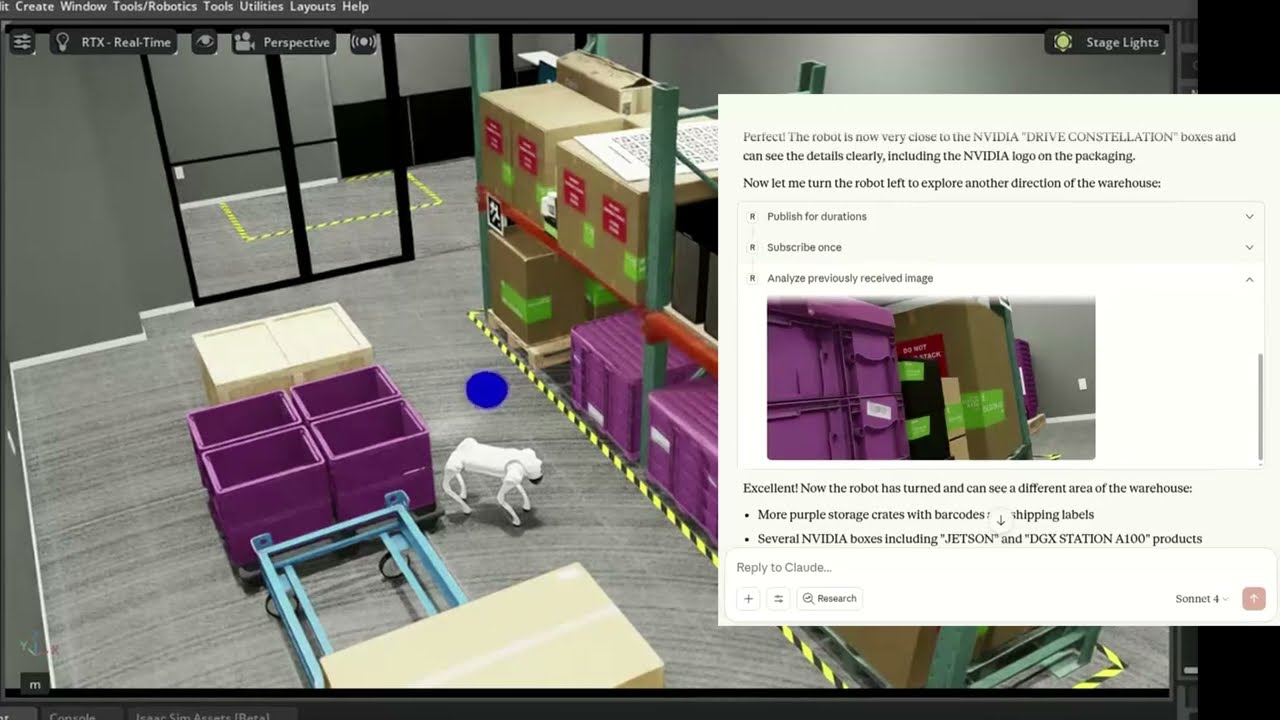
🐕 Example - Controlling Unitree Go2 in NVIDIA Isaac Sim (video)
The MCP server connects Claude to a simulated Unitree Go2 quadruped in NVIDIA Isaac Sim, interpreting natural language commands to navigate and control the robot.
🛠 Getting Started
Follow the installation guide to get started.
ROS-MCP works with Claude Code, Codex CLI, Gemini CLI, Claude Desktop, ChatGPT, Cursor, or any MCP-compatible client.

📚 More Examples & Tutorials
Browse our examples to see the server in action.
We welcome community PRs with new examples and integrations!
🤝 Contributing
We love contributions of all kinds:
- Bug fixes and documentation updates
- New features (e.g., Action support, permissions)
- Additional examples and tutorials
Check out the contributing guidelines and see issues tagged good first issue to get started.
📜 License
This project is licensed under the Apache License 2.0.