 Gurkirat Khaira
5dbbb3aaec
Gurkirat Khaira
5dbbb3aaec
* test(agent): cover antigravity in fakeagent and the e2e user journey

* no-mistakes(document): Add antigravity to agent lists, doctor example, and fakeagent doc comment

* no-mistakes(document): Add antigravity to agent Values and auto resolution order in docs

* feat(recordfixture): capture antigravity fixtures via the owned e2e-record workflow

* no-mistakes(review): Assert Antigravity recorder argv forwarding; focused tests pass

* fix(recordfixture): stage agy captures atomically and contain the process tree

* no-mistakes(review): Test plain fixture replay path by splitting TestRunAgyReplaysRecordedFixture into structured/plain subtests

* no-mistakes(review): Validate Antigravity captures and replay configured fixtures reliably

* no-mistakes(document): Document Antigravity capture and replay behavior

* no-mistakes: apply CI fixes

* fix(recordfixture): expect cmd-exe quote escaping in agy argv test; dedupe antigravity docs

The windows-core run at 0ba9bd95 failed TestCaptureAgyPlacesForwardedFlagsBeforePromptAndSchemaLast
because the fake .cmd agent records Go's literal backslash-quote escaping:
cmd.exe %~1 expansion does not undo it, while real agy parses argv with
CommandLineToArgvW and sees the unescaped JSON. Assert the escaped schema
arg on Windows with a comment explaining the harness-only artifact.

After rebasing onto main (#812), agents.md carried two Antigravity adapter
sections and two supported-agents table rows. Keep one of each, reflecting
final capabilities: session resume via --conversation and
terminal-authoritative result precedence (structured_output >
result.response > stream deltas).

* fix(recordfixture): reject any non-SUCCESS agy result during capture validation

validateAgyCapture only inspected the final result status, so a capture
containing an ERROR result followed by SUCCESS validated even though the
production replay parser treats any ERROR result as fatal. Fail fast on
the first non-SUCCESS result and require at least one result event.
7.3 KiB
git push no-mistakes




干掉所有 slop,开出干净的 PR。
English · 简体中文
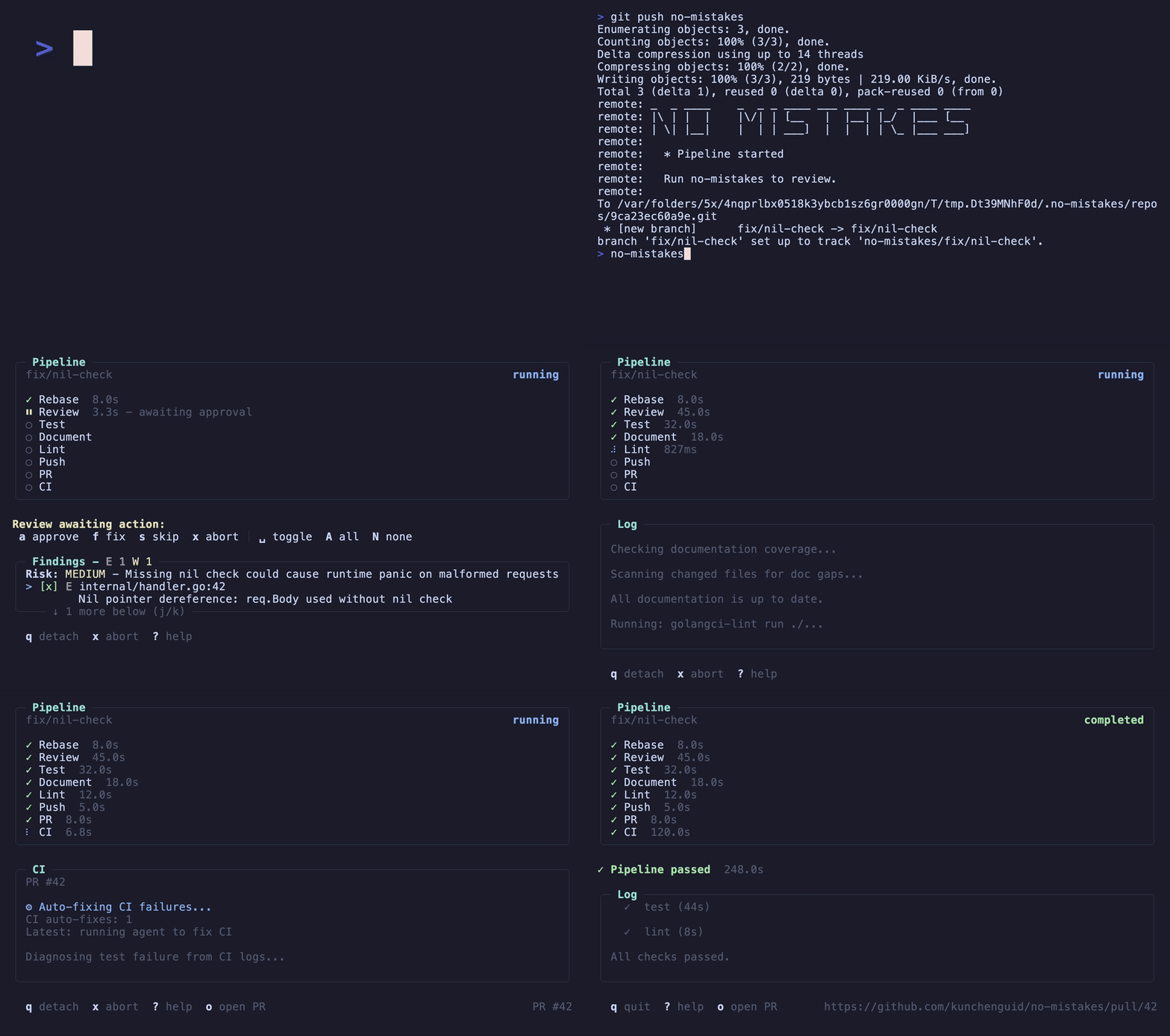
no-mistakes 在你真实的远端前面放了一个本地 git 代理。
把分支推给 no-mistakes 而不是 origin,它会拉起一个用完即弃的 worktree,跑一条 AI 驱动的校验流水线,只有每一项检查都通过后才把分支转发到配置的推送目标,并自动开出一个干净的 PR。
- 不阻塞 —— 流水线在隔离的 worktree 里跑,不打断你手头的工作。
- 不挑 agent —— 支持
claude、codex、grok、rovodev、opencode、pi、copilot、antigravity,也可通过acpx使用cursor/acp:<target>,并支持有序 fallback。 - agent 原生 ——
/no-mistakes既能让编码 agent 完成一个任务再过网关,也能直接为已提交的工作过网关:它跑完流水线、让流水线应用安全的修复,剩下的升级给你。 - 人始终说了算 —— 自动修复,还是逐条审查 findings,你决定。
- 默认就是干净 PR —— 推送、开 PR、盯 CI、自动修复失败,一气呵成。
完整文档:https://kunchenguid.github.io/no-mistakes/
工作原理
        你的分支
            │  git push no-mistakes
            ▼
   ┌───────────────────────────────────────────────┐
   │  用完即弃的 worktree —— 你的工作原地不动          │
   │  review → test → docs → lint → push → PR → CI │
   └───────────────────────────────────────────────┘
            │  每项检查变绿
            ▼
        干净的 PR,已替你开好
每一步要么自己通过,要么停下来给你一条 finding 让你处理。 安全、机械性的修复会自动应用;任何牵涉到你意图的,都会升级给你来 approve(批准)、fix(修复) 或 skip(跳过)。 在每项检查都变绿之前,没有任何东西会到达配置的推送目标。
安装
curl -fsSL https://raw.githubusercontent.com/kunchenguid/no-mistakes/main/docs/install.sh | sh
Windows、Go install 以及从源码构建的说明,见安装指南。
快速上手
$ no-mistakes init
  ✓ Gate initialized

    repo  /Users/you/src/my-repo
    gate  no-mistakes → /Users/you/.no-mistakes/repos/abc123def456.git
  remote  git@github.com:you/my-repo.git
   skill  /no-mistakes installed for agents at user level

  Push through the gate with:
  git push no-mistakes <branch>

$ git checkout my-branch

# 在分支里干点活……

$ git push no-mistakes
  * Pipeline started

  Run no-mistakes to review.

$ no-mistakes
# 打开当前运行的 TUI
如果是 GitHub fork 贡献,让 origin 指向父仓库,并用 no-mistakes init --fork-url <your-fork-url> 初始化。
在 TUI 里你逐条处理 finding:auto-fix 类自动替你应用(或由你 approve 放行),ask-user 类需要你判断,由你 approve、fix 或 skip。
每项检查变绿后,网关会把你的分支转发到配置的推送目标并替你开好 PR,不用手动 git push origin,也不用手写 PR 正文。
想让编码 agent 无人值守地走完同一套流程?
用 /no-mistakes(见下文)。
触发网关的三种方式
每一处改动都走同一条流水线。改动就绪时,挑一个最贴合你当下工作方式的入口:
git push no-mistakes—— 显式的 Git 路径。把已提交的分支推给网关 remote,而不是origin。no-mistakes—— TUI。改完之后运行它(无需先提交),向导会带你建分支、提交、推过网关,然后挂到这次运行上。no-mistakes -y会把这一切自动做完。/no-mistakes—— agent skill。用/no-mistakes <task>让编码 agent 完成一个任务再过网关,或用裸/no-mistakes为已提交的工作过网关。它跑完流水线、让流水线应用安全的修复,并在任何需要人来拍板的地方停下来问你。
no-mistakes init 会为 Claude Code 及其他 agent 安装 /no-mistakes skill。底层上这个 skill 驱动的是 no-mistakes axi —— 同一套审批流程的非交互式 TOON 接口。
完整的首次运行走查见快速上手。
开发
make build   # 构建 bin/no-mistakes(带版本信息)
make test    # 运行 go test -race ./...(不含 e2e 套件)
make e2e     # 运行打了标签的端到端 agent 旅程套件
make e2e-record # agent 线格式变化时,重新录制 e2e fixtures
make lint    # 检查生成的 skill 是否漂移,并跑 go vet ./...
make skill   # 重新生成已提交的 no-mistakes skill 文件
make fmt     # 运行 gofmt -w .
make demo    # 重新生成 demo.gif 和 demo.mp4(需要 vhs 和 ffmpeg)
make docs    # 在 docs/dist 构建 Astro 文档站
完整 target 列表见 Makefile。
make e2e-record 会用真实的 claude、codex、opencode 和 antigravity CLI 覆盖 internal/e2e/fixtures/,会消耗真实 API 额度,提交前应当审查。