-
Add new console frontend to initial model selection, and other model mgmt improvements (#2644)
frostbyte_neo 发布于
2023-02-22 20:24:59 +00:00 | 15822 次提交 在此版本后已推送到 mainMajor Changes
The invokeai-configure script has now been refactored. The work of
selecting and downloading initial models at install time is now done by
a script namedinvokeai-model-install(module name is
ldm.invoke.config.model_install)Screen 1 - adjust startup options:

Screen 2 - select SD models:
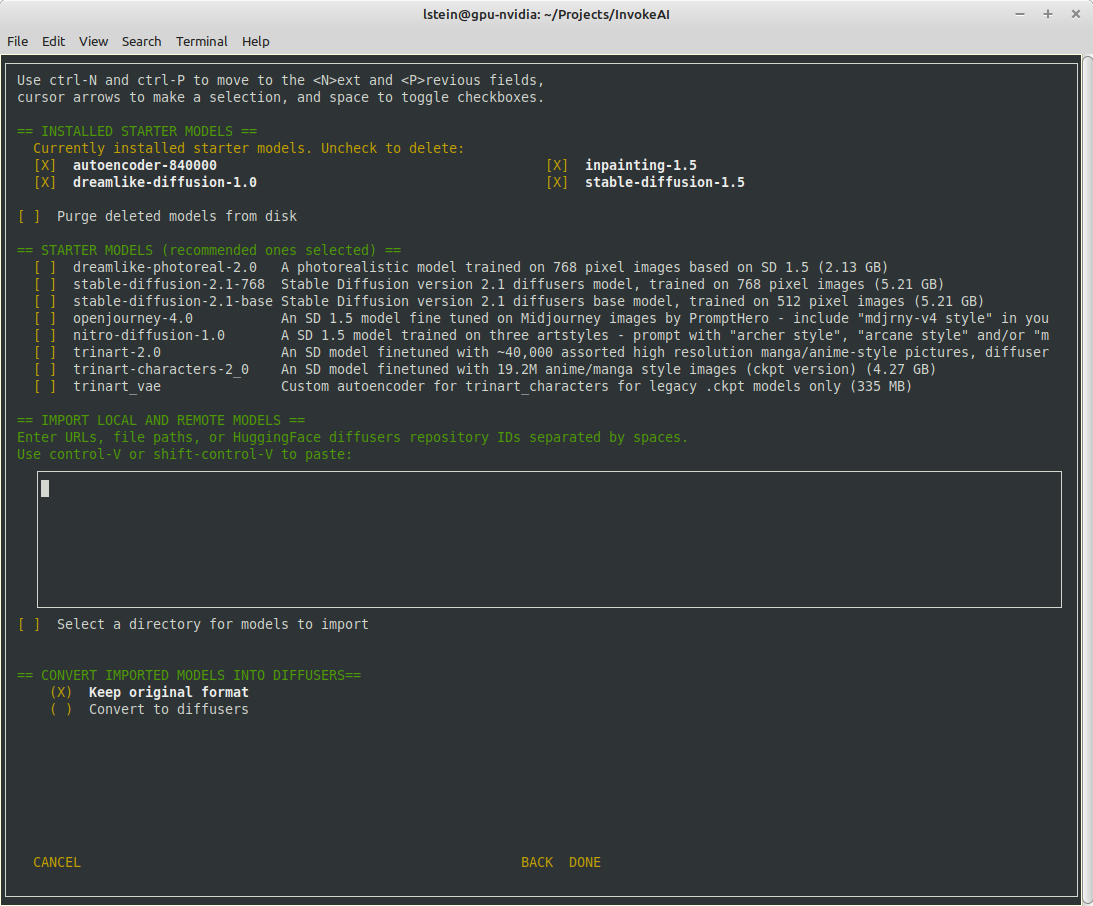
The calling arguments for
invokeai-configurehave not changed, so
nothing should break. After initializing the root directory, the script
callsinvokeai-model-installto let the user select the starting
models to install.invokeai-model-install puts up a console GUI with checkboxes to indicate which models to install. It respects the--default_onlyand--yes` arguments so that CI will continue to work. Here are the various
effects you can achieve:invokeai-configure
This will use console-based UI to initialize invokeai.init,
download support models, and choose and download SD modelsinvokeai-configure --yes
Without activating the GUI, populate invokeai.init with default values,
download support models and download the "recommended" SD modelsinvokeai-configure --default_only
Activate the GUI for changing init options, but don't show the SD
download
form, and automatically download the default SD model (currently SD-1.5)invokeai-model-install
Select and install models. This can be used to download arbitrary
models from the Internet, install HuggingFace models using their
repo_id,
or watch a directory for models to load at startup timeinvokeai-model-install --yes
Import the recommended SD models without a GUIinvokeai-model-install --default_only
As above, but only import the default modelFlexible Model Imports
The console GUI allows the user to import arbitrary models into InvokeAI
using:- A HuggingFace Repo_id
- A URL (http/https/ftp) that points to a checkpoint or safetensors
file - A local path on disk pointing to a checkpoint/safetensors file or
diffusers directory - A directory to be scanned for all checkpoint/safetensors files to be
imported
The UI allows the user to specify multiple models to bulk import. The
user can specify whether to import the ckpt/safetensors as-is, or
convert todiffusers. The user can also designate a directory to be
scanned at startup time for checkpoint/safetensors files.Backend Changes
To support the model selection GUI PR introduces a new method in
ldm.invoke.model_managercalled `heuristic_import(). This accepts a
string-like object which can be a repo_id, URL, local path or directory.
It will figure out what the object is and import it. It interrogates the
contents of checkpoint and safetensors files to determine what type of
SD model they are -- v1.x, v2.x or v1.x inpainting.Installer
I am attaching a zip file of the installer if you would like to try the
process from end to end.下载附件