 githubnemo
daf335f503
githubnemo
daf335f503
The current state of the PEFT docs is not one of structure and I was constantly annoyed that whenever I wanted to change something there were several places that needed touching and they all felt disconnected. So this is my attempt at structuring the docs. Some of these ideas are quite old (discussed in 01/2025) but are still valid.

I've removed most of the code guides without replacement. That's not ideal, I think we should have code examples but I'm think they should be method-focused. Maybe one general example of a training workflow is sufficient because most methods follow the same scheme.

All details from the method guides (prompting, lora, oft/boft, etc.) are now integrated into the respective method pages instead. I would have hesitated to do this if these guides would have integrated information about the adapters but they didn't. I think it makes a lot more sense to have one place for each method to gather examples/tips/recommendations and that is now the `package_refernce/<method>` page. This page now also hosts a small space that shows the MetaMathQA (and potentially other) benchmark results highlighted for that method.

I've moved the LoRA initializations to `package_reference/lora#Initialization` and converted the init methods to `<hfoption>`-tags. This collapses them to a list but may reduce searchability through the document - at least firefox is not able to search 'through' the option tabs. This also doesn't make them appear in the ToC and people specifically searching for, say, PiSSA won't find it directly. I think that's OK though, since the search is able to locate it.

The quicktour is a bit more detailed about what happens under the hood (quick doesn't have to mean simplistic) and includes some new visualizations. I hope that we can integrate more visualizations in the future where it makes sense.

* Remove PEFT method space + front page buttons

The space was not that useful anymore since most methods are compatible
with most models.

The front page buttons are, at least temporarily, with the exception
of the quicktour and method overview buttons. I like the visuals
but there should only be elements that are useful.

---------

Co-authored-by: Benjamin Bossan <BenjaminBossan@users.noreply.github.com>
Co-authored-by: Steven Liu <59462357+stevhliu@users.noreply.github.com>
6.2 KiB
Prefix tuning
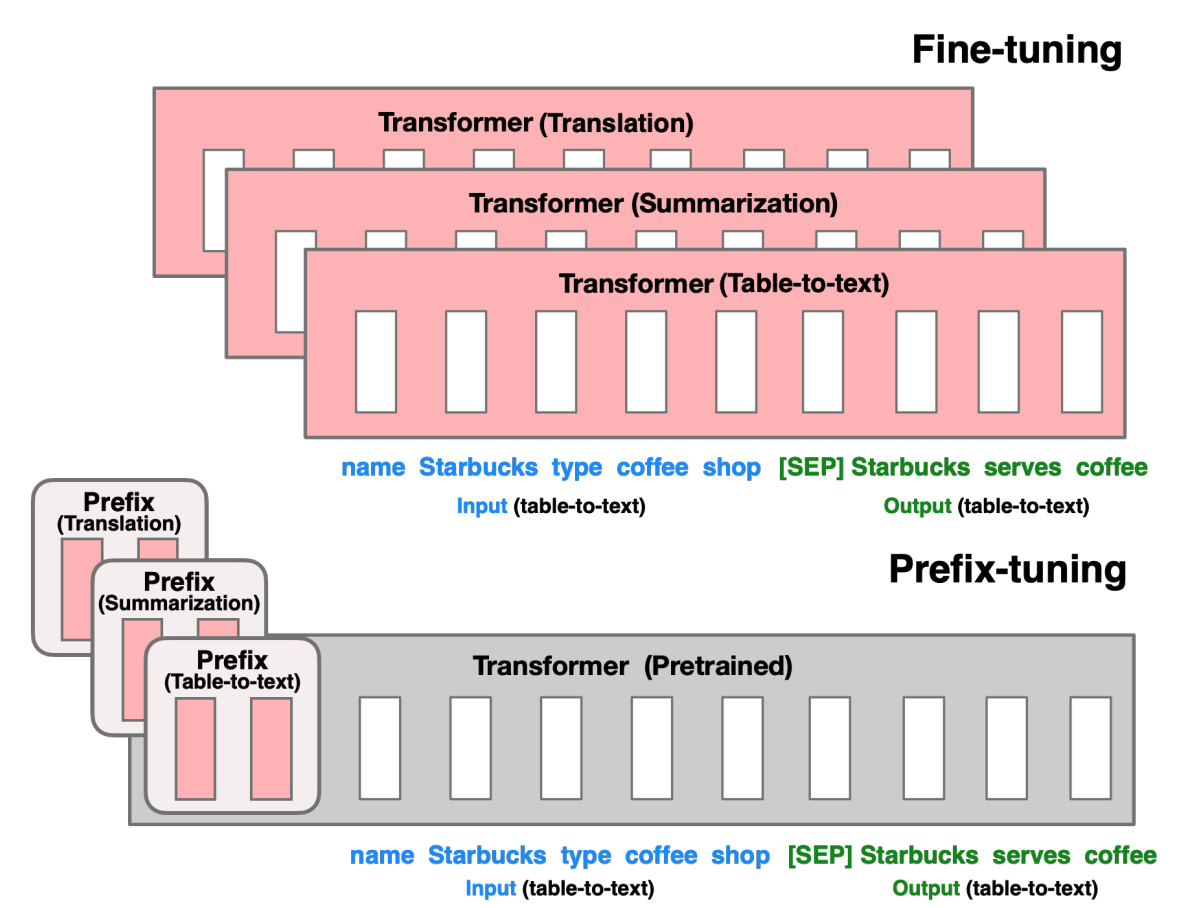
Prefix tuning prefixes a series of task-specific vectors to the input sequence that can be learned while keeping the pretrained model frozen. The prefix parameters are inserted in all of the model layers.
The abstract from the paper is:
Fine-tuning is the de facto way to leverage large pretrained language models to perform downstream tasks. However, it modifies all the language model parameters and therefore necessitates storing a full copy for each task. In this paper, we propose prefix-tuning, a lightweight alternative to fine-tuning for natural language generation tasks, which keeps language model parameters frozen, but optimizes a small continuous task-specific vector (called the prefix). Prefix-tuning draws inspiration from prompting, allowing subsequent tokens to attend to this prefix as if it were "virtual tokens". We apply prefix-tuning to GPT-2 for table-to-text generation and to BART for summarization. We find that by learning only 0.1% of the parameters, prefix-tuning obtains comparable performance in the full data setting, outperforms fine-tuning in low-data settings, and extrapolates better to examples with topics unseen during training.
Note For encoder-decoder models (seq2seq), the prefix is only applied to the decoder, which does not correspond to the paper specification (see e.g. Figure 2). Prefix tuning can still be fine-tuned on these model architectures but the performance could be sub-par; consider using other PEFT methods for encoder-decoder models.
Prefix tuning is very similar to prompt tuning. The main difference is that the prefix parameters are inserted in all of the model layers, whereas prompt tuning only adds the prompt parameters to the model input embeddings. The prefix parameters are also optimized by a separate feed-forward network (FFN) instead of training directly on the soft prompts because it causes instability and hurts performance. The FFN is discarded after updating the soft prompts.
As a result, the authors found that prefix tuning demonstrates comparable performance to fully finetuning a model, despite having 1000x fewer parameters, and it performs even better in low-data settings.
Basic Usage
Create a [PrefixTuningConfig] with the task type and number of virtual tokens to add and learn.
from peft import PrefixTuningConfig, get_peft_model

peft_config = PrefixTuningConfig(task_type="CAUSAL_LM", num_virtual_tokens=20)
model = get_peft_model(model, peft_config)
model.print_trainable_parameters()
"trainable params: 983,040 || all params: 560,197,632 || trainable%: 0.1754809274167014"
Possible Initializations
By default, prefix tuning uses randomly initialized virtual tokens. There's also the option to initialize the vectors to be close to a no-op (initialized to zero, it will still shift the probability mass a bit). This means that the KV-cache injected prefixes have less impact from the beginning and reduces the variance in training performance.
PEFT also provides utilities to initialize a prefix-tuning adapter from an existing KV cache prefix (for example, from
the first p tokens of a prompt/corpus). This is only supported when prefix_projection=False (the default), because
in that case the learned parameters are the KV prefix itself.
from transformers import AutoModelForCausalLM, AutoTokenizer

from peft import PrefixTuningConfig, get_peft_model, initialize_kv_prefix_from_text

base = AutoModelForCausalLM.from_pretrained("gpt2")
tok = AutoTokenizer.from_pretrained("gpt2")

peft_cfg = PrefixTuningConfig(task_type="CAUSAL_LM", num_virtual_tokens=20, prefix_projection=False)
model = get_peft_model(base, peft_cfg)

initialize_kv_prefix_from_text(
    model,
    tok,
    text="...a long context with at least num_virtual_tokens tokens...",
    use_chat_template=False,
)m peft import PrefixTuningConfig, get_peft_model, initialize_kv_prefix_from_text

base = AutoModelForCausalLM.from_pretrained("gpt2")
tok = AutoTokenizer.from_pretrained("gpt2")

peft_cfg = PrefixTuningConfig(task_type="CAUSAL_LM", num_virtual_tokens=20, prefix_projection=False)
model = get_peft_model(base, peft_cfg)

initialize_kv_prefix_from_text(
    model,
    tok,
    text="...a long context with at least num_virtual_tokens tokens...",
    use_chat_template=False,
)
Make sure the text is long enough to produce at least num_virtual_tokens tokens, otherwise initialization will fail.
As a guideline:
- start with a neutral starting sequence using
initialize_kv_prefix_from_text, it can be a very short string like "Question: " - if that doesn't help, use a longer sequence with task relevance (i.e. an engineered prompt), giving you more virtual tokens to fit but also more steering of the model
- if it is not possible to use an initialization text or you want to quickly check if prefix tuning is viable at all, use a zero init without projection
Benchmark overview
API
PrefixTuningConfig
autodoc tuners.prefix_tuning.config.PrefixTuningConfig
PrefixEncoder
autodoc tuners.prefix_tuning.model.PrefixEncoder