 githubnemo
daf335f503
githubnemo
daf335f503
The current state of the PEFT docs is not one of structure and I was constantly annoyed that whenever I wanted to change something there were several places that needed touching and they all felt disconnected. So this is my attempt at structuring the docs. Some of these ideas are quite old (discussed in 01/2025) but are still valid.

I've removed most of the code guides without replacement. That's not ideal, I think we should have code examples but I'm think they should be method-focused. Maybe one general example of a training workflow is sufficient because most methods follow the same scheme.

All details from the method guides (prompting, lora, oft/boft, etc.) are now integrated into the respective method pages instead. I would have hesitated to do this if these guides would have integrated information about the adapters but they didn't. I think it makes a lot more sense to have one place for each method to gather examples/tips/recommendations and that is now the `package_refernce/<method>` page. This page now also hosts a small space that shows the MetaMathQA (and potentially other) benchmark results highlighted for that method.

I've moved the LoRA initializations to `package_reference/lora#Initialization` and converted the init methods to `<hfoption>`-tags. This collapses them to a list but may reduce searchability through the document - at least firefox is not able to search 'through' the option tabs. This also doesn't make them appear in the ToC and people specifically searching for, say, PiSSA won't find it directly. I think that's OK though, since the search is able to locate it.

The quicktour is a bit more detailed about what happens under the hood (quick doesn't have to mean simplistic) and includes some new visualizations. I hope that we can integrate more visualizations in the future where it makes sense.

* Remove PEFT method space + front page buttons

The space was not that useful anymore since most methods are compatible
with most models.

The front page buttons are, at least temporarily, with the exception
of the quicktour and method overview buttons. I like the visuals
but there should only be elements that are useful.

---------

Co-authored-by: Benjamin Bossan <BenjaminBossan@users.noreply.github.com>
Co-authored-by: Steven Liu <59462357+stevhliu@users.noreply.github.com>
3.9 KiB
P-tuning
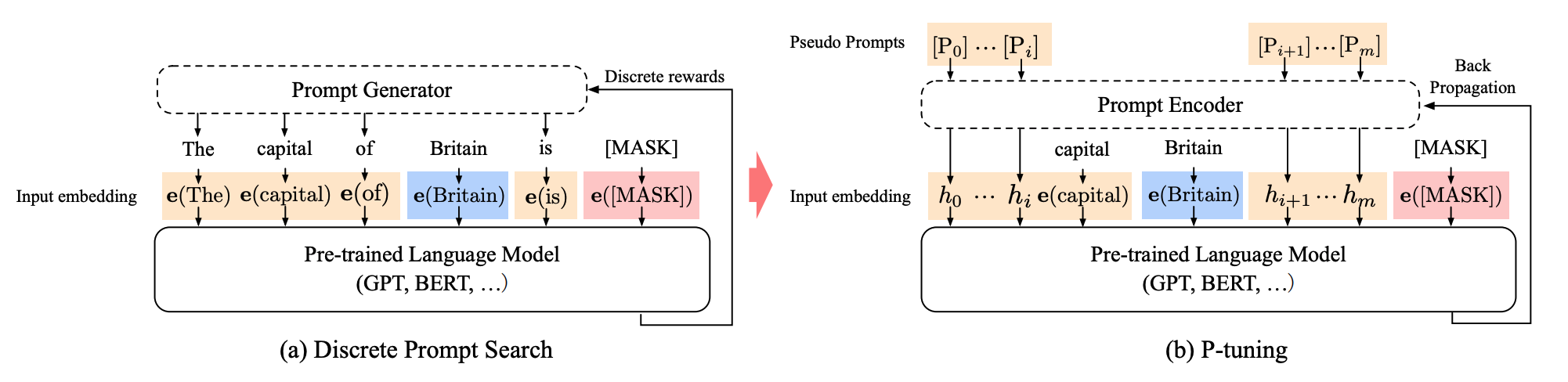
P-tuning is designed for natural language understanding (NLU) tasks and all language models.
The abstract from the paper is:
While GPTs with traditional fine-tuning fail to achieve strong results on natural language understanding (NLU), we show that GPTs can be better than or comparable to similar-sized BERTs on NLU tasks with a novel method P-tuning -- which employs trainable continuous prompt embeddings. On the knowledge probing (LAMA) benchmark, the best GPT recovers 64% (P@1) of world knowledge without any additional text provided during test time, which substantially improves the previous best by 20+ percentage points. On the SuperGlue benchmark, GPTs achieve comparable and sometimes better performance to similar-sized BERTs in supervised learning. Importantly, we find that P-tuning also improves BERTs' performance in both few-shot and supervised settings while largely reducing the need for prompt engineering. Consequently, P-tuning outperforms the state-of-the-art approaches on the few-shot SuperGlue benchmark..
The method adds trainable prompt embeddings to the input that is optimized by a prompt encoder to find a better prompt, eliminating the need to manually design prompts. The prompt tokens can be added anywhere in the input sequence, and p-tuning also introduces anchor tokens for improving performance. A prompt encoder (a bidirectional long-short term memory network or LSTM) is used to optimize the prompt parameters. Unlike prefix tuning:
- the prompt tokens can be inserted anywhere in the input sequence, and it isn't restricted to only the beginning
- the prompt tokens are only added to the input instead of adding them to every layer of the model
- introducing anchor tokens can improve performance because they indicate characteristics of a component in the input sequence
The paper's results suggest that P-tuning is more efficient than manually crafting prompts, and it enables GPT-like models to compete with BERT-like models on NLU tasks.
Usage
Create a [PromptEncoderConfig] with the task type, the number of virtual tokens to add and learn, and the hidden size of the encoder for learning the prompt parameters.
from peft import PromptEncoderConfig, get_peft_model

peft_config = PromptEncoderConfig(task_type="CAUSAL_LM", num_virtual_tokens=20, encoder_hidden_size=128)
model = get_peft_model(model, peft_config)
model.print_trainable_parameters()
"trainable params: 300,288 || all params: 559,514,880 || trainable%: 0.05366935013417338"
Benchmark overview
API
PromptEncoderConfig
autodoc tuners.p_tuning.config.PromptEncoderConfig
PromptEncoder
autodoc tuners.p_tuning.model.PromptEncoder